

Key takeaways
• Augmented reality shopping already pays. Shopify’s own data shows products with 3D/AR content convert 94% higher; IKEA Place buyers are 11x more likely to purchase and return 2.7x less; Wayfair reports a 92% lift, Warby Parker 85%. These are vendor-published numbers, not demo-day charts.
• Native ARKit, not WebAR, ships the features that justify premium pricing. LiDAR Scene Reconstruction, People Occlusion, face and body tracking, Object Capture photogrammetry, and a straight path to visionOS. 8th Wall’s hosted service closed on 28 February 2026 — the WebAR ceiling dropped.
• The market is real and concentrated. Retail AR sits at USD 2.7B–7.84B in 2024 depending on the analyst, compounding 20–32% to 2031; North America holds 35%+ of spend. Even the conservative forecast triples the budget by 2031.
• Vision Pro is the high-margin tier, not the mass market. J.Crew, Wayfair, Lowe’s, e.l.f., StockX and Sotheby’s shipped visionOS apps in year one. The iOS app you ship in 2026 is the codebase that becomes your Vision Pro app when you want it.
• Budget honestly. A production native ARKit showroom runs USD 80K–500K to ship, plus USD 5K–15K per SKU for photogrammetry and USDZ authoring. That’s the spend that returns an 11x purchase lift, not a USD 20K WebAR pilot that plateaus at 1.3x.
If you run product, marketing, or digital at a retail, furniture, automotive, fashion, or luxury brand, you already know augmented reality shopping works. The question in the 2026 planning meeting is sharper: is a native ARKit virtual showroom a better bet than another WebAR pilot, a TikTok activation, or more retail-media spend?
Short answer: yes — but only if you treat the AR experience as a product, not a stunt. Every brand that has published real conversion numbers did the same three things. They paid for photogrammetry-grade assets, they shipped native or near-native experiences with accurate scale and lighting, and they wired the AR view straight into the purchase funnel.
This is the playbook we use with our own clients: defensible market numbers, the current ARKit and RealityKit features that actually move the needle, a WebAR-vs-native decision tree, a cost model with real ranges, Vision Pro positioning, a reference architecture, and a 90-day rollout plan. Every number is sourced.
Why retail and DTC teams hire Fora Soft for native iOS showrooms
Fora Soft has built video, media, and real-time collaboration software since 2005, across 250+ projects with a 50-engineer in-house team. We’re not a WebAR agency that also codes; we’re an iOS shop that has shipped ARKit, RealityKit, and AVFoundation work since the first ARKit release in 2017, and we pair that with on-device AI for product discovery and 3D content.
For a retail or DTC product lead, that means three concrete things:
1. Premium native feel, not a web wrapper. We hold 90–120 FPS on Pro iPhones and a 60 FPS floor on base iPhones, with People Occlusion and LiDAR Scene Reconstruction on where the hardware allows.
2. End-to-end USDZ pipelines. Photogrammetry, PBR material tuning, scale QA, and USDZ signing, all shipped and maintained by one team. No handoff gap between the 3D vendor and the iOS engineers.
3. Vision Pro-ready from day one. The same RealityKit models we ship on iOS run on visionOS. You don’t rebuild when the time comes. See our AR/VR development services for the full scope.
Planning an ARKit showroom for 2026?
Book a 30-minute call with our iOS AR lead. We’ll scope your SKU set, pick the capture pipeline, and send a written rollout plan within 48 hours — no pitch deck.
Why 2026 is the year you commit to native AR commerce
Three signals converged in the year before this update. Together they make a native ARKit showroom a lower-risk bet than another WebAR pilot.
1. The WebAR ceiling dropped. Niantic closed 8th Wall’s hosted service — logins, cloud editor, and web XR Studio — on 28 February 2026; existing campaigns keep running until 28 February 2027, then go dark. The platform is now free and open source under Niantic Spatial, which is good for tinkerers but tells you exactly how much commercial roadmap is left. If you’re building in 2026, you’re choosing between a self-hosted retired platform and a native SDK Apple ships new features into every June.
2. The Object Capture pipeline is production-ready. Apple’s Object Capture API and Reality Composer Pro turn a phone or DSLR video of a product into a USDZ asset in hours, not weeks. The “we can’t staff a 3D team” objection is mostly dead for products that fit on a turntable.
3. Vision Pro created a new premium tier. Vision Pro unit sales are modest, but the brands that shipped visionOS apps in year one — J.Crew, Wayfair Decorify, Lowe’s Style Studio, e.l.f., StockX, Sotheby’s — use spatial experiences to anchor a high-margin segment. A native iOS ARKit app adapts to visionOS. A WebAR activation does not.
What changed in 2025–26: Apple moved to a year-based OS naming scheme — iOS 26 and visionOS 26 shipped in autumn 2025, with visionOS 26.4 out in March 2026. RealityKit gained Gaussian Splat rendering, direct ARKit data access, and real-world occlusion components. The cost to get in-market fell; the cost of waiting rose.
Here is the evidence that makes the business case, brand by brand.
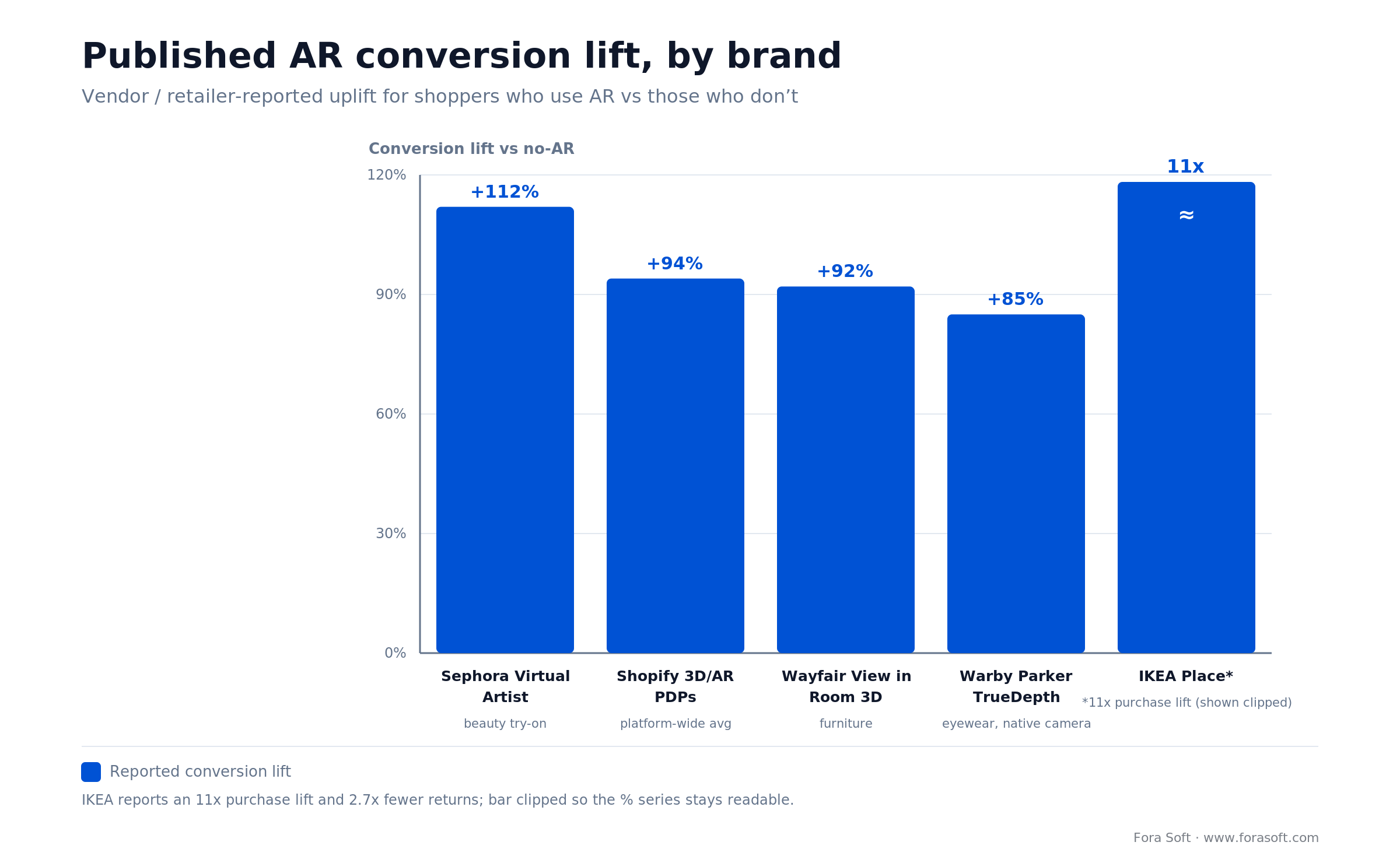
Figure 1. Vendor-published conversion lift for shoppers who use AR versus those who don’t. IKEA’s 11x is a purchase-likelihood multiple, shown clipped so the percentage series stays readable.
The market in numbers: 2025–2031
Three numbers you can defend in a board meeting, pulled from four independent analyst firms:
| Segment | Baseline | Projection | CAGR |
|---|---|---|---|
| AR in retail (Valuates) | USD 2.66B (2024) | USD 9.38B (2031) | 20.0% |
| AR in retail (Grand View) | USD 7.84B (2024) | USD 105.87B (2033) | 32.4% |
| Augmented shopping (Mordor) | USD 18.21B (2025) | USD 40.15B (2030) | 14.08% |
| Mobile AR (GM Insights) | USD 23.2B (2024) | ~USD 340B (2034) | 31.3% |
The analyst spread looks wide, but every low-end forecast still compounds at 14% for six years. Even the conservative reading says the retail AR budget triples by 2031. North America holds over 35% of global spend, which concentrates the opportunity for US-headquartered brands.
The conversion data that actually holds up
Marketing decks are full of “AR increased conversion 300%” claims from unnamed case studies. Here are the ones published by the vendor or the retailer, with attribution:
Shopify. Products with 3D or AR content convert 94% higher on average across the platform, published by Shopify and still the cleanest vendor-neutral benchmark in the market.
IKEA Place. AR room-view users are 11x more likely to purchase and 2.7x less likely to return. Referenced across IKEA PR and independent case databases.
Wayfair View in Room 3D. A 92% conversion lift for AR users versus non-users.
Sephora Virtual Artist. A +112% conversion lift on the makeup try-on flow, the strongest published beauty number.
Warby Parker TrueDepth try-on. A +85% conversion lift on iPhones with the front-facing TrueDepth camera. This is the canonical native-hardware justification case.
Furniture return rates. Brands that add AR visualisation cut returns by roughly 25% (some 3D-PDP sources report up to 40%); Goldman Sachs has estimated ~USD 1.6B in annual industry savings from AR-enabled furniture.
The pattern isn’t subtle. Double-digit conversion lift is the low case. Where scale and fit matter — furniture, eyewear, makeup — the ceiling is 10x and up.
Want the one-page AR ROI model we build for clients?
Send your average order value, current conversion rate, and return rate. We’ll return a bespoke AR-lift projection with upper, base, and conservative scenarios.
What ARKit and RealityKit actually ship for commerce teams
ARKit is the tracking, scene-understanding, and anchoring engine under RealityKit. For a commerce use case, seven capabilities drive most of the product decisions you’ll make:
Object Capture. On-device (or macOS) photogrammetry: phone video in, USDZ out. Removes the per-SKU cost of an external 3D studio for simple geometry.
Scene Reconstruction (LiDAR). A real-time mesh of the room, for physically correct occlusion, physics, and placement on iPhone 12 Pro and later.
RoomPlan. Structured output of walls, floors, windows, doors, and furniture. The backbone of any serious interior-design or kitchen/bath showroom.
People Occlusion. Virtual products render correctly behind real people. This is what makes a model wearing a handbag look real rather than floaty.
Environment textures. Real-time capture of ambient lighting, reflected onto your asset’s metal and glass. The difference between “CGI” and “it’s sitting on my counter.”
RealityKit’s 2025–26 additions. Direct access to ARKit data from RealityKit, a ManipulationComponent for grab-and-rotate interactions, an EnvironmentBlendingComponent for real-world occlusion, and Gaussian Splat rendering for photoreal scanned objects. Reference objects trained once work on both iOS and visionOS — no retraining.
AR Quick Look. The iOS-native USDZ viewer reachable from Safari, Messages, and any app. Zero install for the customer, and the entry point for most native showroom flows.
The floor for ARKit is an A12 chip (iPhone XS, 2018). Scene Reconstruction and Object Capture need LiDAR — iPhone 12 Pro through 17 Pro and iPad Pro. In 2026 your realistic install base for Pro-only features is 60–70% of engaged retail-app users. Straight from Apple: the ARKit and RealityKit docs track every version.
WebAR vs native ARKit: the decision tree
This is where brands lose money. The right answer depends on the asset, the funnel, and the customer, not on which platform a vendor is selling this quarter.
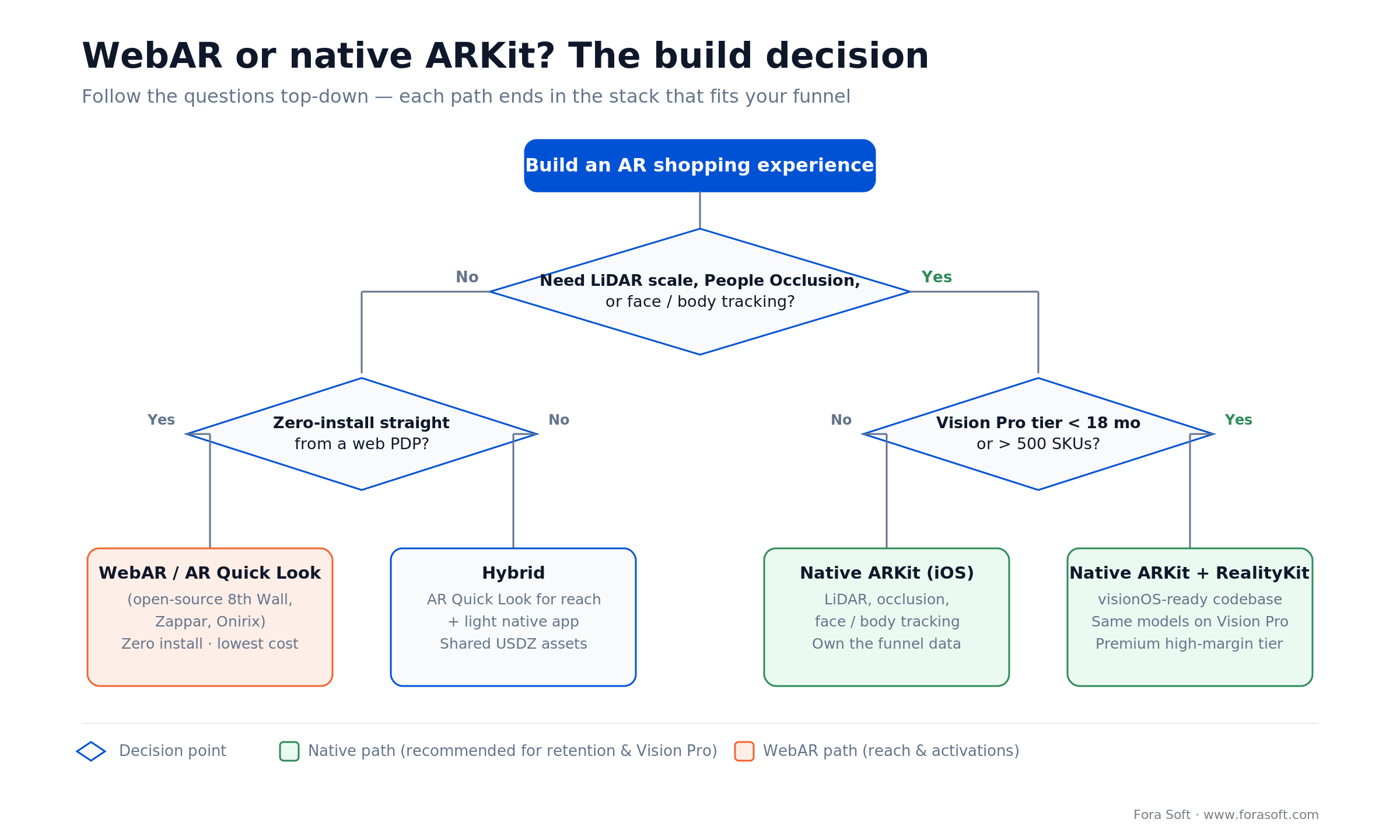
Figure 2. Answer the questions top-down; each path lands on the stack that fits your funnel and roadmap.
Ship WebAR (or AR Quick Look with a web gateway) when:
- You have under 200 SKUs and the blocker is discoverability, not fidelity.
- Your paid-media funnel lands people on a web PDP and you need zero install.
- You don’t need People Occlusion, LiDAR placement, or face/body tracking.
Ship native ARKit when:
- Scale accuracy drives conversion (furniture, kitchen, automotive, real estate).
- You need face or body tracking (eyewear, makeup, apparel, watches).
- You plan a Vision Pro tier inside 18 months.
- You have 500+ SKUs, a loyalty app, or app-native retention mechanics.
- You want to own the data — native apps expose sensor, dwell-time, and interaction signals WebAR can’t.
The pragmatic middle path: AR Quick Look from the web for zero-install discovery, then a native iOS app for logged-in customers, repeat buyers, and Vision Pro. The same USDZ assets and RealityKit models serve both tiers — you build the asset pipeline once.
The ARKit showroom tech stack we ship on
This is the default stack for a 2026 native iOS showroom, production-grade on iPhone 12 Pro and later.
AR & rendering. Current ARKit and RealityKit, USDZ assets, Reality Composer Pro for scene authoring, MetalFX upscaling on Pro iPhones.
App shell. SwiftUI with The Composable Architecture or VIPER, Swift structured concurrency, Combine for reactive streams.
3D asset pipeline. Object Capture on macOS/iPad Pro, Blender or Cinema 4D for cleanup, Reality Composer Pro for scene construction, USDZ signing. Texture LODs are compressed for delivery — the same discipline we cover in our video encoding course applies to shipping heavy media to heterogeneous clients.
Backend. Node/NestJS or Python/FastAPI behind a CDN, PostgreSQL for catalog, S3 or Cloudflare R2 for USDZ delivery, edge compression for texture LODs.
Commerce integration. Shopify Storefront API or headless Salesforce Commerce, deep links into native checkout, an SKU-to-USDZ mapping table.
Observability. Sentry for crash reporting, Datadog RUM for device-tier frame-rate telemetry, a first-party analytics layer for AR event funnels.
Vision Pro. The same RealityKit models, adapted with visionOS Shared Space and Immersive Space APIs, plus Personas for remote co-shopping.
Which verticals already earn back the investment
The published data concentrates in seven verticals. Each has a different reason AR works, and therefore a different feature-priority list.
Furniture and home. Scale and fit. IKEA Place, Wayfair View in Room 3D, Houzz, Amazon AR View. 11x purchase lift, 25% fewer returns. LiDAR Scene Reconstruction and RoomPlan are the critical features.
Eyewear. Face-tracking accuracy. Warby Parker (TrueDepth), Ray-Ban, Persol. 85% conversion lift. ARKit face tracking and TrueDepth are non-negotiable.
Makeup and beauty. Shade-match fidelity. Sephora Virtual Artist, MAC, YouCam. 112% conversion lift. Real-time blendshape cosmetics.
Automotive. Configurator in context. BMW i Visualizer, Porsche, Audi, Mercedes-Benz. Life-size vehicle placement with LiDAR anchors.
Fashion and apparel. Body tracking and fabric draping. Gucci’s try-on, Nike, Adidas. ARKit body tracking plus real-time cloth simulation. Putting the garment on the shopper, rather than a product in their room, is a different build with its own approaches and trade-offs, which we cover in our virtual fitting room and try-on development guide.
Luxury and jewelry. Texture and reflection realism. Cartier, Louis Vuitton, Bulgari. Environment textures and real-time PBR shading are everything.
Real estate and B2B. Matterport, Zillow 3D Home, industrial equipment showrooms. RoomPlan is the backbone; 3D tours can lift listing engagement sharply.
Vision Pro: the premium tier, not the mass market
Set expectations honestly: Vision Pro is expensive, its install base is small, and the 2026 sales trajectory is conservative. But 30+ retail brands shipped visionOS apps in year one, and every one treats the device as a segmentation tool for high-intent, high-margin customers — not a mass channel.
J.Crew. A native visionOS shopping app with a social layer — shoppers browse alongside a stylist.
Wayfair Decorify. Upload a photo of your room, generate a 3D version, drop furniture in, and check it from any angle.
Lowe’s Style Studio. Kitchen design in immersive space with real SKUs and live pricing.
e.l.f. Beauty, StockX, Sotheby’s. Try-on and discovery tuned for the headset’s resolution; 360-degree sneaker inspection; full property tours that compete with in-person showings.
The unit economics are simple. If your average order value is above USD 2,500, or your sales cycle includes remote consultation, Vision Pro pays back. If you sell a USD 40 T-shirt, iPhone-first is your whole story.
Reach for Vision Pro when: the app is a companion, not a replacement for the iPhone flow. Every retail visionOS app that got visible traction shared that trait. Plan the iPhone app first; add the Vision Pro adaptation once you know which journeys matter most.
3D asset creation: photogrammetry, modelling, and the cost of USDZ
The biggest cost in an AR showroom isn’t engineering. It’s 3D assets. Three credible paths:
1. Object Capture photogrammetry (rigid, textured products). USD 50–500 per SKU in-house, USD 1,500–5,000 with a studio partner. Works for furniture, home goods, footwear, bags, toys. Weak on glass, chrome, or anything with subsurface scattering.
2. CAD-to-USDZ conversion (automotive, appliances, industrial). USD 2,000–10,000 per SKU depending on material complexity. A 3D artist optimises LODs and bakes PBR textures. The standard deliverable for brands with existing CAD pipelines.
3. Manual 3D modelling (luxury, jewelry, bespoke). USD 5,000–15,000 per SKU. Highest fidelity, needed where a 1% colour or surface defect kills conversion.
Across our enterprise clients, assets absorb 25–40% of the first-year budget. That’s why narrowing the initial SKU set is the single most important commercial decision in the programme.
Cost model: what a native ARKit showroom actually costs to ship
Budgets move with scope. These are the ranges we see in 2026 for brands building from scratch with a competent studio. We use Agent Engineering internally, so our own quotes tend to land at the lower end of each band.
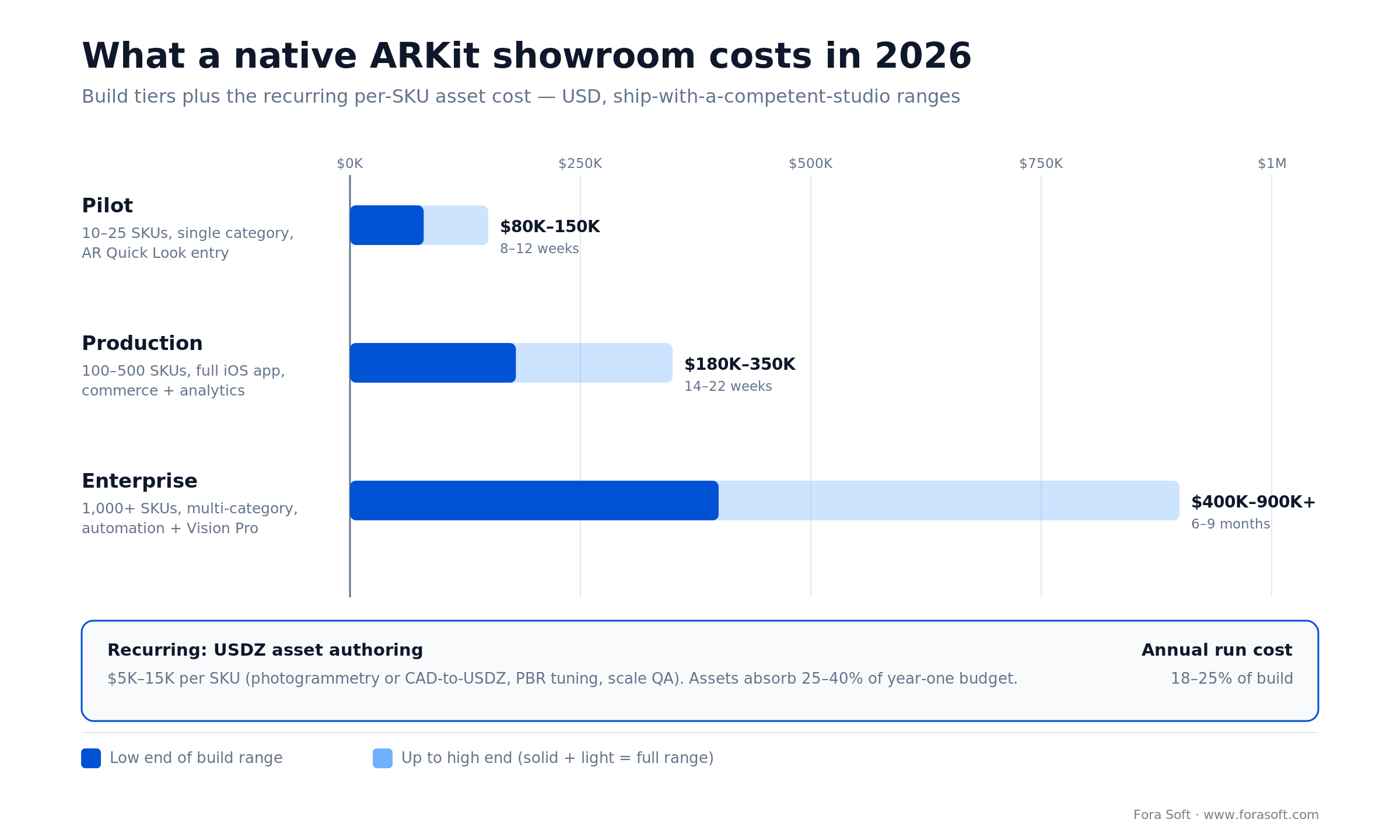
Figure 3. Build tiers and the recurring per-SKU asset cost. Solid = low end of the range, lighter = up to the high end.
| Scope tier | Scope | Build range (USD) | Timeline |
|---|---|---|---|
| Pilot | 10–25 SKUs, single category, AR Quick Look entry | 80K–150K | 8–12 weeks |
| Production | 100–500 SKUs, full iOS app, commerce integration, analytics | 180K–350K | 14–22 weeks |
| Enterprise | 1,000+ SKUs, multi-category, automation pipeline, Vision Pro tier | 400K–900K+ | 6–9 months |
| Per-SKU asset (recurring) | USDZ authoring, QA, CMS onboarding | 5K–15K / SKU | 1–3 weeks / batch |
Worked example, 20-SKU furniture pilot. Say a build at USD 110K, plus 20 SKUs × USD 2,000 photogrammetry = USD 40K assets = USD 150K in. If your store does USD 4M a year at a 2.0% conversion rate and AR lifts converting sessions even 30% (a fraction of the 92–94% headline), that’s USD 4M × 0.02 × 0.30 = USD 24K of incremental revenue per point of exposed traffic per year — before the return-rate saving. Run the math on your own AOV before you commit; the point is that the pilot pays back inside a year on the right SKUs, not that every catalogue does.
Annual run cost (maintenance, OS updates, new-SKU onboarding, analytics) typically sits at 18–25% of the initial build. Budget for it. It’s the difference between a showroom that keeps working and one that breaks on the next iOS release.
Need a fixed-price pilot quote?
Send the SKU set and target launch date. We’ll scope a pilot with a fixed price and a week-by-week plan — no platform lock-in.
Reference architecture for a production ARKit showroom
Five layers. Miss one and the app is a prototype, not a product.
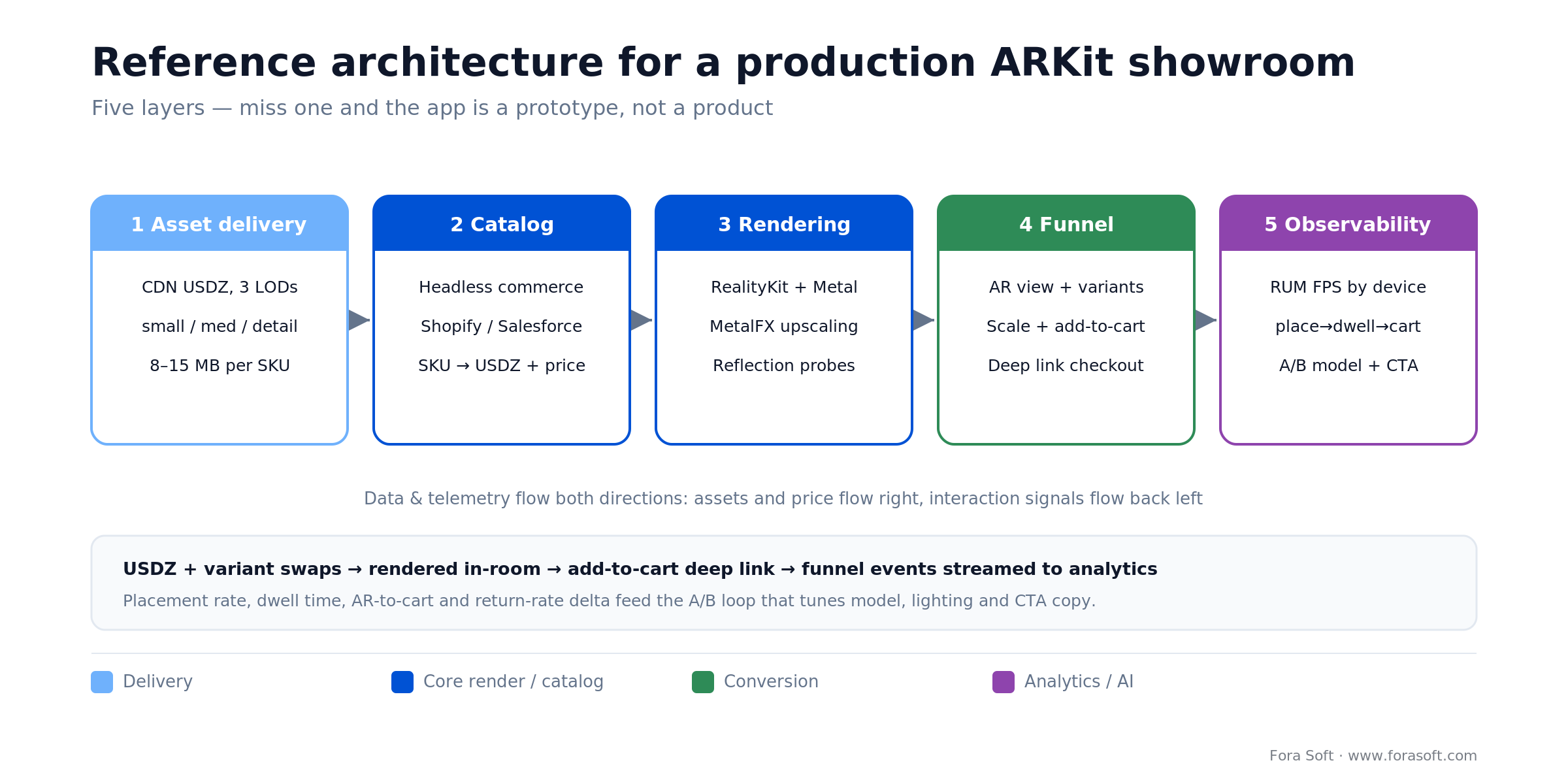
Figure 4. Assets and price flow right; interaction signals flow back left into the A/B loop.
1. Asset delivery. CDN-backed USDZ with three LODs (small, medium, detail) over HTTP/2. Signed URLs for premium catalogues. Target 8–15 MB per SKU.
2. Catalog. Headless commerce API (Shopify Storefront, Salesforce, custom GraphQL) with an SKU-to-USDZ mapping. Must carry live price, inventory, and per-SKU variant swaps.
3. Client rendering. RealityKit ECS, a Metal shader graph for material tuning, MetalFX upscaling, environment-texture reflection probes.
4. Interaction & funnel. AR view, variant picker, scale validation, add-to-cart, share (a USDZ via AirDrop or Messages), and analytics events at each step.
5. Observability & growth. RUM frame-rate telemetry by device tier, funnel analytics (placement → dwell → variant switch → add-to-cart), and an A/B framework for model, lighting, and CTA copy.
Analytics: the five metrics that matter for AR commerce
Stop counting “AR sessions.” Start measuring these:
1. AR placement rate. Of users who open the AR view, what percentage successfully place a product? Target above 75%. Low numbers usually mean a lighting or surface-detection UX problem.
2. AR-to-cart conversion. Of users who place a product, what percentage add to cart within 24 hours? This is the single number that justifies the investment.
3. Return-rate delta (AR vs non-AR). Furniture and apparel brands typically see a 15–25% reduction. If you aren’t, your asset scale is wrong.
4. Dwell time on the variant picker. Dwell inside AR correlates strongly with conversion. Under 20 seconds usually means confusing UX; over 60 seconds means the feature is landing.
5. Device-tier frame rate. A sub-30-FPS experience kills conversion. Instrument every AR frame on iPhone XS, 12, 13 Pro, and 15/16/17 Pro separately.
Privacy, permissions, and App Store compliance in 2026
Apple has tightened the rules for camera-based apps every year since iOS 14. For a 2026 showroom app, the hard requirements are:
Privacy Nutrition Label completeness. Every data type collected and every third-party SDK declared in App Store Connect. Missing categories are the most common cause of rejection.
Purpose strings. The camera prompt must state why the app needs the camera (“To show this sofa in your room” — not “AR features”).
No frame persistence without consent. The camera buffer must never be written to disk or sent off-device without an explicit opt-in and a clear visual signal.
Third-party SDK disclosure. Analytics, crash reporting, and ad SDKs are declared individually. Apple cross-checks this against SDK signatures.
Age-appropriate design. Beauty and apparel apps with makeup or body-tracking features need age-gating logic and the right rating.
Buy, build, or hybrid: the platform field you’ll be compared to
When you weigh building custom against buying a platform, the 2026 field looks like this:
Shopify 3D/AR. Native AR Quick Look inside Shopify PDPs. Lowest friction, lowest differentiation. Best for long-tail SKUs on an existing Shopify stack.
Apple AR Quick Look. Free to everyone, zero install. The right distribution layer for any native or web showroom — not a product on its own.
8th Wall (now open source). Hosted service closed February 2026; the code lives on under Niantic Spatial but with no commercial roadmap. Fine for a self-hosted experiment, not a durable 2026 bet.
Zappar, Blippar, Onirix. WebAR-first, campaign-oriented. Good for short-lived activations, not a retention platform.
Threekit, Emersya, Poplar. 3D configurator platforms with AR output. Strong for configurator-heavy categories (apparel customisation, furniture colour swaps).
Matterport. Room and space capture — the category leader for 3D tours, especially in real estate and trade.
Custom native (ARKit / RealityKit). The only option that opens Vision Pro, true on-device AI personalisation, and full sensor access. What you build when the programme is strategic, not tactical.
Mini case: two iOS 3D builds that map onto a showroom
Two recent Fora Soft builds sit right next to a retail AR showroom on the engineering map. Neither is a store — and that’s the point: the hard parts are the same.
The 3D-capture problem. For a PropTech client we built a 360 3D Scan App: it turns 360-degree photos from LiDAR-capable cameras (Ricoh Theta Z1, Insta360 One X) into real, navigable property meshes — not stitched panoramas. The pipeline runs OpenCV and PyTorch in the cloud for stitching, depth estimation, and mesh generation, with position tracking and interactive 3D maps. That’s the same capture-to-mesh problem a furniture brand hits when it wants a room-accurate USDZ, solved in a US$1.82B virtual-tour market where 72% of listings now ship a 3D tour.
The on-device intelligence problem. For a fashion client we shipped an iOS AI wardrobe app that recognises garment type, colour, fabric, cut, and season from a photo, running custom YOLOv8m and CLIP models entirely on-device through the Vision framework and TensorFlow Lite — no round-trip to a server, no privacy exposure. Swap “what should I wear” for “show me this jacket on the shelf” and you have the personalisation layer that separates a premium AR showroom from a static USDZ viewer.
Put together, those two projects are the AR-showroom stack in disguise: capture 3D at scale, deliver it to heterogeneous iPhones, and add on-device intelligence that keeps people in the funnel. You can browse the full set on the Fora Soft case studies page, or book a 30-minute assessment of your own catalogue.
A five-question decision framework
Answer these in order before the next planning meeting. If you can’t answer three of them cleanly, the programme isn’t ready to scope.
1. Which single conversion metric will this move, by how much, and who owns it? If the answer is “brand engagement,” the programme never gets a phase two.
2. Which 20 SKUs, and why those? Pick the SKUs where scale, fit, or realism matters most — your hardest-to-sell-online products, not your bestsellers.
3. Where does the AR experience live in the funnel? Product page, search, saved items, post-purchase? Each answer drives a different architecture.
4. Who owns the 3D pipeline after launch? In-house, agency, hybrid? This decides year-two cost more than anything else.
5. What’s the Vision Pro roadmap? Even if the answer is “not yet,” write it down. The architecture you choose in 2026 decides whether that door stays open.
Five pitfalls that quietly kill AR showroom programmes
We’ve audited enough failing AR programmes to know the pattern. These five go wrong again and again.
1. Cutting the asset budget. A USD 300 USDZ next to a USD 3,000 sofa photograph looks cheap. The AR view becomes the reason someone doesn’t buy.
2. Shipping AR outside the funnel. An AR showroom that doesn’t deep-link into checkout adds friction instead of removing it.
3. Ignoring device fragmentation. The app that flies on iPhone 17 Pro but stutters on iPhone XS earns one-star reviews from the exact long-tail users you need.
4. No analytics beyond “sessions.” Without placement rate, dwell, and AR-to-cart, the programme can’t prove ROI and gets defunded next cycle.
5. Treating AR as a marketing channel. Marketing owns the moment of wow; product owns the retention curve. If AR sits under marketing, it won’t survive its second year.
The most expensive one we’ve audited: 400 SKUs, USD 1.2M in assets, and no deep link into checkout. Three months after launch it converted 0.2% AR-to-cart. The fix took six weeks; the six months of lost attribution never came back. Wire the funnel first.
A 90-day roadmap we give clients
This is the plan we actually run on pilot programmes. Adjust for scope, but the phase structure rarely changes.
| Phase | Weeks | Outcomes |
|---|---|---|
| Discovery & SKU selection | 1–2 | 20-SKU pilot set, metric targets, funnel placement, asset capture plan. |
| Asset capture & pipeline | 3–6 | USDZ pipeline stood up, first 20 assets captured, PBR materials tuned, scale QA passed. |
| iOS build & integration | 5–10 | Native ARKit viewer, catalogue integration, commerce deep links, analytics instrumentation. |
| QA, beta, App Store | 10–12 | Device-tier QA matrix, TestFlight beta, Privacy Nutrition Label complete, App Review passed. |
| Launch & optimisation | 12–14 | Soft launch, funnel instrumentation live, weekly analytics review, first A/B round. |
Ready to start the 90-day pilot?
We can kick off an ARKit showroom pilot within 14 days of signing. Book a 30-minute call and we’ll send a written scope and fixed price within 48 hours.
FAQ
How many SKUs do we need to justify a native ARKit showroom?
Twenty is the floor for a pilot. Below that, AR Quick Look and web 3D viewers beat a native app on cost and time-to-market. Above 100–200 SKUs the unit economics flip toward native, especially with retention logic, a loyalty layer, or a planned Vision Pro tier.
Do we need LiDAR, or does a regular iPhone work?
Regular iPhones (A12 and up) run ARKit placement, face tracking, and AR Quick Look. LiDAR-only features are Scene Reconstruction, accurate RoomPlan output, and the best People Occlusion. For furniture, home goods, and automotive, LiDAR is worth gating premium features to; for eyewear, makeup, and small accessories, a non-Pro iPhone is enough.
How long does it take to photogram a product with Object Capture?
A trained operator captures a simple rigid product in 20–40 minutes, plus 1–3 hours of material cleanup. Products with chrome, glass, or hair take 2–4x longer and often still need manual modelling on top of the photogrammetry output.
Is WebAR dead now that 8th Wall shut down?
No, but its ceiling dropped. 8th Wall’s hosted service closed on 28 February 2026 and the code went open source under Niantic Spatial. AR Quick Look is still a first-class WebAR path inside iOS, and Zappar and Onirix are active. For 2026, use AR Quick Look for zero-install PDP experiences and go native where fidelity, retention, or Vision Pro matter.
What does a Vision Pro port of an iOS showroom cost?
If the iOS app was built on RealityKit with rendering separated from UI, USD 60K–150K is realistic for a 50–100 SKU catalogue. If it used SceneKit or a third-party engine, roughly double it.
How do we measure ROI on augmented reality shopping?
Compare AR-exposed purchase rate, gross margin, and 90-day return rate to non-AR, all segmented by SKU. Shopify’s 94% conversion-lift figure is the calibration baseline; IKEA’s 11x purchase lift and 2.7x return reduction set the upper envelope for furniture. Instrument from day one.
What OS and device minimums should we support?
For 2026, an iOS 17-and-up deployment target and A12 (iPhone XS/XR) is the realistic floor. Pro-tier features (Scene Reconstruction, best People Occlusion) light up on iPhone 12 Pro and later. Vision Pro (visionOS 26) is a separate target, worth committing to only if the iPhone architecture supports it.
Does Fora Soft handle the 3D asset pipeline or only the iOS build?
Both. We run Object Capture sessions, author USDZ in Reality Composer Pro, tune PBR materials, and QA scale accuracy ourselves. For CAD-to-USDZ conversions on automotive or industrial catalogues, we bring a 3D studio inside the same delivery team. One accountable partner, not a handoff.
What to read next
Related read
ARKit dating app features: the 2026 retention playbook
How AR face effects and virtual date rooms became the first real retention lever for dating apps in a decade.
Related read
AR and VR in education: the 2026 playbook
Engagement evidence, devices, WebXR vs native, a cost model, and a 90-day rollout plan.
Related read
AR and VR in modern healthcare
Where spatial computing earns its keep in clinical and training settings — and where it doesn’t yet.
Services
AR/VR development at Fora Soft
ARKit, RealityKit, and visionOS builds — from a pilot showroom to an enterprise catalogue.
Portfolio
Fora Soft case studies
How we ship iOS, AR, and collaborative 3D platforms for clients from pre-seed to enterprise.
Ready to make augmented reality shopping a product, not a stunt?
A native ARKit virtual showroom is no longer a bet on an emerging medium. Shopify’s 94% lift, IKEA’s 11x purchase lift, Wayfair’s 92%, and Warby Parker’s 85% are enough to build the business case, and the 2024–2031 market compounds 14–32% across every credible forecast. With 8th Wall’s hosted service closed since February 2026, the durable platform choice narrows to native ARKit plus AR Quick Look — the same stack Vision Pro adopts.
The risk in 2026 isn’t building the wrong thing — it’s building the right thing at the wrong fidelity. A USD 80K–500K native investment returns an 11x purchase lift and 25% fewer returns on the right SKU set; a USD 20K WebAR pilot plateaus at 1.3x. Pick your scope, pick your 20 pilot SKUs, and pick a partner that has shipped native iOS 3D at scale.
Let’s scope your ARKit showroom
Book a 30-minute discovery call and we’ll return a written scope and a fixed-price pilot quote within 48 hours — tailored to your catalogue.

