

Key takeaways
• The UI/UX design trends 2026 all trace back to one 2024 shift: UI/UX became an AI-native craft. Figma AI, Samsung One UI 7, V0 by Vercel, Cursor and Lovable, Apple Intelligence, Galaxy AI — product teams now expect AI to draft, prototype, refactor, and personalize the interface. The teams that ignored this added months to their delivery cycles.
• The losers in 2024 were redesigns without a job-to-be-done. Apple Photos, Spotify, Sonos, and Nike all shipped UI changes that lost users, revenue, or both. The common thread: redesigns driven by aesthetics or A/B-test growth metrics rather than the user’s actual primary task.
• InVision’s 2024 shutdown ended the 2010s prototyping era. Figma is the new default. Adobe XD is mostly mothballed. Sketch retreated to indie Mac users. Penpot is the open-source alternative gaining ground. If you are still on InVision in 2026, you are working in a museum.
• The new designer roles are real. AI Interaction Designer, Prompt Designer, Design Engineer, Service Designer, and Spatial Designer are no longer LinkedIn vanity titles — they are budgeted seats on serious product teams. The split between “designer” and “design engineer” is the most consequential job change of the year.
• This guide is a senior product+engineering view, not a Pinterest scroll. Below: what actually shipped in 2024, what got built in 2025–26, what is still ahead, and what to do about it if you are scoping a software product right now.
The short answer: the UI/UX design trends 2026 that actually matter are AI-native design tooling (Figma AI, v0, Cursor, Lovable), generative UI assembled at runtime, the rise of the design engineer, a swing back to calm and adaptive interfaces with purposeful motion, and a regulatory and ethical reset on dark patterns. Everything below is what shipped in 2024, which redesigns won or failed, and how to act on each of these trends when you scope a 2026 build.
Why Fora Soft wrote this UI/UX retrospective
Fora Soft is a custom software development company — building video, real-time and AI products since 2005, with 250+ delivered projects and 50 in-house engineers — and design has been a core part of every project we deliver. We do not run a separate “design studio” team that hands wireframes to engineering. Designers, product managers, and engineers sit on the same squad and own the same outcome — that is the only way to land an AI-driven UI on time. If you want the mechanics, we wrote up how our design team works after 20 years.
This article is the playbook we use internally to brief new product owners on what changed in UI/UX during 2024 and how that has shaped 2025–26. It is written for CTOs, product directors, and founders scoping a custom software build who are deciding what to build, what to retire, and which design/engineering roles to hire next. We have shipped products like BrainCert, an EdTech platform serving 100K+ customers and 500M+ classroom minutes, where the UI is the product. We will walk through the wins, the loud failures, the platform shifts, and the practical commercial implications for anyone scoping a custom software product.
Our team uses agent-assisted engineering — in-house Claude- and Cursor-based pipelines — to compress the commodity work in any product build, including the design system, the component library, the empty states, and the boilerplate flows. That keeps the budget on the parts of the UI that matter: the AI affordances, the workflow that the customer pays for, and the polish that takes the product from “works” to “loved.” Our 2026 quotes therefore run noticeably tighter than typical 2024–2025 industry ranges.
Need a UI/UX sanity check on your roadmap?
Bring the product, the user research, and the redesign brief. We will tell you in 30 minutes which trends are worth chasing, which to skip, and where to put the AI affordances first.
The end of the InVision era and the platform consolidation
InVision shut down on December 31, 2024 after losing its place as the prototyping standard. By that point Figma had already taken over — and the consolidation went much further during 2025.
Figma is the new design substrate. Figma Make and Figma Sites turned the canvas into a deployable product platform. Pair that with Figma AI for component scaffolding and Figma Dev Mode for design-token and code handoff, and most B2B SaaS teams now ship from Figma all the way to production-grade prototypes. Adobe’s abandoned acquisition in 2023 turned out to be the moment Figma stopped being a tool and started being a platform.
Adobe XD is functionally retired. Adobe stopped active development; XD users have largely migrated to Figma or to Adobe Express for marketing pages. Sketch has retreated to indie Mac shops. Penpot is the credible open-source alternative for self-hosted teams.
The handoff stack changed. Zeplin and Avocode lost ground because Figma Dev Mode plus the design-token export ecosystem covers most of what they did. Storybook is still the bridge to engineering. The new layer underneath is V0 by Vercel, Cursor, Lovable, and similar tools that turn a Figma frame into shippable React directly.
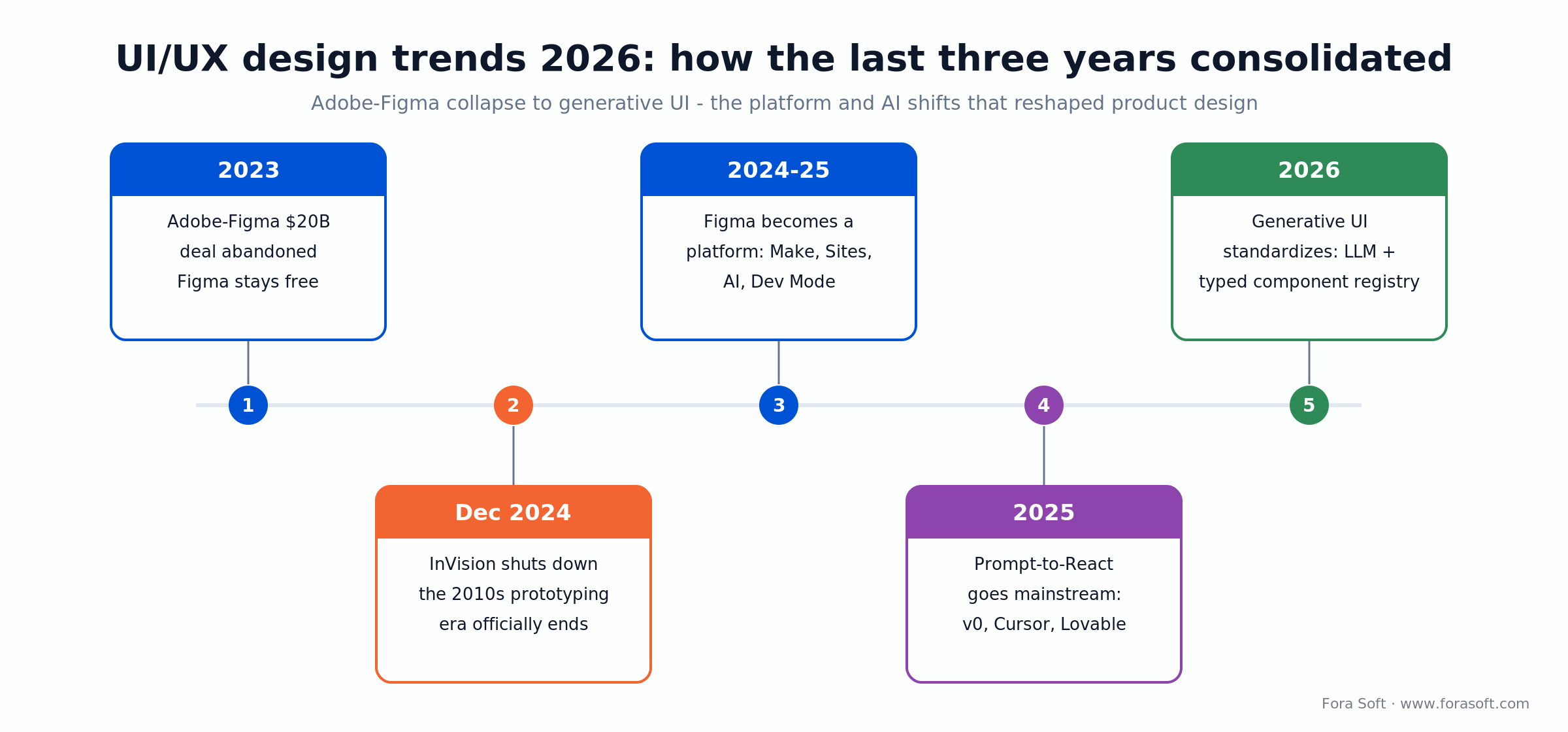
Figure 1. How the last three years consolidated — from the Adobe–Figma collapse to generative UI.
AI design tools that actually shipped in 2024–26
2024 was the first year AI design tooling stopped being demoware and started being a daily-use part of the design pipeline. Two trends matter for product teams.
Generation moved from screen mockups to working components. V0 (Vercel), Lovable, Bolt, and Cursor turn a prompt or a Figma frame into shippable Tailwind/React code. Useful for scaffolding, design-system stress-testing, and rapid prototyping. Not yet a substitute for senior design judgment — but it is a substitute for week three of a junior designer iterating on a sign-up form. We break down where the time actually goes in how AI speeds up UX/UI design.
Personalisation moved to runtime. Apple Intelligence, Galaxy AI, and Samsung One UI 7 made on-device personalisation a platform feature: writing tone adjustment, photo cleanup, content summarisation, and contextual replies happen in the OS, not in your app. The implication for product teams: stop building features that the OS now does for free, and start building affordances that benefit from those OS features.
Generative UI is the next frontier. Anthropic’s Artifacts, OpenAI’s Canvas, and Google’s in-Gemini canvases prove the pattern: the AI does not return a paragraph, it returns a small interactive UI fragment that the user can manipulate. By 2026 mature B2B products are starting to ship dynamic UI surfaces — tables, charts, forms — assembled at runtime from an LLM plus a strict component library.
The good: redesigns that actually worked
Five product redesigns from 2024 are worth studying because they shipped genuine improvements without alienating users.
1. Samsung One UI 7. A refresh of Samsung’s Android skin around AI-first interactions: Now Bar, Now Brief, AI Select, Cross-app Actions. The design direction is the win — turning the lock and home screens into surfaces where the OS does work for the user is exactly the right 2026 move. The rollout itself was rocky: it slipped by months, and an early build caused lock-screen problems on some Galaxy S24 units before Samsung paused it. That is its own lesson — a strong AI-first concept still lives or dies on shipping discipline.
2. Linear’s staged platform expansion. Sub-issues, customer requests, and later AI-assisted triage (previewed in 2025) shipped in coordinated waves rather than one big-bang release. Each shipped feature respected the muscle memory of existing power users. Linear is widely cited as a model for expanding a tool into new (PM-track) workflows without alienating the base that made it popular.
3. Notion AI as an inline citizen. Notion AI lives inside any block, not only in a separate panel — highlight text and ask it to condense, rewrite, or translate without leaving the page. Notion has since layered a sidebar chat and autonomous agents on top (Notion 3.0, 2025), but the inline entry point is the one most productivity tools copied. The pattern (“AI is a verb on the existing surface”) is now a default for productivity products.
4. Stripe’s progressive onboarding. Stripe’s merchant onboarding leans on progressive verification — collecting only what each step needs and surfacing what is still outstanding rather than hiding it behind a spinner. The lesson generalizes to AI: when an automated check gates a user (KYC, KYB, risk scoring), put the explanation in the foreground, especially where money and identity are on the line.
5. Apple’s Vision Pro spatial UI patterns. Even with limited consumer adoption, the visionOS interaction grammar — gaze to target, pinch to select — is now the reference for any spatial software project. Mature spatial UIs are still mostly enterprise (training, surgery prep, design review) but the patterns set in 2024 are sticking.
Reach for an “AI as a verb” pattern when: your users already have a primary surface (a doc, a board, a feed). Putting AI inline on that surface beats a separate chatbot or modal almost every time. Reserve dedicated AI surfaces for net-new workflows that did not exist before.
The bad: redesigns that lost users or revenue
2024 also produced the most public, most expensive UI controversies of recent years. The pattern is consistent: redesigns that prioritized aesthetics, growth metrics, or platform politics over the user’s primary task.
Apple Photos (iOS 18) ran into a wall of complaints. The single-page library reorganized core actions, removed the bottom navigation users had built muscle memory around, and surfaced AI-generated “Memories” ahead of recent photos. App Store reviews and social feedback were unusually negative for an Apple stock app. Apple restored a few pieces in iOS 18.1 and 18.2, but only fully walked the redesign back — navigation tabs and a camera-roll-first layout — in iOS 26 in 2025. The lesson: do not trade memorisation cost for AI promotion in a stock app a billion people already know; at that scale, the climb-down takes a year.
Spotify’s home-screen and DJ pivot annoyed power users. The redesign pushed AI-generated playlists, podcasts, and short-form video higher in the discovery hierarchy at the cost of user-curated playlists. Spotify still added tens of millions of subscribers in 2024, so this was not a revenue disaster — but year-over-year growth decelerated through the year, and the loudest, most loyal users felt their curated libraries had been demoted and said so. The lesson: even when the top line holds, do not quietly bury the feature your power users organize their listening around to chase engagement minutes.
Sonos’s app rewrite became a textbook bad rollout. The new Sonos app launched with broken core features (alarm, sleep timer, queue management). Customer trust collapsed; Sonos spent months restoring the missing features, executives forfeited bonuses over it, and CEO Patrick Spence departed in early 2025. The lesson: a rewrite that ships without parity on the user’s primary task fails, regardless of how clean the new architecture is.
Nike’s digital-strategy whiplash. Under then-CEO John Donahoe, Nike leaned hard into data-driven performance marketing and direct-to-consumer at the expense of brand storytelling and wholesale relationships. Sales and brand heat suffered, and the stock shed roughly $28 billion in market value in a single day in late June 2024. Donahoe was replaced by Nike veteran Elliott Hill in October 2024, whose turnaround is a deliberate reversal — back toward brand-led marketing and rebuilt retail partnerships. The cautionary tale is not a single UI choice; it is a strategy that treated the funnel as a dashboard and forgot the brand.
Reddit’s API turmoil. The 2023 API pricing change rolled into 2024 with the third-party-app shutdowns, mod tooling churn, and a search-redesign that made the official mobile app harder to use for power moderators. Reddit went public anyway and kept growing — a reminder that strong top-line growth can mask real UX debt for power users rather than prove the debt away.
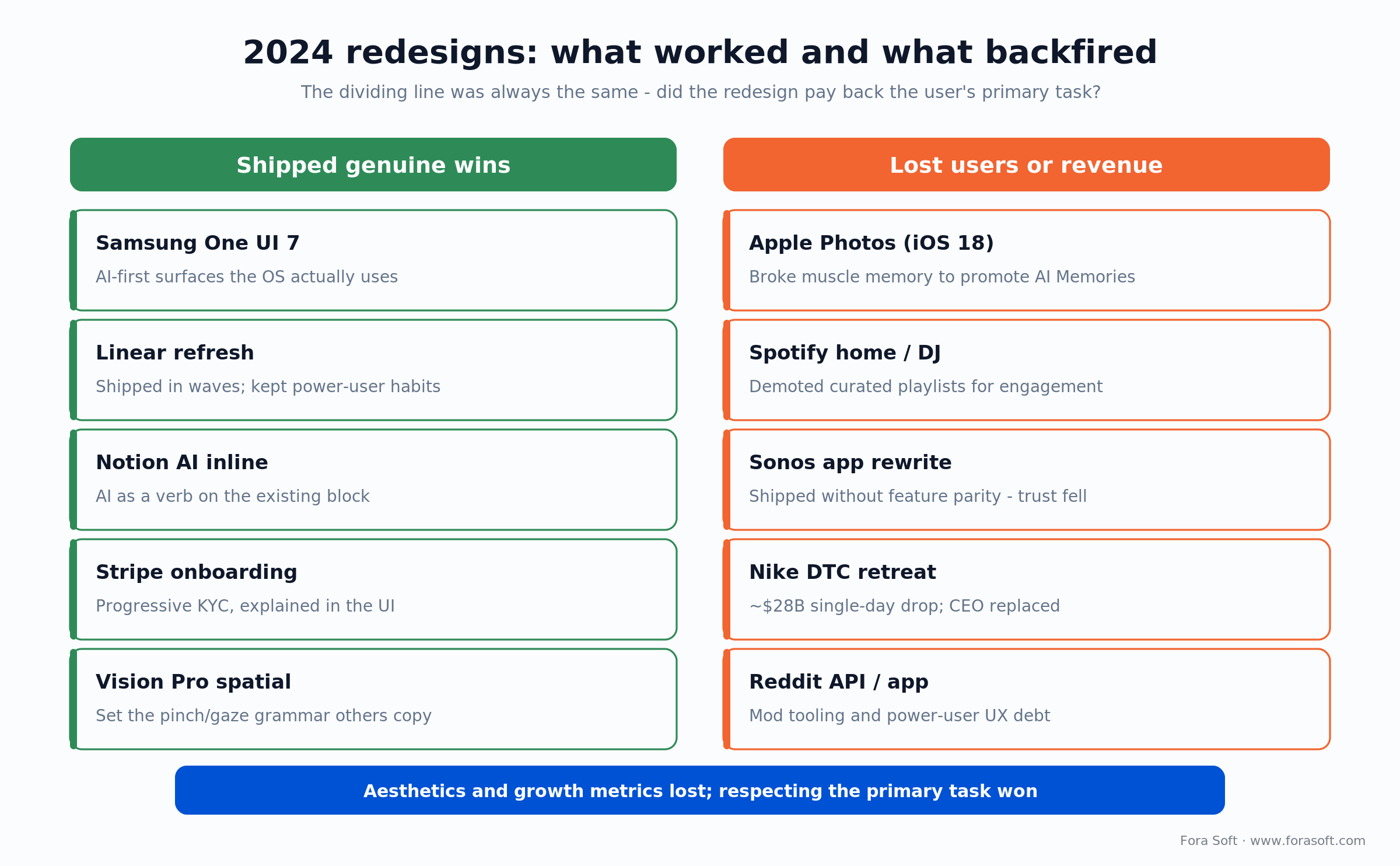
Figure 2. The 2024 scoreboard — the dividing line was always whether the redesign paid back the user’s primary task.
Generative UI: the new pattern to learn now
The most consequential UI shift starting in 2024 is generative UI — interfaces that are assembled at runtime by an LLM from a strict component library. Three things make this real now.
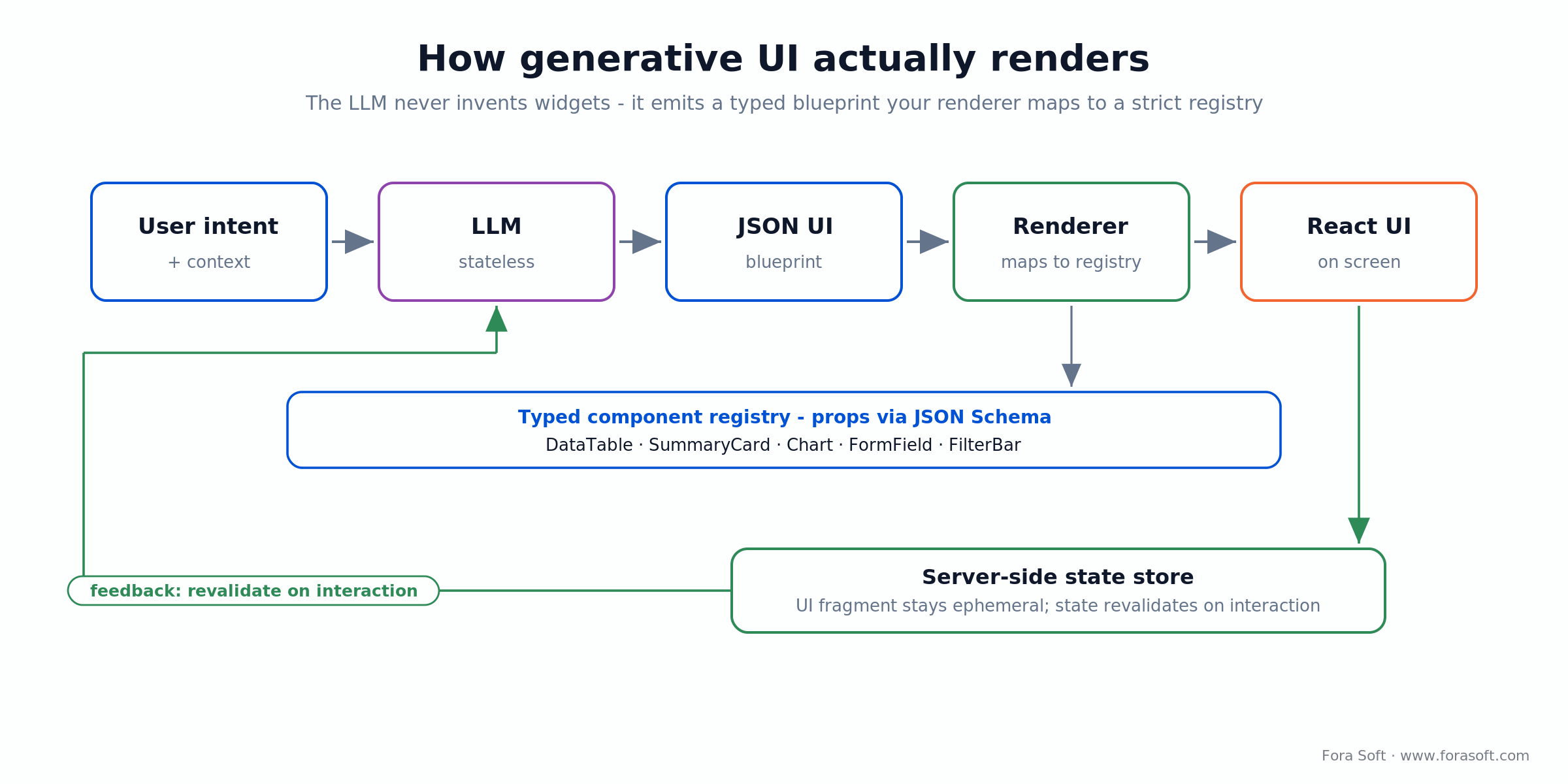
Figure 3. Generative UI, end to end — the LLM emits a typed blueprint; your renderer owns the components and state.
The component library is the contract. The LLM does not invent buttons. It picks from a typed registry of components your team owns: DataTable, SummaryCard, Chart, FormField, FilterBar. Each component declares its props in JSON Schema. The LLM emits a JSON blueprint; your renderer maps it to React.
The state model is server-side. The LLM is stateless and the UI fragment is ephemeral. The data behind it lives in a server-side store that gets revalidated as the user interacts. This pattern is what Anthropic Artifacts, ChatGPT Canvas, and Vercel’s AI SDK Generative UI all converged on by mid-2025.
Design becomes inventory management. Designers no longer hand off “the screen for the dashboard.” They hand off the catalogue of components and the prompt patterns that compose them. The role rebalances toward design systems and information architecture — a major reason senior designers are getting paid more in 2026 than in 2022.
The rise of the design engineer
The most important hiring shift of 2024–25 is the design engineer — a person who can write production React, owns the component library, and contributes to design tokens at the same level as a senior designer. Linear popularised the title; Vercel, Stripe, GitHub, and most well-funded SaaS companies now hire for it explicitly.
Why the role is needed. Generative UI, AI-assisted code, and design tokens make the boundary between “design” and “engineering” less useful. A design engineer ships the component, the variants, the dark/light themes, and the keyboard/a11y handling in one PR. Time from Figma frame to shipped component drops from weeks to hours.
What it means for hiring. If you have one design seat to fill on a small team, hire a design engineer over a pure visual designer. They will land more value because the visual designer’s output gets bottlenecked at the engineering handoff regardless of quality.
Five design roles that became real in 2024–26
Job titles in design teams shifted faster in the last 24 months than in the previous decade. Five roles you should know if you are hiring or being hired.
1. AI Interaction Designer. Owns the conversational and generative-UI surfaces, the prompt templates, the failure modes (refusals, hallucinations, low-confidence), and the “AI explanation” layer. Sits between PM, design, and applied science.
2. Prompt Designer. Treats prompts as a first-class artifact: versioned, tested, monitored, A/B-tested in production. Often a senior writer who learned engineering, not the other way around.
3. Design Engineer. Owns the component library and the bridge from Figma to React. Already covered above — the most consequential of the five new roles.
4. Service Designer. Maps the cross-channel customer experience (app, email, support, in-store, callbacks) and owns the experience as a whole rather than any single screen. Especially valuable in regulated verticals (healthcare, finance, government).
5. Spatial Designer. 3D affordances, gaze and pinch interactions, anchored content for AR, room-scale environments for VR. Still niche in 2026, but real budgets are now attached on enterprise training and design-review software.
Ethics, dark patterns, and growth design after 2024
2024 was also the year regulators and the design community pushed back on growth-led design choices. Two pieces of news set the tone.
The FTC’s Click-to-Cancel rule was finalized in 2024 and then vacated by the 8th Circuit Court of Appeals in July 2025 on procedural grounds, so it is not binding federal law right now. Do not read that as an all-clear. The direction of travel has not changed: California’s auto-renewal law, the EU’s Digital Services Act and Digital Markets Act, and the FTC’s continued enforcement posture all push the same rule — cancellation must be at least as easy as sign-up. Teams that baked dark patterns into the cancel flow are still exposed; the sharp ones fixed them anyway.
Apple App Tracking Transparency completed its long arc. The opt-out default reshaped the mobile-ads market, and by 2025 Meta and other platforms had substantially adapted with on-device modeling and privacy-preserving signals, though a measurement gap persists. The implication for product teams is that growth-design playbooks built on cross-app tracking are mostly dead. Build the loop on first-party data.
The community pushed back too. “Growth-design ethics” was the most contested topic at IxDA (the Interaction Design Association), Figma’s Config 2024 conference, and the Nielsen Norman Group’s 2024–25 reports. The pendulum is swinging back from growth-loop optimisation toward retention and trust. Pricing transparency, deliberately non-clickable confirmation steps, and explicit AI disclosures became the new normal in well-run products.
Need a senior UI/UX team for a product build?
Bring the product spec or the existing app. We will tell you in 30 minutes what to ship in v1, what to delay, and which AI affordances belong on the foreground.
Tools comparison: 8 platforms shaping product UI in 2026
If you are setting up a new design+engineering pipeline in 2026, these eight tools are the ones we see most often in well-run product teams.
| Tool | Role in pipeline | Strength | Limit |
|---|---|---|---|
| Figma (with AI) | Design canvas, prototyping, dev handoff | Industry default, plugin ecosystem | Heavyweight for solo/indie teams |
| Penpot | Design canvas (open-source) | Self-hosted, no vendor lock-in | Smaller ecosystem |
| V0 (Vercel) | Prompt-to-React generation | Fast scaffolding, shadcn/ui aware | Tailwind/Next.js bias |
| Lovable/Bolt | Full-stack prototype-to-deploy | Backend + frontend in one go | Production hardening still needed |
| Cursor | AI-native IDE for senior engineers | Repo-aware editing, agent loops | Steep ramp for non-engineers |
| Storybook | Component library docs & testing | Industry standard for design systems | Setup overhead |
| Maze/UserTesting | Quantitative usability research | Fast remote testing at scale | Surface-level vs deep interviews |
| Dovetail/Notably | AI research repository | Themes, tagging, AI-summarised insights | Requires research-ops discipline |
Pick the smallest pipeline that closes the loop from idea to shipped component. For most product teams in 2026 that is Figma → V0 (or Cursor) → Storybook → production React, with Maze and Dovetail running in parallel as the research cadence.
AI beyond chatbots: agents, copilots, and ambient UI
By 2026 the “chatbot” is the least interesting AI surface. Three patterns are taking over — and the first design decision is where AI should live at all.
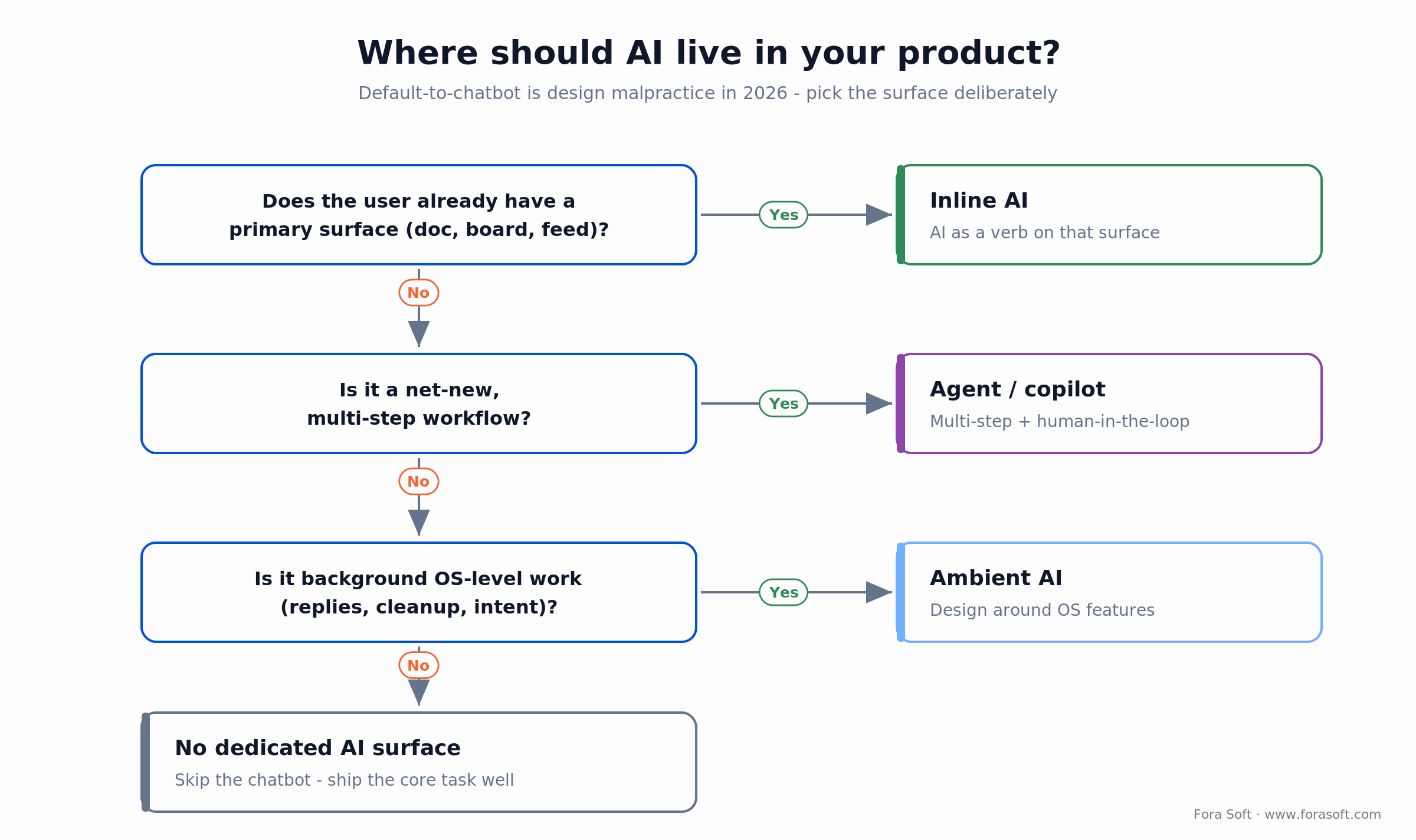
Figure 4. Where should AI live? Pick the surface deliberately instead of defaulting to a chatbot.
Inline AI. The AI is a verb on the existing surface. Highlight a paragraph and rewrite it. Right-click a chart and ask it to explain. Tap a row in a table and request a summary. No modal, no chatbot — the AI is part of the toolbar. Notion, Apple, Adobe, Microsoft 365, and Google Workspace all converged here.
Agents and copilots. Multi-step automations that can read your data, take actions, and surface a UI for human-in-the-loop confirmation. Cursor for code, Claude in Chrome for browsing, and the new wave of vertical agents (sales SDRs, finance, ops) all share this pattern. The UI challenge is showing what the agent has done, what it will do, and where the user can intervene.
Ambient AI. The OS does work in the background — smart replies, intent prediction, photo cleanup, voice intent recognition — without a clear surface. Apple Intelligence and Galaxy AI both did this. Implication for product teams: pick the part of your product that benefits most from ambient OS features and design around it instead of duplicating it.
Voice is back. LLMs make voice useful again, especially for hands-busy and accessibility-driven workflows. Real-time TTS/STT pipelines from OpenAI, ElevenLabs, and Deepgram are now production-grade. The design work is in the affordance, not the model: show a live transcript, a confidence state, and an obvious way to correct the machine. We cover the build side in AI integration, and the agent patterns behind hands-free flows in our LiveKit AI-agents guide.
Beyond AI: the 2026 aesthetic — calm, motion, and adaptive UI
Not every 2026 trend is an AI trend. Three non-AI patterns show up on almost every credible UI/UX design trends 2026 list, and they matter because they decide how the AI surfaces above actually feel in the hand.
Calm, minimal interfaces. The loudest reaction to a decade of dashboards, badges, and notification dots is a swing back toward reducing cognitive load: fewer competing calls to action, more whitespace, honest hierarchy, and a home screen that answers “what do I do next” without a tour. Calm design is not a visual style — it is a decision to make the primary task the loudest thing on the screen and demote everything else.
Purposeful motion and micro-interactions. Motion is back, but as feedback rather than decoration. A control that confirms it was pressed, a list that shows where a new row landed, a state change the eye can follow — these lower error rates and perceived latency. Micro-interactions have moved from nice-to-have to standard practice in shipped product work through 2025–26. The trap is motion for its own sake: if an animation does not carry information, cut it, because it costs performance and accessibility.
Adaptive, context-aware interfaces. The interface increasingly adjusts to who the user is, what device they are on, and what they are trying to do — surfacing the next likely action, collapsing rarely used controls, shifting density on smaller screens. Personalization is the sharp end of this: Netflix-style ranked rows, role-based dashboards, and onboarding that adapts to the first task a user actually performs. Good AI UX design makes that adaptation legible rather than spooky — done badly it disorients screen readers and moves the button the user was about to tap, so ship it with an obvious way to pin the layout back to predictable.
Practical implications for product owners scoping a build
Five takeaways if you are about to brief a design/engineering team in 2026.
1. Budget for the design engineer first. If you have one design seat, hire someone who can also commit production code. Pure visual designers are still valuable, but they get bottlenecked at handoff in any team smaller than 20.
2. Decide on AI surfaces in v1. Not all of them — one or two. Inline AI on the primary surface, an explainability panel for any AI-driven decision, and a clear opt-out for users who do not want personalisation. Defer agents and ambient AI to v2 unless they are core to the value proposition.
3. Pick the design system before the screens. Tailwind + shadcn/ui is the de-facto B2B SaaS default in 2026. Material 3 for native Android, SwiftUI for native iOS. Custom design systems pay back only at > 50 engineers. Below that, a forked shadcn library with your tokens beats every alternative.
4. Plan the regulatory work. Click-to-Cancel, App Tracking Transparency, GDPR, BIPA, ADA. Add four weeks of design+legal review per release if you serve regulated buyers. Underestimating this kills product launch dates more often than any technical risk.
5. Re-test the obvious. Your sign-up flow, your settings page, your cancellation flow, and your onboarding have probably regressed since 2022. For how the whole build sequences around this, see our seven-phase product development playbook. Run a usability test on the first three weeks of a new user’s experience at least once a year. The teams that win in 2026 take the obvious work seriously.
Mini case: shipping AI-driven product UX with a small team
Situation. A B2B media-research client needed a v1 product that would put AI-summarised interview insights in front of brand teams within ten weeks. The team was three engineers and one designer. The risk was that the design+engineering loop would consume the budget before the AI work landed.
What we shipped. A Figma design system that mirrored shadcn/ui exactly so the designer could prototype in Figma while engineering shipped real components. V0 generated the first pass on every new screen; the designer refined and committed back to Figma; the engineer wired the data layer and the LLM calls. Inline AI lived on the existing transcript surface (highlight, summarise, ask). No chatbot, no modal.
Outcome. The product shipped on day 71 with the AI surfaces working in production. The designer+engineer loop closed in a single PR per feature instead of three. The customer’s NPS at week 12 was 67. We documented the pattern internally as a template for any small-team AI-product build.
Reach for inline AI on the existing surface when: users already have a primary surface (a doc, a board, a feed, a transcript). When users already have a primary surface to work on, sidebar chatbots consistently lose to inline AI in our experience.
Need a cost model for your specific redesign?
Send the current product, the user research, and the rough scope. We will tell you in 30 minutes what is fixed, what is variable, and which parts to phase.
Reach for shadcn+Tailwind (vs custom design system) when: your team is under 50 product engineers. Custom design systems pay back at scale; below that, a forked shadcn library with your tokens is cheaper, faster, and less risky.
Cost model: realistic UI/UX budgets in 2026
Conservative ranges for a senior agency in 2026 using agent-assisted engineering. UI/UX cost is a portion of the total project budget, never a separate line.
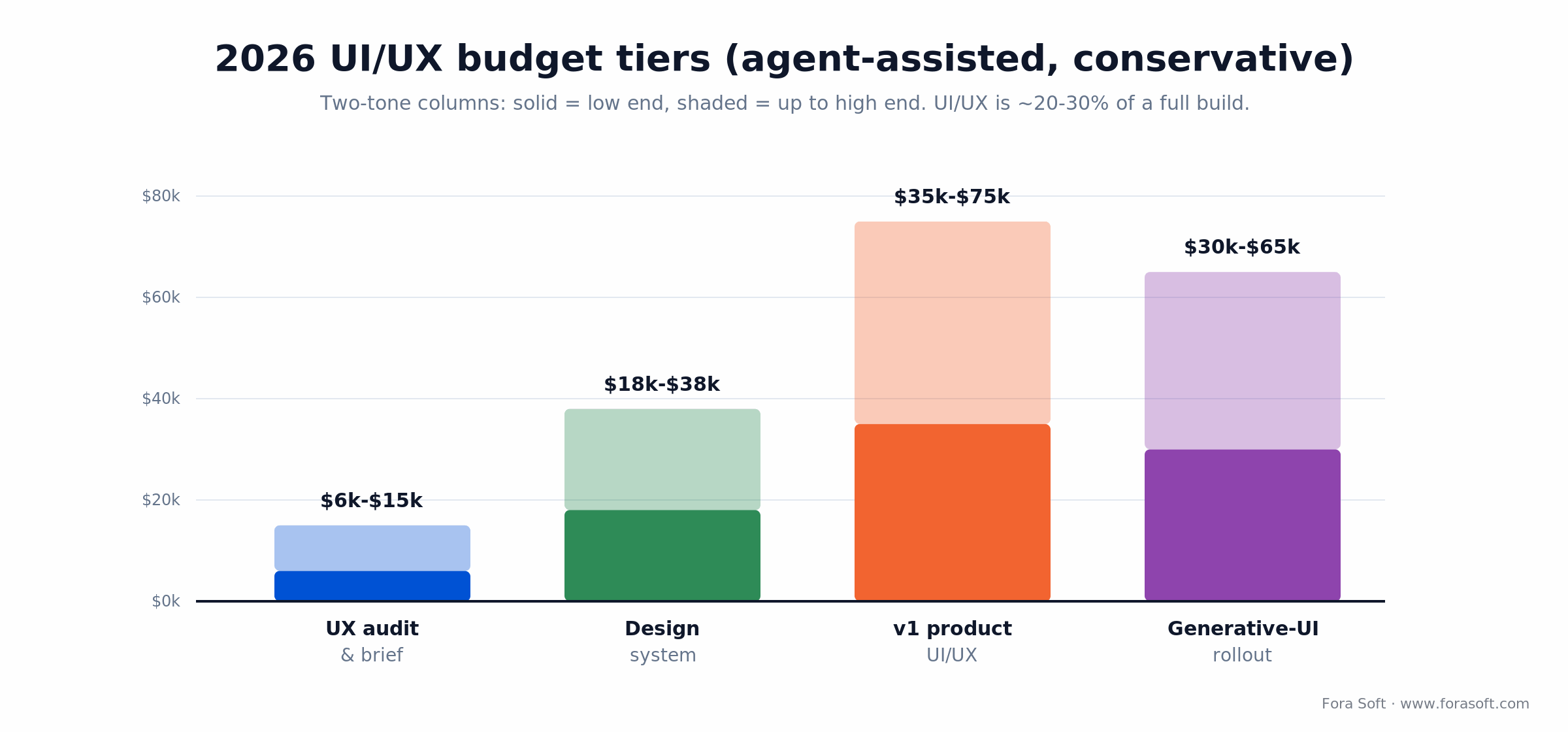
Figure 5. Conservative 2026 UI/UX budget tiers with agent-assisted engineering — solid bar is the low end.
| Tier | What it covers | Timeline | Conservative range |
|---|---|---|---|
| UX audit & redesign brief | Heuristic review, user-flow audit, prioritised redesign brief | 2–4 weeks | $6k–$15k |
| Design system & component library | Tokens, Figma library, shadcn-based React components, Storybook | 5–8 weeks | $18k–$38k |
| Full UI/UX for a v1 product | Research, IA, key flows, design system, AI affordances, dev handoff | 10–14 weeks | $35k–$75k |
| Generative-UI rollout in an existing product | Component schema, prompt patterns, rendering, monitoring, eval suite | 8–14 weeks | $30k–$65k |
These ranges assume an existing product team. UI/UX as part of a full product build is roughly 20–30% of the total project budget — less if you start from a strong design system, more if AI affordances are a major surface. If the budget is tight, scope hard: our take on what an MVP really is and a 7-day scoping pass both keep the first release honest.
A decision framework — pick your UI/UX path in five questions
Five questions on a sheet of paper before any design call.
Q1. What is the user’s primary task on this surface? Write it down in one sentence. Every UI choice flows from this. If you cannot answer it, you do not have a redesign brief — you have a Pinterest board.
Q2. Where does the AI live in this product? Inline, agent, ambient, none. Pick deliberately. Defaulting to a chatbot in 2026 is design malpractice for most B2B products.
Q3. Native, web, or both? Most modern B2B SaaS ships web first and native later (or never). Native pays back when the workflow is genuinely mobile or platform-specific. Be honest.
Q4. Custom design system or shadcn+tokens? Below 50 engineers, customise shadcn. Above 50, consider your own. Custom-from-scratch in a small team is a way to spend the design budget on plumbing instead of users.
Q5. What dark patterns will the new design remove? Each redesign should pay down at least one ethical debt — a hidden cancellation, a default opt-in, a confusing pricing display. Make this explicit in the brief.
Pitfalls to avoid in a 2026 redesign
Five places redesign projects keep burning weeks. None are exotic; all are easy to skip in a SOW.
1. Redesigning aesthetics without a job-to-be-done. The Apple Photos and Spotify lessons. If the new design does not pay back a measurable user task, do not ship it. A/B-test the change against the existing version before global rollout.
2. Shipping a rewrite without parity. The Sonos lesson. Map every existing feature, every shortcut, every accessibility affordance into the new system. Ship the rewrite when the parity is > 95%, not when the architecture is clean.
3. Demoting power-user features. Power users drive your retention numbers more than your acquisition team realises. Never push a power feature one layer deeper to surface a growth experiment. Retention loss compounds faster than acquisition gain.
4. Adding AI without explainability. Any AI-driven decision the user can see needs a one-tap explanation. Without it, trust collapses on the first wrong answer. Build the explainability layer into the design system, not as a bolt-on.
5. Skipping accessibility. ADA lawsuits keep climbing in 2026. WCAG 2.2 AA is the floor. Build keyboard navigation, focus rings, screen-reader semantics, and color contrast into every component, not as a phase-2 polish item.
KPIs that matter: Quality, Business, Reliability
Three buckets, with thresholds we use as the minimum bar to ship a UI/UX release.
Quality KPIs. Time-to-first-meaningful-action < 5 s on a new user. Task-completion rate > 85% for the primary task in usability tests. Lighthouse Performance > 90 on the top three pages. WCAG 2.2 AA conformance on every shipped component.
Business KPIs. Activation rate (users completing the primary task in the first session) > 50%, ideally trending up post-redesign. Trial-to-paid conversion not lower than baseline at week 4. NPS at week 4 and week 12 trending up. Support-ticket volume per active user trending down.
Reliability KPIs. JS error rate < 0.5% of sessions. Frontend p95 LCP < 2.5 s. AI feature latency < 2 s for inline calls, < 5 s for agent calls. Crash-free sessions > 99.5% on native (Crashlytics).
When NOT to redesign your product in 2026
Three scenarios where a redesign is the wrong answer. We tell roughly one prospect in five to skip the redesign — they almost always thank us later.
Your retention is healthy and you are not adding new surfaces. A working product with strong retention is worth defending, not refactoring. Spend the budget on adjacent features instead.
You do not have user research. A redesign without research is gambling. Run six interviews and an unmoderated usability test before scoping the rebuild.
Your team cannot ship the rewrite to parity. The Sonos lesson. If your team is not big enough to maintain feature parity through the rewrite, do an iterative refactor instead.
Your timeline is under eight weeks. A meaningful redesign of a B2B SaaS surface is 10–14 weeks at minimum. Anything shorter is a coat of paint.
Reach for an iterative refactor (vs full redesign) when: retention is healthy, the codebase is large, the team is small, or the brand needs continuity. Reserve full redesign for genuinely new surfaces or when retention has already broken.
FAQ
How long does a 2026 product redesign take?
A focused redesign of one or two key flows lands in 6–10 weeks. A full v2 redesign for a B2B SaaS product runs 10–14 weeks. Generative-UI rollouts inside an existing product are 8–14 weeks depending on the component-library maturity. Add four weeks of compliance review per regulated regime in scope.
Should we replace our pure designer with a design engineer?
Augment, do not replace. A senior visual designer is still essential for IA, brand, and research. The design engineer accelerates the path from Figma to shipped React. Most well-run product teams in 2026 keep both; small teams often get more out of a single design engineer than from a single visual designer.
Is generative UI ready for production B2B SaaS?
For the right surfaces, yes. Dynamic dashboards, table views composed at runtime, and chart suggestions are working in production at multiple AI-native B2B products in 2026. Avoid generative UI for primary navigation, billing, settings, and any surface where determinism is the user expectation.
Tailwind+shadcn or Material 3 or our own design system?
For web B2B SaaS in 2026: Tailwind+shadcn unless you have > 50 product engineers. For native Android: Material 3. For native iOS: SwiftUI with Apple HIG. For cross-platform: Flutter Material or React Native with NativeWind. Custom design systems pay back at scale, not in v1.
How do we handle AI explainability in the UI?
Every AI-driven decision visible to the user gets a one-tap explanation. Show what the AI used (which fields, which sources), why it picked the result, and how the user can override. Reserve dedicated AI surfaces for net-new workflows; for everything else, keep AI inline on the existing surface and tuck the explanation behind an info icon.
What about accessibility (WCAG 2.2, ADA)?
WCAG 2.2 AA is the floor in 2026. Build keyboard navigation, focus rings, screen-reader semantics, and AA-grade color contrast into every component, not as phase-2 polish. Run an automated audit (axe, Lighthouse) on every PR; run a manual audit before each release. ADA litigation in the US continues to grow — treat accessibility as a defensive investment, not a moral one.
How do regulators (FTC Click-to-Cancel, DSA, DMA) change product design?
The FTC’s federal Click-to-Cancel rule was vacated in July 2025, but the principle holds in state law and the EU: cancellation must be at least as easy as sign-up. Pricing must be transparent at the point of decision. Default opt-ins for tracking are gone in EU and shrinking in the US. Hidden fees and forced subscriptions are legal risk. The simplest playbook: design every flow as if a regulator is watching it. The teams that adopted this in 2024 are the ones still shipping freely in 2026.
Should we hire an in-house team or work with an agency?
Hire in-house once you ship a product. Use an agency to land v1 and the first 12 months of iteration when the team is small and the work is heavy. The right pattern is an agency that hands the codebase to your in-house team with documentation, CI/CD, and Storybook intact. Avoid agencies that build to lock you in.
How much does UI/UX cost in 2026?
For a senior agency using agent-assisted engineering, budget roughly $6k–$15k for a UX audit and redesign brief, $18k–$38k for a design system, and $35k–$75k for full UI/UX on a v1 product. As part of a full build, UI/UX is usually 20–30% of the total project budget, never a separate line.
What to Read Next
Design Tools
AI Tools for UI/UX Design
A 2026 buying guide to the AI design tools that actually earn a seat in a product pipeline.
AI Workflow
How AI Speeds Up UX/UI Design
Where agent-assisted design saves real hours in complex products — and where it does not.
Accessibility
The Accessible UI/UX Playbook
Seven pillars, WCAG 2.2 AA, and why accessibility overlays fail — the defensive UX investment.
Mobile UX
Mobile App UX Best Practices
The 2026 patterns that keep mobile products fast, legible, and worth returning to.
Trends
Where AI Meets Nostalgia
A companion trends read on how AI tooling and retro aesthetics are colliding in product design.
Where UI/UX is heading from here
2024 was the inflection point: AI moved from a sidebar feature to a default expectation, the prototyping era ended with InVision, and the public failures of Apple Photos, Spotify, Sonos, and Nike taught the industry to respect the user’s primary task. 2026 is where the patterns become standardised — inline AI, generative UI, design engineers, ethical guard-rails. The teams that win are not the ones chasing every trend; they are the ones who pick the UI/UX design trends 2026 that pay back the user’s task and ship them with care.
If you are scoping a product redesign or a new build right now, the highest-impact move this week is to write down the user’s primary task on every surface in one sentence each. Bring that list to a senior product+design call, and the rest of the playbook above will tell you which trends to keep and which to ignore.
Bring your UI/UX scope to a working session?
Thirty minutes. Two senior product engineers and a design lead. We will tell you what to ship in v1, what to delay, and where to put the AI affordances first — with a conservative budget you can take to your CFO.

