

Key takeaways
• Real-time video translation is now a sub-second loop. A tuned ASR + MT + TTS cascade lands under ~900 ms end-to-end, and since May 2026 you can buy the whole loop as one call — OpenAI’s GPT-Realtime-Translate does streaming speech-to-speech across 70+ input languages into 13 output languages at $0.034 per minute.
• The stack has stabilised. Deepgram Nova-3 or self-hosted Whisper large-v3 for ASR, DeepL or Google Cloud Translation for MT, ElevenLabs for voice. Pick on privacy, data residency, and how much per-stage control you need. That last one is the only real argument left for a cascade.
• Five applications are already in production: global team meetings, e-learning, telemedicine triage, sales and customer calls, and live events. Each has a different latency tolerance, quality bar, and compliance profile.
• Accuracy is a data problem, not a model problem. Glossaries buy terminology accuracy rather than a headline score: in the benchmark study, terminology constraints lifted correct term use from 77% to 93–94% while BLEU barely moved (Dinu et al., ACL 2019). Fine-tuning moves the scores, but pick the right one: domain audio moves ASR word error rate, in-domain parallel text moves translation quality, and the published gains vary far too much by domain to promise a number.
• Managed services cover the 80% case; custom wins when integrations matter. Teams live translated captions, Zoom translated captions, and Webex real-time translation ship the default; custom earns its keep when you need in-product translation, proprietary glossaries, on-prem / HIPAA deployments, or multi-language broadcast layers.
Real-time video translation is a pipeline that transcribes live speech (ASR), translates it (MT), and optionally re-synthesises it as speech (TTS), fast enough that conversation stays natural — 300–500 ms end-to-end for captions and 700–900 ms for voice in 2026. Fora Soft is a software development company that has been building video, real-time and AI products since 2005. This playbook covers the stack, the five production use-cases, build-vs-buy, compliance, and what it actually costs.
Remote teams, global classrooms, and cross-border customer conversations hit the same bottleneck: language. For a decade the fix was captions — late, wrong, and one-way. In 2026 the fix is live translation — sub-second, bidirectional, and often with voice cloning so the translated speaker still sounds like themselves. The model stack that makes this possible is boring; the engineering that makes it ship at enterprise scale is not.
This guide is written for CTOs, product owners, and L&D / collaboration leads who are scoping real-time translation for their own product or buying it for their teams. It covers the five use-cases that actually pay back, the ASR + MT + TTS stack and its latency budget, the end-to-end speech-to-speech models that now compete with that stack, the build-vs-buy decision, and the pitfalls that ruin otherwise solid deployments. For pre-recorded video rather than live calls, AI video dubbing and lip sync is a separate offline pipeline.

Figure 1. The real-time translation loop — five stages, each with a latency budget that has to fit under ~900 ms end-to-end.
Why Fora Soft wrote this playbook
Fora Soft has been building real-time video software since 2005 — 250+ projects, with live video, AI, and WebRTC as core competencies. We built Speed.Space, a remote video production platform used on productions for Netflix, HBO, and EA, where multilingual teams coordinate in real time. We shipped VALT, a video evidence platform trusted by 770+ US organizations and 50,000+ users, where transcription accuracy is evidentiary, not decorative.
Real-time translation sits at the intersection of three stacks we have been operating for years — live video transport, AI inference, and low-latency delivery. Teams that win at this build the pipeline as one system; teams that struggle usually stitch together three vendors and lose the budget in the handoffs. Our AI language interpretation engineers build it as one system, from Whisper or Deepgram to voiced output in 100+ languages.
We run Agent Engineering: AI agents working alongside our senior engineers on every build, with the same review and ownership rules that applied before them. It is why the delivery ranges further down this page are measured in weeks. They are the numbers we quote, not a floor we hope to hit.
Scoping live translation for your product?
Bring your language pairs, latency target, and data-residency rules. We will map it to an ASR + MT + TTS stack with a week-level estimate in 30 minutes.
The real-time translation pipeline: ASR, MT, TTS
A production real-time translation loop has three required stages (streaming ASR, machine translation, and delivery) plus optional TTS when you want voice out instead of captions. Each stage has its own latency budget, and the whole loop has to stay under ~900 ms before one side starts talking over the other. For the architecture behind each stage, our real-time speech translation guide goes deeper.
| Stage | What it does | Latency budget | Typical choices (2026) |
|---|---|---|---|
| Capture + VAD | Audio capture, voice activity detection | 50–100 ms | Silero VAD, WebRTC VAD |
| ASR (speech-to-text) | Streaming transcription | 150–500 ms | Deepgram Nova-3, Whisper large-v3, AssemblyAI |
| MT (machine translation) | Streaming translate partial hypotheses | 80–200 ms | DeepL API, Google, Azure, open NMT |
| TTS (optional) | Voice synthesis, voice clone | 150–400 ms | ElevenLabs v3, OpenAI tts-1 |
| Delivery (caption or voice) | WebRTC overlay, SFU side-channel | 50–100 ms | Custom WebRTC data channel, signed URL |
Captions-only flows can run at 300–500 ms end-to-end; voice-to-voice (dubbing) flows land around 700–900 ms if every stage is tuned. Above 1.2 s conversation quality drops off fast — people start to talk over each other.
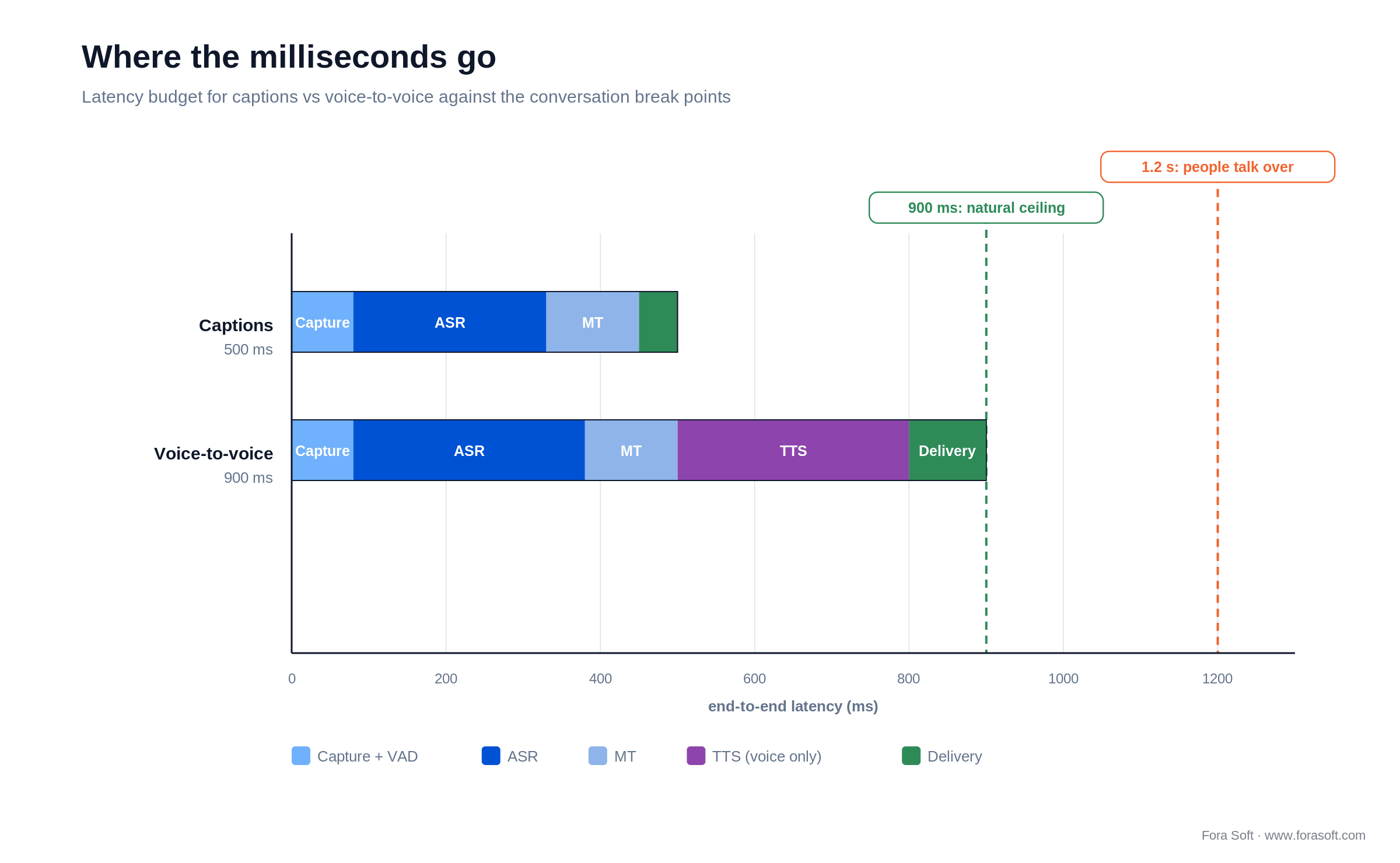
Figure 2. Where the milliseconds go: captions clear 300–500 ms; voice-to-voice needs 700–900 ms; past 1.2 s people talk over each other.
Cascade or end-to-end speech-to-speech?
Since May 2026 you no longer have to build the cascade at all. OpenAI’s GPT-Realtime-Translate, launched 7 May 2026, streams speech straight to translated speech through a dedicated /v1/realtime/translations endpoint: 70+ input languages into 13 output languages at $0.034 per minute, with no separate ASR, MT or TTS bill. Read the session model before you budget it, because it bills one session per output language. Google Meet’s speech translation went generally available on 27 January 2026, and Microsoft’s Teams Interpreter agent has been GA since 31 July 2025. End-to-end is shipped product now, not a research direction.
So when is the cascade still right? When you need to touch the middle. Be precise about what you actually lose, because it is not the transcript: OpenAI’s translation sessions stream both source and target transcript deltas, so you can still render subtitles and store a record. What you lose is the seam. A cascade lets you inject a domain glossary at the MT stage, redact PII before anything is persisted, swap one vendor without rewriting the loop, keep transcription on-prem while translation runs in the cloud, and instrument each stage separately when latency drifts. End-to-end gives you fewer moving parts, better prosody, and one bill.
The honest default in 2026: if you want voice out and you don’t need the transcript, start with an end-to-end model and stop reading. If you need captions, records, glossaries, residency control, or per-stage observability, which is most regulated and in-product work, build the cascade. We ship both, and we’ve stopped recommending a cascade to teams who only ever wanted dubbed audio.

Figure 5. Two shipping architectures. The cascade keeps a seam you can inject a glossary and PII redaction into; end-to-end trades that seam for one vendor and better prosody.
Reach for end-to-end speech-to-speech when: the deliverable is translated audio, you are not injecting a glossary, and per-stage control is not a requirement. On cost, be careful which cascade you are comparing against. A cascade that also produces audio pays per-target TTS, and at ElevenLabs’ $0.05–$0.10 a voiced-minute that one line already costs more than the entire $0.034 end-to-end call — so end-to-end is cheaper at one target and stays cheaper at ten. The cascade only wins on cost for audio if you self-host TTS at $0.01–$0.03 a minute. If what you need is captions rather than audio, that is a different question entirely: transcribe once, translate N times. The cascade is about four times cheaper at a single target and better than ten times cheaper by five, because you pay for transcription once instead of per language.
Five ways real-time video translation is reshaping global work
Five real-time video translation use-cases are in production at scale in 2026: global team meetings, e-learning and corporate training, telemedicine triage, sales and customer calls, and live events and broadcast. Each has a different latency tolerance, accuracy bar, and compliance profile, and matching the stack to the use-case is where most of the return comes from.
1. Global team meetings. Captions and optional voice translation for standups, all-hands, and project calls. Latency budget 300–500 ms for captions and 700–900 ms for voice; meetings tolerate the top of both ranges because turn-taking is slower than broadcast. This is where Microsoft’s live translated captions and Interpreter agent, Zoom’s translated captions, and Webex real-time translation compete. Product teams building custom collaboration tools (live-ops consoles, broker desks, healthcare shift handoffs) add in-product translation rather than forcing users into Teams.
2. E-learning and corporate training. Pre-recorded content gets captioned and translated offline; live sessions get real-time captions in 8–20 languages. Accuracy bar is highest here because learners re-read transcripts. Glossary injection for domain terms matters. OTT-style delivery with translated subtitle tracks tends to win over inline voice dubbing at this bar.
3. Telemedicine and clinical triage. Patient-to-clinician live translation reduces misdiagnosis and increases access. Latency under 1 s, HIPAA BAA mandatory, and medical-glossary-tuned ASR / MT is the differentiator. A pragmatic 2026 setup: on-prem Whisper large-v3 plus a BAA-covered MT engine and a captioning overlay.
4. Sales and customer calls. Real-time translation opens markets that would otherwise require native-language reps. CRM integration (transcripts, moments, action items) is often the real reason custom builds ship here. Latency tolerance is looser (~1.5 s) because reps can pause.
5. Live events, conferences, and broadcast. Multi-language captions for thousands of concurrent viewers, optionally with voice dubs for major pairs. Delivered over LL-HLS or WebRTC side-channels. Relevant when your event product or conference platform has to support an international audience.
Reach for captions-only delivery when: your audience needs accuracy over personality. Learners, patients, and regulated-industry users prefer a readable transcript to an imperfect voice clone.
ROI signals: what to measure, and what nobody has measured
Three outcomes move when live translation ships well: meeting participation, conversion in markets you couldn’t staff, and training throughput. What we are not going to do is hand you industry percentages for the first two, because the credible ones don’t exist. Every number we could find traced back to a vendor page citing another vendor page.
Meeting participation lift. The closest thing to evidence is a controlled study, and it is weaker than it sounds: across 16 distributed groups running requirements meetings over machine-translated text chat — not speech — the gap between the most and least talkative participant narrowed in 10 of them (Calefato et al., Empirical Software Engineering, 2016). We could not find an equivalent controlled study of a live speech deployment. That is a direction, not a multiplier. Measure it yourself: speaking-time distribution per participant, four weeks before and four weeks after. If you already store transcripts, that is a two-line query, and it beats any benchmark we could quote you.
Customer-call conversion in new markets. No published close-rate study exists for translated sales calls. The defensible framing is the constraint shift: you stop asking “can we staff native reps in this market” and start asking “can our existing reps work more pipelines.” Instrument conversion by market before you roll out, or you will have no baseline to argue from at renewal.
Support and training scale. This one is arithmetic rather than research. A single live session translated into 8–15 languages replaces 8–15 separately produced localised sessions; the ratio is whatever your language count is. For L&D and customer-success teams that is a direct headcount trade, and it is the easiest business case to get signed off because finance can check it.
ASR choices: Deepgram, Whisper, AssemblyAI
For live translation in 2026, pick Deepgram Nova-3 when latency is the product, self-hosted Whisper large-v3 when HIPAA or GDPR residency puts transcription on your own hardware, and AssemblyAI when PII redaction and speaker diarisation are the requirement. Speech recognition is usually the biggest chunk of the latency budget and sets the quality ceiling for everything downstream, so this is the choice to get right first.
Deepgram Nova-3. Managed API. Deepgram publishes the decomposition rather than one marketing number: 150–300 ms for transcription, 200–500 ms end-to-end including network. That is the honest way to quote latency and we wish more vendors did it. Nova-3 Monolingual lists at $0.0077 per streaming minute and $0.0043 pre-recorded, with 50+ languages on Deepgram’s own count. Code-switching is a separate mode (language=multi) covering English, Spanish, French, German, Hindi, Russian, Portuguese, Japanese, Italian and Dutch; the expansion release added 10 new monolingual languages (Greek, Romanian, Slovak, Catalan, Lithuanian, Latvian, Estonian, Flemish, Swiss German, Malay) and multilingual keyterm prompting, which is a different thing and gets reported wrong a lot. Deepgram has kept adding languages in changelog drops since, so check the current list rather than any blog post, including this one.
Whisper large-v3 (OpenAI). Open weights, self-hostable, and worth being precise about: it is a 30-second-window model and the model card says outright that Whisper “cannot be used for real-time transcription out of the box.” Real-time means bolting on a streaming wrapper and paying for it in accuracy. Budget for meeting audio, not read speech: on the Open ASR Leaderboard (checked September 2026) large-v3 averages about 5.8% WER across the eight public sets but 13.6% on AMI-Cleaned conference recordings. Re-check it before you quote it; the leaderboard’s default view and set composition both move. The sub-3% figures you will see quoted come from LibriSpeech and will not survive contact with a conference call. Use large-v3-turbo if you want the speed back. Pick self-hosting for residency and fine-tuning, not for cost; managed transcription has caught up on price.
AssemblyAI. Managed API, currently on Universal-3.5 Pro Realtime (June 2026). Treat the headline latency figures carefully: AssemblyAI’s own documentation benchmarks Time to Complete Turn at a P50 near 570 ms, well above the sub-200 ms numbers that circulate in comparison posts. Where it earns its place is PII redaction and speaker diarisation, which is why it keeps winning call-centre and compliance work.
Domain tuning matters, but know what it buys. A generic ASR on a medical call or a legal deposition will miss specialist vocabulary. Glossary and terminology injection is the cheap lift, and what it actually moves is term accuracy: in the canonical benchmark, terminology constraints raised correct term use from 77% to 93–94% while BLEU shifted by less than a point either way (Dinu et al., ACL 2019). Be careful which score you expect to move, though. Fine-tuning on 10–30 hours of domain audio adapts the ASR stage, so what improves is word error rate. BLEU scores the translation stage, and moving that means fine-tuning the MT engine on in-domain parallel text. The published gains there run from under a point to well into double digits depending on domain and language pair, so plan a measurement, not a number.
Reach for self-hosted Whisper when: HIPAA, GDPR residency, or sensitive enterprise data pushes transcription onto your own hardware. Accept the chunking penalty, expect meeting-audio WER around 13–14% before tuning, and ship captions rather than voice dubbing while that budget is tight.
Machine translation: DeepL, Google, Azure, open NMT
Four engines cover the 2026 market: DeepL for European-pair quality, Google Cloud Translation for breadth, Azure Translator if you are already on Microsoft, and self-hosted M2M-100 or MADLAD-400 when nothing may leave your network. Machine translation is the smallest slice of the latency budget and often the biggest quality lever, which makes it the cheapest place to buy an improvement.
DeepL. Premium quality on European pairs, and broader than its reputation suggests: the API now lists 125 target and 114 source languages. Fastest of the four to integrate; API-only; priced per character.
Google Cloud Translation. Broadest coverage of the four: the NMT model list runs past 190 languages, with the newer Translation LLM covering 127. Mature glossary and custom-model support. Pick it for scale and long-tail language breadth.
Azure Translator. Strong enterprise posture (GDPR, HIPAA BAA options), document translation, custom models via Azure ML. Natural pick when you’re already on the Microsoft stack.
Self-hosted open models. Full control, nothing leaves your network, fine-tunable on domain corpora for legal, medical or enterprise work. The licence is the first thing to check here, not the last, and this is where most teams get caught: Meta’s NLLB-200, the model everyone reaches for on long-tail languages, is CC-BY-NC 4.0, and its model card adds that it is “not released for production deployment”. It is a research model, not a commercial option. Meta’s SeamlessM4T v2 speech-to-speech weights carry the same licence. The commercially clean choices are M2M-100 (MIT, 100 languages) and Google’s MADLAD-400 (Apache 2.0, 400+ languages). Right pick when compliance forces self-hosting and you have the MLOps capacity to carry it.
Streaming translation. The trick for low latency is translating partial hypotheses as ASR emits them, and suppressing flicker when the upstream correction arrives. Most teams orchestrate this at the app layer — re-translating the growing partial transcript — rather than relying on a vendor “streaming translate” endpoint. Wiring ASR, MT and delivery into one loop is exactly the kind of build our AI integration team ships.
# one active speaker; Deepgram Nova-3 emits ~300 ms partials
async for partial in asr.stream(mic):
    if partial.is_final or partial.prefix_stable():
        text_es = await mt.translate(partial.text, target="es")   # DeepL / Google
        captions.emit(text_es, debounce_ms=150)   # 150 ms smoothing buffer kills flicker
TTS and voice cloning: ElevenLabs, OpenAI TTS
If captions are enough, skip this stage entirely. For voice out, the two we would actually build on in 2026 are ElevenLabs (still the voice-cloning benchmark, 70+ languages on v3, publishing a per-minute figure of roughly $0.10 for v3 and $0.05 for Flash) and OpenAI, where tts-1 is priced at $15 per million characters and gpt-4o-mini-tts is token-priced. One caveat worth stating plainly: OpenAI does not publish a TTS latency number, so anyone quoting you one is guessing. Play.ht, now PlayAI, is the one we have stopped putting in proposals: Meta acqui-hired the team in July 2025 and the product has been quiet since, which is not a dependency we want under a production voice path.
Voice cloning ethics and compliance. Cloning someone’s voice without explicit consent is a legal liability in the EU and increasingly in US states (New York, California, Tennessee). Build consent capture into onboarding and offer a clean non-cloned voice as fallback.
Lip-sync is a separate problem. For polished dubbing UX you want a visual re-animation layer rather than translated audio over unchanged lips. On pre-recorded content that is solved: Synthesia shipped Dubbing 2.0 on 15 July 2026 and HeyGen has been doing it at scale for longer. Doing it live on a real human speaker is not something you can buy as an API: what the conversational-video vendors ship live is interactive AI avatars, which is a different product. The closest thing to a real implementation is NVIDIA’s LipSync NIM, shown at IBC in September 2026. It ships as a Docker microservice with a gRPC API, gated behind NVIDIA’s AI for Media Private Access Program, and there is a Holoscan for Media build that runs it inside live SMPTE ST 2110 broadcast pipelines. Note the coverage: fine-tuned models exist for German, Spanish and French, and everything else falls back to a generic one. That is a broadcast-plant capability, not something you bolt onto a video call, so budget accordingly and do not promise real-time lip-sync in a product roadmap.
Build vs buy: managed meetings vs custom product
Buy a managed tool when live translation is a convenience for your own staff; build when translation is a surface of your product. That is the whole decision, and everything below is how to check which side you are on. The split is clean because it is really a question about where the feature lives: inside someone else’s meeting app, or inside yours. For a tool-by-tool look at the managed options, see our comparison of the best video-call translation tools; this section is about when to leave them behind.
| Option | Latency | Custom glossary | On-prem / BAA | Best fit |
|---|---|---|---|---|
| Teams live translated captions | Not published | Limited (enterprise) | Azure BAA | Microsoft-first enterprises |
| Zoom translated captions | Not published | Limited | Enterprise plan | Zoom-standardised orgs |
| Webex real-time translation | Not published | Yes (enterprise) | Regional options | Cisco customers |
| Translinguist / KUDO | Not published | Yes | Managed | Events, conferences |
| Custom pipeline (Fora Soft) | 0.3–0.5 s captions tuned; 0.8 s shipped with flicker smoothing | Full control | Yes | In-product, HIPAA, events, proptech |
About that latency column. None of Cisco, Microsoft or Zoom publishes a latency figure for live translation, so we have left the cells blank rather than invent them. Microsoft will only say translation “may take longer than the original speech.” If latency is a hard requirement, measure it in a pilot on your own network; comparison tables that quote vendor latencies to two significant figures are quoting each other. What the vendors do publish is scope: Teams covers 57 spoken languages into 31 targets and needs Teams Premium or a Copilot licence; Webex real-time translation is a paid add-on licence taking 16 spoken languages into 100-plus caption languages, capped at 15 per meeting; Zoom splits it three ways: automated captions, translated captions on Business Plus and up, and a separate voice translator add-on covering five languages.
Custom pays off when: the product itself needs live translation (not the company’s meetings), the industry has heavy jargon (medical, legal, finance), on-prem is mandatory, or the integration (CRM, LMS, EMR) doesn’t exist in a managed tool. That is where a custom video-conferencing build earns its keep. For the integration-first version of this decision, we go deeper in our real-time translation integration playbook.
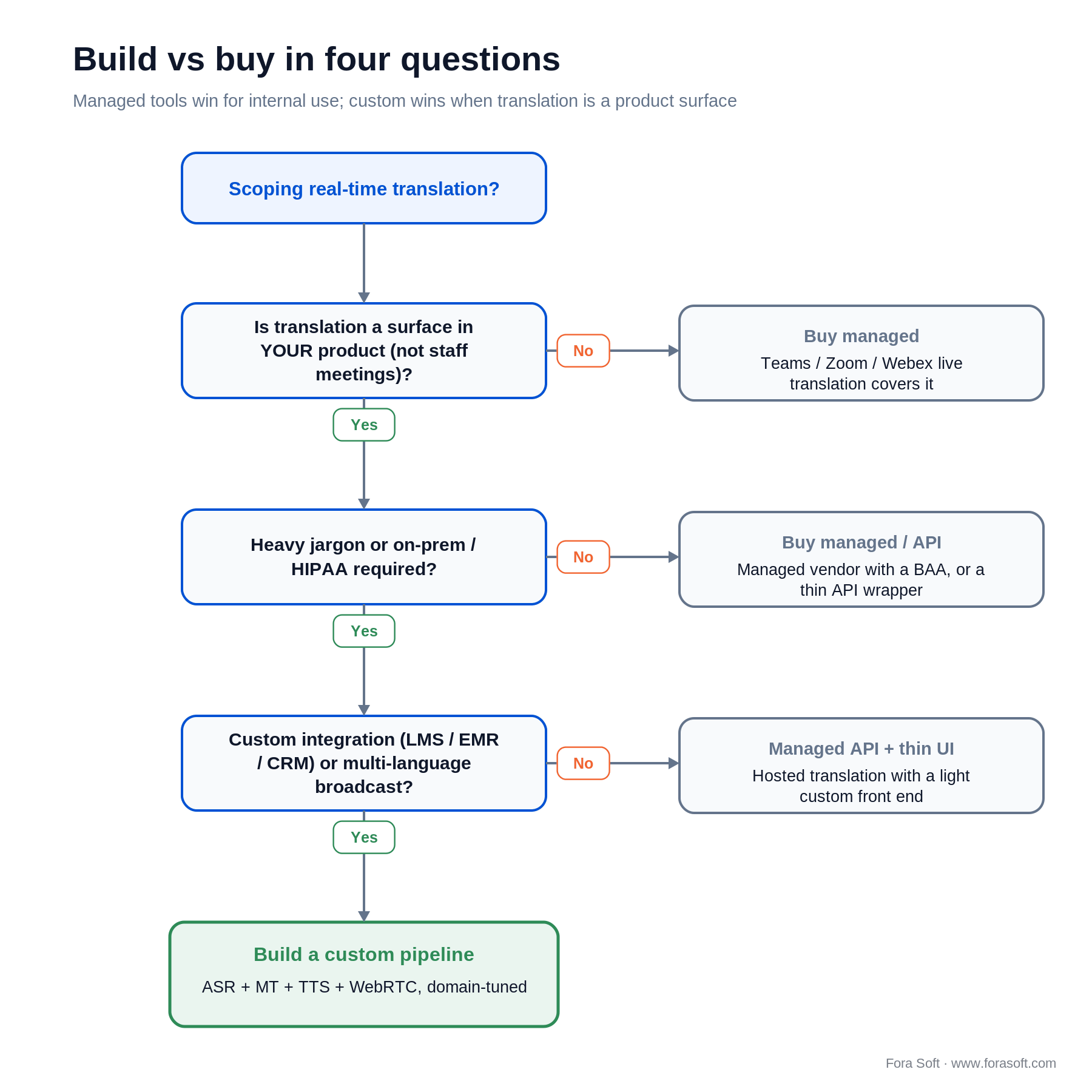
Figure 3. Build vs buy in four questions. Managed tools win for internal use; custom wins when translation is a product surface.
Reach for a managed meeting tool when: live translation is a convenience for your own staff, not a product feature. Custom is only worth it when translation is inside your product surface.
What building it actually takes. Since we promised numbers earlier, here they are rather than buried in an FAQ. A focused captions-only MVP (streaming ASR, streaming MT, caption overlay, one language pair proven end-to-end) lands in 6–10 weeks with a team that already ships real-time video. Adding voice output is another 3–5 weeks, or close to zero if you take the end-to-end route above. Enterprise-grade work, meaning HIPAA, SOC 2, a domain fine-tune and per-pair QA across a dozen languages, runs 4–6 months. Those are our ranges with Agent Engineering, which is what we call running AI agents alongside our senior engineers on the build; These are our ranges with Agent Engineering, and they assume a team that already ships real-time video; budget differently if yours does not.
Mini case: multilingual real-time video on production scale
Situation. Speed.Space — our remote video production platform used on Netflix-, HBO-, and EA-grade productions — supports international crews where directors, DPs, and VFX leads may work in four or more languages on one call. A generic captioning tool would drop key production vocabulary and break the creative flow.
12 weeks, shipped. We integrated a streaming ASR into the WebRTC side-channel of Speed.Space, wired it to a domain-tuned MT with a production glossary (camera terms, director call-outs, union-specific phrasing), and rendered captions inline with the video feed. The critical fix was suppressing caption flicker when upstream ASR corrections arrived — we built a 150 ms smoothing buffer that traded a little latency for a dramatically more readable caption line. That buffer is 150 ms of the 300 ms gap between the 500 ms a tuned captions-only budget allows and the 800 ms we shipped; the rest went on the domain-tuned MT hop and the WebRTC side-channel. We spent it on purpose and we would make the same call again.
Outcome. End-to-end caption latency settled around 800 ms. On accuracy we will be straight with you: the before/after WER on that project belongs to the client and we don’t publish it. What we can say is what moved it: the production glossary, not a bigger model. That matches the published pattern, where terminology constraints lift correct term use into the nineties while the headline score barely twitches. The lesson: in high-vocabulary domains, a domain glossary is cheaper than a better model. Want a similar assessment for your translation pipeline?
Need domain-tuned live translation for your product?
We have shipped domain glossaries for production, legal, medical, and enterprise call workflows. Bring your jargon list; we will scope a pilot.
A decision framework — pick your translation path in five questions
Five questions settle the architecture: captions or voice, how many language pairs, what the compliance regime forces, how specialised the vocabulary is, and where the output has to land. Answer them in that order and the stack picks itself.
1. Captions only, or voice dubbing too? Captions hit 300–500 ms budgets easily. Voice dubbing needs 700–900 ms and adds ethical / consent work. Start with captions; add voice only when the product justifies it.
2. How many language pairs? Under 10 pairs on common languages: any of DeepL, Google, Azure. Over 50 pairs or rare languages: Google Cloud Translation, or self-hosted MADLAD-400 if the weights have to stay on your hardware — not NLLB-200, which is CC-BY-NC and not licensed for a commercial product. If you’re shipping 100+ pairs in 2026, expect quality to vary dramatically across them.
3. Compliance and data residency. HIPAA, GDPR residency, or confidential enterprise data usually force on-prem ASR + self-hosted MT. Accept the latency hit.
4. Vocabulary domain. Generic business English: off-the-shelf is fine. Medical, legal, finance, or niche enterprise: plan for glossary injection and possibly a fine-tune. Expect terminology accuracy to move a long way on a glossary alone. If you also fine-tune, be clear whether you are adapting the ASR stage (measured in word error rate) or the MT stage (measured in translation quality), because they are different budgets and different data.
5. Where does the output go? In-meeting overlay, stored transcript, LMS / EMR / CRM event, searchable archive. Each implies a different storage, retention, and access pattern.
Five pitfalls that burn translation quarters
The five that cost real quarters: stitching vendors together without an end-to-end latency plan, ignoring caption flicker, skipping speaker diarisation, assuming every language pair behaves like English–Spanish, and cloning voices without consent. Each one is cheap to avoid before the build and expensive to retrofit after it.
1. Stitching three vendors without a latency plan. ASR vendor A + MT vendor B + TTS vendor C is the easiest way to blow past 1.5 s. Measure end-to-end early; renegotiate stages that eat more than their share.
2. Ignoring caption flicker. Streaming ASR emits partial hypotheses that get revised; unsmoothed captions jitter and become unreadable. A 100–200 ms smoothing buffer usually pays for itself in UX.
3. Skipping speaker diarisation. Multiple speakers become one wall of text; conversation structure disappears. Diarisation is worth the 20–40 ms latency cost in any multi-speaker product.
4. Assuming all pairs work equally. A translation pipeline that looks great on EN↔ES can fall over on EN↔Japanese / Korean / Arabic because of word-order and ASR quality differences. Per-pair quality audits catch the cliff.
5. Voice cloning without consent. Cloning a user’s voice without explicit opt-in is a legal liability in the EU and in many US states. Build consent capture into onboarding or use non-cloned voices.
Compliance: HIPAA, GDPR, and voice-rights law
HIPAA. Any ASR, MT, or TTS vendor used in a clinical workflow needs a signed Business Associate Agreement (BAA). Azure, AWS, and Google all offer this; most smaller vendors do not. Self-hosted Whisper plus a BAA-signed MT is the pragmatic US clinical pattern.
GDPR and data residency. EU personal data must stay in the EU unless a valid transfer mechanism is in place. Some ASR vendors expose regional endpoints; otherwise, self-hosting in an EU region is the cleanest answer.
Voice-cloning consent. Tennessee’s ELVIS Act took effect 1 July 2024 and California’s AB 1836 and AB 2602 on 1 January 2025, with more US states following. In the EU, AI Act Article 50 has applied since 2 August 2026, and which duty you carry depends on what you built. Ship the generative system and Article 50(2) makes you mark outputs in a machine-readable format; use someone else’s to produce a deepfake and Article 50(4) makes you disclose that to the people hearing it. Generative systems already on the market before 2 August 2026 have until 2 December 2026 for the marking duty, under the transitional Article 111(4) inserted by the Digital Omnibus on AI, Regulation (EU) 2026/1744, in force since 27 July 2026. That is adopted law, not a proposal, which is worth saying because a lot of guidance written earlier in 2026 still calls it one. Explicit opt-in plus watermarking is the default safe path.
Recording consent. Jurisdictions split on one-party vs two-party-consent recording. Most products default to explicit opt-in plus a visible recording indicator, which also satisfies the EU.
Cost model: what real-time translation actually costs
A captions-only cascade for a 100-person broadcast-style meeting, one active speaker with captions fanned out in five languages, costs about $0.61–$1.06 an hour in API fees at 2026 list prices. Translated audio in those same five languages is a different product and a different bill: $10.20 an hour end-to-end, against $15.61–$31.06 an hour for a cascade doing the same job with ElevenLabs on the TTS stage. Transcribe every participant’s microphone for captions and the room runs $49–$58 an hour. Those numbers come out of the per-minute components below, and we show the arithmetic underneath because cost claims in this space are usually asserted rather than computed.
- ASR (streaming). Deepgram Nova-3 Monolingual lists at $0.0077 per streaming minute and $0.0043 pre-recorded (a lower promotional rate was running when we checked in September 2026; we price off list, not off promos). Self-hosted Whisper amortises to $0.0005–0.002 per minute only at high sustained GPU utilisation; a bursty meeting product will not see the bottom of that range.
- MT. DeepL / Google / Azure around $20–60 per million characters; for conversation that’s $0.0005–0.002 per minute.
- TTS (optional). ElevenLabs publishes roughly $0.10 per minute on v3 and $0.05 on Flash, billed per 1,000 characters. OpenAI’s
tts-1is $15 per million characters;gpt-4o-mini-ttsis token-priced. Self-hosted open models land at $0.01–0.03. - Delivery. A WebRTC data channel adds effectively nothing. An LL-HLS or HLS side-caption track is a few kbps of text, so it is dominated by request overhead rather than bytes; price it from your own CDN contract rather than from anyone’s blog, including ours. What matters architecturally is that it is the only line that scales with audience rather than with speakers.
- End-to-end alternative. GPT-Realtime-Translate is $0.034 per minute for the entire speech-to-speech loop, which beats any cascade running managed TTS. A cascade with self-hosted TTS is the one case that still comes in under it.

Figure 4. The arithmetic, shown: per-minute inputs on the left, three scenarios summed on the right. For captions the cascade wins at any language count; for translated audio, end-to-end does.
The arithmetic, shown. Broadcast case, one speaker, five caption languages, one hour: ASR is 1 × 60 × $0.0077 = $0.46; MT is 5 × 60 × $0.0005–0.002 = $0.15–$0.60; over a WebRTC data channel delivery is about zero, so you land at $0.61–$1.06 an hour. Translated audio in the same five languages is five sessions: 5 × 60 × $0.034 = $10.20. That is roughly ten times the captions-only cascade — but captions and dubbed audio are not the same deliverable. Against a cascade that also speaks, add 5 × 60 × $0.05–$0.10 of ElevenLabs on top and you get $15.61–$31.06, so end-to-end is the cheaper way to get audio and it stays cheaper as you add targets, because per-target TTS costs more per minute than the whole end-to-end call. Every-mic case, 100 transcribed streams, one target language: ASR is 100 × 60 × $0.0077 = $46.20, MT adds $3–$12, total $49–$58. Note what that means: ASR scales with transcribed streams, MT and end-to-end sessions scale with streams × target languages, and caption delivery is the only line that scales with viewers. The short version: cascade for captions, end-to-end for audio, and only self-hosted TTS flips that second one back. Custom engineering sits on top of all of this and earns its keep when integrations, domain quality, or compliance force it.
KPIs: what to measure after you ship
Quality KPIs. Word Error Rate by language pair for the ASR stage (target under 8% on primary pairs, under 15% on the long tail). For translation quality, report COMET or MetricX where you have references, and COMETKiwi or MetricX in QE mode where you don’t. The WMT metrics task has ranked neural metrics above BLEU since its 2022 results paper, subtitled “Stop Using BLEU”, and BLEU deltas don’t transfer across test sets or engines anyway. For speech-to-speech, BLASER 2.0. Then speaker-diarisation accuracy and caption flicker rate. Track by pair, not overall — averages hide the failing pair.
Business KPIs. Session duration lift vs pre-translation baseline; cross-language participation rate in meetings; support-ticket reduction for international users; conversion lift on customer calls. Tie the dashboard to a product-level outcome, not to “translation used.”
Reliability KPIs. Pipeline p95 latency; ASR / MT / TTS per-stage availability; caption emission rate (partial corrections per minute); pair-level error-rate drift. Instrument each stage independently so you fix the right vendor or stage.
When custom real-time translation is not worth it
Four patterns where a managed solution beats a bespoke build: internal-only use, small-volume events, no domain-vocabulary gap, and a privacy posture your team can’t carry. If you recognise your situation in any of these, buying is the right answer and we will tell you so on the call.
1. Internal-only use-case. If the only consumers are your own staff, Teams live translated captions, Zoom translated captions or Webex real-time translation cover most of the need at zero integration cost. Microsoft’s Interpreter agent has done real speech-to-speech in Teams since 31 July 2025, which closes the last obvious gap.
2. Small-volume events. Sub-10-hour monthly usage: managed services (KUDO, Translinguist) outperform in cost-per-minute.
3. No domain vocabulary gap. If your use-case is generic English-Spanish-German business conversation, off-the-shelf already ships at 90%+ of what a custom fine-tune would deliver.
4. Weak privacy posture. If your team won’t pass HIPAA / GDPR / SOC 2 on a custom build, a managed vendor that already has those attestations is a faster and safer path.
Reach for voice cloning only when: product value is material (content dubbing, accessibility, branded voice), consent capture is clean, and you can live with the EU AI Act transparency obligations. Otherwise, ship captions plus a non-cloned voice.
Second opinion on your translation pipeline?
We have shipped this exact stack — ASR, MT, TTS, WebRTC delivery — in production-grade workflows. Tell us your language pairs and latency target.
Integration checklist: transport, storage, and observability
Five decisions to lock before engineering starts: transport, storage, PII redaction, observability, and admin surfaces. Each one is a day of argument now and a fortnight of rework later.
- Transport. WebRTC data channel for real-time captions; SFU side-channel for voice dubs; HLS subtitle ladder for broadcast. Your WebRTC architecture picks this.
- Storage. Raw audio (sensitive, retain only as legally required), transcripts (searchable, PII-redacted), translations (versioned).
- PII redaction. Credit cards, emails, national IDs out before transcript is persisted. AssemblyAI, Azure, and custom rules all work.
- Observability. Per-pair latency, per-stage error rates, per-speaker WER, per-session transcript audit. Prometheus + Grafana is the common stack.
- Admin surfaces. Glossary editor, pair enable / disable, retention controls. Build them into the admin console from day one.
Emerging trends through 2027
Speech-to-speech has already arrived, so plan around it rather than for it. GPT-Realtime-Translate went live on 7 May 2026, Google Meet’s speech translation reached GA on 27 January 2026, and Meta’s open speech-to-speech weights have been downloadable since November 2023, on a non-commercial licence, so read that before you plan a product around them. The open question for 2027 isn’t whether end-to-end works; it’s whether the per-stage control a cascade gives you is worth three extra vendors.
On-device live translation already shipped, so check what your users have before you build it. Apple shipped Live Translation with iOS 26 on 15 September 2025 across Messages, FaceTime, Phone and AirPods, running on-device. Google announced Voice Translate with Pixel 10 on 20 August 2025 and shipped it on the 28th, on-device on Tensor G5, in something close to the speaker’s own voice. Samsung’s Live Translate has been on Galaxy since the S24. Samsung’s own materials disagree about whether it runs fully offline, so if that matters to your use-case, test it on the handset rather than trusting either the launch footnote or the FAQ. If your product competes with what is already in the user’s pocket, plan for that.
Visual dubbing splits in two. Pre-recorded lip-sync crossed the publish-without-editing bar in mid-2026: Synthesia’s Dubbing 2.0 landed 15 July 2026. Real-time interactive avatars are generally available at HeyGen, as LiveAvatar, and in beta at Synthesia. Real-time lip-sync of a live human speaker has left “nobody ships it” territory, but only at the broadcast tier: NVIDIA’s LipSync NIM, shown at IBC in September 2026, runs inside live SMPTE ST 2110 pipelines on Holoscan for Media, behind an access programme and with fine-tuned coverage for three languages. No conversational-video vendor offers it as an API, and that is the honest answer when a stakeholder asks for it.
Agentic meeting summaries. LLM-powered post-meeting agents that digest translated transcripts, extract action items, assign owners, and update CRMs. The translation layer becomes invisible; the output is a cleaner downstream workflow.
Hybrid human + AI interpreting. For high-stakes legal and diplomatic use-cases, an AI baseline with a human interpreter correcting in real time is emerging. Cheaper than fully-human interpreting, higher-quality than fully-AI.
FAQ
What is real-time video translation?
A pipeline that captures audio from a video stream, transcribes it in streaming mode (ASR), translates it into one or more target languages (MT), and optionally synthesises the translation as speech (TTS) — fast enough that conversation stays natural. End-to-end latency sits around 300–500 ms for captions and 700–900 ms for voice in 2026, and since May 2026 a single end-to-end model (OpenAI GPT-Realtime-Translate) can replace the ASR, MT and TTS stages for $0.034 per minute.
How does it differ from “live captions”?
Live captions are ASR plus rendering in the original language. Real-time translation adds a machine-translation pass, optionally a TTS pass, and turns captions or voice into a cross-language experience. The engineering overlap is ~70%; the product experience is very different.
Which ASR engine should we use?
Deepgram Nova-3 when latency is the product: Deepgram publishes 150–300 ms transcription and 200–500 ms end-to-end, at $0.0077 per streaming minute. Whisper large-v3 when self-hosting is mandatory for HIPAA or GDPR residency, accepting the chunking penalty and around 13.6% WER on meeting audio. AssemblyAI when PII redaction and speaker diarisation matter. Pair any of them with a streaming MT engine for a full pipeline.
How accurate is real-time translation in 2026?
Report it as word error rate against a named benchmark, not as a single accuracy percentage. Whisper large-v3 sits near 5.8% average WER on the Open ASR Leaderboard (checked September 2026) but 13.6% on AMI-Cleaned conference audio, because conversational meeting audio is several times harder than the read speech most quoted figures come from. Jargon-heavy domains are harder again unless you inject a domain glossary or fine-tune on in-domain audio. Rare language pairs vary widely; audit per-pair before rolling out.
Should we ship captions or voice dubs?
Captions first, always. Lower latency, lower cost, no voice-rights issues. Voice dubs earn their keep only for premium experiences: entertainment dubbing, high-engagement live events, accessibility. Many successful products combine captions for everyone with voice dubs as a premium add-on.
How long does it take to ship a live translation feature?
A focused captions-only MVP — streaming ASR + streaming MT + caption overlay — lands in 6–10 weeks with a team that ships real-time video. Add voice dubbing and expect another 3–5 weeks. Enterprise-grade (HIPAA, SOC 2, domain fine-tune, multi-language QA) runs 4–6 months. Those are our ranges with Agent Engineering — AI agents working alongside our senior engineers on the build.
Do we need consent for voice cloning?
Yes — and increasingly by law. EU AI Act Article 50 has applied since 2 August 2026: if you ship the generative system you must mark outputs machine-readably under Article 50(2), and if you use one to produce a deepfake you must disclose it under Article 50(4). Systems already on the market before that date have until 2 December 2026 for the marking duty. Tennessee, California and other US states have passed explicit voice-rights statutes. Build explicit opt-in plus watermarking into onboarding. Many products offer a non-cloned synthetic voice as default and let users opt into cloning.
How much does a real-time translation pipeline cost?
A broadcast meeting with one active speaker and captions in five languages costs about $0.61–$1.06 per hour in API fees at 2026 list prices. Transcribe every participant’s microphone and the same room runs $49–$58 per hour, because ASR alone is $46.20. Voice output adds $0.05–$0.10 per voiced-minute. Translated audio is a different bill: GPT-Realtime-Translate is $0.034 per minute per output language, so the same five-language room is $10.20 per hour end-to-end, against roughly $15.61–$31.06 for a cascade doing the same job with managed TTS.
Should I build live translation or buy a managed tool?
Buy when live translation is a convenience for your own staff: Teams live translated captions, Zoom translated captions and Webex real-time translation cover that at zero integration cost. Build when translation is a surface of your product, when your domain carries heavy jargon (medical, legal, finance), when on-prem or HIPAA deployment is mandatory, or when you need CRM, LMS or EMR integration no managed tool offers. A captions-only custom MVP lands in 6–10 weeks; managed tools cost nothing to integrate but cannot live inside your product.
What to Read Next
AI & Video
Real-Time Video Processing with AI: 2026 Playbook
The AI-in-video patterns that sit under ASR, MT, and TTS pipelines.
WebRTC
WebRTC Architecture Guide for Business 2026
How captions and translations ride inside the SFU and data channels.
Streaming
Real-Time Video Streaming: 2026 Low-Latency Playbook
The transport layer that translation pipelines ride on — WebRTC, LL-HLS, and the codec choice.
AI Agents
LiveKit AI Agents Guide
Running voice AI agents in live video — the framework most translation products use today.
Ready to ship live translation that feels natural?
Real-time video translation in 2026 is either a three-stage cascade (ASR, MT, optional TTS) landing under ~900 ms end-to-end, or a single end-to-end speech-to-speech call at $0.034 a minute. The cascade stack has stabilised on Deepgram Nova-3 or Whisper large-v3 for ASR, DeepL / Google / Azure for MT, and ElevenLabs for voice; the end-to-end route trades per-stage control for fewer vendors and better prosody. The hard engineering is domain tuning, caption smoothing, compliance, and tying the output into your product’s actual workflow.
If you are scoping live translation, the fastest move is a 30-minute call with a team that has shipped this stack under production-grade latency and accuracy constraints. We will look at your language pairs, latency target, compliance profile, and integration wiring and tell you where to build, where to buy, and where the quiet week-eaters are hiding.

The book · Volume 7 of 7
AI for Video: A Complete Guide to Intelligence in Video Products: From Real-Time Pipelines and Agents to Serving, Cost, Compliance, and Verticals
This playbook sets the pipeline and the budget; keeping the loop under a second in a live call is where the engineering sits. Volume 7 covers latency in the call, where AI plugs into a WebRTC pipeline, live captions and translation, serving on vLLM and Triton, and cost per stream-hour. It is the reference for teams shipping translation inside their own product. Written by Nikolay Sapunov, CEO at Fora Soft.
Read it on Amazon →Kindle & paperback · Fora Soft Video Engineering Handbook
Talk to engineers who ship live translation
30 minutes, no slides. Bring your language pairs and latency target; we will map it to a week-level plan.

