

Enterprise IPTV — also called corporate IPTV, and sold by some vendors as Smart IPTV — is an enterprise-controlled video distribution system running on the company’s own network: it turns the company network and every Smart TV, set-top box, laptop and phone on it into a controlled video channel for training, town halls, compliance and product education. Done right, it replaces broadcast TV, SharePoint video, patchwork LMS embeds and one-off Zoom recordings with a single measurable pipeline: headend → middleware → CDN/eCDN → devices → analytics. This playbook is the short, opinionated version — what to build, what to buy, what it costs, and where enterprise IPTV rollouts usually go wrong.
Key takeaways
• Enterprise IPTV is a pipeline, not a player. It is headend + middleware + CMS + multi-DRM + CDN/eCDN + Smart TV, STB, web and mobile clients, not just an app that streams channels.
• Start with eCDN over unicast; add LAN multicast above ~10,000 concurrent viewers. An eCDN cuts WAN egress 65–90 % with no switch work. Multicast (IGMPv3 with snooping, PIM-SM/SSM to cross sites) keeps bandwidth flat for all-hands in the offices you control; unicast LL-HLS or WebRTC handles remote and BYOD viewers.
• Integrate with the LMS, not around it. SCORM + xAPI + LTI + SSO (SAML/OIDC) turn a video player into a compliance system with audit-grade completion data.
• Buy the platform, customize the edges. Panopto, Kaltura, Vbrick and Brightcove cover 80 % of corporate needs; custom development pays off on compliance, LAN multicast with an STB fleet, deep HRIS wiring, a white-label product, or at 20,000+ learners.
• Measure behaviour, not clicks. Completion rate, quiz uplift, time-to-competence and cost-per-trained-employee are the only KPIs that make CFOs renew training budgets.
Updated October 2026: enterprise IPTV system vendors (VITEC, Uniguest Tripleplay, Haivision) and managed IPTV added; Microsoft eCDN and Teams town hall licensing, CloudFront flat-rate plans and vendor prices re-checked.
Why Fora Soft wrote this enterprise IPTV playbook
Fora Soft is a software development company that has shipped video products since 2005: 250+ projects across video streaming, video conferencing, IPTV and e-learning. Enterprise IPTV is not a side topic for us. It is most of what we do. We have built Android STB and Smart TV IPTV clients powered by the Stalker middleware API for a Canadian ISP (our project Smart IPTV), a white-label Set-Top-Box platform carrying 3,000+ live channels for Swiss community operators (Smart STB IPTV), and on-demand Smart TV training apps like Bellicon with 530+ workout videos for Apple TV and Android TV.
On the learning side, we engineered the virtual-classroom core of BrainCert, which now serves 100,000+ customers and 500M+ classroom minutes. That mix — IPTV delivery on one hand, SCORM/xAPI-grade LMS on the other — is exactly the stack a modern enterprise IPTV rollout needs. Clutch named Fora Soft a Top Smart TV Development Company in 2024, and corporate IPTV is where that Smart TV, streaming and LMS work converges. This guide distils what we wish every prospect knew before we scope their project; when a team decides to build, our IPTV and internet TV development team takes the same headend-to-Smart-TV stack into production.
Scoping a corporate IPTV training platform?
Bring your headcount, office map and compliance list. In 30 minutes we’ll tell you what to build, what to buy, and what it will cost.
What is enterprise IPTV for corporate training?
Consumer IPTV is a Smart TV pulling channels from an ISP. Enterprise IPTV is an enterprise-controlled video distribution system: live broadcasts, on-demand training libraries, interactive overlays and analytics, delivered over IP to Smart TVs, STBs, browsers, phones and Teams/Zoom — governed by SSO, DRM and the LMS. The platform sits between your content producers (L&D, corporate comms, product marketing) and every employee, contractor or partner who needs to be trained or informed. Vendors also call this corporate IPTV; the two terms are interchangeable.
What is an enterprise IPTV system? An enterprise IPTV system is the hardware and software that delivers live TV channels, in-house broadcasts and on-demand video over a company’s IP network: encoders and a headend, middleware with an EPG, a content manager and players on screens, set-top boxes and desktops. Managed IPTV is the same system run for you: a vendor or integrator operates the headend, middleware, channel rights and device fleet under an SLA, usually billed per screen or per site, so your IT team does not run the video stack itself.
The market context is relevant when you pitch budget. Grand View Research sized corporate e-learning at USD 104.3B in 2024 and projects USD 335B by 2030, a 21.7 % CAGR for 2025–2030 (Grand View Research, checked October 2026). Translation for a CFO: spending on video-based training is not a niche; it is the default way large organisations transfer skills in 2026. Enterprise IPTV is simply the delivery mechanism that makes that spend governable.
Reach for enterprise IPTV when: you have more than ~500 learners, mandatory compliance training, live events that spike bandwidth, or a mix of on-prem offices and remote staff that a single SaaS player cannot serve without choking the WAN.
Where enterprise IPTV beats a plain LMS
A vanilla LMS treats video as an attachment. Enterprise IPTV treats video as the product and wraps the LMS around it.
1. Live at scale without melting the network. A 5,000-person all-hands on standard HLS is ~4.5 TB of egress per hour at 2 Mbps adaptive bitrate. eCDN + multicast routinely cuts that WAN load by 65–90 %. A plain LMS does not have that lever.
2. Channels, not courses. Finance, HR, product and safety each get their own channel and EPG. Employees browse a TV-style grid on lobby screens and shop floors, not a Kirkpatrick-shaped course catalog.
3. Live-to-VoD and nDVR. Every broadcast auto-archives, time-shifts and produces SCORM/xAPI completion events, a legal requirement for regulated industries and a retention multiplier for everyone else.
4. Native Smart TV and STB. Manufacturing floors, hospitals, retail back-rooms and field offices without laptops are still reachable — the case for dedicated IPTV hardware did not disappear with BYOD.
The enterprise IPTV reference architecture
Every serious enterprise IPTV platform has six tiers: headend (encode and package), middleware (users, EPG, entitlements), CMS (catalog and metadata), DRM (keys and licences), CDN/eCDN (move the bytes) and clients (Smart TV, STB, web, mobile). If a vendor pitch skips one, ask why.
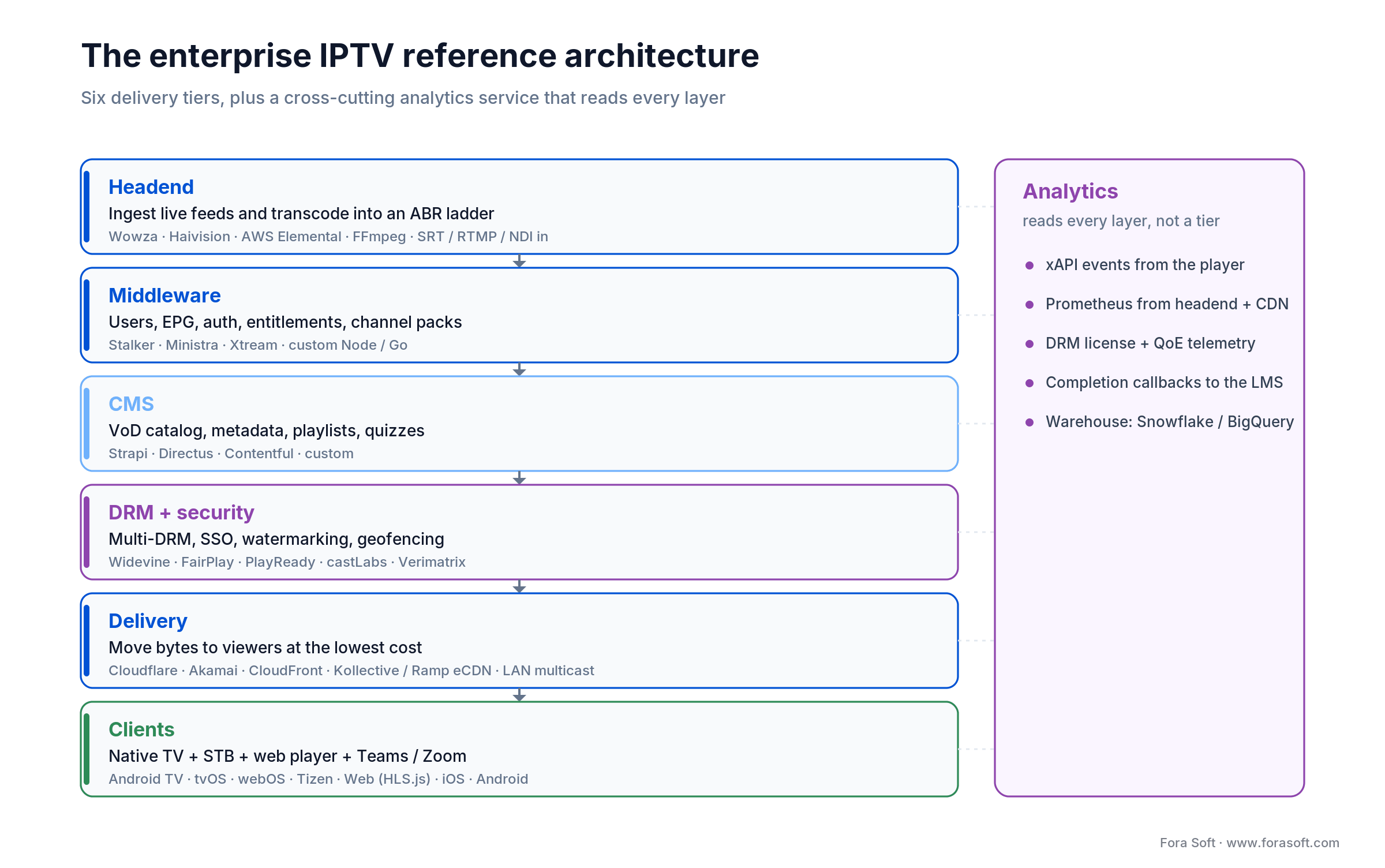
Figure 1. The six-tier enterprise IPTV stack. Read it top to bottom: each tier hands a contract to the next.
| Tier | Role | Typical tech |
|---|---|---|
| Headend | Ingest + transcode into ABR ladder | Wowza, Haivision, AWS Elemental, FFmpeg, SRT/RTMP/NDI ingest |
| Middleware | Users, EPG, auth, billing, channel packs | Ministra TV Platform (Infomir, formerly Stalker Middleware), custom Node/Go |
| CMS | VoD catalog, metadata, playlists, quizzes | Strapi, Directus, Contentful, custom |
| DRM + security | Multi-DRM, SSO, watermarking, geofencing | Widevine, FairPlay, PlayReady, castLabs, Verimatrix |
| Delivery | Move bytes to viewers at the lowest cost | Cloudflare, Akamai, AWS CloudFront; Microsoft eCDN, Kollective or Hive; multicast LAN |
| Clients | Native apps + web player + Teams/Zoom | Android TV, tvOS, LG webOS, Samsung Tizen, Web (HLS.js/dash.js), iOS, Android |
Analytics is not a seventh tier; it is a cross-cutting service that reads every layer. Plan for xAPI events from the player, Prometheus metrics from the headend/CDN, and completion callbacks to the LMS from day one. Retrofitting analytics after launch is the single most expensive mistake we see. For the platform layer under all six tiers, our OTT video platform guide walks the same architecture end to end.
Multicast, eCDN or unicast: which delivery topology for a town hall?
For a corporate town hall, the 2026 default is eCDN over unicast, with LAN multicast added only above ~10,000 concurrent viewers or where a managed plant or hospital LAN makes bandwidth the hard constraint. Under 1,000 concurrent viewers, plain unicast CDN is fine. Between 1,000 and 10,000, an eCDN cuts WAN egress 65–90 % for a fraction of the engineering cost of multicast. Above 10,000, run both: eCDN everywhere, multicast inside the offices you control. Topology is the highest-impact decision in an enterprise IPTV rollout. Get it wrong and your all-hands saturates a 1 Gbps office uplink before the CEO finishes the intro slide. At 2 Mbps that uplink carries 500 concurrent viewers per site. The thresholds above are total scale; the uplink math is per office.
1. Unicast over CDN. Each viewer pulls their own copy over HLS or DASH from Cloudflare, CloudFront or Akamai. Simple, works everywhere, scales to millions, but costs USD 0.02–0.15 per GB, which stacks up on a 5,000-person live event. Those are list rates; a committed enterprise contract with Akamai, Fastly or Cloudflare routinely lands at USD 0.005–0.02 per GB, so run your own numbers before you build a business case on the top of that range. AWS now also sells CloudFront flat-rate pricing plans with no overage charges: the Premium tier is USD 1,000 a month for 50 TB and 500 million requests, configurable up to USD 10,000 for 600 TB (AWS documentation, October 2026). That covers roughly eleven 4.5 TB town halls a month, provided the HLS segment requests fit the allowance too.
2. LAN multicast. The headend emits one UDP stream per channel; every device inside the LAN "joins" it via IGMPv3. Bandwidth stays flat regardless of viewer count. Requires cooperative switches (IGMPv3 snooping, an IGMP querier per VLAN, a dedicated video VLAN and QoS) and kills any BYOD/remote use case. One correction we make on most network calls: IGMP alone only covers a single layer-2 domain. The moment channels must cross sites you are also buying PIM-SM (RFC 7761) or source-specific PIM-SSM on 232.0.0.0/8 (RFC 4607) on the L3 core, plus a rendezvous point if you run SM, or mVPN to carry it across the WAN. That routing work, not the switch config, is the line item that gets under-scoped.
3. eCDN peer-to-peer. Three vendors matter in 2026: Microsoft eCDN (the former Peer5, acquired in 2021, and since Microsoft’s April 2026 Teams licensing change part of every Teams Enterprise licence, including E3 and E5 suites but not Microsoft 365 Business plans), Kollective and Hive. All three turn every viewer into a cache for their neighbours on the LAN, cutting WAN egress 65–90 % during big broadcasts without the switch-level work multicast needs. Vbrick Rev bundles its own eCDN: native peer-to-peer plus the edge-caching and multicast stack Vbrick acquired with Ramp in December 2022, and does not sell it separately. On price: Microsoft eCDN comes with the Teams Enterprise licence you already hold; Kollective and Hive are licensed per seat or per concurrent viewer, and typical enterprise deals sit in USD 10k–100k+ per year. We compare the eCDN vendors on cost, reference customers and rollout questions in a separate enterprise video streaming and eCDN vendor guide.
4. Hybrid (recommended default). Multicast in managed offices, eCDN in semi-managed branches, unicast CDN for remote/BYOD. Your middleware picks the lane per user based on subnet / device / SSO group.
Reach for hybrid when: you have >3 offices with managed networks plus a remote workforce, and a single live event has ever passed 1,000 concurrent internal viewers — the same threshold as Q1 of the decision framework below.
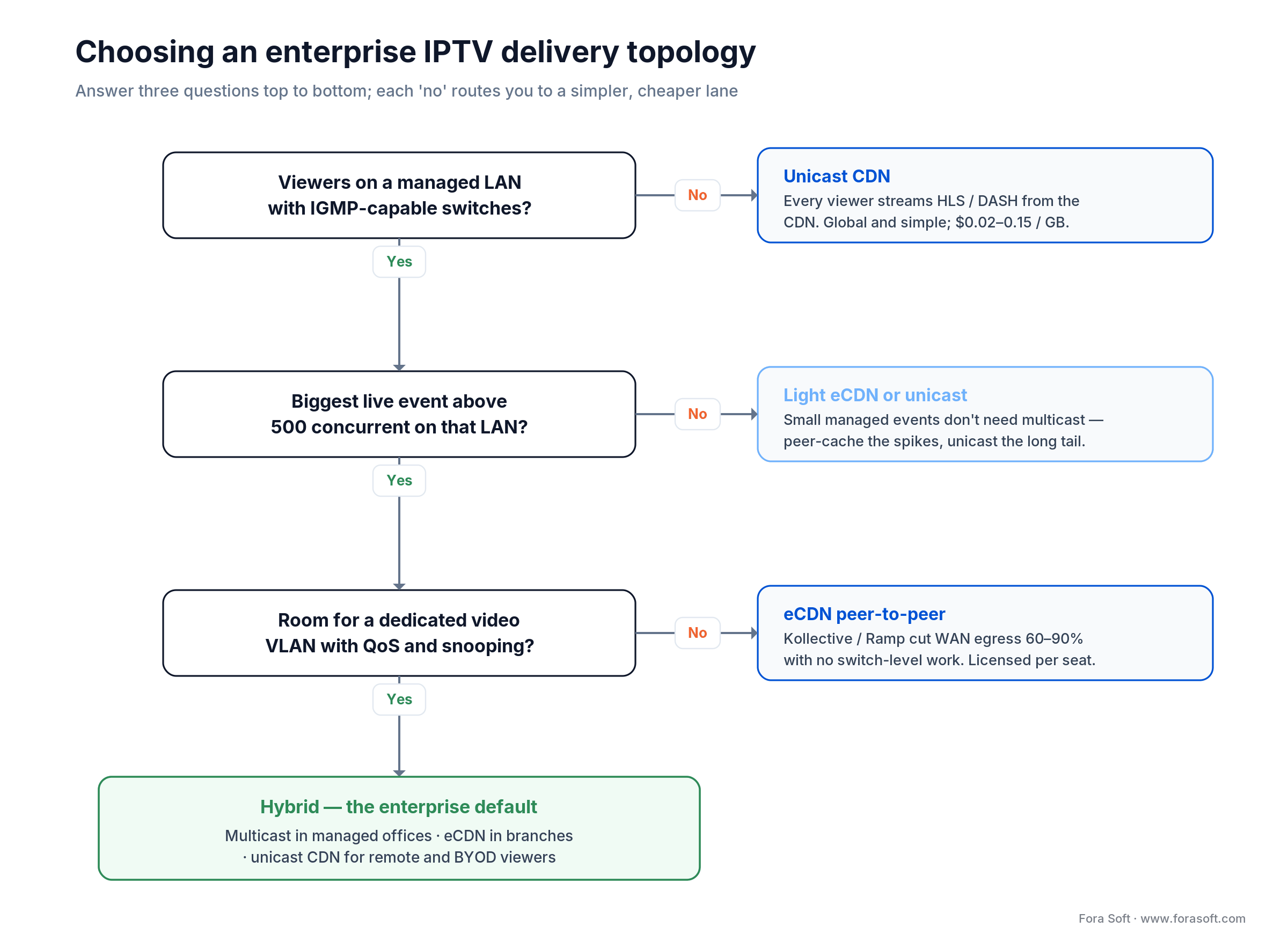
Figure 2. Each ‘no’ routes you to a simpler, cheaper lane; the managed-LAN path ends at a hybrid default.
Protocols and codecs for corporate video in 2026
The right answer is rarely one protocol. Use LL-HLS (~2 s) as the 2026 default for town halls with chat, WebRTC (<500 ms) only where people actually talk back, plain HLS/DASH (6–30 s) for broadcast-only and VoD, and SRT (~1 s) for contribution into the headend. Pick by latency tolerance and interactivity.
| Protocol | Latency | Best for | Watch out for |
|---|---|---|---|
| HLS | 6–30 s | VoD + scheduled broadcasts on any device | Too slow for Q&A |
| LL-HLS / LL-DASH | ~2 s | Town halls with chat Q&A | CDN support still uneven |
| WebRTC | <500 ms | Interactive sessions, breakouts, 1:few | Scaling past ~1k needs cascaded SFUs |
| SRT | ~1 s | Contribution from studio to headend | Not a last-mile protocol |
| RTMP | 3–5 s | Legacy ingest from OBS/camera | Flash-era security, replace on prod |
| Multicast (UDP/MPEG-TS) | ~500 ms | On-prem channel distribution on managed LAN | Needs IGMPv3 + snooping, querier, QoS, VLAN; PIM-SM/SSM to cross sites |
On codecs, default to H.264 for universal device support and H.265/HEVC as a second rendition when bandwidth savings justify the license fee (roughly 40–50 % lower bitrate at the same quality). AV1 is still selective: use it for VoD long-tail where you control the players. For a typical corporate ladder, 240p / 480p / 720p / 1080p at 0.4 / 1.0 / 2.5 / 5 Mbps covers 95 % of sessions; add 4K only for marketing or design training. The delivery formats are standards worth reading first-hand: Apple’s HTTP Live Streaming and the DASH Industry Forum guidelines define what your players must support.
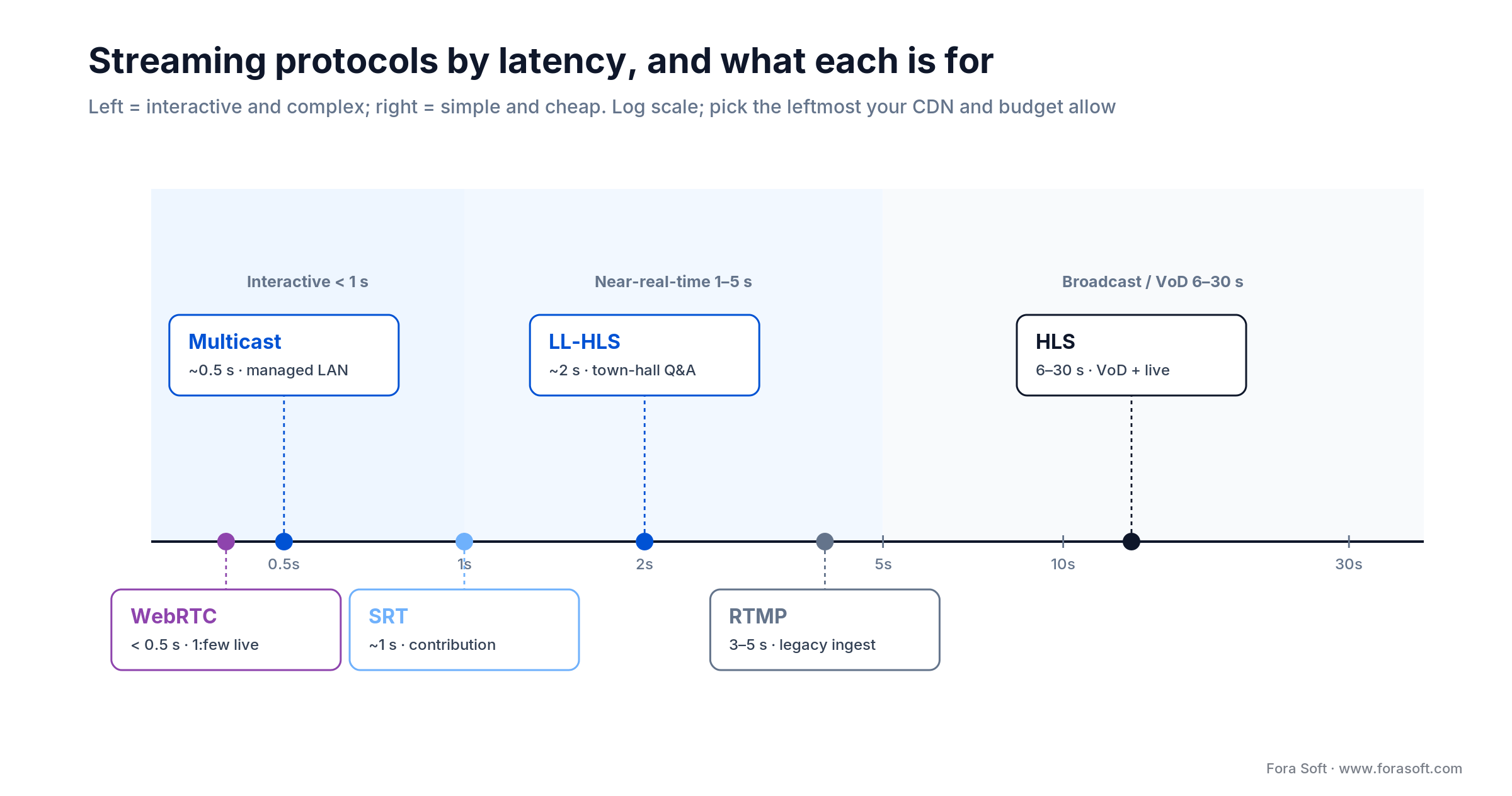
Figure 3. Lower latency buys interactivity and costs complexity. Pick the leftmost protocol your CDN supports.
Live, VoD, nDVR and live-to-VoD explained
Four modes cover everything a corporate training programme needs to broadcast: live for town halls, VoD for the on-demand catalog, nDVR for pause-and-rewind on a running stream, and live-to-VoD so today’s all-hands becomes tomorrow’s onboarding asset without a manual step.
1. Live. Real-time: town halls, Q&A with leadership, breaking compliance briefings. Use LL-HLS for 1:many, WebRTC for 1:few.
2. VoD. On-demand catalog: onboarding, product training, recorded courses. Should be indexed, chaptered, captioned, searchable and SCORM/xAPI-tracked.
3. nDVR & time-shift. Network DVR that lets viewers pause, rewind and catch up on live channels within a retention window, typically 7–30 days. Essential for shift workers, global offices and regulated audit trails.
4. Live-to-VoD. Auto-archival of every live broadcast into the VoD catalog the moment it ends, with auto-transcription, auto-chapters and quiz attachments. Our Smart STB IPTV project lets viewers rewind up to 12 hours back on channels that support time shift — the same pattern works for corporate rollouts.
Devices and clients: Smart TV, STB, web, mobile, Teams and Zoom
The most underestimated part of IPTV for corporate training is the device fleet. Laptops are easy; everything else is project work.
Smart TVs. LG webOS, Samsung Tizen, Android TV and Apple tvOS each need a native app. webOS and Tizen use their own SDKs (Enact + React, Tizen Studio); Android TV reuses Kotlin, now with Compose for TV rather than the deprecated Leanback library; tvOS is Swift + SwiftUI focus APIs. Plan 8–14 weeks per platform for a production-grade app.
Set-top boxes. Pre-installed on managed hardware (MAG, Formuler, Amino) via Ministra TV Platform (Infomir’s successor to Stalker Middleware) or custom middleware — the pattern we used for our Canadian-ISP project Smart IPTV. Ideal for shop floors, hospitals, hotel training rooms and retail back-rooms where laptops are a security or hygiene problem.
Web. HLS.js or dash.js with Shaka Player as a backup, CMAF chunked transfer, SSO-gated. Should run inside the LMS iframe via LTI 1.3, which writes grades back to the platform gradebook through Assignment and Grade Services; xAPI statements, not LTI, are what feed the Learning Record Store.
Mobile. iOS and Android natives with download-to-device (offline-safe, time-boxed DRM licenses for field staff). Background audio playback is non-trivial; we have a dedicated write-up on Smart TV app development.
Microsoft Teams & Zoom. Modern enterprise IPTV stacks ship Teams apps and Zoom Events integrations so training streams appear inside the tools employees already live in. Watching inside Teams emits the same xAPI event as the web player: one source of truth for compliance.
Need Smart TV, STB and mobile apps shipped in one sprint cadence?
We have production codebases across tvOS, Android TV, webOS, Tizen, STB, iOS, Android and Web. Bring the backlog — we’ll map it to a realistic 12-week plan.
LMS, SSO and HRIS integrations
Enterprise IPTV becomes a training system, not a media player, when it plugs into the rest of the employee stack. Three standards do most of the work: SCORM for legacy course packaging, xAPI for event-level tracking into a Learning Record Store, and LTI 1.3 for embedding the player inside the LMS with grades flowing back.
1. SCORM 1.2 / 2004. Still the compliance lingua franca. Tracks “completed / incomplete / passed / failed” and a single score. Unavoidable for regulated training. Every enterprise LMS speaks it.
2. xAPI (Tin Can). Modern event-based tracking into a Learning Record Store: “user watched 67 % of chapter 3, answered quiz correctly, scrubbed back 2 times”. Enables personalization, AI tutoring and audit-grade analytics. Complements SCORM; do not replace.
3. LTI 1.3. Embeds enterprise IPTV players inside the LMS (Moodle, Cornerstone, SAP SuccessFactors, Docebo, Canvas) with SSO propagated and grades written back automatically. If the LMS itself is the bottleneck, custom LMS development lets the video pipeline and the course engine share one data model.
SSO. SAML 2.0 and OIDC cover Entra ID, Okta, Ping and Google. Group claims flow to channel access control and content entitlements without a parallel user table.
HRIS. Workday, SAP SuccessFactors and BambooHR feed org structure, role and location into content targeting. "Everyone in Finance EMEA sees the new GDPR update by Friday" is a single rule, not a spreadsheet.
Which DRM do you need? Watermarking and compliance
Widevine plus FairPlay is the 2026 minimum: together they cover ~90 % of devices. Add PlayReady for a Windows/Xbox-heavy estate, and forensic watermarking for anything that would hurt if it leaked. Leaked leadership briefings, unauthorised re-upload of product training to YouTube, and regulator audits are the three scenarios that justify the DRM line item. The 2026 default is one CMAF package encrypted once under the Common Encryption cbcs scheme and licensed through multiple DRMs. Package with cenc AES-CTR instead and every device that depends on FairPlay (Safari, iOS, iPadOS, tvOS: a quarter to a third of a typical estate) gets nothing.
1. Widevine (Google). Android, Chrome, most Smart TVs. Covers ~60 % of devices. Security level follows the hardware, not the app type: L1 needs crypto and decode inside the device TEE, so a modern Android handset can be L1 while desktop Chrome is L3 no matter what you ship.
2. FairPlay (Apple). iOS, tvOS, Safari. Required for 25–30 % of users.
3. PlayReady (Microsoft). Windows, Xbox, some STBs. Strongest licensing rules for expiration, offline and concurrency.
4. Forensic watermarking. Per-session invisible watermark that identifies the viewer in any screen recording: the only control that survives a camera pointed at a screen. Licensed via Verimatrix, NAGRA, castLabs.
Compliance frames. SOC 2 Type II and ISO/IEC 27001 are table stakes for any enterprise deal; GDPR drives data residency (EU-only CDN origin, Frankfurt/Ireland); HIPAA matters for any healthcare training content; the EU AI Act adds transparency duties — its Article 50 obligations apply from 2 August 2026 — when AI generates or personalizes learning material. The 2026 Digital Omnibus delayed high-risk duties but left Article 50 in place; only generative systems already on the market before August get until 2 December 2026 to add machine-readable marking. None of this is exotic. On the virtual-classroom core we built for BrainCert, the work came down to two things we did from the start — an auditable record of who watched what, and data residency pinned per tenant — plus, since August, labelling AI-generated material where the Act asks for it. Budget all three into the first release rather than a phase two.
AI layer: captions, translation, chapters, search and personalization
AI is the feature that turned enterprise IPTV from a broadcast system into a training system. Six capabilities are now table stakes: automatic captions, translation and dubbing, chapter detection, in-video search, summaries and quiz drafts, and personalized recommendations.
1. Auto-captions & speaker labels. Dozens of languages, with single-digit word-error rates on clean audio in the major European languages. Essential for accessibility (EAA, ADA) and searchable content.
2. Real-time translation. Dozens of target languages for compliance and product training rolled globally; we cover vendor picks in multilingual translation in video calls.
3. Auto-chapters & summaries. An LLM pass over the transcript produces chapter markers, bullet summaries and executive recaps, so learners jump straight to the part they need.
4. Semantic search. Vector indexes on transcripts + slide OCR turn every training into a searchable knowledge base. “Show me the 45 seconds where the CFO talked about Q4 guidance” becomes a single query.
5. Personalized recommendations. The same models that power consumer streaming recommend the next course, broadcast or clip based on role, recent viewing and knowledge gaps. See our playbook on AI content recommendation systems.
6. AI tutors & quiz generation. An LLM over the transcript generates knowledge-check quizzes, answers questions inside the player and flags weak areas. Our guide on AI for e-learning video tools benchmarks the main providers.
Enterprise IPTV solutions and vendors compared
Enterprise IPTV solutions fall into two groups: video-CMS platforms for training and town halls, and appliance-based IPTV systems for live TV across a campus. The video-CMS platform market has consolidated around four platforms — Panopto, Kaltura, Vbrick Rev and Brightcove — with two adjacent categories in most RFPs: Wowza as a streaming engine, and the eCDN layer (Microsoft eCDN, Kollective, Hive) as pure delivery. The table below carries all six because that is how they show up on a shortlist, but only the first four are platforms. This is where most RFPs land; treat it as a starting filter, not a final answer. Prices below are vendor-published or directory-listed signals checked in October 2026 and move on volume.
| Platform | Sweet spot | Price signal | Deploy | Watch out |
|---|---|---|---|---|
| Panopto | Lecture capture, search, L&D | Quote-based; Capterra lists Basic at USD 7,500/yr (2026) | SaaS only | Limited live-at-scale |
| Kaltura | Modular, LMS-heavy, AI avatars | Quote-based | Cloud + on-prem | Module sprawl, implementation cost |
| Vbrick Rev | Enterprise town halls, eCDN built-in, multimodal AI and an MCP server for AI agents (March 2026) | Quote-based | Cloud + on-prem | Heavy for <5k seats |
| Brightcove | External audiences, marketing + training | Quote-based | SaaS | Not eCDN-first; owned by Bending Spoons since February 2025 |
| Microsoft eCDN / Kollective / Hive | eCDN layer under Teams town halls / Stream | Microsoft eCDN included in Teams Enterprise; Kollective/Hive USD 10k–100k+ /yr | SaaS agent | A delivery layer, not a platform; Vbrick’s own eCDN is the former Ramp (2022) |
| Wowza | Ingest, transcode, streaming engine | Streaming Engine from USD 195/mo per instance (2026) | Cloud + on-prem | Not a UX layer — bring your own |
Reach for a commercial platform when: you have <20k learners, no exotic compliance, a vanilla integration list (Teams, Moodle, Cornerstone, Workday) and prefer OPEX over CAPEX.
Who provides enterprise IPTV systems for campuses and hospitals
The table above is the video-CMS and eCDN layer. A second vendor category owns the classic enterprise IPTV RFP: appliance and headend players that turn broadcast and satellite TV into IP for campuses, hospitals, hotels and trading floors. These are the names that come up most often in that RFP (vendor sites, checked October 2026):
| Vendor | Product focus | Typical fit | Base |
|---|---|---|---|
| VITEC | EZ TV suite; Exterity line (acquired) | Live TV, signage and video walls on campus | France |
| Uniguest (Tripleplay) | Hub IPTV, encoders, set-top endpoints | Corporate, hospitality, Sky content in UK workplaces | UK/US |
| Haivision | Encoders, SRT, enterprise video distribution | Secure live contribution and in-building TV | Canada |
| Z-Band | RF-over-coax and IPTV headends | Retrofit sites with existing coax | US |
| BLANKOM (OmniscreenTV) | Appliance or SaaS IPTV and signage server | Government, healthcare, education, hotels | Germany |
Haivision and VITEC increasingly take SMPTE ST 2110 in at the headend. Be precise about what that buys you: ST 2110 carries uncompressed essence at 1.5–12 Gbps per stream on a managed production LAN, so it is a contribution format into the encoder, not the transport that reaches a hospital room. Pick an appliance vendor when you must push live linear TV and digital signage across a physical campus; pick the CMS/eCDN layer when the job is on-demand training and town halls for knowledge workers.
Build vs buy: when custom enterprise IPTV pays off
Most companies should buy. Custom development wins in exactly five scenarios: regulated training with forensic requirements, deep HRIS and proprietary integrations, LAN multicast with an STB fleet, more than 20,000 learners, or a white-label product you intend to sell. It loses loudly everywhere else.
1. Regulated training with forensic requirements. Healthcare, pharma, defence, finance. DRM + watermarking + audit trails that SaaS vendors will not commit to in writing.
2. Deep HRIS and proprietary integrations. SAP SuccessFactors + internal mainframes + Salesforce fields that the LMS cannot map on its own.
3. Multicast + STB fleets. Manufacturing, hospitals, airports, retail. No SaaS runs your LAN or pre-flashes your STBs for you.
4. >20,000 learners. Per-user SaaS pricing stops being interesting north of 20k. A custom platform + eCDN amortises in 24–36 months.
5. White-label / commercial product. If you sell the training to end customers, you control the roadmap, not the vendor.
Because we use Agent Engineering — LLM-assisted coding agents embedded in every workstream — our teams scope and ship faster than the industry median. A reasonable rule of thumb: a meaningful enterprise IPTV platform (headend + middleware + web + iOS + Android + one Smart TV platform + LMS/SSO integration) is typically a six-to-nine-month first release with us, versus twelve-to-eighteen months for teams without agent tooling. Exact numbers depend on integration count and compliance, so we prefer to estimate on a real backlog, not in a blog post. When the training side carries most of the scope, our e-learning platform development team scopes the player, LMS hooks and analytics on a real backlog.
Reach for a custom build when: compliance, forensic watermarking, LAN multicast, an STB fleet, deep HRIS wiring or 20,000+ learners push past what a SaaS vendor will commit to in writing.
Cost model: where the money actually goes
A realistic budget has six line items: delivery (CDN/eCDN egress), transcoding, storage, DRM, platform licences or build, and run cost (the people who operate it). Skip any of them and the project surprises the CFO in month six.
1. Ingest & transcoding. USD 0.02–0.10 per minute on cloud transcoders, cheaper on bare-metal AX-series Hetzner nodes once volume justifies ops overhead.
2. Delivery. CDN at USD 0.02–0.15 per GB, eCDN licensing flat USD 10k–100k+ per year, multicast capex one-off (switches, probes). A 5,000-viewer, one-hour town hall at 2 Mbps = ~4.5 TB of egress at unicast-only = USD 90–675 per event before eCDN savings.
3. DRM & watermarking. USD 0.01–0.05 per license request, plus a USD 5k–25k annual platform fee. Watermarking is a separate SKU.
4. Storage. Cloud object storage runs about USD 0.02 per GB per month on hot tiers (S3 Standard, GCS Standard, Azure Hot) and a fraction of that on infrequent-access and archive tiers; the real driver is retention policy (30 days? 7 years for compliance?). Decide up-front.
5. Development & integration. Web + iOS + Android + one Smart TV platform + LMS/SSO + middleware. Scope drives everything; we estimate on the actual backlog, not on a page count.
6. Ops & support. 24/7 monitoring, on-call, STB fleet management, app-store releases for three or four Smart TV platforms, annual DRM certificate renewals. Plan on 15–25 % of year-one build cost annually.
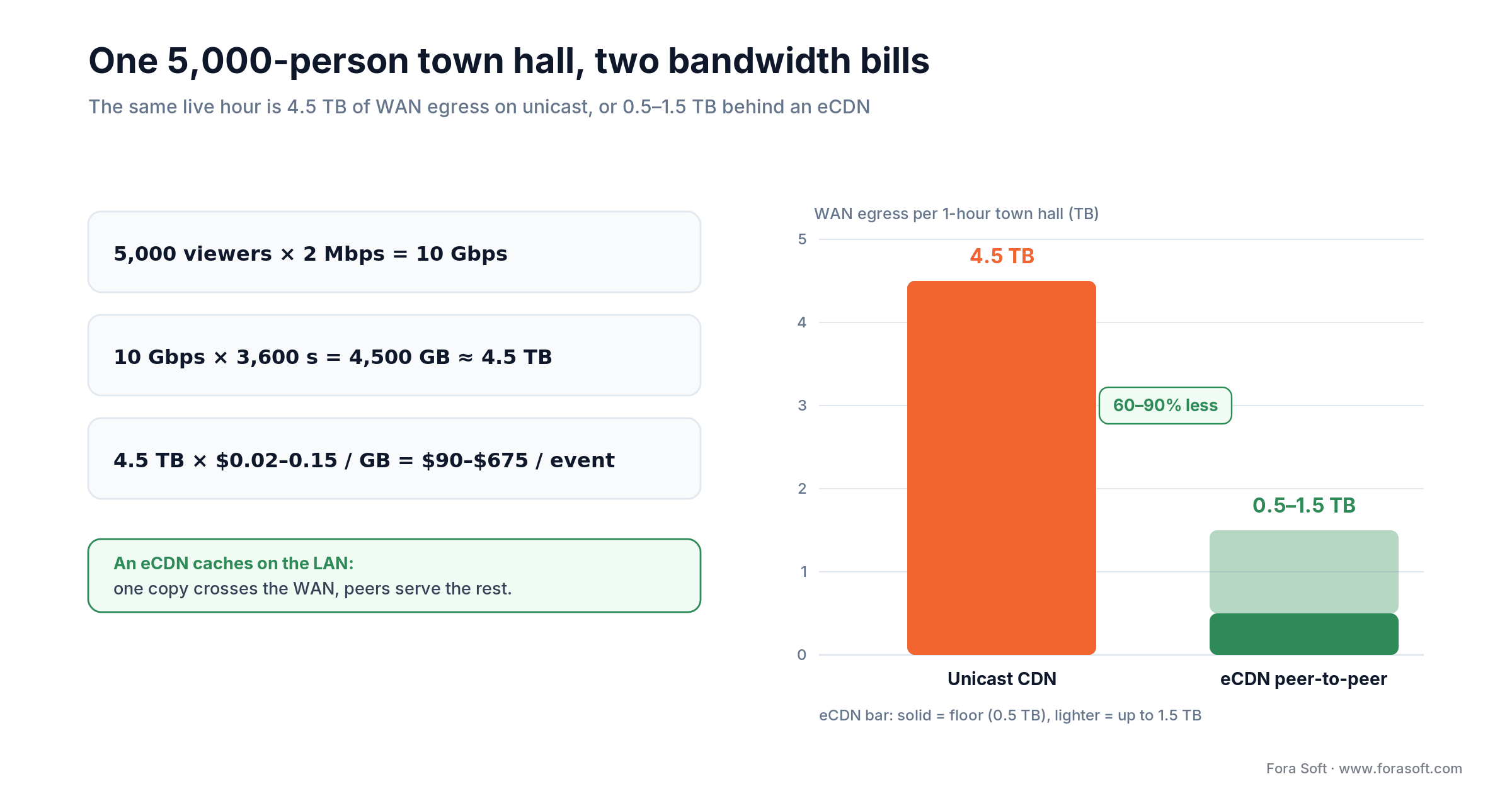
Figure 4. The same live hour costs 4.5 TB on unicast or 0.5-1.5 TB behind an eCDN — a 65–90% WAN cut.
Mini case: 3,000+ channels on a household STB, plus a trampoline on Apple TV
Two Fora Soft IPTV projects bracket the typical enterprise IPTV build.
Smart STB IPTV (Switzerland). A Swiss operator needed to push 3,000+ live channels plus VoD, nDVR and time-shift (up to 12 hours back) to Android set-top boxes for community customers. We delivered a white-label IPTV client on top of Stalker middleware, picture-in-picture EPG, PIN-protected adult mode, scheduled recording with wake-from-sleep, and self-service Portal subscriptions via a settings-link paste. Full details on the Smart STB IPTV project page.
Bellicon Smart TV (global). Trampoline-workout streaming on Apple TV and Android TV with 530+ professional workout videos, muscle-group / pregnancy / asthma filters, bilingual EN/DE switching, and custom workout plans derived from user weight, height, age and goals — plus a parallel responsive web app. The pattern — Smart TV + mobile + web + personalization layer — is exactly what a modern corporate L&D app looks like; see the Bellicon case.
The lesson for L&D buyers: the engineering distance between a telco IPTV product and a corporate training platform is short. Middleware, EPG, DRM, recording, device apps — the building blocks are shared. Want a similar assessment of your own stack? Book a 30-minute scoping call.
A decision framework — pick your enterprise IPTV stack in five questions
Five questions decide the stack: peak concurrent viewers, interactivity, compliance envelope, device fleet and where reporting lives. Answer them before the first RFP goes out. If the answers change later, the architecture must too.
Q1. How many concurrent viewers at the biggest live event? Under 1,000: unicast is fine. 1,000–10,000: eCDN. 10,000+: eCDN + multicast in offices.
Q2. What is the interactivity requirement? Chat-only Q&A: LL-HLS. Live breakouts / 1:few coaching: WebRTC. Broadcast-only: plain HLS.
Q3. Which compliance envelopes apply? SOC 2 + ISO 27001 are baseline. GDPR forces EU residency. HIPAA and PCI add architectural constraints. The EU AI Act’s Article 50 transparency duties (from 2 August 2026) apply to AI features.
Q4. Which devices do you control? Laptops only: web + Teams. Field / shop-floor: add STB or Android TV. Executive offices / hospitality: tvOS / webOS / Tizen.
Q5. Where does reporting live? Standalone dashboard = vanity metrics. LMS-integrated (SCORM/xAPI/LTI) = completion and grades. Warehouse (Snowflake/BigQuery) = cost-per-trained-employee and time-to-competence.
Five pitfalls that kill enterprise IPTV rollouts
Five failure modes account for most stalled rollouts: launching without an eCDN, treating captions and translation as phase two, building Smart TV apps one at a time, skipping watermarking on internal content, and pointing analytics at the wrong dashboard.
1. Launching without eCDN and learning about WAN on town-hall day. A 5,000-person all-hands at 2 Mbps unicast will saturate most corporate links for the duration. Budget eCDN before the first live event.
2. Treating captions and translation as a phase 2. Accessibility (EAA, ADA, WCAG 2.2) is a compliance requirement now, not a nice-to-have. Retrofitting captions across a 1,000-hour VoD library is a quarter of painful work.
3. Building one Smart TV app at a time. Sequential delivery (“Android TV first, webOS later”) ships one platform per quarter. A shared TV-client architecture with platform-specific shells ships three in parallel.
4. Skipping watermarking for internal content. Leadership briefings, M&A internal updates, product pre-announces — these are the videos that end up in a reporter’s inbox. Forensic watermarking is the cheapest insurance in the stack.
5. Pointing analytics at the wrong dashboard. View counts do not renew a training budget. Completion rate, quiz uplift, time-to-competence and cost-per-trained-employee do. Wire xAPI into a warehouse and build the exec dashboard against that, not against the player.
KPIs for IPTV corporate training
Three buckets, no more, no less: quality (start time, rebuffering, playback failures), business (completion, quiz uplift, cost per trained employee, time-to-competence) and reliability (uptime, DRM licence success, egress against budget). Anything else is a vanity slide.
1. Quality KPIs. Video start time < 2 s, rebuffer ratio < 0.5 %, playback failure rate < 0.3 %, average bitrate > 2 Mbps on managed networks. These determine whether the rest of the KPIs are even measurable.
2. Business KPIs. Completion rate > 85 % on mandatory training, post-training quiz score uplift > 25 % vs pre-test, cost-per-trained-employee trending down quarter-on-quarter, time-to-competence for new hires < 30 days. This is the CFO view.
3. Reliability KPIs. Uptime ≥ 99.9 % on publishing and playback endpoints, DRM license-success rate > 99.95 %, CDN origin egress within budget ± 10 %, STB fleet reachability > 98 %. This is the Ops and Security view.
When NOT to use IPTV for corporate training
Enterprise IPTV is wrong — or premature — in four clear cases: fewer than ~500 learners in one country, training that is text-first rather than video-first, no named L&D + IT + Security owner, and a Microsoft Stream/Teams estate that already covers most of the need.
Under ~500 learners in a single country. An LMS with native video plus Vimeo Enterprise or Wistia is a third of the cost and ships in a month.
All content is text-first. If training is predominantly documents, checklists and Articulate courses, video is decoration; invest in the LMS, not a broadcast pipeline.
No dedicated owner. Enterprise IPTV needs an L&D + IT + Security triad to steer it. Without a named owner, it becomes shelfware.
A Microsoft Stream rollout already covers 80 % of the need. Stream + Teams town halls + a SCORM wrapper can be enough. Turn on Microsoft eCDN first: since the April 2026 Teams licensing change it is part of Teams Enterprise (E3/E5 included), so you already pay for it. Then benchmark Kollective or Hive against it before you add a parallel enterprise IPTV platform.
Trying to decide between Panopto, Kaltura, Vbrick and a custom build?
Share your headcount, compliance list and integration map — we’ll compare TCO over 3 years and tell you which path actually wins for your case.
FAQ
Is enterprise IPTV the same as an LMS with video?
No. An LMS stores and gates courses; enterprise IPTV is the live + on-demand video pipeline underneath, covering ingest, DRM, delivery, nDVR and Smart TV / STB clients. The LMS sits on top of enterprise IPTV to track completion and grades via SCORM, xAPI and LTI.
What is an enterprise IPTV system?
An enterprise IPTV system delivers live TV channels, in-house broadcasts and on-demand video over a company’s own IP network to screens, set-top boxes, desktops and phones. It combines encoders and a headend, middleware with an EPG, a content manager, DRM and players, all controlled by the company rather than a TV operator.
What is managed IPTV?
Managed IPTV is an enterprise IPTV system operated for you by a vendor or integrator under an SLA. The provider runs the headend, middleware, channel rights and device fleet, usually for a per-screen or per-site fee, while your IT team only owns the network.
Who provides enterprise IPTV solutions?
For training and town halls the usual shortlist is Panopto, Kaltura, Vbrick and Brightcove, with Microsoft eCDN, Kollective or Hive for delivery. For live TV across a campus, hospital or hotel the appliance vendors are VITEC, Uniguest (Tripleplay), Haivision, Z-Band and BLANKOM. A custom build makes sense when compliance, an STB fleet or 20,000+ learners push past both groups.
Do we still need multicast in 2026?
Only inside managed LANs where bandwidth is the hard constraint: manufacturing plants, hospitals, large offices and shop floors. For everything else, eCDN plus unicast CDN is simpler, more portable and almost as cheap at scale.
How long does an enterprise IPTV platform take to build?
First useful release is typically 6–9 months with Agent Engineering: web + iOS + Android + one Smart TV platform + SSO + LMS + core middleware. Compliance scope (HIPAA, SOC 2) and integration count (SAP, Salesforce, Workday) are the variables that move the number.
Which DRM do we actually need?
Widevine + FairPlay covers ~90 % of devices and is the 2026 minimum for any content containing confidential IP or leadership communications. Add PlayReady if your estate is Windows/Xbox-heavy, and forensic watermarking for anything that would hurt if it leaked.
Can enterprise IPTV embed inside Microsoft Teams?
Yes. Modern enterprise IPTV stacks ship Teams apps plus a dedicated viewer tab; training streams appear inside channels, and completion events write back to the LMS via xAPI just like the web player. Microsoft retired Teams live events on 30 June 2026 (already scheduled events keep running until 28 February 2027), so the target is now Teams town halls, which take up to 10,000 view-only attendees on a Teams Enterprise licence. Microsoft eCDN handles the bandwidth side and is part of Teams Enterprise since the April 2026 licensing change, with Kollective or Hive as the benchmark alternatives.
What bandwidth do we need per viewer?
Plan for ~2 Mbps sustained per viewer as a blended ABR average on a 720p-capped ladder (the 720p rung itself is 2.5 Mbps), ~5 Mbps at 1080p, and ~15 Mbps at 4K. A 5,000-person, one-hour all-hands at 2 Mbps is roughly 4.5 TB of egress without eCDN, 0.5–1.5 TB with one.
Does AI replace human instructional designers?
No — AI automates captions, translation, chapters, summaries, quiz drafts and search. It raises the ceiling of what one instructional designer can ship, but it does not decide the learning objectives. Treat it as a force multiplier, not a replacement.
How do we measure ROI on IPTV corporate training?
Anchor on three numbers: cost-per-trained-employee, quiz-score uplift versus pre-test, and time-to-competence for new hires. Reporting against these — not completion clicks — is what keeps the CFO renewing the budget.
What to Read Next
Enterprise video
Smart TV Enterprise Video Platform Development
How to architect a corporate-grade video platform that ships on Smart TV and web at the same time.
AI for L&D
AI for E-Learning Video Tools — Cut Costs 60 %
The AI capabilities worth adding to any corporate IPTV training platform, with vendor picks.
Smart TV
Smart TV App Development Guide
tvOS, Android TV, Tizen, webOS — what to build in parallel, what to stage, what to skip.
Personalization
AI Content Recommendation Systems
How to ship the Netflix-grade recommendation layer corporate viewers now expect.
Ready to launch your corporate IPTV training platform?
Enterprise IPTV, done properly, is a measurable pipeline, not a media player: the headend encodes, middleware authenticates, CDN and eCDN deliver, DRM protects, Smart TVs and STBs present, and xAPI tells the LMS what happened. Buy a platform when the use case is vanilla; build when compliance, integrations, multicast, STB fleets or scale push past what SaaS can commit to.
Fora Soft has 20+ years building exactly this kind of product — from 3,000-channel STB systems and Apple TV fitness platforms to a WebRTC virtual classroom now running 500M+ minutes for 100k+ customers. If you are scoping an enterprise IPTV corporate training rollout, let’s compare your plan against what we already know works — from streaming software development to Smart TV apps and LMS integration.


The handbook · 7 volumes
Fora Soft Video Engineering Handbook
Corporate IPTV lives or dies on the town hall: thousands of viewers, one stream, no buffering. Our seven-volume handbook covers the whole video stack: encoding, delivery, audio and AI. Start with Volume 3 on ABR, CDN caching, DRM and players, then Volume 2 on multicast-friendly transport and HLS packaging, and Volume 4 on loudness, captions and accessibility for training video. Written by Nikolay Sapunov, CEO at Fora Soft.
Browse the handbook on Amazon →7 volumes · 9,000+ pages · Kindle & paperback
Let’s de-risk your enterprise IPTV rollout
Bring the plan you have. We’ll tell you what to keep, what to cut, what to buy and what to build — in 30 minutes, no slides.

