

Key takeaways
• Two products hide under one search. An AI study guide maker is either a consumer app a student uses today (Quizlet, NotebookLM, RemNote) or a platform you build for a school or brand. This guide covers both: a tool comparison first, then the build stack.
• Five layers, no skipping. A 2026-grade platform needs content ingestion, RAG grounding, a generation model, a pedagogy engine, and teacher oversight. Drop one and it hallucinates, leaks student data, or teaches nothing.
• Retrieval decides quality, not the model. The same LLM returns a clean study guide or confident nonsense depending on how you chunk and rerank the textbook. That is where most projects break.
• Route models by job. Claude Sonnet 5 and Gemini 3.x carry long-textbook work; Haiku 4.5 and Gemini Flash-Lite run cheap high-volume flashcards; a speech-native model handles voice. Pay flagship prices only for hard reasoning.
• Compliance is the moat. FERPA, the 2025 COPPA rules, and the EU AI Act (education is high-risk) decide whether a school can even buy you. Build the data-proxy layer in sprint one, not week ten.
Why Fora Soft wrote this playbook
We’ve built software since 2005, and for the last stretch of that a lot of it has been education: virtual classrooms, lecture-capture, corporate L&D portals, tutoring tools grounded in a school’s own content. Across 250+ projects we keep meeting the same request from founders and CTOs: “build us an AI study guide maker.” We already know where the bodies are buried — math answers that hallucinate, a FERPA breach hiding in the logging pipeline, textbook chunks that retrieve the wrong paragraph, teachers with zero visibility into what the AI told a 14-year-old.
This is the brief we hand our own engineers at kickoff, rewritten for you. It compares the consumer tools students actually use, then walks the reference architecture, the pedagogy stack, the model-routing math, the compliance surface, and a real 12-week build. One of our e-learning platforms, BrainCert, runs virtual classrooms and assessments for schools worldwide, so the numbers here come from shipped systems, not a slide deck. If you want the learning-platform fundamentals alongside this, our e-learning platform development guide is the companion piece.
Scoping an AI study guide product?
Tell us your content, your buyer, and your jurisdiction. We’ll tell you which layers you actually need, which model tier fits your budget, and where the compliance traps are — on a 30-minute call.
What an AI study guide maker actually is in 2026
An AI study guide maker turns raw source material — a PDF, a lecture video, a slide deck, a pile of notes — into structured study output: summaries, flashcards, practice questions, and often a chat tutor that answers from that material. The phrase now collapses four product categories that were separate in 2022, and knowing which one you mean saves months of wasted build.
1. Flashcard and quiz generators. Upload notes, get spaced-repetition cards and practice tests. Quizlet Magic Notes, Knowt, StudyPDF — mostly $5–12/month consumer subscriptions.
2. Source-grounded understanding engines. Summarize a textbook, analyze a lecture, answer questions strictly from the syllabus. Google NotebookLM is the reference example, with its audio-overview “podcast” of your own sources.
3. Conversational tutors. Sub-second voice or text chat grounded in course content, with hints instead of answers. This is the hardest to build well and the easiest to build irresponsibly.
4. Institutional adaptive platforms. Embedded into Canvas or Moodle over LTI 1.3, with per-student learning paths, mastery tracking, and a teacher dashboard. This is where the contract sizes live, and where Fora Soft spends most of its education time. Our adaptive learning guide goes deep on the tutor variant.
Reach for a consumer tool when: a single student wants a study set from their own notes this afternoon. Build your own when: a school or brand needs its content grounded, its students’ data protected under a DPA, and its teachers in the loop — things no off-the-shelf app will sign for.
The 7 best AI study guide makers, compared
If you just want a tool today, start here. We ranked these on what matters for real study: input range, whether there’s a genuine spaced-repetition engine (the difference between remembering in a week and cramming), and where each one quietly falls down. Prices are the mid-2026 published rates and shift often — check the vendor before you commit.
| Tool | Inputs | Spaced repetition | Price (2026) | Where it breaks |
|---|---|---|---|---|
| Google NotebookLM | PDF, Docs, Slides, URLs, YouTube, audio | No scheduler | Free; paid via Google AI plans | Source-bound by design; won’t add outside knowledge; no mastery tracking |
| RemNote | Notes, PDF, PPT, YouTube, lecture audio | FSRS + exam scheduler (best in class) | Free; Pro $8/mo; Pro+AI $18/mo | Steep learning curve; the useful AI sits in the $18 tier |
| Quizlet | Pasted text, PDF, notes | Learn mode (lighter) | Free (capped); Plus ~$7.99/mo | Q-Chat tutor retired mid-2025; AI sets can be shallow and need checking |
| Knowt | Notes, PDF, lecture video, slides, Quizlet import | Built-in scheduler | Free (generous); Premium $5/mo | Unlimited AI chat/grading gated to the $149.99/yr tier |
| StudyFetch (Spark.E) | PDF, lecture audio/video, photos of notes | Review sets, no true SR engine | Free (thin); ~$7.99–11.99/mo | Feature-wide, sometimes shallow; verify accuracy on technical material |
| NoteGPT | YouTube, PDF, PPT, web pages, images | No scheduler | Free quota; Pro ~$9.99/mo | Summarizer first; credit-metered; outputs stay surface-level |
| Penseum | PDF, slides, video, notes | Study roadmap sequencing | Free; premium ~$9.99/mo | Smaller player; pricing inconsistent across sources; less proven depth |
Table 1. Consumer AI study guide makers, mid-2026. Prices are published rates and change often.
Our honest read for a student: NotebookLM if you want your own sources explained and won’t stray from them, and RemNote if you care about remembering the material a month later, because its FSRS scheduler is the only learning-science engine in the group that’s hard to beat. For a fuller side-by-side including ChatGPT and NotebookLM workflows, see our roundup of AI study guide tools.
Here’s the catch none of these solve: they are built for one student and their own files. Point any of them at 18,000 students, a Canvas gradebook, and a FERPA auditor and they fall over — not because the AI is weak, but because grounding, data control, and teacher oversight were never in scope. That gap is the rest of this guide.
The market: what the buy-side is seeing
The short version: money is moving into AI education fast, but the exact size depends on who you ask, so treat any single number with suspicion. Analysts put AI in education somewhere between $7B and $19B for 2025 depending on scope, with double-digit compound growth into the early 2030s. Grand View Research puts it near $8.3B in 2025 and growing about 26% a year into the early 2030s; Precedence Research starts lower at roughly $7.05B (2025) but forecasts a steeper climb. The adaptive-learning slice specifically sits around $5.1–5.3B in 2025 by Mordor Intelligence and MarketsandMarkets, growing roughly 20–23% a year.
Adoption is the number that actually matters for a build decision, because it tells you the buyer is already primed. Around 60% of US K-12 teachers reported using an AI tool during the 2024–25 school year, and weekly users said they save close to six hours a week (Gallup and the Walton Family Foundation, 2025). In UK higher education, 92% of surveyed students now use AI in some form and 88% have used it for assessments (HEPI, 2025). Your prospect’s students are already doing this on consumer tools. The question is whether the institution ships something safe, or pretends it isn’t happening.
The five-layer reference stack
Every AI study platform we build maps to five layers. The bottom three are infrastructure; the top two are the product a teacher or student actually feels. Skip a layer and you don’t get a smaller product, you get a broken one: no ingestion means no content, no RAG means hallucination, no pedagogy means a chatbot that spits facts and teaches nothing.
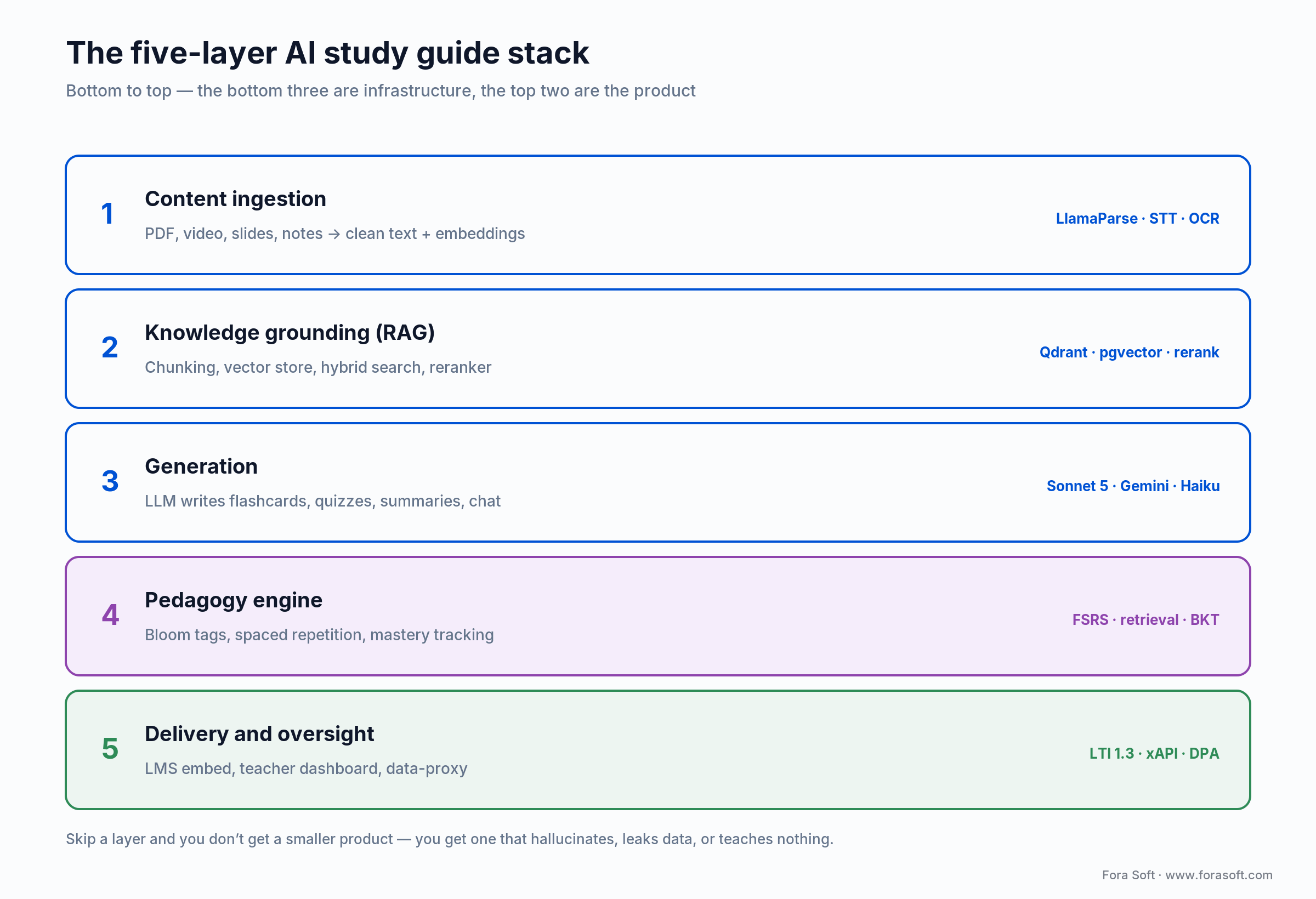
Figure 1. The reference stack, bottom to top. Oversight is not a sixth box; it wraps the whole thing.
Layer 1 — Content ingestion. PDFs, videos, slides, and notes become clean text plus embeddings. PDFs go through a structure-aware parser (LlamaParse or Unstructured) with OCR fallback for scans; lectures go through speech-to-text. Garbage in here poisons every layer above.
Layer 2 — Knowledge grounding (RAG). Hierarchical chunking, a vector store (Qdrant, pgvector, or Pinecone), hybrid search, and a reranker so the model sees the right passage before it writes a word. This layer, not the model, sets your quality ceiling.
Layer 3 — Generation. The LLM that writes flashcards, quizzes, summaries, and chat replies from retrieved context. You route across a few models here rather than betting the product on one (next section).
Layer 4 — Pedagogy engine. The part that turns output into learning: Bloom-level tagging, spaced repetition, retrieval-before-reveal, mastery tracking. Most tools skip this and ship a summarizer wearing a study-guide costume.
Layer 5 — Delivery and oversight. LMS embedding, a teacher dashboard, and a data-proxy that keeps student PII away from third-party model APIs. This is what makes an institution sign. We break the full build in our e-learning build guide.
Model routing: which model for which job
There is no single best model for a study platform, and betting on one is how you overpay by 5x or ship slow tutoring. The right answer is a router: send each task to the cheapest model that clears its quality bar, and reserve the expensive tier for hard reasoning. Prices below are per million tokens (MTok) as published in mid-2026; they move, so treat the ratios as the durable part, not the exact cents.
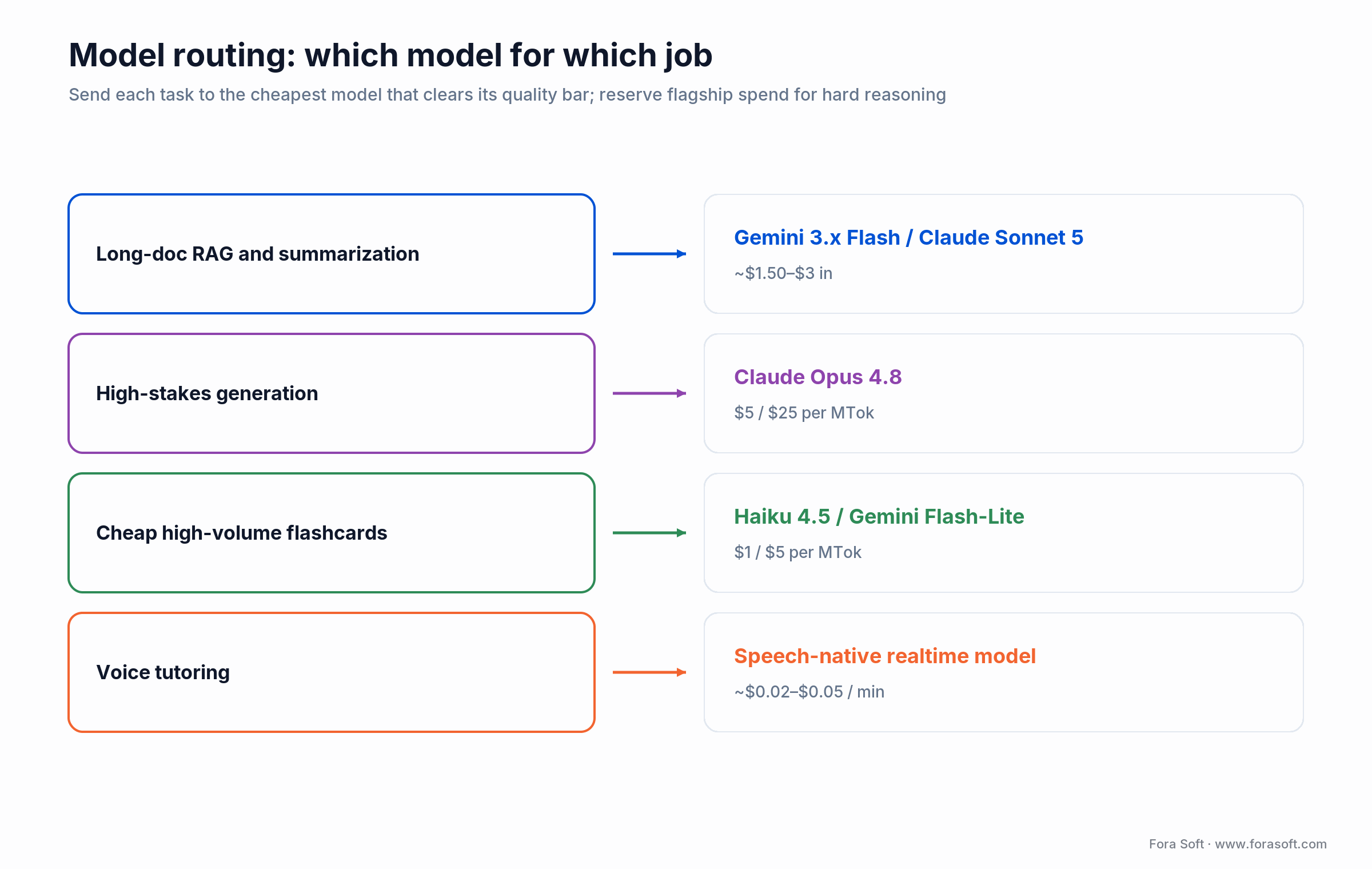
Figure 2. Route by job, not by brand loyalty. The router keeps flagship spend to the tasks that need it.
| Model | Price in/out per MTok | Context | Reach for it when |
|---|---|---|---|
| Claude Sonnet 5 | $3 / $15 | 1M | Default generator: strong reasoning, pedagogy-shaped prompts, the quiz writer we trust |
| Claude Opus 4.8 | $5 / $25 | 1M | High-stakes generation: board-exam prep, graduate subjects, research summaries |
| Gemini 3.x Flash | ~$1.50 / $9 | ~1M | Whole-textbook grounding and fast summarization at scale |
| Claude Haiku 4.5 | $1 / $5 | 200K | Cheap high-volume flashcards, distractors, and rewrites |
| Self-hosted Qwen / Llama 4 | Infra only | up to 10M | On-prem data residency for strict FERPA/GDPR deployments; zero per-token cost at scale |
Table 2. A four-tier router covers almost every study-platform task. Published rates, mid-2026.
One caveat worth budgeting for: per-token prices move month to month and token counts vary by each model’s tokenizer. Size the cost model on measured token counts for the models you actually pick, not on word counts — and re-check the pricing pages before you commit.
RAG for textbooks: the chunking fight
Retrieval is the single biggest quality lever, and it’s the one teams underestimate. Get chunking wrong and the best model on Earth confidently answers from the wrong paragraph. A 2024 study of production systems catalogued seven distinct ways RAG fails — missing content, the right passage never retrieved, wrong format, incomplete answers — and almost all of them trace back to how you split and rank the source, not to the model.
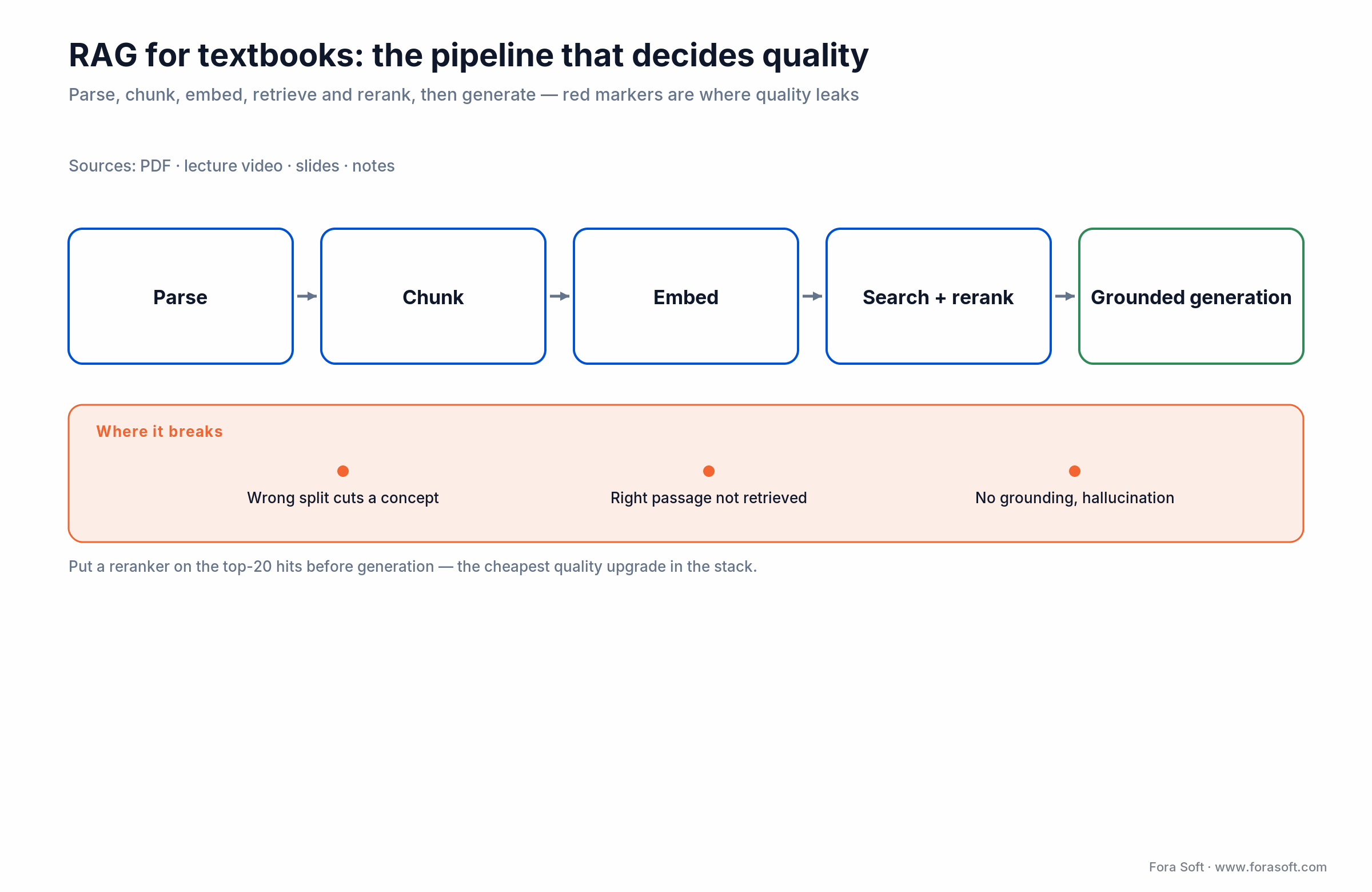
Figure 3. The textbook retrieval pipeline. Red markers are where quality leaks if you cut corners.
Semantic chunking. Embed each sentence, group by similarity, split on concept boundaries. Best for mixed-topic material where a fixed window would slice an idea in half. Slower to index; worth it.
Late chunking. Feed the whole document to a long-context model, embed at document level, then retrieve subsets. Preserves cross-chapter references a student needs when a question spans two units. Our default for structured textbooks now that 1M-token context is cheap.
Hierarchical chunking. A multi-level index — chapter summary, section summary, paragraph text — and the query is routed to the right granularity. Best for very large textbooks where flat retrieval drowns in near-duplicates.
Whatever you pick, put a reranker on top of the top-20 hits before generation. It’s the cheapest quality upgrade in the stack, and skipping it is the most common reason a demo that looked great on ten pages hallucinates across a full course. For the deeper agentic-retrieval patterns, our multimodal agentic AI guide covers grounding at production scale.
The pedagogy engine: operationalizing learning science
The most common failure we see is a tool that generates something shaped like a study guide but operationalizes zero learning science. That’s a summarizer, and summarizing is the weakest way to learn. Decades of research say the opposite works: pull the answer out of your head, space the practice, get it slightly wrong, and try again. Here is the minimum kit that turns generation into retention.
Retrieval practice over rereading. Karpicke and Roediger showed in 2008 (Science) that repeated testing crushes repeated studying on delayed recall — and that students consistently mispredict this, feeling like rereading works when it doesn’t. A 2017 meta-analysis of 188 experiments put the practice-testing effect at about g = 0.5. So the product default is retrieval before reveal: the student answers before the AI shows anything.
Spaced repetition with FSRS. The forgetting curve Ebbinghaus described in 1885 was replicated in 2015 (PLOS ONE); it’s why cramming evaporates. The Free Spaced Repetition Scheduler outperforms Anki’s classic SM-2 on retention per review. Schedule reviews at expanding intervals and adjust on each answer. Cepeda’s 2006 synthesis of 317 experiments is blunt: spacing beats massing, and the optimal gap grows with how long you need to remember.
Bloom-level tagging. Tag every generated question to one of six cognitive levels and prompt for the level you want: “write three Apply-level questions from this passage,” not “write three questions.” Otherwise the model defaults to Remember-level recall and the student never practices transfer.
Interleaving. A 2020 randomized trial of 787 students found interleaved math practice scored 61% versus 38% for blocked practice on a later test (d = 0.83). Mix topics in a review session instead of drilling one to exhaustion.
Mastery tracking. Under the hood, per-skill mastery estimation — Bayesian Knowledge Tracing and its deep-learning successors — decides what to show next. This is the machinery Bloom pointed at in 1984 when one-to-one tutoring beat classroom teaching by two standard deviations. You can’t hire a tutor per student; you can approximate the loop.
Turning lectures into study guides
Higher ed and corporate L&D sit on mountains of lecture video, so a serious platform treats video as a first-class input, not an afterthought. The pipeline is transcription, then topic segmentation, then clip extraction that becomes the spine of the guide.
Transcription. Streaming speech-to-text runs a fraction of a cent per minute in 2026, and batch is cheaper still. Accuracy on technical vocabulary is where providers separate — a model that hears “eigenvector” as “I gen vector” ruins the study guide downstream, so test on your actual subject matter before you commit.
Topic segmentation and clip extraction. Detect topic shifts, then pull the three-to-six most-referenced moments from a 90-minute lecture. Those clips anchor the flashcards and let a student jump straight to the 90 seconds where the professor explained the thing they got wrong.
The video layer under all of this is its own engineering problem. If lecture capture and streaming are core to your product, our AI video streaming playbook and the e-learning video guide go deeper than we can here.
Voice tutoring: sub-second conversational agents
Voice tutoring crossed from demo to shippable in 2025, and in 2026 you have two honest paths. A speech-native model (OpenAI’s Realtime API or Gemini Live) does audio-in to audio-out in one hop and gets you closest to sub-second, voice-to-voice. A cascaded pipeline — streaming speech-to-text, then an LLM, then streaming text-to-speech — gives you more control and lower cost, landing around 500–800ms at the median with good tuning.
What actually makes voice feel human isn’t raw speed, it’s turn-taking. Silence-timer endpointing adds half a second and interrupts a kid who paused to think. Semantic turn detection — deciding the student is done by meaning, not by a timer — is the difference between a tutor and a voicemail system. Modern text-to-speech hits first audio in under 300ms (Cartesia Sonic-3 around 188ms, ElevenLabs Turbo around 264ms in mid-2026 benchmarks), so your latency budget is spent on the LLM and the turn logic, not the voice.
Ground the tutor in the student’s own material and cap it to hints before answers, or you’ve built a homework-answer machine. The voice architecture itself is a rabbit hole; our AI voice agent guide covers the real-time stack end to end.
Reach for a speech-native model when: voice is the core experience and you need the tightest possible latency. Reach for a cascaded pipeline when: you need per-component cost control, your own voice library, or a specific model you can’t get in a single-vendor speech-to-speech API.
Feature set: what we ship in v1
Institutional launches carry a tight first release. Resist the urge to ship all four product categories at once. These are the features that earn a renewal, in the order we build them.
1. Upload-to-study. Drop a PDF, slide deck, or lecture recording and get an outline, key terms, 20 flashcards, and 10 questions in under a minute. This is the “wow” that sells the pilot.
2. Questions with ranked distractors. Wrong answers pulled from nearby-context confusions, not random strings, so a multiple-choice item actually tests understanding. Add short-answer and cloze for subjects where MCQ is too easy.
3. Spaced-repetition scheduler. FSRS-driven review prompts by push or email. Without the scheduler you have a generator; with it you have a study system.
4. Grounded chat and voice Q&A. Answers strictly from the student’s material, with citations back to the source page or lecture timestamp.
5. Progress dashboard and teacher view. Mastery per concept for the student, and a class-level view for the teacher showing what the AI generated and what students struggled with. The teacher view is what converts a pilot into a contract.
Want the retrieval layer to actually hold up?
Bad chunking is why demos dazzle and production hallucinates. We’ll review your content type, pick a chunking and reranking strategy, and set an eval suite so quality is measured, not hoped for.
Compliance: where most projects hit the wall
Education is one of the most regulated product categories you can pick, and the compliance surface is where good engineering teams stall because they left it for “later.” Here is the 2026 map, and the dates changed this year, so old blog posts will steer you wrong.
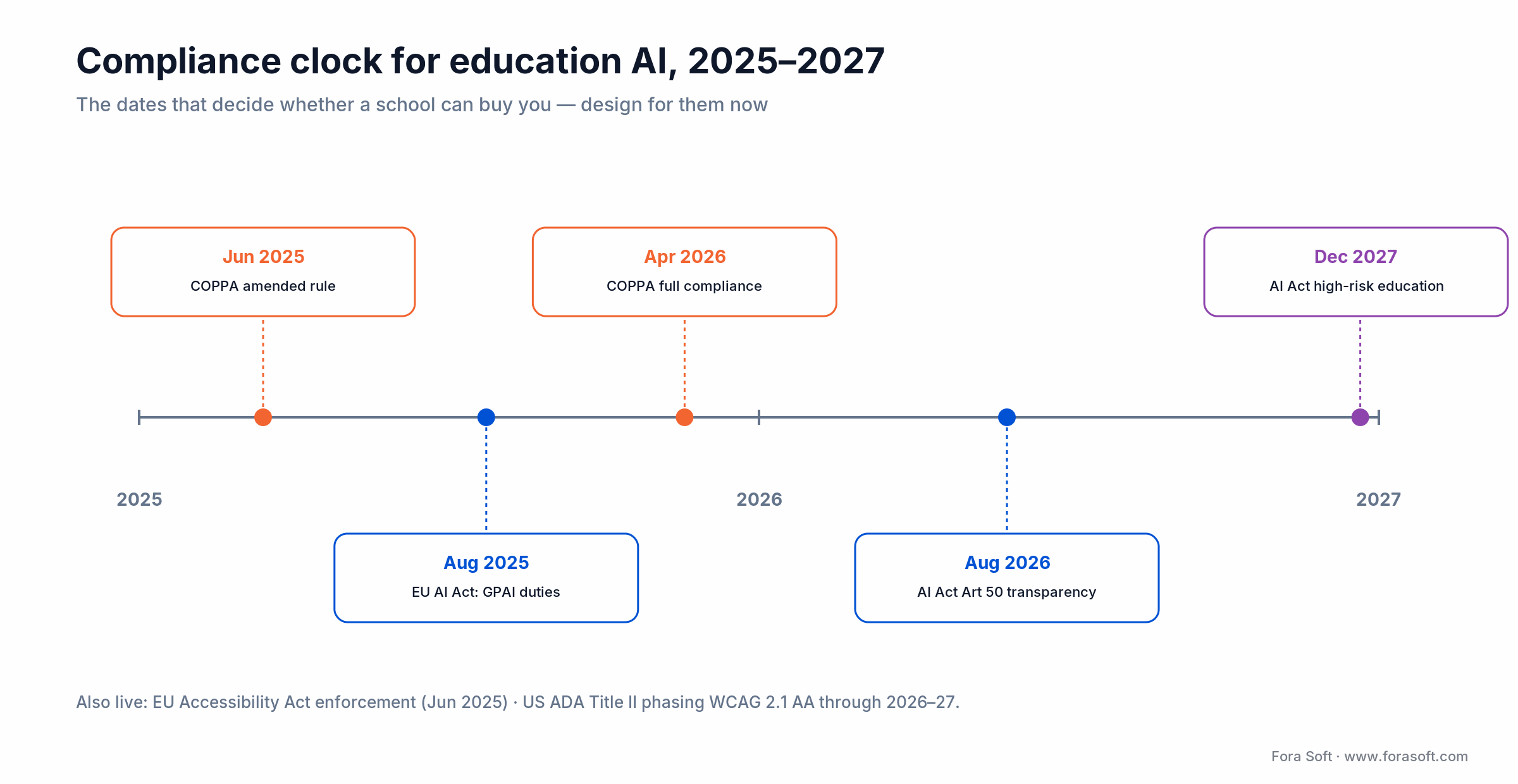
Figure 4. The obligations that bind a US-plus-EU education product, 2025 through 2027.
FERPA (US). To touch student records you operate as a “school official”: you perform a function the school would otherwise staff, you’re under the school’s direct control, and you don’t re-disclose or reuse the data. In practice that means a signed Data Processing Agreement, school-controlled deletion, and no training your models on student work without authorization. Send a student name to a third-party model API as free text and you’ve created the breach yourself.
COPPA (US, under-13). The amended rule took effect June 23, 2025 with full compliance required by April 22, 2026. It adds biometric identifiers to protected data, demands separate verifiable parental consent before sharing a child’s data with a third party, and requires a written retention and security program. The FTC has signaled that training AI on children’s data needs consent and isn’t “integral” by default.
GDPR (EU). The school is the controller, you’re the processor, so an Article 28 DPA is mandatory. Adaptive profiling of children triggers a Data Protection Impact Assessment (Article 35), and auto-placement or auto-grading runs into Article 22 limits on solely-automated decisions. Digital-consent age runs 13 to 16 depending on the member state.
EU AI Act. Education AI is classified high-risk under Annex III when it evaluates learning outcomes, decides placement, or monitors testing. The timeline matters: general-purpose-model obligations have applied since August 2025; Article 50 transparency duties (tell users they’re talking to AI, mark AI-generated content) apply from August 2, 2026; and the heavy high-risk education obligations were pushed to December 2, 2027 by the 2026 Digital Omnibus. Design for them now, because retrofitting conformity assessment is brutal.
Accessibility. Target WCAG 2.2 Level AA (the current version since 2023). The EU Accessibility Act began enforcement June 28, 2025 for in-scope consumer services, and US ADA Title II is phasing WCAG 2.1 AA into public institutions through 2026–2027. Accessibility isn’t a nice-to-have here; it’s a procurement gate.
Reach for a data-proxy layer when: any student PII could reach a third-party model. The proxy strips names, IDs, and scores before the prompt leaves your infrastructure and re-attaches them on the way back. It’s the single control that keeps FERPA and GDPR from becoming a launch blocker, and it belongs in sprint one.
Academic integrity: the honest answer
Institutional buyers ask about cheating in the first five minutes, so have a real answer. The uncomfortable truth: no AI-writing detector is accurate enough to hang a grade-changing accusation on by itself. Vendors quote 98–99% accuracy, but real-world false-positive rates of a few percent mean that across a big class you will falsely flag honest students, and those are the cases that end up in the dean’s office.
Treat detection as one weak signal, never the verdict. The defense that works is design, not policing: publish an AI-use policy in the syllabus, build assignments that require process artifacts (drafts, oral defense, in-class components), and make the study tool itself teach with retrieval and hints rather than hand over finished answers. A product that refuses to write the essay is a better integrity story than one that claims to catch the students who did.
LMS integration: LTI 1.3, xAPI, SCORM
Institutions don’t adopt standalone apps; they adopt tools that live inside the LMS they already run. Plan the integration on day one, because discovering a procurement blocker in week ten is how timelines double.
LTI 1.3 and LTI Advantage. The default, governed by 1EdTech. It launches your tool from inside Canvas, Moodle, Blackboard, or D2L over signed OAuth2 tokens, and LTI Advantage adds the three services you actually need: Deep Linking to place content, Names and Role Provisioning for the roster, and Assignment and Grade Services for grade passback. One integration, every major LMS.
xAPI and cmi5. xAPI logs granular learning events to a Learning Record Store for analytics the native LMS reports can’t give you. For new content, use cmi5 — the xAPI profile that adds SCORM-style launch and completion semantics. Plain xAPI without cmi5 is now rare in production.
SCORM and QTI. SCORM has been frozen since 2009, but every LMS still imports it, so districts will ask. Support it for interop and move on. QTI 3.0 is the standard for exporting your generated quizzes back into the LMS gradebook. Test all of this against the customer’s actual LMS version before launch, not after.
Cost model: what this costs to run
Here’s the arithmetic for one active student per month on a mixed institutional workload. We build with Agent Engineering, so our estimates come in faster and leaner than a traditional shop’s — but the point of showing the math is that you can sanity-check any vendor’s quote, including ours.
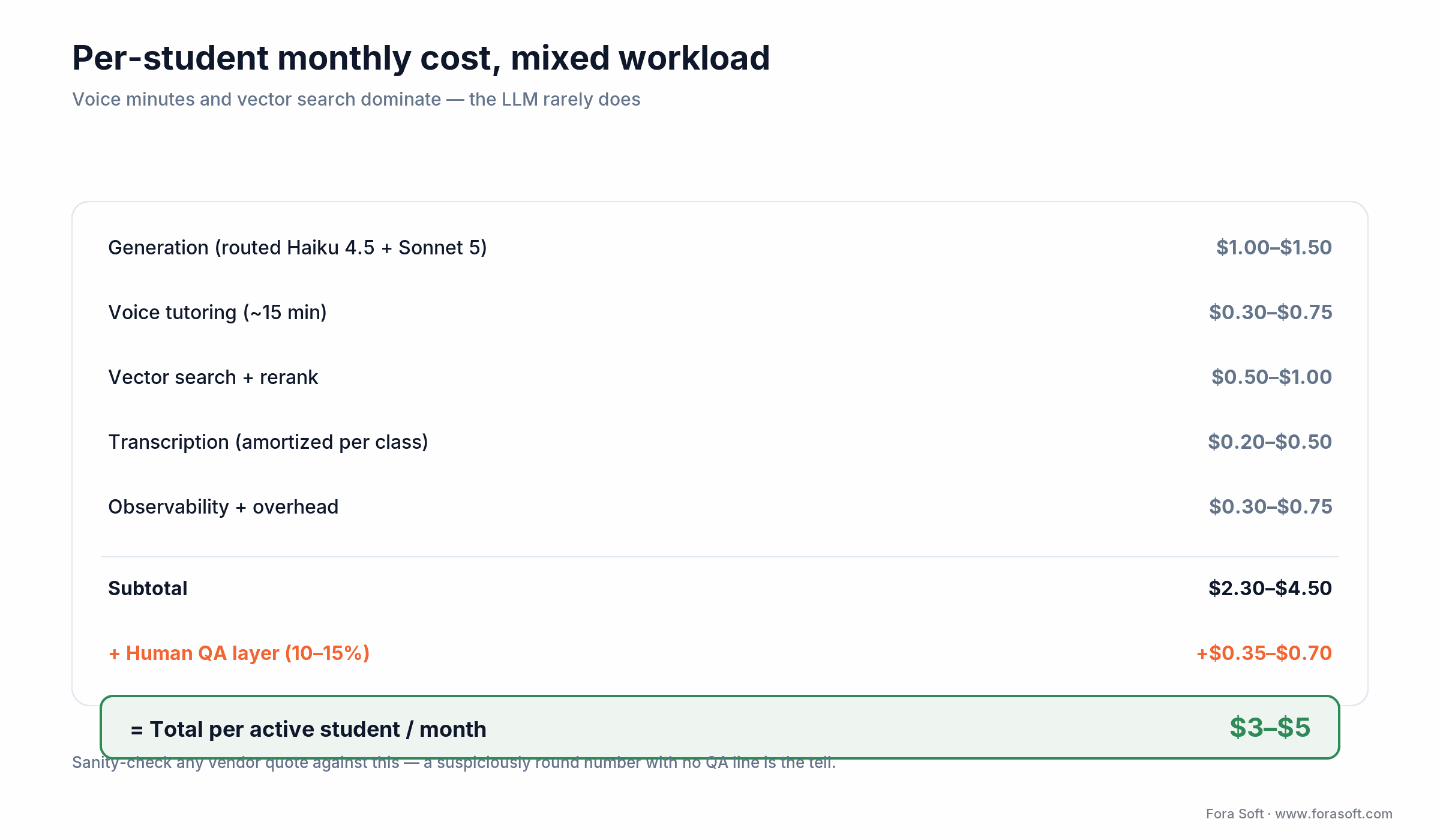
Figure 5. Per-active-student monthly cost, mixed workload. Voice and vector search dominate; the LLM rarely does.
Take a student who generates a few study sets, runs 200 grounded chat turns, and has 15 minutes of voice tutoring in a month. Generation on a routed mix (bulk on Haiku 4.5, hard reasoning on Sonnet 5) lands around $1.00–1.50. Voice at roughly $0.02–0.05 a minute adds $0.30–0.75. Vector search, reranking, transcription amortized across the class, and observability add another $1–2. Round the total to $3–5 per active student per month at institutional scale, dropping as you self-host the cheap tier.
Two things founders get wrong. First, the LLM is rarely the big line item — voice minutes and vector reads are. Second, the human QA layer is a real cost, not an optional one: budget 10–15% on top for teacher review, because that’s what keeps a wrong answer from reaching a student. When someone quotes you a suspiciously round per-student number with no QA line, that’s the tell.
Need a per-student cost model you can defend?
Send us your student count, content mix, and whether voice is core. We’ll return a routed model plan and a monthly cost band you can take to a budget meeting — with the QA line included, not hidden.
Mini case: a study platform in 12 weeks
A mid-sized university came to us with a familiar shape of problem: 18,000 students, 400-plus courses on Canvas, and a lecture library of roughly 14,000 hours of video nobody could search. Teaching-assistant costs had climbed past $3M a year, and course pass rates had slipped three points over two years. They didn’t want a chatbot; they wanted students to actually study the material they already had.
We shipped on the five-layer stack in 12 weeks. Ingestion ran a nightly batch of new Canvas content and lecture captures through speech-to-text, with PDFs and textbooks through a structure-aware parser. RAG used hierarchical chunking with a vector store scoped per course so nothing leaked across classes, and a reranker on the top-20 hits. Generation routed bulk flashcards to the cheap tier and reserved the flagship model for exam-prep questions, all behind a data-proxy so no student PII left the university’s tenancy. Teachers got a dashboard showing exactly what the AI produced for their course.
By the end of the 60-day pilot, study-tool engagement was the surprise: students pulled far more practice questions than the old static review sheets ever saw, and the teaching team spent its hours on the students who were genuinely stuck instead of writing review guides by hand. The stack is close cousin to what runs on BrainCert, our virtual-classroom platform. Want a similar assessment of your content and LMS? Grab a 30-minute call and we’ll scope it.
5 pitfalls that kill AI study-guide projects
1. Hallucination on facts and math. Frontier models still get a meaningful share of factual recall wrong without grounding. Ship quizzes without RAG, ranked distractors, and a teacher review loop and every set has wrong answers hidden in it. Budget a human QA layer; treat it as infrastructure, not overhead.
2. Over-reliance kills the learning. If the tool hands over answers, students skip the struggle that actually builds memory. Engagement metrics look great while learning craters. Counter it in the product: retrieval before reveal, hints before solutions, and caps that push a student to attempt before asking.
3. FERPA leak through the API. Free-texting student names or scores to a model provider is a data breach with a friendly UI. The data-proxy layer isn’t optional, and it has to exist before the first real student record flows, not after the audit.
4. Retrieval that looked fine on ten pages. Demos run on a clean chapter; production runs on a messy 600-page course pack with duplicated figures and scanned appendices. Build the eval suite early and test on the ugliest content the customer has, because that’s what real students upload.
5. Integration discovered too late. The customer’s ancient LMS doesn’t speak LTI 1.3, or their data-residency rules cut off your model provider. Both are cheap to check in week one and ruinous to find in week ten. Map the integration and the jurisdiction before you write feature code.
KPIs: what to measure
Pick the smallest set you can defend, and make sure at least one measures learning, not just usage. Engagement is easy to game; mastery isn’t.
Learning KPIs. Mastery gain is pre-study versus post-study correctness on novel problems the student hasn’t seen. Retention is correctness at one week and 30 days — spaced repetition should beat a cramming baseline by a wide margin. Time-to-mastery is minutes per concept to reach a correctness threshold; watch it for regressions as the content library grows.
Quality KPIs. Hallucination rate is the share of AI-generated factual statements a teacher marks wrong. Target under 2%, and know that aggressive human-in-the-loop can push it well below 1%. Track it per subject, because history and math misbehave differently.
Business KPIs. Weekly active students per license, teacher-dashboard adoption, and renewal intent. The teacher metric predicts renewal better than any student number — if the teacher isn’t in the loop, the contract doesn’t come back.
When NOT to build an AI study guide maker
We turn projects down every quarter, and saying so is how you know the rest of this guide is honest. Walk away, or buy instead of build, when any of these is true.
Your content is high-stakes certification. Medical licensing or the bar exam, where a 2% hallucination rate is unacceptable and you don’t have the expert-QA budget to drive it toward zero. The liability outweighs the automation.
You only need one student served. If the real requirement is a single person turning their own notes into flashcards, RemNote or NotebookLM already do it for the price of a coffee. Build when grounding, data control, and oversight are the requirement — not before.
The integration or jurisdiction is a dead end. An LMS that can’t do LTI 1.3, or data-residency rules that cut off every viable model provider in your target country. Fix the blocker first or the platform can’t ship.
You can’t staff the QA loop. An AI study tool without human review of generated content isn’t cheaper, it’s a slower-motion reputation problem. If nobody owns quality, don’t launch.
A decision framework in five questions
Five questions decide your architecture. Answer them before anyone writes code.
1. Who is the buyer? A B2C student means freemium plus subscription and a relentless focus on engagement. An institution means LTI 1.3, a teacher dashboard, and DPAs before anything else. These are different products; pick one.
2. What’s the primary content? Textbooks point to long-context grounding or hierarchical chunking. Lectures point to a transcription and clip pipeline. Mixed means both, and a bigger ingestion budget.
3. What’s the stakes level? K-12 homework runs cheap on a mid-tier model. Board exams demand the flagship tier, aggressive QA, and expert review of every question. Match model spend to the cost of a wrong answer.
4. Which jurisdictions? US-only is FERPA plus COPPA plus state laws. Add the EU and you inherit GDPR and the AI Act. Start from the strictest regime you’ll touch and layer down; retrofitting the other direction is painful.
5. Is voice core or optional? Optional means defer it to v2 and save the latency engineering. Core means a speech-native model or a tuned cascade and a real budget per voice minute. Don’t half-build it. If two or more answers push you toward “institutional, high-stakes, multi-jurisdiction,” you’re building a platform, not a feature — and that’s exactly the conversation to have with our AI integration team.
The 10–14-week build path
A first institutional release fits in a quarter if you sequence it right. This is the path we run, and the eval suite in week three is the part teams skip and regret.
| Weeks | Phase | Deliverable |
|---|---|---|
| 1–3 | Discovery & content audit | Architecture, model plan, FERPA/GDPR data map, LMS scope, eval suite |
| 3–5 | RAG setup | Vector index, chunking, reranker, retrieval quality baseline |
| 5–9 | Core AI features | Flashcards, quizzes, summaries, video-to-notes on real content |
| 9–11 | Chat & voice tutor | Grounded chat, optional voice, teacher dashboard v1 |
| 11–12 | LMS & compliance | LTI 1.3 embed, xAPI logging, data-proxy, WCAG 2.2 AA, DPAs signed |
| 12–14 | Pilot & hardening | 60-day pilot, observability, on-call runbook |
Where AI study tools are heading in 2026–2027
Multi-agent tutoring. One agent generates a question, a second critiques the answer, a third plays a confused peer so the student explains it back. Early results suggest a real lift on retention over single-agent chat, and the pattern is getting cheap enough to run per student.
On-device models for the under-13 case. Small local models on phones and laptops keep a child’s data off the network entirely, which closes the COPPA loop by design rather than by contract. Expect a wave of local-first K-5 tools as these models get good enough.
The EU AI Act clock. Transparency duties bite in August 2026 and the high-risk education obligations land in December 2027. Vendors that treated conformity as an afterthought will find themselves locked out of European public procurement while the ones who designed for it walk in. Build the audit trail now.
Ready to build an AI study guide maker that schools can buy?
We’ve shipped grounded generation, voice tutoring, and LMS-embedded platforms with the compliance to back them. Bring your content and your buyer; we’ll bring the stack and the estimate.
FAQ
What is the best AI study guide maker in 2026?
For most students, Google NotebookLM if you want your own sources explained without the AI wandering, and RemNote if you want to remember the material weeks later, because its FSRS spaced-repetition engine is the strongest of the consumer tools. Quizlet and Knowt are solid free-first flashcard options. There is no single winner; match the tool to whether you value grounding, retention, or breadth.
Can an AI study guide maker turn a PDF into a study guide?
Yes. Most tools accept a PDF upload and return a summary, key terms, flashcards, and practice questions in under a minute. Quality depends on the PDF: clean digital text works well, while scanned or handwritten pages need OCR and often lose tables and equations. For a platform you build, a structure-aware parser plus OCR fallback handles messy real-world PDFs far better than a raw upload.
Are AI study guide makers free?
Many have a free tier. NotebookLM and Knowt are generous for free; Quizlet, RemNote, and StudyFetch offer free plans with daily caps and paid tiers around $5–18 a month for unlimited AI. Free tiers usually throttle AI generation or gate the useful features (unlimited chat, grading), so heavy users end up paying.
Which LLM is best for generating study guides?
Route rather than pick one. Claude Sonnet 5 is a strong default generator; Gemini 3.x Flash is cost-effective for grounding whole textbooks; Claude Haiku 4.5 or Gemini Flash-Lite handle cheap high-volume flashcards; reserve Claude Opus 4.8 or another flagship for high-stakes questions. The winning pattern is a router that sends each task to the cheapest model that clears its quality bar.
How do you keep an AI study tool FERPA compliant?
Operate as a “school official” under a signed Data Processing Agreement, keep the school in direct control of the data, and never reuse or train on student records without authorization. Technically, route all requests through a data-proxy that strips names, IDs, and scores before any prompt reaches a third-party model API and re-attaches them on return. That proxy is the control that keeps student PII out of the model provider entirely.
Can an AI study guide maker replace a tutor?
For low-stakes practice at scale, largely yes — it’s available at 2am and costs a fraction of human tutoring. For diagnosing persistent misconceptions, motivation, and high-stakes coaching, no. Bloom’s 1984 research showed one-to-one human tutoring is remarkably effective; the realistic goal is an AI-plus-human hybrid that handles volume so humans focus on the students who are actually stuck.
How much does it cost to build an AI study guide platform?
A first institutional release typically runs 10–14 weeks. Running costs land around $3–5 per active student per month at institutional scale — voice minutes and vector search usually dominate, not the LLM — plus a 10–15% human-QA budget. We use Agent Engineering to come in faster and leaner than a traditional shop, and we’ll give you a defensible band on a call rather than a suspiciously round number.
How do you stop an AI study tool from just giving answers?
Design it to teach, not to answer. Use retrieval-before-reveal so the student attempts first, give hints that escalate rather than solutions, and cap how much the tool will do before requiring an attempt. Pair that with a syllabus AI-use policy and assignments that require process artifacts. A tool that refuses to write the essay is a better integrity story than a detector that claims to catch cheating after the fact.
What to read next
Tools
Best AI study guide tools compared
NotebookLM, ChatGPT, Quizlet and more, side by side.
Build
Build an adaptive learning platform
Algorithms, architecture, and cost for the full platform.
Tutoring
AI tutors and adaptive learning in 2026
How the tutor loop maps to modern LLM architectures.
Teachers
AI lesson plan generator playbook
The teacher-facing sibling of the study-guide build.
Video
AI video streaming playbook
The lecture-video layer under any e-learning product.
Ready to ship a study guide maker students actually learn from?
If you just want a tool tonight, pick NotebookLM or RemNote and get on with it. If you’re building for a school or a brand, the hard part was never the model. It’s the retrieval quality that decides whether your tutor cites the right page or hallucinates, the pedagogy engine that decides whether students remember anything, and the compliance discipline that decides whether an institution can legally buy you at all.
Get those three right — grounded generation, real learning science, and a data-proxy from day one — and the rest of the engineering falls into place on the five-layer stack. That’s the platform we’ve shipped before, and the one we’d build with you.
Let’s scope your AI study guide platform
Two decades of shipped education software, grounded AI, and the compliance to pass a FERPA audit. Tell us where you are and we’ll map the fastest safe path to launch.

