Key takeaways
• If you already have a web app, Electron is the default for desktop app development in 2026 and everything else needs a reason. Tauri, WebView2 and Flutter each win one column of the table and lose three.
• The real cost of desktop is not the build, it is the release train. Electron ships a major every 8 weeks and patches only the newest three, so you are roughly 24 weeks from running unsupported Chromium.
• Signing is no longer a checkbox. Since June 2023 your Windows key must live on hardware, and since March 2026 certificates expire after 460 days instead of 39 months.
• Budget $2,748 at the floor and about $12,215 realistically for year one of just staying shippable — before a single feature. Most of that is engineering time, not licences.
• Enterprise buyers ask three questions your marketing site cannot answer: can we deploy it with Intune or Jamf, can we pin the version, and does it meet EN 301 549. Have the answers ready.
Desktop app development sounds like a solved problem until the first enterprise customer asks for an MSI, a pinned version, and an accessibility conformance report in the same email. Getting the framework choice wrong costs you a rewrite; getting the shipping pipeline wrong costs you the deal. We build desktop clients for a living — four of them are running in production right now on Electron — and this is the guide we wish existed when we started.
Short version: if you have a web app and you need it on Windows, macOS and Linux, use Electron and spend the saved argument on the parts that actually bite — signing, updates, enterprise distribution, and the eight-week upgrade treadmill. The rest of this page shows the arithmetic behind that answer, and the cases where we would tell you to do something else.
Why Fora Soft wrote this guide
Fora Soft is a software development company founded in 2005 that has delivered 250+ projects with 50+ in-house specialists. Desktop keeps coming back. Not as a nostalgia play, but because some products only work when they own the machine: local files, background capture, low-latency audio, hardware access, offline work. Those are the products our Electron desktop app development team builds.
Four of the desktop apps we have shipped run on Electron, and each broke in a different place. Franchise Record Pool is a DJ platform with a 200,000-track live library out of a 720,000-track licensed catalogue; the desktop client exists because DJs need tracks on disk before a gig, not streaming in a club with bad Wi-Fi. Tyxit lets musicians in different countries play together under 30 ms of end-to-end latency — it was used live between the stages of Montreux Jazz Festival and Jazz à Vienne in 2022. Fox Runner is a trading news terminal doing roughly $5M a year with 6,000+ active traders. StreamFog pushes AR effects into OBS, Discord and Zoom through a virtual camera, mixing C++ and Chromium Embedded Framework alongside Electron.
None of those were “wrap the website and ship it.” Every one of them hit the same four walls: memory, code signing, auto-update, and the version treadmill. That is what this guide is about. If you want the same coverage for the browser side, our custom software development team does both halves.
Not sure desktop is even the right move?
Send us the product and the constraint. Thirty minutes, and we will tell you if a PWA would do the job instead — we have talked clients out of desktop before.
What desktop app development means
Desktop app development is building software that installs on a user’s computer and runs against the operating system directly — its own process, its own window, its own access to the file system, the hardware and the network stack — instead of running inside somebody else’s browser tab. In 2026 the work splits into two halves: writing the app, and getting it past the operating system’s gatekeepers onto a machine you do not control.
Desktop, web or PWA: which shape does your product need
Most products do not need a desktop client. Here is the test we apply before quoting anyone.
| You need | Web app | PWA | Desktop app |
|---|---|---|---|
| A window and a URL | yes | yes | yes |
| Works offline for hours | no | partly (cache) | yes |
| Reads and writes arbitrary local files | no | no | yes |
| Runs while minimised or at login | no | limited | yes |
| System audio or a virtual camera | no | no | yes |
| Installed by enterprise IT with MDM | no | no | yes |
| Ships a fix in five minutes | yes | yes | no — users must accept an update |
If your honest answers are all in the first two columns, ship a PWA and spend the saved money on the product. The desktop column is where you land when the operating system is the feature: local storage of something large, background capture, hardware access, or an IT department that wants to deploy you like any other corporate application.
What you are actually choosing between
Two decisions, not one. First the runtime: do you ship a browser engine with your app (Electron), borrow the one already on the machine (Tauri, WebView2), draw your own pixels (Flutter Desktop), or use the platform toolkit (SwiftUI and AppKit on macOS, WinUI and WPF on Windows, GTK or Qt on Linux). Second the language: TypeScript, Rust, Dart, C#, C++, Swift, Kotlin or Python. The two are coupled — picking Qt means C++ or Python, picking MAUI means C#, picking Electron means your existing web stack.
For a business app with a web front end already in production, that second decision is usually already made, which is why the rest of this guide spends most of its time on the runtime.
What changed in 2026
Four things moved in desktop app development since the last time most guides on this topic were written: Electron reached version 43, npm installs stopped running a postinstall script, Windows code-signing rules tightened twice, and EU accessibility law started applying to desktop software. Every one of them changes a decision you are about to make.
1. The version gap got embarrassing. Electron is on 43 as of 30 June 2026 — Chromium 150, Node 24.17, V8 15.0. Most articles that say “2026” in the title are still describing Electron 34 and Chromium 132. That is nine majors and about 18 Chromium releases of security fixes.
2. npm install stopped downloading Electron. From Electron 42 (5 May 2026), the electron package no longer fetches its binary in a postinstall script — it downloads on first run instead. The Electron team did this because postinstall scripts became the favourite npm supply-chain attack vector. Practical effect: you can finally run npm install --ignore-scripts in CI.
3. Code signing got stricter twice. Private keys have needed hardware protection since June 2023, and since 1 March 2026 code-signing certificates max out at 460 days instead of 39 months. Your renewal calendar just got 2.6 times busier.
4. Accessibility became a legal question in the EU. The European Accessibility Act has applied since 28 June 2025, and EN 301 549 clause 11 covers non-web software — that is your desktop app, not just your website. We have not seen a single competing Electron guide mention this.
Electron alternatives, compared
If you are looking for Electron alternatives, there are seven realistic ones in 2026 and each wins a different column. The honest comparison is not “which is best” but “which column of the table do you actually care about.” Here is how each scores for a business app.
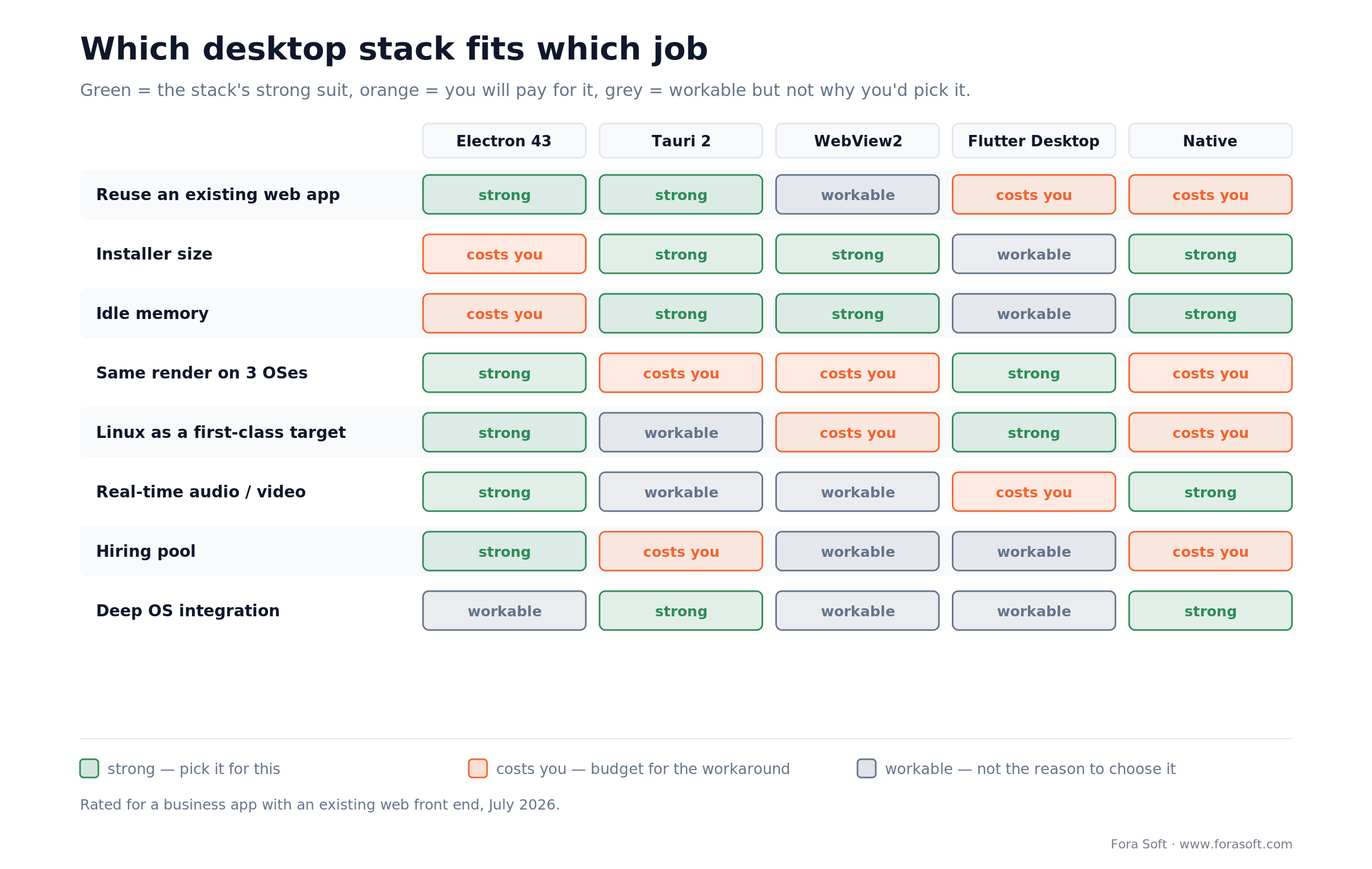
Figure 1. Each stack is strong somewhere. Electron wins the columns most business apps are graded on: web reuse, consistent rendering, Linux, real-time media and hiring.
| Stack | Installer | Idle memory | Rendering | Where it wins | Where it breaks |
|---|---|---|---|---|---|
| Electron 43 | 50–150 MB | highest of the seven | Chromium 150 everywhere | web reuse, media, Linux, hiring | size and memory; you own the upgrade train |
| Tauri 2 | 3–15 MB | low | OS webview — three engines | tiny binaries, Rust backend, memory | webview drift; Rust hire; weaker media stack |
| WebView2 | smallest | shared with Edge | Edge only | Windows-only shops, disk footprint | no macOS, no Linux; Microsoft owns the runtime |
| Flutter Desktop (3.x) | 20–60 MB | moderate | own renderer, pixel-identical | one codebase with mobile, custom UI | no web code reuse; Dart hiring; plugin gaps |
| .NET MAUI / WPF | 30–80 MB | moderate | native controls per OS | C# shops, Windows-first enterprises | macOS support is thinner; no Linux in MAUI |
| Qt 6 (C++ or Python) | 30–80 MB | low | own widget set | industrial, medical, embedded, 3D | commercial licence unless you can live with LGPL |
| Native per OS | small | lowest | platform-perfect | OS integration, performance ceiling | three codebases, three teams, three release trains |
A word on the two people ask about least and hit most often. Qt is the right answer far more often than web developers assume — if your product is an instrument panel, a CAD-adjacent tool or anything with a hard real-time loop, Qt with C++ or PySide is what that industry already runs, and the licensing question (LGPL versus commercial) is a legal decision before it is a technical one. .NET MAUI and WPF are the right answer when the company is already a C# shop with an existing WinForms or WPF estate; fighting that with JavaScript is a hiring problem you are choosing to create. Python desktop toolkits (Tkinter, PySide) are fine for internal tools and we would not ship a commercial product on them.
Two numbers make the memory argument less dramatic than the internet suggests. Chromium is shared across renderers inside one app, so a five-window Electron app is not five browsers. And the shipped apps we measure sit far below the “200–300 MB idle” figure that gets quoted — we treat 150 MB resident at idle as the budget on Fora Soft builds, and we alert when it drifts.
Reach for Electron when: you have a working web front end, you need all three desktop OSes, and the app touches media, files or long-running background work. That describes most B2B desktop products.
Reach for Tauri 2 when: installer size is a real constraint (kiosk fleets, metered networks), you already have Rust on staff, and your UI is plain enough that three different webview engines will not embarrass you.
Reach for WebView2 when: you ship to a Windows-only enterprise fleet, disk footprint is audited, and you are comfortable that the runtime updates on Microsoft's schedule rather than yours.
Electron vs Tauri: the numbers
Pick Electron if you need one rendering target, real-time media or the bigger hiring pool; pick Tauri 2 if installer size is a hard constraint and you have Rust engineers. This is the comparison people actually search for, so let us be precise about what is comparable and what is not.
What is comparable: ecosystem size. In the week of 18–24 July 2026, npm served electron 5,221,460 downloads and @tauri-apps/api 2,078,872. electron-builder alone pulled 3,176,221 downloads that week — more than the entire Tauri client API. That gap is the answer to “will there be a Stack Overflow answer at 2am.”
What is not comparable: the bundle-size and RAM benchmarks that get quoted everywhere. We looked at the widely-cited “Tauri is 96% smaller and uses 5x less RAM” numbers and could not find a disclosed methodology behind any of them — no app spec, no OS versions, no framework versions. A hello-world comparison tells you nothing about a product with a media pipeline in it. The directionally true statement is: Tauri binaries are roughly an order of magnitude smaller, and its idle memory is lower, because it does not ship a browser.
The trade you are actually making
Tauri renders in the operating system’s own webview: WebView2 on Windows, the system WebKit view on macOS 10.15 and up, WebKitGTK on Linux. You save 100 MB and you buy three rendering engines to test against, on versions your users control. Electron ships one Chromium; you pay 100 MB and you get one target.
For a dashboard with tables and forms, that trade favours Tauri. For anything with video, audio worklets, WebRTC, canvas-heavy UI or DRM, it favours Electron so hard the conversation ends. On Tyxit we needed predictable audio scheduling across Windows and macOS at under 30 ms — three webview engines was never an option.
One correction worth making, because it circulates as a Tauri talking point in reverse: AFFiNE did migrate between the two, but the direction was Tauri to Electron, in March 2023. It was never on Electron first. If someone cites it as “even Electron users left,” they have the arrow backwards.
Reach for a hybrid when: one subsystem is the bottleneck. Ship Electron for the shell and move the hot path into a Rust or C++ native module — that is what we did on StreamFog, and it beats a rewrite you cannot finish.
When not to build on Electron
Five situations where we would tell you to spend the money elsewhere. This section costs us work and we keep it anyway.
1. Your app is a menu-bar utility. If the whole product is a tray icon and a 300 px popover, 100 MB of Chromium to render it is indefensible. Native or Tauri.
2. You ship to Windows only and IT audits disk usage. WebView2 shares the Edge runtime that is already on the machine. Microsoft moved Teams off Electron onto WebView2 for that reason and, in March 2023, reported the new client running up to two times faster while using 50% less memory. Separately — and earlier, in December 2022 — they retired the Teams Linux desktop client entirely and replaced it with a PWA. Two decisions, one lesson: a Windows-first stack makes Linux somebody else’s problem.
3. You have no web codebase. Electron's entire value is reusing what you already built. Starting from an empty repo, you are choosing to inherit a browser for no reason. Flutter Desktop or native.
4. You need sub-millisecond or kernel-level work. Drivers, packet capture, real-time control loops, anything with a hard deadline in the microseconds. Node's event loop is not the tool.
5. Nobody will own maintenance. This is the one that actually kills projects. An Electron app with no assigned owner is an unpatched Chromium browser with your logo on it, distributed to your customers. If you cannot name the person who upgrades it, do not start.
Want a second opinion before you commit?
We will look at your web stack, your customers' IT constraints and your team, and give you a straight recommendation — including “do not build a desktop app.”
What Electron 43 actually ships
Electron 43 became stable on 30 June 2026 with Chromium 150.0.7871.46, V8 15.0 and Node v24.17.0. Two recent releases matter more than the version number.
Electron 42 (5 May 2026) stopped downloading its own binary through a postinstall script. Supply-chain attacks against npm made postinstall the obvious attack surface, so the binary now downloads the first time the bin script runs. If your security team has been asking for scriptless installs, you can now do this:
npm install electron --save-dev --ignore-scripts
npx install-electron
The same release moved macOS notifications from the deprecated NSUserNotification API to UNNotification. Read the consequence carefully: the new API requires the app to be code-signed for notifications to display at all. An unsigned dev build now silently emits a failed event instead of showing a notification. We have watched a team lose half a day to that one.
Platform support in 43: macOS Monterey and up on both Intel and Apple Silicon, Windows 10 and up on ia32, x64 and arm64, Linux built on Ubuntu 22.04 and verified on Ubuntu 18.04+, Fedora 32+ and Debian 10+. macOS universal binaries are not a prebuilt artefact — you merge the two architecture builds with @electron/universal.
Put this one in your roadmap now: the 43.x series is the last to ship prebuilt 32-bit binaries — Windows x86 (win32-ia32) and Linux ARM (linux-armv7l). Support ends in January 2027. If any customer fleet is still 32-bit, that is a migration conversation you want to start this quarter, not next December.
One myth to bury: @electron/remote is not deprecated. What was removed was Electron's built-in remote module; @electron/remote is its maintained replacement. We still would not reach for it — it re-opens the boundary you spent the security section closing — but “it is deprecated” is wrong.
Architecture that survives audit
Every Electron security review comes down to one question: what can the renderer reach. The answer should be “a short, named list of functions and nothing else.”
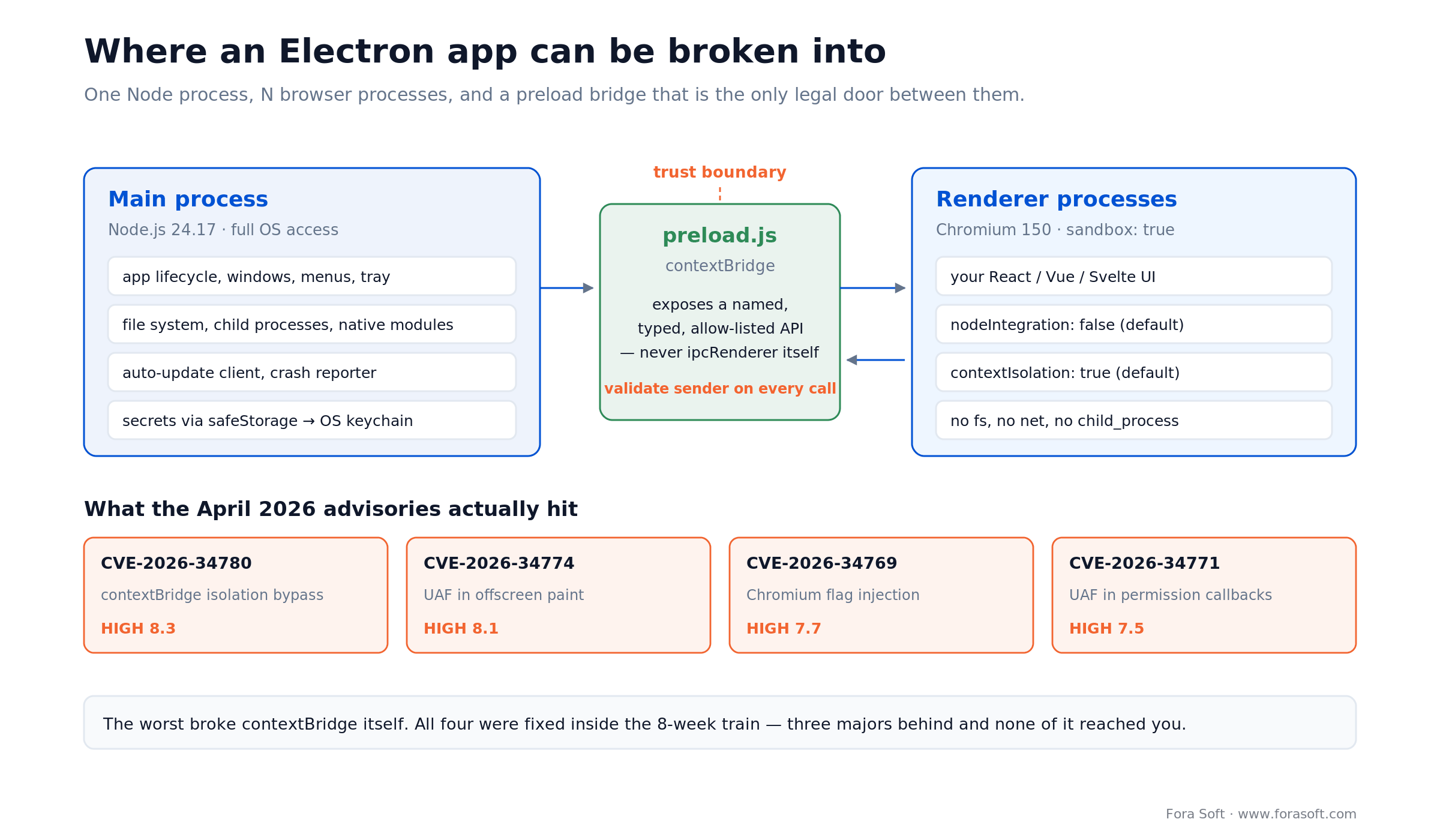
Figure 2. The preload script is the only legal door between your UI and the operating system. Everything the April 2026 advisories touched sits on one side of that line or the other.
The shape is fixed: one main process running Node with full OS access, N renderer processes running sandboxed Chromium, and a preload script that is the only thing both can see. Get the preload right and most of the checklist takes care of itself.
The preload contract
Expose named functions, never the IPC channel itself. This is the difference between an API and a hole:
// preload.js  -- the ONLY thing the renderer can reach
const { contextBridge, ipcRenderer } = require('electron')

contextBridge.exposeInMainWorld('licenceApi', {
  // good: one named operation, no channel name in the renderer
  activate: (key) => ipcRenderer.invoke('licence:activate', String(key)),
  status:   ()    => ipcRenderer.invoke('licence:status')
})
// bad, and we still find it in code reviews:
// contextBridge.exposeInMainWorld('ipc', ipcRenderer)
On the main side, validate the sender of every message. The official security checklist is explicit that this is on you — it is item 17 of 20, and it is not a default. Check the frame, not the window: any frame can send IPC, including iframes and child windows, and a window keeps its identity across navigation while a frame URL does not.
const ALLOWED = 'https://app.example.com'

ipcMain.handle('licence:activate', (event, key) => {
  // item 17: validate the SENDER FRAME, not the window
  const frame = event.senderFrame            // null if it already navigated
  if (!frame || frame.origin !== ALLOWED) throw new Error('bad sender')
  if (typeof key !== 'string' || key.length > 64) throw new Error('bad input')
  return activateLicence(key)
})
Comparing BrowserWindow.fromWebContents(event.sender) against your main window is the version you will find in most tutorials, and it is weaker than it looks: it passes for any view attached to that window, for sub-frames when nodeIntegrationInSubFrames is on, and for the window itself after it has navigated somewhere you did not intend.
Reach for a native module when: the work is CPU-bound and measured in milliseconds — codecs, encryption, indexing. Keep it in the main process behind a narrow IPC surface, and keep the renderer dumb.
The 8-week upgrade treadmill
This is the line item that turns a fixed-price desktop project into an ongoing one, and almost nobody writes it into the proposal.
Electron ships a major every 8 weeks and supports only the latest three stable majors. Six majors a year, a support window of roughly 24 weeks. Miss two trains and the security fixes stop reaching you — not Electron's fixes, Chromium's.
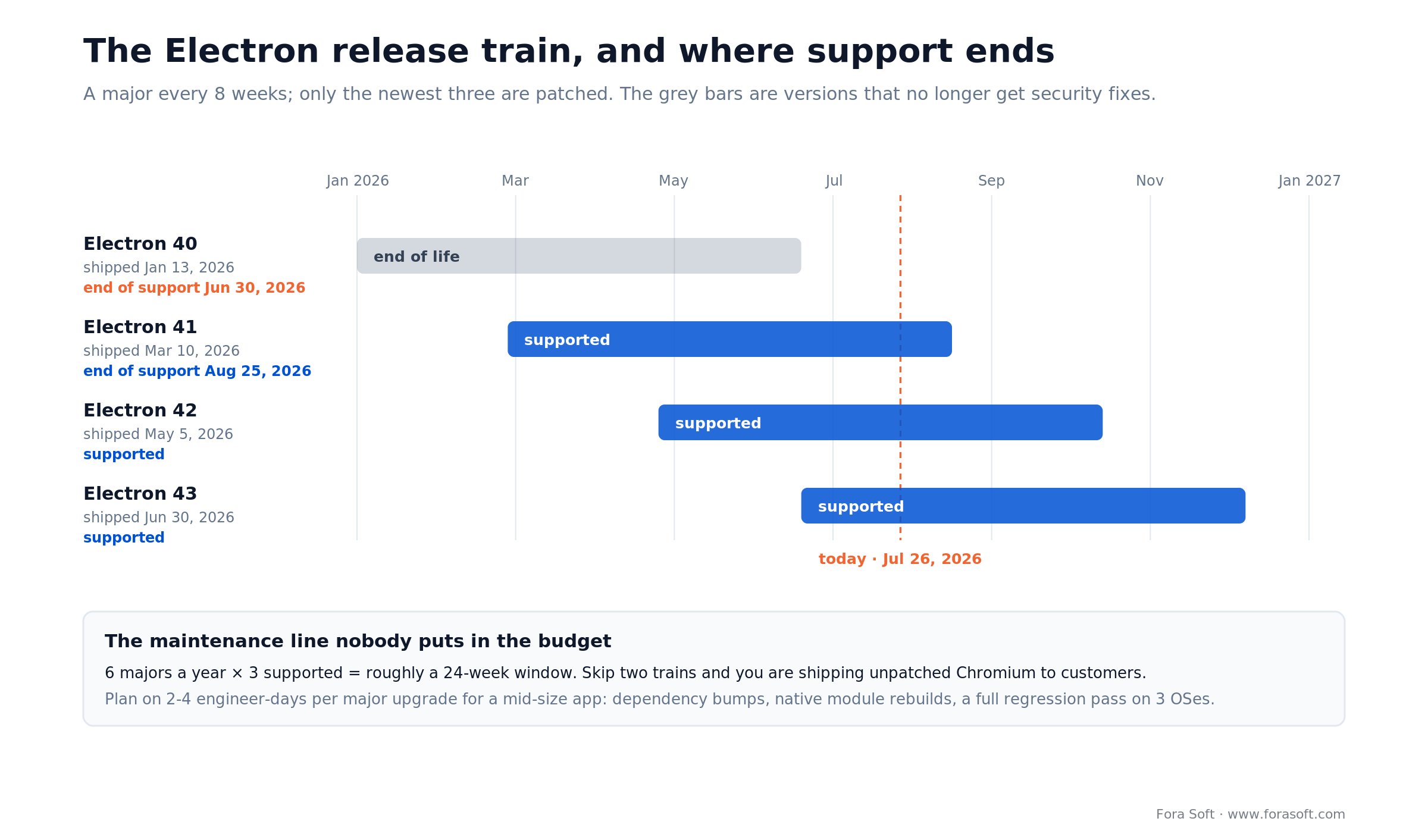
Figure 3. Only three majors are patched at any moment. Electron 40 shipped in January 2026 and was already out of support by the end of June.
As of 26 July 2026: Electron 40 shipped 13 January 2026 and lost support on 30 June 2026. Electron 41 (10 March 2026) loses it on 25 August 2026. If your app is pinned to 40 right now, you are shipping a Chromium with published, unpatched vulnerabilities.
What an upgrade actually costs. For a mid-size app we budget 2–4 engineer-days per major: dependency bumps, rebuilding native modules against the new Node ABI, and a full regression pass on three operating systems. At 2–4 engineer-days per major and a conservative $400 a day, that is $2,400–$4,800 a year if you take every second major, and $4,800–$9,600 if you take all six — pure maintenance, before anyone writes a feature. The floor column of the cost table below uses the cheapest of those, three upgrades at two days each.
You can skip alternate majors and upgrade three times a year instead of six, which is what we usually recommend. You cannot skip four in a row and still call the product supported.
Reach for a pinned LTS-style policy when: your customer is an enterprise with a change-control board. Pick every second major — three a year, which keeps you inside the support window — publish the schedule, and put the upgrade window in the contract before they put it in the SLA.
Security beyond the defaults
Good news first: the three settings that used to be the whole conversation are now defaults. nodeIntegration: false since Electron 5, contextIsolation: true since Electron 12, sandbox: true since Electron 20. If a guide is still telling you to set those, it was written a long time ago.
The official checklist has 20 items. Here are the ones that are not defaults and that we see missed in nearly every audit.
1. Content Security Policy. Item 7, and still a recommendation rather than a default. Without it, one injected script tag in your renderer has the whole web at its disposal.
2. Sender validation on IPC. Item 17, quoted almost verbatim: you should be validating the sender of all IPC messages by default. See the handler above.
3. Do not turn off context isolation to fix a bug. Disabling it also disables process sandboxing, regardless of the sandbox setting. It is one flag that quietly removes two defences.
4. ASAR integrity, if you can use it. It detects tampering with your packaged app, it is stable since Electron 39, and it is off by default — you enable the EnableEmbeddedAsarIntegrityValidation fuse together with OnlyLoadAppFromAsar. It works on macOS (Electron 16+) and Windows (30+). There is no Linux support, so do not promise it in a security questionnaire.
5. Secrets belong in the OS keychain. Use safeStorage, not a JSON file in userData. We have inherited more than one codebase with a refresh token in plain text next to the logs.
What the April 2026 advisories actually were
Electron published roughly eighteen advisories in the first week of April 2026, numbered CVE-2026-34764 through CVE-2026-34781. Severities below are the GitHub advisory scores; NVD sometimes rates the same bug differently in either direction, so triage against whichever feed your scanner uses. The four that matter most:
1. CVE-2026-34780 (HIGH, 8.3) — context isolation bypass through contextBridge. A attacker who can already run JavaScript in the main world — via XSS, say — could use a VideoFrame bridged across contextBridge to reach into the isolated world, and with it any Node API the preload script exposes. This is the one to read twice, because it attacks the exact boundary the architecture section above is built on. Context isolation is a wall, not a guarantee, and walls get patched.
2. CVE-2026-34774 (HIGH, 8.1) — use-after-free in the offscreen child window paint callback. Only relevant if you use offscreen rendering, which most business apps do not.
3. CVE-2026-34769 (HIGH, 7.7) — Chromium command-line switch injection through an undocumented commandLineSwitches web preference. Read the precondition before you panic: you are only affected if you build a webPreferences object by spreading untrusted or external configuration. A hardcoded webPreferences object is not affected.
4. CVE-2026-34771 (HIGH, 7.5) and CVE-2026-34770 (HIGH, 7.0) — use-after-frees in WebContents permission callbacks and in PowerMonitor. The permission one needs an asynchronous setPermissionRequestHandler; a synchronous handler is not affected.
A separate critical advisory in June 2026, CVE-2026-54257, covered a Buffer byte-length miscalculation in Electron causing a heap under- and overflow. It affected only Electron 42.3.1 and 42.3.2 and was fixed in Electron 42.3.3 — a two-patch window, which is exactly how fast you have to be able to move.
Every one of those was patched inside the release train. That is the point of the previous section: the upgrade budget is the security budget.
One caution about CVE lists you find elsewhere. CVE-2026-39846 is widely repeated as an Electron flaw. It is not — it is a stored-XSS-to-RCE in SiYuan's Electron client, caused by that app enabling nodeIntegration and disabling contextIsolation. Which is its own lesson.
Code signing changed in 2026
Signing a desktop app in 2026 costs $99 a year on macOS and $129–$349 a year on Windows, and since 1 March 2026 Windows certificates expire after 460 days instead of 39 months. If one section of this guide saves you a week, it is this one: signing is where desktop projects discover they have a three-week procurement problem.
macOS
The Apple Developer Program costs $99 per membership year, unchanged in 2026. From macOS 10.15 onward, everything built after 1 June 2019 and distributed with a Developer ID must be notarized; apps shipped through the Mac App Store are exempt. Notarization is an upload to Apple, a wait of minutes, and a stapled ticket. Without it, Gatekeeper blocks the app on first launch. The escape hatch still exists, but it moved: since macOS Sequoia the Control-click trick is gone, and the user has to open System Settings, go to Privacy & Security, and press Open Anyway. Nobody in enterprise procurement will do that for you. We wrote the full walkthrough separately in our guide to publishing desktop apps on macOS.
Windows, where the rules moved twice
Since 1 June 2023, code-signing private keys must be generated and stored in hardware meeting FIPS 140-2 Level 2 or Common Criteria EAL 4+ — a USB token, an HSM, or a cloud HSM. The CA/Browser Forum passed this as Ballot CSC-13 and set the date with CSC-17. You cannot get a .pfx emailed to you any more, which means your CI cannot just hold a file.
Since 1 March 2026, Ballot CSC-31 caps certificate validity at 460 days, down from 39 months (CA/Browser Forum, November 2025). Put the renewal in the calendar the day you buy it.
Real prices, checked in July 2026: SSL.com lists OV code signing at $129.00 a year and EV at $349.00 a year on a one-year term, with a YubiKey FIPS token at $379 if you do not already have hardware. Cloud signing services let CI sign without a physical token. Azure Artifact Signing, for example, publishes quotas of 5,000 signatures a month on the basic tier and 100,000 on premium.
OV or EV: the honest answer, which changed in 2024
For years the advice was “buy EV, it skips SmartScreen.” That stopped being true in March 2024, when Microsoft removed the instant-reputation behaviour. Microsoft’s own guidance now says paying a premium for EV solely to avoid SmartScreen warnings is no longer justified, and SSL.com states plainly that EV and OV have been treated equally since March 2024. Both certificate types now show the “unrecognized app” warning until your signing identity accumulates reputation.
So buy OV at $129 unless something else on your list needs EV — a customer security questionnaire that names it, or a kernel-mode driver, which still requires EV for attestation signing. If a vendor is still selling you EV on the SmartScreen argument, they are two years out of date.
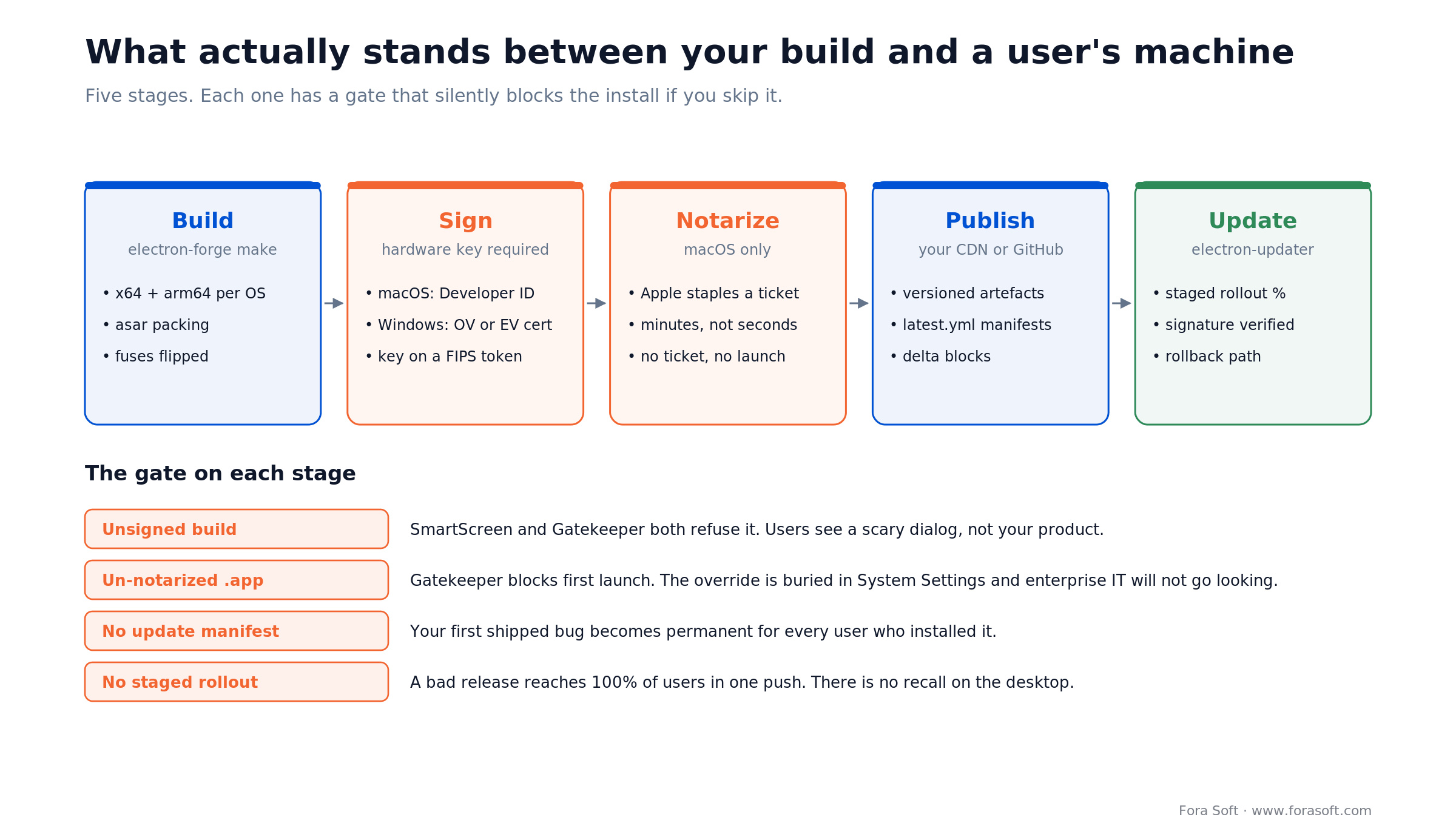
Figure 4. Five stages between your build and a user's machine. Each has a gate that fails silently — the app does not crash, it simply never opens.
Stuck on signing, notarization or MDM packaging?
We have shipped signed Electron builds to Windows, macOS and Linux fleets. Bring us the error message and we will tell you which of the five gates you are standing on.
Auto-update without midnight pages
Desktop has no recall. Once a build is on a user's machine, the only way to fix it is another build that the machine agrees to install. Design for that on day one.
Tooling. Electron’s own docs lead with Electron Forge and file electron-builder under alternative tooling — community-maintained, without official support from the Electron project, and it replaces some modules the maintainers ship (including the auto-updater) with its own. Both are fine. We use electron-builder plus electron-updater on most projects because the multi-platform packaging matrix is more complete, and we accept the support caveat consciously rather than by accident.
Four rules we do not break
1. Stage every rollout. 5% for a day, 25% for a day, then everything. A bad desktop release at 100% is a support incident measured in weeks, because the broken client is the thing that would have downloaded the fix.
2. Verify signatures on the client. The updater must refuse an artefact that does not match your certificate. An update channel you do not authenticate is a remote code execution feature you built on purpose.
3. Back up user data before applying an update. Schema migrations run on machines you cannot log into. A copy of the local database costs disk and saves the account.
4. Keep a rollback path. Publish the previous version's manifest and know how to point clients back at it. Test the rollback before you need it, not during.
Hosting is unglamorous: versioned artefacts on S3 or GitHub Releases behind a CDN, plus the update manifests the updater reads. Delta updates start paying for themselves around the 50 MB mark, which is where an Electron installer begins, not where it ends.
Enterprise rollout and MDM
Yes, enterprise IT can deploy an Electron app through Intune, ConfigMgr, Group Policy or Jamf — if you ship an MSI for Windows and a signed PKG for macOS, with silent install and an admin policy that can disable auto-update. Enterprise IT does not install your app. It deploys your app, to thousands of machines, without a human clicking anything.
Windows: ship an MSI, not just an NSIS exe. Group Policy software installation wants an MSI, and ConfigMgr gets automatic detection rules from an MSI for free. Intune can wrap an EXE as a Win32 app, so an MSI is not strictly required there — it is just your customer doing extra packaging work to install your product. NSIS is a consumer installer. Support silent install (/S or the MSI equivalent), per-machine rather than per-user installation, and a documented uninstall.
macOS: a signed PKG, deployable through Jamf. A DMG is a consumer artefact — it assumes someone drags an icon. Fleet tools want a package they can push.
Let IT turn off auto-update. This is the single most common enterprise blocker we hit. A managed fleet cannot have your app updating itself outside the maintenance window. Read an admin policy — registry key on Windows, configuration profile on macOS — and honour it. Then let them pin a version and update on their schedule.
Linux: pick two formats and mean it. AppImage plus deb covers most of the enterprise surface; add rpm if you have a Red Hat customer. Snap and Flatpak are consumer-friendly and awkward inside locked-down networks.
The security questionnaire that arrives with the contract
MDM is half of enterprise readiness. The other half is a spreadsheet from your customer’s security team, and the desktop-specific rows are these:
- SBOM. A software bill of materials for the shipped binary, not just your package.json. Generate it in CI so it matches the artefact you actually signed.
- Signature and update chain. Who holds the signing key, where it lives, and how the updater verifies an artefact before applying it. Have a written answer, not a shrug.
- Penetration test scope. Desktop pen tests probe the preload boundary, the IPC surface and local storage of credentials. If you followed the architecture section, you already have the answers.
- SSO. SAML or OIDC through the system browser — and on the OIDC path, authorization code with PKCE. Never an embedded webview asking for a password; RFC 8252 says native apps must use an external user-agent, and that pattern fails review on sight.
- Data residency and the DPA. A desktop app caches on the endpoint. Say exactly what is written to disk, whether it is encrypted at rest, and how it is purged on uninstall.
- Vulnerability response. A SECURITY.md, a disclosure address, and a stated patch SLA. Given the eight-week train, that SLA is easier to honour than it sounds.
The right time to build this is before the first enterprise deal, not during it. Retrofitting MSI packaging and update policy into a shipped app is a two-to-three-week job that always lands in the middle of a procurement cycle.
Reach for a managed-deployment build when: a single customer represents more than 100 seats. At that size their IT team, not their users, is the one who decides whether your app gets installed.
Accessibility is now a gate
The European Accessibility Act has applied since 28 June 2025. EN 301 549 — the standard European public bodies and, increasingly, private buyers procure against — devotes clause 11 to non-web software. Desktop applications are explicitly in scope, mapping the WCAG success criteria onto software with open and closed functionality.
The upside for Electron: you are rendering in Chromium, so the accessibility tree, ARIA, focus management and screen-reader support you already built for the web come along. The work is not starting from zero.
The parts that are desktop-specific and that we check on every project:
- Full keyboard operation with no traps, including native menus, the tray and any custom title bar.
- System preferences honoured — OS-level reduced motion, high contrast, increased contrast and font-size settings, not just your own theme toggle.
- Screen reader verification on the platform stack that matters: NVDA and Narrator on Windows, VoiceOver on macOS. Chromium's tree is a good start, not a pass.
- Focus visible on every interactive element, including anything you drew yourself in a custom window frame.
- An accessibility conformance report you can send to procurement. Enterprise buyers ask for it by name.
Nobody writes about this because it is not fun. It is also the fastest way to lose a public-sector deal in the EU, and increasingly in the US too.
Media and on-device AI
Real-time media on the desktop
If your product involves audio, video or screen capture, the desktop question is usually not “whether Electron” but “how far into Chromium do we have to go.”
Electron gives you Chromium's entire media stack: WebRTC with hardware acceleration, the codec set, getDisplayMedia for screen capture, Web Audio, and the same behaviour on all three OSes. Rebuilding that on top of three OS webviews is a project, not a task.
Where the browser stops and native starts, in our experience:
- Virtual cameras. There is no web API. StreamFog needed a Windows virtual camera driver so that OBS, Streamlabs, Discord and Zoom would see its AR output as a normal webcam — that is native code with an Electron shell around it.
- System audio capture. Loopback on Windows and macOS is platform work. The browser will give you a tab or a microphone, not the machine.
- Sub-30 ms audio scheduling. On Tyxit the whole product was the latency budget. That meant native audio paths and a Chromium UI, not the other way round.
- Background capture while minimised. Renderers get throttled. Long-running capture belongs in the main process or a utility process.
If you are choosing a media stack from scratch, our write-up on picking the technologies for a streaming app covers the server side, and the Video Streaming course in our Learn section goes deeper on protocols and delivery. Our dedicated development team has been shipping this class of product since 2005.
On-device AI in Electron
The reason a lot of AI products ship as desktop apps in 2026 is simple: the data cannot leave the machine, or the model runs better locally. Electron happens to be well positioned for that, and it comes with a new risk.
The advantage. The main process is Node. That means you can talk to a local model runtime over HTTP without any of the browser's restrictions — Ollama, for example, listens on port 11434 and exposes an OpenAI-compatible surface at http://localhost:11434/v1/, so most client SDKs work unchanged with the base URL swapped. You also get the file system, so retrieval over the user's own documents never leaves the device.
The risk, and it is new. That same Node host is why an AI feature is now a supply-chain question. Plugins, extensions and tool servers that your app loads run inside a process with full OS access. If your product lets users install third-party tools, you need a real answer for what those tools can reach — not a documentation page saying “only install trusted plugins.”
What we do: run the model-facing code in a separate utility process, keep an explicit allow-list of what any plugin can call, and never hand a plugin the same IPC surface the first-party UI uses. It is the preload contract again, one layer out.
If the AI part is the product rather than a feature, our AI integration service and the AI for Video Engineering course are the two places to go next.
Building an AI desktop app with data that cannot leave the machine?
Local inference, document retrieval, plugin sandboxing — we have shipped all three. Bring the constraint and we will sketch the architecture on the call.
What a desktop app costs in 2026
An existing Electron desktop client costs roughly $2,748 a year at the floor and about $12,215 realistically just to stay shippable in 2026, before a single new feature. Two numbers matter here and most guides publish neither: what it costs to build, and what it costs to keep shipping. The second one is the one that surprises people.
The run cost, shown longhand
Here is the annual bill for an Electron client that already exists, with nothing new being built. Floor is the cheapest legal way to ship; the upper end assumes EV signing, a FIPS token, a paid crash service and real CDN traffic.
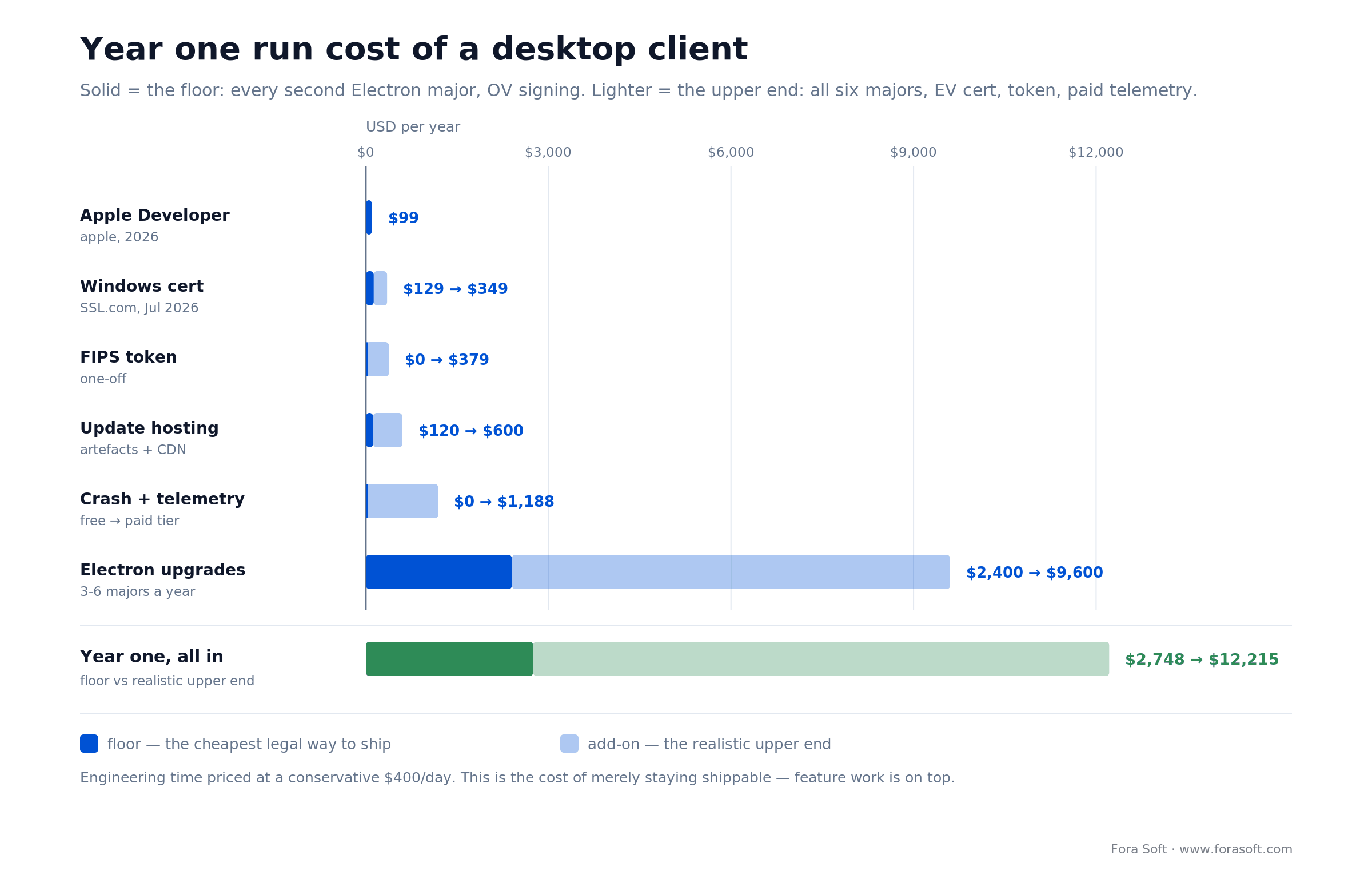
Figure 5. The licences are rounding errors. Six major upgrades a year at 2–4 engineer-days each is the entire cost of ownership.
| Line item | Floor | Realistic | Note |
|---|---|---|---|
| Apple Developer Program | $99 | $99 | per membership year, 2026 |
| Windows code-signing cert | $129 (OV) | $349 (EV) | SSL.com list price, July 2026 |
| FIPS token, first year | $0 | $379 | one-off; skip if you have hardware |
| Update hosting and CDN | $120 | $600 | artefacts plus bandwidth |
| Crash reporting and telemetry | $0 | $1,188 | free tier to a paid plan |
| Electron major upgrades | $2,400 | $9,600 | 3–6 majors × 2–4 days × $400/day |
| Year one total | $2,748 | $12,215 | before a single feature |
The arithmetic on the last line, spelled out: 6 majors a year × 2 engineer-days × $400 a day = $4,800 if you take every train. Take every second major, which is what we recommend, and it is 3 × 2 × $400 = $2,400. Add $228 of certificates and $120 of hosting, and the floor is $2,748. Run all six majors at four days each with EV signing, a token, a paid crash service and real CDN traffic, and you are at $12,215. Put the first number in the budget and the second in the risk register.
The build cost, and why we will not give you a range
We are not going to publish an “MVP costs $X” bracket, because every such number we have seen in this niche is either marketing or a guess. What we will tell you is where desktop is more expensive than the equivalent web app, so you can price it against your own rates:
- Three QA passes instead of one. Windows, macOS and Linux each get a full regression cycle per release. This is usually the biggest single delta.
- Signing and distribution setup. One to two weeks the first time, including procurement lead time on certificates, which you do not control.
- Auto-update and rollback. A week to do properly, including testing the rollback.
- Native modules. Anything the browser cannot do gets written twice, once per platform family, and rebuilt on every Node ABI change.
- Enterprise packaging. Two to three weeks for MSI, PKG, admin policy and update pinning, if you need it.
Effort for the most common case, in engineer-weeks
The one scope we are asked for most often is “we have a React app, we need a signed desktop client our enterprise customers can deploy.” Multiply by your own blended rate rather than trusting ours:
| Workstream | Effort | Calendar | Notes |
|---|---|---|---|
| Shell, packaging, three-OS build | 2–3 engineer-weeks | weeks 1–3 | main/renderer/preload, IPC contract, CI matrix |
| Desktop-only features | 2–6 engineer-weeks | weeks 2–7 | offline storage, tray, deep links, native modules |
| Signing and notarization | 1–2 engineer-weeks | start week 1 | certificate procurement is the long pole, not the code |
| Auto-update and rollback | 1 engineer-week | weeks 4–6 | staged rollout, signature check, rollback drill |
| Enterprise packaging | 2–3 engineer-weeks | weeks 6–9 | MSI, PKG, admin policy, version pinning |
| Three-OS QA cycle | 1 engineer-week per release | ongoing | usually the biggest recurring delta |
That lands a first signed, auto-updating, MDM-deployable release at roughly 9–16 engineer-weeks over 8–12 calendar weeks for a team of two. Start the certificate paperwork in week one and the calendar holds; start it in week eight and it does not.
Should you just build it in-house?
Build it in-house if you have React capacity to spare, an engineer who wants to own desktop for years, and no deal waiting on the release date. Hire it out if any of those is missing. The framework decision above is the hard part, and you now have it.
Hire it out when one of three things is true. You need it before a specific deal closes, and signing plus MDM packaging are three weeks of unfamiliar work sitting on the critical path. Or the app touches real-time media, where the gap between working and shipping is measured in weeks of tuning nobody on a web team has done before. Or nobody wants to own the eight-week upgrade train forever — in which case the honest arrangement is that we build it and hand it over with a runbook, and you keep us on the upgrade cadence only if you want to.
We use agent-assisted engineering across delivery, which changes the shape of an estimate rather than shaving a fixed percentage off it. That is a conversation with numbers attached to your actual scope, not a table on a blog post. If you want the honest version, book 30 minutes and bring the requirements.
Mini case: 720,000 tracks offline
The situation. Franchise Record Pool is a DJ platform founded by Funkmaster Flex with a licensed catalogue of 720,000+ tracks from Sony Music, Universal and Virgin, of which 200,000+ are live in the searchable library with 3,000+ added every month. Franchise Record Pool runs about 3 million page views a month at $19.99 a month per DJ. The web app worked. The problem was the venue: DJs need their crates on disk before they play, and club Wi-Fi is not something you bet a set on.
The plan. We built the desktop client in Electron alongside the web app and the React Native mobile apps, sharing the same React front end. The desktop-specific work was the part the browser could not do: a local library on disk, downloads that survive a dropped connection, and search over hundreds of thousands of tracks with key, BPM and remix metadata that stays fast when the machine is offline. Everything else — the AI voice assistant that builds a playlist from “Italian pop from the 90s, BPM 140,” the Shazam-style recognition that identifies the original behind a remix, the label-facing play tracker — is the same code the web app runs.
The outcome. One React codebase serving web, desktop and mobile, with the desktop client owning local storage, offline playback and background downloads. The library it searches locally is 200,000+ tracks and grows by 3,000+ a month, so the index has to stay fast while the machine is offline — that constraint, not the UI, is what made it a desktop product. The app was fully redesigned and relaunched in August 2024 and is still in production today. Want a similar assessment of what should be native and what should stay web? Book 30 minutes and we will map it against your product.
Five pitfalls that eat budgets
1. Treating the desktop app as a shipping target rather than a product. “Just wrap the web app” produces something that works on the developer's machine and fails on a locked-down corporate laptop with a proxy, an antivirus that quarantines unsigned binaries, and no admin rights.
2. Discovering code signing in the last sprint. Certificate procurement has lead time you do not control, and since June 2023 it involves shipping physical hardware or provisioning a cloud HSM. Buy the certificate in week one, even if you sign nothing until week ten.
3. Shipping without staged rollout. The first time a release breaks on one OS version, you will want a 5% ring. Building it afterwards costs the same and arrives one incident too late.
4. Leaking memory in a process that never restarts. A browser tab gets closed. A desktop app runs for three weeks. Every listener you forget to remove and every interval you never clear compounds. Set an idle RSS budget — we use 150 MB — and alert on it in production.
5. No maintenance owner. We are repeating this because it is the one that actually kills products. Six majors a year means someone has to care every eight weeks. If that person does not exist on your org chart, the app becomes unpatched within a year.
Decide in five questions
Answer these in order. The first one that gives a clear answer usually is the answer.
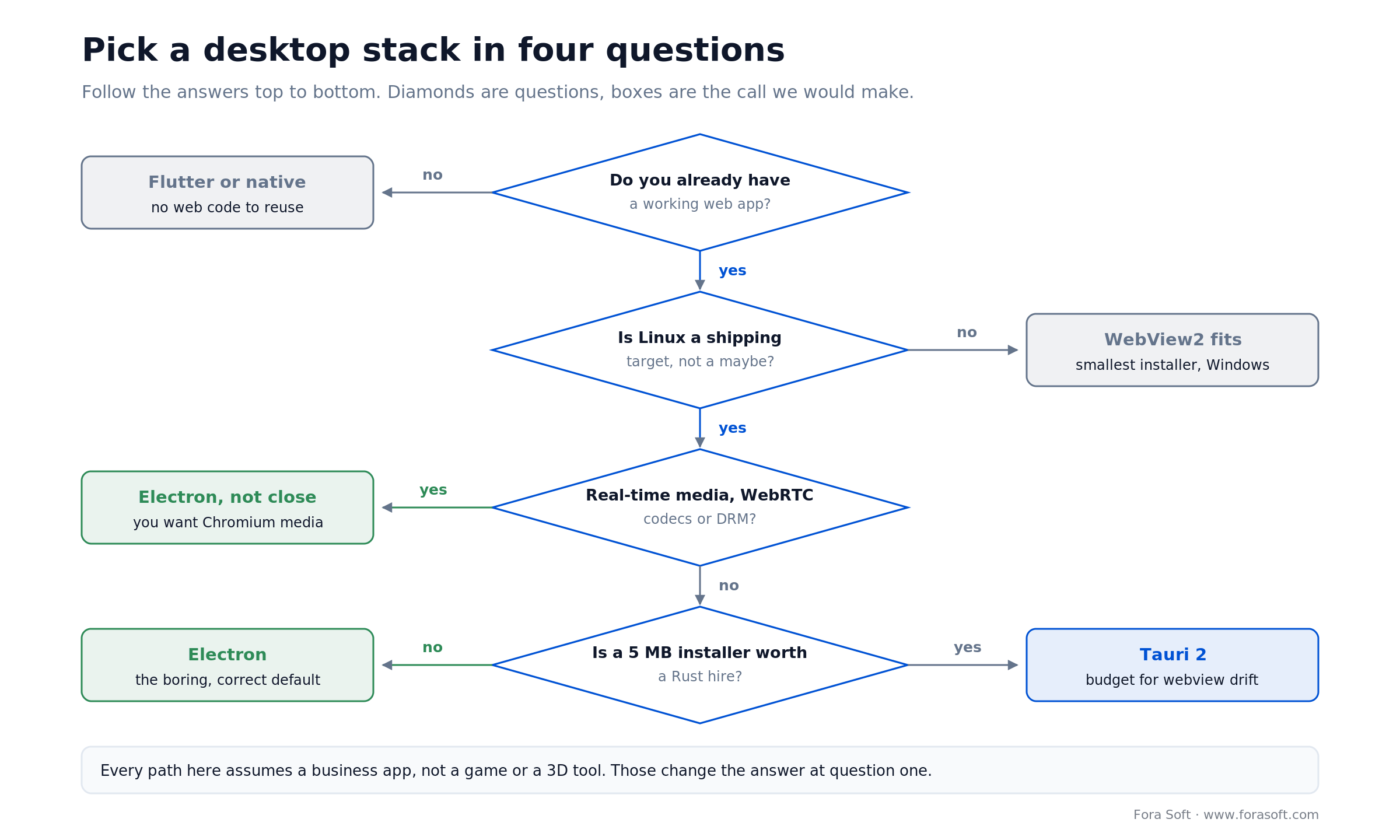
Figure 6. Four of the five questions fit a tree; the fifth is about people, not technology. Most business apps with an existing web front end land on Electron by the second or third branch.
Q1. Do you already have a working web app? No — look at Flutter Desktop or native first. Electron's value is reuse; without it you are inheriting a browser for nothing.
Q2. Is Linux a shipping target, not a maybe? If no, WebView2 becomes viable and you get the smallest footprint on Windows. If yes, WebView2 is out.
Q3. Does the app touch real-time media, codecs, capture or DRM? If yes, Electron, and it is not close. You want Chromium's media stack and you want one of it, not three.
Q4. Is a 5 MB installer worth a Rust hire and three webview engines to test? Honest answer for most business apps: no. If your answer is yes, Tauri 2 is a good tool and you should budget for the rendering differences.
Q5. Who upgrades it every eight weeks? Name the person. If you cannot, the answer to every question above is “do not ship a desktop app yet” — and if that person should be us, that is what a dedicated team is for.
| Your priority | Pick | Why |
|---|---|---|
| Reuse the web app, ship everywhere | Electron 43 | one Chromium, three OSes, the biggest ecosystem |
| Smallest possible installer | Tauri 2 | no bundled browser; accept three webview engines |
| Windows-only, disk footprint audited | WebView2 | shares the Edge runtime already on the machine |
| One codebase with mobile, custom UI | Flutter Desktop 3.x | own renderer, pixel-identical everywhere |
| Deep OS integration or hard real-time | Native | no abstraction between you and the platform |
| Any of the above, shipped and maintained | Talk to us | 250+ projects since 2005, four Electron products in production |
FAQ
Is Electron still a good choice in 2026?
Yes, for business apps that already have a web front end. Electron 43 shipped on 30 June 2026 with Chromium 150 and Node 24.17, npm served the package 5,221,460 times in the week of 18–24 July 2026, and it remains the only option that gives identical rendering plus a full media stack on Windows, macOS and Linux. The cost is installer size, memory, and a major upgrade every 8 weeks.
How much does cross-platform desktop app development cost?
The build depends on scope, but the ongoing cost is predictable: roughly $2,748 at the floor and about $12,215 realistically for the first year of an existing Electron client, of which $2,400–$9,600 is engineering time for three to six major upgrades. Certificates and hosting are a few hundred dollars; the engineering is the budget.
Electron or Tauri: which should you choose?
Tauri if installer size is a hard constraint, you have Rust engineers, and your UI is simple enough to survive three different webview engines. Electron if you need one rendering target, real-time media, or the larger hiring pool. For a typical B2B app with an existing React front end, we pick Electron.
How often do I need to upgrade Electron?
Electron ships a major every 8 weeks and supports only the latest three, so the practical window is about 24 weeks. We recommend taking every second major — three upgrades a year, which keeps you inside the support window — and budgeting 2–4 engineer-days each.
Do I need to sign and notarize my desktop app?
On macOS, yes and yes: anything built after 1 June 2019 and distributed with a Developer ID must be notarized or it will not launch. On Windows, an unsigned installer triggers SmartScreen warnings that will fail enterprise procurement. Since Electron 42, an unsigned macOS build also cannot display notifications at all.
What does a Windows code-signing certificate cost in 2026?
SSL.com lists OV code signing at $129.00 a year and EV at $349.00 a year, checked July 2026. Since June 2023 the private key must sit on FIPS 140-2 Level 2 hardware, so add roughly $379 for a token unless you use a cloud signing service. Certificates now expire after 460 days rather than 39 months.
Can enterprise IT deploy an Electron app with Intune or Jamf?
Yes, if you build for it. Ship an MSI for Windows per-machine deployment through Intune, SCCM or Group Policy, and a signed PKG for Jamf on macOS. You also need silent install, a documented uninstall, and an admin policy that lets IT disable auto-update and pin a version.
Does the European Accessibility Act apply to desktop apps?
Yes. The Act has applied since 28 June 2025, and EN 301 549 clause 11 covers non-web software explicitly. Because Electron renders in Chromium, the accessibility work you did for the web carries over, but keyboard access to native menus, OS-level contrast and motion preferences, and screen-reader testing on NVDA, Narrator and VoiceOver are desktop-specific.
How much memory should an Electron app use?
Plan for 150 MB resident at idle on a well-built app. Fora Soft holds that number as the budget on shipped Electron clients and alerts when it drifts. The “200–300 MB idle” figure repeated online usually comes from unoptimised builds; a single Electron app also shares one Chromium across its renderers, so a multi-window app is not multiple browsers.
Can I run AI models locally inside an Electron app?
Yes — the main process is Node, so you can call a local runtime over HTTP. Ollama listens on port 11434 and exposes an OpenAI-compatible API at http://localhost:11434/v1/, so most SDKs work with only the base URL changed. Isolate that code in a separate utility process and allow-list what any third-party plugin can reach.
What to read next
Desktop
Publishing Electron apps on macOS
Notarization, Gatekeeper and the errors that stop a build launching.
Strategy
Native vs cross-platform in 2026
The same decision, applied to mobile instead of the desktop.
Architecture
Cross-platform video app development
A CTO framework for video products across web, mobile and desktop.
Budgeting
What a video conferencing app costs
How we build estimates when the scope includes real-time media.
Ready to scope your desktop app?
The framework question is the easy one. If you have a web app and you need all three operating systems, Electron is the answer and the interesting work starts after that decision: a preload boundary tight enough to survive a security review, a signing pipeline that clears both Gatekeeper and SmartScreen, an updater with staged rollout and a rollback you have actually tested, MSI and PKG artefacts for the fleets that buy in bulk, and a named person who upgrades Electron every eight weeks.
Skip any one of those and the product still demos fine. It just does not survive its first enterprise customer — and on the desktop, unlike the web, you cannot fix it by pushing to production.



The handbook · 7 volumes
Fora Soft Video Engineering Handbook
Once the shell is chosen, the hard parts of a desktop media app are the ones a browser faces too: capture, playback and real-time calls. We wrote a seven-volume handbook on that stack: encoding, delivery, audio and AI. Start with Volume 3 on WebRTC and players, Volume 4 on low-latency voice processing, and Volume 6 on running models on the user's device. Written by Nikolay Sapunov, CEO at Fora Soft.
Browse the handbook on Amazon →7 volumes · 9,000+ pages · Kindle & paperback
Let's scope your desktop client
Thirty minutes with engineers who have shipped four Electron products to production. Bring your web stack and your customers' IT constraints; leave with a plan and an honest estimate.