

Key takeaways
• Real-time video translation integration starts with one choice — the integration shape. Server-side bot, inline transform, SFU egress, or client-side capture — pick the pattern that matches your platform and you’ll save months.
• LiveKit Agents and Agora Conversational AI Engine are the two fastest paths in 2026. Both give you first-party audio hooks, per-track subscription, and a published audio track for translated voice without low-level RTP plumbing.
• Caption delivery is three lines of code; caption sync is three weeks of tuning. Pick WebRTC data channel for per-session delivery, debounce partial updates, and ride the media clock instead of the wall clock.
• One translation worker per call does not scale. Plan for autoscaling pools, per-language-pair routing, graceful reconnects, and a kill-switch before you’re running 500 concurrent rooms in production.
• Mobile integrations add 300–600 ms on top of the desktop budget. iOS CallKit and Android ConnectionService routing quirks bite late; account for them in your architecture, not your sprint retros.
Why Fora Soft wrote this integration playbook
Fora Soft has been shipping video and real-time communication products since 2005 — 250+ projects in all — and WebRTC products since the standard became usable in the early 2010s (Google open-sourced WebRTC in 2011). Across telemedicine, e-learning, broadcast, and enterprise video, we’ve wired real-time translation agents into every major video platform at least once — LiveKit, Agora, Mediasoup, Jitsi, Zoom Video SDK, Daily, and bespoke SFUs running on Hetzner and AWS. This playbook condenses the integration decisions we make on day one of each engagement.
Two references ground the guide. VOLO is a real-time translation platform we built for live events — attendees scan a QR code, pick a language, and get AI subtitles or voiceovers with no app install; it has run at Black Hat Briefings 2025, HIMSS, and GDC 2026 on a Vonage plus Speechmatics stack. TransLinguist is an interpreter video platform we engineer that carries 75+ languages and a marketplace of 30,000+ certified interpreters, and it won the NHS national framework in the UK — speech-to-speech in 16+ languages, captions in 22, wired into Zoom, Google Meet, and Microsoft Teams. These integration patterns live in our custom video & audio processing practice; when the goal is production interpretation quality, our AI language-interpretation experts own that side.
Our strategic guide to real-time video translation covers the bigger picture — pipelines, latency, cost, provider choice — and our audio-for-video engineering course goes deep on the signal path underneath. This one stays in the wiring: which hook to call, how to publish a secondary audio track back, how to scale the worker pool, and how to keep sync when a user reconnects.
Need to bolt live translation onto your existing video stack fast?
30 minutes with a video engineering lead. Bring the SFU you run and your target languages — you’ll leave with a concrete integration plan.
Four integration patterns that actually ship
Real-time video translation integration is the work of wiring a speech-to-speech pipeline — streaming ASR, machine translation and optional neural TTS — into a live video call you already run, so that translated captions or a translated voice track arrive inside the same call in about a second. It is an integration problem, not a model problem. The models are commodity in 2026; the wiring is not. Every one we’ve shipped reduces to one of four patterns. Pick the pattern first, then the tech.
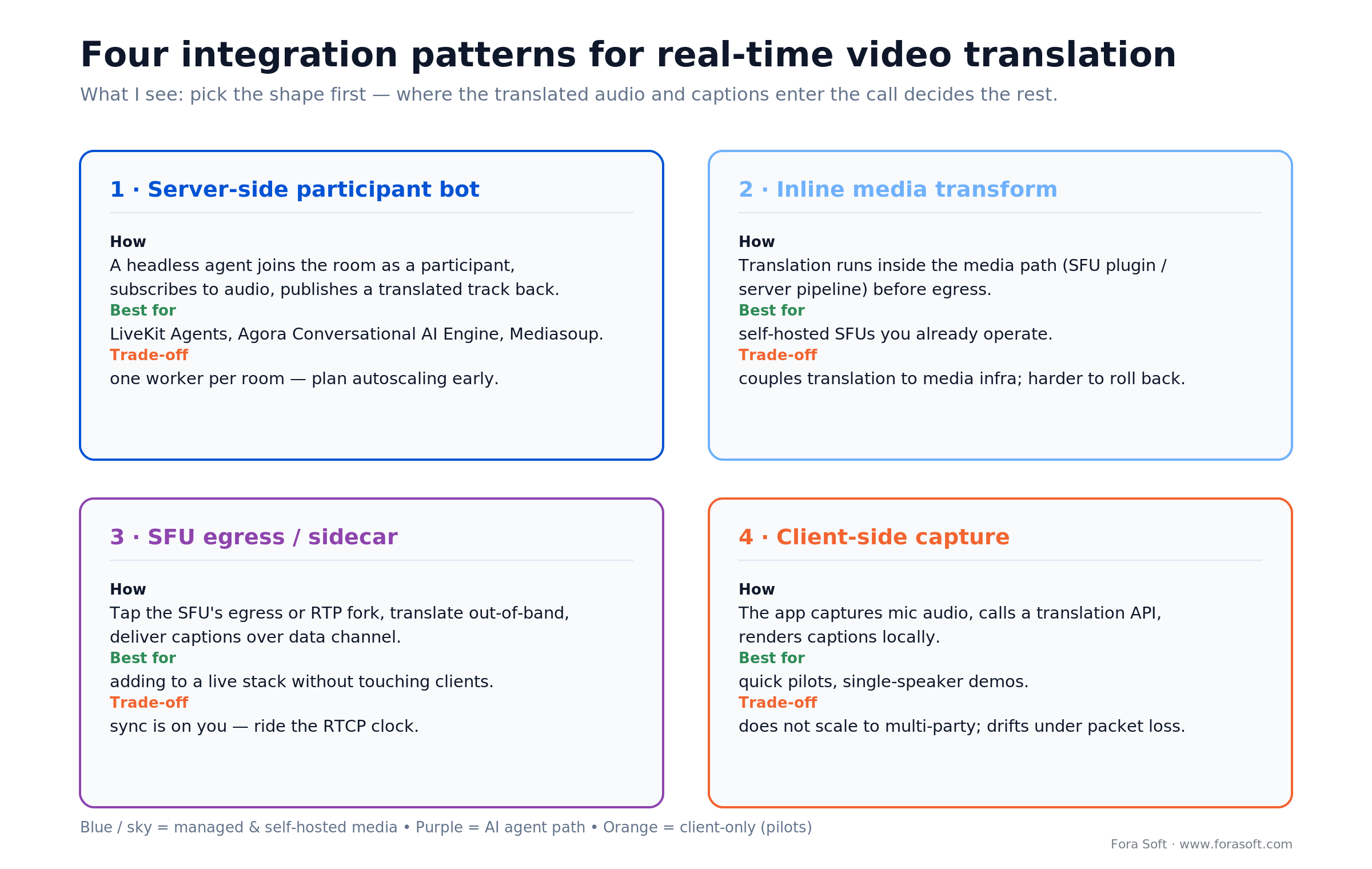
Figure 1. The four integration shapes — pick where translated audio and captions enter the call before you pick tools.
1. Server-side participant bot. A headless process joins the call as if it were a human participant, subscribes to each participant’s audio track, runs ASR and MT server-side, and publishes back translated voice as a secondary audio track or captions over a data channel. This is the cleanest pattern and the default we pick on LiveKit and Agora because both platforms expose a first-party bot SDK.
2. Inline media transform. A plugin registered with the media pipeline intercepts audio before encoding or after decoding, replaces or layers translated audio, and returns it on the same track. Microsoft Teams Media Extensibility and Mediasoup plain-transport both fit here. Benefit: single stream, no doubled participants. Cost: you run inside the platform’s own frame cadence. Teams application-hosted media bots receive and return audio as 20 ms frames, 50 of them per second (Microsoft Teams real-time media docs, 2026), so anything slower than a frame period has to be buffered behind the live path, and you’re coupled to vendor internals that change without your release calendar.
3. SFU egress to external worker. The SFU forwards RTP to a plain transport or RTP endpoint consumed by a translation worker. The worker decodes Opus, runs ASR+MT+TTS, re-encodes, and sends RTP back to the SFU as a new producer. Mediasoup, Janus, and custom SFUs all support this. It’s the most flexible and most work — you own SSRC, jitter, RTCP, and FEC.
4. Client-side capture + cloud ASR. The browser or mobile client ships captured audio to Deepgram / AssemblyAI / Azure over WebSocket, gets transcripts back, and relays them to peers over a WebRTC data channel. Good for 1:1 calls or low concurrency; breaks down in webinars with hundreds of listeners paying for ASR each.
Reach for server-side participant bot when: you already run LiveKit, Agora, Daily, or Jitsi, and you want one translation pipeline per room regardless of how many listeners join.
Reach for inline media transform when: you’re integrating into Zoom Video SDK or Teams as a certified app and need exactly one audio stream per participant.
Reach for SFU egress when: you run your own Mediasoup / Janus / Pion stack and need full control over codecs, jitter buffers, and regional routing.
Reach for client-side capture when: you’re on a hosted SDK (Whereby, Twilio Video, an early-stage managed service) that doesn’t expose server-side audio hooks. Daily is the exception in that list: daily-python gives you a headless participant, so on Daily prefer the bot.
Platform-by-platform: where audio enters your pipeline
Here are the exact hooks we use in 2026 integrations. Names and APIs as published by each vendor.
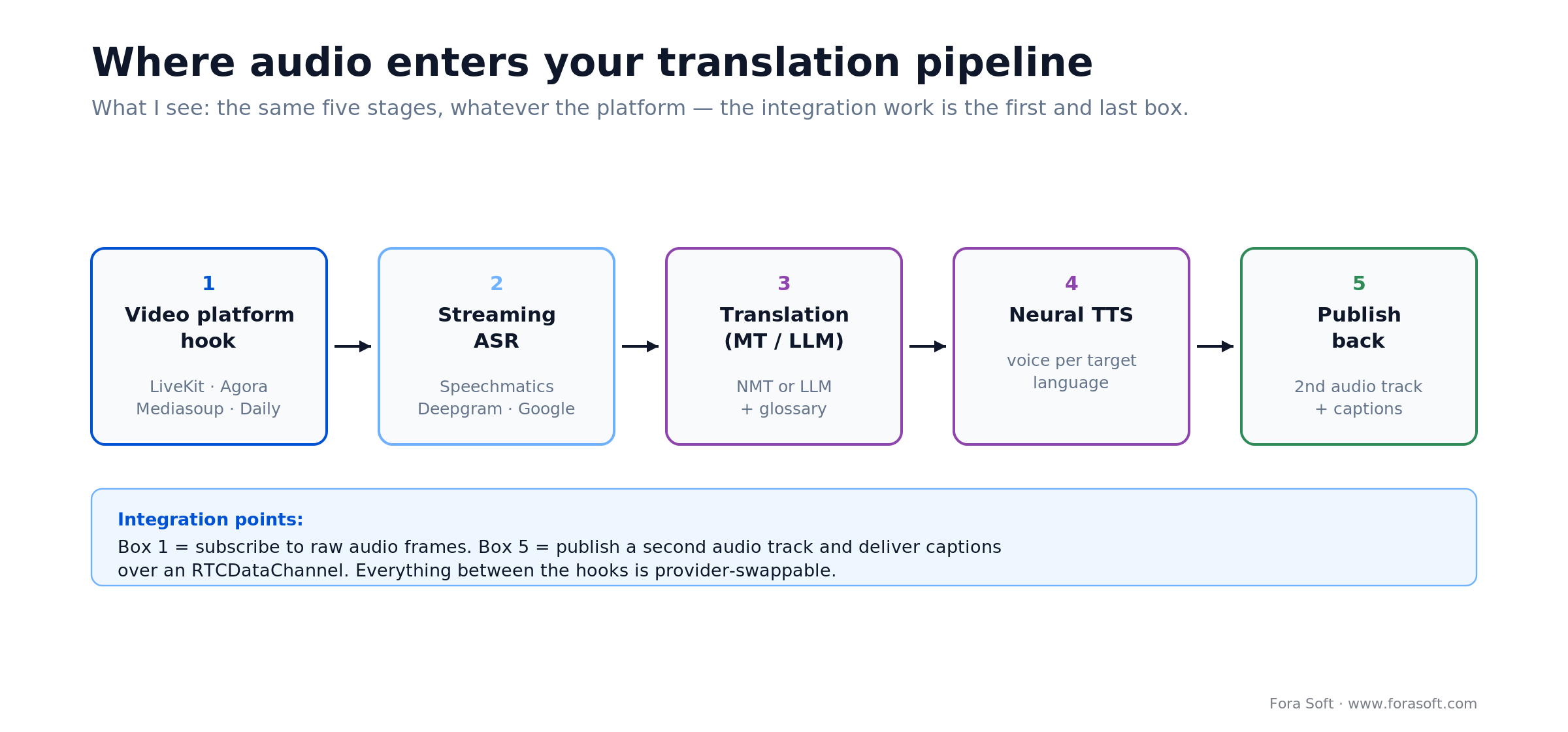
Figure 2. The same five pipeline stages on every platform; the integration work lives in the first and last box.
| Platform | Pattern | Audio-in hook | Translated audio out | Captions out |
|---|---|---|---|---|
| LiveKit Agents | Server-side bot | room.on(“track_subscribed”) |
Publish LocalAudioTrack |
send_text on topic lk.transcription |
| Agora Conversational AI | Server-side bot | AudioFrameObserver |
createCustomAudioTrack + pushAudioFrame |
RTM message / data stream |
| Daily.co | Server-side bot (daily-python) |
track-started (JS) / daily-python audio renderer |
add_custom_audio_track() (daily-python) / startCustomTrack (JS) |
sendAppMessage |
| Mediasoup | SFU egress | Plain transport + consumer | Plain transport + producer | WebRTC data channel |
| Jitsi Meet | Jigasi bridge | Jigasi transcriber XMPP participant | Re-join as synthetic participant | XMPP stanza broadcast |
| Zoom Video SDK | Inline transform | IZoomVideoSDKDelegate → onOneWayAudioRawDataReceived |
IZoomVideoSDKVirtualAudioMic |
SDK command channel |
| Microsoft Teams | Inline transform | Media Extensibility callbacks | Return stream in transform | Meeting side-panel app — no caption-surface API |
| Custom WebRTC (Pion / libwebrtc) | SFU egress | RTP tap + libopus decode | Synthesized RTP producer | Data channel or SSE |
One thing in that table needs a correction we see repeated across the internet: Twilio Programmable Video is not end-of-life. Twilio announced a sunset in December 2023, pushed the date back once in March 2024 (to 5 December 2026), then reversed the decision outright on 21 October 2024. Video remains a standalone product with no forced migration. Plenty of teams started migrating during the scare and finished anyway, which is why hosted-SDK escapees show up in our inbox; but if you are still on Twilio Video in 2026, you do not have to move to add translation. Check the vendor’s own changelog before you let a blog post (including a two-year-old one) set your roadmap.
LiveKit Agents: the fastest path in 2026
LiveKit Agents is a Python (and Node) framework for running headless AI participants inside a LiveKit room. In 2026 it’s the pattern we reach for first for new projects because the primitives line up exactly with what a translation pipeline needs: per-track subscription, built-in VAD, first-class data channel, published audio track back into the room. The skeleton looks like this:
import asyncio
from livekit import agents, rtc

async def entrypoint(ctx: agents.JobContext):

    @ctx.room.on("track_subscribed")                      # Room event, not agent
    def _on_track(track, publication, participant):
        if track.kind == rtc.TrackKind.KIND_AUDIO:        # KIND_AUDIO, not AUDIO
            asyncio.create_task(translate(ctx, track))

    await ctx.connect()                                   # subscribe BEFORE connecting

async def translate(ctx: agents.JobContext, track: rtc.Track):
    stream = rtc.AudioStream.from_track(
        track=track, sample_rate=16000, num_channels=1,
    )
    async for ev in stream:                    # ev is an rtc.AudioFrameEvent
        pcm = bytes(ev.frame.data)             # .data is a memoryview
        text = await asr.push(pcm)             # -> partial | final | None
        if not text:
            continue
        es = await mt.translate(text, target="es")
        await ctx.room.local_participant.send_text(
            es, topic="lk.transcription",
        )
That’s the real shape, not pseudocode — asr and mt are the only stubs. Three details trip people up and all three are in the snippet: track_subscribed is a Room event, the audio enum is KIND_AUDIO, and AudioStream yields an AudioFrameEvent, so the PCM lives at ev.frame.data (a memoryview), not ev.data. Note the ordering in the snippet: the handler is registered before await ctx.connect(). Register it after and any track already published when the agent joins never fires the event. We have watched a demo lose its first speaker to exactly that race. Captions go out on LiveKit’s text-stream topic lk.transcription, which clients read with registerTextStreamHandler; the older publish_transcription() path is deprecated and will not fire the modern client events. Publishing translated voice back adds a rtc.LocalAudioTrack built from TTS output and a publish_track call.
Deploy the agent as a worker and LiveKit’s dispatcher assigns one agent per room. Read the bill before you model cost: on LiveKit Cloud that agent is a metered participant on your plan, while a self-hosted deployment is your own compute and your own autoscaling problem. The two look identical in code and nothing alike in a budget.
Scaling: run agents as a Kubernetes Deployment behind the LiveKit dispatcher. Each pod handles roughly 10–15 concurrent rooms at two active speakers each when ASR runs on a provider API rather than locally — measure your own number in week one, everything downstream keys off it. Autoscale on CPU and active-agent count. Reserve 25 % headroom for reconnect storms when a region flaps.
Agora: raw audio frames and the Conversational AI Engine
Agora gives you two valid integration points. The Agora Conversational AI Engine is the managed option — it runs an STT/LLM/TTS pipeline inside a room on your behalf and exposes hooks for custom pre- and post-processing. The raw audio frame observer is the self-managed option: register an AudioFrameObserver, receive PCM on onPlaybackAudioFrameBeforeMixing, ship the PCM to your ASR of choice.
For publishing translated voice back, use the track-based path, not the old one: createCustomAudioTrack returns a track id; you publish it by setting BOTH publishCustomAudioTrack = true and publishCustomAudioTrackId in ChannelMediaOptions (set only the id and nothing reaches the channel), then feed TTS PCM with pushAudioFrame(frame, trackId): frame first, track id second. The setExternalAudioSource call you will still find in most tutorials has been deprecated since Agora SDK 4.4.0 (Agora custom audio source docs). Clock discipline matters: Agora re-buffers around its own clock, so push frames at 10 ms cadence regardless of TTS availability, pad with silence when TTS is behind.
Captions ride on Agora Signaling (RTM) messages or a dedicated data stream on the RTC channel. We default to the dedicated stream because its delivery is bound to the audio session — if the stream dies, the client reliably knows captions are offline.
Migrating off Twilio Video or evaluating LiveKit vs Agora?
We run both in production across multiple client products. 30 minutes, concrete recommendation for your constraints, no sales pitch.
Caption delivery: four mechanisms that don’t flicker
1. WebRTC data channel. Default for real-time delivery. Send JSON frames like {t: ts, s: speakerId, p: “partial”|“final”, x: “translated text”} every 150 ms. Per-session, per-peer, minimal server load.
2. SFU-native RPC. LiveKit text streams on lk.transcription (or raw publish_data if you need your own envelope), Agora RTM, Daily sendAppMessage, Zoom SDK command channel. Identical semantics, slightly different failure modes. Use when you want vendor-managed ordering and reliability.
3. Server-sent events. For external observers — moderator consoles, accessibility sidecars, compliance monitors. Decouples caption timing from the RTC session, survives jitter, easy to audit.
4. WebVTT track. Useful when you also record the call and want downstream video players (HLS, DASH, Mux) to render captions natively. Generate VTT cues from the same stream of partials; promote to final-only cues when recording.
The caption-flicker pattern that bites every team: rendering raw partials. Streaming ASR revises its own partials as more audio arrives, so text visibly rewrites itself. Fix: buffer partials for 150 ms, drop revisions older than the current render, and promote to final when ASR emits is_final=true.
Sync: ride the media clock, not the wall clock
The single biggest production bug we see in first-cut integrations: captions drift against audio because the caption renderer uses wall-clock timestamps while audio plays to the SFU’s media clock. After 20 minutes of a long meeting, captions lag audio by several seconds.
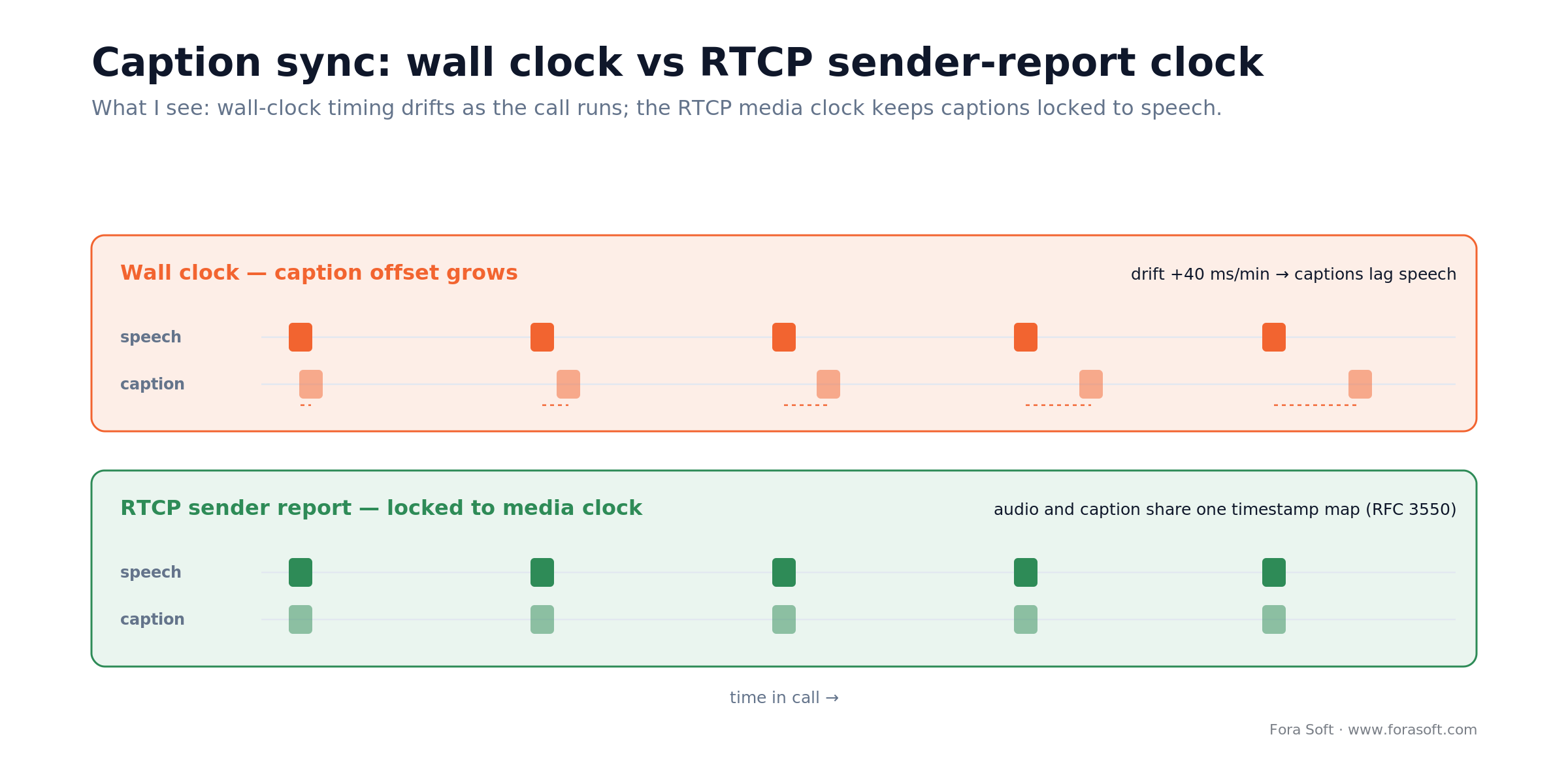
Figure 3. Wall clock vs the RTCP sender-report clock — the media clock keeps captions locked to speech.
The fix is to timestamp every caption with the media clock of the audio frame the ASR consumed — the RTP timestamp where the platform gives you one, mapped back to NTP via the RTCP Sender Report on the receiving side, instead of whatever the worker’s time.time() happened to say. Where you get that timestamp differs per platform, and on one of them you have to build it yourself. On mediasoup you get the real thing: read it out of the RTP header of the consumed packet. In the browser, tap the track with MediaStreamTrackProcessor and read AudioData.timestamp, which is WebCodecs, not Web Audio. On LiveKit there is nothing to read: the Python audio path hands you an rtc.AudioFrameEvent whose only field is frame, and the frame carries data, sample_rate, num_channels and samples_per_channel, and no RTP or RTCP timestamp anywhere in livekit.rtc. So synthesise one: accumulate samples_per_channel / sample_rate from the first frame of each track and you have a sample-count clock that is exact for that track and only drifts if the SDK drops frames, which it logs. It is less elegant than an RTP timestamp and it works. Attach whichever clock you end up with to every partial you send; let the renderer align captions to the playback clock.
For translated voice the same discipline applies, plus one more: publish TTS samples at the same cadence as the source audio (10 ms frames at 48 kHz). Pad with silence when TTS lags so the SFU’s jitter buffer stays happy. Dropping frames is cheaper than clock skew.
Reconnects, rejoins, and state consistency
A translation agent that survives a network blip is a translation agent that keeps production alive at 3 AM. Three rules:
1. State lives outside the agent. Glossary, language preference, per-speaker overrides, meeting metadata — all in Redis or the session DB, keyed by roomId. An agent that reconnects rehydrates state in under 100 ms.
2. Idempotency on translation calls. Each partial carries a sequence number per speaker. If the agent reconnects and re-submits, the MT service sees the same seq and returns cached output. Eliminates flicker on reconnect.
3. Clean disconnect semantics. When the agent is evicted, unsubscribe from tracks, flush the TTS buffer, publish a final “translation paused” data frame. Clients that see no frames for > 3 s should show a “translation reconnecting” chip, not silently stale text.
The client side matters too: on a user reconnect (laptop sleep, network change), re-request the current caption state from the agent over the data channel instead of waiting for the next partial. Users who rejoin a 40-minute meeting want context, not just the next sentence.
Scaling: worker pools, sharding, cost control
One translation process per call doesn’t scale. Plan for a pool from day one.
Worker pool. Kubernetes Deployment with HPA. For LiveKit, each pod is a LiveKit Agent worker; dispatcher assigns rooms automatically. For Mediasoup or custom SFUs, put a shard router in front: session → worker pod consistent-hash keyed by roomId. Autoscale on active-session count plus CPU headroom.
Per-language-pair routing. Don’t spray all languages across all workers. Deploy a pool per major language family (Latin, CJK, Indic, Arabic, Germanic) so models stay warm in RAM and ASR providers can benefit from region-locality.
Regional placement. Place workers in the same region as your SFU egress. A worker in Frankfurt consuming audio from a Tokyo SFU pays roughly 120 ms one way on the Europe–Asia hop (about 240 ms round trip on commodity routes) before a single model runs. On the 900 ms budget below that is more than an eighth of everything you have, spent on a config choice.
Sizing math, shown. Start from concurrency, not from rooms. One worker pod on 2 vCPU / 2 GB handles ~10–15 concurrent rooms at two active speakers each with provider-hosted ASR. For 500 concurrent rooms at the conservative end: 500 ÷ 10 = 50 pods, plus 25 % reconnect headroom = 63 pods ≈ 126 vCPU. Run the same arithmetic at 15 rooms per pod and it is 500 ÷ 15 = 34 pods, ×1.25 = 43 pods ≈ 86 vCPU. That 1.5× spread is the difference between one node pool and two, which is why the first thing we measure on a new stack is rooms-per-pod, not model quality.
Cost control. Meter translation minutes per tenant; emit them on the same span as billing metrics. Cap free-tier accounts at the ASR worker level — no point burning Deepgram credits on abusers. Route enterprise tenants to reserved workers so spikes from free users don’t cannibalize SLAs.
Mobile: iOS and Android integration traps
Here is the one-way desktop budget we design to: 60 ms to capture and uplink to the SFU, 30 ms of SFU egress to a same-region worker, 300 ms for streaming ASR to settle a stable partial, 120 ms for machine translation, 250 ms for neural TTS to emit its first audio, and 140 ms to publish back through the receiver’s jitter buffer. 60 + 30 + 300 + 120 + 250 + 140 = 900 ms. Mobile adds another 300–600 ms on top of that, or 1.2 to 1.5 seconds end to end, almost all of it OS audio routing, and it brings platform-specific behavior that costs teams weeks when it surfaces late.
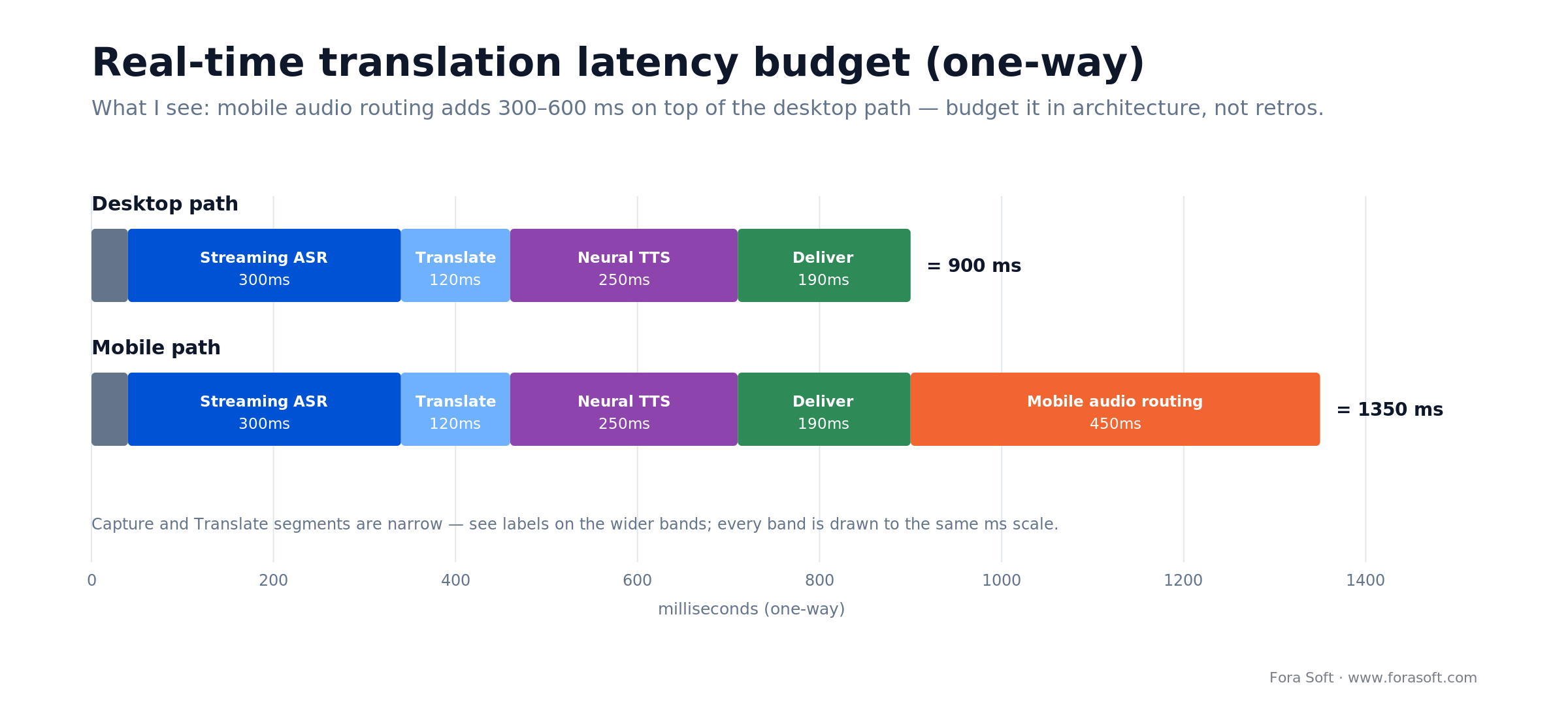
Figure 4. A one-way latency budget — mobile audio routing adds 300–600 ms on top of the desktop path.
iOS. Use AVAudioSession category .playAndRecord with .voiceChat mode. Enable the voip background mode and the audio entitlement so translation keeps running when the user backgrounds the app. CallKit integrations need a special routing block for the translated voice track — the system routes the primary call audio but not your custom secondary track by default.
Android. Use a foreground service with FOREGROUND_SERVICE_PHONE_CALL (API 34+) or FOREGROUND_SERVICE_MEDIA_PROJECTION depending on your flow. AudioManager.MODE_IN_COMMUNICATION for echo cancellation. The trap we hit most often is Bluetooth: when a headset drops, Android tears down the SCO link and the route falls back to the built-in device, so your secondary translated-voice track follows the system default rather than whatever the user picked. Re-assert AudioManager.setCommunicationDevice() (API 31+) from an AudioDeviceCallback on every device change, instead of setting the route once at call start.
Shared. Local TTS (Apple Neural TTS, Google TTS) beats cloud TTS for mobile because it saves a 200–400 ms round trip. Accept the quality hit; users value “translation keeps up” over “translation sounds premium”.
Authentication, JWTs, and tenant isolation
The translation worker is another participant with special powers — it should get the least-privilege token possible and never share credentials across tenants.
LiveKit. Mint a room-scoped JWT with canSubscribe, canPublish, canPublishData, no admin. Short TTL (5–10 minutes) with refresh. Identity prefixed agent: so clients can filter in UI.
Agora. AccessToken2, channel-scoped, with only the privileges the agent needs — join-channel plus publish-audio, and publish-data if captions ride the RTC data stream. There is no separate “raw audio” privilege. Receiving PCM through the frame observer is a client-SDK capability, not a token claim, which is exactly why an over-broad publisher token is such an easy mistake to ship. Refresh before onTokenPrivilegeWillExpire.
Tenant isolation. Scope ASR/MT API keys per tenant, not per environment. The credentials your worker uses for tenant A’s call must not be usable for tenant B even if a configuration bug leaks them. Rotate on schedule; alert on cross-tenant usage.
Network egress. Translation workers should only reach ASR/MT/TTS endpoints. No open egress, no SSRF surface. VPC security groups with explicit allow-lists; deny everything else.
Testing: simulated audio, mocked ASR, latency SLOs
Production translation pipelines need three test tiers to stay green.
Tier 1 — unit and mock. Mock the ASR and MT providers with deterministic responses. Run on every PR. Validates wiring, not quality.
Tier 2 — simulated audio rig. A test rig that joins a LiveKit/Agora room with a synthetic participant playing a labelled audio fixture, then asserts that the captions data channel emits the expected text within the latency budget. Run nightly against staging. Catches regressions in the pipeline’s timing discipline.
Tier 3 — golden-set WER. Weekly sampling of production audio (with consent) against human-labelled reference transcripts, per language. Alert when P95 WER drifts > 2 points in a week. Catches ASR-provider quality regressions that no other test will.
Ship all three. Teams that ship only Tier 1 learn about latency and quality regressions from customers.
Provider fallback and graceful degradation
Every ASR/MT/TTS provider will degrade at least twice a year. Build the fallback before the first outage, not after.
Multi-provider ASR. Primary Deepgram, secondary Azure Speech. Per-session circuit breaker: if first-partial latency breaches the SLO for N consecutive utterances, fail over to secondary for the remainder of the session. Log every failover event; alert on rate.
Degraded modes. Captions-only when TTS provider is down. Source-language-only captions when MT is down. “Translation temporarily unavailable” banner when the whole pipeline fails. Silent degradation is always worse than an honest error.
Kill switch. A single config flag turns translation off for a tenant, a region, or globally. Test the kill switch quarterly. Nothing focuses the mind like losing translation in production at 9 AM Tokyo time.
Subprocessors, DPIAs, and the compliance paperwork the integration triggers
Adding real-time translation adds subprocessors, and subprocessors trigger compliance work. Don’t leave it to legal three days before launch.
DPIAs. Voice audio is personal data; under GDPR it’s special-category biometric when the system identifies the speaker. Run a Data Protection Impact Assessment before you sign contracts with ASR/MT/TTS vendors. Document purpose, retention, access controls, and residual risk.
Subprocessor list. Every vendor that touches audio or transcripts goes on your public subprocessor list before the feature ships. If your customer contract requires 30-day advance notice of new subprocessors, plan accordingly.
BAAs for HIPAA. Deepgram, Azure, Google, and AWS sign BAAs on their standard commercial agreements. DeepL and ElevenLabs gate theirs behind enterprise contracts — ElevenLabs pairs it with zero-retention mode, so a self-serve, card-on-file account does not cover you no matter what the marketing page implies. Route patient audio only through a provider whose BAA you have actually signed, even if the model scores a point or two lower.
EU AI Act, Article 50. Since 2 August 2026 synthetic audio has to be disclosed: if you publish an AI-generated voice into a call, the people in that call must be told it is AI-generated, and the output has to be machine-readably marked as such (EU AI Act Art. 50, applicable 2 Aug 2026). In practice: an “AI voice” badge on translated tracks, a disclosure line in the join flow, and the marking in your TTS output path. Cheap if you design it in, expensive when a customer’s DPO finds it missing during procurement.
Data residency. Route EU sessions to EU vendor endpoints; route US healthcare sessions to US BAA-covered endpoints. Bake the routing into the agent dispatcher, not the network — it’s easier to audit.
A decision framework — pick your integration pattern in five questions
1. What platform are you on? LiveKit or Agora → server-side bot. Zoom or Teams → inline media transform. Mediasoup / custom → SFU egress. Daily → server-side bot via daily-python. Whereby or Twilio Video → client-side capture.
2. Do you need translated voice or just captions? Captions → data channel is enough. Voice → verify your platform can publish a secondary audio track from a server-side participant without a second licence.
3. What’s your concurrency ceiling in year one? < 100 concurrent rooms → single worker-pool region is fine. > 500 → regional worker pools from day one; autoscale, shard by roomId.
4. Is mobile a first-class surface? Yes → invest in local TTS and the platform foreground-service dance up front; don’t retrofit.
5. Regulatory envelope? HIPAA → BAA-covered providers only, per-region routing, no persistent audio. GDPR → EU endpoints, subprocessor list published, DPIA on file.
Five integration pitfalls that sink projects
1. Using wall clock for caption sync. Works in demo, drifts in production. Ride the media clock: RTP/RTCP where the platform exposes it, a sample-count clock where it doesn’t. Attach it to every caption payload.
2. One worker per room forever. The moment concurrency crosses a worker’s capacity a single room can starve others. Size pods for 10–15 rooms and autoscale aggressively.
3. Echo into the ASR. Translated voice re-enters the room; the ASR transcribes it; the pipeline translates its own output. Tag the synthetic audio track with metadata and skip it at the AudioFrameObserver level.
4. No idempotency on reconnects. Agent flaps, re-submits partials, captions flicker backward. Sequence numbers per speaker plus MT-side cache keyed on the partial content kill this dead.
5. Mobile background silence. iOS sleeps the app; translation stops mid-sentence. Background modes, foreground services, and keep-alive audio frames are the fix — not hope.
KPIs for an integrated translation pipeline
Quality KPIs. First-partial latency P50 ≤ 500 ms; P95 ≤ 1 s. WER on the weekly sampled golden set ≤ 8 % per top-10 language. Caption coverage ≥ 90 % of spoken words reaching viewers.
Business KPIs. Feature attach rate (share of sessions with translation enabled). Revenue uplift from non-English markets per quarter. Support-ticket rate tied to translation (target: trending down after week 6 post-launch).
Reliability KPIs. Agent dispatch success rate ≥ 99.5 %. Provider-failover events per month ≤ 2 (more means renegotiate). Cost per translated minute, monitored per tenant and per language pair.
When NOT to integrate real-time translation yet
Some products need to wait. If you’re about to migrate your video transport (Twilio → LiveKit, Jitsi → Agora), finish the transport migration first and layer translation on the new stack. Layering two migrations at once doubles the risk without doubling the value.
If you’re pre-product-market-fit and localization friction isn’t in your top-three user-voice themes, defer. Real-time translation is a 10–14 week sidequest; spend that on something the market is actually asking for.
If your platform doesn’t expose server-side audio hooks and doesn’t plan to — some early-stage hosted SDKs are here — captions via client-side capture is a tactical option, but don’t invest in translated voice until the platform catches up.
Want an architecture review before you commit to a platform?
Bring your current SFU, your target languages, and your compliance envelope. 30 minutes, concrete integration diagram, no slideware.
FAQ
Should you use LiveKit Agents or build a Mediasoup egress?
If you don’t already run Mediasoup, LiveKit Agents is faster to build on and cheaper to operate. If you run Mediasoup for other reasons (pricing, control, custom SFU behavior), the egress pattern is maintainable. Don’t switch SFUs just for translation.
How do I publish translated voice in Daily.co?
Run a headless Daily participant with daily-python, which gives you server-side audio in and out without a browser; the older Node plus daily-js-in-Puppeteer trick still works but costs you a headless Chrome per room. Publish a custom track with the translated audio; clients subscribe by participant ID. The pattern is heavier than LiveKit Agents but works.
What’s the right data channel payload for captions?
Small JSON per frame: {t: mediaTs, s: speakerId, p: “partial”|“final”, l: “es”, x: “text”, seq: n}. A media-clock timestamp for sync (the RTP timestamp on mediasoup, a sample-count clock on LiveKit), sequence for ordering and idempotency, language for multi-language rooms, partial/final flag so the client knows when to stop animating.
How many rooms can a single translation worker handle?
For a cascaded pipeline with Deepgram Nova-3 streaming ASR and DeepL MT, one worker pod with 2 vCPU / 2 GB RAM handles ~10–15 concurrent rooms comfortably at 2 speakers each. Self-hosted ASR on an A10G GPU handles ~20–40 streams per GPU depending on the model. Size with headroom.
How do I stop echo feedback when publishing translated voice back?
Tag the translated track with a stable identifier (participant identity agent:translator:* in LiveKit, named audio source in Agora). Filter tracks with that identifier at the AudioFrameObserver / track-subscription layer so the ASR never sees its own output. Do it at the agent, not the client — one authoritative filter is easier to audit.
Can I integrate real-time translation into Zoom meetings without a Zoom app?
Not cleanly. The right path is Zoom Video SDK with raw media, shipped as a Zoom Marketplace app. Screen-scrape or post-processing workarounds exist but they break every few months when Zoom updates its client. For platform-native integration, plan on the Video SDK path and budget the review process.
How do I handle a user reconnecting mid-meeting with long context?
Keep a rolling transcript in the agent, server-side. On client reconnect, the client sends a data-channel request for the last N seconds of translated captions; the agent responds with a single catch-up payload. Users see the context they missed instead of jumping in mid-sentence.
What’s a realistic integration timeline for an existing WebRTC product?
10–14 weeks for a production-grade integration on LiveKit or Agora with a Fora Soft team running Agent Engineering tooling. Zoom SDK, Teams, or custom Mediasoup integrations add 3–5 weeks for platform-specific work. Mobile-first adds another 2–4 weeks for the OS integration layer.
What to read next
Strategy
Real-Time Translation API: 2026 Guide for Live Video
Which ASR, MT and TTS vendors to actually buy: Deepgram, AssemblyAI, Azure, DeepL and OpenAI compared on latency and price.
AI translation
Real-Time Video Translation: The 2026 Engineering Playbook
The strategy layer above this one: pipeline design, build-vs-buy, use-cases, cost and compliance.
Architecture
P2P, SFU, MCU, Hybrid: Which WebRTC Architecture Fits Your 2026 Roadmap?
The transport layer your translation agent sits on — pick wrong and the latency budget is blown.
Enterprise
Multilingual Video Conferencing: Enterprise Guide
How large organizations buy and deploy translation across Teams, Zoom, Webex, and custom platforms.
Scaling
Scalability in Video Streaming and Conferencing
How translation worker pools sit inside a broader video scaling strategy.
Ready to wire translation into your video stack without breaking production?
The integration shape — server-side bot, inline transform, SFU egress, or client-side capture — is the decision that cascades. LiveKit Agents and Agora Conversational AI Engine are the fastest paths in 2026; Zoom Video SDK and Teams Media Extensibility are the right bets for platform-native distribution; SFU egress is the right answer if you already own the media layer. Captions go over WebRTC data channels, stamped with a media-clock timestamp, debounced against partial flicker. Voice gets published as a secondary track, paced at source cadence, echo-filtered by identity.
The products that succeed here treat scaling, reconnects, idempotency, and compliance as day-one concerns. The products that fail treat them as day-90 concerns. A production-grade integration lands in 10–14 weeks when the pattern is picked right on day one; we’ve delivered that timeline on platforms running from global virtual classrooms to HIPAA telehealth.
Let’s scope your integration
Bring your SFU, your languages, and your compliance envelope. 30 minutes, concrete integration plan, no sales deck.

