


Key takeaways
• Industrial video surveillance is now a software layer, not a camera upgrade. AI runs on your existing ONVIF/RTSP cameras and turns pixels into real-time decisions: PPE violations, forklift near-misses, intrusions, equipment drift.
• Five benefits move budget. Real-time hazard detection, automated incident response, predictive maintenance, compliance & audit, and scalable multi-site monitoring. The rest are features.
• Be honest about accuracy. Peer-reviewed detection sits near 84–95% mAP@50 on good footage in 2025: strong, not magic. Budget for a tuning phase and a false-positive target before you set SLAs.
• Edge plus cloud is the architecture that wins. Inference at the edge for latency and bandwidth, cloud for training, dashboards, and evidence. Cloud-only stacks break at scale and go blind during outages.
• Fora Soft has shipped this stack. We built V.A.L.T., a surveillance platform trusted by 770+ organizations and 50,000+ users, and we layer AI recognition on ONVIF cameras as part of our video surveillance service.
Updated October 2026: industrial video analytics use-case table, EU AI Act Digital Omnibus dates (machinery from August 2028), BLS 2024 fatality data, Jetson AGX Thor and YOLO26 in the edge stack.
What is industrial video analytics? The short answer
Industrial video analytics is software that watches factory, warehouse and plant camera feeds and turns them into real-time events: PPE violations, forklift–pedestrian near-misses, intrusions, fire and smoke, blocked exits and equipment drift. Industrial video surveillance with AI is the same idea applied to the whole camera system: the analytics layer runs on your existing ONVIF/RTSP cameras, usually on one edge server per site, and alerts a supervisor within 1–2 seconds instead of waiting for someone to review footage. Budget-wise, a hosted subscription runs about $25–$60 per camera per month, and an integrated custom build about $60–$180k upfront for a 100-camera site (Fora Soft 2026 estimates, broken down in the cost model below).
AI video analytics vs manual monitoring: the gain is coverage, not judgment. One operator cannot watch 100 feeds for a full shift; a model can pre-filter them so people only see flagged events, then a human confirms and acts. That is why real-time industrial video monitoring is now bought as a safety and operations tool, not only as security. Camera vendors ship the same use cases on-device, too: Hanwha Vision’s Factory Safety AI pack (April 2025) bundles forklift speed, forklift–person proximity, slip-and-fall and blocked-exit detection.
| Use case | What the analytics flags | Readiness in 2026 |
|---|---|---|
| Worker safety & PPE | Missing hard hats, vests, gloves; people inside exclusion zones | Production-ready |
| Forklift and vehicle–pedestrian | Speeding, forklift–person proximity, near-misses at blind corners | Production-ready |
| Perimeter, intrusion and theft | After-hours entry, fence-line breaches, cargo and material theft | Production-ready |
| Fire, smoke and overheating | Early smoke, sparks, hot spots (radiometric thermal cameras) | Production-ready; steam and welding arcs cause false alarms |
| Gates and logistics | License plates, container codes, dock and yard occupancy | Production-ready |
| Slip, fall and blocked exits | Person down, obstructed fire exits and aisles | Solid |
| Equipment anomaly | Leaks, steam, belt slip, abnormal motion on a line | Solid with per-line tuning |
| Quality inspection | Surface defects, missing parts, assembly errors | Needs dedicated machine-vision cameras and line-specific training |
| Video search and summaries | Natural-language queries across footage (“every blocked exit on line 3 last week”) | Emerging in 2026 (vision-language agents) |
Why Fora Soft wrote this playbook
Fora Soft has built video and AI software since 2005 (250+ projects, 50+ in-house specialists), and industrial surveillance is the part of our work with the longest receipts. Our flagship is V.A.L.T., a browser-based multi-camera recording and evidence platform used by 770+ U.S. organizations (police departments, medical-education programs, child-advocacy centers) with 50,000+ active users. On top of that video plumbing we layer AI: object recognition, anomaly detection, movement and intrusion detection, and voice search inside recordings (see our AI video recognition and computer vision for surveillance practices).
This playbook is what we tell operations directors, HSE leaders, and plant IT before they sign a vendor contract. It reflects the boring truths: AI models only matter if the video pipeline is clean; compliance and evidentiary integrity outlast features; edge inference is how you keep pace with 30 fps feeds across hundreds of cameras without bankrupting your bandwidth. We’ll tell you what works, what doesn’t, what to measure, and when to build versus buy, with the 2026 numbers to back it.
Mapping AI onto your existing surveillance stack?
Book a 30-min scoping call. Bring your camera list, use cases, and compliance rules — we’ll sketch the pipeline and a quarter-by-quarter rollout.
Where AI industrial surveillance stands in 2026
The commercial case is sturdier than the hype. Work injuries cost U.S. employers $181.4 billion in 2024, or $48,000 per medically consulted injury and $1.54 million per death (National Safety Council, Injury Facts, 2024). The Bureau of Labor Statistics counted 5,070 fatal work injuries in 2024 (Census of Fatal Occupational Injuries, published February 2026), and pedestrian deaths involving vehicles rose 19% to 369. Those are the forklift-and-plant-traffic and struck-by numbers that AI video is actually good at catching. When a single averted lost-time injury can fund a deployment, the ROI math stops being theoretical.
The market is growing, just not at the 26% some decks claim. Mordor Intelligence puts the AI-in-video-surveillance market at about $6.8B in 2026, heading to ~$13B by 2031 (~14% CAGR), with software the fastest-growing component (~17.9% CAGR), cloud the fastest-growing deployment model (~22.1%) and facial recognition and biometrics the hottest application (~23.9%) (Mordor Intelligence, 2026). Translation: AI video analytics has crossed from “nice to have” into procurement criteria for OEM, energy, and regulated buyers — you’re meeting a bar, not chasing a marginal edge. The cross-industry market figures and the business case sit in our AI in video surveillance market, benefits, and pricing guide.
The technical picture matches. Modern analytics runs on existing ONVIF/RTSP fleets, usually with no new cameras (you add one edge server per site), and pushes real-time alerts to SMS, email, mobile, or in-facility panels within 1–2 seconds of an event. The blockers have shifted from “can the model see it?” to “does the pipeline hold under factory load, and is the evidence admissible?”
The five benefits that matter — ranked by business impact
Every vendor lists twenty “features.” These are the five that move budget. We rank them by where we’ve seen the hardest dollar signal on deployed systems.
1. Real-time hazard & PPE detection
The signature use case: helmets, vests, gloves, masks, safety glasses, forklift intrusions into pedestrian zones, crane-swing envelopes. Models tuned to your camera placements flag violations in about a second. On good footage, PPE detection lands in the high-80s to mid-90s mAP@50: enough to drive supervisor alerts and OSHA-aligned reporting, not enough to run unattended. The economics is workers-comp claim avoidance; for high-incident sites, one averted lost-time injury typically funds the deployment.
2. Automated incident response & escalation
Detection is worthless without routed action. A mature system integrates with your SCADA/ERP/shop-floor dispatch so a forklift-speeding alert pages the shift supervisor; an equipment-overheating event stops the line; a trespass triggers an access-control lockdown. AI is the sensor; the automation layer is where the ROI crystallizes.
3. Predictive maintenance via anomaly detection
Vibration, steam, vapor, belt slippage, bearing glow, drip patterns: cameras are cheap condition sensors if you treat them that way. Autoencoder-style models trained on your baseline operating video flag drift before a failure cascades. The payoff to measure is fewer unplanned stops on lines where the anomaly model covers the critical path; set the baseline before rollout so the gain is provable.
4. Compliance, audit, and evidentiary integrity
Regulated industries (pharma, food, energy, defense) need video with tamper-evident storage, access logs, and search-by-event. V.A.L.T.’s evidence-management pattern (encrypted storage, role-based access, annotation, PDF reporting) is what gets footage accepted in court or in an audit. AI makes retrieval practical: “show me every PPE violation on line 3 last quarter” becomes a query, not a two-day project.
5. Scalable remote monitoring across sites
One security operations center, twenty facilities. AI pre-filters feeds so human monitors see only flagged events; cross-site dashboards consolidate KPIs; edge nodes keep bandwidth under control. We’ve helped multi-site operators shift from “one guard per plant” to “one SOC for the portfolio,” cutting the hours operators spend watching idle feeds while improving response times.
Reach for AI surveillance when: you have 20+ IP cameras across one or more sites, incident data that cost you money or people in the last 12 months, and a compliance regime that rewards documented response. Below that, spend the budget on better lighting and supervision first.
Reference architecture for industrial AI surveillance
Below is the architecture we recommend for operators with 50–500 cameras across 1–20 sites. It assumes existing ONVIF-compliant IP cameras, a wired or hardened-wireless network, and a mixed edge/cloud posture.
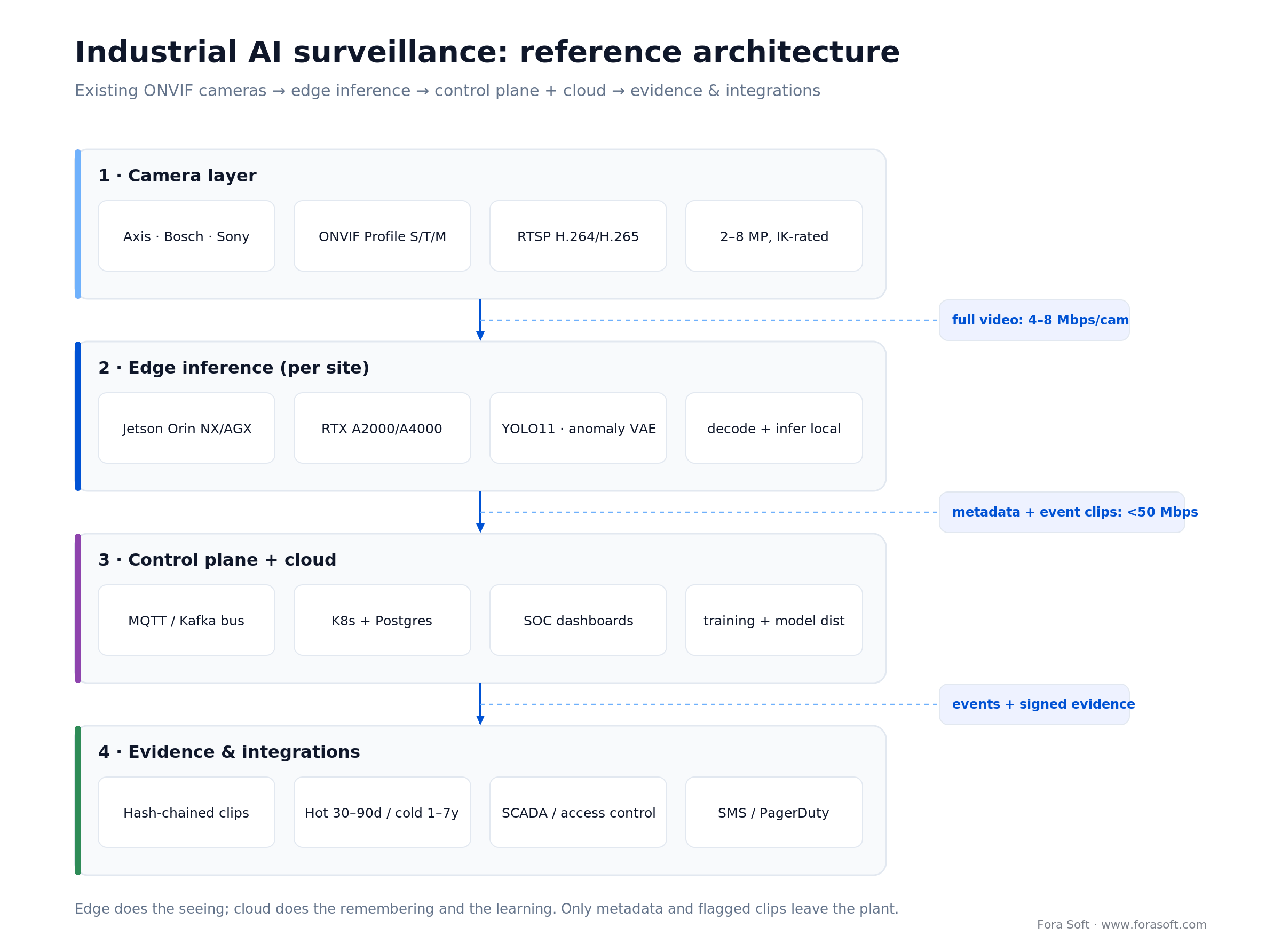
Figure 1. Edge does the seeing; cloud does the remembering and the learning. Only metadata and flagged clips leave the plant.
Reach for edge inference when: you have 30+ cameras per site, an unreliable WAN, or latency-sensitive safety use cases. Cloud-only inference is rarely the right default above that threshold.
Reach for evidentiary storage when: footage will ever be used in a regulator audit, a police proceeding, an insurance claim, or a union dispute. Bake hash-chains and signed exports in from day one.
Stage-by-stage breakdown
1. Camera layer. ONVIF + RTSP IP cameras. Axis, Bosch, Hanwha Vision and Sony are the safe defaults. For analytics interoperability, prefer cameras that expose ONVIF Profile M (metadata/analytics) alongside Profile T streaming. Confirm H.264/H.265 support, low-light performance matching your worst-lit area, and IK-rated housings for impact zones. In hazardous areas (chemicals, dust, oil & gas), you need ATEX/IECEx-certified enclosures and IP66/IK10 ratings, a spec generic guides skip entirely.
2. Edge inference nodes. Small form-factor servers (NVIDIA Jetson Orin NX/AGX, Intel NUC with iGPU, or rack mini-servers with RTX A2000/A4000) located per-site or per-zone. They decode RTSP, run the models, and forward only metadata plus event clips upstream. Jetson Orin ranges from 67 TOPS (Orin Nano Super) to 275 TOPS (AGX Orin); an AGX-class node comfortably handles 16–32 cameras on a single PPE-style model, while Orin Nano is better sized for 4–8. Multi-model pipelines drop those numbers fast. For sites that want vision-language models on-prem, NVIDIA Jetson AGX Thor (Blackwell GPU, up to 2,070 FP4 TFLOPS, 128 GB memory; developer kit $3,499, shipping since September 2025) is the step up, at roughly 7.5× the AI compute of AGX Orin by NVIDIA’s figures.
3. Event bus + control plane. Events (bounding boxes, timestamps, camera IDs, clips) flow through an MQTT/Kafka-style bus into your cloud control plane. This is where incident workflows live: routing, escalation, ticket creation, SOC dashboards. We tend to build this on a lightweight stack — Kubernetes + Postgres + object storage — rather than a bloated enterprise VMS.
4. Evidence store. Tamper-evident storage of full-fidelity clips for the incidents that matter. Hot tier for 30–90 days, cold tier for regulated retention (typically 1–7 years by industry). Cryptographic hash chains and per-clip signatures are what make the footage evidentiary.
5. Integrations. SCADA/ERP for line-stop; access control for lockdown; HR/shift systems to identify roles rather than people; email/SMS/PagerDuty for escalation. Integrations are where the ROI shows up — plan them first, not last.
Detection capabilities — what’s reliable in 2026
Not every claim on a vendor site is equally production-ready. Vendors love to quote “99% compliance,” but that measures sustained outcomes, not model accuracy. Published detection accuracy is more sober — here’s our working map of what hits deployable precision on typical industrial footage.
| Capability | Maturity | Typical accuracy (mAP@50, good footage) | Common gotchas |
|---|---|---|---|
| PPE compliance | Production-ready | 84–95% | Hard hats vs. bump caps; occlusion by equipment |
| Restricted-zone intrusion | Production-ready | 90–96% | Shadow false-positives; authorized maintenance |
| Forklift / vehicle–pedestrian | Production-ready | 88–94% | Camera placement & depth estimation |
| Fire & smoke early warning | Production-ready | 82–93% | Steam/welding arcs as false positives |
| Fall & slip detection | Solid | 78–90% | Crouching, tool pickup confused as falls |
| Equipment anomaly (visual) | Solid with tuning | Site-specific | Needs per-line baseline training |
| Aggression / altercation | Usable | 70–85% | Manual-handling motions mis-classified |
| Facial recognition (ID) | Regulated | 95%+ match accuracy on good footage (not mAP) | Legal restrictions — EU, IL, TX, WA |

Figure 2. Detection accuracy by capability: mAP@50 ranges from published studies and our deployments. Solid = conservative floor, lighter = best-case on good footage.
Rule of thumb: if a capability isn’t in the production-ready or solid tier, plan a 4–8 week tuning phase on your footage before you set SLAs around it. And treat facial recognition as a compliance question first, a capability second (more on that below).
Edge vs. cloud inference — why hybrid wins
The choice is not binary. Put inference at the edge, orchestration and training in the cloud: edge cuts a 200-camera site from 800–1,600 Mbps to under 50 Mbps, fires alerts in 200–500 ms instead of adding cloud round-trips, and keeps working through WAN outages. The numbers make the case.

Figure 3. Edge vs cloud-only inference across bandwidth, latency, WAN-outage resilience, and cost per camera-month.
Bandwidth. A 30-fps 4 MP camera produces 4–8 Mbps of H.265. A 200-camera site streaming to cloud burns 800–1,600 Mbps 24/7. Edge inference drops that to under 50 Mbps of metadata plus a few MB of event clips per alert.
Latency. Edge PPE detection fires in 200–500 ms from frame to alert. Cloud round-trips add 150–400 ms on top of ingest, enough to miss a forklift–pedestrian near-miss before the supervisor sees it.
Resilience. If your plant loses WAN for 30 minutes, edge keeps working. Cloud-first stacks go blind exactly when an incident is most likely.
Cost. Cloud GPU inference for 24/7 video at scale crosses $10–$30 per camera-month in compute alone. Amortized edge hardware is typically $1–$4 per camera-month over three years (the arithmetic is in the cost section below).
What stays in cloud. Training, model distribution, dashboards, cross-site analytics, long-term evidence storage, and heavy retrospective searches (“find every time forklift X entered aisle 4 last month”). For dashboard delivery we lean on sub-second streaming — see minimizing latency to less than 1 sec for mass streams.
Mini case: V.A.L.T. and the surveillance stack we build on
Our longest-running surveillance product is V.A.L.T., a browser-based multi-camera recording and evidence platform. The situation when we started: interview-room and observation-room recording was a mess of disk-based DVRs and ad-hoc exports that wouldn’t hold up under chain-of-custody review.
What we built over successive 12–16-week engagement cycles: full-HD multi-camera live monitoring (up to nine per screen), PTZ control with presets, SSL/RTMPS-encrypted recording with hash-chained storage, LDAP integration and role-based access, automated scheduling, annotation and “marks” for rapid review, CD/DVD and PDF export tailored to police departments, and mobile upload for field evidence. On top we layered search, AI-assisted tagging, and voice search via Amazon Transcribe so investigators could run “find the word X” across hundreds of hours of audio.
The result in production: 770+ organizations and 50,000+ active users across U.S. police departments, medical-education programs, and child-advocacy centers, under HIPAA. The evidentiary pipeline — encrypted storage, tamper-evident hash chains, signed exports — is what keeps the product on the qualified-vendor list. If you’re building something in the same shape, we can usually reuse patterns and cut 20–30% of the build path. Book a 30-min call and we’ll share what that looks like for your scope.
Cost model — what operators actually pay
Let’s ground the numbers. Assume a single industrial site with 100 ONVIF cameras, one AI use case (PPE), a cloud control plane, and 90-day hot retention. Three realistic cost profiles:
| Option | Upfront | Monthly run-rate | Ownership & fit |
|---|---|---|---|
| SaaS AI surveillance | $2–$8k install | $25–$60 / camera | Fastest start; limited integrations |
| Integrated custom (our default) | $60–$180k build | $8–$20 / camera (cloud + ops) | Full integration, evidentiary grade, custom models |
| Build from scratch | $300k–$800k+ | $5–$15 / camera | Only if you’re a surveillance vendor |
These are Fora Soft 2026 estimates, not vendor quotes. If you are pricing an industrial video subscription (VSaaS, where the vendor hosts analytics and bills per camera per month), the SaaS row is your comparison point: the subscription is the cheapest way to start. Over three years at 100 cameras, SaaS (about $92k–$224k) and an integrated custom build (about $89k–$252k) land in a similar range, so integrations, evidence handling and who owns the models and data decide it, not price alone.
The edge-versus-cloud question drives the run-rate more than anything else. Here is the three-year arithmetic for a larger, 200-camera site — illustrative 2026 ranges, not a quote:
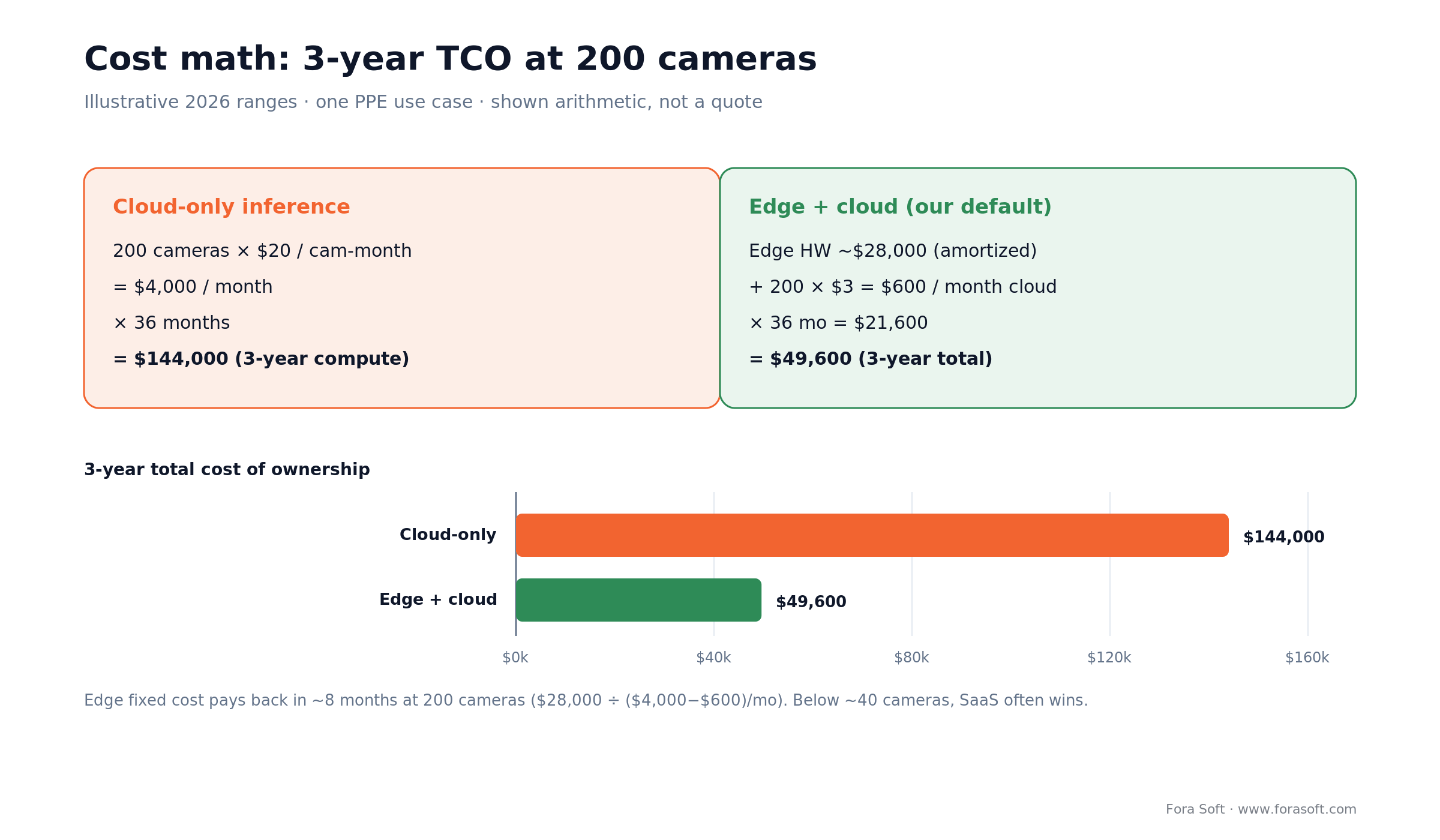
Figure 4. Three-year TCO at 200 cameras: cloud-only compute vs edge-plus-cloud, with the arithmetic shown.
Cloud-only inference at 200 cameras runs 200 × $20/camera-month = $4,000/month, or $144,000 over three years. Edge plus cloud is roughly $28,000 of amortized edge hardware plus 200 × $3 = $600/month of cloud, so $28,000 + $21,600 = $49,600 over three years. Against cloud-only compute, the edge hardware pays back in about eight months ($28,000 ÷ ($4,000 − $600)/month). Below roughly 20–40 cameras, SaaS usually wins on total cost.
We apply agent engineering to the custom build, which typically compresses a six-to-nine-month integration into 10–14 weeks and keeps the upfront number at the low end of the range. If the scope is clear, we can usually give a defensible fixed-price number after a one-to-two-week scoping spike. We build this kind of platform under our custom software development practice.
Want a cost model for your sites?
Share camera counts, use cases, and retention rules. We’ll come back with a pipeline sketch, a hardware BOM, and a realistic monthly and upfront number.
Compliance, privacy, and evidentiary integrity
1. Facial-recognition and biometric law (2026). The EU AI Act has been reshaped by the Digital Omnibus (Regulation (EU) 2026/1744), in force since 27 July 2026: Annex III high-risk obligations, which cover biometric and employment systems, now apply from 2 December 2027, and AI built into products under Annex I, such as machinery, from 2 August 2028 (European Commission, July 2026). But the Article 5 prohibitions are already live: emotion recognition in the workplace has been banned since February 2025, and real-time remote biometric identification in public spaces is barred for law enforcement outside narrow exceptions. Don’t read the deferral as “anything goes.”
2. U.S. biometric statutes. Three states have standalone biometric laws — Illinois BIPA, Texas CUBI, and Washington. BIPA is the one with teeth: a private right of action with statutory damages of $1,000 (negligent) or $5,000 (intentional) per violation, though the 2024 SB 2979 amendment limited how those accrue. Fifteen-plus states now regulate biometric data through comprehensive privacy laws too. Our take: run role-based anonymization (badge + zone) instead of person-level ID wherever you can, for the same operational value at far less compliance load. We keep a plain-language primer on BIPA and U.S. biometric privacy law if you need the detail.
3. GDPR and workers’ rights. In the EU, workplace surveillance needs a legal basis, proportionality, and worker-council consultation. Document purpose, retention, and data minimization before rollout. Employee-monitoring footage should be encrypted at rest, access-logged, and auto-purged on schedule.
4. OSHA and evidentiary chain-of-custody. There is no AI- or video-specific OSHA rule; obligations run through general injury/illness recordkeeping under 29 CFR Part 1904. Where footage is used for law-enforcement or regulator-facing evidence, hash-chain every clip, sign every export, and log every access. V.A.L.T.’s design is the baseline: who, when, what they viewed, what they exported.
5. Security hygiene for the cameras themselves. ONVIF cameras are frequent CVE targets. Patch firmware on a 60-day cadence, network-segment the camera VLAN, disable unused protocols (UPnP, FTP), enforce unique passwords per camera, and push all management through a hardened VMS. A compromised camera is a foothold into your operational network.
Decision framework — pick AI surveillance in five questions
Q1. How many cameras, how many sites? Under 20 cameras and one site, a SaaS product is usually enough. 20–200, custom integration on top of your existing VMS. 200+ or multi-site, you need a custom integration layer no matter what the vendor pitch says.
Q2. Which use cases? Narrow scope (PPE only, intrusion only) is a 4–8 week rollout. Multi-model (PPE + anomaly + intrusion) is 3–6 months. Full suite with integrations is 6–9 months.
Q3. What’s the network reality? Reliable wired plant network: go edge-light and push more to cloud. Rural or wireless sites: go edge-heavy. Mixed: expect a per-site topology decision.
Q4. What’s your compliance envelope? EU, healthcare, or defense — bring legal into the first sprint. U.S. manufacturing only — OSHA-aligned reporting is usually enough.
Q5. Who owns the ops? Plant IT, HSE, SOC, or a third-party MSSP. The owner drives integration choices (ticketing, paging, access control) and determines whether the project ships or stalls.
Five pitfalls that kill industrial surveillance rollouts
1. Buying cameras before designing detections. Wrong focal lengths, wrong placement, wrong lighting will break every downstream model. Map your use cases to camera specs first.
2. Running inference in cloud for all streams. Bandwidth burns and latency spikes kill real-time response. Edge plus cloud, always.
3. Treating AI as a replacement for supervisors. It’s a force multiplier. Keep a human in the loop on escalations and tune thresholds against real incident data every quarter.
4. Ignoring the false-positive budget. Every false alert erodes operator trust. Set a target false-positive rate per camera-hour and tune until you hit it — usually under one per 8-hour shift.
5. No integration plan. Detections that go to a dashboard nobody watches are theater. Tie every alert class to a ticket, a page, or an automated action.
KPIs to measure — three buckets
Quality KPIs. Detection precision and recall per camera-zone (target >90% precision on tier-1 use cases). False-positive rate per 8-hour shift (target <1). Mean time to detection from event onset (target <2s).
Business KPIs. Incident-frequency reduction quarter-over-quarter. Time-to-response per event class. Unplanned-downtime reduction on covered lines against a pre-rollout baseline.
Reliability KPIs. Camera uptime (>99%). Edge-node availability (>99.5%). Evidence integrity: zero hash-chain gaps. WAN-failover recovery <60s.
Camera placement — the cheap upgrade most miss
Detection quality is bounded by camera geometry. We’ve audited sites where repositioning a dozen cameras by 30–60 cm lifted PPE precision from 82% to 94%. A short punch list:
Height and angle. For PPE and posture detection, 3–4 m height with a 15–30° downward angle gives full-body visibility without foreshortening the head.
Line-of-sight. Avoid placing cameras behind pillars, overhead lights, or moving equipment that blocks the detection zone even 10% of a shift.
Lighting discipline. Mixed color temperatures and blown-out sunlit zones kill models. Target 100–300 lux with minimal IR bleed.
Resolution vs. coverage. 4 MP at 30 fps covers most industrial use cases. Don’t splurge on 8 MP across the board — the bandwidth and storage hit isn’t worth it except for license-plate or fine-detail tasks.
Buy, integrate, or build from scratch
Buy a SaaS product. Best if you have under 20 cameras, standard use cases, no operational integrations, and don’t mind vendor lock-in. Pros: weeks to deploy. Cons: a customization ceiling you’ll hit fast.
Integrate AI onto your existing VMS. Our default for 50–500 cameras, multi-site operators, or regulated workflows. Keep the VMS you have (Genetec, Milestone, Axxon, or a custom VMS like V.A.L.T.), add an edge inference layer, control plane, and integrations. 10–14 weeks to first production for one or two use cases, 3–6 months for multi-model rollouts, continuous improvement after. See our video surveillance service page for scope examples.
Build from scratch. Only if surveillance IS the product and you’re going to market. Budget 6–12 months and serious MLOps. Take V.A.L.T.’s shape as a reference — browser-first, evidentiary storage, role-based access, AI overlays — and plan for continuous customer-driven iteration.

Figure 5. Buy, integrate, or build — a three-question decision tree with the No path running down the stem.
Our rule: if the surveillance product isn’t your revenue, integrate — don’t build. Let your cameras feed AI on top of the VMS you already run.
When not to deploy industrial AI surveillance
Don’t do this if you haven’t walked the floor in six months. AI on badly-placed cameras is a $200k theater production. Don’t do it if your network is unreliable and you can’t place edge nodes, because the system will be useless during the outages you need it most. And don’t do it to “reduce headcount” without a plan for the humans who stay; operator trust is hard-won and easy to lose.
Don’t deploy in jurisdictions where the legal review hasn’t been run, either. Worker-council pushback, privacy regulators, and union grievances will pause a rollout longer than any technical blocker.
Typical tech stack we build on
Cameras. Axis, Bosch, Sony ONVIF cameras (Profile M for analytics metadata, Profile T for streaming), H.264/H.265, 2–4 MP for general coverage, 8 MP where detail matters.
Edge. NVIDIA Jetson Orin Nano/NX/AGX (and Jetson Thor for the heaviest sites), Intel NUC + Arc/iGPU, or rack mini-servers with RTX A2000/A4000 — sized to camera count per site.
Models. YOLO11 or YOLO26 (Ultralytics, January 2026: NMS-free, with a vendor-reported up to 43% faster CPU inference) for object detection, open-vocabulary detectors (YOLOE, YOLO-World) for flexible classification without retraining, temporal- or 3D-CNN variants for action recognition, autoencoder-based anomaly detection for line-specific drift, and vision-language agents for natural-language video search and incident summaries (NVIDIA’s Video Search and Summarization blueprint reached version 3.0 in 2026).
Streaming & storage. RTSP ingest, H.265 passthrough, HLS/WebRTC for dashboards, S3-compatible object storage, and Postgres for metadata. For the integration patterns, see our guide to adding video analytics software to your existing cameras and VMS.
Cloud plane. Kubernetes, Kafka/MQTT for events, Grafana or custom dashboards, SAML/OIDC for SSO, and Temporal/Argo for workflows.
Why our builds ship faster: agent engineering in the loop
Industrial surveillance projects are integration-heavy: dozens of camera models, site-specific quirks, SCADA and access-control hooks, regulatory overlays. We use agent-engineering methods internally (see how we use spec-driven agents) to compress work that used to take 6–9 months into 10–14 weeks for a first production deployment.
The practical effect on your budget: the upfront build lands at the low end of the custom range, and we can start with a one-to-two-week spike rather than a three-month “discovery.” If we’re uncertain about scope, we say so and remove the uncertainty before we quote a fixed number.
FAQ
Do you need to replace existing cameras to add AI?
Usually no. ONVIF/RTSP cameras with H.264/H.265 output cover most modern industrial installations. We add an edge inference layer that consumes the existing streams. You’ll only swap cameras where lighting, angle, or resolution can’t support your target use case.
How accurate is AI PPE and hazard detection?
On good footage, peer-reviewed models land around 84–95% mAP@50 for PPE and higher for restricted-zone intrusion. Low light, occlusion, and stricter thresholds pull that down, so treat “95%+” as a best case, budget a tuning phase, and set a false-positive target before you commit to SLAs.
How many cameras can one edge node handle?
An AGX Orin node handles roughly 16–32 cameras at 10–15 fps on a single PPE-style model; Orin NX about half that; Orin Nano is better sized for 4–8. Multi-model pipelines (PPE + intrusion + anomaly) cut those numbers by 2–3x. Size against your heaviest model mix, not your lightest.
What latency should we target for real-time alerts?
Under two seconds from event onset to supervisor notification, and under one second for safety-critical events like forklift–pedestrian or falls. Edge inference plus a fast alert bus (MQTT/Kafka with pre-configured paging) hits that envelope reliably.
Can we run AI surveillance without the cloud?
Yes — fully on-prem is viable for classified, air-gapped, or strict data-residency sites. You trade cloud convenience (auto-update, cross-site dashboards, managed training) for compliance. Plan for local MLOps and an on-prem update workflow.
Is facial recognition legal in industrial surveillance?
It depends on jurisdiction. Under the EU AI Act, biometric high-risk obligations apply from December 2027, but emotion recognition on workers is already banned; in the U.S., Illinois BIPA, Texas CUBI, and Washington impose consent and retention rules, with BIPA allowing private lawsuits. We often recommend role-based anonymization instead of person-level ID.
How long does a typical rollout take?
For 100–200 cameras and one or two use cases on an integrated custom platform, first production in 10–14 weeks with our agent-engineering approach. Multi-use-case, multi-site rollouts scale with integration count — typically 4–9 months for full portfolio coverage.
How do we handle false positives without losing operator trust?
Set a budget (for example, under one false positive per camera-shift), tune thresholds per zone, and run a weekly review where operators tag false positives. Those tags feed the retraining loop. Without a loop, the false-positive rate creeps up as conditions change and operators stop trusting the alerts.
What is industrial video analytics software?
Industrial video analytics software runs AI models on factory and warehouse camera feeds to flag PPE violations, vehicle–pedestrian near-misses, intrusions, fire and smoke, and equipment anomalies in real time. It usually runs on an edge server per site and works with existing ONVIF/RTSP cameras.
Is IP video good for factories?
Yes. IP cameras with ONVIF and H.264/H.265 are the standard for factories because they feed AI analytics, scale across sites and support encrypted, access-logged storage. In hazardous areas, use ATEX/IECEx-certified enclosures rated IP66/IK10.
Is AI video analytics better than manual monitoring?
For coverage, yes: a model can watch every camera on every shift, while a person can reliably watch only a handful of feeds. The best setup combines both, with AI pre-filtering events and a human confirming each alert before action.
What to Read Next
Analytics
How to Integrate Video Analytics With Surveillance
Practical patterns for layering AI analytics on an existing VMS — without tearing out the camera fleet.
Models
Anomaly Detection Models for Video Surveillance
Which model families flag equipment drift and unusual events — and where each one breaks.
Standards
ONVIF Profile M for Analytics and Metadata
Why Profile M matters when you want camera-agnostic analytics and clean event metadata.
Latency
Minimizing Latency to Less Than 1 Sec for Mass Streams
Why sub-second latency matters for live surveillance dashboards — and how to hit it reliably.
Ready to put AI on your existing cameras?
Industrial video surveillance in 2026 isn’t about replacing your VMS or installing new hardware. It’s a software layer that turns the cameras you already trust into real-time decision-makers, with the accuracy honesty, edge architecture, compliance, and integration discipline your operation actually needs.
We’ve shipped this stack for V.A.L.T. and layered AI recognition onto operators’ existing camera fleets. If you’re evaluating a build, a rollout, or a rescue of a stalled deployment, a scoping call is the shortest path from the framework above to a plan for your sites.



The handbook · 7 volumes
Fora Soft Video Engineering Handbook
PPE and near-miss detection only pay off when the model, the camera stream and the edge box are engineered together. We wrote seven volumes on the video stack; start with Volume 6 on detection, tracking and segmentation, then Volume 7 on edge serving, cost per stream-hour and biometric regulation, with Volume 1 for the codec side of your camera feeds. Written by Nikolay Sapunov, CEO at Fora Soft.
Browse the handbook on Amazon →7 volumes · 9,000+ pages · Kindle & paperback
Want us to sanity-check your plan?
30 minutes, no slides. Bring camera counts, use cases, and constraints — we’ll tell you the shortest path to a production pipeline.

