


Key takeaways
• Web app vs mobile app on a budget usually starts with the web. A web app or PWA ships for $12k–$32k with no store review, so you validate before you spend on native.
• The store fee that matters is 15%, not 30%. Apple charges 15% to developers under $1M/year, and Google Play now charges 10% plus a 5% Play Billing fee in the US, UK and EEA (June 2026), so the “30% tax” scare rarely applies to a first launch.
• Android has the users; iOS has the money. Android runs ~72% of global devices (StatCounter, October 2026), yet iOS earns about two-thirds of app spend and ~54% of US phones (StatCounter, September 2026). Pick your one platform by where your users and revenue actually sit.
• PWAs finally send push on iPhone. Since iOS 16.4 (2023) installed PWAs get push; iOS 26 opens them as real apps. Good enough for repeat-visit products, still short on background sync and deep hardware.
• Cross-platform saves 30–40%, but only with a team that has shipped it. Flutter and React Native (46% and 35% of cross-platform developers in Statista’s 2023 survey) are safe bets; learning either on your MVP burns the saving in debugging.
Updated November 2026: Google Play’s new 10% + 5% fee split in the US, UK and EEA, the still-zero Apple commission on US payment links, and fresh iOS/Android share from StatCounter.
The 60-second decision: pick your first platform
Short answer: with one budget and one shot, build the thing your users can reach today and defer the rest. Web wins the default case. Native wins when the product only makes sense in a pocket. Here is the path we walk clients through before we quote a line of work.
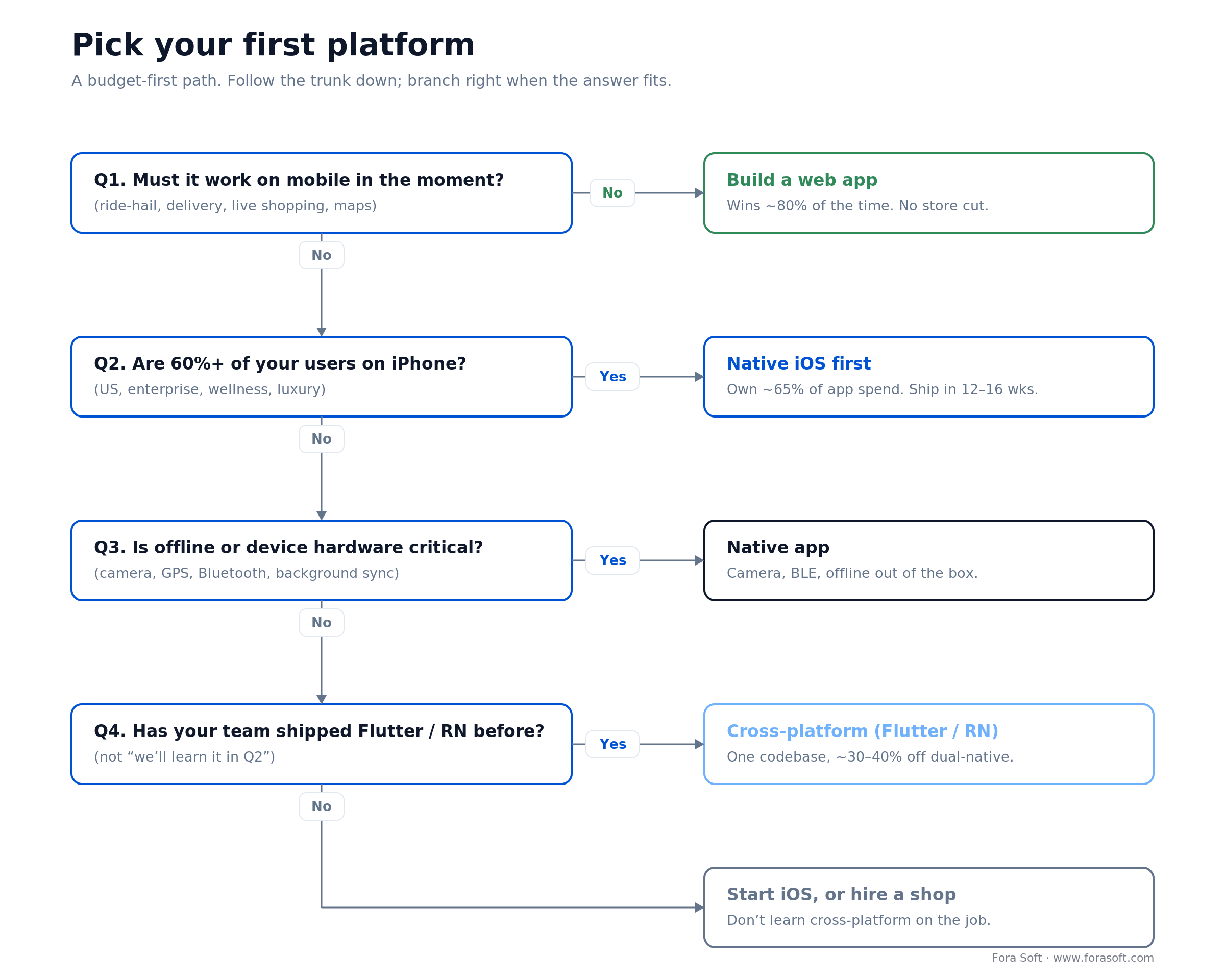
Figure 1. Follow the trunk down; branch right the moment an answer fits your product.
The rest of this guide is the evidence behind each branch: real 2026 cost bands, the store-fee math nobody explains correctly, the iOS-versus-Android split, and a shipped case where the web-first call paid off. Read the parts that match your product; skip the rest.
Not sure which platform your $15k–$60k should buy?
In 30 minutes we’ll map your users, revenue model, and budget to one platform, and tell you what to defer.
Web app vs mobile app: the key differences
A web app runs in the browser from a URL: nothing to install, and every update is live the moment you deploy. A mobile app is installed from the App Store or Google Play. It lives on the home screen and gets full access to the phone’s hardware, but every release goes through store review and in-app sales pay a store fee. A PWA sits in between: a web app that installs to the home screen and can send push.
| Factor | Web app | PWA | Native mobile app |
|---|---|---|---|
| How users get it | Open a URL | Open a URL, then “Add to Home Screen” | Download from the App Store or Google Play |
| Updates | Live the moment you deploy | Live the moment you deploy | Store review on every release (Apple: 90%+ within 24 hours) |
| Offline | Limited | Cached screens and data | Full |
| Hardware access | Camera, GPS, with clunkier permissions | Camera, GPS, push; no Bluetooth or NFC on iOS | Full: Bluetooth, NFC, biometrics, sensors |
| Discovery | Search engines and links | Search engines and links | Store search and featuring |
| Payment fees | Card processor only (Stripe 2.9% + $0.30) | Card processor only | Apple 15% under $1M/year; Google 10% + 5% billing in the US, UK, EEA (2026) |
| Lean MVP build (our 2026 bands) | $12k–$28k | $16k–$32k | $20k–$45k per platform |
On a budget, ask which of these trade-offs your first users will actually notice. If you’re weighing a PWA against a store app with no budget limit in the picture, our playbook on when a PWA is the right call versus native goes deeper on that choice.
Why Fora Soft wrote this guide
We’re Fora Soft. We’ve shipped web, iOS, Android, and cross-platform products since 2005 — 250+ of them — with a team of 50+ in-house specialists. The clients who need this guide most are the ones with one budget and no room to be wrong: a founder betting $15k on a first release, or a product lead who has to justify every platform to a board. For them we usually start with MVP planning: a feature cut, a monetization model and a launch blueprint before any code is written.
Take AppyBee, gym-management software now used by 800+ fitness centers. Owners run it from a desk (web), members book classes from a phone (mobile). We built both around one backend on React Native, React, PHP, and AWS. The numbers below are what we actually quote and hit, not figures scraped off a pricing blog.
One more thing worth saying up front: we make money building software, so a cheaper “just do a web app” answer costs us the bigger native contract. We give it anyway, because the founders who validate cheaply are the ones who come back to build the native app that revenue now justifies.
Cost reality 2026: build, run, and what you defer
Every platform choice is really a choice about what you postpone. The table shows a lean MVP build, the first-year run cost at ~100k monthly users, and what you give up by picking that lane first. Bands assume a small senior team and our Agent Engineering workflow, which lets us quote below the typical market MVP (the going rate for a single-platform MVP starts around $30k in 2026). For a quick number on your own feature list, our app development cost calculator prices web, iOS and Android side by side.
| Platform | Build (MVP 6–14 wks) | 12-month run @ ~100k users | What you defer |
|---|---|---|---|
| Web app | $12k–$28k | $2k–$5k (hosting, CDN, DB) | Home-screen habit, deep hardware, best-in-class offline |
| PWA | $16k–$32k | $2.5k–$5k (same stack + push) | App Store listing, background sync, widgets, some hardware |
| Native iOS only | $20k–$45k | $3k–$8k (server + $99/yr Apple) | Android reach, responsive web |
| Native Android only | $18k–$40k | $2.5k–$6k (server + $25 Google) | iOS revenue, iOS-only integrations |
| Cross-platform (Flutter/RN) | $28k–$50k (both stores) | $4k–$10k (server + dual stores) | Web, a few platform-specific niceties |
| Dual native (iOS + Android) | $40k–$80k | $6k–$15k (two apps, two teams) | Runway — this is the expensive lane |
Budget roughly $5k on top for the “first time” tax: design review, a compliance pass, and your first store submission. Subtract it from web; add it to native. For a full line-item breakdown, see our mobile app development cost guide.
The store-fee reality: 15%, not 30%
Here’s the catch with most “avoid the 30% Apple tax” advice: the 30% almost certainly isn’t your rate. Apple’s Small Business Program charges 15% to developers earning under $1M a year. Google Play split its fee in two on June 30, 2026 in the US, UK and EEA: a 10% service fee on your first $1M of annual earnings and on all auto-renewing subscriptions, plus a 5% billing fee only when you use Google Play Billing (Android Developers Blog, June 2026). A small developer on Play Billing still pays 15% in total, or 10% when the sale goes through alternative billing or an external web link. Other regions keep the old 15% tier until the rollout reaches them: Australia by September 30, 2026, Japan and Korea by December 31, 2026, the rest of the world by September 30, 2027. Apple’s 30% headline kicks in only after you cross $1M in a year. If you’re reading a budget guide, plan around 15%.
US payment links are free for now. In April 2025 a US court barred Apple from blocking or charging for external payment links, and Apple updated its US App Store rules in May 2025 to let apps send buyers to the web. In December 2025 the appeals court said Apple may eventually charge some fee on those sales, but no rate has been set. As of November 2026, Apple takes 0% on US link-out purchases. It proposed 5% for Small Business Program apps and 15% for everyone else in August 2026, and the Supreme Court isn’t expected to rule on the case before mid-2027. We track the moving details in our note on how to pay less App Store commission.
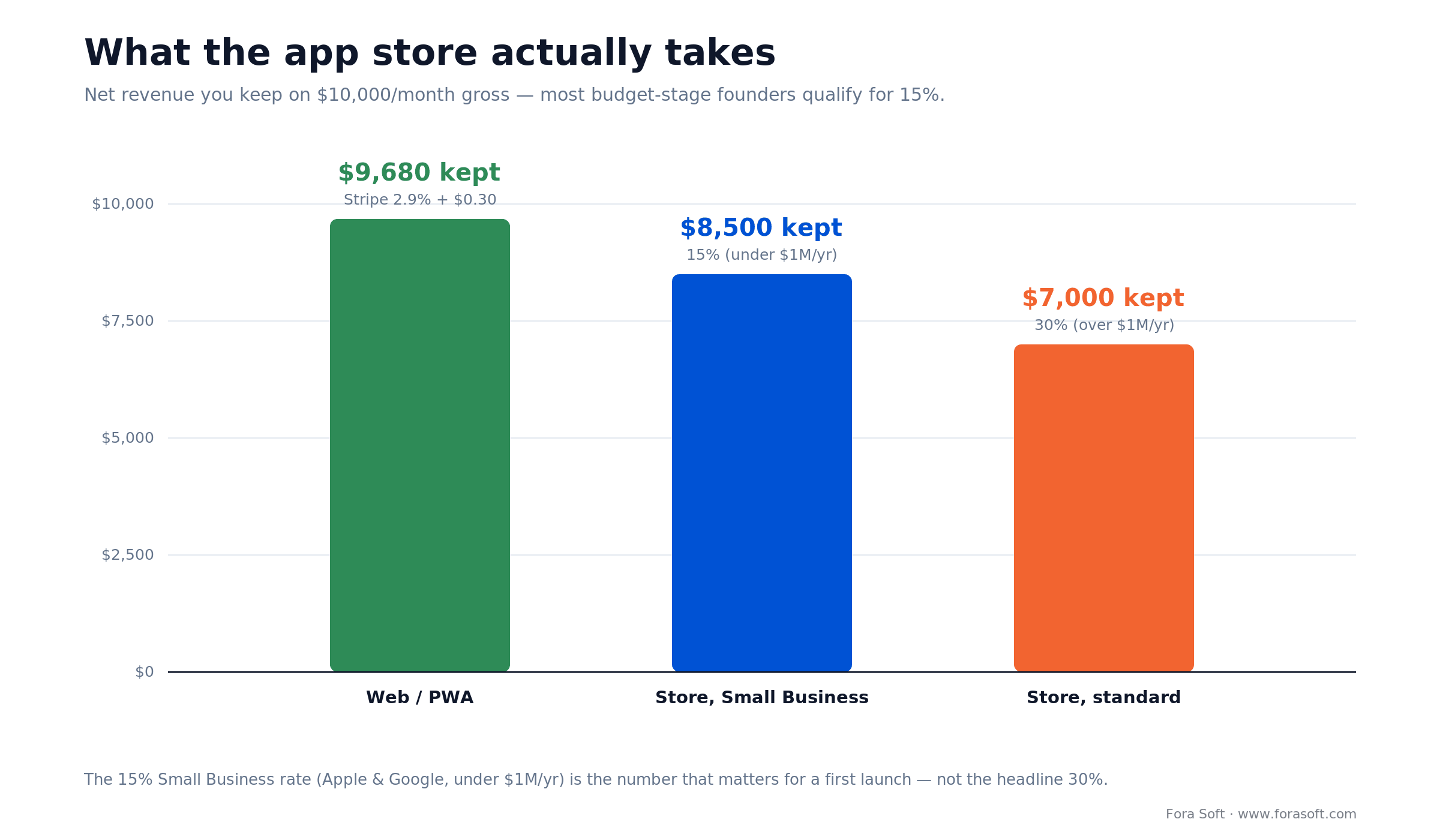
Figure 2. What you keep on $10,000/month gross under each route. The 15% Small Business rate is the one most first launches actually pay.
Run the math on $10,000/month. Web through Stripe (2.9% + $0.30 per charge) keeps about $9,680 across ~100 charges, a little less if you run many tiny ones. The store at 15% (Apple’s Small Business rate, or Google Play Billing in the US, UK and EEA) keeps $8,500. Google’s external-link route costs the 10% service fee plus your card fees, which leaves about $8,680. The store at 30% keeps $7,000. So the honest gap for a budget-stage app is web versus 15%, about $1,180/month — real, but not the “you lose a third” disaster you’ve been told. Only high-volume apps past $1M feel the 30%.
Route payments through the web when: your margins are thin, your users already trust a web checkout, or you sell a SaaS subscription that can live behind a web login. Keep in-app purchase when a smooth one-tap buy lifts conversion more than the fee costs you.
Web apps: speed, ownership, and unit economics
No gatekeeper. You push from CI/CD straight to production. A bug found at 4pm is fixed at 5pm. No store queue sits between you and your users, which is why so much early growth work lives on the web.
You own the payment flow. Stripe at 2.9% + $0.30 means you control checkout, the cancel path, and dunning retries. No review, no policy surprise, no store cut on the web itself.
One codebase, every screen. A responsive web app serves desktop, tablet, and mobile browser from one build. For a team-facing tool, that’s often 100% of the audience covered on day one.
The honest limits. No app-store shelf to be discovered on. Weaker habit loop than an icon on the home screen. And people spend the vast majority of phone time in apps: Sensor Tower’s State of Mobile 2026 puts it near 94% in apps, under 6% in mobile browsers. A web app has to earn its traffic through search, word of mouth, and ads.
Reach for a web app when: your product has a real desktop use case, your users are logged-in workers rather than casual consumers, or you need to iterate faster than any store review allows.
Native mobile apps: presence and monetization upside
An icon is a daily reminder. Home-screen presence plus a spot in App Store or Play search is a habit engine a browser tab can’t match. A feature placement can multiply installs in a week.
Push actually gets opened. App push routinely out-opens email several times over, which is why re-engagement products live and die on it. Web push exists now, but its reach and reliability still trail native.
Hardware from day one. Camera, GPS, Bluetooth, NFC, and biometrics (Face ID, fingerprint) are first-class in native. The web reaches some of these, but permission flows are clunkier and iOS blocks a few outright.
Where the money is. iOS earns roughly 65% of global app spend despite ~28% of devices, and its median spend per user runs well above Android’s. If you can fund only one native app and revenue is the goal, iOS is the bet. If reach is the goal, Android is.
PWAs in 2026: what changed, what still doesn’t
A progressive web app is a website that installs to the home screen and behaves like an app. The iPhone gap that used to kill PWAs is mostly closed. Installed PWAs have sent push since iOS 16.4 (2023); Safari 18.4 added simpler Declarative Web Push in 2025; and iOS 26 now opens home-screen sites as standalone apps by default (outside the EU, where DMA rules differ). On Android, PWAs have been first-class for years.
What a PWA does well. One codebase, install to home screen, offline caching, push, and no store review — at a lower build cost than native. For a repeat-visit product (booking, banking, dashboards, light social), that’s a strong, cheap fit.
What it still can’t do on iOS. No background sync, no automatic install prompt, no App Store listing, and no Bluetooth or NFC. iOS can also evict a PWA’s cached data if it sits unused, and every iOS browser is forced onto WebKit, so the ceiling is Apple’s to set. Need those? You need native.
Reach for a PWA when: your users come back often, you want push and offline without a store gate, and you don’t depend on Bluetooth, NFC, or background sync. It’s the cheapest way to feel “app-like” on a budget.
Web, PWA, or native — want a second opinion?
Send us your product and budget. We’ll tell you honestly whether a PWA covers it or you truly need native.
Audience fit: consumer vs business, global vs local
Your audience picks your platform more often than your preferences do. TikTok is a phone app; project trackers live on desktop; a booking tool is both, split by role. Map the real behavior before you argue architecture.
Consumer, casual, push-driven. Dating, delivery, social, and fitness apps rise or fall on store presence and push. Native or cross-platform is the bet. Budget: $30k–$60k for a solid first release.
Business and workspace tools. CRMs, dashboards, and admin panels are used at a desk. A responsive web app covers most of that audience; a native app adds months and $20k–$30k for a smaller slice of usage. Budget: $15k–$30k on web.
Geography decides the OS. US and Western Europe skew iOS, so iOS-first. India (Android ~95%), LATAM, and much of APAC skew Android, so Android-first when you must choose one. Emerging markets also run older, cheaper handsets on slower networks, where a lean PWA or a well-optimized Android app beats a heavy web bundle.
Monetization: IAP, subscriptions, ads, and direct sales
In-app purchase (store rate). Games and casual apps live here because one-tap buying converts. At the 15% Small Business rate a $10 purchase nets $8.50; at 30% it nets $7. Frictionless buying often earns back the fee — measure it, don’t assume.
Web or external checkout (Stripe). A $10 charge nets about $9.41 after Stripe. You own the flow and the data. Since 2025 you can even link out to it from a US iOS app, and as of November 2026 Apple takes no commission on those sales while the fee is still in court.
Hybrid: native app, web sign-up. Some of the best unit economics come from a native app for presence and push, with premium plans sold through a web login. Legitimate for many SaaS categories, and it sidesteps the store cut on subscriptions.
Ads are a late-stage lever. Networks take a big cut and you need serious daily active users before the revenue is meaningful. For most early apps, subscriptions or direct sales beat ads until scale arrives.
iOS vs Android: share, revenue, and regional play

Figure 3. Android owns the devices; iOS owns the spending (StatCounter, September–October 2026; Sensor Tower).
| Metric (2026) | iOS | Android |
|---|---|---|
| Global device share | ~28% (Oct 2026) | ~72% (Oct 2026) |
| US device share | ~54% (Sept 2026) | ~46% (Sept 2026) |
| Share of global app spend | ~65–70% | ~30–35% |
| Store review time | ~24h (90%+ in a day) | hours to ~3 days |
| Strong regions | US, UK, Japan, Australia | India, Brazil, Indonesia, Africa |
iOS-first fits US-centric, enterprise, wellness, and premium products: fewer device variations to test, higher spend per user, ~65–70% of global app revenue. Android-first fits global reach, emerging markets, and social or content apps, with the trade-off of real device fragmentation. If you’re global with $40k–$60k, ship iOS for revenue, then add Android once it’s earning.
App-store policies in 2026 you can’t ignore
Review is fast now. Apple reviews 90%+ of submissions within 24 hours; the old “one to two weeks” is out of date except for sensitive categories. Google Play runs from a few hours to about three days, longer for finance or kids apps. Plan for one rejection, not for a lost fortnight.
The rules still bite. Apple rejects thin “website in a wrapper” apps and polices payment UI closely. Google Play now asks you to disclose generative-AI features and auto-suspends on serious violations. Android also added a check outside the store: since September 30, 2026, apps on certified devices in Brazil, Indonesia, Singapore and Thailand must come from a developer registered with Google to install normally, even when sideloaded, and Google plans to take that global in 2027. If your product sits in a grey zone — crypto, VPN, health claims — get the policy read before you build, not after.
Regulation is loosening, unevenly. The EU Digital Markets Act forces alternative stores and third-party payments for EU users. In the US, Apple currently takes nothing on external payment links, and Google’s March 2026 settlement with Epic cut Play fees and opened Android to registered third-party stores. The direction is more founder-friendly, but the details differ by region and keep shifting, so design for the market you actually sell to.
Speed and performance: how load time drives churn
Milliseconds move money. Google and Deloitte’s 2020 study “Milliseconds Make Millions” found a 0.1-second mobile speed-up lifted retail conversions 8.4% and average order value 9.2%, across 30 million sessions and 37 brands. Speed isn’t polish; it’s revenue.
The web feels it first. Google’s 2017 data pegged mobile abandonment at 53% once a page took over 3 seconds to load. A native app skips the “load” step when it’s offline-first: it opens instantly and fetches in the background.
The stack has to match the promise. On the web, a lean framework and a small JavaScript bundle matter more than the framework name. On native, pre-load and cache aggressively. A bloated native app throws away the very speed edge it was chosen for. For real-time or media-heavy products, our WebRTC architecture guide shows where native still pulls ahead.
5G and on-device AI: where native still wins
5G is common, not universal. Ericsson’s June 2026 report puts 5G at roughly a third of global mobile subscriptions and about 48% of traffic, on track for two-thirds by 2031. Faster networks narrow the gap between web and native, but native still has less overhead and closer OS access.
On-device AI is a native lane. Apple’s Neural Engine, Pixel’s Tensor, and Qualcomm’s NPUs are reachable from native code; the web’s WebGPU path is still early. If your product runs models locally for privacy or offline use, that points to native, and it is the lane our AI mobile app development team works in with Core ML and Gemini Nano.
For most teams it isn’t the deciding factor. Early products lean on server-side AI (OpenAI, Anthropic, Google) that runs anywhere. On-device inference is a v2 concern unless offline privacy is the whole point of the product.
Cross-platform: Flutter vs React Native vs KMP
The share picture. In Statista’s 2023 survey of cross-platform developers, 46% used Flutter and 35% React Native. Stack Overflow’s 2024 survey, the last one with a clean comparison, put them at 9.4% and 8.4% of all respondents. Kotlin Multiplatform is still a small minority. React Native is usually easier to hire for, because any React web developer can pick it up, even though Flutter “wins” the popularity charts.
Flutter. Dart, one polished UI on both platforms, fast iteration. Used by Google Pay, eBay, and BMW. The trade-off is a smaller library ecosystem than JavaScript’s.
React Native. JavaScript, huge ecosystem, easy hiring from any React web team. Used by Meta, Shopify, and Discord. The trade-off is more platform-specific edge cases to smooth out.
Kotlin Multiplatform. Shares business logic, not UI, and still maturing for client teams. Promising, but a risky first bet unless you already have Kotlin depth on staff.
Reach for cross-platform when: you need both stores on one budget and you have a team that has shipped Flutter or React Native before — or you hire a shop that ships it every week. Don’t learn it on your MVP.
Mini-case: how AppyBee shipped web plus mobile
Situation. AppyBee serves two very different users. Gym owners run the business from a desk: schedules, memberships, payments, reporting. Members do one thing on a phone, often: book the next class. Two audiences, one budget — the exact split this article is about.
What we did. We put the owner-facing admin on the web, where desk work belongs, and built the member app with React Native so one codebase covers iOS and Android. Everything sits on one backend (React, PHP, AWS) with QR-code check-in and automated payments and overdue follow-ups. Members get targeted push for class reminders; owners never touch a store to run their business.
Outcome. AppyBee now runs 800+ fitness centers, saves owners 10–15 hours a week of admin, and has lifted member retention ~20%, at 4.6 stars across its reviews. The lesson generalizes: match each audience to the platform it actually uses, share one backend, and you don’t have to choose web or mobile — you choose where each part lives. Want the same split mapped for your product?
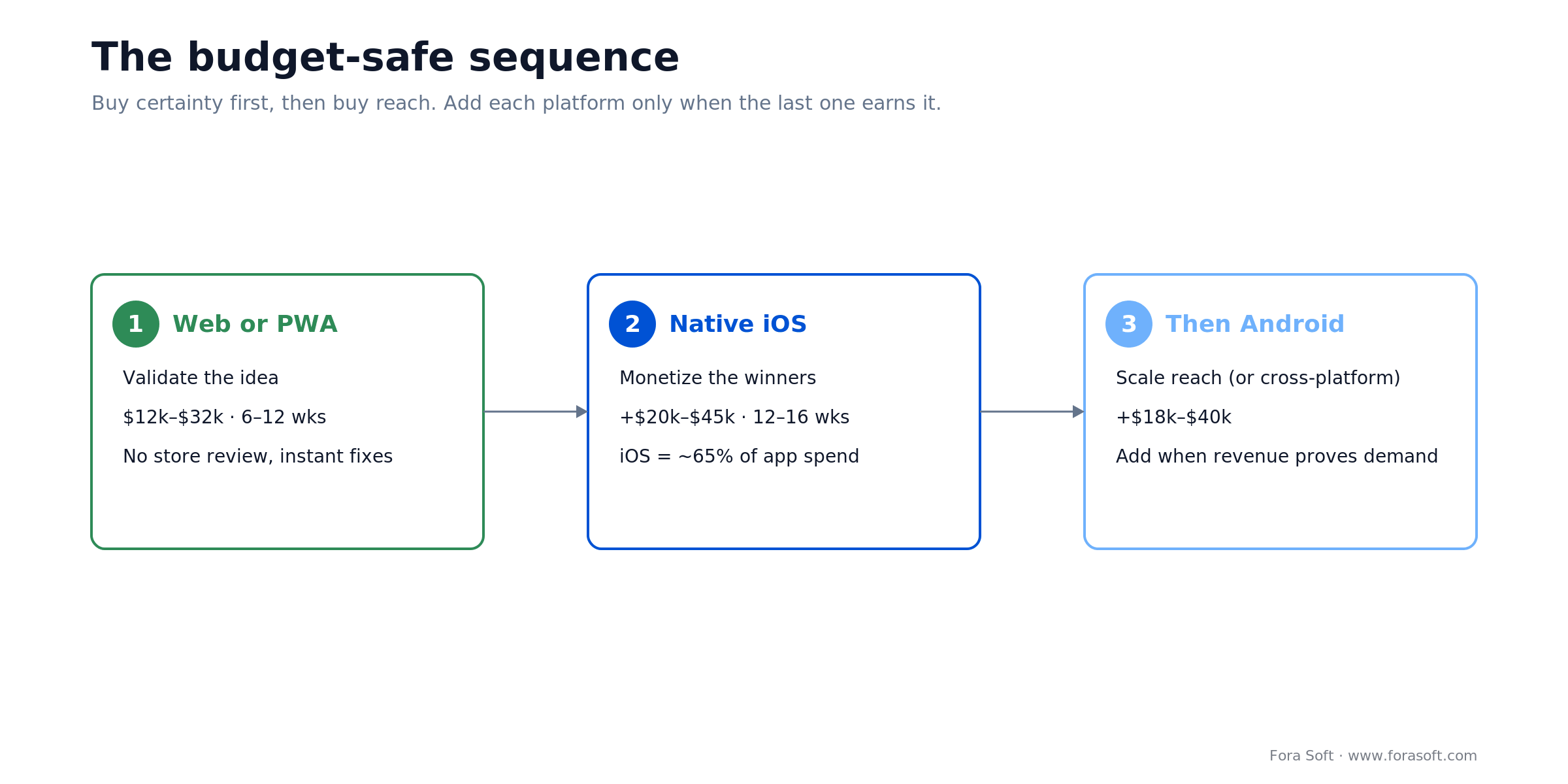
Figure 4. Buy certainty first, then buy reach: add each platform only when the last one earns it.
Two audiences, one budget?
We’ll show you how to split a shared backend across web and mobile so nothing gets built twice.
A decision framework in five questions
1. Is the product mostly mobile, or does it have a real desktop job? If more than ~70% of use is mobile, keep going. If desktop matters, build web and defer native.
2. Can your margins absorb the store rate? At 15% a $50/month tool nets $42.50; on web it nets about $48. If that gap sinks you, lean web. If a smooth in-app buy lifts conversion more, the store is fine.
3. Do you need home-screen presence and push on day one? Habit-driven consumer apps do. A back-office tool doesn’t. Yes points to native or PWA; no points to web.
4. Where does your market’s OS split sit? 60%+ iOS (US, premium) means iOS-first. 60%+ Android (global, emerging) means Android-first. Roughly even means web or cross-platform.
5. Has your team shipped the stack before? Prior React Native or Flutter wins make cross-platform safe. First-timers should ship web or PWA now and hire specialists for native later.
Five pitfalls that swallow budgets
1. Building iOS and Android at once on $40k. That’s ~$20k per platform, which buys two half-apps and mediocre ratings on both. Ship one well, then expand. A 4.6-star app on one store beats two 3-star apps.
2. Pricing as if the fee were 30%. It’s usually 15% under $1M. Getting this wrong overprices your plans or scares you off the store for no reason. Model your real rate before you set prices.
3. Ignoring rejection risk. A “thin wrapper” or payment-UI flag costs days, not weeks — but only if you test on TestFlight and submit early. Leave a buffer for one round of fixes.
4. Treating a PWA as a toy. For a repeat-visit product without deep hardware needs, a PWA is 80–90% of native at a fraction of the cost. Go native only when a specific capability forces it.
5. Learning cross-platform on the paid project. A team new to Flutter or React Native can spend 40–60% longer chasing platform quirks. The framework saving evaporates in debugging. Hire people who’ve shipped it.
KPI targets: what to measure after launch
Acquisition. On mobile: cost per install, organic-versus-paid mix, and store search rank for your core terms. On web: organic search traffic and paid customer-acquisition cost. Aim for 30%+ organic by month six.
Retention. Track day-1, day-7, and day-30 return rates. Above ~40% at day 7 is healthy; under ~30% means churn is eating you before monetization even starts.
Revenue per user. Total revenue divided by active users. SaaS should target a few dollars a month and up; casual apps run lower. If it sits under ~$0.50/month, the model or the audience is wrong.
When to stay web-only: three honest cases
Your users are at a desk. Project management, CRM, accounting, and design tools are desktop work. A responsive web app covers essentially the whole audience; a phone app is a “check status” extra, not the product.
Your margins are razor-thin. If revenue per user is tiny or the product is ad-light, even a 15% store cut hurts. Web keeps that slice.
You ship many times a day. Growth teams that push fixes and experiments hourly can’t wait on any review. The web lets you change something at 2pm and measure it by 3pm.
When to go mobile-first: three honest cases
The product only makes sense in a pocket. Ride-hailing, delivery, live shopping, and navigation are mobile-first or mobile-only. A web version is a side channel, not the MVP.
Habit is your growth engine. Fitness, social, and games run on re-engagement, and app push still beats email and web push on open rates. If the loop is the business, you need native or a push-capable PWA.
You need real hardware or offline. Maps, camera-heavy tools, wearables over Bluetooth, and true offline all favor native. A PWA closes some of this, but not Bluetooth, NFC, or background sync on iOS.
FAQ
Web app vs mobile app: which should I build first on a limited budget?
Default to a web app or PWA. It ships for $12k–$32k with no store review, so you validate demand before committing to native. Go mobile-first only when the product is inherently mobile (delivery, navigation, live), when push-driven habit is the growth engine, or when you need hardware like the camera or Bluetooth.
What’s the minimum viable budget for each platform?
Web app from about $12k; PWA from about $16k; a single native platform (iOS or Android) from about $20k; cross-platform covering both from about $28k; and dual native from about $40k. Add roughly $5k for design review, a compliance pass, and your first store submission.
Is the app store fee really 30%?
Not for most first launches. Apple charges 15% to developers under $1M a year. Since June 30, 2026, Google Play in the US, UK and EEA charges a 10% service fee on the first $1M and on subscriptions, plus 5% if you use Play Billing; other regions keep 15% until the rollout reaches them. US iOS apps can also link out to web payment, and as of November 2026 Apple charges no commission on those sales while the fee is still in court.
Can a PWA replace a native app in 2026?
For most repeat-visit products, yes. Installed PWAs support push (iOS 16.4+), offline caching, and home-screen install, and iOS 26 opens them as standalone apps. They still lack background sync, automatic install prompts, an App Store listing, and Bluetooth or NFC on iOS. If you need those, build native.
iOS or Android first if I can only afford one?
Follow the money and the market. iOS earns ~65–70% of global app spend and ~54% of US phones (2026), so pick iOS for revenue and US or premium audiences. Android runs ~72% of global devices and dominates India, LATAM, and Africa, so pick Android for reach in those regions.
Flutter or React Native for a first cross-platform app?
Both are safe. Flutter led Statista’s 2023 survey of cross-platform developers (46%) with one polished UI across platforms; React Native (35%) has a bigger ecosystem and is easier to hire for, because React web developers can pick it up. Choose by the skills already on your team. Avoid Kotlin Multiplatform as a first bet unless you have Kotlin depth.
How long does app store approval take in 2026?
Apple reviews more than 90% of submissions within 24 hours; sensitive categories can take a couple of days. Google Play runs from a few hours to about three days, longer for finance or kids apps. Budget for one rejection round rather than the outdated “one to two weeks.”
Can I launch on one platform and add another later?
Yes, and it’s the budget-safe path. Ship web or one native platform, prove demand, then add the next once revenue justifies it. Sharing one backend keeps the second build cheap. Just don’t pivot platforms before product-market fit — that resets months of work.
PWA or React Native for a small business app on a limited budget?
Start with a PWA if your users come back often and you don’t need Bluetooth, NFC or background sync: it costs about $16k–$32k and skips store review. Pick React Native, about $28k–$50k for both stores, when you need an App Store listing, deeper hardware access or reliable push on every device, and your team has shipped it before.
What is Google Play’s service fee in 2026?
In the US, UK and EEA, since June 30, 2026: 10% on your first $1M of annual earnings and on all auto-renewing subscriptions, plus a 5% billing fee only when you use Google Play Billing. Sales through alternative billing or external web links pay the 10% service fee alone. Other regions move to the new structure by September 30, 2027 and keep the 15% tier until then.
What to read next
Cost breakdown
Mobile App Development Cost Guide
Line-item build costs for iOS, Android, and cross-platform, with team makeup.
Stack choice
Native vs Cross-Platform Development
When one codebase pays off, and when native is worth the extra spend.
Store fees
Pay Less App Store Commission
The 15% program, external payments, and what changed after 2025.
Build with us
Hire a Dedicated Development Team
A senior team that has shipped web, native, and cross-platform before.
Ready to choose your first platform?
The web app vs mobile app call gets simpler once the myths drop out. Web and PWA win the default case on cost, speed, and ownership. Native wins on presence, push, and the ~65% of app spend that lives on iOS. The store fee that actually applies to you is 15%, not 30%. And cross-platform pays off only with a team that has shipped it before.
Match each audience to the platform it already uses, share one backend, and add platforms as revenue earns them. That’s how AppyBee runs 800+ gyms across web and mobile, and it’s the same path we’d map for you. If you want a reality check on your budget and roadmap, a 30-minute call is the fastest way to get one.



The handbook · 7 volumes
Fora Soft Video Engineering Handbook
If the first platform you ship carries video, calls or on-device AI, the platform choice also sets your media budget. We wrote seven volumes on that stack. Begin with Volume 3 for players, WebRTC and delivery costs on web and mobile, then Volume 1 for encoding and Volume 6 for the on-device AI features that push you toward native. Written by Nikolay Sapunov, CEO at Fora Soft.
Browse the handbook on Amazon →7 volumes · 9,000+ pages · Kindle & paperback
Pick your first platform with confidence
30 minutes: a cost model for your platform choice, a hiring plan, and an honest read on 12-month total cost.

