

Key takeaways
- Voice is no longer a novelty feature. The speech and voice recognition market is forecast to grow from $9.66 B in 2025 to $23.1 B by 2030 (MarketsandMarkets), and voice commerce from $42.8 B in 2023 toward $186 B by 2030 (Grand View Research).
- The 2026 mobile voice stack is cheap and fast: on-device Apple SpeechAnalyzer and Android ML Kit speech recognition run free and offline; cloud streaming APIs cost $0.0025–$0.017 per audio minute at October 2026 list prices.
- App-store approval and privacy rules are the real bottleneck. Microphone permissions, App Privacy labels, Data Safety declarations, and NSSpeechRecognitionUsageDescription get voice apps rejected more often than broken features do.
- Hybrid architectures win. On-device for private, latency-sensitive paths; cloud for multilingual, accuracy-critical paths. Pick per-feature, not per-app.
- Fora Soft ships production voice features into iOS and Android apps in 8–12 weeks with a repeatable architecture: hybrid on-device + cloud ASR, LLM intent with function calling, streaming TTS, privacy-compliant logging, and App Store / Play review sign-off built into the process.
Updated October 2026: platform and price table for voice SDKs (Deepgram, AssemblyAI, Chirp 3, OpenAI GPT-Live-Transcribe), Android ML Kit speech recognition, App Store AI-consent rule 5.1.2(i), amended COPPA and EU AI Act Article 50 dates.
More on this topic: read our complete guide — 3 Key Strategies for Noisy Speech Recognition (2026).
Voice recognition app development crossed from novelty to baseline in 2026. If you run product or engineering at a mobile-first company — healthcare, fintech, retail, fitness, accessibility, automotive — you already know voice is moving from “nice to have” to expected. Your competitors are shipping voice search, voice commerce, voice dictation, and voice-first onboarding. The user expectation has quietly shifted: if I can say it, the app should understand it.
This guide is the playbook we use at Fora Soft for voice recognition app development — whether a customer wants to add voice to an existing iOS or Android app or build a voice-first one from scratch. It covers the stack, the SDKs, the privacy rules, the latency budget, and the 8–12-week integration path, with numbers and references — not slogans. If you’d rather skip to a scoping call, book 30 minutes with our team.
Voice recognition app development: the short answer
Voice recognition app development means adding speech-to-text, voice commands or a spoken assistant to an iOS or Android app. In October 2026 the default build is hybrid: free on-device recognition (Apple SpeechAnalyzer on iOS 26+, Android SpeechRecognizer or ML Kit GenAI Speech Recognition) for short, private commands, plus a streaming cloud API (Deepgram, AssemblyAI, Google Chirp 3, OpenAI or Azure) at roughly $0.0025–$0.017 per audio minute for multilingual dictation and agents. A focused voice feature in an existing app takes us 8–12 weeks.
How to add voice recognition to an app
- Pick one capability. Dictation, commands, search, a conversational agent or voice biometrics — not two.
- Choose where recognition runs. On-device if audio must stay on the phone or work offline; cloud if you need 20+ languages or the best accuracy.
- Wire capture and permissions. 16 kHz mono PCM, a voice-activity detector,
NSMicrophoneUsageDescriptionon iOS (plusNSSpeechRecognitionUsageDescriptionif you useSFSpeechRecognizer),RECORD_AUDIOon Android. - Stream and resolve. Show partial transcripts as the user speaks, then map the final text to an action with a small classifier or an LLM limited to function calls.
- Declare and test. List every audio flow in App Privacy and Google Play Data Safety, ask permission before speech goes to a third-party AI service (App Store guideline 5.1.2(i), November 2025), and test on real devices before you submit.
Top platforms for voice-enabled mobile apps in 2026
These are the SDKs and APIs we shortlist on mobile projects. Prices are public list prices checked on 13 October 2026; volume tiers and promos lower them.
| Platform | Where it runs | Best for | Price (Oct 2026) |
|---|---|---|---|
| Apple SpeechAnalyzer (Speech framework, iOS 26+ and macOS 26) | On-device; the model ships with the OS | iOS dictation, commands, offline | Free |
| ML Kit GenAI Speech Recognition / Android SpeechRecognizer | On-device; Gemini-based advanced mode on Pixel 10 and Pixel 11 (alpha) | Android commands and dictation | Free |
| whisper.cpp / WhisperKit | On-device, open source; iOS, Android, macOS, Windows | Offline dictation on mobile and desktop | Free; models add ~75 MB–1.5 GB |
| Picovoice (Porcupine, Leopard, Cheetah) | On-device; mobile, web, desktop, embedded | Wake words, offline field apps | Free tier; commercial plans from the vendor |
| Deepgram Nova-3 / Flux | Cloud streaming | Real-time dictation, voice agents with turn detection | $0.0077/min streaming (list) |
| AssemblyAI Universal-Streaming | Cloud streaming | Low-cost English streaming | $0.15/hour (~$0.0025/min) |
| Google Cloud Speech-to-Text (Chirp 3) | Cloud | 85+ languages | $0.016/min for the first 500k min/month |
| OpenAI GPT-Live-Transcribe and gpt-realtime-2.1 | Cloud | Voice agents and speech-to-speech | $0.017/min live transcription |
| Microsoft Azure AI Speech / MAI-Transcribe-2-Streaming | Cloud | Enterprise apps on the Microsoft stack | ~$1/hour real-time (list); MAI streaming $0.54/hour in preview |
For an offline field-service app where technicians dictate reports hands-free, start with the on-device rows: SpeechAnalyzer and ML Kit cost nothing per minute, whisper.cpp runs on both platforms with a downloadable model, and Picovoice adds a wake word and a commercial support contract. The tools that work across mobile and desktop apps are whisper.cpp, Picovoice and every cloud API; SpeechAnalyzer covers iPhone, iPad and Mac. If security is the first requirement, keep audio on the device; if it has to go to the cloud, pick a vendor that signs a HIPAA BAA and offers zero data retention and EU data residency. For a vendor-by-vendor look at cloud engines by WER, latency and price, see our AI speech recognition software comparison.
Why Fora Soft wrote this playbook
Fora Soft has been building real-time audio, video, and AI features into mobile apps since 2005 — 250+ shipped products across 21 years. Three reasons we felt obliged to write this one.
First, voice is a cousin of every modality we already ship. Our AI voice recognition for intercoms practice has put ASR, voice biometrics, and LLM intent into production on thousands of doors. Our simultaneous interpretation architecture handles live multilingual audio at scale. Our AI streaming platform work covers the real-time media stack a voice-first mobile app depends on, and our AI-for-video-engineering knowledge base tracks the model side.
Second, mobile voice is where small engineering choices compound quickly. The difference between a voice feature that feels instant and one that feels broken is usually 200 milliseconds, one missing permission string, or a misplaced retry loop. We’ve done enough of these to have a repeatable checklist, and our speech-to-text development team applies it to every on-device and cloud ASR build.
Third, app-store reviewers have gotten stricter on voice and microphone permissions. Between 2023 and 2026 both stores raised the bar: Google Play’s Data Safety section, Apple’s required privacy manifests for SDKs (May 2024) and, since November 2025, explicit consent before personal data goes to third-party AI. A voice feature that can’t pass App Store or Play review is worth zero.
Our bias, stated up front: we don’t believe in voice-everywhere. Voice is the right modality for hands-free, eyes-free, or accessibility-first contexts. It’s the wrong modality for dense data entry or private-in-public interactions. The best voice features in 2026 are surgical, not ambient.
What “AI voice recognition in mobile apps” actually means in 2026
The phrase covers five distinct capabilities. Most product teams conflate them — and most RFPs underspec the one they actually need.
1. Voice dictation
User speaks, app transcribes. Fast input for long text, particularly on phones. Gboard, Otter, Rev, medical scribe apps (Nuance DAX, Abridge, Suki) are the archetypes. Accuracy and streaming responsiveness matter more than anything else.
2. Voice commands
User speaks a bounded phrase mapping to an in-app action: “pause,” “next track,” “find my insurance card,” “add this to cart.” Peloton, Spotify, Walmart’s voice ordering, and CarPlay app integrations all live here. Grammar is constrained; the hard part is latency and precision.
3. Voice search
User speaks a free-form query; the app resolves it to search. Amazon, eBay, Zillow, food-delivery apps all ship voice search. Requires ASR + intent + result rendering — plus graceful fallback when the transcript is wrong.
4. Voice-first conversational agents
Full spoken dialog. Bank of America’s Erica, ChatGPT voice mode, medical-intake bots, fitness coaches. This is the ASR → LLM → TTS (or speech-to-speech) loop, with memory and multi-turn reasoning. Highest technical bar, biggest product payoff. When this is the brief, our AI voice assistant development team builds the speech loop and wires it into your existing app rather than shipping a separate bot.
5. Voice biometrics
Speaker verification as an authentication factor. Banks and call centres have used it for a decade; it’s now creeping into mobile onboarding, insurance, and healthcare. Governed by BIPA, GDPR Article 9, and CCPA/CPRA — not a feature to bolt on without legal review.
Every production voice feature in 2026 is one of these five. Pick the one you actually need; then pick the stack that fits it. Over-scoping is the most common reason voice features ship late.
The market: why voice in mobile keeps growing 16–25% a year
Three overlapping markets drive voice features in mobile apps. All three are growing in double digits.
| Market | Size and forecast | CAGR | Sources |
|---|---|---|---|
| Speech & voice recognition | $9.66 B (2025) → $23.11 B (2030) | 19.1% | MarketsandMarkets, Aug 2025 |
| Voice commerce | $42.8 B (2023) → $186 B (2030) | 24.6% (2024–30) | Grand View Research |
| Voice biometrics | $2.63 B (2025) → $6.54 B (2031) | 16.4% | Mordor Intelligence, 2026 |
Usage is the better tell than market sizing. Bank of America says about 20.6 million clients used its Erica assistant in 2025, with nearly 700 million interactions that year and more than 3.2 billion since launch (BofA, March 2026) — not “available,” but used.
Voice isn’t replacing touch. It’s eating the edges where touch is bad: driving, cooking, mid-workout, holding a sleeping baby, small-motor disability. Any mobile app whose users are in one of those contexts — even 10% of the time — has a voice opportunity.
The mobile voice pipeline: seven stages on a phone
Mobile voice is not desktop voice with a smaller screen. The phone is a very different engineering target: small battery, strict background rules, close-talking microphone, unreliable network. Every serious mobile voice feature runs through these seven stages.
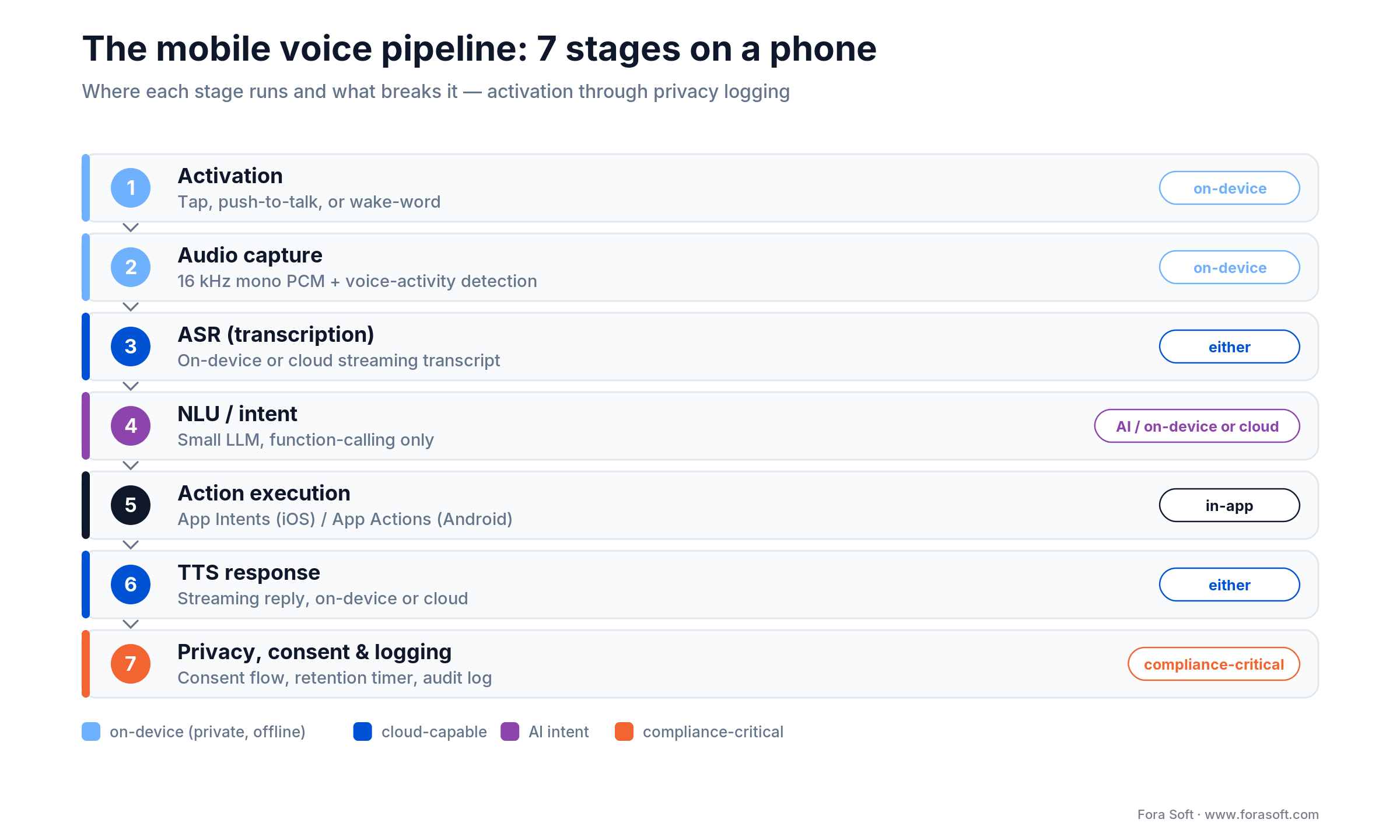
Figure 1. The seven stages every mobile voice feature runs through — and where each one runs.
Stage 1 — Activation
How does voice start? Three options: user taps a microphone button (cheapest, most-rejection-proof), user holds a push-to-talk button (cleaner UX for commands), or a wake-word runs continuously (“Hey Acme”). Wake-word on iOS requires Apple’s restricted background audio modes; on Android it needs a foreground service and a persistent notification. Picovoice Porcupine is the most common third-party wake-word engine; Sensory TrulyHandsfree is the enterprise-grade alternative.
Stage 2 — Audio capture
iOS: AVAudioEngine or AVFoundation capture at 16 kHz, mono, 16-bit PCM. Android: AudioRecord or MediaRecorder at the same specs. VAD (voice activity detection) trims silence before transmission — Silero VAD or WebRTC VAD are the community defaults. Good VAD cuts data volume and ASR cost by 40–60% on typical mobile voice sessions.
Stage 3 — ASR
Three routes: on-device (Apple Speech framework / SpeechAnalyzer, Android SpeechRecognizer or ML Kit GenAI Speech Recognition, whisper.cpp, Picovoice Leopard, Vosk), cloud streaming (Deepgram Nova-3 and Flux, Google Chirp 3, Azure AI Speech, AssemblyAI Universal-Streaming, OpenAI GPT-Live-Transcribe), or hybrid (on-device first, cloud-validated when confidence is low). The choice depends on latency budget, offline requirement, language mix, and privacy posture.
Stage 4 — NLU / intent
Transcript becomes intent. For small command vocabularies, a regex or tiny classifier is enough. For open dialog, a small LLM with function calling: Claude Sonnet 5.5 or a small GPT-5-class model in the cloud; Apple’s Foundation Models framework or Gemini Nano on-device. Keep the LLM constrained to function calls — free-text responses are 3× slower and 10× more expensive than a structured output.
Stage 5 — Action execution
The intent resolves to a function call inside the app: add-to-cart, start-workout, call-tenant, open-document. iOS App Intents (iOS 16 +) and Android App Actions let the OS-level assistant trigger your actions without the user opening the app. This is the “Siri Shortcuts for voice” layer — shipping it means your app shows up in Siri suggestions and Assistant routines.
Stage 6 — TTS response
If the app talks back, TTS runs either on-device (AVSpeechSynthesizer on iOS, Android TextToSpeech) or cloud (ElevenLabs, Google Chirp 3 HD, Cartesia). ElevenLabs Flash v2.5 (~75 ms model latency, vendor figure) and Eleven v4 Turbo (September 2026) are the usual low-latency picks. Skip OpenAI’s tts-1 and gpt-4o-mini-tts for new builds: OpenAI deprecated them on 1 October 2026, with shutdown on 6 January 2027. On-device TTS is free but less natural. Streaming is mandatory for anything conversational.
Stage 7 — Privacy, consent, and logging
Permission strings in Info.plist (iOS) and AndroidManifest.xml. App Privacy labels on App Store Connect. Data Safety section on Google Play Console. In-app consent flows for biometric usage. Audit-safe logging with retention policies. Skip any of these and the app either gets rejected or gets sued.
On-device vs cloud: the most consequential choice
Ninety percent of the design debate on a voice-in-mobile project comes down to on-device or cloud. Here is the trade-off matrix we use.
| Dimension | On-device (Apple Speech, Gemini Nano, whisper.cpp) | Cloud (Deepgram, Chirp, OpenAI Realtime) |
|---|---|---|
| Latency | 100–400 ms, no network variance | 200–600 ms, adds network RTT |
| Accuracy (WER) | 6–12% on clear speech in our projects; worse on noisy / accented | ~2–5% on the Artificial Analysis benchmark, Oct 2026 (GPT-Transcribe 3.3%, Chirp 3 4.3%, Nova-3 5.2%) |
| Languages | Check SpeechTranscriber.supportedLocales on iOS; 15 basic / 21 advanced locales in ML Kit GenAI | 85 + (Chirp 3), 99 (Whisper family), 30 + (Nova-3) |
| Offline capability | Yes — airplane, rural, tunnels | No — requires connection |
| Privacy | Audio never leaves the device | Audio transits vendor servers |
| Battery impact | Higher during recognition; neural engine helps | Lower CPU, but uses radio |
| App size | +50 MB–1.5 GB for bundled models | Near-zero |
| Cost per minute | Zero marginal | $0.0025–0.017 streaming (Oct 2026 list) |
The right answer is almost always hybrid. On-device for short commands, wake-words, and privacy-sensitive flows (health dictation, financial queries). Cloud for multilingual dictation, long-form transcription, and open-ended conversational agents. Let the app pick per session, not per app.
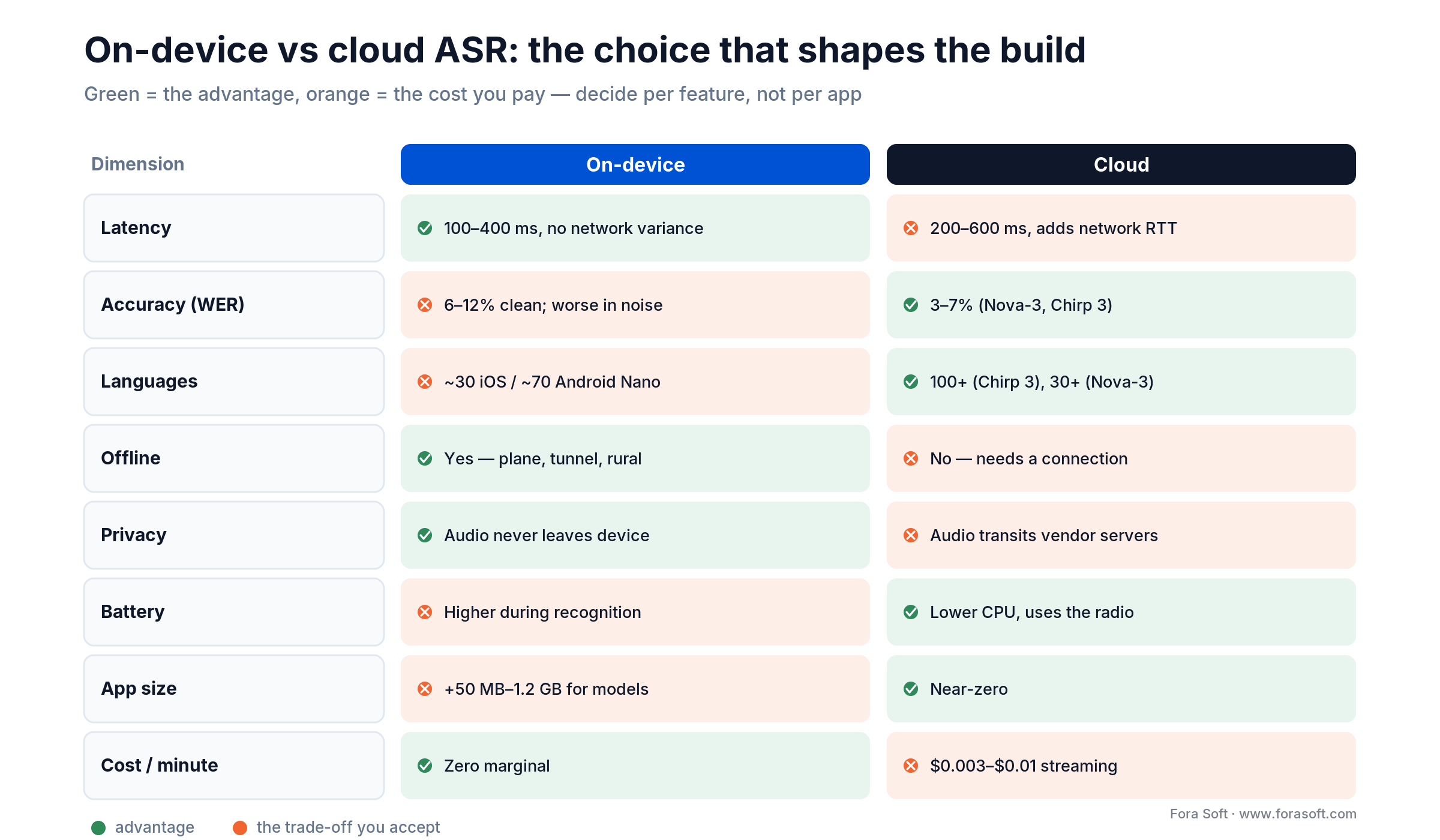
Figure 2. On-device versus cloud ASR — the advantage in green, the trade-off you accept in orange.
Practical rule: default to on-device when the transcript never leaves the phone, the language is in the top 10 the OS supports, and the expected utterance is under 10 seconds. Route to cloud otherwise. Surface the choice to the user (a lock icon = private / on-device) — trust is the feature.
The Apple voice stack: SpeechAnalyzer, App Intents, Apple Intelligence
Apple reorganised its voice APIs in 2025 at WWDC. The legacy SFSpeechRecognizer still works, but new code should move to SpeechAnalyzer (iOS 26 and later), which integrates with the Apple Intelligence on-device stack, ships modules for general and long-form transcription on Apple’s new model (SpeechTranscriber), a fallback on the older dictation model for locales and devices the new one does not cover (DictationTranscriber) and voice-activity detection (SpeechDetector), and — in MacStories’ June 2025 test — transcribed about 2× faster than Whisper Large V3 Turbo. For an iOS-only deep dive, see our iOS speech recognition guide to SpeechAnalyzer and WhisperKit. It exposes richer metadata: confidence, word timings, language detection.
Practical notes for iOS voice features in 2026:
- On-device is the default. SpeechAnalyzer runs fully on-device, and Apple ships and updates the model as a system asset, so your app bundles no weights. The legacy
SFSpeechRecognizercan still send audio to Apple’s servers unless you setrequiresOnDeviceRecognition. Apple Intelligence and the on-device Foundation Models framework, which you can use for intent, need an iPhone 15 Pro or later (A17 Pro / M-series). - App Intents replace Siri Shortcuts donations. Declare voice-triggerable actions via the App Intents framework, ship parameterised intents (“start a workout for 30 minutes”), and Siri surfaces your app automatically. This is the cheapest distribution channel in mobile voice.
- Background audio needs a mode. Continuous listening outside the foreground requires
UIBackgroundModes: audioand a clear user-facing reason. Apple reviewers push back on speculative “always listen” use cases. - Permission string matters.
NSSpeechRecognitionUsageDescriptionandNSMicrophoneUsageDescription: the microphone string is always required, the speech-recognition string whenever you useSFSpeechRecognizeror request speech authorization. Write them as specific verbs, not generic disclaimers. “To transcribe your voice notes in the session log” passes review; “To provide voice features” does not.
The Android voice stack: ML Kit GenAI, Gemini Nano, App Actions
Android’s story in 2026 is dual-track. The baseline SpeechRecognizer API handles simple recognition on any modern device. ML Kit GenAI adds two layers on top. Its Speech Recognition API (alpha as of October 2026) has a basic on-device mode for most Android 12+ phones and a Gemini-based advanced mode on Pixel 10 and Pixel 11 with 21 locales. Its Prompt API runs Gemini Nano for intent and short responses on supported flagships — privately, offline, and free to run.
Practical notes for Android voice features in 2026:
- App Actions are the equivalent of App Intents. Declare capabilities in
shortcuts.xmlso Google Assistant and Gemini can trigger your app by voice. This is where most apps leave distribution on the table. - Foreground service for continuous listening. Android 14 + tightened foreground-service restrictions; a “microphone” foreground-service type is required and triggers a persistent notification.
- Gemini Nano access is device-gated. Design features so they gracefully degrade to cloud ASR on older phones — otherwise everyone not on a current flagship gets a worse experience.
- Data Safety declarations are strict. Google Play’s ML-powered review actually parses SDK imports and flags undeclared audio data flows. Declare every ASR SDK you use — even if the data is “ephemeral.”
Cross-platform: React Native, Flutter, Capacitor
If you’re not native on each OS, pick SDKs that match your framework. This is where projects silently burn weeks.
| Framework | ASR options | TTS options | Gotchas |
|---|---|---|---|
| React Native | @react-native-voice/voice, expo-speech-recognition, Deepgram SDK, AssemblyAI SDK | react-native-tts, expo-speech | New Architecture (Fabric / TurboModules) adoption broke some legacy voice modules; verify module compatibility before starting. |
| Flutter | speech_to_text, deepgram_speech_to_text, Google Cloud Speech SDK | flutter_tts, google_tts | iOS privacy-string plumbing via Info.plist is manual; the plugin doesn’t set it for you. |
| Capacitor / Ionic | @capacitor-community/speech-recognition, @capgo/capacitor-speech-recognition | @capacitor-community/text-to-speech | Background listening is uneven across Capacitor plugins — test on real devices, not simulators. |
| Native (Swift / Kotlin) | Apple Speech / SpeechAnalyzer; Android SpeechRecognizer; any cloud SDK | AVSpeechSynthesizer; Android TextToSpeech | Maximum control, highest effort. Default choice when latency or privacy matter. |
If your app is fully native, stay native for the voice layer — RN or Flutter bridges add 50–150 ms of overhead that you feel on every interaction. If your app is already cross-platform, pick plugins aligned with a recent release and plan for native-code fallbacks on hot paths.
Planning voice for your mobile app?
We’ll audit your codebase — native, React Native, or Flutter — recommend the stack, and scope an 8–12-week integration. No obligation.
Latency budget: the 1-second rule
Mobile users are unforgiving about voice latency. Empirically, responses under 500 ms feel instant; 500–1,000 ms feels responsive; 1–2 seconds feels sluggish; anything past 2 seconds and users tap instead. Here’s our target budget for a voice command that executes an in-app action.
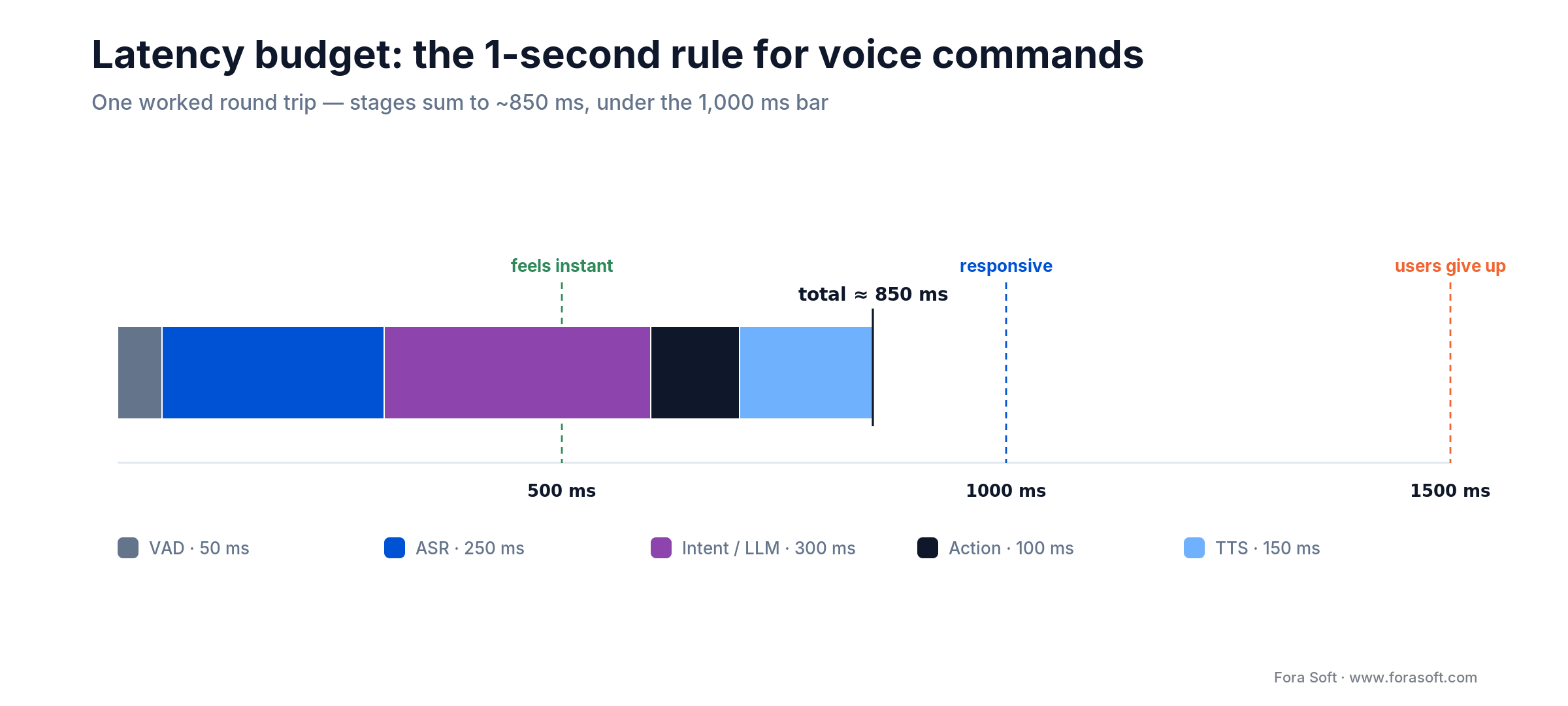
Figure 3. A worked latency budget — five stages summing to ~850 ms, comfortably inside the 1-second rule.
| Stage | Budget | Notes |
|---|---|---|
| VAD & end-of-speech | ~50 ms | Silero VAD or WebRTC VAD on-device. |
| ASR (first transcript) | 100–400 ms | Streaming partials from Deepgram Nova-3 / Flux in a few hundred ms (Flux end-of-turn under 400 ms); Apple Speech ~200 ms on-device. |
| Intent / LLM | 50–500 ms | Small classifier <50 ms; GPT-5-class / Sonnet 5.5 function-calling 300–500 ms. |
| Action execution | 50–150 ms | API call, local database update, UI state. |
| TTS first audio | 75–250 ms | ElevenLabs Flash ~75 ms; Apple AVSpeechSynthesizer ~200 ms. |
| Total | ~325–1,350 ms | Target <1,000 ms end-to-end for commands; <1,500 ms for dialog. |
A few of the easiest wins, in order: stream ASR (don’t wait for utterance end); use a small classifier before the LLM for obvious commands; stream TTS first-token audio; prefer speech-to-speech (OpenAI Realtime, Gemini native audio) for conversational features; keep one persistent WebSocket to the ASR provider rather than reopening per session.
Permissions and privacy: the UX that gets your app approved
Voice features get rejected at the App Store and Play more often for privacy than for functionality. The reviewer’s mental model: if the user might not expect audio to leave the device, the user must be told, precisely, before it does.
iOS permission UX
- Declare both
NSMicrophoneUsageDescription(microphone capture) andNSSpeechRecognitionUsageDescription(needed forSFSpeechRecognizer, which can route audio to Apple’s servers unless on-device recognition is required). - Pre-prime the permission. Show an in-app explanation screen before the system prompt — apps with a pre-prime see 20–30% higher grant rates.
- App Privacy “nutrition label” on App Store Connect must accurately declare all voice-data flows — linked or not, collected for analytics or not. A missing declaration means rejection.
- Guideline 5.1.1 (data collection / privacy) is the most common rejection anchor for voice apps. Have a published privacy policy and an in-app link to it.
- Since November 2025, guideline 5.1.2(i) requires you to disclose and get explicit permission before sharing personal data with third-party AI. Sending a user’s voice to a cloud ASR or LLM vendor counts — put it in the pre-prime screen, not only in the privacy policy.
Android permission UX
- Declare
android.permission.RECORD_AUDIOinAndroidManifest.xmland request at runtime via Activity Result API. - For continuous listening, declare
FOREGROUND_SERVICE_MICROPHONE(Android 14 +) and keep a persistent notification. - Data Safety section must enumerate each third-party ASR SDK and the data each sends. Play’s automated review flags mismatches.
- For health / financial voice flows, the app-category designation pulls in additional policies — check the Developer Program Policies specific to your category.
Consent flows
If your app stores voice recordings for later review (medical dictation, customer-support callback, training data), you need explicit consent — not a checkbox buried in ToS. If you use voice biometrics as an auth factor, you’re in BIPA / GDPR Article 9 territory and need a dedicated consent flow with a published retention policy. We build this as first-class UI; retrofitting it later is painful.
Compliance: HIPAA, PCI, GDPR, BIPA, COPPA, EU AI Act
A compact tour. Every voice-in-mobile project hits some of these. Build them into the architecture from day one.
- HIPAA — medical dictation, telehealth, senior-care apps. Voice transcripts often contain PHI. Requires Business Associate Agreements with every voice SDK provider, encryption at rest and in transit, audit logging, 6-year retention. Nuance DAX, Abridge, and Suki are HIPAA-eligible; most consumer ASR SDKs are not without a negotiated BAA.
- PCI DSS — voice payment flows. If the user speaks a card number, the audio and transcript are in PCI scope. Most teams route payment voice through a dedicated isolated service (Voice IVR providers like CDW, Cisco, or Plivo) rather than trying to PCI-scope their whole mobile app.
- GDPR — any EU user. Voice is personal data by default; voiceprints are Article 9 special category. Requires lawful basis, explicit consent for biometrics, DPIA, EU data residency, right-to-delete tooling. EDPB 2024–2025 guidance tightens enforcement.
- BIPA (Illinois) — any voice biometric use with Illinois residents. Written consent, published retention, destruction timeline. Active class-action venue.
- CCPA / CPRA (California) — voice recordings and voiceprints are sensitive personal information. Opt-in for sensitive processing, right-to-delete.
- COPPA — users under 13. Verifiable parental consent before collecting voice. The FTC’s amended COPPA Rule (compliance date 22 April 2026) names biometric identifiers, including voiceprints, as personal information. Education apps get this wrong frequently.
- EU AI Act Article 50 — from 2 August 2026, any AI voice agent interacting with users in the EU must tell them they’re talking to AI, with fines up to €15M or 3% of global turnover. The Digital Omnibus, in force since 27 July 2026, gives systems already on the market before that date until 2 December 2026; new launches get no grace period. A short opening line (“Hi, I’m Acme’s AI assistant”) satisfies it.
- Tennessee ELVIS Act — no TTS cloning of real voices without consent. Use vendor-provided synthetic voices unless you have a signed release.
A compliance shortcut that actually works: treat every voice transcript as personal data from the moment it leaves the microphone, and every voiceprint as Article 9 / sensitive-PI. You’ll over-engineer for 20% of regulations but you’ll never be surprised by an enforcement action. The cost of that discipline at design time is roughly one sprint; the cost of adding it after a BIPA class action is ~$50–250 k and a settlement.
Building voice into a regulated app?
HIPAA, PCI, BIPA, COPPA, the EU AI Act — we’ve shipped voice through all of them. Book a call and we’ll map your compliance surface before you commit to a stack.
Offline-first voice: when the phone has to work without the cloud
Some apps don’t get to assume connectivity. Airlines ban radio below 10,000 feet. Field-service apps operate in basements and rural areas. Medical apps sometimes can’t legally send audio off-device. For these contexts, offline voice is non-negotiable.
The practical options in 2026:
- Apple Speech / SpeechAnalyzer on-device — iOS 26+; the model ships with the OS. Adequate WER on clean speech in the major languages (check the supported locales for yours). Free, instant, no bundled model weight.
- Android SpeechRecognizer + ML Kit GenAI Speech Recognition — basic on-device mode on most Android 12+ phones, Gemini-based advanced mode on Pixel 10 and Pixel 11 (alpha). Same category as Apple’s on-device stack; degrade to cloud where neither mode covers the language.
- whisper.cpp — Whisper ported to C++ with Metal / Core ML acceleration on iOS and optimised CPU code on Android. Runs on any modern phone; base.en is ~140 MB and small.en ~470 MB (less when quantised). Larger models (medium, large-v3-turbo) give near-cloud WER but add ~1.5 GB each. Ship them as downloadable assets, not bundled.
- Picovoice Leopard / Cheetah — commercially licensed, ~30 MB, real-time on mobile, ~90% accuracy on clean English. Paid, but predictable.
- Vosk — open-source, Kaldi-based, ~50 MB models per language, ~85% accuracy. Good for low-resource projects.
A rough rule: the Whisper small.en model on an iPhone 15 transcribes a minute of clean speech in ~10 seconds — roughly 6× real-time — at ~95% accuracy on clean audio. Battery impact is noticeable but not dire: a 10-minute dictation session uses 3–5% battery on a modern phone. Bundle the model as a downloadable asset, cache aggressively, and let users opt in.
Use cases that are working in 2026
Who is shipping voice features that users actually use? A tour of what’s shipping and getting used.
Retail & voice commerce
Amazon, Walmart, eBay, and Starbucks all ship voice-activated reorder and voice search in their mobile apps. Walmart Voice Order hit mainstream usage years ago; Starbucks’ voice ordering cut drive-through queue time measurably. Grand View Research puts voice commerce on a 24.6% CAGR path to $186 B by 2030. The pattern that works: voice for re-order of known SKUs, touch for discovery.
Healthcare & medical dictation
Nuance DAX Copilot (Microsoft), Abridge, Suki, DeepScribe. Abridge raised a $300M Series E at a $5.3 B valuation in June 2025 (on top of a $2.75 B Series D in February), signalling investor confidence that AI ambient clinical documentation is now enterprise infrastructure, not a pilot; KLAS named it 2026 Best in KLAS for ambient speech. The feature set is narrow (capture visit audio, generate SOAP notes, structured billing codes) and the compliance bar is steep (HIPAA, SOC 2, data residency). We’ve built exactly this kind of HIPAA-compliant clinical workflow ourselves on CirrusMED.
Fintech & voice banking
Bank of America’s Erica is the poster child — used by about 20.6 million clients in 2025 and past 3.2 billion interactions since its 2018 launch, with voice-enabled balance checks, transfers, and bill pay. Capital One, Chase, and Wells Fargo have similar in-app voice agents. The common design pattern: voice for queries, but touch confirmation for transactions — PCI scope plus deepfake risk makes voice-only authorisation indefensible.
Automotive & hands-free
Cerence AI (the spun-out Nuance automotive unit), Android Auto with Gemini, CarPlay with Siri. 2026-model-year vehicles increasingly ship built-in voice, and the mobile-app version has to dovetail cleanly via CarPlay and Android Auto media and messaging intents. If your app runs in the car, a voice-first mode is effectively required.
Accessibility & inclusion
Voice is the clearest accessibility multiplier on mobile. UsableNet counted 2,019 US digital-accessibility lawsuits in the first half of 2025 alone, on track for about 20% more than 2024, and its tracking covers mobile apps as well as websites. Apps with motor- or vision-impaired users benefit directly from a voice-first mode — and it’s one of the few features where the inclusive design argument and the commercial argument fully align.
Fitness & wellness
Running, cycling and gym apps lean on voice for audio cues and hands-free control: start, pause, skip the interval, log the set. The use case fits the medium: mid-workout, hands wet, phone strapped to an arm — voice is the only modality that works.
Dictation & productivity
Gboard and iOS dictation are built into every phone, so a custom dictation feature has to beat them on domain vocabulary or formatting. Otter and Rev ship transcription apps with real-time voice capture. Willow, a newer entrant, markets 4× faster typing via voice + tactile hybrid. Voice productivity is a mature category — the differentiator is no longer ASR accuracy but post-processing (punctuation, formatting, speaker separation, translation).
Mini case: hybrid voice on a React Native productivity app
Context: a North American productivity SaaS with ~450 K active mobile users wanted voice capture for meeting notes inside its existing React Native app. Requirements: offline capability on planes, multilingual support for European team members, sub-1-second perceived latency, and no new App Store category that would trigger re-review.
Scope we shipped:
- Hybrid ASR — Apple SpeechAnalyzer / Android SpeechRecognizer on-device as the default; Deepgram Nova-3 cloud fallback when the user opts into multilingual mode.
- whisper.cpp small.en bundled as a downloadable asset for offline mode; triggered only when the user explicitly toggles “offline capture.”
- Claude Sonnet 4.6 (the current model at the time) with function-calling schema for post-capture processing (format, summarise, extract action items, assign to a note).
- Streaming UI — partial transcript updates every 150 ms, visible waveform, clear “Listening” / “Processing” state transitions.
- Permission UX redesign — pre-primed mic and speech-recognition permission with a one-paragraph explanation and a “Not now” option. Grant rate climbed from 58% to 83%.
- App Intents + App Actions — “Hey Siri, capture a note in [AppName]” and “OK Google, take a meeting note” both worked from lock screen.
Measured outcomes, 90 days post-launch:
- Voice-captured notes were ~38% of all new notes on iOS and ~31% on Android (up from zero).
- Median end-to-end latency from “stop speaking” to formatted note: ~850 ms on-device, ~1.3 s cloud.
- App Store review passed on first submission. Zero privacy-related rejections.
- Overall project timeline from kickoff to v1 production launch: 10 weeks, including 2 weeks of soak testing.
Details anonymised at the customer’s request. The architecture has been the template for every mobile voice engagement we’ve scoped since.
5 pitfalls that kill mobile voice projects
1. Shipping voice without streaming UI
If the user says something and the app goes silent for 2 seconds, they assume it broke. Always show a waveform, a partial transcript, or at minimum a spinner. Perceived latency is the feature.
2. Letting the LLM free-form
Open-ended LLM responses on mobile voice are slow, expensive, and occasionally hallucinated. Keep the LLM to function calling with enum intents. If you need longer replies, template them and let the LLM fill slots.
3. Ignoring CarPlay / Android Auto
Users who use voice on your app 10% of the time use it 90% of the time in the car. If your app doesn’t work from CarPlay and Android Auto voice intents, you’re shipping half a voice feature.
4. Under-disclosed data flows
The single most common App Store / Play rejection for voice apps in 2025 was incomplete privacy disclosure — a third-party ASR SDK sending audio off-device without it being listed on the Data Safety / App Privacy page. Automate the audit. Check every SDK’s data-flow documentation before you submit.
5. Not planning for failure
Voice fails. The network drops. The transcript is garbled. The user doesn’t know what to say. Every voice feature needs a graceful path back to touch UI — a “type instead” button, a “retry” prompt, a “tap to cancel.” Apps that don’t design failure paths lose users at every stumble.
Reach for fully on-device voice when: the app handles regulated data (HIPAA, PCI), the target market has strict residency rules (EU, Switzerland, Brazil), or the use case demands airplane / tunnel / rural reliability. Hybrid is the default; fully on-device is the right answer for a meaningful minority — and one that’s growing.
KPIs: how to tell if your voice feature is working
Three buckets. Instrument all of them from day one.
Quality
- WER on real user audio — target <10% after phrase biasing.
- Intent accuracy — target >95%; false-action rate <0.5%.
- Median end-to-end latency — <1,000 ms for commands; <1,500 ms for dialog.
- Retry rate — % of sessions where user rephrased. Target <15%.
Adoption
- Voice DAU — % of daily active users who used voice.
- Permission grant rate — % of users who granted mic + speech permissions.
- Feature share — % of target tasks (note capture, search, order, reorder) completed via voice vs touch.
- Retention uplift — cohort retention for voice users vs non-voice users.
Compliance & reliability
- App Store / Play rejection rate — target zero for voice-related reasons.
- Consent capture rate — % of voice sessions with logged consent where required.
- Vendor-failover pass rate — monthly chaos test on cloud ASR + LLM + TTS fallbacks.
- Right-to-delete response time — target <30 days (GDPR), <45 days (CCPA).
When NOT to add voice to your mobile app
A candid list. Five scenarios where voice is the wrong answer.
- Dense data entry with tight validation — tax forms, multi-field search. Voice increases error rate on numeric entry. Touch is better.
- Privacy-sensitive-in-public use — saying your credit-card number on a crowded train. Users will refuse the feature even if it works.
- Single-screen, single-tap flows — if the user can already do the task in one tap, voice is slower.
- Low-volume features — if the target feature has 200 users a month, voice engineering cost exceeds value. Pick a bigger surface.
- Jurisdictions without clear biometric law — if your feature needs voice biometrics and your target market’s biometric regime is unresolved, hold off until the legal picture is clear.
A decision framework — pick your stack in five questions
Every mobile-voice RFP we’ve scoped collapses to these five questions. The answers pick the stack.
- Which of the five voice capabilities do you actually need? Dictation, commands, search, conversational agent, or biometrics. Don’t scope two.
- Is offline a hard requirement? If yes → Apple Speech / Gemini Nano / whisper.cpp. If no → Deepgram / Chirp / OpenAI Realtime cloud.
- How many languages? Top 10 → on-device is fine. 20 + → cloud via Chirp 3 or Whisper API.
- Closed grammar or open dialog? Commands / search → small classifier, no LLM. Dialog → LLM with function calling (Claude Sonnet 5.5, a GPT-5-class model, or on-device Apple Foundation Models / Gemini Nano).
- Which compliance regimes apply? HIPAA → BAA-covered vendors + on-device where possible. PCI → isolated voice payment path. GDPR → EU data residency. BIPA → written consent + retention policy. Plan these on day one.
Integration playbook: the 8–12-week path
What a voice recognition app development engagement actually delivers when a customer brings us a mobile voice feature. Timeline assumes an existing iOS + Android app with a backend; green-field projects add 2–3 weeks.
| Weeks | Phase | Deliverables |
|---|---|---|
| 1 | Discovery & architecture | Use-case scoping, jurisdiction map, stack selection, permission and UX wireframes, DPIA where needed |
| 2–3 | Foundation | Audio capture, VAD, permission UX, App Privacy / Data Safety declarations, feature-flag framework |
| 4–5 | ASR layer | On-device integration (Apple Speech / Android SpeechRecognizer), cloud streaming fallback (Deepgram / Chirp), waveform UI |
| 6–7 | Intent + action execution | LLM with function calling, intent classifier, action handlers, fallback flows |
| 8 | TTS & system integration | Streaming TTS, App Intents / App Actions, CarPlay / Android Auto hooks, Siri / Assistant surface registration |
| 9 | Compliance & audit | Consent flows, audit log, retention timers, right-to-delete tooling, AI disclosure copy |
| 10 | Soak test & tuning | Real-traffic beta, WER measurement, phrase biasing, KPI dashboard, App Store / Play submission prep |
| 11–12 | Submission & launch | App Store / Play submission, reviewer Q&A, staged rollout, on-call runbook, ML-ops for drift |
Our AI-pair engineering workflow compresses weeks 4–7 by roughly 30% compared to a human-only team. The LLM helps most with integration boilerplate — SDK wiring, permission strings, test scaffolding — not with the architectural calls.
Running the feature is cheap, and the bill mostly tracks how much you route to the cloud. Here’s the per-user math for a typical consumer app.
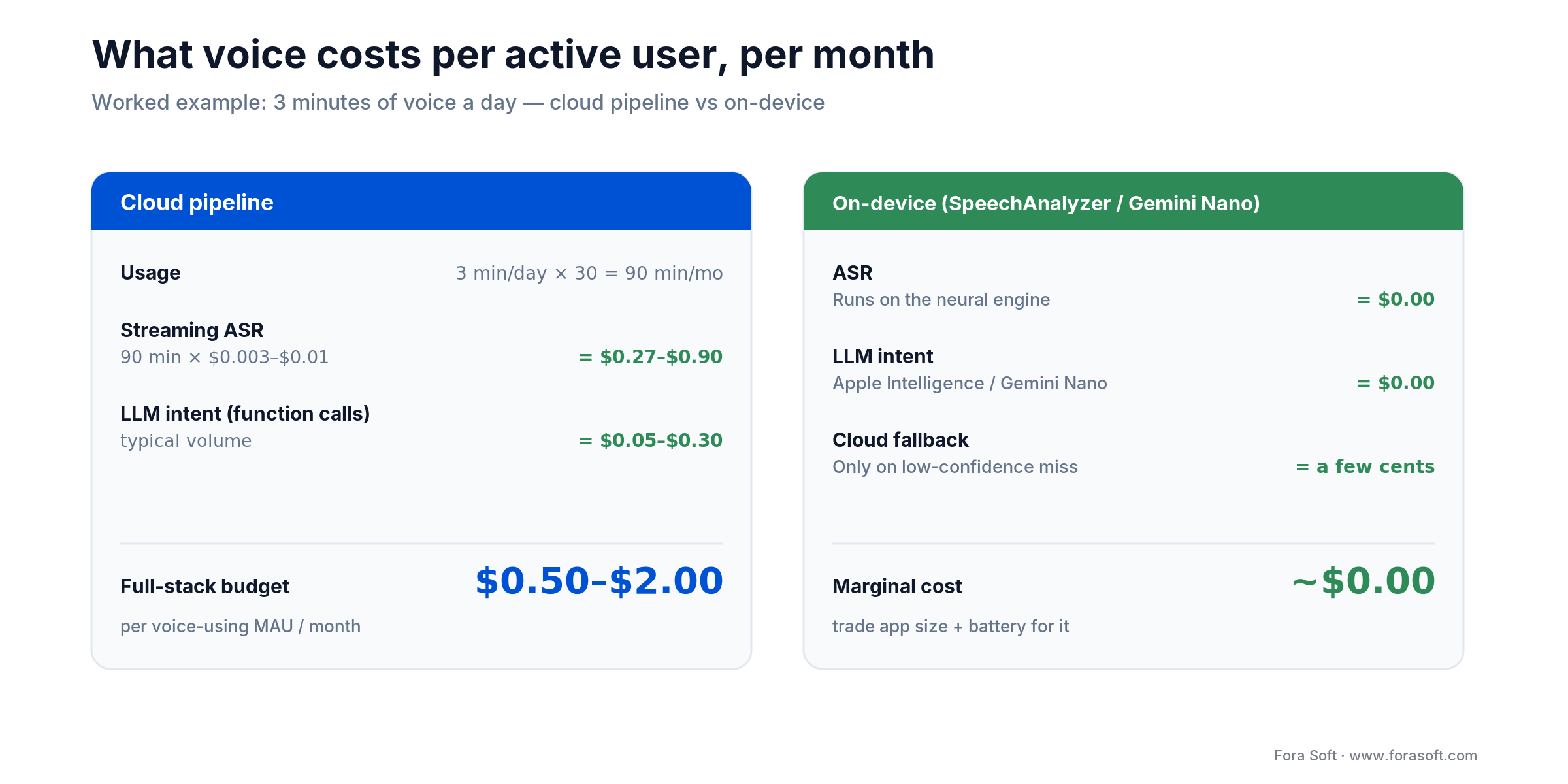
Figure 4. What voice costs per active user each month — cloud pipeline versus on-device.

The book · Volume 6 of 7
AI for Video: A Complete Guide to Intelligence in Video Products: From Models and Inference to Computer Vision, Speech, Search, and Generative Video
On-device or cloud, the recognition model is the core of a voice-first mobile app. This volume covers speech as one capability inside a video and audio product: ASR, TTS and diarization, deployment topologies from the phone to the cloud, model artifacts, and the ML basics product teams need to make those calls with confidence. Written by Nikolay Sapunov, CEO at Fora Soft.
Read it on Amazon →Kindle & paperback · Fora Soft Video Engineering Handbook
Ready to scope your build?
Bring your app, your target use case, and your jurisdictions. We’ll come back with a scoped voice recognition app development plan in five business days.
Where mobile voice is heading in 2026–2027
Four trends to plan around.
Speech-to-speech collapses the pipeline
OpenAI’s gpt-realtime-2.1 (the original gpt-realtime shuts down on 20 January 2027) and Gemini’s native audio skip the ASR → LLM → TTS cascade entirely. End-to-end latency drops to a few hundred milliseconds voice-to-voice and prosody improves noticeably. The trade-off is less control over the transcript and the intent pipeline — good for conversational features, less ideal for security-critical or compliance-heavy flows.
On-device LLMs get genuinely usable
Apple’s on-device Foundation Models framework (about 3B parameters, iOS 26), Gemini Nano, Google’s Gemma 3n and quantised Llama or Qwen models via MLC or llama.cpp all put a usable 2B–8B LLM in the pocket. For bounded voice features (commands, short queries, summarisation), the phone stops needing the cloud at all. Privacy improves, latency improves, and the cost per interaction goes to zero.
App Intents / App Actions become the distribution channel
Siri and Gemini now surface your app’s voice-triggerable actions system-wide. Apps that declare rich App Intents / App Actions get discovered in the assistant surface; apps that don’t get left out of the new interaction layer. The winners are already investing here.
Voice-first AR / wearables
Vision Pro, Meta Ray-Ban Display (on sale since September 2025), smart glasses — all voice-primary input surfaces. Mobile apps that ship clean voice interfaces in 2026 are positioned for the AR interface that’s coming in 2027–2028. Those that don’t will scramble to retrofit.
FAQ
What are the top platforms for voice-enabled mobile apps?
On-device: Apple SpeechAnalyzer (iOS 26+), Android SpeechRecognizer and ML Kit GenAI Speech Recognition, whisper.cpp and Picovoice. Cloud: Deepgram Nova-3 and Flux, AssemblyAI, Google Chirp 3, OpenAI GPT-Live-Transcribe and Azure AI Speech. Most production apps combine one on-device engine with one cloud API.
How do I add voice recognition to my app?
Pick one capability, decide on-device versus cloud, capture 16 kHz mono audio with the microphone and speech permissions, stream partial transcripts into the UI, map final text to in-app actions, and declare every audio flow in App Privacy and Play Data Safety before you submit.
Which speech recognition SDKs work offline on a phone, and what do they cost?
Apple SpeechAnalyzer and Android’s on-device recognition are free and offline once the language model is on the device. whisper.cpp and WhisperKit are free and open source but add ~75 MB–1.5 GB of models. Picovoice is the commercial option, with a free tier and paid plans from the vendor.
Which speech recognition setup is the most secure?
On-device recognition is the most secure, because audio never leaves the phone. If you need cloud ASR, use a vendor that signs a HIPAA BAA, supports zero data retention and EU residency, and get the user’s explicit permission before sending speech to it.
How accurate is on-device voice recognition in 2026?
Apple SpeechAnalyzer and Android on-device recognition (SpeechRecognizer, ML Kit GenAI) typically deliver 6–12% WER on clean speech in top-tier languages in our projects — close enough to cloud accuracy for most command and dictation use cases. Whisper small.en on-device clocks ~95% accuracy on clean English; larger models (medium, large-v3-turbo) get to cloud-parity but cost 500 MB–1.5 GB of storage.
How much does voice ASR cost per user per month?
Cloud streaming ASR list prices run from about $0.0025 per minute (AssemblyAI Universal-Streaming) to $0.017 (OpenAI GPT-Live-Transcribe) in October 2026. A typical consumer app user doing 3 minutes of voice per day (90 minutes a month) costs $0.23–$1.53 per month on ASR alone. On-device ASR is free. LLM intent calls add another $0.05–$0.30 per month at typical volumes. ASR plus LLM comes to about $0.30–$1.85; with streaming TTS, budget $0.50–$2 per voice-using MAU for a full stack.
Will Apple or Google block third-party voice SDKs?
Unlikely — but both require you to declare third-party data flows on App Privacy / Data Safety pages. As long as the declaration is accurate and the SDK vendor has a defensible privacy stance, approval is routine. The issue is mis-declaration, not third-party use.
Should you use OpenAI’s Realtime API or build your own pipeline?
Use the Realtime API (gpt-realtime-2.1, listed at $32 / $64 per 1M audio input / output tokens in October 2026) for conversational features where voice-to-voice prosody matters and the transcript is secondary. Build your own ASR + LLM + TTS pipeline when you need the transcript for compliance, the domain vocabulary for phrase biasing, or the flexibility to mix vendors for cost or redundancy. Most production mobile apps use both — Realtime for the dialog agent, custom pipeline for dictation and search.
How do I handle multilingual users?
Cloud is still the right path for 20 + languages. Google Chirp 3 covers 85 + with automatic language detection; Deepgram Nova-3 covers the top 30+ at production quality; OpenAI Whisper covers 99 languages but does not stream natively, and OpenAI has scheduled whisper-1 for removal on 26 February 2027. Plan for per-user language preference storage, and default to device locale.
Is voice worth it for a B2B app with under 10 K users?
Sometimes. If the target workflow is hands-busy (field service, clinical, warehouse), voice is a retention multiplier even at small scale. If the workflow is pure desk-bound data entry, touch wins. Ask: what percentage of our users are in a context where they can’t type? If it’s over 20%, voice is worth the engineering.
What’s the biggest source of App Store rejection for voice apps?
Guideline 5.1.1 — data collection and privacy. Specifically: missing or vague permission strings, missing or inaccurate App Privacy label entries, and under-disclosed third-party SDK data flows. Reviewers look at these first. Submit with accurate declarations and a clear in-app explanation before each permission prompt.
How long does a mobile voice integration take?
8–12 weeks for a feature (e.g., voice capture or voice search) on an existing iOS + Android app. 14–18 weeks for a full voice-first conversational agent with compliance overhead (HIPAA / PCI / EU residency). Green-field voice-first apps add 2–3 weeks for app-level scaffolding.
What to read next
Adjacent read
AI voice recognition for intercoms
The voice stack when the target is a panel on the door, not a phone in the pocket — different constraints, same fundamentals.
Deep dive
AI simultaneous interpretation
The architecture for live multilingual voice — directly applicable to multilingual mobile dictation and agents.
Companion piece
AI streaming platform guide
How real-time audio and video streaming architectures scale — the backbone of every serious voice-first app.
Related
AI-powered video surveillance
Where voice meets video in physical security — useful context for any voice app that interoperates with cameras.
Services
AI integration services
How we add ASR, LLM intent, and TTS to production iOS and Android apps.
Sum-up
Voice recognition in mobile apps is no longer a differentiator — it’s table stakes in categories where users are hands-free even 10% of the time. The 2026 stack is ready: Apple SpeechAnalyzer and Android ML Kit GenAI for private on-device recognition; Deepgram Nova-3 and Flux, AssemblyAI, Chirp 3 and OpenAI’s realtime models for cloud-grade streaming; ElevenLabs and on-device TTS for the response; App Intents and App Actions for system-wide distribution.
What separates successful voice features from abandoned ones isn’t model choice — it’s latency discipline, permission UX, compliance planning, and failure-path design. Build those in from day one.
If this playbook lined up with where your roadmap is headed, grab 30 minutes with us and we’ll come back with a scoped plan in a week.

