


Key takeaways
• Real-time language translation is a streaming pipeline, not one API call. Capture → ASR → machine translation → optional text-to-speech → render. Every stage adds latency, error, and cost, and the delays add up, so the whole chain sets your ceiling.
• Target 1.2 seconds or less end-to-end for conversation; broadcast tolerates 3 seconds or more. In 2026 the best streaming ASRs (Deepgram Nova-3, Gladia Solaria, AssemblyAI) sit at 5–7% word error and 100–300 ms first-word latency; translation adds 100–400 ms, voice output another 200–600 ms.
• Buy the models, build the orchestration. ASR, MT, and TTS quality from cloud vendors is strong enough that your edge is the streaming glue, the caption UX, the glossary discipline, and the reliability layer, not the model.
• The consumer bar jumped in 2025–2026. AirPods, Pixel Buds, and Galaxy Buds now translate in your ear, and Google rebuilt Translate on Gemini; in 2026 OpenAI, Google and DeepL each shipped speech-in, translated-speech-out APIs. Your users arrive expecting near-instant results, so lazy latency reads as a broken feature.
• Accuracy, accent bias, terminology, and compliance are where projects fail. Plan human-in-the-loop for regulated content, and label synthetic voice: EU AI Act Article 50 transparency rules went live on 2 August 2026, and the 2026 AI Omnibus did not move that date.
Updated October 2026: new sections on accuracy limits (including Hindi and other Indian languages), real-time vs. traditional translation and troubleshooting; OpenAI GPT-Realtime-Translate and DeepL Voice added to the API stack; current Deepgram pricing, AirPods language list and EU AI Act Omnibus dates.
Why Fora Soft wrote this playbook
Real-time language translation sits where three things we ship every quarter overlap: real-time communications (WebRTC, SFU, MCU), speech AI (streaming ASR, TTS, voice biometrics), and applied machine learning. Fora Soft has built software since 2005 – 250+ projects, 50+ in-house specialists – and our AI integration practice puts speech and language pipelines inside video calls, telehealth, sales-intelligence, and global market-research products.
Here is a concrete reference. VocalViews, a market-research marketplace whose research teams include Samsung, Google, and Netflix, runs live transcription and translation across 30+ languages for 1M+ participants and 800,000+ verified panelists across 7 countries. Different vertical, same plumbing: streaming ASR, low-latency MT, and a UX that survives speaker changes, turn-taking, and partial-result correction.
This is the playbook we wish we had on day one: the architecture, the latency budget, which APIs win in 2026, what build vs. buy actually costs, and the failure modes that only surface past a thousand concurrent calls. It is written for product and engineering leaders who are about to add real-time language translation to something people already pay for.
What real-time language translation actually is
Real-time language translation is the streaming conversion of spoken or written content from one language to another with a delay short enough to support live interaction. Three flavours dominate. Speech-to-text translation turns spoken source into translated captions. Speech-to-speech translation also renders the output as synthesised voice in the target language. Text-to-text translation is the underlying machine-translation step, used in chat, support tickets, and live captions.
The detail that trips up most first builds: there is no single “real-time translator” model in production. Every shipping system chains an automatic speech recognition (ASR) model, a machine translation (MT) model, and optionally a text-to-speech (TTS) model, wired together by a streaming orchestrator that pushes partial results forward as they arrive. Get the chaining wrong and a fast model still feels slow.
Real-time vs. traditional translation: what changes
Real-time translation trades polish for speed; traditional translation trades speed for accuracy. Traditional translation works on a finished text or recording, takes hours to weeks, and a human translator or post-editor can reach publication quality. Real-time translation works on speech or text as it is produced, answers in about 0.6–3 seconds, and is good enough to follow and take part in a conversation, not to sign a contract.
| Criterion | Real-time translation | Traditional translation |
|---|---|---|
| Input | Live speech or chat, streamed in chunks | Finished document, subtitle file or recording |
| Turnaround | ~0.6–3 s per sentence | Hours to weeks |
| Context the engine sees | A few seconds of speech, no lookahead | The whole text, plus revision rounds |
| Typical quality | Meeting-grade; errors in names, idioms, jargon | Publication- or legal-grade with human review |
| Cost shape | Per minute of audio (cents) | Per word or per hour of a professional |
| Best for | Calls, events, support, live streams, travel | Contracts, medical records, marketing copy, subtitles for release |
Most products end up with both: real-time output during the session, then a corrected transcript or a human-reviewed translation afterwards for anything that gets stored, published or signed.
Adding real-time translation to a video product?
Thirty minutes with our speech-AI lead and you leave with the right ASR + MT + TTS combo, a latency budget, and an Agent-Engineering-accelerated timeline.
Where real-time translation actually pays off in 2026
1. Multilingual conferences and webinars. The largest segment. Platforms such as Wordly, KUDO, and Interprefy augment or replace human interpreters at trade shows, all-hands, and global town halls. The economics land when you would otherwise hire two to six simultaneous interpreters per language pair per day. We build in this segment: TransLinguist, an interpreter video platform we shipped, runs AI speech-to-speech translation in 16+ languages plus closed captions in 22, and won the NHS UK national framework for language services.
2. Video conferencing and meetings. Zoom, Teams, and Google Meet now offer captions and translation natively or through marketplace add-ons. On 9 June 2026 Google announced Gemini 3.5 Live Translate for Meet: voice-to-voice in 70+ languages and 2,000+ pairs, in private preview for selected Workspace customers, with wider rollout planned for later in 2026. Adoption is fastest at companies whose teams span three or more languages. See our field notes on multilingual translation in video calls.
3. Customer support and contact centres. Chat translation is mature; voice translation now reaches production quality at sub-second latency. Typical patterns: agent assist with a translated transcript, automated translation of inbound chat, and IVR with voice translation. Vendors include Google Contact Center AI, Amazon Connect, and Genesys, plus speech-AI plays from Deepgram and AssemblyAI.
4. Telehealth. Multilingual access is increasingly a regulatory and equity requirement. AI translation cuts the language-barrier load on clinicians, with a human-interpreter handoff for complex or consent-critical visits and HIPAA-aware vendor selection.
5. Live broadcast and streaming. Sports, entertainment, news. Latency tolerance is higher (3–6 seconds) but name handling, profanity controls, and caption quality matter more. Pair MT with closed-caption rendering and human review for high-profile streams. Our AI language translation in live streaming guide goes deeper.
6. Sales and market research. Live translation in sales calls and qualitative-research interviews opens global panels at near-domestic cost. VocalViews is the build we point to here.
7. Education and cross-border learning. Auto-captioned and translated lectures across language cohorts, plus live tutoring across borders. The market itself is real but young: AI simultaneous interpreting was worth about $0.66B in 2026 and is projected to reach $3.14B by 2035, a 19.1% CAGR (Business Research Insights, 2026).
How a real-time translation pipeline works
Figure 1 shows the canonical streaming architecture behind every production system we have built or audited. Read it left to right, and note the latency budget printed under each stage.
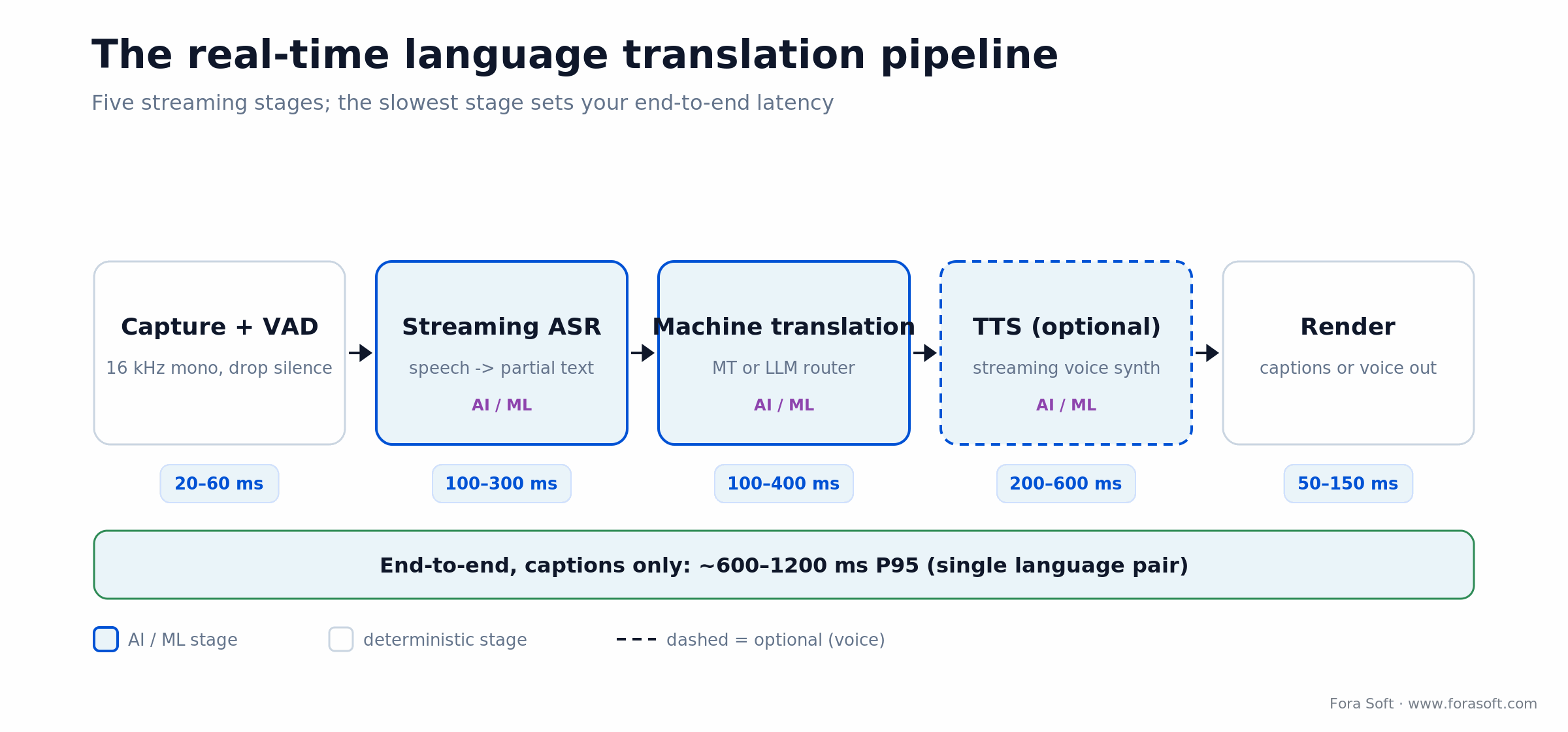
Figure 1. The streaming real-time language translation pipeline, with a per-stage latency budget for conversational use.
Stage 1. Capture and pre-processing
Audio at 16 kHz mono PCM, framed in 20–100 ms chunks, with voice activity detection to drop silence and optional noise suppression. The single biggest quality lever lives here: bad audio poisons everything downstream. WebRTC’s built-in noise suppressor plus a Krisp-style add-on removes a surprising amount of error before ASR ever sees the signal.
Stage 2. Streaming ASR
Convert speech to text incrementally. Streaming ASRs emit a stream of partial hypotheses that stabilise as more context arrives. Gladia Solaria-1 reports under 103 ms partial latency across 100 languages with native code-switching; Deepgram Nova-3 runs sub-300 ms and reports word-error rates in the 5–7% range on its own benchmarks; AssemblyAI leads on transcript intelligence. Whisper is not natively streaming, so production deployments wrap it in a chunked streaming policy (such as whisper-streaming) or use a streaming-tuned fork, and pay for it in extra latency.
Stage 3. Machine translation
Either text-to-text MT (DeepL, Google Translate, Azure Translator, Amazon Translate, NLLB, M2M-100) or, increasingly, an LLM (GPT-class, Claude-class, Gemini) prompted with a glossary and tone rules. Google rebuilt Translate’s text engine on Gemini in December 2025, which tells you where the category is heading. LLMs win on context and named entities; dedicated MT wins on cost and per-token latency.
Stage 4. (Optional) TTS rendering
If the output is voice, push translated text through streaming TTS (ElevenLabs, OpenAI, Azure Neural TTS, Google Cloud TTS, Amazon Polly). One trick that hides 200–400 ms of synthesis: render the next chunk while the current one plays, then crossfade the seam so the listener never hears the gap.
Stage 5. Render
Captions ride WebVTT or an RTC data channel into a positioned overlay refreshed every 200–500 ms. Voice rides WebRTC playout with an adaptive jitter buffer. Three UX rules earn their keep: show unstable partials in italics, lock stable text once ASR commits, and never erase visible text more than once per sentence.
The latency budget you actually have
Latency is a budget you spend once. Here is how the milliseconds break down for a single language pair, and what you can get away with in conversation versus broadcast.
| Stage | Conversation target | Broadcast tolerance | What drives it |
|---|---|---|---|
| Capture + VAD | 20–60 ms | 100–200 ms | Frame size, jitter buffer |
| Streaming ASR | 100–300 ms | 500–1500 ms | Vendor first-word latency |
| Translation | 100–400 ms | 200–800 ms | MT API or LLM completion |
| TTS (voice only) | 200–600 ms | 300–1000 ms | Streaming synthesis preferred |
| Render / playout | 50–150 ms | 100–500 ms | Caption refresh cadence |
| End-to-end (captions only) | ~600–1200 ms | ~1.5–3 s | P95, single language pair |
Reach for caption-only translation when: you can hold the budget at or below 1.2 seconds and accuracy matters more than a spoken voice. Most enterprise meeting cases live here.
Reach for full speech-to-speech when: the audience cannot read captions (driving, broadcast voice, accessibility) and you accept roughly 1.8–3 seconds end-to-end. For the architectural deep dive, see our real-time speech translation guide.
The 2026 API stack: who wins where
The market splits into layers you can mix. Buy each layer from the vendor that is strongest for your language pairs and latency target, and keep the orchestrator yours so you can swap any one of them without a rewrite.
| Layer | Vendors that ship in production | Where it wins | Where it breaks |
|---|---|---|---|
| Streaming ASR | Deepgram Nova-3, Gladia Solaria, AssemblyAI, Google Speech-to-Text, Azure Speech, AWS Transcribe | Sub-300 ms latency, 5–7% WER, 100+ languages | Accent and dialect bias; domain vocabulary needs tuning |
| Self-hosted ASR | Whisper / WhisperX / faster-whisper, NVIDIA Riva, NeMo | Data residency, cost at scale, custom fine-tuning | No native streaming for Whisper; self-hosting lags hosted APIs on out-of-the-box latency |
| Machine translation | DeepL, Google Translate (Gemini), Azure Translator, Amazon Translate, GPT / Claude / Gemini | DeepL strong on European pairs; LLMs strong on context | Glossary discipline and hallucination control required |
| Text-to-speech | ElevenLabs, OpenAI, Azure Neural TTS, Google Cloud TTS, Amazon Polly | Natural prosody, voice cloning, low latency | Voice-clone consent; EU AI Act labelling duties |
| Turnkey RT translators | Wordly, KUDO, Interprefy, Palabra, Maestra | Days to live, native Zoom/Teams plug-ins, AI-plus-human option | Per-minute pricing, limited customisation, vendor branding |
| RTC + speech bundles | Google Meet (Gemini Live Translate), Agora, Daily, LiveKit, Twilio, Zoom AI Companion | Built into the call, simpler ops | Opinionated; less control over language pairs |
| Single-model speech translation | OpenAI GPT-Realtime-Translate, Gemini 3.5 Live Translate (Live API), DeepL Voice API | One streaming call from speech to translated speech or text; fewer moving parts | Fewer output languages, weaker glossary control, preview or early-access status in 2026 |
One 2026 shift worth naming: the stages are starting to collapse into single models. OpenAI released GPT-Realtime-Translate on 7 May 2026 with 70+ input and 13 output languages at $0.034 per minute (The Next Web, May 2026). DeepL opened early access to its Voice-to-Voice API in April 2026 and added voice glossaries on 7 May 2026 (Gigazine, April 2026). And Google exposes Gemini 3.5 Live Translate, in public preview, through the Gemini Live API, so voice-to-voice translation that preserves intonation and pacing is now a callable service, not just a Meet feature. That is good news for builders and one more reason your differentiator has to be the product around the model.
Reference production architecture
Figure 2 is the architecture we recommend for product teams shipping multilingual real-time translation in 2026. Isolating the speech and language services behind one streaming orchestrator buys you per-pair routing, vendor failover, and cost control in a single place.
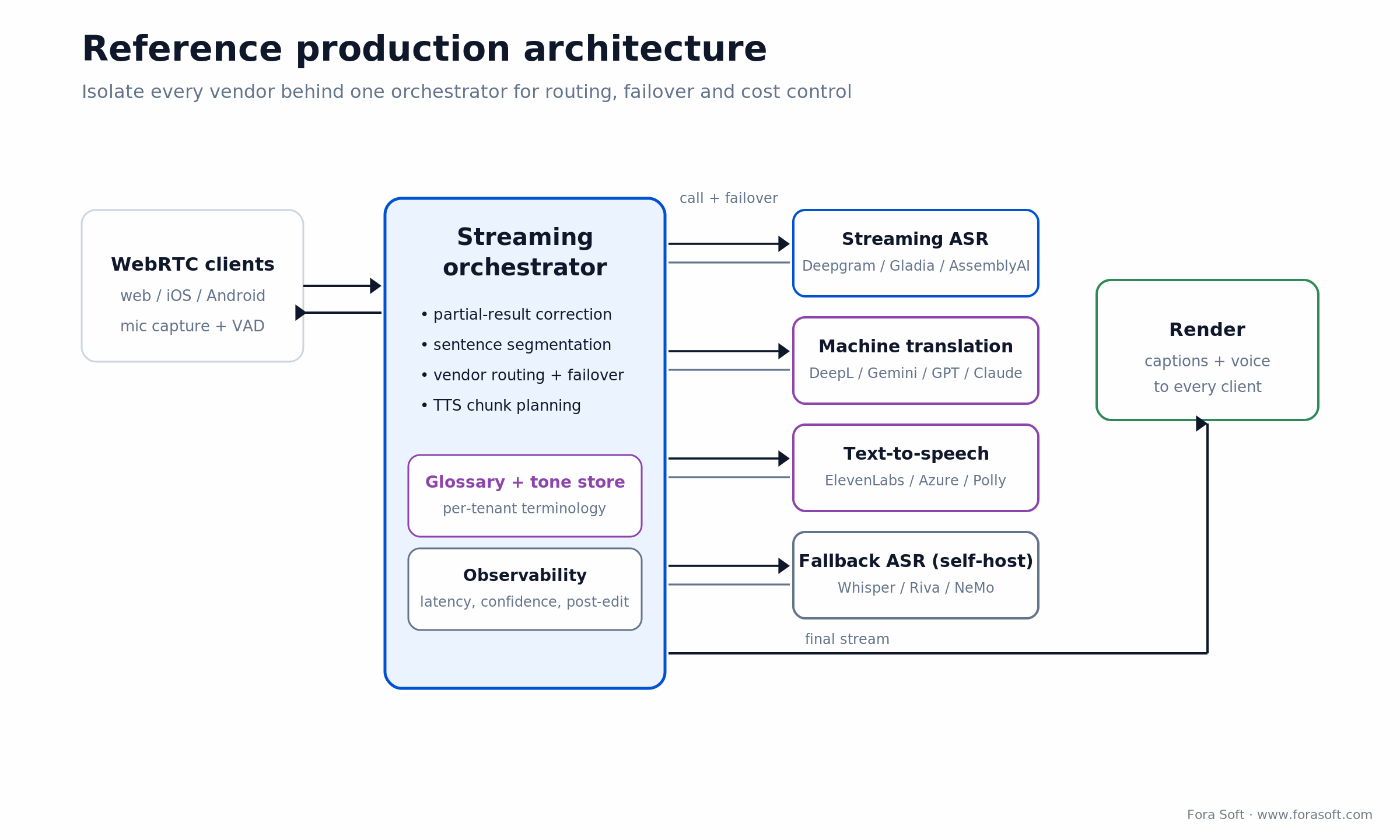
Figure 2. Reference production architecture for real-time language translation, with vendors isolated behind one orchestrator.
Three pieces are not obvious until you have shipped one. The orchestrator owns partial-result correction, sentence segmentation across language boundaries, and TTS chunk planning. The glossary and tone store injects per-tenant terminology and register into both MT and LLM prompts. The observability layer tracks per-pair latency, ASR confidence, and post-edit distance, so your team sees degradation before a customer files a ticket.
LLM vs. classical machine translation: when to switch
Dedicated MT (DeepL, Google, Azure) is fast, cheap, and deterministic. LLMs are slower per token and cost more, but they handle terminology, idioms, register, code-switching, and named entities far better. The direction of travel is clear: LLMs made up 89% of top performers in Intento’s 2025 translation benchmark, up from roughly 55% a year earlier. That does not mean route everything through an LLM.
The 2026 sweet spot is a router, shown in Figure 3. Send the bulk of generic content through dedicated MT, score each sentence, and re-run only the risky ones through an LLM with a glossary prompt. We ship exactly this: every sentence goes through DeepL, a small classifier scores the output (COMET-Kiwi-style), and the bottom 5–10% get an LLM pass. Cost stays close to flat; quality on the long tail climbs where it hurt most.
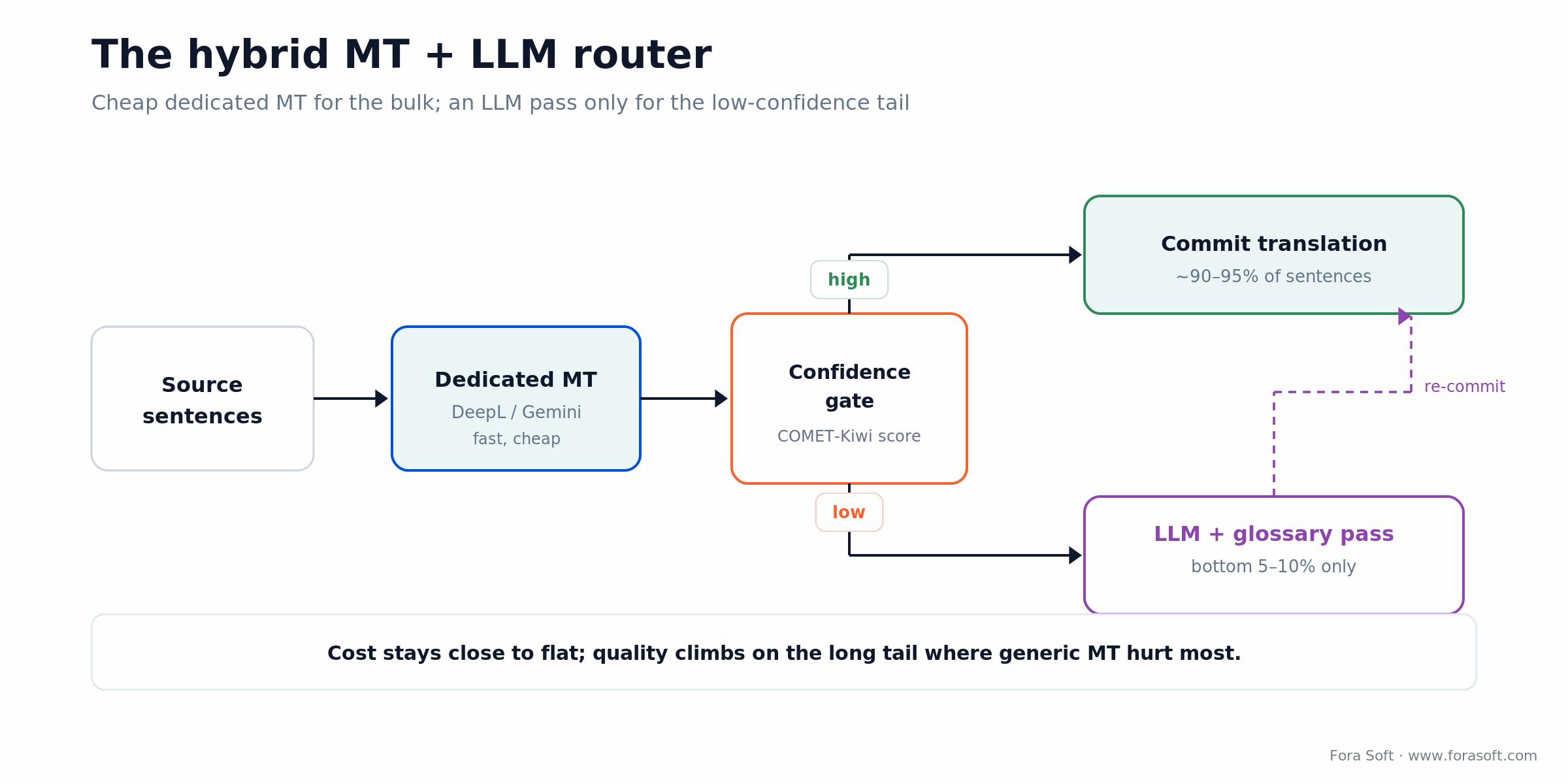
Figure 3. The hybrid router: cheap dedicated MT for the bulk, an LLM fallback for the low-confidence tail.
Reach for an LLM router when: your content is terminology-heavy, mixes languages mid-sentence, or carries brand names you cannot afford to mangle, and you can absorb the extra 200–800 ms on the sentences that need it.
Earbuds, glasses, and apps: the consumer bar
A section most build guides skip, and the one your users judge you against. In 2025 and 2026 real-time language translation moved into hardware people already own, which reset expectations for anything you ship.
Apple AirPods. Live Translation runs on AirPods 4 with ANC, AirPods Pro 2, AirPods Pro 3 and newer models paired to an iPhone 15 Pro or later with Apple Intelligence (Apple, 2026). As of September 2026 it covers nine languages: English, French, German, Italian, Japanese, Korean, Mandarin Chinese, Portuguese and Spanish, with no Hindi. That is well behind the field on breadth, but the in-ear experience sets the bar for how instant people expect translation to feel.
Google Pixel Buds and Android. Pixel Buds Pro 2 translate through Gemini across 70+ languages, and for the first time Android streams live translation through any connected headphones, not just Google’s own. Battery holds four to five hours of continuous translation.
Samsung Galaxy Buds. Galaxy Buds3 Pro and Buds 3 FE run live translate with on-device processing that keeps working when the phone has no signal, which matters for travellers who cannot lean on roaming data. Meta’s Ray-Ban glasses add a heads-up variant of the same idea.
The lesson for builders is not to copy a device. It is that near-instant translation is now table stakes in the mind of your user. If your product feature lags a second behind an earbud they already own, they read it as broken, no matter how good your accuracy is on paper.
Mid-build and the latency or accuracy is off?
We have rescued real-time translation rollouts with vendor swaps, partial-result UX fixes, and orchestrator rewrites. Bring us the symptoms and we will map the fix.
Build vs. buy: a decision matrix
The honest answer is that most teams should buy for events and build for product. Here is the side-by-side we walk clients through.
| Criterion | Buy turnkey (Wordly / KUDO / Palabra) | Build on cloud APIs |
|---|---|---|
| Time to first call | Days | 6–12 weeks with Agent Engineering |
| In-product UX | Vendor-branded | Native, fully customisable |
| Languages & specialism | Preset list, generic terminology | Per-tenant glossary, fine-tuning possible |
| Cost shape | Per-attendee or per-minute | ASR + MT + TTS metered separately |
| Data residency | Vendor regions | Anywhere your stack runs |
| Wins when | Conferences, webinars, internal town halls | Product feature, regulated vertical, custom UX |
Reach for buy turnkey when: translation is an event or meeting feature, you run a handful of language pairs on demand, and days-to-live beats deep customisation.
Reach for build on cloud APIs when: translation is a product feature, you need ten or more language pairs in native UX, or a regulated vertical forces control over data residency and terminology. That is where our custom language-interpretation team lives.
Cost model: realistic ranges and a worked example
Two costs matter: the one-time build and the per-minute run rate. Build ranges below assume our Agent-Engineering-accelerated delivery; treat them as scoping brackets that move with language pairs, integrations, and compliance scope.
| Scope | Duration | Build cost | Run-rate driver |
|---|---|---|---|
| Captions, single language pair | 3–6 weeks | $25k–$60k | ASR + MT per minute |
| Multilingual captions (10+ pairs) | 8–14 weeks | $70k–$160k | Metering scales with usage |
| Speech-to-speech with custom voice | 12–20 weeks | $120k–$280k | Adds TTS minutes, voice licensing |
| Regulated (medical / legal) | 5–9 months | $200k–$500k | Audit, glossary curation, human-in-loop |
Now the per-minute arithmetic for a captions-only build, one language pair. Deepgram Nova-3 streaming ASR lists at $0.0077 per minute for one language and $0.0092 for multilingual (Deepgram pricing, October 2026; temporary promo rates are lower). A dedicated MT step adds roughly $0.01–$0.02 per spoken minute at about 150 words per minute. Skip voice output and you land near $0.02–$0.03 per translated minute in raw vendor cost. Run ten 60-minute meetings a day: 10 × 60 × $0.03 = $18 per day, about $540 per month before your own compute and margin.
Add streaming TTS for a spoken voice and per-minute cost climbs to roughly $0.10–$0.20. The same ten meetings on a premium turnkey platform billed per attendee, say $0.20 per attendee-minute with eight attendees, works out to 10 × 60 × 8 × $0.20 = $960 per day. Turnkey list prices vary, so treat that figure as illustrative and get a real quote. For reference, OpenAI’s all-in-one GPT-Realtime-Translate costs $0.034 per minute (May 2026), so ten such meetings would run about $20 a day before your own infrastructure. The shape is what matters: past a few hundred meeting-hours a month, the metered build wins, and that crossover is the whole build-vs-buy decision in one number.
How accurate is real-time translation? The limits that matter
On clean audio and high-resource pairs such as English–Spanish, a well-built pipeline is accurate enough to run a meeting: you follow every point, but expect a slip every few sentences on names, numbers and idioms. Accuracy is not one number. ASR errors flow into translation and translation errors flow into the synthetic voice, so end-to-end fidelity is roughly the product of the stage accuracies, and the weakest stage sets it.
The common limitations of real-time voice translators, in the order we see them in production:
1. Accents and dialects. ASR error rates swing three to five times across English accents alone, and more across Arabic or Hindi dialects.
2. Code-mixing. Hinglish, Spanglish and Taglish break engines that expect one language per utterance.
3. Names, numbers and jargon. Product names, drug names and figures are the first things mistranslated without a glossary.
4. No lookahead. The engine translates before the sentence ends, so verb-final languages such as German, Japanese and Hindi force a choice between waiting and guessing.
5. Crosstalk and noise. Overlapping speakers and room echo cut ASR accuracy faster than any model upgrade restores it.
6. Tone and idiom. Sarcasm, politeness levels and humour flatten into literal text.
Hindi and other Indian languages
Live audio translation for Hindi works for everyday conversation in 2026; regional languages such as Odia, Assamese or Bhojpuri still need testing on your own recordings before launch. Global engines handle standard Hindi, but accuracy drops on code-mixed Hinglish, regional accents and low-bandwidth phone audio. India-trained models close much of that gap: Sarvam’s Saaras v4 covers 22 Indian languages plus English, with translate and code-mixed modes (Sarvam docs, 2026). Consumer earbuds lag here: AirPods Live Translation did not support Hindi as of September 2026.
Because the ASR stage sets the accuracy ceiling, it is usually where we start a fix: our custom speech-to-text development work covers vendor selection per language, accent fine-tuning and on-prem deployment when the audio cannot leave the region.
Languages and accents that actually work in 2026
High-resource pairs (English to and from Spanish, French, German, Portuguese, Italian, Mandarin, Japanese, Korean) reach business-grade quality with most cloud APIs. Mid-resource pairs (Arabic dialects, Vietnamese, Thai, Polish, Turkish, Hindi) work but carry more variance, so budget a glossary or an LLM fallback. Low-resource pairs (Swahili, Yoruba, Bengali, many regional Indian and Indigenous languages) need testing on real audio, because vendor language counts routinely outrun real accuracy.
Accents move the numbers more than most teams expect. Independent benchmarks show ASR error rates swinging three to five times across English accents alone (US standard, Indian, Scottish, Nigerian, Singaporean). Test with real users in your top markets before launch, then either route to a vendor whose training data covers your audience or fine-tune on a few hundred hours of accented speech.
Domain vocabulary breaks generic ASR the same way: medical jargon, legal terms, finance shorthand, and product names all trip it up. Plan for a domain glossary, a custom ASR model once scale justifies it, and a short “teach it your names” flow so early users correct a term once and never see it mangled again.
Troubleshooting poor real-time translation
Fix the audio first, then the transcript, then the translation. Most “bad translation” tickets turn out to be ASR problems. Check the source-language transcript before you blame the MT engine.
| Symptom | Likely cause | Fix |
|---|---|---|
| Whole sentences wrong | Noisy or echoing audio, wrong source language | Noise suppression and echo cancellation; lock the source language or turn on language ID |
| Names and terms mangled | No glossary | Inject a per-tenant glossary into ASR keyterms and MT or LLM prompts |
| Captions jump and rewrite | Unstable partials shown as final | Lock stable text after 600–1000 ms; style partials differently |
| Voice lags 3+ seconds | TTS waits for full sentences, or a slow LLM step | Stream TTS by clause; route only low-confidence sentences to the LLM |
| One accent much worse | ASR trained on other accents | Benchmark vendors on your users’ audio; fine-tune or route per region |
| Legal or privacy pushback | Voice stored without consent, unclear vendor regions | Consent screen, retention limits, regional processing, “machine translation” label |
The last row is where privacy and legal issues come in: voice is personal data, and in some places biometric data. The next section lists what to put in place.
Compliance, consent, and error disclaimers
Real-time translation touches three regulated zones, and 2026 tightened one of them. Speech and biometric data: voice is personal data under GDPR, and once it is processed to identify a speaker it becomes biometric data under GDPR Article 9; it also falls under BIPA-style laws in several US states, and equivalents in the UK and APAC. Per-user consent and clear retention rules are mandatory. Synthetic voice: EU AI Act Article 50 transparency obligations took effect on 2 August 2026: providers must mark AI-generated audio, including a translated synthetic voice, in a machine-readable way (Article 50(2)), and deployers must disclose audio that imitates a real person’s voice (Article 50(4)). The AI Omnibus adopted by the Council on 29 June 2026 left those dates in place; it only gives generative systems already on the market before 2 August 2026 until 2 December 2026 to add machine-readable marking, while new systems must comply at launch (iubenda, July 2026). See the European Commission’s Article 50 guidance. Translated medical, legal, or financial content: most jurisdictions expect a clear “machine translation, may contain errors” disclaimer in the target language, plus a human-in-the-loop path for binding or safety-critical decisions.
Patterns we ship to satisfy all three: a session-start consent screen carrying the legal text in every meeting language; a persistent on-screen badge reading “Live machine translation” while captions run; an audit trail of each inference, the vendor used, and the consent state; and a one-tap switch to human-only interpretation mid-session for the moments that demand it.
Mini case: live translation across 30+ languages
Situation. A global qualitative-research platform needed live transcription and translation in 30+ languages, so moderators in San Francisco could run sessions with respondents in Lagos, Tokyo, and Sao Paulo without scheduling human interpreters for every call.
Twelve-week plan. Weeks 1–2: WebRTC capture bridge and per-region routing. Weeks 3–6: streaming ASR with vendor failover, MT layered with glossary injection, partial-result caption UX. Weeks 7–9: per-tenant terminology and a sentiment overlay. Weeks 10–12: scale tests, an observability dashboard, and rollout. Want a similar assessment for your stack? Book a 30-min call.
Outcome. The platform, VocalViews, now serves 1M+ participants and 800,000+ verified panelists across 7 countries, with research teams that include Samsung, Google, and Netflix. The same blueprint carries into enterprise sales, telehealth, and education with only the glossary and compliance layer changing.
A decision framework: pick a path in five questions
Five questions settle most real-time language translation decisions. Figure 4 walks the same logic as a tree if you prefer to trace it.
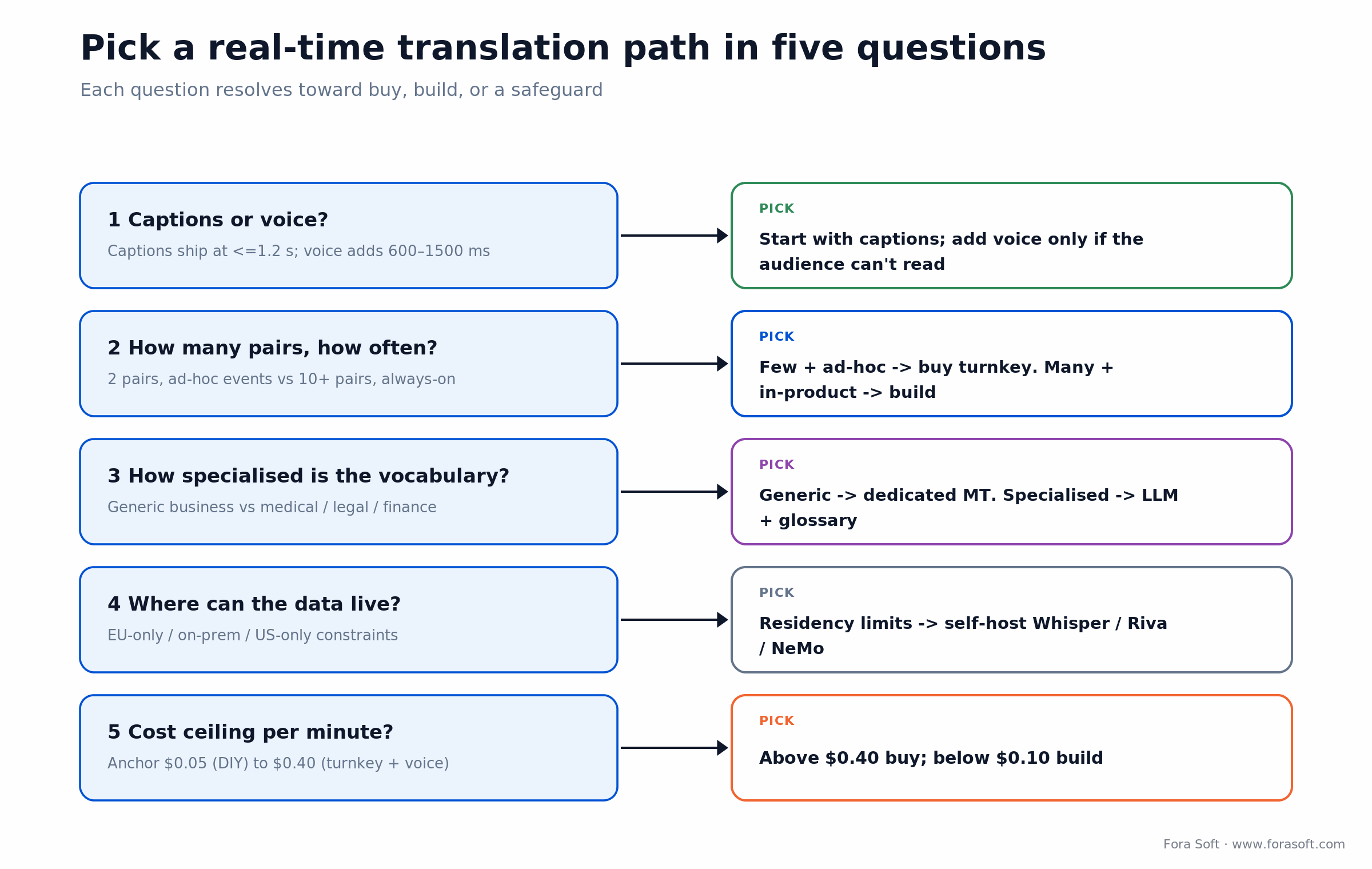
Figure 4. The five-question decision tree for choosing a real-time language translation path.
1. Captions or voice? Captions ship faster and serve most enterprise meetings at 1.2 seconds or less. Voice opens up accessibility and broadcast but lands at about 1.8–3 seconds end-to-end, because synthesis waits for clause boundaries.
2. How many languages, how often? Two pairs for ad-hoc events points to buying turnkey. Ten or more pairs running inside a product around the clock points to building on cloud APIs.
3. How specialised is the vocabulary? Generic business content is fine on dedicated MT. Medical, legal, or financial content needs an LLM with a strict glossary, or human-in-the-loop.
4. Where can the data live? EU-only, on-prem, or US-only requirements decide between cloud APIs and self-hosted Whisper, Riva, or NeMo.
5. What is the cost ceiling per minute? Raw vendor cost runs about $0.02–$0.03 per minute for built captions and $0.10–$0.20 with voice, while turnkey platforms usually bill per attendee-minute. For a few occasional events the turnkey premium is cheaper than a build; past a few hundred meeting-hours a month, building wins.
Pitfalls we keep seeing
1. Optimising ASR latency alone. A 270 ms ASR feeding a 2,000 ms translation still gives you 2.3 seconds end-to-end. Stage delays add up, so budget the whole chain, not the fastest link.
2. No glossary discipline. Brand names, internal terms, SKUs, and people’s names get mistranslated first. Inject a per-tenant glossary into every MT and LLM call, and reject hallucinated translations of named entities.
3. Erasing visible captions too often. ASRs revise their partials. The rule that keeps captions readable: lock stable text after 600–1000 ms and never re-erase visible content more than once per sentence.
4. Ignoring accent and dialect bias. Error rates swing three to five times across English accents alone. Test with real users in your top markets before launch, and consider regional ASR fine-tuning where the audience concentrates.
5. Forgetting compliance until launch. Machine-translated medical or legal content needs a clear may-contain-errors disclaimer in many places, and synthetic voice now needs AI Act labelling. Retrofitting consent screens the week before launch is how ship dates slip.
KPIs: what to measure
Quality KPIs. Word Error Rate per language and per accent (aim at 8% or better for English, 12–15% for under-served languages), a translation quality delta measured with COMET-Kiwi against a reference, and post-edit distance on a sampled set.
Business KPIs. Feature attach rate, the share of meetings using translation, NPS lift among non-native speakers, meeting completion rate, and interpreter spend you no longer pay.
Reliability KPIs. P95 end-to-end latency, ASR/MT/TTS uptime, vendor failover events, cost per minute per language pair, and model rollback time when a new version regresses.
When NOT to use real-time AI translation
Skip pure AI translation when the content is high-stakes legal argument, medical informed consent, or court testimony, and bring in a certified human interpreter instead. Skip it when your audience speaks a low-resource language with weak ASR and MT support, when the room has heavy crosstalk and accents the vendor cannot handle, or when brand-critical names and terminology have no glossary behind them.
In those cases the better answer is hybrid AI plus human: AI for general content, a human interpreter for the regulated or brand-critical sessions, and the AI transcript feeding the human rather than replacing them. Honesty about the limits is what earns the rest of the deployment.
Ready to scope multilingual real-time translation for your product?
We will audit your video stack, map the right ASR + MT + TTS combo, and come back with a one-page brief you can take to your board.
FAQ
How accurate is real-time AI translation?
For general business content on top language pairs, meeting-grade accuracy is realistic: listeners follow every point, with occasional slips on names, numbers and idioms. Error compounds across the pipeline, since ASR mistakes flow into translation, so total fidelity is roughly the product of the per-stage accuracies. Specialised domains need a glossary, an LLM fallback, or human-in-the-loop.
What is the lowest end-to-end latency we can hit?
For caption-only translation, roughly 600–1200 ms P95 is achievable with Deepgram, Gladia, or AssemblyAI plus a fast MT step. Speech-to-speech with TTS adds up to about 1.8–3 seconds. On-device research systems have demonstrated sub-second simultaneous interpretation, but that is not yet the production default.
Should you use Whisper or a streaming cloud ASR?
For batch transcription, Whisper is hard to beat. For real-time, a streaming cloud ASR (Deepgram, Gladia, AssemblyAI, Azure) is the production default, because Whisper is not natively streaming and needs heavy chunking and orchestration to feel live.
DeepL or Google Translate for the translation step?
DeepL is widely judged stronger on European-language business writing, winning a majority of pair benchmarks in Intento’s testing. Google Translate now runs on Gemini and offers wider coverage plus a live-speech mode. Azure Translator fits Azure-native stacks. Test on your own domain with COMET-Kiwi or an LLM judge before committing.
Can we translate with an LLM directly?
Yes. GPT-class, Claude-class, and Gemini models translate well, especially for terminology-heavy content. Cost per token is higher than dedicated MT and latency adds 200–800 ms, so the practical pattern is a router that calls an LLM only on the low-confidence tail.
How good is real-time translation on AirPods and Pixel Buds?
Good enough for travel and casual conversation, and improving fast. Apple’s AirPods Live Translation covers nine languages on an iPhone 15 Pro or later (September 2026); Google Pixel Buds handle 70+ languages via Gemini, and on Android the Translate app now streams live translation to any headphones. For a product feature you still build your own pipeline, but these devices set the latency and ease-of-use bar your users expect.
What does it cost to add real-time translation to a video product?
A single-pair captioning MVP runs $25k–$60k over 3–6 weeks. Multilingual captions with 10+ pairs run $70k–$160k over 8–14 weeks. Speech-to-speech with a custom voice runs $120k–$280k over 12–20 weeks. Per-minute run rate starts near $0.02–$0.03 for captions and climbs to $0.10–$0.20 with voice. Ranges assume our Agent-Engineering-accelerated delivery.
Is human interpretation still needed?
For high-stakes legal, medical informed-consent, or court use, yes: bring in a certified interpreter. For most enterprise meetings, meeting-grade AI translation is enough. The pattern that is winning allocates AI to general content and a human interpreter to the regulated sessions within the same event.
What is the difference between real-time and traditional translation?
Real-time translation converts live speech or chat in about 0.6–3 seconds with meeting-grade quality. Traditional translation works on finished text over hours or days and, with human review, reaches publication or legal quality. Use real-time for live interaction and traditional for anything stored, published or signed.
How accurate is live audio translation for Hindi and other Indian languages?
Standard Hindi works well enough for everyday conversation in 2026, but accuracy drops on code-mixed Hinglish, regional accents and phone-quality audio. India-trained models such as Sarvam Saaras v4, which covers 22 Indian languages, narrow the gap. Test on your own recordings before you promise quality in regional languages.
How do I troubleshoot poor real-time translation?
Check the source-language transcript first: most errors start in speech recognition, not translation. Fix the audio (noise, echo, source language), add a glossary for names and terms, lock stable captions, and stream voice output by clause. For privacy issues, add consent, retention limits and regional processing.
How is generative AI used for real-time translation in live communication?
LLMs translate with context, keep names and terminology consistent through glossary prompts, and fix sentences a classic MT engine gets wrong. In 2026, speech-to-speech models such as OpenAI GPT-Realtime-Translate and Gemini 3.5 Live Translate also translate a voice directly while keeping intonation, in one streaming call.
What to Read Next
Learn
Real-Time Speech Translation for Live Video
The architecture-first companion guide to this playbook.
Video calls
Multilingual Translation in Video Calls
Plugging translation into Zoom, Teams, and Meet workflows.
Live streaming
AI Language Translation in Live Streaming
Higher-latency tolerance, name handling, broadcast quality.
Teleconferencing
Live Real-Time Translation in Teleconferencing
Architecture and product patterns for enterprise stacks.
Services
Custom AI Language Interpretation
Hire the team that ships real-time translation at scale.
Ready to ship translation that feels real-time?
Real-time language translation in 2026 is a solved set of models wrapped around a hard set of integration problems. Buy turnkey when the use case is conferences and webinars. Build on cloud APIs when it is in-product, multilingual, and customer-facing. Either way the differentiator is not the model. It is the orchestrator, the glossary discipline, the partial-result caption UX, the observability, and the human-in-the-loop policy that keeps the feature legal in regulated regions.
Fora Soft has shipped real-time speech and translation into market-research, sales-intelligence, and enterprise video products at scale, and Agent Engineering is what lets us deliver in months instead of quarters. If that is the conversation you need, we are one call away.

The book · Volume 7 of 7
AI for Video: A Complete Guide to Intelligence in Video Products: From Real-Time Pipelines and Agents to Serving, Cost, Compliance, and Verticals
You have the streaming ASR, MT and TTS pipeline and a latency budget to fit it into; the next question is how it behaves inside a live call. Volume 7 covers where AI slots into a WebRTC pipeline, live captions and translation under real-time budgets, serving on vLLM, Triton and TensorRT, cost per stream-hour, and the compliance rules that follow. Written by Nikolay Sapunov, CEO at Fora Soft.
Read it on Amazon →Kindle & paperback · Fora Soft Video Engineering Handbook
Get a second opinion on your real-time translation plan
Thirty minutes with our speech-AI lead, a clear scope, and honest advice on build vs. buy.

