

Key takeaways
• Webinar translation software stopped being optional. WCAG 2.2 makes captions for live audio a Level AA requirement, the EU AI Act’s Article 50 (in force since 2 August 2026) governs AI-generated voice, and captions measurably help learning: 98.6 % of students called them helpful in a 2,124-student Oregon State / 3Play study (2016).
• The 2026 stack is mature: Whisper large-v3-turbo + DeepL or a frontier LLM + WebVTT. Streaming ASR runs at 6–12 % Word Error Rate on clean educational audio with roughly 500 ms of delay; strong machine translation now scores COMET ~0.83–0.88 (COMET replaced BLEU as the metric that tracks human judgement).
• Buy a managed service to ship in weeks; build only when you need control over data, glossary or branding. Wordly, KUDO, Interprefy and Zoom Translated Captions are the obvious shortlist. A custom WebRTC build starts to pay back above ~20,000 webinar-minutes a month.
• Hybrid AI-plus-human is the safest pattern for high-stakes content. Pure-AI handles general lectures well; medical, legal and certification training still benefit from a human interpreter on top — the model Fora Soft helped scale on TransLinguist (75+ languages, 30,000+ professional interpreters, NHS UK national framework).
• Fora Soft has shipped this in production. TransLinguist handles multilingual public-sector communication; Volo is our real-time captioning and translation product, shown at Black Hat, HIMSS and GDC. Book a 30-min call →
Why Fora Soft wrote this playbook
Real-time translation in education attracts a lot of theory and very little operational detail. Fora Soft has been building video and real-time communication software since 2005 (250+ projects across two decades) and has shipped more than one production translation platform, so we know where the pretty diagrams break down. Most usefully, we engineered the multilingual video conferencing platform TransLinguist: 75+ languages, AI subtitles, an interpreter marketplace of 30,000+ professional interpreters, and the operational tooling behind a place on the NHS UK national interpreting framework. We also built Volo, a real-time captioning and translation product shown at Black Hat, HIMSS and GDC. Both grew out of our AI language interpretation development practice, which ships live speech translation for audiences in 100+ languages.
That experience, plus a roster of engineers selected at a 1-in-50 rate, is the source of every recommendation here. We will tell you what to buy, what to build, what to put in the consent screen, what to refuse to do under EU AI Act and accessibility law, and what numbers to commit to in front of your CFO.
Use the table of contents on the right to jump straight to the question you came to answer.
Need real-time translation in your webinars or LMS?
Tell us your audience, language pairs, latency budget and compliance scope. Within one working day we come back with a buy-vs-build recommendation, a target architecture and an honest estimate.
What real-time webinar translation actually is
Real-time translation in an educational webinar means the speaker talks in one language and every participant sees captions — and optionally hears an interpreted voice track — in their own language with a delay of a few seconds. Three concrete deliverables sit under that one phrase:
Live captions are subtitles in the speaker’s language, generated by a streaming Automatic Speech Recognition (ASR) model. They are the foundation: every other layer hangs off them.
Live translated captions push those captions through a Neural Machine Translation (NMT) engine into one or more target languages. Each viewer picks their language in the player.
Live interpreted voice adds a separate audio track per language — either a Text-to-Speech voice (ElevenLabs, Azure Neural TTS) or a human interpreter speaking into a WebRTC channel. This is the gold standard for accessibility and for languages with non-Latin scripts where reading captions is slower.
Why it became essential between 2024 and 2026
Regulation. The European Accessibility Act (EAA, Directive (EU) 2019/882) became enforceable on 28 June 2025. Its scope is a closed list (banking, e-commerce, e-books, transport, electronic communications), and education is not a named category. The trap sits one level down: if you sell a course or webinar online to EU consumers, the purchase flow is an in-scope e-commerce service and has to be accessible; public-sector education runs under a separate rule, the Web Accessibility Directive (EU) 2016/2102. Either way, WCAG 2.2 makes captions for live audio a Level AA requirement (SC 1.2.4), and the EU AI Act’s Article 50 (in force 2 August 2026) requires AI-generated voice tracks to be disclosed. We break the compliance detail down below.
Demand. Captions demonstrably help. In a 2,124-student study across 15 institutions (Oregon State Ecampus / 3Play, 2016), 98.6 % of students found captions helpful and roughly 71–75 % used them as a study aid; a separate Verizon Media / Publicis study (2019) found viewers 80 % more likely to finish a video with captions on. The multilingual-specific uplift, non-English cohorts finishing more of a course, is real in our client data but is vendor- and case-reported, so treat any single “captions lift completion by X %” figure as directional, not a benchmark.
Technology. Whisper large-v3-turbo (OpenAI, Oct 2024) brought open-weights ASR within a couple of points of commercial engines; DeepL and frontier LLMs (GPT-5.5, Gemini 3.1 Pro, Claude Opus 5) now clear the quality bar that used to demand a human post-editor; WebRTC SFUs (LiveKit, mediasoup, Janus) made per-viewer language tracks trivial to publish. The cost per minute of a high-quality multilingual webinar has fallen sharply since 2023.
Reach for live translation when: at least 10 % of your audience speaks a different first language than the presenter, you sell into the EU or run regulated training, or your conversion / retention metrics are languishing in any cohort that is not English-native.
Benchmark numbers worth committing to
When a vendor or an internal team makes accuracy claims, hold them to four numbers: ASR Word Error Rate (WER), MT quality as COMET (BLEU is deprecated but still quoted), end-to-end caption latency, and interpreted-voice latency. Anything that cannot publish those four is selling you a slide.
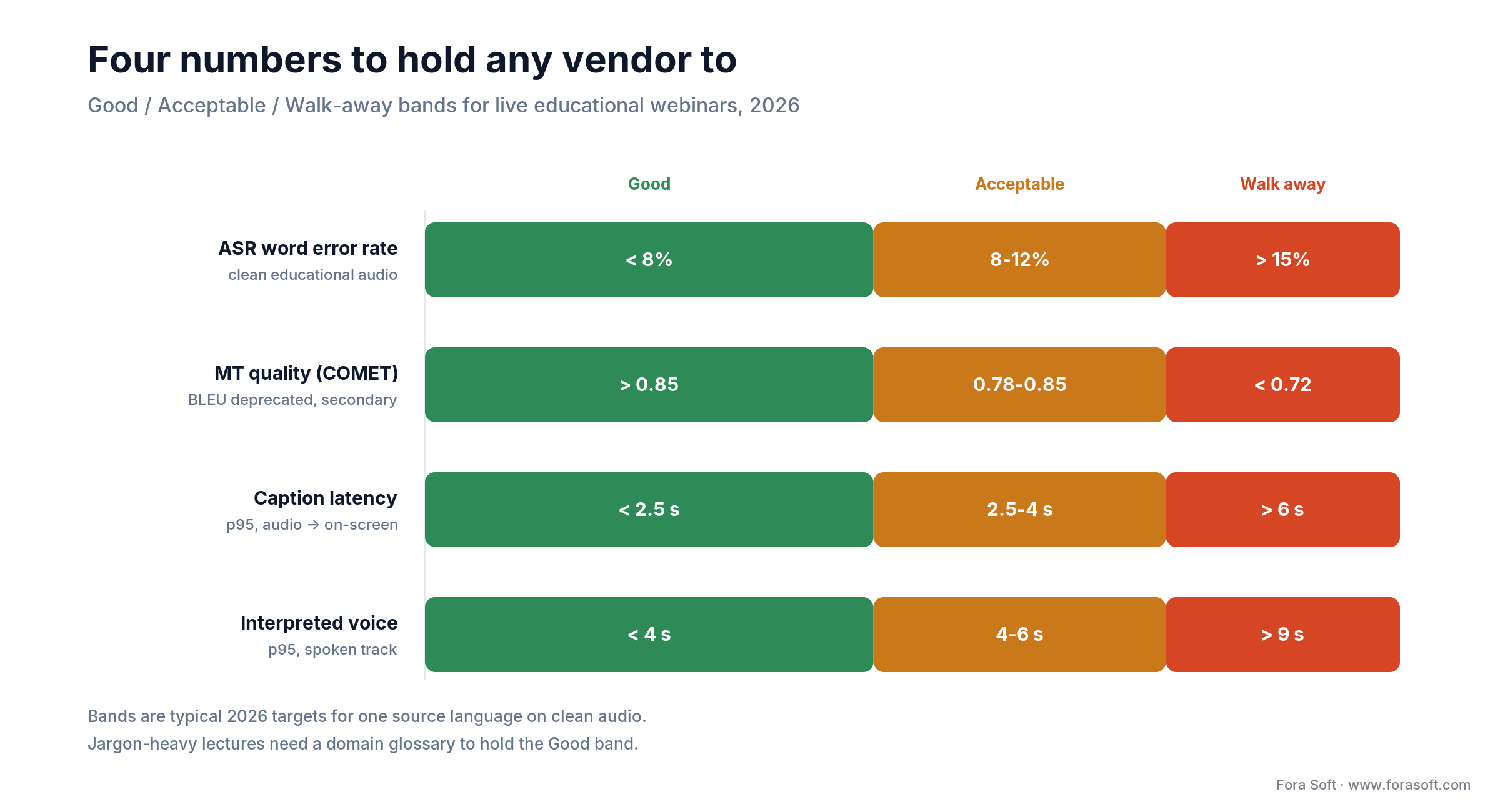
Figure 1. The four numbers to hold any vendor to, as Good / Acceptable / Walk-away bands (2026).
| Component | Metric | Good (2026) | Acceptable | Walk away |
|---|---|---|---|---|
| ASR (English, clean) | WER | <8 % | 8–12 % | >15 % |
| ASR (mixed accents) | WER | <12 % | 12–18 % | >22 % |
| Machine translation | COMET (BLEU 2nd) | >0.85 / >35 | 0.78–0.85 / 28–35 | <0.72 / <25 |
| End-to-end caption delay | p95 latency | <2.5 s | 2.5–4 s | >6 s |
| Interpreted voice delay | p95 latency | <4 s | 4–6 s | >9 s |
A reference pipeline you can build today
Every production translation pipeline we have shipped fits the seven-stage architecture below. Caption latency lands around 2–4 seconds end-to-end (p95 3–4 s); the optional interpreted-voice track adds roughly a second on top — comfortably inside what learners tolerate when captions are well typeset.
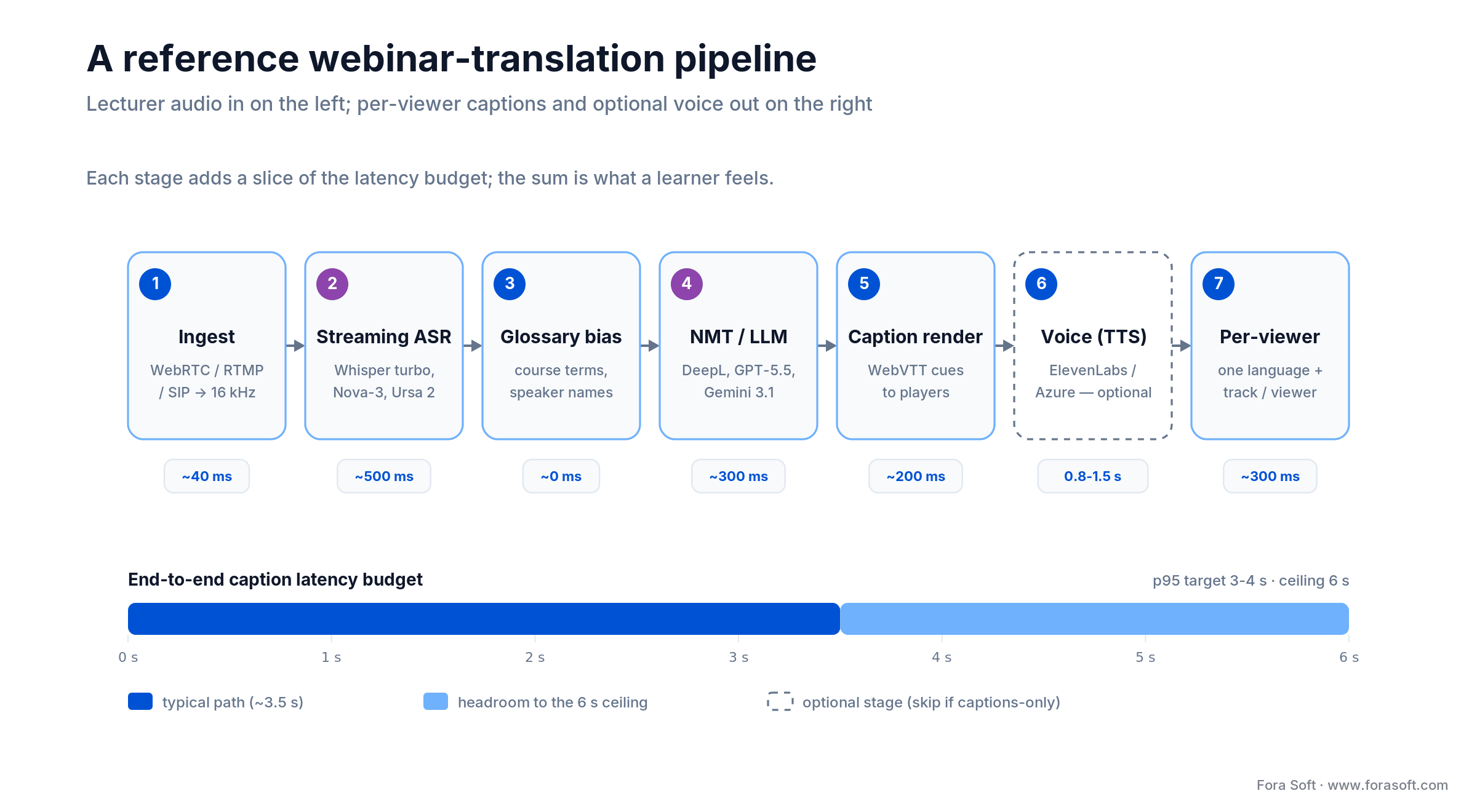
Figure 2. A reference real-time translation pipeline for an educational webinar, with a per-stage latency budget.
1. Ingest
A WebRTC SFU (LiveKit or mediasoup), an RTMP gateway, or a SIP trunk feeds the lecturer’s audio into the pipeline at 16 kHz mono PCM. Keep the audio path co-located in a single region with the worker pods to avoid trans-continental round trips.
2. Streaming ASR
Three production-grade options. Whisper large-v3-turbo self-hosted (6–12 % WER on clean educational audio, near-$0 marginal cost, roughly 500 ms streaming delay on a single L4-class GPU — note Whisper is chunked, not natively streaming). Deepgram Nova-3 (~6 % WER, about $0.0048–0.0077/min streaming depending on model and tier, 2026). Speechmatics Ursa 2 (~7 % WER, 55+ languages, strong on accented English, EU-resident option).
3. Domain glossary
A small, curated table of course-specific terms, speaker names, brand vocabulary and hard-to-translate idioms. Every modern ASR / MT engine accepts a glossary; using one routinely buys 8–15 BLEU points on jargon-heavy lectures (“cardiomyopathy”, “CRISPR”, “Treasury bond”) at zero runtime cost.
4. NMT / LLM engine
DeepL still leads perceived quality on European and formal finance/legal text. Google Translate has the broadest coverage at the lowest cost. Frontier LLMs (GPT-5.5, Gemini 3.1 Pro, Claude Opus 5) now match or beat dedicated NMT on educational prose and uniquely handle “explain this colloquialism” cases — which is why COMET, not BLEU, is the metric to compare them on. Wiring an LLM into a live pipeline is exactly the kind of AI integration work we do. AWS Translate and Microsoft Translator are the obvious picks if you already live inside one cloud.
5–7. Captions, TTS and per-viewer delivery
Push translated text as WebVTT cues through a WebSocket to the player; render at 50 characters/line, two lines maximum, four-second display, 20 px font-size on desktop. For interpreted voice, ElevenLabs and Azure Neural TTS produce natural-sounding tracks in 800–1500 ms; publish each as a separate audio track on the SFU so the viewer subscribes to exactly one. Record per-language tracks for VOD on-demand replay.
Reach for self-hosted Whisper when: data residency is non-negotiable and you have an SRE to run a small GPU pool. Once residency forces your hand, self-hosting earns its ops burden above roughly 10,000 webinar-minutes a month; without a residency mandate, the pure-economics crossover to your own GPUs is much higher (100,000+/month, per the decision framework below). Reach for a managed ASR API when you ship in 8 weeks and want zero ops overhead.
The five managed translation vendors worth shortlisting
1. Wordly — AI captions and AI voice in 60 speaker / 67 attendee languages, built for events and corporate webinars. Strong glossary management. Pricing is usage-based on attendee-hours, one price for all languages, with education and non-profit discounts; Wordly does not publish a per-unit rate, so treat any per-hour figure as an estimate until you have a quote.
2. KUDO — 200+ languages through a managed pool of ~12,000 professional interpreters (RSI), plus an automated KUDO AI mode. The default choice for high-stakes corporate and inter-governmental events.
3. Interprefy — 80+ AI languages (6,000+ pairs) plus human interpreters in effectively any language; embeds into Zoom, Teams, Webex and GoTo Webinar. Strong audit trail for EU public sector.
4. Zoom Translated Captions — native Zoom feature: translated captions in 36 languages (2026), a $5/user/month add-on or bundled with Business Plus and above. Easiest path if your webinars already live on Zoom.
5. Microsoft Teams live translated captions — requires Teams Premium ($10/user/month) or Microsoft 365 Copilot; ~40 spoken source languages into 31 caption languages. Handy quirk: if the organizer is licensed, every attendee gets translated captions without a license of their own.
| Vendor | Languages | AI / Human | Caption latency | Best fit |
|---|---|---|---|---|
| Wordly | 60 / 67 | AI | ~3 s | Corporate webinars, recurring events |
| KUDO | 200+ | Hybrid | 2–4 s | High-stakes events, inter-governmental |
| Interprefy | 80+ AI | Hybrid | 2–4 s | EU public sector, conferences |
| Zoom Translated Captions | 36 | AI | ~3 s | Already on Zoom Business Plus+ |
| Microsoft Teams (Premium) | ~40 → 31 | AI | ~3 s | Already on Teams Premium / Copilot |
Buying or building a translation layer?
We have done both. The TransLinguist platform we engineered powers public-sector communication in 75+ languages; we also wire managed APIs (Wordly, KUDO, Deepgram + DeepL) into existing LMS and event stacks.
Five use cases where live translation actually pays back
1. Universities scaling MOOCs internationally. Add live captions in 5–10 target languages to flagship lectures; non-English cohorts routinely finish more of the course, and the cost per additional enrolled student drops to a few dollars at managed-API pricing.
2. Corporate L&D for global workforces. A monthly all-hands or product training that used to ship English-only now goes live with captions in Spanish, Portuguese, Mandarin, French and Arabic. Internal NPS on training rises, and the legal team gets a clean accessibility narrative for its EAA reporting.
3. Continuing professional education and certification. Medical, legal, financial and engineering certifications often have foreign-language candidates; live captions plus a downloadable transcript make the offering portable across markets without re-recording the lecture.
4. K-12 and parent communication. Districts in the US and UK now run multilingual parent meetings; live captions in the home language remove a barrier that has frustrated teachers for decades. FERPA compliance applies; design accordingly.
5. International conferences and webinars-as-marketing. Multilingual webinars can materially grow inbound lead volume from non-English markets while lowering the cost-per-MQL versus running separate localized events.
Realistic cost model — what live translation costs to ship in 2026
The numbers below are starting points from real Fora Soft engagements; they assume the agent-engineering workflow we use, which has trimmed our typical timelines versus our 2024 baselines. Treat them as a sanity check, not a quote.
| Scenario | Approach | One-off engineering | Monthly running cost | Time to ship |
|---|---|---|---|---|
| Add captions to existing webinars | Wordly / Zoom Translated Captions | ~$5–15K integration | ~$0.10–0.30/attendee-hr (est.) | 3–5 weeks |
| Custom build on managed APIs | Deepgram + DeepL + WebVTT | ~$25–55K | ~$0.025–0.05/audio-min | 8–12 weeks |
| Hybrid AI + human interpreters | Custom + KUDO/Interprefy pool | ~$45–90K | ~$60–180/interpreter-hr | 12–18 weeks |
| Self-hosted Whisper + EU residency | Whisper + Marian / DeepL on-prem | ~$70–130K | ~$1,500–4,000 (GPU) | 14–22 weeks |
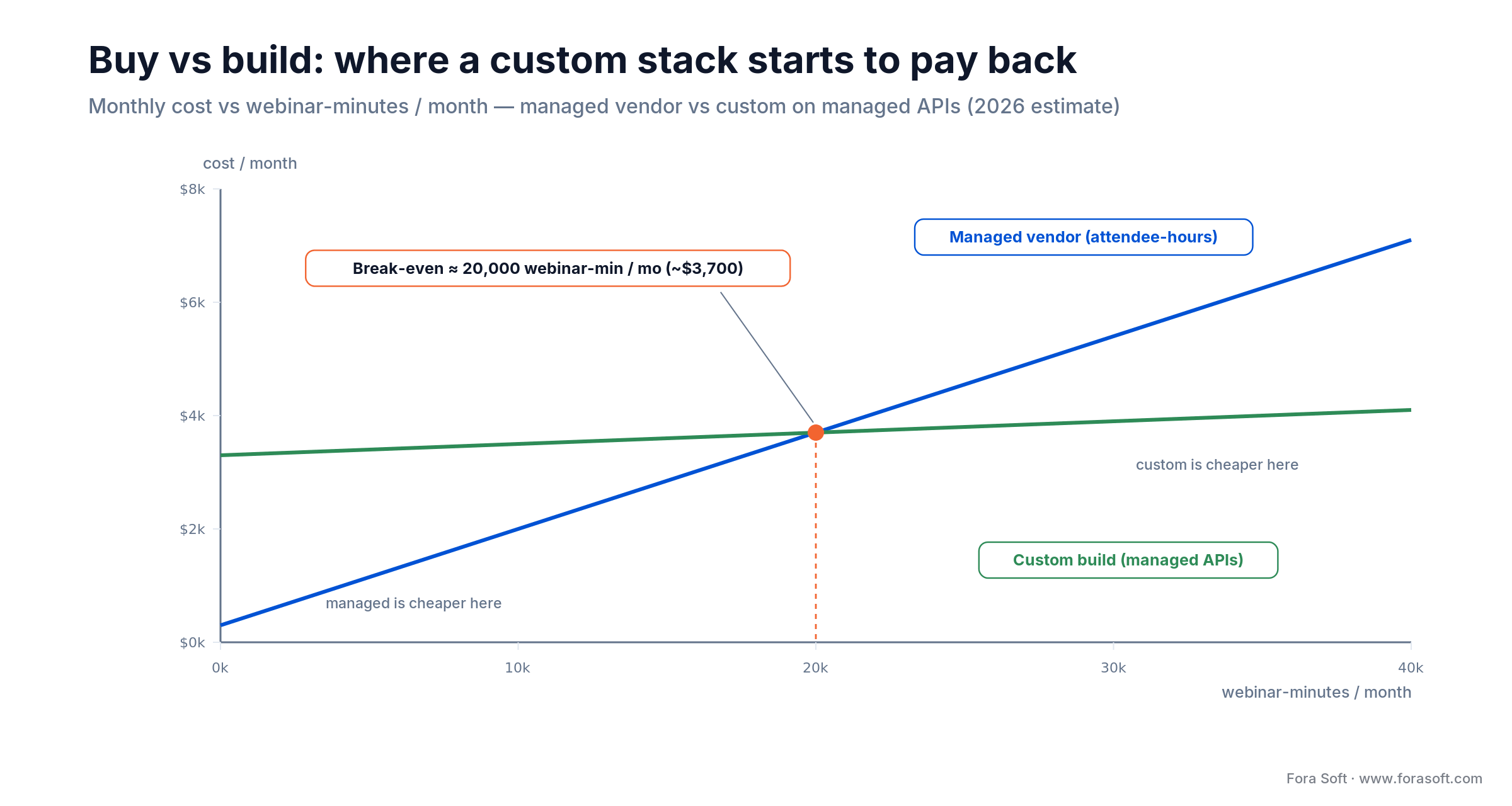
Figure 3. Managed vendor vs custom build: a custom stack starts to pay back around 20,000 webinar-minutes a month.
Mini case: TransLinguist — 75+ languages and an interpreter marketplace
A public-sector client needed a video conferencing platform that could serve speakers of dozens of languages, deliver AI captions in real time and fall back to a human interpreter on demand for clinical and legal contexts. Their initial vendor — a US-based pure-AI service — failed both on language coverage and on EU data residency.
Fora Soft engineered TransLinguist as the answer: a multilingual video conferencing platform with 75+ languages of machine translation, AI subtitles, simultaneous and consecutive interpretation modes, sign-language interpretation, an interpreter marketplace of 30,000+ professional interpreters, and the operational tooling behind a place on the NHS UK national interpreting framework. The architecture stitches WebRTC video, streaming ASR, NMT and a real-time interpreter routing layer behind a single attendee UI.
Two engineering choices that mattered. First, every call defaults to AI captions and lets the host promote a human interpreter into the channel inside two clicks — the AI handles the scaled-out long tail of small meetings, the human handles the high-stakes ones. Second, the interpreter marketplace is treated as a real product surface (search, scheduling, ratings, payouts), not a back-office spreadsheet, which is what makes scaling to 30,000+ interpreters operationally tractable. Want a similar architecture for your platform? Book a 30-min discovery call →
A decision framework — pick the right approach in five questions
Q1. How many target languages do you actually need? Up to 12 → Zoom or Teams native. 12–40 → Wordly. 40+ → KUDO, Interprefy or a custom build.
Q2. Are stakes high enough to justify a human interpreter? Medical, legal, certification → hybrid (KUDO / Interprefy / TransLinguist pattern). General training → pure AI is fine.
Q3. Where does the audio have to live? US data lakes → AWS Transcribe + Translate. EU residency → Speechmatics or self-hosted Whisper in Frankfurt; never default to a US-only vendor.
Q4. What is your latency budget? <3 s captions → Deepgram or Speechmatics streaming. 3–5 s → any modern vendor. Interpreted voice tolerable up to 6 s; beyond that the audience tunes out.
Q5. Monthly volume? <5,000 webinar-minutes → managed vendor wins on TCO. >20,000 → custom on managed APIs. >100,000 or strict residency → self-hosted Whisper plus your own NMT.
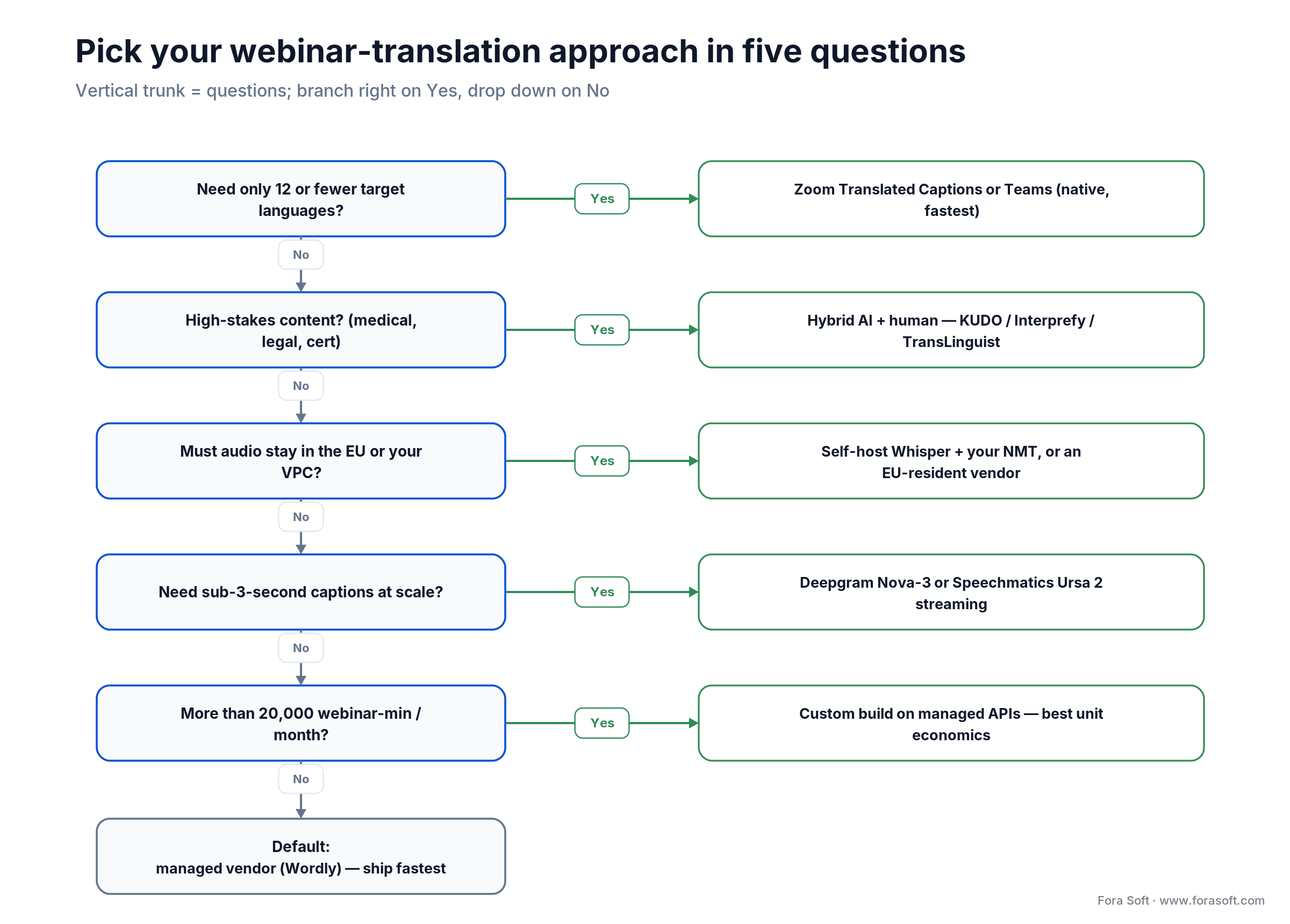
Figure 4. The five questions that decide native vs hybrid vs EU-resident vs streaming vs custom.
Five deployment pitfalls we see every quarter
1. No domain glossary. Default ASR + MT will mistranslate your course-specific jargon every single session. Build a 200–500 term glossary on day one; revisit weekly for the first quarter.
2. Bad caption typography. Captions over 50 characters per line, more than two lines at a time, or shorter than 4 seconds on screen become unreadable. The W3C’s reduced-reading-speed guidance for captions is your default.
3. Unmonitored speaker switching. When the lecturer hands the mic to a guest, ASR confidence often drops 10 points. Auto-detect speaker change (pyannote, NeMo) and re-warm the model.
4. Latency that kills Q&A. A 7-second caption delay turns a question into a non-sequitur by the time it lands. Keep p95 under 4 s; if it slips, scale the worker pool.
5. Treating recordings as “free”. Generating per-language captions for VOD demands a different backend (batch, deeper models). Plan that pipeline at the same time, or you will end up shipping 8 separate post-production processes.
Reach for hybrid AI + human when: the content is medical, legal, regulated, has more than 50 simultaneous attendees in a single non-English cohort, or you cannot tolerate a wrong translation in front of senior stakeholders.
Reach for self-hosted Whisper + your own NMT when: EU residency or HIPAA / FERPA constraints rule out US APIs, the audio cannot leave your VPC, or you ship more than ~100,000 webinar-minutes a month and unit economics start to bite.
KPIs — what to actually measure
Quality KPIs. Word Error Rate per source language (target <12 %), COMET per target language pair (target >0.80, BLEU secondary), human-in-the-loop edit distance for VOD captions (target <5 % of words changed).
Business KPIs. Completion-rate uplift in non-English cohorts (set your own baseline and treat vendor benchmarks as directional); inbound webinar leads from non-English markets; support tickets that say attendees “couldn’t follow” (target down to near zero).
Reliability KPIs. p95 caption latency (target <4 s), interpreted-voice latency (target <6 s), uptime (target 99.95 % on the streaming path), cost per webinar-hour (set a budget; we usually anchor at $1.5–6 per hour, per language pair).
When you should not deploy live translation
Three situations where we have advised pausing. Audio quality is poor. If your lecturers use laptop microphones in echoey rooms, fix the audio first; ASR cannot recover from clipped, reverberant input. The audience is monolingual. If 95 % of your viewers share a first language with the lecturer, captions help accessibility but live translation does not move a metric — spend the budget on transcript search instead. Compliance is unresolved. If you cannot answer where audio is processed, who has access and how long it is retained, do not enable AI captions on student conversations until those questions have written answers.
There is also a softer failure mode: live translation as theatre. We have seen platforms enable five caption languages in a marketing webinar no non-English speaker ever attends. The feature should follow the audience, not the other way around.
Privacy and compliance — the rules that bite in education
GDPR. Student speech and interaction are personal data. Document the lawful basis (usually contract or legitimate interest with explicit information), keep retention short (we default to 30 days for raw audio, 365 days for transcripts), and pick an EU-resident vendor or self-host in the EU.
FERPA. In the US, recordings of K-12 and higher-education instruction can be educational records when a student is personally identifiable. Get a Data Processing Addendum from every vendor in the chain, restrict access by role, and give parents / students an export and deletion path.
EAA / WCAG 2.2. Live captioning is a Level AA criterion (WCAG 2.2 SC 1.2.4). Under the EAA (28 June 2025) the accessible-purchase-flow obligation bites when you sell a course or webinar online to EU consumers; public-sector education falls under the separate Web Accessibility Directive (EU) 2016/2102. Document captioning availability in your accessibility statement either way — it is the artefact a regulator asks for.
EU AI Act — synthetic voices. Article 50 (in force 2 August 2026) requires AI-generated audio to be marked as artificial and disclosed to listeners. If you use TTS for an interpreted-voice track, add a one-line note to the audio-track UI; do not bury it in a help article.
Analytics that finally make multilingual measurable
A translation pipeline is also an analytics pipeline. The same captions that go to viewers feed a per-language transcript store you can query for engagement signals: average watch-time per language, drop-off heatmaps tied to specific phrases, search volume by topic per market. Pair this with light sentiment tagging (the same way our audio emotion analysis stack does it) and you discover, for example, that Spanish-speaking attendees disengage several minutes earlier than English ones — an actionable insight no English-only telemetry could surface.
Build this surface in week one of the project, not as an afterthought. The marginal engineering cost is trivial; the strategic visibility it gives marketing and product is the reason most clients renew the contract.
Accessibility — treat captions as a first-class UX
Captions are the part of the product the regulator sees first and the part the audience actually reads. Three things separate captioning that wins from captioning that limps: typography (50 chars/line, 2 lines, 4-second display, 20 px or larger), positioning (always on a contrasting background, never floating mid-frame over a slide), and controllability (font size, contrast, position toggles in the player UI). Captions are a teaching tool, not just a compliance checkbox — we go deeper in our e-learning video material.
Add a sign-language interpreter overlay channel for high-stakes events — the TransLinguist platform supports this natively and it is increasingly expected for public-sector content under the EAA. Audit captions on real attendees, not just dev devices: a 50-year-old learner on a 1080p TV is not a 25-year-old engineer on a Retina laptop.
Wiring translation into a WebRTC LMS or webinar stack
For a custom build the canonical pattern is: the SFU forks the lecturer’s audio to a server-side worker, the worker runs streaming ASR, glossary biasing, NMT and (optionally) TTS, and publishes results back as caption events on a WebSocket and as additional audio tracks on the SFU. Each viewer subscribes to one caption language and one audio track.
Two architectural choices to commit to early. Co-locate the worker with the SFU — cross-region adds 100–200 ms each way. Design the consent UX before writing code — participants should know that audio is being analysed for captions and where the data goes, with a one-click opt-out path. We covered the broader topic in our overview of top AI speech recognition software, and compared the managed platforms in our real-time speech translation vendor benchmarks.
2026 trends to watch
Voice cloning + translation. ElevenLabs and Hume are shipping pipelines that translate the lecturer’s words into the target language while preserving the lecturer’s own voice. Expect this to become table stakes for premium webinar tiers within 12–18 months — and note it lands squarely inside the EU AI Act’s synthetic-audio disclosure rules.
LLM-based simultaneous interpretation. Frontier LLMs (GPT-5.5, Gemini 3.1 Pro, Claude Opus 5), prompted with a glossary and conversation history, increasingly match dedicated NMT engines on educational content while handling colloquialisms better. Expect more vendors to swap their MT layer for an LLM API.
Edge translation for privacy. Quantised Whisper-medium and small NMT models now run on-device on modern laptops — an option for K-12 and clinical scenarios where audio cannot leave the device.
AR / VR captions. Meta Quest, Vision Pro and Snap Spectacles increasingly render captions as a HUD overlay; the same translation pipeline can serve captions to a headset just as easily as to a browser.
FAQ
How accurate is real-time webinar translation in 2026?
On clean educational audio in 2026, leading streaming ASR engines hit 6–12 % Word Error Rate; strong machine translation scores COMET ~0.83–0.88 (BLEU 35–50, pair-dependent) on educational content. End-to-end caption latency typically lands between 2 and 4 seconds. A custom-tuned domain glossary buys 8–15 BLEU points on jargon-heavy lectures (medicine, law, finance).
Which languages does live webinar translation support?
Mainstream commercial vendors support 36 (Zoom) to 200+ (KUDO via human interpreters) languages; Whisper covers roughly 99 source languages. Practically, target the 5–15 languages that match your audience, not the maximum the vendor advertises — cost and operational load scale with active language count.
Is real-time translation cost-effective for educational webinars?
For workloads above ~5,000 webinar-minutes per month, usually yes. A managed vendor such as Wordly is priced on attendee-hours (no public per-unit rate), while a custom WebRTC build on managed APIs costs roughly $0.025–0.05 per processed audio minute. Above ~20,000 webinar-minutes a month the custom build starts to win on total cost of ownership.
Is live AI translation legal under GDPR, FERPA and the EU AI Act?
Yes, with conditions. GDPR requires a documented lawful basis, EU residency for the audio, and a short retention policy. FERPA requires a Data Processing Addendum and role-based access for identifiable K-12 and higher-ed recordings. Under the EAA (since June 2025) your online course-purchase flow must be accessible if you sell to EU consumers; WCAG 2.2 requires live captions at Level AA; and the EU AI Act (Article 50, in force 2 August 2026) requires AI-generated voice to be disclosed.
AI captions, human interpreters, or both?
Pure AI handles general lectures, internal training and large MOOCs cost-effectively. Human interpreters remain the standard for high-stakes content (medical, legal, accreditation, government). The hybrid pattern Fora Soft built into TransLinguist — AI by default, one-click promotion to a human interpreter on demand — gets the best of both at the cost of integrating two pipelines.
How long does it take to integrate live translation into an existing LMS?
For an existing Zoom or Teams stack, switching on native translated captions takes days. Wiring Wordly or a custom Deepgram + DeepL pipeline into a custom WebRTC LMS typically takes 8–12 weeks at Fora Soft, including UX, glossary tooling, accessibility, recording and analytics. A self-hosted Whisper deployment with EU residency and a hybrid interpreter pool runs 14–22 weeks.
How do you handle Q&A in a translated webinar?
Two patterns. Text Q&A: route every question through translation in both directions (asker’s language → presenter’s language for the answer; presenter’s language → per-viewer for the broadcast). Voice Q&A: keep the answer pipeline open for that asker’s native language and run an interpreter on the host channel. Both work; pick the one that matches your audience size.
Can recorded webinars also have multilingual captions on demand?
Yes — and the offline pipeline is materially better than the live one. Use Whisper large-v3-turbo in batch mode (transcribes near human-grade), pass the result through DeepL or a frontier LLM with the course glossary, and have a human editor review high-value segments. This turns your back catalogue into long-tail organic discovery: indexed multilingual transcripts widen the topics your library can rank for.
What to read next
ASR vendors
Top AI speech recognition software
A buyer’s guide to the ASR engines that sit upstream of any translation pipeline.
Vendor benchmarks
Real-time speech translation vendors
How the managed platforms compare on accuracy, latency and price.
Video calls
Video call translation tools compared
The meeting-room cousin of webinar translation, tool by tool.
Real-time AI
Real-time audio emotion analysis
Engagement detection on top of the same audio stream captions and translation use.
Case study
TransLinguist — 75+ language interpretation
A deeper look at the architecture and interpreter marketplace behind the platform.
Ready to make your webinars truly multilingual?
Real-time translation in educational webinars is essential when at least 10 % of your audience is non-native, when you sell into the EU under the EAA, or when your CFO is staring at a flat international cohort that should be growing. Buy a managed vendor when speed-to-launch matters; build a custom WebRTC + Whisper + DeepL stack when you need data residency, branding control, or unit economics that scale below $0.05 per audio minute. Reserve human interpreters for the moments where a wrong word genuinely costs.
Fora Soft has shipped both ends of that spectrum — from a 75+-language interpreter marketplace on the NHS UK framework to lean Wordly + Zoom integrations for product training. We will tell you honestly which pattern fits your situation, including when the answer is “just turn on Zoom translated captions”.

The book · Volume 7 of 7
AI for Video: A Complete Guide to Intelligence in Video Products: From Real-Time Pipelines and Agents to Serving, Cost, Compliance, and Verticals
Committing to accuracy and latency numbers for live webinar translation means knowing where each second of delay comes from. This volume follows the full path: call latency budgets, where AI slots into a WebRTC pipeline, live subtitles and translation, cost per stream-hour, and the EU AI Act rules that apply to education. Written by Nikolay Sapunov, CEO at Fora Soft.
Read it on Amazon →Kindle & paperback · Fora Soft Video Engineering Handbook
Let’s scope your real-time translation project
A 30-minute call covers your audience, language coverage, latency budget and compliance scope. You leave with a concrete buy-vs-build recommendation and a transparent estimate.

