

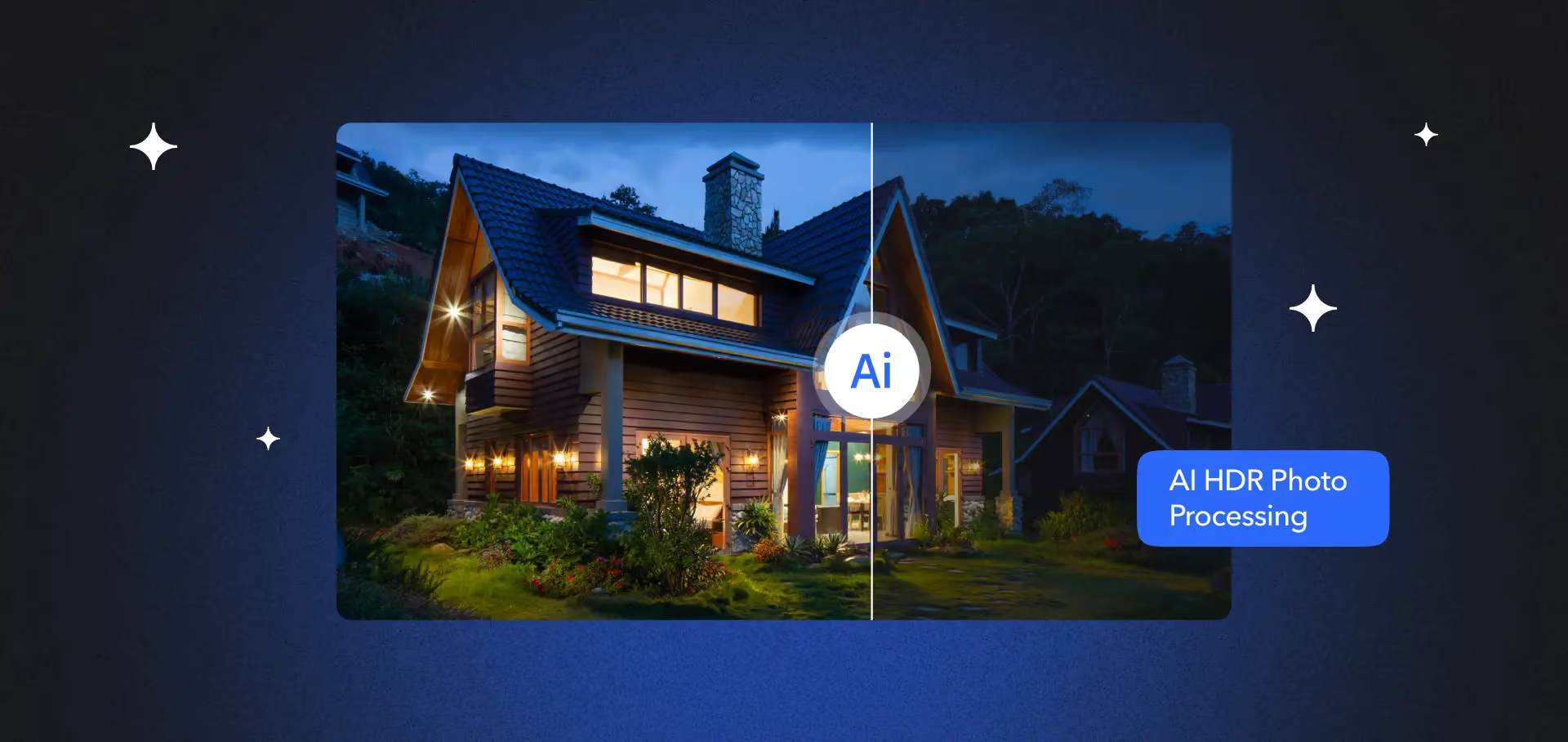
Real estate photography in 2026 runs on a neural network, not a light meter. AI real estate photo editing now merges three bracketed exposures, fixes color, and pulls detail back into blown-out windows in seconds. A bad edit, though, can cost a listing far more than a slow one. Since January 1, 2026, California’s AB 723 makes an undisclosed AI-altered listing photo a misdemeanor, not a style choice. Fora Soft built LAYRS, a custom AI HDR pipeline for real estate, so this is the buyer’s playbook we’d hand a broker, MLS vendor, or PropTech founder deciding what to buy and what to build.
Key takeaways
- AI real estate photo editing drops post-production from 10–20 minutes a shot to seconds, and cuts blended cost per image to well under $1 at scale.
- Under ~1,000 images a month, a $99–$179 desktop app wins. From 1k–15k, a cloud service or an API like Autoenhance.ai wins. Custom middleware only pays back above ~150,000 images a month.
- Pure HDR (tone, exposure, white balance) is exempt from AB 723. Sky swaps, virtual staging, and object removal are not — they need a “Virtually Staged” label and the original photo alongside.
- The winning stack is usually hybrid: your own model for the 80% that is plain HDR, a vendor API for the 20% of hard generative cases.
Why trust this guide
Fora Soft has shipped custom video, imaging, and AI systems since 2005 — 250+ projects across streaming, computer vision, and machine learning. One of them, LAYRS, is a production AI HDR platform for real estate: a photographer uploads three bracketed frames, and a custom neural network returns a single color-corrected HDR image. We are not a photo-retouching house reselling somebody else’s tool. We build the pipelines these tools plug into, so we know where each one wins and where it quietly breaks.
Real-estate teams keep asking the same three questions: which AI photo editing tool do we buy, how do we wire it into our MLS and CRM flow, and what can we show on a listing without breaking the law. This guide answers all three with current vendor pricing, a reference architecture, worked cost math, and the 2026 disclosure rules that just turned sloppy editing into legal exposure.
What AI real estate photo editing does in 2026
AI real estate photo editing replaces the manual bracket-and-merge retouch with a model that does tone mapping, color, denoise, and window recovery in one pass — often from a single RAW. Old-school HDR meant shooting three to nine exposures, aligning them, tone-mapping, killing halos, and grading in Lightroom: 10–20 minutes per image for a good retoucher. A 2026 model collapses that to a click or an API call. Neural networks now synthesize plausible highlight and shadow detail from one frame when brackets aren’t available.
If you want the physics of dynamic range and tone curves under the hood, our complete HDR guide covers it. For property photos specifically, the diagram below shows the whole flow, and the one checkpoint that carries legal weight.
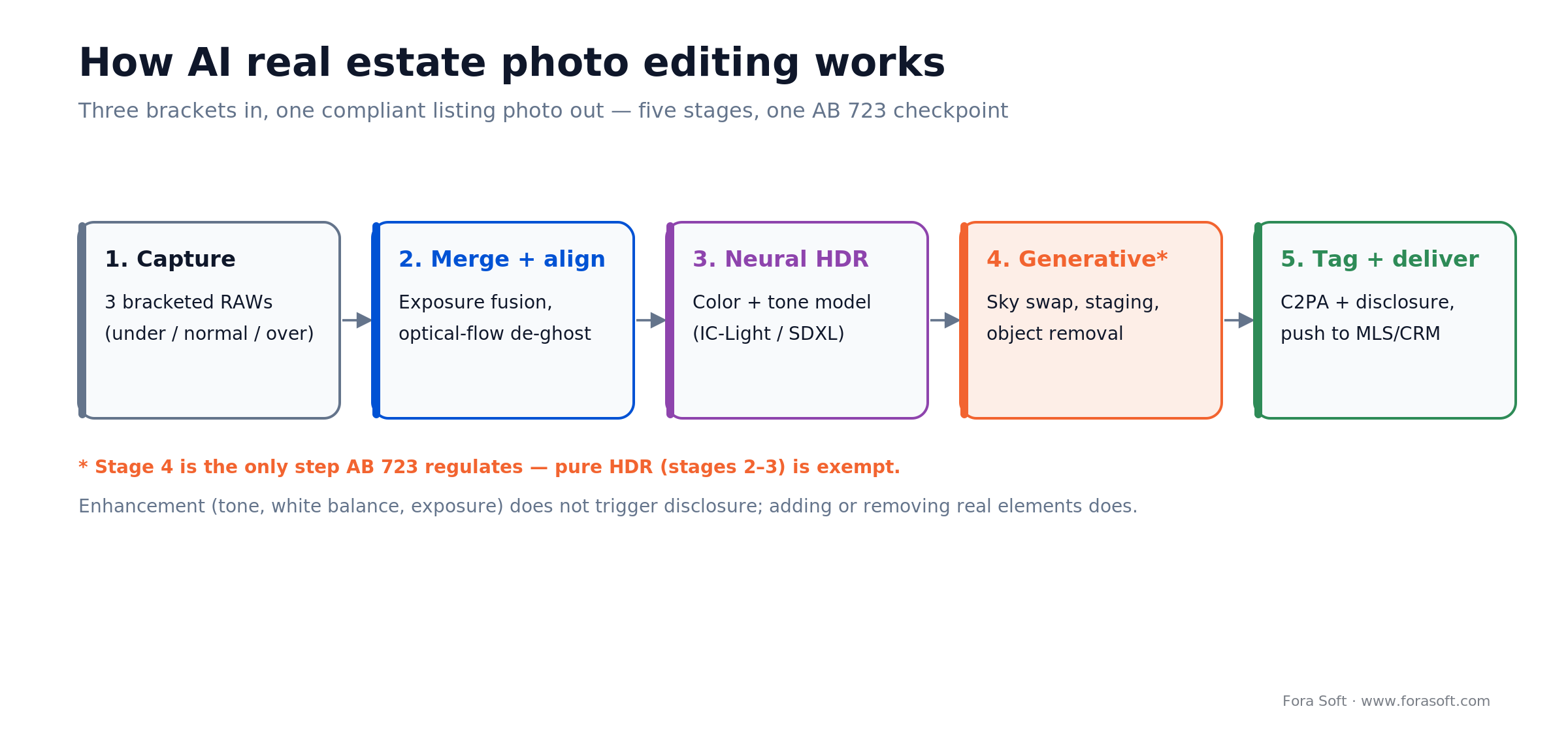
Figure 1. The five-stage pipeline. Only the generative stage (sky, staging, object removal) triggers AB 723 disclosure.
The four AI techniques behind “HDR”
Under the “HDR” label, four distinct techniques do the work, and they matter because two of them are legally safe and two are not.
- Neural tone mapping. U-Net or transformer models trained on bracketed pairs compress 14–18 stops of scene range into a display-ready image without the halos that wrecked old Photomatix output. Safe under AB 723.
- Exposure fusion with alignment. Optical-flow models align hand-held brackets even when curtains or furniture moved between frames, killing the ghosting that used to need manual masking. Safe under AB 723.
- Sky and window replacement. Segmentation models (Meta’s SAM 2, released July 2024, is the current reference) isolate blown windows and drop in a clean sky plate. This changes what the property shows — disclosure territory.
- Generative enhancement. Stable Diffusion–class models synthesize grass, water, or furniture. This is where AB 723 bites hardest: any synthetic element triggers the disclosure rule.
Market size and adoption in 2026
Adoption is already mainstream, and the platforms decided it. The 2025 NAR REALTORS® Technology Survey (fielded July 2025) found about 68% of agents have used AI in some form, with AI-generated content the single most common use at roughly 46% — though only 17% reported a significant positive business impact, so the tools are widespread but not yet transformative.
The tipping point was distribution. On September 10, 2025, Zillow brought AI virtual staging into Showcase listings, built on Virtual Staging AI (which Zillow acquired in October 2024). That pushed AI image generation from a specialist vendor add-on to a default MLS feature. Zillow reports Showcase listings sell for about $7,000 more on average and help agents win 30% more listings — vendor-reported figures, but they explain why brokerages feel the pressure to match.
For the underlying service market, Verified Market Reports estimates the real estate photo editing service market at roughly $1.35 billion in 2024, growing to about $4.85 billion by 2033 (~14.8% CAGR). Treat that as a directional paid-report estimate, not gospel — the operational driver is simpler: turnaround. Brokerages that used to wait 24–48 hours for a photo house now expect edited sets in under 15 minutes, which is exactly where in-platform AI beats human-in-the-loop services.
Reach for AI photo editing when your shooters deliver more than a few hundred images a month, turnaround is the bottleneck your agents complain about, and you can wire disclosure into the workflow instead of trusting each person to remember it.
The 2026 vendor shortlist
Ten platforms cover almost every real-estate imaging budget. They split into three buckets by how you consume them: desktop apps you run, cloud services that edit for you, and APIs you build against.
Desktop apps (one-off or subscription). Luminar Neo ($119 Desktop / $159 Cross-Device / $179 Max, perpetual as of 2026) is the price-performance pick for solo agents — Skylum’s Relight, Structure, and Sky tools handle typical interiors without tuning. Where it wins: no subscription, fast. Where it breaks: no API, so it can’t scale into a pipeline. Photomatix Pro 7 ($99 perpetual) still makes the cleanest bracketed merges if you actually shoot brackets. ON1 Photo RAW 2026 ($99.99–$169.99) and DxO PureRAW (~$139) lead on noise and lens correction rather than HDR itself. Topaz Photo AI (roughly $99/year, with a one-time option in flux) is the ceiling for sharpening and detail recovery on single exposures.
Subscription hybrid. Adobe Lightroom + Firefly (Photography plan $9.99–$21.99/month) is the default if you already live in Creative Cloud — Firefly generative fill handles sky swaps and clutter removal, Enhance merges brackets. Watch the generative credits: the 1 TB Photography plan bundles 100 credits a month and they don’t roll over, so heavy staging burns them fast. Adobe’s Firefly Services API is the one desktop-brand path into a real build.
Cloud services (human-in-the-loop). BoxBrownie (image enhancement $2.00/image, day-to-dusk $5.00, virtual staging $30.00), Styldod (editing from $1/image, virtual staging $23/image, or $16 at 8+), and PhotoUp ($1.50–$9.00/image, down to ~$0.50 with a dedicated editor at volume) combine AI pre-processing with human QA. They win on consistency across many shooters; they break on unit cost and the fact that they don’t expose a true inference API.
API-first. Autoenhance.ai is the one built for developers: a REST API for HDR merge, perspective correction, sky replacement, and window pull, priced from $29/month (50 images) up to $449/month (1,500), with pay-per-image around $0.75 and overage as low as $0.30 at the top tier. This is the shortcut if you want pipeline behavior without training your own model.
Comparison matrix: price, API, best-for
Use this as the 60-second filter. Prices are current vendor list rates as of July 2026; negotiated enterprise rates on the cloud services typically shave 20–35%.
| Vendor | Type | 2026 price | Best for | API? |
|---|---|---|---|---|
| Luminar Neo | Desktop | $119–$179 perpetual | Solo agents, <100/mo | No |
| Photomatix Pro 7 | Desktop | $99 perpetual | Classic bracket merge | No |
| Topaz Photo AI | Desktop | ~$99/yr | Single-exposure recovery | No |
| ON1 Photo RAW | Desktop | $99.99–$169.99 | Batch editing | No |
| Adobe LR + Firefly | Hybrid | $9.99–$21.99/mo | Teams already in CC | Firefly Services |
| BoxBrownie | Cloud + human | $2–$30/img | Staging, day-to-dusk | Order API |
| Styldod | Cloud + human | $1–$23/img | Mid-market brokerages | Order API |
| PhotoUp | Cloud + human | $0.50–$9/img | High-volume MLS | Order API |
| Autoenhance.ai | API-first | $29–$449/mo, ~$0.30–$0.75/img | Builders, integrations | Yes, full REST |
| Custom (SDXL + GPU) | Build | ~$0.07/img at scale | Marketplaces, 150k+/mo | You own it |
What does AI photo editing cost per image?
Blended cost lands between about $0.07 and $1.00 per image, and which end you hit depends almost entirely on volume. The same $119 Luminar license that’s perfect for a solo agent shooting 20 listings a month becomes useless at 3,000 images because it has no API to automate against. Four volume tiers, four correct answers — and the curve below shows where each model overtakes the others.
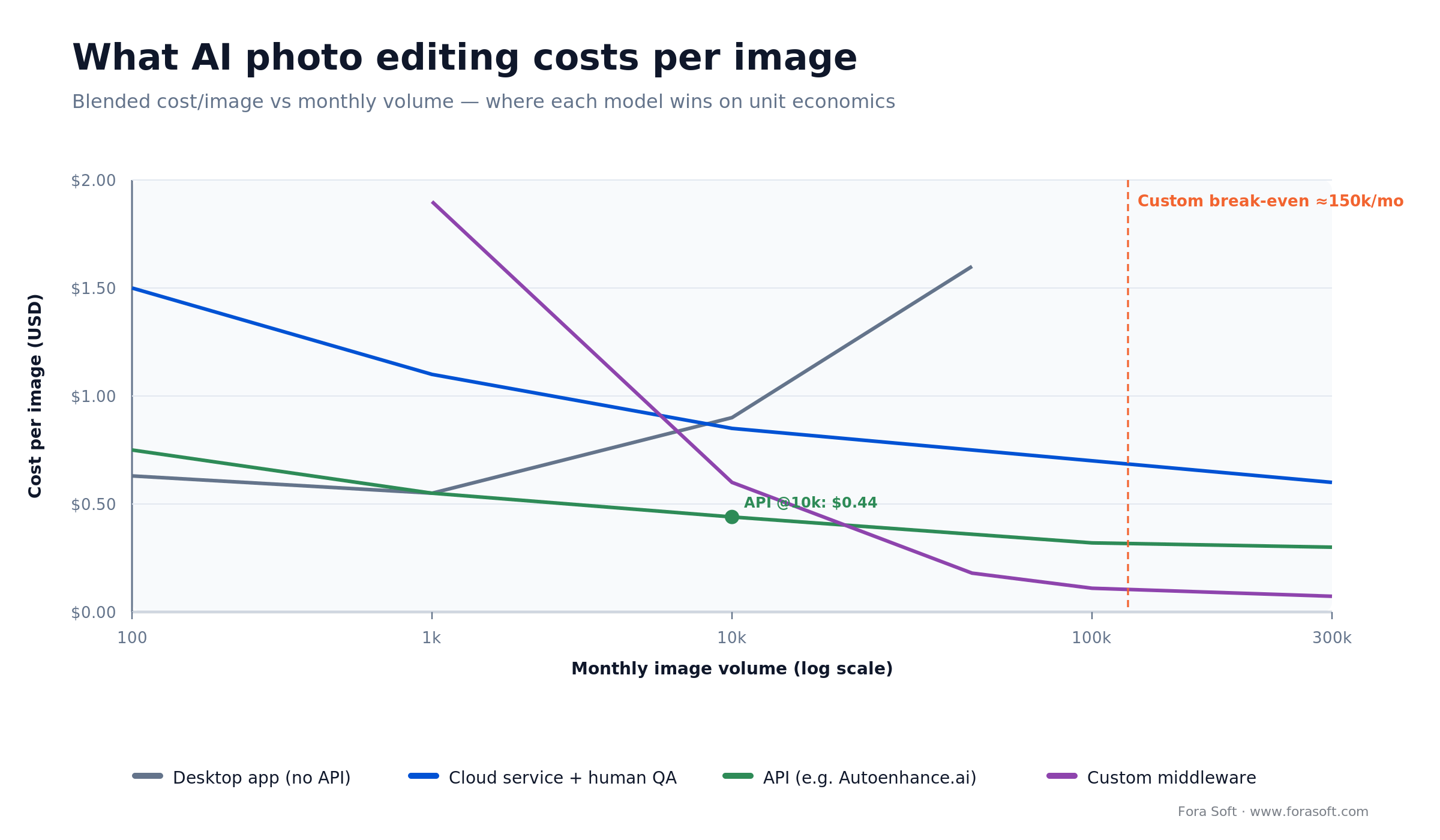
Figure 2. Cost per image by model and volume. An API sits cheapest through the mid-market; custom middleware only wins past ~150k images a month.
Solo agent — 600 images/month. Luminar Neo ($119 one-off, amortized ~$10/mo) + light labor of 30 seconds/image (5 hours at $60/hr = $300). All-in: about $310/month, or $0.52/image.
Small brokerage — 3,000 images/month. Autoenhance.ai Expert plan ($449, ~1,500 images) plus overage on the rest (~1,500 × $0.30 = $450) = $899, plus a few hours of QA (~$300). All-in: about $1,200/month, or $0.40/image — cheaper and faster than a human service at this scale.
Large brokerage — 15,000 images/month. PhotoUp with a dedicated editor at ~$1.00/image = $15,000/month. An API at ~$0.30/image lands near $4,500 if your team owns QA and delivery — the gap is the price of not having engineers.
Marketplace — 300,000 images/month. Custom middleware: GPU inference (batched SDXL-class on Modal or Replicate) at ~$0.04/image + storage/CDN ~$0.01 + ops amortized ~$0.02 = ~$0.07/image, about $21,000/month. Break-even against a $0.30 API is roughly 150,000 images a month — below that, don’t build.
Not sure which tier is yours?
Book a 30-minute call and we’ll run the cost math on your listing volume, SLA, and MLS stack, and tell you whether to buy an API or build — same day.
Reference architecture: seven layers
A production AI photo editing pipeline is seven layers at every scale, from a solo shooter up to a 300k-image marketplace. Skip one and you get either a compliance problem or a cost-per-image that won’t scale.
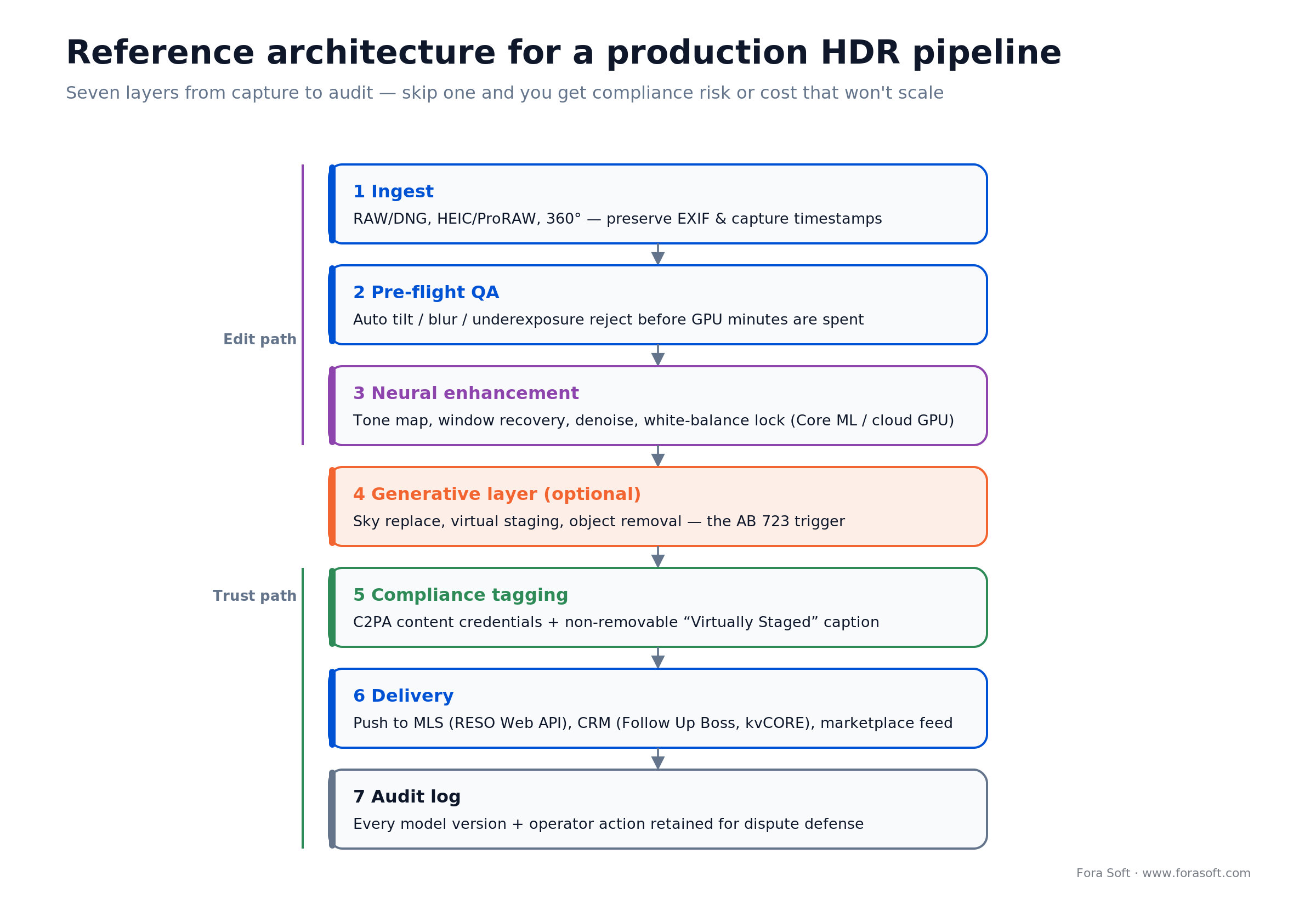
Figure 3. The seven layers. The generative layer (4) is where legal risk lives; layers 5–7 are how you defend against it.
- Ingest. DNG/RAW from a DSLR, HEIC/ProRAW from a phone, or a 360° stitcher. Preserve EXIF end to end — capture timestamps matter for disclosure.
- Pre-flight QA. Automated tilt, blur, and underexposure detection. Rejects go back to the shooter before you spend GPU minutes.
- Neural enhancement. Tone mapping, window recovery, denoise, white-balance normalization. On-device (Core ML, LiteRT) for privacy-sensitive flows; cloud GPU (Replicate, Modal, fal.ai) for batch.
- Generative layer (optional). Sky replacement, virtual staging, grass greening. This is the layer that triggers AB 723.
- Compliance tagging. C2PA content credentials stamped into the file, plus a “Virtually Staged” caption rendered as a non-removable overlay on any generative output.
- Delivery. Push to MLS (RESO Web API), CRM (Follow Up Boss, kvCORE), or marketplace feed (Zillow, Realtor.com, Redfin).
- Audit log. Every transformation, model version, and operator action stored — your defense if a listing is ever challenged.
Inside a real build: LAYRS
The most useful way to understand this stack is to see one we actually shipped. LAYRS is a custom AI HDR platform Fora Soft built for a real-estate client who wanted to kill the manual bracket-merge bottleneck without losing quality.
The situation: their photographers shot the classic three exposures per room (one under, one over, one correct), then merged them by hand. It was slow, needed real skill, and capped how fast listings could go live. They wanted the whole thing automated end to end.
The build: a user uploads three original frames to a web platform. The system merges them into one HDR image, then feeds that into a neural network we trained specifically for real-estate color correction — an IC-Light plus Stable Diffusion 1.5 fine-tune. Generic models don’t know what a warm oak floor or a north-facing kitchen should look like, so we also built a training interface: the client keeps feeding it original-and-final pairs, and the model sharpens on their own catalog over time.
The result, on the client’s own numbers: about 50% better color accuracy, 60% less noise, and 30% faster delivery than their manual workflow. Output also stays consistent across shooters, which is the part brokerages actually pay for. If you want the same kind of owned pipeline, book a scoping call and we’ll map it to your volume.
Is AI photo editing legal? AB 723, NAR, FTC
Yes, with disclosure — and in 2026 the disclosure line is now written into law, not just MLS policy. Enhancement is fine; altering what the property shows is what you must disclose. Three rules govern any US-facing workflow.
California AB 723 (effective January 1, 2026) requires any licensee who uses a digitally altered listing image to disclose it, and — if the photo is posted on a website — to include the unaltered original too. Crucially, the law excludes lighting, sharpening, white balance, color correction, straightening, cropping, and exposure. So pure HDR tone mapping is exempt; adding, removing, or changing physical elements (furniture, fixtures, flooring, walls, sky, landscaping) is not. A willful violation is a misdemeanor under California’s Real Estate Law. That is criminal exposure, not a civil footnote.
NAR Code of Ethics, Article 12 requires REALTORS® to present a “true picture” in advertising and marketing. An altered image that misrepresents the property — a view that isn’t there, a room that isn’t furnished — runs straight into that duty, regardless of what any state statute says.
FTC Section 5. There’s no real-estate-specific federal image rule, but the FTC’s general authority over deceptive advertising — reinforced by its 2023 Endorsement Guides and its 2024 push against deceptive AI claims — covers listing photos that imply something false about a property. Read it as the federal backstop behind the state rules.
The practical rule of thumb: if the edit only changed how the light looks, you’re clear. If it changed what a buyer would believe is physically there, label it “Virtually Staged” and keep the original one click away.
Decision framework: five questions
Every client conversation comes back to these five. Answer them and your stack picks itself — the diagram below is the short version.
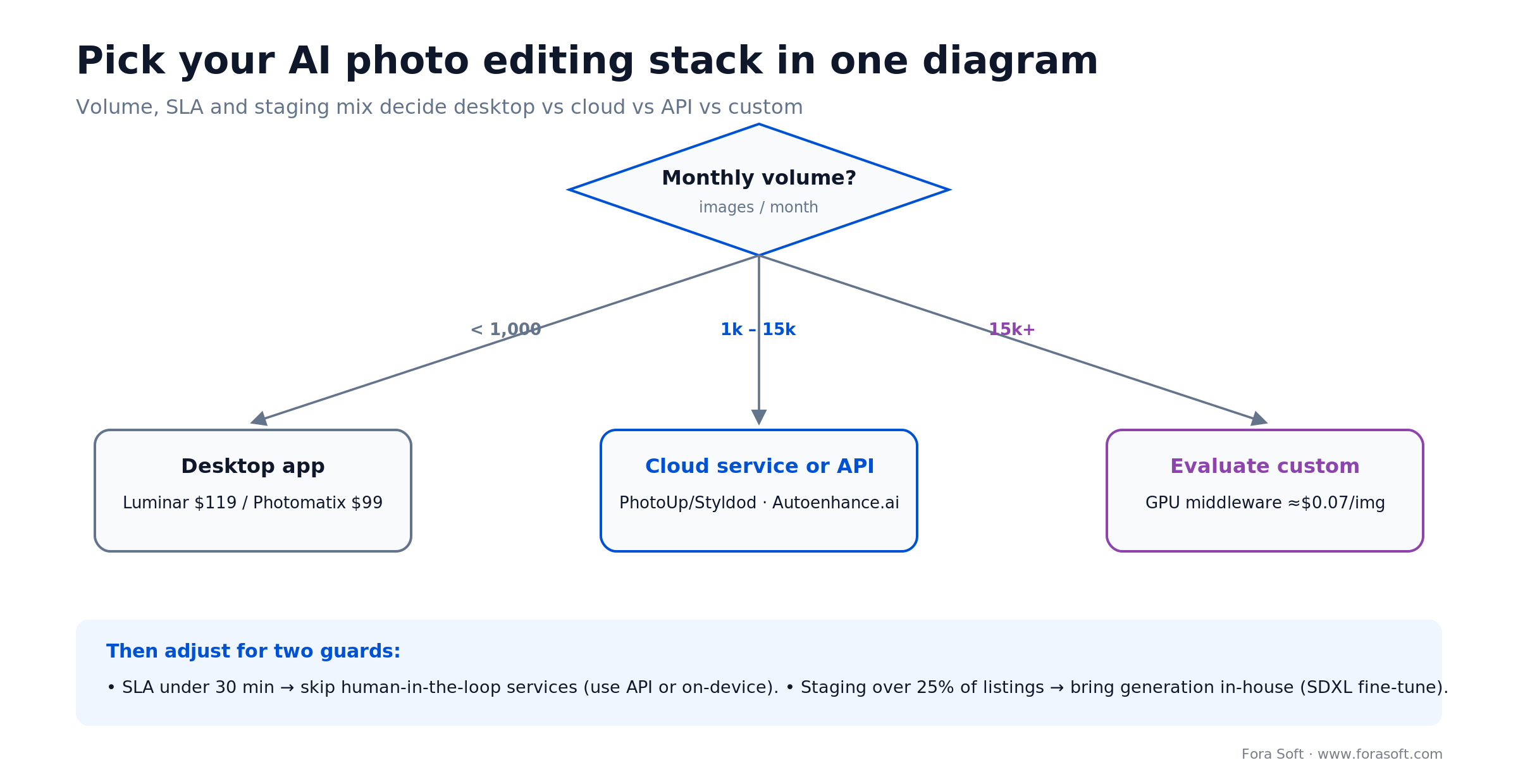
Figure 4. Volume sets the base choice; SLA and staging mix adjust it.
- Volume. Under 1,000 images/month, use a desktop app. 1,000–15,000, use a cloud service or an API. Above 15,000, evaluate custom.
- SLA. Need same-day? Skip human-in-the-loop services. Need under 30 minutes? You need on-device or a GPU-backed API.
- MLS / CRM integration. Already on kvCORE, Follow Up Boss, or BoomTown? Check their plugin catalog before you build anything.
- Virtual staging mix. Under 10% of listings, pay per image. 10–25%, reserve capacity. Over 25%, bring generation in-house with an SDXL fine-tune.
- Regulatory exposure. Operating in California? Disclosure tagging is table stakes — build the overlay into the pipeline on day one, not as a retrofit.
Build vs buy vs hybrid
Buy a service. BoxBrownie, Styldod, PhotoUp. Fastest to launch (days), predictable unit cost, zero MLOps. The ceiling is vendor dependency and a unit cost that rarely beats $0.50/image.
Buy an API. Autoenhance.ai or Adobe Firefly Services. You get pipeline behavior and integration without training a model — the right call for most teams from 1k to ~100k images a month.
Build custom. A fine-tuned Stable Diffusion model for enhancement plus GPU inference on Modal or Replicate. Break-even is around 150k images a month, and you need an ML engineer, a DevOps engineer, and roughly six to nine months. This is what our AI integration team does — the same computer-vision muscle behind work like our surveillance anomaly-detection pipelines.
Our default recommendation is hybrid: own the model for the 80% that’s plain HDR, call a vendor API for the 20% of hard generative cases (day-to-dusk, complex staging). That lands blended cost around $0.15–$0.25/image at mid-market volume without a full MLOps team.
Five pitfalls that kill AI HDR rollouts
The same failure modes show up again and again on imaging builds. Here’s what breaks and how to fix it.
- Halo artifacts at window edges. Old tone mappers ring bright halos around windows. Fix: use a 2024-or-later neural tone mapper that learned halo suppression from paired data.
- Color drift on dark interiors. Aggressive shadow recovery shifts wood tones orange. Fix: lock white balance to the capture-time value; don’t let the model re-estimate it from the enhanced frame.
- Sky mismatch with reflections. Segmentation swaps the sky but the windows still reflect the old gray one. Fix: run reflection inpainting on glass after any sky swap — most vendors skip this.
- Watermark obliteration. Upscalers erase the photographer’s watermark and break your licensing trail. Fix: watermark after enhancement, never before.
- Over-enhancement that fails AB 723. A “punchier” preset can nudge output from enhancement into depiction. Fix: cap enhancement strength for listing photos and route anything stronger through disclosure.
KPIs to measure from day one
Instrument these before you ship. Most teams skip them and then can’t prove ROI at the 90-day review. Note that click-through and days-on-market are things to measure on your own listings — there’s no reliable public benchmark, so run an A/B against a control cohort rather than trusting a vendor stat.
- Cost per edited image (target under $0.50 at 3k+/mo).
- Turnaround time, p95 (target under 30 minutes capture-to-MLS).
- Agent rework rate (target under 8% of sets need a manual re-edit).
- Disclosure coverage (target 100% — missing labels are your biggest legal risk).
- Listing click-through rate (measure AI-edited vs control; don’t assume a lift).
- Days-on-market delta (the business outcome — compare cohorts at 60 days).
When not to adopt AI photo editing yet
Not every team should go all-in. Three signals to wait.
- Under 100 listings/month. A local photographer at $75/set often beats any pipeline on unit economics and dodges the compliance overhead entirely.
- No listing CRM integration. If shooters still email JPEGs to agents, fix ingestion first. AI doesn’t fix process debt.
- Luxury above ~$5M. Buyers and photographers in this tier expect human-retouched imagery; AI enhancement reads as a downgrade signal.
A 12-week deployment playbook
The sequence we run with brokerages and PropTech platforms. Under eight weeks usually means you skipped shooter training and will pay for it in month four.
Weeks 1–2, Discovery. Volume audit, MLS/CRM integration inventory, compliance-exposure map by state, target cost-per-image.
Weeks 3–4, Vendor bake-off. Run 500 representative images through two desktop tools, a cloud service, and an API. Score on quality (blind rater panel), cost, and SLA.
Weeks 5–7, Pipeline build. Ingestion, pre-flight QA, enhancement, disclosure overlay, MLS push, with the audit log and C2PA stamping on the critical path.
Weeks 8–9, Shooter training. Capture standards (bracket when you can), the disclosure workflow, the rework loop. This is where rollouts die — budget real time here.
Weeks 10–11, Shadow launch. Run the pipeline in parallel with the existing photo house on 20% of listings and measure the deltas.
Week 12, Cutover. Full switch, then a 90-day KPI review cadence.
One thing worth stealing: run the shadow launch on at least 400 listings before cutover. Anything less and you won’t catch the edge cases — reflective floors, east-facing kitchens at 7 AM, stained glass — that blow up in production.
Is your listing flow AB 723 compliant?
We’ll audit your AI HDR pipeline against AB 723 and NAR Article 12 and hand you a gap list with a fix plan. Bring the stack you have.
FAQ
Is AI real estate photo editing legal on MLS listings?
Yes, with disclosure. Enhancement — tone mapping, denoise, white balance, exposure — is explicitly exempt under California AB 723. Generative changes like virtual staging, sky swaps, and object removal require a “Virtually Staged” label and the unaltered original alongside the listing.
How much does AI photo editing cost per image at scale?
Around $0.40/image at 3,000/month using an API with light QA, roughly $0.30–$1.00 at 15,000/month depending on how much QA you own, and about $0.07/image on custom middleware past 300,000. Break-even for building your own is near 150,000 images a month.
Do I still need bracketed exposures?
Neural tone mapping on a single well-exposed RAW gets you about 80–85% of bracketed quality. For high-end listings and mixed interior/exterior light, three-bracket capture still beats single-exposure reconstruction — which is why LAYRS is built around three frames.
What does California AB 723 require exactly?
A disclosure on any listing image that has been digitally altered to add, remove, or change physical features, plus the unaltered original when the photo is posted on a website. It took effect January 1, 2026, and a willful violation is a misdemeanor under California’s Real Estate Law. Lighting, color, and exposure edits are excluded.
Which AI real estate photo editing tool should I pick?
Under 1,000 images a month, Luminar Neo or Photomatix. From 1k to 15k, a cloud service (PhotoUp, Styldod) or an API (Autoenhance.ai). Above 15k with a sub-30-minute SLA, an API or a custom build. Volume and turnaround decide it more than brand.
Does Zillow Virtual Staging replace my staging vendor?
For Showcase listings, largely yes — Zillow’s September 2025 feature is built in and offers several furniture styles. For non-Showcase listings or custom styling, BoxBrownie and Styldod still win on flexibility. Either way, the disclosure rules apply.
Can AI replace my photographer?
For post-production, largely yes. For capture, no — you still need someone on-site composing frames, placing lights, and managing reflections. AI collapses the 20 minutes of retouching; the 45 minutes of shooting is still human work.
How does Fora Soft price a custom pipeline build?
It depends on MLS integrations and mobile-capture needs, so we scope it rather than quote a sticker price. We use agent engineering to keep estimates lower and faster than typical, and GPU runtime is pass-through. Book a scoping call and you’ll get a realistic number and a plan.
The short version
AI real estate photo editing in 2026 is a solved problem at every tier except the legal one. Desktop apps, cloud services, APIs, and custom builds all ship professional output faster and cheaper than a human retoucher. What separates winning rollouts from losing ones is pipeline design, shooter training, and wiring AB 723 disclosure in on day one instead of bolting it on later.
Read next
HDR
Real-Time HDR Processing for Virtual Property Tours
The 2026 playbook for HDR on live and 360° tours.
LEARN
The Complete HDR Guide: HDR10, Dolby Vision, HLG
Dynamic range and tone curves, explained from first principles.
COMPUTER VISION
Anomaly Detection in Surveillance Footage
How we build production computer-vision pipelines.
AI SYSTEMS
AI Content Recommendation: 2026 Buyer’s Guide
Cost math and architecture behind personalized feeds.
SERVICES
AI Integration Services
How we build production ML and imaging pipelines end to end.
To sum up
Match the tool to your volume, wire disclosure in from day one, and only build your own model once you’re past ~150k images a month. Fora Soft has shipped AI imaging pipelines from a few hundred to hundreds of thousands of images a month — including LAYRS, a real-estate HDR product built on a custom fine-tuned model. If you want a recommendation matched to your volume, MLS stack, and compliance exposure, we can get you one in a single 30-minute call.
Ready to cut your property-photo cost and turnaround?
Book a 30-minute AI photo editing review. We’ll audit your volume, MLS integration, and compliance exposure, and leave you with a buy-or-build recommendation the same day.

