

Key takeaways
• Real-time HDR processing fuses multi-exposure frames on the fly so bright windows and dark corners both stay readable inside a virtual property tour — not after a 20-minute post-production pass.
• HDR lifts engagement, not just pixels. Listings with a 3D tour draw up to 6× more engagement and 49% more qualified leads than photo-only ones (Matterport, 2024); HDR is what makes a tour read as premium instead of a flat gallery.
• Off-the-shelf vs custom is the real decision. Matterport, Giraffe360, and Zillow 3D Home cover the 80% case; a bespoke HDR pipeline only earns its keep when you need branded UX, MLS/CRM integration, or AI staging guardrails none of the SaaS tools give you.
• Expect a custom MVP in 10–16 weeks. A mobile capture app + Metal/Vulkan tone-mapping + WebGL viewer lands in that window when the team has shipped real-time video pipelines before; enterprise builds with Gaussian Splatting and CRM hooks run 6–10 months.
• Most teams burn budget on the wrong layer. Ghosting, color banding, and HDR→SDR fallback eat weeks of calendar time; smart vendors solve them with shader-level fixes, not more hardware.
Walk into any sunlit listing in real life and your eyes handle it without thinking: the window frame stays readable, the bookshelf in the corner does too. Point a phone camera at the same scene and you get one of two useless results: blown-out windows or a black cave. Real-time HDR processing is the fix that makes virtual property tours look the way the home actually looks, while the buyer is scrubbing through it in the browser, not three hours later in Premiere.
This guide is written for product owners, CTOs, and proptech founders who are about to spec or buy a virtual-tour pipeline and want to know which parts of the HDR stack are worth building, which parts to buy, and where teams most often lose a quarter of engineering time on avoidable problems. It is based on our own work shipping real-time video systems for Netflix-, HBO-, and EA-grade workflows at Fora Soft, plus what the best proptech platforms in 2026 are actually doing under the hood.
Why Fora Soft wrote this playbook
Fora Soft has been shipping video-heavy software since 2005: 250+ projects, specialized in real-time video, streaming, and computer vision. We built Speed.Space, a remote video production platform that records at 1080p/8 Mbps (roughly 5× a standard video-call bitrate) so producers for Netflix, HBO, and EA can cut on the footage the same day it is shot. We shipped VALT, a secure video surveillance and review platform trusted by 770+ US organizations (police departments, medical institutions, and child-advocacy centers), where color fidelity is evidentiary, not decorative.
That background matters here because real-time HDR for virtual tours is fundamentally the same problem as real-time HDR for live production: you have a GPU budget of 8–16 ms per frame, a pipeline that cannot drop a frame without breaking the illusion, and a user who will screenshot the worst moment and post it. The teams that get it right have shipped real-time video before. The teams that get it wrong assume HDR is “just a filter” and ship a demo that ghosts the second you turn your head.
We use Agent Engineering on every build: AI agents sit next to our senior engineers, reading the same spec, writing the scaffolding, running the tests. That is why our MVPs land in weeks rather than quarters, and why our estimates for an HDR tour pipeline tend to be lower than the numbers you will see quoted elsewhere in this article from other sources.
Scoping a virtual property tour with real HDR?
Bring the stack you are considering (Matterport, Giraffe360, custom) and we will tell you in 30 minutes whether you need to build, buy, or hybrid — no pitch deck.
What real-time HDR processing actually does in a virtual tour
A residential interior routinely spans 14–18 stops of dynamic range (sunlit window frame to shadowed hallway), while a phone or 360 camera sensor captures 10–12 stops in a single exposure. HDR processing closes that gap. In a real-time tour, it does it frame-by-frame instead of once in post, so the captured scene looks like the scene your buyer would see standing there.
Under the hood, the pipeline is four stages: capture, fuse, tone-map, display. Each stage has a latency budget and a quality failure mode; the whole pipeline has to stay under 16 ms per frame if you want the 60 fps that VR headsets demand.
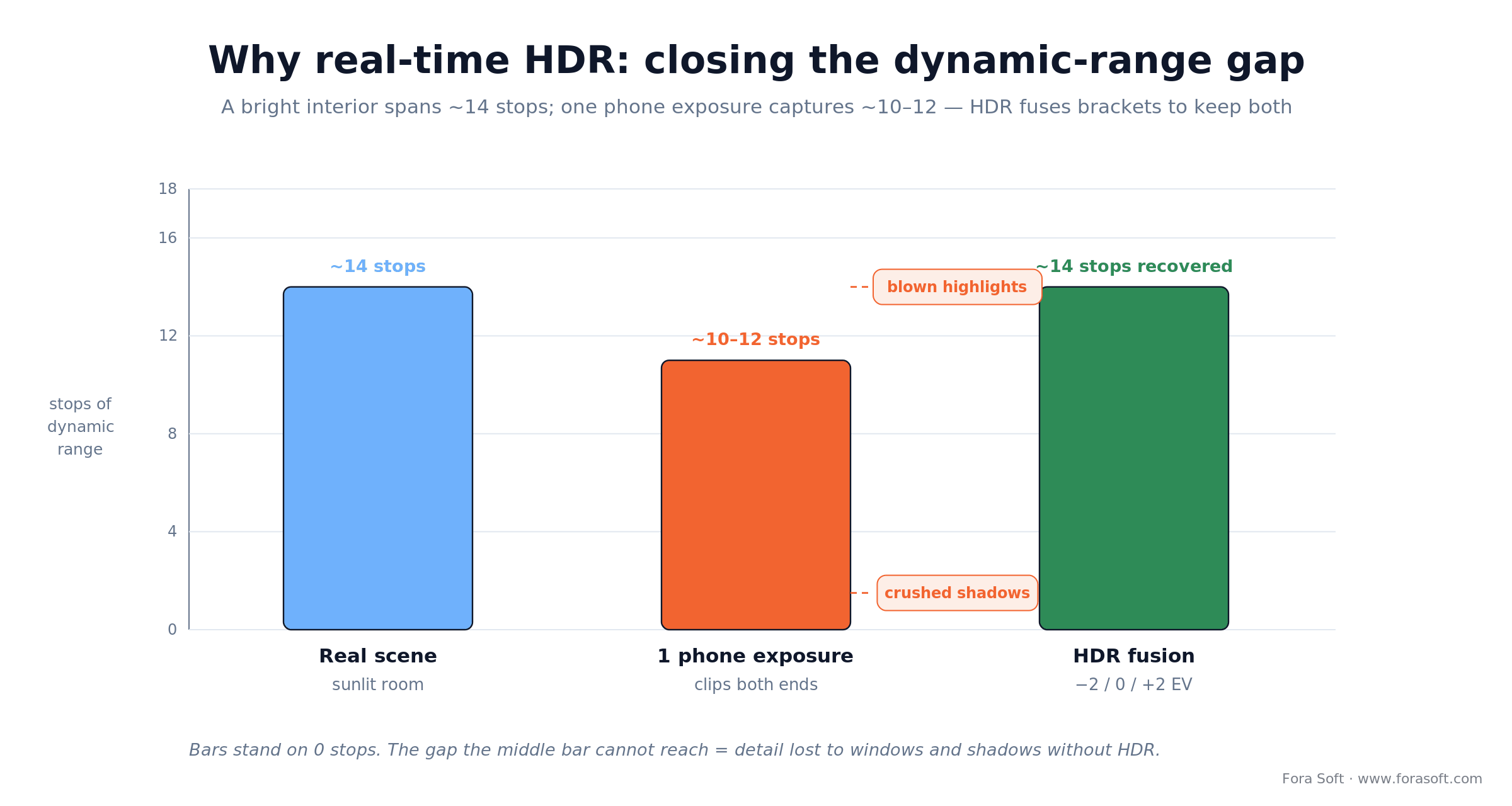
Figure 1. Why real-time HDR exists — it fuses bracketed exposures to keep both the bright window and the shadowed corner readable.
1. Multi-exposure capture
The camera shoots 2–5 exposures in rapid succession, typically EV−2, 0, +2, within a 30–80 ms window. At this stage your biggest enemy is motion between frames: hand wobble during a phone capture can shift the scene 5–20 pixels, and that becomes ghosting the moment you blend the frames.
2. Exposure fusion
Mertens-style fusion blends the exposures weighted by contrast, saturation, and well-exposedness. Run on a recent Snapdragon 8-series or Apple A18/A19, a 2048×2048 fusion takes 20–100 ms depending on pyramid depth. On cloud GPUs it is sub-10 ms and lets you push fused frames over WebRTC to a web viewer in near-real time.
3. Tone mapping
A 12-bit fused frame gets compressed to the 8–10 bits that the target display can show. Global tone mapping (Reinhard, ACES) is fast and safe but flat. Local tone mapping (Durand, bilateral filtering) keeps micro-contrast but needs multi-scale Gaussian pyramids and a conservative compression curve, or you get halos around bright edges and posterization in the sky.
4. Display-aware delivery
Most consumer screens still do 100% sRGB and ignore HDR metadata. Your pipeline needs a dual-render path: HDR10 or PQ (SMPTE 2084) for capable phones, Vision Pro, and Quest 3; a tone-mapped SDR fallback for everyone else. Skipping this is the single most common launch bug in 2025–26 proptech releases we audit.
The proptech market snapshot: why HDR tours matter in 2026
Virtual tours moved from nice-to-have to table-stakes sometime between 2020 and 2023, and HDR quality is now what separates a listing that feels premium from one that feels like a Zillow screenshot.
The concrete numbers from Matterport, NAR, and proptech benchmarks worth quoting to a board:
- Engagement. Listings with a 3D tour draw up to 6× more engagement and 49% more qualified leads than photo-only listings (Matterport’s own data, 2024).
- Speed and price. Matched-listing data has homes with a 3D tour selling up to 31% faster and for up to 9% more; vendor-reported, so read it as directional, but the direction is consistent across studies.
- Buyer confidence. Buyers self-qualify before they ask for a showing; Matterport’s survey puts the drop in buyer hesitation near 54%.
- HDR is the premium signal. Once a listing has a tour, HDR is what separates “feels like the house” from “flat Zillow screenshot”: same pixels, very different first impression.
- Captured inventory. Matterport alone has captured 14 million+ spaces across 177 countries as of 2025; the gap between “has a tour” and “has a premium tour” is where HDR now lives.
Capture hardware: what your team will actually point at the property
Hardware choice drives every downstream decision: exposure control, bracketing API, color space, streaming codec. Four options cover 95% of real-world deployments.
1. Matterport Pro3. Dedicated LiDAR 3D scanner with RGB, list price around $5,995 after the May 2025 increase, plus a subscription from ~$65/mo. Best-in-class scan quality, tight HDR tone mapping, proprietary SDK. Buy it when you are powering a commercial-real-estate workflow where the tour is the deliverable and you do not need to customize the viewer.
2. Ricoh Theta Z1. Single-shot HDR 360 camera, ~$600, dual 1-inch sensors, direct HDR DNG output. Widely used by Giraffe360 and independent shooters. Strong option when operators shoot 10–30 properties a week and want speed over pixel-peeping.
3. Insta360 X4 / X5. 8K 360 capture with active HDR, ~$500–550; the X5 landed in April 2025 with larger 1/1.28-inch sensors and swappable lenses. Low floor, high ceiling, and the public SDKs make it the default for custom apps. If you are building a proprietary tour product, this is the camera you will prototype against.
4. iPhone Pro (with LiDAR). No extra hardware cost for the agent. Computational photography handles bracketing; LiDAR gives you depth for rough 3D reconstruction. The iPhone workflow wins when your target user is the listing agent, not a dedicated tour operator.
Reach for iPhone-first capture when: your ICP is the solo agent or small brokerage, and you can’t bottleneck distribution on $500+ hardware they have to buy and learn.
Reach for 360 hardware when: your tours are shot by a pro-sumer operator doing 5+ properties a day, and single-shot HDR bracketing (Theta Z1, X4) collapses capture time below 60 seconds per room.
Platforms compared: Matterport, Giraffe360, Zillow 3D Home, and custom
The trap most proptech teams fall into is spending a quarter of discovery re-deriving features that a SaaS platform already ships. Use this matrix to pick your lane — then only build what each column cannot give you.
| Platform | HDR Quality | Hardware Lock-in | Cost | Best Fit |
|---|---|---|---|---|
| Matterport | Top-tier (Pro3) | High (Pro3 or partner) | $5,995 hw + $65–309/mo SaaS | Commercial RE, enterprise brokerages |
| Giraffe360 | Strong (multi-exposure) | Medium (Theta-based) | $99–299/mo | Volume shooters, small-brokerage franchises |
| Zillow 3D Home | Moderate (AI reconstruction) | Low (smartphone) | Free to agents; enterprise API priced | US residential listings on Zillow network |
| Cupix | Strong (AI stitching) | Low (GoPro / 360) | $40–150/mo | Construction progress + real estate hybrid |
| Asteroom / iStaging | Light (AI upsample) | Low (phone) | Free to $49/mo | Volume-first SMB agents; AI-staging overlay |
| Custom pipeline | Whatever you build | Zero | From ~$60K MVP | Branded proptech, MLS integration, AI staging |
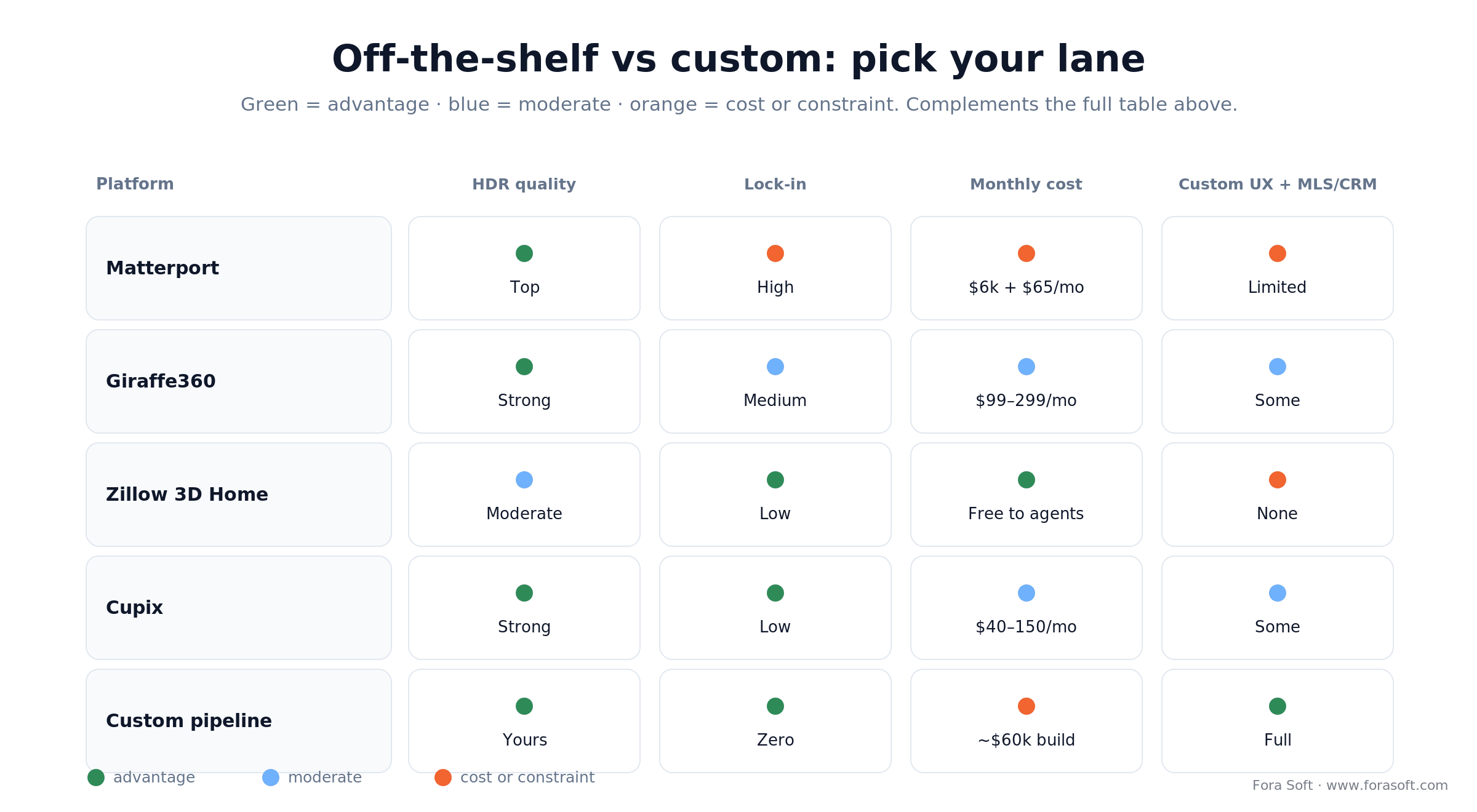
Figure 2. Off-the-shelf platforms cover the volume case; a custom build earns its keep on branding, integration, and delivery control.
A reference architecture for a custom real-time HDR tour pipeline
The diagram below is the pipeline we land on 9 times out of 10 when we build an HDR virtual tour from scratch. Every stage is either a Metal / Vulkan shader on device or a CUDA / WebGPU pass on a rendering node. The arrows are the 8–16 ms latency budget.
| Stage | Where it runs | Latency budget | Output |
|---|---|---|---|
| Multi-exposure capture | Device camera driver | 30–80 ms | 3–5 RAW frames, 12-bit |
| Alignment & deghost | On-device GPU (Metal/Vulkan) | 4–8 ms | Motion-corrected stack |
| Exposure fusion | Device GPU or edge node | 4–10 ms | Fused HDR linear-light |
| AI denoise / sharpening | Device NPU or edge GPU | 3–8 ms | Cleaner HDR frame |
| Tone mapping (local) | Device GPU | 2–5 ms | SDR or HDR10 frame |
| Encode (HEVC / AV1) | Device hw encoder | 1–3 ms | Stream-ready frame |
| Delivery (WebRTC / HLS) | Edge / CDN | 100–400 ms e2e | Tour client (web / VR) |
For the delivery layer, a custom SDK on top of WebRTC is the default. If you want a deeper look at how we design these, we broke it down in our WebRTC architecture guide for 2026; for the AI parts, see real-time video processing with AI: best practices.
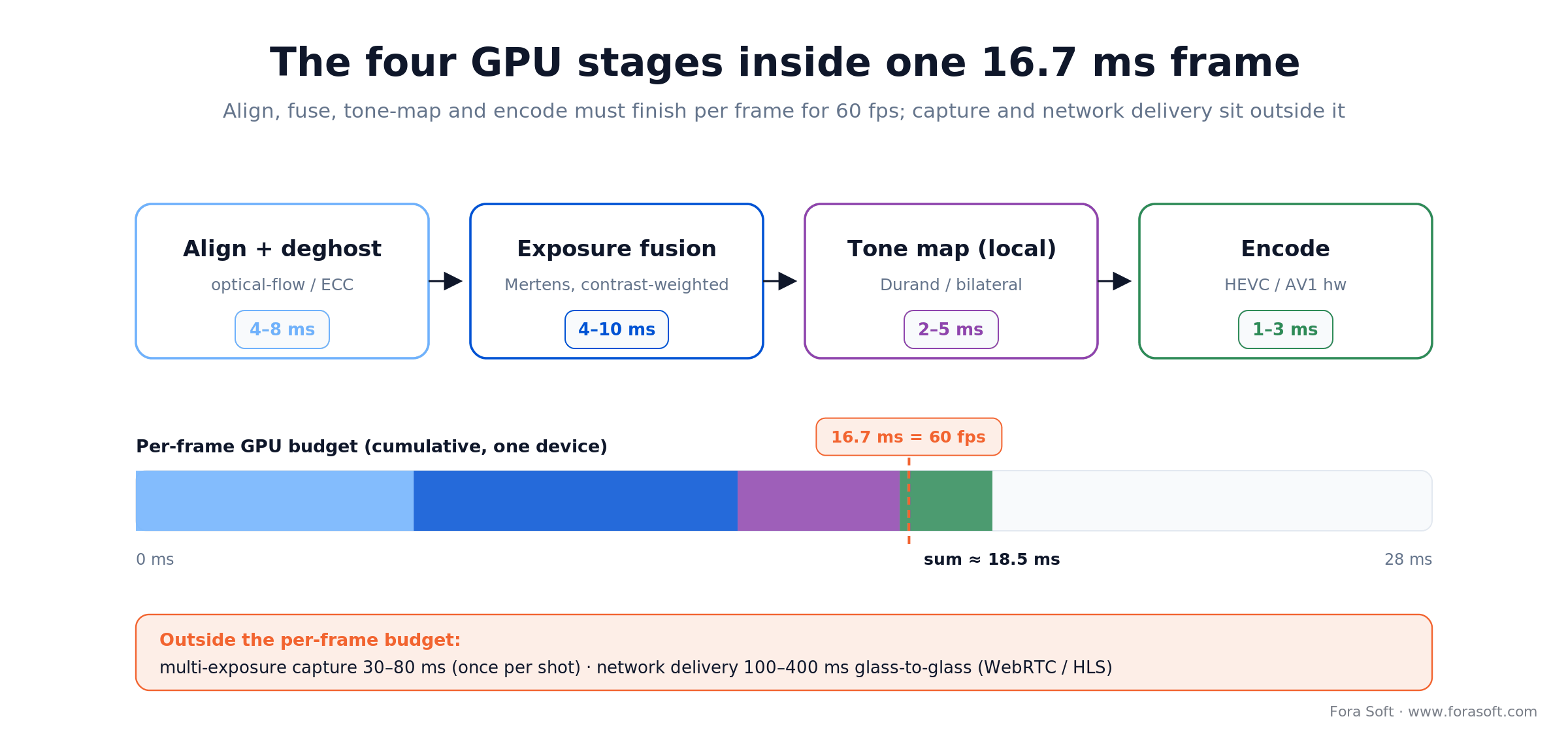
Figure 3. The four GPU stages that must finish inside one 16.7 ms frame; capture and network delivery sit outside that budget.
Reach for on-device fusion when: your target is ≥ 30 fps live preview on a mid-range phone. Edge fusion wins only when you need consistent, device-independent color across a fleet of capture operators.
Where AI actually earns its keep in an HDR tour pipeline
“AI” gets used as a catch-all in proptech demos, so it helps to be precise about which model solves which problem. Four places are worth the engineering cost. The rest are marketing.
1. Deghosting and motion compensation. A small optical-flow network aligns exposures when the shooter moved during the 60 ms bracket. This is the single highest-ROI use of AI in the pipeline — it kills the #1 visual bug reviewers screenshot.
2. Single-image HDR reconstruction. Diffusion or GAN models infer highlight and shadow detail from a single 8-bit input. Useful when you cannot bracket — legacy photos, dashcam frames — but introduces hallucinated details, so never ship it on listing photos without disclosure.
3. AI denoise. A lightweight U-Net cleans the underexposed frame in the bracket so it can contribute shadow detail without injecting ISO noise. Runs on-device on Neural Engine / NNAPI in under 8 ms per frame.
4. Novel-view synthesis (Gaussian Splatting, NeRF). The one transformative addition from 2024–26. Given 40–200 HDR captures of a room, 3DGS produces a photorealistic 3D scene the buyer can fly through at 60 fps, with HDR lighting baked in. Scene build time has dropped from hours to 10–30 minutes on a single A100-class GPU.
If you want a broader map of where AI genuinely pays in video pipelines, this piece on AI-powered video streaming apps covers the parallel stack for live delivery.
Cost model: what a custom HDR tour pipeline actually budgets for
Most cost write-ups in 2025 pricing guides quote $90K–$280K for an MVP and $300K–$800K for enterprise, usually assuming a traditional team. With Agent Engineering, those numbers compress meaningfully: the scaffolding, test rigs, and shader boilerplate take days rather than weeks. A realistic Fora Soft estimate for a similar scope looks like this (all figures order-of-magnitude, ranges, not promises):
- Mobile HDR capture app (iOS + Android). Multi-exposure bracketing, preview, upload. 3–5 weeks.
- Tone-mapping & fusion shaders. Metal + Vulkan + WebGPU fallbacks, tuned for 60 fps. 3–6 weeks.
- Cloud fusion & scene build. If you add Gaussian Splatting or NeRF for walkable tours, budget another 6–10 weeks plus a GPU fleet.
- Web viewer (WebGL / WebGPU) and VR build (Vision Pro / Quest 3). 2–4 weeks for the web viewer alone; another 2–3 weeks to ship the VR build.
- MLS / CRM integration. Highly variable. MLS ingest via RESO Data Dictionary media fields + common CRM webhooks is 1–3 weeks; enterprise bespoke integrations eat their own quarter.
On a per-tour run-rate basis, the math that actually drives CFOs is: iPhone capture costs less than a dollar per tour to run once software is paid; a Matterport Pro3 workflow closer to $5–10 per tour when you amortize hardware and SaaS; Giraffe360 in between. HDR does not change those numbers meaningfully — the GPU compute is already in your device.
Worked example. Take a mid-sized brokerage shooting 200 tours a month. A Matterport-class SaaS runs roughly $309/mo for the plan plus ~$7 per tour amortized — call it $309 + 200 × $7 ≈ $1,700/mo, and it recurs forever. A custom iPhone-capture pipeline is ~$60K to build, then ~$1/tour to run, about $200/mo. Set them side by side and the lines cross near month 40 (~3.3 years): before that SaaS is cheaper, after it the custom build wins, and that is before you count the branding, MLS wiring, and AI-staging control you only get from owning the stack.
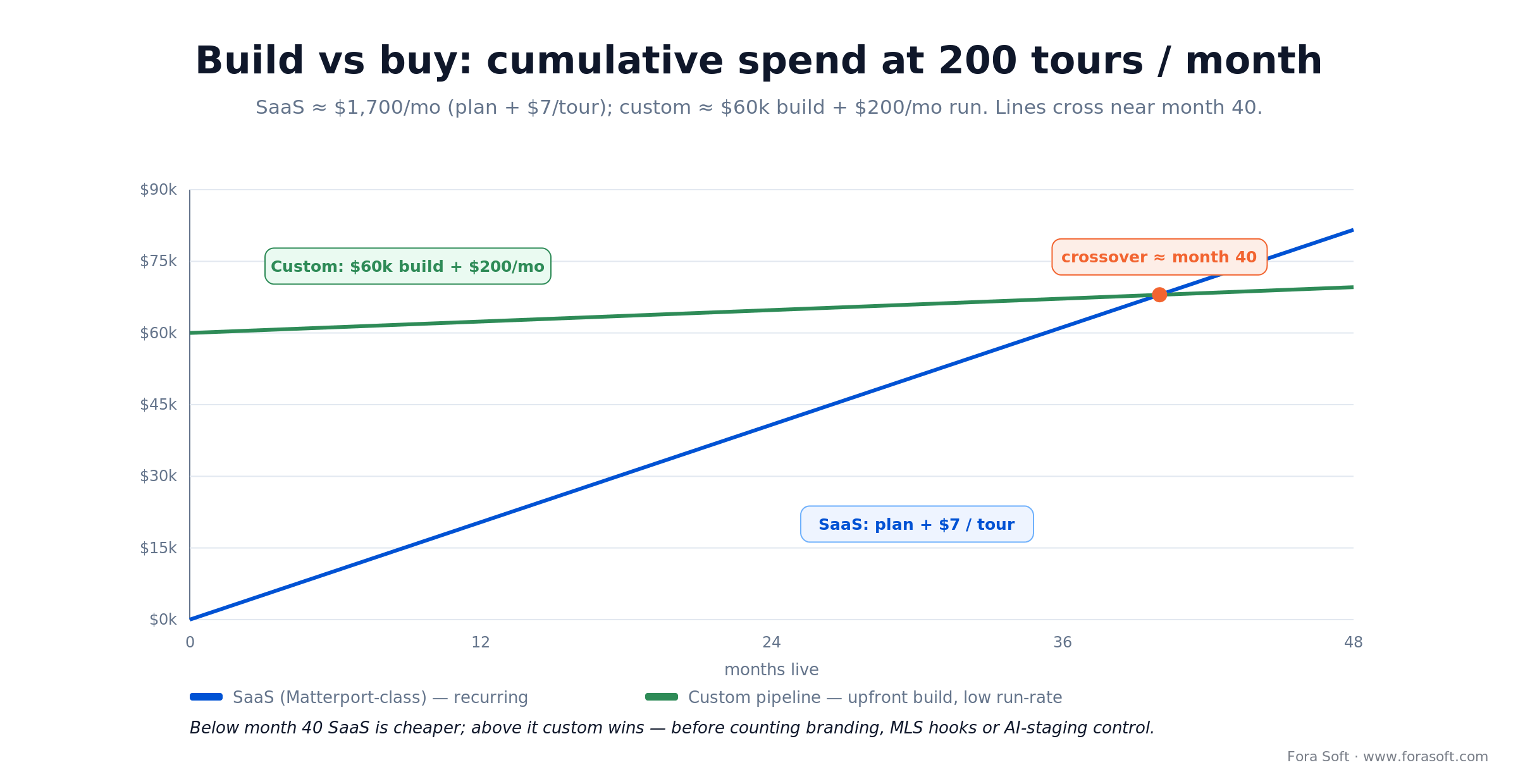
Figure 4. A worked build-vs-buy crossover for a 200-tours/month brokerage — custom pulls ahead in year ~3.
Need a sharp estimate on your exact pipeline?
Send us your capture hardware, viewer targets, and MLS integration list — we will give you a week-level estimate in two business days, no commitment.
Mini case: what we learned shipping real-time video at Netflix/HBO scale
Situation. Speed.Space, a remote video production platform we built for productions that ship to Netflix, HBO, and EA, needed to stream 1080p at 8 Mbps (roughly 5× the bitrate of a standard Zoom call) so directors could cut on the footage the same day it was shot. HDR color had to survive the round trip through WebRTC and the storage layer without drifting, or colorists would reject the grade.
12-week plan. We cut the pipeline into capture, edge fusion, tone mapping, and delivery. The alignment shader and the tone-mapping LUT took most of the bug-fix time; the WebRTC transport layer, our bread and butter since 2005, shipped on schedule. The breakthrough was moving local tone mapping to the device GPU instead of the edge node, which cut glass-to-glass latency by ~40% and eliminated a multi-region color drift we had been chasing.
Outcome. Before Speed.Space, post-production editors waited hours for dailies at 1080p; after, they cut live at 5× bitrate. The lesson for proptech HDR pipelines is direct: put tone mapping as close to the camera as possible, and treat the delivery layer as a transport problem, not a video problem. Want a similar assessment on your tour pipeline?
A decision framework — pick your HDR tour path in five questions
1. Do you need branded UX and a custom domain? If the tour URL has to live on tours.yourbrand.com with your theme and logo as a default, Matterport and Zillow drop out and you are in Giraffe360, Cupix, or a custom build.
2. Do you own the shooting workflow or is it self-serve? If your users are dedicated tour operators, pay ~$5,995 for a Pro3 — the output quality is worth it. If the capture has to happen on a listing agent’s iPhone, SaaS platforms that depend on 360 hardware are non-starters.
3. Do you need integrations that no SaaS gives you? MLS ingest, a custom CRM trigger, an appraisal-ready PDF export — each of these nudges you toward a hybrid (SaaS capture + custom backend) or fully custom build.
4. Is AI staging or generative lighting part of the product? All three SaaS leaders now ship some flavor of AI staging, but none of them give you the policy control (disclosure, fair-housing audit, MLS compliance) you will want if staging is core to your GTM. Custom wins here.
5. What does the delivery device distribution actually look like? If more than 20% of sessions are on Vision Pro, Quest 3, or a high-DPI 10-bit phone, you need a first-class HDR10 delivery path, not a tone-mapped SDR fallback. That is a real engineering commitment that SaaS tours currently do not solve gracefully.
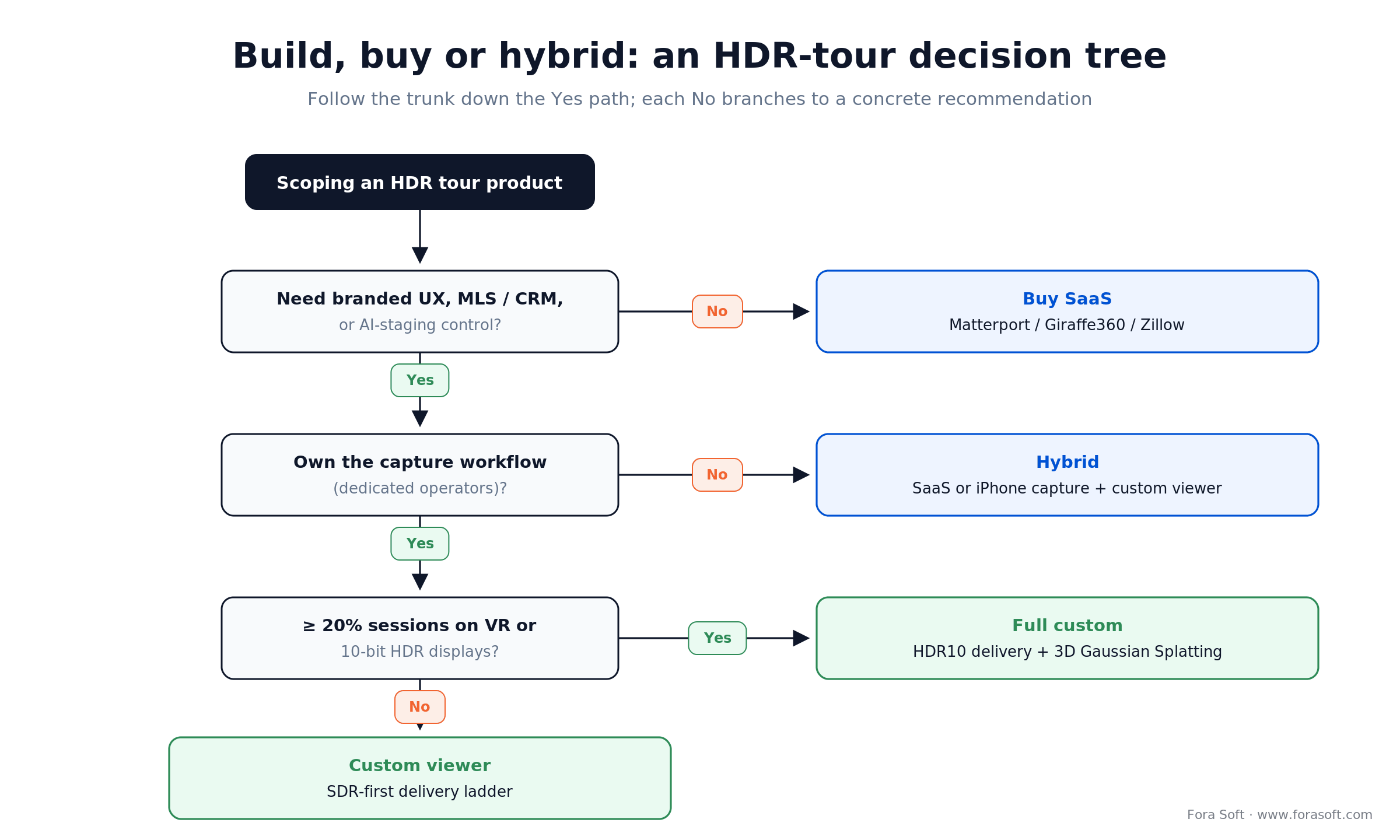
Figure 5. A five-question path from ‘scoping a tour’ to buy, hybrid, or full custom.
Five pitfalls that burn quarters on HDR tour projects
1. Assuming the fusion fix is a filter. Ghosting and banding are registration problems, not colorimetry problems. Teams that skip the alignment shader and go straight to tone mapping spend 2–3 weeks debugging artifacts that a proper optical-flow pre-pass would have killed in a day.
2. Ignoring the SDR fallback. The moment your tour hits a 2021 Android mid-ranger with an 8-bit sRGB panel, the HDR10 signal clips and the scene goes neon. Ship the dual-render path on day one, not after the first App Store review.
3. Underestimating MLS / listing compliance. HDR tone mapping is always fair game; AI staging and generative lighting are increasingly regulated. California’s AB 723 took effect January 1, 2026, NAR ethics already require disclosure nationwide, and ~38 states now have some rule. Build the disclosure UX before the AI-staging shipper gets creative.
4. Treating HDR as the hero metric. Buyers do not care that a tour is HDR; they care that it feels right. A perfectly tone-mapped tour with laggy pan is worse than a slightly flat tour that runs at 60 fps. Latency first, HDR second.
5. Shipping before accessibility. WCAG 2.1 AA is the floor, not the ceiling. Keyboard pan controls, alt-text for key rooms, and a 2D photo fallback for screen readers are not optional. Fair-housing audits have started flagging virtual-tour accessibility gaps.
KPIs: what to measure after you ship an HDR tour
Quality KPIs. Measure tone-mapping consistency across devices (delta-E < 3 on a reference palette), ghosting frame rate (< 1% of frames flagged by a simple SSIM regression), and sustained frame rate under real network conditions (p95 ≥ 55 fps on target devices). These are the numbers that separate a premium tour from a demo.
Business KPIs. Dwell time per tour (target 4+ minutes), tour-to-showing conversion (target > 25%), offer-rate delta against a photo-only control (target ≥ 5%), and cost per qualified lead (target 40–60% below photo-only baseline). Tie the dashboard to your MLS feed if you can.
Reliability KPIs. Tour load time (target < 2.5 s on 4G), error rate on capture (< 1%), and session abandon rate on the viewer (< 15%). These are the numbers that prevent your listing agents from going back to photo-only listings the first time a tour fails mid-open-house.
Emerging trends that will reshape HDR tours through 2027
Gaussian Splatting and neural radiance fields. The big leap of 2025–26 is that 3DGS gives you photo-real walkthroughs at 60 fps in a browser from a modest set of HDR captures. Zillow and Matterport are both investing; expect production-grade 3DGS viewers in most tier-1 proptech stacks by late 2026.
Vision Pro and Quest 3 as first-class viewers. Around 5–15% of high-end buyers will preview properties in a headset by 2027 on current adoption curves. HDR10 + spatial audio is the format to target; mono pan-tilt tours will feel like 2015 video.
Generative lighting and staging. Automatic shadow-fill and AI furniture placement are already in iStaging, Virtually Staging, and emerging Matterport plugins. The regulatory overhang (MLS disclosures, state-level virtual-staging rules) means only buyers with custom pipelines will be able to ship staging safely at scale.
On-device multi-exposure on flagship phones. iPhone 17 Pro and current Galaxy/Pixel flagships already run multi-exposure fusion continuously in the viewfinder. Within 18 months, dedicated 360 hardware will matter mostly at the commercial end of the market. For residential, the phone is winning.
Live collaborative tours. Agent-narrated live tours over WebRTC — the buyer, the agent, and the 3D scene in the same session — are starting to ship. HDR has to survive WebRTC, which means HEVC with HDR10 metadata or AV1 with PQ. This piece on custom WebRTC SDKs covers that layer.
Compliance: MLS, accessibility, and fair housing
MLS and RESO. The National Association of Realtors and regional MLS boards allow virtual tours without format restrictions. The standard that matters is RESO — the Real Estate Standards Organization Data Dictionary every US MLS maps to, which already defines media fields for tours (MediaCategory = ‘Branded Virtual Tour’, MediaURL). Map your tour output to those fields on day one and syndication is a config change, not a rebuild.
Image authenticity. HDR tone mapping is uncontroversial; generative AI staging is not. California’s AB 723 took effect on January 1, 2026 as the first state law aimed at digitally altered real-estate photos; NAR’s Code of Ethics (Article 12) already requires truthful advertising nationwide, and roughly 38 states have adopted some form of virtual-staging disclosure rule by 2026. If your product includes any generative element, build the disclosure UX into the first release.
Accessibility. WCAG 2.1 AA demands keyboard navigation, text descriptions of key rooms, and a 2D fallback for screen readers. Matterport and Cupix meet AA out of the box; custom builds must audit. Fair-housing regulators have started flagging missing accessibility paths on virtual tours.
Data protection. If your tour captures metadata about the occupant (names on mail, photos on walls), treat the data pipeline the way a SaaS would treat PII: encryption at rest and in transit, retention limits, and user-initiated deletion.
When HDR is not worth building
Not every tour benefits from real-time HDR, and some teams are better off skipping it for a cycle.
Your inventory is dark or uniformly lit. Basement units, warehouses, interior condos with no windows, and studio-lit new-construction showrooms often have < 6 stops of dynamic range. Standard tone curves get 95% of the way there; HDR is a rounding error.
Your users cannot tell. If your listing distribution is 80%+ Zillow-embedded viewer on a mid-range Android phone, you are tone-mapping to sRGB anyway and HDR investment gets absorbed.
Your conversion rate is already at ceiling. If your tour-to-showing conversion is already > 40%, HDR is marginal — put the quarter into lead quality, not lens quality.
You do not own the full stack. If you are a franchise that ingests photos from independent operators, you have no control over capture bracketing. Buy a SaaS and invest the engineering spend elsewhere.
Second-opinion on your HDR or virtual tour build?
We have shipped this exact stack — real-time video, AI in the pipeline, WebRTC delivery — for Netflix-scale production and 770+ surveillance organizations. Tell us your bottleneck.
Integration checklist: MLS, CRM, and listing distribution
A premium HDR tour that does not flow into the MLS feed and the agent’s CRM might as well not exist. Before engineering begins, lock in five integration decisions.
- Listing syndication. Where the tour URL has to appear (Zillow, Redfin, Realtor.com, regional MLS boards). Each has its own upload rules.
- CRM hooks. Which CRM (Salesforce, HubSpot, Follow Up Boss) receives events when a buyer finishes a tour — and which events (tour start, tour complete, time-in-tour, specific-room-viewed).
- Appraisal and inspection PDFs. Whether the tour produces a static asset (screenshots, room-by-room PDF) for downstream workflows that cannot consume an interactive tour.
- Analytics stack. Mixpanel/Amplitude or a first-party pipeline, and which events are PII-safe.
- SSO and access control. Who can view a tour (public, buyer-only with login, broker-gated). This is where compliance meets UX.
HDR streaming: HEVC, AV1, and the SDR fallback
HDR10 (PQ, SMPTE ST 2084) and Dolby Vision are the production metadata standards. HEVC (H.265) and AV1 are the codecs that carry them. For a virtual-tour pipeline in 2026, HEVC is the safe default because all modern Apple devices, most Android flagships, and Vision Pro / Quest 3 hardware-decode it. AV1 is the better bet for long-form streaming and will pass HEVC in adoption by 2027, but it is currently a second pass.
Bandwidth is the trade-off: HDR10 adds roughly 1.5–2× the bitrate of comparable SDR content. Adaptive bitrate streaming (DASH / HLS) with an SDR fallback ladder is the production answer — serve HDR when the client negotiates it, SDR otherwise. This is exactly the kind of pipeline our video & audio streaming team builds and stabilises. Our edge-computing guide for live streaming covers how to place the HDR encoders on the edge so delivery stays under 400 ms glass-to-glass.
Reach for AV1 when: your product relies on long-form recorded tours and you can wait 12–18 months for the encoder/decoder ecosystem to catch up. For live WebRTC tours in 2026, HEVC + HDR10 is still the pragmatic default.
FAQ
What is real-time HDR processing in a virtual property tour?
Real-time HDR processing captures multiple exposures of a scene in rapid succession, aligns and fuses them on the GPU, applies local tone mapping, and delivers the result at 30–60 fps so the tour looks balanced the moment the viewer loads it — not after a 20-minute post-production pass. It is the technology that lets a sunlit kitchen and a shadowed hallway both stay readable inside the same frame.
Does HDR really change buyer behavior, or is it just a vanity metric?
Matterport’s own data puts 3D tours at up to 6× more engagement and 49% more qualified leads than photo-only listings, with homes selling up to 31% faster and for up to 9% more (2024, vendor-reported). Buyers do not call HDR out by name, but they spend more time on a tour that looks right — and time-on-listing is what the portals reward.
How long does it take to ship a custom HDR virtual tour pipeline?
A focused MVP — mobile capture app, tone-mapping shaders, and a web viewer — lands in 10–16 weeks with a team that has shipped real-time video before. Enterprise builds that add Gaussian Splatting walkthroughs, MLS integration, and VR clients typically run 6–10 months. Agent Engineering compresses both ends of that range meaningfully compared to traditional staffing.
Should we use Matterport or build custom?
Matterport is the right answer if your tour IS the product — commercial real estate, enterprise brokerage workflows — and you can live inside their viewer and branding. Build custom when you need branded UX, deep MLS / CRM integration, AI staging with controlled disclosure, or a delivery stack that includes Vision Pro or Quest 3 as first-class viewers. Many teams run a hybrid: SaaS capture for volume, custom viewer for the premium tier.
Is Gaussian Splatting production-ready for virtual tours in 2026?
Yes, at the premium end. Scene build time has dropped from hours to 10–30 minutes on an A100-class GPU, and the runtime viewer hits 60 fps in a browser on mid-range devices. The remaining rough edges are dynamic objects (people walking through the scene mid-capture) and editable scenes (moving a couch). For static residential listings, it is ready to ship.
What compliance boxes do we need to check before launching HDR tours?
At a minimum: WCAG 2.1 AA accessibility (keyboard navigation, alt text, 2D fallback for screen readers), MLS upload format compatibility, data-protection basics (encryption, retention, deletion), and disclosure UX for any generative AI element (virtual staging, lighting reconstruction). California, Colorado, and New York have already drafted specific disclosure rules for virtual staging; more states are following.
How do we stop ghosting in handheld multi-exposure HDR?
Ghosting is a registration problem, not a colorimetry problem. Add an optical-flow alignment shader before fusion — a small U-Net runs at 4–8 ms per frame on Neural Engine / NNAPI. If you cannot run inference on device, fall back to a pyramid-based alignment (fast ECC) which runs at 8–15 ms on any modern GPU. Skipping the alignment pass is the single most expensive shortcut teams take.
What hardware should an agent actually use to capture an HDR tour in 2026?
For residential agents shooting their own listings, an iPhone 15 Pro or 17 Pro is enough — its multi-exposure pipeline, LiDAR depth, and hardware HDR encoding cover most use cases. For volume operators shooting 5+ properties a day, an Insta360 X4 or Ricoh Theta Z1 cuts capture time per room below 60 seconds. For commercial real estate or anywhere pixel-perfect accuracy drives a sale, Matterport Pro3 remains the gold standard.
What to Read Next
AI & Video
Real-Time Video Processing with AI: 2025 Best Practices
The AI patterns — deghost, denoise, novel view — that also power HDR tour pipelines.
WebRTC
WebRTC Architecture Guide for Business 2026
P2P, SFU, MCU, Hybrid — the transport choices that matter for live HDR tours.
Streaming
Edge Computing for Live Streaming
Where to place encoders to keep HDR glass-to-glass latency under 400 ms.
Real Estate
Automated HDR for Real Estate
The sibling piece on HDR in real-estate photography and post-capture automation.
Ready to ship a virtual tour that actually feels like the house?
Real-time HDR processing is the technology that separates a virtual tour that earns a showing from one that feels like a Zillow screenshot. The pipeline — capture, fuse, tone-map, deliver — is four stages; the hard parts are alignment, local tone mapping, and the SDR fallback. Off-the-shelf platforms cover the volume case; a custom build earns its keep when branding, integrations, VR viewers, or AI staging are core to your product.
If you are scoping a tour product, the fastest move is a 30-minute call with a team that has shipped real-time video before. We will look at your hardware, viewer targets, and MLS/CRM wiring and tell you where to build, where to buy, and where the hidden weeks of engineering time are actually hiding.
Talk to engineers who have shipped this before
30 minutes, no slides, no pitch. Bring your stack; we will map it to a week-level estimate and a build-vs-buy verdict.

