


Key takeaways
• An educational video platform is three products in one. A live classroom (real-time WebRTC), a video-on-demand library (HLS/DASH, optional DRM), and a learning layer (courses, quizzes, gradebook). Teams that plan them as one “video platform” routinely ship months late.
• Buy first, build the moat. If you have under ~10K learners and a standard subscription, Thinkific or Teachable ships you live in a month. Build custom when live teaching, deep LMS integration, or your own AI tutor is the differentiator.
• Compliance is set by your audience, not your address. The amended COPPA rule (full effect 22 Apr 2026) now treats a student’s face and voice as biometric personal data — and a recorded class captures both. Add FERPA, GDPR-K, and the EU Accessibility Act (live since 28 Jun 2025).
• AI is a baseline in 2026, not a bonus. Auto-captions, lecture summaries, a content-grounded tutor, and at-risk analytics are expected. Claude Sonnet 5 runs about $2/$10 per million tokens; batch and caching cut that further.
• Real 2026 cost with Agent Engineering: a live-plus-VOD education MVP lands around $90K–$160K in 12–14 weeks; a production platform with AI, payments, mobile, and LMS interop runs $220K–$480K. Design pricing into the data model on day one.
Why Fora Soft wrote this playbook
Education and real-time video are two of our oldest verticals. Fora Soft has shipped 250+ projects since 2005 with 50 in-house engineers, and we’ve built the part of an educational video platform most teams underestimate: the live classroom that has to hold up when 400 students join in the same minute.
One of those builds is BrainCert, the world’s first WebRTC + HTML5 virtual classroom LMS. We built it from the architecture up, and it’s now a bootstrapped $3M-revenue product serving 100K+ customers with 500M+ real-time classroom minutes delivered at 99.995% uptime. We’ve also shipped Scholarly (live classes for up to 2,000 students at once), ALDA (an AI course generator used by institutions serving 500,000+ students a year), and CUE (webcam-proctored exams for medical schools).
This is the document we wish every district IT lead, university CIO, and edtech founder had before approving a vendor. It covers what an educational video platform actually is, the build-vs-buy call, the reference architecture we ship, the AI that’s now table stakes, the compliance surface, the monetization that survives real users, and honest 2026 costs. If you read one section, jump to the five-question decision framework — it’s the same grid we use to tell prospects “buy Thinkific and ship next month” or “this needs custom; here’s the 14-week plan.”
Scoping an educational video platform right now?
Bring your audience, monetization plan, and compliance bar. We’ll spend 30 minutes mapping scope, build-vs-buy, and a realistic cost. No slides, no pitch.
An educational video platform is three products in one
An educational video platform is really three products glued together by an identity layer and a database: a live classroom, a video-on-demand library, and a learning experience. The single most useful thing we tell clients in week one is to stop calling it “the video platform” and staff it as three workstreams with different stacks, vendors, and failure modes.
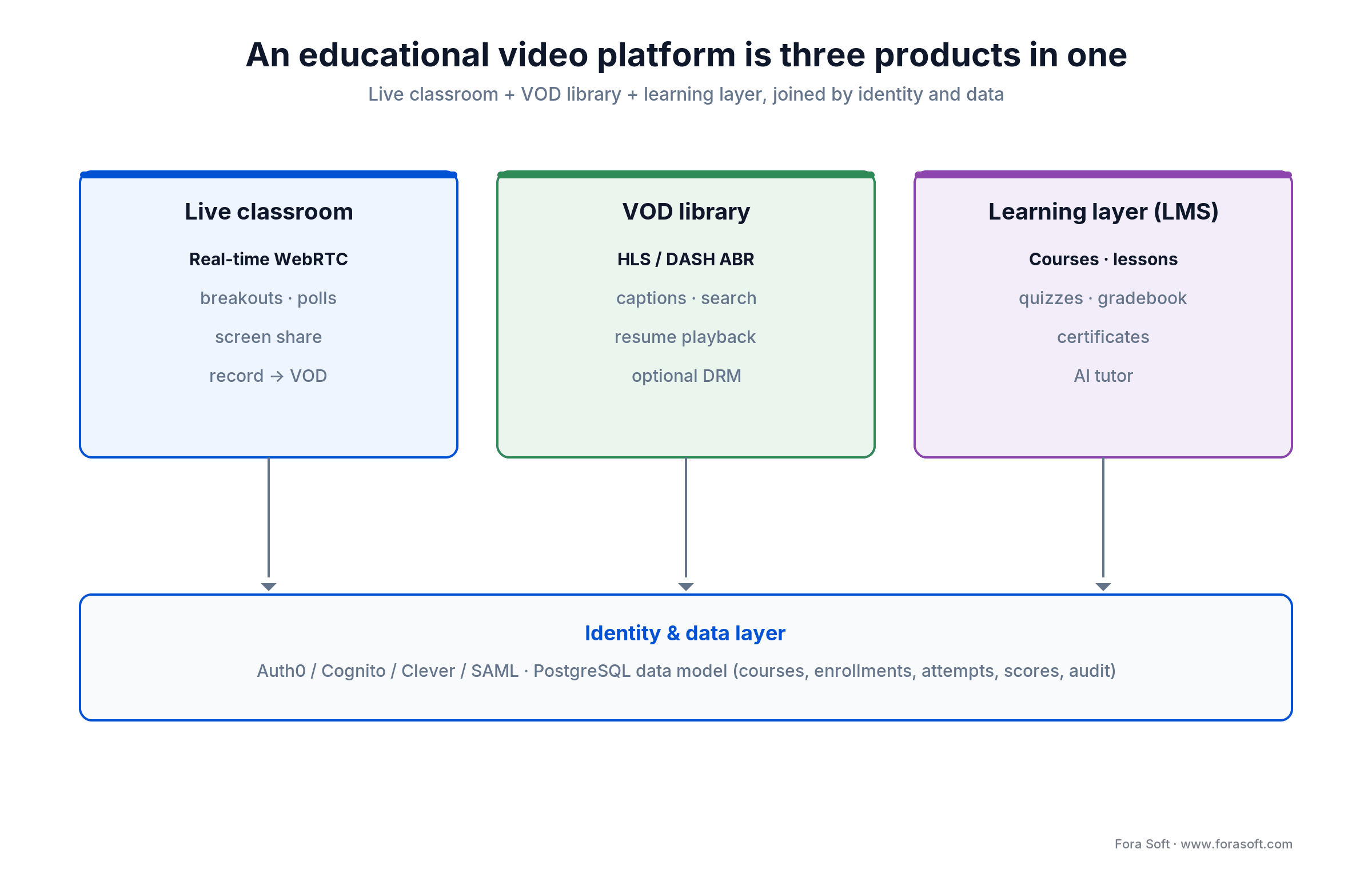
Figure 1. The three products inside every educational video platform, and the identity + data layer that ties them together.
1. Live classroom. Real-time WebRTC: teacher-led lectures, breakout rooms, screen share, hand-raise, in-class polls, recording to VOD. The target is under 500 ms of glass-to-glass latency. It’s the hardest layer to build and the most sensitive to a student’s home Wi-Fi. Built on LiveKit, mediasoup, or Janus, or a managed room SDK like Daily or 100ms.
2. VOD library. HLS or DASH delivery, adaptive bitrate, captions, transcripts, chapters, resume-where-you-left-off, and optional DRM (Widevine, FairPlay, PlayReady). Latency doesn’t matter here; startup time, search, and playback quality do. Built on a CDN-fronted origin (Mux, AWS Elemental, Bunny Stream) plus a metadata service.
3. Learning experience. Courses, lessons, quizzes, assignments, gradebook, certificates, progress tracking, and AI tutoring. This is where the product’s personality lives and where tired legacy LMS competitors look their age. Built as a normal application stack on top of a clean data model — the part that’s cheap to get right early and brutal to fix later.
Split into three workstreams when: your team is bigger than four engineers, your timeline is past 12 weeks, or stakeholders disagree on which of the three matters most. Splitting the architecture surfaces that disagreement in week one instead of week twenty.
Pick your audience before you pick your stack
Five audiences buy educational video platforms, and they want very different things. The projects that go sideways are the ones that try to serve two of them in the first version.
1. K-12 schools and districts. COPPA plus FERPA, parent-mediated consent, district SSO (Clever, ClassLink), Google Classroom, and zero advertising. The buyer is an IT director; the user is nine years old.
2. Higher education. SAML/OIDC/Shibboleth SSO, LMS integration with Canvas, Blackboard, Moodle, and Brightspace over LTI 1.3, accessibility to WCAG 2.2 AA, proctoring, and transcript exports.
3. Corporate L&D. SCORM and xAPI compatibility, SAML SSO, audit logs, and completion reports for compliance training — sometimes on-prem. The buyer is HR or learning ops; payback is measured in compliance pass-rate.
4. B2C edtech and the creator economy. Stripe Connect for instructor payouts, marketplace dynamics, ratings and referrals, and a mobile-first experience. This one behaves like consumer SaaS.
5. Professional certification and bootcamps. Identity verification, proctored exams, verifiable credentials (Open Badges 3.0), employer invoicing, and an audit trail a regulator can read for licensure-grade programs.
Build vs buy: when each path is right
Most education products in 2026 should buy, then customize a thin layer — custom is rarely the right first version. Off-the-shelf options (Thinkific, Teachable, Kajabi, LearnWorlds, Mighty Networks, Skool) got good enough that a full build has to earn its cost. Here’s the four-way test we run on every request, shown as a decision tree below.
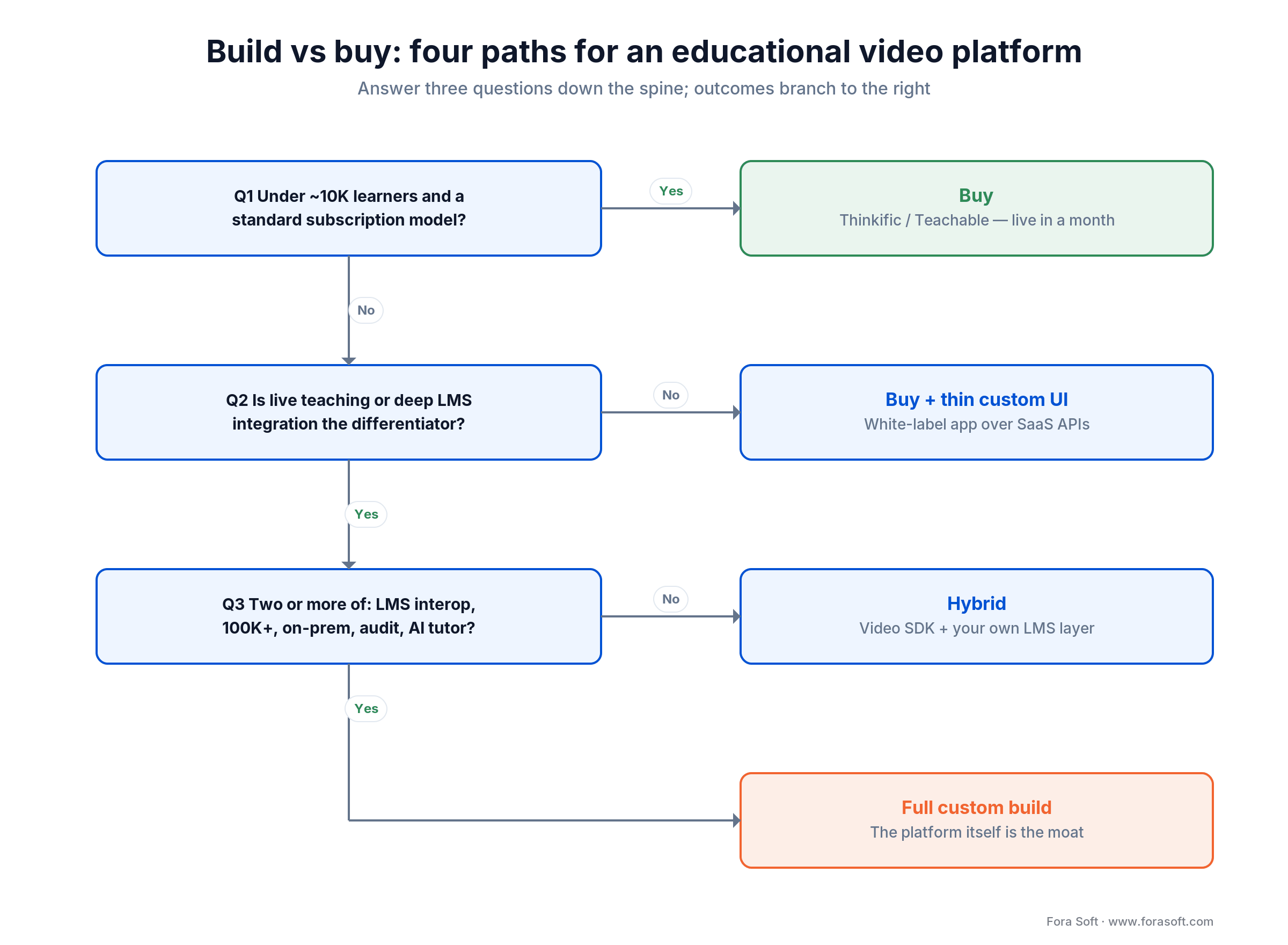
Figure 2. The four paths — buy, buy plus thin custom UI, hybrid, and full custom — and the conditions that push you toward each.
1. Buy when you have under ~10K active learners, your money comes from subscriptions or one-off course sales, you don’t need deep LMS integration, and your brand isn’t the product. Thinkific or Teachable, on a mid-tier plan around $89–$99 a month, covers more than people expect.
2. Buy plus a thin custom UI when you’re a brand-led B2C product and the white-label is the difference, or you need one custom mobile experience. Wrap a React Native or Flutter app around the SaaS APIs and accept the ceiling on what you can change.
3. Hybrid when the live classroom is your differentiator (SaaS is weak here), you need LTI 1.3, or your K-12 audience forces strict COPPA/FERPA control. Use a video SDK for the live layer and your own database for the LMS layer; skip the SaaS LMS.
4. Full custom when two or more of {non-template workflow, deep LMS integration, 100K+ learners, on-prem or air-gapped, regulator-grade audit, a proprietary AI tutor} are non-negotiable. That’s where we usually come in. Our build-vs-buy video guide works the unit economics in detail.
Reach for a custom build when: two or more of {non-template workflow, deep LMS integration, 100K+ learners, on-prem, regulator-grade audit, proprietary AI tutor} are hard requirements. Otherwise hybrid or buy gets you to market faster and cheaper.
The 2026 vendor matrix for education stacks
When you do build, you glue together best-of-breed components rather than writing them yourself. This is the short-list we evaluate on most education projects, with 2026 pricing pulled the month this was published.
| Layer | Best-of-breed | 2026 cost band | When it breaks |
|---|---|---|---|
| Live SFU | LiveKit, 100ms, Daily; self-host LiveKit/mediasoup | LiveKit Cloud ~$0.0004–$0.0005/participant-min | Self-host wins above ~250K min/mo |
| VOD & encoding | Mux, AWS Elemental, api.video, Bunny Stream | Mux per minute: encode free on Basic, deliver from ~$0.0008/min; 100K min/mo free | Bunny cheaper at high volume; all majors bill per minute |
| DRM | PallyCon, BuyDRM, EZDRM | $0.0008–$0.0050/license | Overkill for K-12; needed for premium B2C |
| Identity / SSO | Auth0, AWS Cognito, Clever (K-12), Microsoft Entra | $0–$0.06/MAU | Clever is the K-12 expectation, not optional |
| LMS interop | LTI 1.3 / Advantage, SCORM 2004, xAPI, cmi5 | In-house build | LTI 1.1 is a red flag in higher-ed today |
| AI captions / transcripts | Deepgram Nova-3, AssemblyAI, self-host Whisper | Deepgram $0.0043/min batch; AssemblyAI $0.21/hr batch | Streaming (live) costs ~2× batch |
| AI tutor / summary | Claude Sonnet 5, GPT-class, on-prem Llama | Claude Sonnet 5 $2/$10 per M tokens | Ground it in course content (RAG) or it hallucinates |
| Payments | Stripe (Connect for marketplaces), Paddle (MoR) | 2.9% + $0.30 (US) | Paddle owns global tax; Stripe is cheaper in-market |
| Analytics | PostHog (self-host), Mixpanel, Amplitude | $0–$2K/mo at school scale | PostHog self-host keeps student PII in your boundary |
One detail worth getting right: Mux bills VOD by the minute — minutes encoded, stored, and delivered — not by the gigabyte, and the first 100,000 delivered minutes each month are free. Encoding is free on Mux’s basic quality tier and delivery starts near $0.0008 per minute, so model your costs in minutes of watch time, not bandwidth.
Reference architecture: what we ship
A production educational video platform we ship today looks like the diagram below: off-the-shelf components, with our value in the integration, the data model, and the operational hardening.
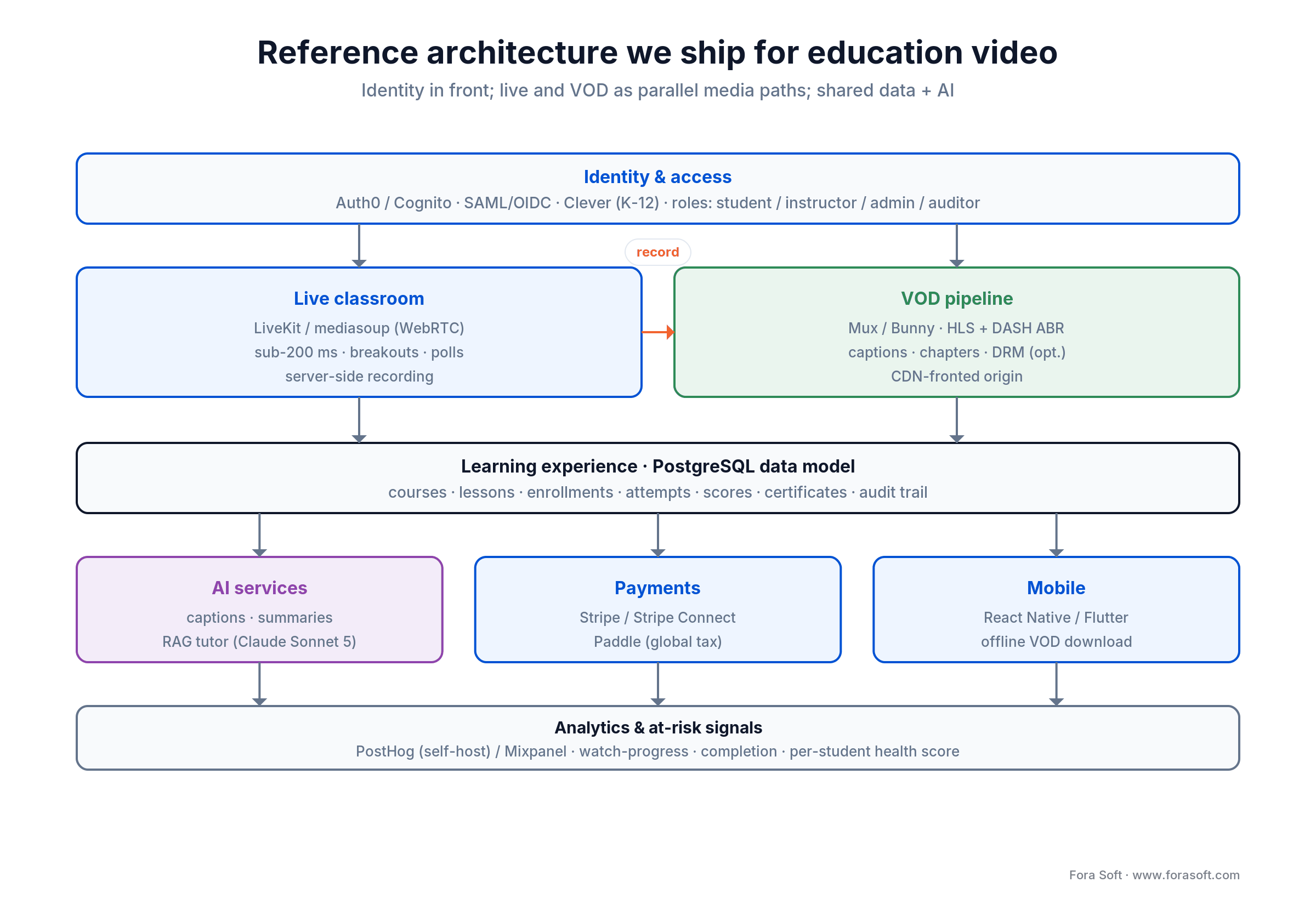
Figure 3. The reference architecture — identity at the front, live and VOD as parallel media paths, the LMS and AI services on a shared data model.
Identity & access
Auth0 or AWS Cognito as the identity provider, with SAML/OIDC for higher-ed and corporate, Clever or ClassLink for K-12, and passkeys for B2C. Role tiers: student, instructor, course-admin, org-admin, auditor. Parental-consent flows sit here for K-12.
Live classroom layer
LiveKit Cloud or self-hosted LiveKit/mediasoup with regional deployments for sub-200 ms round trips, short-TTL join tokens, TURN behind TLS in two or more regions, and server-side recording handed to the VOD pipeline. Real-time captions run as a LiveKit agent. The scaling gotchas we hit are in our scalable streaming guide and the Learn: video streaming track.
VOD layer
Mux for managed encoding and delivery, or AWS Elemental for a self-managed pipeline, or Bunny Stream for cost-optimized delivery. HLS plus DASH adaptive bitrate, captions at the manifest level, optional multi-DRM for premium content, and a CDN in front (CloudFront, Bunny, or Cloudflare Stream). Our custom streaming build guide covers the pipeline choices.
Learning experience layer
A standard application stack: Node.js or Python on the backend, PostgreSQL for application data, Redis for sessions and rate-limits, S3 for assets. The data model earns real attention here — courses, lessons, enrollments, attempts, scores, certificates, audit trail. Get it wrong in v1 and every later feature pays a tax.
AI, payments & mobile
AI services (captions, summaries, a retrieval-grounded tutor) read from the same content store. Stripe or Stripe Connect handles payments; Paddle steps in when global tax matters more than fees, as covered in our digital payments guide. Mobile is React Native or Flutter, and offline VOD download is the feature B2C learners actually ask for.
Want this architecture mapped to your stack?
Send us your audience, monetization plan, and compliance bar, and we’ll come back with a two-page architecture sketch and a cost model.
AI features that are now table stakes
In 2026 the absence of AI is the deal-breaker, not its presence. Five features have crossed from “nice demo” to “buyers expect it,” and all five are cheap enough to ship now that Claude Sonnet 5 runs about $2/$10 per million tokens with caching and batch discounts on top.
1. Real-time multilingual captions. On by default, 30-plus languages, in every player. It lifts retention for non-native speakers and it’s an accessibility requirement, not a bonus. Deepgram Nova-3 streams at about $0.0077 a minute (batch is $0.0043).
2. Lecture summaries and chapters. Generated from the transcript within minutes of class ending. Students re-watch far more often when chapters exist, and instructors stop hand-editing timestamps.
3. A tutor grounded in course content. A retrieval-augmented chat that answers only from the course readings, transcripts, and slides — never the open web. The guard-rail lives in the system prompt: explain, ask Socratic questions, refuse to hand over answers on graded work.
4. Auto-drafted formative quizzes. Three to five questions per unit, drafted by AI, edited and approved by the instructor before any student sees them. On ALDA, an AI course generator we built for institutions serving 500,000+ students a year, this kind of drafting lifted educator efficiency about 20%. More patterns are in our lesson-plan AI overview.
5. At-risk analytics. Watch-progress, quiz performance, login cadence, and discussion participation roll into a per-student health score, so instructors get an early-warning list of learners going quiet. This is the feature that keeps district buyers happy at renewal. The build-vs-buy math for each of these sits in our AI video for e-learning buyer’s guide and the Learn: AI for video engineering track.
Ground the AI tutor in your content when: the tutor touches graded material. An open-web model that free-associates about your syllabus is a support ticket and an academic-integrity complaint waiting to happen. Retrieval over your own corpus, plus an assessment-page kill-switch, is the honest version.
Compliance: COPPA, FERPA, GDPR-K and the rest
Education rules are stricter than most consumer-SaaS teams expect, and 2026 made them stricter still. Which ones apply is decided by your audience, not your headquarters — the matrix below maps the five audiences to the obligations that actually gate a contract.
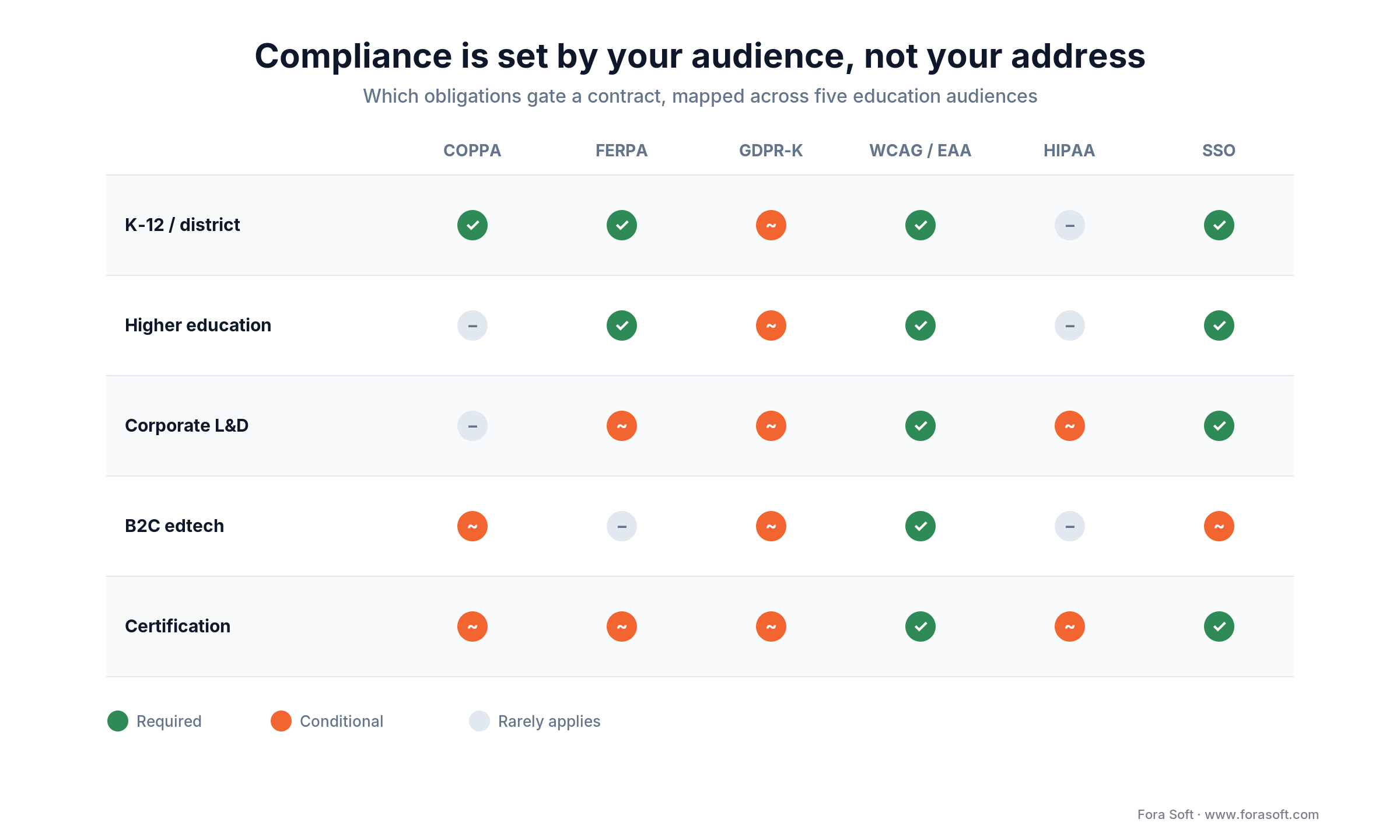
Figure 4. Which obligations bind which audience — the grid we fill in during week one so nothing gets retrofitted.
COPPA (US, under-13) got teeth in 2026. The amended rule reached full effect on 22 April 2026 and now counts biometric identifiers — face templates and voiceprints — as personal information. A recorded class captures both, so recording under-13 students is now biometric data collection that needs verifiable parental consent, no behavioral ads, and tighter security. Most K-12 vendors lean on the school-authorization exception, but it has limits.
FERPA (US, all ages). Education records are confidential; access is limited to the student, the school, and vendors acting as “school officials.” You need audit logs of who touched which record and a Data Privacy Agreement, not just terms of service.
GDPR and GDPR-K (EU/UK). Lawful basis, data minimization, retention limits, right of erasure, and parental consent for under-16s (under-13 in some member states). Cross-border transfer needs standard contractual clauses or local processing.
Accessibility is now enforced in the EU. The European Accessibility Act has been enforceable since 28 June 2025, so any platform sold into the EU must meet WCAG 2.1 AA and EN 301 549. US K-12 and higher-ed procurement expects WCAG 2.2 AA: captions, keyboard navigation, screen-reader support, and real color contrast.
HIPAA (when clinical). Healthcare-training platforms need HIPAA-eligible infrastructure, signed BAAs with every third-party vendor, and audit logging that survives a review. Our HIPAA video-platform guide covers the architectural delta.
Pin compliance in week one when: any of {K-12 audience, EU learners, healthcare training, district procurement} apply. Retrofitting COPPA-grade consent or WCAG 2.2 AA onto a finished product costs three to five times what designing for it up front does.
Monetization that holds up past the free tier
Free-tier signups are a vanity metric in education. These are the models that actually pay for the build, and you should design pricing into the data model on day one rather than bolt it on later.
1. Per-seat institutional license. Schools, districts, universities, corporate L&D. The band is $10–$60 per seat per year, billed annually, often on a Sept–Aug K-12 calendar. Procurement-friendly, with 90%+ gross margin and 90%+ renewal when the product sticks.
2. B2C subscription with paid course upgrades. Free intro lessons, paid full course, all-access monthly or annual. Works for creator-led brands; less reliable for general-purpose education.
3. Certification and credential fees. Free or cheap course access, pay for the credential. Strong unit economics when the credential is one people actually want on a résumé.
4. Employer-paid tuition and bootcamps. Income-share agreements faded; employer-pays-direct is the resilient version. Sell to the employer, train their people, run the audit trail.
5. Marketplace revenue share. Instructors keep most of the take; the platform keeps the rest. On BrainCert the storefront hands instructors a 90% revenue share — generous splits are what pull good instructors onto a marketplace. It only works at scale; below a few million dollars of gross sales the fees don’t cover the platform. Payment-architecture choices, covered in our payments guide, matter a lot here.
Reach for institutional licensing when: your buyers are schools, districts, or large employers and your sales motion can carry annual contracts. The unit economics beat any B2C model at the same revenue.
Mini case: BrainCert, the WebRTC virtual classroom that scaled
Situation. BrainCert set out to build the first WebRTC + HTML5 virtual classroom LMS — live teaching, a course catalog, assessments, and a storefront in one product — and to do it bootstrapped, with a small team, against VC-backed incumbents. The hard part was the same one every education team underestimates: a live classroom that stays smooth for real students on real networks while doubling as the recording source for the VOD catalog.
Plan. We built it from the architecture up: WebRTC + HTML5 HD classrooms, an interactive whiteboard with LaTeX and Wolfram Alpha, proctored exams, DRM content protection, a white-label storefront with a 90% instructor revenue share, SCORM/xAPI support, and branded iOS and Android apps — on infrastructure spanning 10 worldwide datacenters. Compliance was designed in, not retrofitted: SOC 2 Type I and II, ISO/IEC 27001:2022, HIPAA, GDPR, PCI DSS, CCPA, and NIST.
Outcome. BrainCert reached $3M in revenue in 2024, up 58% year over year from $1.9M in 2023 (and $1.5M in 2021), with 100K+ customers and 500M+ real-time classroom minutes delivered at a guaranteed 99.995% uptime — all from a 12-person team. As its CEO put it, “from designing the technical architecture to programming, they do it all for us.” Want a similar feasibility scope?
Cost model: realistic 2026 ranges
Here is what an educational video platform actually costs to build in 2026, using our Agent Engineering delivery. The worked math below shows where the MVP number comes from, so it’s a figure you can defend to a board, not a range pulled from the air.
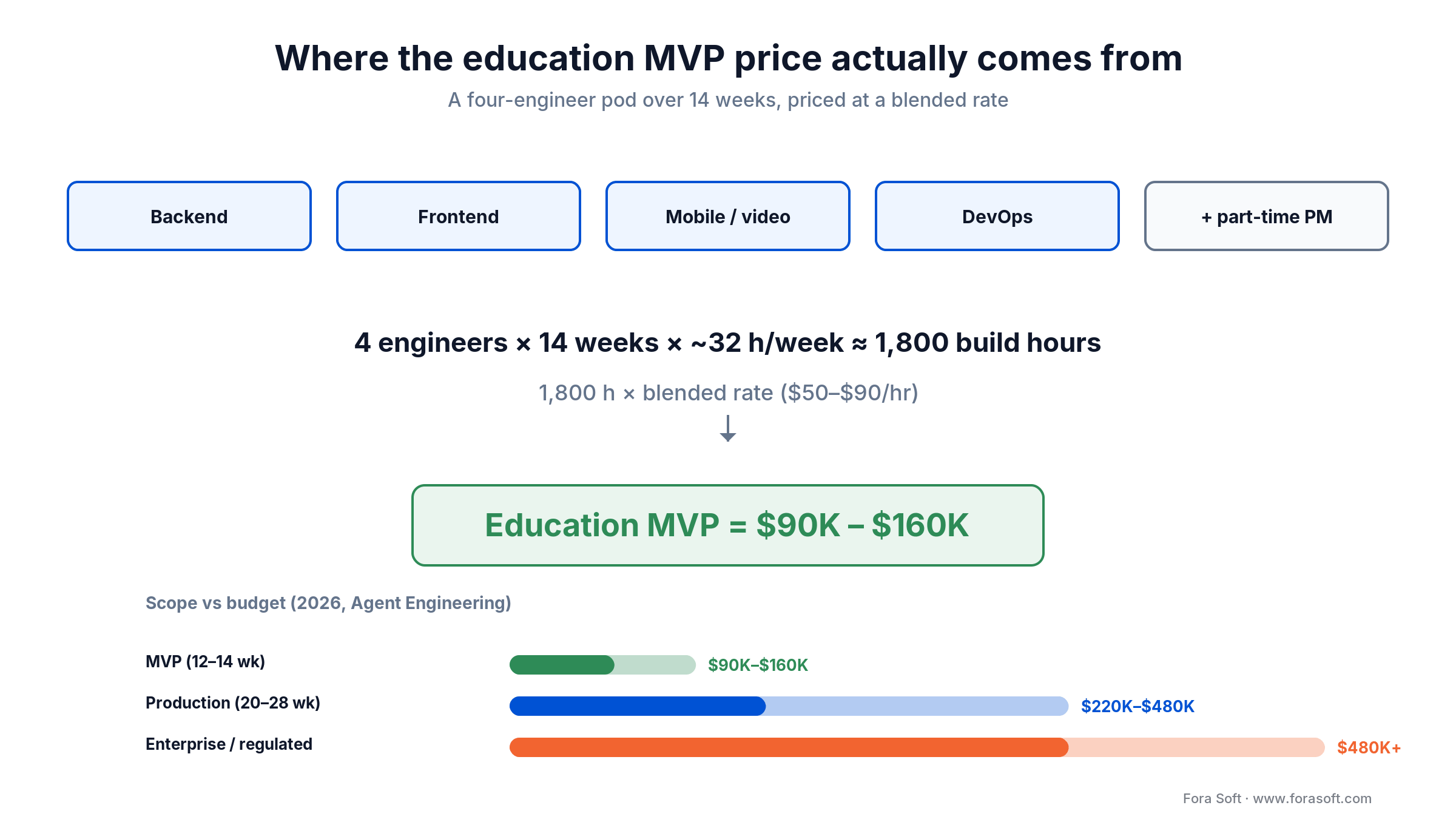
Figure 5. Worked MVP math — a four-engineer pod over 14 weeks, priced at a blended rate, lands the education MVP band.
Education MVP — $90K to $160K, 12–14 weeks. Live classroom, VOD library, auth, a simple LMS data model, Stripe checkout, web only, one language. The math: a four-engineer pod (backend, frontend, mobile/video, DevOps) plus a part-time PM over 14 weeks is about 1,800 engineering hours of build work; at our blended $50–$90/hr rate that lands the $90K–$160K band. Suitable for a focused pilot or a seed-stage edtech.
Production-grade platform — $220K to $480K, 20–28 weeks. Everything in the MVP plus an AI tutor, real-time captions, an instructor marketplace with payouts, iOS and Android apps, LTI 1.3 interop, WCAG 2.2 AA, five-plus languages, full audit logs, and an analytics dashboard.
Ongoing infrastructure — $1.5K to $8K a month at 1K–10K active learners: SFU $300–$2,500, VOD $200–$1,800, database/auth/observability $500–$2,000, and AI inference that scales with usage.
Compliance overhead — $20K to $60K a year for SOC 2 Type II once you’re live, plus an annual penetration test ($8K–$25K), and another $15K–$30K if HIPAA and BAAs apply. For comparison, general edtech-app benchmarks from 2026 vendor surveys put MVPs at $30K–$70K and AI-heavy builds past $200K; our ranges sit inside that because the live-video layer is where the real engineering is.
Need an MVP shipped in 14 weeks?
Bring your audience, monetization plan, and compliance bar. We’ll send back a fixed-scope plan and a real budget, usually within five working days.
A realistic 14-week MVP roadmap
This is the schedule we ship a custom MVP against, with a four-engineer pod plus a part-time PM and content producer. Note the deliberate overlap: live classroom starts before VOD finishes, because the recording handoff between them is the integration most likely to bite.
| Phase | Weeks | Output |
|---|---|---|
| Discovery + curriculum design | 1–2 | Audience, monetization, compliance bar, content blueprint |
| Architecture + infra | 2–3 | Stack decisions, BAAs/DPAs, IaC scaffolding |
| Auth + LMS data model | 3–5 | SSO, roles, course/lesson/enrollment/quiz schema |
| VOD pipeline | 4–7 | Upload, encoding, captions, player, watch-progress |
| Live classroom | 6–9 | LiveKit room, polls, breakouts, recording-to-VOD |
| Payments + checkout | 8–10 | Stripe / Paddle, plans, content gating |
| AI features (captions + tutor) | 9–12 | Real-time captions, summaries, RAG tutor v1 |
| Hardening + accessibility | 12–13 | WCAG 2.2 AA pass, pen test, runbooks |
| Pilot launch | 13–14 | Soft-launch to first cohort, on-call rota, KPI baselines |
Five pitfalls we keep watching teams step into
1. Bundling live and VOD into one workstream. They have different stacks, vendors, and operational profiles. Bundling them is the number-one reason education projects miss their date.
2. Treating accessibility as a launch-week checklist. WCAG 2.2 AA is a design constraint, not a final sprint. Retrofitting captions, keyboard navigation, and ARIA labels at week 12 is expensive and comes out half-done.
3. Underweighting the data model. Courses, lessons, enrollments, attempts, scores, certificates, audit trail. Ten extra hours on the schema in week two saves ten weeks of refactoring later.
4. Forgetting that recordings are now biometric data. Under the 2026 COPPA rule, a recorded class of under-13 students captures faces and voices, which are personal information. Build consent, retention, and deletion for recordings from week one, not after the first parent complaint.
5. Buying ad-supported “free” SaaS for K-12. COPPA bans behavioral advertising to under-13s, so any vendor that monetizes through ads is ineligible. Read the privacy notice before you sign.
A decision framework in five questions
Q1. Who is the primary audience? K-12 pushes you to COPPA, FERPA, and Clever; higher-ed to LTI 1.3, SAML, and accessibility; corporate to SCORM/xAPI and audit; B2C to marketplace, payouts, and mobile. Each answer points at a different stack.
Q2. Live, VOD, or both? Live-only is rare, VOD-only is common, both is the default. If both, plan two workstreams from the start.
Q3. What is the monetization model? Per-seat, subscription, certification, marketplace, or employer-paid. Whichever it is, it belongs in the data model on day one.
Q4. What is the compliance bar? Standard SaaS gets by with SOC 2 plus GDPR. K-12 adds COPPA, FERPA, and DPAs. Clinical training adds HIPAA and BAAs. Pin it in week one.
Q5. What is your 24-month learner count? Under 5K: buy SaaS with a thin custom UI. 5K–100K: hybrid. Past 100K with deep custom needs: full custom.
KPIs to put on the dashboard
Quality KPIs. Live-class join success above 98%, time-to-first-frame under 1.2 s at p95, dropped-call rate under 1.5%, VOD startup under 2 s at p95, and caption word-error-rate under 8% on your top languages.
Business KPIs. Course completion rate is the north star — aim above 55% for serious programs — alongside DAU/MAU, instructor NPS above 50, per-student gross margin, and churn cohort curves.
Reliability KPIs. Uptime above 99.9% on the live classroom and 99.95% on VOD, mean time to detect and recover, audit-log integrity pass rate, and days since the last successful penetration test (keep it under 365).
When a custom platform is the wrong choice
A custom educational video platform is the wrong call more often than vendors admit. If your audience is under 5K learners and a subscription fits, Thinkific or Teachable puts you live in a month on an entry plan in the tens of dollars, and you can spend the saved budget on content. If you’re pre-revenue, Skool or Mighty Networks let you validate demand without engineers.
If you land on “buy,” here’s the shortlist we point clients to, sorted by what each one is best at. Cost tier is a rough guide: $ is entry SaaS (tens of dollars a month), $$ is higher-tier SaaS, and Quote means enterprise sales.
| Platform | Best for | Live + VOD | LMS depth | Cost tier |
|---|---|---|---|---|
| Thinkific | Course creators & small teams | VOD (live via add-on) | Medium | $ |
| Teachable | Solo creators & coaches | VOD | Medium | $ |
| LearnWorlds | White-label course sellers | VOD + interactive video | High | $ |
| Kajabi | All-in-one creator business | VOD | Medium | $$ |
| Vimeo | Simple video hosting for classes | VOD + livestream | Low | $ |
| Panopto | Universities, lecture capture | Live + VOD | Medium (via LTI) | Quote |
| Kaltura | Large enterprises & universities | Live + VOD | High (open platform) | Quote |
Custom earns its keep when the platform itself is the moat — live teaching is your differentiator, AI features need your proprietary data, a regulator forces on-prem, or the unit economics break the SaaS model. Otherwise, buy first and build later.
How to vet an educational video platform partner
If you’re picking a vendor, these five questions separate teams that have shipped education software from teams that read the brochure.
1. Show me a recent live-classroom build. WebRTC at scale is hard. If they can’t demo a working live class with breakouts, polls, and recording, the live workstream will slip.
2. What does your DPA and BAA register look like? An education vendor without a Data Privacy Agreement template signs nothing in K-12 procurement.
3. Have you shipped LTI 1.3? It’s higher-ed table stakes. “We do LTI 1.1” means no fresh higher-ed integration in two years.
4. Walk me through your accessibility process. It should include automated tooling, manual screen-reader passes, and a known-issue tracker. “We run axe-core” on its own isn’t a process.
5. What is your IP and source-code escrow story? You should own the platform outright, and the contract should say so in writing. Building on a dedicated development team makes that ownership clean.
FAQ
How much does it cost to build an educational video platform in 2026?
A live-plus-VOD education MVP runs about $90K–$160K over 12–14 weeks with Agent Engineering delivery. A production platform with AI features, payments, mobile apps, and LMS interop runs $220K–$480K over 20–28 weeks. Ongoing infrastructure is $1.5K–$8K a month at 1K–10K learners.
Should we use Zoom for the live classroom?
For one-off webinars, Zoom is fine. For a product where the live classroom is part of your brand, no — you can’t deeply customize the UX or wire class controls into your LMS, and it feels like Zoom, not your platform. Use a video SDK such as LiveKit, mediasoup, or Daily instead.
Do we need DRM on our VOD library?
For K-12 and most B2B education, no — signed URLs with short TTLs are enough. For premium B2C content where piracy hits revenue directly, yes — Widevine, FairPlay, and PlayReady through a managed provider (PallyCon, BuyDRM, EZDRM) at $0.0008–$0.0050 per license.
SCORM, xAPI, or LTI — which do we need?
SCORM 2004 for legacy corporate L&D import/export, xAPI (Tin Can) for modern analytics across systems, and LTI 1.3 Advantage for higher-ed integration with Canvas, Blackboard, Moodle, and Brightspace. Most modern platforms support all three; LTI 1.3 has the most ROI in higher-ed.
Does COPPA apply if our learners are 13 and older?
Strictly, COPPA covers under-13s. But the 2026 amended rule expanded personal information to include biometric data such as face templates and voiceprints, and districts often treat mixed-age platforms as if COPPA applied. Default to data minimization, no behavioral ads, and parental consent for any under-13 access, and the audit conversations get easier.
How do we stop the AI tutor from giving away exam answers?
Put the pedagogy in the system prompt: Socratic questioning, no final answers on graded work, and a fallback to the instructor for anything outside the course corpus. Add a per-page gate that disables the tutor on assessment pages, plus an instructor-visible log of tutor interactions so misuse surfaces early.
Can we use Stripe Connect for instructor payouts globally?
For most G7 and EU markets, yes. For broader coverage in emerging markets, Paddle as Merchant of Record offloads global sales tax at the cost of higher fees. Many platforms run Stripe Connect for major markets and Paddle as the fallback.
How long does an MVP really take?
Twelve to 14 weeks for a four-engineer pod with Agent Engineering, covering live plus VOD plus auth plus a simple LMS plus Stripe in one language. Add four to six weeks for mobile apps, four for the AI tutor and captions, and six to eight for LTI 1.3 interop and accessibility hardening.
What to Read Next
Adaptive Learning
How to Build an Adaptive Learning Platform
Algorithms, architecture, COPPA/FERPA, and cost tiers for personalized learning paths.
Corporate L&D
Corporate Training Video Platform
SCORM, xAPI, SSO, and audit logs — the corporate-grade variant of this stack.
AI
AI Video for E-Learning: A Buyer’s Guide
Tutoring, summarization, and quiz generation — tools, costs, and compliance.
Decision
Build vs Buy: SDK to Custom Video Platform
When the unit economics flip and a custom build pays off — with worked numbers.
Engineering
Building a Scalable Video Streaming App
Operational lessons that apply directly to live-plus-VOD education stacks.
Ready to ship a credible educational video platform?
An educational video platform is three products glued together: a live classroom, a VOD library, and a learning experience. The teams that ship well plan them as separate workstreams, pick one primary audience for v1, pin compliance in week one, design pricing into the data model, and treat AI as a baseline. Custom is rarely the right first version; hybrid often is; full custom earns its keep when the platform itself is the moat.
We’ve shipped this stack across K-12, higher education, corporate L&D, B2C edtech, and certification — from BrainCert’s 500M+ classroom minutes to Scholarly’s 2,000-student live classes. Whether you’re scoping a 14-week MVP, a production build, or a SaaS evaluation, we can usually tell you in 30 minutes whether to buy or build, and what the real budget looks like. Start with a video app development or custom software scope, or add an AI integration on top.
Let’s scope your educational video platform
Bring your audience, monetization plan, and compliance bar. Thirty minutes, no slides — just an honest scoping call.

