


This is engineering guidance, not legal advice. Confirm specifics with qualified counsel.
Why this matters
A telemedicine consult is rarely just two faces on a screen. The clinician sends a lab result, the patient uploads a photo of a rash, someone shares a screen to explain a medication schedule, a nurse draws a circle on a wound image, a connected blood-pressure cuff pushes a reading into the call. Every one of those actions moves health data, and every one of them can either stay safely inside your compliance boundary or quietly leak out of it. If you are scoping or buying a telemedicine platform, "it has chat and file sharing" is not a feature checkbox — it is a set of data-handling decisions that determine whether you pass an audit. This article is written for the founder, product manager, or clinical-IT lead who has to specify these tools and then ask a vendor or engineer the right questions about each one. By the end you will be able to say, for chat, files, screen share, annotation, and vitals, where the data goes, whether it becomes part of the medical record, and what could go wrong.
The shared rule: everything in the call is PHI
Start with the idea that ties all five tools together. Protected Health Information (PHI) is any health data that can be tied to an identifiable person — a name with a diagnosis, a photo of a patient's face, a blood-pressure reading attached to an account. The moment a tool inside the call touches PHI, that tool is inside the same legal boundary as the video, and the same HIPAA Security Rule technical safeguards apply: access control, encryption, integrity, and transmission security, all set out in 45 CFR §164.312.
Here is the reassuring part. The text, files, and drawing coordinates that these tools send travel over the WebRTC data channel — a general-purpose pipe for arbitrary data that runs alongside the audio and video in the same connection. That data channel is built on SCTP carried inside DTLS (Datagram Transport Layer Security, the datagram cousin of the TLS that secures websites), and per the standard, RFC 8831, it is encrypted by default using the same DTLS session that protects the media. In plain terms: a chat message and a shared file are scrambled in transit automatically, with no extra work, exactly like the video.
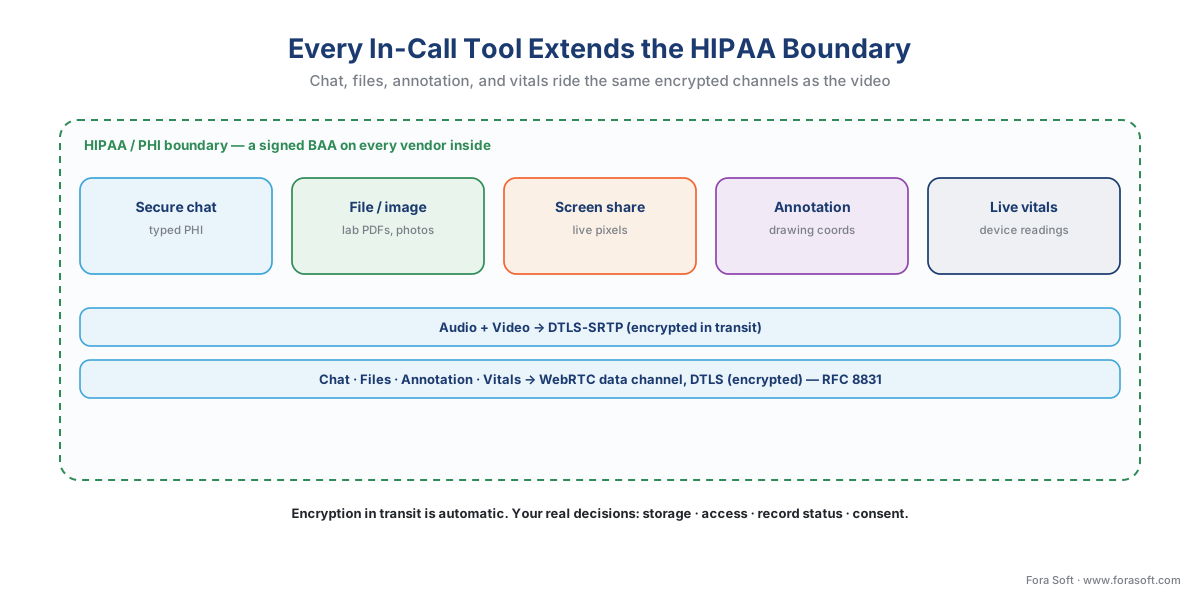 Figure 1. Every in-call tool extends the same boundary. Chat, files, annotation, and device readings ride the DTLS-encrypted data channel; the video and audio ride DTLS-SRTP. Encryption in transit is automatic — the real decisions are storage, access, and consent.
So encryption in transit is solved by the protocol. That means the work — and the risk — is everywhere else: what gets stored, where it is stored, who can see it, whether it becomes part of the patient's permanent record, and what the patient agreed to. The rest of this article is those four questions, tool by tool. Remember the recurring trap from across this section: encrypted is not the same as compliant. A perfectly encrypted chat that is logged to a third-party analytics tool with no Business Associate Agreement — the signed contract a vendor must sign before it may handle PHI — is still a violation.
Secure chat: convenient, and part of the record
In-call chat looks like the most trivial tool, and it carries the most under-appreciated consequence. A typed message like "your potassium came back at 5.9, keep taking the new dose" is PHI in text form. Two decisions follow.
First, storage and retention. If chat is ephemeral — shown during the call and discarded — it is low-risk but also clinically useless after the fact. If it is saved, it almost certainly becomes part of the designated record set, the formal term (defined at 45 CFR §164.501) for the records a provider uses to make decisions about a patient. Patient-portal messages are a textbook example of designated-record-set content. Once chat is in the record, the patient has a right to access it, you must retain it for the period your state requires, and it must be encrypted at rest and access-controlled like any chart entry.
Second, identity and context. Chat has no facial cue, so a message sent to the wrong open window goes to the wrong person silently. The product safeguards are practical: bind each chat thread to a verified consult, never to a free-floating contact; show clearly who is in the thread; and disable any "copy to clipboard" or third-party keyboard logging path that could carry PHI outside the boundary. Chat should also meet accessibility requirements — readable contrast, screen-reader labels, no color-only status — because the same WCAG 2.1 Level AA standard that governs the rest of the interface governs the chat box too.
File and image share: the lab result and the rash photo
Sharing a file is where store-and-forward medicine meets the live call. A clinician pushes a PDF lab report; a patient uploads a photo of a wound or a medication bottle. These files are PHI at their most concentrated — a single image can contain a face, a body, and a visible condition.
The transit is handled by the data channel's encryption, but a file, unlike a spoken sentence, persists. That forces three decisions. Where does it land? A shared file must be written to encrypted storage inside your boundary, not to a generic cloud bucket or a developer's test folder. Who hosts that storage? If it is a third-party object store, that vendor needs a signed Business Associate Agreement; without one, every uploaded photo is an unauthorized disclosure. How long do you keep it, and is it in the chart? A lab result a clinician used to make a decision is part of the designated record set and inherits the record's retention and access rules; a blurry photo the patient sent by mistake may need a defined deletion path.
A worked example makes the storage real. Suppose a dermatology service stores two images per consult at about 3 megabytes each, and runs 200 consults a day. That is 2 × 3 MB × 200 = 1,200 megabytes, or roughly 1.2 gigabytes per day. Over a year that is about 1.2 GB × 365 ≈ 438 gigabytes of patient images — every one of which must be encrypted at rest, access-logged, and retained for the years your state's medical-records law requires (often 6 to 10). "We added file sharing" quietly became "we operate a regulated medical-image archive." That is a design decision, not an afterthought.
A second safeguard is content hygiene: validate file types, scan for malware, and cap sizes, because an upload field that accepts anything is also an attack surface pointed straight at your PHI store.
Screen sharing: the biggest accidental-disclosure risk in the call
Screen sharing is the tool most likely to cause a breach, and it does so through ordinary human error rather than a hacker. The mechanism is simple: the clinician means to show one thing and accidentally shows everything.
HIPAA's minimum necessary standard (45 CFR §164.502(b)) says you should use or disclose only the PHI needed for the task. Treatment of the patient in front of you is exempted from the strict version of the rule, but another patient's data is never part of this treatment — and that is exactly what leaks when a clinician shares a whole screen. The classic failures: a desktop notification slides in showing a different patient's name; the electronic health record still has the previous patient's chart open in another tab; an email preview or a calendar invite flashes across the shared view.
 Figure 2. Whole-screen versus single-window sharing. Sharing the entire desktop exposes notifications, other browser tabs, and another patient's open record. Sharing a single application window — and suppressing notifications — keeps the disclosure to the minimum necessary.
The engineering controls are well understood and should be defaults, not options. Offer single-application or single-window sharing and make it the recommended choice over full-screen. Suppress operating-system and app notifications automatically while a share is active. Show the presenter an unmistakable "you are sharing" indicator and a one-click stop. Where the platform can, blur or gate the share until the clinician confirms what is visible. None of this is exotic; it is the difference between a tool that respects minimum-necessary by design and one that depends on a tired clinician never making a mistake.
On-image annotation: drawing that can become a chart entry
Annotation is the act of drawing on a shared image or screen — circling a lesion, marking a range of motion, pointing at a line on a lab report. Mechanically it is lightweight: the drawing is a stream of coordinates sent over the same encrypted data channel, overlaid on the image on each side. There is usually no new media to encrypt and little new transit risk.
The decision annotation forces is about the result. If the marked-up image is saved — "circled area of concern, follow up in two weeks" — that annotated image is now clinical documentation and joins the designated record set, with the same retention, access, and integrity duties as any chart image. The integrity safeguard in 45 CFR §164.312(c) matters here: the saved annotation must be tamper-evident, because a drawing that can be silently altered later undermines the record. One more line to watch: annotation is a communication and a documentation tool, not a measurement instrument. The moment a tool claims to measure from the image — a wound's area in square centimeters used for a clinical decision — you have crossed toward the regulatory questions of the next section.
Live vitals: where the FDA line runs
The most technically interesting in-call tool is the live reading from a connected device — a Bluetooth blood-pressure cuff, a pulse oximeter, a glucometer, a connected scale — surfaced inside the consult. Two things are true at once: the reading is PHI like everything else, and the device and software around it may or may not be an FDA-regulated medical device. That second question is where teams get into trouble, so be precise.
The line is about what the software does with the reading, not whether health data is involved. The U.S. Food and Drug Administration (FDA) has stated, in its final guidance on Medical Device Data Systems, that software whose function is solely to transfer, store, convert, or display medical-device data is not itself a device the agency actively regulates — it exercises enforcement discretion because the risk is low. So a tool that takes a cuff's reading and shows it to the clinician, or files it in the chart, generally sits in that low-risk display-and-transmit zone.
 Figure 3. The vitals tool's regulatory question. Display, transmit, or store a reading: generally not an actively regulated device. Analyze, alarm, or drive a diagnosis from it: you may be building Software as a Medical Device — get a regulatory read before you ship.
It changes when the software starts to interpret. If your tool analyzes the reading, raises a clinical alarm, computes a risk score, or steers a diagnosis, it may meet the definition of Software as a Medical Device (SaMD) — software intended for a medical purpose, which the FDA classifies by risk. The FDA's Clinical Decision Support guidance draws the working boundary between decision support that informs a clinician who can independently review the basis, and software that effectively makes the call — the latter is far more likely to be regulated. Keep these two ideas apart in every spec: "show the number" is a feature; "tell the clinician what the number means and what to do" may be a regulated device. When you are near the line, get a regulatory opinion before you build, not after.
Two more practical notes. Device-sourced vitals must preserve data integrity end to end — a transposed digit in a blood-pressure reading is a clinical error, so the path from device to display should be validated and tamper-evident, again per 45 CFR §164.312(c). And the connected-device path is also a remote-patient-monitoring (RPM) data flow; if readings are collected outside the live call, the rules and reimbursement of RPM as its own product apply, which we treat separately.
The five tools, side by side
The table consolidates the decisions. Read each row as: what the tool carries, where it lands, whether it joins the permanent record, and which third party (and therefore which Business Associate Agreement) is in the path.
| In-call tool | What it carries | Stored where | In the medical record? | Third-party / BAA? |
|---|---|---|---|---|
| Secure chat | Typed PHI | Encrypted chat store | Yes, if clinically used | BAA if a vendor hosts it |
| File / image share | Lab PDFs, photos (PHI) | Encrypted object store | Yes, attached to chart | BAA if cloud storage |
| Screen share | Live pixels (transient) | Not stored unless recorded | Only if recorded | BAA if CPaaS carries it |
| On-image annotation | Drawing coordinates | Saved with the image | Yes, if the markup is kept | Same store as the image |
| Live vitals | Device readings (PHI) | RPM store / EHR | Yes | BAA + FDA check on the device tool |
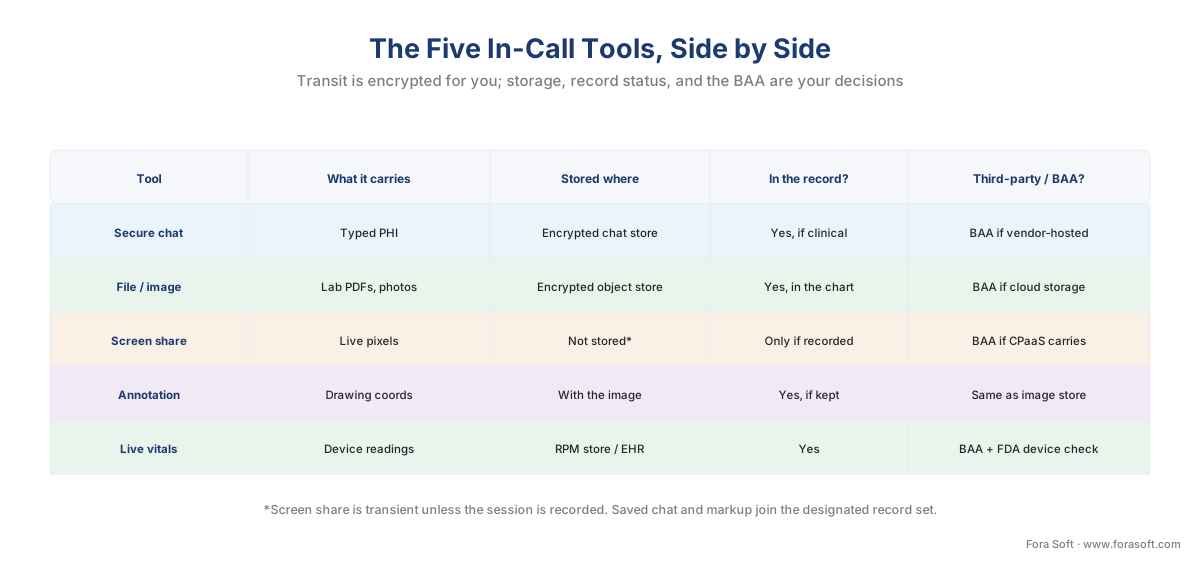 Figure 4. The five in-call tools at a glance. Transit encryption is automatic; the storage, record-status, and BAA columns are where your decisions live.
The pattern across the table is the same one we opened with: transit is encrypted for you, but storage, record-status, and the BAA on every third party in the path are decisions you must make deliberately for each tool.
Consent and the minimum-necessary habit
Two threads run through all five tools. Consent: patients should understand and agree to what the consult involves — that images may be stored, that a session may be recorded, that a connected device is feeding data into the record. Recording in particular carries its own consent and retention rules, which we cover in the recording article; the principle here is that an in-call tool that captures or stores PHI is something the patient agreed to, not a surprise. Minimum necessary: every tool should expose the least PHI required to do the job — single-window screen shares, scoped chat threads, files that go only to the chart that needs them. Build both as defaults, and the tools protect the patient without depending on anyone remembering to be careful.
Common mistakes
Sharing the whole screen. The most common real-world breach in telehealth tooling: a full-desktop share that exposes a notification, an open tab, or another patient's chart. Default to single-window sharing and auto-suppress notifications.
Treating chat as throwaway. Saving clinical chat without realizing it became part of the designated record set — owing the patient access, retention, and at-rest encryption — or, the reverse, discarding messages that should have been documented.
Storing shared files outside the boundary. Writing uploaded photos and lab PDFs to a generic cloud bucket or an un-BAA'd service. Encrypted-in-transit does not save a file that lands in an unauthorized store.
Letting a vitals feature drift into diagnosis. Shipping a tool that started as "display the reading" and grew an alarm or a risk score, crossing the FDA's device line without a regulatory review.
Forgetting accessibility. Building chat and shared-content tools that fail WCAG 2.1 AA — color-only status, no screen-reader labels, unreadable contrast — in a section of the product that the same accessibility duty governs as the rest.
Where Fora Soft fits in
The requirement is that every tool inside the call honors the same compliance boundary as the video; the capability is building those tools so the safe path is the default path. Fora Soft has built real-time communication on WebRTC since the technology was new — across telemedicine, video conferencing, e-learning, and streaming — including the data-channel features that carry chat, file transfer, and annotation. We wire each in-call tool into the PHI boundary: encrypted-at-rest storage with a Business Associate Agreement on every vendor, designated-record-set handling for anything that becomes documentation, single-window screen sharing with notification suppression, and a clear separation between displaying a vital and interpreting it. The result is a consult where the convenient action and the compliant action are the same action.
What to read next
- Recording clinical sessions: when, how, and the compliance tension
- Latency, quality, and the clinical "good enough" bar
- Audit logging and access controls for clinical video
Call to action
- Talk to a telemedicine engineer — book a 30-minute scoping call to talk through your in-call clinical tools plan.
- See our case studies — 250+ shipped projects across video streaming, WebRTC, OTT, telemedicine, e-learning, surveillance, and AR/VR.
- Download the In-Call Clinical Tools PHI & Consent Checklist — A one-page checklist for chat, file share, screen share, annotation, and connected vitals: the data path, storage decision, record status, consent step, screen-share leak controls, and the FDA vitals line.
References
- 45 CFR §164.312 — HIPAA Security Rule, Technical Safeguards (access control, encryption/decryption, integrity, transmission security — the controls every in-call tool that touches ePHI must meet). eCFR / HHS. Current as of 2026-06-14. Tier 1. https://www.ecfr.gov/current/title-45/subtitle-A/subchapter-C/part-164/subpart-C/section-164.312
- 45 CFR §164.502(b) — Minimum Necessary standard (use/disclose only the PHI needed for the task; the basis for single-window screen sharing). eCFR / HHS. Current as of 2026-06-14. Tier 1. https://www.ecfr.gov/current/title-45/subtitle-A/subchapter-C/part-164/subpart-E/section-164.502
- 45 CFR §164.501 — Definitions: Designated Record Set (the record set used to make decisions about a patient — saved chat and annotated images fall in it). eCFR / HHS. Current as of 2026-06-14. Tier 1. https://www.ecfr.gov/current/title-45/subtitle-A/subchapter-C/part-164/subpart-E/section-164.501
- RFC 8831 — WebRTC Data Channels (SCTP over DTLS; the data channel is encrypted by default and shares the media DTLS session). IETF, January 2021. Tier 1 (standard). https://www.rfc-editor.org/rfc/rfc8831.html
- RFC 8832 — WebRTC Data Channel Establishment Protocol (DCEP) (how a data channel for chat/file/annotation is opened and negotiated). IETF, January 2021. Tier 1 (standard). https://www.rfc-editor.org/rfc/rfc8832.html
- WebRTC: Real-Time Communication in Browsers — W3C Recommendation (
RTCDataChannelAPI used for in-call chat, file transfer, and annotation). W3C, 2025 edition, checked 2026-06-14. Tier 1 (standard). https://www.w3.org/TR/webrtc/ - Medical Device Data Systems, Medical Image Storage Devices, and Medical Image Communications Devices — FDA Final Guidance (software that solely transfers, stores, converts, or displays device data is not an actively regulated device — enforcement discretion). U.S. FDA, 2015. Tier 1 (agency guidance). https://www.fda.gov/media/88572/download
- Clinical Decision Support Software — FDA Final Guidance (the decision-support vs. device line; software that interprets data toward a diagnosis is more likely SaMD). U.S. FDA, September 2022. Tier 1 (agency guidance). https://www.fda.gov/regulatory-information/search-fda-guidance-documents/clinical-decision-support-software
- Nondiscrimination on the Basis of Disability; Accessibility of Web Information and Services of State and Local Government Entities — ADA Title II Final Rule (adopts WCAG 2.1 Level AA as the technical standard). U.S. DOJ, 2024. Tier 1. https://www.federalregister.gov/documents/2024/04/24/2024-07758/nondiscrimination-on-the-basis-of-disability-accessibility-of-web-information-and-services-of-state
- Extension of Compliance Dates — ADA Title II Web Accessibility (Interim Final Rule) (compliance deadlines extended: large entities to 2027-04-26, small/special-district to 2028-04-26; effective 2026-04-20). U.S. DOJ, Federal Register, 2026-04-20. Tier 1. https://www.federalregister.gov/documents/2026/04/20/2026-07663/extension-of-compliance-dates-for-nondiscrimination-on-the-basis-of-disability-accessibility-of-web
- Web Content Accessibility Guidelines (WCAG) 2.1, Level AA — W3C Recommendation (conformance target for chat, captions, and shared-content controls). W3C, 2018, checked 2026-06-14. Tier 1 (standard). https://www.w3.org/TR/WCAG21/
- Using WebRTC data channels — MDN Web Docs (all data over a data channel is DTLS-encrypted; reliability and ordering options for chat and file transfer). Mozilla, checked 2026-06-14. Tier 6 (orientation). https://developer.mozilla.org/en-US/docs/Web/API/WebRTC_API/Using_data_channels
- HIPAA Guidelines on Telemedicine — The HIPAA Journal (BAAs, encryption, access controls, and minimum-necessary in telehealth tooling). Updated 2026, checked 2026-06-14. Tier 6 (orientation). https://www.hipaajournal.com/hipaa-guidelines-on-telemedicine/
