


Why This Matters
If you are a product manager, founder, or engineering lead about to greenlight a computer vision project — surveillance, OTT moderation, telemedicine triage, fitness pose tracking, retail analytics, e-learning attention metrics — the pre-processing pipeline is the place where your project will either save or lose two thirds of its accuracy budget. Most teams arrive at this conversation with a notebook that decodes one video file with OpenCV, resizes every frame to 224×224, normalises with ImageNet means, and feeds the result into a pretrained model; that pipeline works on a clean dataset and breaks on real cameras for reasons that are not obvious and not in any vendor tutorial. The fix is engineering, not magic. This article assumes you have already read lesson 1.2 on latency and deployment topology and lesson 1.4 on AI cost in video products, because every choice in a pre-processing pipeline reduces to a latency number, an accuracy number, or a dollar number — usually all three at once. By the end you will be able to read a research paper's pre-processing section, audit a vendor's pipeline, and write a one-page spec that survives contact with a production camera.
What "Pre-Processing" Actually Means In A Computer Vision Project
The word "pre-processing" is doing too much work in most computer vision job descriptions, and the conversations stall because nobody has agreed which slice of the pipeline they are arguing about. The taxonomy below is the one we use at Fora Soft when we sit down with a new client and walk through where the project is going to leak quality. Until that taxonomy is clear, no model conversation is useful.
A decode step turns the compressed bitstream the camera produces — H.264, H.265, AV1, sometimes MJPEG, sometimes a proprietary format on industrial cameras — into raw pixel arrays. The bitstream lives inside a container (MP4, MKV, fragmented MP4, RTSP packets, RTP packets in a WebRTC session) and the decode step has to crack both the container and the codec. The first place a CV project leaks quality is here, because the decoder will silently produce eight-bit YCbCr 4:2:0 frames even when the camera shot ten-bit BT.2020 — and the model is going to be trained on whatever the decoder produced, not on what the camera saw.
A format conversion step turns the decoded YCbCr 4:2:0 into the pixel layout the model expects. The model nearly always expects RGB at full chroma resolution (RGB 4:4:4) in either uint8 or float32. The conversion is not free; it touches every pixel; the matrix it applies (BT.601 vs BT.709 vs BT.2020) changes every colour in the frame and most teams pick the wrong one. We will walk that table below.
A spatial transformation step resizes, crops, pads, or warps the frame into the model's input shape. The model nearly always wants a square, almost always 224×224, 384×384, 640×640, 768×768, or 1024×1024 depending on the architecture. The transformation has to preserve aspect ratio (object detectors fall over when you do not), and the interpolation kernel (bilinear vs bicubic vs Lanczos vs nearest) changes accuracy by up to 2 percentage points on the same model.
A temporal sampling step picks which frames in a clip to feed to a model. For a 3D-CNN you sample 8, 16, 32, or 64 frames in a window. For a video VLM you sample 8, 16, 32, or 64 frames in a 30-second clip and the sampling pattern (uniform, dense centre, key-frame-only, head-tail-mid) changes the model's accuracy by 5 to 15 points. For a per-frame model you sample every nth frame and the n you pick determines whether you catch the event or miss it.
A normalisation step scales pixel values into the range the model was trained on. Most ImageNet-pretrained models want mean=(0.485, 0.456, 0.406) and std=(0.229, 0.224, 0.225) after dividing by 255. Models trained on CLIP-style data want mean=(0.48145466, 0.4578275, 0.40821073) and std=(0.26862954, 0.26130258, 0.27577711). Get the constants wrong and accuracy drops by 2 to 8 points; do nothing at all and accuracy drops by 10 to 25 points. The fix is to copy the constants from the model card and verify them with a sanity check on a held-out batch.
A batching step groups frames into tensors and pushes them to the accelerator. Static batching (always batch=8) wastes capacity at the start and end of a clip. Dynamic batching (group whatever has arrived in the last 50 ms) maximises throughput but adds tail latency. Padded batching (pad to max-sequence in the batch) is the only thing that works when clips have variable length. Picking the wrong batching pattern is the single most common cause of GPU utilisation below 30%.
An augmentation step sits on top of all of the above during training. Random crop, horizontal flip, colour jitter, random erasing, MixUp, CutMix, RandAugment, AutoAugment, and the temporal augmentations (frame drop, frame jitter, temporal crop, temporal stretch) all live here. In 2026 the dominant patterns are RandAugment for image-level work and the TimeMix family for video, and they earn between 1 and 4 percentage points of held-out accuracy when applied correctly.
The single biggest engineering win in a computer vision project is to name those seven steps explicitly and assign a number — accuracy budget — to each one. "Our model gets 92% accuracy" is not a specification; "our model loses 0.5% to decoder colour drift, 1.2% to wrong normalisation constants, 0.8% to bilinear-instead-of-bicubic resize, 2.1% to temporal aliasing, and reaches 92%" is one we can debug.
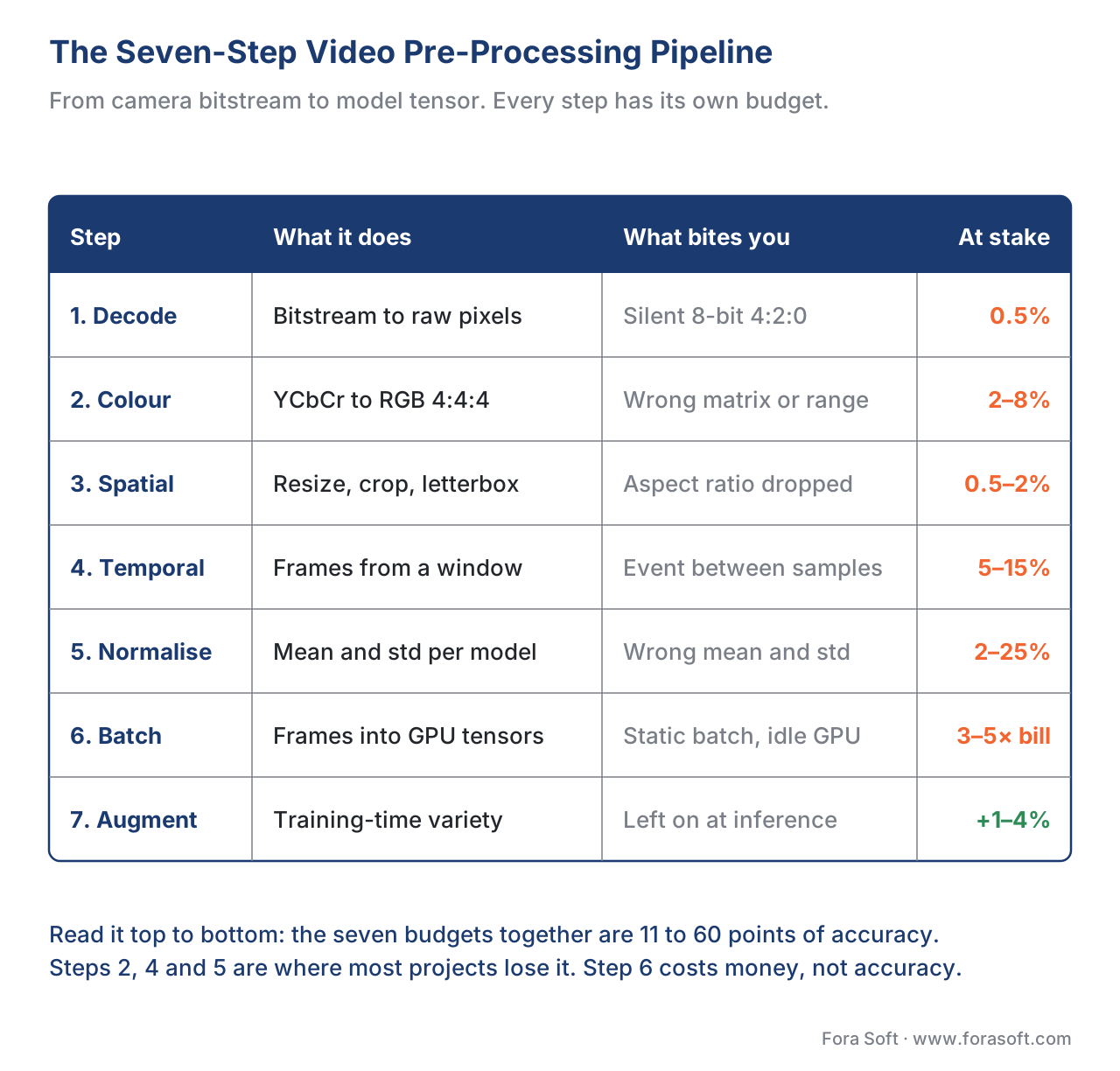 Figure 1. The seven steps every video pre-processing pipeline ships, and the budget each one consumes from the project's accuracy.
The Computer Vision Market In 2026 — Why The Numbers Below Matter Now
Before we go deeper into the engineering, the commercial picture matters because it sets the cost of a wrong decision. The global computer vision market in 2026 is forecast at roughly USD 24 to 35 billion depending on which analyst counts which slice — Fortune Business Insights puts the broader market at USD 24.14 billion growing to USD 72.80 billion by 2034, Grand View Research and Mordor Intelligence put the 2026 number near USD 32 to 35 billion, and Coherent Market Insights forecasts the narrower "AI in computer vision" segment at USD 34.94 billion in 2026 with a 32.8% CAGR through 2033. North America held about 34.3% of the market in 2025; Asia-Pacific is the fastest-growing region. The application split is dominated by manufacturing quality inspection, automotive driver-assistance and autonomy, retail analytics, healthcare imaging, and surveillance — in roughly that order by revenue.
The numbers that matter for a pre-processing decision are downstream of that. A typical IP camera deployment in 2026 ships 1080p H.265 at 30 frames per second, 4 to 8 Mbps per stream, and 50 to 200 cameras per site. A typical OTT moderation backlog ingests 100,000 to 10 million minutes of user-generated video a month at 480p to 4K. A typical telemedicine application captures 720p WebRTC at 15 to 30 frames per second over a connection that drops to SD when the patient's wifi degrades. A typical fitness app receives 1080p at 30 to 60 frames per second from a phone camera held by a user who has never read a tripod manual. Each of those workloads has a different pre-processing optimum, and the engineering pattern below is the union of what survives all four.
The Color-Space Gotcha — The First Mistake In Every CV Project
The single most under-appreciated step in a video pre-processing pipeline is the color-space conversion, and that under-appreciation costs more accuracy points than anything else on this page. The reason is structural: cameras shoot in YCbCr, codecs encode in YCbCr 4:2:0, models train on RGB 4:4:4, and the matrices that convert between them are different for SDR-BT.601 footage, SDR-BT.709 footage, and HDR-BT.2020 footage. If you use the wrong matrix, every colour in the frame shifts by 2 to 8% — and the model that learned to recognise a green safety vest will start missing it on the camera that shoots BT.2020.
The math is short. The YCbCr-to-RGB conversion matrix for BT.709 (the dominant standard for HD content) is given in Rec. ITU-R BT.709 §3.2. With analog full-range coefficients it reduces to R = Y + 1.5748 (Cr − 128), G = Y − 0.1873 (Cb − 128) − 0.4681 (Cr − 128), B = Y + 1.8556 (Cb − 128) — but real footage is rarely full range. Most cameras encode in studio range (a.k.a. limited range, a.k.a. TV range) where Y goes from 16 to 235 and Cb/Cr from 16 to 240, and the conversion has to subtract 16 from Y and scale before applying the matrix. Get the range wrong and every frame is roughly 10% darker or brighter than it should be — and your training-time augmentation now has a 10% baseline error that the model has to memorise out.
The fix is to read the colour space and range metadata off the decoded frame. FFmpeg exposes them as colorspace, color_range, color_primaries, and color_trc on the decoded AVFrame; OpenCV's default VideoCapture drops them and silently assumes BT.601 + studio range, which is the worst combination because most modern footage is BT.709 + studio range. The single best engineering investment in a new project is to switch off OpenCV's default decoder, use PyAV or torchcodec or Decord with explicit colour conversion, and assert the colour space on every frame.
| Source | Default in OpenCV (cv2.VideoCapture) |
Default in PyAV / Decord / torchcodec | What modern cameras actually shoot |
|---|---|---|---|
| HD camera (1080p, 720p) | BT.601, studio range | Reads metadata, BT.709 if tagged | BT.709, studio range |
| 4K SDR camera | BT.601, studio range | Reads metadata, BT.709 or BT.2020 | BT.709 or BT.2020, studio range |
| 4K HDR camera (HDR10 / PQ) | BT.601, studio range | Reads metadata, BT.2020 + PQ | BT.2020, PQ transfer, studio range |
| Smartphone camera | BT.601, studio range | Reads metadata, often BT.709 + sRGB | BT.709, full or studio range |
Figure 2. The colour-space defaults in the most common decoders, vs what cameras actually produce. The OpenCV default produces a 2 to 8% colour drift on every modern source; PyAV, Decord, and torchcodec read the metadata and convert correctly.
The pitfall every junior team falls into is the convert-twice mistake. The pipeline decodes YCbCr to RGB using BT.709, then a downstream library (Albumentations, torchvision, Pillow, even Matplotlib) "fixes" what it thinks is the wrong colour space and runs another matrix. The frame that started in BT.709 is now in BT.601-then-BT.709, the colours are wrong twice, and the model is more confused than if you had not converted at all. The fix is to convert once, log the matrix, and assert no downstream library is going to re-touch the colour. A one-line assert frame.color_range == "studio" and frame.colorspace == "bt709" at the boundary catches the bug before it ships.
Frame Sampling — The Number That Decides Everything Else
Once the colour space is right, the next decision is how many frames per second per clip you feed to the model. The number is not arbitrary; it determines latency, cost, and accuracy in a tight coupling that no model architecture can hide.
Per-frame models — YOLO, RT-DETR, Grounding DINO, SAM 2 in image mode, MediaPipe Selfie Segmentation — operate on one frame at a time. Their sampling decision is just the inter-frame interval: process every frame (30 fps), every other (15 fps), every fifth (6 fps), or every key frame (1 to 2 fps). The right number depends entirely on the event you want to catch. A person falling can be detected at 6 fps because the fall lasts more than a second; a license plate going past a camera at highway speed needs 30 fps because the plate is in frame for less than a second. The cost scales linearly with the number of frames you process, so the question reduces to the slowest event in your customer's spec.
Window-based models — 3D-CNNs (I3D, SlowFast), video transformers (TimeSformer, VideoSwin, VideoMAE), and most action recognisers — operate on a window of 8, 16, 32, or 64 frames. The window's temporal stride (how far apart in the source the sampled frames are) is the parameter that most teams get wrong. The Kinetics-pretrained SlowFast model expects a slow pathway at temporal stride 16 (one frame every 16, spanning about 2 seconds at 30 fps) and a fast pathway at temporal stride 2 (one frame every 2, spanning about 1 second). Feed it 16 consecutive frames at 30 fps and it sees one twelfth of the temporal context it was trained on; accuracy drops by 8 to 14 points. The fix is to read the stride off the model card and respect it.
VLM-based models — Gemini 2.5, GPT-5, Claude Opus, the open-weights Qwen-VL and LLaVA-Video, and the SmolVLM family — sample frames into a fixed budget. Gemini 2.5 Flash, for example, processes media at 1 frame per second by default in low-resolution mode, charging about 66 tokens per frame; a 60-second clip becomes 60 frames and roughly 4,000 tokens of media context. GPT-5's Vision API charges per image, with each frame counting as a separate image and a 60-frame clip costing roughly 60 × per-image-price. Claude Opus 4 ingests frames similarly. The implication for cost is direct: a 1-fps sampling cadence costs 3.3% of what a 30-fps cadence costs at the same model. Pick the slower cadence that still catches your event class.
A worked example. A retail store has 80 cameras shooting 1080p at 30 fps. The product manager wants to detect a shoplifter putting an item in a bag, which is a 4-to-8-second event. At 30 fps the workload is 80 × 30 × 86,400 = 207 million frames per day per store. At 6 fps the workload is 41.5 million frames per day; at 2 fps it is 13.8 million frames per day. A YOLOv11s model at 6 fps on an NVIDIA L4 ($1.10 per hour) processes 200 streams comfortably, which is two stores per L4. At 30 fps you need five times the GPU capacity and pay five times the hourly bill. The event class fits in 6 fps; pick 6 fps, and the same $1.10-per-hour-per-two-stores becomes the unit economic.
| Sampling cadence | What it catches reliably | What it misses | Cost vs 30 fps |
|---|---|---|---|
| 30 fps | Sub-second events, license plates at speed, fast gestures | Nothing in the cadence; budget pressure | 100% |
| 15 fps | Most action recognition, most shoplifting, most pose tracking | Highway license plates, very fast hand gestures | 50% |
| 6 fps | Falls, queues forming, behaviour anomalies, retail dwell | Sub-second events, fast moving small objects | 20% |
| 2 fps | Schedule violations, presence, slow scene changes | Anything under 2 seconds | 6.7% |
| 1 fps (VLM default) | Long-form action labelling, scene summarisation | Anything under 2 seconds reliably | 3.3% |
| Key-frame only | Editorial / search use cases | Real-time alerting | Variable, usually <1% |
Figure 3. The frame sampling cadence determines latency, accuracy, and cost in lock-step. Pick the slowest cadence that catches your event class, never the fastest you can afford.
The common mistake is to over-sample because "the camera shoots at 30 fps, we should use all of it". The opposite mistake is to under-sample because "the model only needs 8 frames per clip". Both fail. The right cadence is whatever lets your model see the temporal extent of the event class once, plus a safety margin of 2× for tail events and noise.
Spatial Transformations — Resize, Crop, Pad, And Why Aspect Ratio Bites Object Detectors
The model's input shape is almost always square — 224×224, 384×384, 640×640, 768×768, 1024×1024 — and the camera's output shape is almost never square. The transformation between them is the third place where accuracy leaks, and the leak is biggest for object detectors.
Three patterns dominate. Naive resize stretches the frame to the model's input shape, ignoring aspect ratio. It is the default in most tutorials and it destroys object detection accuracy because every box's aspect ratio is now wrong. Letterbox resize (also called pad-resize) scales the longest side to match the model's input, then pads the short side with a neutral colour (gray, mean colour, or black). It preserves aspect ratio and is what YOLO, RT-DETR, and most production object detectors expect. Crop-and-resize picks a square region of the frame and resizes that, throwing away the rest. It works for classifiers that already centre on the object but not for detectors that need to see the whole scene.
The pitfall the team usually finds the hard way is that the augmentation library and the inference path use different resize functions. Training-time Albumentations uses one bilinear interpolation, inference-time OpenCV uses another, and the resulting frames are 1 to 3% different in pixel values — enough to push a confidence-0.51 detection below the 0.50 threshold and miss the box. The fix is to verify that the resize function is byte-identical between training and inference, or to retrain with the inference-time resize function. The Roboflow team's published analysis on YOLO deployment shows letterbox + bilinear is the dominant production pattern; anything else is asking for a 1 to 2 point accuracy gap between paper and product.
The interpolation kernel matters less than people think for inference, but more than people think for training. Bilinear is fast and adequate for inference on most resize ratios. Bicubic is slightly more accurate at downsampling and the standard for fine-art applications. Lanczos is the highest quality and the slowest. For training, the difference is real because the model learns to expect a particular pixel distribution; pick one kernel and stick with it across training, validation, and inference. The Hugging Face Transformers image_processor defaults differ by model — CLIP uses bicubic, ViT uses bilinear, BEiT uses bicubic — and using the wrong default produces a measurable 0.5 to 1 percentage point gap on every benchmark.
Normalisation — The Constants That Cost 10 Points If You Skip Them
The normalisation step is mechanically simple — subtract a per-channel mean, divide by a per-channel standard deviation — and the failure mode is that the team uses the wrong constants. The right constants are the ones the model was trained with; the wrong constants are everything else.
Three constant sets cover 90% of production models in 2026.
ImageNet constants are used by ResNet, EfficientNet, ConvNeXt, ViT-base/large variants pretrained on ImageNet, and most TIMM models. Mean = (0.485, 0.456, 0.406), std = (0.229, 0.224, 0.225), input in [0, 1] after divide-by-255.
CLIP constants are used by CLIP, OpenCLIP, SigLIP, EVA-CLIP, and most VLMs derived from them (LLaVA, Qwen-VL, InternVL, Pixtral). Mean = (0.48145466, 0.4578275, 0.40821073), std = (0.26862954, 0.26130258, 0.27577711), input in [0, 1] after divide-by-255.
No normalisation (a.k.a. raw [0, 255] uint8) is used by some YOLO variants (YOLOv8 in 0-255 mode, all Ultralytics variants by default), MediaPipe models, and most ONNX-exported computer vision models targeting edge inference. The constants are baked into the model graph.
Get the constants wrong and you get a 2 to 8 percentage point accuracy drop on a well-tuned model and a 10 to 25 point drop on a less tuned one. The fix is to copy the constants from the model card, run a sanity check on a held-out batch (predict on 100 images, compare to the published benchmark, alarm if the gap is more than 0.5 percentage points), and never trust a default that came from a tutorial.
The 2026 ecosystem fix is the model card itself. Hugging Face model cards expose normalisation constants in the preprocessor_config.json of every modern checkpoint; the right pattern is to load the preprocessor alongside the model and call it on every input. AutoImageProcessor.from_pretrained(model_id) does the right thing for ImageNet and CLIP both; using it eliminates an entire class of bugs. The corresponding pattern in TensorFlow is tf.keras.applications.<arch>.preprocess_input; in MediaPipe it is the framework's own pre-processor.
Temporal Batching And Throughput — Why Your GPU Sits At 23% Utilisation
The last engineering step is batching, and it is the place where a CV project's unit economics live or die. The math is straightforward and the failure mode is universal: teams ship a static batch size, the GPU sits at 20 to 30% utilisation, the cloud bill is 3 to 5 times what it should be, and the post-mortem blames "the model" instead of the batching.
Static batching ("always batch=8") is the simplest pattern and the right one for a single producer feeding a single consumer. It fails as soon as the producer is bursty — a multi-camera surveillance feed where 80 cameras occasionally all see motion at once. The GPU sits idle waiting for batch=8 to fill, then bursts, then sits idle again. Throughput is below 50% of the GPU's nameplate.
Dynamic batching ("collect for 20 ms then send") is the production pattern. Triton Inference Server, TorchServe, and vLLM all expose dynamic batching as a first-class feature. The two knobs are the maximum batch size (bounded by GPU memory) and the maximum wait (bounded by your latency budget). For a 50 ms inference budget, the standard tuning is max wait = 10 ms, max batch = 16; the GPU utilisation jumps from 23% to 75 to 90% on the same workload and the per-frame cost drops by 3 to 5×.
Padded batching is what you need when clips have variable length — a video VLM seeing 10-second clips and 60-second clips in the same batch. Pad each clip to the longest in the batch, set an attention mask so the model ignores the padding, and accept that you are doing 1.1 to 1.4× the compute on the shorter clips. The trade is worth it because the alternative — sending every clip as its own batch — collapses GPU utilisation.
A worked example. A surveillance product has 50 cameras and a 100 ms inference latency budget. Each camera produces a 30-frame clip every 5 seconds (a 1-second window every 5 seconds). At static batch = 1 the throughput is 50 clips per 5 seconds = 10 clips/second; the L4 GPU is at 8% utilisation. At static batch = 8 the throughput rises to 28 clips/second but the latency to fill the batch is 1.6 seconds — over budget. At dynamic batching with max wait = 20 ms and max batch = 16 the throughput hits 80 clips/second, the latency is 50 to 60 ms, the GPU sits at 84%, and the cloud bill drops by 4.5×. Same model, same hardware, same workload; the batching is the difference.
The hardware-software co-design is the second piece. NVIDIA Triton Inference Server (still the production default in 2026) supports dynamic batching out of the box and works with TensorRT-LLM, vLLM, and any PyTorch or TensorFlow model. The vLLM project has become the dominant inference engine for VLMs and supports continuous batching, which is even more efficient than fixed dynamic batching for the LLM-style decode loop. For non-VLM image models, ONNX Runtime + Triton or PyTorch + Triton remain the safe choices.
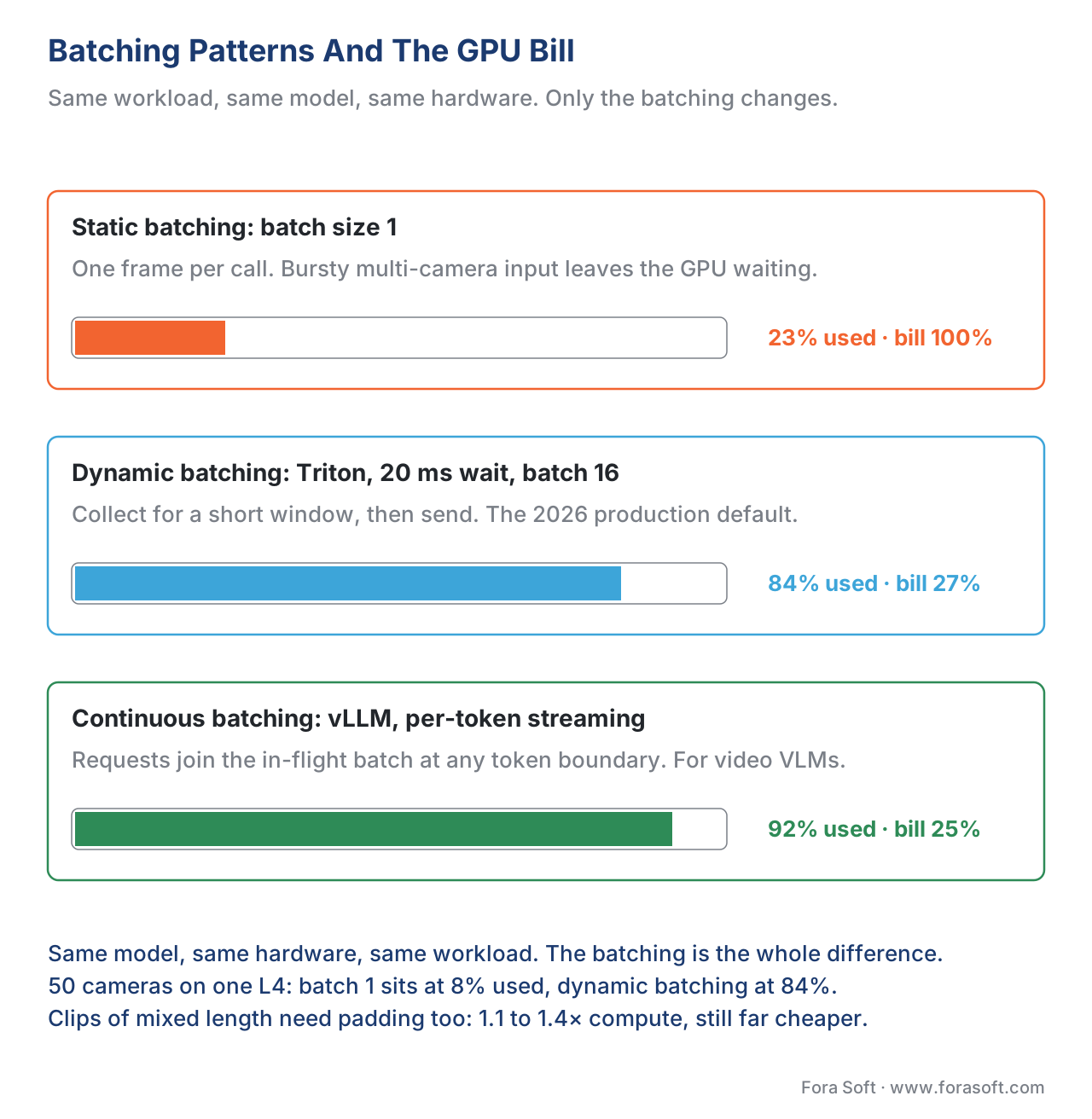 Figure 4. Static, dynamic, and continuous batching with the GPU utilisation each one delivers on the same workload.
The Decoder Choice — OpenCV, PyAV, Decord, Torchcodec, NVIDIA DALI
The decoder is the first link in the chain, and the choice of decoder makes more difference to throughput than most teams realise. Five libraries dominate the ecosystem in 2026.
OpenCV (cv2.VideoCapture) is the easiest. It wraps FFmpeg, handles most containers, and provides a Pythonic frame-by-frame API. The two failure modes are that it silently assumes BT.601 colour space (covered above) and that it copies every decoded frame from FFmpeg's buffer to OpenCV's buffer, doubling the memory bandwidth. For prototypes it is fine; for production at scale it is the wrong default.
PyAV is the FFmpeg wrapper most production teams settle on. It exposes every FFmpeg knob — colour space, range, hardware acceleration via NVDEC / VAAPI / VideoToolbox, container format — and gives you the decoded frame as a NumPy array with metadata attached. The learning curve is steeper than OpenCV; the throughput on a single CPU thread is roughly 2× OpenCV's because there is no double-copy.
Decord (dmlc/decord) is the deep-learning-specialised reader. It supports random access into a video file ("give me frames 100, 250, 400"), GPU decoding via NVDEC, and a built-in batch API that returns a NumPy tensor of N frames. The throughput on a single GPU is 10 to 30× a CPU PyAV pipeline. The trade-off is that it is less feature-complete than PyAV — fewer container formats, fewer encoder knobs. For inference workloads where the codec is known and fixed, Decord is the right default.
TorchCodec is the newer (mid-2024 onward) PyTorch-native video reader. It returns decoded frames directly as torch.Tensor on the GPU, supports every codec the installed FFmpeg supports, and integrates with PyTorch DataLoader without the NumPy → tensor copy. The PyTorch team is investing in TorchCodec as the long-term replacement for the ad-hoc read_video API; it is the right choice for new PyTorch projects.
NVIDIA DALI (nvidia.dali) is the heaviest, most performant option. It is a full data-processing pipeline (decode + augment + batch) that runs on the GPU end-to-end, eliminating the CPU bottleneck entirely. The throughput on an A100 is 5 to 15× a Decord pipeline. The cost is operational complexity: DALI has its own DSL, its own debugger, and a learning curve that takes a senior engineer about a week. For high-volume training on NVIDIA hardware (above 1 million clips per training run) it is the right default; for everything below that, the simpler libraries are better.
| Library | Best for | Throughput on a 1080p clip (single thread) | Production-grade | Notes |
|---|---|---|---|---|
| OpenCV | Prototypes, single-camera demos | ~30 fps | No at scale | Wrong colour-space default |
| PyAV | Production CPU pipelines | ~60 fps | Yes | The safe default |
| Decord | Random-access dataloading | ~200 fps (GPU NVDEC) | Yes | Built for ML batches |
| TorchCodec | New PyTorch projects | ~150 fps (GPU NVDEC) | Yes | PyTorch-native tensors |
| NVIDIA DALI | High-throughput training | ~600 fps (GPU, with augment) | Yes | Complex, GPU-only |
Figure 5. The five dominant video decoders for ML pipelines in 2026, with their throughput on a 1080p clip and their best-fit use case.
Augmentation — The Patterns That Earn Real Points
The augmentation step is the last engineering decision in the pre-processing chain, and it is where 1 to 4 percentage points of accuracy are still on the table for a well-tuned project. The 2026 dominant patterns are well known, but the temporal patterns specific to video are less so.
Image-level augmentation is mature. Random crop, horizontal flip, colour jitter, random erasing, and the family of policy-based methods (RandAugment, AutoAugment, TrivialAugment) are the standard set. The Albumentations library remains the dominant Python implementation; torchvision v2 caught up in 2024 and is now a credible alternative. The single most important rule is to apply the same augmentation to the same frame at training time and to disable augmentation at inference time — the framework helpers (model.train() vs model.eval()) usually do this automatically but verify it on every new pipeline.
Temporal augmentation is video-specific and less well documented. The patterns that earn measurable points are temporal cropping (sample a random window of K frames from a longer clip), temporal stretching (resample the clip to a slightly different frame rate), frame dropping (set 10 to 30% of frames to zero or interpolated values), and the TimeMix family (mix two clips along the time axis). The 2024 Cerberus paper showed that combining RandAugment for spatial work with a 20% temporal dropout earned 3.1 percentage points on UCF-Crime over the no-augmentation baseline.
Mixup, CutMix, and MixUp variants sit on top. Image-level Mixup blends two images and their labels in a fixed ratio; CutMix pastes a square of one image onto another. For video, VideoMix (a 3D version of CutMix) and the more recent TubeMix mix sub-volumes of one clip into another. The accuracy lift is consistent (1 to 2 points on action recognition benchmarks) and the cost is essentially zero at training time.
The pitfall the team often falls into is over-augmenting. A four-stage augmentation pipeline (random crop + flip + colour jitter + RandAugment + Mixup) on a small dataset will produce a model that learns the augmentation policy as much as the actual task. The fix is to run a small ablation — train without each augmentation, measure the drop — and keep only the ones that earn at least 0.3 percentage points.
Common Computer Vision Projects In 2026 And Their Pre-Processing Spec
The whole article so far has been generic. The pre-processing spec changes by use case. The six patterns below cover roughly 80% of the production CV projects we see in 2026.
Real-time object detection on surveillance video (the dominant CV project by count). Camera input: 1080p H.265 at 30 fps. Decode: PyAV with explicit BT.709 + studio range. Sample at 6 to 10 fps. Letterbox-resize to 640×640. No normalisation (Ultralytics YOLOv11 takes 0-255 uint8). Static batch = 1 per camera; dynamic batch = 16 at the inference server. Augmentation at training: random crop + flip + mosaic + Mixup. Expected accuracy: 88 to 92% mAP@50 on a domain-adapted model; 80 to 85% on a Roboflow / Ultralytics pretrained without adaptation.
Action recognition on archive video (OTT, security, e-learning). Input: 480p to 1080p H.264 at 24 to 30 fps. Decode: Decord with GPU NVDEC. Sample: 32-frame window with temporal stride matching the Kinetics-pretrained model (typically stride 2 for the fast pathway, stride 16 for the slow pathway in SlowFast). Centre-crop to 224×224 after resize-shortest-side=256. ImageNet normalisation. Padded batch = 8 at training, dynamic at inference. Augmentation: temporal crop + RandAugment + Mixup. Expected accuracy: 85 to 90% on Kinetics-400 with a fine-tuned SlowFast or VideoSwin.
Pose tracking for fitness or telehealth. Input: 1080p from phone camera, 30 fps over WebRTC. Decode: client-side via WebRTC's MediaStreamTrack and OffscreenCanvas; on the server, PyAV or Decord. Sample every frame for tracking, every 5th for evaluation. Resize to 256×256. No normalisation (MediaPipe Pose v2 takes uint8). Static batch = 1 per stream (latency-bound). Augmentation: scale + flip + small rotation; over-augmenting hurts because pose ground-truth labels are precise. Expected MPJPE (mean per-joint position error): 30 to 50 mm on indoor sessions, 50 to 80 mm on noisy outdoor or low-light sessions.
Face detection for moderation or attendance. Input: variable resolution from upload (480p to 4K). Decode: PyAV. Sample one frame per face encounter (use a fast detector + tracker to decide which frame to keep). Resize to the detector's input — 416×416 for the legacy MTCNN family, 640×640 for YOLOv8-Face, 320×320 for SCRFD. ImageNet or detector-specific normalisation. Dynamic batch at the inference server. Augmentation at training: photometric + small scale jitter; no horizontal flip if the model also predicts a left-vs-right attribute. Expected accuracy: 95%+ AP at 0.5 IOU on WIDER FACE Easy; 80 to 87% on Hard.
Video VLM moderation / captioning (the newest dominant CV project). Input: any clip the user uploads. Decode: PyAV for metadata + ffmpeg to extract frames to disk. Sample: 8, 16, or 32 frames uniformly across the clip, plus key frames. Resize to the VLM's input — 384×384 for SigLIP-based models, 448×448 for Qwen-VL, 224×224 for older CLIP-based VLMs. CLIP-style normalisation (most VLMs use it). No batching (each clip is one VLM call); for cost-control, route to a smaller VLM (Qwen-VL 7B, SmolVLM 2B, LLaVA 1.6 7B) on the edge and to a frontier VLM (Gemini 2.5, GPT-5) only on borderline cases. Augmentation: not applicable at inference; for fine-tuning, the LoRA recipe described in the Phase 4 lesson on fine-tuning VLMs.
Anomaly detection on surveillance video. Covered end-to-end in lesson 2.15; the pre-processing spec there is: PyAV with BT.709, 10-second clips at 6 fps, 16-frame uniform sample per clip, 224×224 centre crop, ImageNet normalisation, dynamic batch = 8 at the edge inference server.
Free download: CV Pre-Processing Decision WorksheetOne printable page with the eight numbers a computer vision project has to answer before anyone argues about models: colour space, sampling cadence, input resolution, normalisation constants, decoder, batching mode, augmentation policy, and the accuracy budget you are spending.Where Fora Soft Fits In
Fora Soft has been shipping video products since 2005 and computer vision projects since 2018 — surveillance and intelligent video analytics, OTT moderation, telemedicine triage, e-learning attention analytics, AR fitness coaching, and several confidential industrial inspection systems. The pre-processing pipeline above is the union of what we have shipped, what has broken in production, and what we have rebuilt. We do not sell a CV product; we build CV pipelines into yours. The conversation that earns our team is usually a one-page architecture worksheet — the same worksheet we have packaged as a downloadable companion to this article — that walks the eight numbers a new project has to answer before the model selection conversation begins. Teams bring that worksheet to our computer vision engineering team, which builds the pre-processing, detection and tracking pipeline into the product, and to our AI video agent development practice when the pipeline has to reason over live video on Jetson or a cloud vision model.

The book
AI for Video: A Complete Guide to Intelligence in Video Products
This article sets the seven budgets; volume 6 is where the models on the other end of them are taken apart. Detection, tracking, segmentation, pose and OCR get a chapter each, and the chapters before them cover the ML minimum this article leans on hardest — model artifacts, quantization, and the deployment topology that decides whether your decode and resize run at the camera or on a shared GPU. Volume 7 picks up where the batching section stops: serving with Triton and vLLM, real-time budgets, and cost per stream-hour. Written by Nikolay Sapunov, CEO at Fora Soft.
Is your model underperforming, or is it the seven steps in front of it?
Send us the camera spec, the event you need caught, and the accuracy you are held to, and we will come back with the seven numbers filled in — colour space, sampling cadence, input size, normalisation constants, decoder, batching mode, and the accuracy budget each one is spending. 250+ video products shipped since 2005.
See our case studies
Case study
Mindbox
An intelligent video management system where steps 1 and 4 are the whole product: RTSP feeds decoded through FFmpeg, ANPR reading over 500,000 vehicles a day at about 95% accuracy — a plate is in frame for under a second, so the sampling cadence is not negotiable — and facial recognition above 99.5%, in 50+ deployments since 2020.
Case study
Layers (LAYRS)
What step 2 is worth when you get it right: three bracketed photos go into a custom-trained network that does the colour correction, and the output is 50% more accurate in colour and 60% quieter in noise than the manual edit it replaces, at 30% faster time-to-market.
Case study
Netcam Studio
The other end of step 6: motion and sound rules running on ordinary Windows hardware with no accelerator at all, free up to 4 cameras and licensed from $75 for 16 — the floor that a GPU pipeline has to beat before the batching argument is worth having.
What to read next
Vision blocks
Computer Vision In Retail And Industrial Video Analytics
What the tensors from this pipeline actually feed, block by block.
Models
CLIP And Contrastive Vision-Language — The Primer
Where the normalisation constants in step 5 come from, and why they differ.
Cost
The Cost Model — What AI In Video Actually Costs
The pricing behind every sampling cadence and batching decision here.
Deployment
Latency And Deployment — Real-Time, Edge, And Cloud
Where the seven steps run once latency, not accuracy, is the constraint.
References
- Rec. ITU-R BT.709-6 (06/2015), "Parameter values for the HDTV standards for production and international programme exchange". The normative source for HD colour space and matrices. https://www.itu.int/rec/R-REC-BT.709
- Rec. ITU-R BT.2020-2 (10/2015), "Parameter values for ultra-high definition television systems for production and international programme exchange". The normative source for UHD / wide-gamut colour. https://www.itu.int/rec/R-REC-BT.2020
- Rec. ITU-R BT.601-7 (03/2011), "Studio encoding parameters of digital television for standard 4:3 and wide-screen 16:9 aspect ratios". The SD colour space; still relevant because OpenCV's default decoder assumes it. https://www.itu.int/rec/R-REC-BT.601
- ISO/IEC 23008-2:2020 (HEVC / H.265). The compressed bitstream most modern cameras produce. Decoder design has to track this spec.
- AOMedia AV1 Bitstream and Decoding Process Specification v1.0.0-errata1. The royalty-free codec gaining ground in OTT and surveillance. https://aomediacodec.github.io/av1-spec/
- Decord — Efficient video loader for deep learning, dmlc/decord. https://github.com/dmlc/decord (accessed 2026-05-24).
- TorchCodec — Easy and efficient video decoding for PyTorch. PyTorch Blog, March 2025. https://pytorch.org/blog/torchcodec/
- PyAV documentation. Pythonic FFmpeg bindings. https://pyav.org/docs/develop/ (accessed 2026-05-24).
- NVIDIA DALI documentation. GPU-accelerated data loading and augmentation. https://docs.nvidia.com/deeplearning/dali/ (accessed 2026-05-24).
- NVIDIA Triton Inference Server — dynamic batching documentation. https://github.com/triton-inference-server/server (accessed 2026-05-24).
- Cubuk, E., Zoph, B., Shlens, J., Le, Q.V. "RandAugment: Practical Automated Data Augmentation with a Reduced Search Space". CVPR 2020. arXiv:1909.13719.
- Yun, S., et al. "CutMix: Regularization Strategy to Train Strong Classifiers with Localizable Features". ICCV 2019. arXiv:1905.04899.
- Albumentations — Fast image augmentation library and API for ML, used by Kaggle Grandmasters. https://albumentations.ai/ (accessed 2026-05-24).
- Hugging Face Transformers —
AutoImageProcessordocumentation. The right pattern for normalisation constants in 2026. https://huggingface.co/docs/transformers/main/en/main_classes/image_processor (accessed 2026-05-24). - CLIP Preprocessing Constants — OpenAI CLIP model card and preprocessing constants. https://github.com/openai/CLIP (accessed 2026-05-24).
- Feichtenhofer, C., et al. "SlowFast Networks for Video Recognition". ICCV 2019. arXiv:1812.03982.
- Ultralytics YOLOv11 documentation — letterbox resize and preprocessing defaults. https://docs.ultralytics.com/ (accessed 2026-05-24).
- Fortune Business Insights — Computer Vision Market Report, 2026. Market size forecast USD 24.14B → USD 72.80B (2026–2034). https://www.fortunebusinessinsights.com/computer-vision-market-108827
- Grand View Research — Computer Vision Market, 2030 Forecast. 2026 sizing. https://www.grandviewresearch.com/industry-analysis/computer-vision-market
- Coherent Market Insights — AI in Computer Vision Market 2026-2033. USD 34.94B in 2026, 32.8% CAGR. https://www.coherentmarketinsights.com/industry-reports/ai-in-computer-vision-market
- vLLM — Continuous batching documentation. https://docs.vllm.ai/ (accessed 2026-05-24).
- Roboflow — YOLO production deployment best practices. https://blog.roboflow.com/ (accessed 2026-05-24).
