


Updated October 2026: new section on Sammie-Roto 2 (v2.4.1, September 2026), Meta’s SAM 3.1 Object Multiplex (March 2026), EdgeTAM for on-device use, and the official SAM 2.1 speed and accuracy table.
Why This Matters
If your video product needs to isolate a specific object across many frames — a person on a security feed, a tumour outline on a surgical recording, a product placement to track in a UGC clip, a face to anonymise in a stored archive — you have two options. Option one is the classic computer vision pipeline: a detector finds the object, a tracker keeps an ID across frames, and a segmenter (Mask R-CNN, DeepLab) draws the polygon. That pipeline takes weeks to assemble per use case and breaks the moment your customers ask for a class you did not train it on. Option two is SAM 2: one click on frame zero, masks on every remaining frame, no training, no class list, no retraining cycle. The choice is not always obvious — SAM 2 is heavier per frame than a YOLO + tracker stack, and the prompt has to come from somewhere — but for any product that lets a human or a vision-language model say "track this specific thing", SAM 2 has become the default building block. If you need the background, start with lesson 2.2 on the YOLO production lineage — because the canonical 2026 pattern is detect-then-segment — and lesson 2.3 on open-vocabulary detection, because Grounding DINO is the most common front-end that supplies SAM 2 with its initial prompt. By the end you will be able to specify a SAM 2 integration, pick the right checkpoint size, design a long-video propagation strategy, and avoid the common mistakes we see when teams ship a SAM 2 feature for the first time.
What Is SAM 2? The Short Answer
SAM 2 (Segment Anything Model 2) is Meta’s open video segmentation model: one click, box or mask on any frame returns a pixel mask of that object on every frame, with no training. It runs on a single cloud GPU (an L4 or A100 handles several streams) or, via EdgeTAM, on a phone; the main risks are long-clip drift and needing a prompt source. It was released on 29 July 2024 under Apache 2.0, and SAM 2.1 (30 September 2024) is still the checkpoint family Meta publishes for it as of October 2026. Its successor, SAM 3 (November 2025, updated to SAM 3.1 on 27 March 2026), adds text prompts such as “yellow taxi” but ships under Meta’s own SAM License. If you want SAM 2 rotoscoping on a desktop without writing code, the free open-source app Sammie-Roto 2 wraps it in a GUI.
| Question | Answer (October 2026) |
|---|---|
| What does SAM 2 do? | Promptable segmentation and tracking of one chosen object across a whole video |
| Licence | Apache 2.0 for code and checkpoints; SA-V dataset under CC BY 4.0 |
| Latest checkpoints | SAM 2.1: Tiny 38.9M to Large 224.4M parameters |
| Newer Meta model | SAM 3.1 (848M parameters, text and exemplar prompts, SAM License) |
| On-device variant | EdgeTAM: 16 FPS on an iPhone 15 Pro Max (Meta, January 2025) |
| Free desktop rotoscoping app | Sammie-Roto 2, GPL-3.0, Windows, macOS and Linux |
What SAM 2 Actually Is
SAM 2 — short for Segment Anything Model 2 — was released by Meta's FAIR (Fundamental AI Research) group on 29 July 2024, accompanied by the paper "SAM 2: Segment Anything in Images and Videos" (arXiv:2408.00714) by Nikhila Ravi, Valentin Gabeur, Yuan-Ting Hu and collaborators. The paper, code repository at facebookresearch/sam2 on GitHub, four pretrained checkpoints, an interactive web demo, and the SA-V training dataset all shipped on the same day under the Apache 2.0 licence. A patch release, SAM 2.1, followed on 30 September 2024 with improved checkpoints and a developer-tools update.
The model does one job and does it well: take a video and a prompt — a single point click, a box, or a hand-drawn mask — supplied on any one frame of that video, and produce a pixel-accurate segmentation mask of the same object on every frame, in both directions in time. The same model also works on still images; when the input is a single image, the memory module is empty and the model behaves exactly like the original SAM. This is the contract: one prompt in, masks out for every frame, no class list, no retraining.
The reason this is a step change rather than an incremental improvement on previous video object segmentation (VOS) models is the promptable part. Older VOS systems — XMem, AOT, DeAOT, STCN — also propagated a mask across a video, but the user had to supply a hand-drawn mask on frame one. SAM 2 accepts a single click, which collapses the human work from minutes to seconds, and it accepts further clicks mid-video to correct errors, which means the user is in the loop without owning a paintbrush. That difference — promptable propagation versus initialised propagation — is what turned the technology from a niche research demo into a tool that ships in rotoscoping software, surveillance investigation tools, and medical-imaging review systems.
 Figure 1. SAM 2's promptable segmentation contract. A single click on frame N produces masks on every frame in the video; an optional correction click on any frame updates the propagation in both directions.
How The Memory Module Works (And Why It Matters)
The single piece of architecture that distinguishes SAM 2 from SAM is the memory module. Every other part of the model — image encoder, prompt encoder, mask decoder — is structurally similar to SAM with quality-of-life upgrades. The memory module is the new idea, and it is where the engineering work hides.
The pipeline runs as follows. Each video frame is processed by a hierarchical vision transformer backbone — Hiera, a hierarchical ViT pretrained as a masked autoencoder — that produces multi-scale image embeddings (stride 4, 8, 16, and 32 features). The stride-16 and stride-32 features are fused by a feature pyramid into one stride-16 embedding that feeds the memory attention layer; the stride-4 and stride-8 features bypass memory and feed into the mask decoder as high-resolution skip connections, which is what allows the decoder to draw clean edges on thin objects.
The memory attention layer is a transformer block that takes the current frame's image embedding as the query and a buffer of stored object features from previous frames as the keys and values. The buffer contains two kinds of entries. The first is a stack of recent-frame memories: up to six of the most recent frame embeddings plus their predicted masks, fused into per-frame memory tensors by a small memory encoder (the default memory bank has seven slots: the prompted frame plus six recent frames). The second is a stack of prompted-frame memories: the embeddings of every frame on which the user actively clicked, boxed, or scribbled, kept separately, never evicted, and marked with their own temporal position encoding. This separation is deliberate — the prompted frames anchor the model to what the user meant; the recent frames let the model adapt to appearance changes (the object turning, lighting shifting, partial occlusion).
The cross-attention between the current frame and this memory buffer is what tells the mask decoder which object to segment on the current frame. Without memory, the model could only segment whatever the prompt explicitly pointed at — and the prompt only exists on one frame. With memory, the model carries the object's identity forward (and backward, since the buffer is filled by running the model in both temporal directions from the prompted frame). This is also why correction clicks on frame 200 update the mask on frame 50: the corrected frame becomes a prompted-frame memory, and the model re-runs propagation from that anchor.
The image encoder is the most expensive part of the pipeline by a wide margin — roughly 70–80% of total compute. Memory attention adds maybe 10%. The mask decoder is light. This cost shape has practical consequences: if you only ever click once per video and let the model propagate, you pay one image-encoder pass per frame (heavier for Large, lighter for Tiny), and because the memory bank has a fixed number of slots, per-frame cost does not grow with video length. What grows is risk and RAM: the stock video predictor keeps every frame's outputs in its inference state, and on very long videos (10K+ frames) the small rolling window lets the model drift onto look-alikes, which is what motivates the SAM2Long and distractor-aware memory follow-ups discussed below.
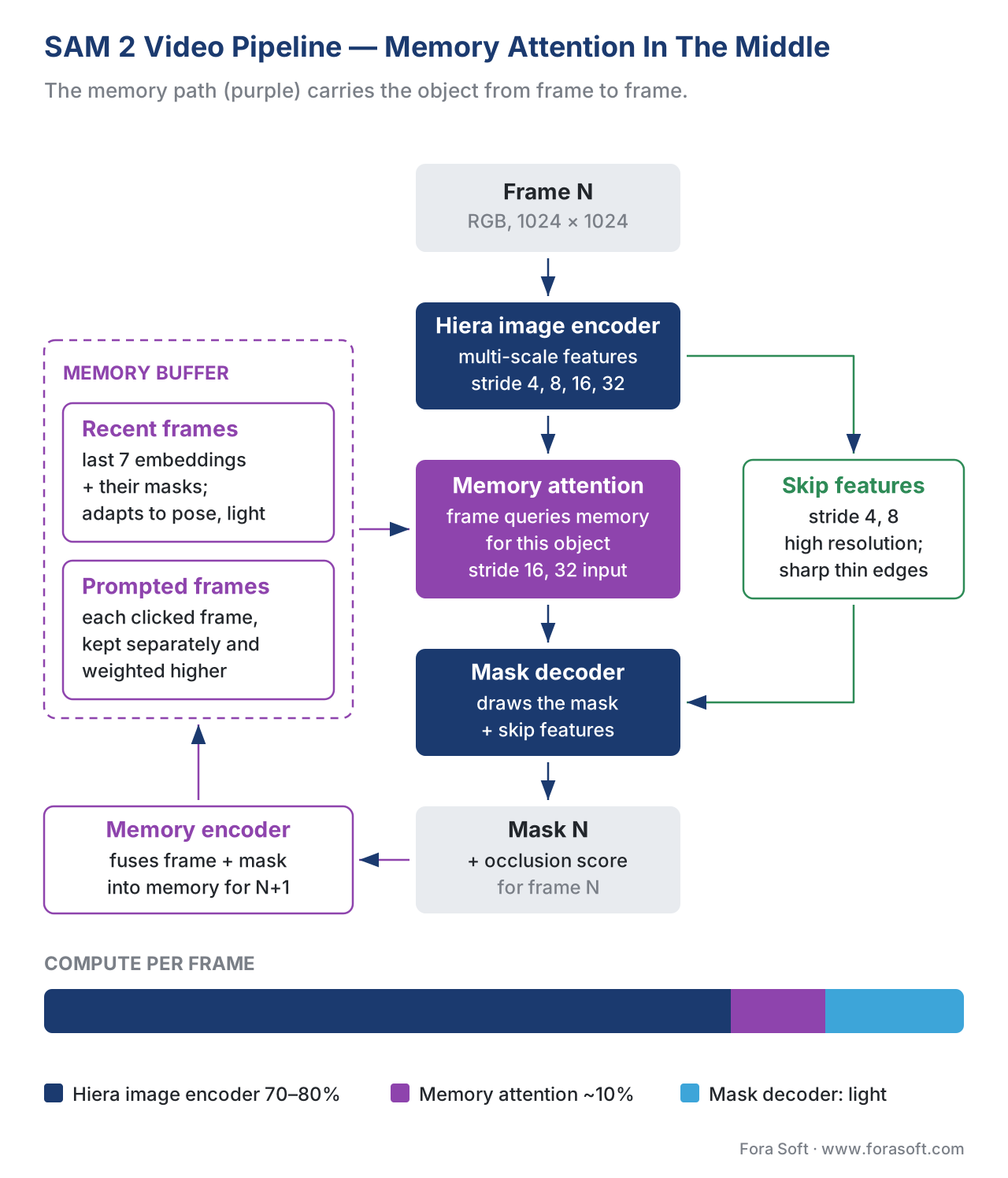 Figure 2. The SAM 2 video pipeline. The memory attention layer is the cross-attention between the current frame and the buffer of recent and prompted memories — the part that did not exist in SAM 1. In the default configuration the bank has seven slots: the prompted frame plus the six most recent frames.
Mask Propagation In Practice
The user-facing behaviour of SAM 2 is what makes the architecture worth caring about. The interaction loop, simplified to the core action:
- The user (or an upstream detector) drops a prompt — point, box, or mask — on any frame of a clip.
- SAM 2 segments that frame and produces a mask plus an internal memory of "this object, here, in this lighting, at this pose".
- The model then runs forward and backward through the video, frame by frame, conditioning the decoder on the memory buffer. Each frame gets a mask.
- The user reviews. If a mask looks wrong on any frame — say the model jumped to the wrong person at frame 240 — the user clicks once to add a correction. The corrected frame becomes a new prompted-frame memory; the model re-propagates from that anchor.
- Repeat until the masks look right. In practice, two or three correction clicks per minute of footage is typical for cooperative scenes.
The phrase "correction click" is doing more work than it sounds. In the older XMem / DeAOT world, fixing a propagation error meant going back to frame one, drawing a fresh mask, and re-running propagation from scratch — which itself often introduced new errors. In SAM 2, a single point at frame 240 fixes both the forward propagation past frame 240 and the backward propagation back toward frame 0, because the memory buffer reweighs the prompted frame and the model is run end-to-end on the new prompt set. The user can leave the model unattended on long clips with simple objects, and intervene only when the model surfaces low-confidence frames.
The model also emits multiple candidate masks per frame and an occlusion score — a learned signal that says "this object is not visible in this frame". Practical production pipelines use the occlusion score to decide whether to emit a mask at all on a given frame, which avoids the failure mode where a propagation locks onto a similar-looking distractor when the original object has left the scene.
The Four Model Sizes — Picking The Right Checkpoint
SAM 2 ships in four sizes, and the 2.1 versions (released September 2024) are the recommended defaults. Numbers below are Meta’s published figures from the facebookresearch/sam2 repository (checked October 2026), measured on an NVIDIA A100 with torch.compile enabled; mask quality is J&F on the SA-V test set.
| Checkpoint | Parameters | A100 FPS (video, 1024² input) | Mask quality (SA-V test J&F) | Typical use |
|---|---|---|---|---|
sam2.1_hiera_tiny |
38.9M | 91.2 | 76.5 | Edge / Jetson / cost-sensitive cloud |
sam2.1_hiera_small |
46M | 84.8 | 76.6 | Edge with slightly better quality |
sam2.1_hiera_base_plus |
80.8M | 64.1 | 78.2 | Most production cloud workloads |
sam2.1_hiera_large |
224.4M | 39.5 | 79.5 | Accuracy-bound: rotoscoping, medical, archival |
Figure 3. SAM 2.1 model variants. Frame-rate numbers assume single-stream video propagation on an A100 with torch.compile (the vos_optimized predictor added in December 2024); without compilation Large runs closer to 30 FPS. The 3-point J&F gap between Tiny and Large is what you trade for a 2.3× speed-up.
A simple decision rule that has held up across a dozen of our projects:
- If the product runs in the cloud, has fewer than a thousand concurrent streams, and quality is the headline feature (rotoscoping for VFX, medical-imaging review), pick Hiera-Large.
- If the product runs in the cloud at higher concurrency and quality is "good", pick Hiera-Base+ — it is the sweet spot of quality per dollar.
- If the product runs on edge hardware (Jetson Orin, robotics, on-device blur) or has a per-stream cost budget under a cent per minute, pick Hiera-Tiny and accept the quality hit. Roboflow's Inference and Ultralytics' SAM 2 wrapper both support Tiny on Jetson directly.
Production teams have published TensorRT integrations that change the cost picture. TIER IV, the autonomous-driving software company, reported in June 2025 that its C++ TensorRT FP16 pipeline cut SAM 2 inference from about 5,000 ms per frame in the Python prototype to 123 ms per frame on a single NVIDIA L40S with roughly 100 box prompts, a 40× speed-up and about 3× faster than its own ONNX Runtime build.
For phones and small edge boards, Meta’s answer is EdgeTAM (arXiv:2501.07256, January 2025, Apache 2.0): a SAM 2 derivative with a lighter memory path that runs at 16 FPS on an iPhone 15 Pro Max without quantisation, 22× faster than SAM 2 on the same device. When the question is how to deploy a vision foundation model like SAM 2 on the edge, the 2026 answer is usually EdgeTAM or Hiera-Tiny with TensorRT, not Hiera-Large.
The SA-V Dataset — Why The Numbers Stand Up
A model is only as good as the data it learned from, and SAM 2 was trained on the largest open video segmentation dataset in existence. The Segment Anything Video (SA-V) dataset, published with SAM 2, contains 50.9K videos and 642.6K masklets — spatio-temporal mask tracks across video — recorded across 47 countries to ensure visual diversity. The dataset breaks down as 190.9K manually-annotated masklets and 451.7K model-assisted masklets generated by a dual-stream annotation engine (SAM 2 itself in the loop, with human verification). For comparison, the prior largest open VOS dataset (DAVIS plus YouTube-VOS plus MOSE) was roughly 50× smaller in mask count.
Meta trained SAM 2 on a mix of SA-V, SA-1B (the original SAM image dataset), internal Meta video and the public MOSE, YouTube-VOS and DAVIS sets, with SA-V as the largest share. The reason this matters in 2026: when you read a competitor's claim "we built our own VOS model", the next question is "trained on what?". The SAM 2 baseline is hard to beat because nobody else has 643K masklets.
The dataset itself is released under the Creative Commons Attribution 4.0 (CC BY 4.0) licence, according to the sav_dataset README in Meta’s sam2 repository (checked October 2026). That is permissive: there is no share-alike or copyleft clause, but you must credit the dataset. Most production deployments use the model and never touch the dataset; if your team fine-tunes on a specialised domain (medical, industrial inspection, surgical video) and mixes SA-V into the training set, keep the attribution in your model documentation and check the licences of your own domain data, which are usually the stricter part.
Real Use Cases — What SAM 2 Ships In Right Now
Rotoscoping And VFX
Rotoscoping — masking out a subject from a video frame by frame — is the classic SAM 2 use case and the one closest to a complete product fit. Manual roto of a complex subject (curly hair, fast motion, semi-transparent fabric) is hours of keyframing per shot; SAM 2 gives a usable first-pass matte in the time it takes to propagate, plus two or three correction clicks. Open-source tools like Sammie-Roto and Sammie-Roto 2 (covered in its own section below) are free GUI wrappers on top of SAM 2 that follow the same click-and-propagate workflow as Adobe’s Roto Brush and DaVinci Resolve’s Magic Mask.
The trade-off VFX teams report is that SAM 2 wins on speed and loses on edge fidelity for the hardest footage: its raw output is a hard binary matte that can flicker at the edges from frame to frame and struggles with hair and motion blur. That is why desktop tools pair it with a separate matting model for soft edges. The pattern that has emerged is two-tier: SAM 2 for previz, dailies, and lower-budget projects; manual or matting-assisted roto for hero shots that have to hold up on a cinema screen at 4K.
Region-Of-Interest Cropping For Generative Video And ASR
The second major use case is less glamorous but more common: cropping out a region of a video to feed to a downstream model. A generative-video pipeline (text-to-video, inpainting, video translation) often needs to operate on just the subject, not the background. A speech-recognition pipeline that uses lip-reading needs the mouth region cropped. An auto-zoom feature for a video editor needs the speaker's head boxed and tracked. SAM 2 supplies the spatial mask; downstream models receive a clean, temporally-consistent ROI.
This is the pattern behind the auto-reframe features that “AI video editor” tools such as Opus Clip and Submagic advertise, for example "automatically reframe a 16:9 video into 9:16 portrait, keeping the speaker centred". The speaker is found by a face detector; SAM 2 propagates the speaker's bounding mask; the crop region is the bounding box of that mask. The user sees "the system follows me as I move" — the engineering is SAM 2 plus a Kalman filter for crop smoothing.
Surveillance Investigation
Surveillance is the third canonical fit, and the one where SAM 2 unlocks features that were previously impossible. The pattern: a human analyst (or, increasingly, a vision-language model agent) is reviewing footage looking for a specific person, vehicle, or object. They click once on the target in frame 1500. SAM 2 produces masks of that target across the entire archive — minutes, sometimes hours of footage — which then feeds into re-identification, motion analysis, or evidence export.
The 2025 follow-up paper SAM2.1++, which introduces a distractor-aware memory mechanism, was specifically motivated by this use case. The baseline SAM 2 sometimes confuses similar-looking objects (two people in the same uniform, two cars of the same colour); SAM2.1++ (Videnovic et al., CVPR 2025) changes how the memory buffer composes recent and prompted frames and adds an introspection-based update rule; the authors report that it beats SAM 2.1 on seven tracking benchmarks and sets a new state of the art on six of them. For surveillance teams, this is the difference between "the system locked onto the wrong car at frame 200" and "the system held the right car for ten minutes".
Telemedicine And Surgical Video
The fourth use case is medical: segmenting an organ, lesion, or surgical instrument across the frames of a procedure or examination recording. The SAM 2 paper itself reports strong zero-shot performance on medical video benchmarks, and follow-up work (SAM2-SGP for medical image segmentation, Q-SAM2 for quantised medical deployment, SAM2S for surgical video with long-term tracking) has extended the model into this domain with task-specific prompting and quantisation.
In our work on telemedicine platforms, the SAM 2 deployment is usually a hybrid: the model runs on the doctor's side as part of a review tool that lets the doctor click once on a region of interest (a thyroid nodule, a polyp, a wound) and get a propagated outline over the recorded video. The doctor's role is to verify and correct; the model's role is to remove the drudgery. The accuracy bar is high and query volume is low (a few clips per consultation), so we pick Hiera-Large even though it costs more per frame.
Sammie-Roto 2: Free SAM 2 Rotoscoping On Your Desktop
Sammie-Roto 2 is a free, open-source desktop app (GPL-3.0) by the developer Zarxrax that turns SAM 2 into a point-and-click rotoscoping tool: you click the subject, it tracks a mask through the clip, and it exports mattes for compositing. The current release is 2.4.1 (5 September 2026), which added preliminary AMD GPU support on Windows; 2.4.0 (22 August 2026) brought a new self-contained installer and forward, backward and single-frame tracking. It runs on Windows, macOS and Linux and is installed by unzipping the release and running install.bat or install.sh.
What makes it more than a SAM 2 demo is the chain of models behind the buttons, which is the same detect, segment, refine pattern this lesson describes for products:
| Step in Sammie-Roto 2 | Model | What it adds |
|---|---|---|
| Segmentation and tracking | SAM 2 (EfficientTAM as a lighter option) | Click-to-mask and propagation through the clip |
| Matting | MatAnyone, MatAnyone 2, VideoMaMa | Soft alpha edges for hair and motion blur that SAM 2’s binary mask lacks |
| Object removal | MiniMax-Remover | Inpaints the masked object out of the shot |
| Export | — | PNG sequences, EXR, matte and alpha outputs for After Effects, Nuke or Resolve |
Three things to know before you rely on it. First, the app is GPL-3.0, but the models it downloads come from other projects and some carry non-commercial terms, so check each model licence before using it on paid work. Second, matting is the VRAM-heavy step: the changelog notes that VideoMaMa needs about 6 GB of VRAM at its smallest resolution, and half-precision mode speeds up segmentation on GPUs that support it. Third, it inherits SAM 2’s long-clip drift, so split long shots with the In/Out markers rather than tracking thousands of frames in one pass. The original Sammie-Roto (version 1) is still on GitHub, but version 2 is the one being developed.
For a product team, Sammie-Roto 2 is a useful reference design rather than a component: it shows that a production-grade roto feature needs SAM 2 plus a matting model plus a removal model, and that most of the engineering is in batching, colour-space handling and memory recovery, which is what its 2026 releases mostly fixed.
A Worked Example — Surveillance Re-Identification With SAM 2
To make the deployment concrete, consider a video surveillance product that needs to let a security analyst type a description like "black hatchback near the east entrance", get a list of candidate frames from across the past 24 hours of footage, and produce a clean mask track of the matching vehicle for evidence export. The workload is twenty cameras at 1080p, H.264 at 25 fps, ~2 TB of footage per day.
The 2026 production pipeline is three stages.
Stage 1 — Open-vocabulary detection (gated). An open-weights Grounding DINO model runs at a low cadence (one frame every two seconds, 30 frames per minute per camera) and emits boxes for the analyst's prompt. This stage is not real-time; it runs in batch on a Spot GPU pool and produces a candidate-events list (frame timestamp + bounding box + similarity score). Cost: 20 cameras × 0.5 frames per second is 10 frames per second; at about 0.6 frames per second per GPU that is roughly 17 Spot GPUs × $0.40/hour × 24 hours ≈ $160/day (illustrative 2026 Spot pricing; check your provider).
Stage 2 — SAM 2 propagation (on demand). When the analyst clicks a candidate event, SAM 2 Hiera-Base+ runs propagation across the surrounding minute of footage (1,500 frames) on a single L4 GPU. With TensorRT FP16 the propagation finishes in roughly 25 seconds for the full minute. Each on-demand run costs about $0.008. Within about half a minute the analyst sees the event clip with the vehicle masked across all 1,500 frames.
Stage 3 — Re-ID and evidence export. The masked frames feed a CLIP-style re-identification model that produces a fingerprint of the vehicle, which is then matched against the candidate-events list to find every other appearance of the same vehicle across the 24-hour window. The matched clips are exported with the SAM 2 masks burned in for the evidence package.
Stage 1 is the fixed cost at about $160/day; each analyst query adds under one cent of GPU time in stage 2, so even 5,000 queries a day keep the fleet near $200/day. The pipeline produces a quality of output (per-pixel masks across minutes of footage, with the right vehicle identified across multiple cameras) that a manual workflow could not produce in less than a day per query.
The non-obvious engineering work is in stage 2. SAM 2's memory window is fixed, so on long clips the prompted frame becomes an ever more distant anchor; for the 1,500-frame minute, based on the drift we measured and GPU memory limits, the team's pipeline resets the memory every 300 frames and re-prompts from the previous segment's last high-confidence mask. Without this resetting strategy, the propagation drifts at around the 500-frame mark — the canonical "SAM 2 long-video drift" failure mode discussed in the next section.
Three Common Mistakes — The Pitfalls We See Most Often
Pitfall 1: Treating SAM 2 as a detector. Teams new to the model sometimes assume SAM 2 can be given an entire video and told "find all the people". It cannot. SAM 2 requires a prompt — a point, a box, or a mask — that says which object to segment. If you need to first find the objects in a frame, you need a detector in front of SAM 2: YOLO for closed-vocabulary, Grounding DINO or Florence-2 for open-vocabulary. The detect-then-segment pattern is the canonical 2026 architecture for "find and outline" features, and the detector belongs in front of SAM 2, not inside it.
Pitfall 2: Underestimating long-video drift. The SAM 2 memory bank keeps the prompted frames plus only the six most recent frames. On videos longer than a few hundred frames, the prompted frame is the only long-range anchor left and it may look nothing like the object now; the model can gradually drift onto a similar-looking distractor. The fix is either SAM2Long (a training-free memory tree extension that improves long-video robustness, released October 2024) or a manual reset strategy: divide the long video into 300-frame chunks, propagate each chunk independently, re-prompt at the chunk boundary using the previous chunk's last high-confidence mask. The drift mode is fixable; it is only a pitfall if the team does not know about it before shipping.
Pitfall 3: Ignoring the occlusion score. SAM 2 emits an occlusion (object-presence) score per frame — a learned signal of whether the prompted object is visible. Teams that consume only the mask output and ignore the occlusion score produce false-positive masks on frames where the object has left the scene. The mask is usually small and ambiguous, but it is still rendered, and the downstream consumer (a re-ID model, an alarm system) treats it as a real detection. In code, this signal is the object-score logit from SAM 2’s occlusion head; the official predictor already blanks the mask when that logit is below zero, but pipelines that post-process raw mask logits, or that need fewer false alarms, should apply their own stricter cutoff, tuned on their own footage, and emit no mask below it. We have seen this single line of code fix a customer's "the system keeps tracking the air where the person was" complaint that had been escalated three times.
Where SAM 2 Sits Relative To Mask R-CNN, XMem, And SAM 3
For teams choosing between options, three comparisons matter most.
Mask R-CNN is the classical instance-segmentation baseline — a two-stage detector (Faster R-CNN) with a parallel mask head. It is closed-vocabulary, requires retraining per class, and produces per-frame masks with no temporal consistency. It is the right pick when you have a fixed class list, a labelled training set, and need raw mask throughput on a single frame at a time. SAM 2 is the right pick when you have no class list, no training set, and need temporal consistency.
XMem, AOT, DeAOT, and the rest of the pre-SAM-2 VOS family take a hand-drawn mask on frame one and propagate it. They are accurate but slow and not promptable; the user supplies an initial mask, not a click. SAM 2 outperforms them on the standard VOS benchmarks reported in its paper and is far easier to use.
SAM 3, released by Meta on 19 November 2025, is a fundamentally different model. SAM 3 introduces Promptable Concept Segmentation — given a noun phrase like "yellow taxi" or an image exemplar, the model segments and tracks every instance of that concept in the video. SAM 3 is what you reach for when the question is "find and segment all the X" rather than "track this specific instance of Y". SAM 2 remains the right pick for the track this one thing contract. In 2026, the two models are used together: SAM 3 for the find-all-instances pass, SAM 2 (or SAM 3's own per-instance head) for the per-instance refinement. On 27 March 2026 Meta shipped SAM 3.1 Object Multiplex, a drop-in replacement for SAM 3 that tracks up to 16 objects in one forward pass instead of one path per object; Meta reports throughput on a single H100 rising from 16 to 32 frames per second for a moderate number of objects. Two practical differences decide the choice. SAM 3 is an 848M-parameter model against 224.4M for SAM 2.1 Large, so it is heavier to serve, and it ships under Meta’s SAM License rather than Apache 2.0, which your legal team should read before you embed it. This lesson covers SAM 2 because it is the deployed-everywhere, Apache-licensed baseline that SAM 3’s own tracker builds on.
Free download: SAM 2 Integration Decision WorksheetOne printable page with the eight questions to answer before you integrate SAM 2: prompt source, checkpoint size, deployment target, video length, multi-object scope, occlusion strategy, licence audit, and the fallback when the model fails.Where Fora Soft Fits In
Fora Soft has shipped video products since 2005 across video conferencing, video streaming, OTT, video surveillance, telemedicine, and AR/VR — the exact verticals where SAM 2 is reshaping what is possible. We have integrated SAM 2 into surveillance investigation tools where a security analyst clicks once on a person and gets propagated masks across minutes of footage, into telemedicine review systems where doctors outline regions of interest on stored recordings, and into video-editing features that auto-reframe portraits and track speakers. The integration work — choosing the right checkpoint, sizing the memory-reset cadence for long videos, wiring occlusion thresholds into downstream consumers, planning the prompt source (human click, detector handoff, vision-language agent) — is where most of the engineering risk lives, and it is the work we do when we ship SAM 2 architectures for customers. Our computer vision development services cover the model and deployment side, and our video editing and processing developers build the rotoscoping and ROI tools on top. For click-to-track investigation features in security products, our computer vision for video surveillance team ships the detector, SAM 2 propagation and re-ID stages as one system.

The book
AI for Video: A Complete Guide to Intelligence in Video Products
Volume 6 of the Fora Soft Video Engineering Handbook takes the computer vision stack from this lesson end to end: detectors that hand SAM 2 its prompt, promptable segmentation and tracking across long clips, and the inference choices that set cost per stream on a cloud GPU or a Jetson. You finish it able to design the detect-then-segment pipeline and size it for production. Written by Nikolay Sapunov, CEO at Fora Soft.
Planning a click-to-track or auto-masking feature?
Tell us where the prompt comes from, how long your clips run and what hardware you have. We will help you pick the checkpoint, set the memory-reset cadence and the occlusion threshold, and estimate GPU cost per query before you build. 250+ video products shipped since 2005.
See our case studies
Case study
Mindbox
AI video management for surveillance: RTSP to FFmpeg to HLS, face recognition at 99.5%+ accuracy, plate reading on 500,000+ vehicles a day, and forensic search across hours of footage in 50+ deployments.
Case study
VALT
Video recording and review for medical simulation labs and police interviews: 770+ U.S. organizations, 50,000+ users, HIPAA-compliant review of stored footage, built and run by our team for 10+ years.
Case study
SuperPowerFX
Consumer VFX app on iOS and Android: 20+ Hollywood-style effects composited onto user clips, 500K+ downloads and 20,000+ reviews over eight years on the market.
What to read next
Detection
Open-vocabulary detection: Grounding DINO, Florence-2, RF-DETR
The front end that turns a text prompt into the box SAM 2 needs.
Tracking
Multi-object tracking: DeepSORT, ByteTrack, OC-SORT
When boxes and IDs are enough and a per-pixel mask is overkill.
Surveillance
Surveillance investigation with a multimodal agent
An agent that searches the archive and hands the target to segmentation.
Video editing
Opus Clip, Descript, Submagic: AI video editor tools
Auto-reframe and speaker tracking, the ROI use case in shipped products.
References
- Ravi, N., Gabeur, V., Hu, Y.-T. et al. SAM 2: Segment Anything in Images and Videos. arXiv:2408.00714, July 2024. https://arxiv.org/abs/2408.00714
- Meta AI. Introducing Meta Segment Anything Model 2 (SAM 2). AI at Meta research page, 29 July 2024. https://ai.meta.com/research/sam2/
- Meta AI / facebookresearch. SAM 2 GitHub Repository — Code, Checkpoints, And Notebooks. Apache 2.0 licence. Accessed 2026-10-12. https://github.com/facebookresearch/sam2
- Meta AI. SAM 2.1 Release Notes And Improved Checkpoints. 30 September 2024 release. https://ai.meta.com/research/sam2/
- Encord. Segment Anything Model 2 (SAM 2) & SA-V Dataset From Meta AI Explained. Encord engineering blog. Accessed 2026-05-24. https://encord.com/blog/segment-anything-model-2-sam-2/
- Encord. Meta's SAM 2.1 Explained — Improved Performance & Usability. Encord engineering blog. Accessed 2026-05-24. https://encord.com/blog/sam-2.1-explained/
- Ultralytics. SAM 2 — Model Documentation, Checkpoints, FPS Numbers. Ultralytics Docs. Accessed 2026-05-24. https://docs.ultralytics.com/models/sam-2
- Roboflow. How To Use SAM 2 For Video Segmentation. Roboflow blog. Accessed 2026-05-24. https://blog.roboflow.com/sam-2-video-segmentation/
- Yu, S., Sun, Y. et al. SAM2Long: Enhancing SAM 2 For Long Video Segmentation With A Training-Free Memory Tree. arXiv:2410.16268, October 2024. https://arxiv.org/abs/2410.16268
- Meta AI. SAM 3: Segment Anything With Concepts. arXiv:2511.16719, November 2025. https://arxiv.org/abs/2511.16719
- Meta Newsroom. New Segment Anything Models Make It Easier To Detect Objects And Create 3D Reconstructions. 19 November 2025. https://about.fb.com/news/2025/11/new-sam-models-detect-objects-create-3d-reconstructions/
- TIER IV Tech Blog. High-Performance SAM 2 Inference Framework With TensorRT. Medium, 25 June 2025.
- Yuzawa, R. SAM 2 Video Segmentation Inference On Jetson Orin Nano — Edge AI Implementation Memo. Personal engineering blog. Accessed 2026-05-24. https://ryogayuzawa.github.io/jetson-sam2-setup/
- Zarxrax. Sammie-Roto And Sammie-Roto-2 — Open-Source GUI For SAM 2 Rotoscoping. GitHub repositories, changelog through v2.4.1 (5 September 2026). Accessed 2026-10-12. https://github.com/Zarxrax/Sammie-Roto-2
- Meta / facebookresearch. SAM 3 GitHub Repository — SAM 3.1 Object Multiplex release (27 March 2026), SAM License. Accessed 2026-10-12. https://github.com/facebookresearch/sam3
- Meta. facebook/sam3.1 model card. Hugging Face. Accessed 2026-10-12. https://huggingface.co/facebook/sam3.1
- Zhou, C. et al. EdgeTAM: On-Device Track Anything Model. arXiv:2501.07256, January 2025. https://arxiv.org/abs/2501.07256
- Videnovic, J., Lukezic, A., Kristan, M. A Distractor-Aware Memory for Visual Object Tracking with SAM2. CVPR 2025. CVPR 2025 open access
