

Key takeaways
• Streaming is the easy 20%; owning your congregation is the other 80%. Pushing a Sunday service to a screen is a solved problem. Keeping the viewer relationship, the giving, and the data on infrastructure you control is the reason to build past YouTube.
• YouTube can demonetize or bury your church without warning. On a third-party platform you don’t own the audience, the algorithm, or the donor data. A church platform keeps all three first-party.
• Multi-campus is a sync-and-ingest problem, not a bigger camera. The hard part is getting a resilient feed out of each room and one service in sync across every site plus online, over connections you can’t trust.
• Delivery and giving fees decide the economics. Encoding is trivial; CDN egress for a 5,000-viewer service and the 2.9% + $0.30 skimmed off every card gift are where the money actually goes.
• We’ve shipped the hard parts. We built Worldcastlive, an HD streaming platform at 0.4–0.5s latency for 10,000 concurrent viewers with a white-label multi-site plugin and pay-per-view plus donations.
Why listen to us on church streaming
Most churches that come to us already stream. They have a camera, an encoder, and a YouTube channel, and the Sunday service goes out fine. What brought them to a software team is the next problem: they’ve planted a second campus, or the online congregation has outgrown a rented platform, or they’ve realized that every dollar of giving and every viewer’s email lives on someone else’s servers. That’s a different job than plugging in a camera, and it is the work our live streaming and OTT platform team takes on.
Fora Soft has built video, real-time, and streaming products since 2005: 250+ projects, a 50+ person in-house team, and a 99% job success score on Upwork. We built Worldcastlive, an HD concert-streaming platform that reaches 10,000 simultaneous viewers at sub-second latency with pay-per-view, donations, and a white-label plugin that syncs one live stream across many sites — the exact pattern a multi-campus church needs. This guide is what we tell church leaders on the first call: when off-the-shelf is the right answer, when it isn’t, what a custom platform actually involves, and what it costs to run.
We’ll name real 2026 vendor prices with the arithmetic behind them, and point you to primary sources instead of hand-waving. If you leave convinced that a $79/month platform is the right call for your church, we did our job.
Planning a multi-campus or online-first church platform?
We’ll map your streaming, giving, and multi-site plan and a realistic budget in one call — no slide deck, just engineers who have shipped live video at scale.
What “church streaming software” actually means
Church streaming software is the stack that captures a service, encodes and delivers it to viewers wherever they are, and wraps giving, chat, and viewer data around the video. At the simple end it’s an encoder pushing to a hosted platform. At the serious end — multi-campus, online-first, or giving-heavy churches — it’s a platform you own: your player on your site, your donor relationships, your data, and streams that stay in sync across every room.
It helps to separate three layers that people lump together. There’s capture (cameras, audio board, an encoder or switcher like OBS or vMix). There’s transport and delivery (the protocol that carries the feed out, and the CDN that fans it out to viewers). And there’s the experience (the player, live chat, giving buttons, on-demand archive, and the account system that ties a viewer to your church). Off-the-shelf tools bundle these; a custom build lets you own the layers that matter to you and rent the rest.
This guide is the vertical cousin of our general live-streaming platform development guide. If you want the platform-agnostic architecture, read that. Here we stay on what makes churches specific: multi-campus sync, giving as the business model instead of ads, and the pull between reaching people on YouTube and owning your congregation.
Why “just use YouTube” quietly costs you
You should absolutely stream to YouTube — it’s where people discover you. The mistake is making it your only home. On YouTube you don’t own the viewer relationship, the recommendation algorithm decides who sees your service, and the platform can demonetize religious content or pull a video with little recourse. Church Production Magazine has written for years about the hidden costs of leaning on YouTube alone, and religious channels routinely find ad revenue unreliable.
The deeper issue is ownership. When a first-time viewer watches on YouTube, YouTube gets the email, the watch history, and the ad impression — you get a view count. When they watch on your platform, you know who they are, you can invite them back, and their giving flows through your processor instead of a donation link buried in a description. A church platform is less about video quality (YouTube’s is excellent) and more about keeping the congregation, the data, and the money first-party.
The pragmatic answer isn’t “leave YouTube.” It’s simulcast: stream the service to your own platform and push the same feed to YouTube and Facebook at once, so you reach people where they are while your owned platform captures the ones who commit. Most serious church setups do exactly this.
Reach for your own platform when: giving, member data, or a growing online congregation are core to your mission. If you’re a small church that just wants shut-ins to watch the sermon, YouTube alone is genuinely fine — and cheaper. Own the platform when the relationship, not just the reach, is the point.
Anatomy of a multi-campus church platform
A multi-campus church platform is a pipeline from the sanctuary to every viewer: cameras and audio feed an encoder, the encoder sends a resilient stream to an origin, the origin transcodes into multiple qualities, and a CDN delivers the right quality to each campus screen and each phone at home. Giving, chat, and the archive hang off the same viewer session.
The non-obvious design decision is where the service is “live.” For a single site streaming to the internet, the encoder pushes straight to a delivery platform and you’re done. For multi-campus, you usually run a central origin that every campus pulls from, so all sites play the same service in sync, and you keep an overflow path so a room that fills up can spill into a second space on the same feed. The online congregation is just another set of viewers pulling from that origin.
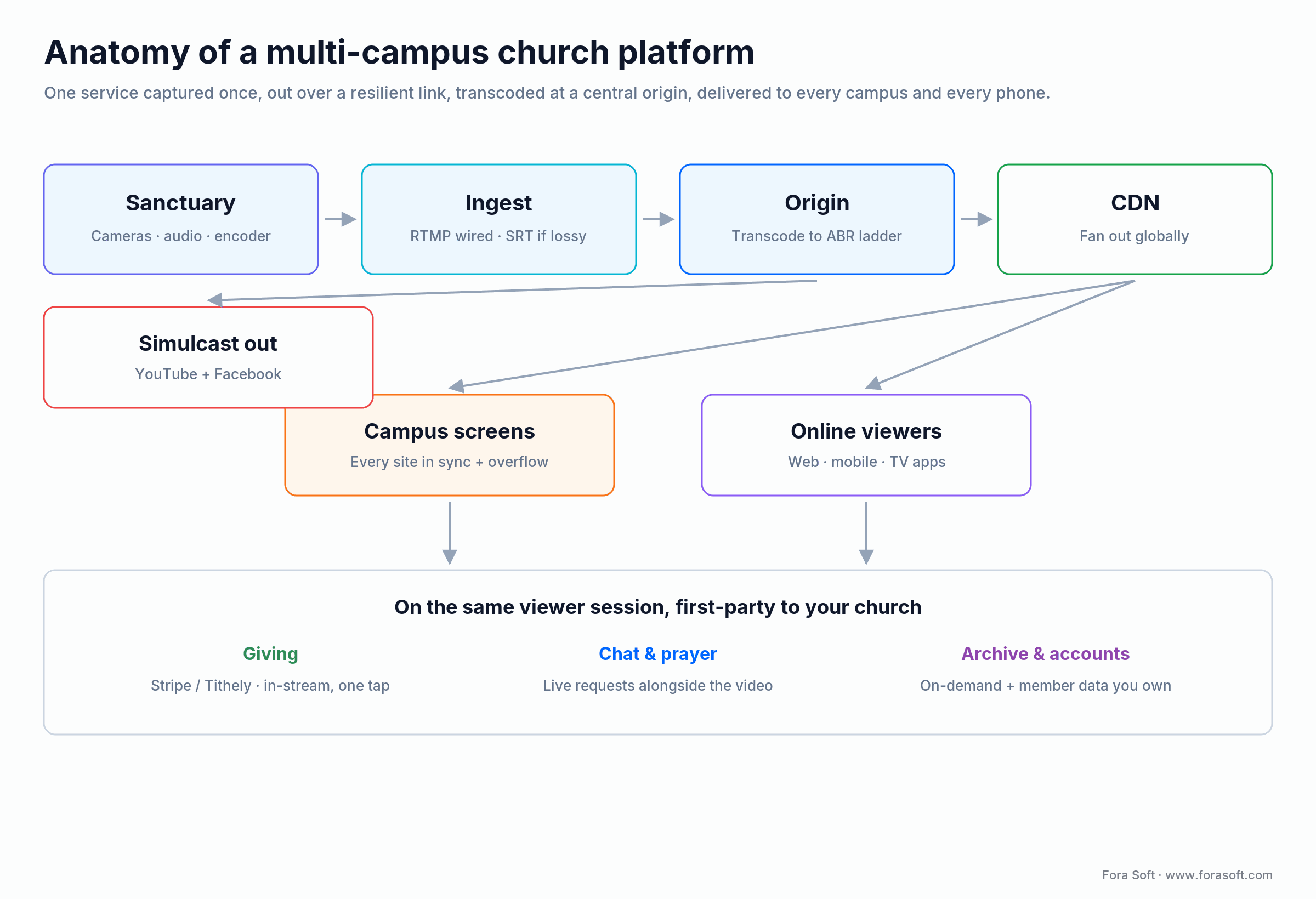
Figure 1. The path of a Sunday service: capture and encode in the main room, a resilient stream to a central origin, adaptive transcoding, and CDN delivery to campus screens and online viewers — with giving and chat on the same session.
RTMP, SRT, HLS: getting the service to every campus
Three protocols do the work, and they play different roles. RTMP is the old reliable for pushing a feed from your encoder to an origin; it runs over TCP, so on a stable wired connection it just works. SRT is the modern ingest choice when the connection isn’t stable — a remote campus on business cable, a portable setup on cellular, or a long-haul link. HLS (and MPEG-DASH) is what viewers actually receive: adaptive segments that drop to a lower quality on a weak phone connection instead of buffering.
Why SRT matters for campuses: it’s built on UDP with error recovery (ARQ and forward error correction), so it degrades gracefully when packets drop, where TCP-based RTMP stalls and freezes. On unstable links SRT can carry a clean feed that RTMP can’t (Mux; FastPix, 2026). Church-focused vendors have built entire products around this idea — Resi markets a patented “resilient streaming protocol” precisely because a frozen stream on a “high-stakes Sunday” is unacceptable. On a stable wired main campus, RTMP and SRT perform about the same; the difference shows up exactly where churches feel it, on the flaky remote link.
For truly interactive services — two-way prayer, a host talking live with a remote campus — you move to WebRTC for sub-second latency, which is the path we took on Worldcastlive. For a one-way broadcast to viewers, HLS at a few seconds of latency is the right, cheaper default.
Reach for SRT ingest when: any campus streams over a connection you don’t control — cellular, shared business internet, or a venue’s Wi-Fi. On a dedicated wired uplink at the main campus, RTMP is simpler and just as good. Match the protocol to the weakest link, not the strongest.
Multi-campus and overflow: one service, many rooms
Multi-campus streaming means one service, captured once, playing in sync across several physical locations and online. The technical spine is a central origin that every campus and every online viewer pulls the same feed from, so the sermon starts at the same moment in every room. That’s the pattern behind our white-label Multiple Venue Streaming plugin on Worldcastlive: one live stream, synced across many sites, from a single source.
Two church-specific wrinkles matter. First, overflow: when the main room fills, you want to spill the same live feed into a second space without a second production. That’s just another player pulling the origin — trivial once the origin exists, painful if you architected around a single room. Second, local moments: campuses often need to cut away for their own announcements or worship, then rejoin the central feed. A good platform lets a campus operator switch between the central stream and a local source, which is a switching-and-permissions feature, not a streaming one.
The scaling question — what happens when 5,000 or 50,000 people watch one service — is a CDN and origin-capacity problem, and it’s the same problem every large live event faces. We cover it in depth in our guide to scaling video streaming to a million viewers; for a church, the practical takeaway is that delivery scales linearly with viewers and you should model it before a holiday service, not after.
Giving and donations: turning a stream into support
For most churches, streaming’s business model is giving, not ads — which flips the priorities. A YouTube stream monetizes through ads YouTube controls and often won’t run on religious content; your own platform monetizes through giving you control, tied directly to the live service with a “Give” button next to the player. The design goal is to make giving one tap during the moment someone is moved to give.
The number that decides the economics is the processing fee. Tithely, one of the most common church giving platforms, charges 2.9% + $0.30 per card gift and 1% + $0.30 per ACH/bank transfer in the US, with $0 setup and $0 monthly for giving itself (Tithely pricing, captured July 2026). That gap between card and ACH is real money: on $10,000 of weekly gifts, cards cost roughly 3–4% while ACH costs closer to 1%. Two design choices follow — nudge recurring donors toward ACH, and offer the “cover the fees” option so the church nets the full gift, which Tithely reports many donors accept.
You rarely need to build a payment processor. You integrate one — Stripe directly, or a church-specific layer like Tithely or Pushpay — and own the experience around it: giving during the stream, recurring tithes, text-to-give, and clean year-end statements. We go deeper on donation and subscription models in our guide to monetization strategies for streaming platforms.
Integrate, don’t build, a payment processor: PCI compliance, fraud handling, and payout logic are exacting and someone else does them better. Build your differentiation in the giving experience — in-stream prompts, recurring setup, campaigns — on top of a processor like Stripe. Building card handling yourself is the wrong place to spend the budget.
Want giving built into your stream?
We integrate Stripe, Tithely, or Pushpay and design the in-stream giving experience so a moved viewer can give in one tap — and you keep the donor data.
The feature set: what’s MVP and what’s later
A church streaming MVP needs enough to run a real Sunday and no more: a reliable live player on your site, simulcast to YouTube and Facebook, a giving button, live chat or prayer requests, and an on-demand archive so people can watch later. Everything else — native apps, multi-campus sync, sermon search, multilingual captions — is a fast-follow once the core service is dependable.
The temptation is to copy a big church’s full app on day one. Don’t. The thing that keeps an online congregation coming back is a stream that never fails and giving that’s effortless. Ship those two flawlessly, then earn the app, the campuses, and the captions with real usage.
| Phase | Features | Why here |
|---|---|---|
| MVP | Live player on your site, simulcast to YouTube/Facebook, giving button, chat/prayer, on-demand archive | Runs a dependable Sunday and captures giving — the two things that must not fail |
| Fast follow | Multi-campus sync, overflow rooms, native + TV apps, sermon library and search, recurring giving | Earned once the core stream is reliable; deepens reach and engagement |
| Later | Multilingual captions, member accounts and groups, events/registration, analytics dashboards | Turns a stream into a full engagement platform once you own the audience |
YouTube vs church platform vs custom build
There are three real options, and they line up on a spectrum of ownership versus effort. YouTube (or Facebook) alone is free and effortless but you own nothing. A hosted church platform — Resi, BoxCast, Subsplash, Tithely and the like — gives you a branded player, giving, and support for a monthly fee, while the vendor owns the infrastructure and roadmap. A custom platform is the biggest investment and the only one where you own the audience, the data, the giving relationship, and the ability to build anything your ministry needs.
Most churches should start hosted and only go custom when they hit a wall: a hosted plan can’t do the multi-campus sync they need, the per-service or per-viewer pricing stops making sense at their scale, or they want an owned member experience the vendor won’t build. The honest rule: buy until the platform is fighting your mission, then build the part that matters and integrate the rest.
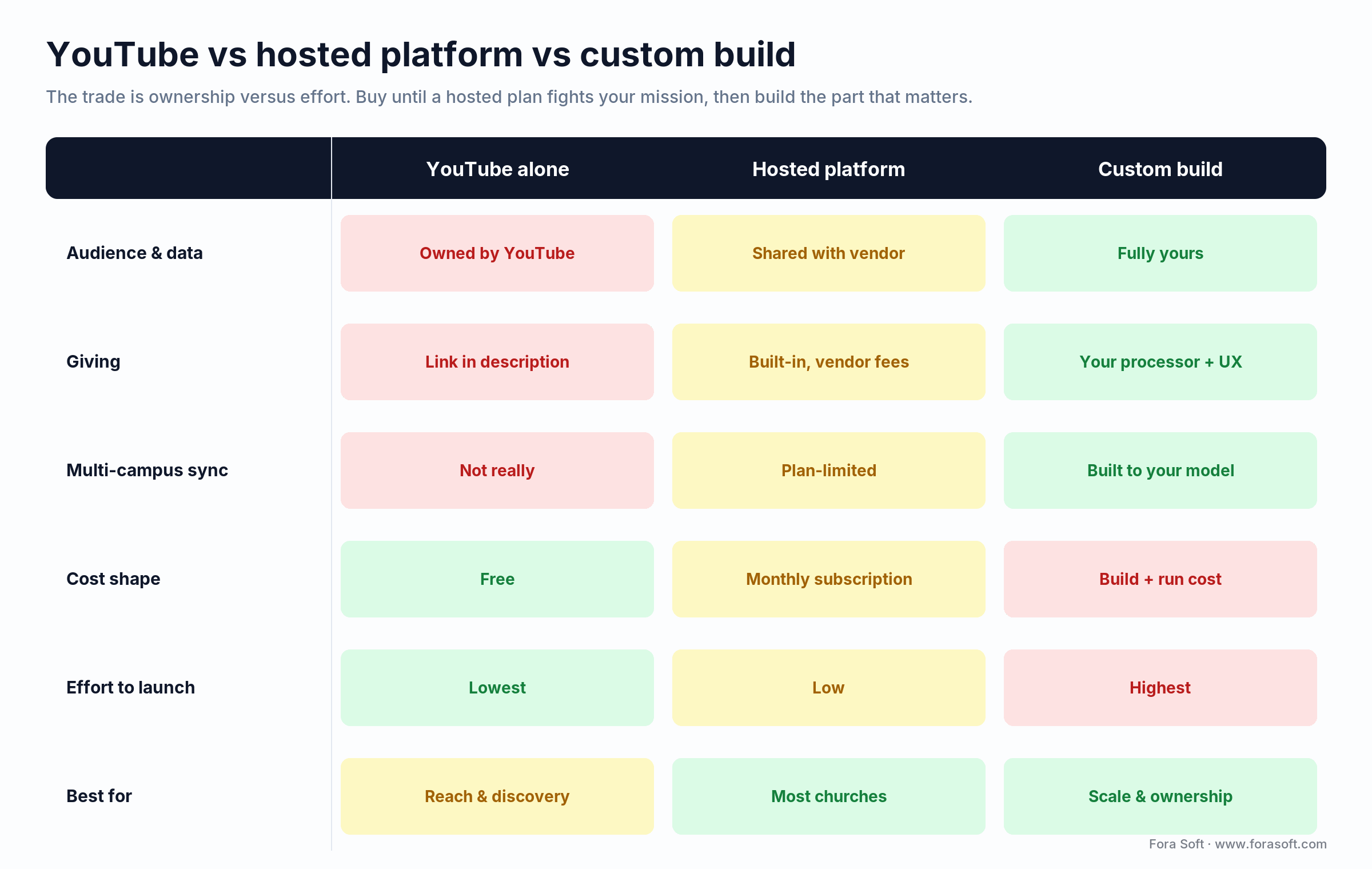
Figure 2. YouTube vs a hosted church platform vs a custom build, scored on the factors that decide the call: audience ownership, giving control, multi-campus fit, cost shape, and effort to launch.
| Factor | YouTube alone | Hosted church platform | Custom build |
|---|---|---|---|
| Audience & data | Owned by YouTube | Shared with vendor | Fully yours |
| Giving | Link in description | Built-in, vendor fees | Your processor, your UX |
| Multi-campus sync | Not really | Some vendors, plan-limited | Built to your model |
| Cost shape | Free | Monthly subscription | Build cost + run cost |
| Best for | Reach and discovery | Most churches, most of the time | Multi-campus, online-first, scale |
Reference architecture: sanctuary to screen
A custom church platform is a set of services around a media pipeline and a viewer session. The encoder ingests the service; an origin transcodes it into an adaptive ladder; a CDN delivers to viewers; a giving service handles donations; a chat/prayer service runs alongside the video; and an accounts service ties each viewer to your church so the archive, giving history, and member data all connect.
The design choice that pays off later is treating the origin as the single source of truth for “what’s live.” Campuses, the website, the mobile app, and overflow rooms all pull from it, so adding a viewing surface is adding a client, not re-architecting. Get that right and multi-campus, apps, and scale are incremental; get it wrong and each new campus is a project.
| Layer | Job | Common choice |
|---|---|---|
| Capture | Cameras, audio, switch, encode | OBS / vMix / hardware encoder |
| Ingest | Carry the feed to origin | RTMP (wired) / SRT (unstable links) |
| Origin & transcode | Adaptive ladder, source of truth | Media server or managed live API |
| Delivery | Fan out to campuses and viewers | HLS/DASH over CDN |
| Experience | Player, chat, giving, archive | Custom web/app + Stripe/Tithely |
| Accounts & data | Members, giving history, analytics | Your database + auth |
The tech stack we reach for
There’s no single right stack, but a proven, boring shape gets a church platform to market fastest: a web app plus native iOS/Android (and often a TV app) on the front, a Node.js or Python backend, PostgreSQL for members and giving records, a media server or managed live API for the origin, HLS/DASH over a CDN for delivery, and Stripe or a church giving layer for donations. Add SRT ingest for shaky campus links and a custom video player where you want the giving and chat welded to the video.
Two decisions carry the most weight. First, managed versus self-hosted media infrastructure is a cost-timing call, not a taste one: start on a managed live API to launch fast, move heavy delivery in-house once your viewer volume makes the CDN bill worth optimizing. Second, how interactive the service is: a one-way broadcast is HLS and cheap; two-way prayer or live campus interaction pushes you to WebRTC, which is more capable and more work. We reached for WebRTC and Kurento on Worldcastlive precisely because sub-second, two-way interaction was the point. For the platform-agnostic version of these choices, our video streaming learn track goes deeper.
What a Sunday stream to 5,000 costs (worked numbers)
A custom church platform MVP — reliable live player, simulcast, giving, chat, and an archive — runs roughly $40,000 to $80,000; a full multi-campus platform with native and TV apps, sync, and member accounts runs $120,000 to $250,000 and up. Those are conservative ranges — we quote fixed scope after a discovery call rather than selling a padded estimate. But the number that surprises church boards isn’t the build; it’s the monthly run cost once thousands are watching.
Here’s the arithmetic that matters. Take a 5,000-viewer Sunday service, 90 minutes long, delivered at an adaptive average of about 2.5 Mbps (720p-ish).
Delivery (the big one). 5,000 viewers × 90 min × 60 s × 2.5 Mbit ÷ 8 ≈ 8.4 TB per service. Four services a month is about 34 TB. At a conservative CDN planning rate of $0.02–$0.04 per GB, that’s roughly $680 to $1,360 a month — and it scales linearly, so a Christmas or Easter service at 20,000 viewers multiplies it for that week.
Encoding and origin. Transcoding one 90-minute service into an adaptive ladder is a rounding error next to delivery — tens of dollars a month on a managed live API, or a small always-on origin instance if you self-host. Don’t optimize here first.
Giving fees. On $40,000 of monthly online giving at Tithely’s 2.9% + $0.30 card rate, fees run about $1,200–$1,400 unless donors cover them; shifting recurring gifts to ACH at 1% can cut that by more than half. For many churches, the giving fee line is bigger than the delivery line — which is exactly why owning the giving experience matters.
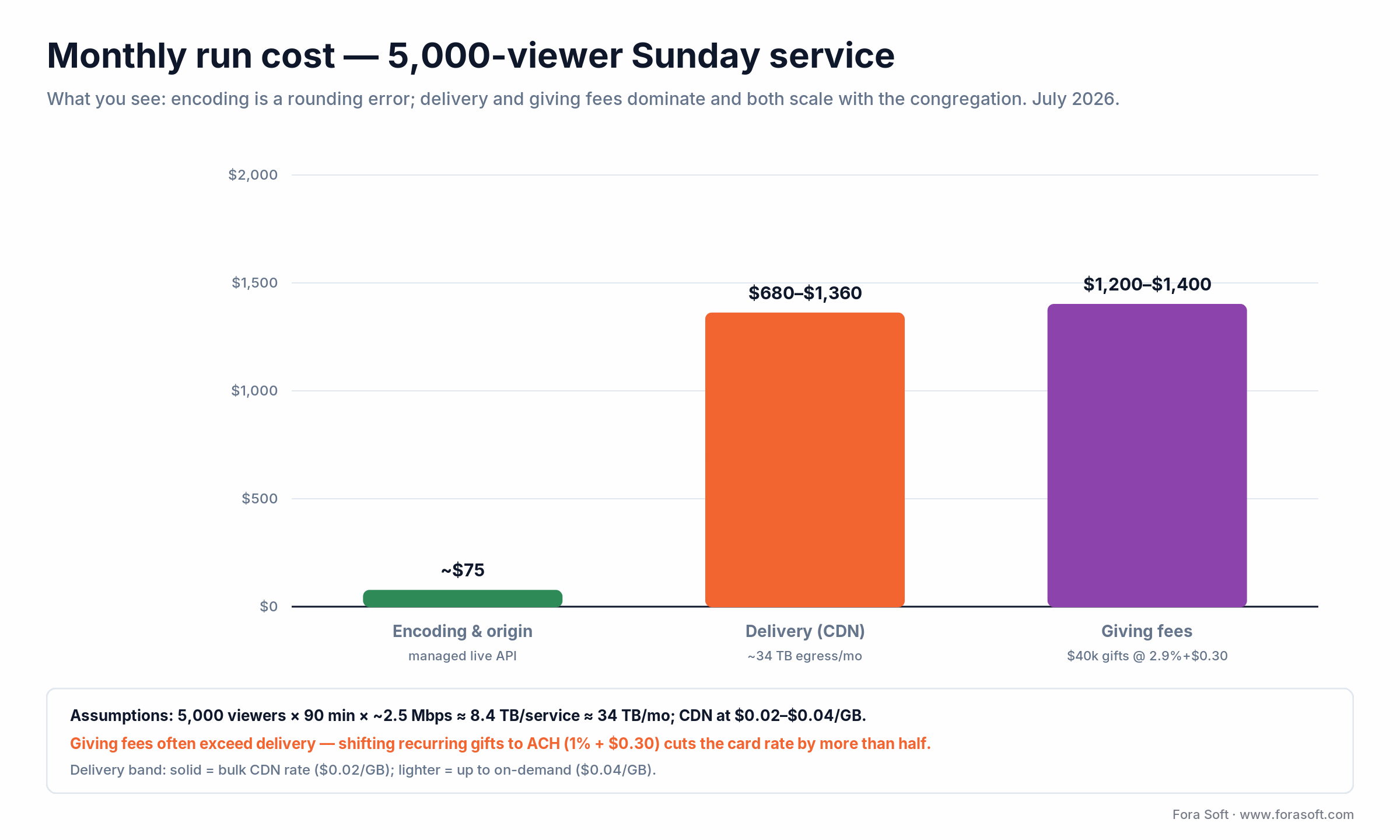
Figure 3. Worked monthly run cost for a church streaming to 5,000 on Sundays: delivery and giving fees dominate, encoding is negligible. Both scale with the congregation — model them before a holiday service, not after.
Want a real number for your church?
Bring your campus count, average attendance, and giving volume; leave with a fixed-scope build estimate and a monthly run-cost model from engineers who have shipped live video at scale.
Mini-case: HD streaming to 10,000 with multi-site sync
A live-entertainment client came to us to build Worldcastlive, an HD concert-streaming platform. The requirements map almost one-to-one onto a serious church: broadcast one live event in true HD to a large audience, sync it across multiple sites, and monetize through pay-per-view tickets and donations rather than ads.
We built it on WebRTC and Kurento with MongoDB, Redis, and AWS. It reaches 10,000 simultaneous viewers at 0.4–0.5-second latency — one of the first platforms to hit sub-second at that scale — with multichannel audio and dynamic quality adjustment for weak connections. The piece that matters most for churches is the white-label Multiple Venue Streaming plugin: it syncs one live stream across multiple websites at once, which is precisely the multi-campus overflow problem in a different costume.
The revenue tools — pay-per-view ticketing, donations, and ad placement — are the same levers a church uses for special services, giving, and sponsorships. We’re not claiming Worldcastlive is a church platform; we’re saying the hard engineering underneath it — low-latency HD, multi-site sync, and monetization — is the same engineering a multi-campus church needs, and we’ve shipped it. Book a call and we’ll walk you through it.
Off-the-shelf vs custom: five questions
Hosted church platforms are genuinely good, and for most churches they’re the right answer. A custom build earns its cost only when specific pressures show up. Answer these five questions before you decide.
1. Do you have real multi-campus needs? If you run several sites that must play one synced service with overflow and local cut-aways, hosted plans often can’t model it — that’s a build signal. A single site streaming online is well served off-the-shelf.
2. Is owning the audience and data core to your mission? If you need first-party member data, giving history, and an owned member experience, a custom platform is the only option that fully delivers it. If reach is enough, YouTube plus a hosted player is fine.
3. Has vendor pricing stopped making sense at your scale? Per-service or per-viewer pricing that’s cheap for a small church can get expensive for a large one. Run the numbers — at some size, owning delivery beats renting it.
4. Do you need something the vendor won’t build? A specific giving flow, an unusual member experience, an integration with your church management system — if the roadmap won’t bend to your ministry, custom is how you get it.
5. Can you support it? A custom platform is an asset you own and a system you must maintain. If you have a technical partner (that’s us) for run and support, great; if not, factor it in. If three or more answers point to multi-campus, ownership, or scale, build custom — and that’s the work we do.
Start hosted when: you’re a single-site or early-multi-site church and no plan limit is blocking your mission yet. The right time to build is when a hosted platform is actively fighting what you’re trying to do — not before. Buying first also teaches you exactly what to build later.
How long it takes to build
A focused church streaming MVP takes three to five months of engineering; a full multi-campus platform with native and TV apps, sync, and member accounts runs eight to fourteen months. Multi-campus sync and the native apps are what stretch timelines, so a sensible plan ships a reliable single-site stream with giving first, then adds campuses and apps once the core is proven on real Sundays. A short MVP planning phase fixes what goes into that first release and what waits.
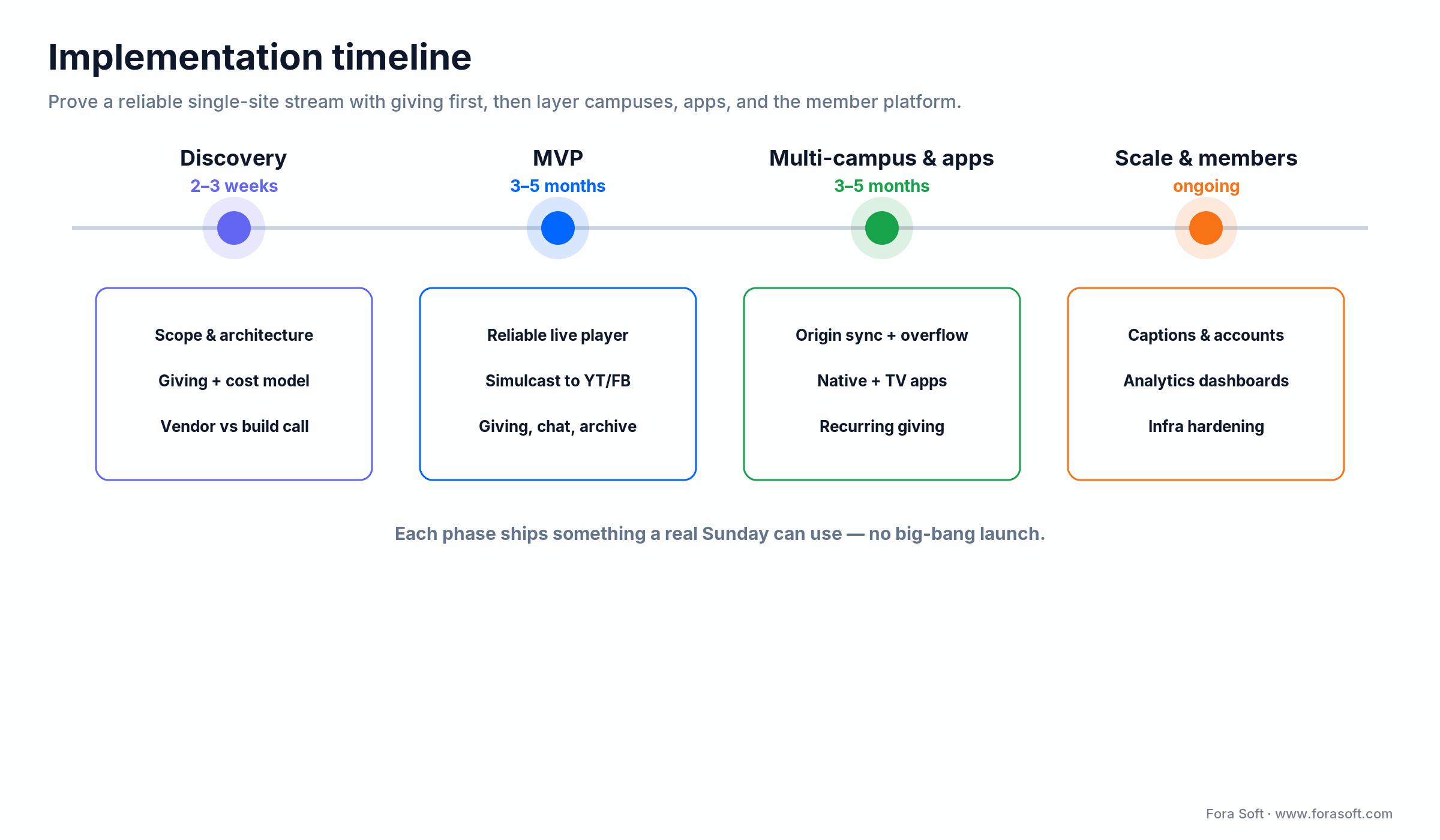
Figure 4. A phased rollout: prove a reliable single-site stream with giving first, then layer multi-campus sync, native and TV apps, and the member platform once real services validate the core.
| Phase | Typical duration | What ships |
|---|---|---|
| Discovery | 2–3 weeks | Scope, architecture, giving and cost model |
| MVP | 3–5 months | Reliable single-site stream, simulcast, giving, chat, archive |
| Multi-campus & apps | 3–5 months | Origin sync, overflow, native + TV apps, recurring giving |
| Scale & member platform | ongoing | Captions, accounts, analytics, infra hardening |
Five pitfalls that sink church streaming projects
1. Building custom before you’ve outgrown hosted. If a $79/month platform does everything you need, custom is money spent on ownership you don’t yet require. Buy until it hurts, then build.
2. Ignoring the weak link. The main campus streams beautifully; the new campus on shared cable freezes every Sunday. If any site rides an unstable connection, plan for SRT ingest and resilience from day one.
3. Treating giving as an afterthought. A giving link three clicks away leaves money on the table. Giving belongs next to the player, one tap away, with ACH nudges and a “cover the fees” option — it’s the business model, not a footer link.
4. Under-modeling delivery for holidays. Your normal Sunday bill is fine; then Easter triples the audience and the CDN invoice. Delivery scales linearly with viewers — model the peak service, not the average.
5. Architecting around one room. If “live” lives in the main sanctuary’s encoder instead of a central origin, every new campus and overflow room is a rebuild. Make the origin the source of truth and new surfaces become easy.
When NOT to build a custom church platform
Don’t build custom if a hosted platform already does the job. This is the honest split between this guide and our general live-streaming platform guide: that one is for teams whose product is streaming; a church’s product is ministry, and streaming is a means. If a $79/month plan streams your service reliably, handles giving, and you have no multi-campus or data-ownership pressure, custom software is the wrong place to spend the building fund.
Skip the custom build if you’re a single site with a stable connection and a modest online congregation — YouTube plus a hosted giving tool is cheaper and better for you. Skip it if you can’t staff or contract the ongoing support a custom system needs. And skip it if your real problem is production quality (cameras, lighting, audio) rather than software — no platform fixes a stream that looks and sounds rough. Build custom when ownership, multi-campus, or scale genuinely force the issue; until then, the best church streaming software is the one you don’t have to maintain.
FAQ
What is church streaming software?
It’s the stack that captures a service, encodes and delivers it to viewers, and wraps giving, chat, and viewer data around the video. It ranges from an encoder pushing to a hosted platform (simple) to a fully owned platform with your player, your donor relationships, and multi-campus sync (custom). The custom end is worth it when owning the audience, data, and giving matters more than just reach.
How much does it cost to build a church streaming platform?
A custom MVP with a reliable player, simulcast, giving, chat, and an archive runs roughly $40,000 to $80,000; a full multi-campus platform with native and TV apps runs $120,000 to $250,000 and up. The bigger surprise is the monthly run cost: CDN delivery for a large service and the 2.9% + $0.30 giving fees, not encoding, dominate the bill and scale with your congregation.
Should our church just use YouTube?
Use YouTube for reach and discovery, but don’t make it your only home. On YouTube you don’t own the viewer relationship or data, the algorithm decides who sees you, and religious content is often demonetized. The pragmatic answer is to simulcast — stream to your own platform and push to YouTube and Facebook at once — so you reach people where they are while capturing the ones who commit.
How does multi-campus church streaming work?
You capture the service once and run a central origin that every campus and online viewer pulls the same feed from, so the service plays in sync everywhere. Overflow rooms are just extra players on the same feed, and campuses can cut away for local moments and rejoin. The key is architecting the origin as the single source of truth — then new campuses are incremental, not a rebuild.
RTMP or SRT for church streaming?
Use RTMP for a stable wired main campus — it’s simpler and works fine. Use SRT for any campus on an unstable connection (cellular, shared business internet), because it recovers from packet loss where RTMP freezes. Viewers receive the stream over HLS/DASH regardless, which adapts quality to each connection. Match the ingest protocol to your weakest link.
What are the fees on church online giving?
Church giving platforms charge a processing fee per gift. Tithely, for example, charges 2.9% + $0.30 per card gift and 1% + $0.30 per ACH/bank transfer in the US, with $0 setup and $0 monthly for giving (Tithely pricing, July 2026). Moving recurring gifts to ACH and offering donors a “cover the fees” option can meaningfully increase what the church actually receives.
How long does it take to build?
A focused MVP is typically three to five months of engineering; a full multi-campus platform with native and TV apps is eight to fourteen months. Multi-campus sync and the native apps are what expand timelines, so scope the MVP around a reliable single-site stream with giving first, then add campuses and apps once real Sundays prove the core.
Which is the best church streaming software?
There’s no single best — it depends on your scale and goals. For a single site that wants reach, YouTube plus a hosted giving tool is hard to beat. For most churches, a hosted platform (Resi, BoxCast, Subsplash, Tithely) balances features and cost. A custom build is best only when multi-campus needs, audience ownership, or scale make hosted plans a constraint rather than a convenience.
What to read next
Development
Live Streaming Platform Development
The platform-agnostic version of this guide, for teams whose product is streaming itself.
Technologies
Monetization Strategies for Streaming
Donations, subscriptions, and pay-per-view — the giving models behind a church stream.
Development
Scale Video Streaming to 1M Viewers
What happens to delivery and origin capacity when a holiday service goes big.
Services
Video & Audio Streaming Development
How we build streaming platforms end to end, from resilient ingest to giving.
Ready to build your church platform?
Church streaming software is a giving-and-ownership product wearing a video player’s clothes. Getting the service onto a screen is the easy part; the decisive work is keeping the congregation, the data, and the giving on infrastructure you control, syncing one service across every campus, and modeling the delivery and giving-fee bill before it arrives. Use YouTube for reach, own the platform for the relationship.
We’ve built live video at real scale, and we’ll give you honest numbers and an honest recommendation — including when a $79/month platform beats a custom build. Explore our video and audio streaming development services, see the Worldcastlive project in detail, or compare notes with our general live-streaming platform guide.


The handbook · 7 volumes
Fora Soft Video Engineering Handbook
Getting one sermon to every campus in sync is a delivery problem before it is a feature list. We wrote a seven-volume handbook on the video stack behind it. Start with Volume 2 for RTMP and SRT contribution, the latency budget and HLS packaging, then use Volume 3 for CDN scaling and players and Volume 1 for encoder settings that keep the stream sharp. Written by Nikolay Sapunov, CEO at Fora Soft.
Browse the handbook on Amazon →7 volumes · 9,000+ pages · Kindle & paperback
Let’s scope your church streaming platform
Bring your campuses, attendance, and giving; leave with a streaming and giving plan, an architecture sketch, and a fixed-scope estimate from engineers who have shipped live video at scale.

