Key takeaways
• “Classroom observation software” means two different products. One kind records teaching so a coach can leave time-coded feedback later (GoReact, Edthena, Sibme). The other lets an evaluator score a live visit on a tablet and roll the data up across a district (eWalk, Observe4Success). Buying the wrong category is the most common and most expensive mistake.
• The hard part is privacy and rubrics, not the video. A recording of a lesson is a student education record under FERPA the moment a child is identifiable, and the whole product has to fit whatever framework you evaluate against — Danielson, CLASS, edTPA, or your own. Get those two right and the rest is plumbing.
• The evidence for video coaching is real but bounded. A randomized trial found teachers who reviewed video significantly increased productive talk moves (Journal of the Learning Sciences, 2020), and video coaching is consistently the most-valued reflection format. It works when it feeds structured dialogue — not as a camera you switch on and forget.
• Most programs should buy. GoReact alone is used by 800+ institutions and roughly one in five graduating US teachers (2024). If a mature platform fits your framework and your student-data rules, buy it and move on.
• Build when observation is strategic. A custom platform wins when you need deep SIS/LMS integration no vendor offers, when data-residency rules keep video off a vendor cloud, or when you’re an edtech company and observation is the product you sell. Otherwise, per-seat SaaS is cheaper than a build.
A student teacher films a 45-minute lesson on a phone at the back of the room. Two days later her supervisor, 90 miles away, scrubs to the 12-minute mark, drops a comment on the moment three kids checked out, and tags it against the university’s Danielson rubric. No one drove anywhere, nobody argued about what “really happened,” and the clip is now evidence for the program’s accreditation file. That loop, made of capture, time-coded feedback, a rubric, and a record, is what classroom observation software does, and it’s quietly become core infrastructure for teacher preparation, district evaluation, and instructional coaching.
We’ve built video and computer-vision systems since 2005, including large-scale video observation platforms used in teacher and medical education. So this is an engineer’s guide, not a brochure: what the two kinds of observation software actually are, how they work, what the research supports, how FERPA and accreditation shape the design, how the real vendors compare, what a build costs, and when a school system is better off buying than building.
Choosing or building observation software?
Tell us who’s watching whom — a teacher-prep program, a district evaluation team, or a product you’re shipping — and we’ll give you a straight read on whether to buy a platform or build one, with the privacy, rubric, and integration tradeoffs behind the call.
Why Fora Soft wrote this guide
We’re a video and AI software company: 250+ projects since 2005 and a team of 50+ in-house specialists. A big share of that work is exactly the machinery observation software runs on — capturing video from phones and room cameras, moving it around securely, letting reviewers scrub and comment frame by frame, and wiring the whole thing into the systems a school already uses. When a program asks us to make many recorded lessons reviewable, taggable, and defensible, we’ve usually built the parts before.
The clearest example is VALT, a video observation and recording platform we’ve been the sole development team for over a decade — now used by 770+ US organizations and 50,000+ users, including university education programs, medical schools, and child advocacy centers. It is multi-camera observation with recording, scheduling, strict access control, and audit trails: the same backbone a classroom observation platform needs, and the core of our video recording and observation software development. We’ve written up how it grew from a boxed product into an industry-leading observation system.
We don’t sell a boxed teacher-evaluation product, so there’s nothing to push here. For most programs, buying a mature platform is the right answer, and we’ll say so plainly. What we build is the custom version — which means we’ve earned the right to tell you when you don’t need one.
What classroom observation software actually is
Classroom observation software is any tool that helps someone watch teaching and turn what they see into structured, comparable feedback — either by recording the lesson for review later or by capturing an observer’s notes against a rubric during a live visit. The word “observation” hides a fork in the road, and the two branches are almost different products.
Video coaching platforms put the lesson on video. A teacher or teacher candidate records themselves, uploads the clip, and a coach or supervisor leaves time-coded comments, scores it against a framework, and tracks growth over time. This is the branch that dominates teacher preparation and instructional coaching — GoReact, Edthena, Sibme, Torsh Talent, and IRIS Connect all live here.
Walkthrough and evaluation apps skip the camera. An administrator carries a tablet into the room, taps through a rubric or checklist while the lesson runs, and the data rolls up into district dashboards. This is the branch built for formal evaluation and short, frequent walkthroughs — eWalk, Observe4Success, and similar tools sit here.
It helps to say what observation software is not. It’s not general school e-learning video for delivering lessons to students. And it’s not online proctoring: proctoring watches students to protect exam integrity, while classroom observation watches the teaching to improve or evaluate it. Same cameras, opposite purpose — and, as we’ll see, very different consent rules.
The short answer: buy video coaching, buy a walkthrough app, or build
Buy a video coaching platform (GoReact, Edthena, and peers) if your goal is teacher development or accreditation evidence — recording lessons, leaving feedback, scoring against a framework. These are mature, widely adopted, and deploy in weeks. For a university education program or a district coaching team, this is almost always the right call.
Buy a walkthrough app (eWalk, Observe4Success) if your goal is formal evaluation and frequent short visits — a principal capturing rubric data on a tablet and rolling it up across a building or district. You want it running this semester, not built.
Build a custom platform when observation is strategic rather than a purchase — when you need it woven into a specific SIS/LMS or evaluation workflow no product supports, when student-data rules keep video off a vendor cloud, when you’re an edtech company selling observation as your product, or when per-seat fees at your scale have outgrown a one-time build. The rest of this guide is the evidence behind those three paragraphs.
The two categories, and which one you actually need
Before you shortlist a single vendor, decide which branch you’re on, because the tools barely overlap. Video coaching is asynchronous and developmental: the artifact is a recorded lesson, and the point is reflection and growth over weeks. Walkthrough software is synchronous and evaluative: the artifact is a rubric score, and the point is coverage and comparability across many classrooms.
The reason this matters is that the top of the search results still points people the wrong way. The page ranking first for “classroom observation software” is a comparison article from 2012, and the next tier is from 2014 and 2016 — a decade before the video coaching category matured. Buyers arrive with a mental model built for tablet-based walkthroughs and don’t realize an entire second category exists.
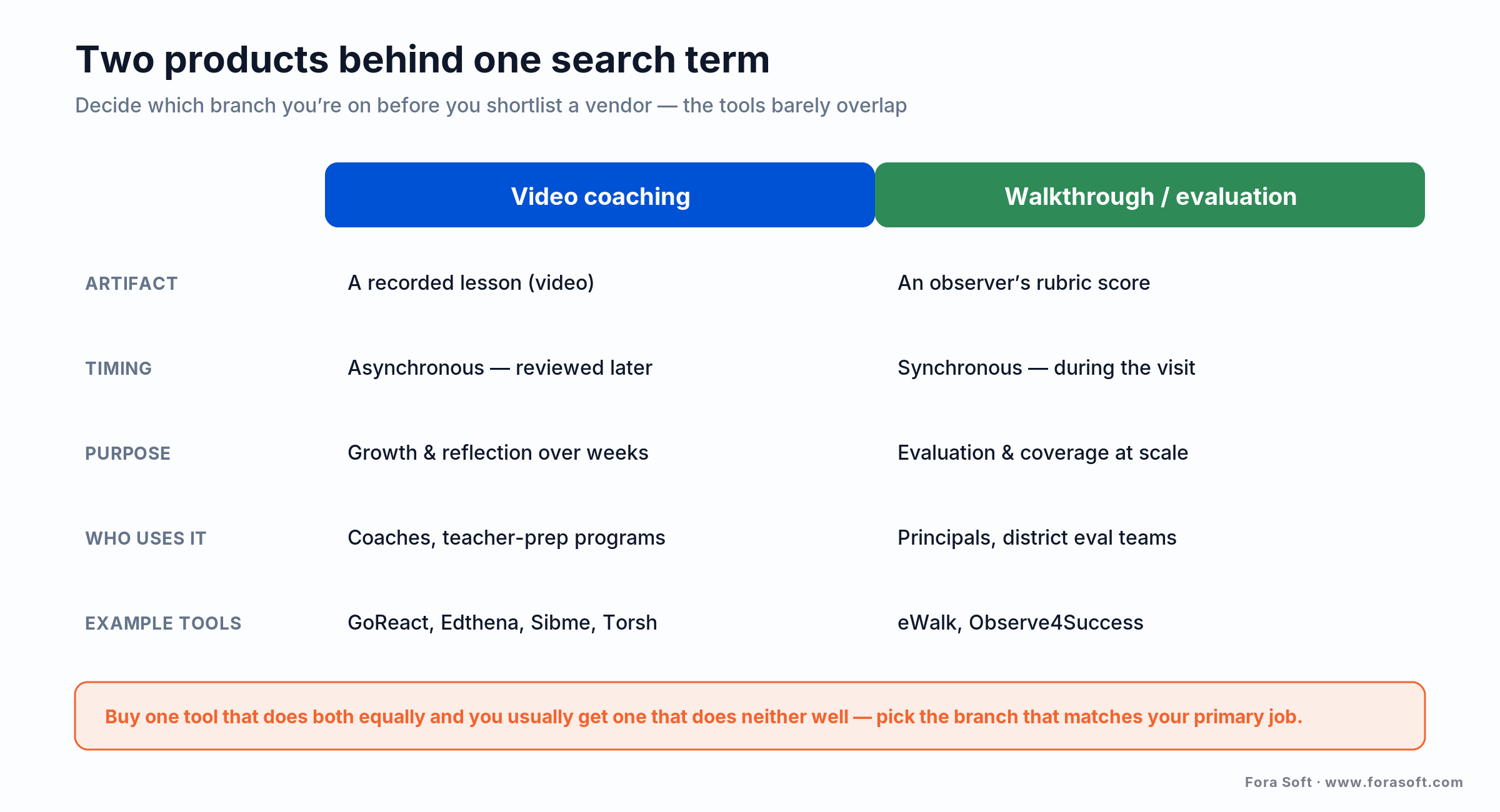
Figure 1. The two products behind one search term. Video coaching captures the lesson for asynchronous, developmental feedback; walkthrough software captures an observer’s rubric during a live, evaluative visit.
Some programs need both, and a few platforms bolt live scoring onto video review. But if you try to buy one tool that does everything equally well, you usually get one that does neither part well. Pick the branch that matches your primary job, growing teachers or evaluating them, and treat the other as secondary.
How video classroom observation actually works
The loop is short: someone records a lesson, uploads it, a reviewer leaves time-coded feedback and scores it against a rubric, and the results feed a growth record. Everything else is detail in service of making that loop fast, private, and defensible.
Capture. A teacher records on a phone, a laptop webcam, or a fixed room camera. The better platforms ship a mobile app that uploads straight to a secure account so nothing sits on a personal device. IRIS Connect’s Record app does exactly this. Live options exist too: GoReact’s Live Review syncs a reviewer’s comments to the recording as it happens.
Review and feedback. The reviewer scrubs the timeline and drops comments pinned to the exact second. Edthena tags each comment as a question, suggestion, strength, or note; Sibme goes further and derives instructional metrics from the recording (teacher talk time, student talk time, questioning patterns, wait time), grounded in a transcript. The teacher can usually respond, turning a one-way review into a conversation.
Score and track. Comments attach to a rubric (Danielson, CLASS, edTPA, or a custom one), and scores accumulate into a growth record and, where needed, an accreditation file. The value isn’t any single review; it’s the trend line a coach and teacher can see over a semester.
Why programs and districts adopt observation software
Three pressures push schools toward software instead of clipboards. The first is scale: a university placing student teachers across a whole region can’t send a supervisor to every classroom, and video lets one supervisor observe candidates 90 miles apart in an afternoon. The second is rising fieldwork requirements — Texas raised required field-experience clock hours from 30 to 50 (with in-person hours from 15 to 25) effective September 2024, and every logged, reviewable hour is easier to prove with software than paper.
The third, and the one teachers feel most, is that video is unarguable. A recording gives “clear and inarguable evidence of an event,” which kills the counterproductive debate about what actually happened in the room and lets the conversation move to what to do next (ResearchGate review, 2017). A teacher watching their own lesson also catches things they never noticed while teaching — the student who disengaged, the question that landed flat.
The honest framing: observation software doesn’t improve teaching on its own — it makes good coaching cheaper to deliver and easier to prove. Buy it to support a coaching model you already believe in. Buy it hoping the recordings will fix instruction by themselves, and you’ll have an expensive archive nobody watches.
Does video coaching actually work?
Yes, when it feeds structured dialogue — and the effect is real but not automatic. In a randomized controlled trial, teachers who used video-based professional development significantly increased their use of productive talk moves in math classrooms compared with a control group (Journal of the Learning Sciences, 2020). Across the wider literature, video coaching is consistently rated the most valued reflective-teaching format, because it turns abstract PD content into something concrete a teacher can point at.
Here’s the catch worth being honest about: most of the research uses qualitative methods and small samples, so the consensus is “video helps when it’s embedded in real coaching,” not “buy cameras and scores go up.” The recordings are inert without a coach, a rubric, and a routine of watching and talking. Software that makes reflection easy earns its cost; software bought as a substitute for coaching doesn’t.
Anatomy of a video observation platform
Under the friendly review screen, a video observation platform is five layers, and the visible one (the player with comments) is the easiest to build. The engineering effort goes into the layers users never see.
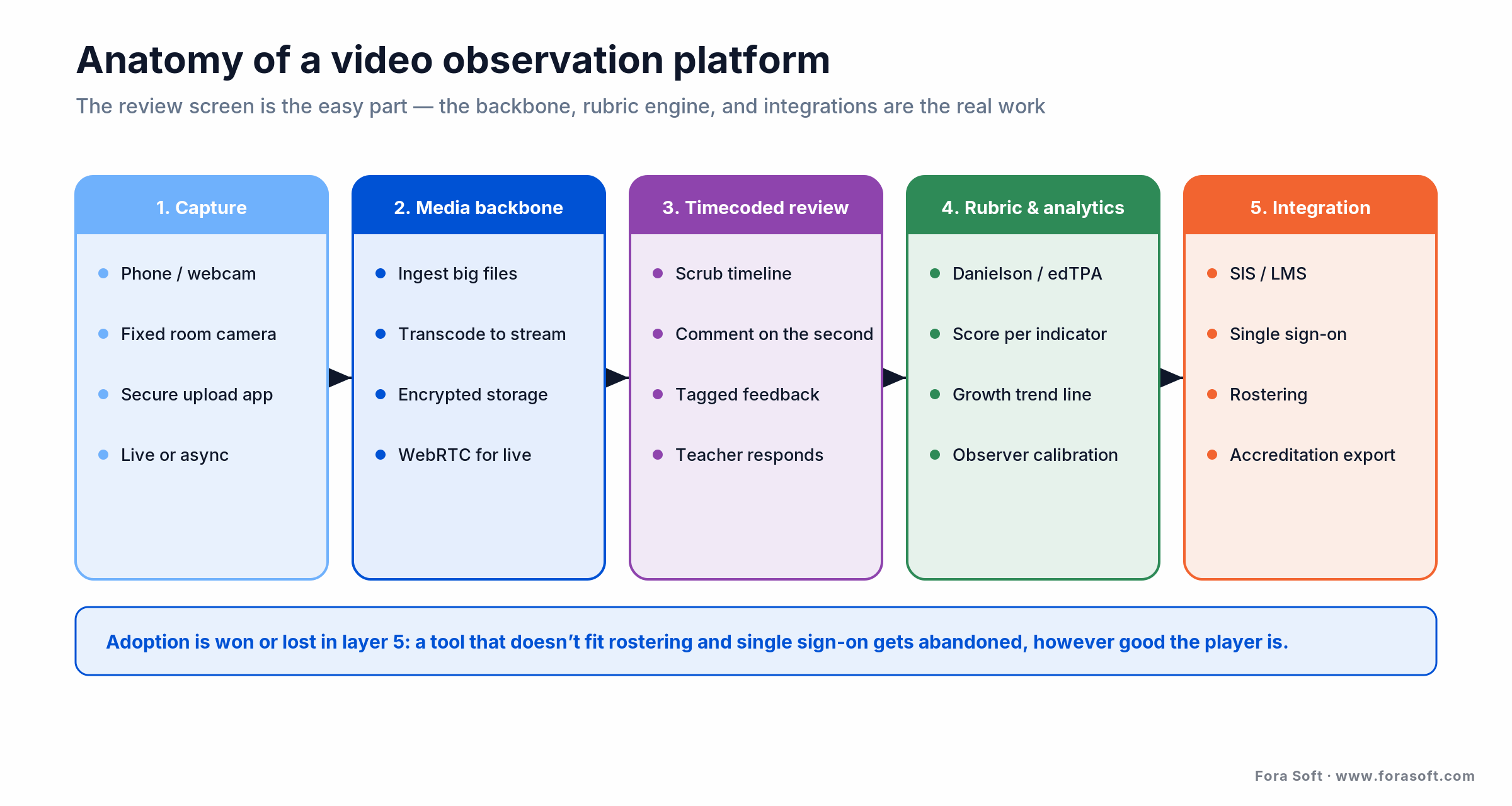
Figure 2. The five layers of a video observation platform. Capture and review are the visible parts; the media backbone, the rubric-and-analytics engine, and the integration layer are where the real work lives.
Capture and media backbone. Phones and webcams produce wildly inconsistent files, so the platform has to ingest large uploads reliably over school networks, transcode them to stream smoothly, and store them securely. Live review adds a real-time path, typically WebRTC, on top of the upload path. This is the same low-latency media problem we solve on e-learning and video platforms, and it’s where a naive build first cracks.
Timecoded review and rubric engine. Comments and scores must anchor to an exact timestamp and to a rubric’s criteria, so a coach can later filter “every clip where questioning scored low.” If the rubric is hard-coded, the platform is stuck with one framework; if it’s data-driven, it can carry Danielson for one program and edTPA for another.
Analytics and integration. On top sits reporting (growth over time, coach calibration) and the integration layer that connects to the SIS, the LMS, and single sign-on. As with almost every education product, adoption is won or lost here: a tool that doesn’t fit rostering and login gets abandoned no matter how good the player is.
Rubrics and frameworks are first-class objects, not settings
The single biggest design decision in observation software is how it treats the framework you evaluate against. Get it wrong and you’ve bought a video player with sticky notes; get it right and every comment, score, and report is comparable across observers and years.
The frameworks in play are well established. The Danielson Framework for Teaching scores practice on a four-level scale (highly effective, effective, partially effective, minimally effective) across domains like classroom environment and instruction. CLASS — the Classroom Assessment Scoring System — is a separate instrument many programs use instead of or alongside it. And plenty of districts run a homegrown rubric shaped by state policy. A serious platform lets you configure any of them, tie each comment to a specific indicator, and calibrate observers so two people scoring the same lesson land in the same place.
Reach for a custom build when: your rubric is unusual, changes often, or has to feed a specific reporting format a vendor won’t bend to. Off-the-shelf platforms support the common frameworks well; the moment your evaluation logic is a competitive or regulatory differentiator, owning the rubric engine stops being optional.
The accreditation and assessment workflow
For teacher-preparation programs, observation video does more than support coaching; it also becomes evidence. Performance assessments like edTPA require candidates to submit video of their teaching, and the rubrics are aligned to CAEP accreditation standards, so the same clips that grow a candidate also help a program keep its accreditation.
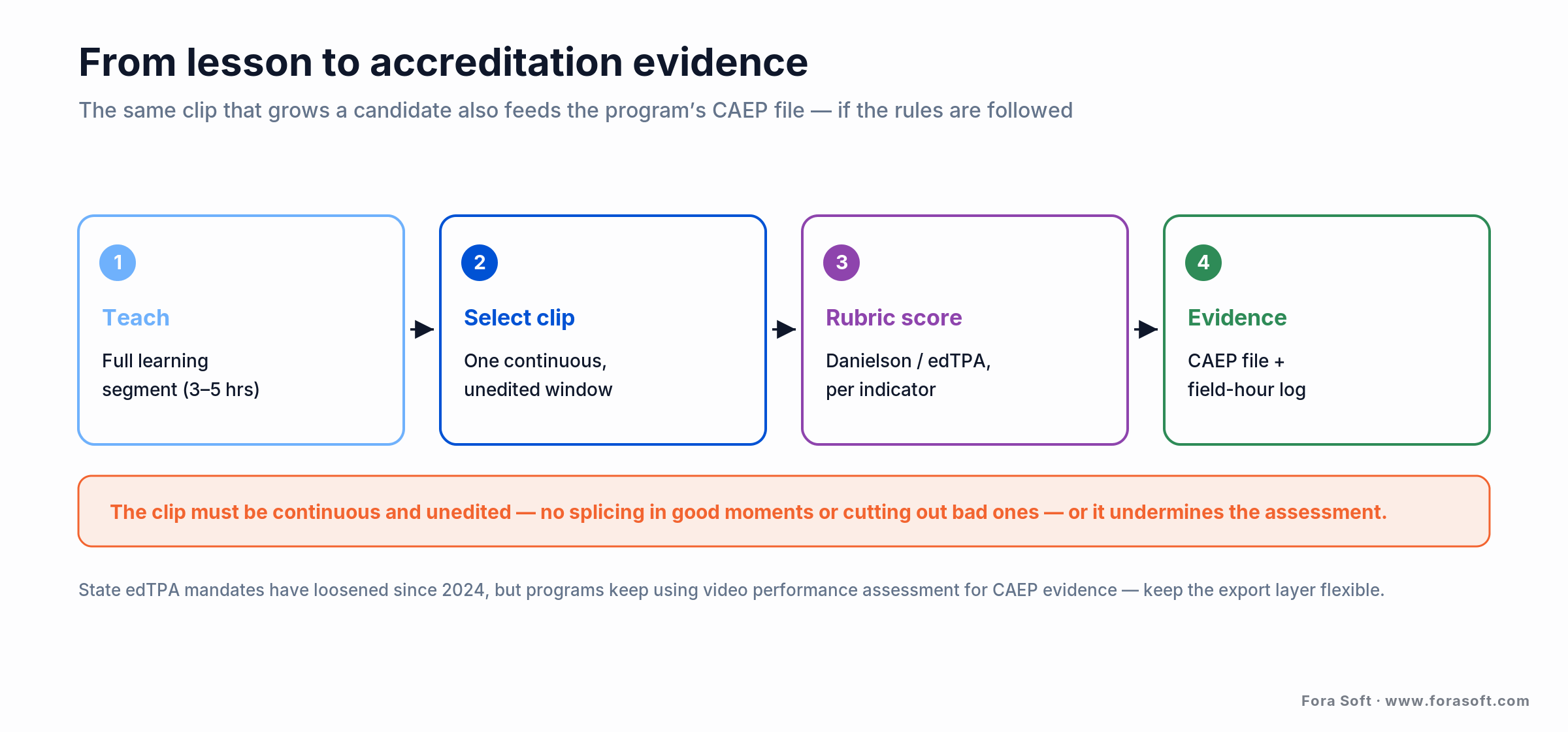
Figure 3. From lesson to accreditation evidence. A candidate teaches a full learning segment, selects a short continuous clip, gets it rubric-scored, and the record feeds field-hour logs and CAEP evidence.
The rules are specific in ways that shape the software. For edTPA, the video in Task 2 must be a continuous, unedited clip — candidates can’t splice in good moments or cut out bad ones — typically 10 to 20 minutes, drawn from a longer learning segment. A platform used for this has to make trimming to a single continuous window trivial and make editing impossible, or it undermines the assessment’s validity.
One honest caveat: the policy ground moves. Several states have pulled back on edTPA as a hard mandate. Connecticut dropped it for program completion in July 2024, Washington eliminated it in 2021, and Minnesota narrowed it to two tasks, even as programs keep using video performance assessment for CAEP evidence. Build or buy for the assessment workflow, but keep the rubric and export layer flexible, because the specific mandate you’re serving today may change.
FERPA and student privacy by design
Here’s the constraint that quietly governs the whole product: a video of a lesson is a student education record under FERPA the moment a student is identifiable in it. According to the US Department of Education, a photo or video is an education record when it’s directly related to a student and maintained by the institution, and once it contains personally identifiable information (a face, a name, identifiable audio), its use is legally limited (US Dept of Education, Protecting Student Privacy).
That has teeth. A recording with student PII can’t be shared without consent from the parent (in K-12) or the eligible student — even if the recording itself was legal under state law. Most K-12 districts require written parental consent before a child is recorded at all, and that consent has to be voluntary, not a condition of enrollment. The observation is of the teacher, but the students in frame carry the privacy burden.
What this means for the build: role-based access so only the coach and teacher see a clip, encryption in transit and at rest, retention limits with automatic deletion, consent tracking tied to each recording, and full audit logging of who viewed what. A build can go further — blur non-consented students, or restrict a clip to the teacher’s own account. Whatever you choose, privacy is an architecture decision made on day one, not a setting added before launch.
The vendors compared: GoReact, Edthena, and peers
The market splits along the two categories. On the video coaching side, GoReact is the most widely adopted, used by 800+ institutions and roughly one in five graduating US teachers as of 2024, with Edthena, Sibme, Torsh Talent, and IRIS Connect competing on coaching depth, analytics, and reach. On the walkthrough side, eWalk and Observe4Success sell rubric capture for live evaluation. Here’s the honest map.
| Tool | Category | Where it wins | Where it breaks |
|---|---|---|---|
| GoReact | Video coaching | Teacher prep & edTPA; Live Review; huge adoption | Per-license cost adds up; price rises noted by users |
| Edthena | Video coaching + AI | Structured coaching tags; AI Coach (“Edie”) | In-service PD focus; less edTPA-centric |
| Sibme | Video coaching + analytics | Transcript metrics: talk time, wait time, questioning | Metric accuracy depends on transcript quality |
| Torsh Talent | Video coaching + reporting | Any rubric; reporting suite; used in 40 states + DC | Breadth can mean more setup up front |
| IRIS Connect | Video PD | PD model (theory/model/practice/coach); secure Record app | Strong UK roots; program-led rather than eval-led |
| eWalk / Observe4Success | Walkthrough / evaluation | Fast tablet rubric capture; district dashboards | Not built for video review or coaching |
| Custom build | Your platform | Deep SIS/LMS fit, data residency, or it’s your product | One-time build + run cost; you own maintenance |
GoReact publishes list pricing around $70–$95 per license with volume discounts starting near 100 users (GetApp, 2026-07-17); most of the others price by quote. Because coaching platforms bill per seat per year, the total cost scales with the number of candidates or teachers — which is exactly the variable that decides whether a build ever pencils out.
Build vs buy: when a custom platform wins
For a program that just wants to record lessons and coach against a common framework, buying wins almost every time — a mature platform deploys in weeks and carries integrations and privacy controls you’d otherwise build from scratch. A custom build makes sense only when specific conditions hold, and it’s worth being strict, because a build you didn’t need is the most expensive way to save money.
Build when: observation must live inside an SIS/LMS or evaluation workflow no product supports; data-residency, sovereignty, or district policy keeps student video off a vendor cloud; you’re an edtech company and observation is part of the product you sell; or you operate at a scale where per-seat fees over several years clearly exceed a one-time build plus its run cost.
Buy when: you’re a single program or district, a standard framework fits, you want proven adoption and support, and you’d rather spend on coaching than on a software team. For most schools this is the honest answer, and we’ll tell you so before you spend a dollar with us.
There’s a hybrid worth naming: build the parts that are strategic (the rubric engine, the privacy model, the SIS integration) on top of proven media infrastructure instead of reinventing upload, transcode, and streaming. Most of a platform’s real differentiation is in workflow and compliance, not in moving video, so that’s where a custom effort should concentrate.
What a custom observation platform costs
The build-vs-buy math is really a race between two curves: per-seat SaaS fees that grow every year with your headcount, and a one-time build cost that’s flat once it’s paid. At a few dozen candidates, SaaS wins easily. At thousands of seats across many years, the lines cross. The figure below is illustrative, not a quote, but it shows the shape of the decision.
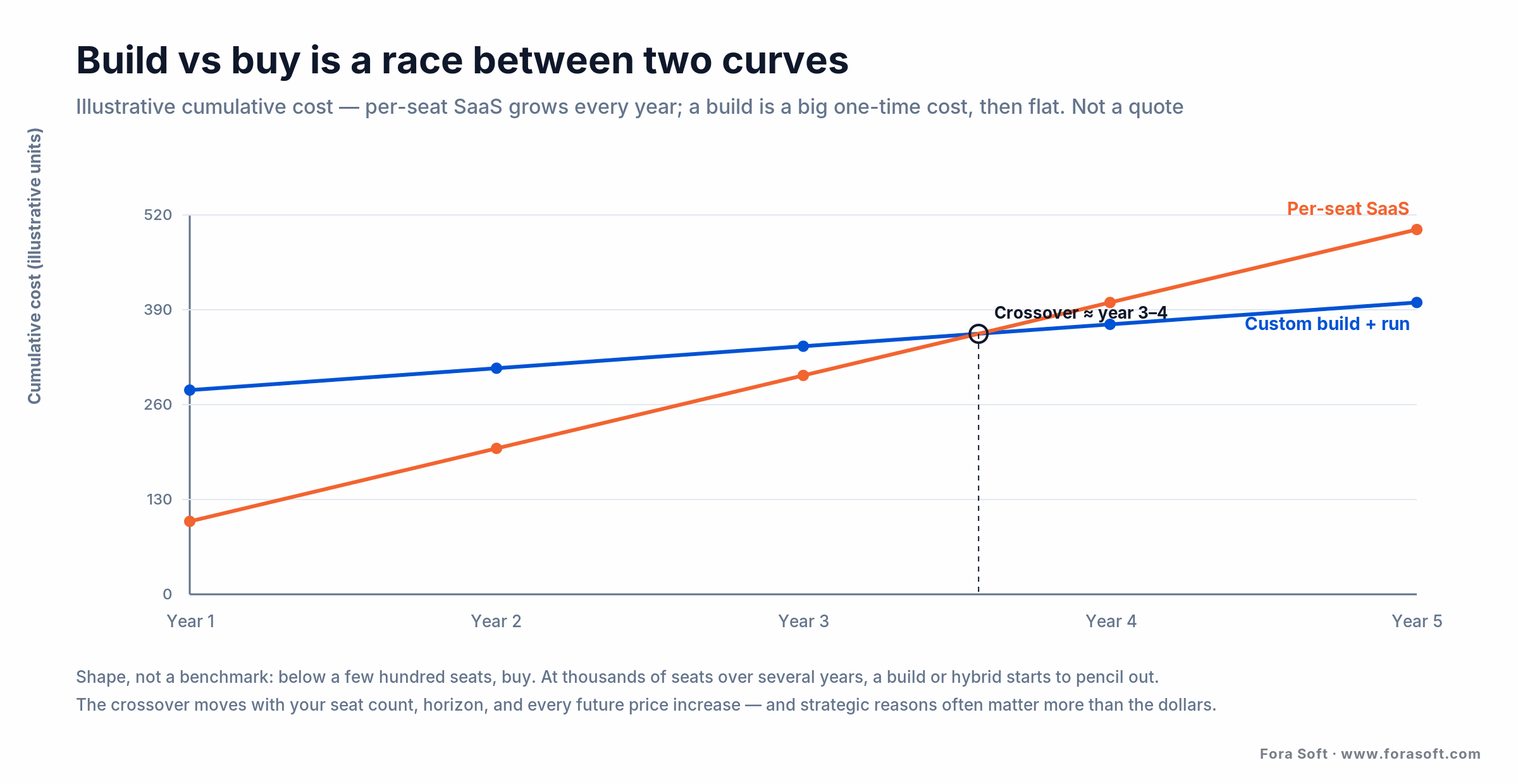
Figure 4. Illustrative build-vs-buy math. Per-seat SaaS scales with the number of teachers or candidates every year; a custom build is a larger one-time cost plus a smaller run cost. The crossover depends on your seat count and horizon.
The SaaS side. At published rates near $70–$95 per license (GoReact, 2026), 500 candidates is a five-figure annual bill, and it recurs. Multiply by a multi-year horizon and add every future price increase, and the subscription total is the number a build has to beat. For the build side, our app development cost calculator gives a first range in a few minutes.
The build side. A custom platform’s one-time cost is dominated by the media backbone (upload, transcode, secure storage, streaming), the timecoded review and rubric engine, the SIS/LMS and SSO integration, and the privacy and audit layer. Reusing proven real-time infrastructure instead of building transport from scratch is the biggest lever on that number — and the reason we keep estimates conservative rather than inflating them. The recurring cost is hosting, storage, and maintenance, which is a fraction of per-seat SaaS at scale.
The break-even. Below a few hundred active seats, buy — the build won’t pay back before the requirements change. At thousands of seats over several years, a build or a hybrid starts to pencil out, and the strategic reasons (integration, data residency, product ownership) often matter more than the raw dollars anyway.
Want the build-vs-buy numbers for your program?
Give us your seat count, the framework you score against, and your student-data constraints, and we’ll model a custom build against the SaaS quotes you’re gathering — conservatively, with the assumptions on the table.
Mini-case: observation infrastructure at scale
The closest analog in our own work is VALT, a video observation and recording platform we’ve developed as the sole engineering team for more than a decade. It’s used by 770+ US organizations and 50,000+ users, and its home turf is exactly this space: university teacher-education programs, medical and nursing schools, and child advocacy centers recording sessions for training, review, and evaluation.
What that decade taught us maps straight onto classroom observation. Multi-camera recording has to stay reliable when whole cohorts capture sessions at once. Scheduling and access control aren’t features, they’re the product — who can record, who can view, for how long, and with what audit trail. And the integration surface, fitting an institution’s existing accounts and workflows, is where adoption is decided, exactly as SIS and LMS integration decides it in a school district.
The privacy discipline transfers too. VALT runs in environments where the footage is deeply sensitive, so strict role-based access, retention control, and tamper-evident audit logs are baked in — the same posture FERPA demands of a K-12 classroom recording. When a program asks whether a custom observation build is realistic, our answer is grounded in a system we already run at that scale, which is why we can be honest about when you should just buy GoReact instead.
A five-question decision framework
Before you talk to a vendor or a build team, five questions tell you which path you’re actually on.
1. Coach or evaluate? If the goal is teacher growth and reflection, you want video coaching. If it’s formal evaluation and frequent short visits, you want walkthrough software. Naming this first eliminates half the market.
2. What’s the seat count and horizon? A program with dozens of candidates buys SaaS. Thousands of seats across a multi-year horizon is where a build or hybrid starts to compete on cost alone.
3. How unusual is your rubric and workflow? Standard Danielson or CLASS is well served off the shelf. A bespoke rubric, an odd approval chain, or a specific accreditation export can push you toward a custom rubric engine.
4. Where must the video live? If district or state policy forbids storing student video in a vendor cloud, your options narrow fast and building your own infrastructure may be the only compliant route.
5. Is observation your operation or your product? If you’re a school improving teaching, you almost certainly buy. If you’re an edtech company selling observation, you build.
When NOT to build (or deploy) observation software
The tools are useful, which is exactly why it’s worth being clear about their limits. Don’t build when a mature platform already fits your framework and privacy rules — you’d be paying to re-earn integrations and clinical-grade access controls that GoReact, Edthena, and their peers spent years on. Don’t deploy video coaching as a substitute for actual coaching, either: the research is clear that recordings only move the needle when a coach, a rubric, and a routine of dialogue sit around them.
Be careful with consent and culture. If your teachers experience the cameras as surveillance rather than support, you’ll get defensive teaching and empty archives; the fastest way to poison a rollout is to blur the line between developmental coaching and punitive evaluation. And don’t deploy where you can’t honor FERPA — if you can’t secure parental consent for the students in frame, or can’t restrict and retain the footage properly, the recording you can’t protect is the recording you shouldn’t make.
Finally, don’t conflate this with exam integrity. If your real need is watching students during assessments, that’s online proctoring, a different product with different consent rules — and if it’s analyzing how students engage with recorded lessons, that’s video analytics for online learning. Classroom observation software is about the teaching.
FAQ
What is classroom observation software?
Classroom observation software helps someone watch teaching and turn it into structured feedback. It comes in two forms: video coaching platforms that record a lesson so a coach can leave time-coded comments and score it against a rubric (GoReact, Edthena, Sibme), and walkthrough apps that let an evaluator capture rubric data on a tablet during a live visit (eWalk, Observe4Success). The first is for teacher growth; the second is for formal evaluation.
What is the best classroom observation software?
There’s no single best — it depends on the job. For teacher preparation and video coaching, GoReact is the most widely adopted (used by 800+ institutions and about one in five graduating US teachers as of 2024), with Edthena, Sibme, Torsh Talent, and IRIS Connect as strong alternatives. For district walkthrough evaluation, eWalk and Observe4Success fit better. Match the tool to whether you’re coaching or evaluating before comparing features.
Is recording a lesson legal under FERPA?
It can be, with care. A video is a student education record under FERPA once a student is identifiable in it, so it can’t be shared without consent from the parent (K-12) or eligible student, even if the recording was legal under state law. Most K-12 districts require written parental consent before recording, and that consent must be voluntary. The observation targets the teacher, but the students in frame carry the privacy obligations.
Does video coaching actually improve teaching?
The evidence is positive but conditional. A randomized controlled trial found teachers using video-based PD significantly increased productive talk moves versus a control group (Journal of the Learning Sciences, 2020), and video coaching is consistently rated the most valued reflection format. But it works when the recordings feed structured coaching and dialogue — not on their own. Video without a coach and a rubric is an archive nobody watches.
How is observation software used for edTPA?
Candidates submit video of their teaching for edTPA Task 2, and the rubrics align to CAEP accreditation standards. The clip must be continuous and unedited (no splicing in good moments or cutting out bad ones), typically 10 to 20 minutes drawn from a longer learning segment. Observation platforms make it easy to trim to one continuous window while preventing edits. Note that state edTPA mandates have loosened recently, so keep the export layer flexible.
How much does classroom observation software cost?
Video coaching platforms price per license per year. GoReact publishes list rates around $70–$95 per license with volume discounts starting near 100 users (2026); most competitors quote by deployment. Because the cost scales with your number of teachers or candidates, a 500-seat program runs a recurring five-figure bill. That per-seat scaling is the main reason larger systems eventually price a custom build against the subscription.
Should we build our own observation platform?
Usually not. Building makes sense when observation must integrate deeply with an SIS/LMS no vendor supports, when data-residency rules keep student video off a vendor cloud, when you’re an edtech company selling observation as your product, or when per-seat fees at your scale over several years clearly exceed a one-time build plus its run cost. For a single program or district on a standard framework, buying is cheaper and faster.
What’s the difference between observation software and online proctoring?
They point cameras in opposite directions. Classroom observation software watches the teaching, to develop or evaluate the teacher. Online proctoring watches students during an exam, to protect assessment integrity. The consent, retention, and analysis needs differ sharply, which is why they’re separate products even though both record people in a learning setting.
What to read next
Case study
VALT: A Video Observation Platform at Scale
How a video observation and recording platform grew to 770+ organizations across education and training.
E-learning
Online Proctoring & Anti-Cheating
Watching students for exam integrity — the opposite-facing cousin of observing teachers.
AI & video
AI Video Analytics for Online Learning
Engagement analytics on learning video — a different job than observing live teaching.
Services
E-Learning Software Development
The team and stack behind observation, coaching, and video learning platforms.
The bottom line on classroom observation software
Start by naming which product you need: video coaching to grow teachers, or a walkthrough app to evaluate them. The value in either isn’t the camera; it’s the rubric that makes feedback comparable and the privacy design that keeps a recording of children from becoming a liability. Build those two layers well and everything else is refinement.
Buy a mature platform when a standard framework and vendor cloud fit, which is most of the time. Build when integration, data residency, or product ownership makes observation strategic. If you’re not sure which side of that line you’re on, we’ll help you decide before you commit — you can book a 30-minute call or explore our e-learning development services to see where we’d start.


The handbook · 7 volumes
Fora Soft Video Engineering Handbook
An observation platform lives or dies on whether a reviewer can scrub a lesson and hear every word. We wrote a seven-volume handbook on the video stack underneath. Start with Volume 3 for players, WebRTC live review and delivery, then read Volume 1 for encoding classroom footage and Volume 4 for capturing clear speech, loudness and captions. Written by Nikolay Sapunov, CEO at Fora Soft.
Browse the handbook on Amazon →7 volumes · 9,000+ pages · Kindle & paperback
Let’s scope your observation platform
Whether you’re choosing between GoReact and a walkthrough app or building observation into your own product, we’ll give you an honest read in 30 minutes — buy or build, with the rubric, privacy, and integration tradeoffs to back it.