

Key takeaways
• Multi-DRM is one thing: license servers for all three DRM systems at once. No single DRM covers every device, so you encrypt your video once and hand out Widevine, PlayReady, and FairPlay licenses from a service that runs those servers for you. The encryption is the easy part; the always-on licensing is what you’re really paying for.
• Encrypt once, license many. Package as CMAF, encrypt once with the cbcs scheme, and one set of files serves Chrome, Safari, Android, iOS, smart TVs, and Xbox. FairPlay accepts only cbcs, and modern Widevine and PlayReady accept it too, so a single encryption now serves all three.
• Only EZDRM publishes real prices. Its Universal Complete plan is $299.99/mo for all three DRMs (captured 2026-07-17). BuyDRM, PallyCon/DoveRunner, and Axinom price by quote, MAU, or unlimited-license contract. We put the models side by side below so you can compare like for like.
• DRM stops honest devices; forensic watermarking catches the leaker. Encryption keeps the stream locked to authorised players, but it can’t stop someone screen-recording. A watermark embeds an invisible per-user ID so a leaked copy traces back to one account — and studios require it for 4K and early-window titles.
• Buy the DRM service, build the workflow around it. Almost everyone should start on a managed service. The license servers are a solved, undifferentiated problem. You build a custom integration when volume makes per-license fees hurt, when you need keys and images to stay in-house, or when content protection is the product itself.
A streaming founder gets the same warning from every studio, distributor, and enterprise customer: no DRM, no premium content. So they wire in a DRM SDK, ship, and then discover the awkward truth: the video plays on Chrome but not Safari, or on an iPhone but not a Samsung TV, because one DRM never covers every device. The fix is multi-DRM, and the moment you reach for it you hit a wall of vendors (EZDRM, BuyDRM, PallyCon, Axinom, Verimatrix) whose pages all promise the same thing and mostly hide the price. This guide is the comparison none of them will write.
We’ve built video streaming and OTT platforms since 2005 — 250+ projects, a team of 50+ in-house specialists — including content-protected VOD, e-learning, and live systems where DRM was a hard requirement. We don’t sell a DRM product, so there’s nothing to push: this is the engineering read on how multi-DRM actually works, what each service really costs, where forensic watermarking fits, and when it’s smarter to build your own licensing layer than to rent one.
Scoping content protection for your platform?
Tell us your device targets, your content value, and whether studios are involved, and we’ll tell you honestly which DRM service fits — or whether you’ve outgrown one and should build the licensing layer yourself.
Why Fora Soft wrote this guide
We’re a video and AI software company: 250+ projects since 2005, a team of 50+ in-house specialists, and a large share of that work is streaming: OTT and VOD platforms, live systems, and the packaging, CDN, and playback plumbing that DRM plugs into. When a client needs content protection, we’re the ones wiring the license server into the player and the packager into the encryption step, so we’ve integrated these services rather than just read their datasheets. Most of that work ships through our OTT and Internet TV development team, where DRM, packaging and Smart TV playback sit inside the same build.
That’s the perspective this article is written from. Most “multi-DRM” pages that rank are vendor product pages, and a vendor never tells you when not to buy them. We sell neither a DRM product nor a reason to over-build, so we can be blunt about where each service wins, where it breaks, and where a managed service is plainly the right call over a custom integration. If you want the concept-level theory first, our multi-DRM primer in Learn covers how it works; this article is the buyer’s and builder’s comparison that sits on top of it.
One honest caveat up front: DRM markets move, and vendors change pricing without much notice. Every price and model here is dated to when we captured it (2026-07-17) from the vendor’s own page. Treat the numbers as a snapshot to compare shapes, not a quote — and re-check the vendor page before you sign anything.
What is multi-DRM, exactly?
Multi-DRM is a service that issues licenses for all three production DRM systems (Google Widevine, Microsoft PlayReady, and Apple FairPlay) from one integration, so a single encrypted video plays on every device. DRM (digital rights management) is the lock that ties an encrypted stream to an authorised player and enforces rules like “no downloading” or “HD only on a secure device.” The catch is that each platform vendor ships its own incompatible lock, so protecting one library for the whole internet means speaking all three — that’s the “multi.”
It helps to separate two things people conflate. Encryption scrambles the video file. DRM is the system that decides who gets the key to unscramble it, on which device, under what rules. Multi-DRM is specifically the licensing layer: the always-on servers that receive a player’s request, check the policy, and hand back a decryption key for that device’s DRM. You can encrypt a file yourself in an afternoon; running three compliant, high-availability license servers is the part that turns into a product you buy or a team you staff.
This is different from the broader question of stream security. Locking down tokens, signed URLs, and CDN access is a related job we cover in securing live streaming content; DRM is the piece that specifically encrypts the media and controls key delivery. If you’re protecting a live event against link-sharing, that guide is the wider view; if you’re protecting a premium VOD library against copying across devices, multi-DRM is the tool, and it’s what the rest of this article is about.
The short answer: buy the DRM service, own the workflow
For almost everyone, the right move is to buy a managed multi-DRM service and build your own packaging, player, and entitlement logic around it. The license servers are a solved, undifferentiated problem (nobody wins customers by running their own Widevine server), and a service like EZDRM or DoveRunner gets you compliant licensing for all three systems in days, not quarters. Start there.
You build a custom licensing layer only when the managed model stops paying off: when per-license or per-user fees at your volume cost more than owning the servers, when compliance or IP means keys and content can’t touch a third party, or when content protection is your actual product and its behaviour is your differentiator. The rest of this guide is how you tell which side of that line you’re on — starting with why one DRM is never enough.
Why one DRM isn’t enough: Widevine, PlayReady, FairPlay
You need three DRM systems because the three platform owners each mandate their own, and they don’t interoperate. Google’s Widevine covers Chrome, Firefox, Android, Chromecast, and most Android-based smart TVs. Apple’s FairPlay Streaming is the only DRM Apple allows on Safari, iOS, iPadOS, macOS, and tvOS. Microsoft’s PlayReady covers Edge and Windows, Xbox, and a large slice of smart TVs (Samsung Tizen, LG webOS) and set-top boxes. Ship one DRM and you lock out roughly a third of your audience on day one.
Widevine and PlayReady also come in security levels that decide what resolution you’re allowed to serve. Widevine’s L1 (hardware-backed) is required for HD and 4K on most content; its L3 (software) is limited to SD. PlayReady mirrors this with SL3000 (hardware) versus SL2000 (software); SL150 is a test-only level, not for production. This matters because a studio contract will often say “4K only to hardware-DRM devices,” and your entitlement logic has to read the device’s security level and downgrade the stream if it can’t be trusted.
Reach for all three DRMs when: your audience is genuinely cross-platform — web plus mobile plus smart TV. If you’re a mobile-only app targeting iOS and Android, Widevine + FairPlay already covers you, and PlayReady is optional. Add PlayReady when you have real Windows-app, Xbox, or Tizen/webOS TV traffic, or a distributor that explicitly requires it. Paying for a DRM no device of yours uses is a common, quiet waste.
How multi-DRM works: encrypt once, license many
The whole model rests on one standard: Common Encryption, or CENC (ISO/IEC 23001-7:2023). CENC lets you encrypt a video file a single time and have any of the three DRM systems open it, because the encryption is separated from the key delivery. You package the video once, encrypt it once, and each device fetches its own DRM’s license to get the key, with no re-encoding per platform.
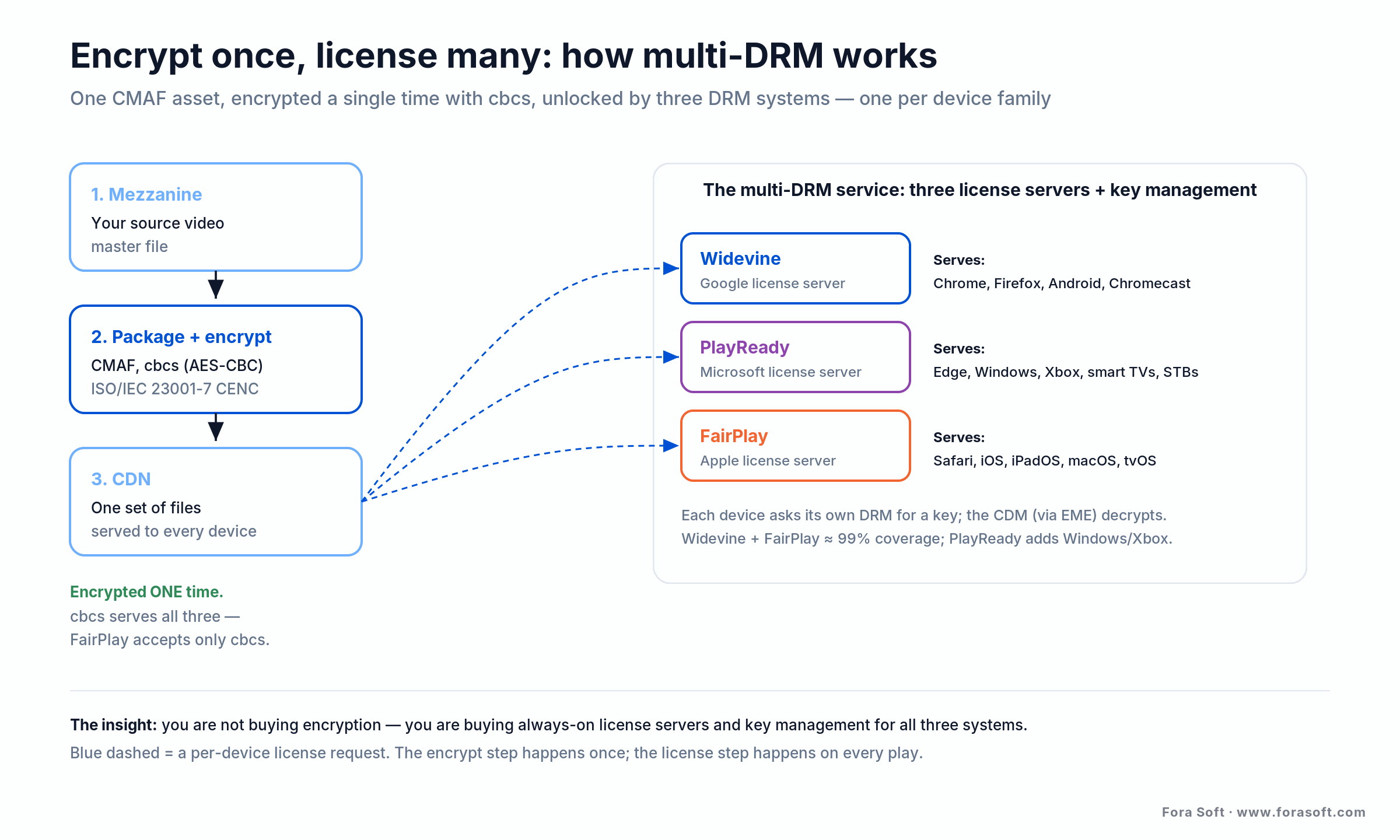
Figure 1. The encrypt-once, license-many model. You buy the three license servers and key management on the right; the encryption step on the left happens only once.
There’s one detail worth getting right, because it used to force you to encrypt twice. CENC has two schemes: cenc (AES-128 in counter mode) and cbcs (AES-128 in cipher-block-chaining with pattern encryption). FairPlay accepts only cbcs. For years that meant one encryption for Apple and another for everyone else. Today, modern Widevine and PlayReady both accept cbcs as well, so the 2026 production default is to package as CMAF, encrypt once with cbcs, and signal it in both HLS and DASH, so one set of files serves every device. Our Learn deep-dive on CENC, cenc and cbcs walks through the byte-level difference if you need it.
On playback, the browser or OS does the decrypting through a Content Decryption Module (CDM), the DRM engine built into the platform, driven by the W3C Encrypted Media Extensions API. Chrome ships the Widevine CDM, Edge ships PlayReady, Safari ships FairPlay. Your player asks the CDM for a license, the CDM calls the DRM’s license server, and the key comes back inside a secure boundary the web page never sees. That’s the part a multi-DRM service runs for you: three license servers, key exchange (usually via the CPIX standard), and the policy engine that enforces your rules.
Anatomy of a protected streaming stack
A protected streaming stack is five boxes, and multi-DRM is only one of them. First, a packager takes your encoded renditions and wraps them in CMAF, encrypting with cbcs. Second, the multi-DRM service runs the three license servers and key management. Third, a CDN delivers the encrypted segments. Fourth, the player on the device drives its CDM to request a license and decrypt. Fifth, an entitlement service decides who is allowed what before any key is issued.
The split between what you rent and what you own falls cleanly across those boxes. You almost always rent the license servers (box two) and the CDN (box three), because both are commodity, high-availability infrastructure. You own the packager configuration, the player integration, and the entitlement logic, because that’s where your product’s rules and user experience live. Getting that boundary right is most of a clean DRM project: don’t rebuild the commodity, don’t outsource the part that’s yours.
This is the same box-by-box pipeline we lay out in the OTT platform development guide, with DRM slotted between packaging and playback. If you’re scoping a build, draw these five boxes first and mark which you’ll rent; the answer usually makes the whole content-protection plan obvious.
License policy: downloads, rentals, and output rules
The DRM license isn’t just a key — it carries the rules for how that key may be used, and setting those rules is your job, not the vendor’s. A license can be persistent (stored on the device for offline download) or session-only; it can expire after a rental window; it can cap how many devices play at once; and it can demand a minimum security level or HDCP before it releases a key for HD or 4K.
Those policies are where DRM stops being a checkbox and starts encoding your business model. A 48-hour rental is a time-bound license. “Watch offline” is a persistent license with an expiry. “Two screens on the family plan” is a concurrency rule the license server enforces. The multi-DRM service exposes the levers; your entitlement logic decides which user gets which policy, on which device, for which title. Plan the policies before you pick a vendor, because a service that can’t express your rental or offline model isn’t a fit no matter how cheap the per-license fee.
The services compared: EZDRM, BuyDRM, PallyCon, Axinom, custom
There’s no single best multi-DRM service. They split by how they bill you and how much you want to own. The table below reflects each option’s public positioning captured on 2026-07-17; most vendors price by quote or usage, so verify current figures before you commit.
| Service | Billing model (2026-07-17) | Where it wins | Where it breaks |
|---|---|---|---|
| EZDRM | Public list price: $299.99/mo all three (Universal Complete); per-license or per-user metering | Transparent pricing; fast start; free POC; small-to-mid libraries | Metered licenses can add up at very high volume |
| BuyDRM (KeyOS) | Flat rate, unlimited licenses; standard 12-month managed-service agreement | Predictable cost at high volume; studio-approved pedigree | No public price; annual commitment; overkill for a small catalogue |
| PallyCon / DoveRunner | MAU or MAL model via AWS Marketplace; 30-day free trial (up to 1,000 MAL / 50 MAU) | Strong forensic watermarking; OTT + anti-piracy in one vendor | Pricing needs a quote; rebrand (2025) can confuse product lines |
| Axinom | Per generated license or per MAU; public price calculator, no fixed rate | Part of a broader OTT back-end (Mosaic); enterprise integrations | Heavier to adopt if you only need licensing |
| Custom build | One-time engineering + hosting; no per-license markup | You own keys, data, and policy; no lock-in; content stays in-house | Overkill unless volume, compliance, or product demands it |
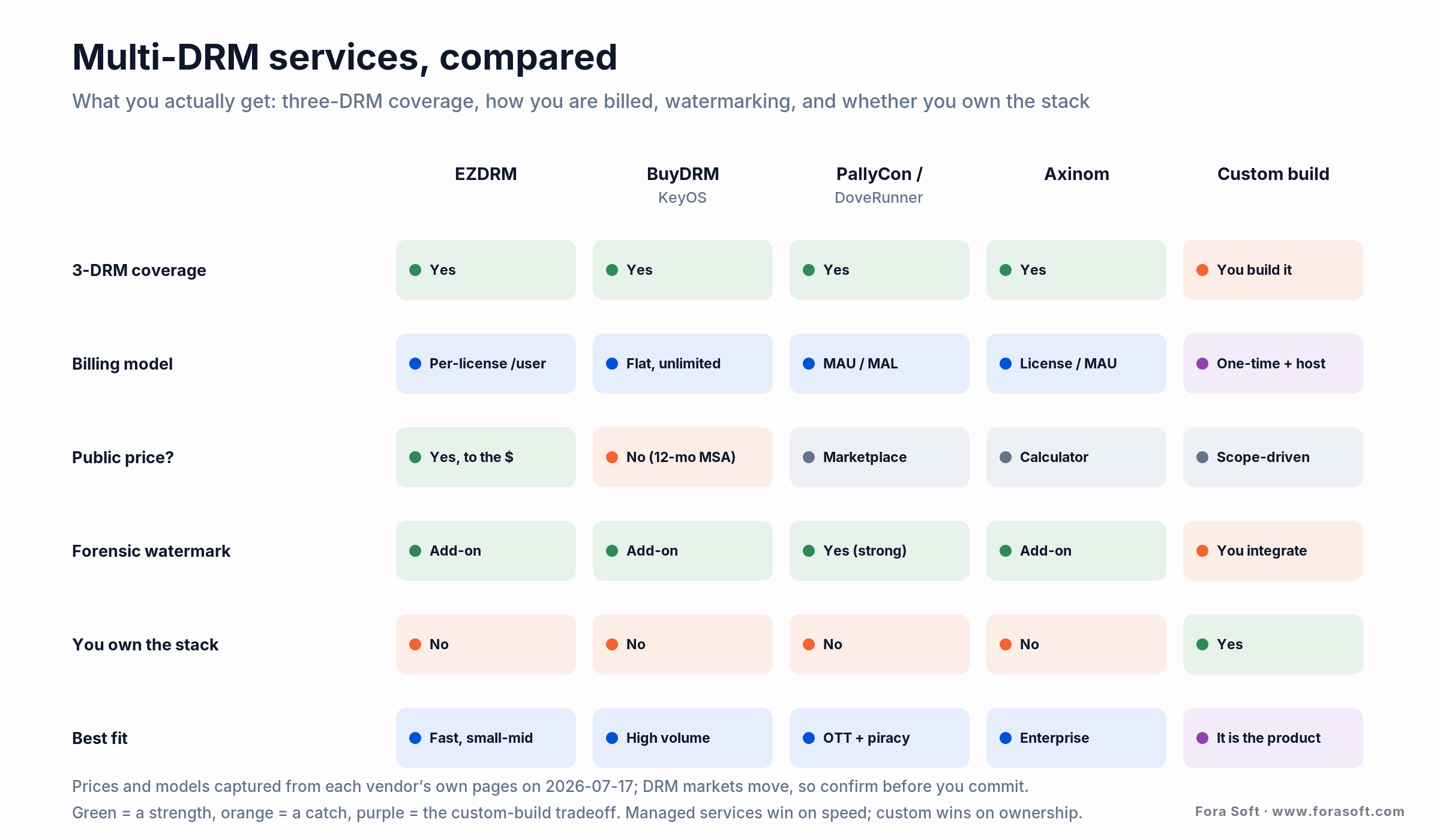
Figure 2. The same options at a glance. They all deliver three-DRM coverage; the real differences are how you’re billed, whether pricing is public, and whether you own the stack.
A useful way to read it: EZDRM is the one you can price yourself today and start fast; BuyDRM trades a public price and a small-catalogue fit for predictable cost at scale; PallyCon/DoveRunner is the pick when anti-piracy and forensic watermarking matter as much as the DRM; Axinom fits teams already building on its OTT back-end; and a custom build is the choice when the licensing layer has to be yours. Which one you land on follows from cost and control, the next two sections.
Not sure which DRM service fits your stack?
Send us your device targets, expected monthly plays, and whether a studio or distributor is in the picture, and we’ll map the shortlist to your actual needs — and flag when a managed service beats a build, or the other way around.
What does multi-DRM actually cost?
A managed multi-DRM service starts around $200–300 a month and scales with usage; a custom build is a larger one-time engineering cost that you then own. EZDRM is the only major vendor with fully public pricing, so it anchors the concrete numbers: its Universal Complete plan is $299.99/mo for Widevine, PlayReady, FairPlay, and WisePlay (20,000 licenses or 2,000 users, $199.99 setup), and its Universal DRM plan is $199.99/mo for Widevine, PlayReady, and WisePlay over DASH (10,000 licenses). All figures captured from EZDRM’s pricing page on 2026-07-17.
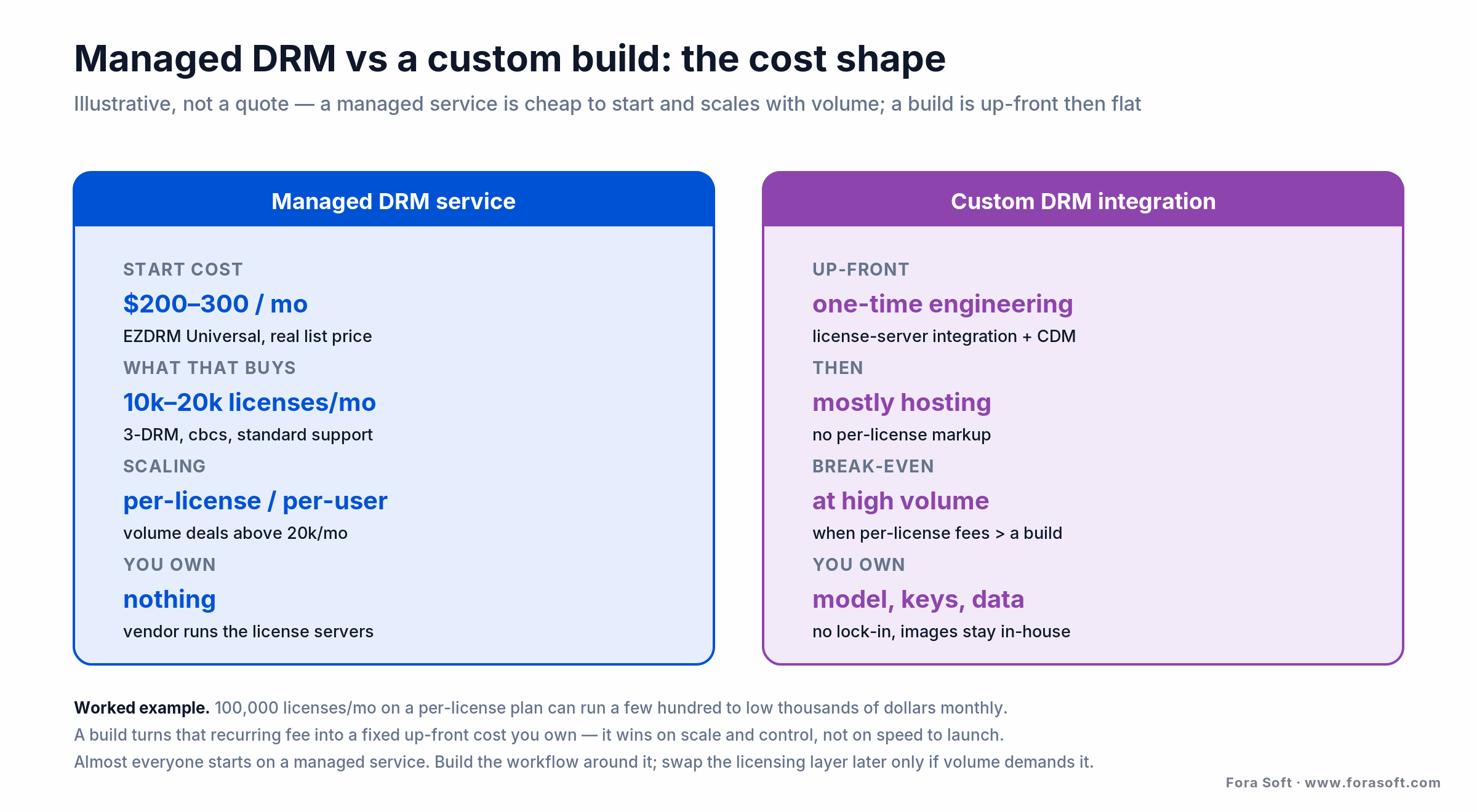
Figure 3. The cost shape, not a quote. Managed DRM is cheap to start and grows with plays; a build is up-front engineering then mostly hosting. Volume decides which wins.
The other vendors price by model rather than a public number. BuyDRM’s KeyOS is a flat rate for unlimited licenses on a 12-month agreement: predictable, and attractive precisely when a metered plan would balloon. PallyCon/DoveRunner and Axinom bill on monthly active users or generated licenses, which tracks your real audience but needs a quote to pin down. One caution: DoveRunner also sells app-shielding (its former AppSealing line) with published tiers around $129/mo and a $25,000/mo enterprise plan — those are not its multi-DRM prices, and it’s an easy trap to quote the wrong number.
Here’s the worked example that decides build-versus-buy. Say you serve 100,000 licenses a month. On a per-license managed plan that’s comfortably in the low-hundreds-to-low-thousands of dollars a month, and it stays a rounding error against your CDN bill. Now push to millions of plays a month: the metered fee becomes real money every month, forever, while a custom licensing layer is a fixed engineering cost you pay once and then mostly host. The crossover isn’t about the software being hard (the DRM SDKs are available); it’s about when a recurring per-play fee outgrows the one-time cost of owning the servers. Below that crossover, buy. We keep our own development estimates deliberately conservative, so we’d rather tell you to stay on a managed service than sell a build you don’t need.
Forensic watermarking: tracing a leak to its source
Forensic watermarking embeds an invisible, per-user identifier into the video so that if a copy leaks, you can trace it back to the exact account or session it came from. It’s the answer to DRM’s blind spot: encryption stops an unauthorised device from playing your stream, but it can’t stop an authorised viewer from pointing a phone at the screen or running a capture card. The watermark doesn’t prevent that leak — it names who did it.
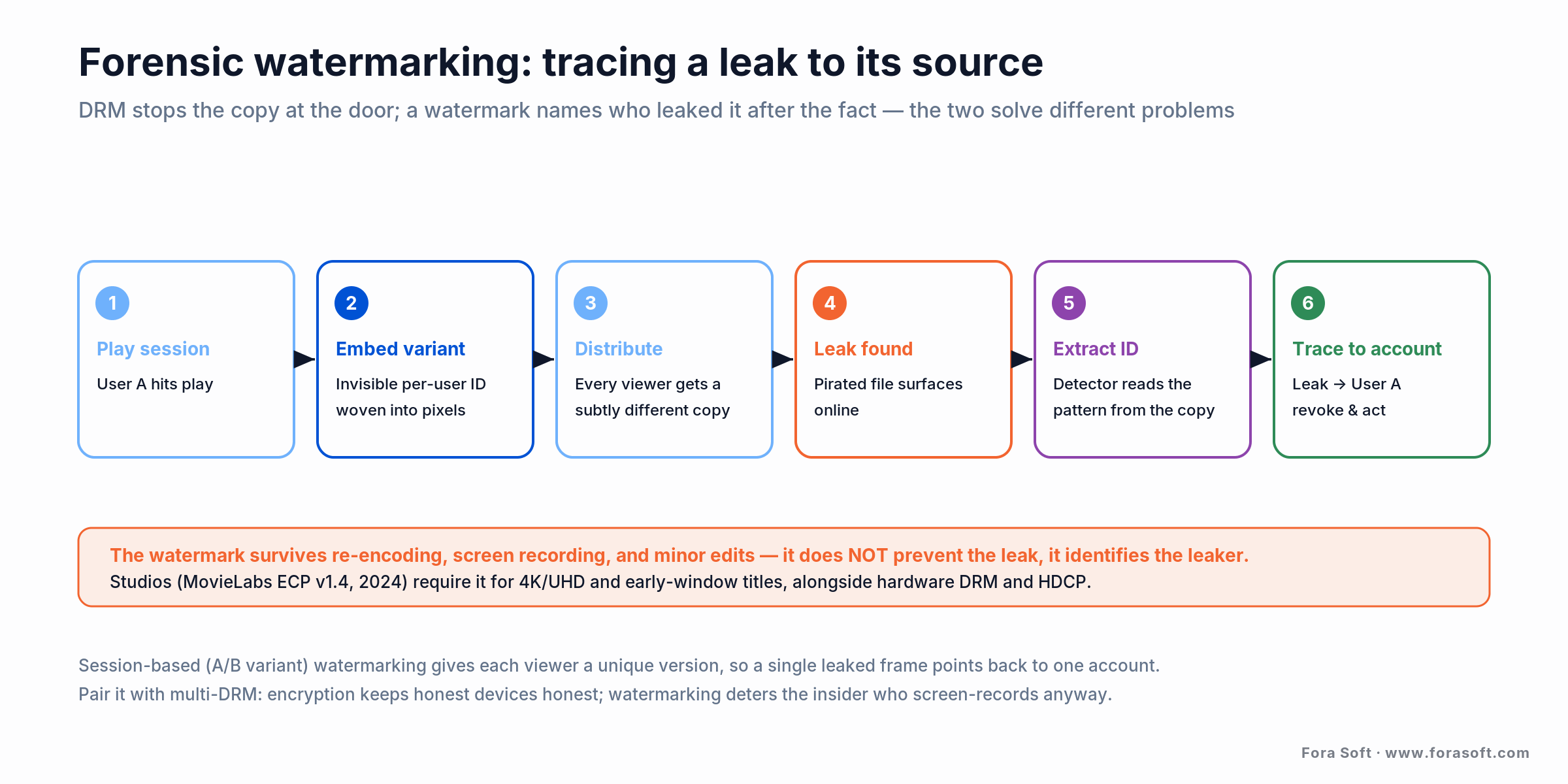
Figure 4. Watermarking runs after the fact. It survives re-encoding and screen recording, and points a leaked frame back to one account — the deterrent DRM can’t provide.
The common technique is session-based (A/B variant) watermarking: each viewer receives a subtly different version of the stream, so a leaked frame’s pattern maps to one account. The mark is woven into the pixel data mathematically, invisible to the eye, and it survives re-encoding, screen recording, and minor edits, which is what makes it useful against the exact attacks DRM can’t cover. Our Learn write-up on how forensic watermarking traces a stream leak goes deeper on the embedding and detection mechanics.
Reach for forensic watermarking when: you license premium or early-window content, run high-value live sports or events, or a distributor requires it in the contract. If you’re protecting a modest catalogue against casual copying, multi-DRM alone is usually enough, and watermarking adds cost and per-session processing you may not need yet. Add it when a single leak is expensive — not by default.
Hardware DRM, HDCP, and the studio bar for 4K
If you plan to stream 4K or licensed Hollywood content, software DRM isn’t enough — the studios set a higher bar. The reference is MovieLabs’ Enhanced Content Protection (ECP) specification, currently version 1.4 (2024), which distributors point to when they say what protection premium titles require. It calls for hardware-backed DRM, output protection, and forensic watermarking together for the most valuable material.
In practice that means three things stack up. Hardware DRM (Widevine L1 or PlayReady SL3000) keeps the keys and decryption inside the device’s secure hardware, so 4K only plays where the chip can be trusted. HDCP protects the video on its way out over HDMI, so it can’t be captured off the cable. And forensic watermarking traces any leak that still gets out. Miss one and a studio simply won’t license you 4K or early-window titles.
Reach for the full studio stack when: you’re distributing licensed premium content, especially 4K/UHD or early-window titles where a leak during the theatrical run is catastrophic. For your own SD/HD catalogue, software-level Widevine L3 and FairPlay are typically fine, and forcing hardware DRM only shrinks the set of devices that can play you. Match the protection tier to the value and the license, not to the highest spec you’ve read about.
Multi-DRM for live vs VOD
VOD and live use the same three DRM systems, but the timing is different enough to change your architecture. For VOD you package and encrypt each title once, ahead of time, and licenses are issued on demand when someone presses play — there’s no clock. For live you package and encrypt the stream in real time as it’s produced, and the license and key exchange has to keep pace with playback or viewers stall.
Live also tends to rotate keys periodically through the broadcast, so the license server and player have to handle key rotation smoothly without a visible glitch, and any low-latency target you’ve set has to absorb the license round-trip. For high-value live — sports especially — this is exactly where forensic watermarking and the studio protection tier come in, because a live leak is worth the most in the moment it’s happening. If low latency is a hard requirement, treat DRM as part of that budget from day one rather than a step you bolt on at the end.
Build vs buy: when a custom DRM integration wins
Buying is the right default, and it’s not close for most teams. A managed service hands you compliant Widevine, PlayReady, and FairPlay licensing, key rotation, and the maintenance that follows every browser and OS update: work that never ends and never differentiates you. Start on a service, ship, and put your engineering into the packaging, player, and entitlement logic that your product actually competes on. That’s the same platform work we describe in our OTT platform development guide.
Building the licensing layer yourself wins in a specific set of cases. You build when your volume is high enough that per-license or per-user fees now cost more, month after month, than owning the servers would. You build when compliance or IP means the content keys can’t sit with a third party. And you build when content protection is the product you sell — when the DRM behaviour, not just the video, is your differentiator. Short of those, a custom build is money spent reinventing a solved, undifferentiated component.
Reach for a custom build when: you’re fighting the managed model — the monthly per-license bill has outgrown a one-time build, a compliance rule forbids third-party key custody, or you need DRM policy the vendor won’t expose. At that point you’re paying managed-service money without the ownership, and building the licensing layer buys back control. The honest middle path is common: stay on a service for years, and build only the piece that becomes your constraint.
Weighing build vs buy for DRM?
We’ve integrated managed DRM and built custom protection into streaming products since 2005. Give us your volume and constraints and we’ll run the crossover with you — and tell you plainly if staying on a service is the smarter spend.
Mini-case: content protection on an e-learning platform
Video DRM isn’t only an OTT problem — anywhere premium video is the product, someone wants to copy it. With BrainCert, the e-learning platform we’ve built with since it was a startup and grew to roughly $10M in annual revenue, protected content matters directly: instructors sell courses and live classes, and their lessons are the asset. Content protection ships as part of the platform, so a course owner’s videos can’t be trivially ripped and re-sold.
The engineering lesson from that work maps straight onto the build-versus-buy call in this article. The hard parts were never the encryption. They were tying key delivery into the entitlement system (who paid for which course gets which key), keeping playback smooth across web, iOS, and Android without a separate encode per platform, and doing it without turning every lesson upload into a slow, fragile pipeline. That’s the workflow you own; the licensing plumbing underneath is what a managed DRM service exists to handle.
The transferable takeaway: decide protection at the entitlement layer, not the encryption layer. Once you know exactly which user is allowed which content on which device, plugging in Widevine, PlayReady, and FairPlay licenses is the mechanical part — and the part you can safely rent. If you’re scoping a video product where the content is the revenue, that’s the same conversation we’d start with you on a call.
How to run a multi-DRM proof-of-concept
The fastest way to de-risk a DRM decision is a proof-of-concept that plays your content on your hardest device first, before you commit to a vendor. Start with the awkward end of your device matrix — usually FairPlay in Safari and on an iPhone, plus one Samsung Tizen or LG webOS TV — because if protected playback works there, the easy targets will follow. Most vendors make this cheap: EZDRM offers a free proof-of-concept account, and PallyCon/DoveRunner has a 30-day trial (up to 1,000 licenses / 50 users).
With playback proven, wire in the piece that actually breaks projects: entitlement. Confirm that a real user identity maps to the right license policy — a paid title plays, an unpaid one is refused, an offline download persists and then expires. Measure license latency on a cold start and after a token refresh, and try a deliberately unauthorised request to check it’s refused cleanly. A POC scoped this way takes days, and its output isn’t a demo — it’s a defensible answer on which vendor fits and whether you ever need to build.
A multi-DRM decision framework in five questions
Before you shortlist a vendor or scope a build, answer these five. They decide most of the design and the spend.
1. Which devices do you actually serve? Mobile-only (iOS + Android) needs Widevine + FairPlay. Add PlayReady only for real Windows-app, Xbox, or Tizen/webOS TV traffic. Don’t pay for a DRM no device of yours uses.
2. How valuable is the content, and who licenses it? Your own SD/HD catalogue is fine on software DRM. Licensed 4K or early-window titles trigger the studio stack: hardware DRM, HDCP, and forensic watermarking.
3. What’s your monthly volume? Thousands to tens of thousands of licenses a month: a managed service is a rounding error — buy. Millions of plays a month, forever: model the crossover where per-play fees beat owning the servers.
4. Can keys and content live with a third party? If compliance or IP says no, you’re building — the license servers and key custody have to stay inside your walls.
5. Is DRM your product or a feature of it? If protection behaviour is your differentiator, build it. If it’s plumbing under a product that competes on something else, rent it and move on. If you want a second opinion on your answers, that’s exactly what our video streaming development team does.
When NOT to add multi-DRM
Multi-DRM isn’t free, and it isn’t always the right protection. If your video isn’t premium (marketing clips, free tutorials, user-generated content), DRM adds cost, playback complexity, and support tickets for no real gain. Signed URLs, token authentication, and CDN access rules, the lighter tools covered in video streaming app security features, protect against casual leeching without the DRM tax.
Don’t confuse DRM with anti-piracy, either. DRM stops unauthorised devices from playing your stream; it does nothing about a determined viewer screen-recording an authorised session. If your real threat is that kind of leak — someone re-uploading your paid content — forensic watermarking is the tool, and DRM alone will give you a false sense of safety.
And don’t build a custom DRM stack to save money at low volume. At thousands of licenses a month, a managed service costs less than the meetings you’d spend scoping a build. The custom path is for when you’ve outgrown the service, not for avoiding a modest monthly bill in the first place — being honest about that is why a partner who says “just buy EZDRM” is worth more than one who quotes you a build regardless.
FAQ
What is multi-DRM?
Multi-DRM is a service that issues licenses for all three production DRM systems — Google Widevine, Microsoft PlayReady, and Apple FairPlay — from a single integration. Because no one DRM plays on every device, multi-DRM lets you encrypt a video once and serve it, protected, to Chrome, Safari, Android, iOS, smart TVs, and game consoles alike. What you buy is the always-on license servers and key management, not the encryption itself.
Why do you need Widevine, PlayReady, and FairPlay all three?
Because each platform owner mandates its own DRM and they don’t interoperate. Widevine covers Chrome, Firefox, Android, and Chromecast; FairPlay is the only DRM Apple allows on Safari, iOS, and macOS; PlayReady covers Edge/Windows, Xbox, and many smart TVs and set-top boxes. Ship one DRM and you lock out roughly a third of your audience. Widevine + FairPlay covers most web and mobile; add PlayReady for Windows apps, Xbox, and Tizen/webOS TVs.
How much does a multi-DRM service cost?
EZDRM, the one vendor with fully public pricing, lists $299.99/mo for all three DRMs on its Universal Complete plan (20,000 licenses or 2,000 users) and $199.99/mo for Widevine, PlayReady, and WisePlay over DASH, captured 2026-07-17. BuyDRM sells a flat rate for unlimited licenses on a 12-month agreement; PallyCon/DoveRunner and Axinom bill per monthly active user or per generated license and quote on request. Expect a managed service to start around $200–300/mo and scale with usage.
What’s the difference between CENC’s cenc and cbcs schemes?
Both are ways to encrypt video under Common Encryption (ISO/IEC 23001-7). The cenc scheme uses AES-128 in counter mode; cbcs uses AES-128 in cipher-block-chaining with pattern encryption. The practical point: FairPlay accepts only cbcs, and modern Widevine and PlayReady accept it too — so encrypting once with cbcs in a CMAF container serves all three DRM systems, which is the 2026 production default.
Is DRM the same as forensic watermarking?
No, and they solve different problems. DRM encrypts the stream and controls who gets the key, stopping unauthorised devices from playing it. Forensic watermarking embeds an invisible per-user ID so that if a copy leaks (via screen recording, say), you can trace it to one account. DRM prevents the copy at the door; watermarking identifies the leaker after the fact. Premium and studio-licensed content usually needs both.
Do I need hardware DRM to stream 4K?
For licensed premium 4K, generally yes. Studios follow MovieLabs’ Enhanced Content Protection spec (v1.4, 2024), which requires hardware-backed DRM (Widevine L1 or PlayReady SL3000), HDCP output protection, and forensic watermarking together for the most valuable titles. For your own SD/HD catalogue, software-level Widevine L3 and FairPlay are typically enough — forcing hardware DRM there only shrinks the set of devices that can play you.
Should I build my own multi-DRM or buy a service?
Buy, unless you have a specific reason not to. The license servers are a solved, undifferentiated problem, and a managed service is compliant and running in days. Build a custom licensing layer when per-license fees at your volume outgrow the cost of owning the servers, when compliance or IP forbids third-party key custody, or when content protection is your product. Most teams stay on a managed service for years and build only the piece that becomes their constraint.
Which multi-DRM service is best for OTT?
There’s no single best — it depends on billing and priorities. EZDRM fits fast starts and small-to-mid libraries with transparent pricing; BuyDRM suits high, predictable volume on a flat rate; PallyCon/DoveRunner is strong when forensic watermarking and anti-piracy matter alongside DRM; Axinom fits teams on its broader OTT back-end. A custom build wins only when volume, compliance, or product strategy demand you own the licensing layer.
What to read next
OTT platforms
OTT Platform Development Guide
The full pipeline DRM plugs into — ingest, encode, package, CDN, player, and monetization.
Streaming security
Securing Live Streaming Content
The wider view: tokens, signed URLs, and CDN rules that sit around DRM, not inside it.
Learn: OTT
Multi-DRM: One Workflow for Every Device
The concept-level theory behind this comparison — how encrypt-once, license-many really works.
Services
Video Streaming Development
How we integrate DRM and build content-protected streaming products end to end.
Ready to protect your content without over-building?
Multi-DRM comes down to a few clear calls. You need all three DRM systems because no one covers every device; you encrypt once with cbcs in CMAF and let each device fetch its own license; and what you’re really buying is the always-on license servers, not the encryption. On price, EZDRM is the transparent anchor at $299.99/mo for all three, while BuyDRM, DoveRunner, and Axinom price by volume or contract. And DRM alone won’t stop a screen recorder — that’s what forensic watermarking is for.
The default is simple: buy a managed service, build your workflow around it, and take on a custom licensing layer only when volume, compliance, or product strategy make ownership pay off. If you want a straight answer on which side of that line you’re on — and which vendor or build fits — we’re happy to run it with you.

The book · Volume 3 of 7
Video Streaming: A Complete Guide to Video Delivery: From ABR and CDNs to Players, WebRTC, DRM, and the Economics of Streaming
Encrypt once, license many is the easy part to describe; license policy, player integration and device QA are where projects slip. Volume 3 of our Fora Soft Video Engineering Handbook covers DRM alongside ABR ladders, CDN caching, player recovery after stalls and the economics of delivery. It helps OTT teams decide what to buy, what to own and what to test before launch. Written by Nikolay Sapunov, CEO at Fora Soft.
Read it on Amazon →Kindle & paperback · Fora Soft Video Engineering Handbook
Let’s get your DRM decision right
Whether you need help picking a multi-DRM service, adding forensic watermarking, or building content protection into your own product, we’ll give you an honest read in 30 minutes — buy or build, with the coverage, cost, and studio-compliance tradeoffs behind the call.

