

Telnyx WebRTC sits in a specific corner of the real-time communication market: a programmable carrier-grade voice platform with WebRTC SDKs, native PSTN interconnect, SIP trunking, SMS / MMS, number provisioning, and a global IP network most other CPaaS vendors don’t own. The right question is rarely “Telnyx vs Twilio.” The right question is “does my product need carrier-grade voice + WebRTC, or am I building a video-first product that happens to need a phone bridge?”
This guide is the playbook we share with founders and CTOs evaluating Telnyx WebRTC development against alternatives like LiveKit, Daily, Agora, Amazon Chime SDK, Zoom Video SDK and Twilio Voice + Video. It covers when Telnyx is the right pick (programmable voice + PSTN + WebRTC), when it’s not (video-first products), how to architect a Telnyx + custom-SFU hybrid, what real-time codec and reliability KPIs matter, the HIPAA / SOC 2 paths, and realistic 2026 build cost ranges with agent-engineering accelerated delivery.
Key takeaways
• Telnyx is voice-first WebRTC. It owns its network and shines on PSTN interconnect, SIP, low-latency voice, and programmable call control. Video and screen share work, but they are not the headline feature.
• Pick Telnyx when telephony matters. Contact centers, IVR, AI voice agents, SIP trunking, sales-dialer products. Pick LiveKit / Daily / Agora when video and AI agents are the headline.
• Hybrid stacks are common. Telnyx for PSTN + voice, LiveKit or Daily for video; bridge them at your application layer with a single user-identity model.
• HIPAA support is real but conditional. Telnyx will sign a BAA on the right plan; verify before any PHI byte and keep observability vendors HIPAA-eligible too.
• Tier 1 Telnyx WebRTC build: $40K–$90K, 12–16 weeks. Tier 2 with PSTN + AI agents: $120K–$280K, 4–6 months. Agent-engineering accelerated delivery lands at the lower end.
Why Fora Soft wrote this Telnyx WebRTC playbook
Fora Soft has been shipping real-time video and audio products since 2005 — from Flash-RTMP through native WebRTC, mediasoup, Janus, LiveKit, Daily, Agora and the carrier-grade CPaaS world that includes Telnyx, Twilio Voice, Vonage and Plivo. We have built voice-first call-center products, video-first telehealth, hybrid product stacks, and AI voice agents that bridge PSTN to LLMs. On the carrier side, our Telnyx integration and migration team handles Voice, SIP, TeXML and Twilio-to-Telnyx moves.
For surrounding context, see our deep-dive on P2P vs MCU vs SFU architectures, the WebRTC overview, our walkthrough on LiveKit AI agent development, and our HIPAA-grade telemedicine work at CirrusMED.
That’s 250+ projects since 2005 with a 50+ person in-house team, and a 2025 TechReviewer listing as a Top Software Development Partner for Startups in WebRTC. When you want that bench as a delivery team, it’s our custom software development practice. The honest read below is the same one we give clients on the first call.
Need a senior pair on your Telnyx WebRTC architecture?
30 minutes, free, no obligation — we’ll review your CPaaS pick, your codec / latency targets and your HIPAA controls, and tell you what to change before week one.
What Telnyx WebRTC actually is — and what it isn’t
Telnyx is a CPaaS that owns its IP backbone. The WebRTC product is one piece of a broader stack that includes SIP trunking, PSTN voice (licensed in 30+ markets, calling to 100+ countries), SMS / MMS, number portability, and an AI/voice-agent platform. The WebRTC SDK gives you in-browser and in-app voice and video over Telnyx’s media servers.
What Telnyx WebRTC is best at:
1. Voice-first products. IVR, contact centers, sales dialers, AI voice agents, click-to-call. Telnyx’s carrier-grade SIP and PSTN routing is its strongest moat.
2. Programmable call flows. Call Control API, Voice API, programmable SIP trunks, real-time fork to AI / transcription. The pattern: a phone call hits your DID, your control logic decides what to do (route to agent, run an LLM, branch by IVR menu), and Telnyx executes.
3. Cost on telephony. Per-minute and per-DID pricing tends to undercut Twilio Voice for high-volume carriers. The picture varies by destination — benchmark on your top-10 dial codes.
What Telnyx WebRTC is not best at:
1. Video-first products. Recording, simulcast, multi-party rooms, AI agent attached to the SFU: LiveKit, Daily and Agora are deeper here. If video is the headline feature, the answer is rarely Telnyx alone.
2. Live streaming & media composition. If you need 1-to-many broadcast with live transcoding and DVR, look at AWS IVS, Mux, Cloudflare Stream, or a media-server stack on top of mediasoup.
3. Built-in AI scribe / agent framework. Telnyx has voice-AI primitives but the developer experience for an “ambient agent on a video call” is more mature on LiveKit Agents and Daily Bots.
Reach for Telnyx WebRTC when: voice + PSTN are central, you need programmable call control, and you want to consolidate SIP, DIDs, SMS and WebRTC under one vendor with a BAA path.
Telnyx vs LiveKit vs Daily vs Agora vs Twilio — the side-by-side
Five managed RTC platforms cover most new builds. The right pick depends on whether voice or video is the headline.
| Platform | Strength | PSTN / SIP | Video depth | AI agent dev experience | HIPAA / BAA |
|---|---|---|---|---|---|
| Telnyx | Owned IP backbone, voice + PSTN | Native, 30+ countries | Basic | Voice-AI primitives | BAA on the right plan |
| LiveKit | OSS SFU, AI agents | Via SIP gateway | Best-in-class | First-class Agents framework | BAA on Cloud |
| Daily | 75+ PoP managed SFU | Phone bridge add-on | Strong | Daily Bots framework | BAA available |
| Agora | Global SD-RTN routed mesh | PSTN add-on | Strong | Conversational AI Engine | BAA + HIPAA package |
| Twilio Voice + Video | Mature voice CPaaS | Native, broadest reach | Mid; staying (EOL reversed) | ConversationRelay | BAA on enterprise |
Reach for Telnyx + LiveKit hybrid when: your product needs PSTN voice and rich video / AI agents in the same workflow — Telnyx for the carrier path, LiveKit for the SFU + agent layer, bridged at your application identity layer.
One 2026 update worth flagging: Twilio reversed its Programmable Video end-of-life. After announcing a December 5, 2026 shutdown, Twilio said Video will remain a standalone product. So Twilio Video is no longer a sunsetting risk, but its roadmap investment still trails the video-first SDKs, so we’d pick it for voice, not new video.
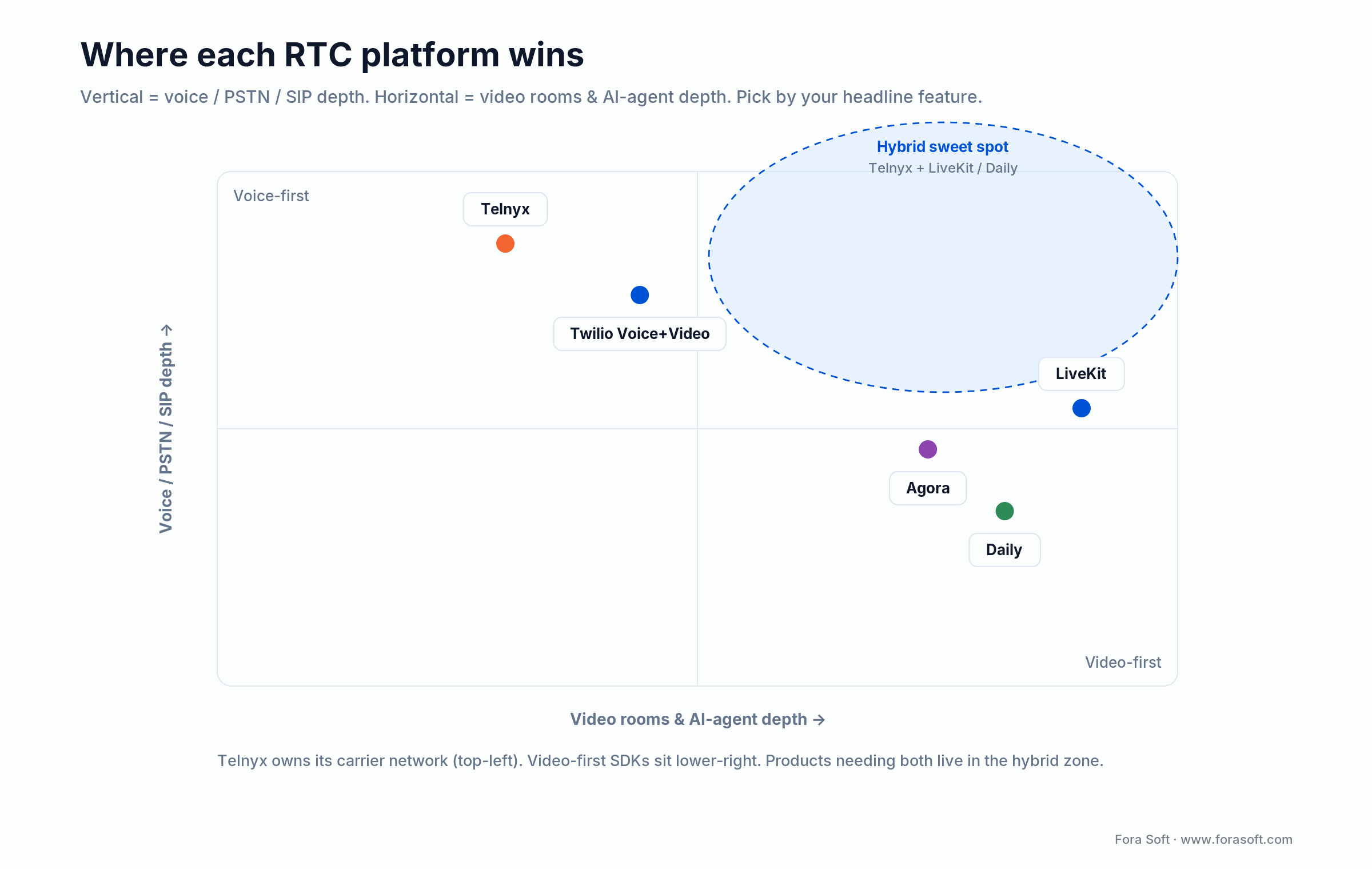
Figure 1. Pick by your headline feature: voice and PSTN sit top-left, video and AI rooms bottom-right, hybrid builds in the top-right zone.
When Telnyx WebRTC is the right pick — five concrete scenarios
1. AI voice agents. Inbound call → LLM with TTS / STT → outbound transfer or task completion. Telnyx’s real-time fork plus low-latency PSTN backbone makes voice agents possible without a third-party media gateway in the middle.
2. Custom contact center. Multi-tenant call routing, supervisor barge, whisper, queue analytics, screen-pop into a CRM — Telnyx Call Control plus your own CCaaS UI delivers a tighter experience than off-the-shelf contact-center products at startup volumes.
3. Sales dialer / outbound platform. Power-dialer, click-to-call, local presence (use a DID native to the called area), call recording, SIP-back-to-CRM. Telnyx’s DID inventory and SIP trunks are deep enough to skip a dedicated dialer SaaS.
4. SIP-first communications. SIP trunking with WebRTC bridges — if you have on-prem PBX customers and a SaaS roadmap, Telnyx is good at stitching the two.
5. Number portability + SMS. Number management, port-in / port-out, SMS / MMS at scale, A2P 10DLC compliance — Telnyx is a serious carrier choice if telephony is core to the product, not an add-on.
When Telnyx WebRTC is NOT the right pick
Video-first telehealth. Use LiveKit, Daily or Agora. Bridge to PSTN only if a small share of patients call by phone. See our telehealth software guide.
Live streaming and broadcast. AWS IVS, Mux, Cloudflare Stream, or a custom mediasoup pipeline beats Telnyx for 1-to-many broadcast.
Edu / virtual classroom. LiveKit or Agora, with better tooling for breakout rooms, hand-raise, recording, simulcast.
Massive multi-party meetings. Zoom Video SDK, Daily and LiveKit have a deeper bench for 100+ participant rooms.
A reference Telnyx WebRTC architecture that ships
The architecture below is what we deploy for a typical Telnyx WebRTC product (AI voice agent, programmable contact center, dialer SaaS).
| Layer | Default pick | Notes |
|---|---|---|
| Frontend | Next.js 15 + Telnyx WebRTC JS SDK | SSR for marketing; React Query; Zustand for call state |
| Mobile | Telnyx WebRTC mobile SDK (iOS / Android / Flutter) or React Native | Native if CallKit / ConnectionService is required |
| Call control | Node.js + Telnyx Call Control API | Stateless workers; Redis for short-lived call state |
| AI agent (optional) | Deepgram Nova-3 / Flux → GPT-5 mini / Gemini 3 Flash → Cartesia / ElevenLabs | Telnyx fork → STT → LLM → TTS → back to call leg |
| Database | PostgreSQL + Redis | RDS Multi-AZ; pgcrypto for sensitive call metadata |
| Recording & storage | Telnyx Recording → S3 with Object Lock | KMS keys per tenant; lifecycle policy by retention class |
| Observability | Datadog or New Relic with BAA + Telnyx webhooks | Trace each call leg end-to-end with one trace ID |
| Hosting | AWS or GCP under BAA | Separate VPC for PHI workloads if healthcare |
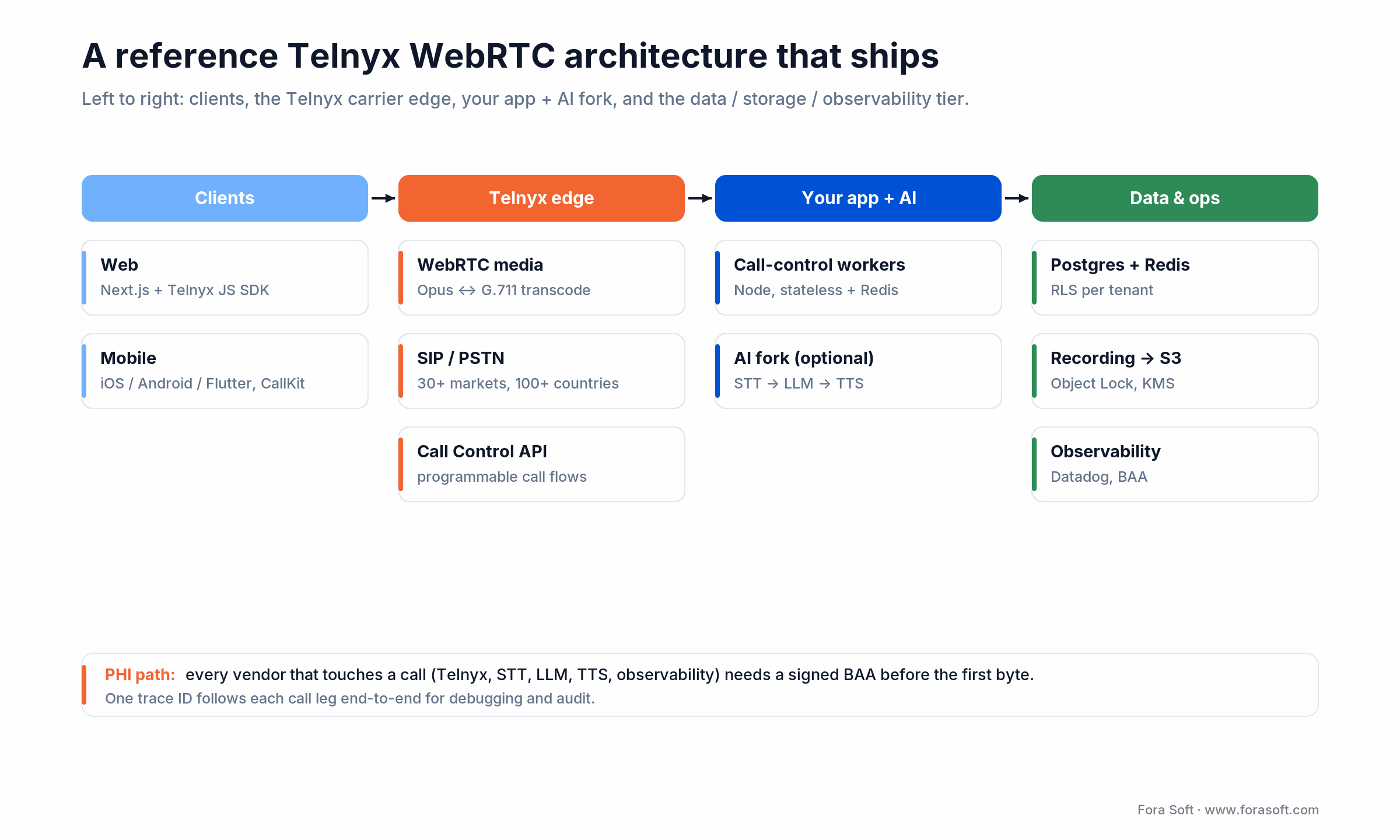
Figure 2. The reference stack we deploy for a Telnyx voice product — clients, the Telnyx carrier edge, your app plus an optional AI fork, and the data tier.
Building AI voice agents on Telnyx WebRTC
Voice agents (inbound calls answered by an LLM) are where Telnyx WebRTC shines because the carrier path is owned and the latency budget is generous.
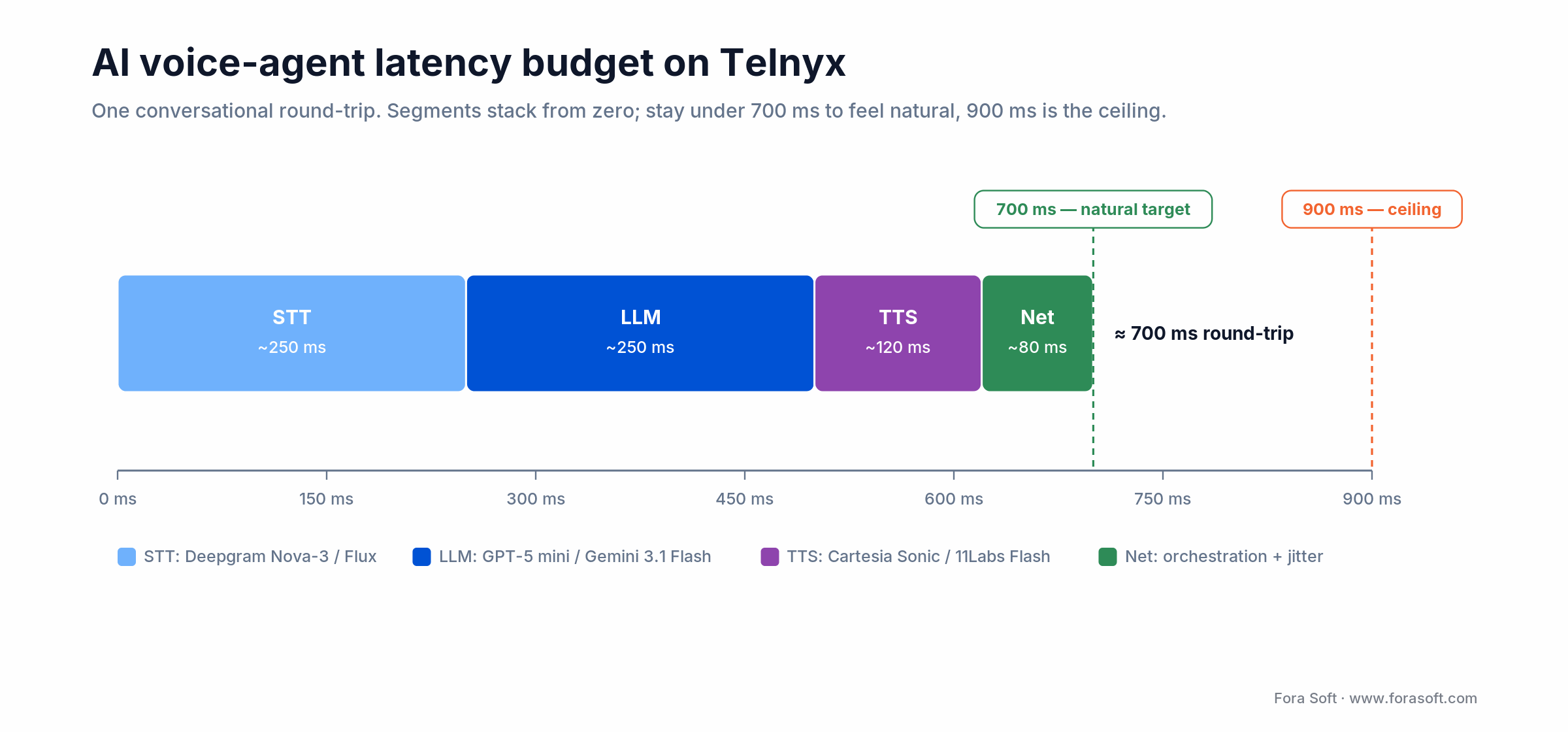
Figure 3. A conversational round-trip on Telnyx: keep STT + LLM + TTS + network under about 700 ms so the agent feels natural.
1. Latency budget. Inbound PSTN call → Telnyx fork → STT (sub-200ms first-token streaming) → LLM (100–300ms first-token on a fast model via streaming) → TTS (sub-200ms first-audio) → back to caller. Budget STT at ~200–300ms, the LLM first token at ~100–300ms, TTS first-audio at ~40–200ms and orchestration at ~50–100ms. Keep the total under 700ms and the conversation feels natural; 900ms is the ceiling before callers start talking over the agent.
2. STT picks. Deepgram Nova-3 for general use, or Deepgram Flux, purpose-built for voice agents with sub-300ms streaming and built-in turn-detection so the agent knows when the caller stopped talking. AssemblyAI Universal when you need intelligence on the transcript; Whisper-Large self-hosted for multilingual. Streaming mode is non-negotiable.
3. LLM picks. A fast model (GPT-5 mini or Gemini 3 Flash, 2026-generation) for scripted turns; a frontier reasoning model for booking flows and billing escalations. Bedrock or Azure OpenAI when you need the model under a BAA. Constrain output with strict tool-calling schemas. Free-form chat is where voice agents break.
4. TTS picks. Cartesia Sonic (~40ms first-audio) when response time is the hard constraint; ElevenLabs Flash v2.5 for voice quality and multilingual breadth; Azure Neural for HIPAA-eligible voices. Preview a few voices on a real call before committing. Naturalness beats spec sheets.
5. Interruption handling. Detect caller speech mid-TTS and barge-in cleanly. Don’t make the agent talk over the caller.
6. Tool calls. Wire LLM tools to your CRM, booking, billing — not free-form chat. Tools are how voice agents get reliable.
Codec, latency and reliability KPIs that decide call quality
Audio codecs. Opus is the WebRTC default; G.711 and G.722 for PSTN interop. Opus DTX + RED dramatically improves perceived quality on bursty networks. Telnyx auto-transcodes between webRTC Opus and PSTN G.711 — check it doesn’t break Opus FEC for your real packet-loss profile.
Video codecs (when used). VP8 universal default; VP9 with simulcast for diverse-bandwidth panels; H.264 for hardware interop; AV1 for the long-term bet on the clinician / agent side first. For a plain-language primer on how these codecs trade quality for bitrate, see our video encoding learn track.
Latency targets. Glass-to-glass <300ms p95 for natural turn-taking; MOS > 4.0 on the standard 1–5 audio scale; round-trip latency <200ms p95 for AI agents (the LLM round-trip eats half the human-perceived budget).
Reliability targets. 99.95% uptime on the WebRTC entrypoint; <1% disconnects per call; mean-time-to-recover under 15 minutes for media-server outages; ICE-restart cycles in <5 seconds when a network changes.
Want a senior pair on your AI voice agent?
Send us your use case — we’ll come back with a Telnyx + STT + LLM + TTS architecture, latency budget, and a 12–16-week milestone plan, free.
HIPAA, SOC 2 and GDPR with Telnyx WebRTC
1. BAA. Telnyx will sign a BAA on the right plan; verify in writing before any PHI byte. Treat any unsigned vendor in the data path as a breach risk — that includes Sentry, Mixpanel, Datadog, your TTS provider and your STT provider.
2. Recording lifecycle. If recordings touch PHI, encrypt at rest (KMS), retain six years, watermark exports, and put S3 Object Lock on the bucket so retention is enforceable.
3. RBAC + audit logs. Per-tenant call data isolated by row-level security; immutable audit log for every call action (start, transfer, mute, recording-toggle, supervisor-listen).
4. SOC 2 Type II. Health-system buyers ask for it. Plan readiness during build, attest Type I at month 9, Type II at month 15. HITRUST CSF only for large IDNs.
5. GDPR (if EU users). Lawful basis, data subject access & deletion within one month, EU data residency, EU representative, DPIA before launch. Voice recordings are special-category data.
Cost model — what a Telnyx WebRTC build really costs in 2026
Tier 1 — Single-product MVP. Web + responsive mobile, click-to-call, basic IVR, recording, dashboard, HIPAA controls. Roughly 12–16 weeks, $40K–$90K.
Tier 2 — Programmable contact center / AI voice agent. Adds Call Control logic, AI agent (STT + LLM + TTS), CRM integration, multi-tenant white-label, SOC 2 readiness. Roughly 4–6 months, $120K–$280K. The AI agent part of this tier is what our AI call agent development projects ship: inbound and outbound calls, CRM lookups and warm transfer to a human.
Tier 3 — Enterprise. Native iOS & Android with CallKit / ConnectionService, deep telephony platform features, multi-region failover, HITRUST. 9–14 months, $400K+.
Run-rate. Telnyx voice minutes typically $0.0035–$0.0090 per minute on US destinations; DIDs ~$1/month each; AWS hosting $1K–$8K/month at MVP scale; AI agent token + STT + TTS at $0.05–$0.30 per minute depending on stack.
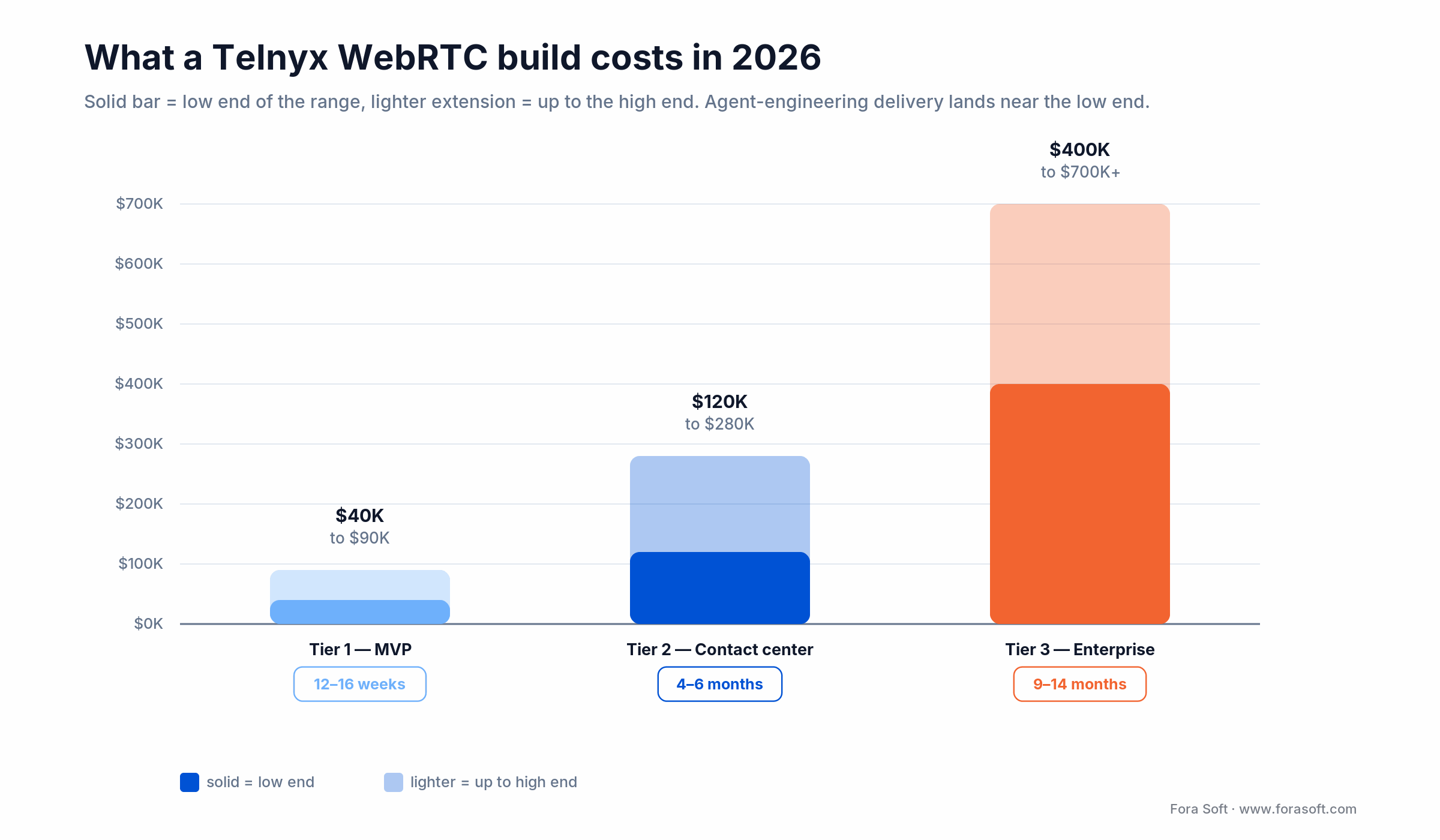
Figure 4. What a Telnyx WebRTC build costs in 2026 by tier; the solid bar is the low end, the lighter extension is up to the high end.
Real Telnyx WebRTC use cases worth copying
1. Inbound AI receptionist for SMB. Single DID per business, AI agent answers, books appointments via tool-calls into the customer’s scheduler. Replaces $15–$30/hour answering services at $0.10–$0.30 per call.
2. Outbound dialer for sales. Power-dialer with local-presence (DIDs in the called area code), call recording for QA, CRM integration via Telnyx webhooks. Lifts connect rate 30–60% over generic VoIP dialers.
3. Patient phone-bridge for telehealth. Elderly patients call a single DID, get IVR-routed to their scheduled visit, join the same LiveKit room as browser patients. Bridges digital divide without forking the clinician workflow.
4. Programmable IVR for utilities / insurance. Account lookup, balance, payment, claims status — LLM-driven conversation handles 60–75% of calls without a human. Structured tool-calls into the system-of-record.
5. Click-to-call SaaS embed. Web button on a landing page launches a Telnyx WebRTC call into the customer’s sales line. Lifts demo conversion vs “fill out this form.”
Reach for Telnyx click-to-call when: your conversion funnel has a high-intent moment (pricing page, demo request) and you can answer instantly — replacing a form with a one-tap voice connection lifts conversions reliably.
Third-party SDK pricing inside a Telnyx WebRTC build
STT. Deepgram Nova-3 / Flux ~$0.005–$0.012/min streaming; AssemblyAI Universal ~$0.012/min; Whisper-Large self-hosted on a GPU runs ~$0.002/min including ops at ≥500 concurrent streams. Streaming mode is non-negotiable for AI voice agents.
LLM. A 2026 fast model (GPT-5 mini, Gemini 3 Flash) runs cents per call; a 5-minute voice-agent call typically burns 4K–9K tokens, which lands well under $0.20 on a fast model and a few times that on a frontier reasoning model. Put the fast model on scripted turns and only escalate hard turns.
TTS. Cartesia Sonic ~$0.015/min (~40ms first-audio); ElevenLabs Flash v2.5 ~$0.02–$0.05/min; Azure Neural ~$16/M characters (~$0.05–$0.10/min). Pick on perceived naturalness in a 2-minute live test, not on price alone.
Telnyx voice. US destinations $0.0035–$0.0090/minute typical; international varies sharply by country. Inbound DIDs ~$1/month each.
All-in. A typical 5-minute AI voice agent call lands at $0.30–$0.80 once Telnyx + STT + LLM + TTS are summed. Enterprise volume tiers cut that 30–50%.
A decision framework — pick your stack in five questions
Q1. Is the headline feature voice or video? Voice = Telnyx is in the running. Video = LiveKit / Daily / Agora.
Q2. Do you need PSTN inbound or outbound? Yes = Telnyx (or Twilio). No = pure WebRTC SDK.
Q3. Are AI voice agents or programmable IVR central? Yes = Telnyx Call Control + LLM stack.
Q4. Do you need recording, transcription, multi-party rooms, breakouts? If yes, layer LiveKit / Daily on top, or pick them outright.
Q5. Healthcare / fintech with HIPAA / SOC 2? Telnyx will sign a BAA on the right plan. Verify in writing.
Reach for a hybrid stack when: two or more of Q1–Q4 are split — e.g. you need PSTN voice (Telnyx) and rich video AI agents (LiveKit). Bridge them at the application layer with one user-identity model.
Five pitfalls in Telnyx WebRTC builds we keep seeing
1. Picking Telnyx for a video-first product. The voice path is excellent; the video / SFU path is basic. If video and AI agents are the headline, you will spend more building around Telnyx than you save.
2. Skipping the latency budget. AI voice agents fail when round-trip exceeds ~900ms. Measure each leg in production, not just in dev with a clean wifi.
3. Letting the LLM speak free-form. Tool-calling schemas turn voice agents from tech demos into reliable products. Don’t skip the schema layer.
4. Forgetting CallKit / ConnectionService on native mobile. Without OS-level call integration, your app fails the “answer call from lock screen” test. Ship them in v1 or stick to browser-only.
5. Mixing test and prod credentials. Telnyx test keys are forgiving; prod is not. Separate keys at infrastructure level; don’t share Connection IDs between environments.
KPIs — what to measure on a Telnyx WebRTC product
Quality KPIs. MOS ≥ 4.0 on the 1–5 audio scale; glass-to-glass latency ≤300ms p95; first-token-to-speech ≤700ms for AI voice agents; ASR WER ≤10% on the target accent profile.
Business KPIs. Containment rate (calls fully resolved by AI agent without human transfer) ≥55% for simple IVR / FAQ; outbound dial connect rate ≥30%; conversion lift on click-to-call vs no-call control; DID utilisation.
Reliability KPIs. 99.95% uptime on the WebRTC entrypoint; <1% disconnects per call; MTTR <15 min for media outages; ICE-restart cycles <5 sec on network changes.
Mini case — bridging PSTN to a video-first telehealth platform
Situation. A US private practice running a video-first telemedicine platform (CirrusMED-shaped) wanted to add a PSTN entry path for elderly patients without smartphones — while keeping HIPAA compliance, EMR integration and structured visit recording.
What we shipped. Hybrid stack: LiveKit for the video room and AI scribe; Telnyx for the PSTN bridge and IVR (“press 1 for your scheduled visit”); shared user-identity layer in Postgres so a patient calling by phone joined the same room as a patient in the browser. Visit recording came out of the LiveKit egress; STT and SOAP-note generation reused the existing pipeline.
Outcome. Phone-only patients onboarded without an app or a separate clinician workflow; clinicians saw one consistent visit room regardless of how the patient connected. The hybrid pattern beats running two separate communication products. Want a similar assessment for your own stack? Book a 30-min call and we’ll sketch it live. Surrounding Fora Soft healthcare work: CirrusMED and Video Interpretations.
Stuck on Telnyx vs LiveKit vs hybrid?
Tell us your use case — we’ll review whether Telnyx is the right pick, sketch a hybrid architecture if needed, and give you a 12–16-week milestone plan in a 30-minute call.
Testing strategy for Telnyx WebRTC products
1. Unit tests on call-control logic. Vitest / Jest for state machines — ringing, ringing-no-answer, busy, connected, transfer, recording, hangup. Cover >80% of state transitions.
2. Webhook contract tests. Pact-style assertions on Telnyx event payloads — event names, schema, idempotency keys, replay tolerance.
3. Synthetic call tests. Telnyx test numbers + scripted dialing to validate connect / talk / hangup end-to-end. Run in CI nightly against staging.
4. AI agent regression suite. Recorded test calls replayed through STT → LLM → TTS to catch regressions in voice quality, intent extraction and tool calls.
5. Load tests. SIPp or k6 driving concurrent SIP / WebRTC sessions to find concurrency cliffs. Always run before marketing announces a campaign.
FAQ
Is Telnyx HIPAA-compliant for telemedicine?
Telnyx will sign a BAA on the right plan. That covers the carrier and SDK layers; you still need every other PHI-touching vendor (your STT, LLM, TTS, observability) under a BAA too. Treat the full data path, not just Telnyx, as the compliance scope.
When should I pick LiveKit instead of Telnyx?
When the headline feature is video, multi-party rooms, recording, or AI agents attached to the SFU — LiveKit is deeper. Telnyx wins when PSTN, programmable voice, and SIP are the priority.
Can Telnyx power a video-only product?
You can, but you won’t be using the strongest part of the platform. For video-only, LiveKit, Daily and Agora have richer SDKs, recording, simulcast, and AI agent frameworks.
How long does a Telnyx WebRTC MVP take to ship?
12–16 weeks for a Tier 1 product (web + mobile, click-to-call, basic IVR, recording, HIPAA controls). 4–6 months for a programmable contact center or AI voice agent platform with CRM integration and SOC 2 readiness.
Which STT / LLM / TTS stack works best for AI voice agents on Telnyx?
Deepgram Nova-3 or Flux for STT, a fast LLM (GPT-5 mini or Gemini 3 Flash) with tool-calling required, Cartesia Sonic or ElevenLabs Flash v2.5 for TTS, behind a latency budget under 700ms round-trip.
Does Telnyx work with iOS CallKit and Android ConnectionService?
Yes, via Telnyx’s native mobile SDKs. CallKit / ConnectionService integration is non-negotiable if your users will answer calls from a lock screen or expect VoIP calls to behave like cellular calls.
How does Fora Soft scope a Telnyx WebRTC project?
Fixed-band on a 1–2 week discovery sprint, then fixed-band per phase or T&M with a hard cap. We share an honest cost band on the first call — if it’s a Tier 1 build, we say so. Agent-engineering accelerated delivery typically lands at the lower end of the ranges in this article.
Should I self-host SIP infrastructure or use Telnyx?
Below ~5M minutes/month, Telnyx beats DIY on every dimension — carrier relationships, fraud detection, number portability, on-call SRE burden. Self-hosted SIP only earns its keep at very high volume with a dedicated team.
What to read next
AI agents
LiveKit AI Agent Development
How we build ambient agents on top of an SFU, end-to-end.
Video stack
P2P vs MCU vs SFU: Which to Pick
When peer-to-peer breaks, when SFU wins on real-time video.
Primer
What Is WebRTC
A non-engineer-friendly overview of WebRTC’s components and lifecycle.
Architecture
Telehealth Software Guide: AI, HIPAA, Build Cost
Full 2026 stack for AI-powered video consultations.
Ready to ship a Telnyx WebRTC product that survives production?
Telnyx WebRTC development pays back when voice and PSTN are the headline — AI voice agents, contact centers, sales dialers, programmable IVR. It is not the right pick for video-first products; for those, LiveKit, Daily and Agora are deeper. Hybrid stacks (Telnyx for the carrier path, LiveKit / Daily for the SFU + AI layer) cover the products that need both, and they bridge cleanly at your application identity layer.
If your build is Tier 1 voice-first, plan for 12–16 weeks and $40K–$90K with an agent-engineering accelerated team. Tier 2 with AI agents and CRM integration doubles both. Tier 3 enterprise needs a discovery sprint first — nobody quotes Tier 3 voice telephony honestly on a one-call SOW.
The book · Volume 5 of 7
Audio for Video: A Complete Guide to Sound in Video Products: From Jitter Buffers and Lip Sync to Atmos, Quality Metrics, and Neural Codecs
The call-quality KPIs above are where a Telnyx WebRTC product gets judged once PSTN and browser audio meet. Volume 5 explains what happens to that audio in the network: jitter buffers and NetEq, packet loss concealment, FEC and RED, and quality metrics such as PESQ and POLQA. Voice teams can use it to trace a bad call to its cause instead of guessing. Written by Nikolay Sapunov, CEO at Fora Soft.
Read it on Amazon →Kindle & paperback · Fora Soft Video Engineering Handbook
Let’s pressure-test your Telnyx WebRTC plan
Free 30 minutes — we’ll review your CPaaS pick, latency budget, AI voice-agent stack and HIPAA controls, and tell you what to change before week one.

