


Why this matters
The market is large and the adoption curve is steep: the global e-learning market is on the order of $365 billion in 2026 with around 620 million active learners, and the AI-in-education slice is its fastest-growing part, expanding at roughly 40% a year. By mid-2025, 84% of US high-school students reported using a generative-AI tool for schoolwork and AI tutoring platforms already served tens of millions of learners. If you build, run, or are scoping an e-learning product — a course marketplace, a corporate training platform, a university LMS, a language app, or a live-tutoring service — "add AI" is now on the roadmap, and the questions behind it are real engineering and legal decisions: which feature reuses which pipeline, what runs in real time versus overnight, what the EU AI Act lets you ship, and what accessibility and privacy law require before a single learner sees it. This playbook answers those for the e-learning vertical specifically. It is written so a product manager can plan the feature and its risk posture without an engineering or law degree, and so an engineer can see exactly where each feature taps the video and where it can go wrong. The deeper lessons in this section are the per-component manuals; this is the vertical map that tells you which one to open.
What "AI in e-learning" actually means
Strip away the marketing and "AI in e-learning" is a catalog of concrete features, each of which reuses a video- or language-AI pipeline you can name. It helps to see the whole list before reasoning about any one item, because the features sort into groups that behave very differently.
The first group is understanding the content. Automatic speech recognition — the technology that turns speech into text, abbreviated ASR — transcribes every lecture, and from that transcript you get captions, a searchable index, and automatic chapters that break an hour-long recording into navigable topics. A vision-language model — a model that reads images and video and answers questions about them in words, abbreviated VLM — can go further and tag what is on screen, so a learner can jump to the moment a diagram appears.
The second group is helping the learner. An AI tutor answers a student's questions about the course, grounded in that course's own material rather than the open internet, using a pattern called retrieval-augmented generation — fetch the relevant passage first, then let a language model answer from it, abbreviated RAG. The same machinery drafts summaries, flashcards, study plans, and practice questions, and a translation-and-speech stack can dub a course into another language.
The third group is judging the learner: scoring assignments automatically, recommending who gets admitted or placed into which level, and watching students during an exam to catch cheating, which the industry calls proctoring. This group looks like just another set of features. It is not. As the next sections show, it is governed by a different body of law and a different engineering standard, and confusing it with the first two groups is the most expensive mistake a team can make.
 Figure 1. The AI-in-e-learning feature catalog, grouped by what the AI does. The first two groups help a learner; the third judges one — and that distinction drives the entire playbook.
The e-learning wrinkle: two clocks, not one
Here is the structural insight that ties "AI" to "e-learning" specifically, and it is the part most generic round-ups miss. Other video products live on one clock. A streaming catalog is asynchronous — you process a film once and serve it to millions, so the only thing that matters is cost per item processed. A video call is real-time — everything has to happen inside a hundred milliseconds, so the only thing that matters is latency. An e-learning product is the one vertical that runs on both clocks at the same time, and every AI feature has to be placed on the correct one.
The first clock is the asynchronous catalog. Recorded lectures, on-demand courses, and a back-archive of past sessions behave exactly like a streaming library: you transcribe, caption, chapter, embed, and summarize each video once, store the result, and serve it forever. The economics are the streaming economics covered in the OTT platform development playbook — process-once, serve-many, and the only real question is the cost of that one-time pass, which we cost out below.
The second clock is the real-time classroom. A live virtual class, a one-to-one tutoring call, and live proctoring all run inside a real-time pipeline — the WebRTC stack that carries the call, where real-time communication on the web is shortened to WebRTC. Live captions, live translation, and live tutoring face the same sub-100-millisecond latency budget as any conference feature, and they tap the call the same way, through the media server that routes streams. That machinery is the subject of the AI in video conferencing playbook and the SFU-side ASR fan-out lesson.
The practical consequence is a sorting rule. Before you build any AI feature, ask which clock it is on: if the content already exists, do the work asynchronously in a queue where compute is cheap and a slow, accurate model is fine; if the moment is live, you are in a latency budget and a different, faster model. The same feature — captions, say — is a cheap batch job on a recorded lecture and a hard real-time problem in a live class, and they are two different builds. An e-learning roadmap that does not separate the two clocks ends up trying to run batch-quality models in real time, or paying real-time prices for work that could have waited.
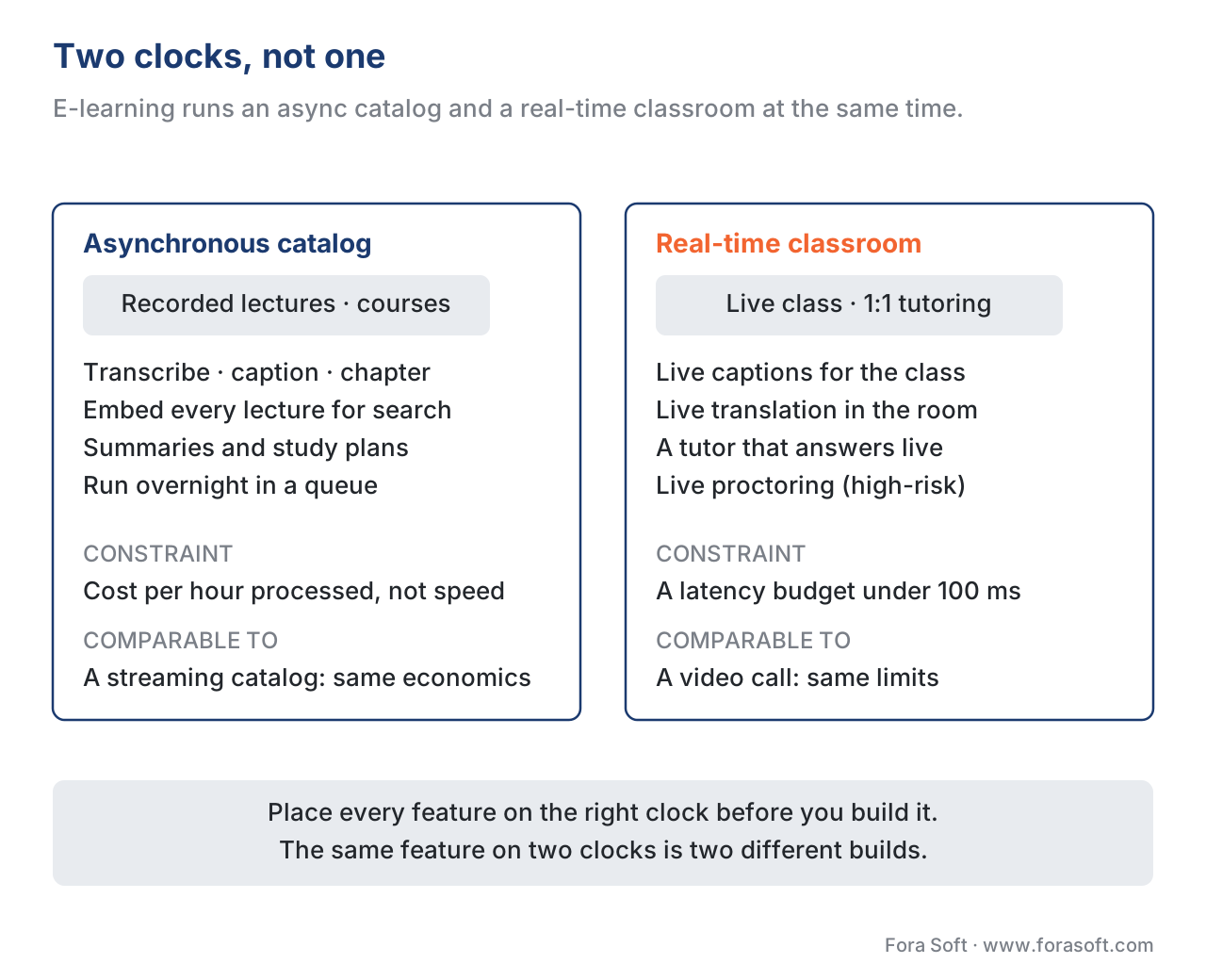 Figure 2. The two clocks. E-learning combines a streaming-style asynchronous catalog with a conferencing-style real-time classroom, and each AI feature belongs to exactly one of them.
The one rule that decides everything: the feature decides the risk tier
In a video call the binding constraint is latency; in a streaming catalog it is cost; in an e-learning product the binding constraint is what the AI is allowed to do to a learner, and the rule that follows is blunt: the feature decides the risk tier, and the tier decides how you build, test, document, and ship it. Europe wrote this rule into law, and because the EU AI Act — Regulation (EU) 2024/1689 — applies to any provider whose system is used in the EU, it sets the floor for any e-learning product with European learners, which in practice means almost all of them.
The Act sorts AI into tiers, and e-learning features land in three of them.
 Figure 3. The risk tiers for AI in education. Convenience features sit in the light-touch top band; anything that judges a learner is high-risk; inferring student emotions is banned outright.
The top tier is low-risk convenience, and it holds most of what teams actually want to ship. Transcribing and captioning lectures, chaptering and searching the video library, the AI tutor, summaries, study plans, and dubbing all help a learner without judging one. The Act does not impose its heavy high-risk regime on these. Their obligations come from elsewhere — accuracy, accessibility law, and student-data privacy, covered in the gate section below — and from a transparency duty under Article 50 that AI-generated content and AI chat be disclosed as such. This is the bucket to ship first and ship fast.
The middle tier is high-risk, and the trigger is precise. Annex III, point 3 of the Act lists four education uses as high-risk: AI used to determine access or admission to an institution; AI used to evaluate learning outcomes, including when those outcomes steer a learner's path; AI used to assess the appropriate level of education a person should receive; and AI used for monitoring and detecting prohibited behaviour of students during tests — that last one is exam proctoring, named in the law. If your feature does any of these four things, it is high-risk, and the high-risk regime applies: a documented risk-management system, data governance for the training data, human oversight by design, demonstrated accuracy and robustness, automatic logging, technical documentation, and a conformity assessment before the system goes on the market. Those obligations for Annex III systems apply from 2 August 2026. This is not a checkbox; it is a different product with a different cost and timeline, and it is the part teams underestimate.
The bottom tier is prohibited. Since 2 February 2025, Article 5 of the Act bans AI systems that infer the emotions of a person in the workplace or in education institutions, except for narrow medical or safety reasons. This matters directly because some proctoring and "engagement" tools advertise that they read a student's face for stress, attention, or "suspicious" affect. In the EU, that is not a high-risk feature to be managed — it is a banned one, and the regulator's stated reason is that emotion inference from faces lacks a reliable scientific basis. A "measure student engagement by webcam emotion" feature is a line you do not cross.
The same logic holds outside Europe even where the statute differs: a feature that judges a learner carries consequences a convenience feature never does, so it earns a higher standard of accuracy, fairness testing, human review, and record-keeping wherever it ships. The Act simply makes the line explicit and enforceable.
The convenience bucket: cheap to draft, expensive to finish
Take the top tier first, because it is where the value is and where a good engineering decision saves the most money. The defining property of every convenience feature is the same: AI produces a draft for a few cents, and the last mile to a shippable result is human. Get that shape right and the economics are excellent; ignore it and you ship something that looks finished and is not.
Captioning is the clearest case. ASR will caption a recorded lecture automatically, and the draft is genuinely useful. But automatic captions are not, on their own, accessible captions. The best speech engines reach about 90–95% accuracy on clean, general audio, and YouTube's auto-captions sit in roughly the same band; under real lecture conditions — an accent, a noisy room, dense terminology — accuracy can fall much further. Accessibility practice treats 99% as the bar for meaningful access, and the gap between 95% and 99% is exactly the technical vocabulary a learner most needs. A 95% caption garbles one word in twenty, and in a biochemistry lecture that one word is the enzyme. So the pattern is: ASR drafts every caption for cents, and a human corrects to 99% for any video you intend to call accessible. The transcription engineering behind the draft is in the streaming ASR lesson; the dubbing and subtitle pipeline that builds on it is in the AI dubbing and subtitle lesson.
The AI tutor is the second flagship, and the rule there is grounding. A tutor that answers from the open weights of a general model will, sooner or later, state something fluent and wrong — a hallucination — and in a learning context a confident wrong answer is worse than no answer, because the learner has no way to catch it. The fix is retrieval-augmented generation: the system first retrieves the relevant passage from this course's transcripts and materials, then asks the language model to answer using only that passage, with a citation back to the lecture moment. The learner gets an answer they can verify against the source, and the product keeps the tutor inside the curriculum instead of the whole internet. The full build is in the video RAG lesson; the question of when a general VLM is good enough to replace a custom pipeline is in the "just use a VLM" lesson.
Chaptering, search, summaries, study plans, and quiz drafting all share the tutor's shape: they run off the same transcript and embeddings, they produce a draft a learner or instructor can accept or edit, and they are cheap because the expensive part — understanding the video — was done once when the lecture was ingested. One caution sits at the edge of this bucket: the moment a generated quiz stops being a study aid and starts producing a grade of record, it has crossed into the high-risk tier. Drafting practice questions is convenience; scoring the exam is assessment.
Common pitfall: shipping auto-captions as "accessible." A demo where the auto-captions scroll by cleanly tempts a team to mark the accessibility box and move on. Then a deaf learner hits a lecture where the captions render "myocardial" as "my cardio" and the dense ten minutes that matter most are unusable — and the platform is both inaccessible and, in the EU and for US public institutions, out of compliance. The fix is structural, not a disclaimer: treat ASR output as a draft, budget human correction to ~99% for anything you label accessible, show learners which videos are human-verified versus auto-drafted, and never let "we have auto-captions" stand in for an accessibility commitment. Ask of every caption track, "would a deaf learner get equal access from this?" — and if the honest answer is no, it is not done.
The assessment bucket: a different product, not a bigger feature
The high-risk tier is where e-learning AI gets genuinely hard, and where most teams should slow down. Three features live here — automated grading, admissions and placement, and proctoring — and all three share a property the convenience features do not: a wrong output changes a person's life, not their afternoon. A mis-graded exam, a denied admission, or a false cheating flag is a harm the learner cannot easily undo, which is exactly why the law puts these under the high-risk regime and why the engineering standard rises to match.
Automated grading is the most tempting, because a language model can plausibly score a short-answer or essay question and save an instructor hours. The trap is that "plausibly" is not "fairly." A grading model can be systematically harsher on non-native phrasing, on dialect, or on answers that are correct but unusually worded, and at the scale of a whole cohort a small bias becomes a pattern of unfair outcomes. Under the Act this is Annex III 3(b) — evaluating learning outcomes — and the obligations follow: govern the data the model learned from, test accuracy and bias before deployment, keep logs, and design a human in the loop who makes the final grade. The defensible pattern mirrors the convenience bucket: the model proposes a score and the evidence for it, and an instructor decides. The model drafts; the human grades.
Admissions and placement — recommending who gets in, or which level a learner starts at — is Annex III 3(a) and 3(c). The same discipline applies, with even more weight on fairness testing and on the learner's right to an explanation, because the decision is a gate.
Proctoring is the one that most often goes wrong in public, and it is worth being concrete about why. Exam proctoring watches a student through their webcam during a test and flags suspected cheating, typically by detecting faces, tracking gaze and head pose, and spotting anomalies like a second person in frame. It is Annex III 3(d) by name, and because it processes faces it also touches the biometric rules in Annex III point 1. Three failure modes recur. First, bias: facial-detection-based proctoring has a documented history of failing on darker-skinned students — one analysis found a widely used tool failed to detect Black faces a majority of the time, and students have reported having to shine lights at their own faces to be recognized, a harm investigated by the Dutch Institute for Human Rights. Second, false positives: normal behavior — looking away to think, a sibling entering the room, a twitchy connection — gets flagged as cheating, and an unreviewed flag can fail an honest student. Third, the emotion line: any proctoring that claims to infer stress or "suspicion" from a face is not high-risk in the EU, it is prohibited. The engineering response is to treat every proctoring signal as a draft flag for human review, never an automated verdict; to test detection parity across skin tones before shipping; and to prefer designs that minimize biometric processing. The underlying detection components are covered in the face detection under the EU AI Act lesson and the anomaly detection playbook; the broader regulatory engineering is in the EU AI Act lesson.
The takeaway for a product lead: do not let an assessment feature ride into the roadmap on the momentum of the convenience features. It is a separate product with its own compliance work, its own fairness testing, and its own timeline, and the honest default for many e-learning products is to ship the convenience bucket now and treat the assessment bucket as a deliberate, scoped, later decision.
Three ways to add AI to your e-learning product
If you are building the e-learning product itself, "add AI" resolves to one of three routes, and they trade speed against control the same way platform decisions always do.
 Figure 4. Three routes to AI inside your product. Embedding through LTI or a vendor validates fastest; building keeps the learner data and the model inside your perimeter.
The first route is to embed via a standard or a vendor. E-learning has an advantage the other verticals lack: a mature interoperability standard. Learning Tools Interoperability — LTI, now at version 1.3, maintained by the 1EdTech consortium and built on OAuth 2.0 and JSON Web Tokens — lets your platform plug in an external tool, AI ones included, so a learner opens it without a separate login. Through LTI or a vendor's own software development kit you can add captioning, a tutor, or proctoring in days to weeks, inheriting the vendor's accuracy work and a signed data agreement. The cost is that learner data and the per-learner margin live in the vendor's system, and you customize only within the limits they expose. It is the right choice to validate that learners will use a feature before you invest in owning it. Two adjacent standards matter here too: SCORM and the newer xAPI (Experience API), which package and track learning content and learner activity, so AI-generated material and AI-tracked engagement stay portable across systems.
The second route is to assemble on managed AI APIs — wire a hosted speech-to-text service to a hosted language model and write the tutor, the chaptering, and the review screens yourself. This is a step up in effort, weeks to a few months, and it buys real control: you decide the learning experience, you choose each model, and you control where data flows. The trade is that integration, accuracy tuning, and every privacy agreement are now yours to own.
The third route, and the only one that keeps the product fully yours, is to build on open-weights models — run open speech and language models on your own infrastructure. This takes the most engineering up front, typically months, but the learner audio and data never leave your perimeter, there is no per-learner fee to a vendor, and you control the model end to end. It is the route for a platform whose learner data and learning quality are the business itself. The per-feature cost method behind all three routes is in the real cost of AI in video lesson, and adapting a model to your subject domain — including e-learning — is in the fine-tuning a video VLM lesson.
A worked cost example: per hour of content, then per active learner
Two different costs drive an e-learning AI budget, and they scale on different things. Do the arithmetic once and the build-versus-buy conversation gets concrete.
The first cost is the one-time pass over the catalog, and it scales per hour of video. Take a course with 50 hours of recorded lecture. To make it AI-enhanced you process each hour once. Transcription on a managed engine runs about $0.006 per audio minute:
transcription: 60 min × $0.006 = $0.36 per lecture hour
Chaptering and a summary add a single language-model pass over that transcript — roughly 12,000 words of text in, a short structured output — which on a mid-tier model costs a few cents, and embedding the transcript so the tutor and search can find it costs a fraction of a cent. Round the whole one-time pass up generously:
one-time AI pass: ≈ $0.50 per lecture hour → 50 hours ≈ $25 for the whole course
Twenty-five dollars to transcribe, caption-draft, chapter, summarize, and make searchable an entire 50-hour course is the number that makes the convenience bucket a clear yes. But it is the draft number. The accessibility-grade caption pass — a human correcting ASR output to ~99% — is the real line item, and professional captioning runs roughly $1–$3 per video minute, or $60–$180 per hour. That is two orders of magnitude more than the AI pass, and it is the honest shape of the feature: the AI makes the draft for cents, and the compliance-grade finish is human.
The second cost is the AI tutor, and it scales per active learner, not per hour of content. Each tutor question is a retrieval plus a language-model answer — a few cents per question depending on the model and answer length. A learner who asks 20 questions working through a course costs on the order of a few tens of cents in tutoring, ongoing, for as long as they study.
| Cost | Scales with | Illustrative number | Notes |
|---|---|---|---|
| Transcription | Hour of content (once) | ~$0.36 / hr | Managed ASR, ~$0.006/min |
| Chapter + summarize + embed | Hour of content (once) | ~$0.15 / hr | One LLM pass + embeddings |
| AI draft, total | Hour of content (once) | ~$0.50 / hr | The cheap part |
| Human caption correction | Hour of content (once) | ~$60–$180 / hr | The real cost of "accessible" |
| AI tutor | Active learner question | ~few cents each | Ongoing, RAG over the course |
The numbers are illustrative and move with model prices; the point is the shape. The AI work that makes a catalog smart is astonishingly cheap — tens of dollars for a whole course. The expensive parts are the human last mile on anything you call accessible, and the ongoing per-learner cost of an always-on tutor. Plan the budget around those two, not around the AI pass.
The gate every feature passes: accessibility, student data, and disclosure
This is where an e-learning roadmap quietly becomes a legal one. Treat what follows as engineering-relevant context, not legal advice — confirm specifics with a qualified lawyer for the jurisdictions you operate in.
Accessibility is the first gate, and for e-learning it is law, not courtesy. The Web Content Accessibility Guidelines — WCAG, a W3C Recommendation, current version 2.2 — require captions for all prerecorded audio in synchronized media at the most basic conformance level (Success Criterion 1.2.2, Level A), and audio description and transcripts climb from there. Two laws turn that guideline into an obligation for e-learning. In the EU, the European Accessibility Act (Directive (EU) 2019/882) applies from 28 June 2025 and explicitly covers e-learning content, with WCAG AA as the practical baseline. In the US, the Department of Justice's 2024 update to ADA Title II requires public entities — including public universities and their online course content — to meet WCAG 2.1 AA, with compliance dates landing in 2026–2027 (the DOJ adjusted the timeline in 2026, so confirm the current date for your institution size). Engineering consequence: captioning and transcripts are not a premium feature, they are a baseline obligation for a large share of the market, which is exactly why the auto-caption-versus-accessible-caption distinction above is a compliance line, not a nicety.
Student data is the second gate. In the US, the Family Educational Rights and Privacy Act — FERPA — governs education records; an AI vendor that processes them must act as a contractually bound "school official" with a legitimate educational interest, which in practice means a data agreement that forbids the vendor from using student records for its own purposes. In the EU, the General Data Protection Regulation — GDPR — requires a clear controller-processor relationship and, for high-risk processing, a data protection impact assessment; for under-13 learners, the US COPPA adds its own consent rules. The AI-specific danger is training data: once a learner's personal information enters a model's training set, removing it is extraordinarily difficult, so the load-bearing safeguards are a contractual no-training-on-our-data clause, and an architecture — RAG rather than fine-tuning on raw records — that keeps student data out of model weights in the first place.
Disclosure is the third gate. Under Article 50 of the EU AI Act, a system that interacts directly with a person must let them know they are dealing with AI, and AI-generated content should be marked as such — so an AI tutor identifies itself, and an AI-drafted summary or dub is labelled. The broader regulatory engineering, including the high-risk obligations for the assessment bucket, is in the EU AI Act lesson.
The rule across all three gates is the same one that governs the whole article: a human stays in control of anything that affects a learner. Accessibility is the learner's right to equal access; the data agreement is your control over where their records go; disclosure is their right to know a machine is involved. A feature that respects all three is an asset; one that skips any of them is a liability.
The playbook: from "add AI" to shipped feature
Put the pieces together and adding AI to an e-learning product reduces to four questions, asked in order.
 Figure 5. The playbook in one path. Sort the feature by whether it judges a learner, place it on the right clock, enforce draft-and-decide, and pass every feature through the accessibility-and-data gate.
First, sort the feature: does it judge a learner — grade, admit, or proctor? If no, it is low-risk convenience; ship it. If yes, it is high-risk under Annex III point 3; scope it as a separate compliance product with fairness testing and human oversight, and never build emotion inference, which is prohibited outright. Second, place it on a clock: if the content already exists, run the work asynchronously where compute is cheap and a slow accurate model is fine; if the moment is live, build it in the real-time pipeline under a latency budget. Third, the draft-and-decide rule: let AI draft the caption, the summary, the grade, or the cheating flag, and put a human on the decision — correcting captions to accessibility grade, approving grades, and reviewing proctoring flags before any of them count. Fourth, and without exception, the compliance gate: caption to WCAG and the European Accessibility Act, sign a FERPA or GDPR data agreement that forbids training on student data, and disclose AI to the learner.
That is the entire playbook. The deeper lessons in this section are the manuals for each box — streaming ASR for the transcription that feeds captions and search, video RAG for the AI tutor, SFU-side ASR fan-out for live-class captions, and the face detection lesson for the proctoring components you should approach with the most caution.
Free download: AI in E-Learning — Engineering & Compliance Decision SheetOne page with the feature catalog, the two clocks, the EU AI Act risk tiers, the embed-assemble-build comparison, and the gate every feature passes before launch.Where Fora Soft fits in
We build the e-learning, video-conferencing, and streaming platforms that these AI features live inside — course marketplaces, corporate training systems, live virtual classrooms, and the video pipelines underneath them — so we run this playbook with clients regularly. When a client wants to validate a feature, we add a vetted captioning or tutor service through LTI or a vendor SDK and wire the disclosure and data agreement in first. When the learner data and the learning quality are the product, we build on an owned pipeline — transcribing and chaptering the catalog asynchronously, grounding the tutor with RAG over the client's own courses, and keeping learner data inside the client's perimeter — with accessibility and the draft-and-decide pattern designed into the flow from the first sprint. When a client raises grading or proctoring, we treat it as the separate, high-risk product it is. The four questions in this playbook are the same ones we weigh in scoping calls when an e-learning client asks where AI belongs in their roadmap. Our virtual classroom and EdTech development team builds the platform side with SCORM and LTI, and our AI integration engineers add captioning, chaptering and RAG tutors on top.

The book
AI for Video: A Complete Guide to Intelligence in Video Products
This article sorts the features and draws the gate; volume 7 engineers what sits behind it. It covers the real-time half of the classroom — live captions and live translation inside a call’s latency budget — what an hour of transcribed lecture costs once you serve it at scale, and the regulatory chapter behind Annex III and Article 50 that decides whether a grading or proctoring feature can ship at all. Written by Nikolay Sapunov, CEO at Fora Soft.
Deciding where AI belongs in your e-learning roadmap?
Tell us which features you want and which markets you teach in, and we will tell you what to embed, what to assemble, and which ones are a separate compliance product. 250+ video products shipped since 2005.
See our case studies
Case study
BrainCert
Both clocks in one product: a WebRTC virtual-classroom LMS with proctored exams, SCORM and xAPI, 500M+ real-time classroom minutes across 10 datacenters at 99.995% uptime, SOC 2 Type II and GDPR certified.
Case study
TransLinguist
The accessibility gate at scale: AI speech-to-speech translation in 16+ languages, closed captioning in 22, and session transcription in every one of them, with 30,000+ certified interpreters behind the hard calls.
Case study
Tabsera
Where the learners are minors: a multilingual K-12 LMS in English, French, Arabic and Turkish with parental controls, teacher payouts and an interactive whiteboard — student-data rules first, features second.
What to read next
Search
Video RAG — Multimodal RAG Over A Video Archive
The library search and the tutor’s grounding, built out as a pipeline.
Captions
AI Dubbing, Voice-Over And Auto-Subtitle Pipelines
How an auto-caption draft becomes the 99% a human signs off on.
Regulation
Regulatory Engineering — EU AI Act, Article 50, And Biometric Prohibitions
The disclosure duty from step 4, written as a classifier you can test.
Biometrics
Face Detection And Recognition Under The EU AI Act
What an exam-proctoring feature is legally allowed to look at.
References
- Regulation (EU) 2024/1689 (EU AI Act) — Annex III, point 3 (Education and vocational training). Lists four high-risk education uses: access/admission, evaluating learning outcomes, assessing appropriate level of education, and monitoring/detecting prohibited behaviour during tests (proctoring). Read directly from the consolidated Annex III text (Official Journal version, 13 June 2024); Annex III obligations apply from 2 Aug 2026. Tier 1 (official EU regulation). https://artificialintelligenceact.eu/annex/3/
- Regulation (EU) 2024/1689 (EU AI Act) — Article 5(1)(f) (Prohibited AI practices). Bans AI systems that infer emotions of a person in the workplace and education institutions, except for medical or safety reasons; in force since 2 Feb 2025. Annex III(1)(c) also lists emotion recognition under biometrics. Tier 1 (official EU regulation). https://artificialintelligenceact.eu/article/5/
- W3C — Web Content Accessibility Guidelines (WCAG) 2.2, W3C Recommendation (5 Oct 2023); Success Criterion 1.2.2 Captions (Prerecorded), Level A. Captions required for all prerecorded audio in synchronized media. Tier 1 (W3C Recommendation). https://www.w3.org/TR/WCAG22/
- Directive (EU) 2019/882 (European Accessibility Act). Applies from 28 June 2025; covers digital services including e-learning content; WCAG AA is the practical conformance baseline via harmonised standard EN 301 549. Tier 1 (official EU directive). https://eur-lex.europa.eu/eli/dir/2019/882/oj
- US Department of Justice — Americans with Disabilities Act (ADA) Title II web accessibility final rule (published April 2024). Requires public entities (incl. public universities and their online course content) to meet WCAG 2.1 AA; compliance dates 2026–2027 by entity size; DOJ adjusted timelines in 2026. Tier 1 (official US regulation). https://www.ada.gov/resources/2024-03-08-web-rule/
- 1EdTech Consortium (formerly IMS Global) — Learning Tools Interoperability (LTI) 1.3, on OAuth 2.0 + JWT; plus ADL SCORM and xAPI (Experience API) for content packaging and activity tracking. The interoperability standards that let AI tools plug into an LMS and keep content/activity portable. Tier 6 (industry standards bodies). https://www.1edtech.org/standards/lti
- "Measuring the Accuracy of Automatic Speech Recognition Solutions," arXiv:2408.16287 (2024), and 3Play Media — auto-caption quality in higher education. Best ASR ~90–95% on clean general audio, lower under lecture conditions; ~99% accuracy needed for meaningful access; the gap is human correction. Tier 5/6 (preprint + specialist analysis). https://arxiv.org/abs/2408.16287
- Electronic Frontier Foundation / MIT Technology Review / Netherlands Institute for Human Rights — AI exam-proctoring bias and false positives. Documented facial-detection failures on darker-skinned students; the VU Amsterdam (Robin Pocornie) case; privacy and equality concerns. Tier 5/6 (advocacy + investigative + human-rights body). https://www.eff.org/deeplinks/2021/06/long-overdue-reckoning-online-proctoring-companies-may-finally-be-here
- Khan Academy — Khanmigo (AI tutor built on Anthropic's Claude; Socratic method; free for teachers, ~$4/mo for learners) and Duolingo Max (GPT-4 roleplay/explain). Class Central, "Personalized AI-Powered Tutors are Here." Tier 7 (vendor + trade). https://www.classcentral.com/report/chatgpt-on-duolingo-khan-academy/
- Grand View Research / Precedence Research — AI in education market size (~$6B in 2024 → ~$32B by 2030, ~40%+ CAGR) and global e-learning market (~$365B, ~620M learners, 2026). Estimates vary widely by definition. Tier 7 (analyst). https://www.grandviewresearch.com/industry-analysis/artificial-intelligence-ai-education-market-report
- US Department of Education — Family Educational Rights and Privacy Act (FERPA), 34 CFR Part 99, "school official" exception; plus GDPR (Regulation (EU) 2016/679) controller-processor duties and COPPA for under-13 learners. An AI vendor handling education records is a contractually bound school official; no use of records for the vendor's own purposes. Tier 1 (official US/EU regulation). https://studentprivacy.ed.gov/
- Gallup / Walton Family Foundation and RAND Corporation — teacher and student AI adoption (60% of K-12 teachers used an AI tool in 2024-25; teacher adoption doubled 25%→53%; 84% of US high-schoolers used generative AI by May 2025). Tier 6/7 (survey research). https://www.gallup.com/
