


Why this matters
The market you are building into is enormous and still growing: worldwide OTT video revenue is projected at roughly $353 billion in 2026 and is forecast to keep compounding through the rest of the decade. If you run or are scoping a streaming product — a subscription VOD service, an ad-supported channel, an internet-TV app, a training library, or a creator catalog — two questions are now on the roadmap that were not there five years ago: "which AI features do we add, and in what order?" and "do we rent a platform, assemble one, or build it ourselves?" This playbook answers both for the OTT vertical specifically. It is written so a product manager can plan the feature set and the cost posture without an engineering degree, and so an engineer can see exactly when each feature runs and what that timing does to the bill. The deeper lessons in this section — and in our companion streaming section — are the per-feature manuals; this is the vertical map that tells you which one to open.
What "an OTT platform" actually means
OTT stands for "over the top." The phrase means delivering video straight to a viewer over the ordinary internet, on top of whatever connection they already have, instead of through a cable box or a broadcast tower. A streaming app like a film service, a sports library, or a corporate training portal is an OTT platform. Most of them are built around video on demand, usually shortened to VOD: a catalog of recorded videos a viewer can start whenever they want, as opposed to a live channel.
Strip away the branding and every OTT platform is the same pipeline. A video is ingested (uploaded into the system), prepared (compressed into several quality versions and packaged so any device can play it), stored and delivered (copied out to servers near the viewer), and finally watched (streamed into a player on a phone, a TV, or a browser). The preparation and delivery half of that pipeline — compressing the file, building the quality ladder, encrypting it, and pushing it through a content delivery network — is mature engineering with its own deep standards, and our video streaming section covers it in detail. This playbook is about the other thing now bolted onto that pipeline: the AI.
"AI in an OTT platform" means inserting a model somewhere in that pipeline to do one of three things — make new media (a thumbnail, a clip, a dubbed track), read the media (a transcript, a summary, a content rating), or decide what a viewer sees next (a recommendation, a personalized row). Almost every AI feature an OTT product ships is one of those three verbs applied to a catalog of video.
The feature menu, grouped by the job it does
Buyers think in features; engineers should think in jobs. Four jobs cover essentially everything an OTT platform ships, and grouping by job — not by vendor — keeps the roadmap honest.
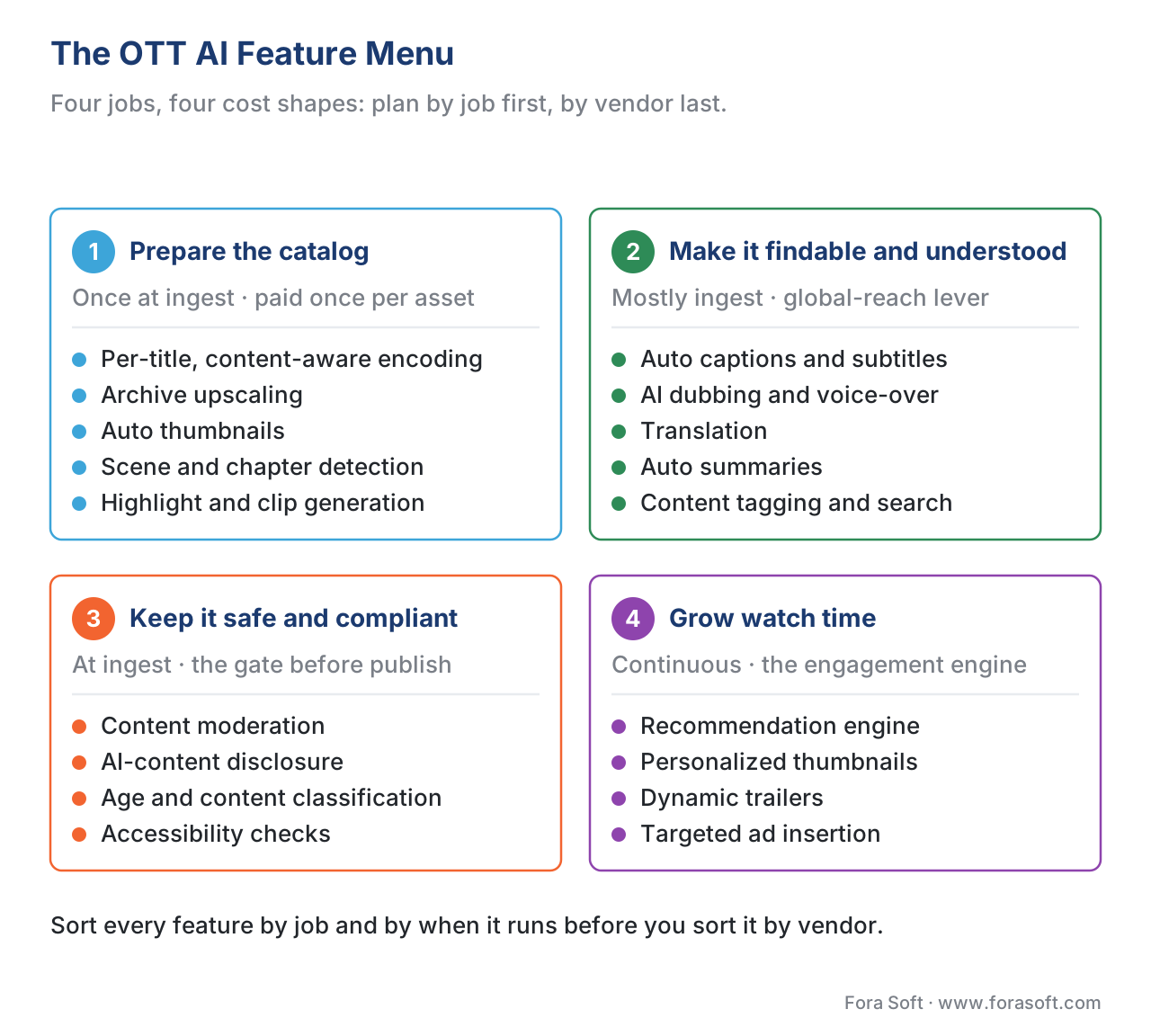 Figure 1. The OTT AI feature menu. Four jobs, four very different cost shapes — plan in this order, not by product name.
The first job is preparing the catalog, the work that happens when a video first enters the system. AI here decides how each file is compressed: per-title encoding analyzes a video and gives it its own quality ladder rather than a one-size-fits-all setting, because a still cartoon and a fast sports clip do not need the same number of bits. Netflix, which pioneered the approach, reports roughly 20% bitrate savings from per-title encoding and around 30% when the analysis goes scene by scene — savings that come straight off your delivery bill. The same ingest stage is where AI upscales an old low-resolution archive to look modern (covered in the Real-ESRGAN archive-upscaling lesson), picks an eye-catching thumbnail frame, detects scene boundaries to build chapters, and cuts highlight clips for social promotion.
The second job is making the catalog findable and understood. This is the localization and accessibility layer: automatic captions produced by speech recognition, subtitles, AI dubbing that replaces the spoken track in another language, content tags that power search, and short auto-summaries of each title. These features are how a catalog reaches an audience that does not speak its language or cannot hear its audio, and AI changed their economics completely — more on that below.
The third job is keeping the catalog safe and compliant: scanning uploads for content that breaks the rules, labelling AI-generated or synthetic video so viewers and regulators know what they are watching, and classifying content by age-appropriateness. This is the gate every asset passes through before it goes live, and in 2026 it is also where the law lives.
The fourth job is growing watch time: the recommendation engine that decides which titles appear on a viewer's home screen, the personalized thumbnails that change per viewer, and the targeted advertising that ad-supported services run. This group is the revenue engine, and unlike the others it runs continuously, all day, for every active viewer.
The one decision that runs through every feature: when does it run?
In a video call, the decision that drives everything is where a feature runs, because the binding constraint is latency. In an OTT platform the binding constraint is different. Most of the catalog is recorded, not live, so a viewer almost never waits on the AI in real time. What they wait on instead — what blows up budgets — is how many times the model runs. So the decision that matters here is when each feature runs relative to a view, and there are three answers.
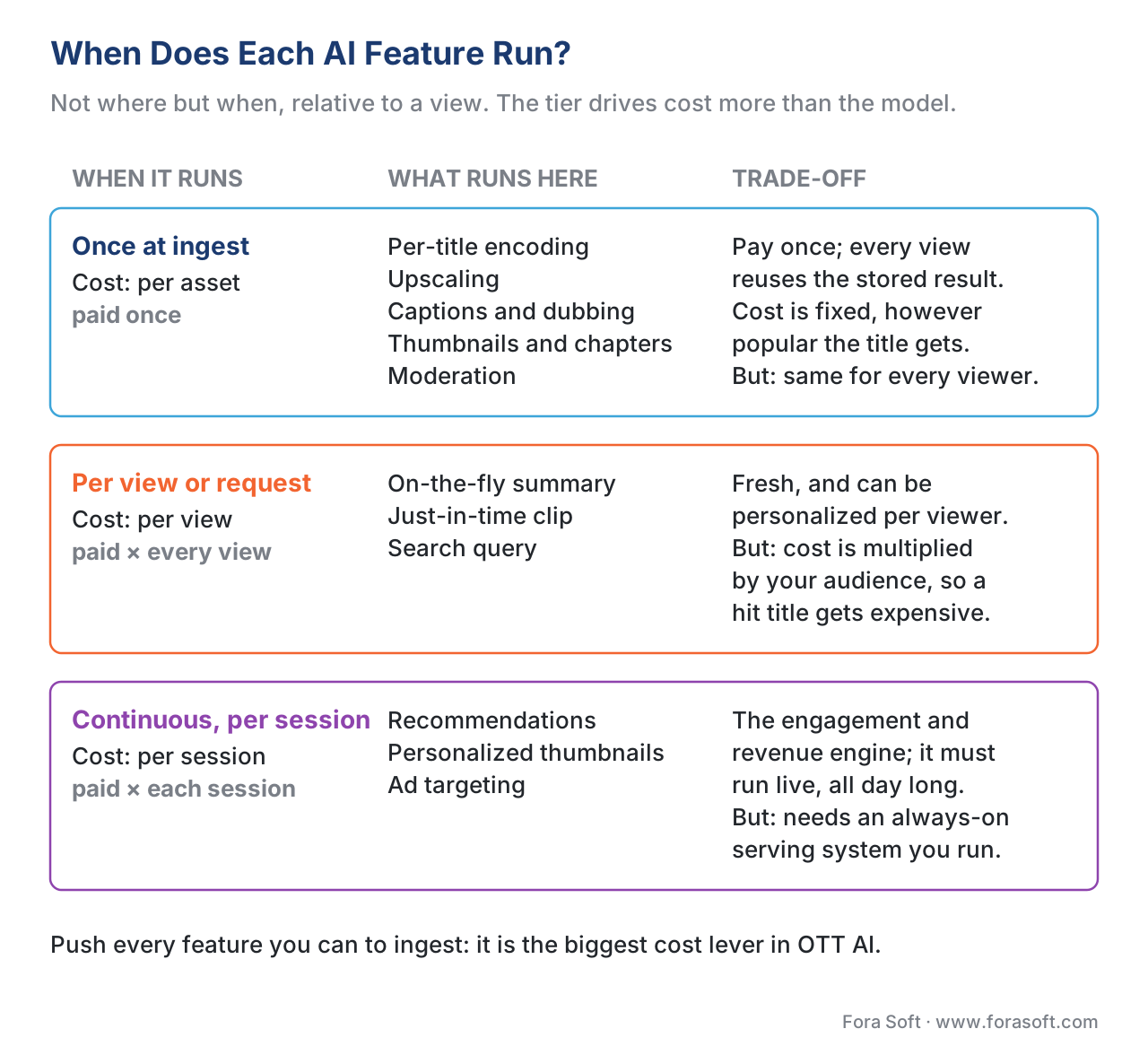 Figure 2. The three timing tiers. The spine of the whole playbook — every feature is an answer to "ingest-once, per-view, or continuous?"
The first time is once, at ingest — the moment a video enters the catalog. Per-title encoding, upscaling, caption generation, dubbing, thumbnail selection, chapter detection, and moderation can all happen here. The win is decisive: you pay for the model exactly once per asset, and every future viewer reuses the stored result. A title watched ten times and a title watched ten million times cost the same to caption. This is why ingest is the home for almost everything that can live there.
The second time is per view, or per request — every time a viewer presses play or types a query. A summary generated fresh on demand, a clip cut on the fly, or a search across the catalog runs here. The feature can be personalized and always current, but the cost is multiplied by your audience: a model that costs a fraction of a cent per call is cheap on one view and ruinous across ten million. Per-view AI is sometimes necessary, but it is the expensive tier, and the discipline is to ask whether the same result could have been computed once at ingest instead.
The third time is continuously, per session — the work that has to run live the whole time a viewer is browsing. Recommendations, personalized thumbnails, and ad targeting cannot be pre-baked per asset because they depend on who is watching and what they just did. This tier earns its cost because it is the engagement engine, but it requires an always-on serving system that you build, operate, and pay for around the clock.
Almost no real platform picks one tier. A typical OTT product encodes, captions, and moderates at ingest, summarizes on demand only for titles that need it, and runs recommendations continuously. The skill is matching each feature to the cheapest tier that still does the job, and the rule of thumb is blunt: push everything you can to ingest. It is the single biggest cost lever in OTT AI.
The money features up close: recommendations, the summarizer, and dubbing
Three features are worth precision because they are the ones buyers name and the ones that move the business.
The recommendation engine is the most valuable AI an OTT platform owns. It is the system that decides which titles fill a viewer's home screen, ranked by what that specific person is likely to watch. Netflix has said its recommendations drive more than 80% of the hours its members watch and save the company over a billion dollars a year by keeping subscribers from cancelling — the clearest proof in the industry that the home screen, not the catalog, is the product. A recommender runs continuously, learns from every play and pause, and is the hardest of these features to buy off the shelf in a form that fits your specific catalog and audience.
The AI video summarizer is the feature buyers literally search for — "ai video summarizer" alone draws several thousand searches a month. In plain terms it turns a long video into a short readable digest. The mechanics are simple and worth knowing: speech recognition transcribes the audio, then a language model reads the transcript and produces timestamped chapters, key points, and a paragraph summary. For an OTT catalog this powers chapter markers, episode recaps, and search snippets. Because the long-form tooling around this feature is a topic of its own, we give it a dedicated lesson — the AI video summarizer and YouTube-summary tools deep-dive — and reference rather than repeat it here.
AI dubbing is the cheapest lever for global reach, and the numbers explain why every catalog owner is now looking at it. Traditional studio dubbing of one hour of content into one language runs into the thousands of dollars and takes weeks; AI dubbing lands in the rough range of a few dollars to a few tens of dollars per finished minute and turns weeks into hours, with many teams reporting around 90% cost savings. That does not make AI dubbing automatically the right choice for a flagship drama, where performance still matters — but for a back catalog of training videos or documentaries, it is the difference between localizing the whole library and localizing nothing. The full pipeline, including where to keep a human in the loop, is in the AI dubbing and voice-over lesson.
Three ways to build the platform
For the platform itself there are three routes, and they trade speed against control in a predictable way.
 Figure 3. Three routes to an OTT platform. Renting validates fast; building keeps the catalog, the viewer data, and the AI inside the product you own.
The first route is to rent a managed OTT platform — a turnkey vendor that hands you apps, a player, encoding, delivery, and a set of built-in AI features. You can be live in roughly eight to ten weeks with about 80% of the features a typical service needs. This is the right answer when you are validating a business and want to learn what viewers do before investing in engineering. It is the wrong answer when the AI is your differentiator, because the recommender, the summaries, and the viewer data all live in the vendor's system, not yours, and you customize only within the limits they allow.
The second route is to assemble on a hyperscaler bundle — use a cloud provider's media services for encoding and delivery and wire in managed AI APIs for the smart features. This gives a team with three or four dedicated video engineers real control over the pipeline and a free hand to pick the best AI service for each job. The cost is that you integrate and operate the pieces yourself, and you pay per use for each managed service.
The third route, and the only one that makes the platform fully yours, is to build from open-source models and your chosen APIs. This takes longer up front — on the order of fourteen to twenty-two weeks for a serious build — but it gives full control, keeps the catalog and the viewer data inside your perimeter, and can run 30–50% cheaper at scale than renting, because you are not paying a platform margin on every viewer. It is the route for a product whose catalog, audience data, and AI features are the business itself.
A worked cost example — why ingest beats per-view
"Push it to ingest" is not a slogan; it is arithmetic, and doing the multiplication once will save more money than any model choice. Consider a catalog of 1,000 hours of video and a feature that costs, say, $1 of compute per hour of video to run — a stand-in number for a captioning or moderation pass.
Run it once at ingest, and the bill is the catalog times the rate: 1,000 hours × $1 = $1,000, total, forever. Every viewer who ever watches reuses that stored output, so the cost does not move whether the catalog gets a thousand views or a billion.
Run the same feature per view, and the bill is the catalog times the rate times the number of views. If those 1,000 hours are watched 100,000 times in a month, that is 1,000 × $1 × 100,000 = $100,000 per month — a hundred times the ingest cost, every month, for the identical output. The model is the same; only the timing changed. That gap is the whole reason the timing tier, not the model, is the decision that controls an OTT AI budget. The full per-feature cost method, including the language-model token math, is in the real cost of AI in video lesson and the cost-optimization levers lesson.
 Figure 4. Ingest-once versus per-view, same feature, same output. The hundred-fold gap is created entirely by when the model runs.
The shapes of cost are worth naming, because confusing them is how OTT budgets blow up. Ingest cost is per asset — predictable, one-time, and independent of popularity. Continuous cost (recommendations, ad targeting) is per session — it scales with active audience. Delivery cost, which is separate from AI entirely, is per gigabyte sent by your content delivery network, and the per-title encoding from the prepare-the-catalog job is what shrinks it — the CDN cost economics lesson in our streaming section covers that bill.
| Feature | When it runs | Cost shape | Watch out for |
|---|---|---|---|
| Per-title encoding | Once at ingest | Per asset | One-time; also cuts delivery cost 20–30% |
| Captions / subtitles | Once at ingest | Per asset | Cheap, reused forever; do not regenerate per view |
| AI dubbing | Once at ingest | Per asset per language | ~$1–20/min vs thousands for studio dubbing |
| Content moderation | Once at ingest | Per asset (or per upload) | ~1/30–1/100 the cost of human review |
| AI summary / chapters | Ingest (cache it!) or per view | Per asset if cached | Per-view summaries multiply by audience |
| Recommendations | Continuously per session | Per session | Always-on serving; the engagement engine |
| Ad targeting | Continuously per session | Per session | Revenue engine for ad-supported tiers |
Common pitfall: treating per-view AI as free because each call is cheap. A summary that costs a fraction of a cent looks negligible in a demo, so teams wire it to run live on every play. Then a title goes viral, the same model fires ten million times, and a "negligible" feature becomes the largest line on the cloud bill. The fix is almost always the same: compute the result once at ingest, store it next to the asset, and serve the stored copy. Ask of every AI feature, "could this have been done once instead of every time?" — and if the answer is yes, move it to ingest before you ship.
The gate every asset passes: moderation, disclosure, and accessibility
This is where an OTT roadmap quietly becomes a legal one. Treat what follows as engineering-relevant context, not legal advice — confirm specifics with a qualified lawyer for your jurisdiction.
Moderation is the first gate, and it is where AI carries real weight. Scanning every upload by hand is impossible at catalog scale; automated moderation is on the order of one-thirtieth to one-hundredth the cost of human review, which is why it now does the first pass everywhere. The correct pattern is hybrid: the model handles the volume and flags the uncertain cases, and human reviewers judge the edge cases the model is not confident about. The same SFU-side moderation mechanics used in live video apply to a VOD catalog at ingest — see the real-time content moderation lesson.
Disclosure is the gate 2026 added. If any part of your catalog is AI-generated or meaningfully AI-altered — a synthetic presenter, a generated b-roll shot, an AI dub — you increasingly have a duty to label it. In the European Union, Article 50 of the AI Act makes that labelling a transparency obligation, not a courtesy, and the C2PA standard provides the technical way to attach a tamper-evident "this was AI-made" credential to a file. The engineering of that disclosure is its own subject, covered in the C2PA and EU AI Act disclosure lesson and the broader EU AI Act regulatory lesson.
Accessibility is the oldest gate and the easiest to satisfy with AI. Many jurisdictions require captions on commercial video, and AI caption generation has made compliance cheap enough that there is no reason to ship a catalog without it. The packaging of those captions into the standard subtitle formats a player understands is delivery-side work, covered in our streaming section's captions and multi-audio lesson. The rule across all three gates is the same: every asset passes the gate at ingest, before it is ever published, because catching a problem after a title is live is far more expensive than catching it on the way in.
The playbook: a short path from wishlist to shipped feature
Put the pieces together and an OTT AI roadmap reduces to four questions asked in order, per feature.
 Figure 5. The playbook in one path. Job hints at timing, timing controls cost, data-ownership sets build-versus-buy, and compliance gates every publish.
First, which job is it — prepare, find, protect, or grow? The job hints at when the feature naturally runs. Second, when does it run — if every viewer would get the identical result, compute it once at ingest and store it; if the result depends on who is watching or must be fresh, accept that it runs per view or continuously and budget for the audience-multiplied cost. Third, build or buy — if the catalog and the viewer data must live inside your product, build from open source and your own APIs; if you are validating or do not need to own the data, rent a managed platform or assemble on a hyperscaler bundle. Fourth, and without exception, the compliance gate — moderate the asset, disclose any AI-generated content, and add captions, all at ingest before the title goes live. Every asset passes through that gate; none skips it.
That is the entire playbook. The deeper lessons in this section are the manuals for each box — archive upscaling, AI dubbing, video summarizers, multimodal search over an archive, and generative video for b-roll — and the streaming section is the manual for the delivery pipeline underneath them all.
Free download: OTT Platform Development — AI Engineering Playbook Decision SheetOne-page planner: the AI feature menu grouped by job, the three-tier “when it runs” cost map (ingest-once, per-view, continuous), the rent-vs-assemble-vs-build split, the ingest-once-vs-per-view cost math ($1,000 forever vs $100,000 a month for the identical output) and a compliance gate checklist.Where Fora Soft fits in
We build the OTT and internet-TV platforms these AI features live inside — subscription VOD services, ad-supported channels, e-learning libraries, and sports and entertainment catalogs — so we run this playbook with clients regularly. When a client is validating an idea, we help them stand up fast and learn what viewers do. When the AI is the product — a recommendation engine tuned to their specific catalog, a fully localized library built on AI dubbing, an archive made searchable end to end — we build it on an owned pipeline so the catalog and the viewer data stay inside the product they ship, with moderation, disclosure, and captioning designed into the ingest path from the first sprint. The four questions in this playbook are the same ones we weigh in scoping calls when a client asks whether to rent an OTT platform or own one. Owning one runs through our custom OTT platform development, and the recommendation, dubbing and search features on top come from our generative AI development practice.

The book
AI for Video: A Complete Guide to Intelligence in Video Products: From Real-Time Pipelines and Agents to Serving, Cost, Compliance, and Verticals
This playbook is one of the vertical maps from volume 7 of the Fora Soft Video Engineering Handbook, which works the production layer out in full: serving and queues, the cost per stream-hour behind the ingest-versus-per-view decision, and the EU AI Act Article 50 and C2PA rules your compliance gate has to meet. Volume 6 covers the capabilities each box in the feature menu stands on — upscaling, speech recognition for captions, dubbing, search and generative video — and the seven volumes together walk the video stack from the pixel to production, so the reader who works through them can design and build an AI-driven OTT platform end to end. Written by Nikolay Sapunov, CEO at Fora Soft.
Rent, assemble or build — which route fits your OTT catalog?
Tell us how many hours are in your library, how many views you expect a month and which AI features are on the wishlist, and we will map each one to its timing tier, estimate the ingest and per-view bill, and tell you where renting stops paying off. 250+ video products shipped since 2005.
See our case studies
Case study
Drundoo
Bulgarian internet TV with 60 live channels plus movies, series, sport and concerts on demand — the OTT platform this playbook's feature menu is bolted onto.
Case study
Perspire.tv
A live and on-demand fitness streaming platform where trainers keep 80% of revenue and price each video rental and channel subscription themselves — a catalog built rather than rented.
Case study
TapeReal
A creator-first video platform with 52,000+ members, 650,000+ likes and plays and paywalled posts — a growing catalog where recommendations and moderation become the product.
What to read next
Summaries
AI video summarizer and YouTube-summary tools
The feature buyers search for, and why you cache it at ingest.
Localization
AI dubbing, voice-over and auto-subtitle pipelines
The cheapest lever for global reach, built as a pipeline.
Catalog prep
Real-ESRGAN and BasicVSR++ for OTT archive upscaling
Making an old low-resolution library look modern, once at ingest.
Cost
The real cost of AI in video products
The per-feature cost method behind the ingest-versus-per-view math.
References
- Statista — "OTT Video — Worldwide | Market Forecast." Worldwide OTT video revenue projected at ~$352.96B in 2026; CAGR 2026–2030 ~8.14%. Tier 7 (analyst). https://www.statista.com/outlook/amo/media/tv-video/ott-video/worldwide
- Mordor Intelligence — "Over The Top (OTT) Market Size & Share Analysis." OTT market ~$383.52B in 2026, ~10.32% CAGR to 2031. Used as a cross-check on the Statista figure; analyst estimates vary by market definition. Tier 7. https://www.mordorintelligence.com/industry-reports/over-the-top-market
- Netflix Technology Blog — "Per-Title Encode Optimization" and "Dynamic Optimization." Per-title encoding ~20% bitrate savings; scene-based / dynamic optimization ~30%; the originating engineering account of content-aware encoding. Tier 3 (first-party engineering blog from the approach's authors). https://netflixtechblog.com/per-title-encode-optimization-7e99442b62a2
- Streaming Media — "How Netflix Pioneered Per-Title Video Encoding Optimization." Independent account of the per-title savings (~20% bitrate at equal quality) and the evolution to context-aware encoding. Tier 4 (production-deployer / trade press). https://www.streamingmedia.com/Articles/Editorial/Featured-Articles/How-Netflix-Pioneered-Per-Title-Video-Encoding-Optimization-108547.aspx
- ISO/IEC 23009-1:2022 — "Dynamic adaptive streaming over HTTP (DASH) — Part 1: Media presentation description and segment formats." The official MPEG-DASH delivery standard an OTT platform packages VOD into. Official standard. https://www.iso.org/standard/83314.html
- IETF RFC 8216 — "HTTP Live Streaming" (Apple; August 2017). The base specification for HLS, the most widely supported OTT delivery protocol. Official standard (Informational RFC). https://www.rfc-editor.org/rfc/rfc8216
- ISO/IEC 23000-19:2024 — "Common media application format (CMAF) for segmented media." The package-once container that lets a single encoded source serve both HLS and DASH players. Official standard. https://www.iso.org/standard/85623.html
- ISO/IEC 23001-7 — "Common encryption in ISO base media file format files (CENC)." The encryption scheme that lets one encrypted OTT asset be protected under multiple DRM systems. Official standard. https://www.iso.org/standard/84637.html
- Regulation (EU) 2024/1689 (EU AI Act), Article 50 — Transparency obligations. The duty to label AI-generated or AI-manipulated content, including synthetic video in a catalog. Official standard (EU regulation). https://eur-lex.europa.eu/eli/reg/2024/1689/oj
- 3Play Media — "What Is AI Dubbing? The Complete Guide for 2026" and "AI Dubbing vs. Traditional Dubbing." AI dubbing economics (~$1–20/finished minute, ~90% savings, hours vs weeks) versus studio dubbing in the thousands per hour. Tier 7. https://www.3playmedia.com/blog/what-is-ai-dubbing/
- Hive AI — pricing and product documentation; WaveSpeed — "AI Content Detection in 2026." Automated moderation at roughly 1/30–1/100 the cost of human review; hybrid model-plus-human pattern at scale. Tier 4/7. https://thehive.ai/pricing
- The Product Space / Netflix research summaries — "How Does Netflix Use AI to Personalize Recommendations." Recommendations drive >80% of viewing and save Netflix >$1B/year via retention; 1,000+ taste communities. Point-in-time figures from Netflix's published research; confirm before quoting. Tier 7 (orientation) referencing Netflix first-party claims. https://theproductspace.substack.com/p/how-does-netflix-use-ai-to-personalize
