


Why This Matters
Captions and multi-audio are the part of streaming that determines whether a product is shippable in regulated markets, whether it is usable by viewers with hearing or vision loss, and whether a marketing campaign in a new region actually converts. The U.S. FCC, the EU Accessibility Act, the U.K. Equality Act, and the Australian Broadcasting Services Act all mandate captioning for in-scope video services; descriptive audio is mandated for several categories of premium content; and platform certifications from Apple, Roku, Samsung, and Google Play all gate publication on correct accessibility signalling in the manifest. None of this work is glamorous, and almost none of it shows up in the product backlog until the first launch in a French-speaking market, the first compliance audit, or the first one-star App Store review from a viewer with a screen reader. This article gives non-technical leads enough mechanics to plan the work and gives engineering leads the exact tags, attributes, and pitfalls that decide whether captions and dubbed audio reach the viewer who needs them.
Why Captions and Multi-Audio Are Their Own Track Type
Every streaming manifest describes three families of media: the picture, the sound, and the text that overlays the picture. The picture lives in a video rendition; the sound lives in one or more audio renditions; the text — captions and subtitles — lives in zero or more text renditions. The three families share a timeline, but they do not share a file. A 4 K H.265 video segment contains no audio and no captions. A multilingual dubbed audio track is its own segmented file. A French closed-caption track is its own segmented file. The manifest is what stitches them together at the player.
This separation is deliberate. The encoder produces the picture once and reuses it across every market the show ships into. The audio team produces an original master plus a dub for each language. The accessibility team produces a closed-caption track for the original language, a subtitle track for each translated market, an audio-description track for visually impaired viewers, and a sign-language video overlay where regulation requires it. If all of those were baked into the video stream, every market would require a re-encode of the picture. Storing them separately is the only way the math works.
A useful analogy: a streaming manifest is a restaurant menu, not a single dish. The picture is the main course; each audio rendition is a wine pairing; each caption track is an annotation card on the table. The player reads the menu, asks the viewer what they want — or guesses from system language and accessibility settings — and orders only what is requested. The kitchen, the packager, and the CDN never assemble all of it into one plate; they hand the player whichever items it asks for.
The structural consequence is that the manifest carries dense metadata about every text and audio rendition: what language it is, whether it is closed captioning (transcribes spoken dialog plus non-speech audio cues for deaf viewers) or open subtitles (translates spoken dialog for hearing viewers in a foreign language market), whether it is audio description, whether it is forced (must always play when the matching video is shown — typical for foreign-language signs and on-screen text), whether it should be the default selection in a given system locale. Get any of those flags wrong and a viewer who needs captions sees nothing, or a French viewer in Paris hears English by default.
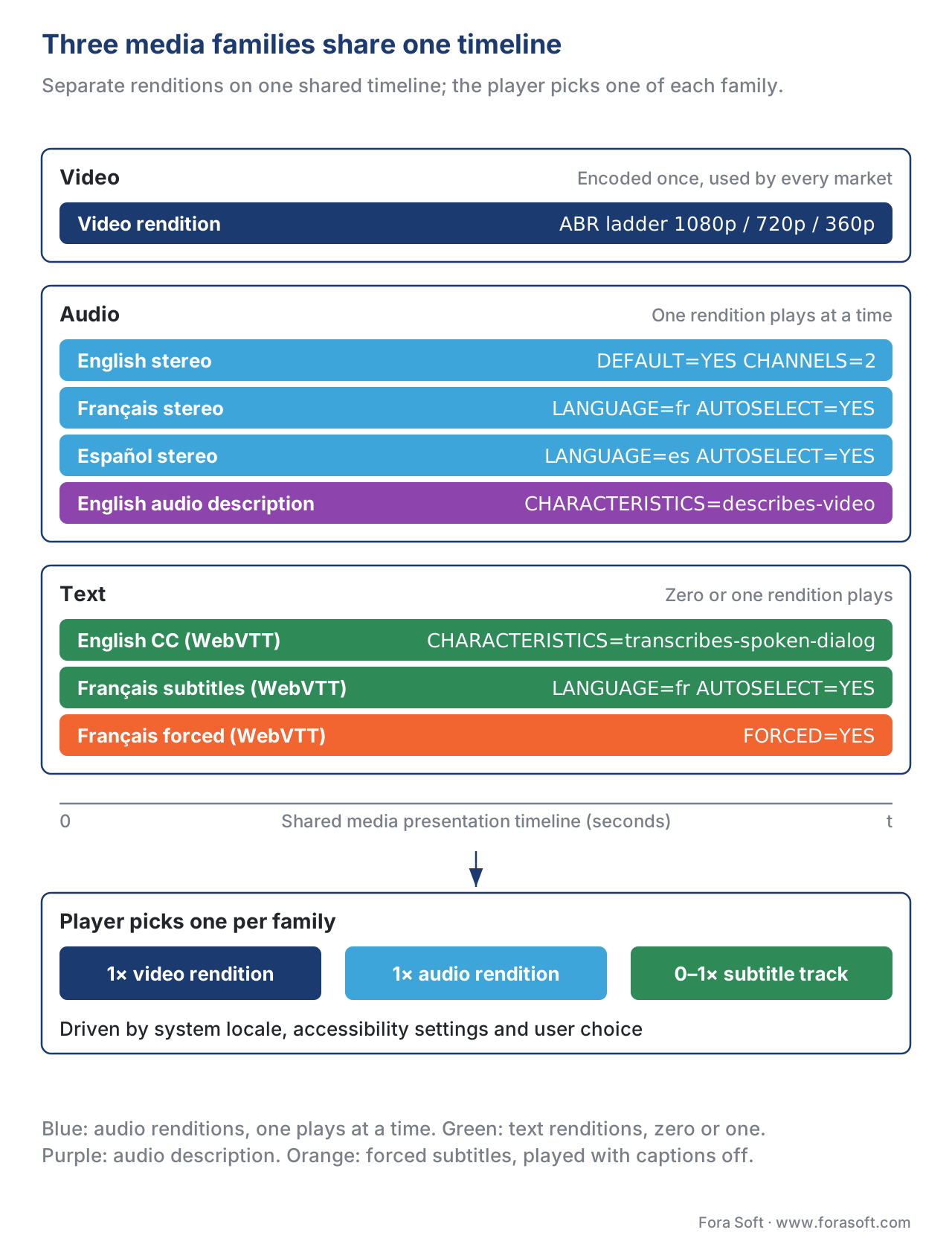 Figure 1. A streaming manifest carries video, audio, and text as three independent rendition families. The player picks one of each based on system locale, accessibility settings, and user choice. The picture is encoded once; audio and text vary by market.
WebVTT: The Format Every Web Player Speaks
WebVTT — Web Video Text Tracks — is the W3C Timed Text Working Group's caption and subtitle format for the open web. It is a plain-text format that every modern web browser can parse natively through the <track> element, and it is the only caption format HLS allows in its plaintext (non-fMP4) form. A WebVTT file is small, human-readable, and trivial to edit — the same properties that made .srt popular two decades ago, plus the standards backing that lets browsers and packagers agree on what each cue means.
A minimal WebVTT file looks like the following:
WEBVTT

00:00:03.000 --> 00:00:06.500
Welcome to the briefing.

00:00:06.800 --> 00:00:09.200 line:85% align:middle
[door slams]
On schedule, as promised.
The file begins with the magic header WEBVTT. Each block after the header is a cue: a start time, an end time, an arrow between them, and one or more lines of text. The cue runs from start to end on the timeline; the player overlays the text on the picture during that window. The optional cue settings after the timestamp — line:85% align:middle in the example — control where the text appears on the screen and how it aligns; without them the player uses defaults, typically bottom-centre with a small inset from the edge. WebVTT also supports speaker labels, basic styling via inline tags like <b> and <i>, and chapter and metadata tracks that have nothing to do with visible captions.
For HLS delivery, WebVTT is segmented. The packager splits the full WebVTT file into smaller chunks aligned to the video segment cadence — typically every 6 seconds, sometimes every 10 — so the player can fetch only the caption window it needs and keep memory use bounded for a 4-hour broadcast. Each segment is a valid standalone WebVTT file with its own WEBVTT header. To keep cue timestamps aligned with the media timeline across segments, the packager prefixes each segment with an X-TIMESTAMP-MAP header that anchors the segment's local time to the media presentation timestamp. Apple's HLS Authoring Specification spells out the exact format: X-TIMESTAMP-MAP=LOCAL:<cue time>,MPEGTS:<media time>. Without that header, the cues appear on screen but at the wrong time — a common bug when a third-party caption tool writes a WebVTT file without HLS awareness.
WebVTT cues can carry forced content — a phrase that should appear regardless of whether the viewer enabled captions, because the picture shows a sign in a foreign language and the audience needs the translation to follow the story. The HLS manifest marks a forced rendition with the FORCED=YES attribute on the rendition's EXT-X-MEDIA line; the WebVTT file itself contains only the forced cues, not the full caption track.
What WebVTT does badly: typographic richness. Coloured text on a coloured background, glyphs that do not exist in the viewer's default font (Arabic, CJK, complex scripts requiring shaping), bitmap-based subtitles that already contain styled artwork, and frame-accurate positioning beyond what line: and position: cue settings express. Any of those needs push the project toward IMSC1.
IMSC1: The Format Broadcast Uses
IMSC1 — TTML Profiles for Internet Media Subtitles and Captions — is the W3C profile of TTML (Timed Text Markup Language) that the broadcast and OTT industries standardised on for premium-grade captions. IMSC1 actually defines two profiles: a Text profile that styles text the same way HTML and CSS do, and an Image profile that lets each cue be a PNG image — the path used by markets like Japan and Korea where caption typography is too rich for any text rendering engine to reproduce reliably. IMSC1 supports per-cue colour, background fills, outlines and drop shadows, precise positioning with percentage or pixel coordinates, ruby annotations for CJK content, and bidirectional layout for Hebrew and Arabic.
IMSC1.0.1 became a W3C Recommendation in 2018; IMSC1.1 in 2020 added expanded styling capability; IMSC1.2 is the current edition, retaining compatibility with IMSC1.1 documents while supporting contemporary practices. CMAF — the unified packaging format for HLS and DASH — accepts only one TTML profile, and that profile is IMSC1. If your content is packaged as CMAF, captions are either WebVTT or IMSC1, with no third option.
The structural difference from WebVTT is that IMSC content is carried inside fragmented MP4 segments. The packager wraps the IMSC XML in MPEG-4 Part 30 boxes (ISO/IEC 14496-30) and produces an fMP4 file with a .mp4 or .m4s extension and the codec string stpp (subtitle/text profile). HLS calls these IMSC Segments; DASH carries them in an AdaptationSet with contentType="application" and codecs="stpp". Apple's HLS Authoring Specification requires that each IMSC Segment contain all subtitle samples intended to display during the segment's EXTINF duration and all style definitions referenced by any sample in the segment — segments are independently parseable, the same property that makes video segments work.
IMSC support in players is universal on the big platforms but uneven on smaller ones. iOS and tvOS shipped IMSC1 Text profile support after WWDC 2017; Android Exoplayer, Shaka Player, and most smart-TV native players added it through 2018–2020. hls.js added IMSC support as a plug-in, not as a default — a CMAF-only HLS stream that ships nothing but IMSC will fail silently on web players that omitted the plug-in. The pragmatic posture in 2026 is to ship WebVTT as the universal text track and add IMSC only where typography demands it or where a downstream platform contract requires it.
CEA-608 and CEA-708: The In-Bitstream Survivors
A third caption family survives in 2026 not because anyone designs new systems around it but because it is the legacy interchange format that broadcast captioning workflows have used since the analog era. CEA-608 is the original NTSC line-21 captioning standard from the early 1980s — 32-character lines, two colours, three pop-on / paint-on / roll-up presentation modes, limited to one or two simultaneous services. CEA-708 is the modern digital-television successor, adopted with ATSC in 1998, supporting up to 63 service channels, multiple fonts, colours, transparency, and richer positioning. CEA-708 decoders are required to also decode embedded 608 captions, so a single 708 bitstream carries both 608-compatible and richer 708 data side by side.
The reason these matter for streaming is that captions produced upstream of the encoder — a live captioning service, a broadcast feed, an archival master — often arrive embedded in the H.264 or H.265 video bitstream as SEI (Supplemental Enhancement Information) messages carrying 608 or 708 payloads. The streaming packager has two choices: leave the captions in the video bitstream and tell the player to extract them at render time, or strip them out and re-emit them as WebVTT or IMSC sidecar tracks.
The HLS manifest signals the in-bitstream path with a TYPE=CLOSED-CAPTIONS EXT-X-MEDIA tag whose INSTREAM-ID attribute names a 608 service (CC1 through CC4) or a 708 service (SERVICE1 through SERVICE63). The player reads the value, extracts the captions from the SEI messages inside the segment, and renders them. The variant playlist's EXT-X-STREAM-INF line then references the closed-captions group with the CLOSED-CAPTIONS attribute. A variant with no embedded captions sets the attribute to NONE explicitly; omitting the attribute is legal but a common source of inconsistent player behaviour.
The sidecar path strips the 608/708 data at the packager and re-emits it as a WebVTT or IMSC rendition, exactly as a manually created caption track would appear. This is the cleaner posture for new builds — it puts every caption track in the same family of manifest tags and gives the packager a chance to normalise the styling. The downside is that captioning created during a live broadcast as 608 line-21 data loses fidelity in the conversion: colour and positioning that 708 expressed natively must be approximated in WebVTT.
The pragmatic 2026 posture is to keep CEA-608/708 in the bitstream for ingest from a broadcast source, then re-emit as WebVTT for the player. Roku, smart TVs, and older Android devices still read in-bitstream 608/708 reliably; web players prefer the sidecar form. Ship both where the encoder allows it.
The Manifest Plumbing: How HLS Wires It All Together
A multi-language, multi-caption HLS manifest is the single best place to see how all of the above comes together. The example below is reduced for clarity but legal and complete enough to play in a modern hls.js or native iOS player.
#EXTM3U
#EXT-X-VERSION:7

# Audio renditions — three languages, plus an audio-description variant
#EXT-X-MEDIA:TYPE=AUDIO,GROUP-ID="aac-main",NAME="English",
  LANGUAGE="en",DEFAULT=YES,AUTOSELECT=YES,CHANNELS="2",URI="audio/en/main.m3u8"
#EXT-X-MEDIA:TYPE=AUDIO,GROUP-ID="aac-main",NAME="Français",
  LANGUAGE="fr",DEFAULT=NO,AUTOSELECT=YES,CHANNELS="2",URI="audio/fr/main.m3u8"
#EXT-X-MEDIA:TYPE=AUDIO,GROUP-ID="aac-main",NAME="Español",
  LANGUAGE="es",DEFAULT=NO,AUTOSELECT=YES,CHANNELS="2",URI="audio/es/main.m3u8"
#EXT-X-MEDIA:TYPE=AUDIO,GROUP-ID="aac-main",NAME="English (Audio Description)",
  LANGUAGE="en",DEFAULT=NO,AUTOSELECT=NO,CHANNELS="2",
  CHARACTERISTICS="public.accessibility.describes-video",URI="audio/en-ad/main.m3u8"

# Subtitle renditions — WebVTT for web, IMSC for premium markets
#EXT-X-MEDIA:TYPE=SUBTITLES,GROUP-ID="subs",NAME="English (CC)",
  LANGUAGE="en",DEFAULT=NO,AUTOSELECT=YES,FORCED=NO,
  CHARACTERISTICS="public.accessibility.transcribes-spoken-dialog,
                   public.accessibility.describes-music-and-sound",
  URI="subs/en/main.m3u8"
#EXT-X-MEDIA:TYPE=SUBTITLES,GROUP-ID="subs",NAME="Français",
  LANGUAGE="fr",DEFAULT=NO,AUTOSELECT=YES,FORCED=NO,URI="subs/fr/main.m3u8"
#EXT-X-MEDIA:TYPE=SUBTITLES,GROUP-ID="subs",NAME="Français (forcés)",
  LANGUAGE="fr",DEFAULT=NO,AUTOSELECT=NO,FORCED=YES,URI="subs/fr-forced/main.m3u8"

# Video renditions — each references the audio and subtitle groups
#EXT-X-STREAM-INF:BANDWIDTH=5000000,RESOLUTION=1920x1080,CODECS="avc1.640028,mp4a.40.2",
  AUDIO="aac-main",SUBTITLES="subs",CLOSED-CAPTIONS=NONE
video/1080p/main.m3u8
#EXT-X-STREAM-INF:BANDWIDTH=2500000,RESOLUTION=1280x720,CODECS="avc1.4d401f,mp4a.40.2",
  AUDIO="aac-main",SUBTITLES="subs",CLOSED-CAPTIONS=NONE
video/720p/main.m3u8
#EXT-X-STREAM-INF:BANDWIDTH=900000,RESOLUTION=640x360,CODECS="avc1.42c01e,mp4a.40.2",
  AUDIO="aac-main",SUBTITLES="subs",CLOSED-CAPTIONS=NONE
video/360p/main.m3u8
Read top to bottom: four audio renditions in the aac-main group, three subtitle renditions in the subs group, three video variants — every variant references both groups by their GROUP-ID. The viewer hears one audio rendition at a time and sees zero or one subtitle rendition at a time; the video rendition switches with bandwidth via ABR. The AUDIO= and SUBTITLES= attributes on EXT-X-STREAM-INF are the binding that says "this video can be combined with anything in those groups". CLOSED-CAPTIONS=NONE is the explicit absence-of-in-bitstream-captions signal; setting it explicitly is better than omitting it because some players treat the absence as "I don't know — try to extract" and waste cycles.
Every attribute on every EXT-X-MEDIA line matters. LANGUAGE is a quoted BCP 47 tag — "en", "en-US", "fr", "pt-BR", "zh-Hans" — and the player uses it to match the system locale when picking a default. DEFAULT=YES marks the rendition that plays when the viewer expresses no preference; only one rendition per group may set it. AUTOSELECT=YES marks the rendition as eligible for system-driven selection (a Mac set to French would pick the French audio if it is AUTOSELECT=YES); a rendition that is the default must also be auto-selectable. FORCED=YES, on subtitles only, marks a forced narrative track that should display regardless of the viewer's subtitles-on preference. CHARACTERISTICS is the comma-separated list of accessibility roles defined by the iTunes media characteristics taxonomy: public.accessibility.describes-video for audio description, public.accessibility.transcribes-spoken-dialog for closed captions, public.accessibility.describes-music-and-sound for captions that include non-speech sounds. CHANNELS is the count and configuration of audio channels: "2" for stereo, "6" for 5.1, "12/JOC" for a Dolby Digital Plus with Atmos Joint Object Coding mix that downmixes to 5.1 on non-Atmos devices.
The most common manifest bug is a mismatched GROUP-ID: an EXT-X-STREAM-INF line references AUDIO="aac-main" but the audio renditions declare GROUP-ID="aac-1". The player loads the variant, fails to find a matching audio group, and plays the video silently. Test this case explicitly in CI.
The second most common bug is no DEFAULT=YES in the audio group. The HLS specification allows this (the player should pick whichever rendition is appropriate), but real-world player behaviour varies — some Roku models refuse to play, some pick the alphabetically first track regardless of system locale. Always mark exactly one rendition in each group as the default.
DASH: The Same Story, Different Tags
A DASH MPD expresses the same separation through AdaptationSet elements. Video lives in an AdaptationSet whose contentType is video; each audio language lives in its own AdaptationSet with contentType="audio" and lang="en"; each subtitle language lives in an AdaptationSet with contentType="text" (or application for IMSC) and lang="fr". The player walks the MPD, picks one AdaptationSet from each contentType the show offers, and combines them.
DASH expresses accessibility through Role, Accessibility, and EssentialProperty descriptor elements. An audio-description track carries <Accessibility schemeIdUri="urn:tva:metadata:cs:AudioPurposeCS:2007" value="1"/> (the "1" is the TVA AudioPurpose code for "visually impaired") plus a <Role schemeIdUri="urn:mpeg:dash:role:2011" value="alternate"/> to mark it as not the default audio. A forced subtitle track carries <Role schemeIdUri="urn:mpeg:dash:role:2011" value="forced-subtitle"/>. A closed-caption (as opposed to plain subtitle) track carries <Role value="caption"/>. The vocabulary is more verbose than HLS and the URI namespace is harder to remember, but the semantics are the same.
CMAF tightens DASH and HLS toward a common packaging: CMAF requires text tracks to live as segmented CMAF tracks — sidecar WebVTT files are not permitted in a strictly CMAF-conformant stream. In practice, packagers that target both DASH-IF and the Apple ecosystem produce WebVTT in two forms: raw .vtt for HLS-only delivery and CMAF-wrapped WebVTT segments (wvtt codec) for DASH and strict CMAF. The MPD then lists the WebVTT AdaptationSet with mimeType="application/mp4" and codecs="wvtt". IMSC follows the same pattern with the stpp codec.
 Figure 2. HLS expresses alternate audio and text as a flat list of EXT-X-MEDIA renditions tied to variants by GROUP-ID. DASH expresses the same content as a tree of AdaptationSets discriminated by contentType and lang. The semantic content is identical; only the syntactic packaging differs.
Audio: One Stream, Many Mixes
The audio rendition layer carries more than alternate languages. A typical premium streaming bundle ships, at a minimum, the following audio tracks per show:
| Track | Language | Channels | Codec | Use |
|---|---|---|---|---|
| Original dialog mix | en | 2.0 | AAC-LC | Default for English audiences |
| Original surround | en | 5.1 | AC-3 / E-AC-3 | Home-theatre English |
| Atmos object mix | en | 12/JOC | E-AC-3 + JOC | Atmos-capable devices |
| Localised dub (FR) | fr | 2.0 | AAC-LC | Default for French audiences |
| Localised dub (FR) | fr | 5.1 | E-AC-3 | French home theatre |
| Localised dub (ES, DE, JP, …) | … | 2.0 | AAC-LC | One per shipped market |
| Audio description (en) | en | 2.0 | AAC-LC | Mandated accessibility track |
| Director's commentary | en | 2.0 | AAC-LC | Optional bonus content |
CHARACTERISTICS="public.accessibility.describes-video" for the user's preferred language; the system locale match against the LANGUAGE attribute of AUTOSELECT=YES renditions wins next; the rendition flagged DEFAULT=YES is the last-resort fallback.
The channels value is small but consequential. A modern phone and a 2024 smart TV both understand 5.1 audio, but a 2017 set-top box may only render stereo. The HLS specification's CHANNELS attribute lets the player skip renditions it cannot render — a 5.1 rendition marked CHANNELS="6" will be filtered out by a stereo-only device, and the player falls back to a 2.0 rendition with the same language. Atmos is signalled with the JOC suffix: CHANNELS="12/JOC" for a 5.1.4 or 7.1.4 Atmos mix, CHANNELS="16/JOC" for 9.1.6. Devices that do not understand JOC ignore the rendition; devices that do extract the Dolby Atmos object data from the Joint Object Coding payload alongside the legacy 5.1 core mix.
The pragmatic 2026 ladder for a tier-one OTT platform is:
Per language: one AAC-LC stereo rendition at 128 kbps for universal compatibility; one E-AC-3 5.1 rendition at 384 kbps for home-theatre devices; optionally one Atmos JOC rendition at 768 kbps for the Atmos-capable subset.
Plus, in the primary market language: one audio-description AAC-LC stereo rendition at 128 kbps with the describes-video characteristic.
Plus, optionally: one director's commentary AAC-LC stereo rendition for content where it adds value.
The total bitrate added by audio is small compared to video — at six audio renditions and 200–800 kbps each, perhaps 2 Mbps of additional bandwidth even before the player picks one, and only a single rendition is ever delivered to the viewer. The cost is encoding effort, packaging complexity, and the disciplined catalogue management of remembering that show 9847 episode 12 needs a Dolby Atmos render in English and a stereo dub in seven languages.
Accessibility: The Tags That Decide Whether Captions Reach Their Audience
Caption availability alone is not the whole accessibility story. A WebVTT track listed in the manifest without the right characteristics will appear in the player's settings menu as "English" rather than as "English CC", and a viewer running the system-level "Always show captions" toggle will not receive them automatically. The HLS specification borrowed Apple's iTunes Connect media-characteristics vocabulary for the CHARACTERISTICS attribute, and applying the right values is what turns a generic subtitle track into a recognised closed-caption or audio-description track at the platform layer.
The relevant characteristics are:
public.accessibility.transcribes-spoken-dialog — the captions include a written form of spoken dialog. Distinguishes closed captions and subtitles from translation-only subtitles.
public.accessibility.describes-music-and-sound — the captions also describe non-speech audio ([door slams], [ominous music]). Combined with transcribes-spoken-dialog, this is the canonical signal that the track is a closed-caption track for deaf and hard-of-hearing viewers.
public.accessibility.describes-video — the audio rendition is an audio description for visually impaired viewers, with a narrator describing visible action between dialog beats.
public.easy-to-read— the captions are simplified for cognitive accessibility, with shorter sentences and slower reading rate (an emerging EU-driven requirement).
DASH expresses the equivalent through Accessibility descriptors as covered above. The legal mandates from the FCC, the EAA, the U.K. Equality Act, and platform-store policies all hinge on the player correctly surfacing tracks with these tags — not merely on the tracks existing.
Common mistake — tagging a translation subtitle track with the closed-caption characteristics. A French subtitle track that translates English dialog for a French-speaking hearing audience should not carry describes-music-and-sound, because it does not. Doing so tells the platform that the track is a closed-caption track, and viewers searching for accessibility content will be misled. Reserve closed-caption characteristics for tracks that genuinely include non-speech audio descriptions; tag translation subtitles as plain subtitles without those flags.
Second common mistake — forgetting the FORCED=YES track. If a film's original cut has a French character speaking French in a scene meant for an English-speaking audience, the English version needs a forced subtitle track that displays only that French dialog, regardless of whether the viewer turned subtitles on. The HLS pattern is a separate EXT-X-MEDIA rendition with FORCED=YES containing only those cues — paired with the regular English subtitle rendition for viewers who want full captions. Without the forced track, the audience hears the French and watches no translation.
The Production Pipeline: From Script to Manifest
A caption track does not appear by itself. The production pipeline that puts a French dub or a closed-caption track into the manifest involves several handoffs that, when one fails silently, leave the bug for the engineering team to chase weeks later. The simplified pipeline:
- The script and dialogue list is finalised by the production team — the exhaustive list of every spoken line, with timecodes pinned to the master timeline.
- The closed-caption studio transcribes the original-language dialog plus non-speech sounds, producing a SCC, MCC, or IMSC source file aligned to the master timecode.
- The subtitle translation team translates the dialog list into each shipped language, producing per-language SRT or WebVTT source files aligned to the same timecode.
- The audio dubbing studio records the per-language dub against the master picture, producing one audio stem per language.
- The audio description studio writes and records the descriptive narration between dialog beats, producing one descriptive audio stem per primary market language.
- The mastering and QC pipeline verifies every caption file plays cleanly against the master picture and every audio stem syncs to the picture at the right offset.
- The encoder produces the video renditions; the packager wraps the audio stems and caption files into segmented streams; the manifest references each as a rendition with the right
LANGUAGE,CHARACTERISTICS,DEFAULT,AUTOSELECT,FORCED, andCHANNELSvalues. - The CDN caches all of it and the player picks the right tracks for each viewer.
Where it breaks: step 7 is where most accessibility bugs are introduced. The encoder and packager are content-agnostic — they see audio file A and caption file B and produce streams without knowing that A is an audio-description track or that B is a forced-subtitle track. Either the upstream pipeline carries that metadata (an XML sidecar describing each file's role and language) and the packager honours it, or the packager runs a static configuration that has to be updated for every show.
In Fora Soft's OTT projects the most reliable pattern is a CMS-driven manifest assembly: the catalogue management system stores each audio and caption asset with its language, role, channel layout, and accessibility flags as first-class fields, and the packager assembly step reads those fields to produce the right EXT-X-MEDIA or AdaptationSet declarations. Static manifest templates do not scale past a handful of shows.
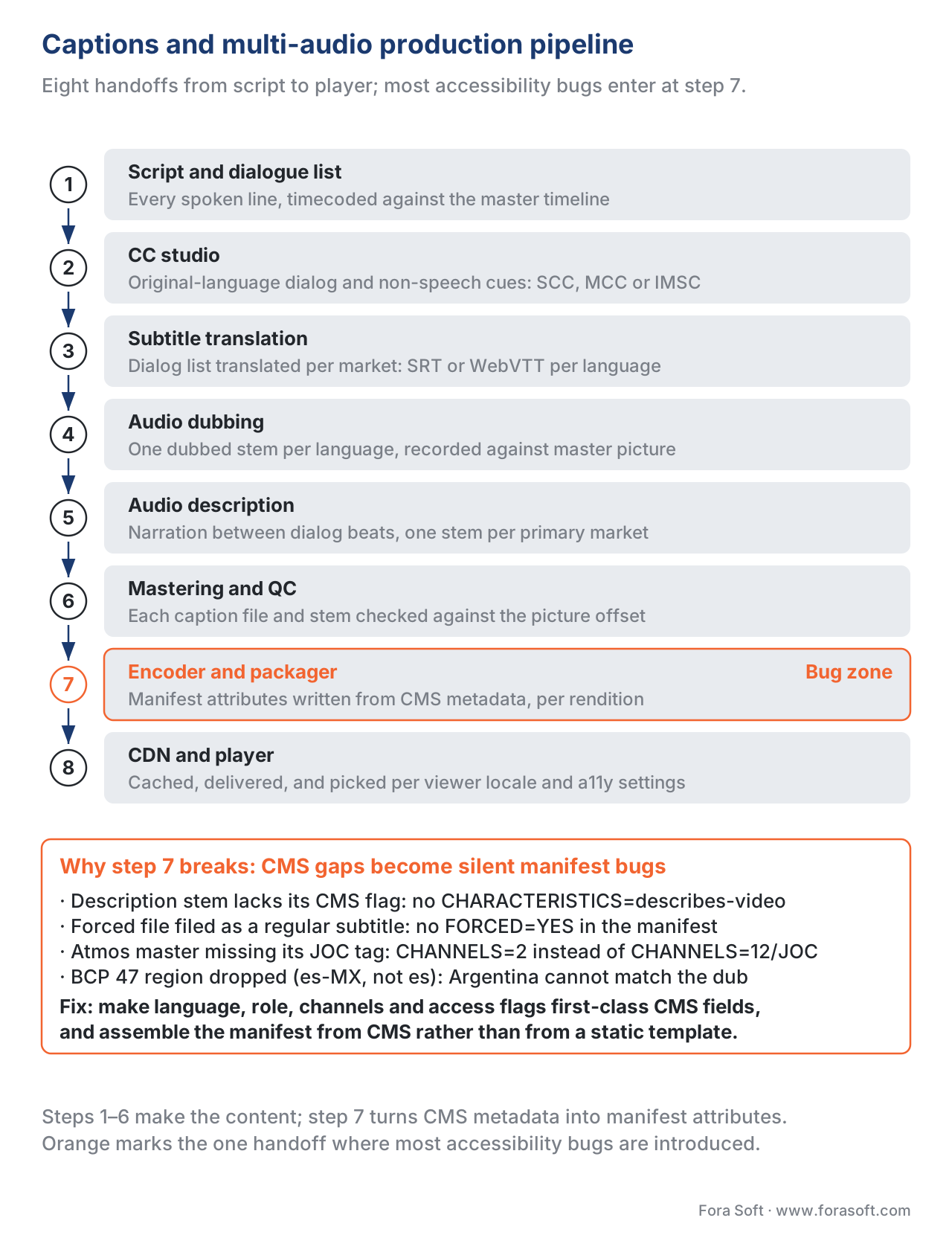 Figure 3. The eight-step pipeline from script through delivery. Most accessibility bugs are introduced at step 7 — the packager — when CMS metadata about language, role, channel layout, or accessibility flags is missing or wrong.
What the Player Actually Does
When the player loads the manifest, it parses every EXT-X-MEDIA and EXT-X-STREAM-INF line into an in-memory model: a set of variants, each pointing at one or more rendition groups. Initial selection runs roughly:
- Find the system locale (e.g.,
fr-CA). - For each rendition type (audio, subtitles, closed-captions), filter to renditions whose
AUTOSELECT=YES. - Within those, prefer the rendition whose
LANGUAGEbest matches the locale. BCP 47 matching is lenient:fr-CAmatchesfr-CAexactly first, thenfras a language-level match, then defaults. - Apply accessibility overrides: if the system "Audio Descriptions" toggle is on, prefer audio renditions with
CHARACTERISTICS=public.accessibility.describes-videofor the matched language. If the "Captions and Subtitles" toggle is on, enable the best-matched closed-captions rendition. - If nothing matches, fall back to the
DEFAULT=YESrendition in each group. - Apply any forced subtitle rendition (
FORCED=YES) that matches the selected audio language — this is the case where a viewer who has not enabled subtitles still sees a forced track for foreign-language signs.
The player then begins downloading segments from the chosen variant, the chosen audio rendition, and zero or one subtitle rendition in parallel. Each track is fetched from a separate URL, decoded by a separate decoder pipeline, and synced via the media presentation timestamp.
Common mistake — assuming the player will figure it out. Players follow specifications, but specifications have ambiguities. A manifest with two AUTOSELECT=YES French audio renditions and no DEFAULT=YES will be resolved differently by iOS, Android Exoplayer, hls.js, and Shaka. Always declare exactly one DEFAULT=YES per group, even if it feels redundant.
Common mistake — the LANGUAGE mismatch. A WebVTT track labelled LANGUAGE="en" will not auto-select for a viewer whose system locale is en-GB unless the player implements BCP 47 fallback to the base language. Most players do, but not all. The safe pattern is to label tracks with the most specific BCP 47 tag the content actually represents (en-US, pt-BR, zh-Hant-HK) so locale-specific renditions exist where they matter, and to provide a base-language rendition (en, pt, zh) as a fallback for unmatched locales.
Common Pitfalls Discovered Two Weeks After Launch
- The French audio plays when the iOS system language is French, but the French subtitles do not — root cause: the subtitle rendition is
AUTOSELECT=NObecause someone copy-pasted it from a forced-subtitles template. - A 5.1 audio rendition is selected on a stereo Roku and downmixes to a quiet, lossy stereo — root cause: the
CHANNELSattribute is missing, so the player cannot filter the rendition out. - The closed-caption track appears in the iOS settings menu as "English" instead of "English CC" — root cause: the
CHARACTERISTICSattribute is missing thetranscribes-spoken-dialog,describes-music-and-soundpair. - The WebVTT cues appear at the wrong time after the first manifest refresh on a live stream — root cause: the packager forgot to emit
X-TIMESTAMP-MAPon the per-segment WebVTT files. - The Spanish dub plays in Mexico but not in Argentina — root cause: tracks labelled
LANGUAGE="es-MX"andLANGUAGE="es-AR"exist, but noLANGUAGE="es"fallback rendition exists, and the player declined to fall back. - hls.js plays the WebVTT track fine on Chrome but shows blank captions on Safari — root cause: a UTF-8 BOM at the start of the file confuses Safari's WebKit parser. Strip BOMs from caption files at the packager.
- The Dolby Atmos track plays as silent on a 2018 Roku Express — root cause: the
12/JOCrendition is the only one declared, and the device cannot decode JOC; ship a6(5.1) fallback in the same group.
Sample Manifests: The Reference Pair
The companion PDF for this article packages two end-to-end reference manifests — one HLS, one DASH — for a hypothetical three-language, audio-described, multi-bitrate show, with every attribute documented. Use it as the canonical starting point for the next show your catalogue ships.
Download the captions and multi-audio reference pack
Free download: Captions and Multi-Audio Reference PackTwo end-to-end reference manifests — one HLS, one DASH — for a three-language, audio-described, multi-bitrate show, with LANGUAGE, DEFAULT, AUTOSELECT, FORCED, CHANNELS and CHARACTERISTICS documented line by line.Where Fora Soft Fits In
Fora Soft has shipped video streaming systems since 2005 across OTT, telemedicine, e-learning, video surveillance, and live conferencing. Captions and multi-audio show up in every category we work in: an e-learning platform delivering courses across Europe needs forced narrative subtitles in seven languages; a telemedicine deployment in an aging-population market needs closed captions on every consultation; an OTT product launching in Quebec needs Quebec French audio with Quebec French subtitles distinct from European French. We design the catalogue schema, the packaging step, the manifest assembly, and the player UI together — because the bug is always at one of the handoffs, never in one of the steps in isolation. Our OTT and Internet TV development team builds that caption and multi-audio plumbing into every catalogue, and our speech-to-text development work generates the caption tracks themselves when there is no script to start from.

The book
Video Streaming: A Complete Guide to Video Delivery: From ABR and CDNs to Players, WebRTC, DRM, and the Economics of Streaming
We wrote a seven-volume handbook that takes the whole video stack apart, from the pixel to production, so that someone who works through it can ship a catalogue that plays the right audio and the right subtitles in every market. Volume 3 is where this article continues: subtitle and caption tracks end to end, how a player turns system locale, accessibility settings and user choice into one rendition per family, and what happens on the device stacks where that choice is ambiguous. Volume 2 covers the packaging these attributes ride on — HLS, MPEG-DASH and CMAF, and the segmenting rules that decide whether a text track is legal at all. Written by Nikolay Sapunov, CEO at Fora Soft.
Are you certain your French subtitles reach the viewer who asked for them?
Send us your catalogue schema, the manifest your packager emits, and the devices you ship to. We will tell you which rendition each player in your mix will actually select, which of the six attributes are missing, and what it takes to close the gap before your accessibility deadline. 250+ video products shipped since 2005.
See our case studies
Case study
TransLinguist
A video interpretation platform covering 75+ languages, with closed captioning in 22 of them and automatic subtitles in every session. This is the language matrix from this article at production scale, where one missing attribute means a viewer gets nothing.
Case study
Worldcast Live
HD concerts at 1.5 Gb/s and 0.4–0.5 s glass-to-glass for 10,000 simultaneous viewers. On a live stream the caption clock is the packager’s job: per-segment WebVTT without X-TIMESTAMP-MAP drifts after the first manifest refresh.
Case study
Mindbox
An AI video management system with 50+ deployments, pulling RTSP from cameras through FFmpeg into HLS. The packager is step 7 of the pipeline above: whatever the catalogue does not model, the manifest cannot declare.
What to read next
HLS
HLS in Depth
The full multi-variant playlist, of which these renditions are one slice.
DASH
MPEG-DASH in Depth
The AdaptationSet tree that carries the same declarations.
Packaging
CMAF: The Packaging Format That Unified HLS and DASH
Why a text track has to be segmented as wvtt or stpp.
Players
Smart TV Players: Tizen, webOS, Roku, Vidaa
Where an unfiltered 5.1 or Atmos rendition goes quiet.
References
- W3C, WebVTT: The Web Video Text Tracks Format, Candidate Recommendation Draft. Available at
https://www.w3.org/TR/webvtt1/. The canonical specification for WebVTT cue grammar, settings, and styling. Tier 1 (W3C). - W3C, TTML Profiles for Internet Media Subtitles and Captions 1.2 (IMSC1.2), W3C Recommendation, 4 August 2020. Available at
https://www.w3.org/TR/ttml-imsc1.2/. The IMSC1.2 specification defining Text and Image profiles and CMAF compatibility. Tier 1 (W3C). - IETF, R. Pantos and W. May, HTTP Live Streaming, RFC 8216, August 2017. Available at
https://www.rfc-editor.org/rfc/rfc8216.html. DefinesEXT-X-MEDIA,EXT-X-STREAM-INF, and theTYPE,GROUP-ID,LANGUAGE,DEFAULT,AUTOSELECT,FORCED,CHARACTERISTICS,CHANNELS,CLOSED-CAPTIONS, andINSTREAM-IDattributes. Tier 1 (IETF). See alsodraft-pantos-hls-rfc8216bis-22for the in-progress second edition. - Apple, HTTP Live Streaming (HLS) Authoring Specification for Apple Devices, revision 2025-09. Available at
https://developer.apple.com/documentation/http-live-streaming/hls-authoring-specification-for-apple-devices. Defines theX-TIMESTAMP-MAPWebVTT header, IMSC Segment requirements (must comply with IMSC1 Text Profile, fMP4 carriage per MPEG-4 Part 30), and Apple-specific authoring rules layered on top of RFC 8216. Tier 1 (Apple authoring specification). Cited per §4.3.2. - ISO/IEC 23009-1:2022, Information technology — Dynamic adaptive streaming over HTTP (DASH) — Part 1: Media presentation description and segment formats. Defines
AdaptationSet,contentType,Role,Accessibility, andEssentialPropertydescriptor elements. Tier 1 (ISO/IEC). Paywalled; supplemented by DASH-IF Implementation Guidelines. - ISO/IEC 14496-30:2018, Information technology — Coding of audio-visual objects — Part 30: Timed text and other visual overlays in ISO base media file format. Defines the
stppandwvttcodec strings and the fMP4 carriage rules for TTML/IMSC and WebVTT used by CMAF, HLS, and DASH. Tier 1 (ISO/IEC). - ISO/IEC 23000-19:2024 (CMAF), section on text tracks. CMAF requires text tracks to be carried as segmented CMAF tracks and limits text codecs to WebVTT (
wvtt) and IMSC1 (stpp). Tier 1 (ISO/IEC). - CTA-708-E, Digital Television (DTV) Closed Captioning, Consumer Technology Association. Defines CEA-708 service channels (
SERVICE1throughSERVICE63), styling, and the requirement that 708 decoders also decode embedded 608 captions. Tier 1 (CTA). - CTA-608-E, Line 21 Data Services, Consumer Technology Association. Defines CEA-608 service channels (
CC1throughCC4), 32-character line constraint, and the original NTSC closed-captioning standard that survives as the legacy path in modern bitstreams. Tier 1 (CTA). - Dolby, Dolby Digital Plus Online Delivery Kit v1.5, HLS Signalling for Dolby Digital Plus with Atmos. Available at
ott.dolby.com/OnDelKits/DDP/Dolby_Digital_Plus_Online_Delivery_Kit_v1.5/. DefinesCHANNELS="12/JOC"(5.1.4 or 7.1.4 Atmos) and"16/JOC"(9.1.6 Atmos) HLS signalling, and the cross-compatibility property that lets Atmos masters downmix to 5.1 cores on non-JOC devices. Tier 4 (vendor authoring kit), cross-validated against Apple HLS Authoring Specification. - DASH-IF, Live Media Ingest Protocol and DASH-IF Implementation Guidelines for Live Services and Subtitle/Caption Tracks. Available at
https://dashif.org/Ingest/andhttps://dashif.org/Guidelines-TimingModel/. Defines the practical patterns for segmented WebVTT and IMSC AdaptationSets in production DASH. Tier 2 (reference implementation / industry guideline). - MDN, Web Video Text Tracks Format (WebVTT). Available at
https://developer.mozilla.org/en-US/docs/Web/API/WebVTT_API/Web_Video_Text_Tracks_Format. Reference for browser native<track>element behaviour and the WebVTT cue grammar as implemented in 2026 browsers. Tier 6 (educational), used for navigation only.
