


Why This Matters
The three features in the title are the ones that engineering managers underestimate during planning and product managers blame engineers for during launch. A 90-minute movie that takes eight seconds to seek loses viewers; a 24-hour live stream that cannot rewind past the last ad break loses subscribers; a scrubber bar without thumbnails feels like an app from 2008. None of these failures show up in the original "deliver HLS to phones" project plan — they show up two sprints before launch, when the player team realises the encoder never produced an I-frame playlist and the storage line in next quarter's budget has to triple. This article gives non-technical leads enough mechanics to make the decisions early and gives engineering leads a checklist of the manifest tags, encoder flags, and CDN cache rules that quietly decide whether the features ship working or ship broken.
Why These Three Features Are Hard
To see why scrubbing, seek, and DVR are structurally harder than "play the stream forward", you need one piece of background: not every encoded video frame can be decoded on its own. The encoder squeezes a stream small by storing most frames as differences from neighbouring frames — only a small subset of frames, called I-frames (short for "intra-coded frames"), contain enough information to be decoded independently. Everything else, the P-frames (predicted from earlier frames) and B-frames (predicted from both directions), depends on its neighbours.
A useful analogy: imagine a comic book where every fifth page is a full drawing, and every page between is just a list of differences from the previous page — "add a hat, move the tree two inches left, change the colour of the sky". You can start reading from any full drawing, but you can't start mid-sequence — the differences only make sense relative to the full drawing they followed. Decoders work the same way. To start playback at any point, the decoder must rewind to the most recent I-frame and replay every dependent frame up to the requested timestamp.
That single fact is the root cause of every problem in this article. Seek is hard because the player can't simply jump to byte X — it has to find the right I-frame first. Trick play is hard because fast forward at 8× would require decoding 240 frames per second of regular content, which most phones cannot do — so trick play uses an alternative stream that contains only I-frames. DVR is hard because the manifest, the storage, and the CDN cache all have to remember the past, and HTTP caches have never been kind to URLs that change every two seconds.
The good news is that every modern streaming protocol — HLS, MPEG-DASH, CMAF — has been refined to make all three features work cleanly. The bad news is that they only work if the encoder, the packager, the manifest, and the player are all configured for them. Skip one step and the feature degrades silently.
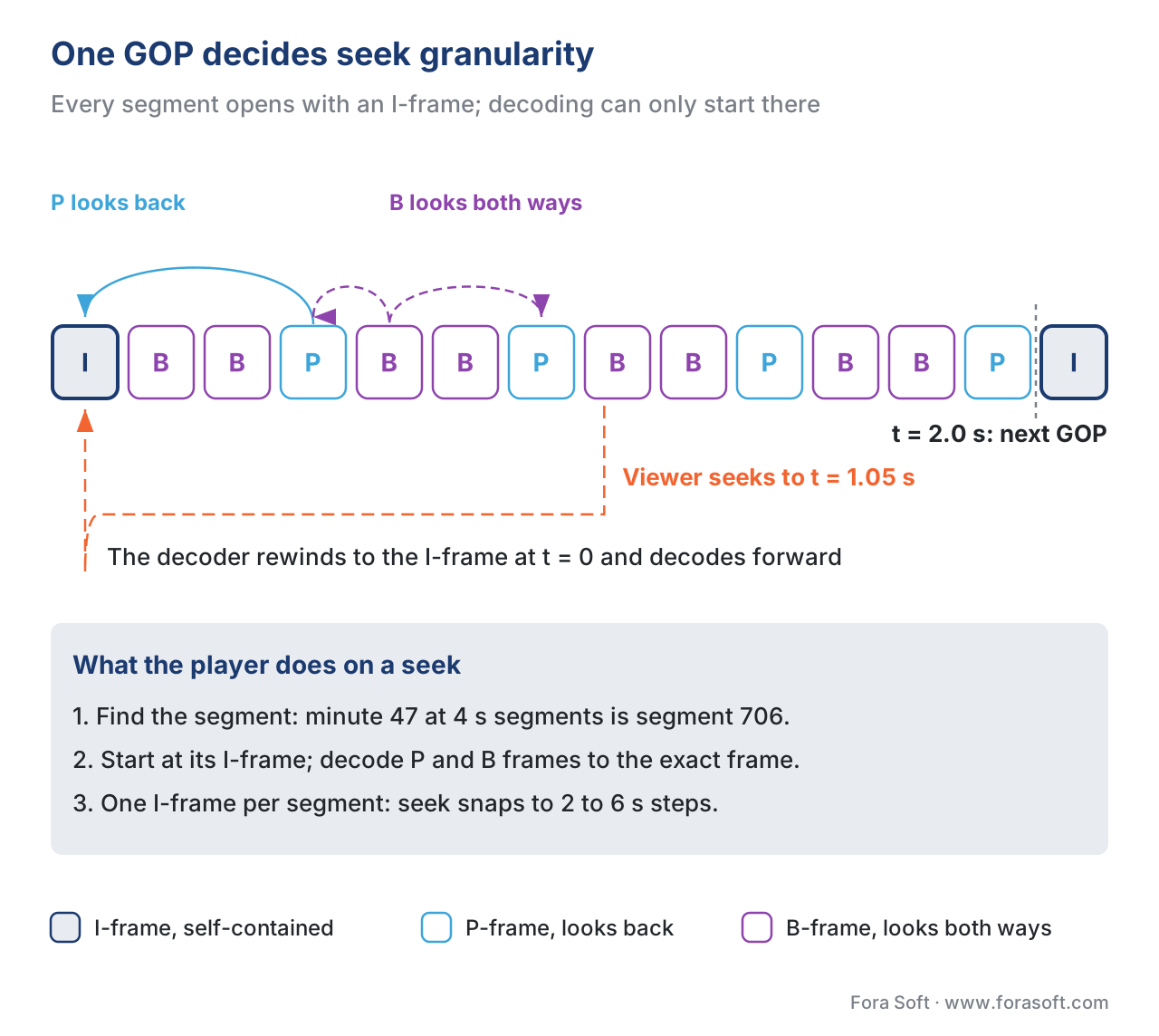 Figure 1. A group of pictures (GOP) starts with a keyframe — an I-frame — followed by P- and B-frames that reference it. Seek lands on the closest preceding I-frame; the keyframe interval (typically 2 seconds for streaming) sets the minimum seek granularity.
Seek: The Anatomy of Jumping to a Timestamp
When a viewer drags the scrubber from minute 12 to minute 47, the player runs a chain of steps that most people imagine as instant. It is not. It is roughly the following.
The player reads its manifest — the HLS multi-variant playlist or the DASH MPD — and locates the segment whose presentation time range contains minute 47. The manifest lists segments either explicitly, by URL and duration (HLS media playlist; DASH SegmentList), or implicitly, by a template that generates the segment URL from the segment's number and a start-number offset (DASH SegmentTemplate; the dominant pattern). In either case, the player computes the segment number from the timestamp: at a 4-second segment duration, minute 47 (2820 seconds) sits in segment 706 (2820 ÷ 4 = 705, rounded up).
The player issues an HTTP request for segment 706. The segment is a short fragmented-MP4 file — typically 2 to 6 seconds long — which the player can decode independently of any other segment. This is the property that makes HTTP-based streaming work in the first place: every segment is self-contained, starting with an I-frame, ending whenever the next segment begins.
Inside segment 706, the player still has to find the right frame. Segment 706 represents 4 seconds of wall-clock time, but the viewer wanted minute 47 exactly, which might be 1.7 seconds into the segment. The decoder starts at the segment's opening I-frame, decodes the P- and B-frames until it reaches frame 51 (at 30 fps, 1.7 seconds ≈ 51 frames), and only then renders the picture to the screen.
The seek granularity of the stream is therefore the segment duration, in seconds, divided by the keyframe interval inside the segment. HLS and DASH conventionally place exactly one I-frame at the start of every segment, so seek granularity equals the segment duration: roughly 2 to 6 seconds. To seek with sub-second precision, the encoder has to insert additional I-frames inside each segment, which inflates the bitrate by 10 to 30 percent. Most platforms accept the 2-to-4-second seek granularity and design the UX around it — the scrubber jumps the play head to the start of the segment that contains the requested timestamp, and the viewer perceives the snap as instant.
Common mistake — inconsistent segment boundaries across renditions. If the 1080p stream cuts a new segment every 4 seconds at frame boundaries N, N+120, N+240, and the 480p stream cuts at N+10, N+130, N+250, the player cannot switch renditions cleanly during seek. Every rendition in the bitrate ladder must use the same segment boundaries, defined by the same closed-GOP keyframe interval. The packager enforces this when it slices the encoder output, but the encoder must produce I-frames at the right cadence in the first place. The classic failure mode is a per-title encoder that decides the optimal keyframe placement per content and ends up with mismatched GOP boundaries across renditions — the player switches rendition, the segment numbers no longer align, and the next seek lands on the wrong second.
Trick Play: Fast Forward Without Frying the Decoder
Trick play is the family of behaviours a viewer expects from a "remote control" — fast forward at 2×, 4×, 8×, scrubber-bar thumbnails that preview the frame the play head is hovering over, and the same in reverse. None of these can be implemented by simply playing the main stream faster. At 8× speed, a 30-fps stream would need to feed the decoder 240 frames per second, which mobile decoders cannot sustain and which would burn the battery in minutes. At any speed, scrubber thumbnails appear at every pixel the user drags through, which means the player needs hundreds of frame previews loaded ahead of the scrubber position, far more than the main stream's segment cadence can supply.
The structural solution is an I-frame-only secondary stream. The encoder produces, alongside the main stream, an alternate stream that contains only the I-frames of the main content, packaged at a much lower bitrate because there are no P- and B-frames in between. The HLS manifest declares this stream with the EXT-X-I-FRAME-STREAM-INF tag — distinct from the regular EXT-X-STREAM-INF that declares the playable renditions. Inside the I-frame playlist, every "segment" is a single I-frame, tagged with EXT-X-I-FRAMES-ONLY at the top of the media playlist to signal the unusual shape. DASH solves the same problem with an adaptation set marked @codecs to a still-image-style profile, or by exposing the same I-frame stream as a low-bitrate representation flagged as a trick-mode track in the MPD.
When the viewer initiates fast forward, the player switches from the main media stream to the I-frame stream, computes which I-frames to render at the chosen speed (every other I-frame at 4×, every fourth I-frame at 8×, and so on), and feeds those frames to the decoder at the playback frame rate. The decoder is asked to render no more than 30 frames per second regardless of trick-play speed; only the source skips along the timeline. Reverse playback uses the same mechanism in reverse — the player decodes I-frames from later to earlier and displays them in descending order.
Scrubber thumbnails are a related, smaller version of the same trick. The conventional solution is the I-frame thumbnail track: a separate low-resolution stream — typically 160×90 pixels at one image every 2 seconds — published as a sequence of JPEG or WebP images, organised into a sprite sheet for efficient HTTP fetching. HLS expresses these as an image-rendition EXT-X-IMAGE-STREAM-INF tag (added in the rfc8216bis drafts and available in major packagers since 2021). DASH expresses them through the image/jpeg codec in an adaptation set, defined in DASH-IF's image-thumbnail guidance. Either way, the player downloads the thumbnail track on top of the main playback, indexes it by timestamp, and shows the right preview tile when the user hovers the scrubber.
The most common scrubber-thumbnail bug is alignment drift: the thumbnail track is encoded at one image every 10 seconds but the manifest claims one image every 2 seconds, and the previews shown during scrubbing are out of step with what plays back when the user releases the scrubber. Trust the manifest, but verify the actual thumbnail cadence against the manifest declaration before shipping.
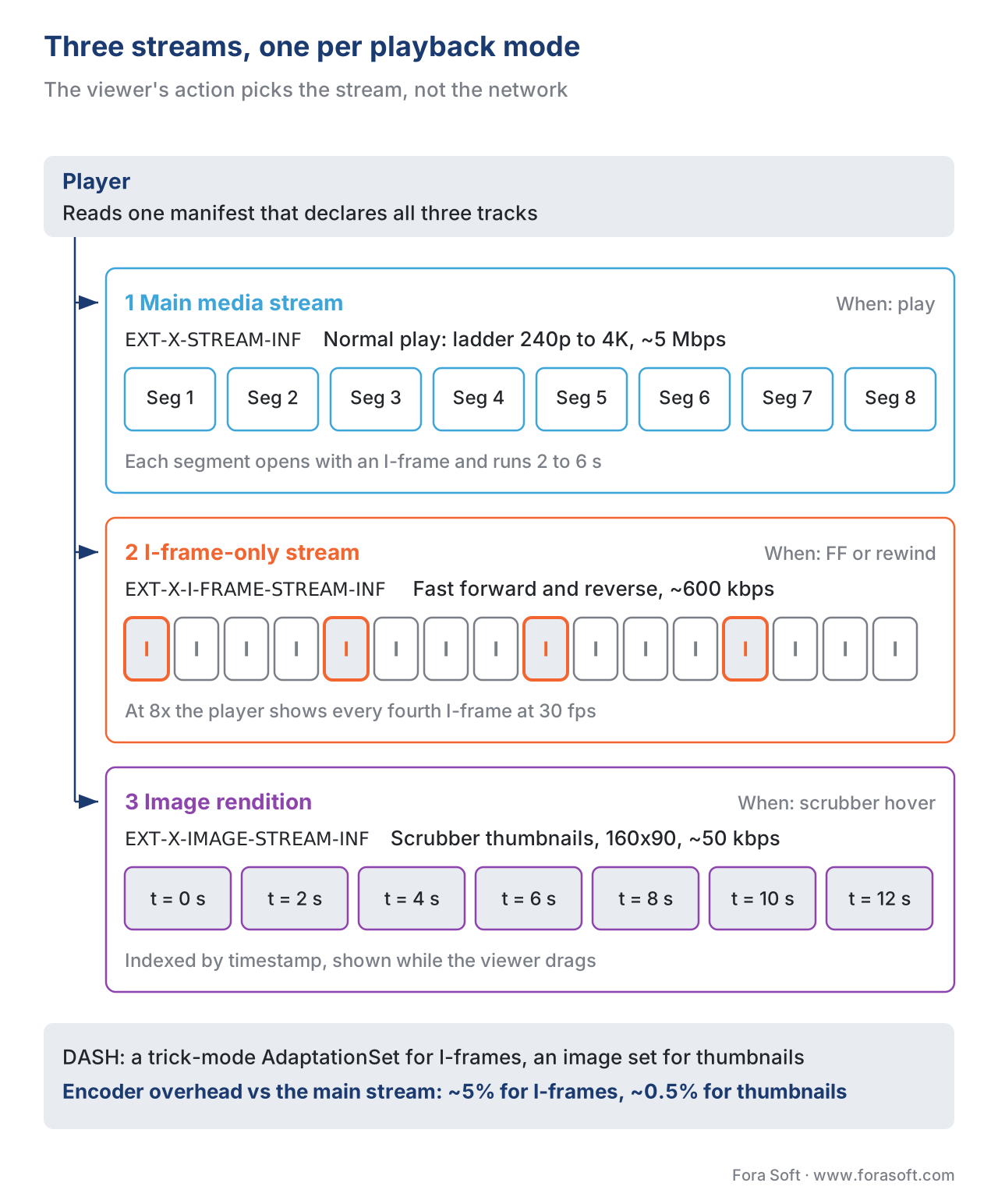 Figure 2. The player carries three streams: the main media stream for normal playback, an I-frame-only stream for fast forward and reverse, and an image rendition for scrubber-bar thumbnails. The switch is driven by user action, not by network conditions.
DVR: Pausing a Live Stream
DVR — short for "digital video recorder" but used in streaming to mean any rewind capability on a live broadcast — is the feature that lets a viewer pause the basketball game, get a drink, come back ten minutes later, and resume from where they paused. It is also what lets the viewer skip back thirty seconds to watch a goal again. Implementing it well separates a polished streaming service from a hobby one.
The structural challenge is that a live stream is by definition a sliding window of recent segments. The encoder produces a new segment every two to six seconds. The packager updates the manifest to add the new segment and (in most live configurations) drop the oldest. If the manifest only ever lists the last five segments, the viewer can rewind back ten or twenty seconds; older segments are gone. That is the default behaviour of a "live" HLS playlist without the EXT-X-ENDLIST tag — the player polls the manifest every few seconds for updates, and rewind is limited to whatever the manifest currently lists.
DVR extends that window. Instead of dropping segments after they slide off the live edge, the packager keeps them and the manifest keeps listing them — sometimes for an hour, sometimes for a full day, sometimes for the full duration of the broadcast. In HLS, the DVR window is expressed implicitly by the segments the media playlist still lists. In DASH, it is expressed explicitly by the MPD@timeShiftBufferDepth attribute, which states the duration in seconds of the seekable past — PT1H for a 1-hour DVR window, PT4H for 4 hours. ISO/IEC 23009-1:2022, section 5.3.1.2, defines timeShiftBufferDepth as the duration of the time-shift buffer that is guaranteed to be available, measured from the live edge backwards.
The implementation work is in three places. The packager has to keep generating new segments without dropping old ones. The origin has to keep the older segments accessible — usually on the same storage as the live segments, occasionally on a separate slower tier for hours-old content. The CDN has to cache them efficiently — DVR segments are excellent CDN candidates because once they slide a few minutes off the live edge, their content never changes again, and a long TTL (1 hour, 6 hours, 1 day) on the CDN edge means most DVR replays serve from cache.
The trade-off is storage. A 1080p live channel at a 5 Mbps composite bitrate burns 2.25 GB per hour — at six renditions in the ladder, 13.5 GB per channel-hour. A 4-hour DVR window costs 54 GB of live storage per channel. A 24-hour DVR window costs 324 GB per channel. A platform with 200 live channels and a 24-hour DVR window therefore needs roughly 65 TB of always-on, low-latency storage just for DVR — a five-figure monthly storage line at almost any cloud provider.
The packager-level choice is whether the DVR window is rolling (older segments get deleted as new ones arrive — the simplest pattern) or catch-up (every segment from the broadcast's start is retained until the broadcast ends, then archived to a VOD asset). Rolling DVR is what news channels and sports broadcasters use for normal operation. Catch-up DVR is what subscription services use when the value of the broadcast extends past the live moment — a Premier League match should be rewatchable for at least 24 hours after the final whistle, ideally for a week.
The player-level choice is what UI to expose. A "rewind 30 seconds" button is the safest universal control — it works regardless of how long the DVR window is, regardless of whether the broadcast started 10 minutes ago or 4 hours ago. A scrubber that exposes the full DVR window is more powerful but more confusing — viewers regularly drag the scrubber past the live edge, get the "live" pill back, and assume they broke something. The convention in 2026 is to show a timeline that ends at "Live" with a visible marker, with the scrubber able to drag left to any segment in the DVR window and snap back to live when dragged to the right edge.
Where HTTP Caching Stops Helping
Trick play and seek are friendly to HTTP caching. The segments and the I-frame playlists are static once published; the CDN can cache them with a long TTL, and most replays land on a warm edge. The main complication is the manifest itself, which for live streams updates every few seconds — most CDNs short-TTL the manifest (1 to 3 seconds) and long-TTL the segments (hours to days). LL-HLS adds further complication by serving partial segments that are stitched into a final segment a few seconds later, but the manifest-vs-segment TTL split still holds.
DVR seek is where the caching story gets harder. A viewer who jumps backwards to the 47th minute of a 4-hour broadcast triggers a cache miss for whichever rendition they're watching at whichever segment number maps to minute 47. If the segment was last requested an hour ago and aged out of the edge cache, the request walks back through the origin shield to the origin. The first viewer to seek to a cold segment pays the latency of the full origin walk; subsequent viewers benefit from the cache warming.
The mitigation is an origin shield tier — a small set of mid-tier edges between the leaf edges and the origin, configured with much longer TTLs and explicit preservation of DVR segments. The shield catches most DVR cache misses and prevents them from hitting the origin; the origin only sees the small fraction of misses that even the shield does not have. (For the full architecture, see Origin Shielding and Tiered Caching.)
A second mitigation is cache-key discipline. A surprising number of DVR bugs come from CDN cache keys that include query parameters the player adds for analytics or session identification. If seg_00706.m4s?session=abc and seg_00706.m4s?session=xyz are cached separately, the CDN's effective hit rate is zero. Strip session-identifying query strings from the cache key, or use signed-URL tokens with a longer-lived cache key. (See Cache Keys for Streaming.)
Live-to-VOD: The Final Form of DVR
The cleanest implementation of long-range DVR is not really DVR at all — it is the live-to-VOD pipeline. As the live broadcast ends (or sometimes as it continues), the packager closes the manifest with EXT-X-ENDLIST (HLS) or transitions the MPD type from dynamic to static (DASH), and the asset becomes a regular VOD title. From that point on, all the usual VOD optimisations apply — pre-packaged or JIT origin, very long CDN TTLs, cheap object-store backing. The DVR window stops being a live-storage cost and becomes an archive-storage cost.
Most sports and news platforms run a hybrid: rolling DVR of 4 to 6 hours during the live broadcast, then a clean transition to a VOD asset that lives in the catalogue for days to years. The player doesn't have to be told — it polls the manifest, sees the EXT-X-ENDLIST tag appear (or the DASH MPD switch type), and switches its internal state from "live" to "on demand". The viewer notices nothing.
The catch is the transition window — the few minutes during which both the live signal and the VOD asset reference the same segments. If the live packager keeps writing while the VOD packager starts publishing, the manifest can temporarily declare more segments than the storage actually contains, or contain a segment URL that gets renamed midstream. The fix is the live-to-VOD coordination contract: the live packager publishes the final manifest with ENDLIST, the VOD packager either copies the live segments into the VOD origin or remaps URLs through a redirect rule, and the live origin keeps serving the old URLs with a 301 to the new ones for at least the cache TTL.
A Worked Example: Sports DVR With Trick Play
Let me run the arithmetic end to end for a representative deployment: a streaming service that distributes 50 live sports channels with a 4-hour rolling DVR window, scrubber-bar thumbnails, and 8× fast forward in catch-up mode.
The encoder ladder is the usual six-rung shape: 240p, 360p, 480p, 720p, 1080p, 4K. The composite bitrate at full quality is roughly 9 Mbps. Add an I-frame-only secondary stream at 600 kbps and a 160×90 thumbnail track at 50 kbps. Each channel emits about 9.65 Mbps to storage.
9.65 Mbps × 3600 s = 34,740 Mb/hour = 4.34 GB/channel-hour
× 4 hours of DVR window     = 17.37 GB per channel
× 50 channels                = 868 GB of live DVR storage continuously
At AWS S3 Standard pricing (~$0.023 / GB-month) that storage is around $20/month — trivial. The real cost is the always-on object-store latency tier: most platforms keep DVR on something like EBS-backed origin storage to keep seek-into-DVR latency under 200 ms, which costs roughly 5× S3 Standard. The DVR storage line for this platform comes out around $100/month — still small compared to the CDN line.
The CDN side carries the real money. At an average concurrency of 50,000 viewers across 50 channels and an average bitrate of 5 Mbps, the live egress is 250 Gbps; over a month, that's roughly 80 PB at standard delivery prices, or around $400,000/month at typical CDN rates for a large customer. DVR usage adds perhaps 5–8% to that, mostly catch-up viewers replaying segments minutes after they aired — which are still warm on most edges, so the marginal cost is small.
Trick play adds a one-time encoding cost (the I-frame stream encodes at ~5% of the main bitrate, so call it a 5% bump in encoding compute) and a small CDN cost during fast-forward sessions. Scrubber thumbnails add maybe 0.5% to encoder load and 0.1% to CDN egress.
The takeaway: the features are not where the money goes. The money goes to the CDN egress that delivers the main streams. The features cost engineering attention, not capital.
Common Pitfalls (Quick Reference)
The list below collects the failure modes that come up in nearly every project. Treat them as a pre-launch checklist.
- GOP boundaries not aligned across renditions — every rung of the ladder must close its GOP at the same wall-clock frame, or seek breaks on rendition switch.
- No I-frame playlist generated — the encoder produces I-frames at the right cadence, but the packager never emits
EXT-X-I-FRAMES-ONLYandEXT-X-I-FRAME-STREAM-INF, so the player cannot do fast forward. - Thumbnail track encoded at a different cadence than the manifest claims — scrubber previews drift relative to actual content.
- Live manifest TTL too long — viewers see stale "live edge" because the CDN serves a 60-second-old manifest.
- DVR window stated in seconds but storage retained in segments — a 1-hour DVR window with 4-second segments needs 900 segments per rendition retained, and the segment-count limit on the packager is the actual constraint, not the time string in the manifest.
- Cache key contains session ID — DVR replays go to the origin every time because no two cache keys match.
- Live-to-VOD transition without
EXT-X-ENDLIST— players in "live" mode keep polling the manifest, missing the VOD asset entirely.
 Figure 3. A working DVR architecture: the live packager produces a rolling window, an origin shield tier holds DVR segments at long TTLs, leaf CDN edges cache hot live segments at short TTLs, and a live-to-VOD bridge transitions ended broadcasts into the VOD catalogue.
Free download: Trick Play, Seek and DVR Pre-Launch ChecklistOne page to check before launch: GOP alignment across renditions, I-frame and thumbnail playlists, manifest tags, CDN TTLs and cache keys, and the DVR storage arithmetic.
Figure 3. A working DVR architecture: the live packager produces a rolling window, an origin shield tier holds DVR segments at long TTLs, leaf CDN edges cache hot live segments at short TTLs, and a live-to-VOD bridge transitions ended broadcasts into the VOD catalogue.
Free download: Trick Play, Seek and DVR Pre-Launch ChecklistOne page to check before launch: GOP alignment across renditions, I-frame and thumbnail playlists, manifest tags, CDN TTLs and cache keys, and the DVR storage arithmetic.
Where Fora Soft Fits In
We build streaming platforms across OTT, sports, e-learning, telemedicine, and video surveillance, and trick play / seek / DVR are problems we hit in nearly every engagement. In sports we ship 4-hour rolling DVR with scrubber thumbnails and 8× catch-up as the baseline; in e-learning we ship per-lesson seek with chapter markers in the manifest and offline download of the I-frame thumbnail track for low-bandwidth scrubbing; in telemedicine we ship recorded-session DVR with frame-accurate seek for clinical review. The patterns differ by vertical, but the manifest-level mechanics — EXT-X-I-FRAMES-ONLY, EXT-X-IMAGE-STREAM-INF, DASH timeShiftBufferDepth, image adaptation sets — are the same across all of them, and the failures are also the same: GOP misalignment, cache-key drift, and undersized DVR windows discovered the day after launch. Our OTT and Internet TV development team builds rolling DVR windows, I-frame tracks and thumbnail scrubbing into the packager and player from the first sprint, and our video streaming software development work covers the live-to-VOD and CDN caching side.

The book
Video Streaming: A Complete Guide to Video Delivery: From ABR and CDNs to Players, WebRTC, DRM, and the Economics of Streaming
Seek, trick play and DVR live in the player and the CDN, and Book 3 covers both: how players load I-frame and thumbnail tracks and recover after a seek, how cache TTLs, origin shields and cache keys decide whether a DVR replay hits the edge, and what the storage and egress lines add up to. Written by Nikolay Sapunov, CEO at Fora Soft.
Adding DVR, scrubbing or fast forward to your player?
Tell us your channels, your DVR window and your player stack. We will check GOP alignment across the ladder, wire the I-frame and thumbnail playlists, set CDN TTLs and cache keys for DVR, and size the storage before launch. 250+ video products shipped since 2005.
See our case studies
Case study
Drundoo
Bulgarian internet TV with 60 live channels, catch-up TV to re-watch the crucial goal, and a movie and series library.
Case study
Worldcast Live
HD concert streaming to 10,000 simultaneous viewers at 0.4–0.5 s latency, with pay-per-view tickets.
Case study
V.A.L.T
Recording and review for medical training and police interviews: 770+ U.S. organizations, word search that jumps to the spoken moment.
What to read next
Protocols
HLS in Depth: m3u8, Segments, Multi-Variant Playlists
The playlists where the I-frame and image tags live.
Protocols
MPEG-DASH in Depth: MPD, Periods, Adaptation Sets, Representations
Where timeShiftBufferDepth and trick-mode sets are declared.
CDN
Origin Shielding and Tiered Caching
The tier that absorbs cold DVR seeks.
CDN
Cache Keys for Streaming, and Why They Break
One session ID in the key and every DVR replay misses.
References
- draft-pantos-hls-rfc8216bis-22 — HTTP Live Streaming, 2nd Edition (IETF Internet-Draft, in progress as of 2026). Defines
EXT-X-I-FRAMES-ONLY,EXT-X-I-FRAME-STREAM-INF,EXT-X-IMAGE-STREAM-INF,EXT-X-ENDLIST, and the live/DVR/VOD playlist types. https://datatracker.ietf.org/doc/draft-pantos-hls-rfc8216bis/ — Internet-Drafts can change before RFC publication. - RFC 8216 — HTTP Live Streaming (IETF, August 2017). The base HLS specification; sections 4.3.3.6 (
EXT-X-I-FRAMES-ONLY) and 4.3.5.3 (EXT-X-I-FRAME-STREAM-INF). https://datatracker.ietf.org/doc/html/rfc8216 - Apple HLS Authoring Specification for Apple Devices, revision 2025-09. Section on I-frame playlists, image media playlists, and DVR window length. Apple's normative requirements layered on top of RFC 8216. https://developer.apple.com/documentation/http-live-streaming/hls-authoring-specification-for-apple-devices
- ISO/IEC 23009-1:2022 — DASH Part 1: Media presentation description and segment formats, 5th edition. Section 5.3.1.2 (
MPD@timeShiftBufferDepth); Annex A (trick-mode adaptation sets); Annex B (image adaptation sets). https://www.iso.org/standard/83314.html - DASH-IF Implementation Guidelines: Live Services, Trick Mode and DVR sections. https://dashif.org/guidelines/
- DASH-IF Implementation Guidelines: Thumbnail Image Track. Defines the convention for sprite-sheet thumbnail tracks in DASH MPDs. https://dashif.org/guidelines/thumbnail/
- ISO/IEC 14496-12:2022 — ISO base media file format (8th edition). Defines
sidx,moof,mdat,styp, the box-level constructs that segment-level seek depends on. https://www.iso.org/standard/83102.html - AWS Elemental MediaPackage — Trick Play documentation, accessed 2026-05-24. Vendor reference for I-frame playlist generation in production. https://docs.aws.amazon.com/mediapackage/latest/ug/trick-play.html
- Apple WWDC 2017, "Advances in HTTP Live Streaming", session 504. The canonical introduction to image renditions and trick-play streams from the HLS team. https://developer.apple.com/videos/play/wwdc2017/504/
- Fraunhofer FOKUS, "Common Pitfalls in MPEG-DASH Streaming", accessed 2026-05-24. Practical reference on
timeShiftBufferDepthmistakes. https://websites.fraunhofer.de/video-dev/common-pitfalls-in-mpeg-dash-streaming/
