


Why This Matters
Half of the streaming traffic on the public internet rides on MPEG-DASH and you cannot make a credible architecture decision about a video product without understanding it. HLS gets the publicity because Apple ships it as the only protocol iOS Safari speaks natively, but every Android device, every smart TV that runs ExoPlayer or Shaka, every browser that supports Media Source Extensions, every premium OTT service that needs three concurrent DRM systems (Widevine for Chrome and Android, PlayReady for Edge and Xbox, FairPlay for Safari and Apple TV) ships DASH. The MPD format is denser and more flexible than the m3u8 playlist — that flexibility is the reason DASH carries the SCTE-35 ad markers, the multi-period live-to-VOD windows, the multi-DRM signalling, and the trick-mode tracks that broadcast and premium OTT actually need. The point of this article is to turn the MPD from an opaque blob of XML into a document you can read like prose, predict the behaviour of, and debug when a player drops to the bottom rendition for no obvious reason.
What DASH is, in one paragraph
MPEG-DASH is an HTTP-based adaptive streaming protocol standardised as ISO/IEC 23009-1 by ISO/IEC JTC 1/SC 29/WG 11 (Moving Picture Experts Group). A DASH stream consists of two artefacts: a single XML manifest called the Media Presentation Description (MPD), and a set of media files called Segments served over plain HTTP. The MPD describes the stream's timeline (where it starts, how long it lasts, whether it is live or on-demand), every available coded version of the audio, video, and text (resolution, bitrate, codec, language, accessibility), how those versions are addressed (URL templates or explicit lists), and how they are protected (DRM scheme identifiers and encryption metadata). A DASH player downloads the MPD once, parses it, decides which combination of video Representation + audio Representation + text Representation to play at this moment, fetches the matching Segments, and continuously re-evaluates that decision as the network and device conditions change. Because everything is plain HTTP and the protocol does not care what is inside the Segments, DASH inherits every property of HTTP delivery — CDN caching, easy firewall traversal, free use of HTTP/2 and HTTP/3 — and adds none of the bespoke server-side machinery that RTMP, RTSP, or WebRTC require.
A short history, with dates
MPEG-DASH did not appear out of nowhere. It was the convergence of three earlier proprietary HTTP adaptive streaming protocols — Apple HLS (2009), Microsoft Smooth Streaming (2008), and Adobe HDS (2010) — into a single vendor-neutral international standard.
The work began at 3GPP in 2009 as Adaptive HTTP Streaming (AHS), with an explicit goal of replacing the RTSP/RTP streaming that 3G networks then carried. In 2010 MPEG issued a call for proposals for an HTTP-based adaptive streaming standard, received eighty-seven submissions, and folded 3GPP's AHS work into the result. The draft international standard was approved in January 2011. The first edition of ISO/IEC 23009-1 was published in April 2012; the protocol was branded MPEG-DASH (Dynamic Adaptive Streaming over HTTP). The first live deployment was VRT's webcast of the August 2012 London Olympics. The DASH Industry Forum (DASH-IF) was formed the same year to publish implementation profiles and a reference player.
The standard has been revised four times since the original. The second edition shipped in 2014, the third in 2019, the fourth in 2020, and the current fifth edition (ISO/IEC 23009-1:2022) in August 2022. The 2022 edition added a descriptor for minimum device output protection security, more flexible bandwidth signalling for variable-bitrate encoding, the Service Description framework that DASH-IF's low-latency profile uses, and clarified the MPD Patch mechanism that turns long live MPDs into incremental updates. ISO/IEC 23009 is now a multi-part standard: Part 1 is the MPD and segment format; Part 4 is segment encryption and authentication; Part 5 is Server and Network Assisted DASH (SAND); Part 8 is session-based DASH operations.
In 2017 the Common Media Application Format (ISO/IEC 23000-19, CMAF) standardised the fragmented MP4 packaging that both HLS and DASH can share, so the same media bytes now serve both protocols. The 2024 third edition of CMAF added native AV1 support. The combination DASH-over-CMAF with Common Encryption is the de-facto premium-OTT delivery stack in 2026.
The four-level MPD hierarchy
The MPD's structural model is a four-level tree, and every other element in the manifest hangs off a node in that tree. Reading any DASH manifest starts with the same picture in your head.
MPD (the presentation as a whole)
└── Period (a slot of time — one ad break, one programme, one entire VOD asset)
    └── AdaptationSet (one media kind for that Period — video, an audio language, a subtitle track)
        └── Representation (one coded version of that kind at a fixed bitrate / resolution / codec)
            └── Segment (a downloadable file or byte-range of media for a slice of time)
The job of every level is to constrain the next.
MPD — the presentation
The root element. It carries the document-wide attributes: @type ("static" for VOD, "dynamic" for live), @profiles (the DASH profile identifiers the manifest conforms to), @mediaPresentationDuration for a static MPD or @availabilityStartTime for a dynamic one, @minBufferTime (the minimum player buffer required for continuous playback at the highest advertised bandwidth), @suggestedPresentationDelay for live (how far back from the live edge a player should start), and @minimumUpdatePeriod for live (how often the player should refetch the MPD). It contains one or more <Period> elements and, optionally, a <ServiceDescription> element that carries low-latency hints, target latency, and playback-rate ranges.
<MPD xmlns="urn:mpeg:dash:schema:mpd:2011"
     type="dynamic"
     profiles="urn:mpeg:dash:profile:isoff-live:2011,urn:mpeg:dash:profile:cmaf:2019"
     availabilityStartTime="2026-05-21T08:00:00Z"
     minimumUpdatePeriod="PT2S"
     timeShiftBufferDepth="PT60S"
     minBufferTime="PT2S"
     suggestedPresentationDelay="PT4S">
  <Period id="p0" start="PT0S">
    …
  </Period>
</MPD>
That preamble alone tells a player six things: this is a live stream; it began at 08:00:00 UTC; the player should refetch the MPD every 2 seconds; the catch-up DVR window is 60 seconds deep; the player needs at least 2 seconds of buffer at the highest bitrate; and the recommended distance from the live edge is 4 seconds. The player can now plan its session before it has touched a single segment.
Period — a slot of time
A Period is a contiguous slot of time inside the presentation. Every other element in the manifest is scoped to a Period. A VOD asset is usually one Period from start="PT0S" to start + duration = mediaPresentationDuration. A live stream is usually one Period that starts at availabilityStartTime and never explicitly ends. The interesting case is multi-period content: a live channel that switches from the main programme to an ad break and back, a VOD movie with pre-roll, mid-roll, and post-roll ads, a 24/7 channel that switches encoding parameters every hour. Each of those slots is a separate Period, each with its own set of AdaptationSets, and the player handles the boundary by tearing down its current SourceBuffer instances and rebuilding them for the new Period — typically with a single-segment gap during which the user sees a brief pause.
<Period id="programme" start="PT0S" duration="PT30M">
  <!-- the main show: video + audio + subtitles -->
</Period>
<Period id="ad-break-1" start="PT30M" duration="PT60S">
  <!-- a 60-second ad pod, separately encoded, possibly from a different origin -->
</Period>
<Period id="programme-2" start="PT31M" duration="PT30M">
  <!-- the show resumes -->
</Period>
A Period can carry a <BaseURL> element that prefixes every URL inside it — that is how Server-Side Ad Insertion (SSAI) injects an ad break served by a third-party ad origin without changing any of the actual ad-segment URLs. A Period can also carry an <EventStream> element that signals SCTE-35 cue tones, programme boundaries, or out-of-band metadata to the player. The @duration attribute is optional for the final Period of a static MPD and forbidden for an open-ended live Period; the player infers the duration from the next Period's start time or from mediaPresentationDuration.
AdaptationSet — one media kind for that Period
An AdaptationSet groups mutually-interchangeable Representations of the same content. The defining test is: any Representation inside the AdaptationSet must be a valid substitute for any other, mid-playback, without re-initialising the decoder pipeline. The classic AdaptationSet groupings are: one for video (all video renditions of the same source — different resolutions and bitrates, but the same codec family, same aspect ratio, same colour space), one per audio language (all bitrate ladders for English audio in one AdaptationSet, all bitrate ladders for Spanish audio in another), and one per subtitle language. A multi-audio-codec stream — say, AAC-LC for compatibility plus xHE-AAC for new clients — is two AdaptationSets, not one, because a single decoder pipeline cannot switch between them.
An AdaptationSet carries the attributes that apply equally to every Representation inside it: @contentType ("video", "audio", "text"), @mimeType ("video/mp4", "audio/mp4", "application/mp4" for fragmented MP4 subtitles), @codecs (the RFC 6381 codec string — "avc1.640028" for H.264 High profile level 4.0, "hev1.2.4.L150.B0" for H.265 Main10 level 5.0, "av01.0.05M.08" for AV1), @width, @height, @frameRate, @audioSamplingRate, @lang (BCP 47 language tag — "en", "es-MX", "ja"), and one or more <Role> descriptors with @schemeIdUri="urn:mpeg:dash:role:2011" and a @value of "main", "alternate", "caption", "subtitle", "sign", "description". The Role descriptor is how a player knows that one of three English AdaptationSets is the descriptive-audio track for accessibility, not the dub.
<AdaptationSet id="video" contentType="video" mimeType="video/mp4"
               codecs="avc1.640028" startWithSAP="1" segmentAlignment="true"
               maxWidth="1920" maxHeight="1080" maxFrameRate="30" par="16:9">
  <Representation id="v0" width="1920" height="1080" bandwidth="6000000" />
  <Representation id="v1" width="1280" height="720"  bandwidth="3000000" />
  <Representation id="v2" width="960"  height="540"  bandwidth="1500000" />
  <Representation id="v3" width="640"  height="360"  bandwidth="800000"  />
  <Representation id="v4" width="426"  height="240"  bandwidth="400000"  />
</AdaptationSet>
@segmentAlignment="true" is the contract that segment boundaries line up across every Representation in the set — if you switch from v0 to v3 at the end of segment 42, the next segment 43 starts on the same wall-clock instant in both, and the player can splice without a gap. Every modern DASH packager defaults to aligned segments because the alternative is a quarter-second of black at every switch.
Representation — one coded version
A Representation is a single coded version of the AdaptationSet's content at a fixed bitrate, resolution (for video), sample rate (for audio), and codec configuration. Its mandatory attributes are @id (a string unique within the AdaptationSet, used for switching), @bandwidth (the maximum bitrate of the stream in bits per second; the player uses this to predict whether its current throughput estimate supports this Representation), @codecs (overrides the AdaptationSet's @codecs if different — rare), @width / @height for video, and a way to address its Segments (described in the next section).
The set of <Representation> elements in an AdaptationSet is what people informally call the bitrate ladder. The Apple-style classic ladder has five video Representations (240p / 360p / 540p / 720p / 1080p) at progressively higher bitrates; modern ladders are per-title (each title gets its own ladder based on a complexity analysis) or per-shot (different shots inside the same title get different ladder shapes). DASH does not care which philosophy you ship — every Representation is described identically.
Segment — a downloadable file
A Segment is the unit of media that the player actually fetches. It is a chunk of fragmented MP4 (or rarely, a chunk of MPEG-TS) covering a slice of presentation time — typically 2 to 6 seconds for VOD, 1 to 2 seconds for live. Each Segment is either a complete, separately-addressable file at its own URL (segments/v0/seg-42.m4s) or a byte-range inside a larger Indexed Single Segment with the byte-range advertised in a <SegmentBase> element. The player issues a normal HTTP GET (or HTTP Range GET) for each Segment and feeds the bytes into the browser's SourceBuffer via Media Source Extensions.
A Segment's first byte of payload is a Stream Access Point (SAP) — a frame from which decoding can begin without reference to earlier frames (an IDR frame in H.264 or an instantaneous-decoder-refresh equivalent in other codecs). The @startWithSAP="1" attribute on the AdaptationSet promises that every Representation's every Segment starts with a SAP, which is what makes mid-segment ABR switching legal.
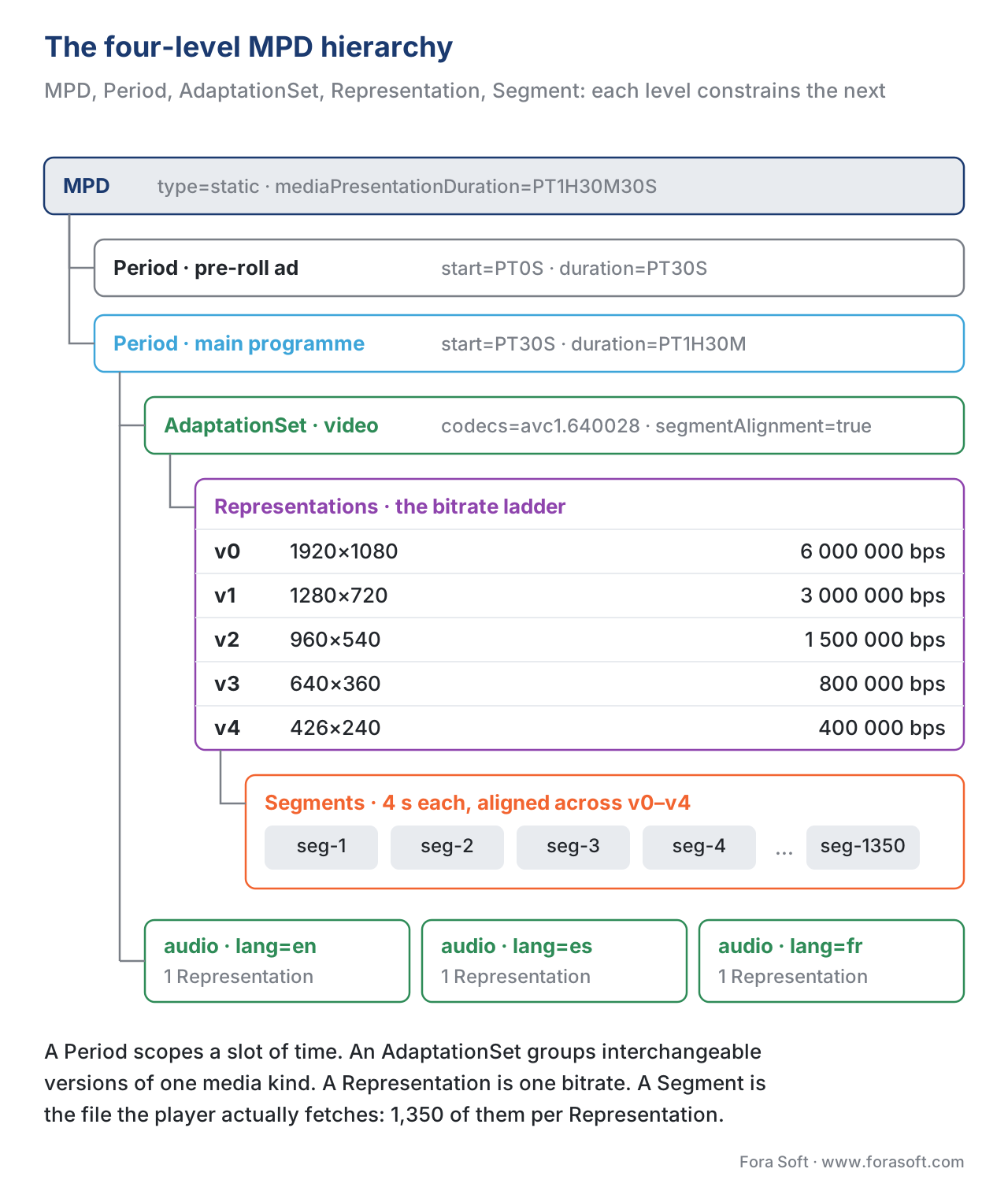 Figure 1. The four-level MPD hierarchy, with a worked example: a 90-minute VOD movie split into a pre-roll ad Period and a main programme Period, video and three audio languages as AdaptationSets, five video Representations and one Representation per language, and segment-aligned 4-second chunks underneath.
Segment addressing — three modes you must recognise
A DASH manifest can address its Segments in one of three ways, and the choice has direct consequences for live latency, packager complexity, and CDN behaviour. Every DASH article that conflates the three is wrong by the second paragraph.
Mode 1 — SegmentList
The simplest mode. The MPD lists every Segment URL explicitly, one per <SegmentURL> line, inside a <SegmentList> element. For a 90-minute movie with 4-second segments, that is 1,350 lines per Representation, 6,750 lines for a five-rendition ladder, 27,000 lines for a movie with four audio languages. The manifest is large, the live use case is impossible (you would have to push a new MPD with appended lines every 4 seconds), and only legacy VOD encoders still use it. Mention it once and never again.
Mode 2 — SegmentTemplate with $Number$
The dominant mode for VOD and the easier of the two live modes. The MPD declares a URL template that contains the literal token $Number$, plus a starting number and an inter-segment duration. The player constructs each Segment URL by replacing $Number$ with the next integer.
<SegmentTemplate
    media="$RepresentationID$/segment-$Number$.m4s"
    initialization="$RepresentationID$/init.mp4"
    timescale="48000"
    duration="192000"
    startNumber="1" />
The player sees: my Segment duration is 192000 / 48000 = 4.0 s; segment 1 lives at v0/segment-1.m4s, segment 2 at v0/segment-2.m4s, and so on. For a 90-minute movie there are no URL listings at all — the player computes them. For a live stream the player adds a Segment number derived from (wall_clock_now - availabilityStartTime) / segment_duration, which is why availabilityStartTime is a non-negotiable attribute of a dynamic MPD.
Number-based templates are CDN-friendly: the URL space is small, the URLs are predictable, and the cache key is trivial. They are unforgiving of variable segment durations — every segment must be exactly the declared duration, or the player computes the wrong wall-clock-to-segment mapping and starts requesting segments that do not exist. Most live encoders solve this by forcing a fixed segment duration, accepting the resulting GOP-alignment constraints.
Mode 3 — SegmentTemplate with $Time$ (and SegmentTimeline)
The flexible mode. The MPD declares a template that contains $Time$, and a <SegmentTimeline> element lists <S> entries that describe each segment's start time and duration in the media timescale.
<SegmentTemplate
    media="$RepresentationID$/segment-$Time$.m4s"
    initialization="$RepresentationID$/init.mp4"
    timescale="48000">
  <SegmentTimeline>
    <S t="0"      d="192000" r="2" />   <!-- 3 segments of 4.000s starting at t=0 -->
    <S            d="240000"      />   <!-- 1 segment of 5.000s -->
    <S            d="192000" r="9" />   <!-- 10 more segments of 4.000s -->
  </SegmentTimeline>
</SegmentTemplate>
The <S> element has three attributes: @t (start time in media timescale, optional after the first entry — it is computed as previous @t + previous @d), @d (duration in media timescale), and @r (repeat count — r="2" means this entry plus two repetitions, i.e. three identical segments). The shape r="-1" means repeat indefinitely until the next entry's @t.
SegmentTimeline accepts variable segment durations — the encoder can shorten a segment to align with an ad-insertion boundary, lengthen a segment to keep a GOP-on-IDR alignment intact, and the manifest accurately describes both. The price is that the manifest grows over the lifetime of a live stream (every new segment adds an <S> entry, or extends an existing one's @r), which is why MPD Patch (ISO/IEC 23009-1:2022 Annex M, expanded in the DASH-IF guidelines) exists: instead of refetching the whole MPD every @minimumUpdatePeriod, the player fetches a tiny XML diff that adds just the new <S> entries.
The DASH-IF Implementation Guidelines: Restricted Timing Model recommends SegmentTemplate with SegmentTimeline for any live deployment that needs accurate time-to-Segment mapping (catch-up DVR, accurate seek, multi-period boundaries). SegmentTemplate with $Number$ remains acceptable for VOD and for live streams where every segment is truly the same duration. Pure SegmentList is acceptable for static VOD only and is functionally obsolete.
| Addressing mode | Best for | Live support | Variable durations | CDN cache key | Manifest size |
|---|---|---|---|---|---|
SegmentList | Legacy VOD | No | Yes | Trivial (per-segment URL) | Large |
SegmentTemplate + $Number$ | VOD and fixed-cadence live | Yes | No | Trivial | Tiny |
SegmentTemplate + $Time$ + SegmentTimeline | DVR live, multi-period, ad-insertion | Yes | Yes | Trivial | Grows over time (use MPD Patch) |
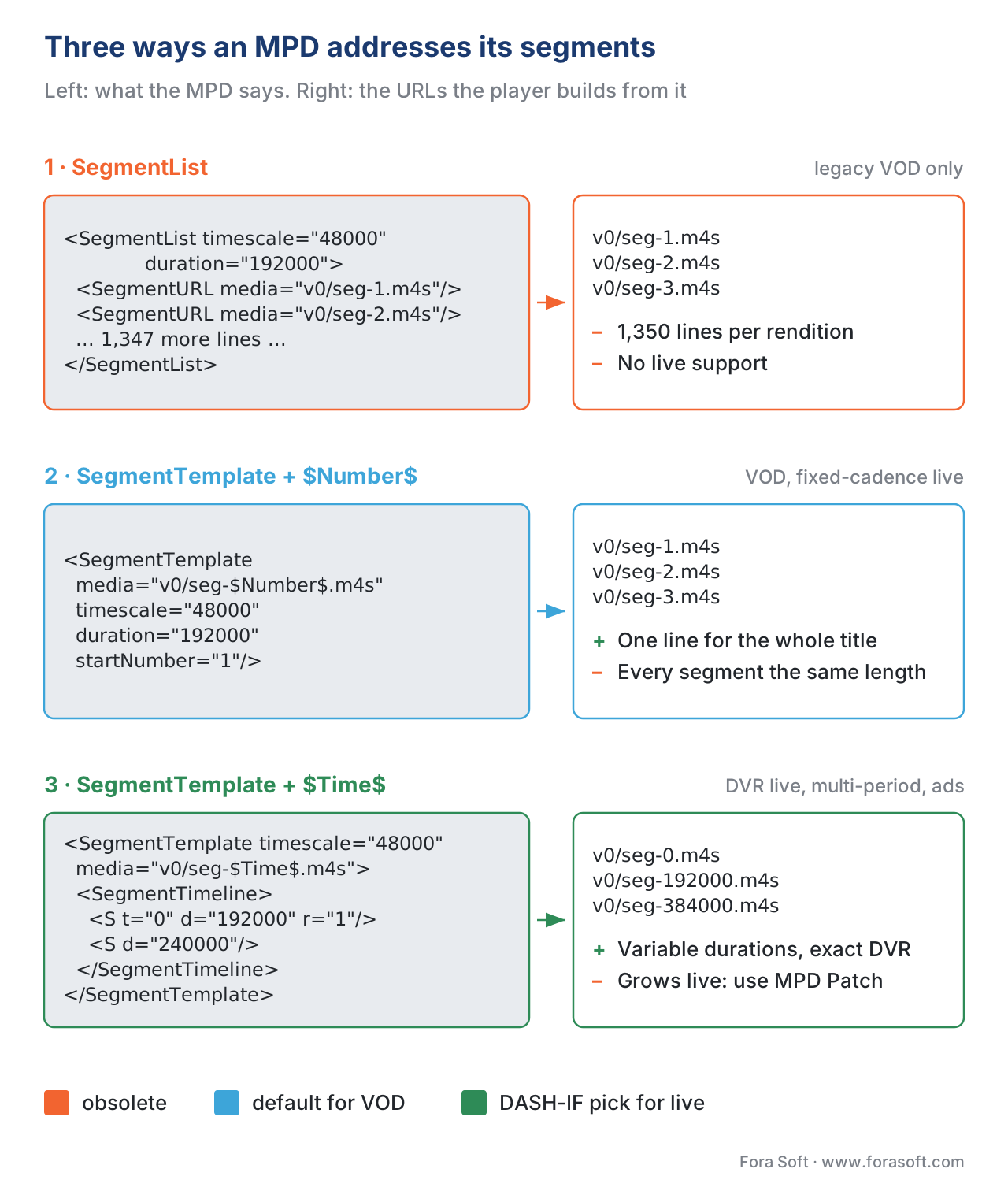 Figure 2. The three segment-addressing modes laid side by side. The MPD on the left is the source of truth; the URLs the player constructs are on the right. Notice the size collapse from SegmentList (one line per segment) to SegmentTemplate+$Number$ (one template line for the whole presentation).
Live vs VOD — the two presentation types
A single attribute on the root MPD — @type — flips the protocol between two modes that the player implements with completely different logic.
Static (VOD)
type="static" declares a recorded asset of known length. The MPD carries @mediaPresentationDuration (the total length of the presentation as an XML duration — "PT1H30M" for ninety minutes, "PT4500S" for the same duration in seconds). The MPD never changes. Every Segment exists from the moment the MPD is published. The player can seek to any point in the timeline, can request any Segment in any order, can prefetch the entire stream if it wants to. There is no @availabilityStartTime, no @minimumUpdatePeriod, no @timeShiftBufferDepth. Subtitles, audio tracks, and chapters can be richer because everything is finalised.
A static MPD's <SegmentTimeline> or <SegmentTemplate> describes the full presentation. The player computes the entire URL list at parse time and can stop talking to the manifest server until the user navigates away.
Dynamic (live)
type="dynamic" declares a stream that is being produced in real time. The MPD now carries @availabilityStartTime (the wall-clock instant at which the stream's first Segment became fetchable; everything else in the presentation timeline is relative to it), @minimumUpdatePeriod (how often the player must refetch the MPD), @timeShiftBufferDepth (the DVR window — how far back the player can rewind from the live edge before Segments fall out of availability), and @suggestedPresentationDelay (how far back from the live edge the player should start playback — typically 2 to 4 times the Segment duration, never less than 4 seconds).
The mapping from wall-clock time to Segment number is the heart of live DASH. For a number-template manifest with availabilityStartTime="2026-05-21T08:00:00Z", startNumber="1", timescale="48000", duration="192000":
seconds_into_presentation = (now_utc - availabilityStartTime).total_seconds()
segment_duration_seconds  = 192000 / 48000 = 4.0
current_segment_number    = startNumber + floor(seconds_into_presentation / segment_duration_seconds)
At 08:00:40 UTC, seconds_into_presentation = 40, current_segment_number = 1 + floor(40/4) = 11. Segment 11 has just become available (its first byte exists at 08:00:40, its last byte at roughly 08:00:44 after the segment-duration encoder delay). A player honouring suggestedPresentationDelay="PT4S" would start from segment 10, not 11, leaving one segment of buffer between itself and the live edge.
A dynamic MPD also commonly carries <UTCTiming> descriptors so the player can synchronise its own clock to the server's. Without an authoritative UTCTiming, players on devices with skewed clocks miscompute current_segment_number and either rebuffer (asking for segments that do not exist yet) or fall behind the live edge.
<UTCTiming schemeIdUri="urn:mpeg:dash:utc:http-iso:2014"
           value="https://time.akamai.com/?iso" />
<UTCTiming schemeIdUri="urn:mpeg:dash:utc:http-head:2014"
           value="https://time.akamai.com/" />
The DASH-IF guidelines insist that every dynamic MPD must carry at least one <UTCTiming>. In production, omitting it is the most common cause of "the live stream stutters on some users' devices but not others" — those users' devices were drifting.
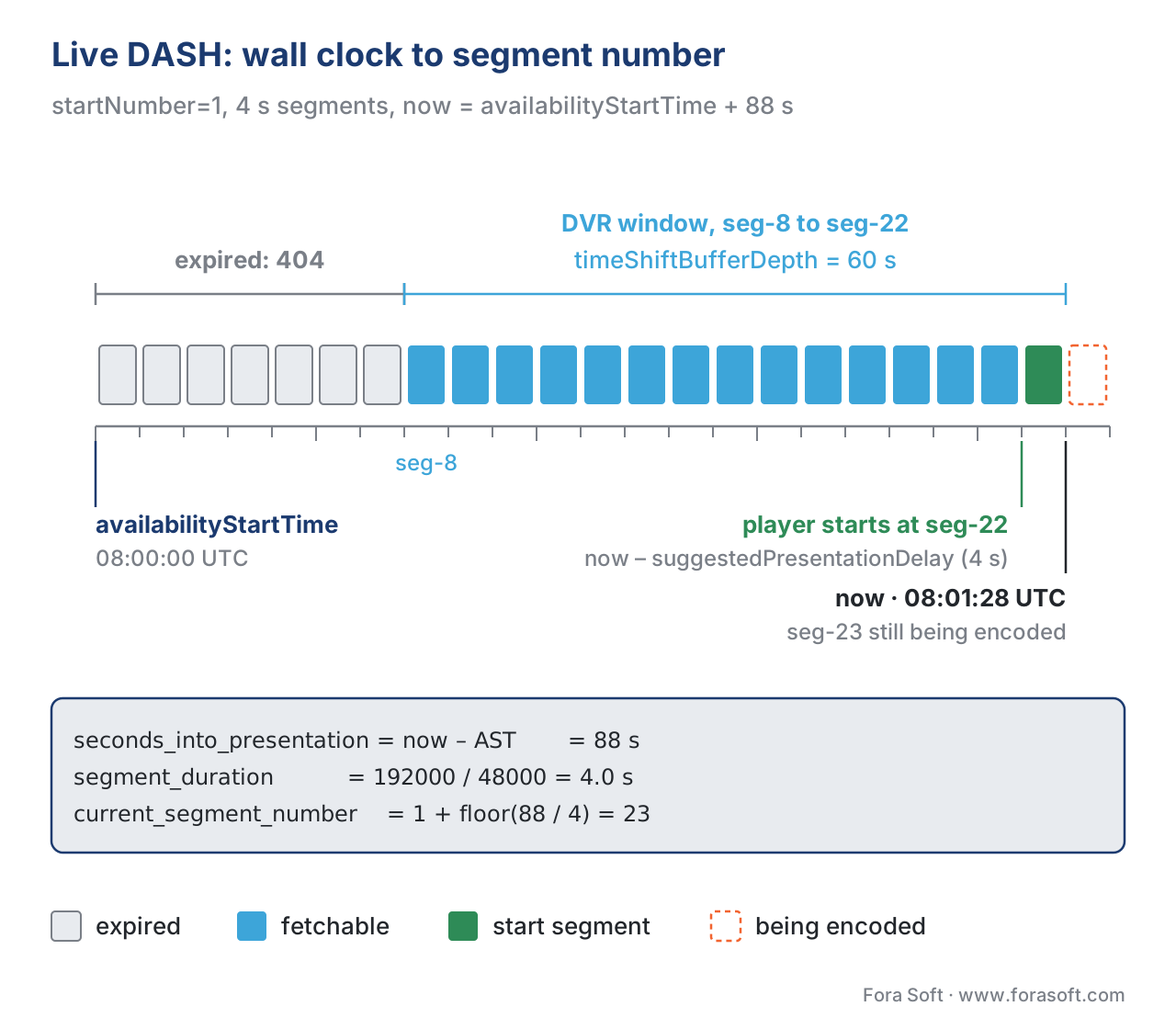 Figure 3. The live DASH timing model. Wall-clock now sits on the right; availabilityStartTime sits on the left. suggestedPresentationDelay is the distance from now back to where the player starts. timeShiftBufferDepth is the catch-up window. Segments older than the left edge of timeShiftBufferDepth fall off and become 404.
The XML preamble — what every MPD declares
Every MPD starts with the same four declarations that tell a parser what kind of document it is reading.
<?xml version="1.0" encoding="UTF-8"?>
<MPD xmlns="urn:mpeg:dash:schema:mpd:2011"
     xmlns:xsi="http://www.w3.org/2001/XMLSchema-instance"
     xsi:schemaLocation="urn:mpeg:dash:schema:mpd:2011 DASH-MPD.xsd"
     type="static"
     mediaPresentationDuration="PT1H30M"
     minBufferTime="PT2S"
     profiles="urn:mpeg:dash:profile:isoff-on-demand:2011,urn:mpeg:dash:profile:cmaf:2019">
xmlns="urn:mpeg:dash:schema:mpd:2011" is the namespace URI for the MPD schema. It has not changed since the original 2012 publication of ISO/IEC 23009-1 — the 2022 fifth edition is fully backward-compatible at the XML level, even though it added new attributes and elements. The 2011 in the URI is the year MPEG fixed the namespace; do not confuse it with the standard's edition year.
@profiles is a comma-separated list of profile identifiers the MPD claims to conform to. The two most important ones in 2026 are:
urn:mpeg:dash:profile:isoff-live:2011— the ISOBMFF (fragmented MP4) live profile. Required for any live stream.urn:mpeg:dash:profile:isoff-on-demand:2011— the ISOBMFF on-demand profile. Required for VOD.urn:mpeg:dash:profile:cmaf:2019— the CMAF profile, ratified by the 2019 amendment to the DASH standard. A manifest carrying this profile promises that every Segment conforms to ISO/IEC 23000-19 (CMAF), which is what makes the same media bytes work in both an HLS and a DASH player.
@minBufferTime="PT2S" is the contract between the encoder and the player: if the player maintains a buffer of at least 2 seconds at the maximum advertised @bandwidth, it will not rebuffer due to coded-content bursts. The attribute is mandatory on the MPD. The DASH-IF guidelines recommend minBufferTime of one to three times the Segment duration; setting it lower forces the player to gamble on instantaneous throughput, setting it higher reduces the latency budget unnecessarily.
The XML duration syntax — PT1H30M, PT2S, PT0.5S — is ISO 8601. P opens the duration, T switches from the date part to the time part, H / M / S are hours / minutes / seconds. Decimal seconds are allowed. The format trips up engineers used to integer milliseconds; reading PT1.5S as "one and a half seconds" trains the eye quickly.
ContentProtection — multi-DRM in one manifest
DASH's killer feature for premium OTT is Common Encryption (CENC) defined by ISO/IEC 23001-7:2023. The same encrypted media bytes can be decrypted by Widevine, PlayReady, or FairPlay, depending on which key system the playing device supports, with a single set of stored Segments and a single content key. The MPD signals this by stacking <ContentProtection> elements inside an AdaptationSet — one for the underlying encryption scheme, one per supported DRM system.
<AdaptationSet contentType="video" mimeType="video/mp4" codecs="avc1.640028" segmentAlignment="true">
  <!-- The encryption scheme: AES-128 CTR, declared once -->
  <ContentProtection
      schemeIdUri="urn:mpeg:dash:mp4protection:2011"
      value="cenc"
      cenc:default_KID="34e5db32-8625-47cd-ba06-68fca0655a72"
      xmlns:cenc="urn:mpeg:cenc:2013" />
  <!-- Widevine: the DRM system identifier UUID is Google's published value -->
  <ContentProtection
      schemeIdUri="urn:uuid:edef8ba9-79d6-4ace-a3c8-27dcd51d21ed">
    <cenc:pssh>AAAAW3Bzc2gAAAAA…(Base64 PSSH box)…</cenc:pssh>
  </ContentProtection>
  <!-- PlayReady: the DRM system identifier UUID is Microsoft's published value -->
  <ContentProtection
      schemeIdUri="urn:uuid:9a04f079-9840-4286-ab92-e65be0885f95">
    <cenc:pssh>AAAAlHBzc2gAAAAA…(Base64 PSSH box)…</cenc:pssh>
    <mspr:pro xmlns:mspr="urn:microsoft:playready">…(Base64 PlayReady Object)…</mspr:pro>
  </ContentProtection>
  <Representation id="v0" width="1920" height="1080" bandwidth="6000000" />
  …
</AdaptationSet>
The first <ContentProtection> element says "these Representations are encrypted with AES-128 CTR per ISO/IEC 23001-7, and the default Key Identifier is the GUID 34e5db32-…". The next two announce the two DRM systems that hold a licence for that key — Widevine and PlayReady — and include each system's Protection System Specific Header (PSSH) box in Base64. A Chrome player picks the Widevine block, posts the PSSH to the Widevine licence server, gets a key, decrypts. A Microsoft Edge player picks the PlayReady block, posts to the PlayReady licence server. The same Segments work for both.
FairPlay is the exception: Apple does not use the in-MPD PSSH-box pattern, and FairPlay content is delivered through HLS, not DASH. A premium OTT serving every device therefore typically ships DASH for Chrome / Edge / Firefox / Android / Smart TV (Widevine + PlayReady, sometimes ClearKey for diagnostics) and HLS for Safari and Apple TV (FairPlay). The CMAF profile is what makes the same encrypted media bytes serve both — only the manifest changes.
The official DRM-system UUIDs are published by the DASH-IF (https://dashif.org/identifiers/content_protection/). The most common ones to recognise:
| DRM system | UUID |
|---|---|
| Widevine (Google) | edef8ba9-79d6-4ace-a3c8-27dcd51d21ed |
| PlayReady (Microsoft) | 9a04f079-9840-4286-ab92-e65be0885f95 |
| FairPlay (Apple — HLS only) | 94ce86fb-07ff-4f43-adb8-93d2fa968ca2 |
| Marlin | 5e629af5-38da-4063-8977-97ffbd9902d4 |
| ClearKey (W3C, diagnostics) | e2719d58-a985-b3c9-781a-b030af78d30e |
urn:mpeg:dash:mp4protection:2011 scheme identifier itself is the way the MPD says "this is CENC"; the @value is the CENC scheme — "cenc" for AES-128 CTR (most common for HEVC/AVC/AV1 video) or "cbcs" for AES-128 CBC sub-sample-pattern encryption (required by Apple FairPlay and the recommended scheme since 2018).
EssentialProperty and SupplementalProperty — the extension mechanism
Both elements are typed DescriptorType in the schema and both carry a @schemeIdUri plus an optional @value. The difference is binding semantics: an EssentialProperty whose @schemeIdUri the player does not recognise must cause the player to ignore the enclosing element; a SupplementalProperty whose @schemeIdUri the player does not recognise may be ignored silently. The pattern is how DASH evolves without breaking older clients.
Real-world EssentialProperty use: signalling that a Representation is part of a stereoscopic video pair, that an AdaptationSet is a trick-mode track (fast-forward / rewind sprites), or that a Period is an SCTE-35 ad break that the client must defer to a separate ad server. Real-world SupplementalProperty use: declaring an aspect-ratio override, a colour-space metadata block, or a frame-packing arrangement that helps a smarter player but does not block a dumber one.
<!-- This AdaptationSet carries trick-mode (fast-forward) sprites — players that don't grok this scheme must skip it -->
<AdaptationSet contentType="image" mimeType="image/jpeg">
  <EssentialProperty schemeIdUri="http://dashif.org/guidelines/trickmode" value="0"/>
  <Representation id="tm0" bandwidth="32000" width="320" height="180">
    <SegmentTemplate media="trick/$Number$.jpg" duration="20" startNumber="1" />
  </Representation>
</AdaptationSet>
CMAF, fragmented MP4, and the segment under the hood
The body of every modern DASH Segment is fragmented MP4 — formally ISO Base Media File Format, ISO/IEC 14496-12, the same container family as .mp4 and .mov. Fragmented MP4 splits the file into a sequence of movie fragments (moof boxes) followed by their payload data (mdat boxes), with one fragment per Segment. A styp (segment type) box at the head of each Segment carries the brand identifier and lets a packager mark a Segment as conforming to a particular profile.
CMAF — ISO/IEC 23000-19:2024, third edition — is a constrained profile of fragmented MP4 that both HLS and DASH can consume. A CMAF Segment is a styp + sidx (segment index, for byte-range addressing) + moof + mdat; a CMAF chunk is one moof + one mdat inside a Segment, which is the unit the low-latency DASH and LL-HLS players fetch via chunked HTTP transfer. The CMAF Initialisation Segment is a ftyp + moov box pair that contains the codec configuration (SPS/PPS for H.264, VPS/SPS/PPS for H.265, the OBU sequence header for AV1) without any media data. The player fetches the Init Segment once per Representation, parses it, configures the decoder, then fetches Segments and feeds them in.
The CMAF promise — one set of media bytes, two manifests — has shaped the industry. Netflix, YouTube, Disney+, Prime Video, Hulu, HBO Max all ship the same CMAF-conformant fragmented-MP4 files, with two thin manifests on top: an HLS m3u8 for the Safari and Apple TV audience, a DASH MPD for everyone else. The storage cost halved, the encoding cost halved, the QA cost more than halved. CMAF is why "HLS vs DASH" stopped being a packaging decision and became a manifest-format decision.
Worked example — reading a real MPD line by line
A 30-second clip of the worked-example MPD makes the four-level hierarchy concrete. The numbers below are real; the URL fragments would resolve against the same origin.
<?xml version="1.0" encoding="UTF-8"?>
<MPD xmlns="urn:mpeg:dash:schema:mpd:2011"
     type="static"
     mediaPresentationDuration="PT1H30M"
     minBufferTime="PT2S"
     profiles="urn:mpeg:dash:profile:isoff-on-demand:2011,urn:mpeg:dash:profile:cmaf:2019">
  <BaseURL>https://cdn.example.com/movie-42/</BaseURL>
  <Period id="main" duration="PT1H30M">
    <!-- 5-rendition H.264 video bitrate ladder, CMAF chunks, 4-second segments -->
    <AdaptationSet id="video" contentType="video" mimeType="video/mp4"
                   codecs="avc1.640028" segmentAlignment="true" startWithSAP="1"
                   maxWidth="1920" maxHeight="1080" frameRate="24" par="16:9">
      <SegmentTemplate
          media="video/$RepresentationID$/seg-$Number$.m4s"
          initialization="video/$RepresentationID$/init.mp4"
          timescale="12288" duration="49152" startNumber="1" />
      <Representation id="v0" width="1920" height="1080" bandwidth="6000000" />
      <Representation id="v1" width="1280" height="720"  bandwidth="3000000" />
      <Representation id="v2" width="960"  height="540"  bandwidth="1500000" />
      <Representation id="v3" width="640"  height="360"  bandwidth="800000"  />
      <Representation id="v4" width="426"  height="240"  bandwidth="400000"  />
    </AdaptationSet>
    <!-- English stereo audio at 128 kbps AAC-LC -->
    <AdaptationSet id="audio-en" contentType="audio" mimeType="audio/mp4"
                   codecs="mp4a.40.2" lang="en" audioSamplingRate="48000">
      <Role schemeIdUri="urn:mpeg:dash:role:2011" value="main" />
      <SegmentTemplate
          media="audio/en/seg-$Number$.m4s"
          initialization="audio/en/init.mp4"
          timescale="48000" duration="192000" startNumber="1" />
      <Representation id="a-en-0" bandwidth="128000" />
    </AdaptationSet>
    <!-- Spanish audio -->
    <AdaptationSet id="audio-es" contentType="audio" mimeType="audio/mp4"
                   codecs="mp4a.40.2" lang="es" audioSamplingRate="48000">
      <Role schemeIdUri="urn:mpeg:dash:role:2011" value="alternate" />
      <SegmentTemplate
          media="audio/es/seg-$Number$.m4s"
          initialization="audio/es/init.mp4"
          timescale="48000" duration="192000" startNumber="1" />
      <Representation id="a-es-0" bandwidth="128000" />
    </AdaptationSet>
    <!-- English subtitles, WebVTT in fMP4 -->
    <AdaptationSet id="subs-en" contentType="text" mimeType="application/mp4"
                   codecs="wvtt" lang="en">
      <Role schemeIdUri="urn:mpeg:dash:role:2011" value="subtitle" />
      <SegmentTemplate
          media="subs/en/seg-$Number$.m4s"
          initialization="subs/en/init.mp4"
          timescale="1000" duration="4000" startNumber="1" />
      <Representation id="s-en-0" bandwidth="2000" />
    </AdaptationSet>
  </Period>
</MPD>
The math, line by line. minBufferTime="PT2S" means the player buffers at least two seconds at the top bandwidth, which is 6 Mbps for video plus 128 kbps for audio. The buffer in bytes is at least (6_000_000 + 128_000) × 2 / 8 = 1.53 MB. timescale="12288" on the video template and duration="49152" give 49152 / 12288 = 4.0 s per segment; 90 minutes is 5400 seconds is 1350 segments. The English audio uses timescale="48000" (the audio sample rate) and duration="192000" for 192000 / 48000 = 4.0 s; the audio and video segment boundaries are aligned. The Spanish audio uses identical parameters. The English subtitle track uses timescale="1000" so durations are in milliseconds; duration="4000" is the same 4-second segment cadence in subtitle-timescale units. A player that picks v2 (540p), a-en-0 (English audio), and s-en-0 (English subtitles) makes three HTTP requests every 4 seconds for the next 90 minutes, totalling 1350 × 3 = 4050 segment fetches over the playback session.
The CDN cache key for those requests is the URL alone; nothing here depends on a query string. CDN hit rates for popular VOD are 95–99% at the edge. The MPD is itself a small file (the example above is ~2 KB; production MPDs run 3–30 KB) and is cached for short periods (60 seconds is typical for VOD, @minimumUpdatePeriod for live).
DASH vs HLS — the comparison that matters in 2026
The two protocols solve the same problem. The differences are in the corners.
| Dimension | DASH | HLS |
|---|---|---|
| Standard body | ISO/IEC (open) | IETF (RFC 8216 → draft-pantos-hls-rfc8216bis) + Apple Authoring Spec |
| Manifest format | XML (MPD) | Text (m3u8) |
| Codec scope | Codec-agnostic | Codec-agnostic since 2017 (was MPEG-TS-only originally) |
| Container scope | Container-agnostic; fMP4 / CMAF dominant | Originally MPEG-TS; CMAF since 2017 |
| Native browser support | Via MSE (Chrome, Edge, Firefox, Android browsers) | iOS Safari (native); macOS Safari (native and MSE); Android (via Exo/Shaka MSE) |
| Apple device support | Not native; needs Shaka/dash.js + MSE; works on macOS Safari, fails on iOS Safari | Native everywhere |
| Multi-DRM | Native via CENC ContentProtection (Widevine + PlayReady + ClearKey, all in one MPD) | Native FairPlay via EXT-X-KEY and HLS Authoring Spec; CENC cbcs mode bridges to Widevine and PlayReady from HLS too |
| Low-latency | LL-DASH + DASH-IF Low-Latency Profile (CMAF chunked) | LL-HLS (parts + preload hints + blocking reload) |
| Ad insertion | SCTE-35 <EventStream>; multi-period server-side ad insertion mature | SCTE-35 EXT-X-DATERANGE; SSAI mature |
| Manifest size growth in live | Grows unless MPD Patch used | Grows unless playlist delta updates used |
| Subtitle formats | WebVTT in fMP4, TTML/IMSC in fMP4, SRT | WebVTT (.vtt), TTML/IMSC (since 2018) |
| Trick-mode (FF/RW) | Native via EssentialProperty:trickmode and image AdaptationSet | Native via EXT-X-IMAGE-STREAM-INF (I-frame playlists) |
| Reference implementations | dash.js (DASH-IF), Shaka Player (Google), ExoPlayer (Google for Android) | Apple AVPlayer (native), hls.js (open), Shaka Player (multi-protocol) |
| Big deployers | Netflix, YouTube, Disney+, Prime Video, Hulu, Twitch | Apple TV+, every iOS app, Apple-ecosystem live streams |
Low-Latency DASH — a quick sketch (full treatment in 4.5)
The DASH-IF Low-Latency Profile (formalised in DASH-IF IOP v4.3 and the Restricted Timing Model) achieves 2–4 second glass-to-glass latency over plain HTTP/1.1 chunked transfer. The four mechanisms:
- CMAF chunks (smaller than Segments — 200 ms is typical) become the unit the player fetches via HTTP/1.1 chunked transfer encoding.
<ServiceDescription>element in the MPD declares the target latency and the playback rate range the player may adjust to keep that target.availabilityTimeOffseton the<SegmentTemplate>advertises that Segments become availableavailabilityTimeOffsetseconds earlier than the strictavailabilityStartTime + segmentNumber × segmentDurationformula would suggest — because the encoder is publishing the chunks as it produces them, not waiting for the Segment to close.- MPD Patch keeps the manifest small over hours of streaming.
The result is comparable to LL-HLS — 2 to 5 seconds glass-to-glass — over a protocol that runs on any HTTP/1.1 CDN. LL-DASH gets its own deep-dive in article 4.5.
Common pitfalls
A short tour of the failure modes Fora Soft has shipped past in production deployments.
Missing or wrong <UTCTiming>. A dynamic MPD without a UTC time source asks the player to use its local clock. Local clocks on smart TVs and embedded devices skew by tens of seconds. Players miscompute current_segment_number, request Segments that do not exist, fall back, retry, and produce intermittent rebuffering that QA cannot reproduce on a clean lab machine. Fix: add at least one <UTCTiming schemeIdUri="urn:mpeg:dash:utc:http-iso:2014" value="…"> element to every dynamic MPD, point it at a reliable HTTP time source (Akamai, Cloudflare, your own ntpd-fronted endpoint).
Drift between segment duration and @duration on the template. Pyramid-of-pain bug: a packager configured for 4-second segments produces 3.997-second segments in practice (because the GOP closes 3 frames early to align on the next IDR). The MPD still declares duration="49152" (4.0 s). After 10 minutes of live, the player and the encoder are out of sync by ~600 ms; after an hour, by ~3.6 s; the player starts requesting Segments that do not exist yet. Fix: either pin the encoder to exact GOP-aligned 4-second segments (force closed-gop + gop-size = framerate × duration), or switch the manifest to SegmentTemplate with SegmentTimeline so the actual durations are described, segment by segment.
ContentProtection elements in the wrong scope. <ContentProtection> is legal inside <AdaptationSet> (applies to every Representation in the set) or inside <Representation> (overrides for that one). Putting it inside <Period> is a common copy-paste mistake that some lenient players accept and others reject silently. Fix: keep ContentProtection at the AdaptationSet level for the common case (the same encryption applies to the whole bitrate ladder), and only push it down to Representation when individual renditions have different encryption.
@startWithSAP not equal to 1. Some encoders emit Segments that start with a P-frame instead of an IDR. The MPD's @startWithSAP="1" then lies, and the player either rebuffers at every ABR switch or — worse — produces blocky decoded video at the switch boundary. Fix: validate the encoded output with a CMAF conformance tool (shaka-packager, Bento4 mp4info); reject any Segment that does not begin on an SAP-type-1 frame.
Mixing $Number$ and $Time$ templates in the same AdaptationSet. The spec allows it; no player handles it well. Fix: pick one addressing mode per AdaptationSet and stick with it.
Period-boundary init.mp4 rotation without <SupplementalProperty> continuity signalling. If two adjacent Periods use different Init Segments (different codec configuration), some players treat the boundary as a fatal error and stop. Fix: signal Period continuity with <SupplementalProperty schemeIdUri="urn:mpeg:dash:period-continuity:2015"> when the next Period continues the previous one's track on the same codec configuration; the player then knows to keep the decoder pipeline up.
MPD too large to refetch every @minimumUpdatePeriod. A live SegmentTimeline MPD that grows for hours can hit hundreds of kilobytes. Refetching it every 2 seconds wastes bandwidth and CPU on every connected player. Fix: enable MPD Patch in your packager (Unified Streaming, AWS MediaPackage, Wowza, Bitmovin Live Server all support it). The player then fetches ~/manifest_patch.mpd (a few hundred bytes) on every refresh and merges it into its in-memory MPD.
Where Fora Soft fits in
Fora Soft has shipped DASH-based streaming for video conferencing, OTT, e-learning, telemedicine, surveillance, and AR/VR products since the protocol was a Working Draft. We typically deploy DASH-over-CMAF with Common Encryption as the main delivery stack for any client outside the Apple ecosystem, with a parallel HLS manifest over the same CMAF Segments for iOS Safari. Our engineers know which production lever to pull when an MPD does not load on a Tizen Smart TV, when an LL-DASH stream stalls behind a hyperscaler load balancer, or when a multi-DRM rotation has to roll out without breaking the existing Widevine client base. The technology is half the work; the operational craft of running it across forty kinds of device is the rest. If your roadmap includes either, talk to us before committing to a stack. Our OTT and IPTV platform team ships DASH and multi-DRM across web, mobile and Smart TV, and our video streaming developers handle live and LL-DASH pipelines.
The book
Video Streaming: A Complete Guide to Video Delivery: From Network Protocols and Transport to Ingest, HLS, and MPEG-DASH
This article reads one MPD from the root element down to a single segment URL. Book 2 goes through the whole manifest the same way: Periods and multi-period ad breaks, all three segment-addressing modes, the live timing model with UTCTiming, CMAF packaging, and HLS next to DASH over the same segments. Book 3 carries on from the manifest into ABR, CDNs, players and multi-DRM. Both are part of a seven-volume handbook that covers the whole video stack from the pixel to production, so an engineer who works through it can design and ship a DASH delivery pipeline like the one in this article. Written by Nikolay Sapunov, CEO at Fora Soft.
Is your MPD ready for every device you ship to?
Send us your MPD, your packager and the list of players and TVs you target, and we will check the segment addressing, live timing and ContentProtection, find what breaks on Tizen, webOS or Safari, and tell you whether one CMAF origin can serve DASH and HLS together. 250+ video products shipped since 2005.
See our case studies
Case study
Drundoo
A Bulgarian internet TV platform with 60 live channels, catch-up TV and a movie and series library — live, DVR and VOD in one product, the three presentation types this article maps onto static and dynamic manifests.
Case study
Vodeo
A movie rental app for Janson Media with 100K+ users, adaptive 480p, 720p and 1080p playback, subtitles and AirPlay and Chromecast casting — a bitrate ladder and text tracks of the kind an AdaptationSet describes.
Case study
Bellicon Smart TV Apps
530+ on-demand workout videos on Apple TV and Android TV plus the web, in English and German — one catalogue delivered to living-room devices, where manifest compatibility is decided device by device.
What to read next
Protocols
HLS in Depth: m3u8, Segments, Multi-Variant Playlists
The Apple-side manifest that usually ships next to your MPD over the same CMAF segments.
Packaging
CMAF: The Packaging Format That Unified HLS and DASH
What sits inside every Segment this MPD points to: styp, moof and mdat.
DRM
Common Encryption (CENC) in Depth
The cenc and cbcs schemes and the default_KID behind every ContentProtection element.
Players
dash.js in Depth
How the reference player parses an MPD and turns it into segment requests.
References
- ISO/IEC — ISO/IEC 23009-1:2022, Information technology — Dynamic adaptive streaming over HTTP (DASH) — Part 1: Media presentation description and segment formats, fifth edition, August 2022. Catalogue: https://www.iso.org/standard/83314.html — Tier 1 (the controlling international standard for DASH). Normative source for every MPD element, attribute, and behaviour described in this article. Full normative text is paywalled; the article relies on the catalogue page's normative summary plus DASH-IF's open implementation guidelines (which mirror the ISO text) for spec text quotation.
- ISO/IEC — ISO/IEC 23000-19:2024, Information technology — Multimedia application format (MPEG-A) — Part 19: Common media application format (CMAF) for segmented media, third edition, 2024. https://www.iso.org/standard/85197.html — Tier 1 (the controlling CMAF standard). Source for the fragmented-MP4 segment structure, the
styp/sidx/moof/mdatbox composition, and the CMAF chunk model used by every modern DASH packager. - ISO/IEC — ISO/IEC 23001-7:2023, Information technology — MPEG systems technologies — Part 7: Common encryption in ISO base media file format files, fourth edition, 2023. https://www.iso.org/standard/83974.html — Tier 1 (CENC). Normative source for the
cencandcbcsencryption schemes and thedefault_KIDsemantics referenced in the ContentProtection section. - DASH Industry Forum — DASH-IF Implementation Guidelines: Restricted Timing Model, post-community-review revision 2025. https://dashif.org/Guidelines-TimingModel/ — Tier 1 (DASH-IF implementation guidelines mirror the ISO text and are the de-facto implementation profile). Source for the timescale,
@presentationTimeOffset, andSegmentTemplate+SegmentTimelineaddressing semantics. - DASH Industry Forum — DASH-IF Interoperability Guidelines for Implementations, v4.3, 2025. https://dashif.org/guidelines/ — Tier 1 (DASH-IF profile). Source for the recommended
minBufferTimeranges, the<ServiceDescription>low-latency framework, MPD Patch usage, and the official DRM-system UUIDs (https://dashif.org/identifiers/content_protection/). - DASH Industry Forum — MPD Patch, DASH-IF technical report, 2024. https://dashif.org/DASH-IF-IOP/mpd-patch.pdf — Tier 1. Source for the MPD Patch mechanism that turns long live SegmentTimeline MPDs into incremental updates; cited in the pitfalls section.
- DASH Industry Forum — dash.js reference player, source repository. https://github.com/Dash-Industry-Forum/dash.js — Tier 2 (the reference implementation maintained by DASH-IF). Cross-validation for the
<UTCTiming>behaviour, MPD parsing edge cases, and the wall-clock-to-segment-number formula in the live-timing section. - W3C — Media Source Extensions, Candidate Recommendation Snapshot 2024-11-05. https://www.w3.org/TR/media-source-2/ — Tier 1 (W3C spec). Source for the
SourceBuffer.appendBuffer()model that DASH players use to feed Segments to the browser decoder. - W3C — Encrypted Media Extensions, W3C Recommendation 2017-09-18 (errata-tracked). https://www.w3.org/TR/encrypted-media/ — Tier 1 (W3C spec). Source for the ClearKey and CDM key-system model that DASH multi-DRM relies on.
- OTTVerse — Structure of a MPEG-DASH MPD, 2023. https://ottverse.com/structure-of-an-mpeg-dash-mpd/ — Tier 6 (educational site, used for orientation only). Cross-checked against the ISO text for the four-level hierarchy described in the body; no claims sourced solely from this reference.
- Bitmovin — Bitmovin Video Developer Report 2025/26. https://bitmovin.com/video-developer-report/ — Tier 4 (vendor analyst report). Source for the 2025/26 adoption figures of DASH vs HLS across 167 developers in 34 countries cited in the comparison section.
- Wikipedia — Dynamic Adaptive Streaming over HTTP. https://en.wikipedia.org/wiki/Dynamic_Adaptive_Streaming_over_HTTP — Tier 6 (used for orientation on standardisation history). Dates and edition counts cross-checked against the ISO catalogue pages.
