


Updated October 2026: RTMPose model-size table, licence checks for OpenPose, Sapiens and YOLO26-pose, Safari 26 WebGPU, new EU AI Act dates, plus a comparison table and FAQ.
Why This Matters
If your product attaches a webcam or a CCTV stream to a body — a fitness app that grades a squat, a telemedicine consultation that measures range of motion, a sports analytics dashboard that compares two tennis serves, a surveillance system that flags a fall or a fight, an e-learning platform that scores a dance lesson, a retail analytics tool that counts how many shoppers reach for the top shelf, a kids-yoga app that turns the practice into a game — you will eventually need a skeleton overlay. Pose tracking is the technology that puts the seventeen, thirty-three, or one hundred and thirty-three dots on a person's body and connects them with the right line segments. The technology has been around since 2017, but the model choices, the deployment patterns, the latency budgets, and the privacy implications have all changed since 2024. The same problem that took a research GPU and a six-figure budget in 2018 — count squats inside a phone app — runs inside the browser tab today for free. The same problem that needed a custom-trained model in 2020 — flag a fall in a retirement-home corridor — runs on a sub-$250 edge box today using a publicly available checkpoint (NVIDIA's Jetson Orin Nano Super developer kit launched at $249 in December 2024). This article shows you which model to pick, where to run it, and how to avoid the four failure modes that sink most production deployments.
RTMPose vs MediaPipe vs OpenPose vs ViTPose: The Short Answer
For most products in 2026, pick by where the model runs: MediaPipe Pose in the browser or phone, RTMPose on a CPU or edge box, ViTPose on a GPU server — and keep OpenPose out of anything commercial. RTMPose is an open-source (Apache 2.0) top-down pose model from OpenMMLab; RTMPose-m reaches 75.8 COCO AP at about 11 ms per person on a desktop CPU (RTMPose model zoo, 2023). MediaPipe Pose is Google's 33-landmark on-device model with first-party JavaScript, Android, iOS and Python bindings. OpenPose is the 2017 Carnegie Mellon research system, licensed for non-commercial research only.
- Fitness, yoga or telehealth app, video stays on the device: MediaPipe Pose in the browser or app.
- CCTV, care home, retail or factory cameras: RTMPose on an edge box next to the cameras.
- Many recorded or live streams in your cloud: RTMPose-m on CPU servers.
- Sports or broadcast analytics where every point of accuracy counts: ViTPose on a GPU.
| Model | Keypoints | Licence | Best place to run | Accuracy and speed (source year) |
|---|---|---|---|---|
| RTMPose (OpenMMLab) | 17 body; 133 whole-body (RTMW) | Apache 2.0 | CPU server, edge box, phone | RTMPose-m 75.8 AP, 11.06 ms on i7-11700 CPU (2023) |
| MediaPipe Pose (BlazePose) | 33, with 3D world coordinates | Apache 2.0 | Browser, Android, iOS | Real time on phones; lite / full / heavy variants (2026 docs) |
| ViTPose / ViTPose++ | 17 body (more in ViTPose++) | Apache 2.0 | GPU server | ViTPose-G 80.9 AP on COCO test-dev; ViTPose-H 79.1 AP on val (2022) |
| OpenPose (CMU) | 18 / 25 body, plus hands and face | Non-commercial research only | Research and prototypes | Bottom-up; below modern top-down models on COCO (2017–2019) |
RTMPose vs MediaPipe: MediaPipe wins when the frame must stay on the user's device and you want a ready browser SDK; RTMPose wins when you process many camera streams on your own CPUs or edge hardware, need 133 whole-body keypoints, or want to fine-tune on your own data. OpenPose vs MediaPipe: MediaPipe is faster, runs in a browser and can ship in a paid product; OpenPose still matters as the multi-person baseline in research papers. The best OpenPose alternatives in 2026 are RTMPose, MediaPipe Pose and ViTPose, with RTMO and YOLO26-pose as one-stage options covered below.
What Pose Tracking Actually Is — And Why The Skeleton Matters
The body has joints. The head connects to the neck, the neck to the shoulders, the shoulders to the elbows, the elbows to the wrists. A pose-tracking model takes a webcam frame as input and emits the pixel coordinates of those joints, plus a confidence score for each one. The dots are called keypoints. The line segments that connect them are called the skeleton. The whole representation is a deliberate compression of the human body into a small, low-dimensional, structured object that downstream code can reason about cheaply.
Why bother compressing? Because the original pixels are heavy and the joint coordinates are light. A 1280 × 720 webcam frame is about three megabytes of RGB data. A pose estimate of seventeen keypoints in two dimensions is thirty-four coordinates plus seventeen confidences — fifty-one numbers, about two hundred bytes as 32-bit floats and roughly three hundred once serialized with a track ID and timestamp. The skeleton is roughly ten thousand times smaller than the frame. That compression is what makes pose-based features practical: every downstream algorithm — fall detector, squat counter, gesture recognizer, sign-language translator, ergonomic-risk scorer — works on those three hundred bytes instead of those three megabytes, and so runs cheaply, runs offline, runs in the browser.
The number of keypoints depends on the model family. The original COCO Keypoint benchmark, which the academic field has standardized around since 2017, defines seventeen keypoints — five on the head (nose, two eyes, two ears), six on the upper body (two shoulders, two elbows, two wrists), and six on the lower body (two hips, two knees, two ankles). MediaPipe extends that to thirty-three keypoints by adding hands, feet, and additional facial points. RTMPose's whole-body variant, RTMW, extends it further to one hundred and thirty-three keypoints by adding hand-finger joints and dense facial landmarks. More keypoints are not always better — they cost more compute, they make the model harder to train, and most downstream features only use eight to twelve of them. We will come back to this when we choose a model.
The output of a pose model also splits along a second axis: two-dimensional versus three-dimensional. A two-dimensional keypoint lives at a pixel position (x, y) inside the input frame. A three-dimensional keypoint lives in a coordinate system anchored to the person's hip, with (x, y, z) measured in body-relative units; it tells you not just where the joint is on screen but how far it sticks out toward or away from the camera. Three-dimensional pose is what fitness apps need to grade a side-lunge that the camera sees mostly from the side, and what telemedicine apps need to measure shoulder abduction. Two-dimensional pose is enough for fall detection, gesture recognition, and surveillance — the difference matters less than people think.
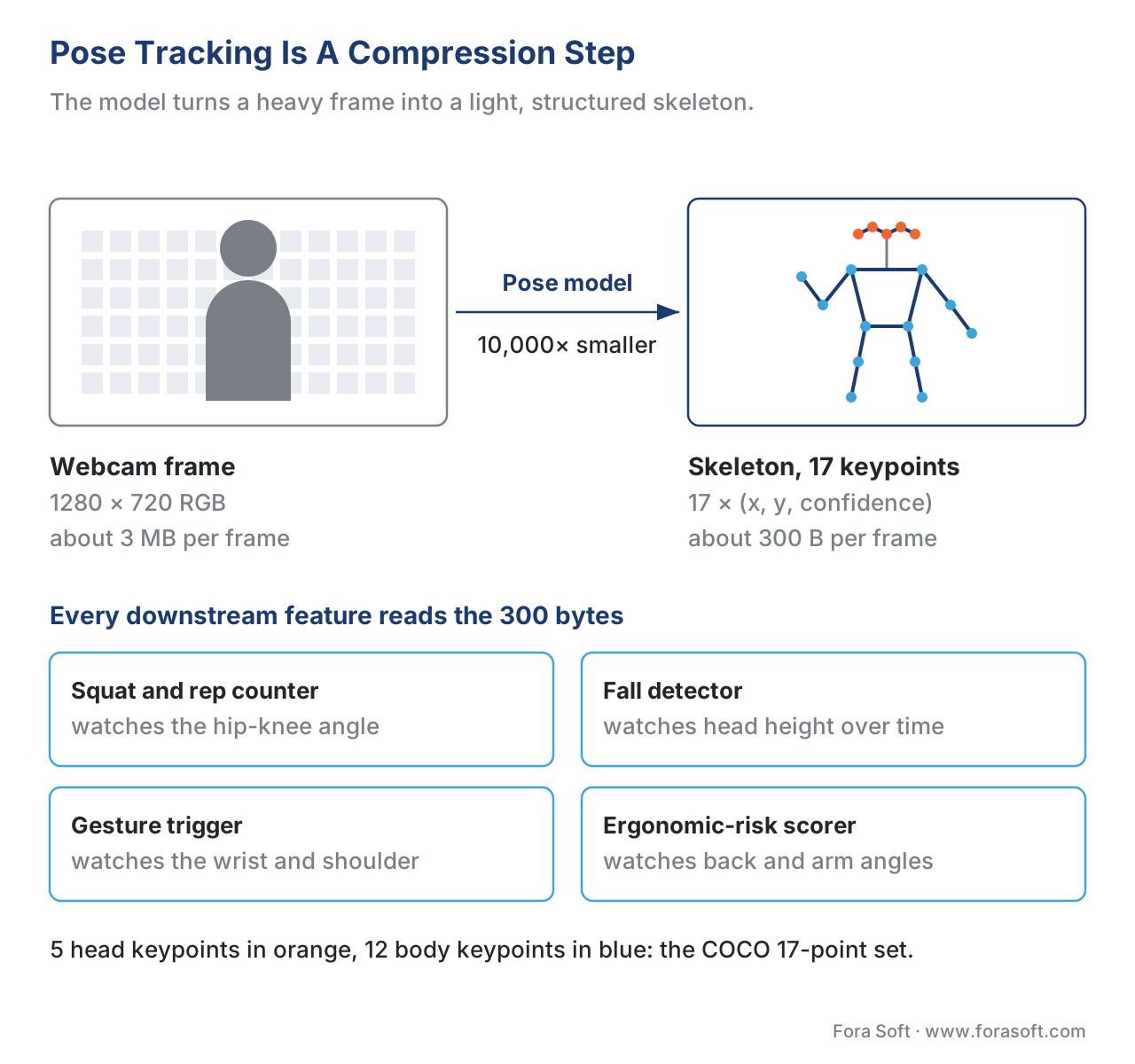 Figure 1. Pose tracking is a compression step. The model turns three megabytes of pixels into three hundred bytes of structured joint coordinates that downstream features can reason about cheaply.
The Four Families Of Pose Model In 2026
Almost every production deployment in 2026 picks one of four model families. We walk through them in chronological order, because each one solved a problem that the next one inherited.
OpenPose — the 2017 system that defined the vocabulary
OpenPose was published at CVPR 2017 by Zhe Cao and colleagues at Carnegie Mellon University. It was the first system that could find every person in a frame, label every joint, and connect the joints into separate skeletons even when the people overlapped — what the field calls multi-person bottom-up pose estimation. The system worked by first running a heatmap network that, for each joint type (18 in the COCO model, 25 in the later BODY_25 model), produced a per-pixel probability that the pixel was that joint, and then running a second network that, for each pair of joints, produced a per-pixel two-dimensional vector — a part affinity field — pointing from one joint to the next along the limb. The decoder then assembled the joints into skeletons by walking the part affinity fields.
OpenPose is the model that taught the field its vocabulary. Almost every paper since 2017 cites it. Its bottom-up design keeps runtime roughly flat as more people enter the frame, but its COCO accuracy sits well below the top-down models later in this article. The code is still public at github.com/CMU-Perceptual-Computing-Lab/openpose; treat it as a research reference, not as an actively developed product.
In 2026, the practical reason to know about OpenPose is twofold. First, it is the model that the academic literature compares everything else against — when a 2024 paper says "we beat OpenPose by 12 points", that is the baseline they mean. Second, the OpenPose license is non-commercial — Carnegie Mellon distributes the model under terms that prohibit commercial use without a separately negotiated license. This is the single most important compliance fact about OpenPose, and it is missed often enough that we have had to rebuild three pose features for clients who shipped OpenPose into their commercial products without a license. Do not ship OpenPose in a commercial product without a Carnegie Mellon licensing agreement. The README routes commercial requests through the university's technology-transfer office. Use any of the other three families instead: MediaPipe, RTMPose (MMPose) and ViTPose are all released under Apache 2.0.
MediaPipe Pose (BlazePose) — the mobile-first model that runs in the browser
MediaPipe Pose, also known as BlazePose, was published by Google Research in 2020. It was the first pose model designed for mobile from the first line of code — every architectural decision serves a single constraint: hit 30 frames per second on a Pixel-class phone. Where OpenPose runs a heavy heatmap network on the full frame, BlazePose runs a lightweight detector that first finds a single person, crops to that person's bounding box, and then runs a small regression network that emits thirty-three keypoints directly as (x, y, z, visibility) tuples. The two-stage design is the same pattern that the MediaPipe family uses for face detection and for hand tracking, and it scales gracefully from the Pixel 2 (above thirty frames per second on CPU) to the modern flagship (super-real-time on GPU).
BlazePose's thirty-three keypoint set extends the COCO seventeen by adding pinky, index and thumb points on each hand, heel and foot-index (toe) points on each foot, and extra eye and mouth points. The additional keypoints are what let MediaPipe Pose drive a fitness app — you can tell a half-squat from a full squat because the model can see the heel, and you can read wrist rotation from the hand points. For finger-level detail, pair it with MediaPipe Hands.
Google does not publish a COCO AP figure for the current Pose Landmarker. It ships three variants — lite, full and heavy — that share the 33-landmark output and trade speed for accuracy, and return each landmark both in image coordinates and in metric world coordinates. Accuracy sits below the GPU-class models but well above the threshold for production fitness, yoga, and gesture-recognition features. The model ships natively as a Tasks API in the @mediapipe/tasks-vision JavaScript package — the same package we recommended in the background-blur lesson — and runs in WebAssembly with a GPU delegate in modern browsers. WebGPU itself now ships by default in Chrome and Edge and, since Safari 26 (September 2025), in Safari on macOS, iOS and iPadOS — which matters when you run other models next to MediaPipe through ONNX Runtime Web.
In 2026, MediaPipe Pose is the default choice for any in-browser, in-app, or on-device feature. It is permissively licensed, it ships with first-party JavaScript bindings, and it does not need a server.
RTMPose — the OpenMMLab production workhorse
RTMPose was published in March 2023 by the OpenMMLab team at Shanghai AI Lab. The paper sets out to answer a single question: can a pose model reach state-of-the-art accuracy while running fast enough on a CPU to be deployed everywhere? The answer turned out to be yes, and the trick was to replace heatmaps with a different output representation. Where OpenPose and ViTPose emit a per-pixel heatmap per joint and then take the heatmap's argmax, RTMPose uses Simple Coordinate Classification (SimCC), which discretizes the image into two sets of one-dimensional bins — one for x, one for y — and asks the network to classify which bin each joint falls into. The output is then two soft probability distributions per joint, from which the decoder picks the highest-scoring bin on each axis; because the bins are finer than a pixel, the coordinates keep sub-pixel precision.
The change matters because heatmaps are expensive — a 256 × 192 input frame becomes a 64 × 48 heatmap per joint, about 52,000 floats for 17 joints that must be computed at high resolution and post-processed — while a SimCC output is two one-dimensional vectors per joint, under a thousand floats, produced by a light classification head. RTMPose-m, the medium variant, reaches 75.8 percent COCO average precision at 90+ frames per second on an Intel i7-11700 CPU and 430+ frames per second on an NVIDIA GTX 1660 Ti GPU. RTMPose-s, the small variant, hits 72.2 percent AP at 70+ frames per second on a Snapdragon 865 phone chip. The whole-body variant, RTMW, reaches 70.1 percent whole-body AP on COCO-WholeBody val with RTMW-l at 384 × 288 (December 2023 checkpoint), across 133 keypoints that include hands and face.
The numbers above are the reason RTMPose is the default choice in 2026 for any server-side or edge deployment that does not need a GPU. The model ships in the OpenMMLab MMPose framework under the Apache 2.0 license; the GitHub repository at github.com/open-mmlab/mmpose/tree/main/projects/rtmpose includes ONNX, TensorRT, and TorchScript exports. The same repository also ships a pretrained whole-body model (RTMW) and a three-dimensional model (RTMW3D).
RTMPose model variants — RTMPose-t, -s, -m, -l and -x compared
RTMPose comes in five sizes: t (tiny), s (small), m (medium), l (large) and x (extra-large); -m is the default, -s and -t are for phones and small edge boxes, -l and -x are for GPU servers that need every accuracy point. The figures below are from the official RTMPose model zoo (OpenMMLab, 2023): COCO val AP for the COCO + AI Challenger checkpoints, latency per person crop with ONNX Runtime on an Intel i7-11700 CPU, TensorRT FP16 on a GTX 1660 Ti, and ncnn FP16 on a Snapdragon 865.
| Variant (input) | COCO AP | Params | CPU latency | GPU latency | Phone latency |
|---|---|---|---|---|---|
| RTMPose-t (256 × 192) | 68.5 | 3.3 M | 3.2 ms | 1.1 ms | 9.0 ms |
| RTMPose-s (256 × 192) | 72.2 | 5.5 M | 4.5 ms | 1.4 ms | 13.9 ms |
| RTMPose-m (256 × 192) | 75.8 | 13.6 M | 11.1 ms | 2.3 ms | 26.4 ms |
| RTMPose-l (256 × 192) | 76.5 | 27.7 M | 18.9 ms | 3.5 ms | 45.4 ms |
| RTMPose-x (384 × 288, Body8 data) | 78.8 | 49.4 M | — | — | — |
Two rules keep the choice short. Latency is per person, so a frame with five people costs five crops — size for the crowd you expect, not for one subject. And moving from -m to -l buys only 0.7 AP for almost twice the CPU time, so on CPU we stay on -m and spend the budget on frame rate instead.
RTMPose-hand, whole-body and 3D
The same repository ships an RTMPose-m hand model (256 × 256, 21 keypoints per hand) that scores 81.5 PCK@0.2 on COCO-WholeBody-Hand and 96.4 on the combined Hand5 set, paired with an RTMDet-nano hand detector. For hands, face and body in one pass, RTMW returns 133 keypoints, and DWPose — a distilled RTMPose whole-body model — is what many ControlNet pose pipelines use. For 3D, RTMW3D (described in the RTMW paper, July 2024) lifts the whole-body keypoints from a single image; like every monocular 3D model, it is a UX signal, not a measurement instrument.
RTMPose licence and maintenance in 2026
RTMPose code and released checkpoints are Apache 2.0, so the RTMPose licence allows commercial use, modification and closed-source distribution with attribution; if your legal review also covers training data, the body checkpoints are trained on COCO and AI Challenger. The catch in 2026 is maintenance, not licensing: the last MMPose release on PyPI is 1.3.2 (July 2024), and the RTMPose model-zoo news ends with the December 2023 RTMW update. In production we export to ONNX or TensorRT once and serve with ONNX Runtime, TensorRT or the lightweight rtmlib wrapper, so the product never depends on the full MMPose / MMCV install.
ViTPose — the Vision Transformer baseline that crosses 80 points on COCO
ViTPose was published at NeurIPS 2022 by Yufei Xu and colleagues, with the ViTPose++ extension following in December 2022. The model is deliberately simple: take a plain Vision Transformer — the same architecture you would use for image classification — pretrain it with masked-autoencoder (MAE) training on ImageNet-1K, then attach a lightweight decoder that produces per-joint heatmaps. The architectural conservatism is the point: ViTPose set out to demonstrate that the structural priors of older convolutional pose models (multi-stage refinement, part affinity fields, dedicated heatmap heads) were not needed if the backbone was good enough.
It worked. ViTPose-H reaches 79.1 percent AP on COCO val; the largest model in the paper, ViTPose-G with a one-billion-parameter ViTAE-G backbone, reaches 80.9 percent AP on the MS COCO Keypoint test-dev set, and an ensemble reaches 81.1 percent, which was the state of the art at publication and remains one of the strongest commercially usable open baselines in 2026. Since Hugging Face Transformers v4.48 (January 2025), ViTPose and ViTPose++ load through the standard Transformers API, which removes most of the MMPose setup cost. The smaller variants are useful too: ViTPose-B reaches 75.8 AP and ViTPose-L 78.3 AP on COCO val. We covered the Vision Transformer architecture itself in the upcoming ViT primer lesson; the short version is that the transformer's global self-attention captures long-range body-part dependencies that CNN receptive fields miss, which is exactly the property pose estimation needs.
ViTPose is the right pick when you have a GPU and you need every accuracy point you can get — sports analytics, broadcast contribution, medical motion-capture systems. The model is heavier than RTMPose and would not fit a CPU budget, but it fits comfortably on a single A10- or L4-class GPU; benchmark your variant and typical person count before sizing the fleet.
Newer options worth knowing: RTMO, YOLO26-pose and Sapiens
Three newer names come up in 2026 model reviews. RTMO (CVPR 2024, OpenMMLab) is a one-stage model that finds people and keypoints in a single pass: RTMO-l reaches 74.8 AP on COCO val2017 at 141 FPS on one V100 GPU, and its cost does not grow with the number of people, which suits crowded scenes. YOLO26-pose (Ultralytics, January 2026) is the current YOLO pose family — YOLO26m-pose scores 68.8 mAP50-95 on COCO keypoints — but it ships under AGPL-3.0 unless you buy an Ultralytics Enterprise licence. Sapiens (Meta, 2024) predicts 308 keypoints at 1024 × 768 and is excellent for dense body and face detail, but its checkpoints are CC BY-NC 4.0 — the same non-commercial trap as OpenPose.
 Figure 2. The four pose model families occupy four corners of the accuracy-speed-deployment space. The right pick depends on where the model has to run, not on which one has the highest paper number.
The Pipeline — Detection, Pose, Tracking, Smoothing
A production pose system is more than one model. The full pipeline has four stages, each of which can be skipped or simplified depending on the use case.
The first stage is person detection. Most production pose models — MediaPipe, RTMPose, ViTPose — are top-down: they expect a cropped image of one person and they emit a skeleton inside that crop. Before they can run, something has to find the people. The detector is a lightweight object detector trained to find the person class only; in 2026 the default choice is RTMDet-tiny from the same OpenMMLab project, or a YOLO person detector (YOLO26 is the current Ultralytics generation, released January 2026 under AGPL-3.0 or an Enterprise licence) from the YOLO production lineage. The detector outputs one bounding box per person; the pose model runs once per box. (OpenPose is the only mainstream bottom-up exception — it finds all joints first and then assembles them into people, so it does not need a separate detector.)
The second stage is the pose model itself — one of the four families above. It takes a person crop and emits keypoints.
The third stage is tracking. A skeleton at frame 1 and a skeleton at frame 2 are unrelated objects unless something connects them — the multi-object tracker needs to assign the same track_id to the same person across frames so that downstream code can reason about a single trajectory. Modern systems use ByteTrack or OC-SORT, applied either to the person bounding boxes from stage 1 or to the keypoints directly. We cover the tracking algorithms in detail in the multi-object tracking lesson; for pose-specific use cases, ByteTrack on bounding boxes is the default.
The fourth stage is smoothing. Raw per-frame keypoint estimates jitter. The same wrist, held still, will move three or four pixels frame-to-frame because the model is sensitive to noise in the input. Jitter destroys downstream features — a squat counter that wants to detect a hip-knee angle crossing 90° will fire and unfire dozens of times in a single rep if the hip and knee bounce. Production systems apply a temporal filter — typically a One-Euro filter or a Kalman filter — to each keypoint independently. The One-Euro filter is the default because it tracks fast motion without lag while suppressing low-amplitude jitter; the official MediaPipe Pose pipeline applies its own landmark smoothing as the last step.
Skipping any of the four stages is allowed when the use case allows it. A browser-side fitness app that tracks one person on a yoga mat does not need stage 1 (the detector) because MediaPipe Pose already includes a person detector in its first-stage network, and does not need stage 3 (the tracker) because there is only one person. A surveillance system that watches a corridor needs all four. Match the pipeline to the deployment.
Numeric example — the cost of running pose on a 1280 × 720 video at 30 frames per second
Here is the math for a single 1280 × 720 stream at 30 frames per second on a modern Intel server CPU.
Detection (RTMDet-tiny, 320 × 320 input): about 6 milliseconds per frame. Pose (RTMPose-m, 256 × 192 input, one person): about 11 milliseconds per frame (11.06 ms with ONNX Runtime on an Intel i7-11700 in the RTMPose model zoo). Tracking (ByteTrack on bounding boxes): about 0.3 milliseconds per frame. Smoothing (One-Euro filter, 17 keypoints): about 0.05 milliseconds per frame.
Total per frame: 17.35 milliseconds.
Per second: 17.35 × 30 = 520.5 milliseconds of CPU time.
A single CPU core has 1000 milliseconds available per second, which means one stream uses about 52 percent of one core, leaving headroom for decoding and the rest of the application. We budget one vCPU per stream so the remaining half absorbs video decoding and load spikes; on that budget, sixteen streams fit a sixteen-vCPU server. The cost on a 2026 cloud instance (e.g., AWS c7i.4xlarge at sixteen vCPUs, $0.714/hour on demand in us-east-1 as of October 2026) is about $0.045 per stream-hour (roughly half that if you pack two streams per vCPU and accept less headroom). That number is the one that matters in the budget conversation — every other component of the pose feature (storage, downstream features, UI) is small compared to the model compute.
If you need more streams per server, the move is not to switch to a smaller model; it is to drop the pose frame rate. A squat counter does not need 30 frames per second of pose — 10 frames per second is enough, because the angular velocities involved are slow. Dropping from 30 to 10 fps cuts the cost by 3×.
Where To Run It — Browser, Edge, Or Server
The deployment topology decision dominates everything else, because where the model runs determines the cost, the latency, the privacy posture, and the offline behaviour of the feature. The same model can be deployed in three different places, with three very different trade-offs.
Browser deployment
The pose model runs inside the user's browser tab, in WebAssembly with WebGPU acceleration. MediaPipe Pose is the only model in the four families that is shipped with first-party browser support, via the @mediapipe/tasks-vision package; the others can be run in the browser via ONNX Runtime Web, but with worse tooling and more friction. Cost to you: zero — the user pays the compute. Latency: lowest possible, because the frame never leaves the device. Privacy: the frames never leave the device, which shrinks the GDPR surface area for fitness, yoga, and gesture-tracking apps. Trade-off: you are limited to whatever the user's hardware can do, you cannot use a model larger than about 30 megabytes (the practical limit for a page that has to load in a few seconds), and you cannot run multiple people on a budget device.
This is the default for fitness apps, yoga apps, gesture-controlled web games, and any browser-based telemedicine consultation that does not also do face recognition.
Edge deployment
The pose model runs on a small box near the camera — a NVIDIA Jetson Orin Nano, an Intel NUC, or a Raspberry Pi 5 with an NPU add-on. RTMPose is the default model here because RTMPose-s hits 70+ FPS on a Snapdragon 865 phone chip and exports cleanly to TensorRT for Jetson; the Jetson Orin Nano Super developer kit (67 TOPS, $249 at its December 2024 launch) is the usual starting box. Cost to you: the cost of the edge box, amortized over its life (typically 3 to 5 years). Latency: low (single-digit milliseconds, plus the LAN round-trip if a server is involved in the response). Privacy: frames stay on the local network, which is the right posture for surveillance, retail analytics, and industrial settings where the customer does not want to send raw video to the cloud. Trade-off: you have to ship and manage hardware, which is operationally heavier than a cloud-only deployment.
This is the default for AI security cameras, AI fall detection cameras in care homes, intelligent video analytics, retail in-store analytics, and industrial computer-vision deployments.
Server deployment
The pose model runs on a GPU or a CPU in your cloud account, fed by streams from the cameras. RTMPose is the default for CPU; ViTPose is the default for GPU. Cost to you: the cloud bill, scaling linearly with the number of streams. Latency: dominated by the network round-trip (typically 30 to 100 ms) plus the model time. Privacy: frames flow to your cloud, which means you operate them as personal data under the GDPR (for biometric-identifying use cases like gait recognition) or as ordinary personal data (for anonymous use cases like crowd counting). Under the EU AI Act, emotion recognition in workplaces and schools has been prohibited since February 2025, and remote biometric identification — which gait recognition can be — sits in the Annex III high-risk tier, whose obligations the Digital Omnibus (in force since 27 July 2026) moved from August 2026 to 2 December 2027. Trade-off: full operational flexibility, but you pay for every minute of every stream.
This is the default for sports analytics platforms, broadcast contribution, batch processing of recorded footage, and any feature that needs the largest models.
The choice between the three is rarely close. The use case picks the topology, and the topology picks the model.
| Topology | Default model | Cost owner | Privacy posture | Latency budget |
|---|---|---|---|---|
| Browser | MediaPipe Pose | User's device | Frames stay on device | 16 ms (60 FPS budget) |
| Edge | RTMPose-m / -s | One-time hardware | Frames stay on LAN | 50 ms (round-trip + model) |
| Server | RTMPose-m (CPU) / ViTPose-L (GPU) | Cloud bill per stream | Frames travel to cloud | 100 ms (RTT + model) |
We treat that table as the first thing a project picks. Everything else — model variant, batch size, frame rate — is a refinement on top.
 Figure 3. The same pose model can ship into three different deployment topologies. The topology picks the model, not the other way around.
Four Production Pitfalls That Sink Pose Features
We have shipped a lot of pose features into video products at Fora Soft. Four failure modes show up over and over again. They are not technical novelties — they are well-known traps that every production team rediscovers — but every team rediscovers them by going through the same painful debugging cycle. Here they are.
The first pitfall is shipping OpenPose into a commercial product without the Carnegie Mellon license. OpenPose is the model most teams learned pose on, because it is the one every tutorial uses, and the GitHub repository's README does not put the non-commercial clause at the top of the page. We have rebuilt three pose features for clients who discovered the clause during a due-diligence audit eighteen months after launch. Default to MediaPipe Pose, RTMPose, or ViTPose for any commercial deployment. Those three are free for commercial use, so there is nothing to trade away. Run the same check on two newer names: Ultralytics YOLO26-pose is AGPL-3.0 (which obliges you to publish your own source code if you distribute or serve the product) unless you buy an Enterprise licence, and Meta's Sapiens pose checkpoints are CC BY-NC 4.0.
The second pitfall is forgetting to smooth. Raw per-frame keypoint output jitters at three to four pixels even when the subject is still. Downstream features that involve threshold crossings — a squat counter that watches the hip-knee angle, a fall detector that watches the head height, a "hand raised" trigger that watches the wrist position — fire spuriously dozens of times per second on raw output. The fix is one One-Euro filter per keypoint, applied as the last step of the pipeline. It is fifteen lines of code and it transforms every downstream metric.
The third pitfall is running the model on every frame instead of every fourth frame. Most pose-driven features do not need 30 frames per second of pose. A squat counter, a fall detector, a posture-correction reminder, a hand-raise trigger — all of them work fine at 7 to 10 frames per second. Running the model on every fourth frame and interpolating the skeleton between frames cuts the compute by 75 percent with no perceptible drop in feature quality. Teams ship at 30 fps because that is the camera's native rate, and then watch their cloud bill scale linearly with no benefit.
The fourth pitfall is assuming three-dimensional keypoints from a single camera are accurate enough to do clinical-grade measurements. They are not. The three-dimensional coordinate that MediaPipe Pose or RTMW3D emits is a monocular depth estimate — the model is guessing how far each joint sticks out toward or away from the camera, based on patterns it learned in training. The estimate is accurate enough to grade a squat or a yoga pose, where the joint depth has to be roughly correct. It is not accurate enough to measure a shoulder abduction angle for a physiotherapy report. If you need clinical-grade three-dimensional measurements, you need a multi-camera rig (typically two to four synchronized cameras) and a triangulation pipeline. The single-camera monocular estimate is a good user-experience feature, not a measurement instrument.
 Figure 4. The four pitfalls that sink pose-tracking deployments. None of them is technically new; all of them are still rediscovered by every team.
Picking The Right Model — A Decision Walkthrough
Here is the decision tree we use at Fora Soft when a project asks for a pose feature. It runs in five questions.
The first question is: is this a commercial product? If yes, do not use OpenPose or Sapiens — their non-commercial licences foreclose them — and clear the AGPL-3.0 terms before you ship YOLO26-pose. Move to one of the other three families.
The second question is: where does the model run? If the answer is "in the browser, on the user's device, for a fitness or yoga or gesture-control feature", the answer is MediaPipe Pose. The first-party JavaScript bindings, the 33-keypoint output, and the WebGPU acceleration make it the only sensible choice for the browser case in 2026. If the answer is "on a small box near the camera, for surveillance or retail or industrial computer vision", the answer is RTMPose-m or RTMPose-s on the Jetson Orin Nano or equivalent. If the answer is "on a server in our cloud, batch or streaming", continue to question three.
The third question is: how many concurrent streams? If the answer is "more than ten per server", RTMPose-m on CPU is the right pick — about 11 ms per person crop on a desktop CPU means a 16-vCPU server handles about sixteen single-person streams at 30 fps, and three times that at 10 fps. If the answer is "fewer than ten per server, but every accuracy point matters", ViTPose-L on a single GPU is the right pick.
The fourth question is: do you need whole-body keypoints? If the downstream feature uses hand fingers (sign-language translation), dense facial landmarks (subtle emotion or attention features), or the full 133-point output, RTMW (RTMPose Whole-body) is the default. If the downstream feature uses only the COCO 17 or the BlazePose 33 (squat counting, fall detection, gesture triggers), do not pay for the bigger model.
The fifth question is: do you need real three-dimensional measurements? If yes, you need a multi-camera triangulation rig, not a single-camera model. If "approximately three-dimensional, for UX feedback" is enough, MediaPipe Pose's 3D mode or RTMW3D is fine.
That decision tree picks the model in about ninety seconds. The rest of the engineering — the detector pick, the tracker pick, the smoothing-filter pick — is downstream of those five answers.
Frequently Asked Questions
What is RTMPose?
RTMPose is a real-time, top-down human pose estimation model released by OpenMMLab in March 2023 as part of MMPose. It predicts keypoints with SimCC coordinate classification instead of heatmaps, which is why RTMPose-m reaches 75.8 COCO AP at about 11 ms per person on a desktop CPU.
RTMPose vs MediaPipe: which is better?
MediaPipe Pose is better for in-browser and on-phone features where video must stay on the device; RTMPose is better for CPU servers and edge boxes processing many camera streams, for 133-keypoint whole-body output, and for fine-tuning on your own data. Both are Apache 2.0.
OpenPose vs MediaPipe: which should I use?
Use MediaPipe Pose for any product: it is faster, runs in the browser and is Apache 2.0. Use OpenPose only for non-commercial research or to reproduce papers that use it as a baseline.
What is the difference between RTMPose-t, -s, -m, -l and -x?
They are five sizes of the same model: RTMPose-t (68.5 AP, 3.2 ms on CPU), -s (72.2 AP, 4.5 ms), -m (75.8 AP, 11.1 ms), -l (76.5 AP, 18.9 ms) and -x (78.8 AP at 384 × 288, no CPU latency published), per the 2023 model zoo. Start with -m on CPU, -s or -t on phones.
Is RTMPose free for commercial use?
Yes. RTMPose and MMPose are released under the Apache 2.0 licence, which allows commercial use and closed-source products with attribution. OpenPose (non-commercial) and Sapiens (CC BY-NC 4.0) do not allow it, and YOLO26-pose needs an Enterprise licence unless you accept AGPL-3.0.
Does RTMPose support hand and 3D pose?
Yes. RTMPose-m hand predicts 21 keypoints per hand (81.5 PCK@0.2 on COCO-WholeBody-Hand), RTMW predicts 133 whole-body keypoints, and RTMW3D estimates 3D whole-body keypoints from a single image.
What are the best OpenPose alternatives in 2026?
RTMPose for CPU and edge, MediaPipe Pose for browser and mobile, and ViTPose for GPU accuracy — all Apache 2.0. RTMO is the strongest open one-stage option for crowded scenes.
Is MMPose better than MediaPipe?
They solve different problems: MMPose is a training and research toolbox that contains RTMPose, ViTPose and RTMO, while MediaPipe is a deployment SDK with ready on-device models. Teams often train or fine-tune in MMPose and serve the exported ONNX model.
Can MediaPipe do skeleton tracking for several people?
Yes. MediaPipe skeleton tracking returns 33 landmarks per person, and the Pose Landmarker's num_poses setting tracks more than one person, but accuracy drops in crowds, where a detector plus RTMPose pose estimation pipeline holds up better.
Free download: Pose-Tracking Model Decision WorksheetOne printable page with the five-question decision tree, the deployment-topology table (browser, edge, server, with default model and cost owner) and the four-pitfall checklist. Use it at project kickoff to pick the pose model, the topology and the pipeline shape.Where Fora Soft Fits In
We have shipped pose features into half a dozen product categories at Fora Soft. The patterns we use are the ones in this article. In video conferencing, we use MediaPipe Pose for browser-side gesture triggers — hand raises, wave-to-acknowledge — that do not need to know who the person is. In e-learning, we use MediaPipe Pose for dance and yoga lessons, where the model runs entirely in the student's tab. In telemedicine, we use RTMPose on the server for range-of-motion measurements inside the AI telehealth video platforms we build, with a multi-camera rig when the consultation needs clinical-grade three-dimensional data. In OTT and broadcast contribution, we use ViTPose for sports analytics — broadcasters who want to overlay pose data on top of athlete footage have the GPU budget and the accuracy requirement. In surveillance and industrial computer vision, we use RTMPose on Jetson edge boxes for fall detection, fight detection, and ergonomic-risk scoring. The model choice is always downstream of the deployment topology and the use-case; the architecture decisions described in this article are the ones we make at every project kickoff. If you are adding pose features now, our computer vision development services cover model choice and edge deployment, and our AI video recognition engineers build the tracking and event-detection layer on top.

The book
AI for Video: A Complete Guide to Intelligence in Video Products: From Models and Inference to Computer Vision, Speech, Search, and Generative Video
Pose sits in the computer-vision half of volume 6 of the Fora Soft Video Engineering Handbook, between the detector that finds the person and the tracker that keeps their ID: the same four stages as the pipeline above, plus the model artifacts and deployment topologies that decide whether RTMPose runs in a browser tab, on a Jetson at the camera or on a CPU pool at $0.045 per stream-hour. Volume 7 takes those models into real-time and regulated verticals — fitness, telemedicine, surveillance — where the licence and the clinical-accuracy questions from this lesson get answered for good. The seven volumes together walk the whole video stack from the pixel to the production deployment, so the reader who works through them can design and build a pose feature end to end. Written by Nikolay Sapunov, CEO at Fora Soft.
Which pose model, and where should it run in your product?
Tell us what the feature has to measure, how many people are in frame, and whether video may leave the device, and we will tell you whether MediaPipe Pose in the browser, RTMPose on an edge box or ViTPose on a GPU fits, what it costs per stream-hour, and which licence you would be signing. 250+ video products shipped since 2005.
See our case studies
Case study
Perspire.tv
A live fitness streaming platform on LiveKit and WebRTC where certified trainers run yoga, HIIT, dance and 1:1 sessions and keep 80% of revenue — the browser-first product where MediaPipe Pose runs in the viewer's tab and no frame leaves the device.
Case study
Mindbox
An AI video management system with 50+ deployments since 2020 that raises intrusion, crowd and fire alerts and triggers recording on the event — the edge-topology pattern from this article, where only events, not raw video, leave the site.
Case study
CirrusMed
A HIPAA-compliant, browser-based telemedicine platform licensed in 48+ US states with 20+ physicians on unlimited video visits — the setting where a range-of-motion check has to be honest about what one webcam can and cannot measure.
What to read next
Detection
YOLO production lineage — v8, v9, v10, v11, v12
The person detector that feeds every top-down pose model.
Browser CV
MediaPipe selfie segmentation with WebGPU
The same Tasks API and WebGPU path, measured frame by frame in the browser.
Deployment
Latency, deployment topology and real-time vs batch
The browser-edge-server framework this article applies to pose.
Fitness
Fitness app development — the AI engineering playbook
Where rep counting and form feedback sit in a full fitness product.
References
- Cao, Z., Hidalgo, G., Simon, T., Wei, S.-E., Sheikh, Y. OpenPose: Realtime Multi-Person 2D Pose Estimation Using Part Affinity Fields. IEEE TPAMI, 2019. arXiv:1812.08008. The original OpenPose paper. The license file at
github.com/CMU-Perceptual-Computing-Lab/openpose/blob/master/LICENSEis the authoritative source for the non-commercial clause. - Bazarevsky, V., Grishchenko, I., Raveendran, K., Zhu, T., Zhang, F., Grundmann, M. BlazePose: On-device Real-time Body Pose tracking. arXiv:2006.10204, 2020. The original BlazePose paper from Google Research.
- Google AI Edge. MediaPipe Pose Landmarker — model card and Tasks API documentation.
developers.google.com/edge/mediapipe/solutions/vision/pose_landmarker, accessed 2026-10-11. The first-party documentation for the JavaScript Tasks API used in browser deployments. - Jiang, T., Lu, P., Zhang, L., et al. RTMPose: Real-Time Multi-Person Pose Estimation based on MMPose. arXiv:2303.07399, 2023. The RTMPose paper with the COCO and CPU benchmark numbers cited in this article.
- OpenMMLab. MMPose 1.x — RTMPose project README and model zoo.
github.com/open-mmlab/mmpose/tree/main/projects/rtmpose, accessed 2026-10-11. Source of the RTMPose-t to -x model-zoo table; MMPose 1.3.2 on PyPI (July 2024) is the latest release. The maintained source of the ONNX, TensorRT, and TorchScript exports cited in the deployment section. - Jiang, T., Xu, X., et al. RTMW: Real-Time Multi-Person 2D and 3D Whole-body Pose Estimation. arXiv:2407.08634, 2024. The RTMPose whole-body and 3D variants.
- Xu, Y., Zhang, J., Zhang, Q., Tao, D. ViTPose: Simple Vision Transformer Baselines for Human Pose Estimation. NeurIPS 2022. arXiv:2204.12484. The ViTPose paper with the 79.1 (ViTPose-H, val) and 80.9 (ViTPose-G, test-dev) COCO numbers.
- Xu, Y., Zhang, J., Zhang, Q., Tao, D. ViTPose++: Vision Transformer for Generic Body Pose Estimation. arXiv:2212.04246, 2022. The ViTPose++ extension covering multi-task pose.
- Lin, T.-Y., Maire, M., Belongie, S., et al. Microsoft COCO: Common Objects in Context. ECCV 2014. The keypoint annotation extension defines the 17-keypoint standard the field uses as a benchmark.
- Zhang, F., Bazarevsky, V., Vakunov, A., et al. MediaPipe Hands — On-device real-time hand tracking. arXiv:2006.10214, 2020. Background on the two-stage detect-then-track pattern that MediaPipe Pose inherits.
- Casiez, G., Roussel, N., Vogel, D. 1€ Filter — A Simple Speed-based Low-pass Filter for Noisy Input in Interactive Systems. CHI 2012. The One-Euro filter used as the smoothing default in stage 4 of the pipeline.
- Zhang, Y., Sun, P., Jiang, Y., et al. ByteTrack: Multi-Object Tracking by Associating Every Detection Box. ECCV 2022. The default tracker for multi-person pose pipelines.
- Lu, P., Jiang, T., Li, Y., et al. RTMO: Towards High-Performance One-Stage Real-Time Multi-Person Pose Estimation. CVPR 2024. arXiv:2312.07526. Source of the 74.8 AP / 141 FPS figures.
- Ultralytics. Pose estimation — YOLO26-pose models and licensing (AGPL-3.0 or Enterprise). docs.ultralytics.com/tasks/pose, accessed 2026-10-11. YOLO26 launched 14 January 2026.
- Khirodkar, R., et al. Sapiens: Foundation for Human Vision Models. arXiv:2408.12569, 2024. Checkpoints on Hugging Face (facebook/sapiens-pose-*) under CC BY-NC 4.0.
- Hugging Face. ViTPose model documentation, Transformers v4.48 and later. huggingface.co/docs/transformers/model_doc/vitpose, accessed 2026-10-11.
- WebKit. WebKit Features in Safari 26.0 — WebGPU shipping on macOS, iOS, iPadOS and visionOS. webkit.org, September 2025.
- Regulation amending Regulation (EU) 2024/1689 (Digital Omnibus on AI), in force 27 July 2026: Annex III high-risk obligations apply from 2 December 2027.
