


Why This Matters
If your product is heading toward an on-screen assistant — a multilingual support agent with a face, a telemedicine intake greeter, a language tutor that watches and reacts, an AI receptionist on a kiosk — you are about to make a real-time-video decision, not a content decision. The slick demo you saw hides three hard systems working in concert under a deadline measured in milliseconds, and getting any one of them wrong makes the whole thing feel broken. This article is for the product manager, founder, or engineering lead who needs to scope that feature, set a sane latency and cost budget, choose a vendor or an open-source stack, and talk to both engineers and lawyers without drowning in either's vocabulary. It deliberately does not re-explain how the underlying face models work — the talking-head and avatar model deep-dive does that. This one is about putting that model inside a live call and making it feel human.
What "Real-Time Avatar In A Call" Actually Means
Start with the words, because "avatar" hides two different jobs and the difference decides everything that follows.
The first job is offline avatar video: you type a script, a service renders a talking person, and minutes later you download an MP4. There is no live person on the other end and no clock running. The second job — the subject of this article — is a real-time, interactive avatar: a synthetic person who is in a conversation right now, hearing a human speak, deciding what to say, and answering on camera fast enough to feel like a call rather than a slideshow. The difference is the difference between recording a voicemail and answering the phone. Everything hard about this topic comes from the phone being live.
Inside that live job there are, again, two technical sub-jobs, and the model deep-dive covers both in detail. Lip-sync edits the mouth on existing footage so it matches new words — the rest of the face is real video. Avatar generation invents an entire speaking person, usually from a single photo, so the whole head, eyes, and expressions are synthetic. In a live call you can use either, but the constraint is identical: each new chunk of speech must be turned into matching mouth movement and pushed on screen before the listener notices the lag. We will treat both under one banner — audio-driven video, generated on the fly — because the real-time plumbing around them is the same.
The Conversational Loop: Five Stages Racing A Clock
An interactive avatar is not one model; it is a relay race of five stages, and the baton is the user's voice. Picture the loop as a circle that has to close in well under a second.
First, automatic speech recognition (ASR) — software that turns the microphone's audio into text — listens and figures out when the person has stopped talking. Second, a large language model (LLM), the text-prediction engine behind chat assistants, reads what was said and starts composing a reply. Third, text-to-speech (TTS) turns that reply back into spoken audio. Fourth, the avatar synthesizer takes that audio and paints a face saying it, frame by frame. Fifth, WebRTC — the browser's built-in real-time video transport, the same one every video call uses — carries the finished audio and video to the viewer's screen. Then the human replies and the baton comes back around.
The reason this is hard is that the stages are sequential: the avatar cannot draw a mouth for a word the TTS has not produced, and the TTS cannot speak a sentence the LLM has not written. Latency adds up along the chain. We explore the full real-time budget in the sub-100ms latency lesson; here we only need the headline: each stage spends time, and the sum is what the user feels.
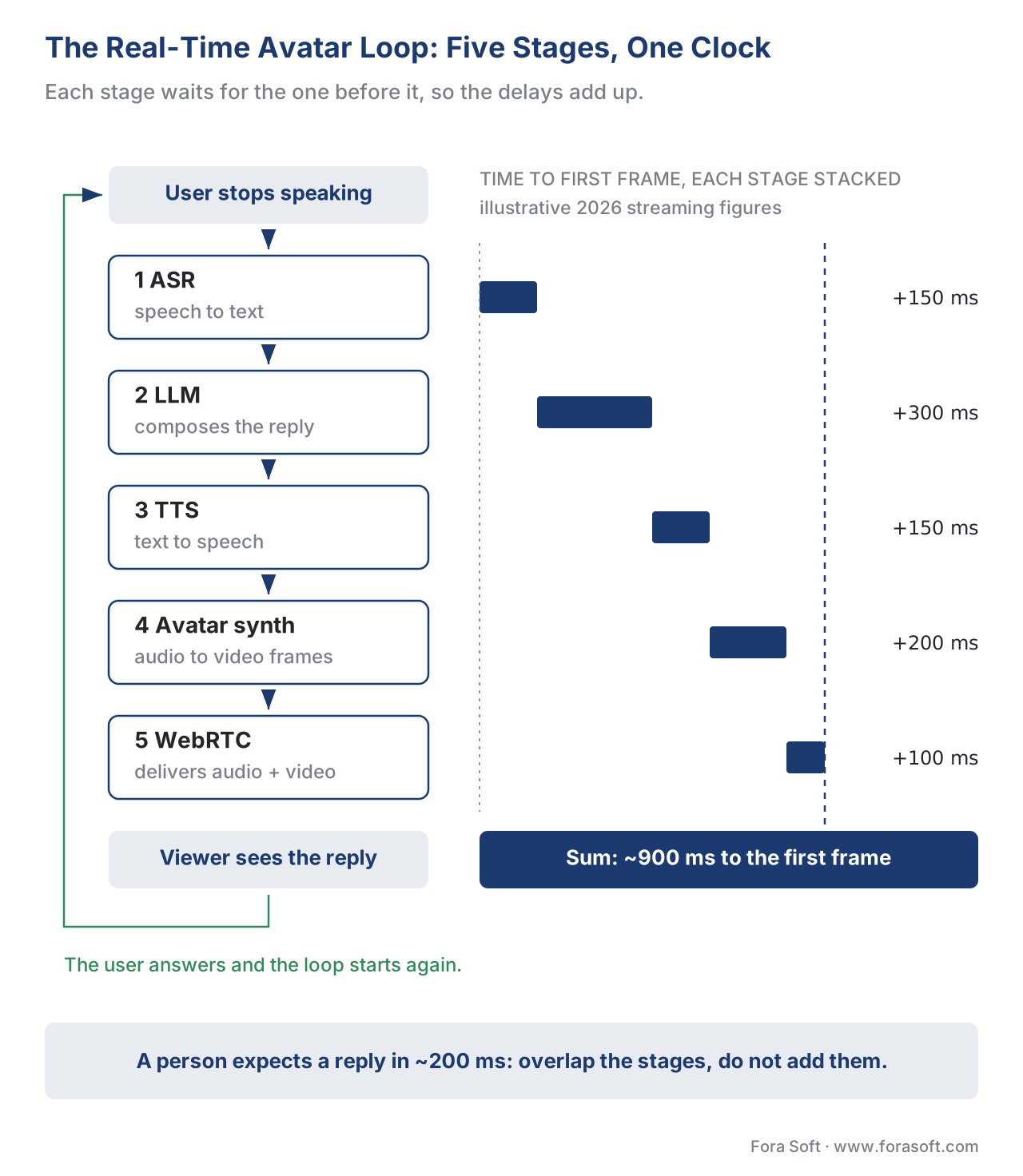 Figure 1. A real-time avatar is a five-stage relay — ASR, LLM, TTS, avatar synthesis, WebRTC — and the conversation only feels human if the whole loop closes in roughly a fifth of a second of perceived gap.
The One Number: Turn-Taking Latency
Every other decision in this article points back to a single human fact. When two people talk, the silence between one finishing and the other starting is about 200 milliseconds — a fifth of a second. We do not consciously measure it, but we feel it the instant it stretches. A gap of a full second already reads as hesitation; a gap of two seconds reads as a broken connection or a slow-witted machine. Researchers studying spoken avatar systems call the danger zone the "uncanny valley of conversation": the avatar looks human enough to set the expectation of human timing, then answers with robot timing, and the mismatch is more unsettling than an obviously artificial voice would be.
So the target is not "fast". The target is: the perceived gap between the user finishing and the avatar visibly starting to respond should sit near 200 ms and must stay under roughly 1.5 seconds. That single requirement is the lens for the whole build. It tells you that you cannot run the five stages naively end to end and wait for each to finish before starting the next — you have to stream through them, starting the LLM before ASR is fully done, starting TTS on the first clause, and starting the avatar's mouth on the first audio chunk.
Let us make the budget concrete with arithmetic, using realistic 2026 streaming figures for each stage. Add the time each stage needs before the first frame of response can appear:
ASR endpointing (detect the user stopped)   ~150 ms
LLM time to first token                      ~300 ms
TTS time to first audio chunk                ~150 ms
Avatar synth time to first video frame       ~200 ms
WebRTC transport + jitter buffer             ~100 ms
-----------------------------------------------------
Total time-to-first-frame                    ~900 ms
Nine hundred milliseconds is already past the comfortable mark, and that is with every stage behaving. This is why production systems overlap the stages instead of summing them, and why the avatar's "first frame" is often a small, natural listening movement that buys cover while the spoken answer is still being generated. The number you optimize is not the sum of the stages; it is the gap the human perceives before something believable happens on screen.
The Architecture That Wins: The Avatar Joins The Call
Here is the design decision that separates a smooth avatar from a laggy one, and most teams meet it the hard way. The naive way to build this is intuitive and wrong.
The naive pipeline treats the avatar service as a remote function. Your agent captures its own spoken audio, sends it over a WebSocket — a long-lived two-way web connection — to a GPU server, waits for that server to render and return finished video frames, then re-publishes those frames over WebRTC to the user. The problem is the round trip. You wait for the video to come back before you can send it on, and the returned video has to be encoded for the network, decoded by your agent, then re-encoded for WebRTC. Each encode and decode is a video codec doing real work, and each adds delay and softens quality. You have built a relay that runs the most expensive leg twice.
The architecture that wins in 2026 removes the round trip entirely: the avatar generation server joins the call as its own participant. Your conversational agent sends only its audio output to that participant over a fast data path — LiveKit, for example, uses a byte-stream channel for this. The avatar server renders the face from that audio and publishes the finished, synchronized audio and video directly into the room, where it reaches the user the same way any other participant's camera does. There is no return trip to your agent and no double encoding. This is precisely how LiveKit documents its avatar integrations with Tavus, HeyGen, Simli, bitHuman, and others, and it is the pattern to copy whether you buy or build.
Two real-time problems fall out of that design, and the same room handles both. Interruptions: when the user starts talking over the avatar, the agent must tell the avatar server to stop mid-sentence, throw away the frames it had already prepared, and switch to a listening pose. Production stacks do this with a remote-procedure call — a message that lets one participant trigger a function on another — so the "stop now" signal travels in milliseconds. Playback tracking: the agent needs to know when the avatar has actually finished speaking a line, so it can decide the turn is over and commit what was said to the conversation's memory; the avatar server signals completion back over the same channel. Get interruptions wrong and the avatar talks over people, which is the single fastest way to make it feel rude and fake.
 Figure 2. The naive pipeline streams the avatar's video back through your agent and pays the encoding cost twice. The winning pattern lets the avatar renderer join the call as a participant and publish video straight into the room.
Buy An API Or Self-Host: The Real Trade
With the loop and the architecture clear, the practical question is whether to buy a managed avatar API or run an open-source model on your own graphics processing units (GPUs) — the specialized chips that do the rendering. The honest answer depends on three things: how low your latency must go, how much control you need over the face, and how much per-minute cost you can carry at scale.
The managed providers hide the GPUs, the model, and most of the real-time plumbing behind a few lines of code. Tavus sits at the low-latency end; its Phoenix-4 model, released in early 2026, advertises sub-600-millisecond end-to-end response over WebRTC and "full-duplex" behaviour, meaning it can listen and speak at the same time rather than taking strict turns. HeyGen's interactive product, marketed as LiveAvatar, streams a lifelike avatar over WebRTC with natural lip-sync and gestures, typically in the one-to-two-second range. Simli and bitHuman focus on the developer-integration angle, plugging into agent frameworks like Pipecat and LiveKit; bitHuman can run locally or in the cloud. NVIDIA ACE is the self-managed heavyweight: you run it on your own NVIDIA hardware, and once the model is warm it lands roughly in the 800-millisecond-to-1.2-second band.
The open-source path is real and getting stronger. MuseTalk, released under the permissive MIT license, does real-time lip-sync by inpainting the mouth region in a model's latent space and reaches thirty frames per second on a single data-center GPU. LivePortrait animates a still portrait with expressions, and people combine the two for a full talking head. Self-hosting means no per-minute fee and full control of the face and data — which matters for healthcare and any regulated vertical — but you now own the GPU bill, the autoscaling, the warm-start problem, and the real-time integration that the managed providers throw in for free. The model ladder itself, from Wav2Lip up through diffusion faces, is laid out in the avatar model deep-dive.
| Option | Hosting | First-frame latency (2026) | Face control | Cost shape | Real-time integration |
|---|---|---|---|---|---|
| Tavus (Phoenix-4) | Managed cloud | Sub-600 ms, full-duplex | Pick/clone a replica | Usage-based per streamed minute | Built in (LiveKit, Pipecat) |
| HeyGen LiveAvatar | Managed cloud | ~1–2 s | Large avatar library | Usage-based, priced separately from video API | Built in (WebRTC) |
| Simli / bitHuman | Managed or local | ~1 s | Developer-focused | Usage-based; bitHuman local option | Built in (Pipecat, LiveKit) |
| NVIDIA ACE | Self-managed (NVIDIA GPU) | ~0.8–1.2 s warm | High | Your GPU + ops cost | You build it |
| MuseTalk + LivePortrait | Self-hosted (open source, MIT) | Tuneable; 30 fps on one GPU | Full | GPU + ops only, no per-minute fee | You build it |
Latency and pricing figures are 2026 vendor-published or model-card claims and move quickly; re-verify against the provider before committing. See References.
A useful rule of thumb: if your product is a focused conversational assistant and you want it live this quarter, buy the API and route its audio through a framework that already has avatar plugins. If your differentiator is the face — a proprietary spokesperson, an on-device avatar, a strict data-residency requirement — or if your per-minute volume is large enough that a usage fee dwarfs a GPU lease, self-hosting starts to pay for itself.
 Figure 3. Three questions settle the build-versus-buy decision: time-to-ship, how much control you need over the face, and whether your streaming volume makes a per-minute fee more expensive than owning GPUs.
Whichever path you pick, plot it against the human limits before you commit. The chart below places the 2026 first-frame latency of each option next to the two numbers that decide whether the avatar feels alive: the ~200 ms a person expects, and the ~1.5 s past which the face reads as a robot. Only the fastest option clears the comfortable zone with room to spare; the rest survive on the streaming and overlap tricks described above.
 Figure 4. First-frame latency by option against the two thresholds that matter — the ~200 ms a person expects and the ~1.5 s past which timing reads as robotic. Figures are 2026 vendor claims, not independent benchmarks.
A Common Pitfall: Shipping The Face Without The Label
Here is the mistake that turns a finished feature into a legal liability, and it has nothing to do with code quality. Many teams build a beautiful real-time avatar and forget that, in much of the world, a synthetic human face talking to a real person now triggers a disclosure obligation.
In the European Union, the AI Act — the bloc's comprehensive AI law — includes Article 50, which governs transparency. Its rules for "deepfakes" cover exactly what a real-time avatar is: AI-generated or AI-manipulated image, audio, or video of a person. Article 50 requires that the people interacting with such a system be told the content is artificially generated, and that the system's outputs be marked in a machine-readable way so other software can detect them. The transparency obligations under Article 50 become enforceable on 2 August 2026, and the European Commission's accompanying code of practice for labelling has been moving through draft during 2026. For a live avatar, the expected practice is a persistent on-screen indicator plus an opening disclosure — the user should know from the first moment that the friendly face is software.
The fix is cheap if you plan for it and expensive if you bolt it on. Decide your disclosure up front: a small persistent "AI" label on the video tile, a one-line spoken or written introduction, and, where your stack supports it, content credentials embedded in the stream. This is the same disclosure-and-provenance engineering covered for generated video in the C2PA and EU AI Act disclosure lesson, and it pairs with the consent rules for cloning a real person's voice or face discussed in the voice-cloning and consent lesson. Treat the label as a product requirement, not an afterthought, and you ship in Europe without a scramble. We have packaged the full set of checks into the downloadable real-time avatar launch checklist at the end of this article.
Voice, Translation, And The Rest Of The Pipeline
The avatar is the visible half; the audio half is where most of the realism actually comes from, and it reuses parts you may already have. The spoken reply is produced by streaming text-to-speech, and the choice between providers — latency, voice quality, languages — is its own subject, covered in the streaming TTS lesson. The listening half is streaming ASR, covered in the streaming ASR lesson.
A growing pattern collapses three of the five stages into one. Speech-to-speech models take the user's audio and produce the reply's audio directly, skipping the separate text steps, which shaves latency and preserves tone; we cover them in the speech-to-speech lesson. Feed that single model's audio output into the avatar and you have a tighter loop. The avatar also unlocks one of the most commercially interesting use cases in video: a presenter who speaks the viewer's language, by pairing live translation with a synthetic mouth that matches the translated words — the in-call translation mechanics live in the real-time translation lesson.
Free download: Real-Time Avatar Launch ChecklistOne-page engineering reference: the five-stage loop, the ~200 ms turn-taking target against the ~900 ms first-frame budget, the join-the-room architecture with RPC interrupts, the buy-vs-build call, and the EU AI Act Article 50 disclosure checks.Where Fora Soft Fits In
Fora Soft has built real-time video systems since 2005, and a real-time avatar is, underneath the novelty, a WebRTC integration problem of the kind we ship constantly. In video conferencing we have wired AI participants into live rooms; in telemedicine we have built intake and assistant flows where latency and privacy are not negotiable; in e-learning we have produced presenter-driven experiences where an on-screen face carries the lesson. The avatar pattern in this article — a synthetic participant publishing audio and video into a room, with interruption handling and disclosure built in — sits squarely in that experience. When teams come to us with a slick avatar demo and ask "can this be real and fast and legal," the answer usually starts with the architecture in Figure 2. Our AI video agent development team builds avatar participants with lip-sync and interruption handling, and our LiveKit AI agent work publishes them into WebRTC rooms with sub-500ms turn-taking.

The book
AI for Video: A Complete Guide to Intelligence in Video Products
Volume 7 of the Fora Soft Video Engineering Handbook is where this avatar lives: the latency budget of a call and where AI plugs into a WebRTC pipeline, streaming ASR, TTS and speech-to-speech, the cost of GPU serving per stream-hour, and the EU AI Act Article 50 duties for a synthetic face. Volume 6 covers the lip-sync and talking-head models themselves. Written by Nikolay Sapunov, CEO at Fora Soft.
Planning an on-screen assistant that has to answer in under a second?
Tell us the use case and the call stack you run today, and we will scope it with you: buy an avatar API or self-host MuseTalk, the first-frame latency budget per stage, the join-the-room wiring with interrupt handling, the GPU cost per streamed minute, and the Article 50 disclosure. 250+ video products shipped since 2005.
See our case studies
Case study
TransLinguist
Interpretation inside live calls on a mediasoup SFU: AI speech-to-speech translation in 16+ languages and captions in 22, built from the same ASR and TTS stages that drive an avatar's voice.
Case study
Meetric
AI sales video platform that analyses the customer and the speaker in real time during the call and writes the report afterwards — an AI working inside a live room, not on a recording.
Case study
CirrusMed
HIPAA-compliant WebRTC telemedicine, licensed in 48+ US states — the privacy and latency bar an intake greeter avatar has to clear in healthcare.
What to read next
Avatars
Lip-sync and talking-head models
Wav2Lip, MuseTalk, EMO, Tavus and HeyGen: how the face models behind the avatar synth stage work.
Latency
The real-time latency budget
Where every millisecond of a live AI pipeline goes, and how to overlap stages to pull the ~900 ms first frame down.
Speech
Speech-to-speech models
Realtime API, Gemini Live and SeamlessM4T collapse ASR, LLM and TTS into one stage — a tighter loop for the avatar.
Compliance
C2PA and Article 50 disclosure
The persistent AI label, opening disclosure and machine-readable marking a live synthetic face needs from 2 August 2026.
References
- LiveKit — "Bringing AI avatars to voice agents" (engineering blog, David Zhao, May 2025; platform current 2026). The canonical description of the avatar-server-joins-the-room pattern, byte-stream audio forwarding, and RPC-based interruption handling. https://livekit.com/blog/bringing-ai-avatars-to-voice-agents
- LiveKit Docs — "Avatar integrations" (Tavus, HeyGen, Simli, bitHuman, Beyond Presence, and others), accessed 2026-06-02. https://docs.livekit.io/agents/models/avatar/
- Tavus — "Building real-time AI video agents with LiveKit" and Phoenix-4 / Sparrow model documentation (sub-600 ms, full-duplex), accessed 2026-06-02. https://www.tavus.io/post/building-real-time-ai-video-agents-with-livekit
- HeyGen — "Introducing LiveAvatar" and Interactive Avatar documentation (WebRTC real-time streaming), accessed 2026-06-02. https://www.heygen.com/interactive-avatar
- TMElyralab — MuseTalk: "Real-Time High Quality Lip Synchronization with Latent Space Inpainting," GitHub repository (MIT license) and arXiv 2410.10122, accessed 2026-06-02. https://github.com/TMElyralab/MuseTalk
- Wang, K. et al. — "Human Latency Conversational Turns for Spoken Avatar Systems," arXiv 2404.16053. Establishes the ~200 ms turn-taking expectation and the conversational uncanny valley. https://arxiv.org/abs/2404.16053
- W3C — WebRTC 1.0: Real-Time Communication Between Browsers, W3C Recommendation. The standard API that carries the avatar's live audio and video to the viewer. https://www.w3.org/TR/webrtc/
- IETF RFC 8825 — Overview: Real-Time Protocols for Browser-Based Applications, Standards Track, January 2021. The architecture overview for the WebRTC transport the avatar publishes into. https://www.rfc-editor.org/rfc/rfc8825
- IETF RFC 6716 — Definition of the Opus Audio Codec, Standards Track, September 2012. The codec carrying the avatar's spoken reply and the user's speech in the call. https://www.rfc-editor.org/rfc/rfc6716
- IETF RFC 7742 — WebRTC Video Processing and Codec Requirements, Standards Track, March 2016. Defines the VP8/H.264 video the avatar's synthesized frames are encoded as for the call. https://www.rfc-editor.org/rfc/rfc7742
- Regulation (EU) 2024/1689 — Artificial Intelligence Act, Article 50 (Transparency obligations), EUR-Lex. The deepfake-disclosure and machine-readable-marking obligations; Article 50 transparency rules apply from 2 August 2026. https://eur-lex.europa.eu/eli/reg/2024/1689/oj
- European Commission — "Code of Practice on marking and labelling of AI-generated content" (draft, 2026), Shaping Europe's digital future. Implementation guidance for Article 50, including live-video disclosure expectations. https://digital-strategy.ec.europa.eu/en/policies/code-practice-ai-generated-content
