


Why This Matters
Every video-understanding feature your product team is scoping in 2026 — "summarise this meeting", "answer questions about this lecture", "flag the moment the forklift entered the restricted zone", "describe what the camera saw overnight" — runs on a video VLM, and the single biggest driver of its cost and quality is a decision most specs never mention: how the video becomes tokens. Get it wrong and a feature that should cost a fraction of a cent per video costs ten cents, or misses the one frame that mattered, or runs out of memory on a long recording. This lesson is for the product manager, founder, or operations lead who needs to sit in an architecture review and understand why the engineers keep arguing about "frames per second" and "token budgets". It builds directly on the shared-embedding-space idea from the CLIP primer; if "embedding" and "token" are new words, read that first.
The One Thing To Understand — A Video VLM Never Sees Your Video
Start with the mental model that fixes everything else. When you hand a two-hour recording to a video AI model, the model does not press play and watch it the way you would. It cannot. The model only understands one kind of input: a long list of small numbered chunks called tokens — in plain language, a token is the smallest unit of information the model reads, roughly four characters of text, or one small patch of an image. Text becomes tokens. Images become tokens. Video, which is just images in sequence, also becomes tokens. The model reads the tokens and nothing but the tokens.
This means a pipeline sits between your video file and the model, and that pipeline makes two decisions that the model has no say in. First, it samples frames: out of the thousands of frames in your video, it picks some to keep and throws the rest away. Second, it tokenises each kept frame: it turns that still picture into a fixed number of tokens. Everything about cost, speed, and accuracy traces back to these two numbers — how many frames, and how many tokens per frame.
Here is the analogy to hold onto. Imagine you hire an expert to review two hours of security footage, but you can only show them a contact sheet — a printed page of thumbnails. You decide how many thumbnails go on the page (frame sampling) and how big each thumbnail is (tokens per frame). A page of twelve tiny thumbnails is cheap to print and quick to scan, but your expert will miss the licence plate. A page of six hundred large thumbnails captures everything, but it is expensive and takes a long time to look through. The model is the expert; the contact sheet is the only thing it ever sees. The rest of this article is about how to build the right contact sheet.
 Figure 1. The model never sees your video — only a sampled, tokenised contact sheet. The pipeline that builds it decides cost, speed, and accuracy.
Frame Sampling — Picking Which Moments The Model Gets To See
The first decision is frame sampling: choosing which frames survive the trip to the model. Almost every video VLM in 2026 samples at a fixed rate measured in frames per second (fps) — how many frames it keeps from each second of video. The default for most systems is 1 fps, meaning one frame survives per second and the other twenty-three to fifty-nine are discarded.
Why throw away that much? Because consecutive frames are nearly identical. In one second of a lecture, thirty frames show the same speaker at the same slide; keeping all thirty wastes the budget and teaches the model nothing new. This near-duplication has a name — temporal redundancy — and it is the reason sampling works at all. The trick is that redundancy is uneven: a static lecture has enormous redundancy, while a fast sports clip or a forklift turning a corner has very little. A single sampling rate cannot be right for both.
Google's Gemini models make the default explicit and documented. Per Google's Gemini API video-understanding guide (updated April 2026), when you upload a video through the Files API it is stored and sampled at 1 frame per second, and you can override this with a custom fps value — lower for static content like lectures, higher for fast action. That single sentence is the whole frame-sampling story for a closed model: you pick an fps, the platform keeps that many frames, and your bill and your accuracy both follow from the choice. The full menu of closed frontier models and how their video handling differs is the subject of the closed-frontier lesson.
The pitfall sampling creates is the one teams discover too late. If the event you care about lasts less than the gap between sampled frames, the model may never see it. At 1 fps, a licence plate visible for half a second as a car passes can fall entirely between two sampled frames — the model is shown the empty road before and the empty road after, and confidently reports it saw no car. Engineers call this the "needle in a haystack" problem, and it is why "just lower the fps to save money" is dangerous advice without knowing how long the important events last.
Tokens Per Frame — How Expensive Each Picture Is
The second decision is how many tokens each surviving frame costs. This is set by the model's image tokeniser and, increasingly, by a resolution setting you control. The numbers are concrete and worth memorising for at least one model, because they anchor every cost estimate you will ever make.
Take Google's Gemini, the best-documented case. Per the Gemini API video-understanding guide, each sampled frame is tokenised at 258 tokens per frame at default media resolution, or 66 tokens per frame at low resolution. Add roughly 32 tokens per second for the audio track, and Google summarises the total as about 300 tokens per second of video at default resolution, or about 100 tokens per second at low resolution. (Google's separate token-counting page quotes a combined "263 tokens per second" figure for video; the difference is whether audio and metadata are folded in and which model generation is measured. When two of a vendor's own pages disagree, use the more detailed per-component breakdown — 258 visual + 32 audio — and treat round "per second" figures as estimates.)
Now do the arithmetic out loud, because the cost of video understanding is nothing more than this multiplication. Suppose you send a 10-minute clip to Gemini at the default 1 fps and default resolution. Ten minutes is 600 seconds, so the pipeline keeps 600 frames:
600 frames × 258 tokens/frame  = 154,800 visual tokens
600 seconds × 32 tokens/second =  19,200 audio tokens
                                 ----------------------
                          total ≈ 174,000 input tokens
That ~174,000 tokens is what you are billed for as input. At a representative 2026 price for a fast model — Gemini 2.5 Flash listed at \$0.30 per million input tokens — the cost of feeding that ten-minute video is:
174,000 tokens ÷ 1,000,000 × $0.30 ≈ $0.052
About five cents to let a model watch and answer questions about a ten-minute video. Switch to low resolution (66 tokens/frame) and the visual cost drops by roughly a quarter, to about a cent and a half. That is the entire economics of the feature in two multiplications, and it is why "default resolution or low?" is a real budget decision, not a detail.
 Figure 2. The whole cost of video understanding is two multiplications: frames × tokens-per-frame, plus audio. Resolution and fps are the two dials.
The Context Window — The Hard Ceiling Everything Hits
Tokens are not just a cost; they are a hard limit. Every model has a context window — the maximum number of tokens it can hold in mind at once, input plus output. Once your sampled, tokenised video exceeds it, you physically cannot send more, no matter your budget.
This is where the two numbers collide with reality. Models with a 1-million-token context window — the large frontier models of 2026 — can hold, per Google's own statement, about one hour of video at default resolution or about three hours at low resolution. Walk the math and it lines up: one hour is 3,600 seconds, and at ~300 tokens/second that is ~1,080,000 tokens, right at the ceiling; drop to ~100 tokens/second at low resolution and the same window stretches to roughly three hours.
This single fact reshapes how you think about long video. A two-hour film simply will not fit at default resolution in a one-million-token window. You have exactly three options, and every long-video product picks among them: drop the resolution (cheaper per frame, fits more, sees less detail), drop the frame rate (fewer frames, fits more, risks missing fast events), or stop trying to fit the whole thing at once and switch to a streaming approach — the second half of this article. There is no fourth option that gives you full resolution, full frame rate, and unlimited length. The context window is the wall, and architecture is how you live within it.
How Open Models Squeeze Frames — The Token-Compression Race
Closed models like Gemini hide the tokeniser behind an API. Open models — the ones you can download and run yourself — expose it, and the cleverest engineering of 2026 lives in how they shrink the token cost of each frame. Understanding the trick demystifies why open video models keep getting cheaper without getting worse.
Alibaba's Qwen2.5-VL, an open vision-language model released in 3-billion, 7-billion, and 72-billion-parameter sizes, shows the standard moves. Its vision encoder reads a frame as a grid of small patches — the same patch-grid idea explained in the Vision Transformer primer — then merges each 2×2 block of patches into a single token before the language model sees them, a four-to-one reduction up front. On top of that it uses dynamic frame-rate sampling and a position-encoding scheme (the model's internal sense of when each frame happened, which Qwen calls absolute time encoding via mRoPE) so it can handle videos sampled at different speeds and still pin events to real timestamps. The combined effect, per the Qwen team, is that the model caps a long video at a fixed token budget: in their setup, a video of up to 768 sampled frames is compressed so that every two frames share 64 tokens, for a maximum of 24,576 video tokens — a whole long video squeezed into a budget a frontier model spends on ninety seconds of raw frames.
The open field pushes this further. Researchers at OpenGVLab report that InternVL3.5 turns each image tile into 1,024 raw visual tokens, then uses a step called pixel shuffle to compress them to 256 tokens — and a "Flash" variant compresses to just 64 tokens per tile, a sixteen-to-one reduction. The pattern across all of these is identical: spend tokens where detail matters, compress hard where it does not, and the model barely notices. For a product team the lesson is not the mechanism but the consequence — the token cost of open video models is dropping fast, which is exactly why "we can't afford to run a VLM on every camera" is a 2024 answer that may already be wrong in 2026.
 Figure 3. Open models compress frames before the language model sees them — merging patches and pixel-shuffle cut tokens per frame by 4× to 16×, so whole long videos fit a fixed budget.
The Two Patterns — Frame Sampling Vs Token Streaming
Now the heart of the article. There are two fundamentally different ways to feed video to a model, and almost every product is built on one or the other. The choice is not a detail; it determines whether your feature can run live, how long a video it can handle, and what it costs.
Frame sampling — also called offline or batch processing — is everything described so far. You take a complete video file, sample frames from it, tokenise them all, and send the whole batch to the model in one request. The model sees the entire (sampled) video at once and can reason across it freely: it can compare the first minute to the last, answer "how many times did the speaker mention pricing", and jump to any timestamp. This is the right pattern when the video already exists and you can wait for an answer — a recorded meeting, an uploaded lecture, an overnight surveillance review. Its limits are the ones we have covered: the whole thing must fit in the context window, and you pay for every token up front.
Token streaming — also called online or real-time processing — is the opposite shape. Instead of one giant batch, frames arrive continuously, are tokenised one or a few at a time, and are fed to the model as a flowing stream. Crucially, the model does not keep every token forever; it maintains a rolling memory of recent frames and lets older ones fade, the way you remember the last few minutes of a conversation clearly and earlier minutes only in summary. This is the only pattern that works on video with no end — a live camera, an ongoing call, a feed that runs for days — because there is no "whole file" to fit in a context window. The trade is that the model cannot freely look back hours; it knows the recent past in detail and the distant past only through whatever summary it kept.
The academic and production work here is moving fast. VideoLLM-online (CVPR 2024) was an early streaming design that ran at 5–10 frames per second on a single consumer GPU and could proactively speak up mid-stream — narrating a change as it happened rather than waiting to be asked. More recent systems like Dispider (2025) split the job into three always-on parts — a light module that constantly watches, a second that decides when to respond, and a third that composes the answer — so the model can react at the right moment without freezing the stream. StreamingVLM (2025) targets stable understanding of, in its framing, effectively infinite video streams. The names will change; the shape will not. If a feature has to respond while the video is still playing, it is a streaming feature, and frame-sampling architectures cannot do it.
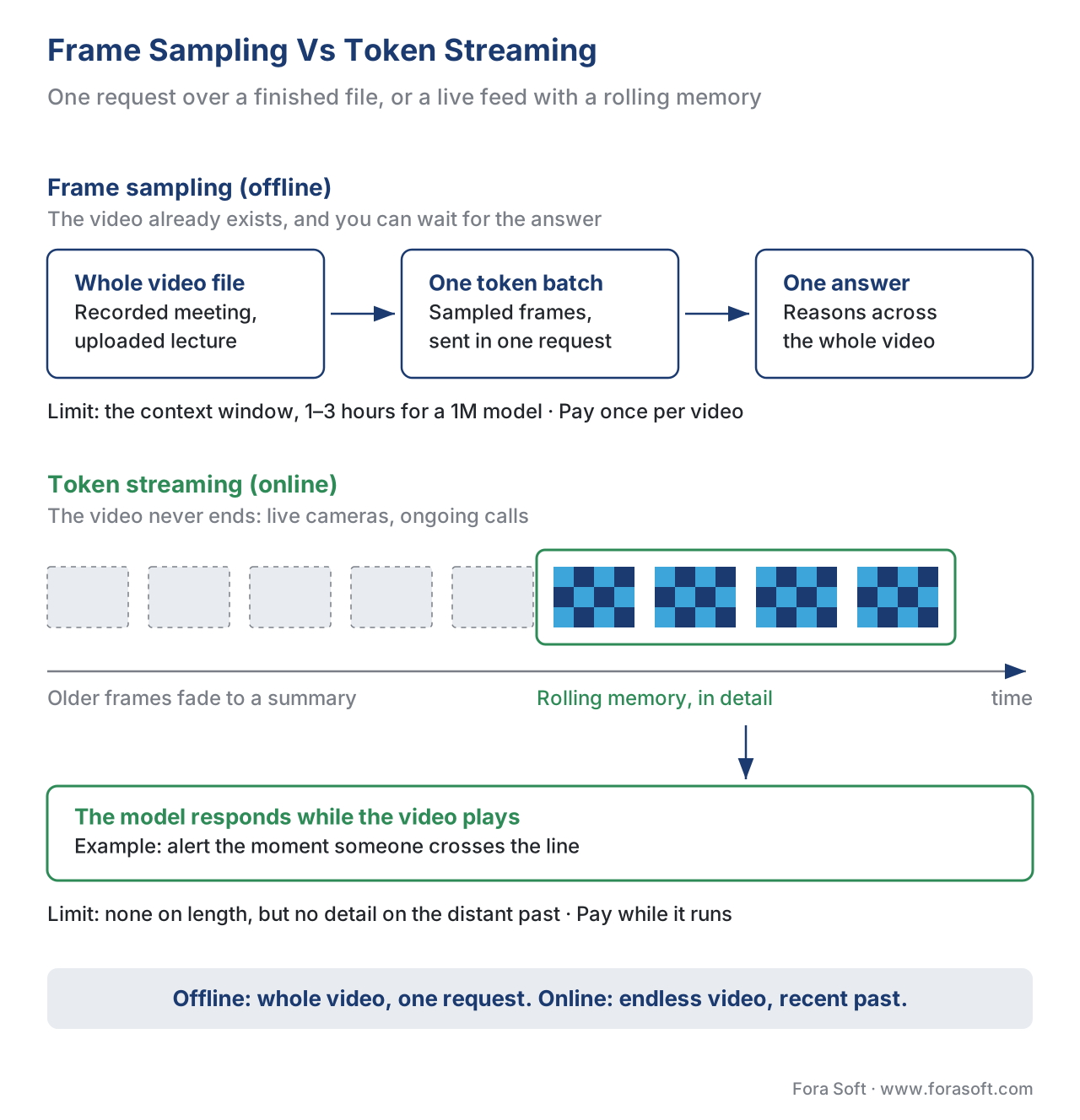 Figure 4. Two architectures. Frame sampling sends a whole video at once and reasons across all of it; token streaming feeds frames continuously and remembers only the recent past — the only option for endless live video.
A Worked Comparison — The Same Feature, Both Ways
Make it concrete with one feature built two ways: "alert a security operator when someone enters a restricted zone."
Built with frame sampling, this is an overnight job. Every morning the system takes the previous night's eight-hour recording, samples it at 1 fps (28,800 frames), and — because that blows past any single context window — chops it into chunks, sends each chunk to the model, and stitches the answers. It produces a tidy report: "Entry detected at 02:14 and 03:48." It is cheap per camera and simple to build. It is also useless for stopping an intruder, because the answer arrives eight hours late.
Built with token streaming, the same feature watches the live feed. Frames flow in at a few per second, the model holds a rolling memory of the last minute or two, and the instant a person crosses the line it fires an alert — sub-second, while it matters. It costs more (the model runs continuously, not once a day) and is harder to build (you need the streaming infrastructure from the real-time AI pipeline lessons). But it is the only version that does the actual job.
Neither is "better". They are answers to different questions. The table below is the decision rule.
| Question | Frame sampling (offline) | Token streaming (online) |
|---|---|---|
| When does the answer arrive? | After the whole video is processed | While the video is still playing |
| Maximum video length | Limited by the context window (≈1–3 hrs for a 1M model) | Effectively unlimited |
| Can it reason across the whole video? | Yes — compares any moment to any other | Only across the recent past it still remembers |
| Typical cost shape | Pay once per video, up front | Pay continuously while the stream runs |
| Best for | Recorded meetings, uploaded lectures, archive review | Live cameras, ongoing calls, real-time alerts |
| Build complexity | Lower — one request, or chunked requests | Higher — streaming pipeline, memory management |
Where Frame Sampling Goes Wrong — And How 2026 Fixes It
The quiet weakness of frame sampling is that uniform sampling assumes every second matters equally, and it rarely does. One frame per second is wasteful on a two-hour static lecture and reckless on a two-minute action clip. Worse, on long, uncurated footage — surveillance, instructional recordings — the one moment that answers the user's question may be a single frame the uniform sampler happened to skip.
The 2026 response is adaptive, query-aware sampling: instead of grabbing one frame per second blindly, the pipeline looks at what the user asked and spends its frame budget where the answer is likely to be. Recent research makes the gains concrete. "Key clip selection" methods that grab short, relevant segments instead of isolated uniform frames have reported accuracy improvements of up to roughly 8–10 percentage points over uniform sampling on long-video benchmarks. Other 2026 systems learn a sampling policy — a small companion model that decides which frames to pull — and some report finding the right keyframes while sampling barely more than 1% of the video. The mechanism varies; the direction is consistent. By 2026 the question "how do we sample frames?" is shifting from "pick an fps" to "let a smaller model pick the frames that matter", and the savings are large enough that it is worth asking your engineers which approach a long-video feature uses.
The benchmark that tracks this progress is Video-MME, a 900-video evaluation spanning short, medium, and long clips. The leaderboard is a useful sanity check on vendor claims: as of 2026 the top general scores cluster in the mid-80s percent, with frontier closed models like Gemini 2.5 Pro reported around 84–85% overall, and the hardest "long video, no subtitles" slice sitting markedly lower — a reminder that long video is still the unsolved part, and that any vendor claiming a solved long-video problem deserves scrutiny.
A Common Pitfall — Confusing "Long Context" With "Watches Everything"
The mistake we see most often is reading "1-million-token context window, supports 1-hour video" and concluding the model watches the hour the way a person would. It does not. At 1 fps it sees one frame per second — it is blind to the other twenty-nine thirtieths of every second, and any event shorter than a second can vanish between samples. "Supports one hour" means "one hour of frames fits in memory", not "perceives every moment of one hour".
The practical rule follows directly. Before you pick a model or a context size, ask one question about your actual content: how long is the shortest event the feature must catch? If the answer is "several seconds" — a person entering a room, a slide changing — 1 fps is fine and a long-context offline model is the cheap, simple choice. If the answer is "a fraction of a second" — a fast hand gesture, a licence plate on a passing car, a ball crossing a line — then 1 fps will miss it, and you need a higher frame rate (which shrinks the maximum video length that fits) or a targeted approach that samples densely only around the moment of interest. Matching the frame rate to the shortest event that matters is the single most important video-VLM decision, and it is the one most specs forget to make.
Free download: Video VLM Frame-Budget Decision SheetOne printable page: the token-cost arithmetic, the context-window limits, the frame-sampling vs token-streaming decision, and the pre-flight checklist ending with the ‘shortest event that matters’ question.Where Fora Soft Fits In
We build these pipelines into real video products, and the frame-sampling-versus-streaming choice shows up in every vertical we work in. In video surveillance, the live-alert features are streaming by necessity, while the "search last month's footage" features are offline and cost-optimised with adaptive sampling. In e-learning and OTT platforms, lecture summarisation and chapter generation are offline jobs where low resolution and a low frame rate cut the bill without hurting quality on slow-moving content. In video conferencing and telemedicine, live meeting assistants are streaming systems that hold a rolling memory of the call. Across all of them the engineering judgement is the same one this article teaches: match the frame rate to the shortest event that matters, match the architecture to whether the answer is needed live or later, and pick the lightest token budget that still clears the accuracy bar. Our AI video agent development team builds the live, streaming side of these systems, and our AI integration projects cover the offline summarisation and search jobs on recorded footage.

The book
AI for Video: A Complete Guide to Intelligence in Video Products: From Models and Inference to Computer Vision, Speech, Search, and Generative Video
This lesson gives you the two numbers behind every video VLM bill; volume 6 of the Fora Soft Video Engineering Handbook works through the models that consume them — vision transformers and patch tokenisers, open and closed vision-language models, frame selection for search and summarisation, and how to pick a model for a given video. Volume 7 takes the streaming side into production: real-time budgets, serving, and cost per stream-hour. Written by Nikolay Sapunov, CEO at Fora Soft.
Not sure whether your video AI feature should sample frames or stream them?
Tell us how long your videos run, how fast the events you care about happen and whether the answer must arrive live. We will size the frame rate, resolution and token budget, estimate the bill per video or per stream-hour, and pick offline, streaming or both. 250+ video products shipped since 2005.
See our case studies
Case study
Mindbox
AI video management system with both patterns side by side: live anomaly alerts on camera feeds and Smart Forensic Search across hours of recorded footage. 50+ deployments since 2020.
Case study
Meetric
AI sales video platform that records meetings, analyses them after the call and turns each one into a structured report, automating 80–100% of CRM data entry. Integrates with Google Meet, Teams and Zoom.
Case study
VALT
Recording platform for police interviews, medical training and child advocacy, where long recorded sessions are searched and reviewed after the fact. 770+ U.S. organizations, 50,000+ users.
What to read next
Foundations
CLIP and contrastive vision-language: the primer
The embedding and token ideas this lesson builds on, explained from scratch.
Models
Open-frontier VLMs: LLaVA, Qwen-VL, LLaVA-NeXT
The open models behind the token-compression tricks covered here, in depth.
Search
Multimodal RAG over a video archive
How to search hours of video when even a 1M-token context window is not enough.
Economics
The real cost of AI in video products
This lesson’s token arithmetic extended to full products, with 2026 API prices.
References
- "Video understanding." Google Gemini API documentation, ai.google.dev, last updated 2026-04-28 (accessed 2026-05-31). — Primary source for the 1 fps default sampling rate, custom-fps override, 258 tokens/frame at default resolution and 66 tokens/frame at low resolution, ~300 / ~100 tokens-per-second totals, the
media_resolutionparameter, and the "1M context = ~1 hour default / ~3 hours low" statement. - "Understand and count tokens." Google Gemini API documentation, ai.google.dev, last updated 2026-02-26 (accessed 2026-05-31). — Source for the alternative combined "263 tokens per second" video figure and the 32 tokens/second audio rate; cited explicitly where it differs from the video-understanding guide. Per the spec-conflict rule, the per-component breakdown in reference 1 is treated as authoritative and the round per-second figure as an estimate.
- "Gemini Developer API pricing" / "Gemini 2.5 Flash pricing." ai.google.dev and pricepertoken.com (accessed 2026-05-31). — Source for the representative \$0.30 per million input tokens figure used in the cost arithmetic; prices change and must be re-verified each quarter.
- Qwen Team. "Qwen2.5-VL." qwenlm.github.io blog, 26 January 2025, and the Qwen2.5-VL Technical Report (arXiv:2502.13923), February 2025 (accessed 2026-05-31). — Primary source for dynamic-FPS training, absolute time encoding via mRoPE, the window-attention vision encoder, 2×2 patch merging, and the open 3B/7B/72B sizes.
- QwenLM/Qwen3-VL repository discussion (GitHub issue on video experimental details) and Qwen3-VL Technical Report (arXiv:2511.21631), 2025 (accessed 2026-05-31). — Source for the "768 frames → every two frames compressed to 64 tokens → 24,576-token cap" video-token budget.
- Wang, W., Chen, Z., et al. "InternVL3.5: Advancing Open-Source Multimodal Models in Versatility, Reasoning, and Efficiency." OpenGVLab, arXiv:2508.18265, 2025 (accessed 2026-05-31). — Source for the 1,024 → 256 pixel-shuffle compression and the 64-token "Flash" variant.
- Chen, J., et al. "VideoLLM-online: Online Video Large Language Model for Streaming Video." CVPR 2024, arXiv:2406.11816 (accessed 2026-05-31). — Source for the early streaming-VLM design, 5–10 fps on a consumer GPU, and proactive mid-stream response.
- Qian, R., et al. "Dispider: Enabling Video LLMs with Active Real-Time Interaction via Disentangled Perception, Decision, and Reaction." arXiv:2501.03218, 2025; and "StreamingVLM: Real-Time Understanding for Infinite Video Streams." arXiv:2510.09608, 2025 (accessed 2026-05-31). — Sources for the disentangled streaming architecture and infinite-stream framing.
- Fu, C., et al. "Video-MME: The First-Ever Comprehensive Evaluation Benchmark of Multi-modal LLMs in Video Analysis." CVPR 2025; and the Video-MME public leaderboard (accessed 2026-05-31). — Source for the 900-video benchmark composition and the 2026 leaderboard score ranges (mid-80s% overall; Gemini 2.5 Pro ~84–85%; lower long-video-no-subtitle scores).
- Zhang, G., et al. "From Frames to Clips: Efficient Key Clip Selection for Long-Form Video Understanding." arXiv:2510.02262, 2025; with related adaptive-sampling work (VideoBrain, arXiv:2602.04094, 2026; Generative Frame Sampler, arXiv:2503.09146, 2025) (accessed 2026-05-31). — Sources for the up-to-~8–10-point accuracy gains of key-clip/adaptive sampling over uniform sampling and the "≈1% of frames" keyframe-search figure.
