


Why This Matters
If your product needs to understand video — summarise a recorded meeting, answer questions about a lecture, flag a safety incident in surveillance footage, or read what is on a user's screen and act on it — the fastest path in 2026 is to call one of three closed APIs rather than train or host anything yourself. But "fastest" hides three decisions that quietly determine whether the feature is cheap or ruinous, accurate or blind, and shippable in a week or stuck in procurement for a quarter: which family, what it costs per video, and whether the data can legally leave your servers at all. This lesson is for the product manager, founder, or operations lead who has to sit in that vendor-selection meeting and understand why the engineers keep saying "Gemini for the long videos, Claude for the screen automation, and watch the output-token bill". It assumes you have read the video VLM primer; if "token", "frame sampling", and "context window" are new words, read that first.
What "Closed Frontier" Actually Means
Start with the two words, because they do real work. Frontier means the most capable general-purpose models that exist — the ones that score highest on the hardest benchmarks and that smaller, cheaper models are measured against. Closed means you cannot download the model and run it on your own hardware; you rent access to it over the internet, sending your data to the vendor's servers and paying per use. The opposite is an open-weights model, which you can download and run yourself — the subject of the open-frontier lesson.
Three companies own the closed frontier in 2026, and it is worth fixing their names and products in your head before anything else. Google ships the Gemini family. OpenAI ships the GPT-5 family. Anthropic ships the Claude Opus 4 family. Each family has several sizes — a big, slow, expensive "pro" model for hard problems, and a small, fast, cheap "flash" or "mini" model for high-volume work — and each ships frequent point releases (Gemini 2.5 then 3.x, GPT-5 then 5.4 and 5.5, Opus 4.5 through 4.8) that bump capability without changing how you call them. The specific version numbers move every few weeks; the families and the way you integrate them are stable, and that stability is what you build on.
Here is the analogy to hold onto. A closed frontier model is like hiring a brilliant freelance analyst through an agency. You never meet them, you never see their desk, you send your material to the agency and a finished answer comes back, and you are billed by the page. You get expert work without hiring, training, or housing anyone — but your material leaves your building, you pay every single time, and if the agency raises rates or changes staff you have little say. Running an open model yourself is the opposite: you hire the analyst in-house. The rest of this article is about when to use the agency.
 Figure 1. The three closed frontier families and their sizes. The integration pattern is identical across all of them; the differences are in video handling, price, and one unique capability.
How Each Family Handles Video
Every one of these models is, at heart, a vision-language model — a system that has learned to read both pictures and text and answer questions about them. But "handle video" hides a real engineering difference that, until recently, was the most important fact in the whole comparison: does the model accept a video file directly, or do you have to turn the video into a stack of still images first?
Native video ingestion means you hand the API an actual video — a file or a link — and the platform itself samples frames, lines up the audio, and feeds the model. Frame-based ingestion means the model only accepts still images, so you are responsible for opening the video, pulling out frames (typically one per second), encoding each as an image, and sending them as a batch alongside a text transcript of the audio. Both end up at the same place — the model reasons over sampled frames as tokens — but native ingestion moves the plumbing from your code into the vendor's, and it is the difference between a feature that takes a day to build and one that takes a week.
Through most of the GPT-5 era this was the headline split. Gemini ingested video natively from the start: per Google's video-understanding documentation, you upload a video and it is sampled at one frame per second by default, each frame costing about 258 tokens plus roughly 32 tokens per second of audio — a number worth memorising because it anchors every Gemini cost estimate. GPT-5 (the August-2025 release) and the Claude Opus 4 line accepted only still images, so video meant frame extraction in your own pipeline. That is the world many 2024-and-2025 articles still describe, and it is now out of date.
During 2026 the gap closed. OpenAI's GPT-5.4 (March 2026) and GPT-5.5 (April 2026) added native video input — GPT-5.5 was described by OpenAI as unifying text, image, audio, and video in a single model session. Google's Gemini 3.x extended its already-native video handling. The practical lesson for a 2026 buyer is precise: native video is no longer a reason to pick one vendor over another, because the current top model in every family does it. What you must still check is the version — if your stack is pinned to the original GPT-5 rather than 5.4 or later, you are still in the frame-extraction world, and an engineer who assumes otherwise will ship a broken integration. Claude's strength, as we will see, lies elsewhere. If native video no longer separates the vendors, picking a model for your product comes down to cost per request, latency under your load, and how much of your own data the answer has to reach.
 Figure 2. Native versus frame-based video ingestion. By 2026 the current top model in every family ingests video natively — but older pinned versions still require you to extract frames yourself.
The Cost Model — Reading The Bill Before You Get It
The way you pay for a closed model is simple to state and easy to underestimate: you are billed per token, separately for what you send (input) and what the model writes back (output), at a price quoted per million tokens. Output is always several times more expensive than input, because generating text is the costly part. Get those two numbers and the rest is multiplication.
Walk a real example out loud, because the arithmetic is the cost model. Suppose you send a 10-minute clip to a fast Gemini model at the default one frame per second and default resolution, and ask for a short summary. Ten minutes is 600 seconds, so the platform keeps 600 frames:
600 frames  × 258 tokens/frame   = 154,800 visual tokens
600 seconds ×  32 tokens/second   =  19,200 audio tokens
                                    ----------------------
                              input ≈ 174,000 tokens
At a representative 2026 price for a fast model — Gemini 2.5 Flash listed at \$0.30 per million input tokens — the input side of that request costs:
174,000 ÷ 1,000,000 × $0.30 ≈ $0.052
About five cents to let the model watch ten minutes of video. Now add the output. A 300-word summary is roughly 400 output tokens; on a model that charges, say, \$2.50 per million output tokens, that is a fraction of a cent — trivial here. But flip the feature around: ask the model to produce a full transcript with timestamps and per-speaker labels for that same video and the output might run 20,000 tokens, which at \$2.50 per million is five cents on its own, doubling the bill. The rule that surprises teams: on video-understanding features the input usually dominates, but on any feature that generates a lot of text, the output line can quietly become the larger number. Always price both sides.
The headline prices differ by family and tier, and they change often enough that any figure printed here must be re-verified before you commit. As a 2026 snapshot for orientation only: the big "pro" models — Gemini 2.5 Pro, GPT-5, Claude Opus 4 — cluster around \$1.25 to \$5 per million input tokens and \$10 to \$25 per million output tokens, with the newest premium releases (GPT-5.5, the fast modes) pushing higher. The small "flash" and "mini" models are roughly four to ten times cheaper and are where most production video volume should run. The discipline is not memorising prices; it is knowing that a 10× price gap exists between the pro and flash tiers of the same vendor, and routing each feature to the cheapest tier that clears its accuracy bar.
| Family (2026 snapshot) | Representative big model | Input \$/M | Output \$/M | Context window | Native video |
|---|---|---|---|---|---|
| Google Gemini | Gemini 2.5 Pro | \$1.25–2.50 | \$10–15 | 1,000,000 | Yes |
| OpenAI GPT-5 | GPT-5 (5.4 / 5.5) | \$1.25–5.00 | \$10–30 | 400,000–1,100,000 | 5.4+ yes; 5.0 frames |
| Anthropic Claude | Claude Opus 4.x | \$5.00 | \$25 | 1,000,000 | Images + screenshots |
Prices and context sizes are a 2026 orientation snapshot and move every few weeks; treat the table as "what order of magnitude", not "what to put in a contract". Gemini Pro and GPT-5 charge a higher rate above a ~200K-token prompt threshold.
The Context Window — Still The Hard Ceiling On Long Video
Tokens are not only a cost; they are a hard limit. Every model has a context window — the maximum number of tokens it can hold in mind at once, input plus output combined. Once your sampled, tokenised video exceeds it, you physically cannot send more, no matter your budget.
In 2026 the frontier converged on a one-million-token context window as the common large size, with some GPT-5 variants pushing past it. That sounds enormous until you do the video math. At Gemini's roughly 300 tokens per second of video at default resolution, one million tokens holds about 3,600 seconds — one hour of video — and not a second more. Drop to low resolution at about 100 tokens per second and the same window stretches to roughly three hours. This is not a Gemini quirk; it is the physics of turning video into tokens, and it applies to every closed model that quotes a context size.
The consequence reshapes any long-video product. A two-hour film does not fit at default resolution in a one-million-token window, full stop. You have exactly three moves, and every long-video feature picks among them: lower the resolution (cheaper per frame, fits more, sees less fine detail), lower the frame rate (fewer frames, fits more, risks missing fast events), or stop trying to fit the whole thing at once and switch to retrieval — chopping the video into chunks, indexing them, and feeding the model only the chunks relevant to each question, which is the multimodal RAG pattern. There is no fourth option that gives you full resolution, full frame rate, and unlimited length. The context window is the wall; architecture is how you live within it. A bigger window from a newer release moves the wall, but never removes it.
Claude Computer Use — The One Capability That Stands Apart
Everything so far applies, with differences of degree, to all three families. Claude Computer Use is different in kind, and it is the reason a video engineer cares about Claude specifically. It is worth slowing down, because most non-technical readers have heard the phrase and very few know what it actually does.
Computer Use is a capability where the model is given screenshots of a real computer screen and, instead of only describing them, it decides what to click, type, and scroll — and sends those actions back to be carried out. The screen is video understanding turned into action: the model "sees" the current state of a desktop as an image, reasons about it, and operates the machine the way a person would. Per Anthropic's documentation, it is delivered through the standard API as a beta tool that exposes screenshot capture, mouse control, keyboard input, and (on the newest models) a zoom action for reading small text.
The mechanism is a loop, and understanding the loop demystifies the whole feature. Anthropic calls it the agent loop, and it has four steps that repeat. First, you send Claude a screenshot and a goal, such as "save a picture of a cat to the desktop". Second, Claude looks at the screenshot and replies not with prose but with an action — "click at these coordinates", "type this text", "take another screenshot". Third, your software carries out that action on a real (or virtual) machine and sends back a fresh screenshot of the result. Fourth, Claude looks at the new screenshot, decides whether the task is done, and either finishes or asks for the next action. The cycle repeats until the goal is met or a safety limit stops it. Crucially, Claude never touches your computer directly — your code is always the hands; Claude is only the eyes and the judgment.
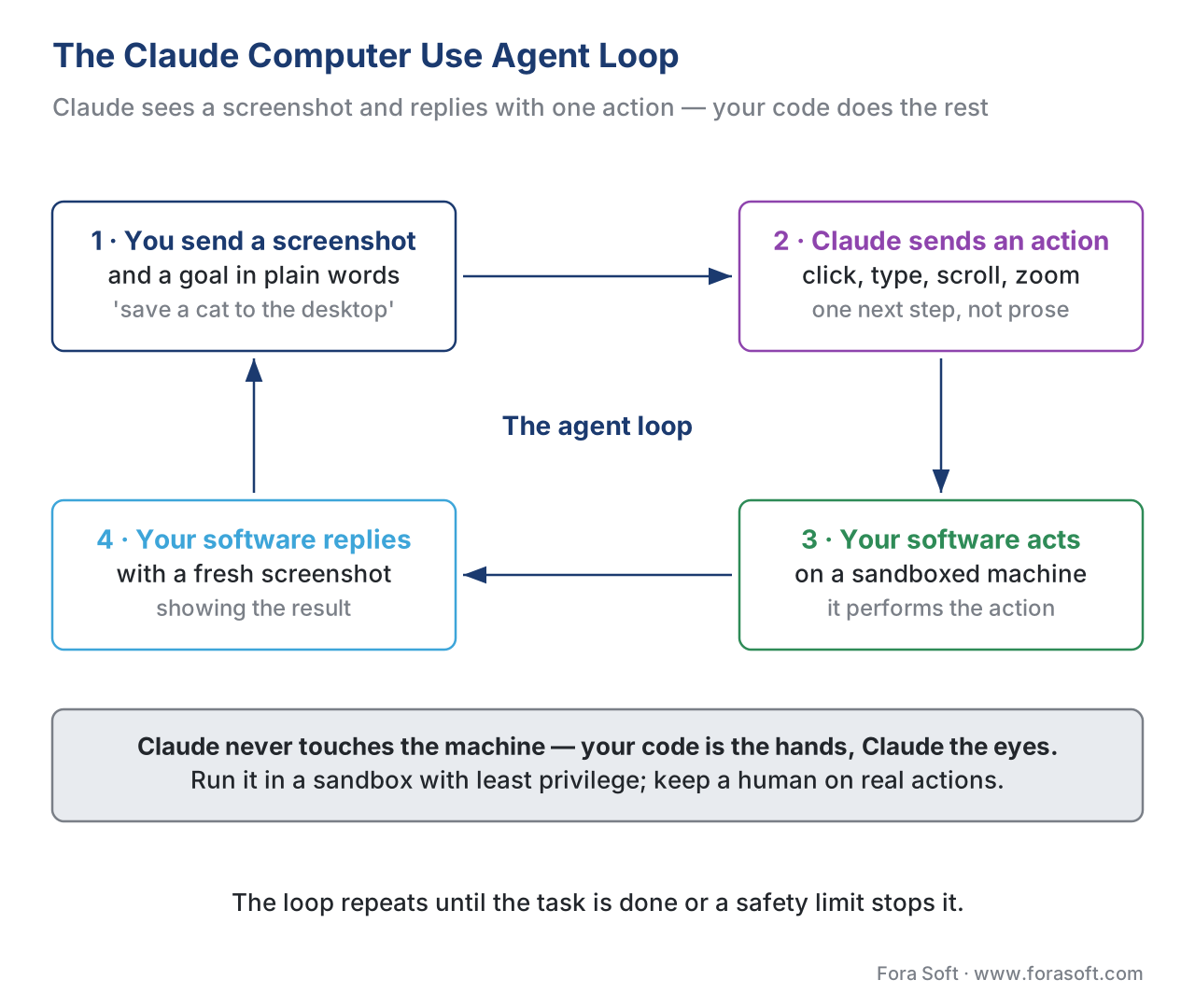 Figure 3. The Claude Computer Use agent loop. The model only ever sees a screenshot and replies with an action; your code performs it and returns the next screenshot.
Why does this belong in a video-engineering course rather than a general-AI one? Because the live screen is a video stream, and the patterns are the same ones from the real-time AI pipeline lessons: a sequence of frames, a model that reasons over recent ones, and an action emitted in response. Computer Use is what lets a video product do something with what it sees — open the right tool, fill the right form, drive the post-production timeline — rather than only narrate it. In 2026 the headline benchmark for this skill is OSWorld (and its cleaner variant OSWorld-Verified), which scores models on completing real tasks across real applications. The closed frontier clusters in the high-70s to low-80s percent there, with Anthropic's Opus line consistently among the leaders — a state-of-the-art result on a hard benchmark, and also a reminder that roughly one task in five still fails, so a human must stay in the loop for anything consequential.
A short, honest caveat belongs here. Computer Use is powerful and unfinished. It is slow compared with a human doing the same clicks, it occasionally mis-clicks or hallucinates coordinates, and — most importantly — it can be hijacked by prompt injection, where text hidden in a web page or image tells the model to do something the user never asked for. Anthropic ships classifiers and guidance to reduce this, but the standing advice is firm: run it in a sandboxed virtual machine with minimal privileges, keep it away from sensitive credentials, and ask a human to confirm any action with real-world consequences. The broader family of screen-driving agents — Claude Code, OpenAI's Operator, Manus, Perplexity Comet — is its own large topic, covered in the computer-use agents lesson; here the point is narrower: Computer Use is the capability that makes Claude uniquely interesting to a team building an acting video product, not just a watching one.
Choosing Between The Three — A Decision Rule
Resist the urge to crown one winner. In 2026 the three families are close enough on raw video understanding that the choice turns on the specifics of your feature, not on a leaderboard. Here is the decision rule we apply.
Reach for Gemini when the job is long-video understanding at scale and cost matters. Its native video pipeline is the most mature, its million-token window and documented per-second token rates make cost predictable, and its flash tier is priced for high volume. Summarising thousands of recorded lectures, generating chapters for an OTT archive, or scanning overnight surveillance is Gemini's home turf.
Reach for GPT-5 when the video work sits inside a broader reasoning or tool-using workflow, or when you are already standardised on OpenAI's stack. The 5.4-and-later releases ingest video natively, the ecosystem of tools and libraries around it is the largest, and for features that mix video with heavy text reasoning, code generation, or function calling, keeping everything in one model session is a real simplification.
Reach for Claude when the feature must act on a screen — Computer Use — or when your reviewers prize careful, honest, well-hedged answers and tight safety behaviour, which matters in regulated verticals like telemedicine and surveillance. Claude's video input is image-and-screenshot based rather than native-file, so for pure long-video summarisation it is the less obvious pick; for screen automation and agentic acting it is the clear one.
And reach for none of them — go open-weights instead — when the data legally cannot leave your servers, when the per-call economics of a high-volume feature beat the cost of hosting your own model, or when you need to fine-tune the model on a private domain. That trade-off is the whole subject of the "just use a VLM" lesson and the open-frontier lesson; the short version is that closed APIs win on time-to-ship and peak capability, and lose on data residency, unit cost at scale, and customisation.
| If your feature… | Best first pick | Why |
|---|---|---|
| Summarises long recorded video at high volume | Gemini (flash tier) | Mature native video, predictable per-second cost, cheap flash tier |
| Mixes video with heavy text reasoning / tool use | GPT-5 (5.4+) | Largest tool ecosystem, native video, one unified session |
| Must click, type, and drive a real screen | Claude (Computer Use) | Only first-class screen-automation product; OSWorld leader |
| Runs in a regulated, safety-critical vertical | Claude | Careful, well-hedged answers; strong safety behaviour |
| Cannot send data off your servers, or runs at huge scale | None — go open-weights | Data residency, unit cost, fine-tuning |
A Common Pitfall — Pricing The Pro Model When Flash Would Do
The mistake we see most often is teams benchmarking and budgeting against the pro tier — the biggest, smartest, most expensive model in a family — for a feature a flash tier would handle perfectly. A pro model can cost ten times its flash sibling per token, so a video feature that would run at five cents per clip on flash gets priced at fifty cents on pro, and someone concludes "video AI is too expensive" when the real problem is tier selection.
The fix is a two-line discipline. First, default every new video feature to the cheapest flash or mini model in your chosen family and only escalate to pro for the specific requests that demonstrably fail on flash — and measure that failure rate rather than assuming it. Second, separate the input bill from the output bill in every estimate, because the lever that lowers each is different: input cost falls with lower resolution and frame rate, output cost falls with shorter, more constrained responses. A second, related pitfall: pinning to an old version. The original GPT-5 needs frame extraction; GPT-5.4 does not. A model string copied from a year-old tutorial can silently land you in the wrong world, paying for plumbing the current version would have done for free.
Free download: Closed-Frontier Model Selection SheetOne printable page: the three families and their tiers, the input-versus-output token math, the context-window limits, the Computer Use loop in four steps, and the which-family-for-which-feature rule.Where Fora Soft Fits In
We integrate these closed APIs into real video products across the verticals we work in, and the family choice maps cleanly onto them. In OTT and e-learning, long-video summarisation and chapter generation run on Gemini's flash tier, where the per-second token math keeps thousands of hours affordable. In video conferencing and telemedicine, meeting assistants that mix transcription with structured reasoning often sit on the GPT-5 line, and the careful, well-hedged answer style of Claude earns its place wherever a wrong confident answer carries clinical or legal weight. In video surveillance and emerging back-office automation, Claude Computer Use lets a system not only describe what a camera or operator console shows but operate the tools around it. The judgment we bring is the one this article teaches: route each feature to the cheapest tier that clears its accuracy bar, price input and output separately, and reserve the open-weights path for data that cannot leave the building. Our AI integration services wire these APIs into existing video products with per-feature model routing, and our generative AI development team builds the summarisation, chaptering, and assistant features on top.

The book
AI for Video: A Complete Guide to Intelligence in Video Products
This lesson picks a model and prices it; volume 6 is the map that decision sits on. It works through model artifacts and the open-versus-closed procurement call, how a vision-language model turns frames and audio into tokens in the first place, and the capabilities you are renting — detection and tracking, speech, search over an archive, generated video. Volume 7 carries the same capabilities into production, where the Computer Use loop above becomes an agent you have to budget, serve, and price per stream-hour. Written by Nikolay Sapunov, CEO at Fora Soft.
Choosing between Gemini, GPT-5, and Claude for a video feature?
Tell us what the feature has to do and we will price it on both tiers of each family, check whether your data can legally leave your servers, and say plainly when an open-weights model is the cheaper answer. 250+ video products shipped since 2005.
See our case studies
Case study
VALT
A recording and observation platform for 770+ organizations and 50,000+ users, where word search finds spoken words inside archived sessions — the long-video, high-volume workload a cheap flash tier exists for.
Case study
Meetric
An AI sales platform that reads video meetings in real time and writes the follow-up, automating 80–100% of CRM data entry and lifting close rates by up to 25% — video mixed with heavy text reasoning in one session.
Case study
Mindbox
An AI video management system in 50+ deployments, with 99.5%+ face recognition and ANPR on 500,000 vehicles a day — the regulated vertical where a confidently wrong answer carries legal weight.
What to read next
Foundations
Video VLMs in 2026 — frame sampling vs token streaming
Where the 258 tokens a frame come from, and why the context window is a wall and not a setting.
Cost
The cost model — what AI in video actually costs at scale
The same arithmetic run across a whole product instead of one ten-minute clip.
Architecture
Video RAG — multimodal retrieval over a video archive
The third move from this lesson, for when a two-hour film will not fit in a million tokens.
Agents
Claude Code, Manus AI, Operator, Perplexity Comet — computer-use agents
The wider family of screen-driving agents that Computer Use belongs to.
References
- "Video understanding." Google Gemini API documentation, ai.google.dev (accessed 2026-05-31). — Primary source for Gemini native video ingestion, the 1 fps default sampling rate, 258 tokens/frame at default resolution, ~32 tokens/second audio, the ~300 / ~100 tokens-per-second totals, and the "1M context ≈ 1 hour default / ~3 hours low resolution" statement.
- "Computer use tool." Anthropic Claude API documentation, platform.claude.com/docs/en/agents-and-tools/tool-use/computer-use-tool (accessed 2026-05-31). — Primary source for the four-step agent loop, the
computer_20251124action set (screenshot, click, type, key, scroll, drag, zoom), thecomputer-use-2025-11-24beta header, the 735-token tool definition and 466–499-token system-prompt overhead, ZDR client-side data handling, the WebArena state-of-the-art claim, coordinate-scaling guidance, and the prompt-injection / sandboxing security guidance. - "Gemini Developer API pricing." Google AI for Developers, ai.google.dev/gemini-api/docs/pricing (accessed 2026-05-31). — Source for the Gemini 2.5 Pro tiered pricing (\$1.25/\$10 up to 200K context, \$2.50/\$15 above) and the Gemini 2.5 Flash \$0.30 input / \$2.50 output rates used in the cost arithmetic; prices change and must be re-verified each quarter.
- "Pricing" and "Models." OpenAI API documentation, developers.openai.com/api/docs/pricing and /models (accessed 2026-05-31). — Source for the GPT-5 family pricing tiers (GPT-5 \$1.25/\$10; GPT-5.4 \$2.50/\$15; GPT-5.5 \$5/\$30) and context windows (GPT-5 400K; GPT-5.4 ~1.1M; GPT-5.5 1M).
- "Introducing GPT-5.5." OpenAI, openai.com (April 2026, accessed 2026-05-31). — Source for GPT-5.5 unifying text, image, audio, and video in one model session, the 23–24 April 2026 release/API dates, and native video input.
- "Processing and narrating a video with GPT vision." OpenAI Cookbook, cookbook.openai.com (accessed 2026-05-31). — Source for the frame-extraction workflow (sample ~1 fps, base64-encode frames, send as image batch with audio transcript) required by image-only / original GPT-5 models, and the limitation that frame-based video fails on motion- and timing-dependent analysis.
- OSWorld-Verified Benchmark Leaderboard, llm-stats.com/benchmarks/osworld-verified; and Xie, T., et al. "OSWorld: Benchmarking Multimodal Agents for Open-Ended Tasks in Real Computer Environments," os-world.github.io / NeurIPS 2024 (accessed 2026-05-31). — Source for the 2026 computer-use leaderboard range (high-70s to low-80s percent; GPT-5.5 ~78.7%; Anthropic Opus line among the leaders) and the benchmark's task composition.
- "Anthropic Claude model release timeline." hidekazu-konishi.com; and Anthropic model announcements, anthropic.com/news (accessed 2026-05-31). — Source for the Claude Opus 4.x family pricing (\$5 input / \$25 output, fast mode \$10/\$50), the 1M-input / 128K-output context window, the text+vision modality, and the model identifier
claude-opus-4-8. - "Gemini 3 / 3.1 Pro." Google Cloud documentation, docs.cloud.google.com (accessed 2026-05-31). — Source for Gemini 3.x improving multimodal/video reasoning over 2.5 Pro and the March-2026 transition from Gemini 3 Pro preview to Gemini 3.1 Pro.
- "Best practices for computer and browser use with Claude." Anthropic blog, claude.com/blog (accessed 2026-05-31). — Source for the effort-setting and resolution recommendations and the human-in-the-loop guidance cited in the Computer Use caveat.
