


Why This Matters
"Computer-use agent" went from a research curiosity to a line item in 2026 planning meetings, and the words now arrive attached to five different products that do related-but-different things. If you run a video product — a conferencing tool, an OTT platform, a surveillance dashboard, a telemedicine app — you are being asked two separate questions that sound like one. The first is "should our developers use Claude Code or Cursor to build faster?" The second is "should our product have an agent that operates the interface for the user?" These are different decisions with different costs and risks, and conflating them is the fastest way to waste a quarter. This lesson is written for the product manager, founder, or engineering lead who needs to answer both without a machine-learning background, and it builds on the closed-frontier model lesson and the agentic-vs-generative AI lesson; if the phrase "vision-language model" is brand-new, start with the video-VLM lesson first.
What A "Computer-Use Agent" Actually Is
Start with the plain-language version, because the marketing has muddied it. A computer-use agent is a piece of AI software that uses other software the same way a person does — by looking at the screen, moving a pointer, clicking, and typing — rather than by being wired into each program through a custom connection. The defining trait is that it operates the visual interface, the buttons and menus a human sees, instead of needing a special back-door built for it in advance.
The everyday analogy is a new temp worker on their first day. You do not rewire your accounting system to accept them; you sit them at a computer, show them the screen, and they figure out where to click. They look, they act, they look again to see what happened, and they keep going until the task is done. A computer-use agent works on exactly that footing. That is what separates it from older automation, which needed a programmer to connect each system to each other system ahead of time.
This matters because most of the world's software has no convenient back-door. Your travel-booking site, your internal dashboard, your legacy hospital records system — they were built for human eyes and human hands. An agent that can see a screen and operate it can, in principle, use any of them without anyone building a special integration first. That generality is the whole promise. The catch, which we will return to with hard numbers, is that "in principle" and "reliably" are still far apart in 2026.
One more piece of vocabulary, defined before we use it. Throughout this lesson, the brain inside these agents is a vision-language model — an AI trained on both pictures and text, so it can look at a screenshot and reason about it in words. We covered the family in depth in the video-VLM lesson; here you only need the one-line version: a vision-language model is the thing that can look at a picture of a screen and say what it sees and what to do next.
The Loop That Powers Every One Of Them
Every computer-use agent, regardless of brand, runs the same four-step cycle. Understanding this loop is the single most useful thing in this lesson, because once you see it you can reason about why these agents are slow, why they cost what they cost, and why they sometimes get stuck.
The first step is observe. The agent takes a screenshot of the current screen — a picture, exactly what a person would see. The second step is reason. That screenshot, together with the goal you gave it ("book the cheapest flight to Berlin next Tuesday"), goes into the vision-language model, which works out what to do next: "I see a search box; I should click it and type the destination." The third step is act. The agent issues a single concrete action — move the pointer to these coordinates, click, type these letters, press Enter. The fourth step is observe again: it takes a fresh screenshot to see what changed, and the loop repeats. Look, think, do, look again — over and over, one small action at a time, until the goal is met or the agent gives up.
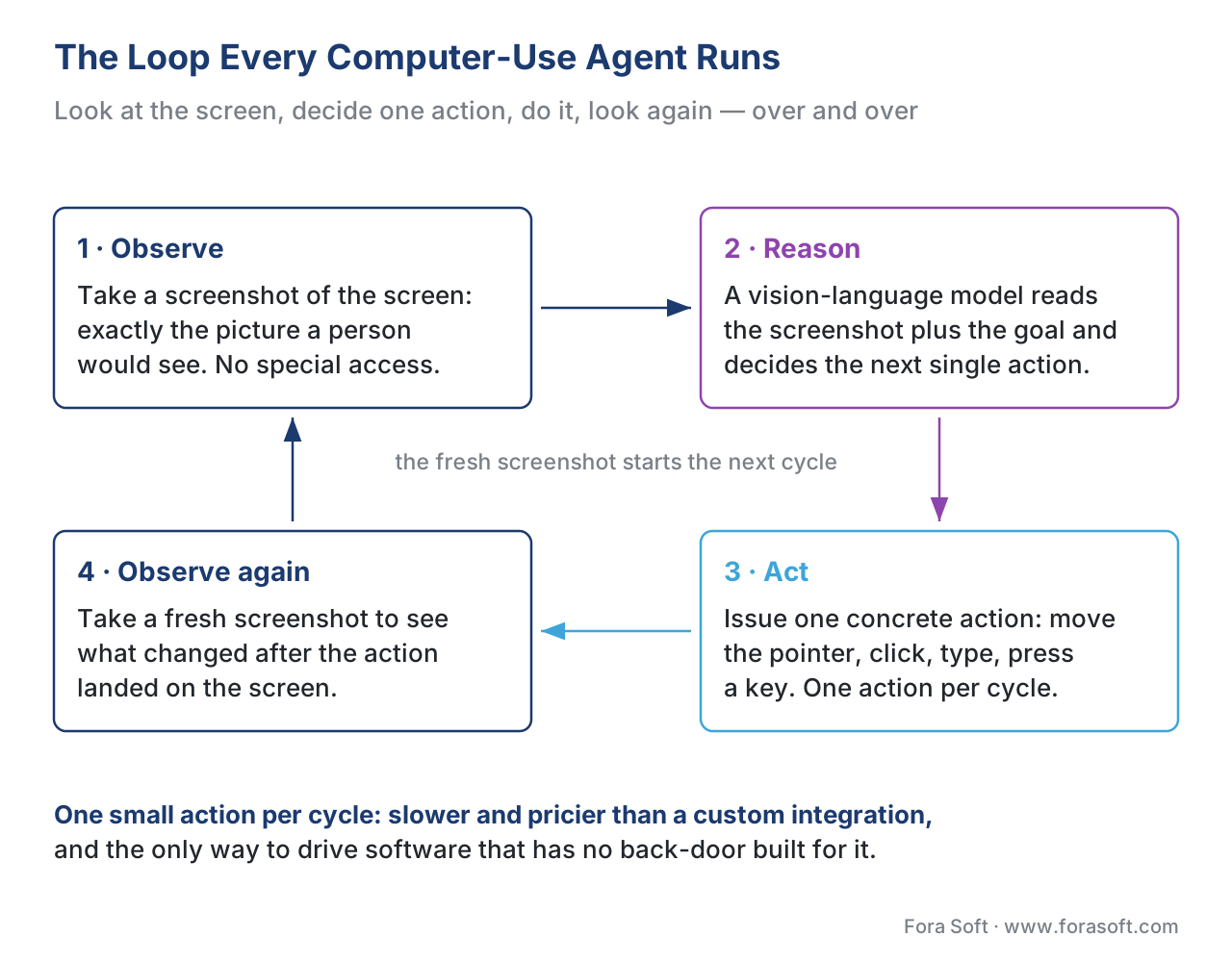 Figure 1. The observe-reason-act-observe loop. Every product in this lesson runs it; the differences are in what screen they operate, which model reasons, and how much autonomy you grant.
Two design choices split the field. Some agents run the whole loop inside one model — the screenshot goes in, the next action comes out, with no separate parts. Researchers call these end-to-end agents. Others break the loop into stages handled by different components — one part detects the buttons and text fields on screen, another decides what to do with them. These are composed agents. You do not need to track which product uses which; you only need to know that the hard, unsolved part is the same for both. That hard part has a name.
Why "clicking the right pixel" is the unglamorous bottleneck
The step where the agent translates "click the Submit button" into the exact screen coordinates to click is called GUI grounding — grounding the abstract intention in the concrete pixels of the interface. It sounds trivial and it is not. A human glances at a screen and the Submit button is simply there; a model has to look at a flat image and predict the precise x-and-y coordinate to target, on screens it has never seen, with buttons of every size, theme, and language. Get the coordinate slightly wrong and the agent clicks empty space, or the wrong control, and the whole task derails. Most of the visible progress in computer-use agents between 2024 and 2026 was progress on grounding — getting the click to land where it should. When an agent in a demo confidently does the wrong thing, a grounding miss is usually why.
The Two Families — And Why You Are Really Asking Two Questions
The five products in this lesson's title are not competitors in a single race. They split cleanly into two families, and the split maps onto the two questions from the start of this lesson. We call them Track A and Track B, the same two tracks that run through this whole course.
Track B agents help you build the product. They operate a developer's tools — a code editor, a terminal, a browser — to write software faster. Claude Code is the headline example: you describe a feature, it writes the code across many files, runs the tests, and commits the result. For a video team, a Track B agent shortens the distance between "we want adaptive bitrate switching" and working code. It never touches your end user; it touches your engineers' keyboards.
Track A agents operate inside the product, on behalf of the user. Operator, Manus, Comet, and Apple Intelligence's Siri all do tasks for an end user — booking, researching, filling forms, controlling apps. If you embed one, or build something like it, your user delegates a chore and the agent carries it out. The risk profile is completely different: a Track B mistake is a bad commit your engineer catches in review; a Track A mistake is an agent that booked the wrong flight on a real user's real credit card.
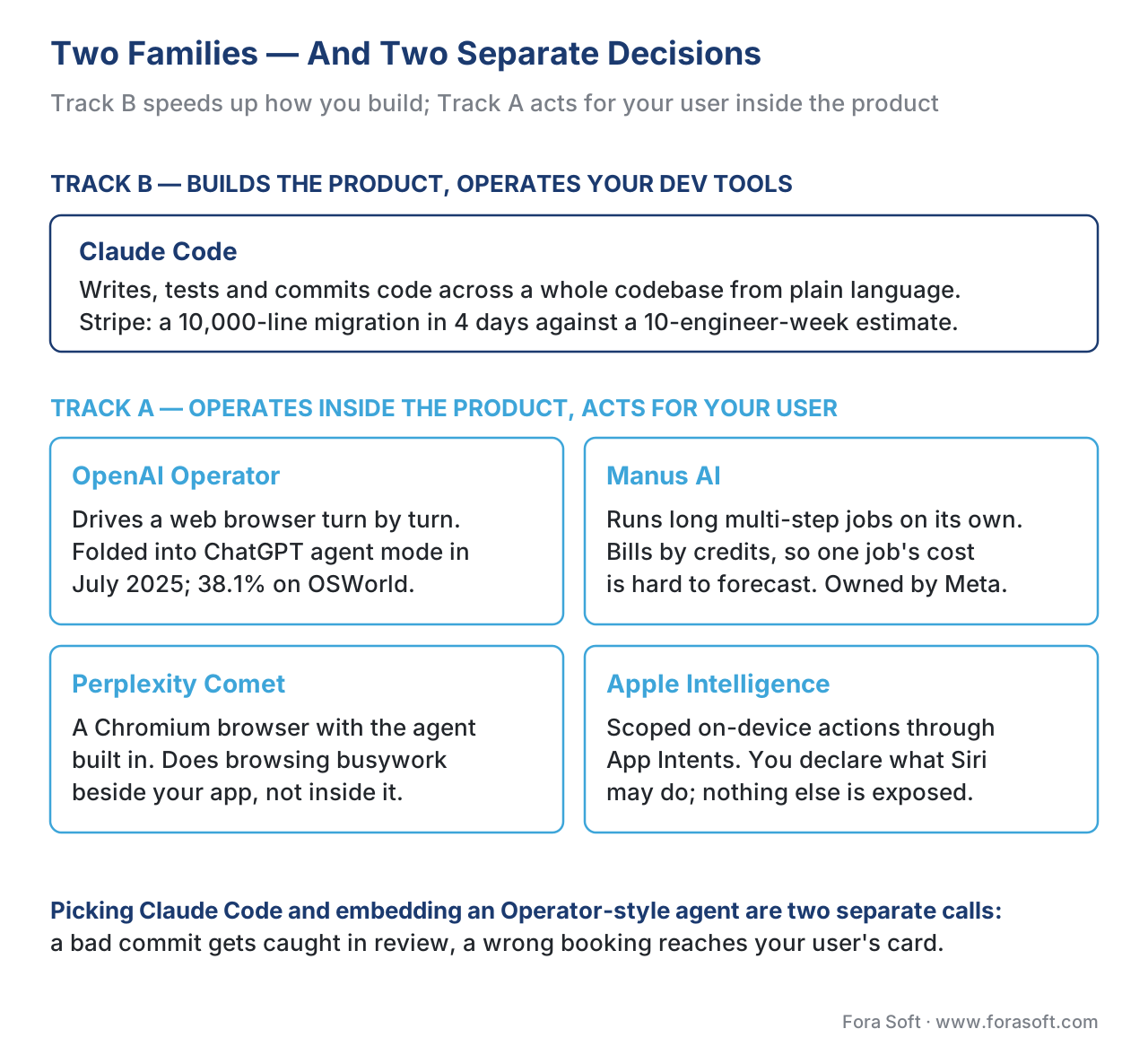 Figure 2. The five products are not one race. Track B tools speed up how you build; Track A agents act for your user inside the product. The decisions are independent.
With the loop and the two families in hand, here is each product in plain terms.
Claude Code — The Agent That Writes Your Software
Claude Code, from Anthropic, is an agentic coding system: you describe what you want built, tested, or fixed in plain language, and it does the work across your whole codebase. The word agentic is worth defining, because it is the difference that matters. An ordinary code-completion tool suggests the next line as a developer types — it is autocomplete. Claude Code operates at the level of the whole project: it reads the entire codebase to understand how the files connect, plans an approach, writes and edits code across many files at once, runs the tests, reads the errors when they fail, fixes them, and commits the result. The developer sets the goal and reviews what gets shipped; the execution runs on its own in between.
The reason this product anchors the lesson is its sheer reach. Anthropic states that the majority of code written at Anthropic itself now comes from Claude Code, with engineers shifting toward architecture and toward orchestrating several agents in parallel rather than typing each line. The published enterprise results are concrete enough to be useful as planning anchors rather than marketing. Stripe rolled Claude Code out to 1,370 engineers; one team finished a 10,000-line migration from the Scala language to Java in four days, work the team had estimated at ten engineer-weeks. Wiz moved a 50,000-line library from Python to Go in roughly twenty hours of active work, against a two-to-three-month manual estimate. Rakuten cut the average delivery time for a new feature from twenty-four working days to five. Ramp cut incident-investigation time by eighty percent, and let non-engineers query their data warehouse in plain English instead of writing database queries.
Notice what those numbers have in common: the biggest wins are on large, mechanical, well-specified work — migrations, refactors, repetitive fixes — where the goal is clear and the tests tell you when you are done. That is the shape of task a Track B agent eats for breakfast. It is also why "the majority of our code is AI-written" does not mean "we fired the engineers": every one of those examples keeps a human deciding the architecture and approving the commit.
For a video team specifically, the most telling 2026 signal is that the tooling vendors are meeting the agents halfway. NVIDIA's DeepStream 9 — the toolkit many teams use to build video-analytics pipelines — shipped integration that lets a developer describe a multi-camera pipeline in plain language ("ingest these RTSP camera streams, run each frame through a vision-language model, send summaries to our message bus") and have Claude Code or its main rival, Cursor, generate production-grade pipeline code with the monitoring and deployment scaffolding included. That is Track B applied directly to video engineering, not a generic coding demo.
A word on the rival, because you will hear it in the same breath. Cursor is a code editor with the same agentic abilities and, by early 2026, the broadest adoption among professional developers, reportedly reaching two billion dollars in annualized revenue. Many teams use both: Cursor as the day-to-day editor, Claude Code for larger hand-off-the-whole-task jobs and for reviewing pull requests. The keyword that brought you here — claude code — is the most-searched of the five products in this lesson by a wide margin, which tells you how central this single tool has become to how software, including video software, now gets built.
OpenAI Operator — The Browser-Driving Agent That Became "Agent Mode"
Operator was OpenAI's first consumer computer-use agent, launched in early 2025. Underneath it ran a model OpenAI called the Computer-Using Agent, or CUA — the same observe-reason-act loop from Figure 1, pointed at a web browser. You gave it a goal, it took screenshots of a browser, decided where to click and what to type, and worked through web tasks: ordering groceries, filling forms, booking reservations.
The important 2026 fact is that the standalone product is gone as a separate thing. On 17 July 2025, OpenAI folded Operator into ChatGPT itself as "agent mode" — you now reach the same capability by switching ChatGPT into agent mode rather than visiting a separate Operator website, and the old standalone site was retired. If someone on your team says "let's evaluate Operator", what they will actually open in 2026 is ChatGPT's agent mode. The underlying CUA model was also upgraded to be more persistent and accurate at driving a browser.
Operator's published benchmark numbers are the honest reality check this whole field needs, so we will use them as the anchor for the "how good are these really?" section below. The original CUA scored 87% on a web-navigation test called WebVoyager and 58.1% on a harder one called WebArena — but only 38.1% on OSWorld, a test of full desktop tasks across files, office apps, and the operating system. Hold that 38.1% in mind: web tasks are far easier for these agents than general desktop control, and the gap is the single most important thing a product owner should internalize before promising users an agent that "can do anything on your computer".
Manus AI — The Agent Built To Run On Its Own
Manus AI is the most autonomy-forward product of the five. Where Operator drives a browser turn by turn and Claude Code hands work back for review, Manus is designed to take a single instruction and run a long, multi-step job to completion largely without supervision — planning the steps itself, browsing the web, writing and running its own code, analyzing data, and returning a finished deliverable. Ask it to research a market and produce a report, and the pitch is that you come back later to a finished report, not a conversation.
Manus is also a useful case study in how fast this market moves and how much money is behind it. It began as a product of the company behind the Monica browser assistant, raised a seventy-five-million-dollar round led by the U.S. venture firm Benchmark in 2025, relocated its headquarters to Singapore, and in December 2025 was acquired by Meta in a deal reported at more than two billion dollars, with some accounts putting it as high as three billion. For a product owner, the lesson in that history is not the gossip — it is that the autonomous-agent layer of this stack is being consolidated by the largest technology companies, and any vendor you build on today may belong to someone else next quarter.
There is a sharp practical caveat with Manus that every budget owner should hear. It bills by credits, and a single complex task can consume an unpredictable number of them, because you cannot know in advance how many observe-reason-act cycles a job will take. The published 2026 plans run from a free tier with a small daily allowance to paid tiers around twenty and forty dollars a month with monthly credit pools. The danger is not the headline price; it is that a long autonomous job with no cost ceiling can burn through credits in ways that are hard to forecast. This is the autonomous-agent version of a problem we quantified in the cost-of-AI lesson: the more autonomy you grant, the harder the bill is to predict.
Perplexity Comet — The Browser That Does Your Busywork
Comet, from the AI-search company Perplexity, is a web browser with an agent built in. It is built on Chromium — the same open-source foundation as Google Chrome, so it looks and feels like an ordinary browser — but Perplexity's AI assistant lives inside it. You can ask any page a question, have it summarize what you are reading, and, the agentic part, hand it a chore: "organize these tabs", "compare these three products and tell me which is cheaper", "fill out this form", "book this for me". It runs the observe-reason-act loop against the web pages you are already looking at.
Comet's 2026 story is about reach. It started in 2025 as an invite-only beta and opened to global availability in 2026 across iPhone, Android, Mac, and Windows. Perplexity positioned the Android version as the first agentic AI browser built for phones, and Comet's agentic browsing was also wired into Samsung's built-in browser on Samsung phones. The product matters to this lesson less because you would embed Comet itself, and more because it shows the direction of travel: the browser — the single most-used piece of software on Earth — is being rebuilt around an agent that acts, not just a page that displays. If your video product lives in a browser tab, your users will increasingly arrive with an agent sitting beside them.
Apple Intelligence — The Scoped Agent In A Billion Pockets
Apple Intelligence is the odd one out, and instructively so. It is Apple's system-wide AI layer, built into the iPhone, iPad, and Mac, and its design choices are almost the mirror image of Manus. Where Manus maximizes autonomy, Apple maximizes privacy and scope-control. Much of it runs on-device — the AI work happens on the phone itself, so personal data need not leave it — and heavier requests go to what Apple calls Private Cloud Compute, servers running on Apple's own chips designed so that even Apple cannot see the data. When a request exceeds what Apple's own models handle, it can hand off to OpenAI's ChatGPT, with the user's permission.
The agentic part lives in Siri and a developer framework called App Intents. App Intents is the mechanism by which an app tells the phone what it can do — "this app can start a recording", "this app can add a note" — so that Siri can chain those actions together across apps on the user's behalf. The 2026 version of Siri also has on-screen awareness: it can see what is on your display and act on it, so you can say "make this photo pop, then drop it into my project note" and it carries the result from one app to the next. Crucially, the actions are scoped — an app declares exactly which capabilities it exposes, rather than the agent freely clicking anywhere. For a video-app builder this is the most directly actionable of the five: if you ship an iPhone app, declaring the right App Intents is how your features become things Siri can do, with the safety rails built into the framework rather than bolted on.
The Five At A Glance
Put the five side by side and the families snap into focus. The table below is the one to keep.
| Product | Family | What it operates | Autonomy | Best at | Watch out for |
|---|---|---|---|---|---|
| Claude Code | Track B (build) | Your codebase, terminal, dev tools | High, human approves commits | Migrations, refactors, multi-file features, CI fixes | Needs tests + review; not a substitute for architecture decisions |
| OpenAI Operator (ChatGPT agent mode) | Track A (use) | A web browser | Turn-by-turn, asks to confirm | Web tasks — forms, ordering, booking | Standalone product retired into ChatGPT; weak at full desktop tasks |
| Manus AI | Track A (use) | Browser + its own code sandbox | Very high, long unsupervised jobs | End-to-end research + deliverables from one prompt | Unpredictable credit cost; vendor now owned by Meta |
| Perplexity Comet | Track A (use) | Web pages in its own browser | Assistant + agent in-page | Browsing busywork, summarizing, tab/form chores | It is a whole browser; an agent beside, not inside, your app |
| Apple Intelligence | Track A (use) | Apps on the phone, via App Intents | Scoped, privacy-first, on-device | Cross-app actions you declare; Siri voice control | Capabilities limited to declared intents; Apple-platform only |
Table 1. The five computer-use agents of 2026, sorted by family. Track B speeds up building; Track A acts for the user. Autonomy and risk rise together as you move down the Track A rows.
How Good Are These Really? The OSWorld Reality Check
Here is the section that separates a sober roadmap from a disappointed launch. The fairest public yardstick for general computer-use ability is a benchmark called OSWorld — 369 real desktop tasks across file management, web browsing, office applications, and operating-system operations, where the agent either completes the task or it does not. Because OSWorld tests general desktop control rather than easy web clicks, its scores are the closest thing to an honest answer to "can this agent run my computer?"
The number that anchors everything is the human baseline: about 72%. That is right — on these realistic tasks, ordinary humans only succeed around 72% of the time, because the tasks are genuinely fiddly. So when you read an agent score, measure it against 72%, not against 100%.
Now the arithmetic that every product owner should do once, out loud. Suppose your workflow chains five agent steps and each step succeeds, optimistically, 90% of the time. The chance the whole chain succeeds is not 90% — it is 0.9 multiplied by itself five times:
end-to-end success = 0.90 × 0.90 × 0.90 × 0.90 × 0.90
                   = 0.90 ^ 5
                   ≈ 0.59
So a five-step task with a strong 90%-per-step agent finishes cleanly under 60% of the time. Stretch it to ten steps and you are near one-in-three. This compounding is the real reason agents that dazzle in a two-step demo frustrate in a ten-step production workflow — and it is why the entire field obsesses over per-step reliability and over keeping a human in the loop for the steps that matter.
Against that backdrop, the 2026 progress is real but should be read carefully. The strongest general agents finally reached and slightly crossed the human baseline on OSWorld during late 2025 and 2026 — the leading frontier models from Anthropic and OpenAI land in the low-to-mid 70s on the benchmark's verified set, and a research agent became the first to cross the ~72% human bar in December 2025. Web-only tasks score far higher, which is why Operator's WebVoyager result was 87% while its full-desktop OSWorld result was 38.1%. The takeaway for your roadmap: an agent confined to a narrow, web-shaped task can be genuinely production-ready in 2026; an agent promised as "it can do anything on your computer" will disappoint, because general desktop control still hovers around merely-human reliability, and merely-human is not good enough to run unattended.
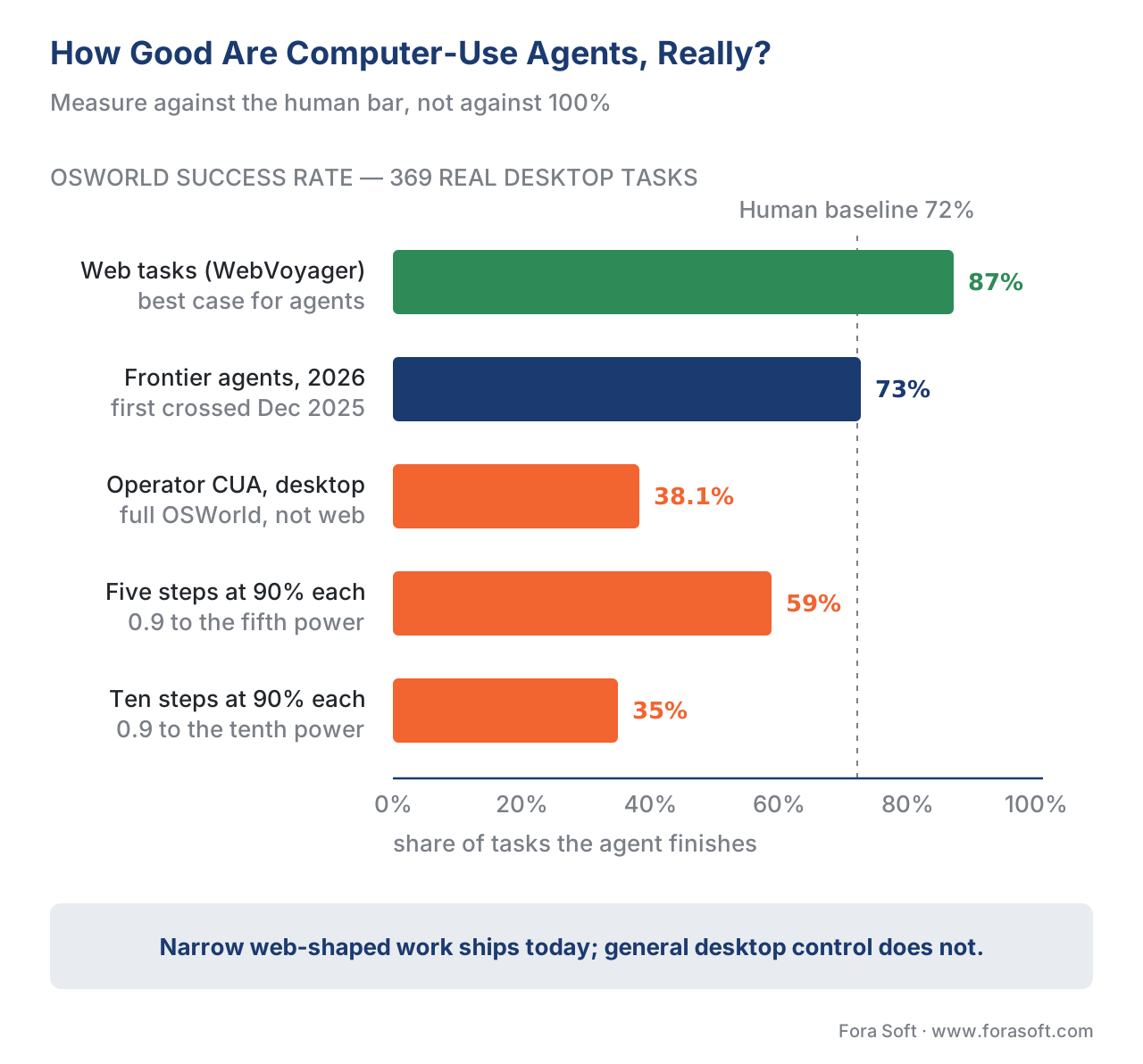 Figure 3. The reality check. Web tasks are nearly solved; general desktop control only just matches an ordinary human; and chaining steps multiplies the failure rate. Plan against the 72% bar.
What These Agents Cost, And Why The Bill Is Hard To Predict
The cost of a computer-use agent follows directly from the loop in Figure 1, and once you see it the pricing stops being mysterious. Every cycle has two billable parts. The screenshot the agent looks at is charged as image input — the model has to read a picture. The decision it makes is charged as text output — the model writes out the action. So each observe-reason-act cycle costs one screenshot's worth of input plus one decision's worth of output, on whichever model you chose.
Walk a small example out loud. Suppose one cycle costs roughly one to two cents on a mid-tier model — a realistic 2026 figure for a screenshot plus a short decision. A task that takes forty cycles to finish therefore costs:
cost of one task = 40 cycles × ~$0.015 per cycle
                 ≈ $0.60 per completed task
Sixty cents sounds cheap, and for one task it is. The trap is that you do not know in advance whether a task takes forty cycles or four hundred — that depends on how many times the agent has to look, get confused, retry, and look again. A task that goes off the rails and loops can quietly run up a bill many times the estimate. This is exactly why Manus's credit model feels unpredictable, and why any agent you deploy needs two guardrails wired in from day one: a hard cap on the number of cycles per task, and a hard cap on spend. The economics are not the problem; unbounded economics are. We size this kind of per-action cost in detail in the cost-of-AI lesson.
A Common Mistake — Treating An Agent Like A Script
The single most expensive misconception in this space is treating a computer-use agent as if it were a traditional automation script. A script does the same thing every time: given the same input, it produces the same output, and if it works once it works forever until the website changes. A computer-use agent is probabilistic — it is making a fresh judgment from a screenshot on every cycle, and it can make a different choice on the same screen twice. Teams that wire an agent into a critical path as though it were deterministic — "the agent will always click Confirm correctly" — are the teams that end up explaining to a customer why the agent confirmed the wrong order.
The fix is not to abandon agents; it is to design for their nature. Keep a human approving any action that spends money, sends a message, or deletes data — the same way Claude Code asks before it commits and Operator asks before it confirms a purchase. Cap the cycles and the cost, as above. Prefer the narrowest possible scope: an agent confined to one web-shaped task is far more reliable than one told to "do whatever it takes". And log every action, so that when the agent does something surprising — and it will — you can see the screenshot it saw and the decision it made. The mature 2026 products bake these rails in: Claude Code defaults to asking permission before changing files, Apple's App Intents only expose declared capabilities, and Operator pauses for confirmation on consequential steps. When you build or buy an agent, the presence of these rails is the feature to check first, ahead of any benchmark score.
Build It, Buy It, Or Skip It — For Your Video Product
Bring it back to the two questions you actually have to answer. For Track B — building faster — the call in 2026 is easy and the answer is usually "use one". Claude Code and Cursor are mature, the per-seat cost is small against an engineer's salary, and the wins on migrations, refactors, and multi-file features are documented and large. The discipline is unchanged from any good engineering shop: keep tests green, review every commit, and let the human own the architecture. There is no exotic risk in pointing a coding agent at your own codebase under review; the downside of a bad suggestion is caught before it ships.
For Track A — an agent inside your product — the call is harder and the honest default is "scope it down hard, or skip it for now". If the task your users want automated is web-shaped and narrow — pull these numbers from that portal, fill this recurring form — an agent can be production-ready today, with the guardrails above. If the task is broad desktop control, the OSWorld reality check says wait, or constrain it until the reliability is there. And before you build a general agent at all, ask whether a scoped integration does the job more reliably for less: if the system you want to operate does have a proper back-door — an official interface built for software to talk to — using that directly is faster, cheaper, and far more reliable than having an agent squint at screenshots. The agent's superpower is operating software that has no back-door; spending it on software that does is the most common over-engineering mistake in this category.
Free download: Computer-Use Agent Selection ChecklistOne printable page: the Track A vs Track B test, the five 2026 products side by side, the observe-reason-act loop, the OSWorld numbers to plan against, and the build-buy-skip rules with the three guardrails every agent needs.Where Fora Soft Fits In
We sit on both sides of this split every week. As a Track B matter, AI coding agents are now part of how we build the video conferencing, OTT, streaming, surveillance, telemedicine, and e-learning systems we have shipped since 2005 — they accelerate migrations and the mechanical parts of a build while our engineers own the architecture and the review. As a Track A matter, we help teams decide, soberly, where an agent belongs inside a video product and where a scoped integration is the safer, cheaper answer — and how to wire in the human-approval, cost-cap, and logging rails before anything touches a real user. The recurring service we provide is less "add an agent" and more "tell us honestly whether this should be an agent at all, and make it safe if it should". That judgment, applied across the video verticals we know, is where the value is. In practice that means our agentic engineering for video streaming teams use Claude Code and Cursor under senior review to ship mediasoup and LiveKit work faster, while our AI integration services scope and build the in-product agents, with approval gates and cost caps, when an agent really is the right answer.

The book
AI for Video: A Complete Guide to Intelligence in Video Products: From Real-Time Pipelines and Agents to Serving, Cost, Compliance, and Verticals
Volume 7 takes the loop from Figure 1 apart as engineering: the agent primitives (tool use, memory, planning), the frameworks you would build on, and the cost-per-action arithmetic behind the cycle caps and spend caps this lesson insists on, plus the EU AI Act and disclosure rules that apply once an agent acts for a real user. Volume 6 sits underneath it with the vision-language models that do the reasoning step, so if you want to know why GUI grounding is hard, that is where to look. Written by Nikolay Sapunov, CEO at Fora Soft.
Should your video product have an agent in it, or a scoped integration?
Tell us the task you want automated and we will tell you honestly whether it is agent-shaped, then wire in the human-approval, cycle-cap, and logging rails before it touches a real user. 250+ video products shipped since 2005.
See our case studies
Case study
Mindbox
The narrow task done properly, not by an agent squinting at a screen: a plate-reading module that clears 500,000 vehicles a day at about 95% accuracy, wired in through RTSP and a REST API across 50+ deployments.
Case study
TransLinguist
What human-in-the-loop looks like when the output is consequential: AI speech-to-speech in 16+ languages and captions in 22, with a marketplace of 30,000+ certified interpreters behind it, on the UK NHS national framework.
Case study
VocalViews
Automation through the back-door rather than the screen: transcription in 30+ languages, live translation, and participant verification called as services across 5,000+ studies for Samsung, Google, and Netflix.
What to read next
Agent basics
Agentic AI vs generative AI — the agent loop for video
The loop from Figure 1, generalized past computer-use products to any agent you might build.
Models
Closed frontier — Gemini 2.5, GPT-5, Claude Opus 4, Claude Computer Use
The vision-language models that run the reasoning step, and what each charges for a screenshot.
Frameworks
Manus AI, Claude Agent SDK, OpenAI Swarm, Google ADK, n8n
If you decide to build rather than buy, this is the shortlist and how the five differ.
Cost
The cost model — what AI in video actually costs at scale
The per-cycle arithmetic behind the 60-cent task, sized for a product instead of one demo.
References
- Anthropic. "Claude Code by Anthropic — Anthropic's agentic coding system." anthropic.com/product/claude-code (accessed 2026-06-01). — Primary source for the definition of Claude Code as an agentic system that reads the codebase, edits across files, runs tests, and commits; for "the majority of code at Anthropic is written by Claude Code"; for the agentic-vs-autocomplete distinction; for the default-cautious permission model; and for the enterprise case studies: Stripe (1,370 engineers; 10,000-line Scala→Java migration in four days vs ~ten engineer-weeks), Wiz (50,000-line Python→Go in ~20 hours vs 2–3 months), Rakuten (feature delivery 24→5 working days), Ramp (incident investigation time −80%).
- OpenAI. "Computer-Using Agent (CUA)." openai.com/index/computer-using-agent (accessed 2026-06-01). — Primary source for the CUA observe-reason-act architecture pointed at a browser and for the benchmark results: 38.1% on OSWorld (full computer use), 58.1% on WebArena, 87% on WebVoyager.
- OpenAI Help Center. "Operator — Release Notes." help.openai.com/en/articles/10561834 (accessed 2026-06-01). — Primary source for the 17 July 2025 integration of Operator into ChatGPT as "agent mode", the retirement of the standalone operator.chatgpt.com experience, and the upgraded, more-persistent CUA model.
- OpenAI. "Introducing Operator." openai.com/index/introducing-operator (accessed 2026-06-01). — Source for Operator's early-2025 launch as a browser-driving consumer agent and its task scope (forms, ordering, booking).
- Xie, T., et al. "OSWorld: Benchmarking Multimodal Agents for Open-Ended Tasks in Real Computer Environments." (OSWorld project; arXiv:2404.07972; accessed 2026-06-01). — Primary source for OSWorld as 369 real desktop tasks across file management, web, office, and OS operations, and for the ~72% human baseline. Per §4.3.2 source discipline, benchmark facts are anchored to the benchmark's own publication rather than to vendor leaderboards; vendor scores (Claude, OpenAI) are reported as claims against this fixed task set.
- CNBC. "Meta acquires intelligent agent firm Manus, capping year of aggressive AI moves." cnbc.com (30 December 2025, accessed 2026-06-01); corroborated by Fortune (fortune.com, 30 December 2025). — Source for Meta's December 2025 acquisition of Manus at a reported price above $2 billion, Manus's origin in the Butterfly Effect / Monica team, the $75M Benchmark-led Series B, and the relocation to Singapore. Figures above $2B (up to $3B) are reported but not officially disclosed; flagged as such in-text.
- Manus. "Manus — Plans & Pricing." manus.im/pricing (accessed 2026-06-01). — Primary source for the 2026 credit-based pricing model (free daily-credit tier; Pro tiers ~$20 and ~$40/month with monthly credit pools; annual discount), used for the unpredictable-cost caveat.
- Perplexity. "Comet: Browse at the speed of thought" and "Comet — a Personal AI Assistant." perplexity.ai/hub/blog/introducing-comet and perplexity.ai/comet (accessed 2026-06-01). — Primary source for Comet as a Chromium-based AI browser with an in-page assistant and agent, the 2025 invite-only beta → 2026 global availability (iOS/Android/Mac/Windows), the Android "first agentic mobile browser" claim, and the Samsung Internet integration.
- Apple. "Apple Intelligence" and Apple Newsroom, "Apple Intelligence gets even more powerful with new capabilities across Apple devices." apple.com/apple-intelligence and apple.com/newsroom (accessed 2026-06-01). — Primary source for on-device processing, Private Cloud Compute, LLM-powered Siri with on-screen awareness, cross-app actions, and the ChatGPT integration. Apple Developer Documentation, "Integrating actions with Siri and Apple Intelligence" (developer.apple.com) — source for App Intents as the framework by which apps declare scoped capabilities.
- Wang, S., et al. "Computer Use Agents: Benchmark & Architecture" (AIMultiple research summary, accessed 2026-06-01) and arXiv GUI-grounding literature (ShowUI, arXiv:2411.17465; GUI-Actor, arXiv:2506.03143). — Source for the end-to-end vs composed agent distinction and for GUI grounding (predicting click coordinates) as the central technical bottleneck, including the reported human-vs-agent performance gap.
- NVIDIA. "NVIDIA DeepStream 9 brings AI coding agents to vision-pipeline development" (NVIDIA developer announcement, 2026, accessed 2026-06-01). — Source for DeepStream 9's integration with Claude Code and Cursor to generate RTSP-ingest, VLM-per-frame, message-bus vision pipelines from natural language — the Track-B-applied-to-video example.
- Pragmatic Engineer / Faros AI. "AI Tooling for Software Engineers in 2026" and "Best AI Coding Agents for 2026." (accessed 2026-06-01). — Source for Cursor's ~$2B annualized revenue and broad professional adoption, and for the documented time-to-first-commit reductions (~35–40%) from standardizing Cursor + Claude Code. Tier-4/6 sources used only for adoption context, not for any spec claim.
