


Why this matters
If you run a streaming service, an e-learning platform, or any product that publishes video to the public in the EU, accessibility tracks moved from "nice to have" to "legally required" in 2025, and getting the formats wrong means a player that does not show the right track even when the file is correct. This article is for product managers, founders, and engineers who need to scope accessibility work, talk to a packaging vendor without bluffing, and understand why "we added subtitles" does not mean "we are compliant." You will finish able to name every track in the stack, say which format and flag carries it, and spot the three mistakes that quietly break accessibility in production.
The one idea: two senses, two directions
The whole topic unlocks once you see that accessibility tracks flow in two opposite directions, because they serve two different disabilities.
A person who cannot hear needs the sound turned into something they can see. That means text on screen — the words being spoken, plus the meaningful non-speech sounds like a door slamming or ominous music. Information moves from the audio track into a text track. (If the very idea of an "audio track" as a stream of samples is new, our primer on what digital audio is is the place to start.)
A person who cannot see needs the picture turned into something they can hear. That means extra spoken words — a narrator describing the action, the scene, and any on-screen text that nobody says out loud. Information moves from the video track into an extra audio track.
Everything else in this article is detail hung on that frame. Captions and subtitles are the see-the-sound side. Audio description is the hear-the-picture side. They are produced by different people, delivered in different file formats, and signaled to the player with different flags — so a team that treats "accessibility" as a single checkbox usually ships only half of it.
![Two stacked panels. Top, blue: an audio track carrying speech and sound effects feeds a text track on screen carrying captions and SDH, with the example cue [door slams]; formats WebVTT, IMSC, CEA-608/708. Bottom, green: a video track carrying action, scenes and on-screen text feeds an extra speech track of audio description, with the example line “she opens the door”, delivered as a separate audio track, not as text.](https://cdn.prod.website-files.com/64e8910adc5a63966a68acea/6ab2a55888cb81e7f15872b0_6ab2a50a1bbb883a188c286a_03_10-accessibility-captions-audio-description-stack__01-two-senses-two-directions.svg) Figure 1. The two directions of accessibility. Captions and SDH turn sound into text; audio description turns the picture into extra speech.
Figure 1. The two directions of accessibility. Captions and SDH turn sound into text; audio description turns the picture into extra speech.
The see-the-sound side: captions, SDH, and subtitles
Three things look almost identical on screen — white text at the bottom — but they are not the same track, and confusing them is the most common accessibility mistake.
Subtitles assume you can hear. They exist to translate dialogue into another language, so they carry only the spoken words. A French film with English subtitles gives a hearing viewer the dialogue in English and nothing else, because that viewer can already hear the explosion.
Captions assume you cannot hear. A caption track, often called a closed caption, carries the dialogue plus the non-speech information a deaf viewer would otherwise miss: [door slams], [tense music], and who is speaking when it is not obvious. "Closed" means the viewer can turn it on or off; "open" captions are burned into the picture and cannot be removed.
SDH — the text whose name spells out "subtitles for the deaf and hard of hearing" — is the modern middle ground. It is a translation subtitle that also carries the non-speech and speaker cues a caption would. SDH exists because streaming is global: a deaf viewer in Spain watching a US show needs both the translation and the sound cues, and SDH is the single track that does both. In practice, streaming platforms ship SDH where broadcast would have shipped separate captions.
Common mistake: shipping subtitles and calling it captioning. A subtitle track that only translates dialogue does not satisfy an accessibility requirement, because it drops the sound effects, the music cues, and the speaker identification a deaf viewer depends on. Auto-generated "subtitles" from a speech-to-text engine are subtitles, not captions — they transcribe words but invent no
[phone rings]. If a regulation says "captions" or "SDH," a plain translation subtitle is not compliant, no matter how accurate the words are.
The formats that carry text on screen
The text track has to be packaged in a format the player understands. Four names cover almost everything you will meet.
The two old broadcast formats are CEA-608 and CEA-708 (also written CTA-608 / CTA-708). CEA-608 is the original US analog "line 21" caption, limited to a single style and a few colors; CEA-708 is its digital successor, carried inside the MPEG transport stream of over-the-air and cable broadcast, with richer styling and multiple service channels. A 708 decoder is required to also decode embedded 608, so the two travel together. You meet these whenever you ingest broadcast-origin video.
For the internet, two formats dominate. WebVTT (Web Video Text Tracks) is the plain-text caption format the web was built on — a small .vtt file of timestamps and lines — and it is the format Apple requires for captions in HLS. IMSC (a profile of the TTML markup language, also called IMSC1) is the broadcast-grade alternative: it survives strict packaging, supports precise positioning and color, and is the only TTML profile that the modern CMAF container allows. The fragmented-MP4 carriage rules for both — the codec strings wvtt for WebVTT and stpp for IMSC — are defined in ISO/IEC 14496-30, so the same caption payload can feed HLS and DASH from one packaging pipeline.
The practical posture in 2026 is to ship WebVTT as the universal text track and add IMSC only where typography demands it or a platform contract requires it. We cover the container mechanics of caption tracks in HLS, DASH, and CMAF in the companion article on audio in HLS, DASH, CMAF and in the Video Streaming section's deep dive on caption packaging.
| Track type | Who it serves | Carries non-speech sounds? | Typical format |
|---|---|---|---|
| Subtitles | Hearing viewers, other language | No | WebVTT, IMSC |
| Captions (CC) | Deaf / hard of hearing, same language | Yes | CEA-608/708, WebVTT |
| SDH | Deaf / hard of hearing, often translated | Yes | WebVTT, IMSC |
| Open captions | Everyone (burned in) | Yes | Pixels in the video |
The hear-the-picture side: audio description
Audio description, abbreviated AD (and called video description in US regulation or tiflokommentary in some markets), is the track most teams forget. It is a second narration, recorded by a describer, that explains the important visual information — actions, scene changes, facial expressions, and on-screen text — and is mixed into the pauses between dialogue so it does not talk over the actors.
There are two flavors, and the difference is a real engineering choice. Standard audio description fits the narration into the existing gaps in the soundtrack; it works when the dialogue is sparse enough to leave room. Extended audio description is allowed to pause the video when the gaps are too short for everything that must be described — the picture freezes, the narrator speaks, then playback resumes. Standard AD is the common Level AA web requirement; extended AD is the higher, AAA-level bar and is rare in mainstream streaming because pausing the video breaks the viewing flow. On platforms that also offer immersive sound, the description track usually rides as a plain stereo rendition alongside the immersive ones rather than as an object in the Atmos / immersive mix, which keeps it simple to author and select.
Crucially, audio description is delivered as a separate audio track, not as text. It is a complete alternate mix — the original soundtrack with the description narration folded in — selected the same way a viewer picks a dubbed language. That is why it belongs in the audio stack and shares the multi-track plumbing we describe in the article on multi-language audio, dubs, and descriptive audio. Because the AD mix is a full track, it has to meet the same loudness targets as every other rendition — see loudness normalization (EBU R128, ITU-R BS.1770, ATSC A/85) — so the narration is neither buried nor jarring against the program audio.
Signaling: how the player knows which track is the accessible one
A correct AD or SDH track that the player cannot find is no better than no track at all. Each delivery system has a specific flag that marks a track as accessible, and missing the flag is the second classic mistake.
In HLS, an audio rendition that carries description is tagged in the playlist with CHARACTERISTICS="public.accessibility.describes-video"; the Apple authoring guidance also recommends setting AUTOSELECT=YES so the player can choose it when the user's device requests audio description. A caption rendition for the deaf is tagged public.accessibility.describes-spoken-dialog,public.accessibility.describes-music-and-sound.
In DASH, the same intent is carried by two MPEG-DASH descriptors: a Role descriptor and an Accessibility descriptor on the adaptation set. An audio-description audio track uses the audio-purpose classification scheme (urn:tva:metadata:cs:AudioPurposeCS:2007), and an SDH text track uses the role value caption. The DASH-HLS interoperability spec, CTA-5005, lines these flags up so one package can serve both.
Common mistake: the unflagged or default-on description track. Two failure modes recur. First, the AD audio is present but carries no accessibility characteristic, so the player lists it as just another language and screen-reader users never get it auto-selected. Second — the opposite — the description track is accidentally marked as the default audio, so every viewer hears a narrator describing the scene, files a bug, and support is baffled. Set the accessibility flag, and never set the description track as the default.
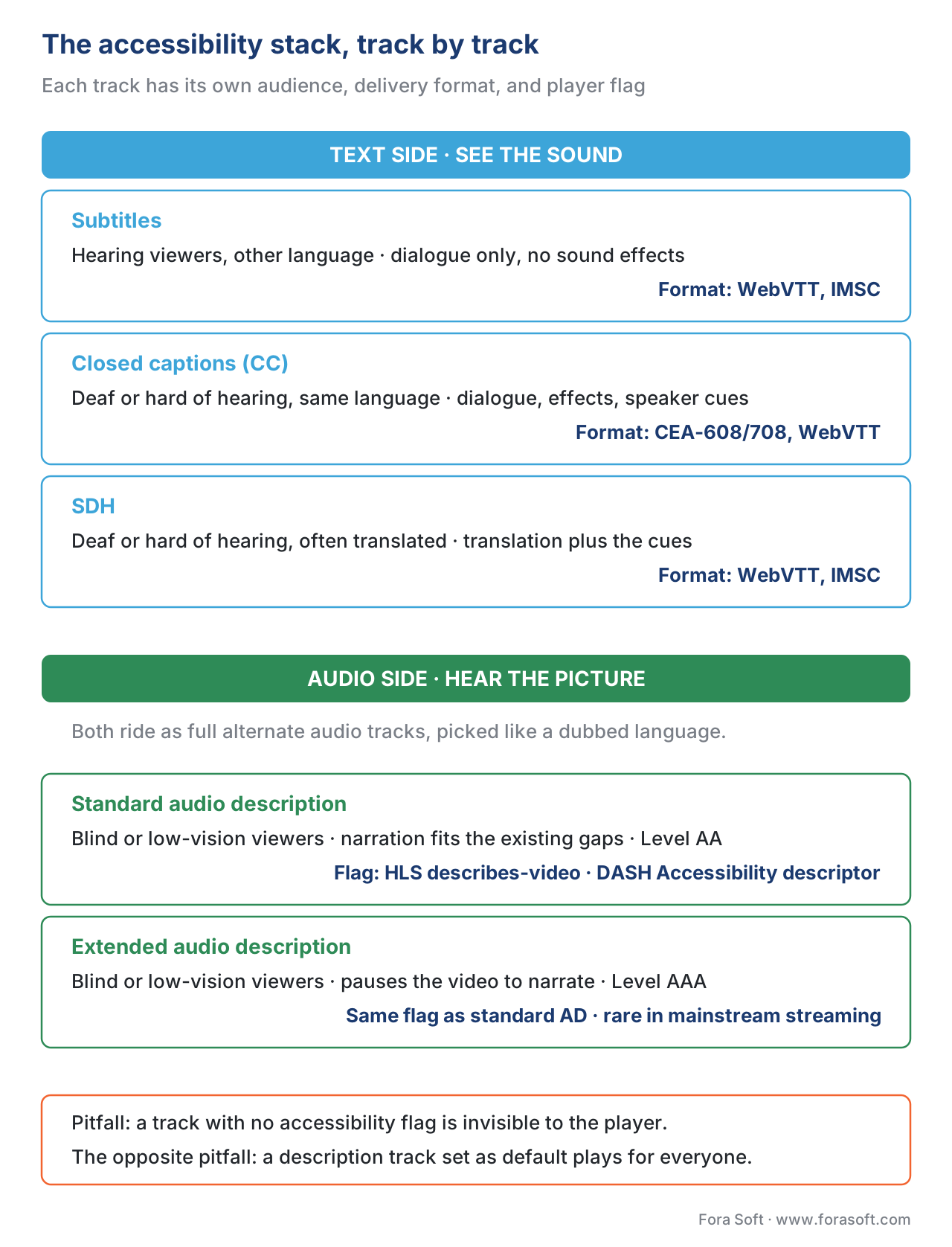 Figure 2. The full accessibility stack. Each track has its own audience, format, and signaling flag.
The rules: who requires what in 2026
The reason this stack matters commercially is that it is now mandated, and the requirements differ by region. The numbers below are the load-bearing ones for scoping.
In the European Union, the European Accessibility Act (EAA) took effect on 28 June 2025. It requires most consumer-facing digital services — including streaming and video-on-demand sold to EU residents, even by non-EU companies — to be accessible, which for video means providing captions/SDH and audio description. New content published from June 2025 must comply; existing back catalogs generally have until 2030. National laws implementing the EAA set the precise thresholds, and broadcast accessibility quotas (captioning a high percentage of programming) continue under the EU's audiovisual rules and the technical standard EN 301 549.
In the United States, the picture is split by medium. The FCC, under the Twenty-First Century Communications and Video Accessibility Act (CVAA), requires closed captioning and, for the largest broadcasters and networks, video description on a set number of hours of programming. For web video published by state and local governments, the Department of Justice's 2024 ADA Title II rule requires conformance to WCAG 2.1 Level AA; the compliance dates were extended in 2026, so entities serving populations of 50,000 or more must comply by 26 April 2027 and smaller entities by 26 April 2028.
The web baseline everyone references is WCAG, the Web Content Accessibility Guidelines from the W3C, currently version 2.2. The relevant success criteria for video are 1.2.2 Captions (Prerecorded) and 1.2.4 Captions (Live) on the text side, and 1.2.3 and 1.2.5 Audio Description (Prerecorded) on the audio side; standard audio description sits at Level AA, while extended audio description (1.2.7) is the stricter Level AAA goal.
A small worked example: how much description time you actually get
Audio description has a hard physical limit that surprises product teams: you can only narrate in the silences. Suppose a 30-minute episode (1,800 seconds) is fairly dialogue-light and 25% of its runtime is gaps between speech:
description budget = total runtime × silent fraction
                   = 1,800 s × 0.25
                   = 450 s of usable gaps
At a comfortable narration pace of about 150 words per minute, that is:
450 s ÷ 60 × 150 wpm = 1,125 words
So a describer has roughly 1,125 words to convey every important visual across the whole episode — under 38 words per minute of runtime. That is why AD scripts are terse, why fast-cut action sequences are the hardest to describe, and why extended audio description (pausing the video) exists as the escape hatch when the gaps simply are not enough.
Free download: Accessibility Track Cheat SheetEvery accessibility track on one page: subtitles vs captions vs SDH vs audio description, the delivery format for each, the HLS and DASH flags that identify them, and the 2026 EU and US dates.Where Fora Soft fits in
Fora Soft has built video software since 2005 across streaming and OTT, e-learning, telemedicine, and video conferencing — all verticals where accessibility is now a delivery requirement, not a feature request. The work is rarely about generating the captions themselves; it is about getting the stack right end to end: making sure the SDH track is flagged as a caption and not a plain subtitle, that the audio-description rendition carries the accessibility characteristic and is never the default audio, and that one packaging pipeline emits both HLS and DASH flags correctly. Teams that bolt accessibility on at the end discover their player silently ignores correct tracks; designing the track model and the signaling up front is the part we help product teams get right before packaging is locked. When captions have to be generated as well as signaled, our speech-to-text development team builds live and VOD captioning, and our OTT platform engineers wire both tracks into HLS and DASH packaging.

The book
Audio for Video: A Complete Guide to Sound in Video Products: From PCM and Codecs to Loudness, Accessibility, and Real-Time Voice Processing
This article names the tracks; volume 4 of the handbook shows you how to author and ship them. Its accessibility and subtitle chapters go through the caption formats and their carriage in fragmented MP4, the loudness target an audio-description mix has to hit alongside every other rendition, and the channel-layout and codec decisions that sit underneath a multi-track deliverable. Written by Nikolay Sapunov, CEO at Fora Soft.
Do your captions and audio description actually reach the player?
Send us your track model and packaging setup and we will tell you which flags are missing, which track is mislabeled, and what an EAA or WCAG audit will ask for. 250+ video products shipped since 2005.
See our case studies
Case study
TransLinguist
Closed captioning in 22 languages, automatic subtitles and session transcription for a marketplace of 30,000+ certified interpreters — the see-the-sound side running at production scale.
Case study
Volo (Blaze Streaming Media)
We developed the software for Blaze Streaming Media's Volo: attendees scan a QR code and choose subtitles or a spoken voiceover — the same content delivered either as text or as an extra audio track. Blaze runs Volo at conferences such as Black Hat USA, GDC and HIMSS.
Case study
Scholarly
DASH and HLS delivery for 15,000+ users and live classes of up to 2,000 students, where every text and audio rendition has to be authored once and signaled correctly to both protocols.
What to read next
Streaming
Multi-language audio: tracks, dubs, descriptive audio
Where the description track actually lives: the multi-track plumbing it shares with dubs.
Streaming
Audio in HLS, DASH, CMAF
How a player picks a rendition — and where it reads the accessibility flags.
Loudness
Loudness normalization: EBU R128, BS.1770, ATSC A/85
The description mix is a full rendition, so it has to hit the same target as the rest.
Immersive
Atmos and immersive audio in streaming
Why the description track rides as plain stereo beside the immersive renditions.
References
- W3C, "Web Content Accessibility Guidelines (WCAG) 2.2" — W3C Recommendation, 12 December 2024. Standards source (tier 1). Cited for success criteria 1.2.2 (Captions, Prerecorded, Level A), 1.2.4 (Captions, Live, Level AA), 1.2.3 / 1.2.5 (Audio Description, Prerecorded), and 1.2.7 (Extended Audio Description, Level AAA). https://www.w3.org/TR/WCAG22/
- W3C WAI, "Understanding Success Criterion 1.2.5: Audio Description (Prerecorded)." Standards source (tier 1). Cited for the definition of standard audio description as narration added during existing pauses in dialogue, at Level AA. https://www.w3.org/WAI/WCAG22/Understanding/audio-description-prerecorded.html
- ISO/IEC 14496-30:2018, "Information technology — Coding of audio-visual objects — Part 30: Timed text and other visual overlays in ISO base media file format." Standards source (tier 1). Cited for the
wvtt(WebVTT) andstpp(TTML/IMSC) codec strings and the fragmented-MP4 carriage rules used by CMAF, HLS, and DASH. https://www.iso.org/standard/75394.html - CTA, "CTA-708-E: Digital Television (DTV) Closed Captioning." Standards source (tier 1). Cited for CEA-708 service channels, styling, and the requirement that 708 decoders also decode embedded CEA-608. https://shop.cta.tech/products/digital-television-dtv-closed-captioning
- Apple, "HTTP Live Streaming (HLS) Authoring Specification for Apple Devices." Cited for the
CHARACTERISTICS="public.accessibility.describes-video"tag, the spoken-dialog / music-and-sound characteristics for captions, and the AUTOSELECT recommendation for accessibility renditions. https://developer.apple.com/documentation/http-live-streaming/hls-authoring-specification-for-apple-devices - European Commission / EUR-Lex, "Directive (EU) 2019/882 — European Accessibility Act." Cited for the 28 June 2025 application date, the scope covering e-commerce and audiovisual media services sold to EU consumers, and the transition arrangements for existing content. https://eur-lex.europa.eu/eli/dir/2019/882/oj
- ETSI EN 301 549, "Accessibility requirements for ICT products and services." Standards source (tier 1). Cited as the harmonized technical standard EU member states apply for captioning and audio-description conformance under the EAA. https://www.etsi.org/deliver/etsi_en/301500_301599/301549/
- U.S. Department of Justice, "Nondiscrimination on the Basis of Disability; Accessibility of Web Information and Services of State and Local Government Entities" (ADA Title II final rule), 24 April 2024, and the 2026 compliance-date extension. Cited for the WCAG 2.1 Level AA requirement and the extended compliance dates (26 April 2027 for populations ≥ 50,000; 26 April 2028 otherwise). https://www.ada.gov/resources/2024-03-08-web-rule/
- FCC, "Twenty-First Century Communications and Video Accessibility Act (CVAA)" rules on closed captioning and video description. Cited for US broadcast/cable closed-captioning obligations and the video-description hour quotas for large networks. https://www.fcc.gov/consumers/guides/21st-century-communications-and-video-accessibility-act-cvaa
- DASH Industry Forum / CTA-5005-A, "Web Application Video Ecosystem (WAVE) — DASH-HLS Interoperability." Cited for the DASH
RoleandAccessibilitydescriptors, theurn:tva:metadata:cs:AudioPurposeCS:2007audio-purpose scheme, and HLS/DASH flag alignment. https://cdn.cta.tech/cta/media/media/resources/standards/cta-5005-a-final.pdf - AWS Elemental, "Back to basics: Accessibility signaling with AWS Elemental Media Services." Cited (secondary) for the practical mapping of HLS CHARACTERISTICS and DASH descriptors to encoder configuration; verified against the Apple and DASH-IF specs above. https://aws.amazon.com/blogs/media/back-to-basics-accessibility-signaling-with-aws-elemental-media-services/
- Mux, "Subtitles, Captions, WebVTT, HLS, and those magic flags." Cited (secondary) for the WebVTT-in-HLS delivery posture and the subtitle-vs-caption distinction in practice; corroborated against ISO/IEC 14496-30 and the HLS authoring spec. https://www.mux.com/blog/subtitles-captions-webvtt-hls-and-those-magic-flags
Note on source tiers: the controlling facts (success criteria, codec strings and carriage, caption-format definitions, accessibility flags, and the EAA application date) come from the standards bodies and regulators (W3C, ISO/IEC, CTA, Apple, EUR-Lex, ETSI, DOJ, FCC). Where a secondary source (references 11, 12) supplied a practical mapping, it was checked against the controlling spec before inclusion.
