


Why this matters
If you run or are building a learning product, video delivery is the line item that grows fastest and quietest as enrolment climbs. Teams budget carefully for the one-time work of encoding a course and for the cheap business of storing it, then get a delivery bill an order of magnitude larger than they planned. This article is written for the L&D director, EdTech founder, or product lead who needs to forecast that bill, understand the few decisions that move it, and know when paying a managed platform beats building delivery in-house. You will leave able to estimate your own delivery cost and to ask an engineer the right questions.
The three costs of putting a course video on screen
Before any optimization, separate the three things you actually pay for. They behave very differently, and confusing them is the root of most delivery-budget mistakes.
The first is transcoding — the computing work of converting one uploaded master video into the several compressed versions a real audience needs. (Transcoding is just re-encoding: taking the high-quality file an instructor uploaded and producing smaller, streamable copies at different quality levels.) You pay for this roughly once per lesson, per minute of output.
The second is storage — keeping those files on a disk in the cloud so they are ready to play. You pay for this every month, per gigabyte held, whether anyone watches or not.
The third is egress — the cost of sending the video bytes out across the internet to each learner who presses play. (Egress simply means "data leaving the provider's network." Every gigabyte a learner watches is a gigabyte of egress you are billed for.) You pay for this every single time, for every learner, forever.
Here is the insight the rest of the article builds on: for a learning catalog, transcoding is small and mostly one-time, storage is usually the smallest line, and egress is the recurring monster. The bill does not scale with how many lessons you own. It scales with how many people watch, for how long, at what quality.
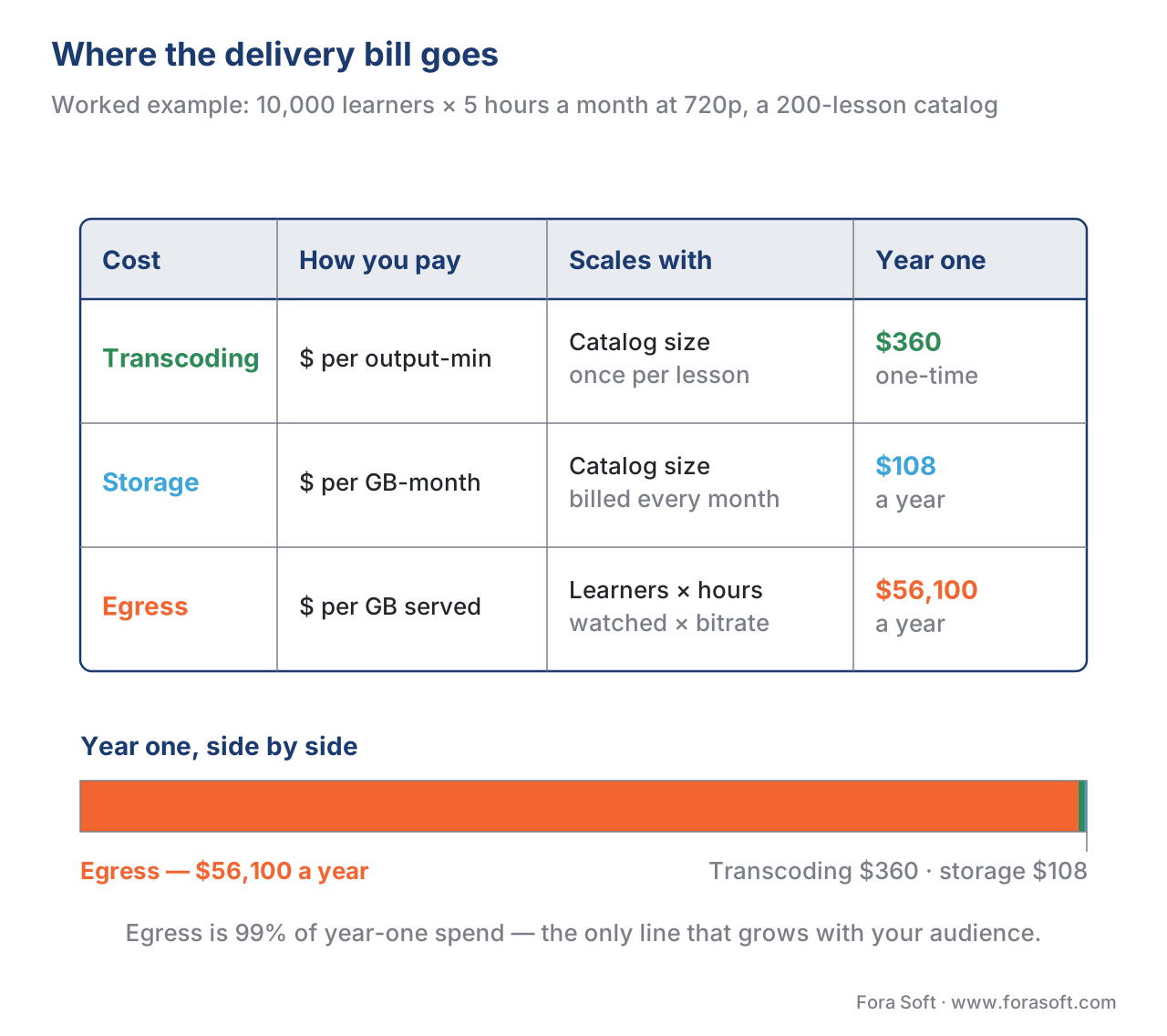 Figure 1. Where the delivery bill goes. Transcoding is a small one-time cost and storage is modest; egress recurs for every learner, every play, and dominates at volume.
The egress arithmetic, shown out loud
Egress is bytes, and bytes are bitrate multiplied by time. So the formula for a course platform's monthly delivery volume is simple, and worth writing once:
monthly egress (GB) = learners × hours watched each × GB per hour
The "GB per hour" depends on resolution. A useful set of round numbers for 2026, consistent across streaming references: roughly 2.0 GB per hour at 1080p, about 1.1 GB per hour at 720p, around 0.5 GB per hour at 480p, and about 0.3 GB per hour at 360p. Spoken-word audio alone, using the Opus codec at 24 kbps, is about 11 MB per hour — roughly a hundred times less than HD video.
Now the worked example. Suppose your platform reaches 10,000 active learners, each watching 5 hours of lessons a month, mostly at 720p:
10,000 learners × 5 hours × 1.1 GB/hour = 55,000 GB = 55 TB per month
That same 55 TB costs wildly different amounts depending only on which network delivers it. On a premium hyperscaler CDN at about $0.085 per GB (Amazon CloudFront's first-tier US/Europe rate in 2026):
55,000 GB × $0.085 = $4,675 per month ≈ $56,100 per year
On a value-priced CDN at $0.01 per GB (Bunny.net's 2026 standard rate for North America and Europe):
55,000 GB × $0.01 = $550 per month ≈ $6,600 per year
Same bytes. Same learners. Same course. An 8.5× difference — about $49,500 a year — decided entirely by which CDN sits in front of your video. That single chart, more than any clever engineering, is why delivery deserves a deliberate decision rather than a default.
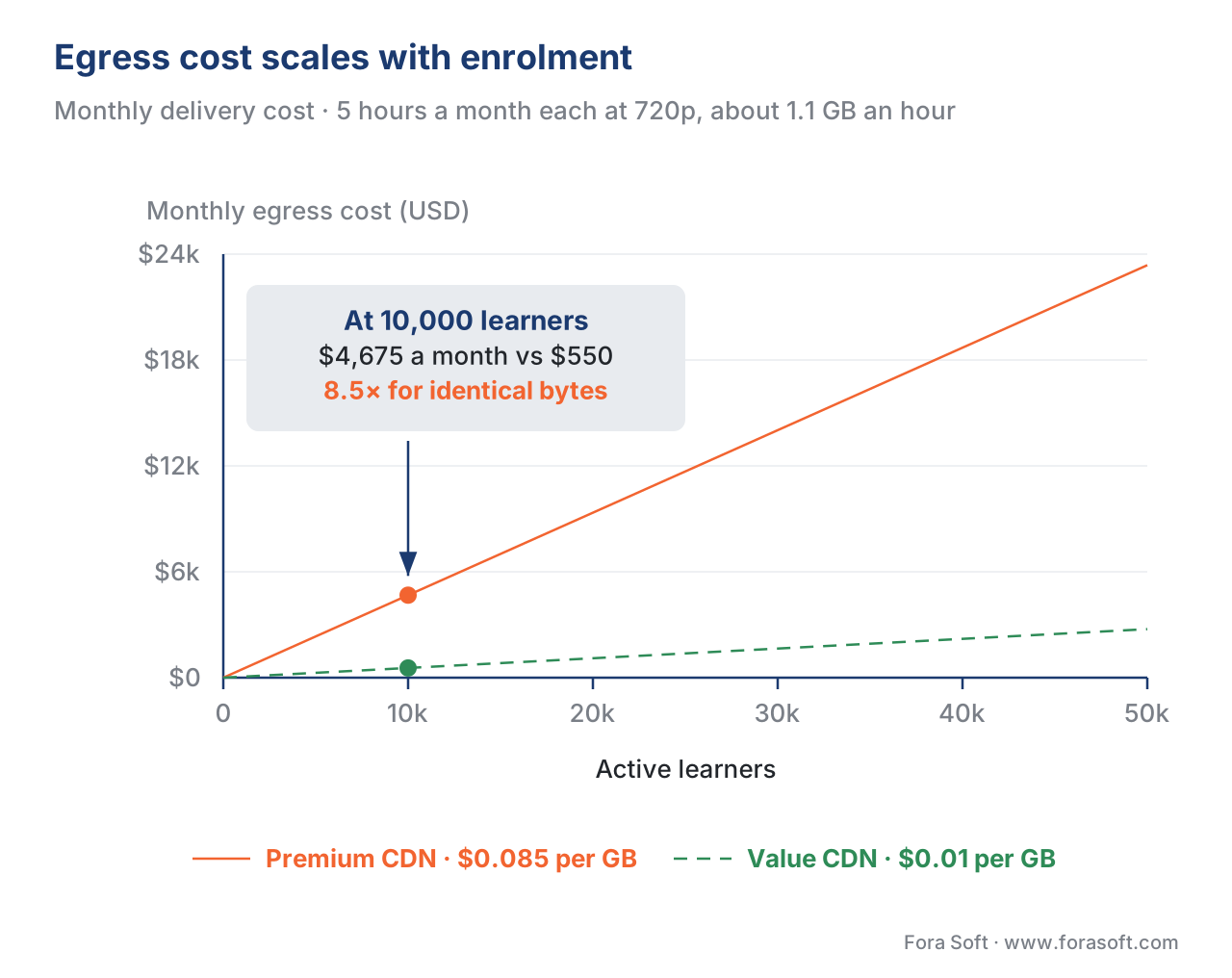 Figure 2. Egress cost scales with enrolment × watch-time × bitrate. The gap between a premium and a value CDN widens with every learner you add.
What a CDN is, and why you need one
A content-delivery network, or CDN, is a fleet of servers spread around the world that keep copies of your video close to learners. (Think of it as a chain of local warehouses: instead of shipping every lesson from one origin server, the CDN stores a copy at an edge location near each learner and serves it from there.) The first learner in a region pulls a lesson from your origin; the CDN caches it; every learner after that is served the cached copy without touching your origin again.
This matters for cost in two ways. A cache hit — serving from the edge copy — is what you are paying the CDN's egress rate for. A cache miss — having to fetch from your origin — adds a second, separate egress charge for moving the file from your storage to the CDN. A high cache-hit ratio means you pay origin egress once and edge egress many times; a low ratio means you pay origin egress over and over. For a course catalog, where the same lessons are watched repeatedly, hit ratios should be very high, and a low one is a red flag worth investigating.
Serving video straight from object storage with no CDN is the classic early mistake. It is slower for the learner, and it bills every byte as origin egress with no caching discount. A CDN is not optional at any real scale.
Common mistake: "We'll add a CDN later." Serving course video directly from a storage bucket works in a demo and falls over in production — higher latency, buffering, and an egress bill with no caching leverage. Put a CDN in front before you have an audience, not after the first big invoice.
The levers that actually move the egress bill
Because egress dominates, the optimizations that matter are the ones that reduce delivered bytes or reduce their unit price. There are four, in rough order of impact.
Lever one: send fewer bytes per minute. The cheapest gigabyte is the one you never send. Two choices govern this. The first is the codec — the compression method. (A codec is the algorithm that squeezes video into fewer bytes; H.264 is the universal baseline, H.265 is about twice as efficient, and AV1 is roughly 30–50% more efficient again.) The second is the bitrate ladder — the set of quality levels you offer. The deep mechanics of codec choice and ladder design belong to the video-encoding craft; this section covers only the cost consequence. Cut the average bitrate 40% by adopting a more efficient codec where devices support it and trimming an over-generous ladder, and the 55 TB above becomes 33 TB:
55 TB × (1 − 0.40) = 33 TB → at $0.085/GB, $2,805/month instead of $4,675
That is roughly $22,000 a year saved on the same course, before changing anything about which CDN you use.
Lever two: match resolution to content. A talking-head lecture or a slide deck carries far less motion than a sports clip, so it looks identical at a much lower bitrate. Delivering a static-slide course at 1080p doubles its egress versus 720p with no measurable learning gain. Per-title and per-scene encoding — letting each video find its own efficient ladder — is the disciplined version of this idea.
Lever three: choose the right CDN and contract. This is the 8.5× lever from the arithmetic above. Premium hyperscaler CDNs are convenient and integrate tightly with their own clouds, but you pay for that. Value CDNs and negotiated enterprise contracts (Fastly, Akamai, and others typically land between $0.02 and $0.05 per GB at negotiated rates) cost a fraction. At very high, steady volume, a multi-CDN setup — splitting traffic across two or more providers with automatic steering — adds both resilience and price leverage.
Lever four: store smartly. Storage is cheap, but it is not free, and a large back-catalog of raw masters and rarely-watched lessons adds up. Cloud object storage offers tiers: a hot tier for active content (Amazon S3 Standard at about $0.023 per GB-month in 2026), an infrequent-access tier at roughly half that, and a deep-archive tier at about $0.001 per GB-month — some twenty-three times cheaper — for masters you must keep but almost never serve.
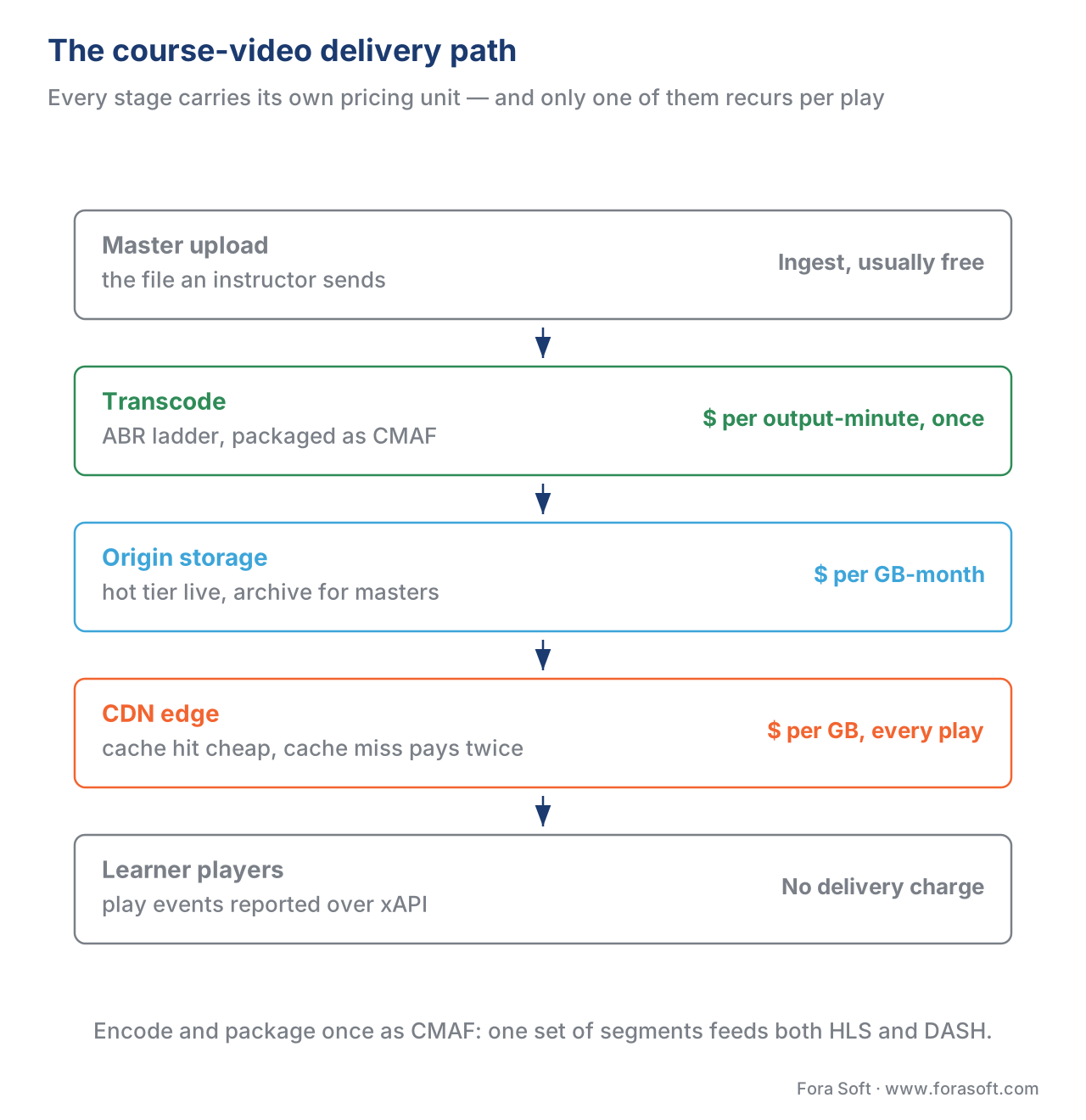 Figure 3. The course-video delivery path. Each stage carries its own pricing unit: per output-minute to transcode, per GB-month to store, per GB to deliver.
Why transcoding rarely makes the budget
Transcoding feels like it should be expensive — it is heavy computing — but for a learning catalog it is a small, mostly one-time cost. Cloud transcoding is billed per minute of output. Amazon's MediaConvert charges about $0.0075 per minute for standard definition and $0.015 per minute for HD output in 2026, with a "normalized minute" that scales up for higher resolution, frame rate, or more demanding codecs, and volume discounts that lower the rate as you process more.
Encode one 30-minute lesson into a four-rung ladder and you spend on the order of a dollar in compute — once. A 200-lesson catalog costs a few hundred dollars to transcode in full, and only when you add or re-encode content. Compare that to the egress example, where a single popular course can generate thousands of dollars a month in delivery, every month. The lesson for forecasting: model transcoding as a small one-off per hour of content, and put your attention on the recurring egress line.
There is one durable architecture choice that touches all three costs at once: encode and package each lesson once into a single common format that serves every player. The Common Media Application Format, standardized as ISO/IEC 23000-19, lets one set of video segments feed both of the open delivery standards — HTTP Live Streaming (HLS, IETF RFC 8216) and MPEG-DASH (ISO/IEC 23009-1) — so you store one copy instead of two and transcode once instead of twice. "Encode once, package once" is the default professional posture in 2026 and quietly cuts both storage and transcoding roughly in half versus maintaining separate HLS and DASH renditions.
Build versus buy: the delivery decision
This is the decision the section leads with, because it dwarfs the micro-optimizations. You can buy delivery as a managed service, or build it on raw cloud parts.
A managed video platform — Mux, Cloudflare Stream, api.video, and similar — takes your uploaded master and handles transcoding, storage, packaging, and global delivery behind one simple price. You write almost no infrastructure. Cloudflare Stream, for example, bills encoding free, storage at $5 per 1,000 minutes stored, and delivery at $1 per 1,000 minutes delivered in 2026. Mux bills per minute for encoding, storage, and delivery, with delivery tiered by resolution and volume.
Notice what per-minute delivery pricing means. You pay by playback time, not by bytes — so the price is bitrate-blind. At 720p (about 1.1 GB per hour, or 0.0183 GB per minute), Cloudflare Stream's $0.001-per-minute delivery works out to roughly $0.055 per gigabyte-equivalent; at 1080p the same per-minute price is closer to $0.03 per GB-equivalent because each minute carries more data. That is cheaper than a premium hyperscaler CDN's $0.085 per GB and far simpler to operate — but more than a value CDN's $0.01 per GB. And because the price ignores bitrate, a managed platform removes your incentive to optimize bytes: there is no egress saving from a better codec when you are billed by the minute.
So the crossover looks like this. Early and mid-stage, a managed platform is almost always the right call: predictable per-minute pricing, no pipeline to build, faster to ship, and you can wire learner-side tracking on top of any of them. As volume grows large and steady, rolling your own — object storage plus a cloud transcoder plus a value or multi-CDN — wins on unit cost, at the price of owning the pipeline, the packaging, the CDN steering, and the monitoring.
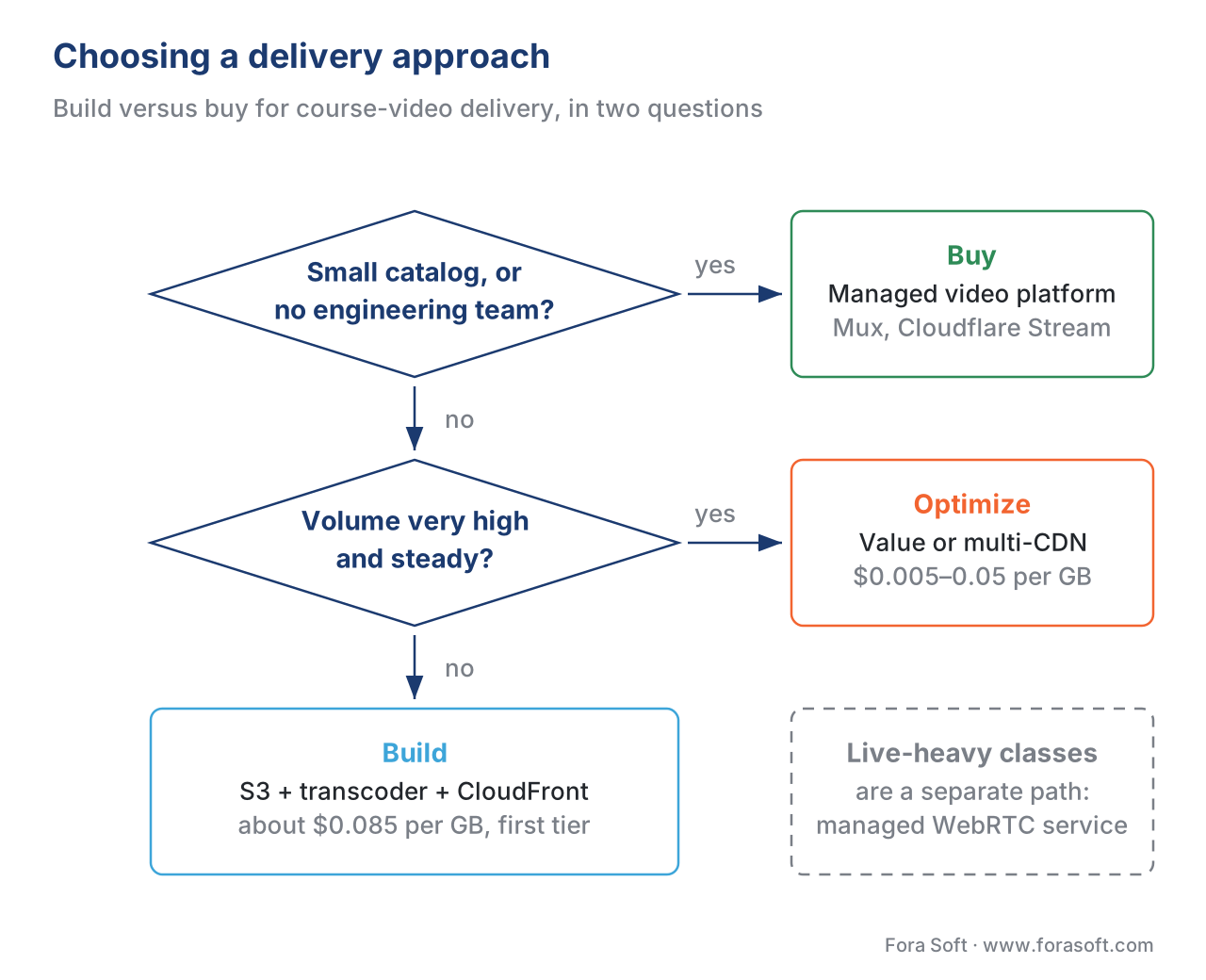 Figure 4. Choosing a delivery approach. Small catalog or no infra team: buy. Growing on-demand volume with engineers: build on a CDN. Very high steady volume: value or multi-CDN.
Delivery options for course video at volume
The table compares the realistic options. The "tracking and standards" column matters because delivery and learning-record tracking must coexist: however you deliver the video, the player still has to report what was watched, usually through the xAPI Video Profile or a SCORM wrapper.
| Option | How you pay | Unit cost (2026) | Best fit | Tracking and standards |
|---|---|---|---|---|
| Managed video platform (Mux, Cloudflare Stream, api.video) | Per minute: encode + store + deliver | Cloudflare Stream $1 / 1,000 delivered min; Mux per-minute tiers | Early to mid scale; small teams; fastest to ship | Player events you wire to the xAPI Video Profile |
| Roll-your-own on a hyperscaler CDN (S3 + MediaConvert + CloudFront) | Per GB egress + per output-min transcode + per GB-month storage | CloudFront ≈ $0.085/GB (tiers down); MediaConvert $0.015/min HD; S3 $0.023/GB-mo | Tight cloud integration; growing volume; control | You own the xAPI Video Profile / SCORM wiring |
| Value or multi-CDN (Bunny, Fastly, Akamai + steering) | Per GB, or 95th-percentile committed rate | Bunny $0.005–0.01/GB; negotiated enterprise $0.02–0.05/GB | High, steady volume; cost-critical at scale | Same; pair with your own player and tracking layer |
| LMS-hosted video (built-in or plugin) | Bundled into LMS hosting | Varies; often capacity-capped and slow | Small catalogs; no engineering team | Native SCORM / xAPI, but weak video scaling |
Two ways CDNs bill, and when burstable applies
Most teams meet egress as a simple per-gigabyte charge: you are billed for the bytes you actually deliver. That model rewards every byte you save, which is why the levers above work.
Large, steady deliverers often move to 95th-percentile (burstable) billing instead. (Here the provider samples your bandwidth every five minutes across the month, discards the top 5% of those samples — about 36 hours of peaks — and bills you on the 95th-percentile rate, in megabits per second, that remains.) This bills your required capacity rather than your consumption, so it suits high and reasonably constant traffic with occasional spikes, and it is the model behind committed-rate enterprise CDN contracts. It is not worth pursuing early; revisit it only once your traffic is large enough that a committed rate beats pay-as-you-go.
Common mistake: budgeting for storage, forgetting egress. Storage is cheap and easy to estimate, so it gets the spreadsheet attention; egress is variable and gets a guess. Then enrolment doubles, watch-time holds, and the delivery bill doubles with it while the storage line barely moves. Forecast egress from learners × hours × GB-per-hour, not from how big your catalog is.
A quick way to estimate your own bill
You do not need a model to get within range. Multiply your active learners by the hours each watches per month, multiply by the GB-per-hour for your typical resolution, and multiply by your CDN's per-GB rate. Then sanity-check it against a managed platform's per-minute price to see which side of the build-versus-buy line you are on. The companion delivery-cost calculator does exactly this across CDN, transcoding, and storage, and lets you compare a premium-CDN scenario against a value-CDN scenario side by side, so you can see the annual difference before you commit. The numbers in this article were produced with it.
Free download: Course-Video Delivery-Cost CalculatorA working spreadsheet: enter active learners, watch-hours, resolution, cache-hit ratio, storage, and transcode minutes, and it computes monthly and annual egress, storage, and transcoding cost — with a premium-CDN vs value-CDN side-by-side comparison and cost-per-learner.Where Fora Soft fits in
We have built video streaming, real-time conferencing, OTT, surveillance, telemedicine, and e-learning products since 2005, which means we have paid — and optimized — a lot of delivery bills. For learning-platform clients the question is rarely "which CDN is best" in the abstract; it is "given your enrolment curve, your content mix, and your team, where is the crossover between buying managed delivery and building your own, and what does each cost in two years?" We help teams model that honestly, start on a managed platform when speed matters, and migrate the heavy on-demand egress to a value or multi-CDN when volume justifies the engineering. The goal is a delivery stack whose cost grows slower than your enrolment.



The handbook
Fora Soft Video Engineering Handbook
We wrote a seven-volume handbook that works through the whole video stack across 9,000+ pages — encoding, delivery, audio, and AI — and a course catalog’s delivery bill is decided inside three of them. Volume 3 covers ABR ladders, CDNs, multi-CDN steering, players, and the economics of streaming, which is where the $0.085-versus-$0.01 decision is worked out in full; volume 2 covers the transport, ingest, HLS, DASH, and CMAF packaging that decide how many copies you store and serve; volume 1 explains the codec and bitrate choices that set the GB-per-hour figure every egress estimate starts from. Written by Nikolay Sapunov, CEO at Fora Soft.
Not sure whether to buy course-video delivery or build it?
Tell us your enrolment curve, your content mix, and the team you have, and we will put numbers on both sides of the crossover — egress, storage, transcoding, and what it costs to own the pipeline — 250+ video products shipped since 2005.
See our case studies
Case study
Scholarly
15,000+ active users and live classes carrying up to 2,000 students at once, delivered over DASH and HLS from S3 and Cloudflare R2 — the storage-plus-CDN split this article prices out, under exam-season peaks.
Case study
BrainCert
500M+ real-time classroom minutes delivered across 10 datacenters at 99.995% guaranteed uptime for 100K+ customers — the volume at which the per-GB rate, not the feature list, decides the budget.
Case study
WorldCast Live
1.5 Gb/s of HD video to 10,000 simultaneous viewers at 0.4–0.5 s latency, with quality that steps down instead of freezing — bitrate times audience, priced in practice.
What to read next
Delivery
Packaging and delivering content: manifests, hosting, and the cloud
How the segments and manifests behind that egress line are produced, packaged, and hosted.
Cost model
The learning-platform cost model: what it costs to build and run
Where delivery sits in the whole budget, next to people, licences, and the rest of the infrastructure.
Build vs buy
Build vs buy vs hybrid for learning video: the decision guide
The same crossover question, applied to the whole platform rather than to delivery alone.
Networks
Learning video on weak networks
The ladder and codec choices that cut your bytes also keep the lesson playing on a 2 Mbps line.
References
- Internet Engineering Task Force (IETF). RFC 8216 — HTTP Live Streaming (HLS). August 2017. https://www.rfc-editor.org/rfc/rfc8216 — primary standard (tier 1).
- ISO/IEC. 23009-1: Information technology — Dynamic adaptive streaming over HTTP (MPEG-DASH) — Part 1: Media presentation description and segment formats. https://www.iso.org/standard/83314.html — primary standard (tier 1).
- ISO/IEC. 23000-19: Common Media Application Format (CMAF) for segmented media, 2024 edition. https://www.iso.org/standard/85623.html — primary standard (tier 1).
- Amazon Web Services. Amazon CloudFront Pricing. Retrieved 2026-06-21. https://aws.amazon.com/cloudfront/pricing/ — first-party pricing source.
- Amazon Web Services. Amazon S3 Pricing. Retrieved 2026-06-21. https://aws.amazon.com/s3/pricing/ — first-party pricing source.
- Amazon Web Services. AWS Elemental MediaConvert Pricing. Retrieved 2026-06-21. https://aws.amazon.com/mediaconvert/pricing/ — first-party pricing source.
- Cloudflare. Cloudflare Stream — Pricing. Retrieved 2026-06-21. https://developers.cloudflare.com/stream/pricing/ — first-party pricing source.
- Bunny.net. Bunny.net Pricing. Retrieved 2026-06-21. https://bunny.net/pricing/ — first-party pricing source.
- Mux. Mux Video Pricing. Retrieved 2026-06-21. https://www.mux.com/pricing/video — first-party pricing source.
- Wikipedia / industry references. Burstable billing (95th percentile). https://en.wikipedia.org/wiki/Burstable_billing — orientation source for the billing model.
Where sources disagreed, the standards documents (RFC 8216, ISO/IEC 23009-1, ISO/IEC 23000-19) governed the technical framing of HLS, DASH, and CMAF; secondary "data usage per hour" articles were used only to set round GB-per-hour figures, cross-checked against the bitrate math, and never to override a standard.
