


Why this matters
If your course only works on office Wi-Fi, you have quietly excluded the learners who most need flexible, remote education: people on mobile-only connections, on metered data plans, in rural areas, on a train, or in a country where mobile data is a real share of monthly income. This article is for the L&D director, EdTech founder, instructional designer, or product manager who has to decide how far to invest in reach and what to ask engineers to build. It covers the four levers — adaptive video for recorded lessons, graceful degradation for live classes, offline download, and codec choice — with the numbers to size each one and the standards to build it correctly. The underlying network mechanics live in Fora Soft's Video Streaming and Video Encoding sections; this piece is about the learning product decision — where to spend, what it buys, and which learner you keep as a result.
The weak network is the normal network
"Weak network" is not one problem; it is four that usually arrive together. Low bandwidth means the connection cannot carry many bits per second — measured in kilobits or megabits per second (kbps / Mbps). High latency means each request takes a long time to make the round trip — measured in milliseconds (ms). Packet loss means some of the data never arrives and has to be re-sent or concealed. And intermittent connectivity means the link drops entirely and comes back — on a moving train, in a basement classroom, on a rural tower at capacity. A fifth factor is not technical but decisive: metered, expensive data, where every megabyte the learner spends on your course is a megabyte they paid for and did not spend on something else.
That last factor is the one product teams in well-connected cities forget, and the global numbers make the case. The International Telecommunication Union — the United Nations agency for communications, the ITU — reports that in 2025 the median price of a data-only mobile-broadband plan was about 1.4% of gross national income per capita worldwide, but that the global average hides enormous gaps [5]. Subscribers in low-income economies spend roughly 22 times the share of their income that high-income subscribers do for the same mobile-broadband basket, and for the poorest 40% of earners in the least-developed countries the cost can reach about 20% of income per person [5]. In nine of ten low-income countries, a 5 GB monthly plan costs more than 10% of average monthly income — far above the 2%-of-income affordability target that the ITU and the Broadband Commission use as the line for "affordable" [5].
Translate that into your course. If a learner's entire month of data is a few gigabytes and your platform serves an hour of HD lecture at over a gigabyte, you have not delivered a lesson — you have spent their budget. The job of weak-network engineering is to make the same learning fit in a fraction of the bytes, so the connection and the wallet both survive the course.
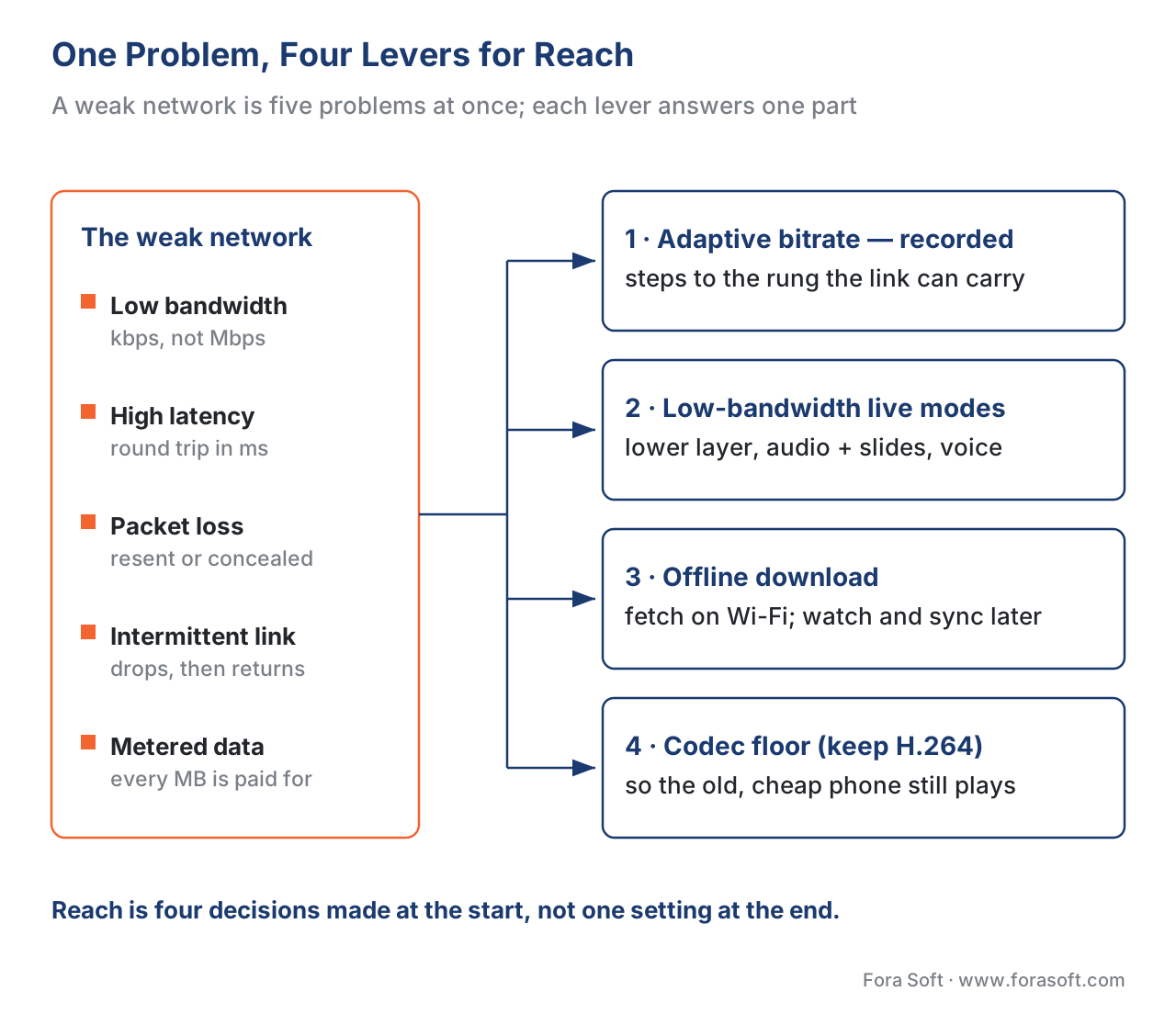 Figure 1. One problem, four levers. A weak network combines low bandwidth, latency, loss, and intermittency with the cost of metered data; reach engineering answers each with a specific technique.
Lever 1 — Adaptive bitrate for recorded lessons
Most learning video is recorded — a lecture, a screencast, a demo the learner watches on their own schedule. For that "video on demand" (VOD) case, the central reach technique is adaptive bitrate streaming, usually shortened to ABR. The idea, in one sentence: instead of shipping one fixed-quality file, you prepare the same lesson at several quality levels and let the player automatically pick the highest one the connection can carry at each moment.
A useful analogy is a moving escalator with steps at different heights. Each step is a complete version of the lesson at a set resolution and data rate — say 240p, 360p, 480p, 720p, 1080p — and the player rides whichever step the network can sustain right now. When bandwidth drops, the player steps down to a smaller version within a second or two and the lesson keeps playing, lower-resolution but uninterrupted; when bandwidth recovers, it steps back up. The set of steps is called the bitrate ladder, and the choice of how many rungs and at what rates is its own craft, covered in the encoding section's per-title bitrate ladders and in the streaming section's adaptive bitrate explainer.
This is not a proprietary trick; it is how two open standards work. HLS (HTTP Live Streaming, defined in the internet standard RFC 8216) uses a master playlist that lists each quality version as a separate Variant Stream, and the client switches among them as conditions change [2]. MPEG-DASH (the ISO standard ISO/IEC 23009-1) does the same with multiple Representations inside an Adaptation Set [3]. Both are described as adaptive precisely because the client measures throughput and buffer health and changes rungs on its own — Fora Soft's buffer-based and throughput-based ABR articles cover the switching logic in depth.
For weak-network reach, the rung that matters most is the lowest one. Many teams build a ladder that tops out at 1080p but bottoms out at 480p, which still demands close to a megabit per second — too much for a congested rural tower. Adding a genuine low rung (a 240p or 360p version at a few hundred kbps) is what keeps the lesson playing at all for the weakest connection. The common mistake is to test only on a fast office network, where the player never needs the low rung, ship it, and never discover the floor is missing.
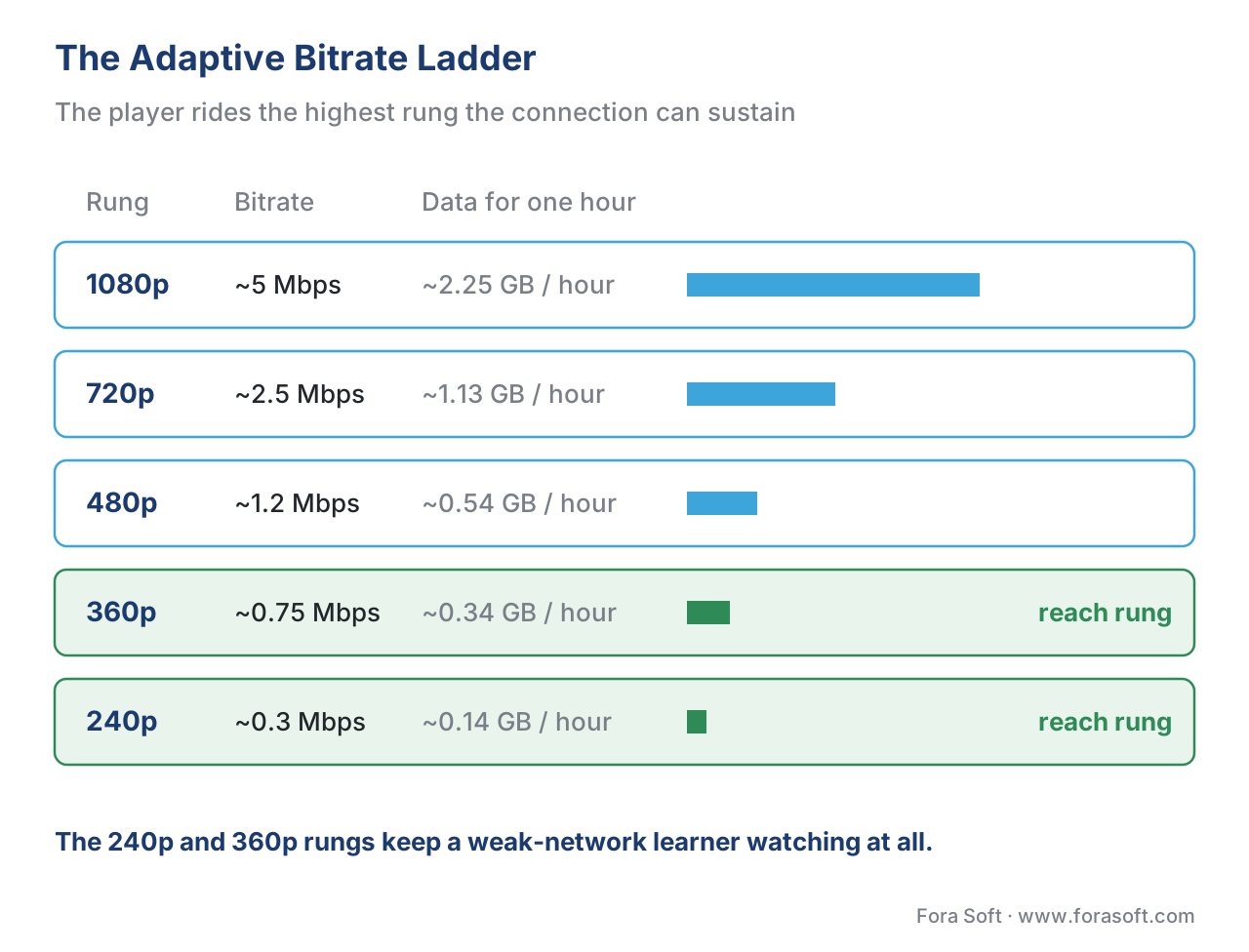 Figure 2. The bitrate ladder. The player rides the highest rung the connection sustains; the low 240p/360p rung is what keeps a weak-network learner watching at all.
The data arithmetic, shown out loud
Numbers decide this, so work them out. Data used is just the bit rate multiplied by the time. For one hour of video:
- 720p at about 2.5 Mbps: 2.5 Mbps × 3,600 seconds = 9,000 megabits ÷ 8 = 1,125 megabytes ≈ 1.1 GB per hour [9].
- 360p at about 0.75 Mbps: 0.75 × 3,600 = 2,700 megabits ÷ 8 = 337 megabytes ≈ 0.34 GB per hour [9].
- Audio only, spoken word, using the Opus codec at 24 kbps: 24 kbps × 3,600 = 86,400 kilobits ÷ 8 = 10,800 kilobytes ≈ 11 MB per hour [1].
So the same one-hour lesson is roughly 1.1 GB, 340 MB, or 11 MB depending on how you deliver it — a spread of about 100× from top to bottom. Stack that against the affordability numbers: in a country where a 5 GB monthly plan already eats more than a tenth of income [5], one HD lecture at 1.1 GB is a fifth of that month's data; the 360p version is a third of that; and the audio-only fallback is a rounding error. The arithmetic is the argument for building every lever below — each one moves a learner down this ladder of cost without moving them out of the course. (For the platform-wide view of these delivery costs, see Scaling Delivery: CDN, Transcoding, and Cost at Volume and The Learning-Platform Cost Model.)
Lever 2 — Low-bandwidth modes for live classes
A live class is harder than a recorded lesson, because the video is being produced and delivered in real time and cannot be buffered ahead. The technology of choice is WebRTC (Web Real-Time Communication, the browser standard for live audio and video), and on a weak network it degrades in a deliberate sequence rather than freezing. The protocol internals live in Fora Soft's WebRTC explainer; here is what each step buys a learner.
The first step is adaptive video quality, the live cousin of the bitrate ladder. With a technique called simulcast or scalable video coding (SVC), the media server — the SFU (Selective Forwarding Unit) that relays streams between participants — can forward a lower-resolution or lower-frame-rate layer to a learner on a poor link while sending the full layer to everyone else, all without re-encoding [12]. When a learner's bandwidth falls, the SFU simply forwards fewer layers; the picture gets smaller or choppier, but it keeps moving. The mechanics are in Simulcast and SVC in the SFU and the congestion-control logic in WebRTC bandwidth estimation.
The second step protects the one stream a class cannot lose: the teacher's voice. Audio is tiny compared with video, and the Opus codec — the audio standard used by WebRTC, defined in RFC 6716 — is built for exactly this. Opus runs anywhere from 6 kbps to 510 kbps and can change rate on the fly without restarting the session, adapting to network conditions packet by packet [1]. The specification lists its bitrate "sweet spots": 8–12 kbps for narrowband speech, 16–20 kbps for wideband speech, and 28–40 kbps for full-band speech [1]. It also has two features tailored to bad links: in-band forward error correction (FEC), which re-sends a low-bitrate copy of important speech inside the next packet so a single lost packet does not create a gap, and discontinuous transmission (DTX), which drops to one packet every 400 ms during silence to save data [1]. The audio engineering is covered in the Opus codec explainer.
The third step is the floor: audio plus slides, then audio alone. When the link cannot carry even a low video layer, a well-built virtual classroom stops sending the camera feed and keeps voice plus the shared slide or whiteboard — which updates only when the slide changes and so costs almost nothing. Below even that, voice alone at a couple of dozen kbps keeps the learner in the lesson. The design principle is graceful degradation: never a frozen black screen, always the next-smaller thing that still teaches.
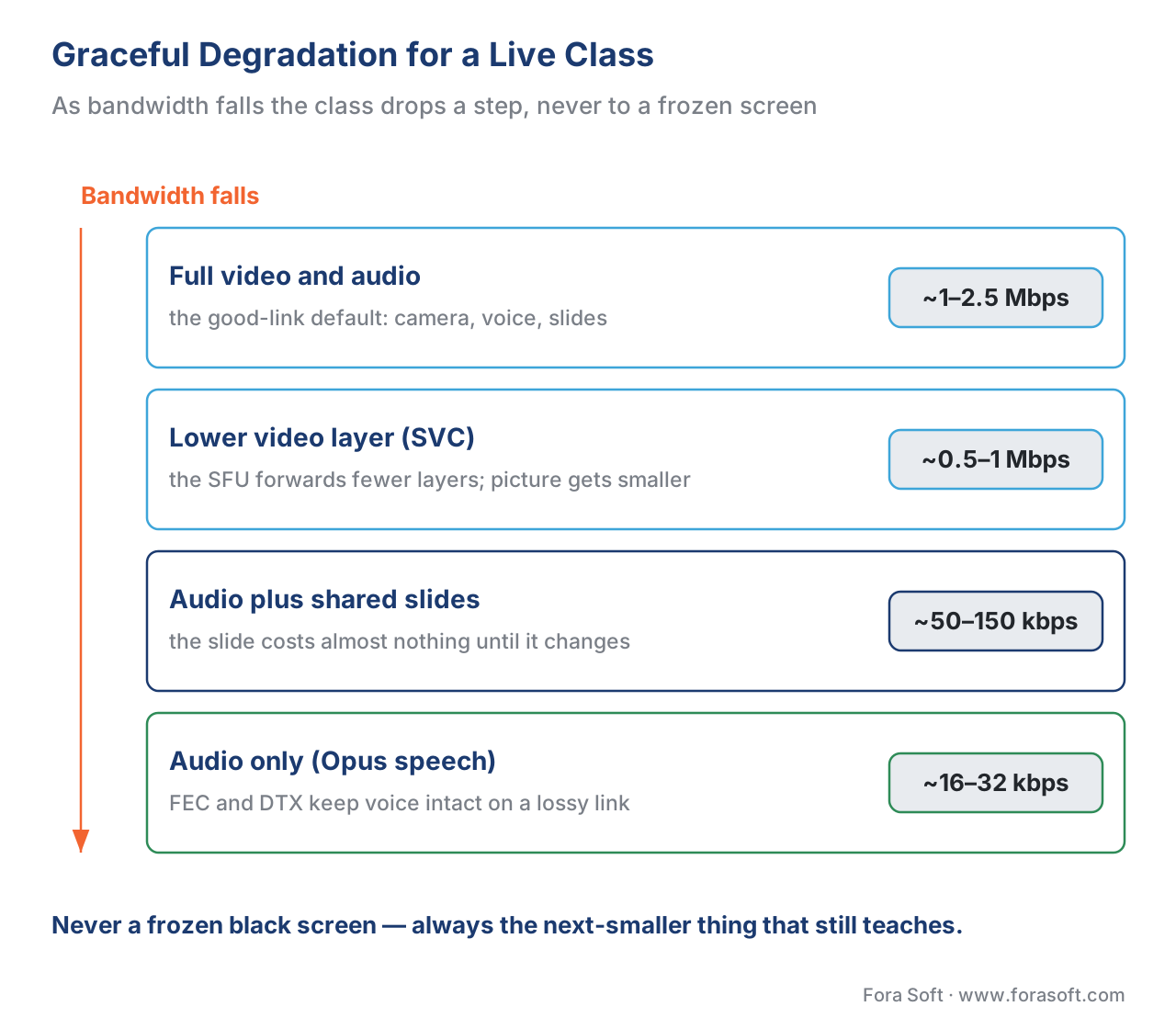 Figure 3. Graceful degradation for a live class. As bandwidth falls, the class drops to a lower video layer, then to audio plus slides, then to Opus audio alone — never to a frozen screen.
Lever 3 — Offline download for mobile
Some connectivity is not slow but absent and intermittent: a learner on a commute, a field worker between sites, a student who has Wi-Fi at home in the evening and none on the bus in the morning. For them the lever is offline download — fetch the lesson while connected, watch it later with no network at all. This is the dominant pattern in mobile learning for low-connectivity regions, where apps let learners download resources on Wi-Fi and study without internet afterward [10].
Offline playback raises one question that matters to a learning product specifically: how do you track progress that happened with no connection? The answer is the learning-records standard, xAPI (the Experience API), which records each learning event as a small statement — a sentence like "Maria completed Module 3." Because a statement is just a small piece of data, the app can store statements locally on the device while offline and send them in a batch to the Learning Record Store (LRS) — the database that holds them — when the connection returns [6]. The learner watches on the bus; the completion and the watch events queue on the phone; the moment they reconnect, the records sync and the dashboard updates as if they had been online all along. How to capture video-watching events precisely is covered in Tracking Video with xAPI, and the broader offline strategy in Offline and Low-Connectivity Learning.
The build-vs-buy line here is clear. Offline download with deferred tracking is non-negotiable for an audience that loses connectivity, but the queue-and-sync machinery is a known pattern, not a research project. Your engineering effort goes into making sync reliable — handling a half-finished download, a statement that fails to send, a device that runs out of storage — not into inventing the concept.
Lever 4 — Codec and quality trade-offs
The fourth lever is the one that quietly decides whether the other three even work: which video codec you encode in. A codec is the math that compresses video; a more efficient codec delivers the same quality in fewer bits, which on a weak network is the whole game. But there is a trap, and it is the most expensive mistake in this article.
The three codecs in play in 2026 trade efficiency against device support. H.264 (AVC), finalized in 2003, is the least efficient but decodes on essentially every device and browser ever made [8]. H.265 (HEVC) is roughly twice as efficient — the same quality at about half the bitrate — and has hardware decoding on most devices made since around 2017 [8]. AV1, the royalty-free codec, is about 30–50% more efficient again than H.265, but hardware decoding is mostly limited to devices made after roughly 2020 [8]. The deep comparison lives in the encoding section's choose-a-codec guide.
Here is the trap. The learner on the weak network is very often also the learner on the old, cheap phone — and that phone may have no hardware decoder for the efficient codec. Ship an AV1-only course and the most efficient file in the world will not play on the device that needed it most, or it will decode in software and drain the battery while stuttering. The reach-correct answer is usually to offer the efficient codec and keep an H.264 version as the universal floor, the same "build a real low rung" discipline from the ABR ladder, applied to codecs. Efficiency you cannot decode is not efficiency; it is exclusion.
| Codec | Efficiency vs H.264 | Hardware decode support | Best role for weak-network reach |
|---|---|---|---|
| H.264 / AVC | Baseline | Essentially universal [8] | The compatibility floor — always keep one rung |
| H.265 / HEVC | ~2× (half the bitrate) [8] | Most devices since ~2017 [8] | Efficient mid-tier where devices support it |
| AV1 | ~3–4× (30–50% over H.265) [8] | Mostly devices since ~2020 [8] | Maximum savings for newer devices; never the only option |
| Opus (audio) | — (audio codec) | Universal in modern browsers / WebRTC [1] | The audio-only and live-voice floor, 6–510 kbps [1] |
A worked reach plan
Put the levers together for a concrete course: a 40-hour video curriculum for learners across a region with mixed connectivity. Recorded lessons ship as an HLS/DASH ladder from 240p (about 300 kbps) to 1080p, encoded in H.265 with an H.264 floor so the cheapest phone still plays them. Live sessions run on WebRTC with simulcast, degrading to audio-plus-slides and then to Opus voice at ~24 kbps when links fail. The mobile app downloads any lesson on Wi-Fi and queues xAPI statements for sync. The result, in data terms: a learner who must use mobile data can take the entire 40 hours at 360p for roughly 40 × 0.34 GB ≈ 13.6 GB, or follow the live cohort in audio-plus-slides for a tiny fraction of that — instead of the 44 GB the same curriculum would cost at 720p, a bill that would simply end the course for a budget-constrained learner. The reach is not a feature bolted on at the end; it is four decisions made at the start.
Common mistakes
These are the failures that turn up the moment a course meets a real-world network.
Testing only on fast Wi-Fi. The single most common cause of a missing low rung and a broken weak-network experience. Test on a throttled connection (most browsers can simulate 3G) before shipping, every release.
A bitrate ladder with no low rung. A ladder that bottoms out at 480p still needs ~1 Mbps; the learner below that gets endless buffering, not a smaller video. Always include a genuine 240p/360p rung [2][3].
Dropping captions to "save bandwidth." Captions are a few kilobytes — thousandths of the video's size — and they help weak-network learners most, because a learner can follow a lesson from captions when the video stalls. They are also an accessibility requirement under WCAG 2.1 (Success Criteria 1.2.2 and 1.2.4) regardless of network [4]. Never the thing you cut. See Captions, Transcripts, and Audio Description.
Shipping one efficient codec only. AV1-only or HEVC-only delivery excludes the old, cheap devices that cluster on weak networks. Keep an H.264 floor [8].
No offline mode for an intermittent audience. If learners lose connectivity by the nature of their day, streaming-only is a non-starter; they need download-and-sync [6][10].
Treating buffering as the learner's problem. A spinning loader is a design failure, not a user failure. Graceful degradation — a smaller video, audio plus slides, audio alone — keeps the lesson alive where a frozen screen ends it.
Free download: Weak-Network Reach Readiness ChecklistA one-page checklist across the four reach levers — the adaptive bitrate ladder with a real low rung, the live degradation sequence, offline download with xAPI sync, and the H.264 codec floor for cheap devices.Where Fora Soft fits in
Fora Soft has built video streaming, real-time WebRTC, and OTT delivery software since 2005, and for weak-network learning the hard part is rarely any single lever — it is wiring all four into one product so reach is automatic rather than a setting. The build-vs-buy trade-off is concrete: an off-the-shelf player may give you a basic adaptive ladder but little control over the low rung, the live degradation sequence, the offline-and-sync flow, or the codec floor for cheap devices, while a custom build lets you tune each of those to the actual networks and phones your learners use — and hands you the responsibility of getting the engineering right. We help teams decide how far up that line their product needs to go, then build the delivery layer so the learner on the worst connection still finishes the course. The same streaming, real-time, and adaptive-delivery work runs through the conferencing, OTT, telemedicine, and surveillance products we build.



The handbook
Fora Soft Video Engineering Handbook
We wrote a seven-volume series that takes the whole video stack apart across 9,000+ pages — encoding, delivery, audio and AI — so the reach described above is something you engineer on purpose rather than something you find out is missing after launch. Volume 3 sits closest to this article: the bitrate ladder, the buffer-based and throughput-based algorithms that pick a rung, CDNs, players, WebRTC and the economics of delivery — the machinery behind levers 1 and 2. Volume 1 holds the codec decision that lever 4 turns on, H.264 against HEVC against AV1 and what each costs per bit, and volume 4 covers Opus, loudness and real-time voice processing — the audio-only floor a class drops to when the link can no longer carry a picture. Written by Nikolay Sapunov, CEO at Fora Soft.
Would your course still play on your weakest learner’s connection?
Tell us which networks and which phones your learners actually have, and how much of the teaching has to happen live — and we will come back with the ladder, the degradation sequence and the codec floor that fit, and what each one costs to build. 250+ video products shipped since 2005.
See our case studies
Case study
Scholarly
Sydney’s selective-test prep platform for 15,000+ active users, serving the recorded catalogue over an adaptive DASH and HLS ladder while running live classes for up to 2,000 students at once. It is both halves of this article in one product: a ladder for the lessons a learner watches alone, and a real-time path for the ones they attend.
Case study
WorldCast Live
HD streaming at 1.5 Gb/s to 10,000 simultaneous viewers with 0.4–0.5 s glass-to-glass latency, on a custom WebRTC and Kurento architecture with dynamic video quality adjustment for poor connections. That last part is lever 2 in production: the stream steps down for the viewer on a bad link instead of stalling for everyone.
Case study
BrainCert
A WebRTC and HTML5 virtual-classroom LMS with 100K+ customers and 500M+ real-time classroom minutes delivered from 10 worldwide datacenters, on web, iOS and Android. Reach at that spread is not a setting: it is a datacenter near the learner and a client that runs on the phone they already own.
What to read next
Reach
Offline and Low-Connectivity Learning
Lever 3 in full: download-and-sync, and what breaks when the queue does.
Delivery cost
Scaling Delivery: CDN, Transcoding, and Cost at Volume
What the ladder above costs once every rung is encoded and served.
Live class
WebRTC for Live Learning, and Its Classroom Gotchas
The protocol the degradation sequence runs on, and where it bites.
Accessibility
Captions, Transcripts, and Audio Description for Learning
The few kilobytes you never cut, and why a stalled learner reads them.
References
- IETF. RFC 6716 — Definition of the Opus Audio Codec, §2 and §2.1.1 (Bitrate), §2.1.7 (FEC), §2.1.9 (DTX) (Opus scales from 6 kbit/s narrowband speech to 510 kbit/s; can switch operating modes without renegotiating the session to adapt to varying content and network conditions; bitrate sweet spots: 8–12 kbps NB speech, 16–20 kbps WB speech, 28–40 kbps FB speech; in-band FEC re-encodes important speech in a later packet; DTX encodes one frame per 400 ms during silence). https://www.rfc-editor.org/rfc/rfc6716 — Tier 1 (primary standard, IETF). Published 2012-09; accessed 2026-06-21.
- IETF. RFC 8216 — HTTP Live Streaming (HLS) (a Master Playlist lists multiple Variant Streams encoded at different bit rates / resolutions; the client selects and switches among them as network conditions change — the basis of adaptive bitrate delivery). https://www.rfc-editor.org/rfc/rfc8216.html — Tier 1 (primary standard, IETF). Accessed 2026-06-21.
- ISO/IEC. ISO/IEC 23009-1 — Dynamic Adaptive Streaming over HTTP (MPEG-DASH) (media presented as multiple Representations at different bitrates within an Adaptation Set; the client adapts to available bandwidth by switching Representations). https://www.iso.org/standard/83314.html — Tier 1 (primary standard, ISO). Paywalled; the multi-Representation/adaptation claim is corroborated by the Fora Soft Video Streaming MPEG-DASH article [11]. Accessed 2026-06-21.
- W3C. WCAG 2.1 — SC 1.2.2 Captions (Prerecorded), Level A; SC 1.2.4 Captions (Live), Level AA (synchronized captions are required for prerecorded and live video; they are a small text track independent of video bitrate). https://www.w3.org/TR/WCAG21/ — Tier 1 (primary standard, W3C). WCAG 2.1 published 2018-06-05; accessed 2026-06-21.
- ITU. Facts and Figures 2025; The affordability of ICT services (2024/2025) (in 2025 the median data-only mobile-broadband basket was ~1.4% of GNI per capita; low-income economies pay ~22× the income share of high-income economies; for the bottom 40% in LDCs the burden reaches ~20% of GNI per capita; a 5 GB basket exceeds 10% of monthly income in nine of ten low-income countries; the affordability target is 2% of GNI per capita). https://www.itu.int/itu-d/reports/statistics/facts-figures-2025/ , https://www.itu.int/itu-d/reports/statistics/2025/10/15/ff25-affordability-of-ict-services/ — Tier 1 (primary institutional statistics, UN agency). Accessed 2026-06-21.
- ADL. Experience API (xAPI) Specification — Statements and Communication (a learning event is recorded as a statement and stored in a Learning Record Store; statements can be created offline and sent to the LRS in batches when connectivity is available — the basis of offline capture and deferred sync). https://github.com/adlnet/xAPI-Spec — Tier 1 (primary standard, xAPI). Accessed 2026-06-21.
- Apple. HTTP Live Streaming (HLS) Authoring Specification for Apple Devices (recommended initial bitrate ladders for H.264 and HEVC, presented as starting targets to evaluate against your own content; use HE-AAC for stereo audio below 64 kbps and LC-AAC at or above 64 kbps). https://developer.apple.com/documentation/http-live-streaming/hls-authoring-specification-for-apple-devices — Tier 4 (first-party engineering reference). Accessed 2026-06-21.
- free-codecs.com; colinmackay.net; FastPix; GetStream; CDNetworks. Codec comparison guides, 2026 (H.264 vs H.265 vs AV1) (H.265 roughly doubles H.264 efficiency; AV1 is ~30–50% more efficient than H.265; H.264 decodes on essentially all devices; HEVC hardware decode is common on devices since ~2017; AV1 hardware decode is mostly limited to devices since ~2020). https://www.free-codecs.com/guides/is-av1-better-than-h-265.htm , https://colinmackay.net/guides/h264-vs-h265-vs-av1-2026 , https://fastpix.com/blog/av1-vs-h-264-vs-h-265-best-codec-for-video-streaming — Tier 6 (industry references). Codec mechanics are primary-sourced in the Video Encoding section [11]; figures are orders of magnitude, flagged for re-verification.
- VDOCipher; Recharge; CablePapa. Video data-usage guides, 2025–2026 (approximate hourly data: 360p ~0.3–0.45 GB, 480p ~0.7–1 GB, 720p ~1.5 GB, 1080p ~3 GB; HEVC/AV1 use 30–50% less than H.264 for the same quality). https://www.vdocipher.com/blog/video-bandwidth-explanation/ , https://www.cablepapa.com/blog/how-much-data-does-streaming-use-a-complete-bandwidth-data-usage-guide-2026/ — Tier 6 (industry references). Used as orders of magnitude for the arithmetic; the per-hour figures depend on bitrate and codec.
- Articulate; Digital Frontiers; Solutions for Youth Employment (World Bank). Designing e-learning for low-bandwidth contexts; mobile learning for low-connectivity regions (offline download on connection then study without internet; compressed, audio, and text fallbacks; blended online/offline approaches for emerging markets). https://www.digitalfrontiers.org/2026/05/19/how-to-design-online-learning-for-low-bandwidth-contexts/ , https://community.articulate.com/articles/tips-on-designing-e-learning-for-folks-with-slow-internet — Tier 5 (institutional/practitioner guidance).
- Fora Soft Learn (Video Streaming & Video Encoding). Adaptive Bitrate Streaming Explained; MPEG-DASH in Depth; Simulcast and SVC in the SFU; WebRTC Bandwidth Estimation; Choose a Codec 2026 (first-party engineering orientation for the ABR, SVC, congestion-control, and codec claims that are primary-sourced to the standards above). https://www.forasoft.com/learn/video-streaming/articles-streaming/abr-streaming-explained — Tier 3 (first-party engineering explainers).
- bloggeek.me; LiveKit; Nabto. SVC and simulcast in WebRTC (an SFU can forward a subset of video layers to a participant on a poor link without transcoding, dropping spatial or temporal layers as bandwidth falls; Opus adapts its bitrate to conditions). https://bloggeek.me/webrtcglossary/svc/ , https://blog.livekit.io/an-introduction-to-webrtc-simulcast-6c5f1f6402eb/ — Tier 4 (first-party real-time-media engineering references). The SVC mechanics are detailed in the Video Streaming section [11].
Where sources disagreed, the official standard was followed. Per-hour data figures and codec-efficiency percentages from tier-6 industry guides [8][9] are used as orders of magnitude for the arithmetic, not as fixed quotes, and are flagged for re-verification; the controlling facts — Opus's bitrate range and features [1], HLS/DASH adaptation [2][3], and the WCAG caption requirements [4] — are primary-sourced. ISO/IEC 23009-1 [3] is paywalled and corroborated by the first-party MPEG-DASH article [11]; a reviewer with ISO access can add the exact clause.
