


Why this matters
Roughly 2.2 billion people were still offline in 2025, most of them in low- and middle-income countries and rural areas, and far more than that move in and out of connectivity every day — on a commute, in a basement training room, on an oil platform, between clinic visits [1]. If your learning product only works while connected, you have excluded the audience that most needs flexible training and quietly capped completion for everyone else. This article is for the L&D director, EdTech founder, or product manager who has to decide how far to invest in offline support and what to ask engineers to build. It explains the two halves of the problem — offline content delivery and offline progress tracking — with the standards that make each one work and the numbers to size them. It is the companion to Learning Video on Weak Networks, which covers the slow-but-present connection; this piece covers the connection that is absent.
Offline is a spectrum, not a switch
"Offline" hides three different situations, and the right build depends on which one your learners live in. The first is occasionally connected: a learner who has good Wi-Fi at home in the evening and nothing useful during the day. They sync on a schedule. The second is intermittently connected: a learner on a moving train or a rural tower whose link drops and returns every few minutes, never long enough to stream but often enough to sync small bursts. The third is fully offline: a field worker, a ship's crew, a learner in an area with no coverage at all, who may be disconnected for hours or days and sync only when they reach a depot or a town.
These are different from the weak network covered in the weak-networks article. A weak network is slow, expensive, or lossy — but present, so adaptive streaming can still deliver a smaller video in real time. Offline means there is no connection to adapt to at the moment of learning, so the content must already be on the device and the tracking must wait. Confusing the two is the first design mistake: a beautiful adaptive-bitrate ladder does nothing for a learner with no signal at all.
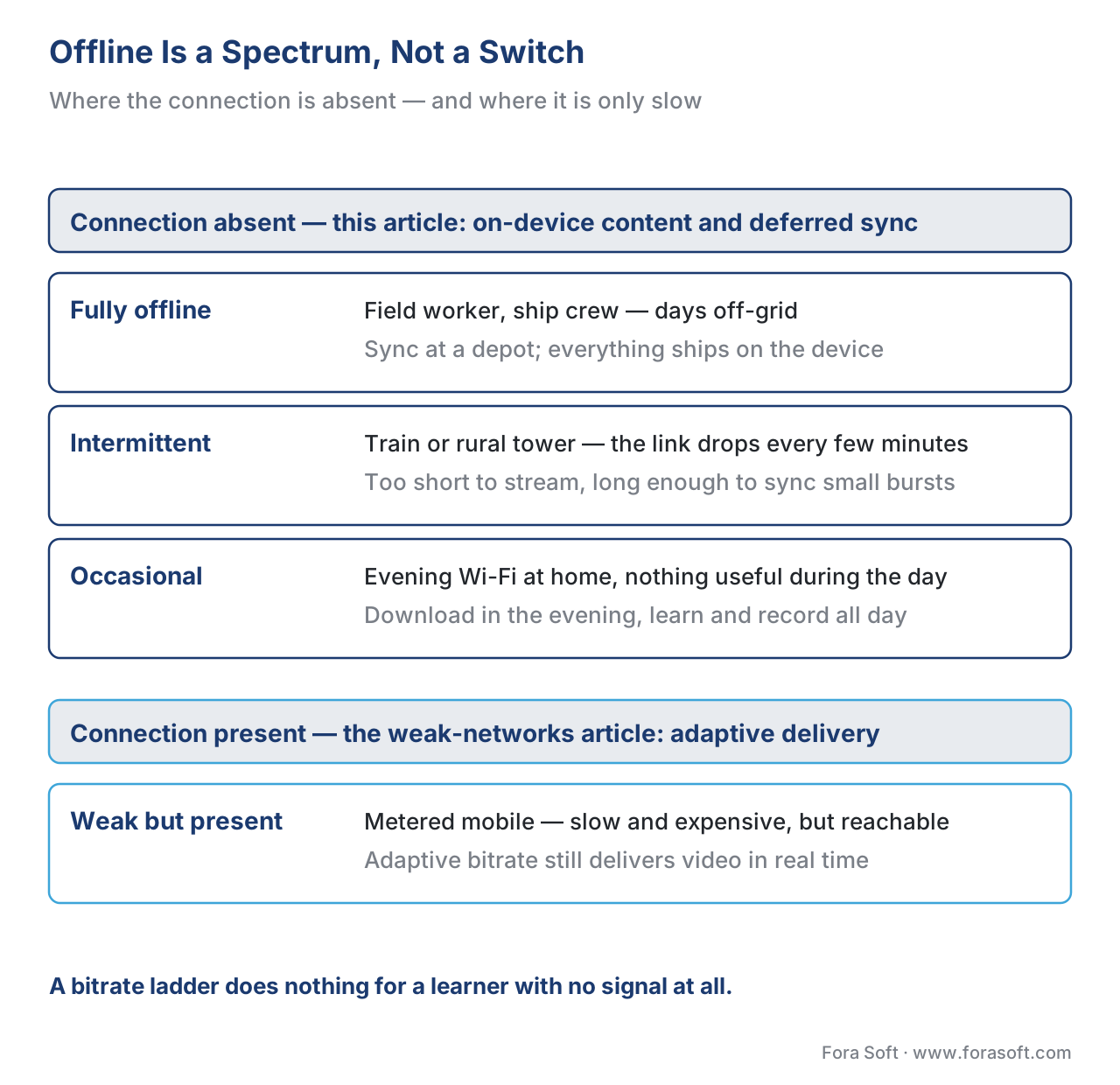 Figure 1. The connectivity spectrum. Weak-network engineering handles the slow-but-present link; offline engineering handles the absent link with on-device content and deferred sync.
Two problems, not one
Every offline learning feature decomposes into two independent jobs, and keeping them separate is the single most useful idea in this article.
The first job is delivery: get the course content — the video, the slides, the quiz — onto the device while a connection exists, so it can be opened later with no network. The second job is tracking: capture what the learner did while offline — watched, answered, completed — and get those records back to the server when the connection returns, accurately and without duplication.
Many teams build the first and forget the second. The learner downloads the course, studies on the plane, lands — and their completion never registers, because the product had no plan for records made offline. A course that a learner finishes but the system cannot prove they finished is, for a compliance or certification program, the same as a course they never took. Treat tracking as a first-class feature, not an afterthought.
Part A — Delivering content offline
Getting content onto a device has two mature paths, and the choice between them is a build-vs-buy decision.
The first path is a native mobile app that downloads lessons to local storage. This is the dominant pattern in mobile learning, and it gives you the most control: reliable large downloads, background fetching, encrypted storage, and a download manager the learner understands. The cost is building and maintaining apps for each platform.
The second path is a progressive web app, a website engineered to work offline. The browser technology that makes this possible is the service worker — a small script, defined in the W3C Service Workers specification, that sits between the page and the network and can serve files from a local cache when there is no connection [2]. A service worker plus the Cache API can make a course's pages, slides, and small media available offline without an app-store install.
Large video, though, exposes a limit. A service worker is usually shut down by the browser when the learner navigates away, which can abort a long download. The browser feature designed to solve this is the Background Fetch API, which hands a big download to the browser to finish even after every page and worker for the site has closed [3]. One accuracy note the standards-careful reader should keep: Background Fetch is an incubation specification from the Web Platform Incubator Community Group (WICG), not a ratified W3C standard, and browser support is uneven [3]. That uncertainty is exactly why a serious offline product for large video often still chooses the native app for the download tier and uses the service worker for everything smaller.
The storage arithmetic, shown out loud
Offline lives inside a storage budget, so do the math before promising a "download the whole course" button. Using the per-hour figures from the weak-networks article — about 340 MB per hour at 360p — a 40-hour video curriculum costs:
40 hours × 0.34 GB/hour = 13.6 GB at 360p
A mid-range phone with 8 GB of free space cannot hold that. It can hold about 8 ÷ 0.34 ≈ 23 hours of 360p video, or — if the lessons are offered as audio plus slides at roughly 15 MB per hour — the entire 40-hour course in 40 × 0.015 = 0.6 GB, with room to spare. The product decision falls straight out of the arithmetic: offer the learner a quality choice at download time, default to a data- and storage-light tier, and never assume the whole catalog fits on the device.
One more delivery trap applies only to protected video. If lessons are encrypted with digital rights management (DRM), offline playback needs a persistent license stored on the device, and those licenses can carry an expiry date. A learner who downloads a course in March and opens it off-grid in June can find the video refuses to play because the license lapsed. The mechanism lives in Fora Soft's streaming section under Encrypted Media Extensions (EME); the offline lesson is simply to set license lifetimes to match how long learners actually stay disconnected.
Part B — Tracking offline: the standards story
This is the half that products get wrong, and it is where the choice of learning standard decides whether offline is even possible.
Why SCORM cannot do it alone
The packaging standard most courses still use, SCORM (Sharable Content Object Reference Model), was built on one assumption: a live connection to the learning management system (LMS). Its content talks to the LMS through a single channel — a JavaScript programming interface the LMS injects into the browser page — and through nothing else. The SCORM stewards state it plainly: content cannot communicate through web services, form posts, or database writes, only through that in-browser interface [4]. No interface present means no tracking. The full standard is covered in SCORM Explained; the point here is that a learner who opens a SCORM course with no connection produces no record the LMS will ever see, unless a separate offline player fakes that interface locally and replays the data later — extra machinery that not every LMS provides.
This limitation is not a footnote in e-learning history; it is the reason the next standard exists. The project that became xAPI began as work on tracking offline and long-running content that SCORM could not handle [4].
How xAPI makes offline work
The Experience API (xAPI) records a learning event as a small, self-contained statement — a sentence in the shape actor–verb–object, like "Maria completed Module 3." Because each statement is just a small piece of data, an app can write it to local storage on the device while completely offline, hold a queue of them, and send the whole queue to the server when a connection returns. The server that receives and stores them is the Learning Record Store (LRS) — think of it as the notebook those sentences are written into. The deeper mechanics of capturing video-watch events live in Tracking Video with xAPI.
Two details in the xAPI specification are what make deferred sync trustworthy, and they are worth understanding because they are the difference between accurate offline records and a corrupted timeline.
First, timestamp versus stored. Every statement has two times: the timestamp, which is when the experience actually happened, and the stored time, which is when the LRS received it. The originating app can and should set the timestamp itself [5]. So an event recorded at 9:14 a.m. on a disconnected bus keeps its real 9:14 a.m. timestamp even though the LRS only stamps it stored at 6 p.m. when the learner reconnects. The learning record reflects when learning happened, not when the network came back.
Second, statements are immutable and carry a unique ID. Each statement gets a universally unique identifier (UUID), and the spec instructs clients to set it. Once an LRS holds a statement, it is immutable — the LRS may fill in fields like stored, but it does not alter the event [5]. This is the foundation of safe sync, and it leads directly to the part teams worry about most.
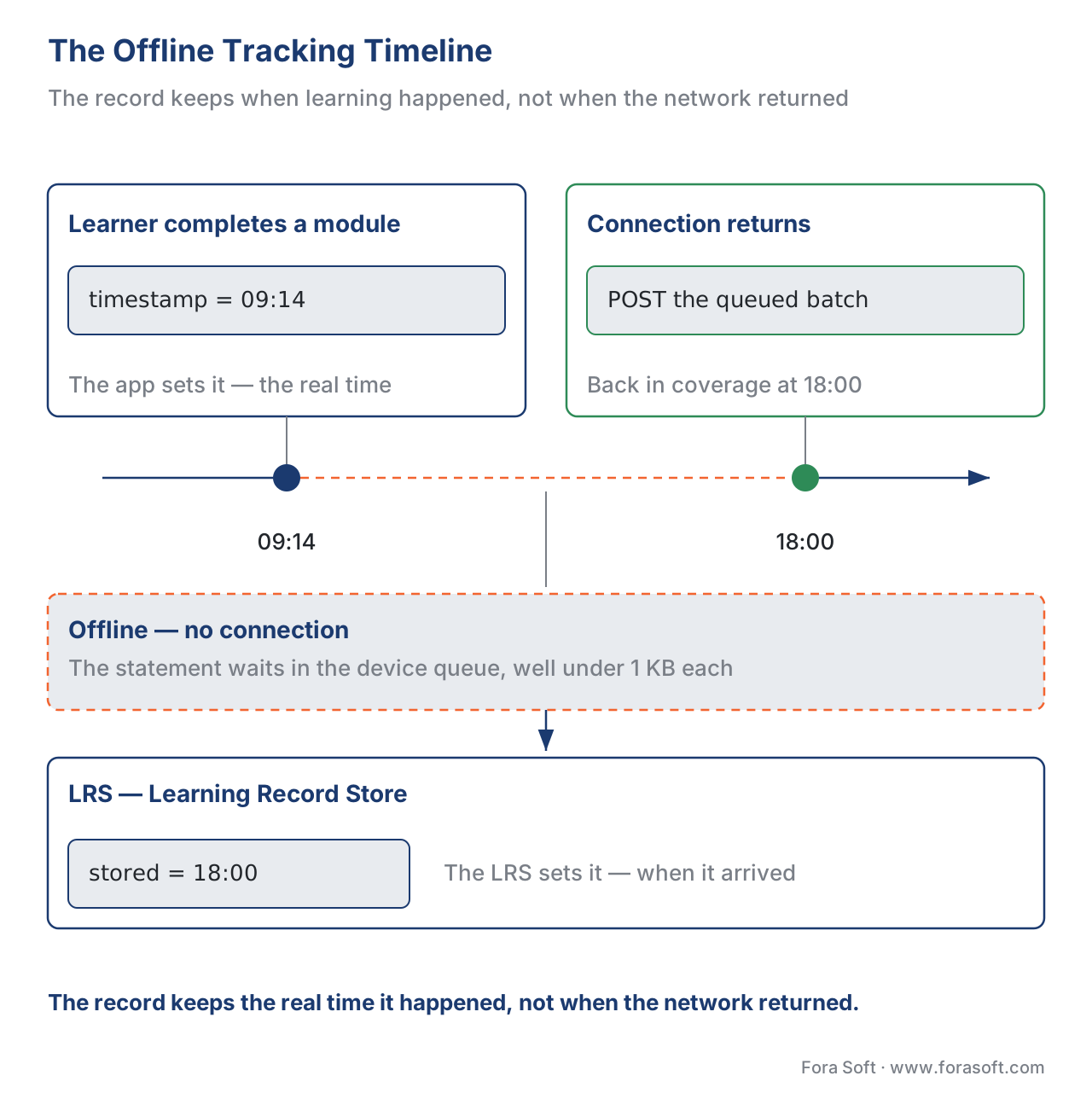 Figure 2. The offline tracking timeline. The event keeps the real time it happened in
 timestamp; the LRS records when it arrived in stored. The true learning timeline survives the gap.
cmi5: offline-friendly by design
The xAPI profile written for courses launched from an LMS, called cmi5, was built with non-browser and offline cases in mind. Its own documentation states that cmi5 content does not require a browser and could be a mobile app [6]. When the LMS launches a lesson, it hands that lesson everything it needs to talk to the LRS later: the LRS address, the learner's identity, the session and registration IDs, and a one-time URL to fetch an authorization token [6]. An offline-capable app grabs that token while connected, then runs the session disconnected and syncs afterward.
There is a real pitfall hiding in that token. Authorization tokens are deliberately short-lived for security, so a token fetched on Monday may have expired by the time a fully-offline learner reconnects on Thursday. An offline design has to plan for re-authenticating and refreshing the token on reconnect, rather than assuming the original token still works. The cmi5 standard itself is covered in cmi5 Explained.
Conflict handling on reconnect
"What happens when it all syncs?" is the question that scares teams away from offline. The answer is reassuring once you split the data into two kinds.
The first kind is append-only events: the xAPI statements describing what happened. These are conflict-free by design. Because each statement has a client-set UUID and is immutable, the specification requires that an LRS receiving a statement whose ID it already holds must not modify its state — it either returns "no content" or a conflict status, but it never duplicates or overwrites [7]. In plain terms: if a flaky connection causes the app to send the same batch twice, the second send is harmless. A completion cannot be double-counted, because the duplicate is recognized and ignored. The engineering job is simply to keep retrying until every statement is acknowledged.
The second kind is mutable state: a single value that changes over time, such as the resume bookmark ("you stopped at 14:32"), the suspend data that lets a course pick up where it left off, or a "highest score so far." Here a genuine conflict is possible. If a learner studies the same module offline on a phone and a tablet, both devices come back with a different "last position," and the system must choose. This is not solved by the standard; it is a product decision. The common rule is last-write-wins by the real timestamp — keep the value from the event that actually happened later. A more careful policy merges where merging makes sense — take the furthest progress rather than the most recent, so a learner is never sent backwards. The mistake to avoid is letting an older device, syncing late, clobber newer progress.
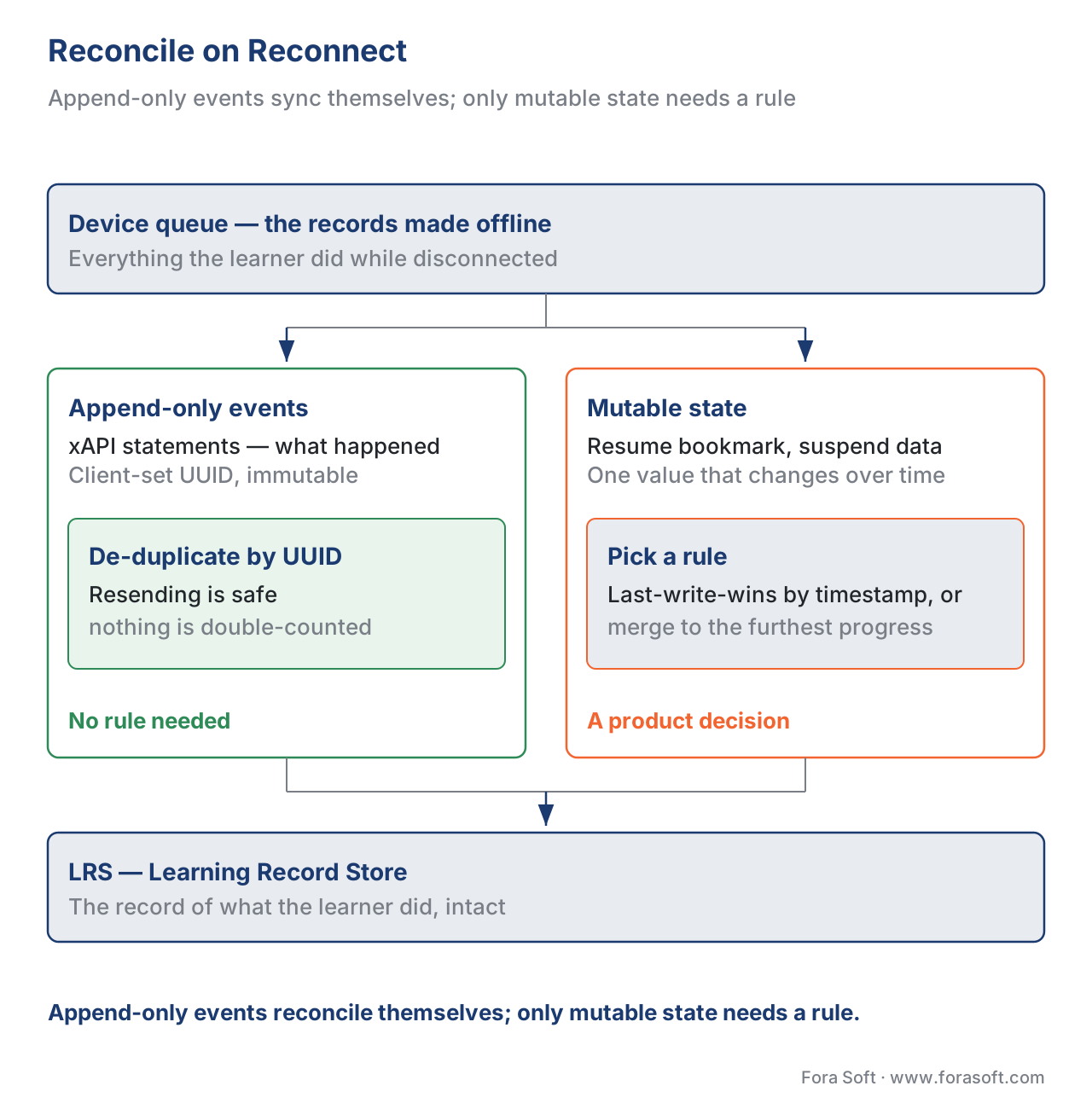 Figure 3. Reconcile on reconnect. Append-only statements de-duplicate themselves by UUID; mutable state needs a deliberate last-write-wins or merge rule. Treat the two paths differently.
How the standards compare for offline
| Capability | SCORM 1.2 / 2004 | xAPI 1.0.3 | cmi5 |
|---|---|---|---|
| Offline content delivery | Package runs locally, but tracking needs the LMS interface | Content-agnostic; pairs with app/PWA download | Content-agnostic; explicitly supports mobile-app, non-browser content [6] |
| Offline tracking | Not natively — needs an LMS-provided offline player [4] | Yes — statements queue on the device, sync later [5] | Yes — built on xAPI, with a defined launch-and-token model [6] |
| How records sync | Replay through the faked JS interface on reconnect | Batch POST of queued statements to the LRS | Batch POST under a cmi5 session, after token refresh |
| Duplicate safety | Depends on the player | Built in — immutable statements de-duplicated by UUID [7] | Inherits xAPI's de-duplication [7] |
| Best offline fit | Legacy courses already in SCORM | Custom apps, rich and mobile tracking | LMS-launched courses that must also run offline |
The pattern is clear: if offline tracking matters, the work is built on xAPI, and cmi5 is the right wrapper when the course is launched from an LMS. SCORM can carry the content, but the offline record depends on a player bolted on around it.
A worked offline scenario
Make it concrete with a field-training app for technicians who spend days at remote sites. The course is 12 video modules, encoded at 360p as audio-rich lessons, totaling about 6 GB. The flow:
At the depot, on Wi-Fi, the technician downloads all 12 modules (6 GB, well within a phone's storage) and the app fetches a cmi5 authorization token. Over the next three days off-grid, they watch modules and pass quizzes. Each event — launched, progressed, passed, completed — is written as an xAPI statement with its real timestamp and a fresh UUID, queued in the device's local database. The queue might hold a few hundred statements; at well under a kilobyte each, the whole batch is a fraction of a megabyte — the records cost essentially nothing, even though the video cost 6 GB.
Back in coverage, the app refreshes the expired token, then POSTs the queued statements to the LRS in batches. If the connection drops mid-sync, the app retries; any statement that already arrived is recognized by its UUID and ignored, so nothing double-counts [7]. The dashboard now shows the three days of learning on the correct days. The technician's certification is intact, and the only thing the office ever saw was a clean batch of records arriving at 4 p.m. on Thursday.
Common mistakes
These are the failures that surface the first time a real learner goes off-grid.
Assuming SCORM works offline. It does not, on its own — no LMS interface means no record [4]. If offline matters, build on xAPI or cmi5, or add a genuine offline player.
Not setting a client-side statement ID. The de-duplication that makes retrying safe only works if the client assigns each statement's UUID before it is sent [5][7]. Let the server assign IDs and a double-sync becomes a double-completion.
Letting the auth token expire. A token fetched before a multi-day offline window will likely be dead on reconnect. Plan the refresh-and-re-auth path, or sync silently fails [6].
Last-write-wins clobbering progress. Reconciling mutable state by "newest sync" instead of "furthest progress" can send a learner backwards. Choose the merge rule deliberately.
DRM licenses that expire before the learner reconnects. A persistent offline license shorter than the disconnection window strands downloaded video. Match the license lifetime to real offline durations.
Forgetting accessibility in the offline package. Captions and transcripts are a few kilobytes and must ship inside the download — WCAG 2.1 AA caption requirements do not pause when the network does [8]. See Captions, Transcripts, and Audio Description.
Unbounded local storage. A "download everything" button with no budget fills the device and the app gets killed. Offer quality tiers and show the storage cost before download.
Free download: Offline Learning Readiness ChecklistA one-page checklist across the two halves of offline learning: content packaging and download for the device, the xAPI statement queue and deferred sync, cmi5 token refresh, and conflict reconciliation for mutable state on reconnect.Where Fora Soft fits in
Fora Soft has built video streaming, real-time, and mobile learning software since 2005, and for offline learning the hard part is rarely the download — it is the tracking and reconciliation that prove a disconnected learner actually finished. The build-vs-buy trade-off is concrete: an off-the-shelf LMS may offer a basic "download for offline" button while quietly dropping the records made off-grid, whereas a custom build lets you own the xAPI statement queue, the token-refresh flow, and the conflict rules for mutable state — at the cost of building that machinery correctly. We help teams decide how much offline capability their audience genuinely needs, then build the delivery and sync layer so a field worker three days off-grid comes back with their progress whole. The same offline-sync, real-time, and mobile-delivery engineering runs through the conferencing, telemedicine, and OTT products we build.



The handbook
Fora Soft Video Engineering Handbook
We wrote a seven-volume series that takes the whole video stack apart across 9,000+ pages — encoding, delivery, audio and AI — so a download button that has to survive three days off-grid is something you design rather than hope for. Volume 3 sits closest to this article: players, persistent DRM licences and their expiry, CDN behaviour, and the economics of what you ship. Volume 1 is where the storage arithmetic comes from — the quality ladder that decides whether 40 hours is 13.6 GB of 360p video or 0.6 GB of audio and slides — and volume 2 covers the packaging and segment formats that make up the offline bundle itself. Written by Nikolay Sapunov, CEO at Fora Soft.
If a learner finished your course on a plane, could you prove it?
Tell us how long your learners stay disconnected, what standard your content is packaged in today, and whether completions have to hold up for compliance or certification — and we will come back with the download tier, the statement queue and token-refresh design, and the conflict rules for resume position, plus what each part costs to build. 250+ video products shipped since 2005.
See our case studies
Case study
Tabsera
A K-12 LMS in English, French, Arabic and Turkish whose learners sit in exactly the markets this article is about — teachers are even paid out through Waafi mobile money. The dedicated mobile apps are the download tier: the lesson has to be on the phone before the day starts.
Case study
BrainCert
A virtual-classroom LMS with 100K+ customers and 500M+ real-time classroom minutes, carrying SCORM and xAPI side by side plus its own QuantumKey content protection. That pairing is both halves of this article in production: the standard that can track off-grid, and the licence that must outlive the disconnection.
Case study
VALT
A recording and observation platform for medical education and simulation labs, 770+ organizations and 50,000+ users, built and maintained by us for 10+ years. Its mobile companion records to local storage and uploads to the server afterwards — capture first, sync later, which is the offline pattern applied to training footage.
What to read next
Delivery
Learning Video on Weak Networks
The other half of the spectrum: the link that is slow but still there.
Mobile
Mobile-First Learning Video
The app that holds the download, and what it costs to build one per platform.
Standards
SCORM vs xAPI vs cmi5 vs LTI
Picking the standard, with offline as one column among several.
Packaging
Packaging and Delivering Content
What is actually inside the bundle a learner downloads, and where it is hosted.
References
- ITU. Facts and Figures 2025 — Internet use (an estimated 6 billion people, about three-quarters of the world, use the Internet in 2025, while ~2.2 billion remain offline — revised down from ~2.3 billion in 2024; the unconnected are concentrated in low- and middle-income countries and rural areas, and the 5G coverage gap is 84% in high-income vs 4% in low-income economies). https://www.itu.int/itu-d/reports/statistics/facts-figures-2025/ , https://www.itu.int/en/mediacentre/Pages/PR-2025-11-17-Facts-and-Figures.aspx — Tier 1 (primary institutional statistics, UN agency). Published 2025-11; accessed 2026-06-21.
- W3C. Service Workers (a service worker is a worker script the browser runs separately from the page; it can intercept network requests and serve responses from a cache, which is the basis of offline-capable web apps). https://www.w3.org/TR/service-workers/ — Tier 1 (primary standard, W3C). Accessed 2026-06-21.
- WICG. Background Fetch (an API for handling large downloads/uploads that continue even after the page and its service worker are closed — addressing the fact that a service worker is otherwise terminated when the user navigates away). Note: a Web Platform Incubator Community Group (WICG) draft, NOT a ratified W3C standard nor on the W3C standards track; browser support is uneven. https://wicg.github.io/background-fetch/ , https://github.com/WICG/background-fetch — Tier 3 (incubation specification / first-party). Accessed 2026-06-21.
- Rustici Software (SCORM.com). SCORM Run-Time Environment; Project Tin Can Phase 3 — tracking offline/long-running content (all communication between content and the LMS happens through an injected JavaScript API and no other channel — not web services, form posts, or database writes; most prior e-learning specs require a constant connection to track, and content cannot be experienced-with-tracking offline unless the LMS provides an offline version of its API; the project that became xAPI began as work on tracking offline and long-running content). https://scorm.com/scorm-explained/technical-scorm/run-time/ , https://scorm.com/project-tin-can-phase-3-tracking-offlinelong-running-content/ — Tier 3 (first-party engineering, the SCORM stewards). The underlying requirement is defined in ADL SCORM 2004 4th Edition, Run-Time Environment. Accessed 2026-06-21.
- ADL. Experience API (xAPI) Specification 1.0.3, Part 2: Statements (Data) (a statement has a
timestampfor when the experience occurred and astoredtime set by the LRS for when it was stored; iftimestampis not set the LRS sets it tostored; the originating system can and should settimestamp; statements are immutable once stored, the LRS only assigning fields such asid,authority,stored,timestamp,version; clients should generate the statementid(a UUID)). https://github.com/adlnet/xAPI-Spec/blob/master/xAPI-Data.md — Tier 1 (primary standard, xAPI). Accessed 2026-06-21. - AICC / ADL. cmi5 Specification (Current) and Conceptual Overview (cmi5 is an xAPI profile for LMS-launched content; it explicitly supports non-browser content such as a mobile app; the LMS launch supplies the LRS endpoint, actor, registration, activity ID, and a one-time Fetch URL used to retrieve an authorization token for the LRS; sessions are bounded by
initialized/terminatedstatements). https://aicc.github.io/CMI-5_Spec_Current/ , https://github.com/AICC/CMI-5_Spec_Current/blob/quartz/cmi5_spec.md — Tier 1 (primary standard, cmi5). Accessed 2026-06-21. - ADL. Experience API (xAPI) Specification 1.0.3, Part 3: Communication (an LRS MUST NOT make any modification to its state based on receiving a statement with an
idit already has a statement for; whether it responds 409 Conflict or 204 No Content it MUST NOT modify the statement or any other object — the basis of safe, idempotent re-sync; a PUT to an existing statement resource returns 409 Conflict). https://github.com/adlnet/xAPI-Spec/blob/master/xAPI-Communication.md — Tier 1 (primary standard, xAPI). Accessed 2026-06-21. - W3C. WCAG 2.1 — SC 1.2.2 Captions (Prerecorded), Level A (synchronized captions are required for prerecorded video; the caption track is small text that ships inside the offline package independent of network). https://www.w3.org/TR/WCAG21/ — Tier 1 (primary standard, W3C). WCAG 2.1 published 2018-06-05; accessed 2026-06-21.
- Learning Equality. Kolibri — the offline-first learning platform (an offline-first platform for teaching and learning without the Internet, in use across 200+ countries and territories; content is imported and updated from the Internet, a USB drive, or another device over a local network — a real-world model for fully-offline and emerging-market learning delivery). https://learningequality.org/kolibri/ — Tier 5 (institutional/practitioner reference). Accessed 2026-06-21.
- MDN Web Docs. Using Service Workers; IndexedDB API; Background Synchronization API (orientation on the browser building blocks of offline web apps: the service worker lifecycle and Cache API for offline assets, IndexedDB as the local store for a structured statement queue, and Background Sync for flushing the queue on reconnect). https://developer.mozilla.org/en-US/docs/Web/API/Service_Worker_API/Using_Service_Workers — Tier 6 (educational reference, Web APIs). Accessed 2026-06-21.
Where sources disagreed, the official specification was followed. The offline-tracking mechanics are primary-sourced to the xAPI specification's Data and Communication parts [5][7] and the cmi5 specification [6]; the SCORM connection requirement is stated by the SCORM stewards [4] and defined in the ADL SCORM 2004 Run-Time Environment book. Background Fetch [3] is explicitly flagged as a WICG incubation draft, not a ratified W3C standard. The per-hour data figures reused for the storage arithmetic are orders of magnitude (see the weak-networks article), not fixed quotes.
