


Why this matters
If you are building or buying a learning product, SCORM is the first standard you will meet, because almost every learning management system and authoring tool speaks it. Get it right and your courses load and report results everywhere, with no custom integration per platform. Get it wrong and you ship a package that plays perfectly in your authoring tool, then refuses to record a single result once a real learning system launches it. This article is for the L&D director, product manager, or founder who needs to decide whether SCORM is enough for their product, and to talk to engineers without drowning in spec language. We will keep the standard accurate down to the data field, but readable from the first line.
What SCORM actually is
Think of a shipping container. A container has a standard size and standard corner fittings, so any crane, truck, or ship in the world can pick it up and move it without knowing or caring what is inside. The standard that does this for an online course, letting any compliant learning system load it and track it without custom wiring, is called SCORM — short for the Sharable Content Object Reference Model.
That name unpacks neatly. Sharable Content Object is a single launchable, trackable chunk of a course — a lesson, a quiz, a video module. Reference Model is the giveaway word: SCORM did not invent a new technology. It is a set of rules that references existing web standards (ZIP files, XML, and JavaScript) and says, "package and wire your course this way, and it will work everywhere." A course built to SCORM is the container; the learning management system is the crane.
A learning management system, or LMS, is the platform that hosts courses, enrols learners, launches content, and stores results — Moodle, Canvas, Cornerstone, and hundreds of others. The whole point of SCORM is that you author a course once and it runs in all of them. Before SCORM, every course was a custom integration with every platform. SCORM turned that into a single, portable file.
SCORM comes from the Advanced Distributed Learning (ADL) Initiative, a program established by the United States Department of Defense to make training content reusable across the military's many systems. ADL released SCORM 1.0 in 2000, SCORM 1.2 in 2001, and the SCORM 2004 family (four editions, the last in 2009) after that. Twenty-five years on, it is still the most widely supported e-learning standard in the world.
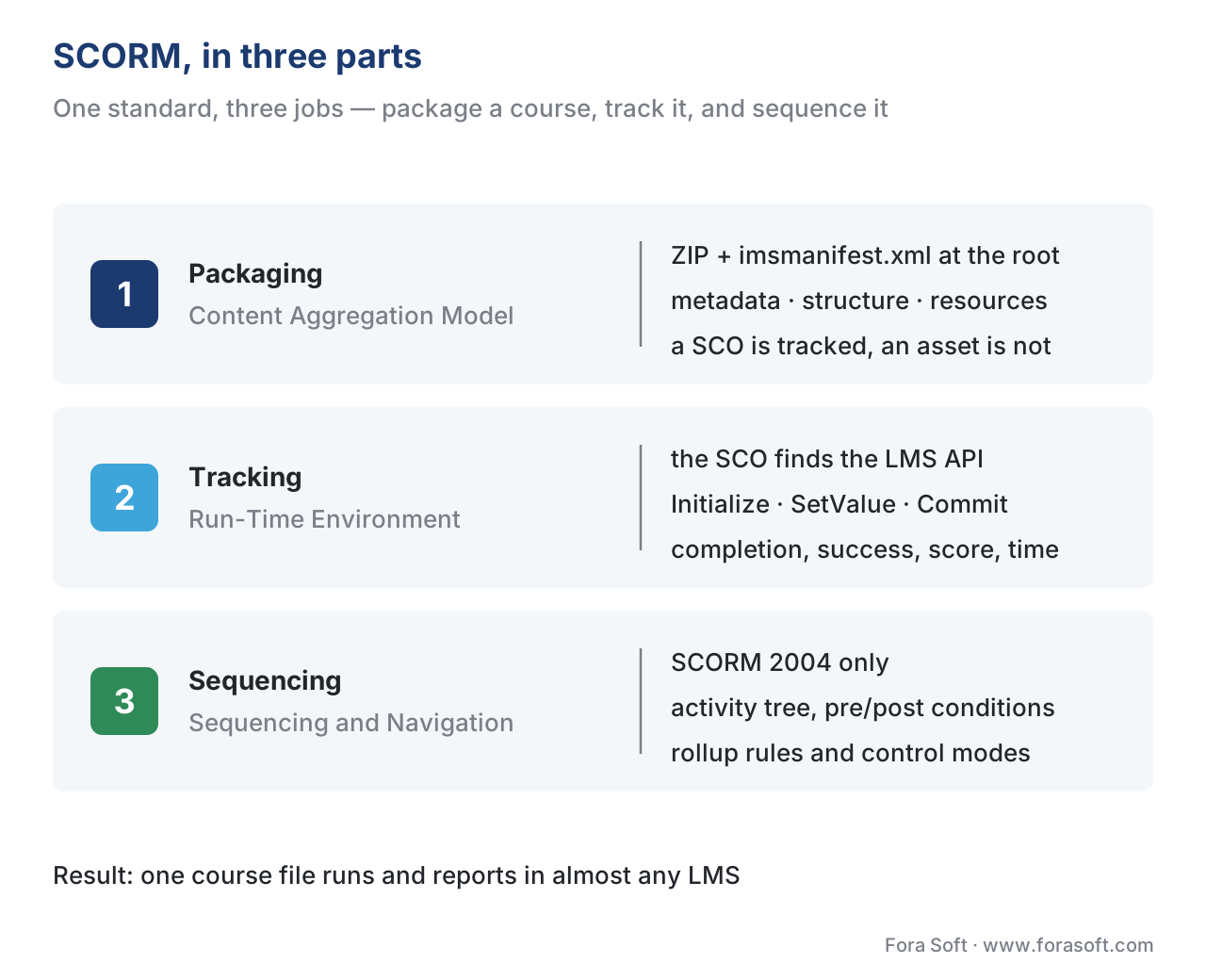 Figure 1. SCORM does three jobs. It packages a course (Content Aggregation Model), it lets the course talk to the host system at run time (Run-Time Environment), and — in SCORM 2004 only — it decides what the learner sees next (Sequencing and Navigation).
Why a 25-year-old standard is still everywhere
New standards have arrived since — xAPI, cmi5, LTI — and we will get to them. Yet SCORM still wins the default slot, for one practical reason: support. Nearly every learning management system on the market can import and launch a SCORM package, and nearly every authoring tool can export one. Articulate Storyline 360 and Rise 360, Adobe Captivate, iSpring, Lectora, and Elucidat all publish SCORM 1.2 and SCORM 2004 out of the box. When an instructional designer clicks "Publish," SCORM is the format they reach for, because it is the one guaranteed to be accepted on the other side.
That universality is SCORM's whole value, and also the reason it has aged in place. ADL stopped actively developing SCORM years ago and now invests in xAPI, cmi5, and a broader "Total Learning Architecture." SCORM is mature, frozen, and ubiquitous — the COBOL of e-learning. You will not pick SCORM because it is modern. You will pick it because it works on day one, in systems you do not control.
The three books: how SCORM is actually built
ADL published SCORM as a set of "books," each covering one job. Understanding the three books is the fastest way to understand the whole standard, so we will take them one at a time.
Book 1 — packaging: the manifest (Content Aggregation Model)
The first book, the Content Aggregation Model (CAM), defines the container. A SCORM course is delivered as a single ZIP file, sometimes called a Package Interchange File (PIF). Inside that ZIP, at the very top level, sits one mandatory file: imsmanifest.xml. This is the packing list. Any compliant learning system opens the ZIP, reads the manifest, and learns everything it needs without opening the course itself.
The manifest describes three things. Metadata is the course's title and description. Organizations is the table of contents — the tree of modules and lessons in the order the author intends. Resources is the file list — every HTML page, script, image, and video the course needs. In SCORM 2004, the manifest also carries the sequencing rules (Book 3).
Inside that structure sits the most important distinction in packaging: a SCO versus an asset. A Sharable Content Object (SCO) is a launchable unit that talks back to the learning system and reports results. An asset is plain media — a PDF, an image, a video file — that is shown but reports nothing. The rule of thumb: if you want to track it, it must be a SCO. A common and costly mistake is shipping a video as a bare asset and then wondering why no completion ever records (more on that below).
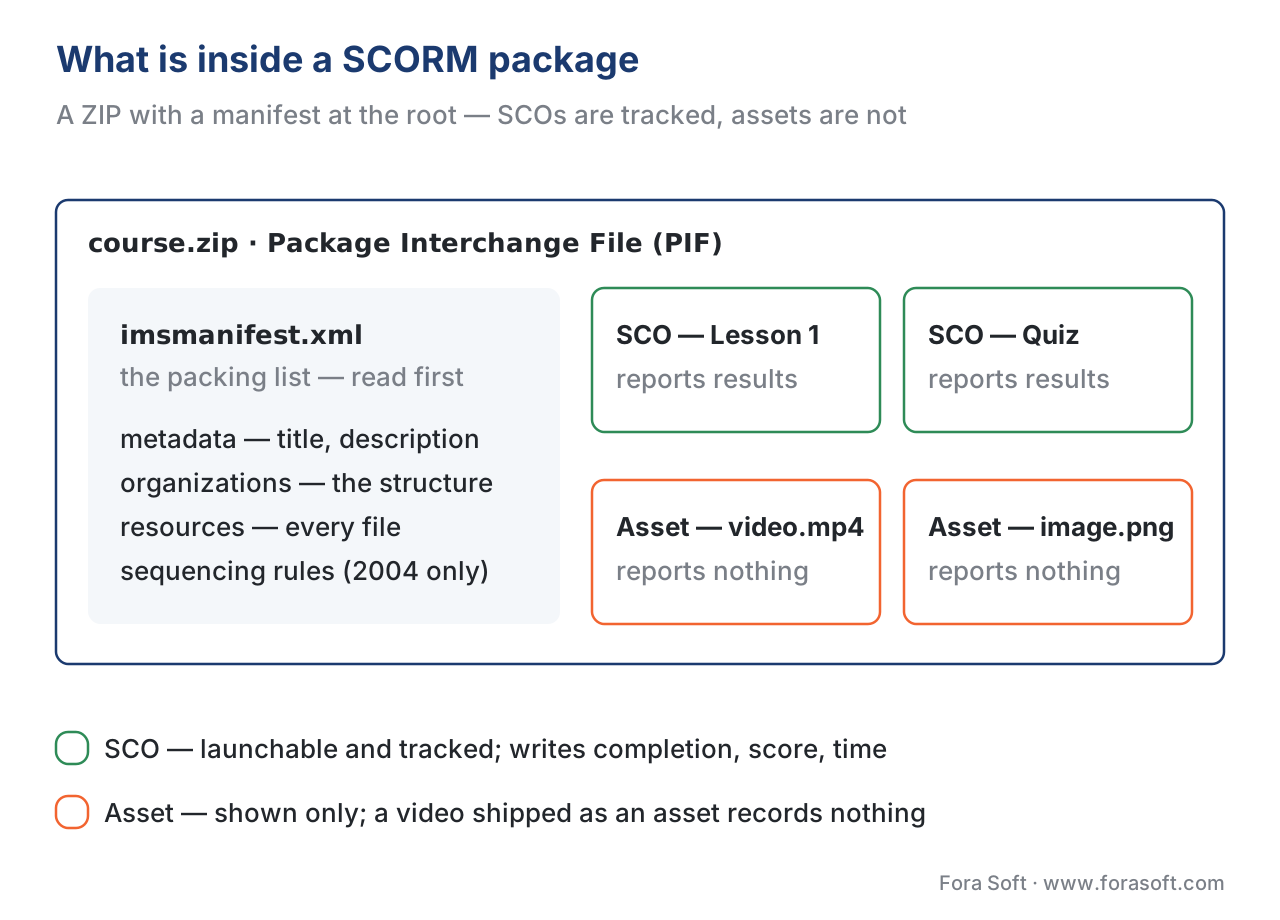 Figure 2. A SCORM package is a ZIP with
 imsmanifest.xml at its root. The manifest lists metadata, the course structure (organizations), and the files (resources). SCOs report results; assets do not.
Book 2 — run-time: the JavaScript conversation (Run-Time Environment)
The second book, the Run-Time Environment (RTE), defines the conversation between the course and the host system once a learner clicks "Start." This is where tracking actually happens, and it is worth slowing down for.
When the learning system launches a SCO, it opens it in a web browser and exposes a small JavaScript object called the API. The SCO's first job is to find that object by walking up the chain of browser windows looking for a specific name — API in SCORM 1.2, API_1484_11 in SCORM 2004. Once found, the conversation follows a fixed script:
// SCORM 2004 run-time conversation (simplified, fake data)
var api = findAPI(window);          // locate the LMS-provided object
api.Initialize("");                 // "I'm starting"
api.SetValue("cmi.completion_status", "completed");
api.SetValue("cmi.success_status", "passed");
api.SetValue("cmi.score.scaled", "0.82");   // 82%, range -1 to 1
api.Commit("");                     // "save what I've sent so far"
api.Terminate("");                  // "I'm done"
In SCORM 1.2 the method names differ slightly (LMSInitialize, LMSGetValue, LMSSetValue, LMSCommit, LMSFinish), but the shape is identical: open the channel, read or write data fields, save, close. Everything the learner does that the system records travels through this interface. If the SCO cannot find the API — because of a cross-domain browser restriction or a misconfigured launch — it silently fails to track, which is the single most common SCORM support ticket in existence.
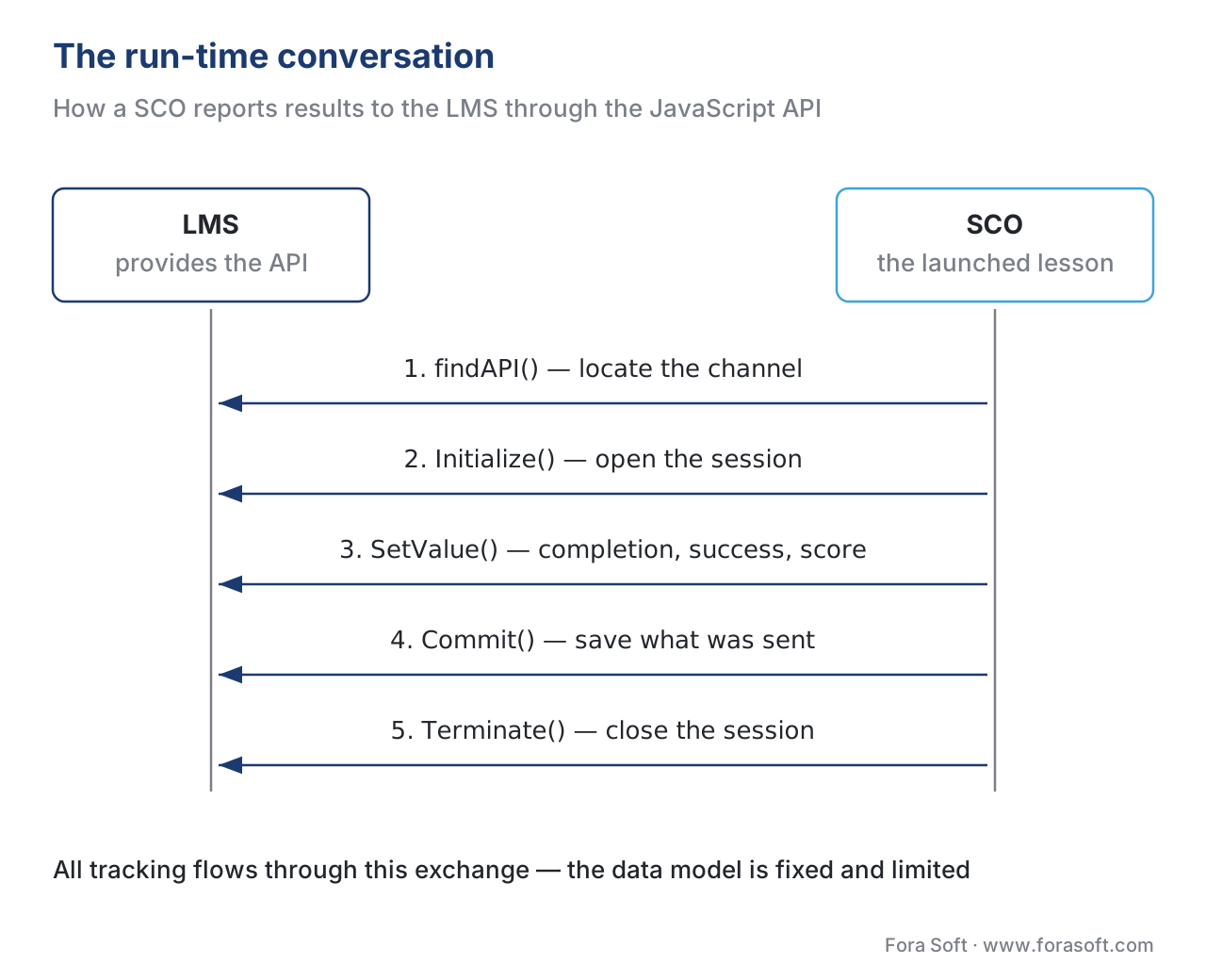 Figure 3. The run-time conversation. The SCO finds the LMS API, opens the channel, writes completion, success, and score into fixed data fields, commits, and terminates. Tracking lives entirely in this exchange.
Book 3 — sequencing: deciding what comes next (Sequencing and Navigation)
The third book, Sequencing and Navigation (SN), exists only in SCORM 2004. It is the rulebook for what the learner sees next when they finish a piece. It defines an activity tree, pre- and post-conditions ("you may not start the exam until you complete all three lessons"), rollup rules (how the parts decide the whole is "complete"), and control modes (whether learners can freely click around or must follow a set path).
Sequencing is powerful and, by ADL's own description, the most complicated part of the specification. It is also the most inconsistently implemented — a sequenced course that behaves perfectly in one learning system can misbehave in another. We will return to that trade-off when we compare versions.
What SCORM tracks — the data model
Here is the claim that trips up most teams: SCORM does not track "everything." It tracks a fixed, predefined data model — a specific list of fields, and only those fields. You cannot invent a new one. Vendors often summarize the core as the "Big 4": completion, success (pass or fail), score, and time.
The exact fields differ between versions. The table below shows the ones that matter most.
| What you want to record | SCORM 1.2 field | SCORM 2004 field |
|---|---|---|
| Did they finish? + pass/fail | cmi.core.lesson_status (one combined field) |
cmi.completion_status and cmi.success_status (two separate fields) |
| Score | cmi.core.score.raw (0–100) |
cmi.score.scaled (−1 to 1), plus raw/min/max |
| Time spent | cmi.core.session_time |
cmi.session_time (ISO 8601 duration) |
| Where they left off | cmi.core.lesson_location |
cmi.location |
| Resume state (bookmark) | cmi.suspend_data (max 4,096 chars) |
cmi.suspend_data (max 64,000 chars) |
| Question-by-question results | cmi.interactions (limited) |
cmi.interactions (richer, with full text) |
| Custom learning objectives | not supported | cmi.objectives |
One subtlety here causes real bugs. In SCORM 1.2, a single field, lesson_status, has to express both "did they finish" and "did they pass," using values like passed, completed, failed, and incomplete. You cannot cleanly say "completed but failed." SCORM 2004 split this into two independent fields — completion and success — so "completed / failed" and "completed / passed" are both expressible. If your reports need to separate "they got to the end" from "they met the bar," that split alone can decide your version.
SCORM 1.2 vs SCORM 2004: an honest comparison
Most teams choose between two versions: SCORM 1.2 (2001) and SCORM 2004 (the 4th Edition, 2009, is the last and most capable). The newer one is technically superior on paper. The older one is more widely supported in practice. That tension is the whole decision.
| Criterion | SCORM 1.2 | SCORM 2004 (4th Ed.) |
|---|---|---|
| LMS support | Near-universal, including old systems | Broad, but uneven on sequencing |
| Completion vs pass/fail | One combined field | Two separate fields |
| Resume data limit | 4,096 characters | 64,000 characters |
| Interactions / question data | Limited | Rich, with full question text |
| Learning objectives | No | Yes |
| Sequencing / branching | None (LMS or content decides) | Full sequencing rules |
| Complexity to implement | Lowest | Higher |
| Best when | You need maximum compatibility | You need branching, richer data, objectives |
Read the table as a rule of thumb. Choose SCORM 1.2 when your priority is that the course must run anywhere, including older or niche systems, and your tracking needs are simple. Choose SCORM 2004 when you need separate completion and success, larger resume state for big courses, richer question data, or rule-based branching — and you control or can test the target systems. When unsure, many teams ship 1.2 because the cost of a course that does not load is higher than the cost of slightly thinner data.
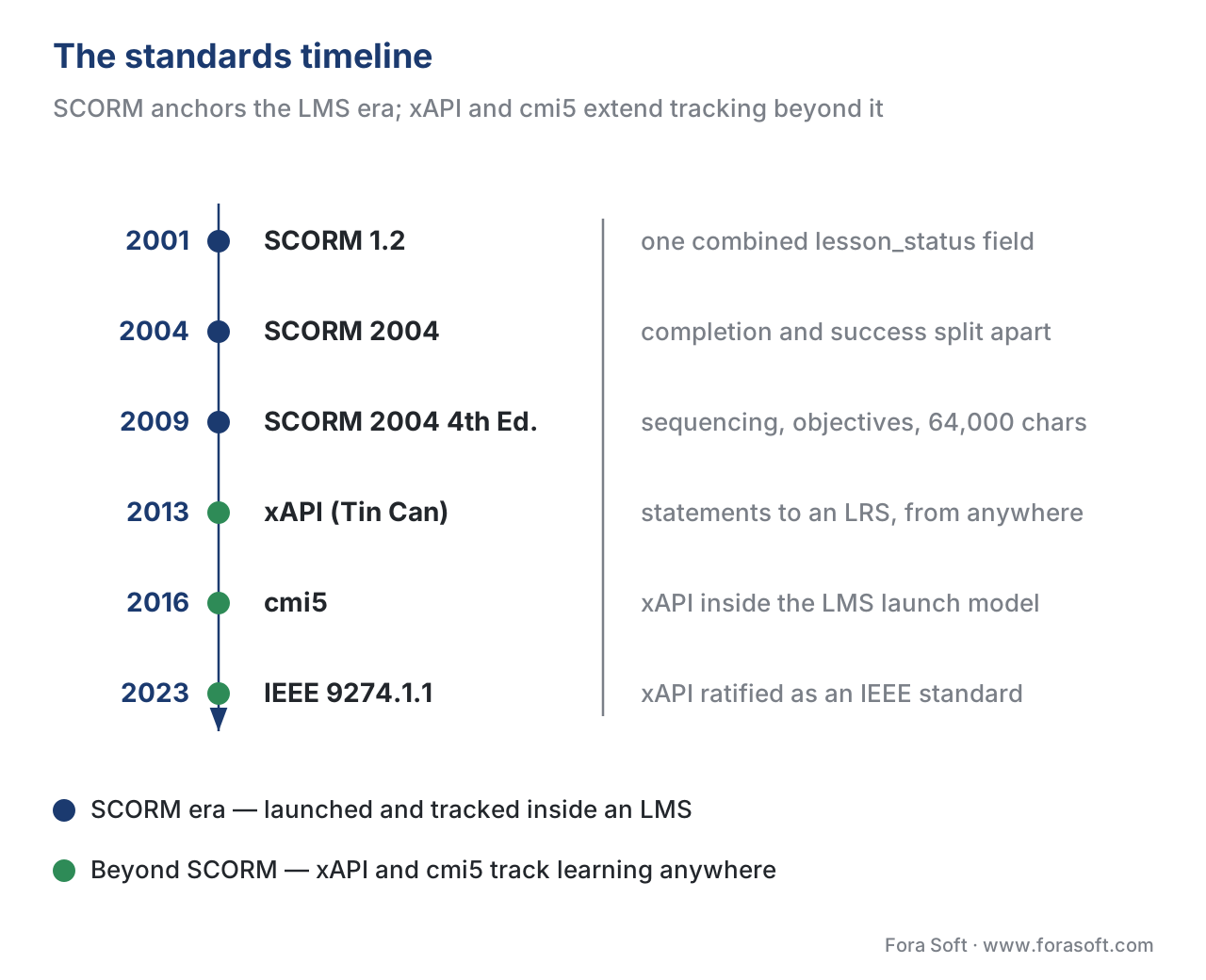 Figure 4. The standards timeline. SCORM 1.2 (2001) and SCORM 2004 (through 2009) anchor the LMS era; xAPI, cmi5, and the 2023 IEEE ratification of xAPI extend tracking beyond it.
A worked example: tracking a 20-minute lecture video
Numbers make the limits concrete, so let us track one video.
Say you have a 20-minute recorded lecture and you want the learning system to record that a learner "completed" it. With SCORM, you wrap the video in a SCO. The SCO watches the HTML5 video element, and when the learner reaches the end it writes one field:
cmi.completion_status = "completed"
That is the natural SCORM unit of truth: completed or not. Now suppose you also want to remember exactly where each learner paused, so they can resume. You store that in suspend_data. Watch the budget:
Resume state per learner  =  last position (8 chars)
                           + chapters seen (12 chars)
                           + notes flag    (4 chars)
                           ≈ 24 characters

SCORM 1.2 budget           =  4,096 characters total
SCORM 2004 budget          =  64,000 characters total
Twenty-four characters fits either version easily. But now imagine a 60-question interactive course that stores each question's state in suspend_data. At roughly 60 characters of state per question, 60 questions is 3,600 characters — already 88% of the SCORM 1.2 budget before you store anything else. Add bookmarking and the course silently overflows 4,096 characters and corrupts its own resume state. This is exactly why big, stateful courses move to SCORM 2004's 64,000-character budget. The math, not the marketing, drives the version choice.
The deeper limit is what SCORM cannot see. SCORM records that the video was "completed." It cannot natively tell you that the learner watched minutes 0–5, skipped to minute 18, rewatched minute 12 twice, and dropped at minute 19. That granular, per-second video behaviour is not in SCORM's fixed data model. To capture it you need xAPI and the xAPI Video Profile — covered in tracking video with the xAPI Video Profile.
What SCORM cannot do — and what replaces it
SCORM's design assumptions come from 2001: a learner sits at a desktop browser, logged into an LMS, with a live connection to that LMS for the whole session. Those assumptions define its limits.
SCORM only tracks learning that happens inside an LMS-launched browser session. It cannot track a native mobile app, a simulation, a VR headset, a piece of equipment on a factory floor, or a video watched on a public website. Its data model is fixed — you record completion, score, time, and a constrained set of interactions, and nothing you dream up beyond that. It needs a live connection to the LMS while the learner works; it was not built for offline learning. And it has no native concept of rich video analytics.
The standards that lift these limits are the rest of Block 2:
- xAPI (Experience API), originally nicknamed the Tin Can API, records learning anywhere as simple statements — "Maria completed Module 3" — stored in a Learning Record Store (LRS). xAPI was ratified as the IEEE 9274.1.1-2023 standard (sometimes called xAPI 2.0) in October 2023. See xAPI (Tin Can) explained.
- cmi5 is the bridge: it brings xAPI's flexibility back inside the familiar LMS launch-and-report model, so you get modern tracking without losing the LMS. See cmi5 explained.
- LTI (Learning Tools Interoperability) is a different tool entirely — it launches your live video tool inside an LMS with single sign-on and grade passback, rather than packaging content. See LTI explained.
For the full side-by-side, see SCORM vs xAPI vs cmi5 vs LTI.
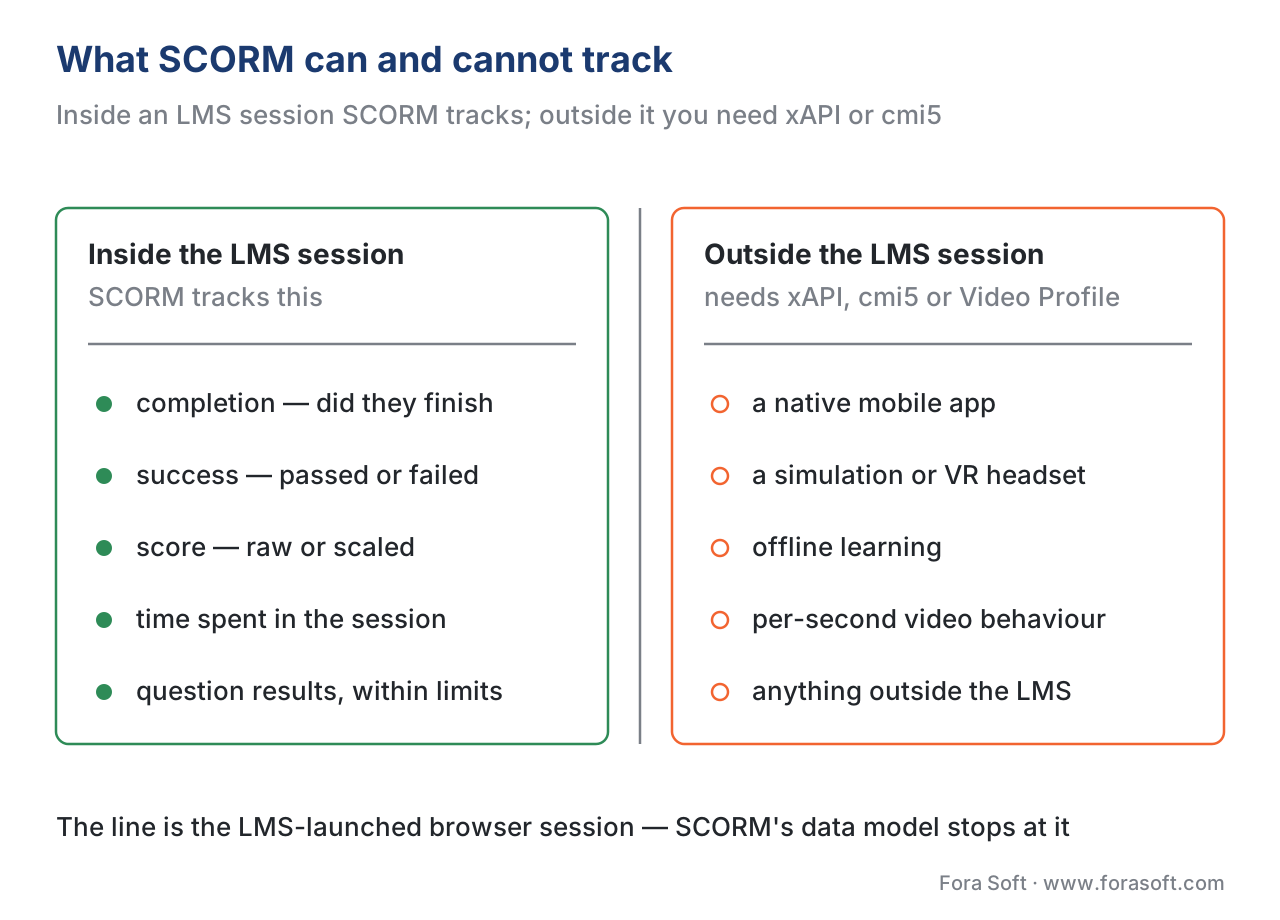 Figure 5. The conformance boundary. Inside the LMS-launched session, SCORM tracks completion, score, and time. Outside it — mobile, simulations, offline, and per-second video — you need xAPI, cmi5, or the xAPI Video Profile.
Common mistakes that cost real time
A few pitfalls show up on almost every SCORM project. Each one is cheap to avoid and expensive to discover late.
The first is "it works in the authoring tool but not in the LMS." A preview inside Storyline or Captivate does not exercise the real run-time conversation. Always test the actual exported package in a real learning system — or in a free conformance sandbox such as ADL's test suite or SCORM Cloud — before shipping.
The second is "watched 100% equals completed." A raw video player reaching its last frame is not the same as the SCO writing completion_status = completed. If you do not make the video a SCO and write the field, the learning system records nothing, no matter how attentively the learner watched.
The third is the silent suspend_data overflow from the worked example above: a big SCORM 1.2 course quietly exceeds 4,096 characters and loses its resume state. Budget the field, or move to SCORM 2004.
The fourth is expecting sequencing to behave identically everywhere. SCORM 2004 sequencing is interpreted slightly differently across systems. If branching matters, test it on every target platform, not just one.
Build vs buy: should you implement SCORM yourself?
This section leads with the business decision, because that is where SCORM costs and saves the most money. There are two sides to "supporting SCORM," and they are not the same project.
If you are producing courses, you almost never build anything. You author in a tool that already exports SCORM (Storyline, Rise, Captivate, iSpring), publish to 1.2 or 2004, and upload to the LMS. The standard is something you use, not something you write.
If you are building a platform that must launch and track SCORM content — your own LMS, or a video product that needs to ingest SCORM packages — then you face a real build-vs-buy choice. Writing a fully conformant SCORM run-time from scratch is a deceptively large job: the data model is broad, the sequencing rules in 2004 are genuinely hard, and conformance edge cases are many. Most teams should not hand-roll it. They either adopt a mature open-source run-time library (for example, a JavaScript SCORM API wrapper) or use a hosted conformance engine that handles packaging, launching, and reporting behind an API. Building the SCORM layer yourself is justified only when SCORM handling is your product. For the broader version of this decision, see build vs buy vs extend an existing LMS.
To make the packaging side concrete and repeatable, we have distilled the conformance steps into a one-page checklist you can run against any SCORM build — download the SCORM packaging and conformance checklist.
Free download: SCORM Packaging and Conformance ChecklistA one-page checklist: package structure and the manifest, SCO vs asset, the run-time API calls and data fields to verify, the SCORM 1.2 vs 2004 decision, and how to test conformance before shipping.Where Fora Soft fits in
Fora Soft has built video learning, streaming, conferencing, and interactive-player software since 2005, across 239+ shipped projects. On e-learning products, the recurring decision we help teams make is exactly the one above: package video as plain SCORM when the goal is "it must run in the client's existing LMS," and move to xAPI or cmi5 when the product needs per-second video analytics, offline learning, or tracking outside the LMS. Our work tends to sit at the hybrid point — a custom video and interactive layer that still reports cleanly into a standards-based gradebook — because that is where the build-vs-buy trade-off usually lands for video-first learning products. We treat the tracking layer as something that must actually work in production, not just pass a demo.



The handbook
Fora Soft Video Engineering Handbook
We wrote a seven-volume handbook that works through the whole video stack — encoding, delivery, audio and AI — across 9,000+ pages, and the lecture video a SCO wraps sits on exactly that stack. Volume 3 is the delivery layer you are instrumenting when a SCO writes completion: players and playback recovery, ABR and CDNs, subtitles, DRM and the economics of delivery. Volume 2 covers the packaging side — ingest, HLS, MPEG-DASH and CMAF — the transport counterpart to the manifest in this article, and Volume 1 explains the encoding decisions behind the file you ship. Written by Nikolay Sapunov, CEO at Fora Soft.
Need a course that actually reports in your client’s LMS?
Tell us which systems your content has to land in and what you need tracked, and we will tell you whether SCORM 1.2, SCORM 2004 or cmi5 is the right target — before you build the tracking layer twice. 250+ video products shipped since 2005.
See our case studies
Case study
BrainCert
The first WebRTC and HTML5 virtual-classroom LMS, which we built from the architecture up: 500M+ real-time classroom minutes across 10 worldwide datacenters at 99.995% uptime, with SCORM and xAPI support in the platform — the build side of this article’s build-vs-buy question.
Case study
Scholarly
Sydney’s leading selective-test prep platform: live classes that hold up to 2,000 students at once for 15,000+ active users, with video, quizzes, LMS and CRM in one system rather than a gradebook bolted on afterwards.
Case study
Tabsera
A multilingual K-12 LMS in English, French, Arabic and Turkish, with gamified courses, quizzes and an interactive whiteboard — the authoring side, where the standard is something you publish to, not something you write.
What to read next
Standards
SCORM vs xAPI vs cmi5 vs LTI
The side-by-side: which of the four standards your product actually needs.
Standards
cmi5 Explained
The bridge: xAPI’s data model without giving up the LMS launch.
Video tracking
Tracking Video With xAPI
The per-second watch behaviour SCORM’s fixed data model cannot see.
Decision
Build vs Buy vs Extend an LMS
The wider version of the decision at the end of this article.
References
- Advanced Distributed Learning (ADL) Initiative. SCORM 2004 4th Edition — Content Aggregation Model (CAM), Version 1.1, 2009. (Tier 1 — primary standard.)
- Advanced Distributed Learning (ADL) Initiative. SCORM 2004 4th Edition — Run-Time Environment (RTE), Version 1.1, 2009. (Tier 1 — primary standard; data model and API.)
- Advanced Distributed Learning (ADL) Initiative. SCORM 2004 4th Edition — Sequencing and Navigation (SN), Version 1.1, 2009. (Tier 1 — primary standard.)
- Advanced Distributed Learning (ADL) Initiative. SCORM Version 1.2 — The SCORM Run-Time Environment / Content Aggregation Model, 2001. (Tier 1 — primary standard.)
- IEEE. IEEE 9274.1.1-2023 — Standard for Learning Technology: JSON Data Model Format and RESTful Web Service for Learner Experience Data Tracking and Access (xAPI 2.0), published October 2023. https://standards.ieee.org/ieee/9274.1.1/7321/ (Tier 1 — primary standard.)
- Advanced Distributed Learning (ADL) Initiative. Overview and Application of xAPI, cmi5, and xAPI Profiles. https://www.adlnet.gov/ (Tier 2 — issuing body guidance.)
- cmi5 specification, ADL / AICC, current working version. https://github.com/AICC/CMI-5_Spec_Current (Tier 1 — primary specification.)
- Rustici Software (SCORM.com). "Comparing SCORM 1.2 and SCORM 2004." https://scorm.com/scorm-explained/business-of-scorm/comparing-scorm-1-2-and-scorm-2004/ (Tier 3 — first-party engineering reference; used for adoption and suspend_data limits, consistent with the ADL specs above.)
- Rustici Software (SCORM.com). "SCORM Run-Time Reference Chart for SCORM 1.2 and SCORM 2004." https://scorm.com/scorm-explained/technical-scorm/run-time/run-time-reference/ (Tier 3 — first-party engineering reference for data model field names.)
Where lower-tier sources (Rustici, vendor blogs) and the ADL specs could appear to differ, the article follows the ADL specification text — for example, on the precise data-model field names and the 4,096 / 64,000-character suspend_data limits, which the ADL RTE book defines and Rustici reports consistently.
