


Why this matters
If you are building a learning product — a video platform, an interactive-video tool, an assessment engine — your buyers will ask one question early: "Does it work inside our LMS?" LTI is the answer that lets you say "yes" to Canvas, Moodle, Blackboard, Brightspace, and a corporate LMS with one integration instead of a dozen custom ones. This article is for the L&D director, EdTech founder, or product manager who has to decide whether to build LTI support, and who needs to brief engineers without drowning in OAuth jargon. It is also the standard that decides whether your roadmap reads "integrate once" or "integrate forever." We keep every claim tied to the named specification, but readable from the first sentence.
What LTI actually is, in one idea
Picture a university LMS as a building with a guarded front desk. Inside are dozens of courses. A teacher wants to drop your video tool into "Biology 201." Your tool lives in your own data centre — it is not a file you hand over. So how does a learner click a link inside Biology 201 and end up inside your tool, already logged in, with your tool knowing who they are and which course sent them?
That handshake is what Learning Tools Interoperability — LTI — standardizes. LTI is the visitor badge that lets your tool walk into any LMS and be trusted: the LMS vouches for the learner, your tool reads that vouching, and the learner crosses from one system to the other without typing a second password. The IMS Global Learning Consortium — now called 1EdTech — created LTI, and it is the most widely adopted integration standard in education technology.
Hold onto one distinction for the whole article, because it is the thing most people get wrong. The packaging standards you may have read about — SCORM and cmi5 — take your content, zip it up, and move it into the LMS to run there. LTI does the opposite. It leaves your tool exactly where it is and launches into it from the LMS. SCORM ships the content; LTI ships a trusted doorway to it.
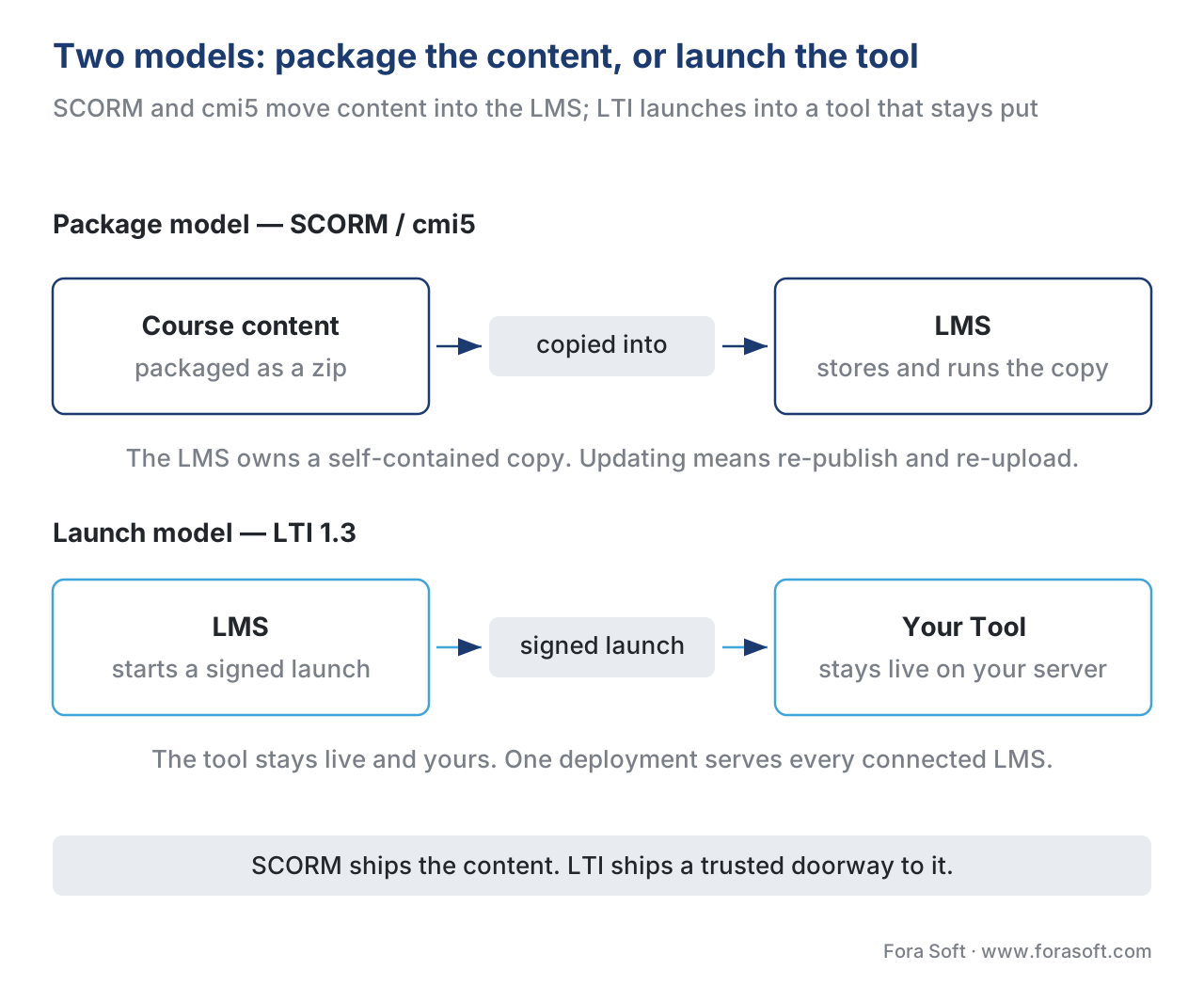 Figure 1. Two models. SCORM and cmi5 package content and move it into the LMS. LTI leaves your tool on its own servers and launches into it through a trusted, signed doorway — one deployment serves every connected LMS.
The two roles: Platform and Tool
LTI describes a conversation between exactly two parties, and the spec gives them precise names worth learning.
The Platform is the system that hosts the learner and starts the launch. In almost every case the Platform is the LMS — Canvas, Moodle, Blackboard Learn, Brightspace, or a corporate learning system. The Platform knows who the learner is, what course they are in, and what role they hold (student, instructor, teaching assistant).
The Tool is the external application being launched — your video player, your interactive lesson, your quiz engine, your proctoring service. The Tool runs on its own infrastructure and trusts the Platform to tell it who is knocking.
Keep these straight and the rest of LTI reads cleanly: the Platform vouches, the Tool trusts, and the standard defines the signed messages that pass between them. Throughout this article, "Platform" means the LMS and "Tool" means the thing you are building or buying.
How a modern LTI launch works: the signed handshake
This is the part that earns LTI its security reputation, and it is simpler than the acronyms suggest once you read it as a story. We will walk the modern version, LTI 1.3, which the issuing body released as an IMS Final Release on 16 April 2019. Older LTI (1.1) used a weaker signing method; 1.3 rebuilt the security on the same battle-tested protocols that protect logins across the web — OpenID Connect (OIDC), OAuth 2.0, and JSON Web Tokens (JWT). We define each below as it appears; you do not need to know them in advance.
Here is the launch, step by step.
Step 1 — The learner clicks. Inside Biology 201, the learner clicks your video lesson. The Platform does not just open a URL. It begins a third-party-initiated login — a formal way of saying "the LMS, not the learner, kicks off the sign-in." The Platform sends a first message to your Tool's login URL announcing who is asking: the issuer (iss, identifying which Platform this is), a login_hint (an opaque pointer to the learner), and the address the launch is ultimately headed for.
Step 2 — The Tool answers with a question. Your Tool does not trust that first message blindly. It bounces back to the Platform's authorization endpoint with an OpenID Connect request — the same "Sign in with…" pattern used across the consumer web. OIDC is a thin identity layer on top of OAuth 2.0, the standard that lets one system grant another limited, scoped access. In plain terms, the Tool says: "Platform, if this is real, send me a signed proof of who this learner is."
Step 3 — The Platform sends a signed token. The Platform authenticates the request and posts back a JSON Web Token — a JWT, pronounced "jot." A JWT is a compact bundle of facts (called claims) with a tamper-evident digital signature. The Platform signs the JWT with its private key. Inside are the claims that make a launch useful: the message type (for a content launch, LtiResourceLinkRequest), the LTI version, a deployment ID, the learner's identity and roles, the context (the course — Biology 201), and which specific resource link was clicked.
Step 4 — The Tool verifies and opens. Your Tool fetches the Platform's public keys (published at a standard address called a JWKS) and uses them to check the signature. If the signature is valid, the claims are genuine and unaltered; if anyone tampered with a single character, verification fails. The Tool also checks a one-time nonce so the message cannot be replayed. Only then does your Tool render the video lesson — for the right learner, in the right course, with the right role.
Read those four steps back and notice what just happened: the learner is inside your tool, already authenticated, with course context, and never typed a password into your system. That is why single sign-on (SSO) is a consequence of LTI, not its mechanism. The mechanism is a signed, verifiable token; the smooth login is the payoff. This precision matters — describe LTI as "it logs the user in" to an engineer and you will mislead the build.
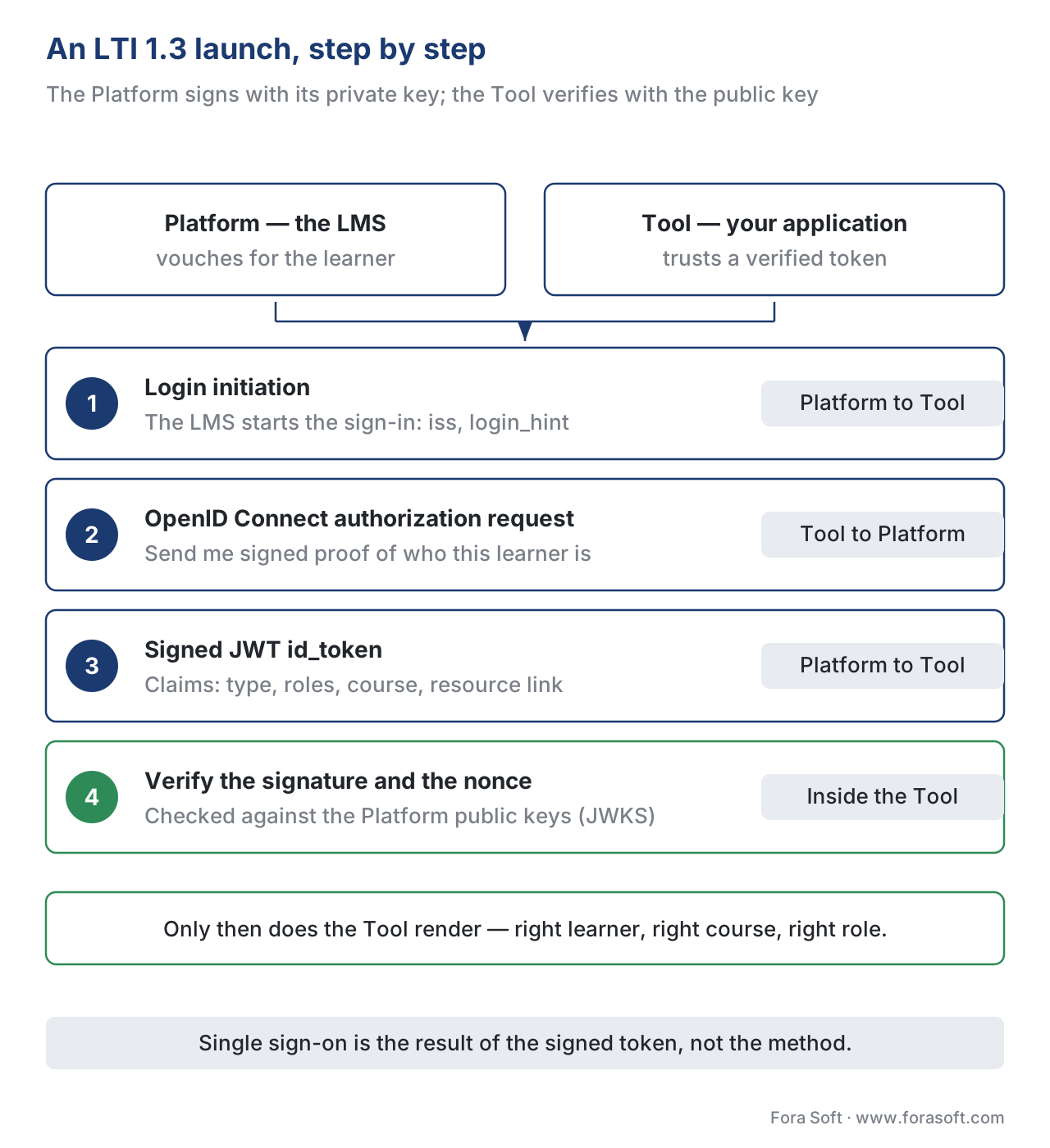 Figure 2. An LTI 1.3 launch. The Platform initiates login; the Tool replies with an OpenID Connect request; the Platform returns a JWT signed with its private key; the Tool verifies the signature against the Platform's public keys, then renders. SSO is the result, not the method.
Why LTI 1.3 replaced LTI 1.1: the security story
You will still meet LTI 1.1 in the wild, so it is worth knowing why the standard moved on. LTI 1.1 signed its messages with OAuth 1.0, which required both sides to share a secret key and compute a complex cryptographic signature on every request. That worked, but shared secrets are fragile: they leak, they are hard to rotate, and the signing scheme had known weaknesses. As 1EdTech put it, older security frameworks "have demonstrated vulnerabilities," and CIOs were rightly nervous about student data — personally identifiable information — passing between systems on that footing.
LTI 1.3 swapped all of it for the modern 1EdTech Security Framework: OAuth 2.0 over HTTPS, OpenID Connect, and JWTs signed with public/private key pairs. The practical wins are concrete. There is no shared secret to leak, because the Platform signs with a private key and the Tool verifies with the matching public key. The model is browser-independent, so an LTI Tool can be a native mobile or desktop app, not just a web page. And because the security layer is separate from the core spec, each can evolve without breaking the other.
There is a real cost, and an honest article names it: managing public/private keys is a new operational step for Tool builders, and getting key rotation and JWKS hosting right is work. But it is well-understood work, built on libraries every web team already uses. The trade is a one-time learning curve for a permanently stronger, secret-free security model. For a tool that will hold student data, that trade is not close.
LTI Advantage: the three services that make LTI do real work
Core LTI 1.3 gets a learner into your Tool with verified context. Useful — but a teacher usually wants more than a doorway. They want to pick which of your videos goes into a lesson, see who is in the class, and have quiz scores flow back into the LMS gradebook automatically. Those three jobs are exactly what LTI Advantage adds. LTI Advantage is not a different standard; it is a set of three optional services layered on core LTI 1.3, each using the same JWT-and-OAuth security.
Deep Linking lets a teacher browse and select specific content from your Tool while building a course, and hand those selections back to the LMS as ready-to-use links. Without it, an instructor gets one generic launch into your tool and has to navigate to the right video by hand. With it, they click "add content," pick "Cellular Respiration, Part 2" from inside your tool, and the LMS stores a direct link to exactly that. Deep Linking turns your tool from a single door into a content picker.
Names and Role Provisioning Services (NRPS) lets your Tool securely read the course roster from the Platform — who is enrolled, and what role each person holds. This is what lets a video tool show an instructor a class list, or pre-create a seat for every student, or know that this launcher is a teaching assistant and not a learner. The Tool requests the roster; the Platform returns it over a secured, OAuth-scoped API.
Assignment and Grade Services (AGS) lets your Tool write grades, scores, progress, and comments back into the LMS gradebook. A learner finishes your interactive video assessment, scores 86%, and AGS pushes that score into Biology 201's gradebook with no manual entry. AGS defines three pieces working together: a line item (a column in the gradebook), a score (what the learner earned), and results (the readable outcome). For any learning product that assesses, AGS is the difference between "and then the teacher types every score by hand" and "scores just appear."
A non-negotiable caveat: each service is optional and negotiated per deployment. The fact that your Tool supports AGS does not mean a given Platform grants it. Availability depends on what both the Platform and the Tool implement and what the institution turns on. Plan for graceful degradation — a launch that works even when grade passback is not available.
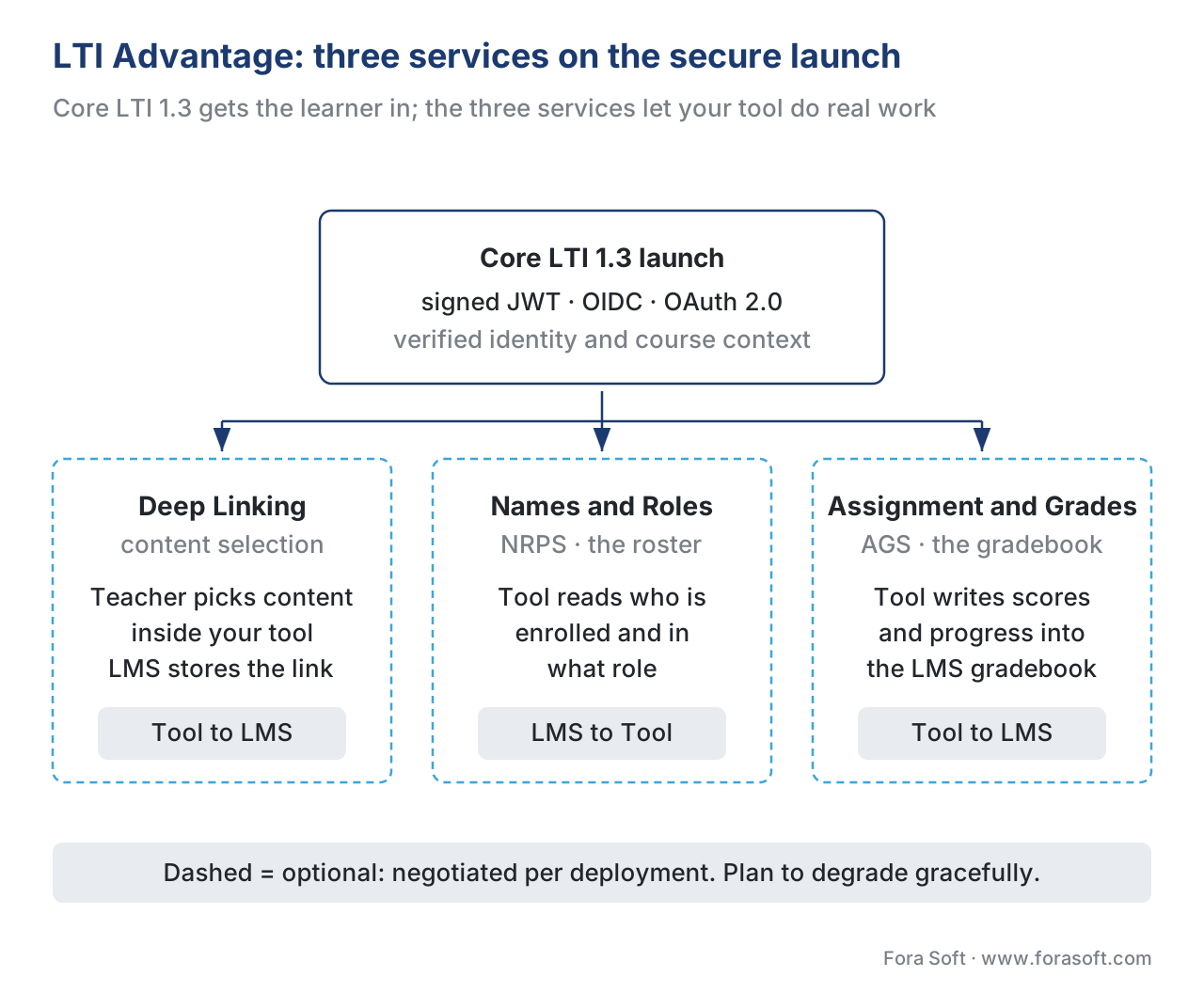 Figure 3. LTI Advantage. Core LTI 1.3 carries the secure launch; Deep Linking adds content selection, NRPS reads the roster, and AGS writes grades back to the LMS gradebook. Each service is optional and negotiated per deployment.
A worked example: one tool, four LMSs, the integration math
Numbers make LTI's payoff concrete. Suppose you sell an interactive-video assessment tool, and four customers run four different systems: Canvas, Moodle, Blackboard, and a corporate LMS. Each wants your tool inside their courses, with grades flowing to their gradebook.
Without a standard, you would build a custom integration per system: authentication, identity mapping, roster sync, and grade passback, four times. Call it a conservative four engineer-weeks each to build and a recurring maintenance burden as every LMS ships API changes:
Custom integrations   = 4 systems × 4 eng-weeks   = 16 eng-weeks to build
                      + 4 separate maintenance tracks, forever
With LTI 1.3 plus AGS, you implement the standard once — one launch flow, one JWT verifier, one AGS grade-passback client — and certify it. Every LTI-conformant LMS then works through that single code path:
LTI integration       = 1 implementation (launch + AGS)   ≈ 4–6 eng-weeks
                      + 1 maintenance track for the standard
New LMS onboarded     = configuration, not code           ≈ hours, not weeks
The saving is not just the up-front weeks; it is that the fifth, sixth, and tenth LMS cost almost nothing to add, because onboarding a new conformant Platform becomes a configuration task, not an engineering project. That "build once, launch everywhere" economics is the entire commercial reason LTI exists, and it is the line your sales team most wants to be able to say.
LTI versus the packaging standards: when to use which
LTI is often discussed alongside SCORM, xAPI, and cmi5, which confuses teams into thinking they must pick one. They solve different problems and frequently coexist. The cleanest way to choose is to ask a single question: does the content need to live inside the LMS, or stay a live service you control?
If you want a self-contained course that any LMS can store and run on its own — even offline, even after you are gone — you package it with SCORM or cmi5. If you want a living tool that you host, update continuously, and launch into from many LMSs, you launch it with LTI. A video platform that adds features weekly, personalizes per learner, or runs heavy server-side processing is a Tool you launch; a fixed compliance module that must run in a client's air-gapped LMS is content you package.
The table below is the comparison most teams actually want, with the standards reality spelled out.
| Criterion | SCORM (1.2 / 2004) | cmi5 (Quartz) | LTI 1.3 + Advantage |
|---|---|---|---|
| Model | Package content into the LMS | Package content into the LMS | Launch a live, externally hosted tool |
| Where content runs | In-browser, inside the LMS | Any device, can run offline | On your servers, always online |
| What's exchanged | A zip + a fixed data model | A zip/link + xAPI statements | A signed JWT launch + live API calls |
| Identity / SSO | Implicit (LMS session) | Carried in launch parameters | OIDC + signed JWT (true SSO) |
| Reads the class roster | No | No | Yes, via NRPS |
| Writes grades back | Yes (fixed fields, in-LMS) | Via the LRS | Yes, via AGS, into the gradebook |
| Content selection by teacher | No | No | Yes, via Deep Linking |
| Update content centrally | Re-publish & re-upload | Re-publish (or remote host) | Instant — you control the server |
| Security model | LMS session | xAPI auth + LRS | OAuth 2.0 + JWT (public/private key) |
| Best when | A course must run in any LMS now | xAPI data plus the LMS flow | A hosted tool serves many LMSs live |
The honest summary: package with SCORM or cmi5 when the content must be a self-contained artifact the LMS owns; launch with LTI when you are a service that many institutions plug into and you keep control of the code. Many real products do both — they package a fallback SCORM module and offer a richer LTI launch — and a learning-video tool often pairs LTI for the live experience with the xAPI Video Profile for per-second tracking. For the full four-way decision, see SCORM vs xAPI vs cmi5 vs LTI.
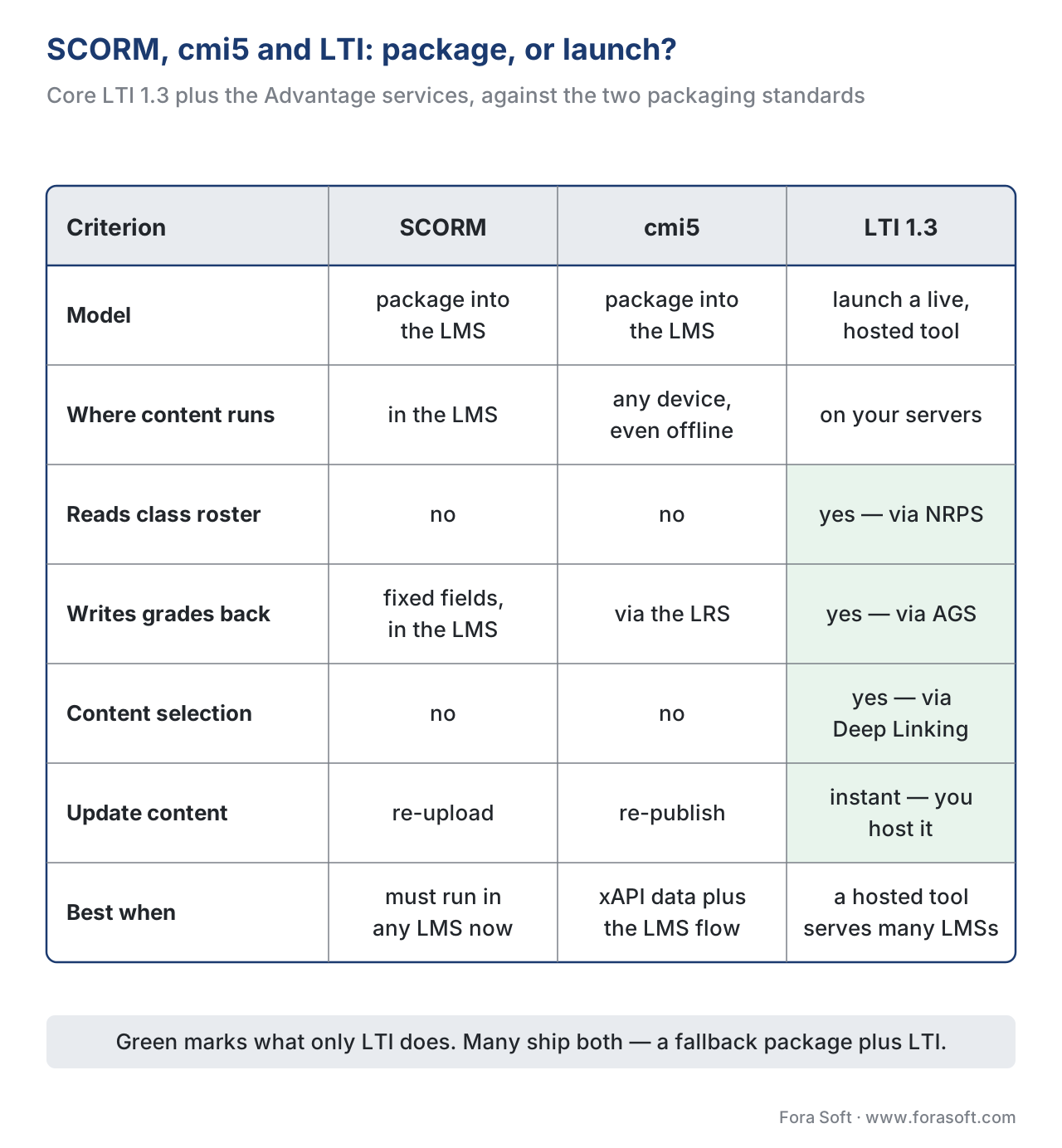 Figure 4. SCORM and cmi5 package content into the LMS; LTI launches a live tool you host. LTI uniquely reads the roster (NRPS), writes grades to the gradebook (AGS), and lets teachers pick content (Deep Linking).
Common mistakes that cost real time
A handful of LTI misunderstandings recur on projects, and each is cheap to avoid up front and expensive to find in a customer's LMS.
The first is building against LTI 1.1 in 2026. LTI 1.1's OAuth 1.0 signing is the security model 1.3 was built to replace, and major platforms have deprecated 1.1. New builds should target LTI 1.3 and LTI Advantage; treat 1.1 as legacy you support only if a contract forces it.
The second is describing LTI as a password login. It is not. The Platform proves identity with a signed token your Tool verifies cryptographically; SSO is the result. Teams that model it as a credential handoff build the wrong thing and miss the security guarantees the JWT provides.
The third is assuming LTI Advantage services are always available. Core launch and the three services (Deep Linking, NRPS, AGS) are negotiated per deployment. A Platform may grant launch but not grade passback. Always degrade gracefully — never let a missing AGS scope break the lesson.
The fourth is skipping JWT validation shortcuts. "It worked in testing" often means signature, nonce, aud, and expiry checks were loose. An LTI Tool that does not fully verify the token against the Platform's published keys is a security hole. Validate every claim, every launch.
The fifth is treating roster and grade data as low-stakes. NRPS hands you real student identities and AGS handles their grades — personal data under the EU's GDPR (Regulation (EU) 2016/679), under FERPA where US student records are involved, and under 152-FZ for a Russian audience. Decide what you store, why, and for how long before your first NRPS call.
Build vs buy: where LTI fits the decision
Lead with the business question, as always. Supporting LTI is rarely a "buy the whole thing" decision — it is a build, but a bounded one, and the size depends on which side you are on.
If you are building the Tool (the common case for a video or assessment product), implementing LTI 1.3 plus the Advantage services you need is real but well-scoped engineering: the OIDC launch, JWT verification and signing, key/JWKS management, and an AGS client for grade passback. Open-source LTI libraries exist for most languages and cut the launch plumbing substantially, so the build concentrates on doing it securely and certifying conformance — 1EdTech offers formal LTI 1.3 certification, and listing in its certified directory is a genuine sales asset.
If you are building the Platform (you are the LMS), the LTI surface is larger: you issue the signed tokens, host the OIDC endpoints and JWKS, and expose the NRPS and AGS APIs. That is a deliberate platform investment, justified only when third-party tool interoperability is a core product promise. For the broader version of this trade-off, see build vs buy vs extend an existing LMS. To scope and sequence your own integration the first time, download the LTI 1.3 integration readiness checklist.
Free download: LTI 1.3 Integration Readiness ChecklistOne page: the LTI version and roles you target, the OIDC launch and JWT verification, key and JWKS management, the three Advantage services, conformance certification, and a privacy gate before you ship.Where Fora Soft fits in
Fora Soft has built video learning, streaming, conferencing, and interactive-player software since 2005, across 239+ shipped projects. On learning products, the recurring decision we help teams make is the one at the centre of this article: package a course with SCORM or cmi5 when it must live inside a client's LMS, and expose your video tool as an LTI 1.3 launch when it is a live service that many institutions plug into. Our work usually sits at the video and interactive layer — an interactive-video Tool that launches cleanly into Canvas, Moodle, or Blackboard, reads the roster through NRPS, and writes assessment scores back through AGS, so a learner's grade and the engagement analytics come from one verified launch. We treat the launch and grade-passback path as something that must hold up in a real institution's LMS at volume, not just pass a sandbox test.



The handbook
Fora Soft Video Engineering Handbook
LTI gets the learner through the door; what waits on the other side is a video product you host and keep running. We wrote a seven-volume, 9,000+ page series on that stack — encoding, delivery, sound and AI. Volume 3 covers the player, the CDN and the delivery economics behind the tool an LMS launches into, volume 1 covers the encoding underneath it, and volume 4 covers the sound and accessibility work that graded video needs. Written by Nikolay Sapunov, CEO at Fora Soft.
Need your tool to launch cleanly inside Canvas, Moodle and Blackboard?
Tell us which LMSs your buyers run and we will scope the LTI 1.3 launch, the JWT and JWKS work, and the Advantage services you actually need — 250+ video products shipped since 2005.
See our case studies
Case study
BrainCert
The Platform side of the conversation: a WebRTC and HTML5 virtual-classroom LMS we built from the architecture up, with SCORM and xAPI support alongside its own classrooms — 500M+ real-time classroom minutes for 100K+ customers.
Case study
ALDA
Built with e-Literate and 70+ US college educators, and now owned by 1EdTech — the body that publishes LTI. Its institutions, from Dallas College to five UNCF HBCUs, serve over 500,000 students a year between them.
Case study
Scholarly
The integration math in practice: one platform with live video, whiteboards, quizzes, LMS and CRM replaced a stack stitched from Zoom and Discord — 15,000+ active users and live classes of up to 2,000 students.
What to read next
Standards
SCORM Explained
The packaging standard LTI is most often confused with, and what it does and does not track.
Integrations
Integrating With Moodle
What an LTI 1.3 launch looks like against the LMS with the widest institutional install base.
Integrations
Integrating With Canvas and Blackboard
The two doors into the North American market, and which Advantage services each one grants.
Assessment
Grading, Rubrics, and Grade Passback
AGS in depth: line items, scores and results, and what breaks when passback is not available.
References
- IMS Global Learning Consortium (1EdTech). Learning Tools Interoperability (LTI) Core Specification, Version 1.3, IMS Final Release, 16 April 2019. https://www.imsglobal.org/spec/lti/v1p3 (Tier 1 — primary specification; the Platform/Tool roles, the third-party-initiated OIDC login, the signed
id_tokenJWT, LTI message types includingLtiResourceLinkRequest, roles/context/resource-link claims, deployment IDs.) - IMS Global Learning Consortium (1EdTech). Learning Tools Interoperability (LTI) Advantage Implementation Guide, Version 1.3, IMS Final Release. https://www.imsglobal.org/spec/lti/v1p3/impl (Tier 1 — primary; how core LTI 1.3 and the three Advantage services fit together, registration, and security model.)
- 1EdTech. LTI Deep Linking Specification. https://standards.1edtech.org/lti/specifications/launch_messages/deep_linking/lti-deep-linking-spec (Tier 1 — primary service spec; how a Tool returns selected content links to the Platform.)
- IMS Global Learning Consortium (1EdTech). LTI Advantage Overview (Deep Linking, Names and Role Provisioning Services, Assignment and Grade Services). https://www.imsglobal.org/lti-advantage-overview (Tier 1 — issuing-body documentation; the three Advantage services and what each does.)
- 1EdTech. Why Platforms and Tools Should Adopt LTI 1.3. https://www.1edtech.org/standards/lti/why-adopt-lti-1p3 (Tier 1 — issuing-body documentation; the 1EdTech Security Framework, OAuth 2.0/OIDC/JWT, the move off OAuth 1.0, browser-independence, single-registration, and the AGS/Deep Linking/NRPS summaries.)
- 1EdTech. Learning Tools Interoperability (LTI) standard overview. https://www.1edtech.org/standards/lti (Tier 1 — issuing-body documentation; LTI's scope as the standard for integrating remote tools and content into platforms.)
- IETF. The OAuth 2.0 Authorization Framework, RFC 6749 (2012). https://www.rfc-editor.org/rfc/rfc6749 (Tier 1 — primary RFC; the authorization framework LTI 1.3's security layer builds on.)
- OpenID Foundation. OpenID Connect Core 1.0. https://openid.net/specs/openid-connect-core-1_0.html (Tier 1 — primary specification; the OIDC identity layer and ID Token model used by the LTI 1.3 launch.)
- IETF. JSON Web Token (JWT), RFC 7519 (2015). https://www.rfc-editor.org/rfc/rfc7519 (Tier 1 — primary RFC; the signed-token format that carries LTI launch claims.)
- Anthology / Blackboard. Getting Started With LTI (developer documentation). https://docs.anthology.com/docs/blackboard/lti/welcome (Tier 4 — vendor engineering reference; what an LTI launch and the OIDC login URL look like in a shipping LMS, used only for "what actually ships," never to override the spec.)
Where lower-tier vendor docs (Anthology/Blackboard) could differ from the specification, the article follows the IMS/1EdTech LTI 1.3 Core and LTI Advantage specs — notably the precise launch sequence (third-party-initiated OIDC login → signed JWT id_token → signature verification), the Platform/Tool role names, and the per-deployment negotiation of the three Advantage services.
