


Why This Matters
If you sell or build a learning-video product, "does it work with Moodle?" is one of the first questions a school, university, or training department will ask — Moodle runs a large share of the world's online courses, and much of it is in the public sector. This article is for the L&D director, EdTech founder, or product manager who has to decide how to integrate, brief engineers, and budget the work without over-building. The wrong path can turn a two-week launch integration into a multi-month plugin project that you then maintain across every Moodle release. We keep each claim tied to Moodle's own developer documentation and to the named standards, but readable from the first sentence.
What "Integrating With Moodle" Actually Means
The phrase hides a real fork in the road, and teams that skip it build the wrong thing. "Integration" can mean any of four things, and they barely overlap.
It can mean launching your externally hosted tool inside a Moodle course — a learner clicks a link in their course and lands in your video player, already logged in. It can mean delivering packaged content that Moodle stores and plays — you hand Moodle a file and it tracks completion. It can mean changing how Moodle itself behaves — adding a new activity type, a new report, a new button, by writing code that runs inside Moodle. Or it can mean reading and writing Moodle's data from another system — your back-office app pulls course completions out of Moodle every night.
Each of these maps to a different technology, a different cost, and a different team. The rest of this article walks all four, then says which to pick for a video product. Hold this fork in mind: most "Moodle integration" debates are really arguments about which of these four jobs you actually need.
Moodle In One Idea: An Open-Source LMS Built To Be Extended
Before the paths, one fact shapes all of them. Moodle is an open-source learning management system — a free, self-hostable platform that schools and companies run to deliver courses, quizzes, and grades. "Open-source" means the code is public and anyone can install, modify, and extend it, which is exactly why Moodle integration has so many doors: you can plug in from the outside through standards, or reach inside and change the code.
Moodle's whole architecture is built around plugins — self-contained add-ons that extend the core. Moodle's developer documentation lists a wide range of plugin types: activity modules (a new kind of course activity), blocks, themes, authentication plugins, enrolment plugins, repository plugins, report plugins, and more. This matters because two of our four integration paths — packaged content and custom plugins — lean directly on this plugin model, while the other two — LTI and the web-services API — are Moodle's front and back doors for systems that stay outside it.
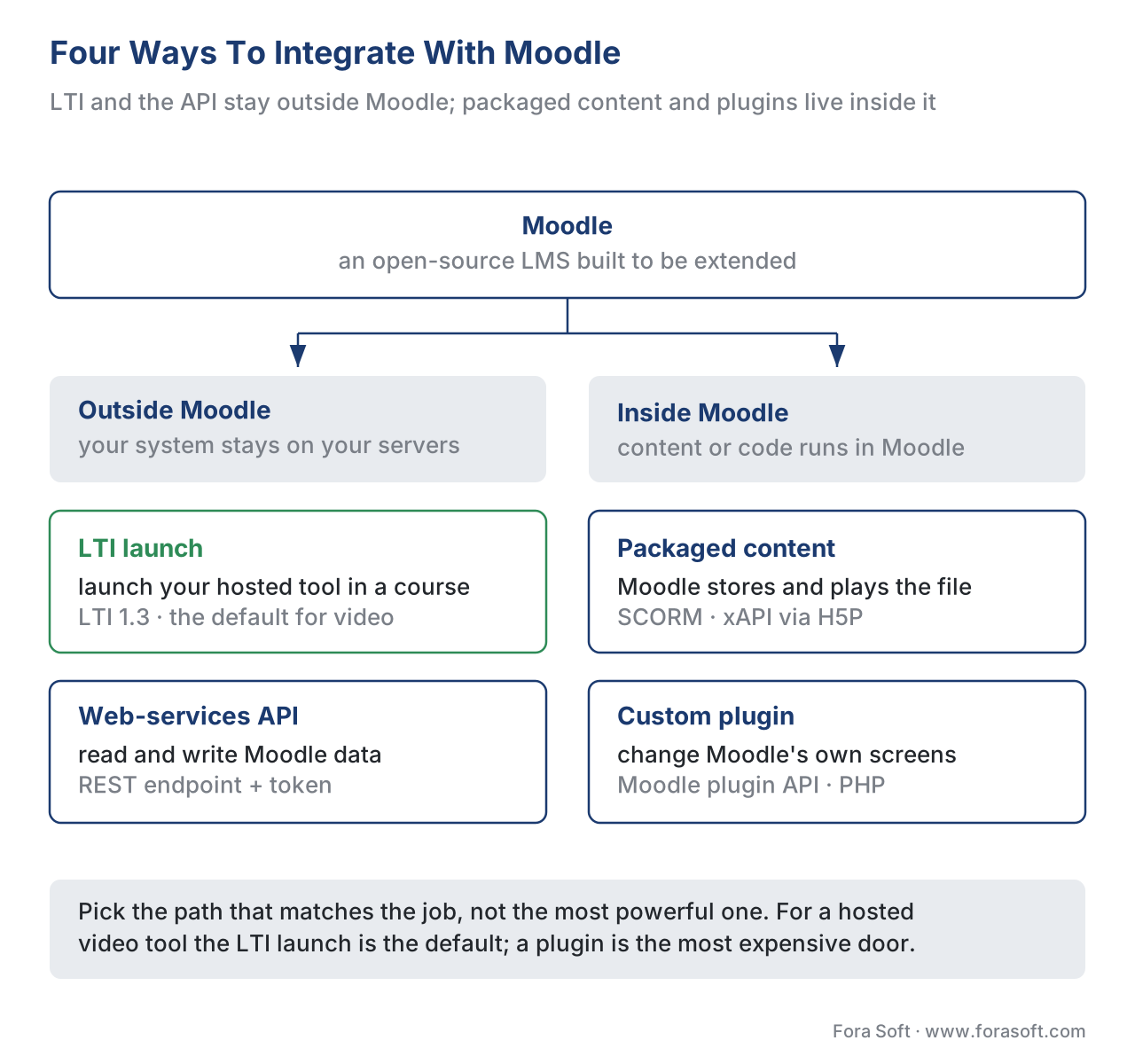 Figure 1. The four ways to integrate with Moodle. LTI and the web-services API connect systems that stay outside Moodle; packaged content and plugins live inside it. Pick the path that matches the job, not the most powerful one.
Path 1 — LTI: Launch Your Tool Inside Moodle (The Default For Video)
The cleanest way to put a video or interactive tool into Moodle is Learning Tools Interoperability — LTI — the education standard that lets an external tool launch securely inside any LMS without its content ever being copied in. Your tool stays on your servers; Moodle opens a trusted, signed doorway into it. If you only read one path, read this one: for a hosted video product, LTI is almost always the right default. (For the standard itself, see LTI explained.)
Moodle has supported the modern version, LTI 1.3, for years, on both sides of the relationship. When Moodle is the Platform (the LMS that hosts the learner and starts the launch), an administrator adds your tool under Site administration → Plugins → Activity modules → External tool → Manage tools, choosing "Configure a tool manually." Moodle's own documentation is explicit about what LTI 1.3 changed: instead of the old shared "consumer key and secret," the two sides now exchange a set of LTI 1.3 connection details — a client ID, a platform ID, an authentication request URL, an access-token URL, and a public keyset (JWKS) URL. Under the hood, Moodle follows the standard: a JSON Web Token (JWT) signed with asymmetric keys, OAuth 2 bearer tokens for service calls, and an OpenID Connect flow to start the launch. A teacher then drops an "External tool" activity into a course, and the learner launches straight into your player.
Moodle can also be the Tool — the thing being launched. Through the "Publish as LTI tool" enrolment plugin, a Moodle site can expose a course or a single activity so a different platform launches into it. That is how one institution shares a specialist Moodle course into another organisation's LMS. For a video vendor this matters less, but it is worth knowing Moodle plays both roles.
The reason LTI is the default for video is economic, and it is the same reason the standard exists. You implement the launch and grade passback once, certify it, and every Moodle site — there are tens of thousands — works through that single code path. Add the three LTI Advantage services and your tool can let teachers pick specific videos (Deep Linking), read the class roster (Names and Role Provisioning Services), and write scores back into Moodle's gradebook (Assignment and Grade Services). One honest caveat from Moodle's own design notes: when your tool passes grades back, the institution typically wants control over which gradebook columns are written — so plan grade passback as a negotiated, configurable thing, not an automatic firehose.
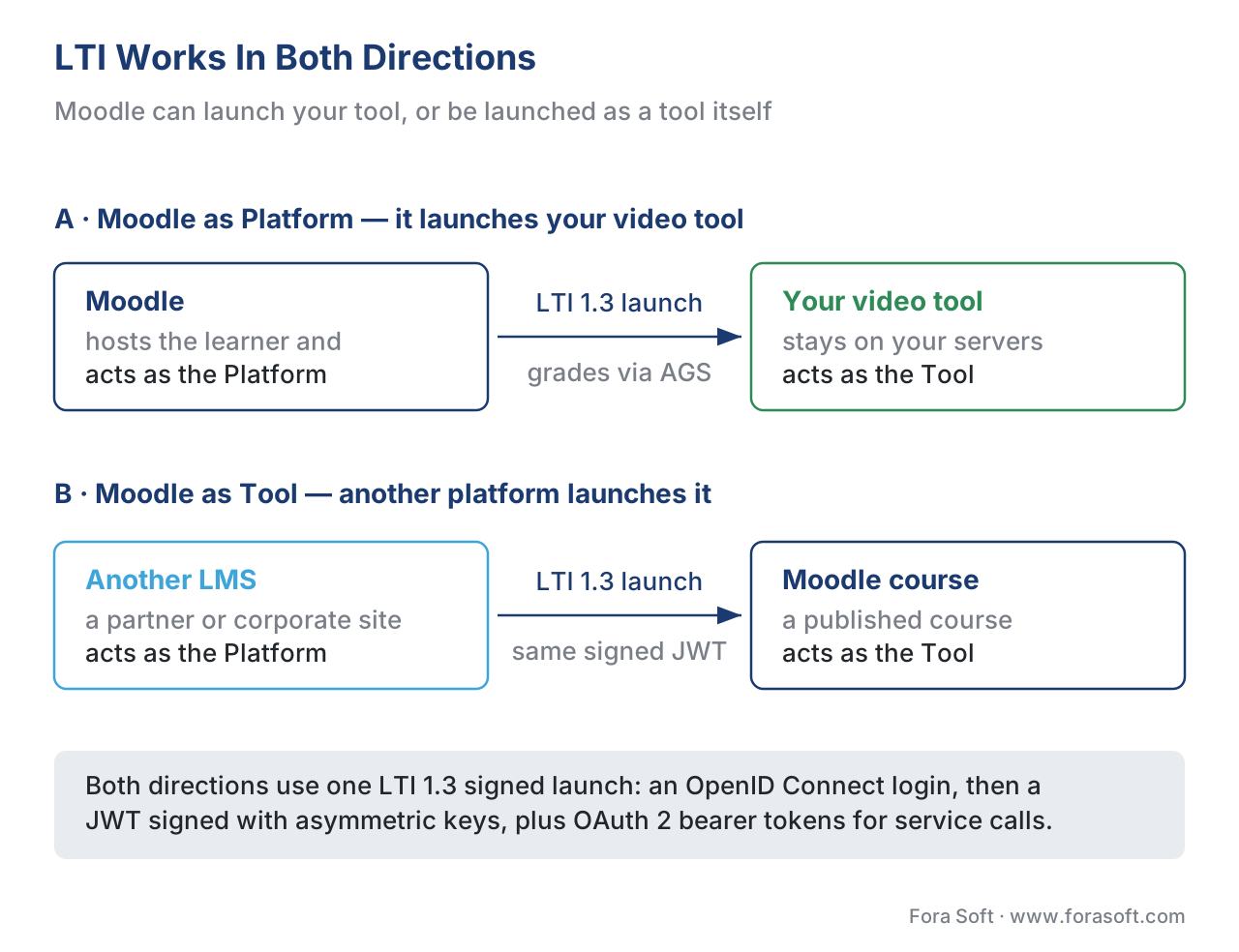 Figure 2. LTI works both directions. Moodle as Platform launches your hosted video tool into a course; Moodle as Tool publishes a course or activity into another platform. Both use the LTI 1.3 signed launch.
Path 2 — Packaged Content: SCORM, xAPI, And H5P
The second path does not connect a live tool at all. Instead you hand Moodle a self-contained package and Moodle stores, plays, and tracks it. This is the right path when the content must live inside the Moodle site — for example because the institution wants it to keep working with no dependency on your servers.
SCORM — the long-standing standard that packages a course into a zip any LMS can play and track — is a first-class Moodle activity. An administrator or teacher uploads a SCORM package (a .zip built to the SCORM 1.2 or SCORM 2004 data model), and Moodle's SCORM activity plays it and records the fixed SCORM data: completion, score, and time. Remember the limit that trips teams up: SCORM tracks a fixed data model inside the LMS launch, not "every interaction." Rich per-second video tracking needs xAPI. (See SCORM explained.)
xAPI — the Experience API, the newer standard that records learning as simple "actor–verb–object" statements like "Maria completed Module 3" — reaches Moodle in two ways. First, H5P, the open interactive-content format now built into Moodle core, emits xAPI statements from its activities; H5P's Interactive Video, for example, fires xAPI statements as a learner plays, answers in-video questions, and finishes, and Moodle uses those statements to put a grade in the gradebook. Second, Moodle's xAPI log store plugin (logstore_xapi) converts Moodle's own events into xAPI statements and forwards them, in scheduled batches, to an external Learning Record Store (LRS) — the database that holds xAPI statements — such as Learning Locker or Watershed. That is how a video tool's interaction data can leave Moodle and join cross-platform analytics. For video specifically, design your statements against the xAPI Video Profile so played, paused, seeked, and completed are captured consistently (see tracking video with the xAPI Video Profile). If you are still deciding which standard to package or launch with, the four-way comparison of SCORM, xAPI, cmi5, and LTI maps each to the job it does best.
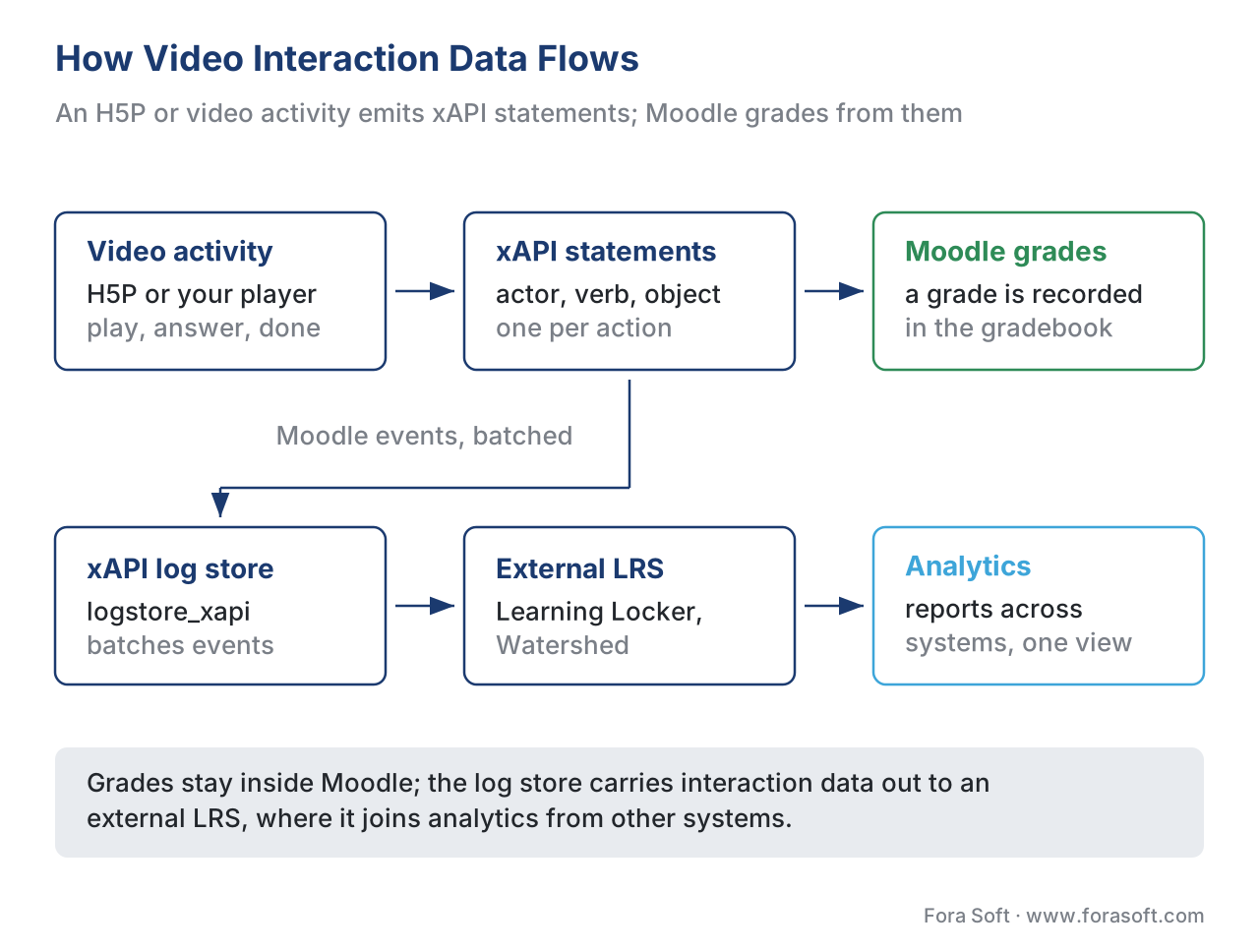 Figure 3. How video interaction data flows. An H5P or video activity emits xAPI statements; Moodle grades from them and, via the xAPI log store, batches them to an external LRS for cross-platform analytics.
Path 3 — Plugins: Changing How Moodle Itself Behaves
The third path reaches inside Moodle and changes it. A plugin is a PHP add-on, installed into a Moodle site, that runs as part of Moodle and can do things no external launch can: add a brand-new activity type, a custom report, a new repository that pulls video from your CDN, or a button on a course page. Because the plugin runs inside Moodle, it has deep access — and that is both its power and its cost.
Choose a plugin only when the integration genuinely has to live inside Moodle's own interface and data model. A native video activity that behaves exactly like Moodle's built-in activities, a repository plugin that lets teachers browse your video library from inside the file picker, or a report that renders your engagement analytics on a Moodle admin screen — these are real plugin jobs. The trade-off is ownership: a plugin is code you write in PHP, test against each major Moodle release (Moodle ships large versions on a regular cadence), and update when the platform's internal APIs change. You also distribute and support it, optionally through the Moodle plugins directory.
The common mistake here is reaching for a plugin when an LTI launch would have done the job with a fraction of the maintenance. A plugin couples you to Moodle's release cycle forever; an LTI tool is hosted once and works across LMSs. Build the plugin when "inside Moodle" is a hard requirement, not a nice-to-have.
Path 4 — The Web-Services API: Driving Moodle From Outside
The fourth path is for when another system — your back office, a data warehouse, a corporate portal — needs to read or write Moodle data programmatically. Moodle exposes a web-services API: an administrator enables web services, defines a service with the specific functions it may call, issues a token, and external code calls a REST endpoint at https://<your-moodle>/webservice/rest/server.php with that token. Functions exist to create users, enrol them, read course completion, fetch grades, and much more.
This path does not launch a learner anywhere and does not change Moodle's screens; it moves data in and out. A typical use for a video product is keeping enrolment and completion in sync with an external HR or content system. Treat the token like a password: scope the service to only the functions you need, transport over HTTPS only, and rotate it. As with LTI's roster and grade data, anything you pull through the API about real learners is regulated personal data — decide what you store and why before the first call.
A Worked Example: The Integration Math
Numbers make the path choice concrete. Suppose you sell an interactive-video assessment tool and you want it working inside Moodle, with scores in the gradebook.
Imagine you choose the plugin path because it feels "more integrated." A native Moodle activity plugin, built and hardened, is a real project — call it a conservative six engineer-weeks — and then it never stops costing, because each major Moodle release can change internal APIs:
Plugin path     = 6 eng-weeks to build
                + re-test & patch against each major Moodle release, forever
                + you only support Moodle — Canvas/Blackboard need separate work
Now compare the LTI path. You implement LTI 1.3 plus Assignment and Grade Services once — one launch flow, one JWT verifier, one grade-passback client — and certify it:
LTI path        = 1 implementation (launch + AGS)   ≈ 4-6 eng-weeks
                + 1 maintenance track for the standard, not per Moodle release
New Moodle site = admin configuration                ≈ minutes, not weeks
Other LMSs      = the same code path already works (Canvas, Blackboard, ...)
The LTI build is similar up front but diverges fast afterward: the plugin binds you to one platform's release cycle and one platform only, while the LTI tool is hosted once and launches into every conformant LMS. For a hosted video product that wants more than one customer, that difference is the whole decision.
When To Use Which Path
The four paths answer four different questions, and the cleanest way to choose is to ask what the integration actually has to do.
| Path | What it does | Standard / mechanism | Standards support | Best when |
|---|---|---|---|---|
| LTI launch | Launch your hosted tool inside a Moodle course | LTI 1.3 + LTI Advantage (OIDC, JWT, OAuth 2) | LTI ✓, AGS grade passback ✓, NRPS roster ✓ | A live video tool serves many LMSs and you host it |
| Packaged content | Moodle stores, plays, and tracks a file | SCORM 1.2/2004; xAPI via H5P + log store | SCORM ✓, xAPI ✓ (cmi5 partial) | Content must live inside Moodle; offline-capable |
| Custom plugin | Change Moodle's own activities, reports, screens | Moodle plugin API (PHP) | Whatever you implement | Behaviour must live inside Moodle's interface |
| Web-services API | Read/write Moodle data from another system | Moodle web services (REST, token) | N/A (data sync) | An outside system needs Moodle's data |
The honest summary: launch with LTI when you are a live, hosted video tool many institutions plug into — this is the default. Package with SCORM or xAPI/H5P when the content must be self-contained inside Moodle. Write a plugin only when the integration must live inside Moodle's own screens. Use the web-services API to sync data with outside systems. Many real products combine paths — for example, an LTI launch for the live player plus the xAPI log store feeding an external LRS for analytics.
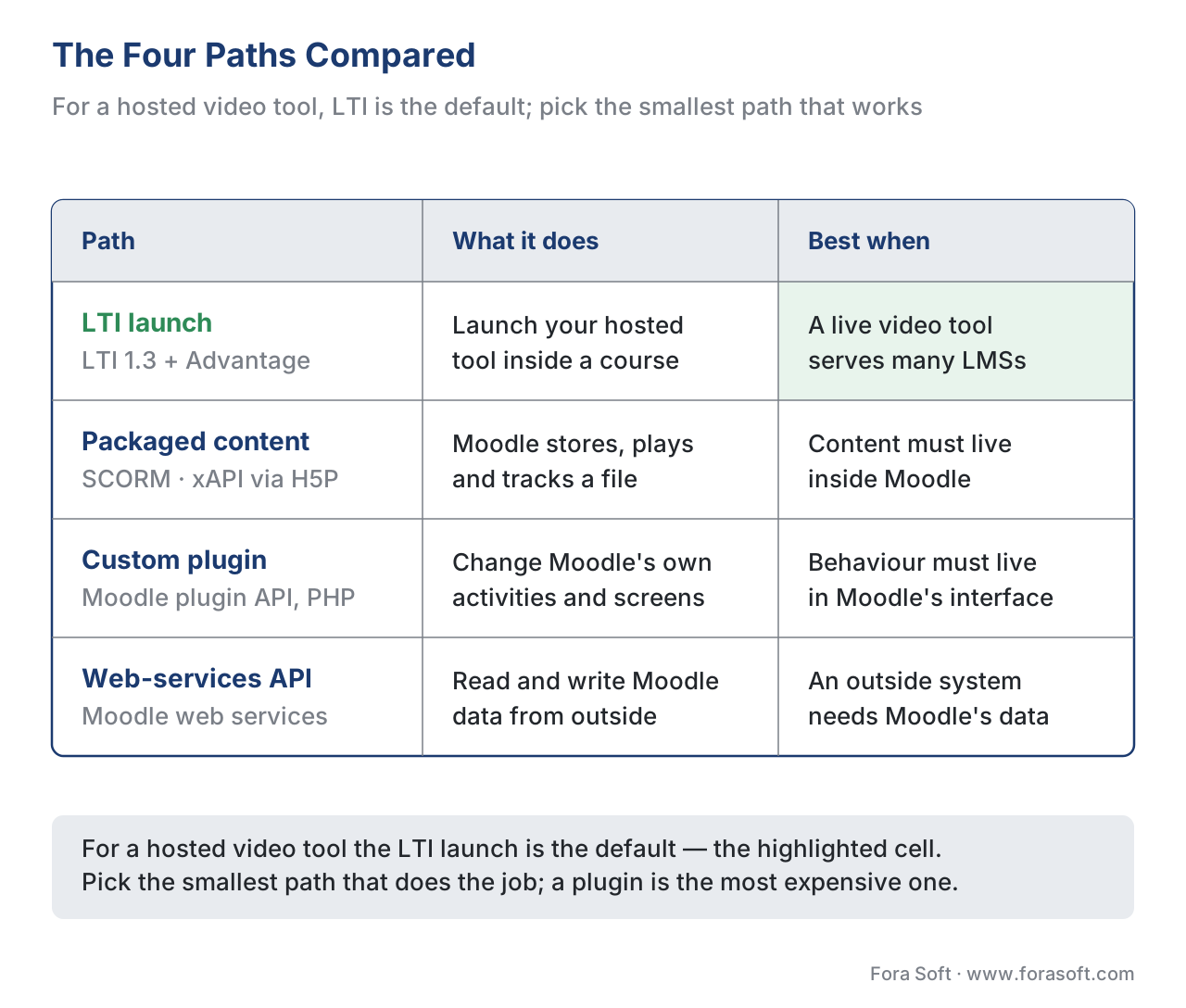 Figure 4. The four paths compared. LTI is the default for a hosted video tool; packaged content lives inside Moodle; a plugin changes Moodle itself; the web-services API syncs data with outside systems.
Common Mistakes That Cost Real Time
A handful of Moodle-integration errors recur on projects, and each is cheap to avoid up front.
The first is building a plugin when an LTI launch would do. A plugin ties you to Moodle's release cycle and to Moodle alone. If your tool is hosted and you want it across LMSs, start with LTI 1.3 and only build a plugin for what genuinely must live inside Moodle.
The second is building against LTI 1.1 in 2026. LTI 1.1's OAuth 1.0 shared-secret signing is the model LTI 1.3 was built to replace, and 1EdTech deprecated 1.1. Target LTI 1.3 plus LTI Advantage; treat 1.1 as legacy you support only under contract.
The third is assuming "watched 100%" equals "completed" in the gradebook. Completion in Moodle is whatever the activity reports — a SCORM completed flag, an xAPI statement, or a manual rule. Decide your completion definition deliberately; do not assume the player's progress bar maps to a grade.
The fourth is "it worked in the authoring tool but not in Moodle." A SCORM package that plays in a desktop preview can fail in Moodle's SCORM player over differences in the manifest, file paths, or the data model version. Test in a real Moodle site, not just the authoring preview.
The fifth is treating roster and grade data as low-stakes. The roster (via NRPS) and grades (via AGS) and anything pulled through the web-services API are real student identities and results — personal data under the EU's GDPR (Regulation (EU) 2016/679), under FERPA where US student records are involved, and under 152-FZ for a Russian audience. Decide what you store, why, and for how long before your first call.
Build vs Buy: Where Moodle Integration Fits
Lead with the business question. "Integrating with Moodle" is rarely a buy decision and rarely a single build — it is choosing the smallest path that does the job. The expensive failure is over-building: a custom plugin where a configured LTI launch would have shipped in a fraction of the time and served every other LMS for free.
If you are building a video or interactive tool, the bounded, well-scoped build is LTI 1.3 plus the Advantage services you need: the OIDC launch, JWT verification, key/JWKS handling, and an AGS grade-passback client. Open-source LTI libraries exist for most languages and cut the plumbing. Reserve plugin work for the parts that truly must live inside Moodle, and use the web-services API only for data sync. If you are running Moodle yourself and the question is whether to extend it or move to a custom build, that is the broader trade-off in build vs buy vs extend an LMS. To pick your path the first time, download the Moodle integration decision worksheet.
Free download: Moodle Integration Decision WorksheetA one-page worksheet to pick your Moodle integration path: the four options (LTI, packaged content, plugin, web-services API), what to check for each, the LTI 1.3 launch and grade-passback gate, and a privacy gate before you ship.Where Fora Soft Fits In
Fora Soft has built video learning, streaming, conferencing, and interactive-player software since 2005, across 239+ shipped projects. On Moodle work, the recurring decision we help teams make is the one at the centre of this article: launch a hosted video tool with LTI 1.3 when it must serve many institutions, package with SCORM or xAPI/H5P when content has to live inside Moodle, and reach for a plugin only when behaviour must live inside Moodle's own screens. Our work usually sits at the video and interactive layer — an interactive-video tool that launches cleanly into a Moodle course, reads the roster through NRPS, and writes assessment scores back through AGS, with per-second engagement tracked via the xAPI Video Profile into an LRS. We treat the launch and grade-passback path as something that must hold up in a real institution's Moodle site at volume, not just pass a sandbox test.



The handbook
Fora Soft Video Engineering Handbook
We wrote a seven-volume handbook, 9,000+ pages, that walks the whole video stack your tool runs on once Moodle has handed the learner over: encoding, delivery, sound, and AI. Volume 3 covers the players, ABR ladders, CDNs, and WebRTC that decide what the learner actually sees inside that LTI launch; volume 1 covers the encoding behind lecture video, and volume 4 the audio, loudness, and captions that make a recorded class usable. Work through them and you can design and build the video tool an institution plugs into Moodle, not just configure one. Written by Nikolay Sapunov, CEO at Fora Soft.
Planning a Moodle integration for your video product?
Tell us what has to work inside Moodle and we will map it to the smallest path that does the job — an LTI 1.3 launch, packaged content, a plugin, or the web-services API — and give you a scope and an estimate. 250+ video products shipped since 2005.
See our case studies
Case study
BrainCert
A WebRTC and HTML5 virtual classroom LMS that reached $3M annual revenue and 100K+ customers, delivering 500M+ real-time classroom minutes across 10 datacentres — the live video layer an LTI launch hands a learner to.
Case study
Scholarly
Sydney’s selective-test prep platform: 15,000+ active users and live classes for up to 2,000 students at once, with video, whiteboard, quizzes, and LMS in one system instead of Zoom plus Discord.
Case study
Tabsera
A multilingual K-12 LMS in English, French, Arabic, and Turkish, with gamified courses, quizzes, an interactive whiteboard, and three user roles — the case where the course platform itself is the product.
What to read next
Standards
LTI Explained: Launching Tools Inside Any LMS
The standard behind Path 1, from the OpenID Connect login to the signed JWT and the three Advantage services.
Standards
cmi5: The Bridge Between SCORM and xAPI
What to package with when SCORM’s fixed data model is too small but you still need the LMS to launch it.
Integrations
Integrating With Corporate LMS and TMS Platforms
The same four paths when the buyer is an enterprise L&D team rather than a university.
Decisions
Build vs Buy vs Extend an Existing LMS
The wider call behind writing a Moodle plugin at all: extend the LMS you have, or build your own.
References
- IMS Global Learning Consortium (1EdTech). Learning Tools Interoperability (LTI) Core Specification, Version 1.3, IMS Final Release, 16 April 2019. https://www.imsglobal.org/spec/lti/v1p3 (Tier 1 — primary specification; the LTI 1.3 launch model, Platform/Tool roles, OIDC login, signed JWT, and the message types Moodle implements.)
- IMS Global Learning Consortium (1EdTech). Learning Tools Interoperability (LTI) Advantage Implementation Guide, Version 1.3, IMS Final Release. https://www.imsglobal.org/spec/lti/v1p3/impl (Tier 1 — primary specification; Deep Linking, Names and Role Provisioning Services, and Assignment and Grade Services that Moodle exposes.)
- ADL Initiative. Experience API (xAPI) Specification, Version 1.0.3 (Part 1: About; Part 2: Statements). https://github.com/adlnet/xAPI-Spec (Tier 1 — primary specification; the actor–verb–object statement model used by H5P and Moodle's xAPI log store.)
- ADL Initiative. SCORM 2004 4th Edition (Content Aggregation Model; Run-Time Environment). https://adlnet.gov/projects/scorm/ (Tier 1 — primary specification; the SCORM data model — completion, score, time — that Moodle's SCORM activity tracks.)
- Moodle Pty Ltd. LTI 1.3 support (Moodle Developer Documentation). https://docs.moodle.org/dev/LTI_1.3_support (Tier 4 — first-party engineering documentation; Moodle's LTI 1.3 security model, the client ID / platform ID / auth-request / access-token / public-keyset connection details, and the gradebook-column note for grade passback.)
- Moodle Pty Ltd. LTI External tools (Moodle Documentation, 5.x). https://docs.moodle.org/502/en/LTI_External_tools (Tier 4 — first-party documentation; configuring an external tool under Site administration, manual tool configuration, and where launch details live.)
- Moodle Pty Ltd. Publish as LTI tool (Moodle Documentation, 5.x). https://docs.moodle.org/502/en/Publish_as_LTI_tool (Tier 4 — first-party documentation; Moodle acting as an LTI Tool, publishing a course or activity to a consuming platform.)
- Moodle Pty Ltd. Plugin types (Moodle Developer Resources, 5.2). https://moodledev.io/docs/5.2/apis/plugintypes (Tier 4 — first-party documentation; the range of Moodle plugin types — activity modules, repositories, reports, enrolment, authentication — that the plugin path uses.)
- Moodle Pty Ltd. Experience API (xAPI) subsystem (Moodle Developer Resources). https://moodledev.io/docs/apis/subsystems/xapi (Tier 4 — first-party documentation; how Moodle generates and handles xAPI statements internally.)
- Moodle community. Logstore xAPI (Moodle plugins directory). https://moodle.org/plugins/logstore_xapi (Tier 4 — first-party plugin documentation; converting Moodle events into xAPI statements and batching them to an external LRS.)
- H5P. H5P and xAPI (documentation). https://h5p.org/documentation/x-api (Tier 4 — first-party tooling documentation; H5P Interactive Video emitting xAPI statements for play, in-video questions, and completion.)
- Moodle US. Using the Web Services API in Moodle. https://supportus.moodle.com/support/solutions/articles/80001016973 (Tier 4 — first-party documentation; enabling web services, defining a service, issuing a token, and the REST endpoint for external data access.)
Where Moodle's implementation documentation (Tier 4) could differ from the standards, the article follows the IMS/1EdTech LTI 1.3 specs and the ADL SCORM/xAPI specs for the standards claims (the signed-JWT launch, the LTI Advantage services, the SCORM fixed data model, and the xAPI statement model), and uses Moodle's docs only for "what actually ships in Moodle."
