


Why This Matters
If you sell or build a learning-video product, "does it work with Canvas?" and "does it work with Blackboard?" are the two questions a university, college, or large training department will ask before anything else — together these platforms run a large share of the world's formal, credit-bearing courses. This article is for the L&D director, EdTech founder, or product manager who has to decide how to integrate with each, brief engineers, and budget the work without over-building. Pick the right surface and one implementation serves both platforms — and Moodle too. Pick the wrong one and you build something that only works on one platform, in one of its two interfaces, and that the vendor has already told you it is sunsetting. Every claim here is tied to the named standards and to Canvas's and Blackboard's own developer documentation.
Two Platforms, The Same Two Doors
Before the differences, the thing that makes this manageable: Canvas and Blackboard are both modern, cloud-hosted LMSs, and both expose the same two integration doors that the wider standards world settled on. Understand those two doors and you understand 90% of the work.
The first door is Learning Tools Interoperability, or LTI — the education standard that lets an external tool launch securely inside any LMS without its content ever being copied in. Your video tool stays on your own servers; the LMS opens a trusted, signed doorway into it. The second door is the platform's REST API — a web interface (REST simply means a standard way for one web application to ask another for data over HTTPS) that lets an outside system read and write the LMS's own data: users, courses, enrolments, grades, content.
Here is the rule that saves the most money. LTI is a standard, so one conformant LTI tool launches into Canvas, Blackboard, Moodle, and every other certified LMS through a single code path. A REST API is platform-specific, so Canvas's REST API and Blackboard's REST API are different and you implement each separately. Blackboard's own developer documentation states this difference plainly: a certified LTI tool works on multiple platforms, while "a platform's REST APIs are always specific to the platform." Lead with LTI; reach for each REST API only for what LTI cannot give you.
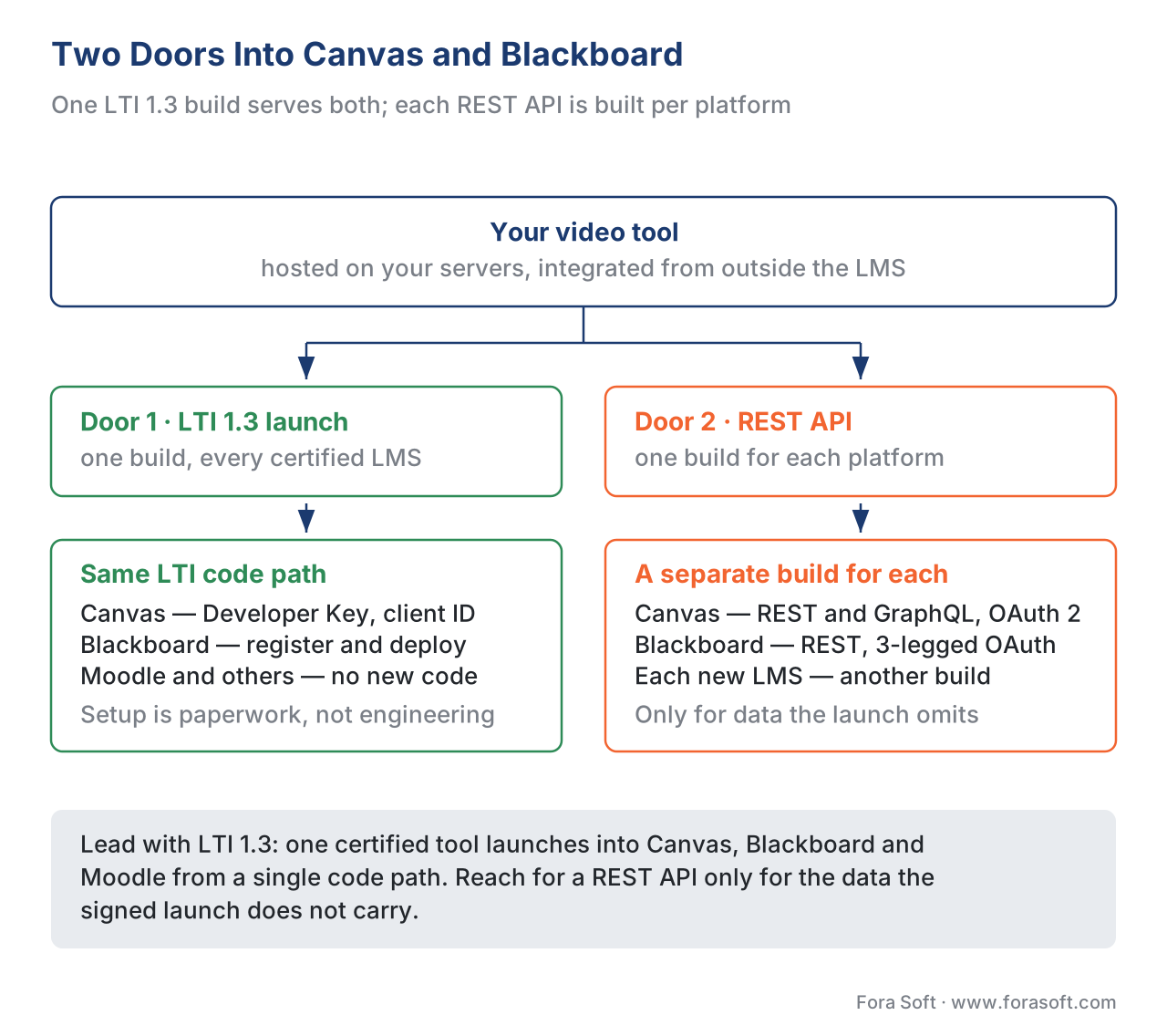 Figure 1. The two doors into both platforms. One LTI 1.3 implementation launches into Canvas, Blackboard, and Moodle alike; each REST API is platform-specific and built separately. Lead with LTI.
The Door You Will Use Most: LTI 1.3
For a video or interactive-video product, the launch is almost always the right default, and the modern version to target is LTI 1.3 plus the bundle of services called LTI Advantage. Both Canvas and Blackboard are certified for it. (For the standard itself — how the launch is signed and why it is not a password login — see LTI explained.)
LTI 1.3 is not a username-and-password login. When a learner clicks your tool in a course, the LMS starts an OpenID Connect handshake (a standard way for one system to vouch for a user to another) and hands your tool a signed JSON Web Token, or JWT — a small, cryptographically signed message that proves who the learner is, which course they came from, and what role they hold. Single sign-on is a consequence of that signed launch, not the mechanism. The three LTI Advantage services then do the heavy lifting: Deep Linking lets a teacher pick a specific video to embed, Names and Role Provisioning Services (NRPS) lets your tool read the class roster, and Assignment and Grade Services (AGS) lets your tool write scores back into the LMS gradebook. All three are defined in the IMS Global (now 1EdTech) LTI 1.3 and LTI Advantage specifications.
The two platforms differ only in the setup paperwork. In Canvas, an administrator creates an LTI Developer Key — you supply either a JSON configuration block or a URL that hosts it, Canvas issues a client ID, and the institution installs your tool with that client ID. In Blackboard, an administrator registers your tool's application (with its client ID and public key set) and deploys it; Blackboard supports Deep Linking 2.0, NRPS, and AGS. The learner-facing result is identical: your video player opens inside the course, already trusted, and grades can flow back.
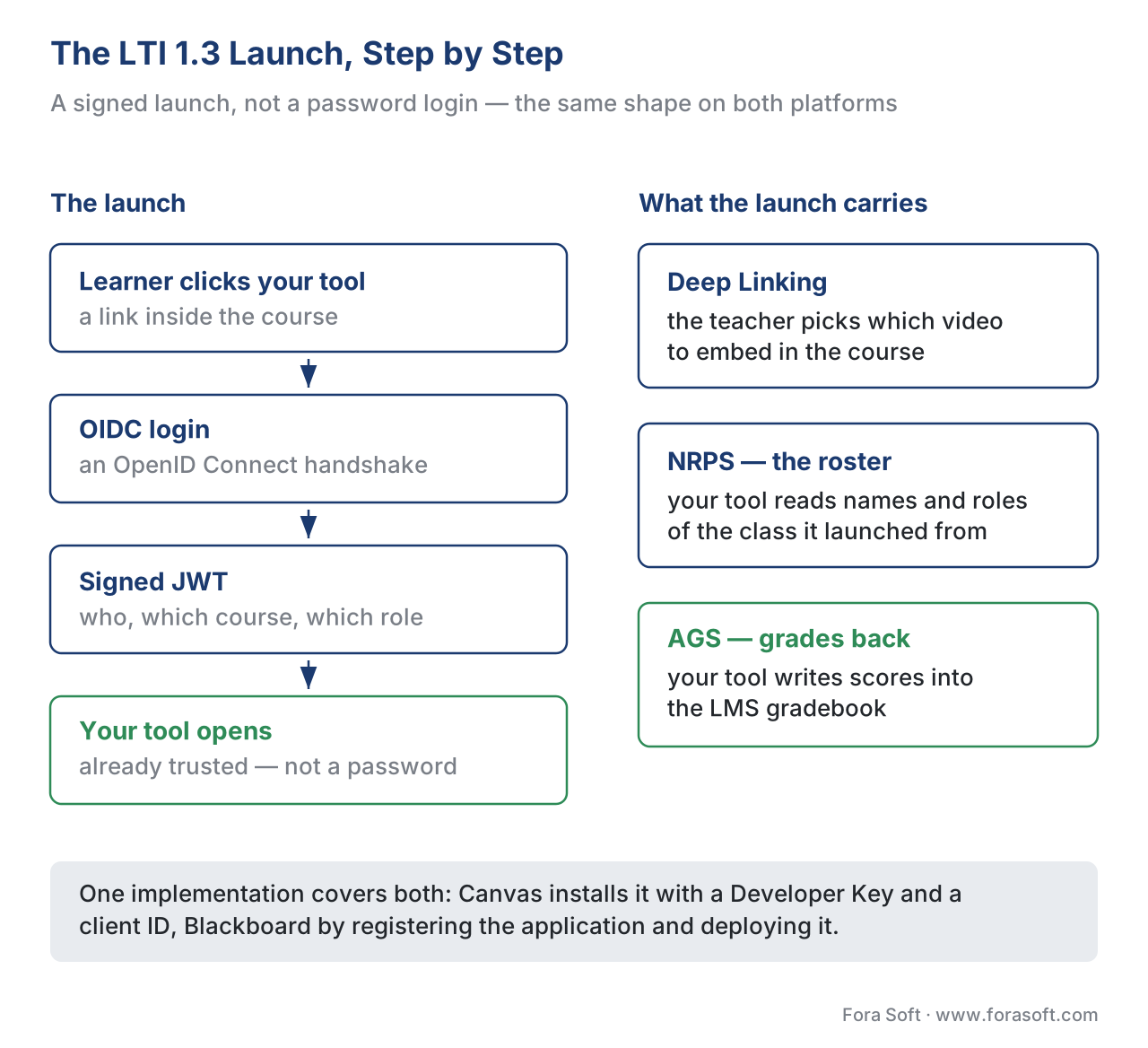 Figure 2. The LTI 1.3 launch is identical in shape on both platforms. An OpenID Connect login leads to a signed JWT; then NRPS reads the roster and AGS writes scores back to the gradebook.
The Other Door: Each Platform's REST API
LTI is deliberately narrow — it covers the launch, the roster, and grades, and little else. When an outside system needs a fuller view of the LMS — to create users, sync enrolments nightly, pull a complete course structure, or read every content item — you use the platform's REST API, and here Canvas and Blackboard part ways because each API is its own.
Canvas exposes a broad REST API and, alongside it, a GraphQL API (a newer query style that lets a client ask for exactly the fields it needs in one request). Authentication uses OAuth 2 access tokens. Blackboard Learn exposes its own REST API, registered through Anthology's developer portal, with a three-legged OAuth 2 flow for acting on behalf of a user. Blackboard's documentation makes a useful point: because the user is already authenticated by the LTI launch, your tool can quietly obtain a REST token for that user behind the scenes — so the cleanest design is often an LTI launch for entry plus REST calls for the data LTI does not carry. That combined pattern works on both platforms.
Treat any API token like a password: scope it to only the calls you need, transport over HTTPS only, and rotate it. Everything you pull about real learners through these APIs is regulated personal data — more on that below.
Where The Platforms Really Differ: Packaged Content
The clearest divergence between Canvas and Blackboard is what happens when you hand the LMS a self-contained content file instead of launching a live tool. This is the packaged-content path, and it matters whenever content must live inside the institution's LMS with no dependency on your servers.
A quick refresher on the formats. SCORM is the long-standing standard that packages a course into a zip any compliant LMS can play and track; it records a fixed data model — completion, score, time — not every interaction (see SCORM explained). xAPI, the newer Experience API, records learning as simple "actor–verb–object" statements like "Maria completed Module 3" and can capture rich, per-second video interactions when you design statements against the xAPI Video Profile. If you are still choosing a format, the four-way comparison of SCORM, xAPI, cmi5, and LTI maps each to its best job.
Blackboard Learn plays packaged content natively. Its built-in SCORM Engine — the Rustici Engine, the same commercial engine many platforms license — plays content conforming to SCORM 1.2, SCORM 2004, AICC, and xAPI packages, and it works in both of Blackboard's course interfaces. An instructor uploads the package and Blackboard plays and tracks it. That is a genuinely capable, standards-broad content path.
Canvas does not. Canvas has no built-in SCORM player. SCORM works only if the institution has enabled a separate SCORM tool installed via LTI, and that path currently supports SCORM 1.2 only — not SCORM 2004, not AICC. Canvas can import course material in the Common Cartridge format (an IMS/1EdTech packaging standard for course content), and Instructure's own Canvas Studio is the native home for video. But if your strategy depends on dropping a tracked SCORM 2004 package straight into the LMS, that works on Blackboard and not on Canvas. This single fact reshapes many integration plans.
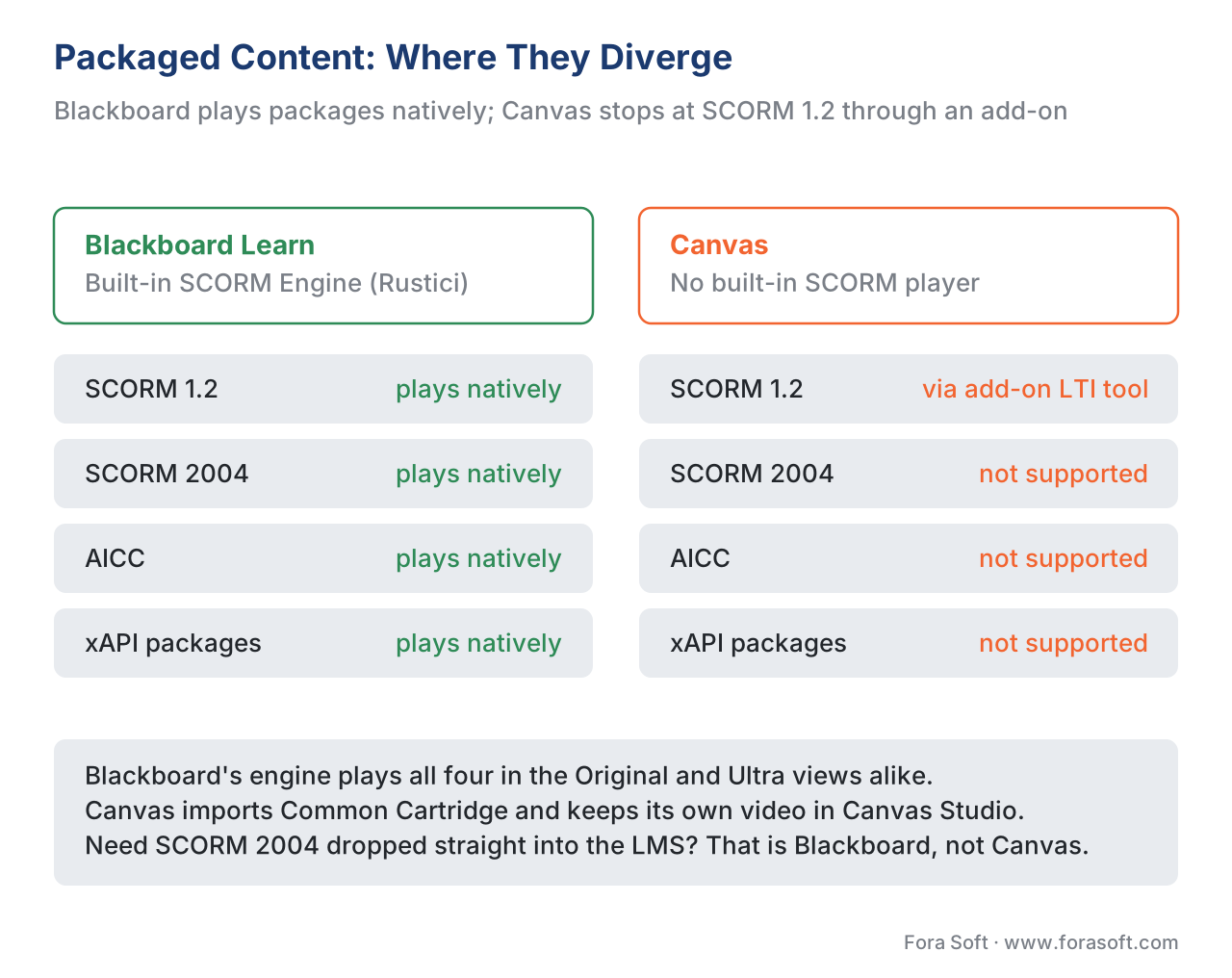 Figure 3. Packaged content is where the platforms diverge. Blackboard plays SCORM 1.2/2004, AICC, and xAPI natively; Canvas has no native player and handles SCORM only through an add-on LTI tool, SCORM 1.2 only.
The Door That Closed: Building Inside The LMS
With Moodle, a fourth path exists — write a plugin in PHP that runs inside Moodle and changes its screens. The instinct to do the same with Canvas and Blackboard is the single most expensive misconception in this space, so be precise about it.
Canvas has never let you run your code inside it. Canvas is a cloud product; you extend it from the outside through LTI and the REST/GraphQL APIs, full stop. There is no "Canvas plugin" you install on the server.
Blackboard used to allow it, and stopped. Its old model, called Building Blocks (B2) — Java code that ran inside a self-hosted Blackboard server — is deprecated. Blackboard announced it would no longer support Building Block integrations as of June 2024, steering developers to LTI and REST instead. Two reasons matter for your plan. First, Building Blocks only ever worked in Blackboard's Original course view, not the newer Ultra course view — and LTI and REST work in both. Second, a B2 ties you to one platform's server and release cycle forever, exactly the trap the standards were built to avoid. Building a new Building Block in 2026 means building on a sunset technology that does not work in the interface most institutions are moving to.
The practical lesson is clean: for Canvas and Blackboard, the "build inside the LMS" path is closed. Everything you need is LTI 1.3 plus each REST API. That is simpler than the Moodle decision, not harder.
Analytics: Both Speak Caliper
One more shared surface is worth knowing because it affects how learning data leaves the LMS. Both platforms can emit analytics events in Caliper Analytics, an IMS/1EdTech standard format (based on JSON-LD) for describing learning activity in a consistent way across systems. Blackboard offers a Caliper event store; Canvas emits Live Events that can be delivered as IMS Caliper v1.1 (or Canvas's own format) to a webhook or queue, and Instructure's Canvas Data 2 warehouse service exposes an institution's full Canvas dataset for reporting. For a video product, this means per-platform engagement and completion data can flow into your analytics in a standardised shape — though for fine-grained video tracking you will still design your own xAPI statements against the Video Profile and send them to a Learning Record Store, rather than rely on the LMS event stream alone.
A Worked Example: The Cross-Platform Math
Numbers make the build-vs-build decision concrete. Suppose you sell an interactive-video assessment tool and you want it working in Canvas and Blackboard, with scores in each gradebook.
Imagine you build to each platform's native, in-the-box mechanism — a Building Block for Blackboard, and, since Canvas has no equivalent, a separate bespoke Canvas integration. The arithmetic is brutal:
Per-platform native = Blackboard Building Block  (Java, Original view only, DEPRECATED)
                    + separate Canvas-specific build (no in-platform option exists)
                    + Moodle plugin (PHP) if you also want Moodle
                    = 3 codebases, 3 release cycles, 1 of them already sunset
Now compare the LTI path. You implement LTI 1.3 plus the Advantage services once — one launch flow, one JWT verifier, one AGS grade-passback client — and certify it:
LTI 1.3 + AGS       = 1 implementation                 ≈ 4-6 eng-weeks
Canvas              = the same tool, configured via a Developer Key   ≈ minutes
Blackboard          = the same tool, registered + deployed            ≈ minutes
Moodle, others      = the same code path already works
+ each REST API     = built only for data LTI does not carry (optional, incremental)
One LTI implementation replaces three native ones, works in Blackboard's Ultra view where the Building Block would not, and adds new platforms by configuration rather than code. For any video product that wants more than one institution, that difference is the whole decision.
When To Use Which Surface
The surfaces answer different questions. The cleanest way to choose is to ask what the integration actually has to do, then pick the lightest surface that does it.
| Surface | What it does | Standard / mechanism | Standards support | Canvas | Blackboard |
|---|---|---|---|---|---|
| LTI 1.3 launch | Launch your hosted tool inside a course, pass grades back | LTI 1.3 + Advantage (OIDC, JWT, NRPS, AGS) | LTI ✓, AGS ✓, NRPS ✓ | Developer Key + client ID | App register + deploy |
| Packaged content | LMS stores, plays, and tracks a file | SCORM 1.2/2004, AICC, xAPI | SCORM ✓, xAPI ✓ (varies) | SCORM via LTI tool, 1.2 only | Native engine: 1.2/2004/AICC/xAPI |
| REST / GraphQL API | Read/write LMS data from an outside system | Platform REST (OAuth 2); Canvas adds GraphQL | N/A (platform-specific) | REST + GraphQL | REST (3LO OAuth) |
| Code inside the LMS | Change the LMS's own screens | Blackboard B2 (Java) — deprecated | N/A | Not possible | Deprecated (Original-only) |
The honest summary: launch with LTI 1.3 — this is the default for a hosted video tool and it serves both platforms from one build. Use packaged content when the institution needs the file to live inside the LMS, and remember Blackboard's native engine is far more capable than Canvas's add-on SCORM 1.2 path. Call each REST API only for data LTI does not carry. And do not build code inside either platform — that door is closed on Canvas and sunset on Blackboard.
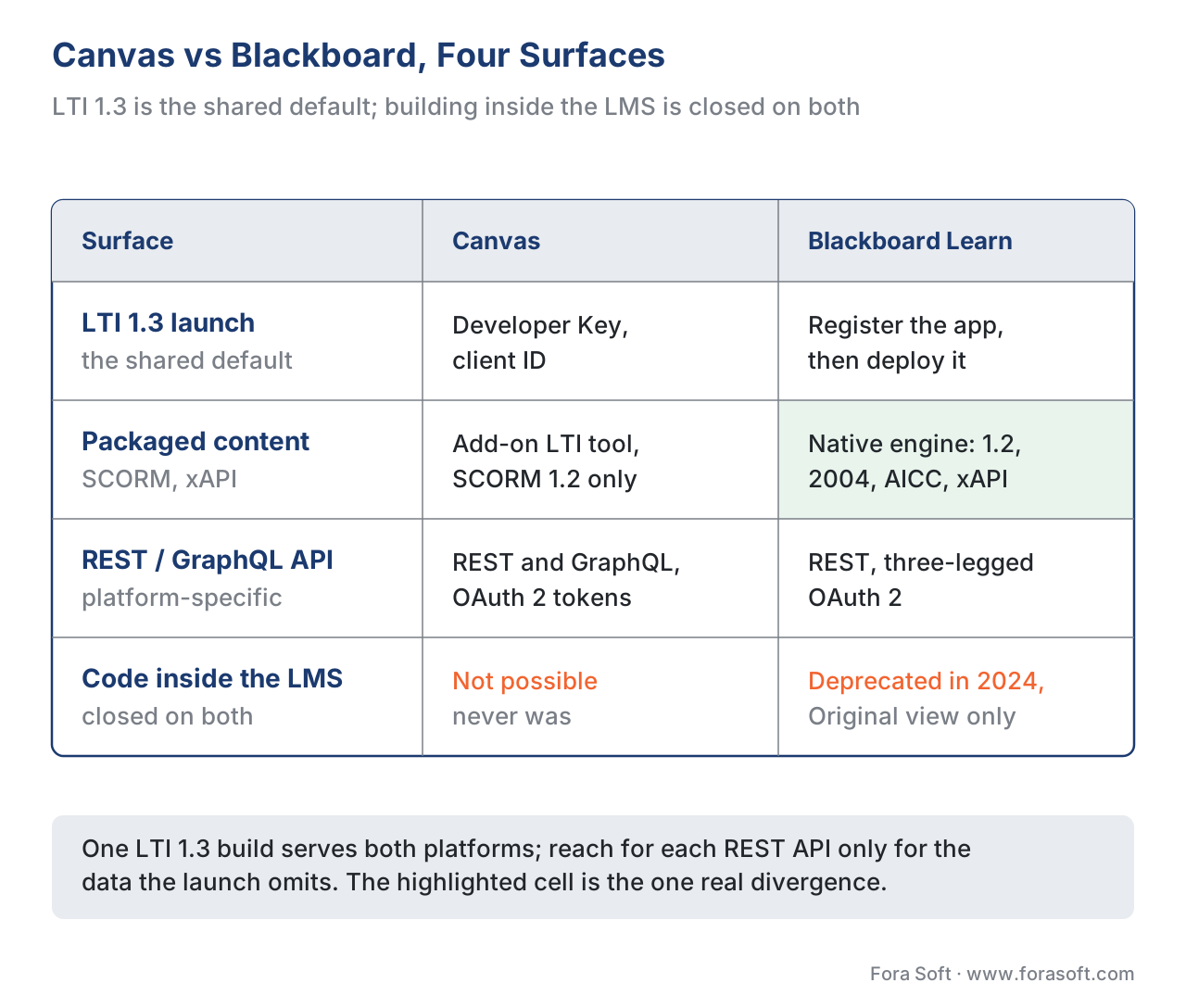 Figure 4. Canvas versus Blackboard across the four surfaces. LTI 1.3 is the shared default; packaged content is where they diverge most; building inside the LMS is closed on both.
Common Mistakes That Cost Real Time
A handful of Canvas/Blackboard errors recur on projects, and each is cheap to avoid up front.
The first is building a Blackboard Building Block in 2026. It is deprecated, it only works in the Original course view, and it serves no other platform. Build LTI 1.3 plus REST instead; treat any existing B2 as legacy you maintain only under contract.
The second is assuming Canvas plays SCORM out of the box. It does not. SCORM in Canvas needs an institution-enabled SCORM tool installed via LTI, and only SCORM 1.2. If your plan depends on SCORM 2004 packages dropping straight into the LMS, that is a Blackboard capability, not a Canvas one.
The third is ignoring Blackboard's two course views. Blackboard ships an Original and an Ultra interface, and an integration that assumes one can break in the other — Building Blocks never ran in Ultra. Test in the view your customers actually use, and prefer LTI and REST, which work in both.
The fourth is building against LTI 1.1 in 2026. LTI 1.1's shared-secret signing is the model LTI 1.3 was built to replace, and 1EdTech deprecated it. Target LTI 1.3 plus LTI Advantage; treat 1.1 as legacy.
The fifth is assuming "watched 100%" equals "completed" in the gradebook. Completion is whatever the activity reports — a SCORM completed flag, an xAPI statement, or an AGS score you post. Decide your completion definition deliberately; the player's progress bar does not define a grade.
The sixth is treating roster and grade data as low-stakes. The roster (via NRPS), grades (via AGS), and anything pulled through either REST API are real student identities and results — personal data under the EU's GDPR (Regulation (EU) 2016/679), under the US Family Educational Rights and Privacy Act (FERPA) where US student records are involved, and under 152-FZ for a Russian audience. Decide what you store, why, and for how long before your first call.
Build vs Buy: Where Canvas And Blackboard Integration Fits
Lead with the business question. Integrating with Canvas and Blackboard is rarely a buy decision and rarely a sprawling build — it is choosing the smallest surface that does the job, then reusing it. The expensive failure is per-platform native work: a Blackboard Building Block plus a bespoke Canvas integration, where one LTI 1.3 tool would have served both, plus Moodle, plus the next LMS, from a single codebase.
If you are building a video or interactive tool, the bounded, well-scoped build is LTI 1.3 plus the Advantage services you need — the OpenID Connect launch, JWT verification, key handling, and an AGS grade-passback client — then each platform's REST API only for the data LTI does not carry. Open-source LTI libraries exist for most languages and cut the plumbing. If you are an institution running Canvas or Blackboard and weighing whether to extend it or commission a custom build, that is the broader trade-off in build vs buy vs extend an LMS. For corporate platforms beyond these two, see integrating with corporate LMS and TMS platforms. To pick your surface the first time, download the Canvas & Blackboard integration decision worksheet.
Free download: Canvas & Blackboard Integration Decision WorksheetA one-page worksheet to pick your Canvas/Blackboard integration surface: the four options (LTI launch, packaged content, REST API, and why not to build inside the LMS), the LTI 1.3 launch and grade-passback gate, the Canvas-vs-Blackboard packaged-content split, and a privacy gate before you ship.Where Fora Soft Fits In
Fora Soft has built video learning, streaming, conferencing, and interactive-player software since 2005, across 239+ shipped projects. On Canvas and Blackboard work, the recurring decision we help teams make is the one at the centre of this article: build one LTI 1.3 tool that launches cleanly into both, reads the roster through NRPS, and writes assessment scores back through AGS — rather than two native integrations, one of them on a deprecated technology. Our work usually sits at the video and interactive layer: an interactive-video tool that opens inside a Canvas or Blackboard course, with per-second engagement tracked via the xAPI Video Profile into a Learning Record Store, and each platform's REST API used only where LTI stops. We treat the launch and grade-passback path as something that must hold up in a real institution's LMS — in Blackboard's Ultra view as well as Original — not just pass a sandbox test.



The handbook
Fora Soft Video Engineering Handbook
We wrote a seven-volume series that takes the whole video stack apart across 9,000+ pages — encoding, delivery, audio and AI — and someone who works through it can build the tool this article launches into Canvas and Blackboard. Volume 3 sits closest to the subject: players, ABR, CDNs and WebRTC, which is what actually runs once the LTI launch has handed the learner over. Volume 1 covers encoding the lecture video you ship, and volume 4 the audio, loudness and caption work that decides whether a recorded class is usable in a course at all. Written by Nikolay Sapunov, CEO at Fora Soft.
Which integration surface does your product actually need?
Send us the product, the institutions you are selling into, and what has to end up in the gradebook — and we will come back with the surface that does the job: an LTI 1.3 launch with AGS and NRPS, the places where each platform's REST API earns its keep, and what a packaged-content strategy really costs you on Canvas. 250+ video products shipped since 2005.
See our case studies
Case study
BrainCert
A WebRTC and HTML5 virtual-classroom LMS with 100K+ customers and 500M+ real-time classroom minutes across 10 datacenters, with SCORM and xAPI support, proctored exams and QuantumKey DRM in the product. It is the other side of this article: when the standards live inside the platform, integration is what the platform offers rather than what you bolt on.
Case study
ALDA
An AI course generator co-designed with 70+ U.S. college educators at institutions serving 500,000+ students a year, now owned by 1EdTech — the body that publishes the LTI 1.3 and Caliper specifications this article is built on. Shipping for the standards organisation itself is the shortest way to say we read the specs rather than the vendor blog posts.
Case study
Scholarly
Sydney’s selective-test prep platform: 15,000+ active users, live classes for up to 2,000 students at once, and a REST OpenAPI plus GraphQL layer joining video, whiteboards, quizzes, LMS and CRM. That API layer is this article’s second door in practice — the data an LTI launch was never meant to carry.
What to read next
The standard
LTI Explained: Launching Tools Inside Any LMS
The launch itself: how it is signed, and why it is not a login.
Third platform
Integrating With Moodle
The same LTI tool, plus the plugin path Canvas and Blackboard closed.
Choosing
SCORM vs xAPI vs cmi5 vs LTI: Which Standard, When
Four standards, four jobs, and which one your integration needs.
Business case
Build vs Buy vs Extend an Existing LMS
The decision one level up from the integration surface.
References
- IMS Global Learning Consortium (1EdTech). Learning Tools Interoperability (LTI) Core Specification, Version 1.3, IMS Final Release, 16 April 2019. https://www.imsglobal.org/spec/lti/v1p3 (Tier 1 — primary specification; the LTI 1.3 launch model, Platform/Tool roles, OIDC login, and signed JWT that both Canvas and Blackboard implement.)
- IMS Global Learning Consortium (1EdTech). Learning Tools Interoperability (LTI) Advantage Implementation Guide, Version 1.3, IMS Final Release. https://www.imsglobal.org/spec/lti/v1p3/impl (Tier 1 — primary specification; Deep Linking, Names and Role Provisioning Services, and Assignment and Grade Services used for roster access and grade passback on both platforms.)
- ADL Initiative. SCORM 2004 4th Edition (Content Aggregation Model; Run-Time Environment) and SCORM 1.2. https://adlnet.gov/projects/scorm/ (Tier 1 — primary specification; the SCORM data model and versions that Blackboard's engine plays and that Canvas's SCORM LTI tool supports at 1.2.)
- ADL Initiative. Experience API (xAPI) Specification, Version 1.0.3 (Part 2: Statements). https://github.com/adlnet/xAPI-Spec (Tier 1 — primary specification; the actor–verb–object statement model for video interaction tracking beyond SCORM's fixed model.)
- IMS Global Learning Consortium (1EdTech). Caliper Analytics Specification, Version 1.1. https://www.imsglobal.org/spec/caliper/v1p1 (Tier 1 — primary specification; the JSON-LD learning-event format both Canvas Live Events and Blackboard's Caliper event store can emit.)
- Anthology / Blackboard. LTI or REST? (Blackboard Developer Documentation). https://docs.blackboard.com/rest-apis/learn/getting-started/lti-or-rest (Tier 4 — first-party engineering documentation; the LTI-vs-REST distinction, "a platform's REST APIs are always specific to the platform," and the recommended LTI-launch-plus-REST pattern.)
- Anthology / Blackboard. Getting Started With LTI and LTI Registration and Deployment with Learn. https://docs.blackboard.com/lti/getting-started-with-lti (Tier 4 — first-party documentation; LTI 1.3 registration, deployment, Deep Linking 2.0, NRPS, and AGS on Blackboard Learn.)
- Anthology / Blackboard. SCORM Engine (Blackboard Administrator Help / Rustici Engine). https://help.anthology.com/blackboard/administrator/en/tools-management/scorm-engine.html (Tier 4 — first-party documentation; Blackboard's built-in SCORM Engine playing SCORM 1.2, SCORM 2004, AICC, and xAPI packages in Original and Ultra.)
- Anthology / Blackboard. Building Blocks and REST APIs (Blackboard Help). https://help.blackboard.com/Learn/Administrator/SaaS/Integrations/Compare_Building_Blocks_and_Rest (Tier 4 — first-party documentation; Building Block deprecation, the recommendation to build LTI/REST, and that B2s do not work in Ultra.)
- Instructure. Manually Configuring LTI Advantage Tools (Canvas LMS REST API Documentation). https://www.canvas.instructure.com/doc/api/file.lti_dev_key_config.html (Tier 4 — first-party documentation; Canvas LTI 1.3 Developer Keys, JSON configuration, the client ID, and LTI Advantage service access.)
- Instructure. How do I import SCORM files as an assignment? (Instructure Community) and Common Cartridge import. https://community.canvaslms.com/t5/Instructor-Guide/How-do-I-import-SCORM-files-as-an-assignment/ta-p/673 (Tier 4 — first-party documentation; Canvas SCORM support via an LTI tool limited to SCORM 1.2, and Common Cartridge import.)
- Instructure. Live Events Introduction, Caliper Event Message, and GraphQL API (Canvas LMS REST API Documentation). https://canvas.instructure.com/doc/api/file.data_service_introduction.html (Tier 4 — first-party documentation; Canvas Live Events in IMS Caliper v1.1, the REST and GraphQL APIs, and Canvas Data 2.)
Where vendor implementation documentation (Tier 4) could differ from the standards, the article follows the IMS/1EdTech LTI 1.3 and Caliper specs and the ADL SCORM/xAPI specs for standards claims (the signed-JWT OIDC launch, the LTI Advantage services, the SCORM fixed data model, the xAPI statement model, the Caliper event format), and uses Canvas's and Blackboard's own docs only for "what actually ships."
