


Why This Matters
If you build or sell a learning-video product, the enterprise buyer's first question is "will this work with the LMS we already run?" — and that LMS is almost never Canvas or Moodle. It is SAP SuccessFactors, Cornerstone, Docebo, or Workday, usually wired into the company's HR system and its single-sign-on provider. This article is for the L&D director, EdTech founder, or product manager who must decide how to integrate, brief engineers, and budget the work without building four separate integrations. Get the surfaces right and one content package plus one identity setup serves every major corporate platform. Get them wrong and you ship per-vendor code that breaks at the next release and never reports cleanly into HR.
First, The Words: LMS, TMS, And Why Corporate Is Different
Two terms get used loosely, so pin them down before anything else.
A learning management system, or LMS, is the platform a company uses to deliver training to employees, track who completed what, and store the record. It is learner-facing: an employee logs in, takes a course, and the system marks it done. SAP SuccessFactors Learning, Cornerstone, Docebo, and Workday Learning are all corporate LMSs.
A training management system, or TMS, is a different animal. It is admin-facing — it runs the operations of training: scheduling instructor-led sessions, booking rooms and resources, managing rosters, handling invoicing for a commercial training provider. Where an LMS answers "did Maria finish the fire-safety course?", a TMS answers "who is teaching the Tuesday workshop, in which room, and has everyone been billed?". Many large organisations run both: an LMS for self-paced compliance and skills training, a TMS for the logistics of live and classroom events. For a video product, the LMS is almost always the system you integrate with; the TMS matters only when your product schedules or delivers live sessions that the TMS coordinates.
The deeper difference is what sits behind the corporate LMS. An academic LMS is usually the edge of the system. A corporate LMS is the middle: it is fed by the company's HR information system (HRIS) — the master record of who works there, in what role, in which department — and the training records it produces flow back into that HR system for compliance and audit. That changes the integration. You are not wiring into a standalone teaching tool; you are wiring into one link of an HR data chain, and the people on the other end care about audit-ready completion records, not engagement analytics.
The Three Jobs Every Corporate Integration Must Do
Forget the platform names for a moment. Any integration between your video product and a corporate LMS has to do three distinct jobs, and it is cleanest to design each one separately.
Job one is identity: prove who the learner is, and make sure their account exists. This splits into two standards that people constantly confuse. Single sign-on (SSO) lets an employee who is already logged into the company move into your tool without a second password — handled by Security Assertion Markup Language (SAML) 2.0, an OASIS standard from 2005 that passes a signed assertion ("this is Maria, and she is who we say she is") between an identity provider and your tool, or by the newer OpenID Connect (OIDC), which does the same job on top of OAuth 2.0. Provisioning is the separate problem of making sure Maria's account actually exists in your tool before she arrives — handled by SCIM (System for Cross-domain Identity Management) 2.0, defined in IETF RFC 7644 (September 2015), which lets the company's identity system create, update, and — critically — deactivate accounts automatically. SSO without provisioning leaves you with users who can authenticate but have no account; provisioning without deactivation leaves "zombie" accounts for ex-employees. You usually want both.
Job two is content: get your video learning to play inside the LMS, and have the LMS track it. This is the packaged-content path, and it uses the same standards every LMS speaks: SCORM (the long-standing format that zips a course so any compliant LMS can play and track it), the older AICC, the modern cmi5, or raw xAPI. We will come back to which one — the choice matters more for video than for any other content type.
Job three is reporting: get the results to where they are needed. At minimum the LMS records completion. But corporate buyers increasingly want two things more: rich learning data (every video interaction, not just "done") sent to a Learning Record Store (LRS), and a clean feed of completions back into the HR system for compliance dashboards and audits.
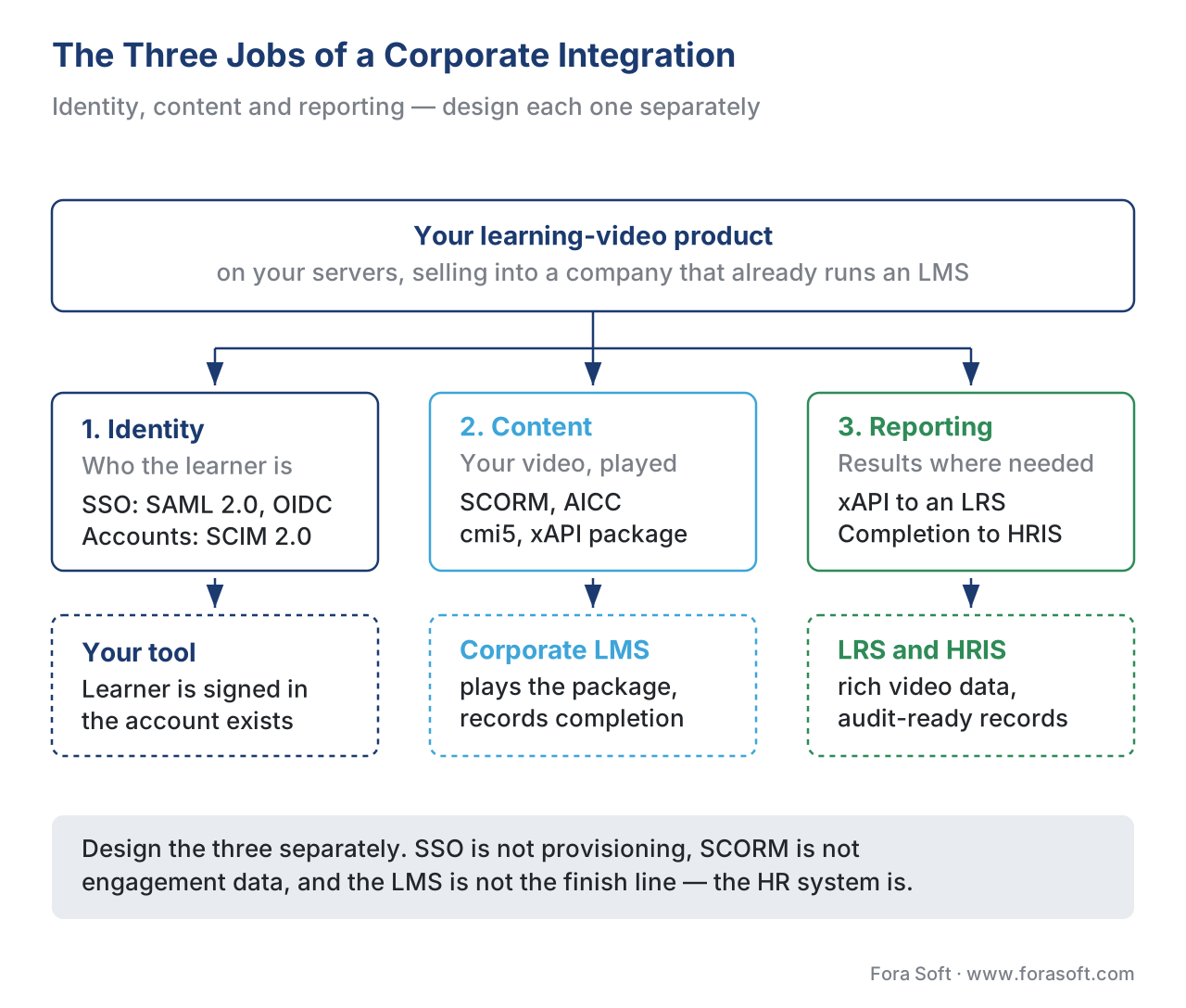 Figure 1. The three jobs of a corporate integration: identity (SSO + SCIM), content delivery (SCORM/AICC/cmi5/xAPI), and reporting (completion to the LMS, rich data to an LRS, records into the HR system).
Identity: SSO Is Not Provisioning
Because identity is where most corporate integrations start — and stall — it is worth being precise.
Think of SSO as the doorman who recognises Maria on sight and waves her through, and provisioning as the HR clerk who made sure Maria had a desk before her first day. They are different people doing different jobs. SAML 2.0 and OIDC are doorman standards: they authenticate a user who already exists. SCIM is the clerk standard: it keeps the account list in sync.
In practice, every corporate platform here supports SAML 2.0 SSO; most also support OIDC. Docebo, for example, authenticates third-party API calls with OAuth 2.0 and supports both SAML and OpenID Connect for sign-on. Cornerstone supports SAML SSO and, through its Edge integration marketplace, connects to identity providers. The recurring failure is not the protocol — it is the user identifier. If your tool and the LMS disagree on what uniquely names a learner, sign-on may work while tracking silently breaks: activity gets attributed to the wrong account or no account. Cornerstone's own LinkedIn Learning integration guidance makes exactly this point — both systems must send the same unique user identifier, or learner-activity tracking via xAPI fails. Decide the shared identifier first; it is the hinge the whole integration swings on.
Content: The Standard You Pick Decides What You Can Track
Now the part that matters most for a video product. All four corporate platforms play packaged content, but the standard you choose decides how much of the learning you can actually see.
A quick, plain-language refresher, because the difference is the whole game:
SCORM packages a course into a zip any compliant LMS can launch, and records a fixed data model — did the learner complete it, what score, how much time — inside an LMS session (see SCORM explained). It does not record "watched the safety demo three times" or "rewound the tricky 30 seconds". For a slideshow, that is fine. For video, it throws away most of what you would want to know. SAP SuccessFactors Learning supports SCORM 1.2 and SCORM 2004, plus the legacy AICC format, and its built-in content player initialises the standard's API to receive bookmarking, score, and completion.
xAPI (Experience API), the newer standard, records learning as simple sentences — "Maria played the video", "Maria paused at 4:12", "Maria completed Module 3" — called statements, written into a Learning Record Store (see xAPI explained). With the xAPI Video Profile, those statements capture per-second video interaction: play, pause, seek, the segments actually watched (see tracking video with the xAPI Video Profile). This is how you turn "completed" into "engaged".
cmi5 is the bridge between the two. Defined by ADL and the AICC working group, cmi5 describes runtime communication between an LMS and an assignable unit (AU) — the launchable piece of content — and uses xAPI underneath to send data to the LRS. As the cmi5 spec puts it, the AU "collects data on the learner and sends it to the LMS", and the LMS "must have an LRS as part of its implementation". In plain terms: cmi5 gives you SCORM's clean launch-and-track behaviour and xAPI's rich statement model in one package. For new corporate video content, cmi5 is usually the right target where the platform supports it. If you are weighing the four, the SCORM vs xAPI vs cmi5 vs LTI comparison maps each to its best job; the practical mechanics of building and hosting a package live in packaging and delivering content.
The catch is uneven support. Workday Learning tracks SCORM content natively, but to use xAPI you must add an external LRS — Workday will keep tracking the SCORM completion even while xAPI data flows to that LRS. Docebo's support for cmi5 has been a recurring customer question rather than a settled "yes everywhere". The lesson: confirm the exact standard and version each target platform supports before you build the package, not after.
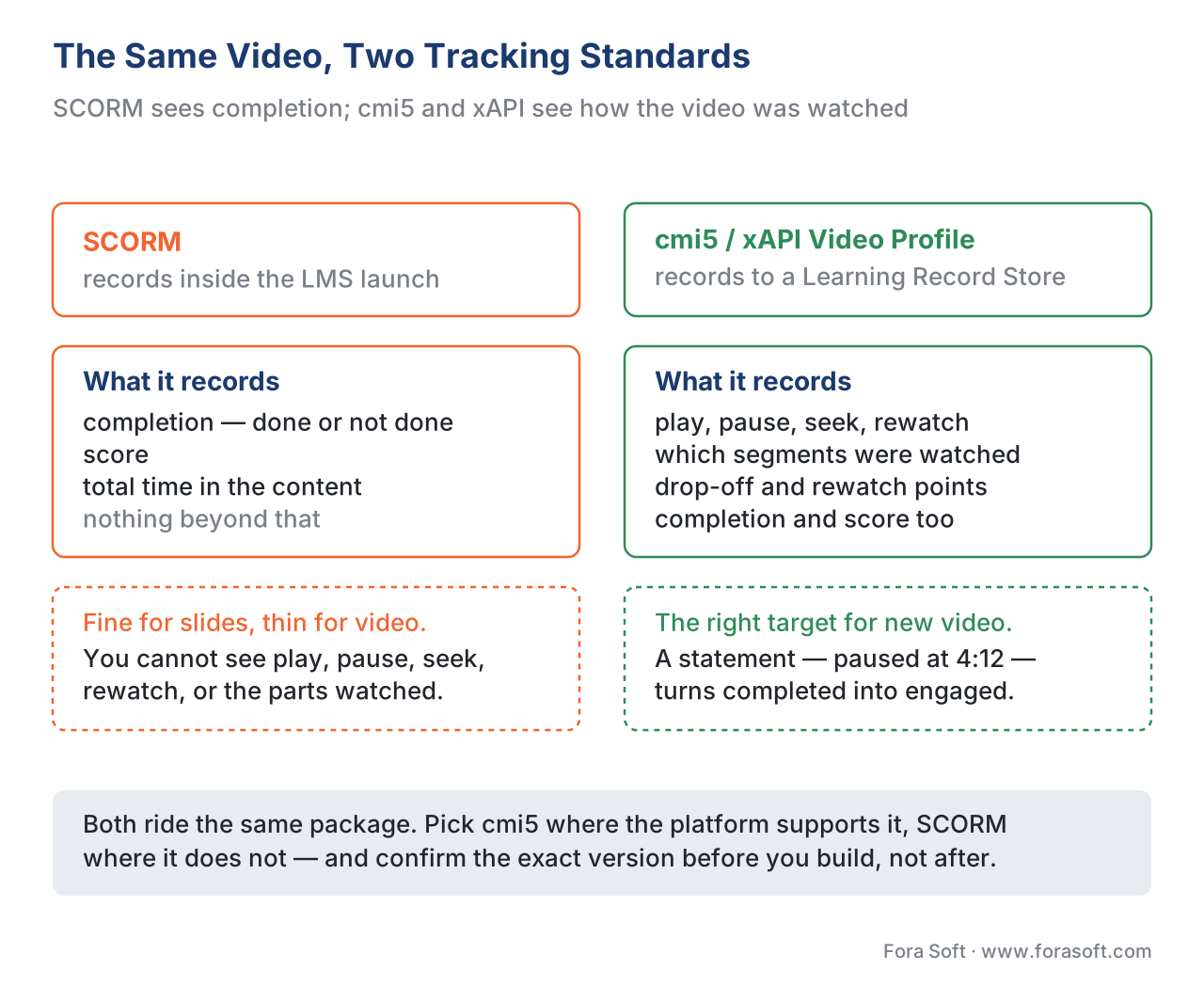 Figure 2. The same video, two standards. SCORM records completion, score, and time inside the LMS launch. cmi5/xAPI records every play, pause, seek, and the segments actually watched, into a Learning Record Store.
Protecting Your Video: Hosting And Dispatch
Corporate integrations raise a problem academic ones rarely do: you may be licensing proprietary video to a company whose LMS you do not control, and a plain SCORM zip handed to a client is a copy you can never revoke. The answer is to keep the video on your own infrastructure and hand the LMS only a thin launcher.
This is the dispatch pattern. Instead of uploading the whole course, you give the client LMS a small package that points back to your hosted content; you keep the video on your servers, and you can turn access on or off, enforce a seat or launch limit, and update the content without re-shipping anything. Rustici's Dispatch and Content Controller are the best-known commercial implementations, distributing content to any LMS "in any standard — SCORM, xAPI, cmi5, AICC, and LTI" while the owner retains control, gating access by number of users, launches, and dates. For a video vendor selling into multiple enterprises, dispatch turns "we lost control of our content the moment we delivered it" into "we host it once and license it centrally". It also keeps the heavy video bytes on a delivery path you tuned, rather than inside an LMS that was never built to stream.
Reporting: The Finish Line Is The HR System
In a corporate setting, the integration is not done when the LMS shows "complete". It is done when that completion is where the business needs it.
Two flows matter. The first is rich learning data to the LRS: your xAPI statements, including video-profile detail, land in a Learning Record Store for analytics. The second — the one academic articles never mention — is completion back into the HR system. Compliance training exists to satisfy auditors: who completed mandatory training, when, and can you prove it. Corporate LMSs feed that record back to the HRIS, often on a schedule, so an L&D team can produce an audit-ready report and an employee's training history follows their HR profile. SAP SuccessFactors exposes this through its OData APIs (mandatory for new integrations since 2015); Cornerstone exposes a Progress API that accepts completion, time, and score even for externally hosted content. Design your reporting so the right completion signal — not just "video reached 100%" — reaches that chain.
This is also where the most common semantic mistake bites. "Watched 100%" is not "completed", and "completed" is not "passed". A video player's progress bar hitting the end is a player event. Completion is whatever your content reports through SCORM's completion status, a cmi5 completed statement, or an xAPI statement you define. Passing is a separate judgement again. Decide what each means before an auditor asks.
The Four Platforms, Side By Side
The surfaces are the same; the support differs. Here is the honest comparison for a video product, with the standards column that decides most builds.
| Platform | Type | SSO / provisioning | Content standards | Video tracking | API for reporting |
|---|---|---|---|---|---|
| SAP SuccessFactors Learning | Enterprise LMS in an HCM suite | SAML 2.0, OIDC | SCORM 1.2/2004, AICC; xAPI evolving | Completion native; rich video via LRS | OData v4 (required since 2015) |
| Cornerstone | Enterprise LMS / talent suite | SAML SSO via Edge | SCORM, AICC; xAPI via shared user ID | Online Content + Progress API; xAPI to LRS | Edge APIs, Progress API |
| Docebo | Cloud learning platform | SAML 2.0, OIDC; OAuth 2.0 APIs | SCORM, xAPI, LTI; cmi5 varies | xAPI to LRS | REST APIs (OAuth 2.0) |
| Workday Learning | Learning inside an HCM suite | SAML 2.0 (Workday SSO) | SCORM native; AICC | SCORM completion native; xAPI needs external LRS | Workday integration APIs |
Read it as a pattern, not a scorecard. Every platform does identity through SAML/OIDC, plays SCORM, and exposes an API for reporting. None of them tracks rich video out of the box — that always means xAPI plus an LRS. And LTI, the education-world launch standard, appears only patchily here (Docebo supports it); in the corporate world, packaged content and identity standards do the work that LTI does on Canvas (compare with integrating with Canvas and Blackboard and integrating with Moodle).
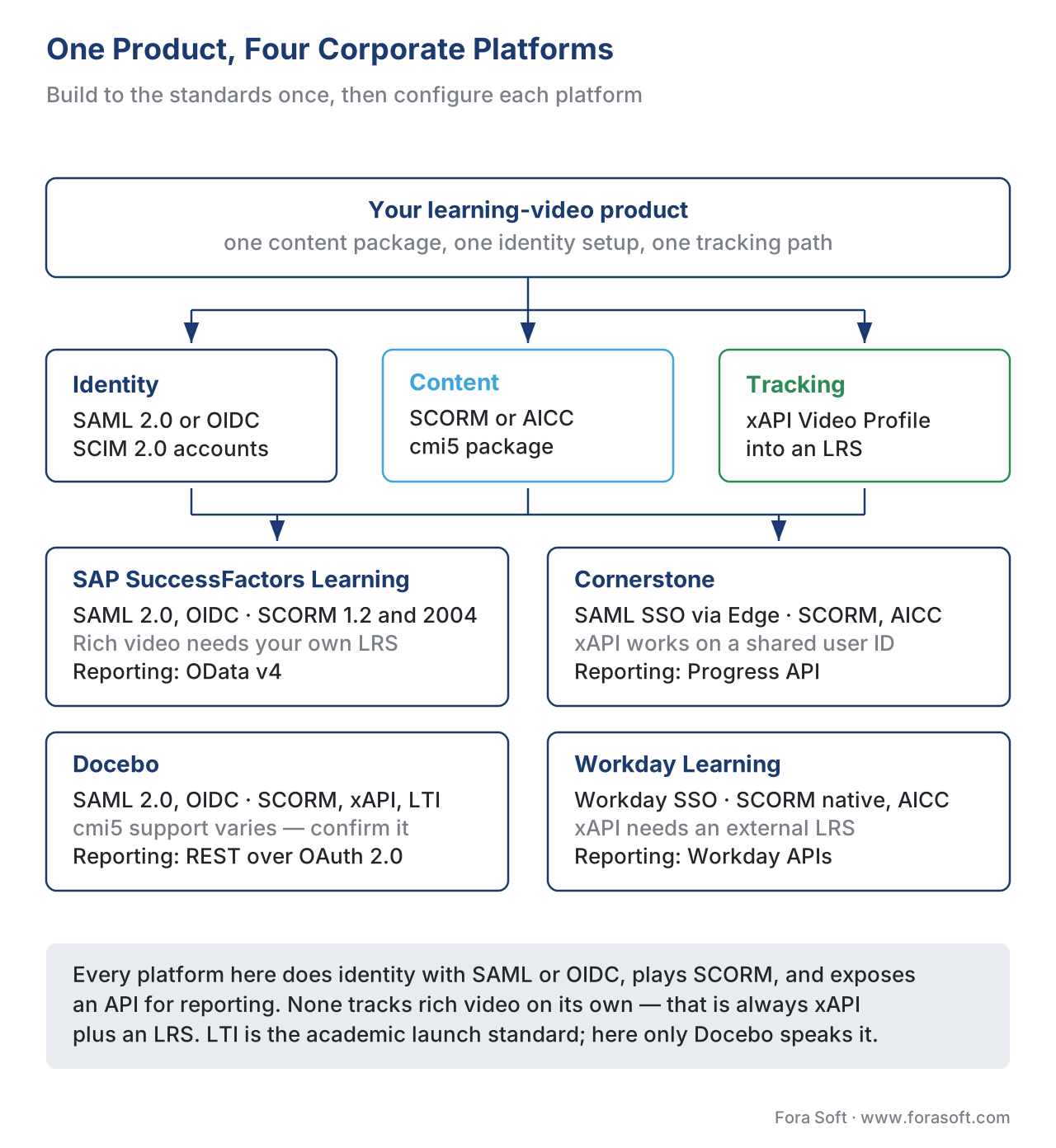 Figure 3. One product, four platforms. Identity rides SAML/OIDC, content rides SCORM/cmi5/xAPI, and rich video tracking always routes through an LRS. Build to the standards once; configure per platform.
A Worked Example: Standards Once Versus Vendors Four Times
Numbers make the build-vs-build decision concrete. Suppose you sell an interactive-video training product and four enterprise prospects run, respectively, SAP SuccessFactors, Cornerstone, Docebo, and Workday. You want your video to play in each, track engagement, and report completion into each company's HR system.
Imagine you build to each vendor's proprietary API surface, one bespoke integration at a time. The arithmetic is unforgiving:
Per-vendor native = SuccessFactors OData integration   (build + test + maintain)
                  + Cornerstone Edge/Progress build      (build + test + maintain)
                  + Docebo REST build                     (build + test + maintain)
                  + Workday integration build             (build + test + maintain)
                  = 4 codebases, 4 release cycles, 4 sets of vendor quirks
Now compare the standards-first path. You build your video as one cmi5 package (xAPI underneath, Video Profile for the rich data), host it once behind a dispatch launcher, and implement identity once against SAML 2.0 and SCIM:
cmi5 package + xAPI Video Profile  = 1 content build              ≈ 3-5 eng-weeks
Dispatch / hosted launcher         = host once, license centrally  ≈ days
SAML 2.0 SSO + SCIM provisioning   = 1 identity implementation     ≈ 2-3 eng-weeks
Each platform                      = configured, not coded          ≈ hours-days each
+ each vendor API                  = only for reporting LTI/cmi5 cannot carry (optional)
One content build plus one identity build replaces four native integrations, and adding a fifth enterprise on a different LMS becomes configuration rather than code. You reach for a vendor's proprietary API only for the last-mile reporting into that company's HR system — the part no standard fully covers. For any product that wants more than one enterprise customer, that is the whole decision.
Common Mistakes That Cost Real Time
A handful of corporate-integration errors recur, and each is cheap to avoid up front.
The first is building one integration per vendor. Four bespoke builds where one cmi5 package and one SAML/SCIM identity setup would serve all four is the single most expensive pattern in this space. Lead with standards; touch a vendor API only for what standards cannot carry.
The second is confusing SSO with provisioning. SAML or OIDC logs in a user who already exists; it does not create the account. Without SCIM (or a nightly user feed), learners authenticate into nothing, and ex-employees keep access. Plan both, including deactivation.
The third is mismatched user identifiers. If your tool and the LMS name the same learner differently, sign-on can succeed while xAPI tracking attributes activity to the wrong account or drops it. Agree the shared unique identifier before writing code.
The fourth is shipping SCORM and expecting video insight. SCORM records completion, score, and time — not play, pause, seek, or watched segments. If the buyer wants engagement, that is cmi5 or xAPI with the Video Profile and an LRS, not SCORM.
The fifth is handing a client a raw content zip you cannot revoke. Proprietary video delivered as a plain SCORM package is a permanent copy. Use a dispatch/hosted-launcher pattern to keep control and update centrally.
The sixth is treating learner records as low-stakes. Names, roles, completion histories, and video-watching data are regulated employee personal data — under the EU's GDPR (Regulation (EU) 2016/679), and under 152-FZ for a Russian workforce. Decide what you store, why, and for how long before your first SCIM sync or xAPI statement.
Build vs Buy: Where Corporate Integration Fits
Lead with the business question. Integrating with SuccessFactors, Cornerstone, Docebo, or Workday is rarely a single buy and rarely a sprawling build — it is choosing the smallest set of standards that does the three jobs, then reusing them. The expensive failure is per-vendor native work: four integrations that one cmi5 package, one dispatch launcher, and one SAML/SCIM identity setup would have served, with vendor APIs reserved for the last-mile HR reporting.
If you are building a video or interactive product, the bounded, well-scoped build is a standards-conformant content package (cmi5 where supported, SCORM where required), an xAPI Video Profile tracking path into an LRS, and a SAML 2.0 / SCIM identity layer — then each vendor's API only for reporting that lands completions in the HR system. If you are an enterprise running one of these platforms and weighing whether to extend it or commission a custom build, that broader trade-off is build vs buy vs extend an LMS. To scope your own integration the first time, download the corporate LMS/TMS integration checklist.
Free download: Corporate LMS/TMS Integration ChecklistA one-page checklist to scope a corporate-platform integration: the identity layer (SSO via SAML/OIDC plus SCIM provisioning), the content-standard choice (SCORM vs cmi5/xAPI for video) and dispatch hosting, the reporting path (LRS plus completion into the HR system), and a privacy gate before the first sync.Where Fora Soft Fits In
Fora Soft has built video learning, streaming, conferencing, and interactive-player software since 2005, across 239+ shipped projects. On corporate-platform work, the recurring decision we help teams make is the one at the centre of this article: build to the standards once — a cmi5 or SCORM package, an xAPI Video Profile tracking path, and a SAML/SCIM identity layer — rather than four vendor-specific integrations that drift apart at every release. Our work usually sits at the video and interactive layer: an interactive-video tool that launches inside a customer's SuccessFactors, Cornerstone, Docebo, or Workday, hosted behind a dispatch launcher so the customer never holds an unrevocable copy, with per-second engagement tracked via the xAPI Video Profile into a Learning Record Store and completions reported cleanly into the HR system. We treat the reporting finish line — audit-ready completion in the HRIS — as a first-class requirement, not an afterthought.



The handbook
Fora Soft Video Engineering Handbook
We wrote a seven-volume series that takes the whole video stack apart across 9,000+ pages — encoding, delivery, audio and AI — and someone who works through it can build the product that a cmi5 package launches inside SuccessFactors or Workday. Volume 3 sits closest to this article: players, CDNs, DRM and the economics of delivery, which is exactly what a dispatch launcher hands the LMS while the video stays on your servers. Volume 2 covers the packaging and hosting underneath that — ingest, HLS and MPEG-DASH — and volume 1 the encoding of the training video you ship in the first place. Written by Nikolay Sapunov, CEO at Fora Soft.
How many integrations does your roadmap really need?
Tell us which corporate platforms your prospects run, what has to reach their HR system, and how much of the video watching you need to see — and we will come back with the standards set that covers all of them: the cmi5 or SCORM package, the xAPI Video Profile path into an LRS, the SAML 2.0 and SCIM identity layer, and the short list of vendor APIs worth writing. 250+ video products shipped since 2005.
See our case studies
Case study
BrainCert
A WebRTC and HTML5 virtual-classroom LMS with 100K+ customers and 500M+ real-time classroom minutes across 10 datacenters, carrying SCORM and xAPI, proctored exams, and QuantumKey DRM so course video stays controlled after delivery. It is this article’s content and protection questions answered inside one product, plus the SOC 2 Type II, ISO 27001 and HIPAA paperwork an enterprise buyer asks for before the integration call.
Case study
TransLinguist
A remote-interpretation platform with 30,000+ certified interpreters in 75+ languages that won the NHS national framework across the UK — NHS trusts, councils, schools, police and fire services — and plugs into Zoom, Google Meet and Microsoft Teams rather than asking each of them to switch. That is the corporate rule this article is built on: integrate into the systems the organisation already runs.
Case study
Scholarly
Sydney’s selective-test prep platform: 15,000+ active users, live classes for up to 2,000 students at once, and a REST OpenAPI plus GraphQL layer joining video, whiteboards, quizzes, LMS and CRM. That layer is the last mile this article reserves for vendor APIs — the reporting data no content standard carries on its own.
What to read next
Choosing
SCORM vs xAPI vs cmi5 vs LTI: Which Standard, When
Four standards, four jobs, and which one your package should target.
Tracking
Tracking Video With xAPI: The Video Profile and What to Capture
The statements that turn a completion flag into watch behaviour.
Academic side
Integrating With Canvas and Blackboard
Where LTI 1.3 does the work that packaged content does in corporate.
Business case
Build vs Buy vs Extend an Existing LMS
The decision one level up from which surface you integrate on.
References
- ADL Initiative. SCORM 2004 4th Edition (Content Aggregation Model; Run-Time Environment) and SCORM 1.2. https://adlnet.gov/projects/scorm/ (Tier 1 — primary specification; the SCORM fixed data model — completion, score, time — that SuccessFactors, Cornerstone, Docebo, and Workday all play.)
- ADL Initiative. Experience API (xAPI) Specification, Version 1.0.3 (Part 2: Statements). https://github.com/adlnet/xAPI-Spec (Tier 1 — primary specification; the actor–verb–object statement model and the Learning Record Store used for rich video tracking beyond SCORM.)
- AICC / ADL. cmi5 Specification (Current). https://github.com/AICC/CMI-5_Spec_Current (Tier 1 — primary specification; the LMS↔assignable-unit runtime, the requirement that the LMS include an LRS, and cmi5 as the SCORM-to-xAPI bridge for new content.)
- OASIS. Security Assertion Markup Language (SAML) v2.0, OASIS Standard, 15 March 2005. https://docs.oasis-open.org/security/saml/v2.0/saml-core-2.0-os.pdf (Tier 1 — primary specification; the SSO assertion model every corporate platform here implements.)
- Internet Engineering Task Force (IETF). System for Cross-domain Identity Management: Protocol, RFC 7644, September 2015. https://www.rfc-editor.org/rfc/rfc7644 (Tier 1 — primary specification; SCIM 2.0 automated user provisioning, update, and deactivation.)
- OpenID Foundation. OpenID Connect Core 1.0, incorporating errata set 2. https://openid.net/specs/openid-connect-core-1_0.html (Tier 1 — primary specification; the OIDC sign-on flow on top of OAuth 2.0 supported by Docebo and others.)
- European Union. Regulation (EU) 2016/679 (General Data Protection Regulation). https://eur-lex.europa.eu/eli/reg/2016/679/oj (Tier 1 — primary legal text; the personal-data obligations governing employee learning records, identifiers, and video-watching data.)
- SAP. AICC and SCORM Support for SAP SuccessFactors Learning (SAP Help Portal) and Learning OData API. https://help.sap.com/docs/successfactors-learning (Tier 4 — first-party documentation; SuccessFactors SCORM 1.2/2004 and AICC support, the content player, and the OData v4 API required for new integrations since 2015.)
- Cornerstone (csod.dev). Online Content Connector and Progress API (Cornerstone API Developer Documentation). https://csod.dev/guides/connectors/content/online-content-connector.html (Tier 4 — first-party documentation; externally hosted content tracked via the Progress API for completion, time, score, and progress.)
- Microsoft Learn. LinkedIn Learning and Cornerstone OnDemand Deep Integration Guide. https://learn.microsoft.com/en-us/linkedin/learning/lms-integrations/integration-docs/cornerstone (Tier 4 — first-party documentation; SAML SSO setup and the matched-unique-identifier requirement for xAPI activity tracking.)
- Docebo. APIs Authentication and Docebo for SAML (Docebo Help & Support). https://help.docebo.com/hc/en-us/sections/360005476460-SSO-and-API (Tier 4 — first-party documentation; OAuth 2.0 API authentication, SAML and OpenID Connect SSO, and LTI/standards support.)
- Rustici Software. Rustici Dispatch and Rustici Engine product documentation. https://rusticisoftware.com/products/rustici-dispatch/ (Tier 4 — first-party documentation; the dispatch/hosted-launcher pattern for distributing and revoking proprietary content across LMSs in SCORM, xAPI, cmi5, AICC, and LTI.)
Where vendor implementation documentation (Tier 4) could differ from the standards, the article follows the ADL SCORM/xAPI/cmi5 specs, the OASIS SAML 2.0 spec, IETF RFC 7644 (SCIM), and OpenID Connect Core for standards claims (the fixed SCORM data model, the xAPI statement/LRS model, the cmi5 AU runtime, the SAML assertion, SCIM provisioning, and the OIDC flow), and uses each vendor's own docs only for "what actually ships". cmi5 platform support in particular is uneven and was treated as "confirm per platform" rather than assumed.
