


Why this matters
If you are building or buying a learning product and your data needs go beyond "did they finish the course," xAPI is the standard you will reach for. It is the difference between knowing a learner watched a 20-minute lecture and knowing they skipped the first five minutes, rewatched one section three times, and dropped off at minute 19. That granularity drives better courses, real engagement analytics, and proof of learning for compliance. This article is for the L&D director, product manager, or founder who needs to decide whether xAPI is worth the extra build, and to talk to engineers without getting lost in the spec. We will keep the standard accurate down to the field name, but readable from the first line.
What xAPI actually is
Think of a sentence. "Maria completed Module 3." It has a subject (Maria), an action (completed), and a thing the action was about (Module 3). Anyone reading that sentence understands exactly what happened, without needing to know which app Maria used or what device she was on. The learning standard that records experiences as exactly these kinds of sentences is called xAPI, short for the Experience API.
That word experience is the giveaway. Where the older packaging standard, the Sharable Content Object Reference Model — covered in SCORM explained — was built to track a course running inside a learning system, xAPI was built to track any learning experience, wherever it happens. A learner watches a video, finishes a simulation, attends a workshop, reads a manual on their phone with no signal, or practices CPR on a training dummy. Each of those is an experience, and each can become an xAPI sentence.
A learning management system, or LMS, is the platform that hosts courses, enrols learners, and stores results — Moodle, Canvas, Cornerstone, and hundreds of others. SCORM assumes the learner is sitting inside one of these, in a browser, with a live connection. xAPI throws out that assumption. It records the experience first and worries about where the LMS is later.
Each sentence is called a statement, and the statements are written into a purpose-built database called a Learning Record Store, or LRS — think of it as the notebook those sentences are written into. We will come back to both in detail. For now, hold the two-part picture: statements are the sentences, the LRS is the notebook.
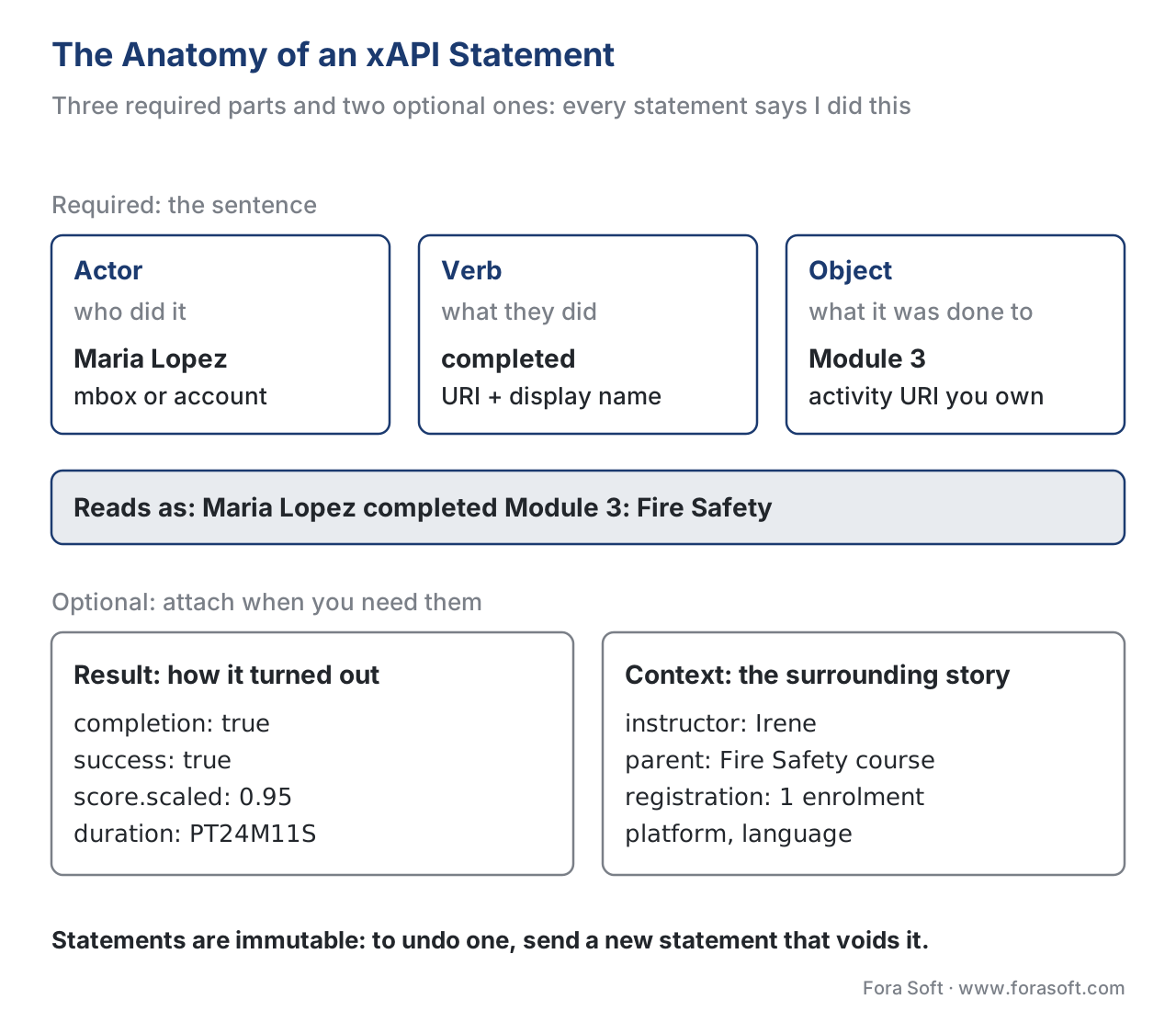 Figure 1. An xAPI statement is a sentence — actor, verb, object — with optional result and context attached. Read plainly, every statement says "I did this."
From Tin Can to xAPI to an IEEE standard: what actually changed
The name confuses almost everyone, so let us settle it first. You will see this standard called Tin Can API, Experience API, and xAPI, and people use them as if they were three different things. They are not.
Around 2008, the e-learning community knew SCORM had aged badly and started asking what should replace it. The U.S. Department of Defense's Advanced Distributed Learning (ADL) Initiative — the same body that created SCORM — put out a request for research into the next-generation specification. A company called Rustici Software won that work and ran the research as an open, two-way conversation with the industry. They nicknamed the project Tin Can, as in two tin cans and a string — a simple way for systems to talk to each other.
When the specification was released, its real name became the Experience API, abbreviated xAPI. "Tin Can API" was only ever the project's working nickname, but it stuck in blog posts and product pages, which is why you still see it. The rule to remember: xAPI is the standard; Tin Can was the project name. If a vendor says their product is "Tin Can compliant," they mean xAPI.
The versions matter because standards claims age badly when undated:
- xAPI 1.0.0 shipped in April 2013 — the first public release.
- xAPI 1.0.3 (2016) was the last version maintained directly by ADL, and it is the version most existing products were built against.
- IEEE 9274.1.1-2023, often called xAPI 2.0, was ratified by the IEEE Learning Technology Standards Committee on 10 October 2023. The IEEE — the same standards body behind Wi-Fi (IEEE 802.11) — is now the steward of xAPI. Notably, it was the first time an open-source specification became a published IEEE standard.
So "what changed" has two answers. Over its lifetime, xAPI changed from a Rustici-run project, to an ADL-maintained spec, to an IEEE-governed standard — a sign it is now durable infrastructure, not a passing trend. And the 2023 IEEE version tightened and clarified the 1.0.3 spec (the JSON data model and the RESTful web service) rather than reinventing it, so most existing xAPI content keeps working. If you are scoping a new product in 2026, build to the IEEE 9274.1.1-2023 form and treat 1.0.3 as backward-compatible legacy.
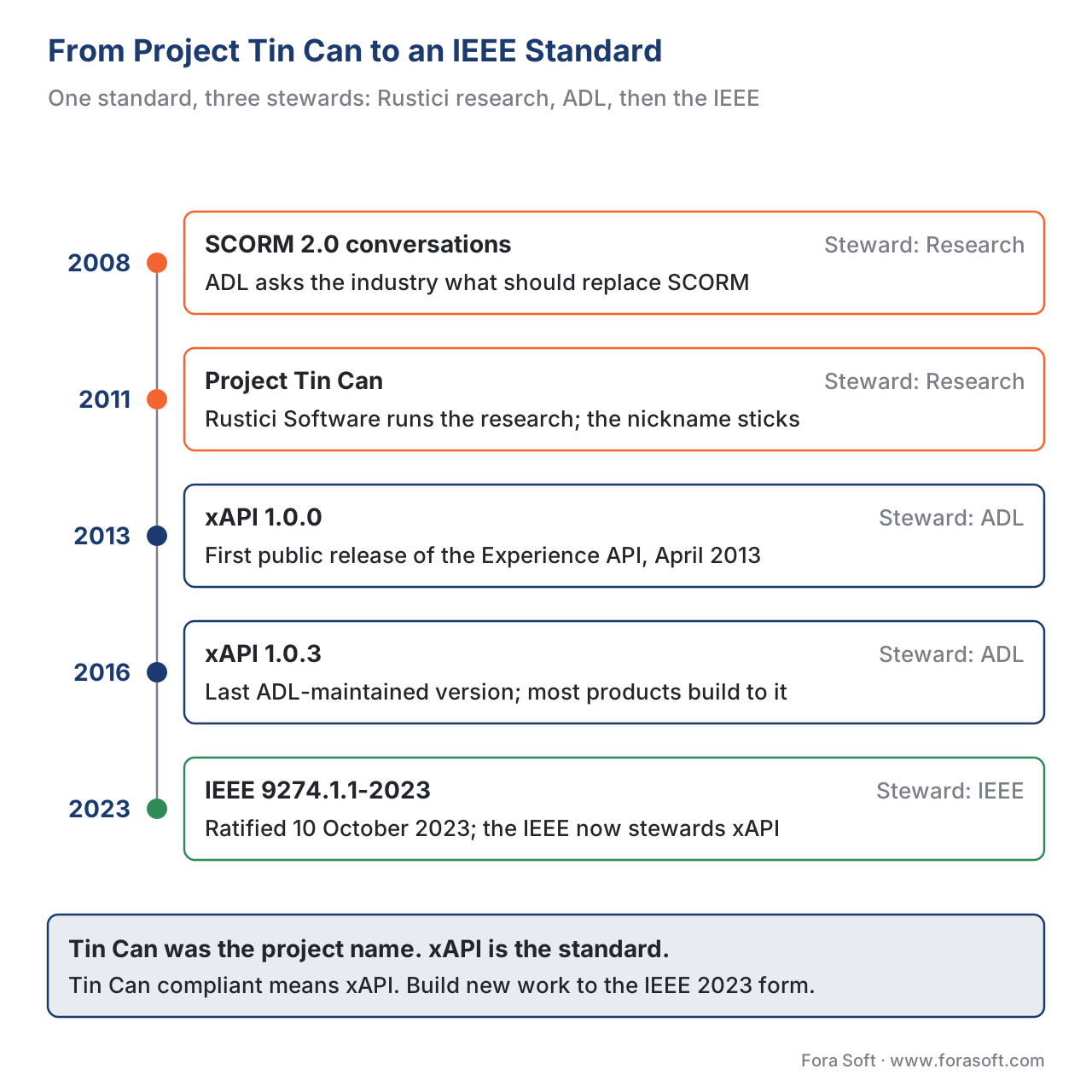 Figure 2. The road to a standard: the SCORM-2.0 conversations and Project Tin Can (research), xAPI 1.0.0 (2013), xAPI 1.0.3 (2016, the last ADL version), and IEEE 9274.1.1-2023 — the first open-source spec to become an IEEE standard.
The anatomy of a statement
The whole power of xAPI lives in one small, readable object. Let us build one up piece by piece, in plain English first and JSON second.
At its simplest, a statement is actor, verb, object — "I did this." The actor is who, the verb is what they did, the object is what they did it to. Everything else is optional detail you add when you need it.
{
  "actor": { "name": "Maria Lopez", "mbox": "mailto:maria@example.com" },
  "verb":  { "id": "http://adlnet.gov/expapi/verbs/completed",
             "display": { "en-US": "completed" } },
  "object": { "id": "https://example.com/courses/module-3",
              "definition": { "name": { "en-US": "Module 3: Fire Safety" } } }
}
Read it aloud and it says: Maria Lopez completed Module 3: Fire Safety. That is the entire core of xAPI. Now the parts.
Actor — who did it
The actor is the person (or group, or system) the statement is about. xAPI is deliberately person-centric: a learner is identified by something that uniquely points to them, most often an email address written as mbox: "mailto:maria@example.com". There may be many people named Maria, but only one owns that email. You can also identify an actor by an account on a named system, which matters when you do not want to use email. The design goal is that your learning history can follow you across systems, not stay trapped in one platform's user table.
Verb — what they did
The verb is the action, and here is a subtlety that trips up newcomers: a verb is not just a word, it is a URI (a web address that uniquely identifies the meaning) paired with a human-readable display string. So "completed" is technically http://adlnet.gov/expapi/verbs/completed with a display of "completed." Using a URI means two systems that both use that exact address agree on what "completed" means, instead of one system's "done" silently mismatching another's "finished." ADL publishes a starter set of verbs — experienced, attended, attempted, completed, passed, failed, answered, interacted, and more — and you are encouraged to reuse those before inventing your own.
Object — what they did it to
The object is usually an activity: a course, a module, a video, a question. Like verbs, every activity is uniquely identified by a URI you control, plus an optional human-readable name and description. The rule that saves you pain later: never reuse the same activity ID for two different things, and only mint IDs under a domain you own. Sloppy IDs are the most common reason xAPI reports turn to mush.
Result — how it turned out
When an experience has an outcome, you attach a result. This is where scores, pass/fail, and time live:
"result": {
  "completion": true,
  "success": true,
  "score": { "scaled": 0.95 },
  "duration": "PT24M11S"
}
That says Maria finished (completion: true), passed (success: true), scored 95% (score.scaled runs from −1 to 1, so 0.95 is 95%), and it took 24 minutes 11 seconds (duration, written in the ISO 8601 time format). Note how xAPI keeps "did they finish" and "did they pass" as two separate fields — the exact split SCORM 1.2 could not express cleanly.
Context — the surrounding story
Finally, context captures the circumstances: who the instructor was, which larger course this activity belongs to, the platform, the language, the registration (one enrolment attempt). Context is what lets you later ask the LRS, "show me every statement from Maria's fire-safety enrolment, under instructor Irene." Statements also carry a timestamp (when it happened) and, once saved, a stored time set by the LRS.
One more property worth knowing: statements are immutable. Once a statement is written to an LRS, it is never edited or deleted. If you need to undo one — say it was sent in error — you issue a new statement that voids the old one. This append-only design is deliberate: a learning record you can quietly rewrite is a learning record nobody can trust.
The Learning Record Store: the notebook
A statement on its own is just a sentence floating in the air. It needs somewhere to be written down, queried, and shared. That place is the Learning Record Store (LRS) — the second half of xAPI and the part teams underestimate most.
An LRS is a specialized data store with one defining ability: it speaks xAPI over a simple web interface (a RESTful API). Any authorized application can send it a statement with an HTTP request, and any authorized reporting tool can ask it for statements back — "give me everything Maria did this month," "give me every completed statement for Module 3." It is the notebook every xAPI sentence is written into, and the desk every report is built from.
Three facts about the LRS decide a lot of architecture:
First, an LRS can stand alone or live inside an LMS. Some learning management systems ship with an LRS built in; many do not, so you add a separate one. A video product that is not an LMS at all can still send statements to its own LRS. The LRS is a component, not a product category.
Second, LRSs can talk to each other. One LRS can forward statements to another. That is how a learner's history can move between an employer, a university, and a personal "data locker" — the records follow the person, not the platform.
Third, the LRS is the thing you actually have to operate. Statements are cheap to emit; storing millions of them reliably, securing them, and querying them fast is the real engineering. We will return to the build-vs-buy decision on exactly this point.
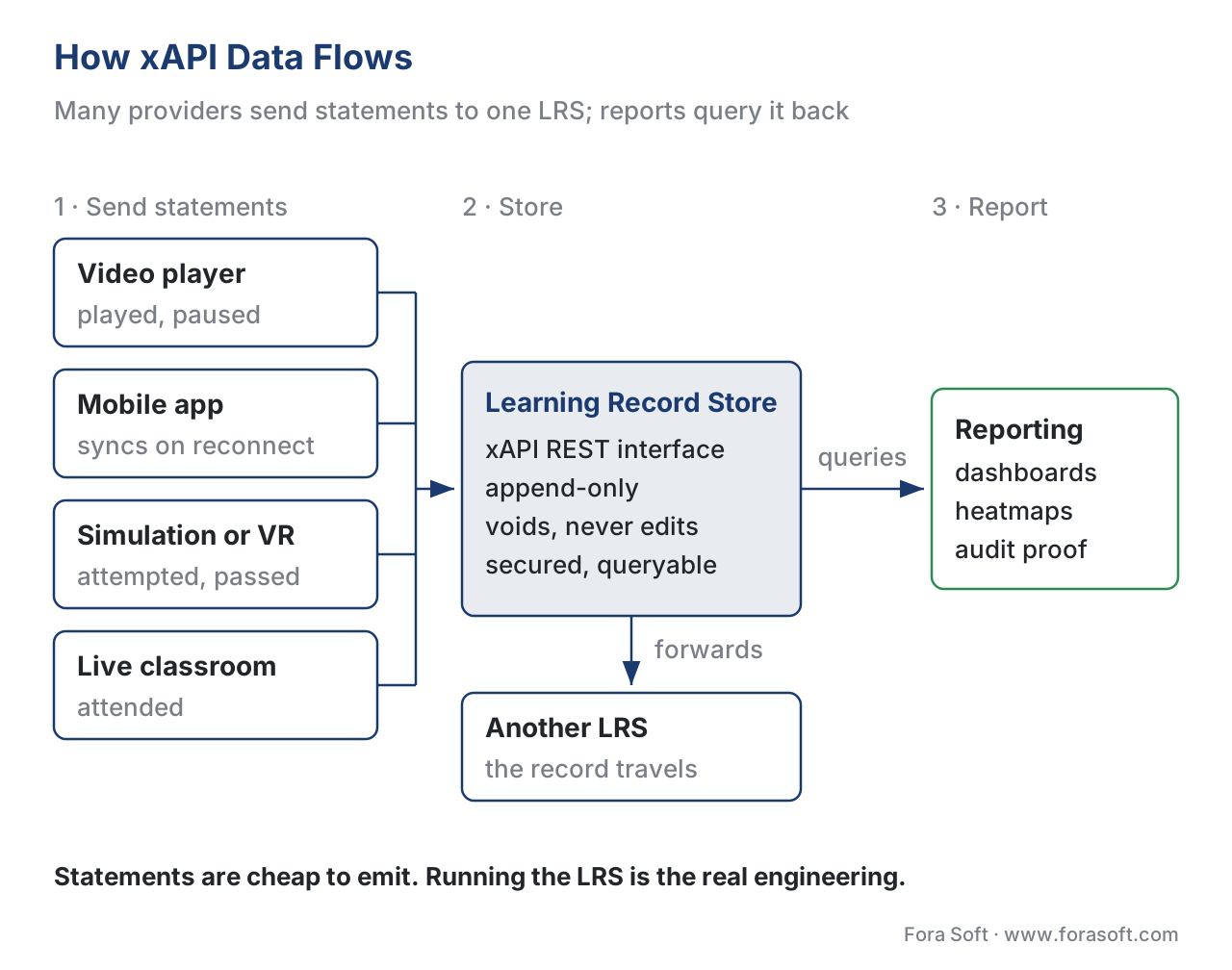 Figure 3. The xAPI data flow. Activity providers — a video player, a mobile app, a simulation, a classroom — each send statements to the LRS, which stores them and serves a reporting and analytics layer.
The four freedoms: why xAPI tracks where SCORM cannot
The official framing of xAPI's advantages is a useful one for non-technical readers, because each "freedom" maps to a real product capability.
Statement freedom. Because a statement is just actor-verb-object plus optional detail, you can record almost anything a learner does, not only "course completed." Watched, paused, answered, bookmarked, attempted, simulated, signed-off — if you can phrase it as "I did this," xAPI can store it.
Device freedom. Any enabled device can emit statements: a phone, a VR headset, a serious game, a piece of factory equipment. Crucially, a constant connection is not required. The device can collect statements offline and send them when it reconnects, which SCORM cannot do.
Workflow freedom. Learning does not have to start or end in an LMS. A learner can begin on a public website, continue in a mobile app, and finish in a workshop, and the whole journey lands in the LRS. Your content is no longer tied to one platform's launch.
History freedom. Because LRSs share statements, a learner's record can travel with them across organizations and systems over a career.
Put together, these four freedoms are the reason a video-first or mobile-first learning product reaches for xAPI: it is the only mainstream standard designed to track learning outside the four walls of an LMS session.
xAPI vs SCORM: an honest comparison
This is the comparison every team actually wants, and it is worth getting right. SCORM and xAPI are not competing versions of the same thing; they make opposite trade-offs. SCORM buys you universal LMS support at the cost of a fixed, modest data model. xAPI buys you rich, anywhere tracking at the cost of more design work and an LRS to run.
| Criterion | SCORM (1.2 / 2004) | xAPI (1.0.3 / IEEE 2023) |
|---|---|---|
| What it tracks | Fixed data model — completion, score, time, limited interactions | Almost anything, as custom actor-verb-object statements |
| Where content runs | Inside an LMS-launched browser session | Anywhere — web, mobile, VR, offline, real world |
| Where data is stored | The LMS | A Learning Record Store (standalone or in an LMS) |
| Connection needed | Live connection to the LMS | Occasional connectivity; offline-capable |
| Per-second video data | No (completion only) | Yes, via the xAPI Video Profile |
| Standards support in LMSs | Near-universal | Growing; not every LMS has an LRS |
| Implementation effort | Low — authoring tools export it | Higher — statement design + an LRS |
| Best when | A course must run in any existing LMS today | You need rich, cross-platform, or video data |
The honest summary: SCORM is still the right default when the goal is "this course must load and report in a client's existing LMS, today." xAPI is the right choice when the question shifts to "what exactly did the learner do, on whatever device, and how do we prove it." Many real products run both — a SCORM wrapper for LMS compatibility and xAPI underneath for the rich data. For the four-way picture including the two standards that bridge them, see SCORM vs xAPI vs cmi5 vs LTI.
A common misconception deserves a direct correction here. Many articles say xAPI simply "replaced SCORM." It did not. SCORM remains the most widely supported format because nearly every LMS imports it; xAPI added a capability SCORM never had, rather than retiring it. Treat them as complementary, and let the data need — not the publication date of the standard — drive the choice.
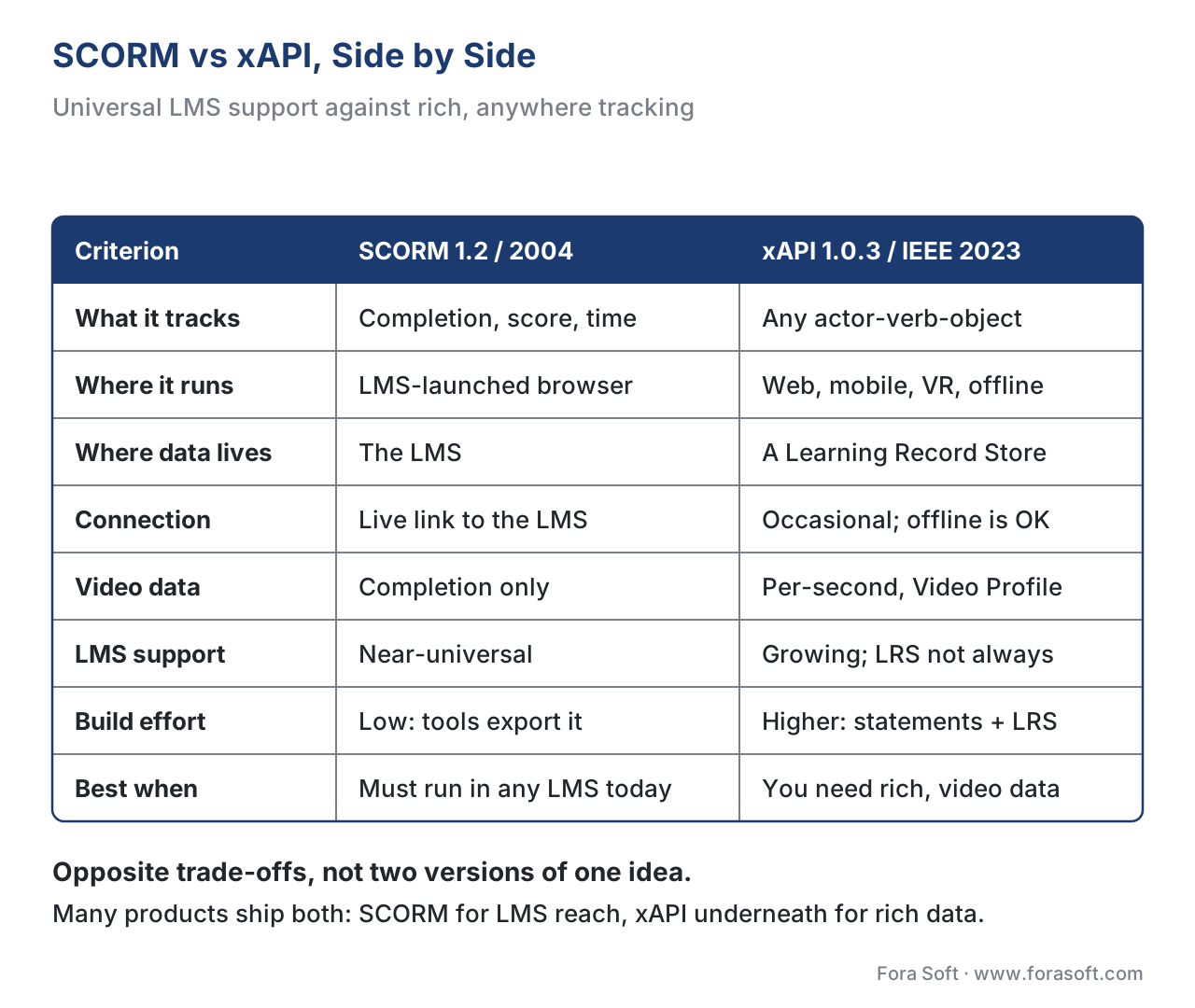 Figure 4. SCORM tracks a fixed model inside the LMS-launched session; xAPI records custom statements from any device or context into a Learning Record Store.
Tracking video with xAPI: the Video Profile
For a video-learning product, the single most valuable thing xAPI unlocks is detailed video tracking — and there is a published recipe for doing it consistently, called the xAPI Video Profile.
A profile is a community-agreed set of verbs, activity types, and extensions for a specific domain, so that everyone tracking the same kind of experience uses the same vocabulary. Without a profile, your "video played" statement and another vendor's "video play" statement would not line up in a report. The xAPI Video Profile (v1.0, an authored community profile maintained alongside ADL's profile work) defines the standard way to describe video.
The profile's core verbs map directly to what a player does:
- initialized — the video is ready to play.
- played — the learner pressed play (the statement records the time position).
- paused — the learner paused (records where).
- seeked — the learner jumped forward or back (records from-time and to-time).
- completed — the learner has played the whole video at least once.
- terminated — the learner left the video.
The richness comes from result extensions — extra fields with their own URIs (under https://w3id.org/xapi/video/extensions/...) that carry the numbers you actually analyze:
- time — the exact second of the video where the event happened.
- progress — how much of the video has been consumed, as a decimal (0.06 = 6%).
- played-segments — the precise ranges the learner watched, like
0[.]54.321[,]60[.]https..., so you can see skips and rewatches.
Here is a "paused at 54.3 seconds" statement, trimmed for clarity:
{
  "actor": { "name": "Maria Lopez", "mbox": "mailto:maria@example.com" },
  "verb":  { "id": "https://w3id.org/xapi/video/verbs/paused",
             "display": { "en-US": "paused" } },
  "object": { "id": "https://example.com/videos/fire-safety-intro",
              "definition": { "type": "https://w3id.org/xapi/video/activity-type/video",
                              "name": { "en-US": "Fire Safety: Introduction" } } },
  "result": {
    "extensions": {
      "https://w3id.org/xapi/video/extensions/time": 54.3,
      "https://w3id.org/xapi/video/extensions/progress": 0.06
    }
  }
}
Because the profile standardizes these fields, a "completed" statement must carry the total time spent watching, and the progress and played-segments values are aggregated across all of a learner's attempts under the same enrolment. That is what turns raw play/pause events into a real engagement heatmap. This is the canonical tracking-spec topic for the section; the full treatment lives in tracking video with the xAPI Video Profile, the interactive elements that emit these statements live in in-player quizzes and polls, and the analytics that consume them live in learning analytics.
![Tracking video with the xAPI Video Profile. At the top, one learner watching one 20-minute lecture as a timeline bar: watched from 0:00 to 5:00, one minute at 12:00 watched twice, and 18:00 to 19:00. That is recorded as played-segments 0[.]300[,]720[.]780[,]1080[.]1140, and progress 0.35, which is 420 of 1,200 unique seconds. Below, a table of the six verbs, what the player saw, and the result extensions each carries: initialized, the video is ready to play, length in context; played, the learner presses play, time; paused, the learner pauses, time; seeked, jumps forward or back, time-from and time-to; completed, the whole video played once, progress and played-segments; terminated, the learner leaves the video, progress and played-segments. Closing line: at 35 percent seen, completed never fires, so the report shows what was really watched.](https://cdn.prod.website-files.com/64e8910adc5a63966a68acea/6ab3b0074f199e2a683f285c_6ab3af8d718ee3a8244c4d1b_02_2-xapi-tin-can-explained__05-video-profile.svg) Figure 5. The xAPI Video Profile maps player events — initialized, played, paused, seeked, completed — to a video timeline, with result extensions (time, progress, played-segments) carrying the analyzable detail.
Figure 5. The xAPI Video Profile maps player events — initialized, played, paused, seeked, completed — to a video timeline, with result extensions (time, progress, played-segments) carrying the analyzable detail.
A worked example: tracking one 20-minute lecture
Numbers make the difference concrete, so let us track a single 20-minute recorded lecture and compare what each standard knows at the end.
With SCORM, you wrap the video in a trackable unit and, when the learner reaches the end, the standard writes one field: completion_status = completed. The LMS now knows one thing — finished, or not. That is the natural SCORM unit of truth.
With xAPI and the Video Profile, the same 20 minutes produces a stream of statements. Suppose Maria watches minutes 0–5, skips to minute 18, rewatches minute 12 twice, and stops at minute 19. The player emits roughly:
initialized            → 1 statement
played / paused / seeked → ~8 statements (her start, skip, rewatches, stops)
completed (or not)      → 1 statement, with duration + played-segments
Now do the engagement math out loud. The 20-minute video is 1,200 seconds. Maria's played-segments cover 0–300s, 720–780s (the rewatched minute 12, counted once for coverage), and 1,080–1,140s — about 300 + 60 + 60 = 420 seconds of unique footage seen.
Coverage   = unique seconds watched ÷ total length
           = 420 ÷ 1,200
           = 0.35  → 35% of the video actually seen
So SCORM would record "completed" if the player marked it complete, while xAPI reveals that Maria saw only 35% of the footage and rewatched one section — a completely different story for an instructor deciding whether the lecture works. This gap between "marked complete" and "actually watched" is the entire reason video-learning products adopt xAPI. The arithmetic, not the marketing, makes the case.
Note the cost of that richness: those ten statements per learner per video add up. Ten thousand learners through one video is 100,000 statements; a 50-video course is millions. The LRS that stores and queries them is real infrastructure, which brings us to the build-vs-buy decision.
Common mistakes that cost real time
A handful of xAPI pitfalls recur on almost every project, and each is cheap to avoid and expensive to find late.
The first is treating xAPI as a drop-in SCORM replacement. xAPI statements are not, by themselves, an LMS launch-and-report cycle. If your content must be assigned and graded inside an LMS, raw xAPI does not define that handshake — that is exactly the gap cmi5 fills, by wrapping xAPI in an LMS launch model. See cmi5 explained.
The second is sloppy verb and activity IDs. Inventing a custom verb when ADL already publishes one, or reusing an activity ID for two different videos, quietly corrupts every future report. Reuse published verbs; mint unique IDs under a domain you control.
The third is forgetting the LRS is a real system. Teams design beautiful statements and only then ask where they will be stored, secured, and queried at volume. Decide the LRS first.
The fourth is tracking video without the Video Profile. Hand-rolled "played" statements that do not follow the profile will not line up with any standard report or third-party tool. Use the profile from day one.
The fifth is privacy as an afterthought. xAPI statements often contain personal identifiers (an email in mbox) and a detailed behavioural trail. Under data-protection law such as the EU's GDPR — and Russia's 152-FZ for a Russian audience — that trail is personal data. Decide what you collect, why, and for how long before you start emitting statements.
Build vs buy: should you run your own LRS?
This is where xAPI costs and saves the most money, so lead with the business decision. Supporting xAPI has two halves, and they are different projects.
Emitting statements from your player or app is the smaller half. Mature client libraries exist for most languages, and adding xAPI tracking to a video player is a contained piece of work. Most teams build this, because the statement design is specific to their product.
Running the LRS is the larger half, and the one to think hardest about. A conformant LRS must accept statements over the xAPI REST interface, store them immutably, enforce authentication, and answer queries quickly as the store grows into the millions of statements. Building one from scratch is rarely justified. Most teams adopt a proven LRS — hosted or self-hosted, commercial or open-source — and spend their effort on the statements and the reporting, which is where the product value is. Build the LRS yourself only when the LRS is your product. For the broader version of this trade-off, see build vs buy vs extend an existing LMS.
To make the decision repeatable, we distilled the statement-design and LRS-readiness steps into a one-page checklist you can run against any xAPI build — download the xAPI statement and LRS readiness checklist.
Free download: xAPI Statement & LRS Readiness ChecklistA one-page checklist: statement design (actor, verb, object, result, context), reusing published verbs and unique activity IDs, the xAPI Video Profile verbs and extensions, the LRS decision, and a privacy gate before you ship.Where Fora Soft fits in
Fora Soft has built video learning, streaming, conferencing, and interactive-player software since 2005, across 239+ shipped projects. On learning products, the recurring decision we help teams make is exactly the one above: keep a SCORM wrapper when a course must run in a client's existing LMS, and add xAPI plus the Video Profile underneath when the product needs per-second video analytics, mobile or offline tracking, or proof of learning outside the LMS. Our work tends to sit at the hybrid point — a custom video and interactive layer that emits clean xAPI statements into a standards-based LRS — because that is where the build-vs-buy trade-off usually lands for video-first learning products. We treat the tracking layer as something that has to work in production at volume, not just pass a demo.



The handbook
Fora Soft Video Engineering Handbook
We wrote a seven-volume handbook that works through the whole video stack, from the pixel to production, so that an engineer who finishes it can design and build a learning player that emits clean xAPI. Volume 3 covers players and playback telemetry — where played, paused and seeked are born. Volume 2 explains how the lesson itself reaches the learner over HLS and DASH, and Volume 7 covers serving, cost and compliance, the questions you face once millions of behavioural statements sit in an LRS. Written by Nikolay Sapunov, CEO at Fora Soft.
Does your product need xAPI, SCORM, or both — and who runs the LRS?
Tell us what you need to know about your learners and which LMS your customers run. We will sketch the statements your player should emit, map them to the Video Profile, and make the LRS build-or-buy call with a first estimate. 250+ video products shipped since 2005.
See our case studies
Case study
BrainCert
A virtual classroom and LMS with SCORM and xAPI support, proctored exams, certificates and an analytics dashboard — the hybrid this article recommends, running 500M+ classroom minutes.
Case study
Scholarly
Live classes for up to 2,000 students at once plus recorded lessons over DASH/HLS, with an event pipeline on ClickHouse — the kind of store that answers queries over millions of learner events.
Case study
ALDA
An AI course and assessment generator co-designed with 70+ U.S. college educators and now owned by 1EdTech, the body that publishes LTI, QTI and Open Badges.
What to read next
Standards
Tracking Video With xAPI
The full Video Profile: every verb, extension and the played-segments math.
Standards
SCORM vs xAPI vs cmi5 vs LTI
The four-way decision, including the two standards that bridge them.
Analytics
Learning Analytics
Which metrics built from xAPI statements matter, and which mislead.
Economics
Build vs Buy vs Extend an LMS
The same trade-off as the LRS decision, one layer up.
References
- IEEE. IEEE 9274.1.1-2023 — Standard for Learning Technology: JSON Data Model Format and RESTful Web Service for Learner Experience Data Tracking and Access (xAPI 2.0), published October 2023. https://standards.ieee.org/ieee/9274.1.1/7321/ (Tier 1 — primary standard.)
- IEEE / xAPI Base Standard Documentation (open-source). Experience API base standard, opensource.ieee.org. https://opensource.ieee.org/xapi/xapi-base-standard-documentation/ (Tier 1 — primary standard text.)
- ADL Initiative. Experience API (xAPI) Specification, Version 1.0.3 (Part Two: Experience API Data; Part Three: Data Processing, Validation, and Security). https://github.com/adlnet/xAPI-Spec/blob/master/xAPI.md (Tier 1 — primary specification; statement structure, actor/verb/object/result/context, voiding, the LRS interface.)
- ADL Initiative / xAPI Authored Profiles. xAPI Video Profile, v1.0.3 (
video.jsonld). https://github.com/adlnet/xapi-authored-profiles/blob/master/video/v1.0.3/video.jsonld (Tier 1 — primary profile spec; video verbs and extensions.) - xAPI Video Profile — Statement Data Model (community profile documentation). https://liveaspankaj.gitbooks.io/xapi-video-profile/content/statement_data_model.html (Tier 3 — community profile reference; verbs, result extensions time / progress / played-segments. Consistent with the adlnet authored profile in ref 4, which governs on any conflict.)
- Rustici Software (xAPI.com). "xAPI (Experience API) Overview." https://xapi.com/overview/ (Tier 3 — first-party engineering reference; the four freedoms, the LRS, history of Project Tin Can.)
- Rustici Software (xAPI.com). "xAPI Statements 101: the anatomy of an xAPI statement." https://xapi.com/statements-101/ (Tier 3 — first-party engineering reference; statement field examples, verbs, extensions.)
- Rustici Software (xAPI.com). "What Is an LRS — Learning Record Store." https://xapi.com/learning-record-store/ (Tier 3 — first-party engineering reference; LRS definition, standalone vs in-LMS, LRS-to-LRS sharing.)
- ADL Initiative. Overview and Application of xAPI, cmi5, and xAPI Profiles. https://www.adlnet.gov/ (Tier 2 — issuing-body guidance; how profiles and cmi5 relate to xAPI.)
Where lower-tier sources (xAPI.com, the community Video Profile gitbook) and the official spec/profile could differ, the article follows the IEEE 9274.1.1-2023 standard text and the adlnet authored Video Profile — for example, on the statement field semantics and the canonical video verb and extension URIs.
