


Why This Matters
If you are an L&D director, an EdTech founder, or a product manager, the in-video quiz is the first interactive feature anyone asks for — and the one most often shipped broken. It is easy to build a question overlay that feels good in a demo and silently tracks nothing, or to gate a course on a "watched to the end" flag that proves no learning. This article gives you the vocabulary to specify quizzes and polls correctly: the question types, the inline-versus-gate decision, the scoring rules, and — the make-or-break part — exactly how the answer becomes a tracked event your analytics can use. It is the practical companion to What makes video interactive, which makes the engagement case this article now turns into a build.
First, What a Quiz and a Poll Actually Are
Start with the two words, because teams use them interchangeably and they are not the same thing. An in-player quiz is a question with a correct answer, shown inside the video player at a timestamp you choose. Playback pauses, the learner responds, and the system records whether they were right. The job of a quiz is retrieval — making the learner pull the just-watched idea back out of memory, which is what actually builds it.
A poll is the same on-screen mechanic with one difference: there is no correct answer. "Which of these three approaches does your team use today?" gathers an opinion or a show of hands. The job of a poll is engagement and signal — it wakes the learner up and tells the instructor something about the room, but it is never scored as right or wrong. Keeping the two apart matters for tracking: a quiz answer carries a result of correct or incorrect, while a poll answer carries a neutral result, and reporting a poll as a graded question is a common and embarrassing data error.
Both share an anatomy worth naming, because every field in it maps to something you will later need to track. A question has a stem (the text being asked), a set of options or an input, the learner's response, the correct response (for a quiz), the feedback the learner sees, and a result. That last word — result — is the one the LMS cares about most.
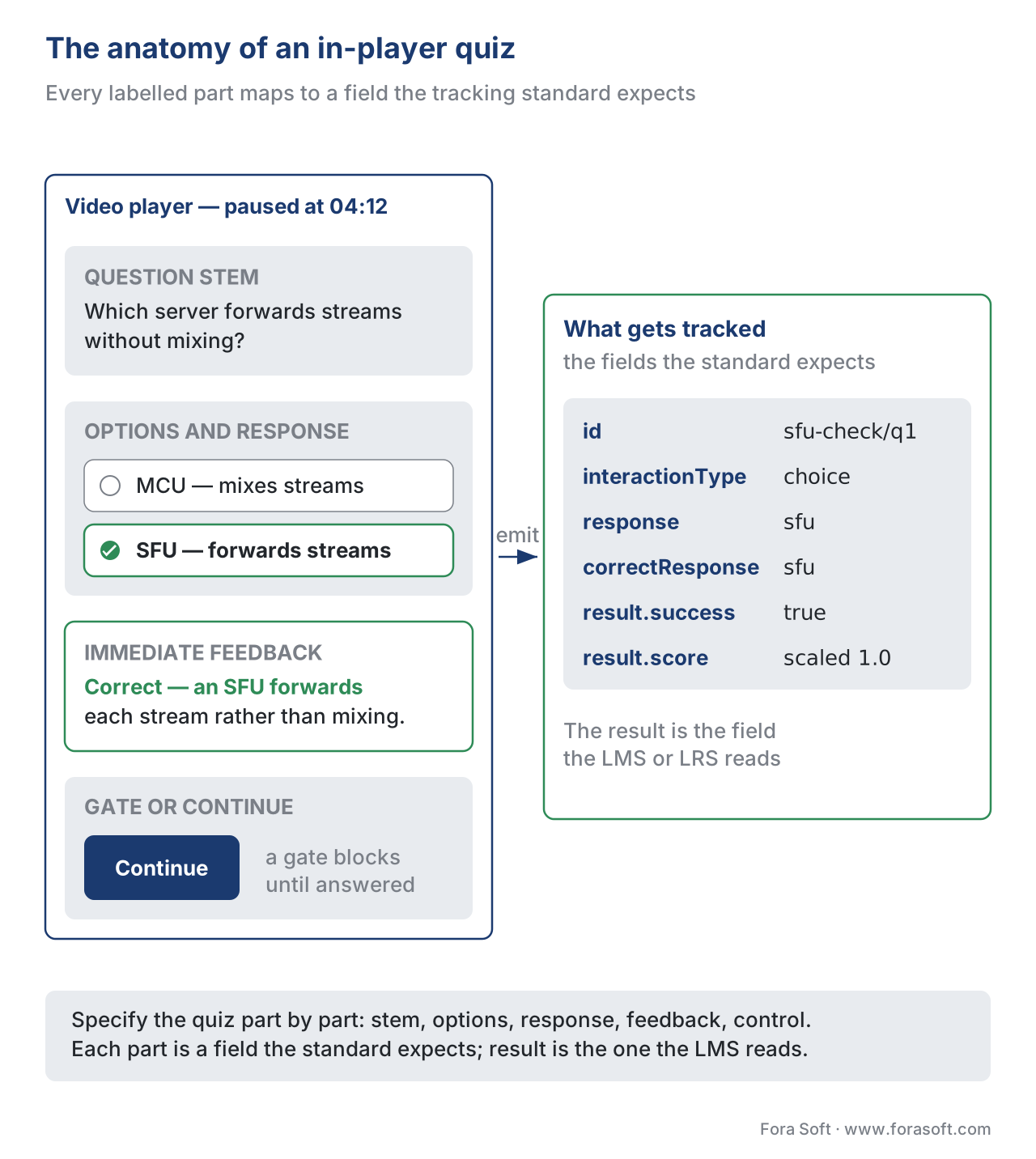 Figure 1. The anatomy of an in-player quiz. Every labelled part maps to a field the tracking standard expects — the result is the field the LMS reads.
The Question Types You Can Actually Track
There is a temptation to invent clever question formats. Resist it, because the learning standards only know a fixed set of question types, and a format outside that set cannot be tracked in a structured, reportable way. The good news is that the standard set covers almost everything a course needs.
These types come from the SCORM 2004 4th Edition run-time data model and were carried, almost unchanged, into the Experience API (xAPI) specification — so a question authored to one of them is portable across both standards. The core types are true-false (two responses), choice (multiple choice, single or multiple select), fill-in (a short typed answer) and its sibling long-fill-in (a longer essay-style entry), matching (pair items from two lists), sequencing (put items in order), likert (a rating scale — the natural type for a poll), numeric (a number or range), performance (a multi-step task), and other (an escape hatch for anything custom, tracked but not structured).
The practical rule is to pick the simplest type that tests the idea. A true-false or single-choice question is fast to answer, easy to give feedback on, and unambiguous to score — which is why it dominates in-video checks, where you want to interrupt for ten seconds, not two minutes. Reserve fill-in, matching, and sequencing for moments where recognition is too easy and you genuinely need recall or ordering. Save long-fill-in for assessments, not in-flow checks, because a typed paragraph mid-video breaks the pace and cannot be auto-scored reliably.
| Question type | Best for | xAPI interactionType |
SCORM 2004 type | What gets tracked |
|---|---|---|---|---|
| True-false | Fast in-flow checks | true-false |
true-false |
response, correct/incorrect |
| Choice (single/multi) | The default in-video quiz | choice |
choice |
chosen option(s), result |
| Fill-in | Recall of a term | fill-in |
fill-in |
typed text, result |
| Likert | Polls, confidence checks | likert |
likert |
scale point (neutral) |
| Matching | Relating concepts | matching |
matching |
pairs, result |
| Sequencing | Ordering steps | sequencing |
sequencing |
order, result |
| Numeric | A value or range | numeric |
numeric |
number, result |
Table 1. The trackable question types, the standard that names each, and what the LMS or Learning Record Store records. Tinted cells mark the two types that do most of the in-video work.
Inline or Gate: Two Ways to Place a Question
A single design decision shapes how a quiz feels and what it can promise: does the question block the learner or not?
An inline question is non-blocking. It appears, the learner may answer, and the video continues whether or not they do. Inline questions are low-friction and good for keeping momentum — a quick confidence check that does not punish a learner who wants to move on. The cost is that you cannot guarantee an answer, so you cannot use an inline question to certify that the learner demonstrated knowledge.
A gate is blocking. Playback stops and will not resume until the learner answers — and, in stricter designs, until they answer correctly. A gate is how you make a quiz mean something for completion: "the learner cannot reach the next module without passing this check." The cost is friction, and friction misapplied is the fastest way to make learners hate a course. Gate the few questions that matter (a safety-critical step, a compliance acknowledgement) and leave the rest inline.
The two patterns also differ in what they let you claim about completion, which connects directly to a mistake covered in the foundation article: "watched to the end" is a position event, not proof of learning. A gate that requires a correct answer is one of the few honest ways to tie course completion to a demonstrated result rather than to the scrubber reaching the last second.
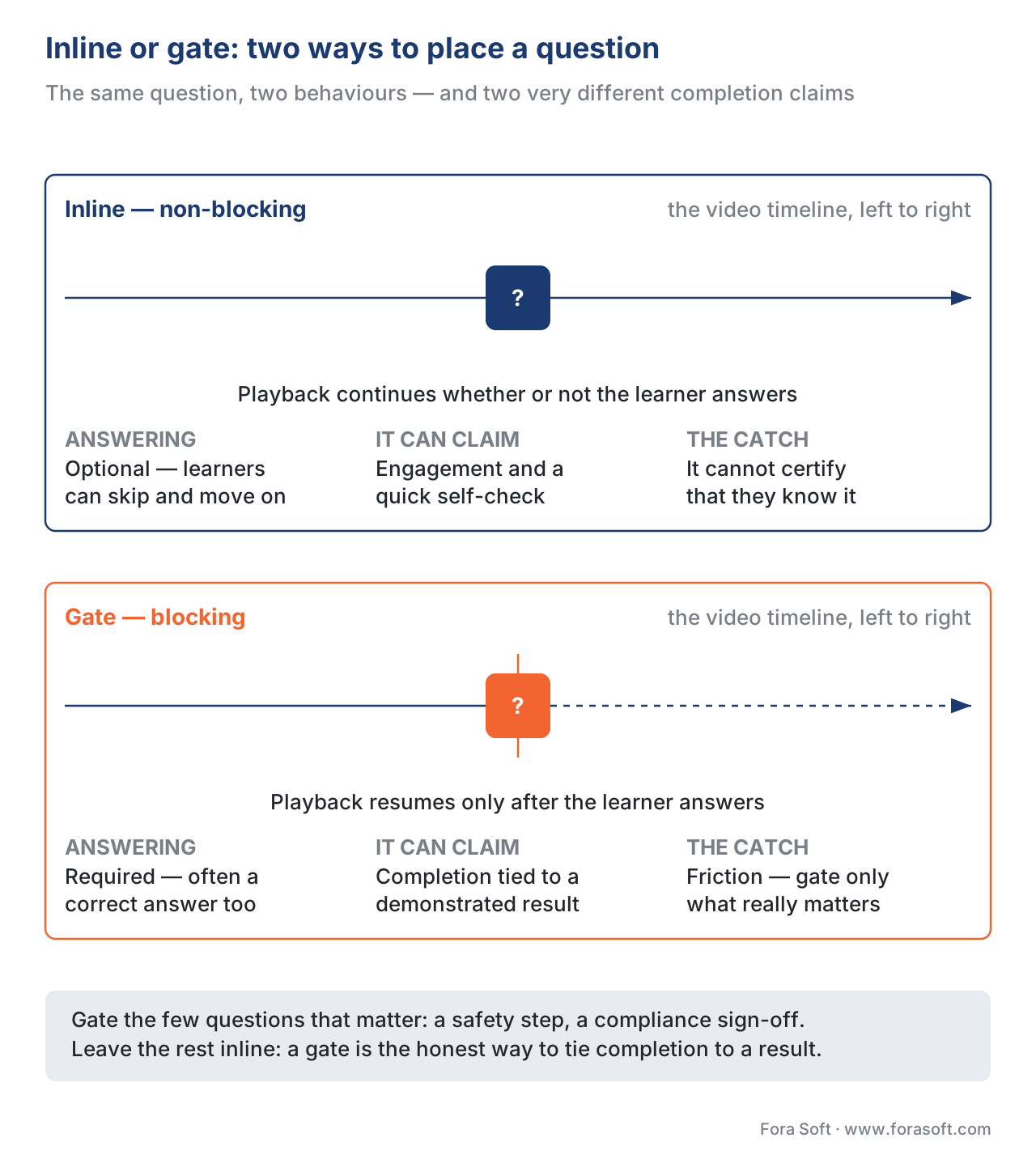 Figure 2. Inline versus gate. Inline keeps momentum but cannot certify; a gate certifies but adds friction — use gates sparingly, on the questions that matter.
Designing the Quiz for Learning, Not Decoration
A trackable question is not automatically a useful one. Three design rules, all grounded in learning research, separate a quiz that builds knowledge from one that merely interrupts.
First, make it retrieval, not recognition theatre. The value of an in-video question comes from the learner effortfully pulling an answer from memory — the "testing effect" or retrieval practice. A question so easy that the answer is obvious from the wording does no work. The point is not to trick the learner; it is to require genuine recall, because the retrieval effort itself is what strengthens the memory. Studies on interpolated questions during lectures show this directly: learners who were quizzed between segments remembered more and reported less mind-wandering than those who simply watched.
Second, give immediate, specific feedback. The strongest moment for feedback is right after the learner commits to an answer, while the topic is still in mind. "Correct — because the SFU forwards streams rather than mixing them" teaches; a bare "Wrong, try again" does not. Immediate elaborated feedback is one of the best-supported findings in the formative-assessment literature, and an in-video quiz is the ideal place to deliver it because the learner is still inside the context that produced the question.
Third, keep in-flow checks low-stakes. A question that pauses a learning video should feel like a chance to self-check, not an exam. Low-stakes, ungraded-or-lightly-graded retrieval gets the learning benefit without the anxiety that depresses performance and makes learners avoid the course. Save high-stakes, weighted scoring for a deliberate assessment at the end of a module, where the learner knows they are being tested.
Scoring: What "Score" Actually Means
"Score" hides several different ideas, and a build that blurs them produces reports nobody can trust. Pull them apart before you write a line of code.
A single question produces a result — correct, incorrect, or, for a poll, neutral. A set of questions produces a score, which standards express in two compatible ways: a raw score (7 out of 10) and a scaled score (a number from −1 to 1, or commonly 0 to 1, that normalises the result so 0.7 means 70% regardless of how many questions there were). A pass/fail decision compares the scaled score to a threshold you set — say, scaled ≥ 0.8. And weighting lets one question count more than another toward the total, so a critical safety question can outweigh a warm-up.
Walk the arithmetic once. Suppose a module has five in-video checks, four worth one point and one safety question worth two points, for six points total. A learner gets the four ordinary questions right (4 points) and the safety question wrong (0 of 2). Raw score is 4 of 6; scaled score is 4 ÷ 6 = 0.67. If the pass threshold is 0.8, the learner fails — correctly, because they missed the question that mattered most. Had every question been weighted equally, the same learner would have scored 4 of 5 = 0.80 and passed, hiding the safety gap. The weighting is doing real work.
One more scoring reality: attempts. Learners retake quizzes, and you must decide whether the system keeps every attempt (called journaling, where each answer is recorded as a new event) or overwrites the last one. Journaling is the safer default for analytics — "passed on the third try" is a different signal from "passed first time" — but it means your reporting code must expect more than one record per question.
How the Answer Becomes Data: xAPI, SCORM, and cmi5
Here is the section teams skip and then regret. A quiz only becomes measurable when the player reports the answer through a learning standard. There are three you will meet, and the right one depends on where the video lives.
The modern default is the Experience API (xAPI) — a standard from ADL (Advanced Distributed Learning) that records learning as short statements shaped like a sentence: actor – verb – object, plus a result. A quiz answer uses the verb answered; the object is the question, described as an interaction activity; and the result carries whether the learner succeeded, their score, and what they actually responded. The statement flows into a Learning Record Store (LRS) — the database that holds xAPI statements — where it becomes analytics. xAPI is the right choice when your video is interactive, lives outside a single course package, or needs richer tracking than a course wrapper allows. A minimal answered statement looks like this:
{
  "actor": { "name": "Maria Example", "mbox": "mailto:maria@example.org" },
  "verb": {
    "id": "http://adlnet.gov/expapi/verbs/answered",
    "display": { "en-US": "answered" }
  },
  "object": {
    "id": "https://courses.example.org/sfu-check/q1",
    "definition": {
      "type": "http://adlnet.gov/expapi/activities/cmi.interaction",
      "interactionType": "choice",
      "correctResponsesPattern": ["sfu"]
    }
  },
  "result": {
    "success": true,
    "score": { "scaled": 1.0 },
    "response": "sfu"
  }
}
The second option is a SCORM interaction. SCORM (Sharable Content Object Reference Model, also from ADL) is the older standard that packages a course so any LMS can play and track it, explained in full in SCORM explained. When the video sits inside a SCORM package, a quiz answer is written to the cmi.interactions data model — an indexed list where each entry records the question id, its type, the learner's response, the correct response, and the result. A key version detail: SCORM 1.2 interactions are write-only and carry no question text, so you can record that a question was answered but not easily reconstruct what it asked; SCORM 2004 4th Edition made interactions readable and added a description field, so the question text travels with the data. If interaction-level reporting matters, prefer SCORM 2004 over 1.2.
The third option, cmi5, is the bridge between the two — an xAPI profile that runs inside an LMS launch like SCORM but emits xAPI statements, including the same answered interactions, into an LRS. For a new build that wants both LMS launch and rich xAPI tracking, cmi5 is often the cleanest choice. The full comparison lives in SCORM vs xAPI vs cmi5 vs LTI; the statement design for video specifically — how quiz events sit alongside the play, pause, and seek events — is covered in tracking video with the xAPI Video Profile.
| Standard | Where it fits | Quiz mechanism | Question text stored? | Lands in |
|---|---|---|---|---|
| xAPI 1.0.3 | Interactive video, beyond the LMS | answered statement |
Yes | Learning Record Store |
| SCORM 1.2 | Legacy LMS package | cmi.interactions (write-only) |
No | LMS |
| SCORM 2004 4th Ed | LMS package, richer tracking | cmi.interactions (read/write) |
Yes | LMS |
| cmi5 | New build, LMS launch + xAPI | answered via xAPI |
Yes | LRS (via LMS) |
Table 2. The three tracking routes for a quiz answer. Tinted cells mark the choices that preserve the question text — essential for question-level analytics.
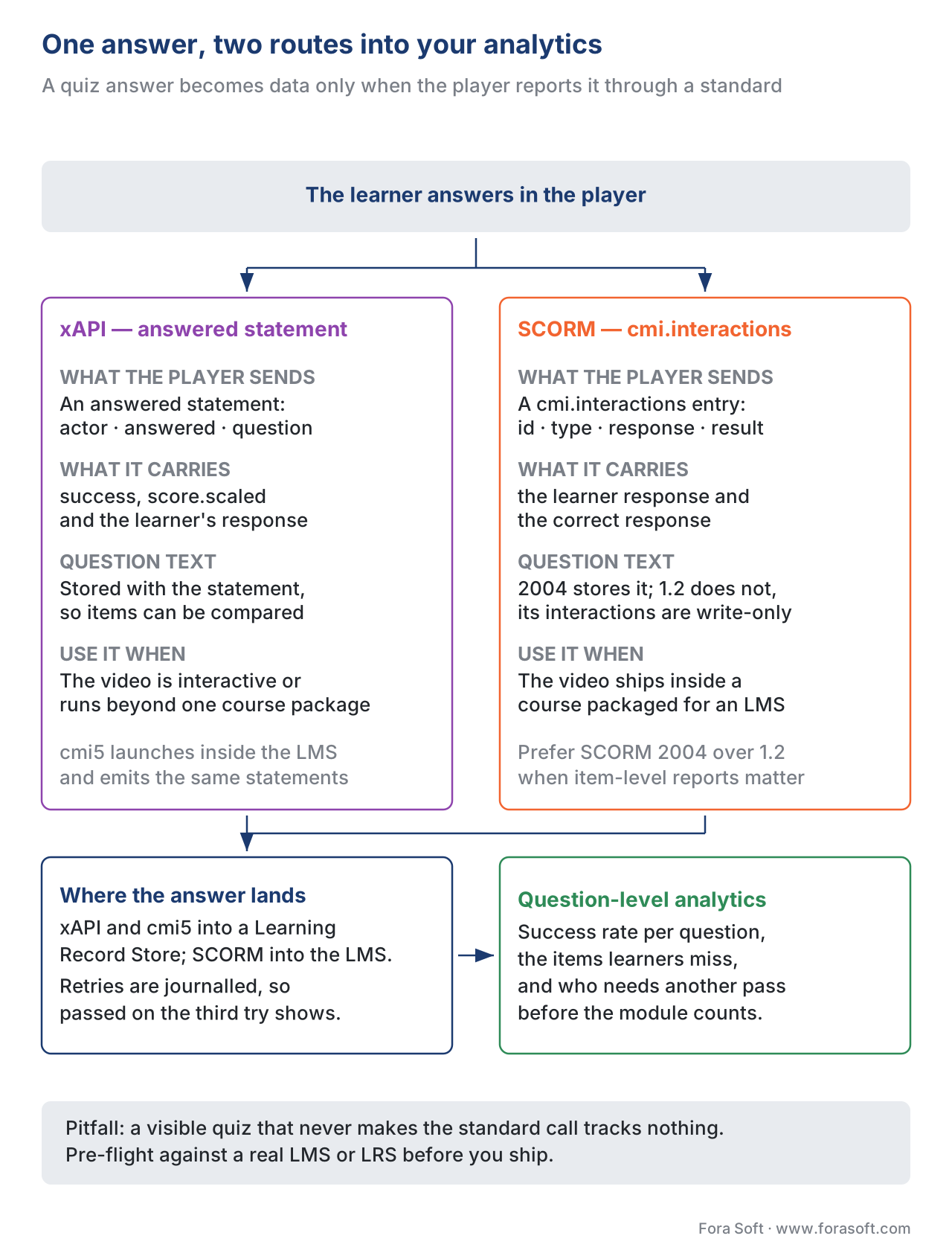 Figure 3. One answer, two routes. The quiz emits either an xAPI
 answered statement or a SCORM interaction; both end as question-level analytics the instructor can act on.
Polls Are Tracked, Too — Just Differently
A poll is not a quiz with the grading turned off; it is its own thing, and tracking it well takes a small amount of care. Because a poll has no correct answer, its result should be recorded as neutral — no success or failure — with the learner's chosen option preserved as the response. In xAPI a poll is still an answered statement, typically using the choice or likert interaction type, but with success omitted and no correctResponsesPattern. In SCORM the same applies: record the interaction with a result of neutral rather than correct or incorrect.
Why bother tracking a poll at all? Because the aggregate is the value. "68% of learners said their team still uses manual transcoding" is a finding an instructor or product owner can use, and it only exists if each poll answer was recorded. Treat polls as a data source for the cohort, not a score for the individual, and they earn their place. How recorded answers — quiz and poll alike — become dashboards and cohort reports is covered in learning analytics.
A Common Mistake: The Quiz the LMS Never Sees
The single most expensive error in in-video quizzing is a quiz that works perfectly on screen and reports nothing. The course author builds the overlay, the question shows, the learner answers, the feedback appears — and the player never makes the standard-specific call that hands the result to the LMS or the LRS. The data structure that would carry the answer stays internal to the content and dies when the tab closes.
This happens more than teams expect, and it is hard to catch because the symptom is invisible during authoring — everything looks right. Rustici Software, who maintain a widely used SCORM/xAPI engine, note plainly that a course can show a quiz with questions and answers while making none of the calls that let the platform see them. The fix is a tracking pre-flight: before you ship, launch the course against a real LMS or LRS and confirm that each question produces a recorded interaction with the expected id, response, and result. Never assume the answer is tracked because the quiz is visible.
A second, quieter mistake: gating a whole course on completion of an inline (non-blocking) question. Because an inline question can be skipped, the completion it implies is fiction. If completion must depend on the answer, the question has to be a gate.
Accessibility: A Quiz Everyone Can Answer
A quiz that only works with a mouse, or that vanishes before a screen-reader user can reach it, is not finished — and in many markets it is not sellable. The Web Content Accessibility Guidelines (WCAG 2.1, Level AA, the W3C standard most procurement contracts require) set the bar.
Three criteria bite hardest for in-video quizzes. Every option, input, and submit control must be reachable and operable by keyboard with a visible focus state (Success Criterion 2.1.1 Keyboard), and each control must expose its name, role, and state to assistive technology (4.1.2 Name, Role, Value) — a custom radio button that a screen reader announces as a blank div fails. Most subtly, if a question is timed, the time limit must be adjustable: the learner must be able to turn it off, extend it to at least ten times the default, or get a warning and a chance to extend (2.2.1 Timing Adjustable). A countdown that a learner with a motor or cognitive disability cannot beat turns a knowledge check into a disability test. Build these in with the quiz, not after — retrofitting accessibility into an interaction layer is far more expensive than designing it in.
Where Fora Soft Fits In
The first decision is build versus buy. A content tool such as the open-source H5P lets an instructional designer drop multiple-choice and fill-in questions into a video and emits xAPI for each scored interaction — the right call when quizzes are a feature of your content and a host LMS will play it. A custom player is what you build when the quiz UX, the scoring rules, the tracking model, and the accessibility have to be yours: a branded experience, an unusual question type, gating logic a plug-in cannot express, or analytics a generic tool will not surface. Fora Soft builds the second kind — custom interactive-video players with the xAPI and SCORM wiring and the dashboards behind them — drawing on two decades of video-streaming and player engineering across e-learning, OTT, and telemedicine. We help teams decide which questions are worth gating, then build the player, the tracking bridge, and the reporting that proves the result.



The handbook
Fora Soft Video Engineering Handbook
We wrote a seven-volume series that takes the whole video stack apart across 9,000+ pages — encoding, delivery, audio and AI — and an engineer who works through it can design and build the player these questions live inside. Volume 3 sits closest to this article: the player itself, timed text and cue points, trick play, DRM and the QoE telemetry that turns player events into numbers — the same craft as firing an answered statement the moment a learner commits. Volume 4 covers the accessibility and captioning side that decides whether every learner can answer at all, and volume 1 the encoding foundation the rest of the course stands on. Written by Nikolay Sapunov, CEO at Fora Soft.
Does the quiz in your video actually reach the LMS?
Send us the course, the player you run today and the LMS or LRS the results have to land in — and we will come back with which question types your build can score cleanly, where a gate is worth the friction it costs, and what the xAPI or SCORM wiring needs before a pre-flight against a real system passes. 250+ video products shipped since 2005.
See our case studies
Case study
BrainCert
A WebRTC and HTML5 virtual-classroom LMS with 100K+ customers and 500M+ real-time classroom minutes across 10 datacenters, shipping SCORM and xAPI support, proctored exams and an analytics dashboard in the product. That is this article’s make-or-break part: an answer counts only once it reaches a standard the institution’s system can read.
Case study
Scholarly
Sydney’s selective-test prep platform: 15,000+ active users, live classes for up to 2,000 students at once, and video, whiteboards, quizzes, LMS and CRM in one system with ClickHouse under the event stream. It is question-level analytics at cohort scale — the reason each answer is worth recording as its own interaction.
Case study
Tabsera
A multilingual K-12 LMS in English, French, Arabic and Turkish where quizzes and an interactive whiteboard carry the lesson for three user roles. It is the case for sticking to the standard question types: the same item has to render, score and report the same way in four languages and on both web and iOS.
What to read next
Tracking
Tracking Video With xAPI: The Video Profile
Where the answered statement sits among played, paused and seeked.
Standards
SCORM vs xAPI vs cmi5 vs LTI: Which Standard, When
The full comparison behind the two routes on the last diagram.
Analytics
Learning Analytics: The Metrics That Matter
What recorded answers become once a whole cohort has taken the course.
Accessibility
WCAG 2.1 AA for Educational Video
The rest of the bar a quiz control has to clear, beyond keyboard and timing.
References
- Experience API (xAPI) Specification, Version 1.0.3, Part 2: Statements (Data). ADL Initiative. — The actor–verb–object–result model, the
cmi.interactionactivity type, theinteractionTypeproperty,correctResponsesPattern, and theansweredverb used for quiz results. (Tier 1) - SCORM 2004 4th Edition, Run-Time Environment (RTE),
cmi.interactionsdata model. ADL Initiative. — The fixed interaction types (true-false, choice, fill-in, long-fill-in, matching, sequencing, likert, numeric, performance, other) and the readable, described interactions that SCORM 1.2 lacked. (Tier 1) - cmi5 Specification. ADL Initiative. — The xAPI profile that launches inside an LMS like SCORM but emits xAPI statements, including
answeredinteractions, into a Learning Record Store. (Tier 1) - Web Content Accessibility Guidelines (WCAG) 2.1, Level AA. W3C Recommendation (2018). — SC 2.1.1 Keyboard, SC 4.1.2 Name/Role/Value, and SC 2.2.1 Timing Adjustable — the criteria that govern accessible quiz controls and timed questions. (Tier 1)
- xAPI Video Profile, Version 1.0.3. ADL Initiative / xAPI Video Community of Practice. — How quiz
answeredevents sit alongside the video events (initialized, played, paused, seeked, completed) for interactive learning video. (Tier 1) - Going Beyond 'The Big 4' with Interaction Data. Rustici Software Knowledge Base (2026). — Interaction data fields (id, type, description, correct/learner response, result, weighting, latency), journaling of repeated attempts, and the fact that a visible quiz may make no tracking calls. (Tier 4)
- Interactive Video xAPI Coverage and H5P documentation. H5P.org. — What a content tool emits:
interactedandansweredstatements per multiple-choice and fill-in question, and the summary/completed statements for interactive video. (Tier 4) - Szpunar, K. K., Khan, N. Y., & Schacter, D. L. (2013). Interpolated memory tests reduce mind wandering and improve learning of online lectures. PNAS, 110(16), 6313–6317. — Questions interpolated between video segments reduce mind-wandering and improve later test performance. (Tier 5)
- Enders, N., Gaschler, R., & Kubik, V. (2021). Online Quizzes with Closed Questions in Formal Assessment: How Elaborate Feedback can Promote Learning. Psychology Learning & Teaching, 20(1). — Closed quiz questions drive retrieval practice; elaborated feedback outperforms correct/incorrect-only feedback. (Tier 5)
- Guo, P. J., Kim, J., & Rubin, R. (2014). How Video Production Affects Student Engagement. ACM Learning@Scale, 41–50. — The six-minute engagement ceiling that motivates short, segmented video with embedded checks. (Tier 5)
Per §4.3.2, where the tooling sources (Tier 4, Rustici and H5P) describe tracking behaviour, the standards claims follow the ADL xAPI 1.0.3 and SCORM 2004 RTE specifications, not the vendor paraphrase.
