


Why This Matters
If you are an L&D director, an EdTech founder, or a product manager, "make the videos interactive" is an instruction you will hear and have to scope. Behind it sit real choices: which interactions actually move learning, which are decoration, what each costs to build and author, and how you prove the effect to a stakeholder who only sees a completion percentage. This article gives you the vocabulary and the evidence to make those calls and to brief engineers and instructional designers without learning a spec by heart. It is the foundation for the rest of this block, which takes each interaction type apart in detail.
First, What "Interactive" Actually Means
Start with the thing interactive video is not. A normal course video is a one-way broadcast: it plays, the learner watches, and the only controls are play, pause, and a scrubber bar. The learner's body is present and their attention may not be. Researchers call this a passive encounter with material, much like reading a page can be passive — information arrives, but nothing forces the mind to process it.
Interactive video adds a second direction of flow. The video still plays, but at chosen moments it asks something of the learner and responds to what they do. A question appears and the video waits for an answer. A region of the frame becomes clickable and reveals a definition. A decision point offers two buttons and the story branches based on the choice. The defining feature is the loop: learner acts, video responds, and that response changes what the learner sees or what the system records.
A useful way to hold this is a ladder of four rungs, from least to most interactive. At the bottom is passive video — play and watch, no loop. One rung up is navigational control: chapters, an interactive transcript, playback speed, and the freedom to jump around. The learner acts on the video's timeline but the content does not change. The third rung is responsive interactivity: in-video quizzes, polls, clickable hotspots, and overlays — the video reacts to the learner inside a fixed path. The top rung is adaptive interactivity: branching scenarios where the learner's choices change which video plays next, so two learners can have two different experiences. Each rung up adds engagement potential and authoring cost. Knowing which rung a feature lives on keeps a roadmap honest.
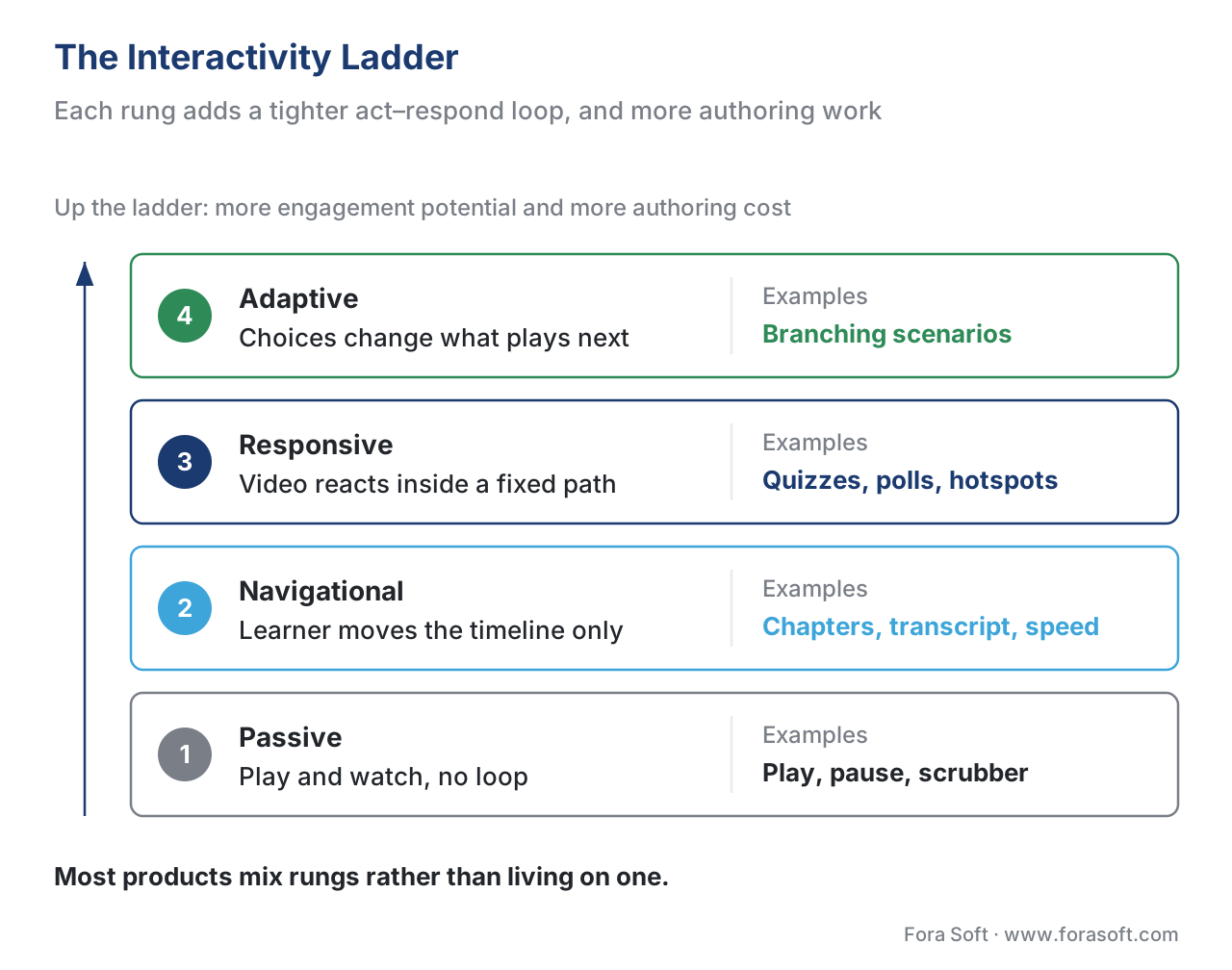 Figure 1. The interactivity ladder. Each rung adds a tighter act–respond loop — and more authoring effort. Most products mix rungs rather than living on one.
The Building Blocks of Interactive Video
Six interaction types do almost all the work in learning video. Each is covered in depth later in this block; here is what each one is and the job it does.
In-video quizzes and polls are questions that appear at a chosen timestamp and pause playback until the learner responds. A quiz checks knowledge and can gate progress; a poll gathers an opinion with no right answer. This is the single most studied interaction, and as the evidence below shows, the one with the strongest effect on learning.
Hotspots and overlays turn part of the frame into something the learner can click — a labelled region on a diagram, a button that opens a resource, a timed card with extra detail. They add a spatial layer to a medium that is otherwise only temporal, letting the learner explore the picture, not just the timeline.
Branching scenarios let a choice change the path. At a decision point the learner picks an option and the video jumps to the matching segment — the choose-your-own-adventure of learning video, used heavily for soft-skills and compliance practice where consequences need to feel real.
Notes, bookmarks, and annotations are learner-generated layers: a timestamped note, a saved position to return to, a highlight shared with a cohort. They shift the learner from consumer to author of their own study material.
Chapters and interactive transcripts make the video navigable and findable. Chapter markers expose the structure; a transcript synced to the video lets the learner read, click a line to jump there, and search the words.
In-video search extends that: type a term and land on the second it is spoken. For a long catalogue this is the difference between a video library and a searchable knowledge base.
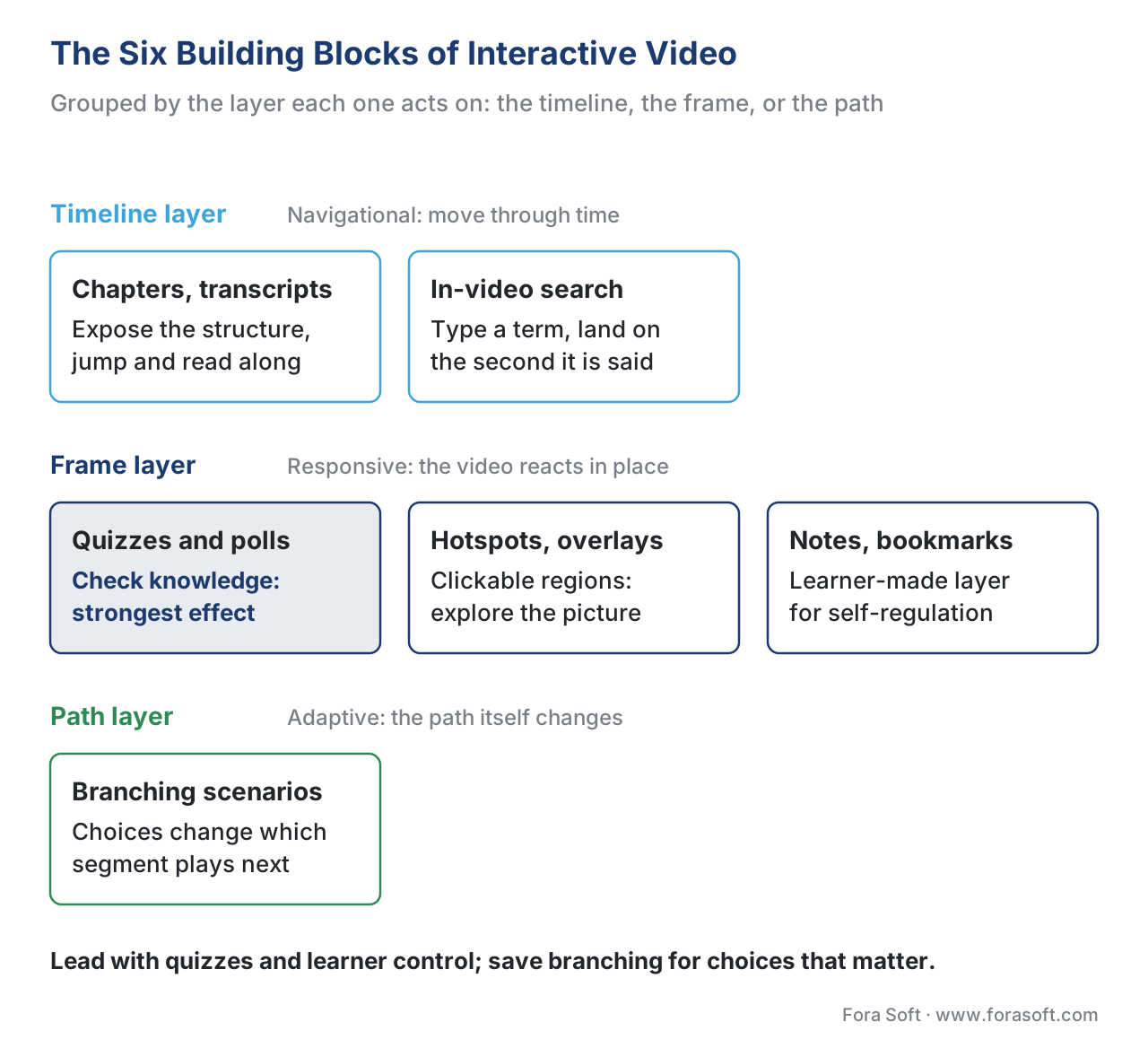 Figure 2. The six building blocks, grouped by the layer they act on — the timeline, the frame, or the path.
Why Interactivity Raises Engagement — The Evidence
The engagement case is not a hunch. It rests on a well-known result about attention and a body of controlled studies about learning.
Start with attention. In 2014 a team at MIT and Harvard, Guo, Kim, and Rubin, analysed 6.9 million video-watching sessions across four edX massive open online courses (MOOCs — free, large-scale online courses). Their finding is the most cited number in this field: median engagement with videos under six minutes was close to 100% — learners watched nearly the whole thing — but engagement fell as videos lengthened, to about 50% for 9-to-12-minute videos and about 20% for 12-to-40-minute videos. The maximum median engagement for a video of any length was six minutes. Put plainly: past six minutes, the average learner has checked out, and every extra minute you add is mostly unwatched.
That is the problem interactivity solves. The reason a six-minute ceiling exists is cognitive: working memory, the small mental workspace where new information is held and processed, has very limited capacity, and a one-way video gives the mind no reason to keep engaging it. Cognitive load theory, articulated by John Sweller, splits the effort a lesson demands into three parts — intrinsic load (the inherent difficulty of the topic), extraneous load (effort wasted on poor design), and germane load (the productive effort of actually building understanding). Passive video tends to let germane load drift toward zero; the learner can watch without thinking. An interaction forces germane load back up: a question at minute four makes the mind retrieve what it just saw, which both resets attention and strengthens memory.
The learning evidence backs this directly. In a 2013 study published in PNAS, Szpunar and colleagues interrupted short lecture videos with questions for one group and unrelated arithmetic for another; the questioned group remembered significantly more, reported less mind-wandering, took more notes, and felt less anxious about the final test. Earlier, Zhang and colleagues (2006) showed that learners who could control their movement through a video — review sections, move back — achieved better outcomes and higher satisfaction than learners watching the same video passively. More recent meta-analyses, which pool many studies into one estimate, put numbers on it: active-learning strategies in video produce positive effects on retention (g ≈ 0.33), comprehension (g ≈ 0.28), and transfer — applying knowledge to a new problem (g ≈ 0.43); enhanced interaction features overall land around g ≈ 0.52. An effect size of 0.5 is the gap between an average score and roughly the 69th percentile — large enough for a stakeholder to notice in completion and assessment numbers.
One worked example makes the engagement math concrete. Suppose a 20-minute lecture video carries the median MOOC engagement of about 20%. That means the average learner absorbs roughly four minutes of a twenty-minute investment — sixteen minutes of production effort, mostly unwatched. Split the same content into four five-minute segments, each ending with a two-question check, and you do two things at once: you stay under the six-minute attention ceiling on each segment, and you add four retrieval moments that pull engagement back up. The arithmetic is not exact, but the direction is reliable: shorter plus interactive beats longer plus passive, every time.
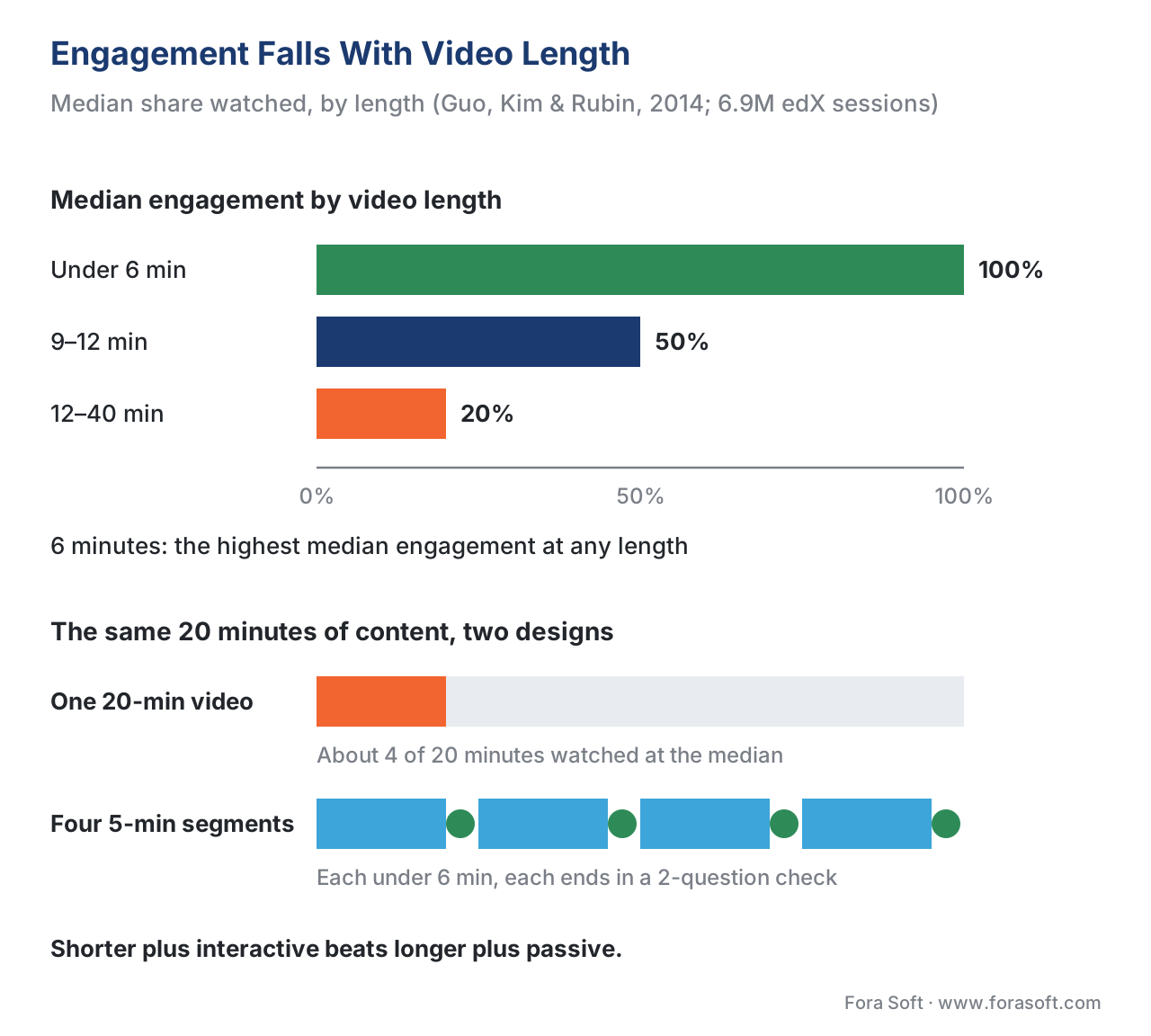 Figure 3. Engagement versus video length (Guo et al., 2014), with interaction points shown as attention resets that interrupt the decline.
Not All Interactivity Is Equal
A roadmap that treats every interaction as equally valuable wastes effort. The interactions cluster into three tiers by evidence and cost.
The strongest, best-supported tier is embedded retrieval — quizzes and questions that make the learner recall and apply, followed by immediate feedback. This is where the largest effect sizes come from, and it is moderate to author. The middle tier is learner control — chapters, transcripts, speed, bookmarks. The effect on raw test scores is smaller, but it is cheap to add, improves satisfaction and accessibility, and helps learners self-regulate. The high-cost tier is branching — powerful for decision-practice and realism, but expensive to author and to track because the content tree multiplies. Branching earns its cost in specific cases (compliance scenarios, sales role-play) and is overkill for a straight explainer.
| Interaction type | Layer | Learning effect | Authoring cost | Standards / tracking |
|---|---|---|---|---|
| In-video quiz / poll | Responsive | High (retrieval + feedback) | Moderate | xAPI (answered), SCORM interaction, cmi5 |
| Hotspot / overlay | Responsive (spatial) | Medium | Moderate | xAPI (interacted) |
| Branching scenario | Adaptive | High for decision skills | High | xAPI (per-path statements) |
| Notes / bookmarks | Learner layer | Indirect (self-regulation) | Low–moderate | App data; optional xAPI |
| Chapters / transcript | Navigational | Medium (control + access) | Low | xAPI (seeked); WCAG benefit |
| In-video search | Navigational | Findability | Moderate | App data + transcript index |
Table 1. The interaction types mapped to effect, cost, and how each is tracked. Tinted cells mark the highest-leverage, lowest-cost moves.
The design rule that follows: lead with embedded questions and learner control, because they give the most learning per dollar, and reserve branching for the moments where a choice genuinely matters.
Interactivity Is Also How You Measure Learning
Here is the part teams underrate. The same act–respond loop that raises engagement is also the only way to know what a learner actually did. A passive video reports one fact — was it played — and even "played 100%" is just a position event, not proof of learning. Every interaction, by contrast, is a measurable signal.
The standard that captures these signals for video is the xAPI Video Profile, a community specification published by ADL (Advanced Distributed Learning, the US body that maintains the xAPI standard). It defines a small, agreed vocabulary of video events: initialized when the player loads, played, paused, seeked when the learner jumps, and completed. Each event becomes an xAPI statement — a short record shaped like a sentence, "actor – verb – object," such as "Maria – seeked – Module 3 at 02:14." Quiz interactions add answered statements carrying the question and whether the response was correct. Those statements flow into a Learning Record Store (LRS) — the database that holds xAPI statements — where they become analytics: drop-off points, re-watched segments, question success rates.
This is why interactivity and measurement are the same investment. Build the quiz and you get both the engagement lift and the evidence that it worked. The companion article Tracking video with the xAPI Video Profile covers the statement design in depth; for the standards landscape behind it see SCORM vs xAPI vs cmi5 vs LTI.
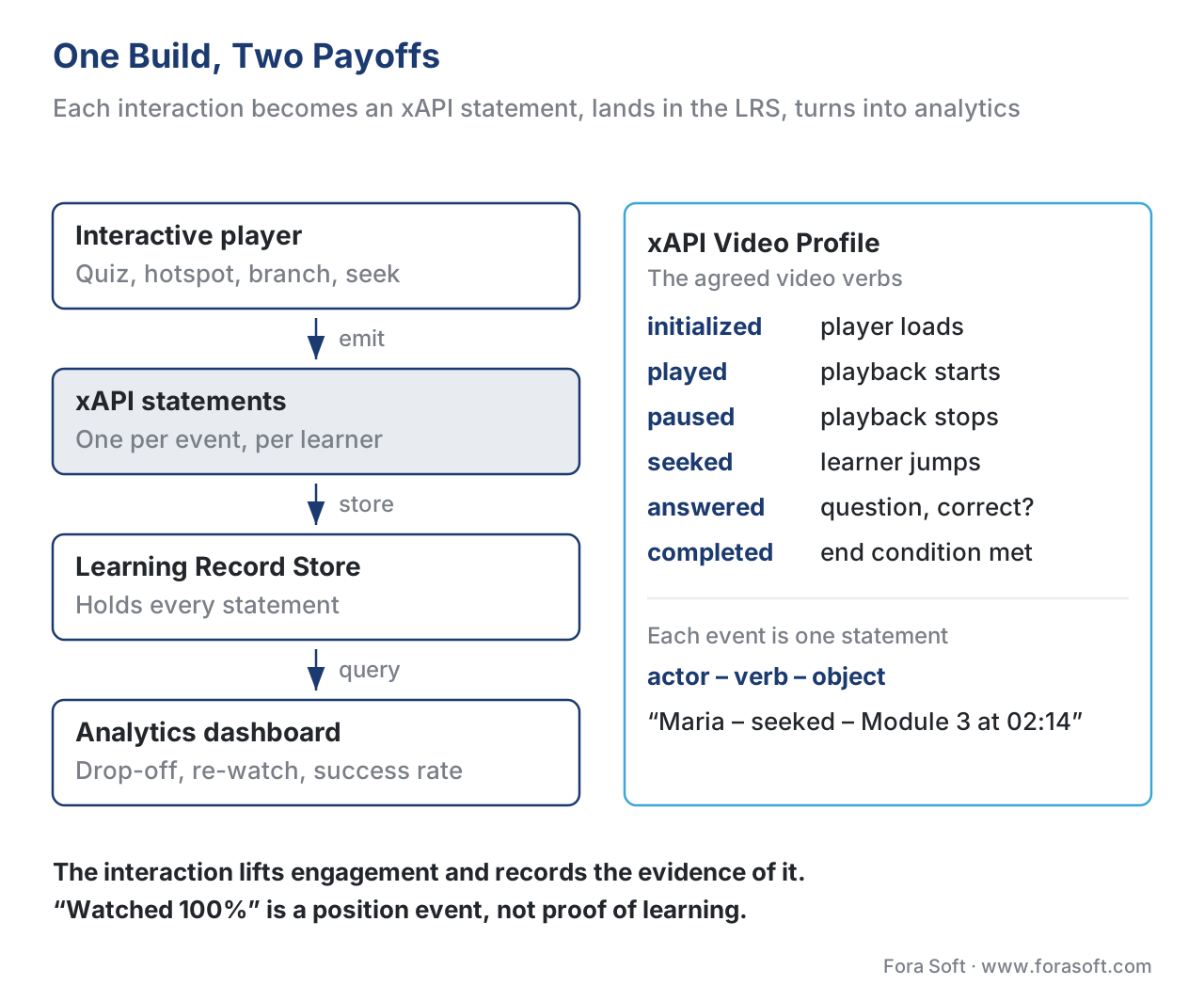 Figure 4. Each interaction becomes an xAPI statement, lands in the LRS, and turns into analytics — engagement and measurement from one build.
A Common Mistake: "Watched 100%" Is Not "Learned"
The most expensive misconception in interactive video is treating a watch-completion bar as a learning outcome. A learner can leave a video playing in a background tab, scrub to the end, and trip the "100% watched" flag having absorbed nothing. Worse, some teams wire course completion to that flag and report it to a compliance auditor as evidence of training — a claim the data does not support.
The fix is to separate three different facts and track them separately. Watched is a position event — useful for engagement analytics, meaningless as proof of learning. Completed should be defined by the design — for an interactive video, "answered the embedded checks," not "reached the last second." Mastered is higher still — passed the assessment at a threshold. Interactivity is what lets you measure the second and third instead of guessing from the first. Decide what "complete" means before you build, and make the interaction, not the scrubber, the thing that satisfies it.
A second, quieter mistake: bolting interactions onto a long passive video and assuming the problem is solved. If the underlying video is 25 minutes of talking head, three quizzes will not rescue it — you have decorated the attention cliff, not removed it. Segment first to stay under the six-minute ceiling, then make each segment interactive. Order matters.
Accessibility Is Part of "Interactive"
An interaction that only works with a mouse excludes keyboard and screen-reader users, and in many markets that is not optional. The Web Content Accessibility Guidelines (WCAG 2.1, Level AA, the W3C standard most procurement contracts require) mean every clickable hotspot, quiz, and control must be reachable and operable by keyboard, have a visible focus state, and expose its purpose to assistive technology. Timed overlays must give enough time or be pausable; captions (Success Criterion 1.2.2) and, where relevant, audio description carry the content to learners who cannot hear or see it. The point is not compliance theatre: an interactive video that a public-sector or enterprise buyer cannot certify as accessible is one you cannot sell. Build the accessibility in with the interaction, not after.
Free download: Interactive Video Engagement ChecklistA one-page guide that maps each interaction type to the learning goal it serves, applies the six-minute segmenting rule and the embedded-retrieval evidence, sets the completion-vs-watched distinction, and pre-flights WCAG 2.1 AA and xAPI Video Profile tracking before you build.Where Fora Soft Fits In
The first decision is build versus buy. A content tool such as the open-source H5P lets an instructional designer add quizzes, hotspots, and branching to clips quickly, and it emits xAPI out of the box — the right choice when interactivity is a feature of your content and a host LMS will play it. A custom interactive player is what you build when interactivity, the tracking model, the analytics, and accessibility have to be yours — a branded product, an unusual interaction, video at a scale or a latency a plug-in cannot meet. Fora Soft builds the second kind: custom interactive-video players and the tracking and analytics behind them, drawing on two decades of video-streaming and player engineering across e-learning, OTT, and telemedicine. We help teams decide which interactions are worth building, then build the player, the xAPI wiring, and the dashboards that prove the result.



The handbook
Fora Soft Video Engineering Handbook
We wrote a seven-volume handbook that works through the whole video stack, from the pixel to production, so that an engineer who finishes it can design and build the player an interactive layer sits on. Volume 3 covers players and how they buffer, seek and switch — the ground every quiz pause and hotspot runs on. Volume 2 explains the HLS and DASH segments a branching jump has to land on cleanly, and Volume 1 shows how keyframe placement decides whether a seek or a branch feels instant. Written by Nikolay Sapunov, CEO at Fora Soft.
Which interactions are worth building into your videos?
Tell us who your learners are and what your stakeholders need to see, and we will map the interactions that earn their cost — embedded checks, learner control, branching where a choice matters — to a player, an xAPI tracking plan and a first estimate. 250+ video products shipped since 2005.
See our case studies
Case study
Sprii
Interactivity as the engagement engine: polls, quizzes, countdowns and product overlays on live video keep viewers for 20 minutes against 54 seconds on a static page, with up to 20x higher conversion.
Case study
Scholarly
Quizzes, an interactive whiteboard and homework built into live classes for up to 2,000 students at once, plus recorded lessons over DASH/HLS and an LMS for 15,000+ active users.
Case study
BrainCert
A learning platform where the video is only half the product: WebRTC classrooms, an interactive whiteboard, proctored exams and certificates — 500M+ real-time classroom minutes across 10 datacenters.
What to read next
Interactivity
Branching Scenarios
The adaptive rung: how choose-your-path video is built and tracked.
Interactivity
Hotspots, Overlays, and Clickable Video
Turning part of the frame into something a learner can click.
Engineering
Building an Interactive Video Player
Architecture and trade-offs behind the layer that runs every interaction.
Pedagogy
The Pedagogy of Video
Attention, retention and chunking — the science behind the six-minute rule.
References
- Guo, P. J., Kim, J., & Rubin, R. (2014). How Video Production Affects Student Engagement: An Empirical Study of MOOC Videos. Proceedings of the First ACM Conference on Learning@Scale, 41–50. — The 6.9M-session edX analysis; the six-minute engagement ceiling and engagement-by-length figures. (Tier 5)
- Brame, C. J. (2016). Effective Educational Videos: Principles and Guidelines for Maximizing Student Learning from Video Content. CBE—Life Sciences Education, 15(4). — Cognitive load, segmenting, signaling, weeding, engagement, and active-learning framework. (Tier 5)
- xAPI Video Profile (v1.0.3). ADL Initiative / xAPI Video Community of Practice. — The initialized/played/paused/seeked/completed verbs and the video statement model. (Tier 1)
- Experience API (xAPI) Specification, Version 1.0.3, Part 2: Statements. ADL Initiative. — The actor–verb–object statement model and the Learning Record Store. (Tier 1)
- Web Content Accessibility Guidelines (WCAG) 2.1, Level AA. W3C Recommendation (2018). — Keyboard operability, focus, timing, and Success Criterion 1.2.2 Captions for interactive video controls. (Tier 1)
- Szpunar, K. K., Khan, N. Y., & Schacter, D. L. (2013). Interpolated memory tests reduce mind wandering and improve learning of online lectures. PNAS, 110(16), 6313–6317. — Interpolated questions reduce mind-wandering and improve test performance. (Tier 5)
- Zhang, D., Zhou, L., Briggs, R. O., & Nunamaker, J. F. (2006). Instructional video in e-learning: Assessing the impact of interactive video on learning effectiveness. Information & Management, 43(1), 15–27. — Learner-controlled interactive video improves outcomes and satisfaction. (Tier 5)
- Active learning strategies in video learning: A meta-analysis (2025), Educational Research Review. — Pooled effects on retention (g ≈ 0.33), comprehension (g ≈ 0.28), and transfer (g ≈ 0.43). (Tier 5)
- The effectiveness of enhanced interaction features in educational videos: a meta-analysis (2022). — Overall interaction effect g ≈ 0.52; embedded assessment questions strongest. (Tier 5)
- H5P Interactive Video and xAPI documentation. H5P.org. — What ships in a content tool: embedded questions, image hotspots, branching, and xAPI event emission. (Tier 4)
Per §4.3.2, where a tooling source (Tier 4, H5P) described tracking behaviour, standards claims follow the ADL xAPI Video Profile and xAPI 1.0.3 spec, not the vendor docs.
