


Why This Matters
If you are an L&D director, an EdTech founder, or a product manager, branching video is the format your stakeholders ask for when they want training to "feel real" — and the one most likely to blow a budget. It is the right tool for teaching judgment: handling an angry customer, running a safety check, making a clinical call. But a branching scenario with thirty filmed endings can cost ten times a straight lecture and teach no more than a well-designed three-branch one. This article gives you the vocabulary to scope branching correctly — to know what you are buying, where the cost hides, how the learner's path gets tracked, and when a simpler interactive video would do the same job for a fraction of the price. It is the high-effort companion to In-player quizzes and polls, which covers the simplest interactive element; branching is the most expensive one.
First, What a Branching Scenario Actually Is
Start with the everyday version. Think of a choose-your-own-adventure book: you read a page, reach a decision ("to open the door, turn to page 42; to walk away, turn to page 58"), and the story you experience depends on what you pick. A branching scenario is that idea built from video. The learner watches a short clip that sets up a situation, the video pauses and offers a choice, and the clip that plays next is the consequence of that choice. Pick well and the situation improves; pick badly and you see it go wrong — safely, on screen, where a mistake costs nothing.
The reason this is worth doing comes from how skills are actually learned. Watching someone handle a difficult conversation transfers knowledge; making the call yourself and feeling the consequence builds skill. Education writers call this scenario-based learning, and it is most valuable exactly where rote procedure fails: judgment calls, soft skills, and situations too dangerous or too sensitive to rehearse live. A branching scenario lets a learner practice the decision, not just recall the policy.
It helps to name the shape every good scenario follows, because it is the same shape screenwriters use: setup (the situation that mirrors the learner's real world), confrontation (the problem that forces a choice), and resolution (what happens as a result). Keep the setup simple and obviously fictional, make each confrontation turn on one teaching point, and let the resolution show the consequence rather than tell the learner they were right or wrong. That "show, don't tell" feedback is what makes the format teach instead of quiz.
The Node-and-Edge Model: How a Branching Scenario Is Built
To build or buy one, you need the model underneath the story. Every branching scenario is a graph — a structure made of two things only: nodes and edges.
A node is a single piece of content the learner sees: one video segment, a question, or an ending screen. Think of it as one page of the adventure book. An edge is a connection from one node to another, triggered by a choice: "if the learner picks de-escalate, go to node 7." The learner's journey through the scenario is simply a path along these edges from a start node to an ending node.
This node-and-edge view is not academic — it is exactly how authoring tools represent the scenario on screen, and exactly what your tracking system records. The free, open-source tool H5P, whose Branching Scenario content type is the most common way teams build these, lets authors "structure the content as a tree with multiple branches and endings," where any choice "may be set to lead to any other node within the interactivity tree structure." That last detail matters: edges can point backward or sideways, not just forward, which turns a simple tree into a more general graph and is where both power and complexity come from.
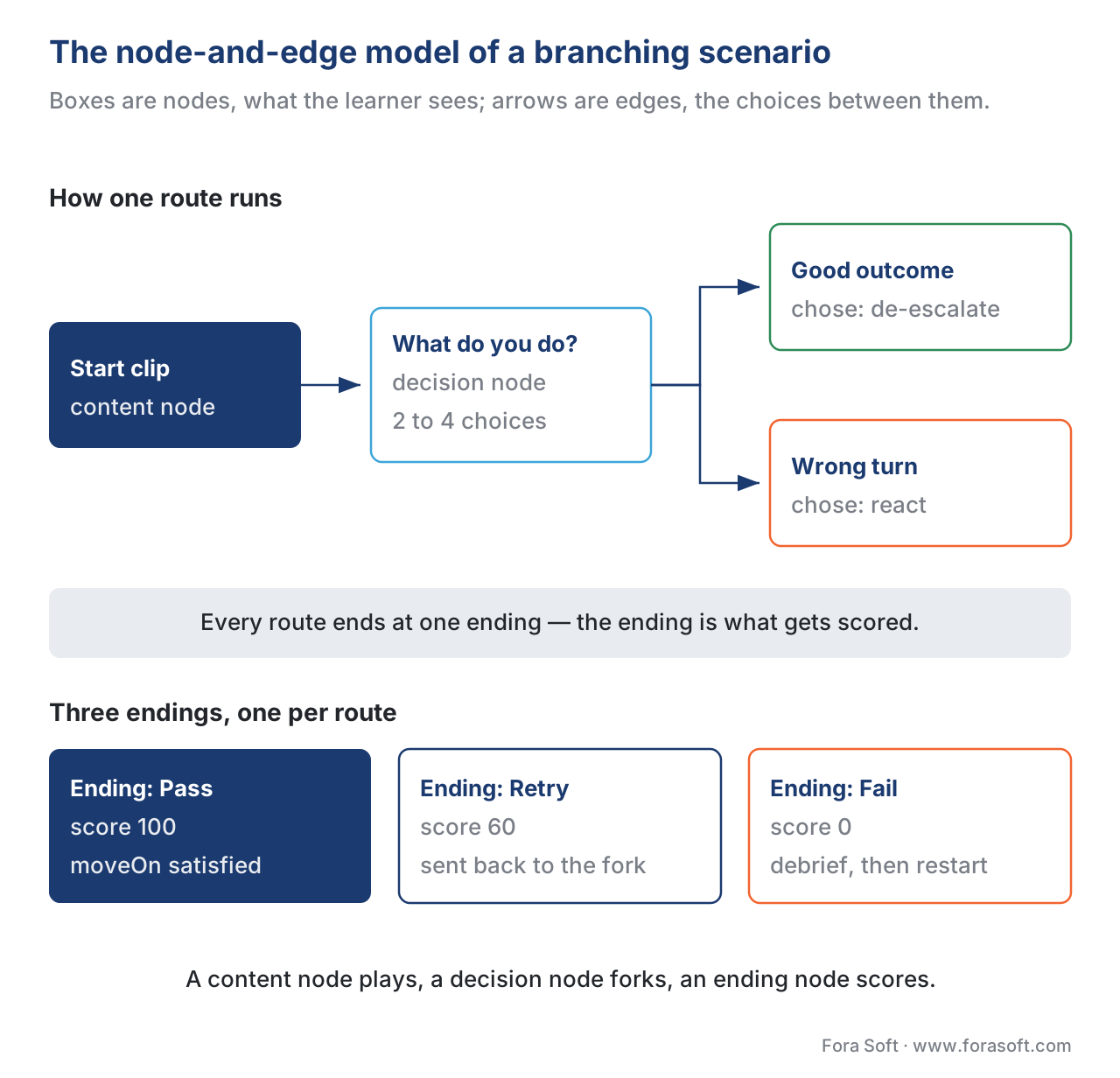 Figure 1. The node-and-edge model. Boxes are nodes (video segments, decisions, endings); arrows are edges (the choices that connect them). The learner's path is one route from start to an ending.
Three node types do almost all the work. A content node plays a video segment and then either continues automatically or presents a choice. A decision node is the fork — the pause that asks "what do you do?" and offers two to four options, each an edge to a different node. An ending node closes a path and usually carries a score or a debrief. Keep the vocabulary straight and the rest of the design — and the tracking — falls into place.
The Hard Part: Branching Cost Grows Faster Than You Think
Here is the trap that sinks branching projects. Every decision point multiplies the content you must produce, and multiplication compounds.
Walk the arithmetic out loud. Suppose every decision offers 3 choices, and after each choice the learner hits another decision. One decision needs 3 consequence clips. If each of those leads to another 3-way decision, that is 3 × 3 = 9 clips at the second level. A third level is 3 × 3 × 3 = 27. The general formula is:
clips at depth D = (choices per decision) ^ D
So a 3-choice scenario that is 4 decisions deep, if you film a unique path for every combination, needs 3⁴ = 81 distinct endings and well over a hundred video segments to reach them. This is the combinatorial explosion: the count grows exponentially with depth, and "modestly sized" scenarios become impossible to film. A linear lesson of the same length is a handful of clips. The branching version, fully expanded, can be a hundred.
No one films 81 endings. The craft of branching design is almost entirely about controlling this explosion without killing the learning. Three techniques do it.
The first is the gold path (sometimes called the critical path): you fully produce the one ideal route through the scenario, plus the most instructive wrong turns, and you stop there. Most branches that a real learner would rarely take are never built. The second is re-merging: after a wrong choice and its consequence, the path loops back to a shared node rather than spawning its own private sub-tree. Re-merging collapses the exponential back toward linear — the same dozen consequence clips get reused across many paths. The third is pruning by depth: cap the scenario at two or three decisions. Research and practice agree that the learning value of a fourth or fifth consecutive branch rarely justifies its exponential cost.
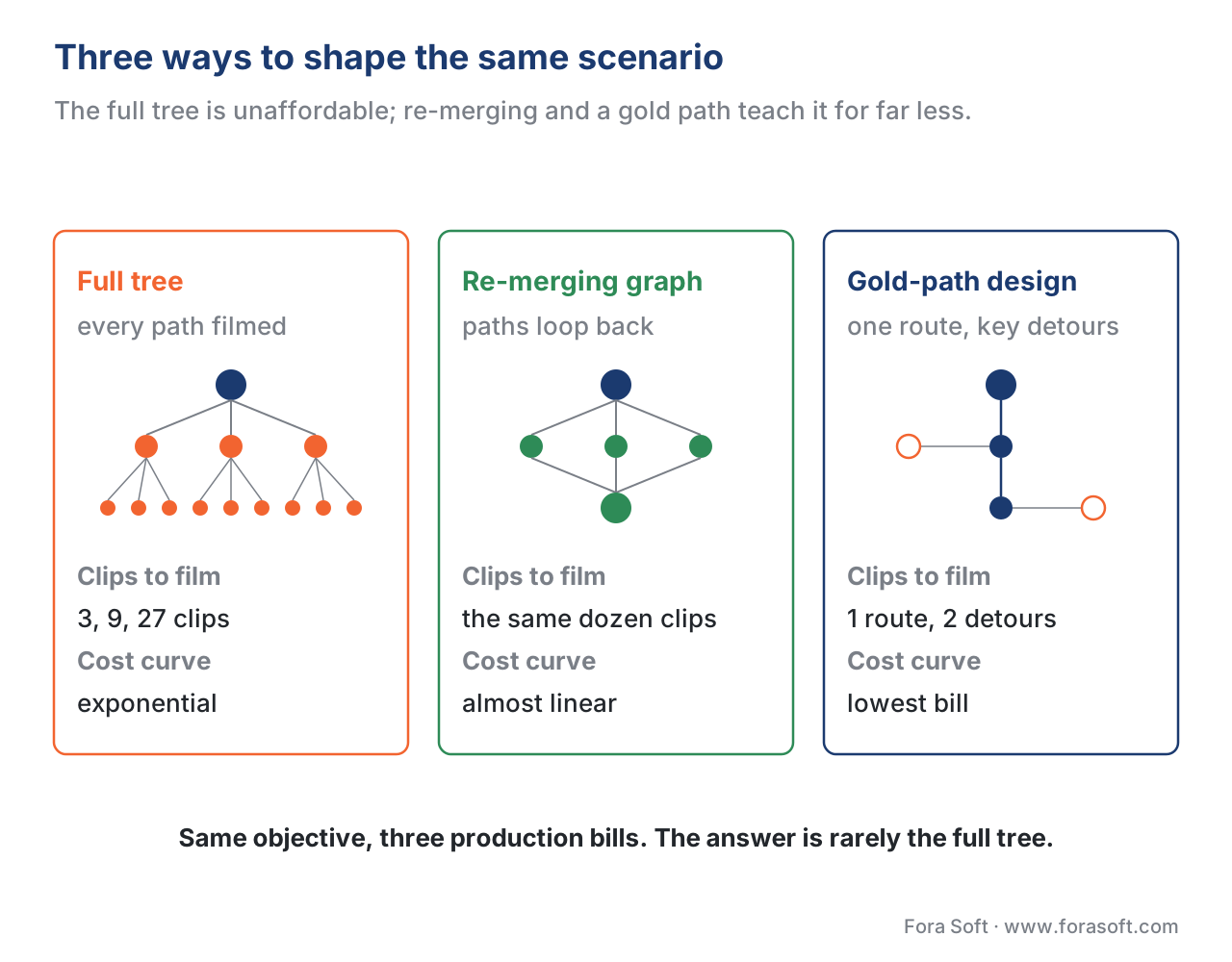 Figure 2. Three ways to shape the same scenario. The full tree is unaffordable; re-merging and a gold-path design deliver most of the learning at a fraction of the production cost.
The chart below makes the stakes concrete: the unbounded tree (orange) is the bill no one can pay; the re-merged design (green) is what actually ships.
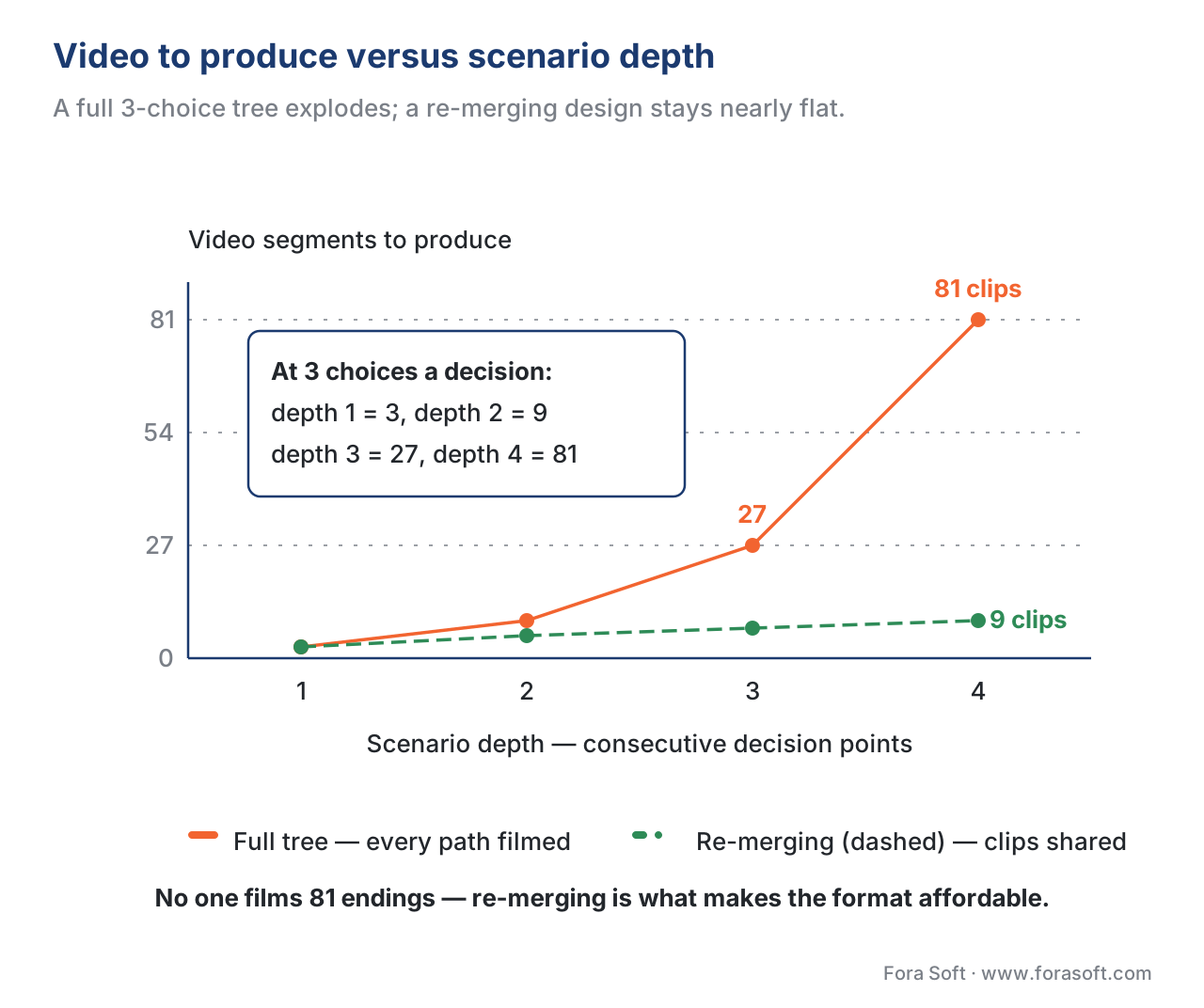 Figure 3. Segments to produce versus depth. A full 3-choice tree explodes (3, 9, 27, 81…); a re-merging design grows almost linearly because consequence clips are shared.
Authoring: Storyboard the Graph Before Anyone Films
The most expensive mistake in branching is filming before the graph is agreed. Video is the costly asset; once it is shot, restructuring the scenario means reshooting. So the work order is fixed: design the graph first, on paper or in a lightweight tool, and validate it with the subject-matter expert before a camera is switched on.
The standard low-cost prototyping tool is Twine, a free, open-source editor built for non-linear stories that exports to plain HTML. Teams use it to write and click-test the entire decision structure — every node, every edge, every ending — using nothing but text. Because it is free and fast, you can throw away three versions before committing. Christy Tucker and Cathy Moore, two widely followed instructional-design writers, both teach this prototype-in-Twine-first discipline precisely because it de-risks the expensive video stage.
When the graph is validated, you move to a production tool. The honest build-vs-buy picture looks like this:
| Tool | What it is | Branching depth | Standards support | Indicative cost (2026) |
|---|---|---|---|---|
| Twine | Open-source story prototyper | Unlimited (text) | Export only; add xAPI manually | Free |
| H5P Branching Scenario | Open-source web content type | Tree + re-merge to any node | xAPI (scores + path); SCORM/LTI via host | Free (self-host) / hosted plans |
| BranchTrack | Hosted scenario simulator | Deep, visual editor | xAPI / SCORM export | ~$1,000/yr (10 scenarios) to ~$4,000/yr |
| Articulate Storyline | Desktop authoring suite | Deep, full control | SCORM 1.2/2004, xAPI, cmi5 | Per-seat subscription |
| Elucidat | Enterprise authoring at scale | Moderate (speed over depth) | SCORM, xAPI | ~$1,650/user/yr (Growth) |
| Custom build | Your own player + graph engine | Whatever you design | Whatever you implement | Project cost; full control |
Table 1. Branching authoring options. The "standards support" column is what lets the scenario be tracked by an LMS or Learning Record Store — a clickable scenario that emits nothing is invisible to your reporting.
The pattern to notice: free and low-cost tools (Twine, H5P) cover most needs and are where you should start. You move to a paid authoring suite or a custom build when you need deeper control, tighter brand and player integration, or tracking the off-the-shelf tools cannot give you. That is the build-vs-buy line, and it is the same line this whole section keeps returning to.
State Tracking: Remembering Where the Learner Is
A branching scenario has a property a linear video does not: the learner is somewhere specific in a graph, and they got there by a specific route. Capturing that is state tracking, and it does two jobs. First, resume: a learner who closes the tab at node 9 should reopen at node 9, not start over — abandoning a 20-minute scenario and being forced to restart is a reliable way to make learners quit. Second, scoring: which ending the learner reached, and which choices led there, is the result you report.
The mechanism is a standard called the Experience API (xAPI) — think of it as a way for the player to write short sentences about what the learner did into a database. Each sentence is an xAPI statement in the form actor – verb – object: "Maria – chose – de-escalate." Those statements are sent to a Learning Record Store (LRS), the database that holds them (the xAPI specification, version 1.0.3, defines both the statement structure and the LRS). When a learner makes a choice, the player emits a statement; the sequence of those statements is the learner's path.
For the resume job, xAPI provides a separate, purpose-built mechanism: the State Resource (xAPI 1.0.3, Part 3). It lets the player store a small document — "current node: 9, path so far: [1,4,7,9]" — keyed to the learner and the activity, then read it back on the next visit to drop them exactly where they left off. Using the State Resource for resume data, and statements for the permanent record, keeps the two concerns cleanly separated.
If the scenario is launched inside a Learning Management System (LMS) using cmi5 — the modern profile that lets xAPI content launch from an LMS the way SCORM does — there is one more rule worth knowing. cmi5 defines a moveOn property that tells the LMS what counts as "done": the allowed values are Passed, Completed, CompletedAndPassed, CompletedOrPassed, and NotApplicable (cmi5 specification, section 13.1.4). For a branching scenario, this is how you make "reached a passing ending" mean "the learner may move on" — a far more honest completion signal than "watched to the last second."
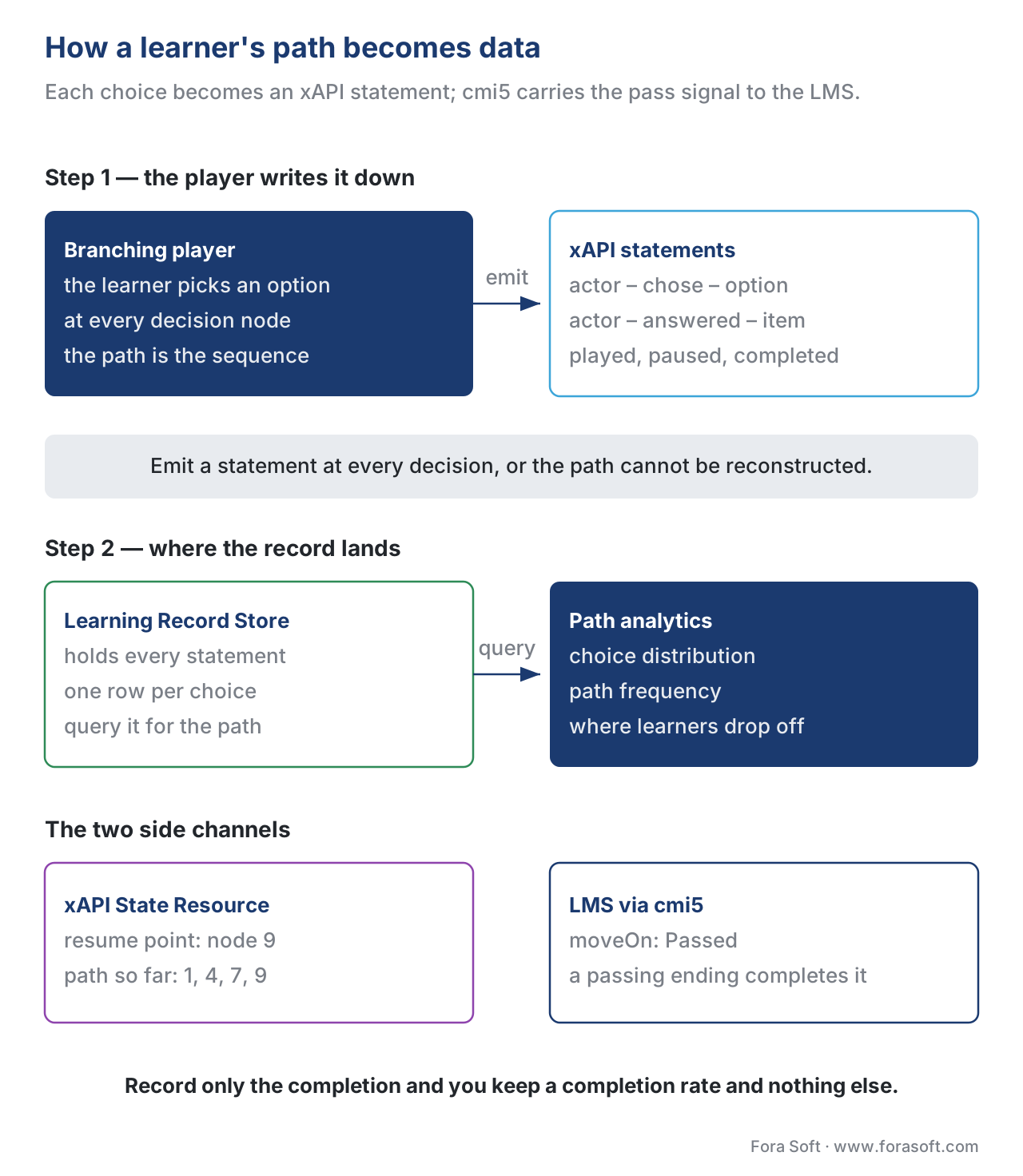 Figure 4. How a path becomes data. Each choice emits an xAPI statement to the Learning Record Store; the State Resource remembers the resume point; cmi5 carries the pass/complete signal to the LMS.
A note on the video itself: each clip in the scenario is still a video, so you can also track within a clip — played, paused, sought, completed — using the xAPI Video Profile (the community profile maintained by ADL, version 1.0.3), which defines exactly those verbs. You rarely need that level of detail for branching, where the choice matters more than the scrub position, but it is there when a clip's internal engagement is part of what you want to measure. For the full treatment, see Tracking video with xAPI.
Path Analytics: Seeing Which Routes Learners Take
Once choices are statements in a Learning Record Store, you can answer the question branching exists to answer: what do learners actually decide? This is path analytics, and it is the payoff that justifies the format's cost.
Three views do most of the work. A choice-distribution view shows, at each decision node, the percentage of learners who picked each option — a node where 80% choose the wrong answer is either a great teaching moment or a badly written question, and the data tells you which. A path-frequency view shows the most-travelled routes from start to ending, which reveals whether your expensive branches are ever visited (often they are not — evidence to prune them next time). A drop-off view shows where learners abandon, which is usually a sign of a confusing decision or a path that runs too long.
Crucially, these analytics are only as good as the statements you emit. If the player records "scenario completed" but not the individual choices, you get a completion rate and nothing else — no choice distribution, no path frequency, no way to improve the design. The discipline is to emit a statement at every decision, with the chosen option in the result, so the path is fully reconstructable. The analytics layer that consumes these statements is covered in Learning analytics; this article's job is to make sure the events exist to analyze.
A Common Mistake: Confusing Motion With Learning
The pitfall that recurs in branching projects is treating interactivity as proof of learning. A scenario where every choice leads to praise, or where the "wrong" answer is obvious from the wording, generates clicks and completions and teaches nothing. Worse, it costs branching-scale money to do it.
The fix is design discipline, not technology. Make wrong choices genuinely plausible — the kind a real, well-meaning person would make. Let consequences sting a little, then teach through them rather than flashing "incorrect." And measure the right thing: not "did the learner finish," but "did the choice distribution shift toward the better answer on a second attempt, or on a later scenario." A branching scenario that does not change behavior is an expensive video that happens to have buttons. Tie completion to a passing ending (via cmi5 moveOn), not to the scrubber reaching the end, and you at least force the learner to navigate to a good outcome.
When Branching Is Worth the Cost
Because branching is the most expensive interactive format, the build-vs-buy question starts earlier than usual: should you branch at all? Lead with the trade-off, then the build.
Branching earns its cost when the learning objective is a judgment the learner must practice under realistic conditions — a manager handling a harassment complaint, a nurse triaging a patient, a salesperson reading a hesitant buyer — and when getting it wrong in real life is costly or dangerous. In those cases the safe rehearsal of a consequential decision is worth real production money, and a simpler format genuinely cannot do the job.
Branching is not worth it when the objective is knowledge transfer (a policy, a process, a product fact), when a single correct procedure exists with no judgment involved, or when budget forces a choice between one polished branching scenario and ten solid straight lessons that cover ten times the curriculum. In those cases, an in-player quiz or clickable hotspots deliver most of the engagement at a fraction of the cost. The honest default is: branch rarely, branch shallow, and reuse clips aggressively.
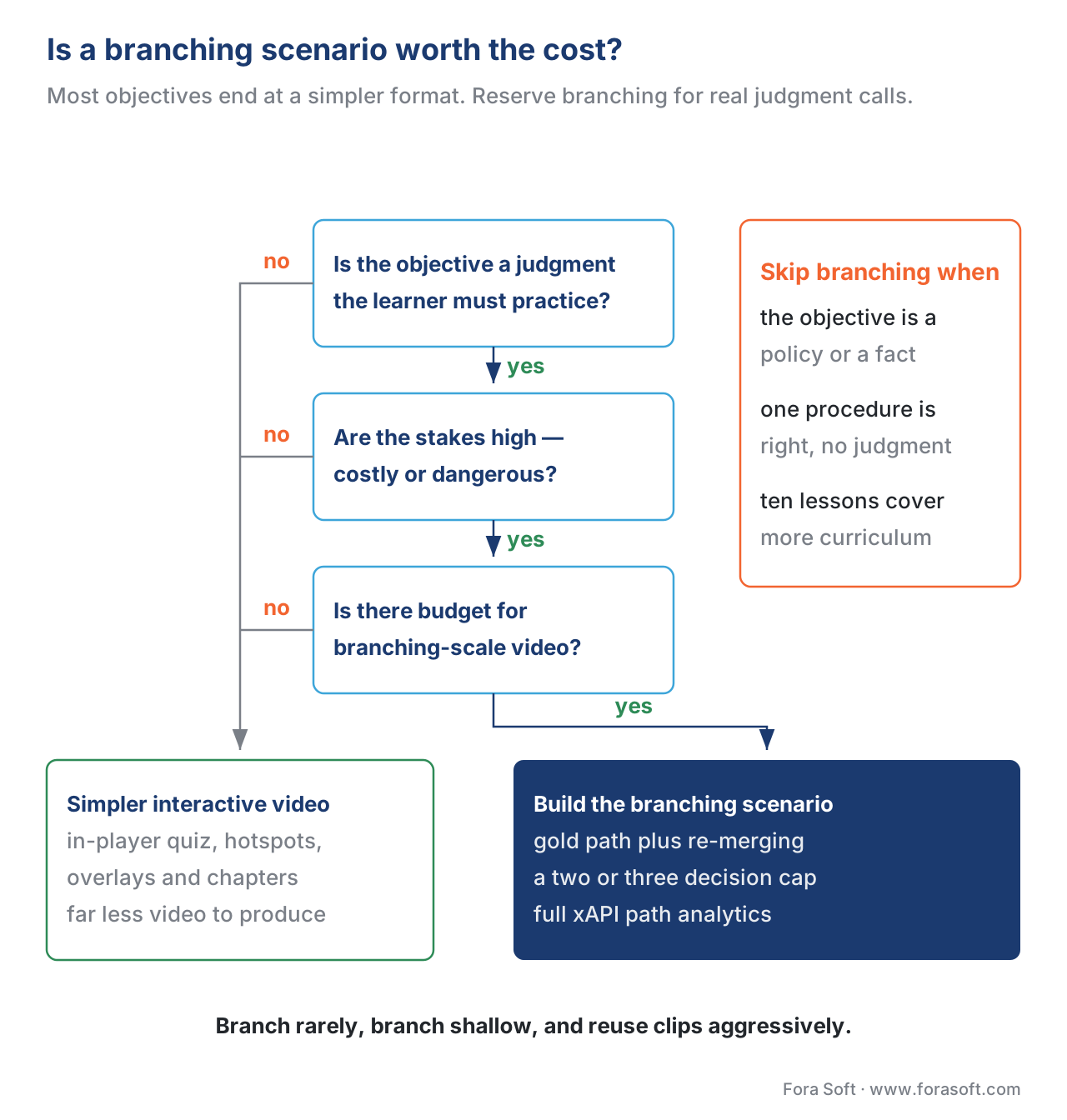 Figure 5. A quick test for whether branching earns its cost. Most learning objectives end at a simpler, cheaper interactive format; reserve branching for consequential judgment.
To make that decision concrete, download the design worksheet below — it walks the graph, the gold path, the re-merge plan, the tracking checklist, and the build-vs-buy test in one page.
Download the branching scenario design worksheet (PDF)
Free download: Branching Scenario Design WorksheetA one-page worksheet to plan the graph, control production cost with a gold path, re-merging and a depth cap, wire the xAPI and cmi5 tracking, and run the build-vs-buy test before anyone films.Where Fora Soft Fits In
Fora Soft has built interactive and streaming video products since 2005, and branching video sits at the intersection of two things we do daily: custom video players and the tracking layer that turns playback into learning data. Teams come to us when an off-the-shelf authoring tool cannot give them the player control, the branded experience, or the analytics depth they need — when the choice is no longer "which tool to buy" but "what to build." We help scope that honestly: often the right answer is H5P or a hosted tool, and we will say so; when a custom branching engine with full xAPI path analytics is genuinely warranted, we build it. The same team works across e-learning, video conferencing, OTT, telemedicine, and AR/VR, so the player and tracking patterns are battle-tested.



The handbook
Fora Soft Video Engineering Handbook
We wrote a seven-volume series that takes the whole video stack apart across 9,000+ pages — encoding, delivery, audio and AI. Volume 3 is the one to start with for a branching scenario: it covers the player itself — how it buffers, how it switches sources without a visible stall, trick play, subtitles, and the QoE monitoring that tells you what the learner actually got when the next clip loaded. Volume 1 prices the library you have to encode, and volume 2 covers the packaging and transport that make an instant jump to the next node possible. Work through them and you can specify and build a branching engine yourself rather than judging one from a vendor demo. Written by Nikolay Sapunov, CEO at Fora Soft.
Scoping a branching scenario and unsure what it will really cost?
Tell us the judgment you need learners to practice, how deep you think the scenario goes, and what your LMS expects back — and we will come back with the graph we would actually film, the clip count a gold path plus re-merging brings it down to, and the xAPI statements your analytics need. 250+ video products shipped since 2005.
See our case studies
Case study
VALT
A recording and observation platform for medical simulation labs, law-enforcement interviews and child advocacy centres — 770+ organizations, 50,000+ users. The judgment-under-pressure rehearsal branching exists to teach, with annotation and searchable transcripts over every session.
Case study
BrainCert
A WebRTC and HTML5 virtual classroom LMS we built from the ground up: 100K+ customers, 500M+ classroom minutes, 300+ features including proctored exams. What it looks like when the player and the tracking are yours rather than an authoring tool's.
Case study
Scholarly
Sydney's selective-test prep platform: 15,000+ active users, live classes for up to 2,000 students, with quizzes, VOD and a ClickHouse analytics pipeline in one system — the per-interaction event trail path analytics runs on.
What to read next
Architecture
Building an Interactive Video Player
The engine that walks the graph, and what it costs to own it.
Standards
cmi5: The Bridge Between SCORM and xAPI
Where moveOn comes from and how a passing ending completes a course.
Analytics
Learning Analytics: Metrics That Matter
What to do with the path data once every choice is a statement.
Reference design
Interactive Video Reference Design
Branching in its place, next to quizzes, hotspots and chapters.
References
- Experience API (xAPI) Specification, Version 1.0.3, Part 2: Statements (Data) — ADL Initiative. The actor–verb–object statement model and the Learning Record Store used to record each choice. Tier 1. https://github.com/adlnet/xAPI-Spec/blob/master/xAPI-Data.md
- Experience API (xAPI) Specification, Version 1.0.3, Part 3: Communication (State Resource) — ADL Initiative. The State (document) Resource used to store and retrieve resume/bookmark data per learner and activity. Tier 1. https://github.com/adlnet/xAPI-Spec/blob/master/xAPI-Communication.md
- cmi5 Specification (current) — AICC / ADL Initiative. The
moveOnproperty and its values (Passed, Completed, CompletedAndPassed, CompletedOrPassed, NotApplicable), section 13.1.4, and the LMS launch model for xAPI content. Tier 1. https://github.com/AICC/CMI-5_Spec_Current - xAPI Video Profile, Version 1.0.3 — ADL Initiative (authored profiles). The video verbs (initialized, played, paused, seeked, completed) for tracking within a clip. Tier 1. https://github.com/adlnet/xapi-authored-profiles/blob/master/video/v1.0.3/video.jsonld
- SCORM 2004 4th Edition — Sequencing and Navigation — ADL Initiative. "Simple sequencing" rules used to implement branching inside an LMS, and the rationale for why cmi5 deliberately omits sequencing. Tier 1. https://adlnet.gov/projects/scorm/
- SCORM vs cmi5 Comparison — The cmi5 Project (AICC/ADL). cmi5 vs SCORM data model, content launch, distributed content, and the moveOn criteria. Tier 2. https://aicc.github.io/CMI-5_Spec_Current/SCORM/
- Branching Scenario (content type) and authoring documentation — H5P / H5P Group. Tree structure with multiple branches and endings, choices that may lead to any node, scoring per ending or by points, and xAPI emission of scores and path. Tier 4. https://h5p.org/branching-scenario
- When Should You Use Branching Video Scenarios for eLearning? — Bill Brandon, The Learning Guild. Scenario-based learning, the setup/confrontation/resolution structure, "show don't tell" feedback, and prototyping tools. Tier 5. https://www.learningguild.com/articles/when-should-you-use-branching-video-scenarios-for-elearning
- Tools for Building Branching Scenarios — Christy Tucker, Experiencing E-Learning. Prototype-in-Twine-first discipline and a comparison of branching authoring tools. Tier 5. https://christytuckerlearning.com/tools-for-building-branching-scenarios/
- Scenario-based training headquarters / action mapping — Cathy Moore. When to use scenarios, designing realistic wrong choices, and prototyping with Twine. Tier 5. https://blog.cathy-moore.com/scenario-based-training-headquarters/
- Instructional Design and Its Usability for Branching Model as an Educational Strategy — PMC (peer-reviewed). A five-dimension instructional-design framework for branching scenarios. Tier 5. https://www.ncbi.nlm.nih.gov/pmc/articles/PMC10276579/
Where popular sources disagreed with the standards, the standards won: many vendor posts describe branching tools as "tracking everything," but per the xAPI 1.0.3 spec and cmi5 §13.1.4, what is tracked is exactly the statements the content chooses to emit and the moveOn signal it sends — a clickable scenario that emits no per-choice statements records nothing analyzable. That distinction is drawn from the primary specs, not the vendor summaries.
