


Why this matters
If video is the heart of your learning product, the data your player emits is the difference between guessing and knowing. A training lead who can only see "completed: yes" is flying blind; one who can see the exact drop-off second knows which lecture to re-cut. This article is for the L&D director, product manager, or founder deciding how to instrument video, and for the engineer who has to emit the statements correctly the first time. We keep it accurate to the field name and the spec version, but readable from the first line — because getting the statement design wrong is expensive to discover six months and ten million records later. This is the canonical tracking-spec article for the section: the elements that emit these statements and the analytics that consume them are covered separately and linked below.
The problem: "watched" is not one thing
Picture a 20-minute recorded lecture inside a course. With the older packaging standard — the Sharable Content Object Reference Model, called SCORM, explained in SCORM explained — the player can tell the learning system one thing when the video ends: a status field (cmi.core.lesson_status in SCORM 1.2) flips to completed. That is the natural SCORM unit of truth. It answers "did they finish?" and nothing else.
But "watched" hides a dozen real questions. Did the learner watch the whole thing, or scrub to the end to trigger completion? Which thirty seconds did everyone rewind to — the part that is confusing, or the part that is gold? Where did half the class quit? On a teaching video, those answers are the entire point, and a single completion flag throws all of them away.
The standard built to capture them is xAPI, the Experience API, covered in xAPI explained. xAPI records learning as short sentences — "actor, verb, object," like "Maria paused the fire-safety video" — and stores them in a database built for the job, the Learning Record Store (LRS), the notebook those sentences are written into. xAPI on its own is deliberately open: you could invent your own way to describe video. The trouble is that your homemade "video play" and another team's "play video" would never line up in a report. So the community wrote down one shared way to do it.
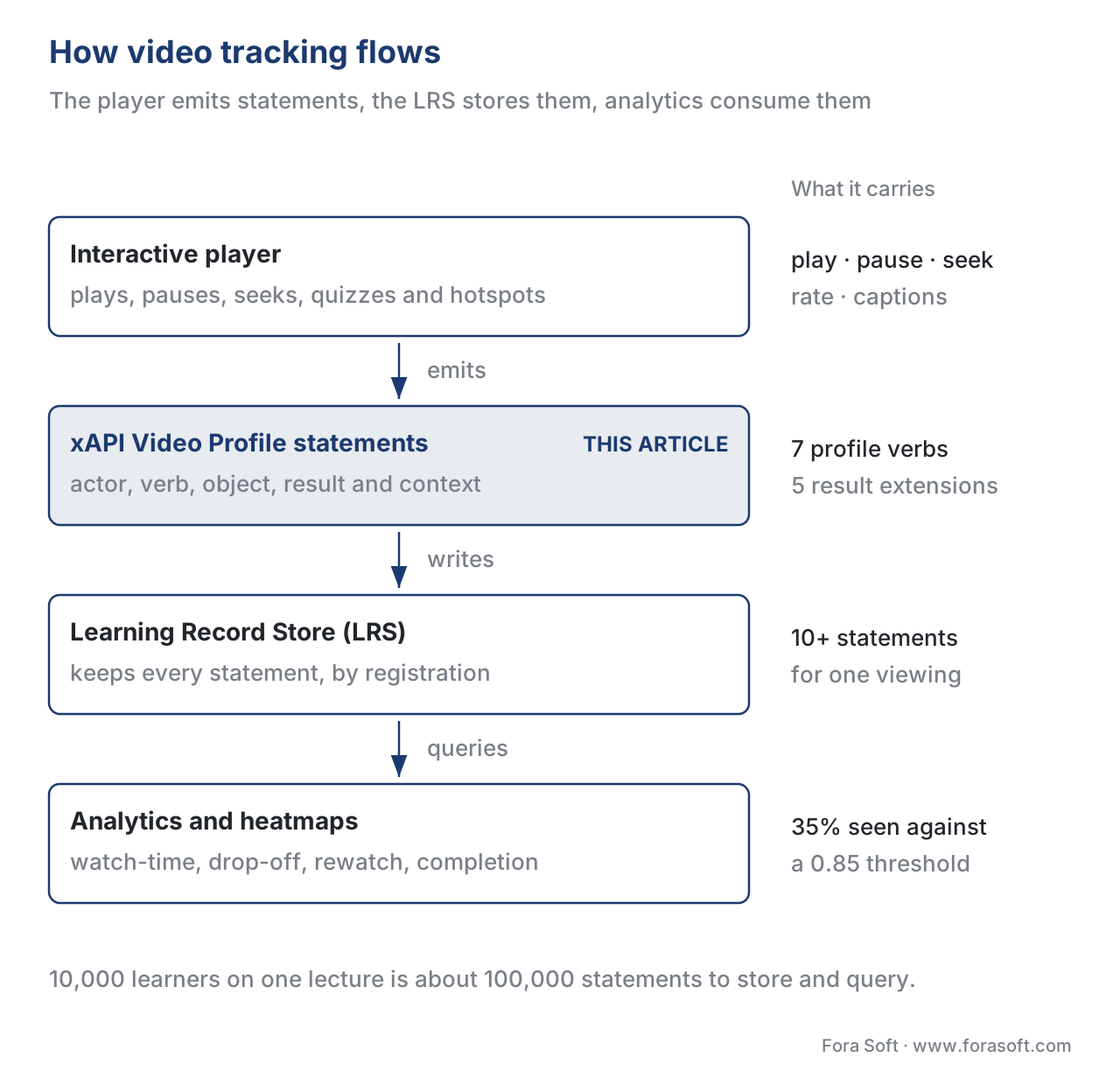 Figure 1. The tracking flow. The player and its interactive elements emit Video Profile statements; the LRS stores them; analytics and heatmaps consume them. This article owns the middle box — the statement design.
What the xAPI Video Profile actually is
A profile, in xAPI terms, is a community-agreed vocabulary for one kind of experience: an agreed list of verbs, an agreed activity type, and agreed extension fields, all named with permanent web addresses so two systems mean the same thing by the same word. The xAPI Video Profile is that vocabulary for video. Its current published version is v1.0.3, identified by the address https://w3id.org/xapi/video/v1.0.3, and it lives in the Advanced Distributed Learning (ADL) Initiative's repository of authored profiles — the same ADL that created SCORM and stewarded xAPI.
Think of the profile as a phrasebook. Without it, every player improvises and the reports are babel. With it, a learner's video history is portable: any conformant LRS, any conformant reporting tool, any second vendor can read your "paused at 54.3 seconds" statement and know exactly what it means. That portability is the whole reason to use the profile instead of rolling your own events.
Two history notes save confusion. Before the profile, the field used an informal "xAPI video recipe" (verbs like play, watch, skip) and the older activity type http://adlnet.gov/expapi/activities/video. You will still meet that pattern in older content and in some platforms — Kaltura, for example, emits played and watched with a cmi5-style progress field rather than the profile. Treat the profile v1.0.3 as the modern target and the recipe as legacy you may need to read but should not build new. And note that the profile is a community/authored profile, not a clause inside the core IEEE xAPI standard (IEEE 9274.1.1-2023); it sits on top of xAPI, using xAPI's rules.
The seven verbs: the actions a player reports
The profile defines seven actions a video player can report. Each is a verb — an action named by a permanent web address paired with a human-readable word — so that "paused" always means the same thing. Three of them are minted by the profile itself (played, paused, seeked); the other four reuse general-purpose verbs ADL already published (initialized, interacted, completed, terminated). The split matters only when you write the addresses, but it is the kind of detail that separates a conformant build from a near-miss.
| Verb | What it means | Canonical verb ID |
|---|---|---|
| initialized | The video is loaded and ready to play | http://adlnet.gov/expapi/verbs/initialized |
| played | The learner pressed play (records the time position) | https://w3id.org/xapi/video/verbs/played |
| paused | The learner paused (records where, and progress so far) | https://w3id.org/xapi/video/verbs/paused |
| seeked | The learner jumped (records from-time and to-time) | https://w3id.org/xapi/video/verbs/seeked |
| interacted | The learner changed a setting (volume, speed, captions, quality) | http://adlnet.gov/expapi/verbs/interacted |
| completed | The learner reached the completion threshold | http://adlnet.gov/expapi/verbs/completed |
| terminated | The learner left the video (records final position and segments) | http://adlnet.gov/expapi/verbs/terminated |
The profile sets a few firm rules about how these are used. The initialized statement MUST be the first statement of a video session, and you MUST NOT send more than one per session — it is the "this session has begun" marker. Everything else hangs off that beginning, tied together by a single identifier we will meet shortly (the registration). Get the opening wrong and the session never closes cleanly in analysis.
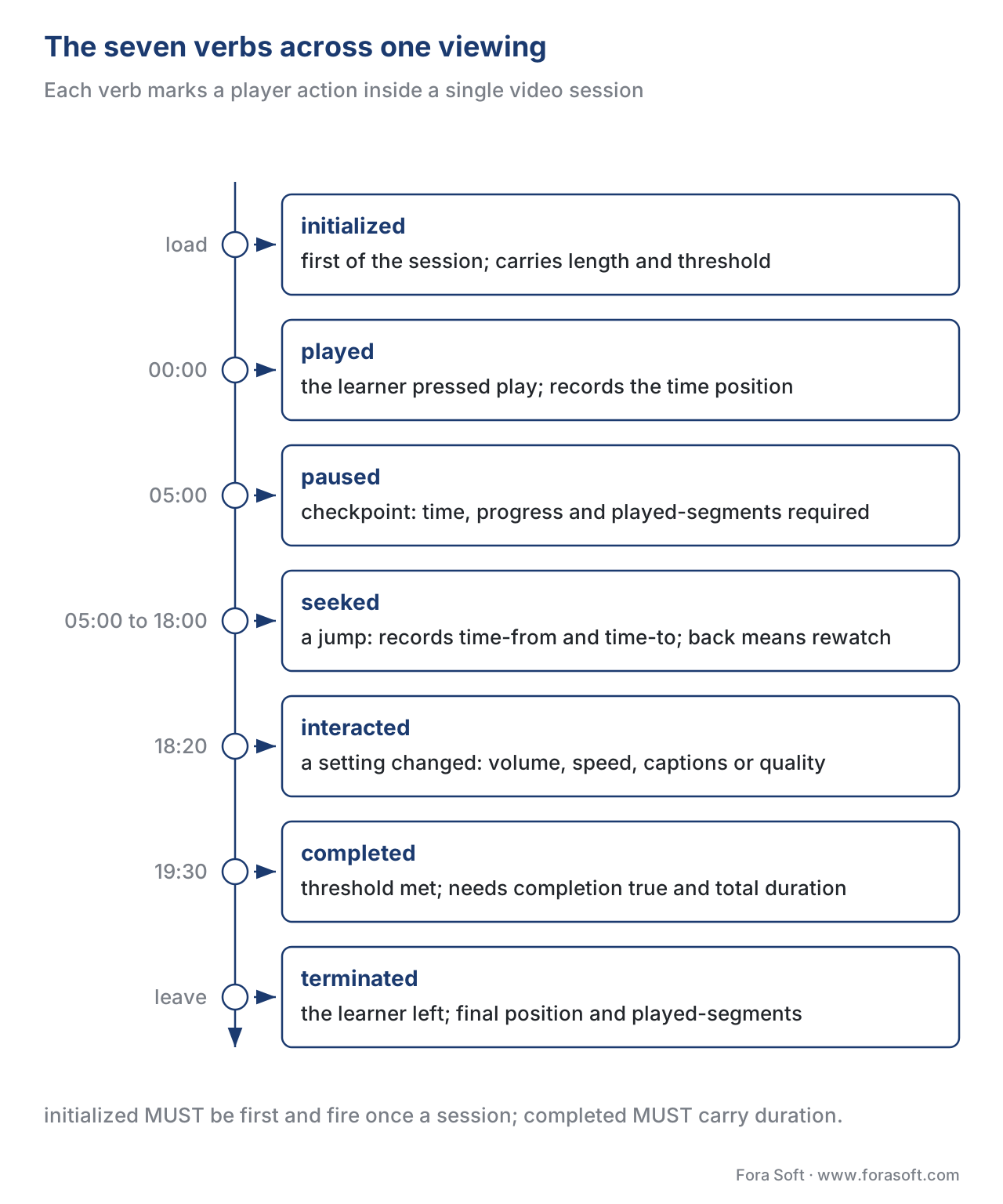 Figure 2. The profile verbs mapped to one viewing session on a timeline — initialized at load, then played/paused/seeked as the learner watches, completed at the threshold, terminated when they leave.
The object: every statement points at the video
In every statement the object — the thing the action was about — is the video itself, and the profile is strict about how you label it. The object's activity type MUST be https://w3id.org/xapi/video/activity-type/video, and the video's identifier MUST be a unique web address you control. This is the single most common place builds go wrong: reuse one activity ID for two different videos, or mint a new ID every time the page loads, and every future report turns to mush. One video, one stable ID, forever.
"object": {
  "id": "https://example.com/videos/fire-safety-intro",
  "definition": {
    "type": "https://w3id.org/xapi/video/activity-type/video",
    "name": { "en-US": "Fire Safety: Introduction" }
  }
}
The result: where the numbers live
The actions tell you what happened; the result tells you the measurements. The profile defines five result fields, all named under https://w3id.org/xapi/video/extensions/.... These are the fields your analytics will actually read.
The first is time — the exact second of the video where the event happened, as a number like 54.3. The second and third are time-from and time-to, which only appear on a seeked statement: they record the jump, "from second 300 to second 1080." (Because a learner can jump backward, time-to may be smaller than time-from — that is a rewind, not an error.)
The fourth is progress — how much of the video the learner has consumed so far, as a decimal from 0 to 1, so 0.35 means 35%. Read that carefully: progress is coverage, the share of unique footage seen, not "how far along the playhead is." A learner who skips to the end has a high playhead position but low progress.
The fifth, and the most powerful, is played-segments — the precise ranges of the video the learner actually watched, in chronological order. It is a string with its own small format: each watched segment is written from.to, segments are separated, and the times match the time/time-from/time-to values elsewhere in the session. A value like 0[.]300[,]1080[.]1140 reads as "watched 0–300 seconds, then 1080–1140 seconds." Played-segments is what turns raw events into a heatmap of attention.
"result": {
  "extensions": {
    "https://w3id.org/xapi/video/extensions/time": 300.0,
    "https://w3id.org/xapi/video/extensions/progress": 0.35,
    "https://w3id.org/xapi/video/extensions/played-segments": "0[.]300[,]1080[.]1140"
  }
}
The context: the settings and the thread that ties a session together
The context carries the surrounding facts: the video's total length, the player settings, and — critically — the identifier that stitches a session together. The profile defines a set of context extensions (also under the w3id.org/xapi/video namespace): length (total seconds), completion-threshold (more on this below), session-id, cc-subtitle-enabled and cc-subtitle-lang (captions on/off and which language), frame-rate, full-screen, quality, screen-size, video-playback-size, speed (playback rate), track (audio/subtitle track), user-agent, and volume.
The thread that ties everything together is the registration — a standard xAPI context field, not a video extension. It is one identifier for one enrolment attempt, and it is the key fact for video analytics: progress, played-segments, and completion are all calculated across every statement that shares the same registration. That is how the system knows the learner's three separate sittings are one attempt at one video, and how "unique seconds watched" can be summed correctly. Choose your registration deliberately — usually one per learner per video attempt — because every aggregate downstream depends on it.
The settings extensions are not busywork. If lots of learners turn captions on for one video, the audio may be hard to follow. If many drop the quality, your delivery is too heavy for their connection — a problem for learning video on weak networks. The settings are themselves engagement signals.
![Diagram titled Anatomy of a paused statement, subtitled who, the action, the video, the measurements and the session thread. A first group labelled The sentence - who did what, to which video - holds three cards: ACTOR, who, Maria Lopez, an identified learner; VERB, what, paused, video/verbs/paused; OBJECT, the video, the lecture, activity-type/video. A second group labelled The payload - what the statement measures and carries - holds two wide panels. RESULT, the measurements: time 300.0, progress 0.35, played-segments 0[.]300[,]1080[.]1140. CONTEXT, the session thread: registration one-per-attempt, length 1200, completion-threshold 0.85, cc-subtitle-enabled true. A closing line reads: reads as, Maria paused the lecture at 5:00, with 35% of it seen.](https://cdn.prod.website-files.com/64e8910adc5a63966a68acea/6ab17b0e27d2c52208bfff60_6ab17a6e643bbe421f2d71ea_02_6-tracking-video-with-xapi-video-profile__03-statement-anatomy.svg) Figure 3. Anatomy of a "paused" Video Profile statement: who, the action, the video (with the video activity type), the measurements in result, and the session thread in context.
Figure 3. Anatomy of a "paused" Video Profile statement: who, the action, the video (with the video activity type), the measurements in result, and the session thread in context.
What each verb must carry
The profile does not leave "what to include" to taste; it specifies the required fields per verb. You do not need to memorize the table, but your player must obey it, because a conformant LRS and reporting tool assume the required fields are present. The essentials:
| Verb | Required result fields | Required context fields |
|---|---|---|
| initialized | — | length; completion-threshold (if not 1) |
| played | time | — |
| paused | time, progress, played-segments | length; completion-threshold (if not 1) |
| seeked | time-from, time-to | — |
| interacted | time (plus any changed setting) | — |
| completed | time, progress, played-segments; completion: true; duration |
length; completion-threshold (if not 1) |
| terminated | time, progress, played-segments | length |
Two rules deserve a callout. On paused, the profile requires the full measurement set — time, progress, and played-segments — because a pause is the natural checkpoint to record cumulative attention. And on completed, the statement MUST set result.completion: true and MUST include result.duration equal to the total time spent consuming the video under the current registration, written in the ISO 8601 duration format (for example PT7M0S for seven minutes). Completion without duration and segments is a half-finished record.
The completion threshold: defining "done" honestly
Here is where teams quietly mislead themselves. Completion-threshold is a context field — a decimal from 0 to 1 — that states the share of the video a learner must consume to earn a "completed." If you omit it, the profile assumes 1.0, meaning 100%. If you set it to anything other than 1, you MUST include it on the initialized, paused, completed, and terminated statements, so the meaning of "completed" is recorded alongside the claim.
This single field forces an honest decision: what does "completed" mean for this video? Must the learner see every second (threshold 1.0)? Is 90% enough to allow for the credits (0.9)? The danger is the unstated assumption. A team that fires completed when the playhead merely reaches the end — without checking coverage — will mark a learner who scrubbed to the last second as "completed" at 5% actually watched. The profile's threshold-plus-progress design exists precisely to stop that. Decide the threshold on purpose, and check progress against it before you celebrate completion.
A worked example: what one 20-minute lecture reveals
Numbers make the gap concrete. Take one 20-minute lecture — 1,200 seconds — and one learner, Maria, with a completion threshold of 0.85 (85%).
Maria opens the video (one initialized statement, carrying length: 1200 and completion-threshold: 0.85). She watches the first five minutes, then jumps ahead, rewatches a tricky minute twice, and stops. Her player emits roughly: one initialized, a handful of played / paused / seeked statements as she moves around, and finally a terminated when she closes the tab. Suppose her played-segments, aggregated across the session under one registration, come to 0–300 seconds, 1,080–1,140 seconds, and 720–780 seconds watched twice.
Now do the coverage math out loud. Played-segments counts unique footage, so the twice-watched minute counts once for coverage:
Unique seconds watched = 300 + 60 + 60 = 420 seconds
Coverage (progress)     = unique seconds ÷ total length
                        = 420 ÷ 1,200
                        = 0.35  → 35% of the video actually seen
Maria's progress is 0.35, well below the 0.85 threshold, so no completed statement fires — correctly. Under SCORM, if the player had marked the lesson complete when the playhead reached the end, the record would say "completed" and hide everything. The Video Profile instead tells the instructor: 35% seen, one section rewatched, dropped off at minute 19. That is an instruction to re-cut the lecture, not a gold star. The arithmetic, not the marketing, is why video-first products adopt the profile.
There is a cost to that richness, and you should size it early. A single attentive viewing can produce ten or more statements. Ten thousand learners through one video is on the order of 100,000 statements; a fifty-video course runs into the millions. Those statements are real infrastructure to store and query — which is why the LRS decision, not the player code, is the part to think hardest about. The analytics that turn this volume into dashboards live in building the learning-analytics pipeline and engagement heatmaps and attention analytics.
![Diagram titled Played-segments: what was really watched, subtitled watched ranges and a rewatch become one string, then unique coverage. A caption reads one 20-minute lecture, 1,200 seconds, completion threshold 0.85. A horizontal bar spans the lecture from 0 to 1,200 seconds with three watched blocks marked on it: a long block at the start, a short block about two-thirds in marked twice, and a short block near the end. Three legend rows follow: 0 to 300 seconds, the first five minutes, 300 unique seconds; 720 to 780 seconds, one minute watched twice, 60 unique seconds; 1080 to 1140 seconds, one minute near the end, 60 unique seconds. A panel then shows the arithmetic: played-segments = 0[.]300[,]720[.]780[,]720[.]780[,]1080[.]1140; unique seconds = 300 + 60 + 60 = 420; progress = 420 divided by 1,200 = 0.35. Below it a second bar on its own scale, labelled coverage, not playhead position, 0 to 100% of unique seconds, is filled to just over a third and marked 35% - 420 of 1,200 unique seconds, with a line at the 0.85 threshold far to the right of the fill. A closing line reads: 35% seen against a 0.85 threshold, no completed statement fires.](https://cdn.prod.website-files.com/64e8910adc5a63966a68acea/6ab17b0e27d2c52208bfff54_6ab17a70c5505a4ea55d3830_02_6-tracking-video-with-xapi-video-profile__04-played-segments.svg) Figure 4. Played-segments in action: watched ranges and a rewatch on the timeline become a single string, and unique coverage works out to 35% — far below a 100% "playhead reached the end" claim.
Figure 4. Played-segments in action: watched ranges and a rewatch on the timeline become a single string, and unique coverage works out to 35% — far below a 100% "playhead reached the end" claim.
How the video approaches compare
The Video Profile is one of several ways teams have tracked video. Here is the honest landscape, with what each can and cannot tell you, and which standard it rests on.
| Approach | What it captures for video | Standards basis | Best when |
|---|---|---|---|
| Raw player analytics | Plays, watch-time, drop-off — in the vendor's own format | None (proprietary) | You only need marketing-style view metrics, not learning records |
| SCORM completion | A single completion/score flag at the end | SCORM 1.2 / 2004 (ADL) | The course must run and report in any existing LMS today |
| Old "xAPI video recipe" | play / watch / skip with start–end points | xAPI 1.0.3, pre-profile (informal) | Reading legacy content; not for new builds |
| xAPI Video Profile v1.0.3 | Per-second play/pause/seek, progress, played-segments, settings | xAPI 1.0.3 / IEEE 9274.1.1; ADL Video Profile | You need real video engagement data and portable records |
| cmi5 + Video Profile | Profile-grade video data, launched and assigned inside an LMS | cmi5 (ADL) wrapping xAPI | You need rich video data and LMS assignment/launch |
The last row is the one teams miss. xAPI and its Video Profile tell you what happened, but they do not define how an LMS launches and assigns the content — that handshake is what cmi5 adds, covered in cmi5 explained. If your video must be an assignable unit inside a learning system and you want profile-grade tracking, the answer is cmi5 carrying Video Profile statements, not one or the other. For the full four-way picture, see SCORM vs xAPI vs cmi5 vs LTI.
Designing statements for the analytics you want later
The profile tells you what is allowed; good design decides what is useful. A few principles save the most pain.
Start from the questions, not the events. If you will be asked "which section do learners rewind to?", you need seeked statements with accurate time-from and time-to, and you need played-segments on the checkpoints. If you will be asked "what is our true completion rate?", you need an honest completion threshold and progress checked against it. Design the statements to answer the report, or you will be re-instrumenting after launch.
Be deliberate about volume. Emitting a statement on every micro-event can drown your LRS; emitting too few loses the heatmap. A common pattern is to record played/paused/seeked at genuine user actions, batch them client-side, and send periodically — while still guaranteeing the required fields on paused, completed, and terminated. The interactive elements that generate these events — quizzes, prompts, hotspots — are covered in in-player quizzes and polls.
Reuse the canonical IDs exactly. The verb and extension addresses in this article are the conformance contract; a typo in a URI silently creates a private dialect that no third-party tool will read. Copy them, do not retype them.
Common mistakes that cost real time
Five pitfalls recur on almost every video-tracking build, and each is cheap to avoid and expensive to find late.
The first is tracking video without the profile. Hand-rolled "played" events that ignore the canonical verbs and extensions will not line up with any standard report or third-party tool. Adopt the profile from day one, even if you only emit a subset.
The second is confusing playhead position with progress. Firing completed because the playhead reached the end — without summing played-segments — marks scrubbers as finished. Always compute coverage and compare it to the completion threshold.
The third is a sloppy registration. If your statements do not share one registration per attempt, the LRS cannot aggregate progress, played-segments, or completion, and your numbers are quietly wrong. Decide the registration before you emit anything.
The fourth is reused or unstable activity IDs. One video must have one permanent ID under a domain you own. New IDs per page load, or one ID shared across videos, corrupt every future report.
The fifth is privacy as an afterthought. Video Profile statements carry a personal identifier (often an email) and a detailed behavioural trail — when someone watched, paused, and quit. Under data-protection law such as the EU's General Data Protection Regulation (GDPR), and Russia's 152-FZ for a Russian audience, that trail is personal data. Decide what you collect, why, and for how long before the first statement is emitted. This is engineering guidance, not legal advice.
Free download: xAPI Video Profile Tracking ChecklistOne page you can hand an engineer: the profile verbs and the session rules, the video object and the measurements (time, progress, played-segments, time-from and time-to), the registration and the completion threshold, end-to-end LRS testing, and a privacy gate to clear before you ship.Where Fora Soft fits in
Fora Soft has built video learning, streaming, conferencing, and interactive-player software since 2005, across 239+ shipped projects. On learning products, the recurring decision we help teams make is exactly this one: keep a SCORM wrapper when a course must run in a client's existing LMS, and add the xAPI Video Profile underneath when the product needs per-second video analytics, accurate completion, or proof of what was actually watched. Our work usually sits at the hybrid point — a custom video and interactive layer that emits clean, conformant Video Profile statements into a standards-based LRS — because that is where the build-vs-buy trade-off lands for video-first learning. We treat the tracking layer as something that must work in production at volume, not just pass a demo.



The handbook
Fora Soft Video Engineering Handbook
We wrote a seven-volume series, 9,000+ pages, that works through the whole video stack from the pixel to production — encoding, delivery, audio, and AI. Every statement in this article starts in a player and ends in a data store, and three volumes carry that further: volume 3 on ABR, CDNs, players, WebRTC and DRM is where the player emitting them is built; volume 7 on real-time pipelines, serving, cost and regulation is where you size the millions of records and meet the privacy rules they fall under; volume 1 on encoding and quality covers the video the learner is watching while all of this is recorded. Work through them and you can design and build a learning-video system end to end. Written by Nikolay Sapunov, CEO at Fora Soft.
Instrumenting learning video and not sure the numbers will hold up?
Tell us what your player emits today and which reports you have to produce, and we will map it onto the Video Profile — verbs, activity IDs, registration, completion threshold — and say what has to change before the first statement ships — 250+ video products shipped since 2005.
See our case studies
Case study
BrainCert
The tracking layer inside a shipping LMS: SCORM and xAPI support, proctored exams and an analytics dashboard, under 500M+ real-time class minutes for 100K+ customers across 10 datacenters at 99.995% uptime.
Case study
Scholarly
What millions of statements need underneath them: a ClickHouse, Prometheus and Grafana stack on Kubernetes behind 15,000+ active users and live classes of up to 2,000 students at once.
Case study
Input Logger
The same idea from the learner's side: an iOS and Android app built entirely on logged activity, turning hours of input into progress graphs and goals a learner acts on.
What to read next
Standards
xAPI (Tin Can) explained: statements, the LRS, and what changed
The base standard this profile sits on, if actor-verb-object and the LRS are still new ground.
Standards
cmi5: the bridge between SCORM and xAPI
The missing handshake: how an LMS launches and assigns video that carries Video Profile statements.
Analytics
Building the learning-analytics pipeline
Where the statements go next: ingestion, storage, and the queries that turn 100,000 records into a report.
Analytics
Engagement heatmaps and attention analytics
What played-segments is for: the picture of where attention holds, drops, and rewinds.
References
- ADL Initiative / xAPI Authored Profiles. xAPI Video Profile, v1.0.3 (
video.jsonld), profile IRIhttps://w3id.org/xapi/video/v1.0.3. https://github.com/adlnet/xapi-authored-profiles/blob/master/video/v1.0.3/video.jsonld (Tier 1 — primary profile spec; canonical verbs, activity type, and extension IRIs.) - xAPI Video Profile — Statement Data Model (community profile of practice documentation, v1.0). https://liveaspankaj.gitbooks.io/xapi-video-profile/content/statement_data_model.html (Tier 1-adjacent — the authored profile's human-readable spec text; verb obligations, result/context extensions, played-segments format, completion-threshold rules. Where it and the adlnet
video.jsonlddiffer, the jsonld governs.) - IEEE. IEEE 9274.1.1-2023 — Standard for Learning Technology: JSON Data Model Format and RESTful Web Service for Learner Experience Data Tracking and Access (xAPI 2.0), October 2023. https://standards.ieee.org/ieee/9274.1.1/7321/ (Tier 1 — the base standard the profile sits on; statement structure, registration, result, context, duration.)
- ADL Initiative. Experience API (xAPI) Specification, Version 1.0.3 (Part Two: Data — statements, actor/verb/object/result/context; activity definitions; ISO 8601 duration). https://github.com/adlnet/xAPI-Spec/blob/master/xAPI.md (Tier 1 — primary specification underlying the profile.)
- ADL Initiative. xAPI Profiles Specification (what a profile is: agreed verbs, activity types, extensions, statement templates, and patterns). https://adlnet.gov/projects/xapi-profile-server/ (Tier 1 — issuing-body definition of profiles.)
- ADL Initiative. xAPI SCORM Profile (how SCORM run-time data maps to xAPI; the completion/lesson-status mapping). https://github.com/adlnet/xAPI-SCORM-Profile/blob/master/xapi-scorm-profile.md (Tier 1 — primary, for the SCORM-to-xAPI completion contrast.)
- Rustici Software. "SCORM Run-Time Reference —
cmi.core.lesson_status/ completion." https://scorm.com/scorm-explained/technical-scorm/run-time/run-time-reference/ (Tier 3 — first-party engineering reference for SCORM's single completion field; the SCORM 1.2 / 2004 RTE books at ADL govern on any conflict.) - Watershed LRS. "How do I author video xAPI statements?" https://support.watershedlrs.com/hc/en-us/articles/360022749332 (Tier 4 — vendor engineering reference for real-world implementations, including the pre-profile recipe and Kaltura's cmi5-progress approach; used only for "what actually ships," never to override the profile.)
Where lower-tier sources (the Watershed guide, scorm.com run-time chart) and the official profile or base standard could differ, the article follows the ADL Video Profile v1.0.3 and IEEE 9274.1.1-2023 — for example, on the canonical verb/extension IRIs, the per-verb required fields, and the played-segments format.
