


This is engineering guidance, not legal advice. Confirm specifics with qualified counsel.
Why this matters
If you build or run a learning product, your dashboard probably reports completion and average watch-time — and both can look healthy while a third of every lesson goes unwatched. A heatmap is the cheapest way to see that, and it changes editing and product decisions you would otherwise make blind. Attention analytics is the more tempting and more dangerous neighbour: the moment a vendor offers to tell you whether learners are "paying attention" via their cameras, you have walked into biometric-data law, and in the EU into an outright prohibition. This article is for the L&D director, product manager, or founder who wants the diagnostic power of a heatmap without buying a lawsuit — read it before you choose an analytics vendor or write a single line of attention-tracking code.
What a heatmap shows that a completion number hides
Start with the gap this whole article exists to close. A completion flag is one bit: reached the end, or did not. Average watch-time is one number: the mean fraction of the video that played. Both are summaries, and like all summaries they hide the shape of what happened. An engagement heatmap — a colour-coded bar laid along the video's timeline, where each slice of time is shaded by how many learners played it and how often — restores that shape. Think of it as footprints in snow across the length of the video: where the crowd walked, the path is worn dark; where nobody went, the snow is untouched.
The colour scale is the whole idea, so define it plainly. A common scheme runs from white through warm colours: white means a section that was never played, green means it was played about once, yellow means it was played roughly twice, and orange-to-red marks the segments learners rewound and watched again and again [1]. Cooler-or-absent is colder engagement; hotter is more replay. That single bar exposes three things a completion number physically cannot.
First, the skipped intro. If the first forty-five seconds are pale while the rest is green, learners are skipping your logo sting and your "in this lesson we will…" preamble. Completion still reports 100%, because they finished; the heatmap shows they started forty-five seconds in.
Second, the drop-off cliff — the point where the colour falls off a shelf, say from green to white at the six-minute mark of a ten-minute video. Average watch-time might read a respectable 70%, but the heatmap tells you where the missing 30% lives: not spread evenly, but a wall everyone hit at the same spot.
Third, and most valuable for learning, the re-watch hotspot: a band of orange or red where learners looped back. In training content a hotspot is ambiguous in an important way — that segment is either the most important part of the lesson or the most confusing one [1][2]. The heatmap flags it; you decide which by pairing it with quiz results, a move we will return to.
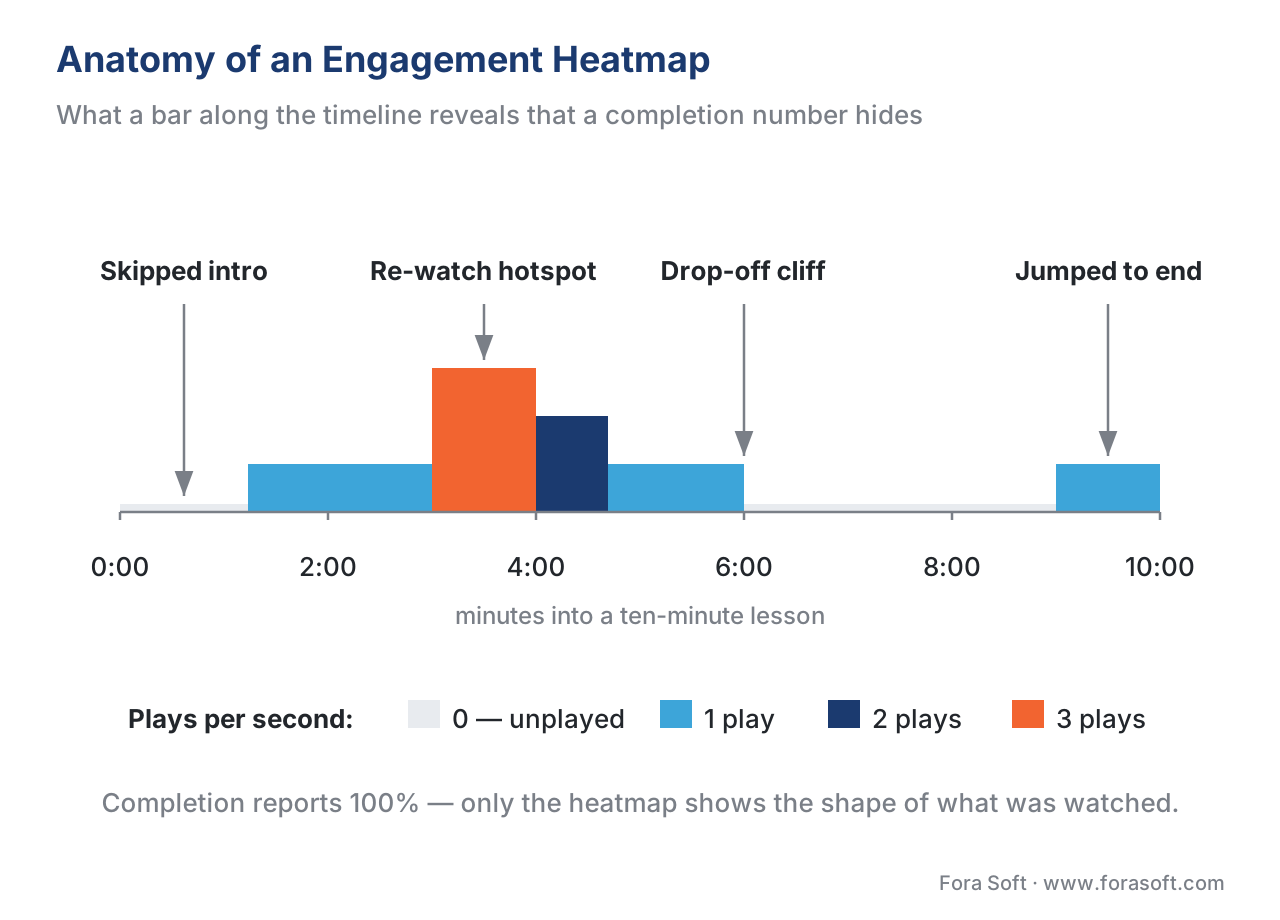 Figure 1. What a heatmap reveals that completion hides. The same lesson that reports "100% complete" shows a skipped intro, a drop-off cliff at six minutes, and a re-watch hotspot — three editing decisions invisible to a single number.
Make the difference concrete with a small piece of arithmetic. Suppose 200 learners are each assigned a 10-minute (600-second) lesson, and the platform reports 100% completion for all of them. Now look at the heatmap built from what they actually played. Seconds 0–45 average 0.3 plays per learner (most skip the intro). Seconds 45–360 average 1.0 (watched once). Seconds 360–600 average only 0.5 (half the cohort drifted after the six-minute mark). The true average fraction watched is roughly (0.3 × 45 + 1.0 × 315 + 0.5 × 240) ÷ 600 = (13.5 + 315 + 120) ÷ 600 ≈ 0.75, or 75% — not the 100% the completion flag implied. The 25-point gap (100 − 75 = 25) is exactly the content the heatmap can point you at and the badge cannot.
Two heatmaps that look identical and mean opposite things
There is a fork here that decides your entire privacy posture, so take it deliberately. The same coloured bar can be built two ways, and they are not interchangeable.
A population heatmap aggregates many learners into one bar for one video. It answers a question about the content: which segments does the crowd skip, abandon, or replay? It needs no learner identity at all — you are summing anonymous play counts. This is the safe, high-value default, and it is the heatmap you should reach for first.
An individual heatmap shows one named learner's plays on one video. It answers a question about the person: did Maria watch the safety briefing, and which parts did she replay? That is far more sensitive, because it is behavioural data tied to an identifiable individual — personal data under the EU's General Data Protection Regulation (GDPR), and very likely an "education record" under the US Family Educational Rights and Privacy Act (FERPA) when it applies [6][7]. Individual heatmaps have legitimate uses (a learner reviewing their own history; a compliance audit that a specific person completed mandatory training), but each use needs a lawful basis, disclosure, and a retention limit. The rule of thumb: default to the population heatmap; collect the individual one only when a named purpose requires it.
How a heatmap is actually built
You do not invent a heatmap format; you aggregate a primitive your player already emits. The cleanest primitive comes from the xAPI Video Profile — the community standard, version 1.0, that defines how a video player reports to a Learning Record Store (the LRS, the database that stores xAPI statements as sentences like "Maria played video 42") [3]. Its key piece of data for our purpose is an extension called played-segments: a compact record of which time ranges a learner actually played during a session, written like 0.000[.]45.300[,]60.000[.]591.200 to mean "played 0–45.3s, then 60–591.2s" [3].
The aggregation is mechanical, which is why it scales. Each viewing session ends with a terminated statement carrying that session's final played-segments value. To build the population heatmap, the analytics layer takes the played-segments from every matching session, lays them all on the same 0-to-duration axis, and counts how many sessions covered each second [3]. Seconds covered by many sessions are hot; seconds covered by few are cold. That count-per-second array is the heatmap; the colours are just a rendering of it.
Here is the one statement that feeds it — a learner pausing partway, with the segments played so far:
{
  "actor": { "mbox": "mailto:learner@example.org", "name": "Sample Learner" },
  "verb": { "id": "https://w3id.org/xapi/video/verbs/paused",
            "display": { "en-US": "paused" } },
  "object": { "id": "https://courses.example.org/video/42" },
  "result": {
    "extensions": {
      "https://w3id.org/xapi/video/extensions/played-segments": "0.000[.]45.300[,]60.000[.]188.900"
    }
  },
  "context": { "registration": "f1e2d3c4-0000-4a5b-8c9d-000000000001" }
}
Two practical notes keep this honest. The statements with the same registration value belong to one viewing attempt, so the LRS can stitch a learner's pauses and resumes into a single coverage record before it aggregates [3]. And the open standards are not the only path: IMS Caliper Analytics (version 1.2, from 1EdTech) models video controls as named media events and can feed the same per-second counts, while a hosted video platform will build the heatmap for you from its own logs — at the cost of owning neither the data nor the schema [4]. The full design of the player-to-LRS tracking layer lives in Tracking Video with xAPI: The Video Profile and What to Capture; here we only need the output, the per-second count.
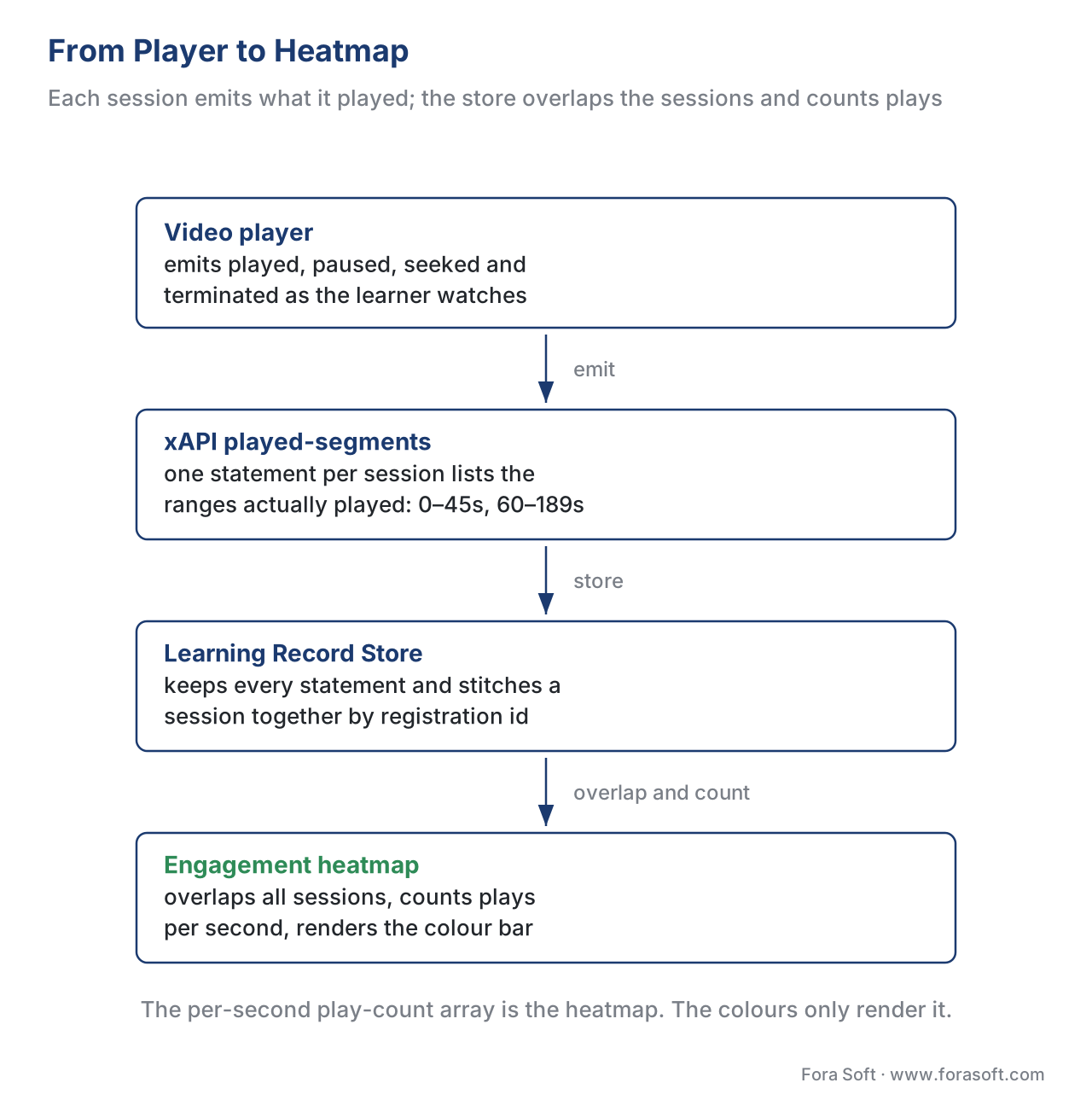 Figure 2. From player to heatmap. Each session emits its played-segments; the LRS overlaps every matching session on one timeline and counts plays per second; that count array becomes the colour bar.
Attention analytics: measuring the mind, not the mouse
A heatmap tells you a segment was played. It cannot tell you a learner was watching — the video can run to the end in a muted background tab while its owner reads email. Attention analytics is the attempt to close that last gap, and it is where teams get into trouble, because "was the learner paying attention?" can be approached two completely different ways with completely different consequences.
The first family is behavioural proxies, and it is the privacy-respecting one. These infer attention from signals the browser already exposes, without any camera. The most useful is the Page Visibility API, a standard web platform feature: when a learner switches tabs or minimises the window, the browser fires a visibilitychange event and sets document.visibilityState to "hidden" [5]. That is a clean, honest signal that the video lost the foreground — and a good player should also pause playback when it happens, which both saves the learner's place and stops you logging watch-time for a tab nobody is looking at. Other proxies in the same family include whether the player is scrolled into the viewport, how long since the last interaction (idle detection), and the cadence of pauses, seeks, and notes covered in Interaction Frequency and Active Learning Signals. A periodic "are you still watching?" prompt is the bluntest proxy of all, and it is honest precisely because the learner knows it is there.
Here is the whole behavioural proxy in a few lines that run in any browser:
// Privacy-respecting attention proxy: no camera, just tab focus.
let hiddenSince = null;
document.addEventListener("visibilitychange", () => {
  if (document.visibilityState === "hidden") {
    hiddenSince = Date.now();
    videoPlayer.pause();              // pause when the tab is backgrounded
  } else if (hiddenSince) {
    const awaySeconds = (Date.now() - hiddenSince) / 1000;
    track("attention_lapse", { awaySeconds }); // log the gap, not the person's face
  }
});
The second family is physiological and biometric: a webcam watching the learner's face and eyes to infer gaze direction, presence, or emotional state. Research shows webcam eye-tracking can estimate where attention falls on a screen, and vendors sell "engagement" or "sentiment" scores built on it [8][9]. The capability is real. The problem is that it collects the most sensitive data a learning product can touch, and — as the next section explains — in education it is now largely off-limits regardless of how good the model is.
The privacy line you cannot cross
This is the part most "engagement analytics" guides skip, and it is the part that will define your build. Attention data sits on a spectrum from clearly fine to clearly prohibited, and three bodies of law draw the lines.
The EU AI Act prohibits emotion recognition in education. The Artificial Intelligence Act (Regulation (EU) 2024/1689) lists, among its banned practices in Article 5, the use of AI systems to infer the emotions of a person in the areas of workplace and education institutions, with a narrow carve-out only for medical or safety reasons [10]. The reasoning is explicit: students and workers sit in a power imbalance that makes this kind of monitoring unacceptable [10]. These prohibitions began applying on 2 February 2025, ahead of the Act's broader entry into application on 2 August 2026 [10]. The practical reading for a learning product: an AI feature that scores whether learners look "engaged," "confused," or "bored" from their faces is not a feature you can ship into the EU education market. Emotion inference is the prohibited line; do not design toward it.
GDPR makes webcam attention data "special category" data. Even where emotion inference is not involved, pointing a camera at a learner to track gaze or presence usually means processing biometric data. Under GDPR Article 9, biometric data used to uniquely identify a person is a special category, and processing it is prohibited unless a specific exception applies — most often the learner's explicit consent [6]. And consent is fragile exactly here: the European Data Protection Board has stressed that consent must be freely given, and in an education or employment relationship the power imbalance can make it invalid — you generally must offer a real, equal alternative for learners who decline [6]. The precedent is concrete: a Swedish school was fined under GDPR for using facial recognition to track student attendance, because consent could not be freely given in that setting [6]. Build attention tracking that needs a camera and you inherit all of this.
FERPA treats engagement data as an education record. In the United States, the behavioural and engagement metrics a learning platform collects about an identifiable student can constitute an "education record" under FERPA, which governs who may see and share it and obliges you to put written agreements in place with the vendors that process it [7]. And US courts have started policing camera-based monitoring directly: in 2022 a federal court held in Ogletree v. Cleveland State University that scanning a student's room over webcam before a remote exam was an unreasonable search under the Fourth Amendment [11]. Camera-in-the-bedroom is not a neutral analytics choice; it is a legal exposure.
Put the three together and the privacy-respecting path is clear, and it is also the cheaper one to build. Prefer the population heatmap over the individual one. Prefer behavioural proxies (tab focus, idle, interaction cadence) over biometric capture. If you have a genuine reason to identify individuals, get a lawful basis, disclose it plainly, minimise what you keep, and set a retention limit. The deeper treatment of consent, biometric law, and proctoring data lives in Proctoring Data, Privacy, and the Legal Landscape and Online Proctoring: Approaches, Trade-offs, and Privacy; the rule for analytics is to stay on the green side of the line by default.
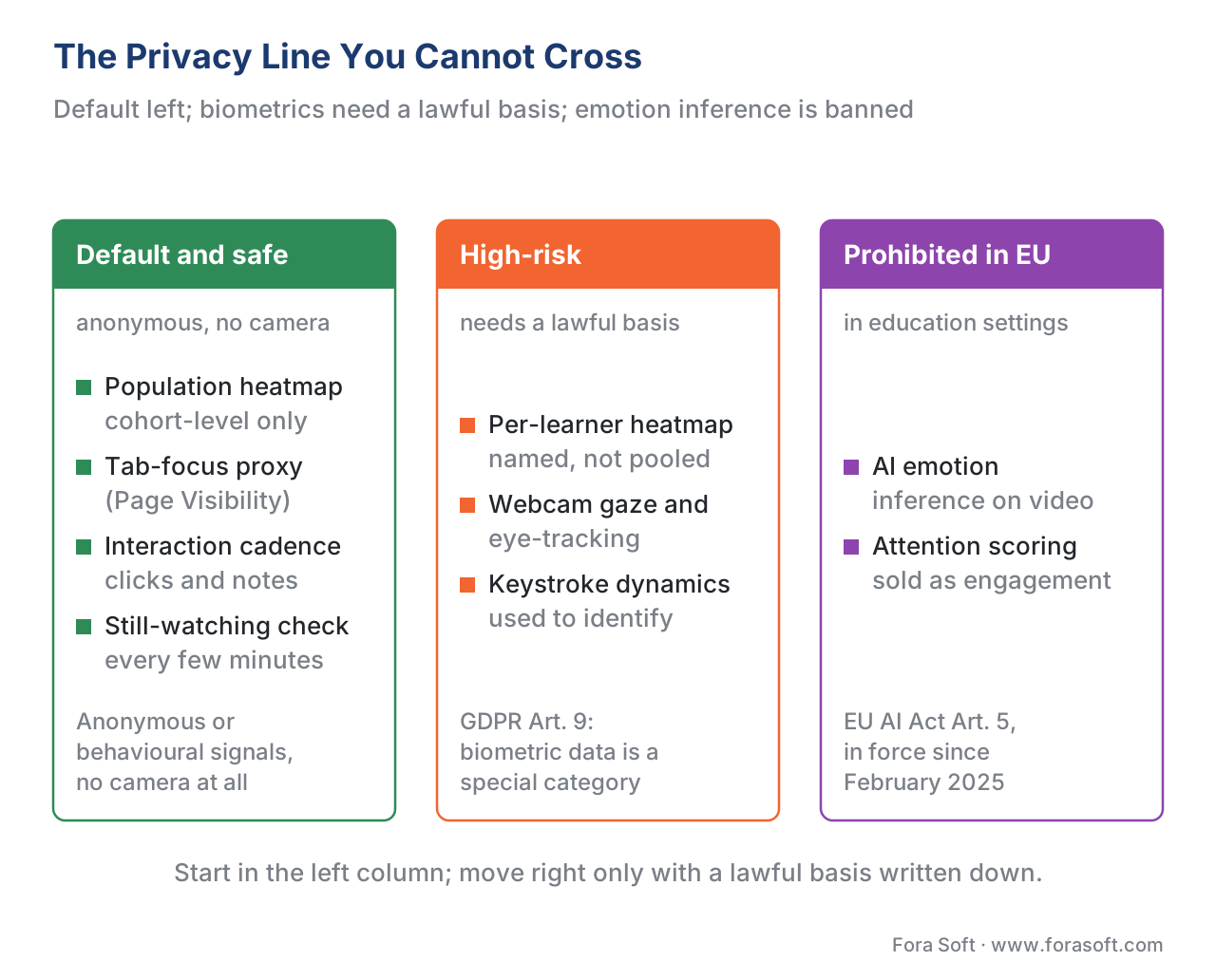 Figure 3. The privacy line. Aggregate heatmaps and behavioural proxies sit safely inside the line; individual biometric capture is high-risk, and AI emotion inference in education is prohibited under EU AI Act Article 5.
Comparing the ways to measure attention
Before you promise a stakeholder an "attention" report, match the method to what it can prove and what it costs you in privacy and law. The richness of the claim is capped by the method, and so is the risk.
| Method | What it captures | Standard / API | Privacy & legal risk |
|---|---|---|---|
| Population engagement heatmap | Which segments a cohort skips, abandons, replays | xAPI Video Profile played-segments; Caliper media events |
Low — anonymous, aggregate [3][4] |
| Watch-time / re-watch per learner | An individual's playback coverage | xAPI Video Profile; SCORM session time | Medium — personal/education record [6][7] |
| Tab-focus / visibility proxy | Whether the player lost the foreground | Page Visibility API (visibilitychange) |
Low — no biometric data [5] |
| Idle / interaction-cadence proxy | Inactivity and active-learning signals | xAPI verbs; client events | Low to medium — behavioural [3] |
| "Are you still watching?" prompt | Confirmed presence at a checkpoint | App-level, no standard needed | Low — overt and consented |
| Webcam gaze / eye-tracking | Where eyes fall, presence on camera | Vendor SDK; biometric capture | High — GDPR Art. 9 special category [6] |
| AI emotion / "engagement" scoring | Inferred emotional state from the face | Vendor AI model | Prohibited in EU education (AI Act Art. 5) [10] |
The reading is blunt. Everything in the top half — aggregate heatmaps and behavioural proxies — gives you most of the diagnostic value at low risk and is built from open standards you control. Everything in the bottom half buys a marginal, contested signal at a steep and rising legal cost. Choosing your method is choosing your risk; the standards-based, aggregate methods are not a compromise, they are the better engineering.
Turning heatmaps and attention signals into action
Analytics earns its keep when it changes something. Map each pattern to a decision and the heatmap becomes a production instrument rather than a wall of colour.
A pale skipped intro says trim it — move the hook to second zero and cut the logo sting. A drop-off cliff at a fixed timestamp is a content defect: open the video there and find what loses people — a slow passage, a hard concept, a missing chapter marker. The fix is often to chunk the lesson, because attention has a known ceiling we will quantify in a moment; chaptering and in-video search help, and are covered in Chaptering, Transcripts, and In-Video Search. A re-watch hotspot is the ambiguous one, and the way to resolve it is to overlay a quiz result: a hotspot next to a question most learners got right marks an important passage worth keeping prominent; a hotspot next to a question most got wrong marks confusion that needs a re-cut [1][2]. A tab-focus lapse clustered at one point says the content stopped holding people there — a stronger signal than watch-time alone, because it captures the moment they looked away.
There is a research-backed reason drop-off and attention lapses cluster where they do. In a 2014 study of 6.9 million video sessions on the edX platform, Guo, Kim, and Rubin found that median engagement time maxed out at about six minutes regardless of the video's length — students rarely stayed past nine minutes, and on videos longer than twelve minutes they engaged with less than a quarter of the content [12]. So when a heatmap shows a cliff around the six-minute mark, you are not looking at bad content so much as a hard limit of attention; the action is to cut the lesson into shorter pieces, the chunking principle detailed in The Pedagogy of Video: Attention, Retention, and Chunking.
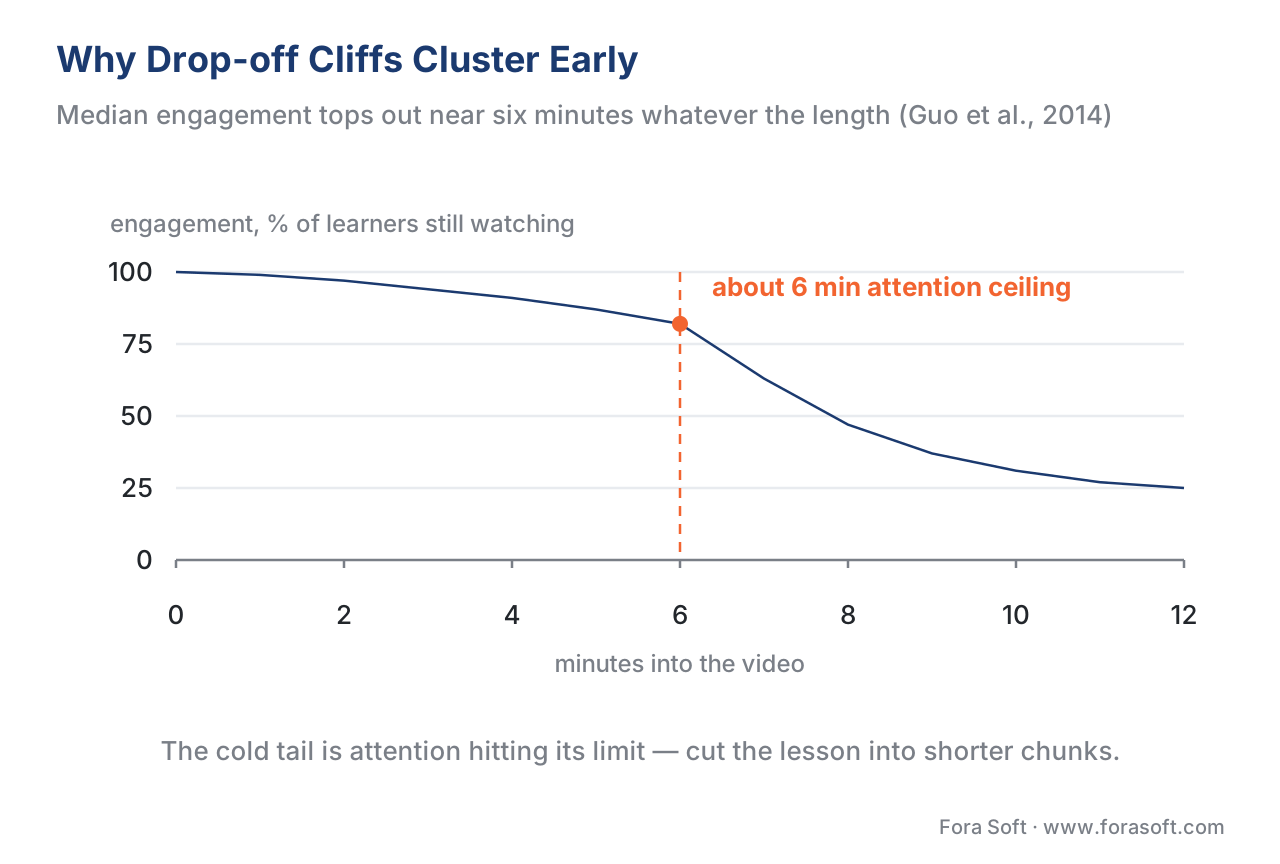 Figure 4. Why cliffs cluster early. Median engagement tops out near six minutes regardless of length (Guo et al., 2014); the heatmap's cold tail on a long video is attention hitting its ceiling, not a flaw in any one second.
Common mistakes
Trusting completion over the heatmap. A 100% badge can sit on top of a skipped intro and an abandoned final third. Read the shape, not just the flag [1].
Treating a re-watch hotspot as automatically good. A hot band means replay, which is either importance or confusion — resolve it with a quiz result before celebrating or editing [1][2].
Collecting individual heatmaps by default. A population heatmap answers most content questions with no identifiable data. Capture per-learner playback only for a named purpose with a lawful basis [6][7].
Buying webcam "engagement" or "emotion" scoring for an education product. In the EU, inferring emotions from learners' faces is prohibited under the AI Act, and webcam biometric capture triggers GDPR Article 9 even where emotion inference is not [10][6].
Confusing "played" with "watched." A heatmap shows playback; a muted background tab still plays. Pair it with a tab-focus proxy via the Page Visibility API before claiming attention [5].
Keeping attention data forever. Behavioural and biometric records carry retention obligations. Decide what you delete, and when, before you collect it [6][7].
Free download: Engagement & Attention Analytics Privacy ChecklistA one-page worksheet that runs from capturing heatmap data with the xAPI Video Profile, through choosing attention proxies that need no camera, to the GDPR, FERPA and EU AI Act lines you have to stay inside before any of it ships.Where Fora Soft fits in
Fora Soft has built video streaming, real-time WebRTC, and interactive-player software since 2005, and in e-learning the analytics question is almost always an instrumentation decision made before any dashboard exists. The build-vs-buy trade-off is usually this: a hosted video platform hands you a heatmap for free but owns your data and stops at the population view, while a custom player emitting the xAPI Video Profile lets you own the per-second data, join it to quiz outcomes, and — crucially — design the privacy posture deliberately rather than inherit a vendor's. We help teams build the aggregate-first, standards-based analytics layer that gets the diagnostic value of heatmaps and behavioural attention proxies while staying on the right side of GDPR, FERPA, and the EU AI Act. The same real-time and interactive-video foundations show up across our conferencing, OTT, telemedicine, and surveillance work.



The handbook
Fora Soft Video Engineering Handbook
We wrote a seven-volume series that takes the whole video stack apart across 9,000+ pages — encoding, delivery, audio and AI — and someone who works through it can design and build the instrumentation a heatmap is drawn from, not just read the chart. Volume 3 sits closest to the work here: players, stall recovery and QoE monitoring, the layer that knows which seconds were really played rather than that the timeline ended. Volume 6 covers the computer-vision and speech models every attention vendor is built on, and volume 7 the real-time serving and the rules around them, the EU AI Act and biometrics included. Written by Nikolay Sapunov, CEO at Fora Soft.
Can you say which seconds of your course were actually watched?
Send us the events your player emits today, where those events land, and the jurisdictions your learners sit in — and we will come back with what it takes to get a per-second heatmap you can trust, which attention signals you can add without a camera, and where the legal line falls for your case. 250+ video products shipped since 2005.
See our case studies
Case study
BrainCert
The first WebRTC and HTML5 virtual-classroom LMS, built from the architecture up with us: 100K+ customers, 500M+ real-time classroom minutes across 10 datacenters, SCORM and xAPI support with an analytics dashboard on top. It is also the compliance case — SOC 2 Type I and II, ISO/IEC 27001, HIPAA and GDPR — which is what deciding the privacy posture before the dashboard looks like in practice.
Case study
Scholarly
Sydney’s selective and scholarship test-prep platform: 15,000+ active users, live classes for up to 2,000 students at once, DASH and HLS playback, and an admin panel whose analytics run on ClickHouse. That column store is the unglamorous half of a heatmap — millions of player events per course, aggregated per second rather than per learner.
Case study
VocalViews
An online market-research marketplace with 1M+ participants and 800K+ verified panelists across 7 countries, used by Samsung, Google and Netflix: video interviews, transcription in 30+ languages and identity checks. Everyone on camera opted in and got paid for it — the difference between measuring people on video and watching them.
What to read next
Standards
Tracking Video With xAPI: The Video Profile and What to Capture
The statement model behind the heatmap: which verbs to send and what played-segments has to contain.
Engagement
Video Engagement: Watch-Time, Drop-Off, and Re-Watch
The three numbers a heatmap resolves into, and what each one is worth on its own.
Privacy
Proctoring Data, Privacy, and the Legal Landscape
The same GDPR, FERPA and AI Act lines, argued where the camera is already switched on.
Analytics
Learning Analytics: The Metrics That Matter and the Ones That Mislead
Where the heatmap sits among the numbers that earn a place on a dashboard.
References
- Wistia. Heatmaps — reading per-viewer and aggregate video engagement. https://support.wistia.com/en/articles/8219083-heatmaps — Tier 6 (vendor documentation). Engagement heatmaps colour each section of a video timeline by play and replay count (unplayed → played once → rewatched), and aggregate views summarise a whole audience; in training, a consistently rewatched section is either the most important or the most confusing part.
- Brame, C. J. (2016). Effective Educational Videos: Principles and Guidelines for Maximizing Student Learning from Video Content. CBE—Life Sciences Education 15(4):es6. https://www.lifescied.org/doi/10.1187/cbe.16-03-0125 — Tier 5 (peer-reviewed). Segmenting, signalling, and interpolated questions manage cognitive load and convert passive watching into engagement; supports reading a re-watch hotspot as a signalling/confusion cue.
- ADL / xAPI Video Community Profile. xAPI Video Profile v1.0 — Statement Data Model (
played,paused,seeked,terminatedverbs;played-segmentsextension). https://github.com/adlnet/xapi-authored-profiles/tree/master/video — Tier 1 (primary profile). Standardises in-video player events;played-segmentsrecords the time ranges played in a session, and overlapping every session's final value on one axis yields the per-second counts behind a heatmap. - IMS Global / 1EdTech. Caliper Analytics 1.2 — Media Profile (
MediaEventactions: started, paused, resumed, jumped to, ended). https://www.imsglobal.org/spec/caliper/v1p2 — Tier 1 (primary standard). Caliper models video controls as named media events, an alternative high-volume clickstream source for per-second engagement aggregation. - MDN Web Docs (Mozilla). Page Visibility API (
document.visibilityState,visibilitychange). https://developer.mozilla.org/en-US/docs/Web/API/Page_Visibility_API — Tier 6 (web-standard reference). Detects when a page is hidden in a background tab or minimised window, the privacy-respecting signal that a video lost the foreground — attention proxy without any camera or biometric data. - European Union. General Data Protection Regulation (GDPR), Regulation (EU) 2016/679 — Article 9 (special categories, incl. biometric data) and EDPB guidance on consent. https://gdpr-info.eu/art-9-gdpr/ — Tier 1 (primary law). Biometric data used to identify a person is a special category whose processing is prohibited absent an exception such as explicit consent; in education/employment the power imbalance can invalidate consent (e.g., the Swedish facial-recognition-in-school fine), and a non-biometric alternative must be offered.
- U.S. Department of Education. Family Educational Rights and Privacy Act (FERPA), 20 U.S.C. § 1232g; 34 CFR Part 99. https://studentprivacy.ed.gov/ — Tier 1 (primary law). Identifiable behavioural/engagement metrics about a student can constitute an "education record," governing disclosure and requiring written agreements with vendors that process the data.
- Robal, T., Zhao, Y., Lofi, C., & Hauff, C. (2018). Webcam-based Attention Tracking in Online Learning: A Feasibility Study. ACM IUI 2018. https://chauff.github.io/documents/publications/iui2018-robal.pdf — Tier 5 (peer-reviewed). Demonstrates webcam-based attention estimation in online learning is feasible — the capability that biometric "attention" vendors build on, and the one constrained by GDPR/AI-Act.
- Characterizing Learners' Complex Attentional States During Online Multimedia Learning Using Eye-tracking, Webcam, and Retrospective recalls (2025). PMC. https://www.ncbi.nlm.nih.gov/pmc/articles/PMC11957737/ — Tier 5 (peer-reviewed). Eye-tracking and webcam signals can characterise attentional states during multimedia learning; underscores both the appeal and the invasiveness of physiological attention measurement.
- European Union. Artificial Intelligence Act, Regulation (EU) 2024/1689 — Article 5 (prohibited practices: emotion inference in workplace and education). https://artificialintelligenceact.eu/article/5/ — Tier 1 (primary law). Prohibits AI systems that infer emotions of a person in workplace and education institutions (narrow medical/safety carve-out); prohibitions apply from 2 February 2025, with the Act broadly applicable from 2 August 2026.
- Ogletree v. Cleveland State University, No. 1:21-cv-00500 (N.D. Ohio, Aug. 22, 2022). https://fpf.org/blog/federal-court-deems-universitys-use-of-room-scans-within-the-home-unconstitutional/ — Tier 3 (court ruling / legal analysis). A public university's webcam room scan before a remote exam was held an unreasonable search under the Fourth Amendment — camera-based monitoring is a legal exposure, not a neutral analytics choice.
- Guo, P. J., Kim, J., & Rubin, R. (2014). How Video Production Affects Student Engagement: An Empirical Study of MOOC Videos. ACM Learning @ Scale. https://up.csail.mit.edu/other-pubs/las2014-pguo-engagement.pdf — Tier 5 (peer-reviewed). Across 6.9M edX sessions, median engagement time maxed out near six minutes regardless of length; longer videos drew under a quarter engagement — the attention ceiling behind early drop-off cliffs.
Where sources disagreed, the official standards and the controlling law were followed. Vendor "engagement analytics" pages [1] describe the heatmap rendering well but treat attention tracking as a pure capability question; this article subordinates that capability to the xAPI Video Profile data model [3] and to the EU AI Act [10], GDPR [6], and FERPA [7], which determine what may lawfully be collected in an education setting.
