


This is engineering guidance, not legal advice. Confirm specifics with qualified counsel.
Why this matters
If you build or run a learning product, watch-time, drop-off, and re-watch are the metrics that tell you which thirty seconds of which video to fix — a precision no completion rate can give you. A completion number says a module is leaking learners; the drop-off curve says they leave at 6:30, and the re-watch spike says they replay the formula at 8:10. That turns a vague "engagement is low" into an editing instruction a content team can act on this week. This article is the video-specific companion to Learning Analytics and to Completion Rate; read it before you promise anyone an "engagement dashboard."
Three numbers, one question: did the video work?
Engagement is a fuzzy word, so pin it to three concrete measurements, each answering a different question about the same video. Average watch-time answers "how much of it did people watch?" The drop-off curve answers "where did they leave?" Re-watch hotspots answer "what did they go back to?" Completion — covered in depth in Completion Rate — answers "did they finish?", and the metric vocabulary itself is defined once in Learning Metrics 101. This article owns the three engagement metrics; together they diagnose content quality in a way a single finish-line number never can.
The reason to separate them is that each points at a different fix. A low average watch-time says the video is too long or front-loads the boring part. A cliff in the drop-off curve says one specific moment fails. A re-watch spike says one specific moment is either gold or confusing. Treat them as one blurry "engagement score" and you lose the instruction; keep them separate and each one tells a content editor exactly what to do.
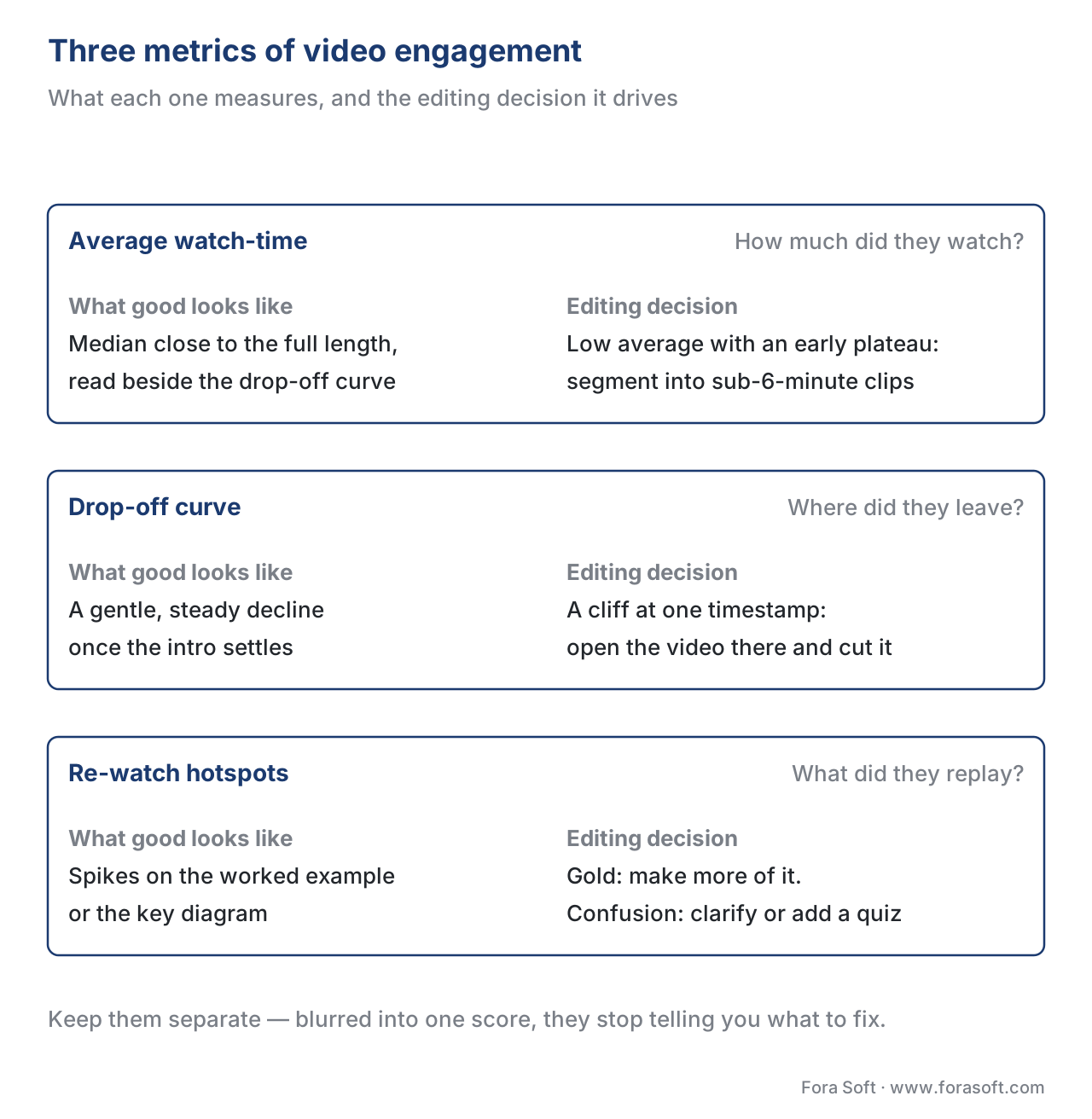 Figure 1. The three engagement metrics, what each measures, and the editing decision each one drives. Keep them separate — blurred into one score, they stop telling you what to fix.
Average watch-time, and why the average lies
Start with the metric everyone quotes and most people misread. Average watch-time is the total time watched across all views divided by the number of views — the mean duration a learner stays [9]. Reported as a percentage of the video's length, it is also called average view duration or percent-viewed, and that percentage is useful because it normalises across lengths: four minutes watched of a ten-minute video is 40%, while the same four minutes of a thirty-minute video is 13% — the same time, a very different verdict [2].
Here is the trap. Learner viewing is rarely a tidy bell curve clustered around the mean; it is usually bimodal — most people either bounce almost immediately or watch nearly all of it, with few in the middle [10]. When the distribution has two humps, the single average sits in the empty valley between them and describes almost nobody. A few early quitters drag the mean down and hide the committed majority behind it.
Walk the arithmetic. A twelve-minute (720-second) module is started by 500 learners. Suppose 200 of them — 40% — quit inside the first thirty seconds, watching about half a minute each, while the other 300 watch about 9.6 minutes each. Total watch-time is (200 × 0.5) + (300 × 9.6) = 100 + 2,880 = 2,980 learner-minutes. The average is 2,980 ÷ 500 = 5.96 minutes — call it 6.0, which is 50% of the video.
Now compute the median — the middle learner once you sort everyone by watch-time. The bottom 200 are the early quitters, so the 250th learner sits inside the committed group at about 9.6 minutes, which is 80% of the video. So the mean says "half the video," the median says "four-fifths." Same 500 learners, same month, a thirty-point gap — and the median is the honest summary of what a typical engaged learner did. The rule: never quote average watch-time without the median beside it, and always read both against the drop-off curve, because the curve is what reveals the two humps the average hides [10].
The drop-off curve: how to read it
The drop-off curve — also called the audience-retention curve — is the most diagnostic engagement view you have. Picture a graph whose horizontal axis is the video's timeline and whose vertical axis is the percentage of starters still watching at that moment. It begins at 100% on the left and only ever falls (re-watching can flatten or bump it, more on that below). The shape of that fall is the diagnosis, and four shapes recur [3][11].
The first-thirty-seconds drop. Every video loses people at the start, as learners confirm they are in the right place. A gentle fall is normal; a cliff is not. A drop of more than about 40% in the first thirty seconds usually means the opening did not deliver on the title — a weak hook, a long logo animation, or a slow setup [11]. In our worked cohort, the 40% who quit early show up here as a near-vertical cliff in the first half-minute. The fix lives in the first ten seconds: state what the learner will be able to do by the end, then start.
The gentle, steady decline. After the intro settles, a healthy learning video declines slowly and smoothly. There is no universal "good" percentage — benchmark within the same length and course type, never against a global number [11]. A how-to or tutorial that holds 45–55% to the end is healthy; a sixty-minute lecture that holds 25–35% still represents fifteen to twenty minutes of attention, which is strong for its length [11]. The shape matters more than the headline number.
The mid-video cliff. A sudden step down in the middle — retention falling, say, from 70% to 45% across thirty seconds — is the most actionable signal on the chart. It means something specific at that timestamp lost a quarter of the room: a tangent, a confusing transition, a slow visual, or a topic switch with no signpost [11]. The cliff is a pin dropped on the exact moment to re-cut. This is why the subcore for this section frames a drop-off curve as an editing instruction, not a vanity chart.
The spike. A place where the curve rises or flattens when it should fall means learners scrubbed backward and watched a segment again — a re-watch hotspot, covered next.
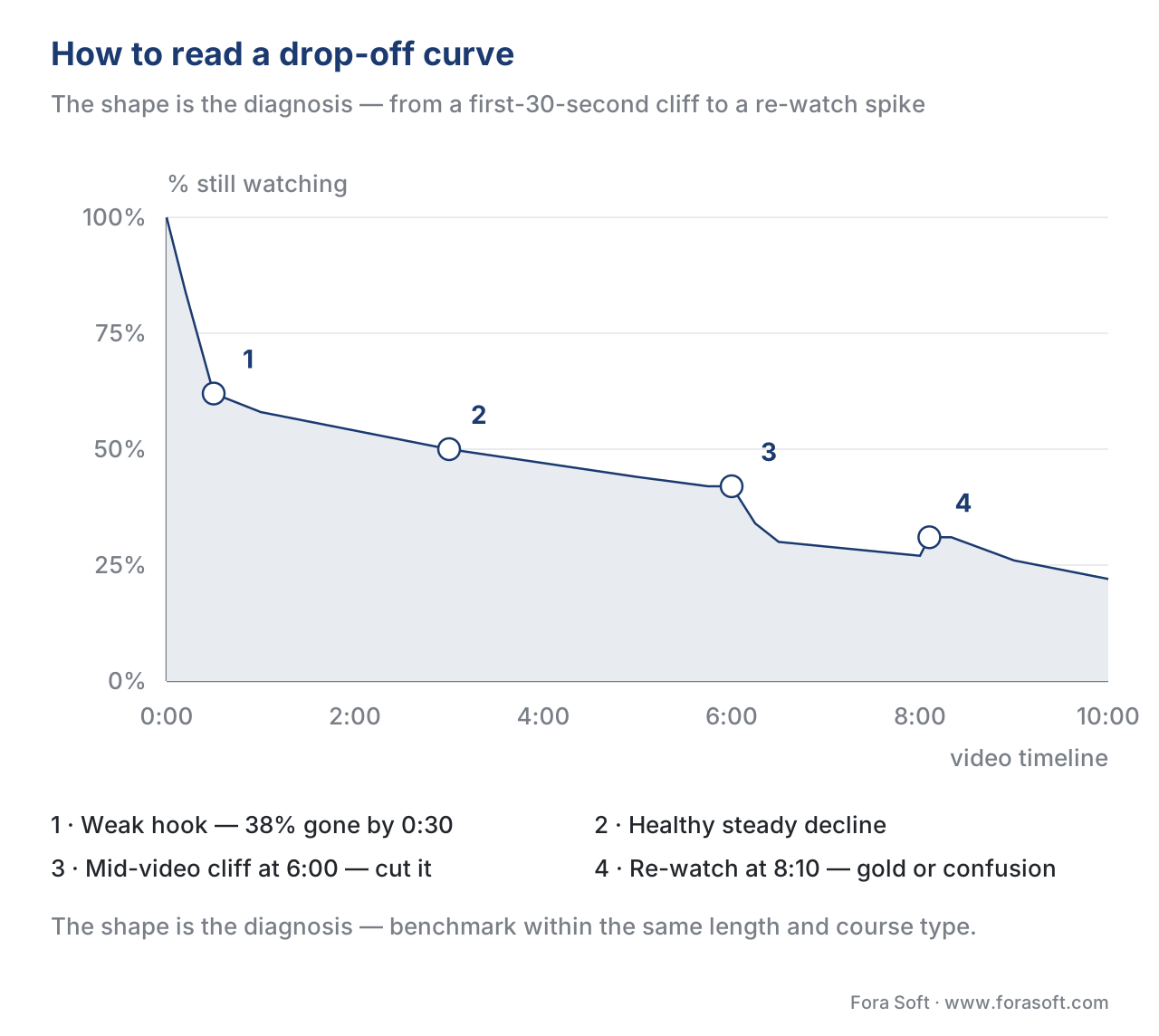 Figure 2. How to read a drop-off curve. The shape is the diagnosis: a first-30-second cliff is a weak hook, a mid-video cliff is a defect to cut, a spike is a re-watch, and a gentle decline is healthy.
Re-watch hotspots: gold or confusion
A re-watch hotspot is a segment of the timeline that learners play more than once, usually by scrubbing backward. On the drop-off curve it appears as a spike or a flat shelf where the line should be sliding down. It carries two opposite meanings, and telling them apart is the whole skill [11][8].
A spike can be gold: the segment is so useful that learners replay it — the worked example, the one diagram that makes the concept click, the exact step they came for. Make more content like it, and consider lifting it into its own short clip. Or a spike can be confusion: the explanation was unclear, the visual moved too fast, or a term went undefined, so learners rewound to try again [8]. The Watershed LRS guidance on video tracking makes the same point from the raw events — a section that is paused often and then rewound is frequently one that is hard to understand [6].
You distinguish the two by context, not by the spike alone. A re-watch on a worked example just before an assessment is probably value; a re-watch on a definition followed by a drop-off and a failed quiz question is probably confusion. This is exactly where engagement data meets the interaction signals in Interaction Frequency and Active Learning Signals — a re-watch next to a wrong answer is a much louder confusion signal than a re-watch alone.
Where the data comes from: the xAPI Video Profile
A consumer video site hands you a retention curve for free, but it is anonymous, sits outside your learning record, and cannot be joined to who passed the assessment. For a learning product you need the same three metrics attributed to a named learner and stored beside completion and score. That is the job of the xAPI Video Profile — the community/ADL profile that standardises how a video player reports to a Learning Record Store (the LRS, the database that holds learning statements) [4]. (For the full statement design, see the canonical Tracking Video with xAPI; here we cover only what the analytics consume.)
The profile defines the player events as xAPI verbs — initialized, played, paused, seeked, completed, terminated — and a set of extensions [4]. Three carry the engagement signal. The context extension length is the video's total duration. The result extension progress is the fraction of the video consumed, from 0 to 1. And the result extension played-segments is the heat-map primitive: a chronological list of every interval the learner actually watched, written as timeFrom[.]timeTo pairs joined by [,], for example 0[.]45[,]45[.]300[,]280[.]600 [4]. Crucially, progress, played-segments, and completion are aggregated across all attempts that share the same registration (the id for one learner's run at the video), so the record reflects everything they watched, not just the last play [4].
That one played-segments string yields all three metrics. Work the example above on a ten-minute (600-second) video:
played-segments = 0[.]45[,]45[.]300[,]280[.]600
  segment 1: 0  → 45    (45 s)
  segment 2: 45 → 300   (255 s)
  segment 3: 280 → 600  (320 s)   ← starts at 280, before segment 2 ended at 300
Sum of the segments is 45 + 255 + 320 = 620 seconds of playback. But the unique timeline covered is only 0 → 600 = 600 seconds, because segments 2 and 3 overlap between 280 and 300. So watch-time (unique) = 600 s = 100% progress, and the 20 seconds of overlap (280–300, about 4:40–5:00) is a re-watch hotspot for this learner. Aggregate the played-segments of every learner second-by-second — count how many cover each timestamp, divide by the number who started — and you have drawn the drop-off curve. One primitive, three metrics.
This is also why a raw player or plain SCORM is not enough. SCORM — the older packaging-and-tracking standard — records a fixed data model at the course level (completion, score, total time, a limited interactions set); it has no concept of which seconds of a video were watched [5]. If your roadmap needs watch-time, a drop-off curve, or re-watch detection, you need the xAPI Video Profile (or cmi5, which wraps xAPI inside a launchable unit), not SCORM's session summary.
What each system can prove about engagement
Before promising a stakeholder a re-watch heat-map or a per-learner drop-off curve, check that the standard your player emits to can actually carry it. The richness of an engagement metric is capped by what the player reports.
| Engagement capability | Raw player / VOD analytics | SCORM 1.2 / 2004 | xAPI + Video Profile | cmi5 |
|---|---|---|---|---|
| Total / average watch-time | Yes (anonymous) | No (session time only) | Yes (played-segments) |
Yes (via xAPI) |
| Per-second drop-off curve | Yes (aggregate) | No | Yes (aggregate played-segments) |
Yes (via xAPI) |
| Re-watch hotspots | Sometimes | No | Yes (overlapping segments) | Yes (via xAPI) |
| Attributed to a named learner | No | Yes (LMS session) | Yes (actor) | Yes (actor) |
| Joinable to completion and score | No | Partial (one SCO) | Yes (any activity) | Yes (AU + masteryScore) |
The reading is blunt. A consumer video platform gives you the curve but not the learner; SCORM gives you the learner but not the curve; only the xAPI Video Profile and cmi5 give you both — the per-second engagement and the identity and outcome to join it to. Choosing the standard is choosing what "engagement" can ever mean in your product. We unpack each in SCORM Explained and the standards comparison in SCORM vs xAPI vs cmi5 vs LTI.
Turning the data into editing decisions
Engagement analytics earn their keep only when they change the content. Map each curve shape to a decision and hand it to whoever edits the video [3][11].
A first-thirty-second cliff means re-cut the opening: drop the logo animation, lead with what the learner will be able to do, and start the substance inside ten seconds. A low average watch-time with an early plateau means the video is too long for its job — segment it. The strongest evidence here is the edX study of 6.9 million video sessions, which found median engagement was at most six minutes regardless of how long the video ran, and that learners rarely watched past nine minutes [1]. Cutting a forty-minute lecture into six-minute, single-idea clips aligns the content with how attention actually works, which we cover in The Pedagogy of Video.
A mid-video cliff means open the video at that timestamp and find the defect — a tangent to cut, a slow visual to tighten, a transition that needs a signpost. A re-watch spike that is gold means produce more of that and consider a standalone clip; a spike that is confusion means add a clearer explanation, an on-screen label, or an in-player question at that point to convert passive rewinding into active checking — the technique in In-Player Quizzes and Polls, and the cognitive-load logic behind it is in Brame's review of effective educational video, where interpolated questions reduced how mentally taxing learners found the material [7].
One more lever cuts across all of these: captions. They are a WCAG 2.1 AA accessibility requirement, covered in WCAG 2.1 AA for Educational Video, and they also lift watch-time for learners viewing without sound or in a second language. The TechSmith viewer research is a useful corrective on length, too: while short is usually right, two-thirds of viewers will watch a video over an hour to learn a job skill — so segment for attention, but do not amputate necessary depth [12]. "As long as needed, as short as possible."
 Figure 3. From curve shape to editing decision. Each pattern in the drop-off curve maps to one concrete change a content team can ship.
 Figure 4. From player events to metrics. The xAPI Video Profile's played-segments primitive flows to the LRS, where aggregation yields watch-time, the drop-off curve, and re-watch hotspots.
Common mistakes
Quoting average watch-time alone. Because learner viewing is bimodal, the mean sits in the empty valley between early quitters and the committed majority [10]. Always report the median beside it and read both against the curve.
Treating watch-time as proof of learning. A learner can play a video to the end in a background tab and learn nothing. Watch-time is an engagement signal, not a mastery signal — pair it with assessment and interaction data, the argument made across Interaction Frequency and Active Learning Signals.
Reading every spike as success. A re-watch can mean "this was gold" or "this was confusing." Judge it by context — what came before, and whether the next quiz question was missed — never by the spike height alone [8].
Benchmarking against a global number. A 45% average is healthy for a tutorial and weak for a fifteen-second hook. Compare within the same length and course type, never against an absolute "good" figure [11].
Trying to get a drop-off curve out of SCORM. SCORM tracks a session summary, not which seconds were watched [5]. If watch-time, drop-off, and re-watch are on the roadmap, instrument the xAPI Video Profile from day one — retrofitting it after launch means re-shipping the player.
Free download: Video Engagement Diagnostic ChecklistA one-page worksheet: which xAPI Video Profile events to instrument, how to read average watch-time, the drop-off curve and re-watch hotspots without fooling yourself, and which editing decision each curve shape calls for.Where Fora Soft fits in
Fora Soft has built video streaming, real-time WebRTC, and interactive-player software since 2005, and in e-learning the engagement work is rarely the dashboard — it is instrumenting the player so the dashboard can exist at all. The build-vs-buy trade-off is usually this: a hosted video platform gives you an anonymous retention curve for free, but the moment you need that curve attributed to a named learner, stored in your LRS, and joined to completion and score, you are building an xAPI Video Profile pipeline into an interactive player. We help teams decide which engagement signals genuinely justify that custom layer, then build the player events and the analytics so a drop-off curve becomes a reliable editing instruction. The same real-time and streaming foundations show up across our conferencing, OTT, and telemedicine work.



The handbook
Fora Soft Video Engineering Handbook
We wrote a seven-volume series, 9,000+ pages, that works through the whole video stack from the pixel to production — encoding, delivery, audio, and AI. Every number in this article starts as a player event and ends as a row someone queries, and three volumes carry that further: volume 3 on ABR, CDNs, players, WebRTC and DRM is where the player that emits those events gets built; volume 7 on real-time pipelines, serving, cost and compliance is where you size the millions of records a drop-off curve rests on and meet the privacy rules they fall under; volume 1 on encoding and quality covers the video the learner is watching while all of it is recorded. Work through them and you can design and build a learning-video system end to end. Written by Nikolay Sapunov, CEO at Fora Soft.
Promised an engagement dashboard and not sure the player can back it up?
Tell us what your player emits today and which curves you have to show, and we will say what has to change in the instrumentation — verbs, played-segments, registration, the aggregation behind a per-second curve — before anyone reads a number off it — 250+ video products shipped since 2005.
See our case studies
Case study
BrainCert
Engagement reporting inside a shipping LMS: SCORM and xAPI support and an analytics dashboard under 500M+ real-time classroom minutes for 100K+ customers across 10 datacenters at 99.995% uptime.
Case study
Scholarly
What a per-second curve needs underneath it: a ClickHouse, Prometheus and Grafana stack on Kubernetes behind 15,000+ active users and live classes of up to 2,000 students at once.
Case study
Input Logger
Watch-time turned into something a learner acts on: an iOS and Android app built entirely on logged time, showing immersion hours as progress graphs against goals and deadlines.
What to read next
Standards
Tracking video with xAPI: the Video Profile and what to capture
Where these three numbers come from: the verbs, the extensions, and the statement design behind them.
Analytics
Engagement heatmaps and attention analytics
The drop-off curve drawn as a heat-map, and what attention data can and cannot tell you.
Pipeline
Building the learning-analytics pipeline
Ingestion, storage, and the queries that turn a million played-segments into one curve.
Pedagogy
The pedagogy of video: attention, retention, and chunking
Why the six-minute clip keeps winning, and how to cut a long lecture into ones that hold.
References
- Guo, P. J., Kim, J., & Rubin, R. (2014). How Video Production Affects Student Engagement: An Empirical Study of MOOC Videos. ACM Learning @ Scale. https://up.csail.mit.edu/other-pubs/las2014-pguo-engagement.pdf — Tier 5 (peer-reviewed). Across 6.9M sessions on four edX courses, median engagement was at most 6 minutes regardless of video length; learners rarely finished videos over 9 minutes.
- Brame, C. J. (2016). Effective Educational Videos: Principles and Guidelines for Maximizing Student Learning from Video Content. CBE—Life Sciences Education 15(4):es6. https://www.lifescied.org/doi/10.1187/cbe.16-03-0125 — Tier 5 (peer-reviewed). Effective video manages cognitive load, maximizes engagement, and promotes active learning; interpolated questions reduce how mentally taxing learners find the material.
- ADL / xAPI Video Community Profile. xAPI Video Profile v1.0 — Statement Data Model (
played-segments,progress,length,completion-threshold;played/paused/seeked/completedverbs). https://liveaspankaj.gitbooks.io/xapi-video-profile/content/statement_data_model.html — Tier 1 (primary profile).played-segmentsis a chronological list of watched intervals (timeFrom[.]timeTojoined by[,]); progress, played-segments, and completion aggregate across attempts with the same registration. - ADL Initiative. xAPI authored video profile (canonical repository). https://github.com/adlnet/xapi-authored-profiles/tree/master/video — Tier 1 (primary profile). The ADL-hosted home of the video profile verbs and extensions; the controlling source for how a player reports video activity in xAPI.
- ADL Initiative. SCORM 2004 4th Edition — Run-Time Environment (
cmi.session_time,cmi.interactions). https://adlnet.gov/projects/scorm/ — Tier 1 (primary standard). SCORM records a fixed course-level data model (completion, score, session time, a limited interactions set); it has no per-second video timeline data. - ADL Initiative. Experience API (xAPI) Specification v1.0.3 — Part 2: Statements (actor-verb-object,
result,context.registration). https://github.com/adlnet/xAPI-Spec — Tier 1 (primary standard). Defines the statement structure and the registration that scopes a learner's run at an activity, which the Video Profile aggregates over. - Watershed Systems. How do I author video xAPI statements? https://support.watershedlrs.com/hc/en-us/articles/360022749332 — Tier 4 (LRS vendor / practitioner). Frequent pausing-and-rewinding of a segment often indicates content that is hard to understand; scrubbing to similar timestamps flags a section needing rework.
- Google. Measure key moments for audience retention (YouTube Help). https://support.google.com/youtube/answer/9314415 — Tier 6 (platform documentation). Defines the audience-retention graph; spikes indicate segments viewers rewatched or shared; the curve normalises retention as a percentage of viewers over the timeline.
- AgencyAnalytics. Average View Duration — KPI definition. https://agencyanalytics.com/kpi-definitions/average-view-duration — Tier 6 (practitioner reference). Average view duration / average watch-time equals total watch-time divided by number of views; reporting it as a percentage of length normalises across videos.
- arXiv. Counteracting Duration Bias in Video Recommendation via Counterfactual Watch Time (2406.07932). https://arxiv.org/abs/2406.07932 — Tier 5 (preprint). Observed watch-time for a given video duration is bimodal — viewers tend to either skip early or watch fully — so the mean misrepresents typical behaviour.
- Humble & Brag. YouTube Audience Retention Benchmarks 2026: What's Good? https://humbleandbrag.com/blog/youtube-audience-retention-benchmarks — Tier 6 (practitioner benchmark). A >40% drop in the first 30 seconds signals a weak hook; mid-video cliffs mark a specific defect; spikes mark re-watch; benchmark within length and content type, not a global average.
- TechSmith. Video Statistics, Habits, and Trends You Need To Know (2026 research). https://www.techsmith.com/blog/2026-video-statistics/ — Tier 6 (industry survey). Viewers prefer instructional videos in the 3–6 minute range, yet ~67% will watch a 60+ minute video to learn a job skill: "as long as needed, as short as possible."
Where sources disagreed, the official specification was followed. Many marketing articles treat average watch-time as the headline engagement metric; this article follows the bimodal evidence [10] and the standards' own data model — the xAPI Video Profile's played-segments [3][4] as the primitive behind all three metrics — and treats raw playback percentage as the weakest, anonymous view, not the canonical one. SCORM's session summary [5] is shown to be insufficient for per-second engagement, a point most vendor SCORM material omits.
