


Why this matters
If you are an L&D director, an EdTech founder, or a product lead scoping a learning-video product, the metrics you choose on day one quietly decide what your platform can ever prove. Pick the wrong ones and you will ship a beautiful player that cannot tell a regulator whether anyone passed, or a dashboard full of "engagement" that does not predict a single business result. This article gives you the shared vocabulary that every later article in this course leans on — completion versus progress versus mastery versus engagement, and leading versus lagging indicators — so you can brief engineers precisely, push back on vanity numbers, and design the tracking before you build the player. It is deliberately a foundations piece: the deep analytics live in learning analytics, but the definitions start here.
Four words people use interchangeably — and shouldn't
Walk into any meeting about a learning product and you will hear "completion", "progress", "engagement", and "mastery" used as if they were synonyms for "the course is working". They are not. Each answers a different question, and confusing them is how teams end up with dashboards that look healthy while learners walk away having learned nothing.
Here is the cleanest way to hold the four apart. Engagement asks are they paying attention right now? Progress asks how far through have they got? Completion asks did they reach the end on our terms? Mastery asks can they actually do the thing the course taught? A learner can score high on the first three and zero on the last — the entire reason mastery is measured separately.
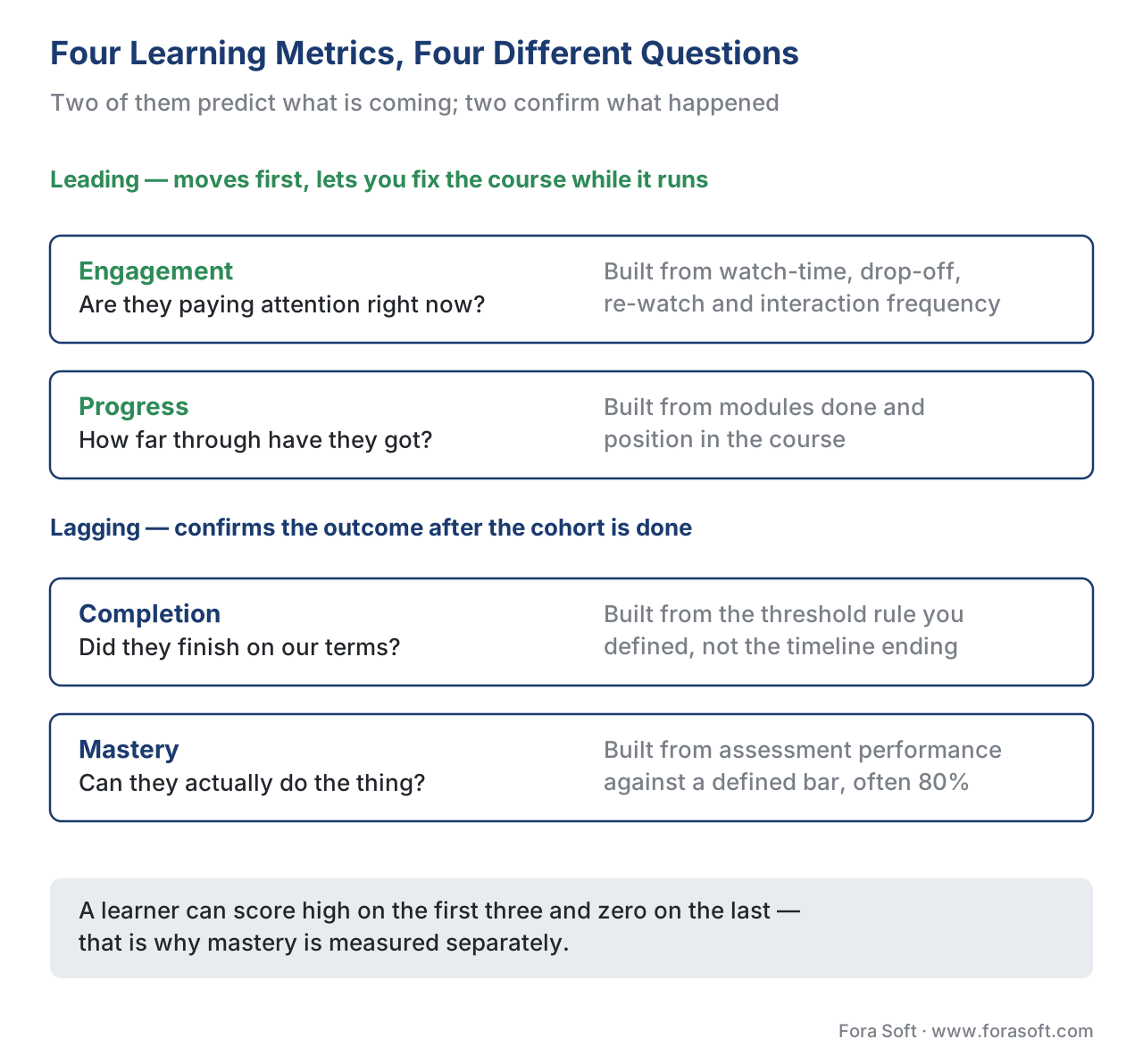 Figure 1. The four metrics, the question each one answers, and where it sits on the leading-to-lagging scale. Engagement and progress hint at what is coming; completion and mastery confirm what happened.
The rest of this article takes them one at a time, then shows how the learning standards record each, and finally runs the numbers on one cohort so the differences stop being abstract.
Engagement: the leading indicator
Engagement is the measure of whether learners are actively paying attention to the content, expressed through what they do while the video plays. In a learning video that means watch-time (how many of the available minutes were actually watched), drop-off (where they stopped), re-watch (which moments they replayed), and interaction frequency (how often they answered an in-video question, opened a transcript, or added a note).
Engagement is the earliest signal you get, which makes it a leading indicator — a number that moves before the outcome you care about, and therefore predicts it. If watch-time collapses at minute four of every video, you can fix the content before a single learner fails the final assessment. That early-warning value is exactly why engagement matters; it is also why it is so easily abused.
The research here is unusually clear. An analysis of 6.9 million video sessions across four edX courses found that median engagement drops sharply once a video passes six minutes, and learners rarely finish videos longer than nine minutes [1]. The practical reading: short, segmented video is not a style preference, it is an engagement lever you can measure. We unpack the learning science behind that in the pedagogy of video.
The common mistake is treating engagement as a goal instead of a signal. High watch-time is encouraging, not conclusive. People can watch attentively and still not learn, and a course optimized purely for watch-time drifts toward entertainment. Engagement earns its place because it predicts problems early — not because a high number means success.
Progress: how far, not how well
Progress is the fraction of the required content a learner has moved through — module 3 of 8, or 40% of the curriculum. It is the metric that drives the "you're 60% done" bar and the "resume where you left off" button, and it is mostly an arithmetic of position, not understanding.
Progress is the metric most people think completion is. The difference is subtle but decisive: progress is monotonic and partial ("how far along the path"), while completion is a threshold event ("did you cross the finish line we defined"). A learner can be at 95% progress forever and never complete, because the final 5% is the graded assessment they keep avoiding.
Progress is also a leading indicator, and a more reliable one than raw watch-time, because it tracks movement through the structure of the course rather than seconds of video. A cohort whose progress curve flattens at module 5 is telling you something concrete about module 5 — before the completion numbers come in. Worth noting: a video player reports its own playback position, but course progress is a higher-level idea the platform computes across modules. Keep "how far through this video" and "how far through this course" separate; they are different numbers captured by different layers, a distinction the platform anatomy article maps in full.
Completion: the word that means five different things
Completion is a threshold: the learner met the rule you defined for "done". The trap is that there is no single rule, and the word quietly means a different thing depending on which layer you ask. This is the single most dangerous ambiguity in learning metrics, so it is worth pulling the five common meanings apart explicitly.
First, raw player completion — the video element fired its "ended" event, or playback position reached 100%. This proves the bytes played to the end of the timeline. It does not prove a human was in the room.
Second, SCORM completion. The packaging standard that lets any learning system play and track a course, called SCORM (Sharable Content Object Reference Model), records a dedicated field. In SCORM 2004 that field is cmi.completion_status with values completed, incomplete, not attempted, or unknown [2]. Critically, SCORM 2004 splits completion (did they finish) from success (cmi.success_status: passed or failed) into two separate fields — so a learner can be completed and failed at the same time [2]. SCORM 1.2 collapsed both ideas into one field (cmi.core.lesson_status), which is exactly why so many old courses confuse "finished" with "passed". We cover this in depth in SCORM explained.
Third, xAPI completion. The modern tracking standard, xAPI (Experience API), records completion as a statement — an actor-verb-object sentence like "Maria completed Module 3" — written into a Learning Record Store (LRS). For video specifically, the xAPI Video Profile says the completed statement must carry result.completion = true and must include the total time consumed, and it can attach a progress extension and a played-segments extension so you know not just that they completed but which seconds they actually watched [3]. Plain SCORM cannot record that per-second detail; the Video Profile is how you get it. See tracking video with xAPI.
Fourth, threshold completion. Both standards let you set a bar rather than demand 100%. SCORM 2004 has a cmi.completion_threshold: the content reports a cmi.progress_measure (0 to 1), and if it meets or exceeds the threshold the status flips to completed [2]. So "complete" might mean "watched 80% and answered the checkpoint", by design.
Fifth, course completion — the business-level rule that stitches the others together: all modules completed, the final assessment passed, maybe a feedback survey submitted. This is the number an HR system or a registrar actually wants, and it is computed by your platform, not handed to you by any single standard.
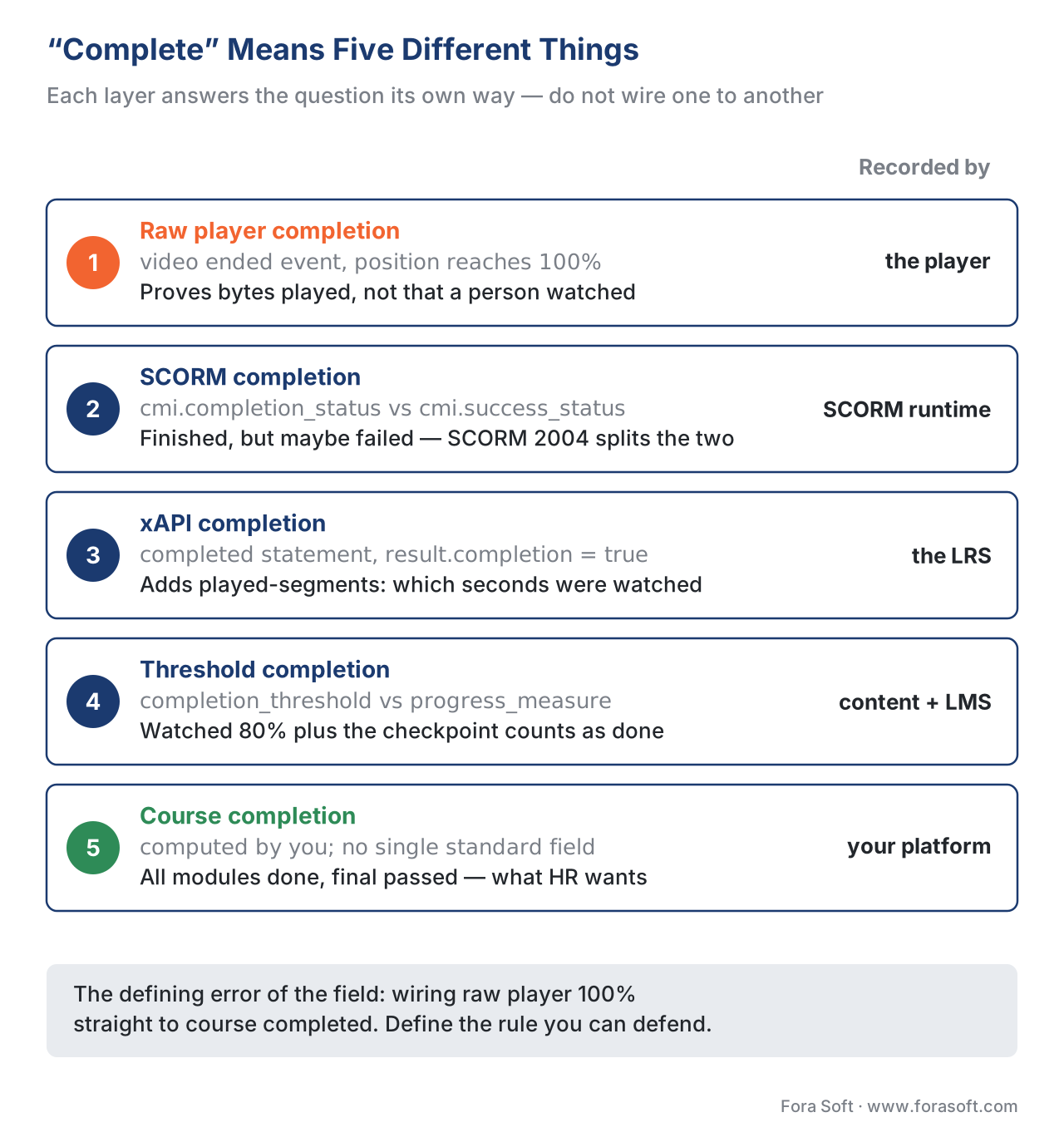 Figure 2. "Complete" means five different things depending on which layer you ask. The raw player proves bytes played; SCORM and xAPI record a status; the course-level rule is what the business cares about.
The common mistake — the defining error of the whole field — is wiring "raw player reached 100%" straight to "course completed". A learner opens the video, mutes it, switches tabs, and the timeline runs to the end. Your dashboard says completed. They learned nothing, and if this is compliance training, you have just recorded a false legal record. Completion must mean the rule you can defend, not the timeline ended.
Mastery: did they actually learn it
Mastery is the only one of the four that measures learning rather than behavior. It asks whether the learner can reliably demonstrate the skill or knowledge the course set out to teach, usually proven through assessment performance against a defined standard. Mastery learning, a concept from educational research, typically sets a high bar — often around 80% on an assessment — and treats anything below it as "not yet", with the learner cycling back rather than moving on.
Mastery is a lagging indicator: it confirms the outcome after the fact. You cannot know it early, you can only measure it once the learner has been tested, and it is the most expensive and most valuable of the four to capture well. In corporate training the bar is higher still. The widely used Kirkpatrick model of training evaluation defines four levels — Reaction (did they like it), Learning (did they acquire the knowledge), Behavior (are they doing it differently on the job), and Results (did the business outcome move) [4]. Mastery, in those terms, is Level 2; the real prize is Levels 3 and 4, which no video player can see and which your analytics must connect to outside systems.
The common mistake is stopping at "passed the quiz" and calling it mastery. A single end-of-module multiple-choice quiz measures short-term recall, not durable skill. Real mastery measurement uses harder formats — applied tasks, spaced retrieval, performance over time — and ties back to on-the-job behavior wherever the business case justifies the cost.
Leading versus lagging: the distinction that makes metrics useful
Two of these metrics predict and two confirm, and knowing which is which is what turns a dashboard from a scoreboard into a steering wheel. Leading indicators move before the outcome and let you intervene: engagement and progress. Lagging indicators confirm the outcome after it happens: completion and mastery (and, beyond them, behavior change and business results).
| Metric | Question it answers | Type | When you see it | What it can't tell you |
|---|---|---|---|---|
| Engagement | Are they paying attention? | Leading | Live, per second | Whether they understood anything |
| Progress | How far have they got? | Leading | Continuously | Whether they passed the gate |
| Completion | Did they finish on our terms? | Lagging | At the threshold | Whether they learned it |
| Mastery | Can they actually do it? | Lagging | After assessment | Whether they apply it on the job |
The design rule that falls out of this table: build leading indicators to catch problems and lagging indicators to prove value. A product that only reports lagging metrics finds out it failed after the cohort is gone. A product that only reports leading metrics feels busy but can never prove a result. You need both, captured deliberately.
How the standards actually record each metric
Metrics are only as good as the events your player emits and the standard that carries them. Three standards do the heavy lifting, and they are not interchangeable.
SCORM carries a fixed data model inside an LMS launch: completion status, success status, score, time, and a limited set of interactions [2]. It is reliable and universally supported, but it tracks a course as a black box — it cannot tell you which fifteen seconds of a video a learner re-watched.
xAPI and its Video Profile carry an open-ended stream of statements into a Learning Record Store. The Video Profile defines the verbs a player should emit — initialized, played, paused, seeked, completed, terminated — and the result extensions that make analytics rich: a time point, time-from/time-to on a seek, a progress value, and played-segments listing exactly which intervals were watched [3]. This is what lets you build a drop-off heatmap rather than a single completion checkbox.
Caliper Analytics, the 1EdTech standard, defines a MediaEvent for interactions with a video or audio object — play, pause, rewind, fast-forward, mute, caption toggle — each stamped with the currentTime location in the stream [5]. It overlaps with the xAPI Video Profile in intent and is common where an institution has standardized on Caliper for all its event data.
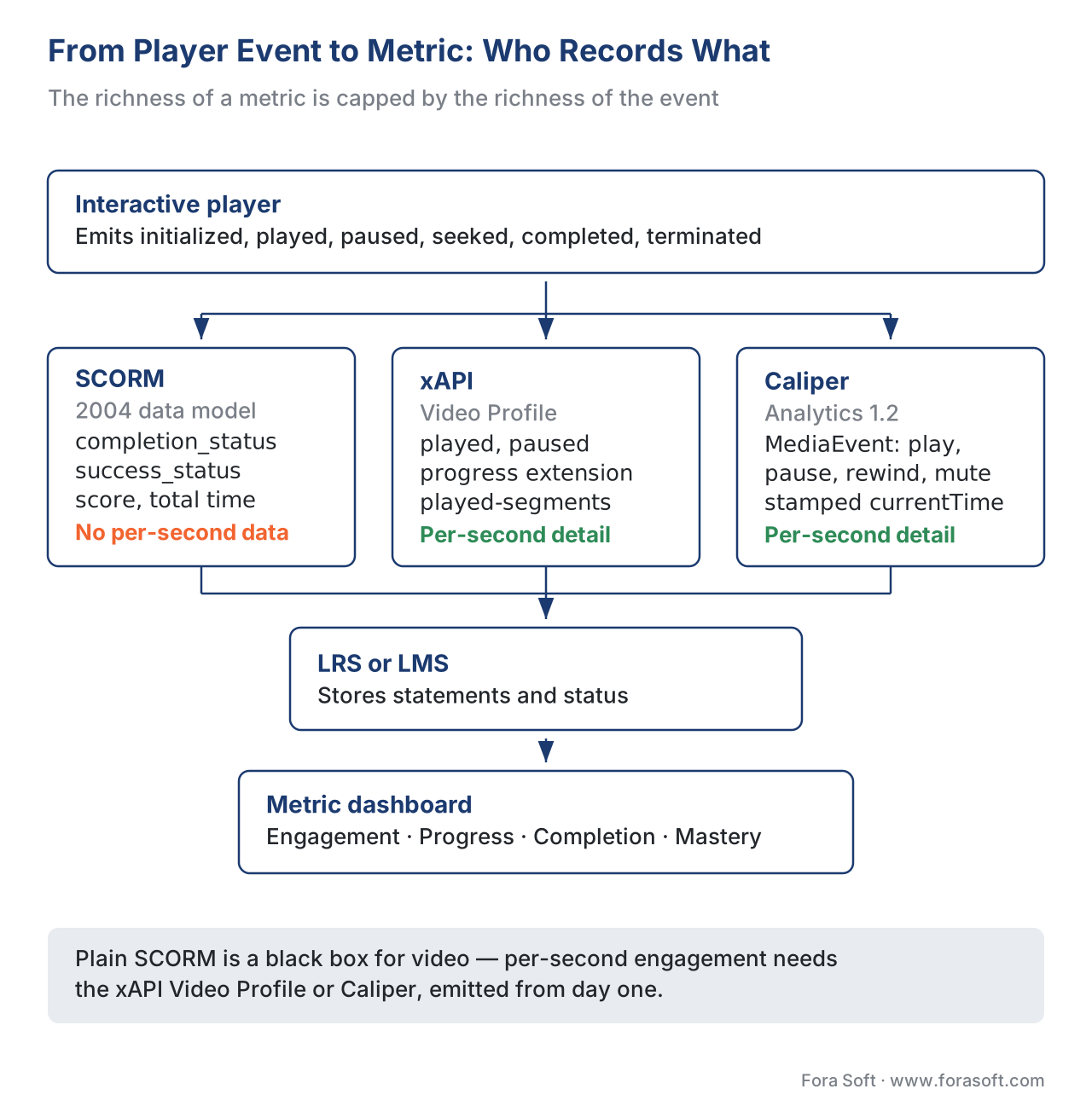 Figure 3. The same player events become a SCORM status, xAPI Video Profile statements, or Caliper MediaEvents, land in an LMS or LRS, and only then become the four metrics on a dashboard. The richness of the metric is capped by the richness of the event.
The table below maps each metric to where it is realistically captured. Note the standards-support column: it is the difference between a metric you can ship and one you only wish you had.
| Metric | Captured from | SCORM | xAPI / Video Profile | Caliper |
|---|---|---|---|---|
| Engagement (watch-time, drop-off) | Per-second player events | No (black box) | Yes (played-segments, paused) |
Yes (MediaEvent) |
| Progress | Position / modules done | Partial (progress_measure) |
Yes (progress extension) |
Partial |
| Completion | Threshold rule | Yes (completion_status) |
Yes (completed + completion) |
Partial |
| Mastery | Assessment score vs bar | Yes (success_status, score) |
Yes (scored statements) | Via assessment profile |
The reading: if your roadmap promises engagement heatmaps or per-second video analytics, plain SCORM will not deliver them — you need the xAPI Video Profile or Caliper, and you need the player to emit those events from day one.
A worked example: one cohort, four numbers
Numbers make the distinctions concrete, so let us run a single cohort through all four metrics. Suppose 1,000 learners are enrolled in a five-module video course with a final assessment, and the completion rule is "all five modules reached threshold AND final score ≥ 80%".
- Engagement: across all videos, learners watched on average 62% of the available minutes. Calculation: total minutes watched ÷ total minutes available = 0.62. Healthy, but it is a leading hint, not an outcome.
- Progress: 700 learners reached module 5; average progress = (sum of each learner's modules completed ÷ 5) across 1,000 = 0.71, i.e. 71%. Most people got most of the way.
- Completion: only learners who hit the threshold on all five modules and attempted the final count. 420 learners did. Completion rate = 420 ÷ 1,000 = 42%. Note how far this sits below progress — the gap is the people who got to module 5 and stalled at the assessment.
- Mastery: of the 420 who completed, 310 scored ≥ 80% on the final. Mastery rate among completers = 310 ÷ 420 = 74%; mastery across the whole cohort = 310 ÷ 1,000 = 31%.
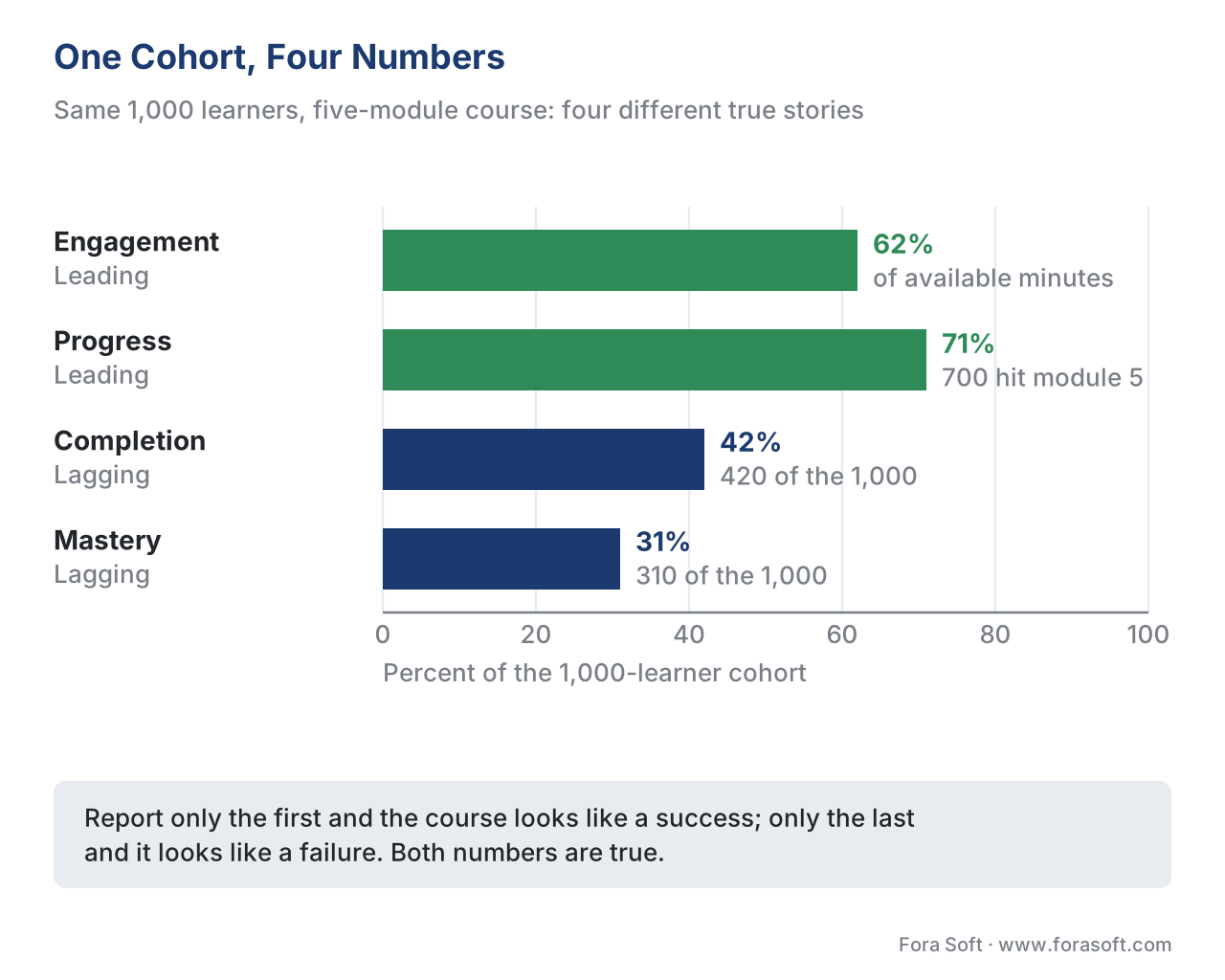 Figure 4. One cohort, four numbers. The same 1,000 learners produce 62% engagement, 71% progress, 42% completion, and 31% mastery — each metric telling a different, true story.
Four honest numbers from one cohort: 62%, 71%, 42%, 31%. If you reported only the first, the course looks like a success. If you reported only the last, it looks like a failure. Both are true. The job of a learning product is to show all four and let the business decide which one matters for this course — a compliance course lives or dies on completion; a sales-skills course lives or dies on mastery and, ultimately, on behavior change.
For context on how low completion can run in open settings: large-scale studies of MOOCs (massive open online courses) consistently find completion rates of roughly 5–15% of registrants, with one six-year analysis of every edX course noting that 52% of registrants never even start [6]. Closed corporate cohorts run far higher, but the lesson holds — the denominator and the rule decide the number, so define both before you quote it. We go deep on this in completion rate: defining, measuring, and improving it.
The metrics to capture from day one
You cannot analyze an event you never recorded, so the cheapest time to decide what to track is before the player is built. At minimum, a learning product should capture, from launch: per-segment watch data (so engagement and drop-off are reconstructable later), module-level progress, a defensible completion status separate from raw playback, and assessment scores tied to a mastery bar. Emit these as xAPI Video Profile statements or Caliper MediaEvents if you need video-grain analytics; rely on SCORM only if a black-box completion-and-score record genuinely suffices.
The reason to over-capture early is asymmetry. Adding an event to a player later only helps from that day forward — you can never backfill the data you did not record last quarter. Storage is cheap; missing history is not.
Free download: Learning Metrics Cheat SheetA one-page reference of the four learning metrics — engagement, progress, completion, mastery — what each one proves, the standard and field that records it, and the five meanings of completion, so you can settle the argument in the room instead of after the cohort ships.Where Fora Soft fits in
Fora Soft has built video streaming, real-time WebRTC, and interactive-player software since 2005, and in e-learning the work is rarely the playback — it is wiring the player so the right events flow into the right standard so the right metric exists. The build-vs-buy trade-off is usually this: an off-the-shelf LMS hands you SCORM-grade completion and scores for free, but the moment you need per-second engagement, drop-off heatmaps, or custom mastery definitions, you are building an interactive player and an xAPI or Caliper pipeline on top. We help teams decide which metrics justify that custom layer and then build the tracking so the analytics are possible — the topic of building the learning-analytics pipeline.



The handbook
Fora Soft Video Engineering Handbook
We wrote a seven-volume series that takes the whole video stack apart across 9,000+ pages — encoding, delivery, audio and AI — and someone who works through it can design and build the platform these four metrics come out of. Volume 3 sits closest to this article: the player that emits the events, QoE monitoring and what you do with a per-second stream, and the delivery economics that decide how much of it you can afford to keep. Volume 1 is the encoding foundation the course stands on, and volume 6 covers the speech, search and computer-vision capabilities that turn a video archive into signals a dashboard can read. Written by Nikolay Sapunov, CEO at Fora Soft.
Can your player prove what your dashboard claims?
Send us the four numbers you plan to report and the events your player emits today — and we will come back with which metrics your current tracking can actually defend, which ones need the xAPI Video Profile or Caliper, and what it costs to emit them from day one instead of backfilling a quarter you never recorded. 250+ video products shipped since 2005.
See our case studies
Case study
BrainCert
A WebRTC and HTML5 virtual-classroom LMS with 100K+ customers and 500M+ classroom minutes across 10 datacenters, shipping SCORM and xAPI support, proctored exams, certificates and badges, and an analytics dashboard. It is the lagging half of this article in production: completion and mastery recorded in fields a buyer can audit, not inferred from playback.
Case study
Scholarly
Sydney’s selective-test prep platform: 15,000+ active users, live classes for up to 2,000 students at once, with quizzes, homework submission and review, and an admin analytics panel running on ClickHouse, Grafana and Prometheus. That event store is what a leading indicator needs — per-second engagement is only as good as the pipeline you built to keep it.
Case study
Tabsera
A multilingual K-12 LMS in English, French, Arabic and Turkish with gamified courses, quizzes, an interactive whiteboard and three roles — teachers, students with parental controls, and admins. Who is shown which of the four numbers, and in which language, is the product decision no standard makes for you.
What to read next
Analytics
Learning Analytics: The Metrics That Matter and the Ones That Mislead
The same four metrics, one level deeper — and the vanity numbers to drop.
Metrics
Completion Rate: Defining, Measuring, and Improving It
Pick one of the five meanings, then move the number.
Standards
Tracking Video With xAPI: The Video Profile and What to Capture
The verbs and extensions that make per-second engagement possible.
Engineering
Building the Learning-Analytics Pipeline
Where the events go once the player starts emitting them.
References
- Guo, P. J., Kim, J., & Rubin, R. (2014). How Video Production Affects Student Engagement: An Empirical Study of MOOC Videos. Proceedings of the First ACM Conference on Learning @ Scale (L@S '14). https://dl.acm.org/doi/10.1145/2556325.2566239 — Tier 5 (peer-reviewed). Median engagement drops after 6 minutes; learners rarely finish videos over 9 minutes.
- ADL Initiative. SCORM 2004 4th Edition — Run-Time Environment (RTE). https://adlnet.gov/projects/scorm/ — Tier 1 (primary standard).
cmi.completion_statusvscmi.success_status;cmi.completion_thresholdandcmi.progress_measure; SCORM 1.2 singlelesson_status. - ADL / xAPI Video Community Profile. xAPI Video Profile v1.0.3 (authored profiles). https://github.com/adlnet/xapi-authored-profiles/tree/master/video — Tier 1 (primary profile). Verbs initialized/played/paused/seeked/completed/terminated; result extensions
time,time-from,time-to,progress,played-segments;completedcarriesresult.completion=true. - Kirkpatrick, D. L. Evaluating Training Programs: The Four Levels (Reaction, Learning, Behavior, Results); Kirkpatrick Partners. https://www.kirkpatrickpartners.com/the-kirkpatrick-model/ — Tier 5 (institutional/foundational). The four-level training-evaluation model.
- 1EdTech (IMS Global). Caliper Analytics 1.2 — Media Profile / MediaEvent. https://www.imsglobal.org/spec/caliper/v1p2 — Tier 1 (primary standard). MediaEvent for video/audio interactions with
MediaLocation.currentTime. - Reich, J., & Ruipérez-Valiente, J. A. (2019). The MOOC pivot. Science, 363(6423); and comparative MOOC-completion studies (Open Praxis, 2024). https://www.science.org/doi/10.1126/science.aav7958 — Tier 5 (peer-reviewed). MOOC completion ~5–15% of registrants; 52% never start.
- ADL Initiative. Experience API (xAPI) Specification v1.0.3 — Part 2: Statements. https://github.com/adlnet/xAPI-Spec — Tier 1 (primary standard). Actor-verb-object statement model and the Learning Record Store (LRS) interface.
- W3C. Web Content Accessibility Guidelines (WCAG) 2.1. https://www.w3.org/TR/WCAG21/ — Tier 1 (primary standard). Cited for accessible reporting and captioned learning video, SC 1.2.2 / 1.2.4.
Where sources disagreed, the official specs were followed: many vendor articles describe "SCORM tracks completion" loosely, conflating completion with success — this article follows SCORM 2004's explicit split of completion_status and success_status [2] and notes that plain SCORM cannot capture the per-second video data the xAPI Video Profile defines [3], overriding the common "SCORM tracks everything" framing.
