


Why this matters
If you are an L&D director, an EdTech founder, or a product lead about to scope a learning-video product, the most expensive mistakes happen before any code is written, when the architecture is drawn wrong on a whiteboard. This article gives you the whole picture in one place: what each part of a learning-video platform does, which standard governs it, and where the money and the risk concentrate. It is deliberately broad rather than deep — every layer here has its own dedicated article later in the course — so that you can hold the entire system in your head, brief engineers and instructional designers with the right vocabulary, and make build-vs-buy decisions layer by layer instead of betting the whole project on one big "build or buy" coin flip.
The whole system in one picture
Start with the thing most teams get wrong. A learning-video platform is not a video site with a login. Video sites — the kind that stream films or store webinars — solve one problem: get pixels to a screen reliably and cheaply. A learning platform has to do that and know who watched what, how much of it, whether they understood it, and prove all of that to a regulator, an HR system, or a university registrar. That second job — knowing and proving — is where the engineering, the standards, and the cost actually live. The video is the easy part.
It helps to see the platform as an assembly line. Raw teaching material goes in one end; verified learning outcomes come out the other. Between those two points sit nine stations, each with a clear job, each handing off to the next. The market that runs on this assembly line is large — global e-learning is estimated between roughly $276 billion and $400 billion in 2026 depending on whose definition you use, growing at a double-digit annual rate [1] — which is exactly why getting the architecture right pays off and getting it wrong is costly.
 Figure 1. The nine layers of a learning-video platform, with the standards-and-accessibility concern wrapping all of them. Each hop names the typical technology and the typical failure mode. This is the map the rest of the course refers back to.
The rest of this article walks that assembly line one station at a time. For each, you get the plain-language job it does, the standard or technology that governs it, and the single most common way teams get it wrong. Keep Figure 1 in view; everything below is a zoom-in on one of its boxes.
Layer 1 — Authoring: where courses are made
Authoring is the work of turning knowledge into a course: recording or animating the video, writing the questions, sequencing the lessons, and packaging it all into something a learning system can play. The tool that does this is called an authoring tool — think of it as the word processor of e-learning. Some are standalone desktop applications; some are built into the platform itself; some teams use a video editor plus a separate quiz builder and stitch the result together.
The output of authoring is the crucial part, because it dictates everything downstream. A course can be exported as a self-contained package built to a standard — most commonly the Sharable Content Object Reference Model, called SCORM, a decades-old packaging format we cover in depth in SCORM explained — or it can be authored natively inside the platform so that every interaction is tracked individually. That single choice, made at the authoring stage, determines how richly you can track learning later. Choose a rigid package format and you are limited to what that format records; author natively and you can capture every click.
The common mistake here is treating authoring as a content problem and not an architecture decision. A team picks an authoring tool because the instructional designers like it, exports a SCORM package, and only later discovers SCORM cannot record the per-second video interactions their analytics roadmap promised. The format was decided before anyone asked what data the business needed.
Layer 2 — The content store: where the bytes live
Once a course exists, its files have to live somewhere: the video files, the images, the quiz definitions, the captions, the packaged manifests. This is the content store, usually a cloud object store (the kind of bottomless file bucket that services like Amazon S3 provide) sometimes paired with a database for the structured parts. A more sophisticated version of this layer is a Learning Content Management System (LCMS) — a system specifically for storing, versioning, reusing, and assembling learning content, as opposed to just holding files [9].
Two things make the content store harder than ordinary file storage. First, versioning: when an instructor fixes an error in module three, learners who are mid-course should not silently jump to new content, and the old version must remain auditable. Second, multiple renditions: a single ten-minute lecture is not stored once. It is stored as several versions at different quality levels so it can be delivered smoothly over a fast office connection or a weak mobile one — which leads directly into the next layer.
The common mistake is storing one giant high-resolution master file and streaming it to everyone. A learner on a phone on a train cannot pull a 1080p file smoothly, the video stalls, and they quit. The store must hold the multiple renditions that adaptive delivery needs.
Layer 3 — Video delivery: getting it to the screen
This is the layer everyone thinks the whole platform is. Its job is to get video from the store to the learner's screen smoothly, whether the class is pre-recorded or happening live right now. These two cases — video on demand (VOD) and live — are genuinely different machines, and blurring them is one of the most common scoping errors.
For pre-recorded video, the dominant technique is adaptive bitrate streaming: the video is encoded into several quality versions, chopped into short segments of a few seconds each, and the player automatically switches between qualities based on the learner's connection. The two formats that carry this are HLS (HTTP Live Streaming) and MPEG-DASH; the segments are then pushed close to learners worldwide by a content delivery network (CDN), a global mesh of caching servers. The codec and encoding-ladder choices behind those renditions are their own discipline — we link out to choosing a video codec in 2026 rather than re-derive them here.
For live classes, the machine is different. The defining requirement is low latency — the gap between an instructor speaking and a learner hearing it must be small enough to allow real conversation, ideally under a few hundred milliseconds. That rules out ordinary streaming and points to WebRTC, the browser real-time communication standard, usually routed through a media server called an SFU (Selective Forwarding Unit) to scale past a handful of participants. Because this protocol layer is shared with video conferencing, we cover its internals in WebRTC explained and treat it here only as the live-delivery engine.
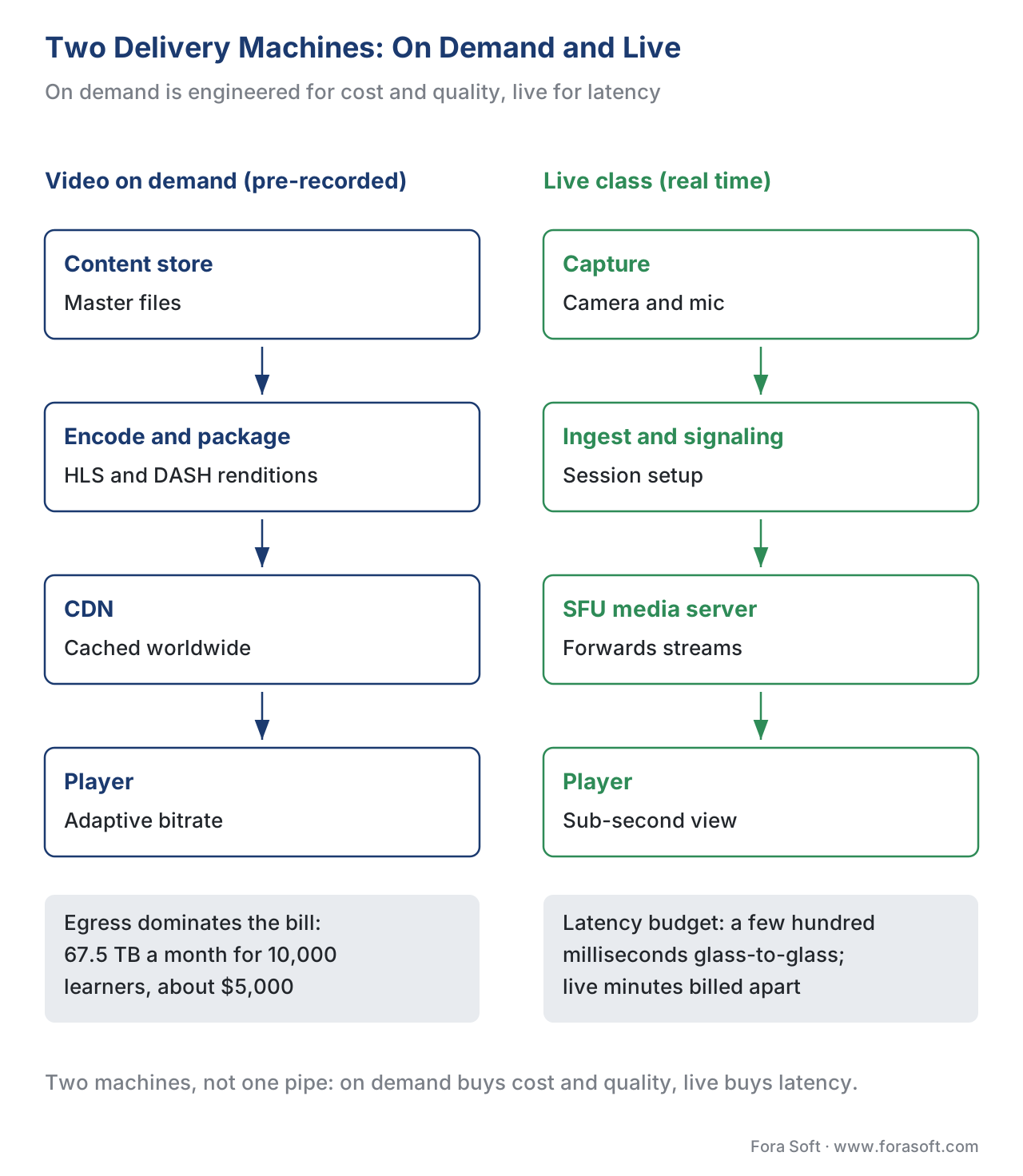 Figure 2. Two different machines. Video on demand optimizes for cost and quality across a CDN; live optimizes for latency through a real-time media server. A learning platform usually needs both.
This is also where the running cost concentrates, and it is worth doing the arithmetic out loud, because it surprises people. Suppose you have 10,000 active learners, each watching 5 hours of video a month, delivered at 3 megabits per second (a reasonable 720p quality). Work it through:
- 3 Mbps is 0.375 megabytes per second. Five hours is 18,000 seconds. So one learner consumes 0.375 × 18,000 = 6,750 MB, about 6.75 GB per month.
- Across 10,000 learners that is 6.75 × 10,000 = 67,500 GB, or about 67.5 terabytes a month.
- On a typical CDN, the first terabyte is free, then rates step down by volume — roughly $0.085/GB for the first tier, dropping toward $0.06/GB at higher volume [2]. The remaining ~66.5 TB works out to roughly $5,000 a month, or about $60,000 a year — for video egress alone, before storage, transcoding, or any live sessions.
That single number reframes the build-vs-buy conversation. The recurring delivery bill, not the one-time build, is often the dominant lifetime cost — which is exactly why we devote a whole article to the learning-platform cost model.
The common mistake is assuming a generic CDN bill is the whole story, or that live and VOD share one pipeline. They do not. Live minutes are billed and engineered differently, and forgetting that turns a tidy budget into a quarterly surprise.
Layer 4 — The interactive player: where watching becomes learning
A learning player is not a play button. It is the surface where a passive video becomes an active lesson — where quizzes appear between segments, where a branching choice sends one learner down a different path than another, where notes and bookmarks attach to a moment in the timeline, where chapters and a transcript let a learner jump straight to what they need. This interactive layer is the single biggest reason a learning platform is more than a video host, and it is where the pedagogy from the pedagogy of video turns into product features.
The player has a second, quieter job that matters just as much: it is the sensor for the entire tracking layer. Every meaningful thing a learner does — played, paused, sought backward, answered a question, finished a segment — originates here as an event. If the player does not emit an event, no downstream system can ever know it happened. The richness of your analytics is capped by what the player chooses to report. We cover the engineering of this surface in building an interactive video player.
The common mistake is shipping a player that plays beautifully but emits almost nothing, then bolting analytics on a year later and discovering the data was never captured. You cannot analyze events you never recorded. Decide what to track before you build the player, not after.
Layer 5 — The tracking layer: the heart of the machine
Here is the layer that separates learning platforms from everything else, and the one most newcomers underestimate. Tracking is the discipline of turning player events into durable, queryable records of what each learner did — and there are competing standards for how to do it, each with a precise scope.
The oldest is SCORM. When a SCORM course launches inside a learning system, it talks to that system through a small JavaScript interface and records a fixed data model: completion status, a score, time spent, and a limited set of interaction results. The popular shorthand that "SCORM tracks everything" is simply wrong, and believing it leads to a non-conformant build. SCORM tracks a defined, modest set of values, only while the content runs inside the launching system, and the two live versions differ: SCORM 1.2 (2001) carries two specification books, while SCORM 2004 4th Edition (2009) added a third, the Sequencing and Navigation book, plus separate completion and success statuses so a course can record "completed but failed" as distinct facts [3][4]. If you need branching paths or richer status, you need 2004; for simple "did they finish" tracking inside an LMS, 1.2 still ships widely.
The modern alternative is the Experience API, called xAPI (its old project name was "Tin Can API," which you will still see in the wild — but xAPI is the standard) [5]. xAPI's unit is the statement, and the best way to understand it is as a sentence: actor – verb – object, as in "Maria — completed — Module 3." Those sentences are written into a Learning Record Store (LRS), a dedicated database that speaks a standard web interface for receiving and querying statements [5]. The breakthrough is scope: xAPI can record learning that happens anywhere — inside a video, in a simulation, in a mobile app offline, even in the physical world — not just inside an LMS launch. For video specifically, the community xAPI Video Profile defines exactly which statements to emit (played, paused, seeked, completed, plus watched-time and position data), which is what makes per-second video analytics possible; we detail it in tracking video with xAPI.
Sitting between the two is cmi5, an ADL specification that lets you use xAPI's rich tracking while keeping the familiar LMS launch-and-report flow that SCORM gave you — the bridge, in effect, between the old world and the new. And launching a tool inside someone else's LMS at all is governed by yet another standard, LTI (Learning Tools Interoperability), covered below.
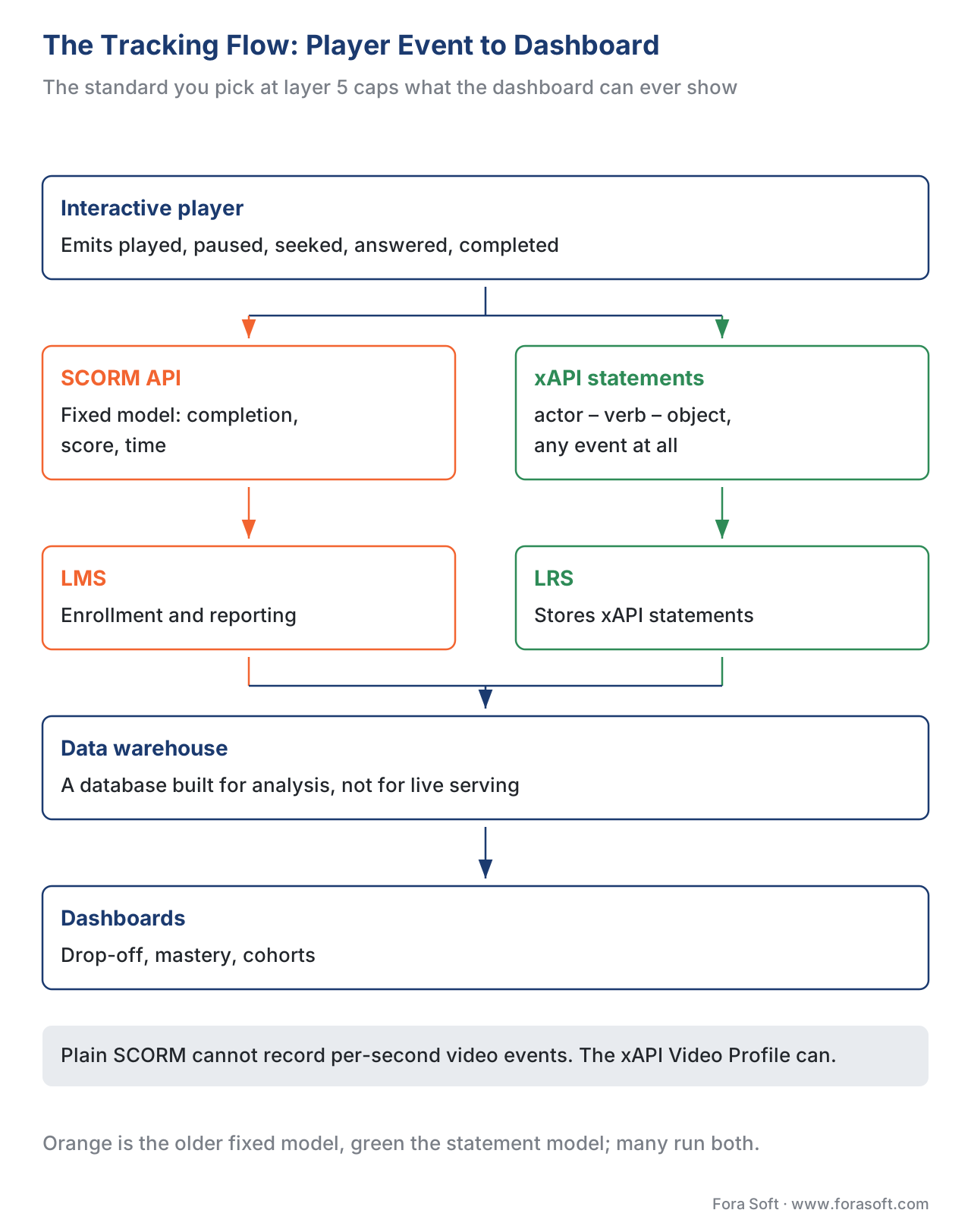 Figure 3. The tracking flow. Player events become either SCORM data-model values or xAPI statements, land in an LMS or LRS, and flow on to a warehouse and dashboards. The arrow labels — the standard and the data — are where conformance is won or lost.
The common mistake is the most expensive in the whole platform: building rich video interactions, then tracking them with plain SCORM, which has no concept of a video event. The interactions happen, the learner sees them, and nothing is recorded beyond "completed." Match the tracking standard to the data you actually need before you build the player, because the player and the tracking layer are two halves of one decision.
Layer 6 — The LMS or LRS: where records become a system of record
The records have to live in a system that organizes learners, courses, enrollments, and results. Traditionally that system is the Learning Management System (LMS) — the administrative backbone that handles who is enrolled in what, deadlines, compliance, and reporting. It is the part most people picture when they hear "e-learning platform," and it is also the part the broad commercial market competes on; this educational section deliberately scopes to the video-and-tracking engineering rather than generic LMS administration, which our build vs buy vs extend an LMS article addresses head-on.
You will also hear two cousins of the LMS, and the distinctions matter for scoping:
- A Learning Experience Platform (LXP) flips the LMS around. Where an LMS is admin-driven (the organization assigns courses), an LXP is learner-driven: it recommends and surfaces content the way a streaming service recommends shows, optimizing for discovery and engagement rather than compliance.
- A Learning Content Management System (LCMS), mentioned earlier as the sophisticated content store, focuses on creating, versioning, and reusing the content itself rather than managing learners.
- An LRS, the Learning Record Store from the tracking layer, is not a full LMS at all — it only stores and serves xAPI statements. Many modern platforms run an LRS alongside an LMS: the LMS manages enrollment and the LRS captures the rich interaction data.
The three acronyms get blurred constantly, so the comparison below pins down who owns what — including the standards each speaks, which is the column that actually drives integration work.
| System | What it owns | Driven by | Standards it speaks |
|---|---|---|---|
| LMS (Learning Management System) | Enrollment, deadlines, compliance, reporting | The organization | SCORM, cmi5, LTI, xAPI (via LRS) |
| LXP (Learning Experience Platform) | Discovery, recommendation, engagement | The learner | xAPI, LTI, often an embedded LRS |
| LCMS (Learning Content Management System) | Authoring, versioning, content reuse | Content teams | SCORM/cmi5 export, sometimes LTI |
| LRS (Learning Record Store) | Storing and querying xAPI statements | Any source that emits statements | xAPI (the only one it requires) |
The common mistake is buying an LMS for its course-catalog features and assuming it can capture rich video analytics. Most cannot, on their own — they record completion and score, not per-second engagement. That gap is precisely why teams add an LRS or a custom analytics layer beside the LMS.
Layer 7 — Assessment and credentials: proving it happened
Tracking records what a learner did; assessment judges whether they learned it, and credentials make that judgment portable and tamper-evident. Assessment ranges from the in-video quiz (recorded as a SCORM interaction or an xAPI statement) to a formal proctored exam, an entire topic this course treats separately in its proctoring block.
The output worth dwelling on is the credential — the certificate or badge that says "this person passed." Two standards make a credential something more than a printable PDF. Open Badges, maintained by 1EdTech, packages an achievement with verifiable metadata about who issued it and what it required; the version matters, because Open Badges 3.0 aligns with W3C Verifiable Credentials, a broader standard for cryptographically tamper-evident digital credentials [6]. Cite the version whenever you claim a credential is "verifiable," because 2.0 and 3.0 differ in exactly that property.
The common mistake is issuing certificates as plain PDFs or images and calling them "verified." Anyone can edit an image. If portability and tamper-evidence matter — and for professional or regulatory training they usually do — the credential needs a real standard behind it.
Layer 8 — Analytics: turning records into insight
Analytics is where the accumulated records become answers: which videos lose learners and at what second, which questions everyone fails, which cohorts finish and which stall. This is the layer that justifies all the tracking discipline upstream — and it is only as good as the events the player emitted and the standard that carried them. Garbage tracking in, garbage analytics out.
The mechanics are usually a pipeline: events land in the LMS or LRS, are copied into a data warehouse (a database built for analysis rather than live serving), and are surfaced through dashboards. The subtlety unique to learning is in the definitions. "Completion" is not one thing — it can mean "reached the end of the video," "watched 90% of the runtime," or "answered the final question correctly," and those produce wildly different numbers from the same footage. Our learning analytics article is built around exactly these definition traps.
The common mistake is the "watched 100% equals completed equals learned" chain, where each equals sign hides a false assumption. A learner can leave a video playing in a background tab (100% "watched"), never engage (not "completed" in any meaningful sense), and certainly not have learned it. Define each metric precisely, or your dashboard will confidently report a fiction.
Layer 9 — Reporting and integration: closing the loop
The final station sends results back out to the systems that needed them: a manager's compliance dashboard, a university's student-information system, a corporate HR platform that records who completed mandatory training. This is integration work, and it is governed by the same standards already met upstream — SCORM and cmi5 packages, xAPI statements flowing to an external LRS, and LTI for live tool launches with grade passback.
LTI deserves a precise description because it is widely misunderstood. Learning Tools Interoperability, maintained by 1EdTech (formerly IMS Global), lets your video tool launch inside someone else's LMS — Moodle, Canvas, Blackboard — as a trusted guest. The current version, LTI 1.3 with the LTI Advantage services, does this through a secure handshake based on OpenID Connect and a signed token (a JWT), not a shared password; single sign-on is a consequence of that handshake, not the mechanism [7][8]. LTI Advantage adds three named services that matter for a video tool: Deep Linking (an instructor picks specific content to embed), Names and Role Provisioning Services (the tool learns the class roster), and Assignment and Grade Services (results flow back into the LMS gradebook automatically) [7][8]. We unpack all of this in LTI explained.
The common mistake is describing LTI as "logging the user in," which leads teams to build a fragile password bridge instead of the standard handshake. Get the mechanism right and integration is secure and certifiable; get it wrong and every LMS partner becomes a custom, brittle project.
The layer that wraps everything: standards and accessibility
Drawn around all nine stations in Figure 1 is a tenth concern that is not a station at all because it touches every one of them: standards conformance and accessibility. We have already met the standards — SCORM, xAPI, cmi5, LTI, Open Badges, Verifiable Credentials — and the rule is the same everywhere: name the standard and its version, because an undated standards claim ages into a non-conformant build.
Accessibility is the part teams most often discover too late, usually when a public-sector or enterprise buyer asks for it during procurement. The governing standard is WCAG 2.1 Level AA (the Web Content Accessibility Guidelines, published by the W3C in 2018). For learning video specifically, the success criteria that bite are 1.2.2 Captions (Prerecorded), 1.2.4 Captions (Live), and 1.2.5 Audio Description — captions on recorded video, captions on live classes, and described visuals for learners who cannot see the screen. Many regions also have their own legal mandates with their own compliance dates, so confirm the rule for your buyer's jurisdiction. The full treatment lives in WCAG 2.1 AA for educational video.
The common mistake is shipping un-captioned video to a buyer who is legally required to provide captions, then discovering during the sales cycle that the entire catalog must be reworked. Accessibility is cheaper as a design constraint than as a retrofit, and it doubles as a learning aid for everyone.
How the layers map to build vs buy
The reason this map matters commercially is that you do not make one build-vs-buy decision — you make nine, one per layer, and they interact. Some layers are commodities you should almost always buy or rent (raw video delivery on a CDN; an object store). Some are where differentiation lives and a serious product usually builds (the interactive player, the analytics definitions). And some are integration surfaces where the standard, not your code, is the product (LTI launches, SCORM/cmi5 packaging) — there you conform rather than invent.
 Figure 4. Build, buy, or integrate — decided layer by layer. Commodities (delivery, storage) lean buy; differentiators (the interactive player, analytics) lean build; standards surfaces (LTI, SCORM/cmi5) are conformance work, not invention.
The practical sequence is to walk Figure 1 left to right and tag each box. Authoring: buy a tool unless your content model is unusual. Content store and delivery: rent. Interactive player: this is your product — build, or buy a component you can extend. Tracking: conform to the right standard for your data needs. LMS/LRS: extend an existing one, or run an LRS beside a bought LMS. Assessment and credentials: conform to Open Badges / Verifiable Credentials. Analytics: build your definitions even if you buy the pipeline. Reporting: conform to LTI and the standards already chosen. The deeper version of this exercise is build vs buy vs extend an existing LMS.
The failure gallery, in one place
Because this is the map article, here is every common mistake from above collected as a single pre-mortem you can run against a proposed architecture. Each one is a layer drawn wrong on the whiteboard.
| Layer | The failure mode |
|---|---|
| Authoring | Picking a format before knowing what data the business needs to track |
| Content store | One master file for everyone; no renditions for weak networks |
| Delivery | Treating live and VOD as one pipeline; ignoring the egress bill |
| Interactive player | A player that plays but emits no events; analytics bolted on too late |
| Tracking | Rich interactions tracked with plain SCORM, which cannot record them |
| LMS / LRS | Expecting a stock LMS to capture per-second video analytics |
| Assessment | "Verified" credentials that are just editable PDFs |
| Analytics | The "watched = completed = learned" chain of false equals signs |
| Reporting | Treating LTI as a password login instead of the standard handshake |
| Accessibility | Un-captioned video shipped to a buyer legally required to caption |
Where Fora Soft fits in
Fora Soft has built video software since 2005 across e-learning, video conferencing, streaming, OTT, surveillance, and telemedicine — more than 239 shipped projects. The reason we lead with this map is that the build-vs-buy conversation we have with learning teams is almost never "can you stream video" — most tools can. It is "which of these nine layers do you build, which do you buy, and which do you conform to," and getting that allocation right early is what keeps a project from over-building a commodity or under-building the interactive player that is the actual product. Our experience sits exactly at the intersection of real-time video, streaming, and the interactive-and-tracking layer that makes video into learning — which is the hard, valuable middle of this diagram.



The handbook
Fora Soft Video Engineering Handbook
We wrote a seven-volume series that takes the whole video stack apart across 9,000+ pages — encoding, delivery, audio and AI. Volume 3 sits closest to this map: ABR ladders, CDNs, players, WebRTC and the delivery economics behind the egress bill you just did the arithmetic on; volume 2 covers the transport, ingest and HLS/DASH packaging that feed it; volume 1 covers the codecs and encoding ladders that decide what your content store has to hold. Work through the series and you can specify all nine layers yourself instead of taking a vendor’s word for them. Written by Nikolay Sapunov, CEO at Fora Soft.
Not sure which of the nine layers you should build and which you should rent?
Tell us the shape of your catalog — how many learners, how much of it is live, which LMS you have to launch inside, what you need to report — and we will come back with the allocation layer by layer, the standards you have to conform to, and what delivery costs at your volume. 250+ video products shipped since 2005.
See our case studies
Case study
BrainCert
A WebRTC and HTML5 virtual-classroom LMS at $3M annual revenue and 100K+ customers, with SCORM and xAPI support, proctored exams and an analytics dashboard — all nine layers of this map running as one product.
Case study
Scholarly
15,000+ active users, live classes up to 2,000 students at once, and adaptive DASH and HLS video on demand in the same platform — both delivery machines, engineered and billed separately.
Case study
Worldcastlive
Sub-second latency of 0.4–0.5 s at 1.5 Gb/s for 10,000 simultaneous viewers on a WebRTC and Kurento architecture — the live path of layer 3 pushed to cohort scale.
What to read next
Standards
SCORM Explained: What It Is, What It Tracks, and When to Use It
Layer 5 up close: the fixed data model, and the exact point where it runs out.
Standards
xAPI (Tin Can) Explained: Statements, the LRS, and What Changed
The statement model that lets you keep what the player actually saw.
Economics
The Learning-Platform Cost Model: What It Costs to Build and Run
The egress arithmetic from layer 3, extended to the whole build and the whole year.
Build vs buy
Build vs Buy vs Extend an Existing LMS
The long version of the layer-by-layer allocation in the last figure.
References
- Mordor Intelligence, "E-learning Market Size, Growth & Share Report" — global e-learning estimated at ~$275.86B in 2026, projected ~$461.92B by 2031 at ~10.86% CAGR; corroborated by Statista (~$400B) and other 2026 trackers for the order of magnitude. https://www.mordorintelligence.com/industry-reports/global-elearning-market (accessed 2026-06-19). Tier 5 (market research).
- Amazon Web Services, "Amazon CloudFront Pricing" — US/EU data transfer out: first 1 TB/month free, then ~$0.085/GB stepping down toward ~$0.060/GB and lower at higher volume; used for the egress arithmetic. https://aws.amazon.com/cloudfront/pricing/ (accessed 2026-06-19). Tier 4 (first-party vendor pricing).
- ADL Initiative, "SCORM 2004 4th Edition" specification books — Content Aggregation Model, Run-Time Environment, and Sequencing and Navigation; separate completion and success status. https://adlnet.gov/projects/scorm/ (accessed 2026-06-19). Tier 1 (standards body).
- ADL Initiative, "SCORM Versions" overview — SCORM 1.2 (2001, two books) vs SCORM 2004 4th Edition (2009, added the Sequencing and Navigation book). https://scorm.com/scorm-explained/business-of-scorm/scorm-versions/ (accessed 2026-06-19). Tier 3/4 (standards-author commentary).
- ADL Initiative, "Experience API (xAPI) Specification" v1.0.3 — the actor-verb-object statement model and the RESTful interface to the Learning Record Store (LRS); now being adopted as IEEE 9274.1.1. https://github.com/adlnet/xAPI-Spec (accessed 2026-06-19). Tier 1 (standards body).
- 1EdTech, "Open Badges" specification, and W3C, "Verifiable Credentials Data Model" — Open Badges 3.0 aligns with W3C Verifiable Credentials for cryptographically tamper-evident credentials; cite the version when claiming verifiability. https://www.imsglobal.org/spec/ob/v3p0/ and https://www.w3.org/TR/vc-data-model/ (accessed 2026-06-19). Tier 1 (standards bodies).
- 1EdTech, "Learning Tools Interoperability (LTI) 1.3" and "LTI Advantage Overview" — OIDC-based launch with a signed JWT; the three Advantage services: Deep Linking, Names and Role Provisioning Services, Assignment and Grade Services. https://www.1edtech.org/standards/lti (accessed 2026-06-19). Tier 1 (standards body).
- 1EdTech / IMS Global, "LTI Advantage" service definitions — security model and the named services used by an embedded video tool. https://www.imsglobal.org/lti-advantage-overview (accessed 2026-06-19). Tier 1 (standards body).
- W3C, "Web Content Accessibility Guidelines (WCAG) 2.1" — Level AA; Success Criteria 1.2.2 Captions (Prerecorded), 1.2.4 Captions (Live), 1.2.5 Audio Description, applied to learning video. https://www.w3.org/TR/WCAG21/ (accessed 2026-06-19). Tier 1 (standards body).
Per the source hierarchy, the standards layers (SCORM, xAPI, cmi5, LTI, Open Badges/Verifiable Credentials, WCAG) are cited to their issuing bodies — ADL, 1EdTech, and W3C (tier 1). Where standards-author commentary (e.g., the SCORM.com versions overview, ref 4) was used for orientation, the controlling specification (refs 3, 5) takes precedence and the commentary is labelled as such. Market-size figures (ref 1) are vendor research and given as a labelled range, not a single point.
